Introduction
Hi, I'm cardene, a software engineer and technical writer focused on blockchain and AI.
I've also authored Japanese technical books on specification-driven development with LLMs and decentralized application (DApp) development.

I also build and publish a variety of tools, libraries, and open-source projects.
The original figures are retained in this English translation and may contain Japanese labels.
How musubi Connects Skills and Shared Formats
With musubi, skill authors can declare which formats and rules provided by other skills they follow, and verify them again after those resources change.
For example, when multiple design skills use the same design document format, their authors can record the format's name, the accepted version range, and the content that was last verified. musubi provides a specification for declaring shared instructions and commands for checking those declarations and examples.
When a shared format changes, the skills that follow it may also need to be checked. An instruction to read a format alone does not establish whether each skill's examples satisfy the updated requirements.
musubi therefore connects providers and consumers through named shared content and uses musubi check to verify their declarations and examples.
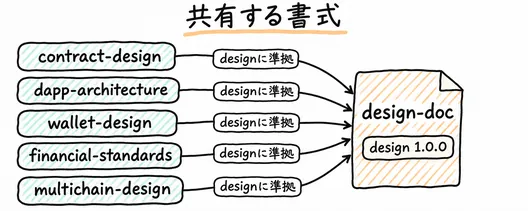
In agent-shuriken, for example, a skill named design-doc provides the common design document format, and five design skills follow that format.
The skill that provides shared content is called a provider, and the skill that follows it is called a consumer. The unit of sharing is not an entire skill but an individual file describing a format, writing convention, or other resource. musubi calls this unit content; it can also refer to a script.
Existing installers remain responsible for obtaining and installing skills. Adding musubi declarations makes it possible to track which content an installed skill follows. A skill that writes design documents can reference the common format and a script for validating completed documents separately.
Declarations and Loading Instructions
Skill authors define shared content in musubi.json and instruct the agent how to read that content in SKILL.md. The musubi CLI checks declarations, while agents read their instructions and open the relevant format. These two files therefore serve different audiences.
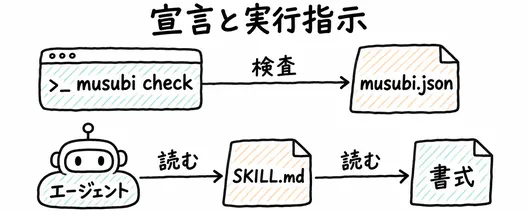
This separation allows agents to continue working with SKILL.md as usual. Meanwhile, authors can use the references in musubi.json to identify changes to shared formats and validation rules.
Declaring Shared Content
Place musubi.json alongside SKILL.md.
Providers list their content under provides, and consumers declare their references under follows. A skill such as design-doc can provide multiple content items, each with its own name and version, so consumers can identify exactly which resource they follow.
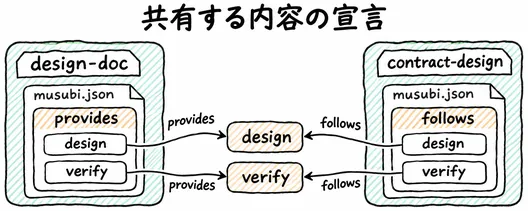
A reference such as design-doc/design identifies the design content provided by design-doc. To follow the same skill's verify content, use design-doc/verify, recording that dependency separately from the format.
The Format Provider
The design-doc skill provides a design document format named design and a script named verify for validating completed design documents.
Its actual declaration specifies the following files and versions.
{
  "musubi": "2026-11-19",
  "provides": {
    "design": {
      "version": "1.0.0",
      "file": "formats/design.md",
      "check": "checks/design.json"
    },
    "verify": {
      "version": "1.0.0",
      "file": "scripts/design-doc.py"
    }
  }
}
Source: design-doc/musubi.json.
In addition to its format file, design specifies a check file for validating examples that follow the format. The verify content points to a Python script and does not have JSON validation rules attached.
| Field | What the declaration specifies |
|---|---|
version |
Version of the individual content item |
file |
Path to the content file relative to the skill folder |
check |
Relative path to the JSON rules applied to consumer examples |
Although design and verify belong to the same skill, their versions can be changed independently. The top-level musubi field identifies the date of the specification used by the declaration, separately from the versions of its content items.
The Format Consumer
The contract-design skill, which writes smart contract design documents, uses both the format and the validation script provided by design-doc. Its follows declaration therefore contains two references.
{
  "musubi": "2026-11-19",
  "follows": {
    "design-doc/design": {
      "version": "^1.0.0",
      "integrity": "sha256-2eOcptAjjHiVoyWBfNY14lbuQtP5u65Kzg924ceSjmI=",
      "examples": ["examples/token-vesting.md"]
    },
    "design-doc/verify": {
      "version": "^1.0.0",
      "integrity": "sha256-u4FNTYMTojH1ecwdfCsIgtNILJ6wVM8CZ4ejFFY1jGA="
    }
  }
}
Source: contract-design/musubi.json.
The examples field for design-doc/design names an example maintained by contract-design itself. The musubi check command applies the provider's JSON rules to that file.
| Field | Information recorded by the consumer |
|---|---|
version |
Accepted version range for the content |
integrity |
Hash identifying the content that was last verified |
examples |
Array of files within this skill to which the validation rules apply |
The integrity field records a fingerprint, a hash computed from the content. It allows musubi to detect differences from the previously verified content even when the declared version has not changed.
The examples specified here are files maintained alongside the skill. They are distinct from design documents that an agent produces later in response to a user's request.
Instructions Read by the Agent
Once the declarations are in place, authors also provide instructions telling the agent how to read the shared format.
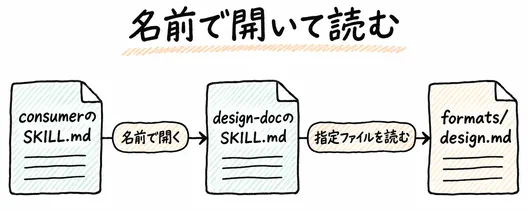
For example, contract-design's SKILL.md instructs the agent to open design-doc by name and read the entire file designated for its design content. Even if the provider offers other content items, the agent reads the specified file.
Authors can use musubi add to create declarations. From the working directory agent-shuriken/plugins/evm-dev/skills/contract-design, pass the location in which to search for the provider skill as follows.
musubi add design-doc/design ../../../doc-formats/skillsThe command writes the reference into musubi.json and prints three lines of instructions to paste into SKILL.md. The author pastes those instructions manually; musubi add does not automatically edit SKILL.md.
The generated instructions also tell the agent to run a check before reading the content if the musubi command is available, and to stop if that check fails. If a required provider skill is not installed, the instructions tell the agent to identify the missing skill, explain how to install it, and stop.
The relative path passed to the command is a CLI search location. When the agent opens the skill, it uses the name design-doc.
Using musubi with Design Skills
The agent-shuriken project separates skills by the kind of system they design while storing their common design document format in design-doc.
In addition to contract-design, the following skills follow both design and verify.
| Skill | Design target |
|---|---|
dapp-architecture |
Decentralized application architecture |
wallet-design |
Wallets |
financial-standards |
Applications using financial standards |
multichain-design |
Applications operating across multiple chains |
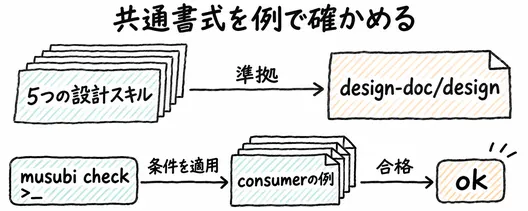
Each skill specifies its own examples, so when the shared format changes, examples for each design target can be checked individually. We distinguish those checks from validation of design documents that agents produce.
Rules Applied to Examples
The JSON rules attached to design check whether an example contains the heading ## Open decisions and whether any unfinished placeholder text, Fill in:, remains.
For contract-design, the file being checked is examples/token-vesting.md, as specified in its declaration.
{
  "musubi": "2026-11-19",
  "rules": [
    {"kind": "headings", "headings": ["## Open decisions"]},
    {"kind": "forbid", "text": ["Fill in:"]}
  ]
}
Source: checks/design.json.
The headings rule requires the designated heading, while forbid rejects unfinished placeholder text. If an author removes the heading for unresolved decisions or leaves placeholder lines while updating the example, the check fails.
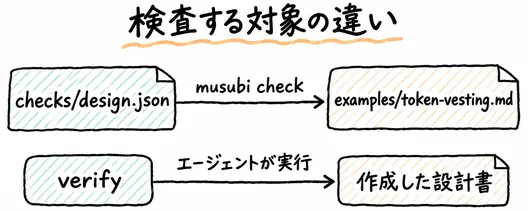
By contrast, the agent separately runs verify to validate a design document produced for an actual request.
The musubi check command verifies declarations and designated examples; it does not execute the Python script referenced by verify. Although the rules and script come from the same provider, their targets differ: one checks maintained examples and the other validates completed deliverables.
From Declarations to Verification
When adding a skill that follows a shared format, first inspect the provider's declaration, then prepare the consumer's declaration and loading instructions. Finally, check both skills by specifying search locations that contain them.
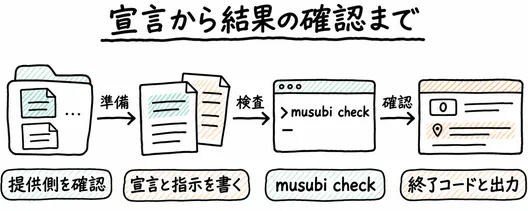
-
Inspect the provided content.
In
design-doc'smusubi.jsonandSKILL.md, identify the format version and the file to read. -
Add declarations and instructions to the consumer.
Specify the references and examples in
musubi.json, and add loading instructions and stop-on-failure behavior toSKILL.md. If you usemusubi add, paste its generated instructions as well. -
Check the provider and consumers together.
From the
agent-shurikenrepository root, pass both skill directories tomusubi check. -
Inspect the exit code and verification output.
If the command reports a problem, inspect and fix the identified file and line, then rerun the same command.
The CLI runs on Node.js 22.18 or later. To install musubi-cli version 0.2.0 and perform the check, use the following commands.
npm install -g musubi-cli@0.2.0
musubi check plugins/doc-formats/skills plugins/evm-dev/skills
This checks the provider, design-doc, together with the consuming design skills.
When the same two directories were checked with the CLI built from the local source, the command exited with code 0 and printed the following result.
musubi check: ok (skills=11, follows=10)The CLI loaded 11 skills and 10 references, and their declarations and designated examples passed verification.
This result came from the local source version of the CLI. It does not establish the outcome of installing and executing the npm package or of asking an agent to produce a design.
Skill Discovery Locations
When a directory is specified, the CLI treats its immediate subdirectories that contain SKILL.md as skills. Passing the two directories used above allows it to discover the providers and consumers in a single check.
If no search locations are specified, the CLI searches both the current working directory and the user's home directory.
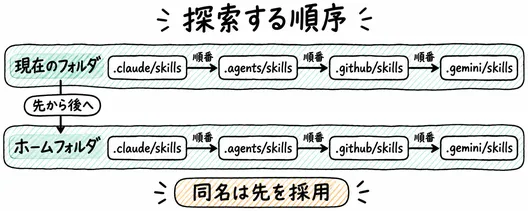
When locations are omitted, the CLI first searches the following paths under the working directory in order, then searches the same paths under the home directory.
| Order | Location |
|---|---|
| 1 | .claude/skills |
| 2 | .agents/skills |
| 3 | .github/skills |
| 4 | .gemini/skills |
If multiple skills have the same name, the first one found is used and a warning is issued for later duplicates. To verify specific design skills, explicitly specifying locations that include their providers makes the verification scope clearer.
This discovery order describes the musubi CLI's behavior and should be distinguished from an agent's own mechanism for opening skills by name.
Detecting and Accepting Changes
When a shared format is updated, authors need to determine whether consumer examples can still be checked under the previously accepted conditions. musubi checks the accepted version range separately from whether the content matches the previously verified fingerprint.
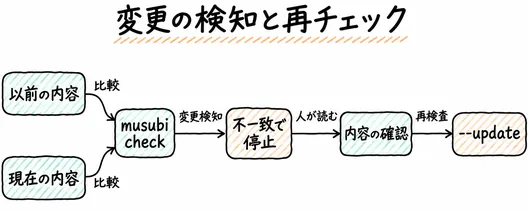
When the content changes, the normal check command stops rather than accepting the new content. The author reviews the change, verifies the examples again, and updates the recorded fingerprint.
Being within the accepted version range does not, by itself, mean that a change has been accepted.
Accepted Versions and Content
The ^1.0.0 version constraint in contract-design accepts versions at or above 1.0.0 and below 2.0.0.
Version 1.0.1, for example, is within that range, but its format or loading instructions may differ. musubi compares the fingerprint recorded in integrity with the value computed from the current files.
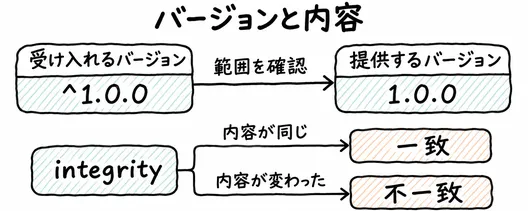
The fingerprint includes the provider's SKILL.md and the content file. If a JSON validation rules file is attached, that file is included too.
The fingerprint therefore changes if the reading instructions or validation conditions change, detecting a broader range of changes than a comparison of the format file alone.
If the fingerprint does not match, the normal check command rejects the reference and does not validate examples against the new content. The accepted version range and the content fingerprint are recorded together in musubi.json, without a separate lockfile.
Reviewing and Updating Changed Content
To accept a change, the author reviews the differences in the shared format and validation rules, then updates examples first if needed.
Running the check with --update applies the updated rules to the examples and updates the reference's integrity value when its examples pass.
musubi check plugins/doc-formats/skills plugins/evm-dev/skills --updateBecause this command rewrites consumers' musubi.json files, authors should inspect the file diff as well as the exit code.
In CLI version 0.2.0, references that pass may be updated even if problems in other references cause the overall command to fail. Exit code 1 does not mean that every declaration remained unchanged.
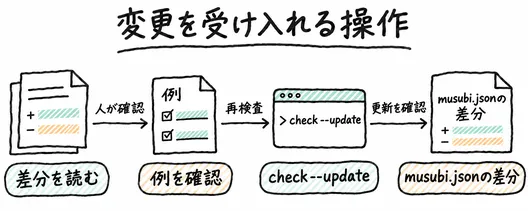
The available example validation rules are headings, which checks required headings and their order; forbid, which detects prohibited strings; and table-columns, which checks required table columns.
The CLI interprets these JSON rules rather than executing provider code as part of the check. Since the rules check structural properties such as headings and columns, the meaning and correctness of the design must be evaluated separately.
A fingerprint establishes a match with recorded content. It does not, by itself, establish whether the provider is authentic or whether code inside that content is safe.
Optional References and Conditions That Stop Verification
Some skills cannot produce a design document without their shared format. Others use supplemental writing guidance only when it is available.
The latter can declare their references optional so that they can continue without the referenced content if the provider skill is absent.
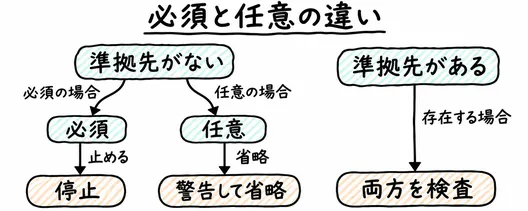
The optional flag changes behavior when the provider skill cannot be found. If the provider is installed, the normal checks still apply, and a detected content change must be reviewed.
Optional Reference in convey
The convey skill reads the connecting writing guidance provided by japanese-writing when that skill is installed.
If it is not installed, convey continues without the guidance. Its declaration therefore specifies optional: true.
{
  "musubi": "2026-11-20",
  "follows": {
    "japanese-writing/connecting": {
      "version": "^1.0.0",
      "integrity": "sha256-sol5EdokoZQsBlK7YiZMsH7atHZuBKTx1+6vLoXsycQ=",
      "optional": true
    }
  }
}
Source: convey/musubi.json.
Declarations using optional references must specify the specification date 2026-11-20. The earlier 2026-11-19 declarations are still readable, but adding optional under that date causes rejection.
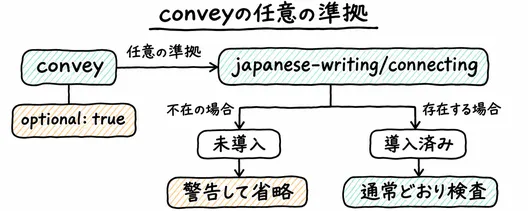
When the CLI built from local source was run with only plugins/convey/skills, it warned that the reference would be skipped because japanese-writing could not be found.
It then exited with code 0 and printed musubi check: ok (skills=1, follows=1). This successful result includes a skipped optional reference and should therefore be interpreted together with the warning.
The observed behavior verifies that the CLI skips an absent optional provider. It does not measure the quality of the text produced by convey.
Conditions That Stop Verification
If a required provider cannot be found, the CLI reports a problem with the declaration. Correct the search locations if they are incomplete, or install the missing skill and check again.
If the skill exists but the specified content does not, compare the names under provides and follows.
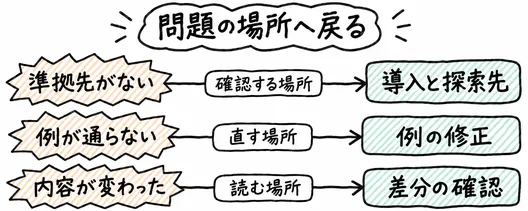
When versions do not match, review the provider's changes and the accepted version range. If only the content changed, inspect its diff before accepting the update. If an example lacks required headings or table columns, correct the identified example and run the check again.
Cycles are also rejected. For example, alpha cannot follow beta while beta follows alpha. Use the reported file and line to identify which reference needs correction.
A normal musubi check does not rewrite files, so authors can inspect reported problems, make corrections, and rerun the same check.
Visualizing Reference Relationships
As the amount of shared content grows, authors can visualize their local declarations to see which skills follow the same formats.
Published skills can also be listed on the musubi website, allowing other authors to discover their content and references.
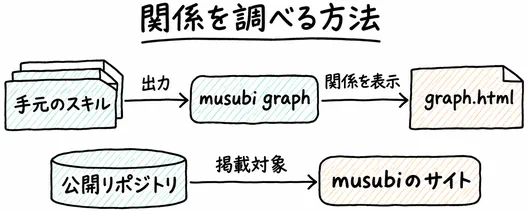
For local use, the directories passed to graph determine what is visualized. For website discovery, authors attach a topic to their public repositories.
Graph Output
The musubi graph command exports skills and arrows representing their references to a single HTML file.
For the design skills discussed above, run the following command from the agent-shuriken repository root.
musubi graph plugins/doc-formats/skills plugins/evm-dev/skills --out graph.htmlThe generated graph.html contains the relationships in the two specified directories. Arrows point from consumers toward providers, making it possible to see that multiple design skills share design-doc.
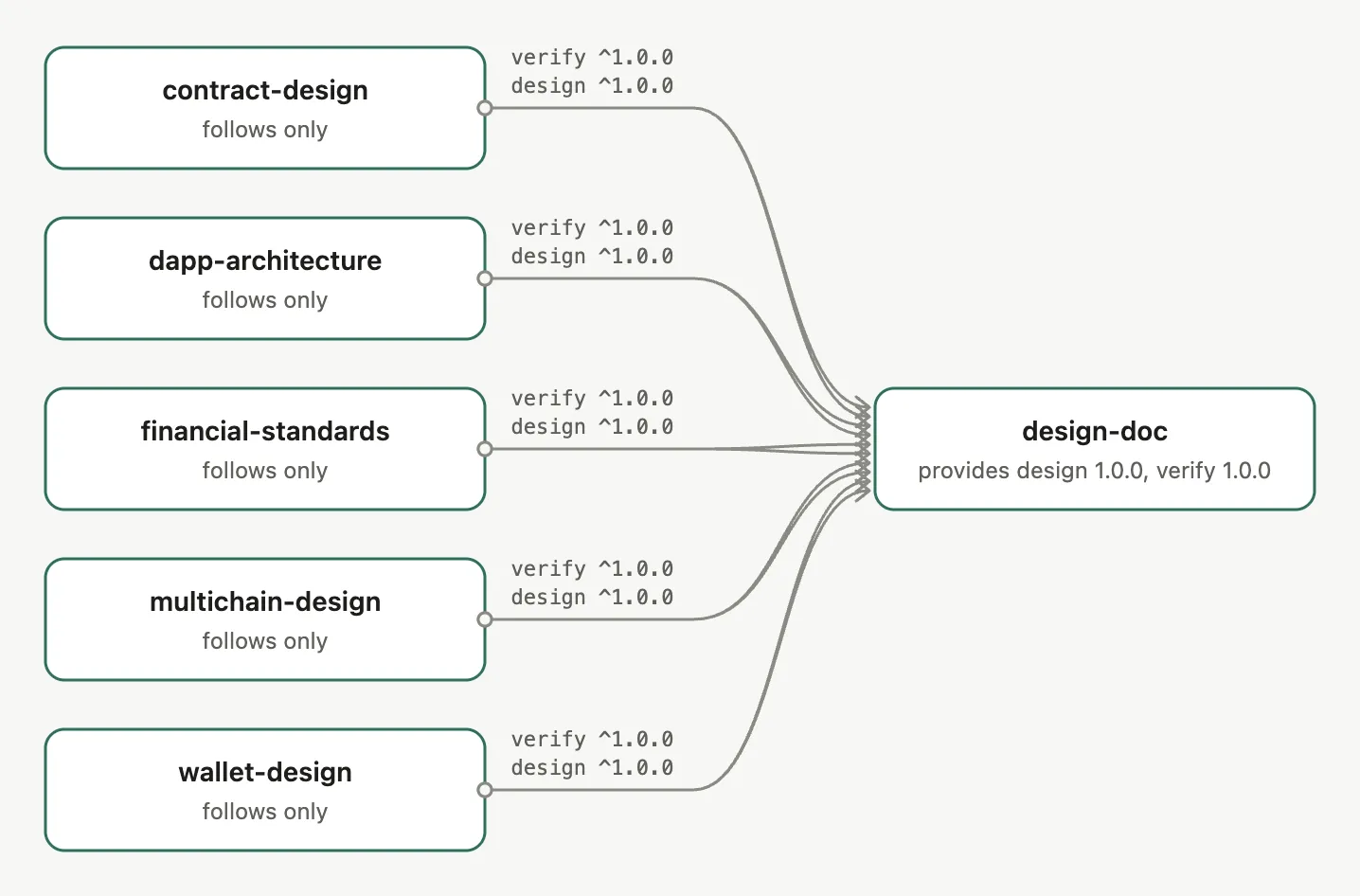
The graph represents declared relationships. Use check to determine whether those relationships pass verification, and actual agent execution to verify that agents follow their loading instructions in practice.
Listing Skills on the Website
Skill authors can make public repositories discoverable by attaching the GitHub topic musubi-skills. The website searches for this topic during its update process, so adding it does not necessarily result in immediate listing.
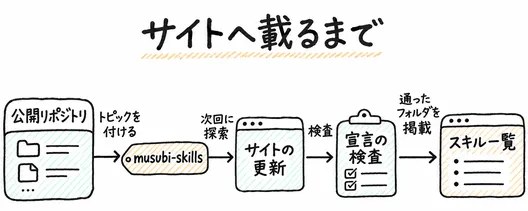
The website lists folders on the default branch that contain both musubi.json and SKILL.md and whose declarations pass verification.
Folders that fail verification, as well as repositories or folders covered by exclusions, are not listed. A listed skill shows the content it provides, the content it follows, and other skills that follow it.
When to Use musubi and What It Can Verify
When multiple skills share formats or writing conventions, musubi makes it possible to trace the affected references and examples that need to be checked after a change.
For a skill with no shared content, the overhead of managing separate content names and versions may outweigh the benefits.
Even after declarations and examples pass verification, actual deliverables must still be checked using the procedures of the skill that produced them.
The musubi specification and command documentation are available in the following repository.

The design skills, convey declarations, and their loading instructions are available here.