Introduction
Hi, I'm cardene, a software engineer and technical writer focused on blockchain and AI.
I've also authored Japanese technical books on specification-driven development with LLMs and decentralized application (DApp) development.

I also build and publish a variety of tools, libraries, and open-source projects.
This article explains ERC20.
I originally wrote this article in December 2022. I revised it in November 2025.
What Is ERC20?
A Common Token Standard
ERC20 is one of the common token standards used on the Ethereum blockchain.
A common token standard means that tokens follow a shared set of rules. Without shared rules, you would need a separate wallet for each token. Creating a new wallet whenever you encounter a new token would be cumbersome.
Designing tokens according to ERC20 allows one wallet to manage them.
ERC20 tokens are also known as fungible tokens. A fungible token can be exchanged for another token of the same value. By contrast, non-fungible tokens, or NFTs, are not interchangeable in this way.
Anyone Can Create a Token
Anyone can create an ERC20 token. As a result, an enormous variety of ERC20 tokens exists.

The page above lists ERC20 tokens. As of November 17, 2025, it listed 1,779,821 distinct ERC20 tokens.
Adding Custom Functionality
As explained earlier, ERC20 standardizes only the minimum functionality that tokens must share. Individual tokens can therefore implement additional features.
Newly issued ERC20 tokens can serve different purposes, such as the examples below, and their implementations can include features suited to those purposes.
Stablecoins
Cryptocurrencies designed to track the price of fiat currencies such as the US dollar or Japanese yen, or commodities traded on the market, such as gold and platinum.
DeFi Tokens
Tokens that support decentralized finance (DeFi) protocols.
These protocols are managed by smart contracts rather than a central administrator.
Users can earn interest by depositing cryptocurrency, receive protocol-specific tokens for providing liquidity, or earn yield by lending cryptocurrency.
Utility Tokens
Tokens that provide practical utility within a particular community or service. Possible uses include:
- Purchasing goods or paying fees within a service
- Rewarding users for particular actions
- Participating in community decisions by holding tokens
- Receiving rewards based on the amount held or the holding period
Common ERC20 Tokens
Here are some well-known ERC20 tokens.
- Tether(USDT) https://tether.to/en/
- Binance Coin(BNB) https://www.binance.com/en
- USD Coin(USDC) https://www.centre.io/usdc
- DAI(DAI) https://makerdao.com/ja/
- Basic Attention Token(BAT) https://basicattentiontoken.org/
- Polygon(MATIC) https://polygon.technology/
- Shiba Inu(SHIB) https://shibatoken.com/
- Uniswap(UNI) https://uniswap.org/
- ChainLink(LINK) https://chain.link/
EIP20
What Is an EIP?
So far we have discussed ERC20, but what does EIP20 mean?
EIP stands for Ethereum Improvement Proposals, the standards process for proposing new Ethereum features and processes.
The following site explains EIPs in more detail.

In brief:
An EIP, or Ethereum Improvement Proposal, is a proposal discussed as part of efforts to improve Ethereum. Because no single person controls Ethereum, anyone in the world can contribute to its development by submitting an EIP. The number 20 identifies proposal 20.
ERC is a category of EIP. Consequently, ERC20 and EIP20 refer to the same proposal.
ERC20 Functions
Optional ERC20 Functions
ERC20 defines both required and optional functions. We will start with the optional features that implementations may choose to include.
name
Returns the token's name.
Example: Tether
function name() public view returns (string)symbol
Returns the token's symbol.
Example: USDT
function symbol() public view returns (string)decimals
Returns the number of decimal places used by the token.
For example, if the value is 8, divide the token amount by 100000000 to display it in a more readable form for users.
function decimals() public view returns (uint8)Required ERC20 Functions
Now consider the required ERC20 functions.
totalSupply
Returns the total token supply.
function totalSupply() public view returns (uint256)balanceOf
Returns the token balance held by a given address.
function balanceOf(address _owner) public view returns (uint256 balance)transfer
Transfers tokens by specifying the recipient address in _to and the amount in _value, and returns whether the transfer succeeded.
Conditions
_tocannot be the zero address.- The address calling transfer must hold at least
_valuetokens.
function transfer(address _to, uint256 _value) public returns (bool success)transferFrom
Transfers tokens by specifying the sender in _from, the recipient in _to, and the amount in _value, and returns whether the transfer succeeded.
The transferFrom function allows a contract to transfer tokens on behalf of a token holder.
The address executing the contract must be authorized to transfer at least _value tokens.
Conditions
- Neither
_fromnor_tocan be the zero address. - The address specified by
_frommust hold at least_valuetokens. - The address executing the contract must be authorized to transfer at least
_valuetokens.
function transferFrom(address _from, address _to, uint256 _value) public returns (bool success)approve
Grants a specified address permission to withdraw tokens, with _spender identifying the authorized address and _value specifying the amount it may withdraw.
The address specified by _spender can make multiple transfers as long as they remain within the amount specified by _value.
Conditions
_spendercannot be the zero address.
function approve(address _spender, uint256 _value) public returns (bool success)allowance
Given the approving address in _owner and the authorized address in _spender, returns the amount that _spender can withdraw from _owner through transferFrom.
function allowance(address _owner, address _spender) public view returns (uint256 remaining)Reviewing the ERC20 Implementation
Now we can examine the actual ERC20 implementation. We will use OpenZeppelin, a widely used library for implementing ERC20.
OpenZeppelin provides an open framework for building secure smart contracts in Solidity.
The company primarily offers security products for building, automating, and operating decentralized applications.
We will refer to the following documentation as we examine the code.

IERC20
IERC20 is the interface defining the functions and events needed to implement ERC20.
In simple terms, Solidity events allow the frontend to observe the results of smart contract operations.
See the official documentation below for more details.
interface
An interface resembles a contract, but cannot be executed on its own. It defines only function signatures, including names and parameters, rather than their implementations. A contract inheriting the interface must define the functions again and implement their bodies.
You might wonder why an interface is useful at all.
The benefit is that it makes the functions required for an implementation explicit. As mentioned above, an interface lists those functions, making it easy for both developers and users of a contract to see what functionality it provides. Interfaces are widely used in established projects, so understanding them now will be useful later.
The official documentation is available here.
Functions
First, examine the functions defined in IERC20.
Functions:
- totalSupply()
- balanceOf(account)
- transfer(to, amount)
- allowance(owner, spender)
- approve(spender, amount)
- transferFrom(from, to, amount)
IERC20 defines the six functions listed above. They are the same functions covered in the EIP20 section, which explains them in more detail.
Events
IERC20 defines two events.
Transfer(from, to, value)
Emitted when value tokens are transferred from the address specified by from, which holds those tokens, to the address specified by to.
The value may be zero.
Approval(owner, spender, value)
Emitted when approve is called and the address specified by owner authorizes the address specified by spender to transfer value tokens.
IERC20Metadata
Next, consider IERC20Metadata. Like IERC20, it is an interface. The functions below were also covered in the ERC20 section.
Functions
name()symbol()decimals()
These three functions are optional, rather than mandatory.
ERC20
We can now examine the ERC20 contract itself. As discussed in the IERC20 section, this ERC20 contract inherits IERC20 and IERC20Metadata. It therefore defines the six functions from IERC20 and the three from IERC20Metadata.
It also defines several other functions, which we will briefly explain.
Functions:
constructor(name_, symbol_)name()symbol()decimals()totalSupply()balanceOf(account)transfer(to, amount)allowance(owner, spender)approve(spender, amount)transferFrom(from, to, amount)increaseAllowance(spender, addedValue)decreaseAllowance(spender, subtractedValue)_transfer(from, to, amount)_mint(account, amount)_burn(account, amount)_approve(owner, spender, amount)_spendAllowance(owner, spender, amount)_beforeTokenTransfer(from, to, amount)_afterTokenTransfer(from, to, amount)
To keep the explanations manageable, we will examine the functions individually.
constructor
The token name (name) and symbol (symbol) are supplied at deployment and cannot be changed afterward. The default number of decimal places (decimals) is 18; override the function to use a different value.
string private _name;
string private _symbol;

constructor(string memory name_, string memory symbol_) {
    _name = name_;
    _symbol = symbol_;
}
name
Returns the value of the _name variable.
function name() public view virtual override returns (string memory) {
    return _name;
}
symbol
Returns the value of the _symbol variable.
function symbol() public view virtual override returns (string memory) {
    return _symbol;
}
decimals
Returns the value specified by decimals (18 by default).
function decimals() public view virtual override returns (uint8) {
    return 18;
}
totalSupply
Returns the total token supply.
uint256 private _totalSupply;

function totalSupply() public view virtual override returns (uint256) {
    return _totalSupply;
}
balanceOf
Returns the amount of tokens held by the address specified by account.
function balanceOf(address account) public view virtual override returns (uint256) {
    return _balances[account];
}
transfer
The _msgSender function returns msg.sender.
function transfer(address to, uint256 amount) public virtual override returns (bool) {
    address owner = _msgSender();
    _transfer(owner, to, amount);
    return true;
}
Here is the definition of _msgSender.
function _msgSender() internal view virtual returns (address) {
    return msg.sender;
}The _transfer function is described later.
allowance
Reads the _allowances mapping to determine how many tokens the address specified by owner has authorized the address specified by spender to transfer.
mapping(address => mapping(address => uint256)) private _allowances;

function allowance(address owner, address spender) public view virtual override returns (uint256) {
    return _allowances[owner][spender];
}
approve
Grants an address permission to withdraw tokens, with _spender identifying the authorized address and _value specifying the amount it may withdraw.
The _approve function is described later.
function approve(address spender, uint256 amount) public virtual override returns (bool) {
    address owner = _msgSender();
    _approve(owner, spender, amount);
    return true;
}
transferFrom
Transfers tokens from from to to in the amount specified by amount.
The _spendAllowance and _transfer functions are described later.
function transferFrom(
    address from,
    address to,
    uint256 amount
) public virtual override returns (bool) {
    address spender = _msgSender();
    _spendAllowance(from, spender, amount);
    _transfer(from, to, amount);
    return true;
}
increaseAllowance
Increases the amount that the address specified by spender is allowed to transfer.
Conditions
spendercannot be the zero address.
The _approve function is described later.
function increaseAllowance(address spender, uint256 addedValue) public virtual returns (bool) {
    address owner = _msgSender();
    _approve(owner, spender, allowance(owner, spender) + addedValue);
    return true;
}
decreaseAllowance
Decreases the amount that the address specified by spender is allowed to transfer.
Conditions
spendercannot be the zero address.spendermust be authorized to transfer at leastsubtractedValuetokens.
The _approve function is described later.
The unchecked block disables arithmetic overflow and underflow checks.
Omitting these checks saves gas, so use it where the checks are unnecessary.
function decreaseAllowance(address spender, uint256 subtractedValue) public virtual returns (bool) {
    address owner = _msgSender();
    uint256 currentAllowance = allowance(owner, spender);
    require(currentAllowance >= subtractedValue, "ERC20: decreased allowance below zero");
    unchecked {
        _approve(owner, spender, currentAllowance - subtractedValue);
    }

    return true;
}
https://ethereum.stackexchange.com/questions/113221/what-is-the-purpose-of-unchecked-in-solidity
For more about overflow and underflow, see the following article.
https://note.com/cardene/n/nc1db4e04b257
_transfer
Transfers tokens from the address specified by from to the address specified by to in the amount specified by amount.
Conditions
fromcannot be the zero address.tocannot be the zero address.- The address specified by
frommust hold at leastamounttokens.
function _transfer(
    address from,
    address to,
    uint256 amount
) internal virtual {
    require(from != address(0), "ERC20: transfer from the zero address");
    require(to != address(0), "ERC20: transfer to the zero address");

    _beforeTokenTransfer(from, to, amount);

    uint256 fromBalance = _balances[from];
    require(fromBalance >= amount, "ERC20: transfer amount exceeds balance");
    unchecked {
        _balances[from] = fromBalance - amount;
        // Overflow not possible: the sum of all balances is capped by totalSupply, and the sum is preserved by
        // decrementing then incrementing.
        _balances[to] += amount;
    }

    emit Transfer(from, to, amount);

    _afterTokenTransfer(from, to, amount);
}
_mint
Creates amount tokens and sends them to the address specified by account, increasing the total token supply.
Conditions
accountcannot be the zero address.
The _beforeTokenTransfer and _afterTokenTransfer functions are described later.
function _mint(address account, uint256 amount) internal virtual {
    require(account != address(0), "ERC20: mint to the zero address");

    _beforeTokenTransfer(address(0), account, amount);

    _totalSupply += amount;
    unchecked {
        // Overflow not possible: balance + amount is at most totalSupply + amount, which is checked above.
        _balances[account] += amount;
    }
    emit Transfer(address(0), account, amount);

    _afterTokenTransfer(address(0), account, amount);
}
_burn
Destroys tokens held by the address specified by account in the amount specified by amount, reducing the total token supply.
Conditions
- The destination is set to the zero address.
accountcannot be the zero address.- The address specified by
accountmust hold at leastamounttokens.
The _beforeTokenTransfer and _afterTokenTransfer functions are described later.
function _burn(address account, uint256 amount) internal virtual {
    require(account != address(0), "ERC20: burn from the zero address");

    _beforeTokenTransfer(account, address(0), amount);

    uint256 accountBalance = _balances[account];
    require(accountBalance >= amount, "ERC20: burn amount exceeds balance");
    unchecked {
        _balances[account] = accountBalance - amount;
        // Overflow not possible: amount <= accountBalance <= totalSupply.
        _totalSupply -= amount;
    }

    emit Transfer(account, address(0), amount);

    _afterTokenTransfer(account, address(0), amount);
}
_approve
Authorizes the address specified by spender to transfer amount tokens on behalf of the address specified by owner.
Conditions
ownercannot be the zero address.spendercannot be the zero address.
function _approve(
    address owner,
    address spender,
    uint256 amount
) internal virtual {
    require(owner != address(0), "ERC20: approve from the zero address");
    require(spender != address(0), "ERC20: approve to the zero address");

    _allowances[owner][spender] = amount;
    emit Approval(owner, spender, amount);
}
_spendAllowance
Updates the allowance that owner has granted to spender when spending amount tokens.
Conditions
- If the allowance granted to
spenderis currently the maximum value, it is not updated. - The operation reverts if the address specified by
ownerdoes not hold the amount specified byamount. (This is the condition described in the original text; the code below checks the allowance.)
function _spendAllowance(
    address owner,
    address spender,
    uint256 amount
) internal virtual {
    uint256 currentAllowance = allowance(owner, spender);
    if (currentAllowance != type(uint256).max) {
        require(currentAllowance >= amount, "ERC20: insufficient allowance");
        unchecked {
            _approve(owner, spender, currentAllowance - amount);
        }
    }
}
_beforeTokenTransfer
Called before a token transfer. You can implement additional logic in this function.
- If both
fromandtoare nonzero,amounttokens are transferred from the sender to the recipient. - If
fromis the zero address,amounttokens are minted and sent to the address specified byto. - If
tois the zero address,amounttokens are burned from the address specified byfrom. fromandtocannot both be the zero address.
function _beforeTokenTransfer(
    address from,
    address to,
    uint256 amount
) internal virtual {}
_afterTokenTransfer
Called after a token transfer. You can implement additional logic in this function.
- If both
fromandtoare nonzero,amounttokens are transferred from the sender to the recipient. - If
fromis the zero address,amounttokens are minted and sent to the address specified byto. - If
tois the zero address,amounttokens are burned from the address specified byfrom. fromandtocannot both be the zero address.
function _afterTokenTransfer(
    address from,
    address to,
    uint256 amount
) internal virtual {}
Extension
This covers the basic ERC20 implementation. ERC20 has many extensions, too many to cover here, so I plan to discuss them in separate articles. For now, understanding the basic ERC20 functionality is enough.
Implementing ERC20
We have covered the ERC20 standard and its implementation. Now we will implement an ERC20 token ourselves. After that long previous section, you might expect an equally long implementation.
// SPDX-License-Identifier: MIT
pragma solidity ^0.8.9;

import "@openzeppelin/contracts/token/ERC20/ERC20.sol";

contract Cardene is ERC20 {
    constructor() ERC20("Cardene", "CARD") {
        _mint(msg.sender, 100000 * 10 ** decimals());
    }
}
Well... Not quite. These seven lines are enough to implement ERC20.
Where did all those functions go? The contract inherits the contract that defines them.
Line 4 imports OpenZeppelin's ERC20 contract.
Line 6 uses Cardene is ERC20 to inherit the contract imported on line 4.
Inheritance makes the functions defined in the base contract available, so we can use the functions explained above. That is how the short implementation provides the functionality we reviewed.
In the following section, we will run it. You can also generate code easily using the OpenZeppelin wizard below and experiment with it to understand the implementation.
https://docs.openzeppelin.com/contracts/4.x/wizard
Running ERC20
In this section, we will run the ERC20 contract. We will use Remix, a browser-based editor.

Here are the implementation steps. The original screenshots and animations are reused; they may contain Japanese labels.
Creating a File
Right-click the contracts directory on the left, choose New File from the menu, and enter CardeneERC20.sol.
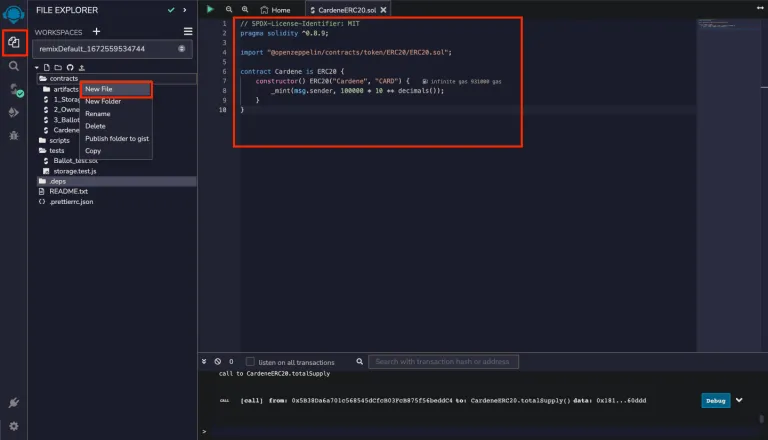
Once the file is created, click CardeneERC20.sol to view its contents in the editor on the right.
The file is empty, so paste in the following code.
// SPDX-License-Identifier: MIT
pragma solidity ^0.8.9;

import "@openzeppelin/contracts/token/ERC20/ERC20.sol";

contract Cardene is ERC20 {
    constructor() ERC20("Cardene", "CARD") {
        _mint(msg.sender, 100000 * 10 ** decimals());
    }
}
Compiling
Now compile the contract.
As shown below, click the middle of the five icons on the left, then click Compile CardeneERC20.sol.
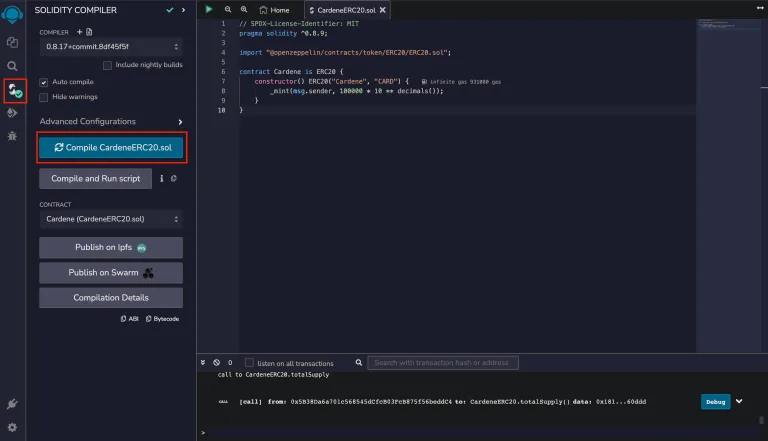
A green check mark on the icon indicates that compilation is complete.
Deploying
Click the second icon from the bottom of the five icons on the left, then click Deploy.
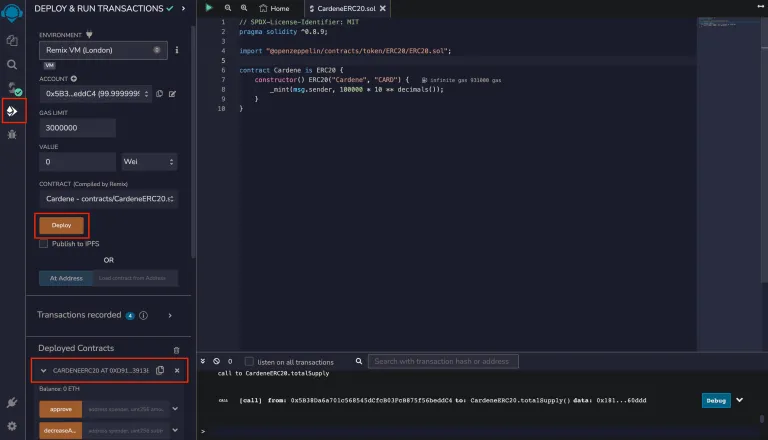
The contract is deployed successfully when CARDENEERC20 AT 0XD91...39138 appears under Deployed Contracts near the bottom left.
Calling Functions
Now we can call the functions.
Read-Only Functions
Start with the read-only functions.
Call decimals, name, symbol, and totalSupply on the contract we just deployed.
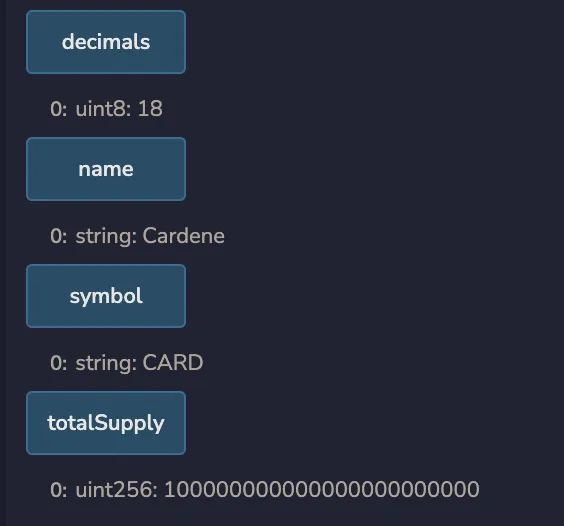
Each function displays its result.
The token name is Cardene, the symbol is CARD, decimals has its default value of 18, and the total supply is the rather large number 100000000000000000000000.
balanceOf
Call balanceOf to see how many tokens a user holds.
Click the copy button to the right of the address used to deploy the contract.
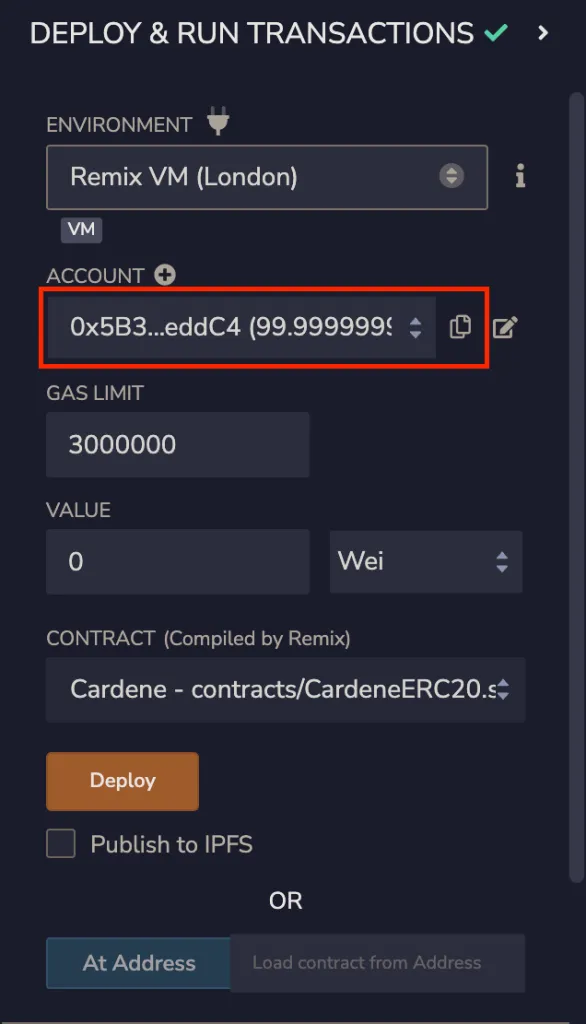
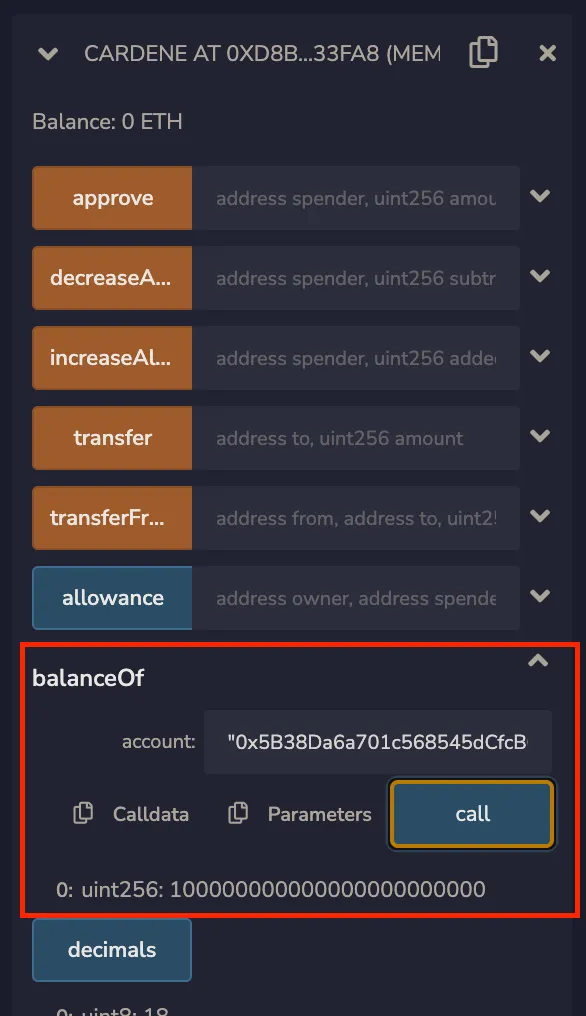
After copying the address, click the arrow to the upper right of balanceOf and paste the address into the account field.
Click the call button to display 100000000000000000000000.
This confirms that the deploying address holds all the tokens.
transfer
Now try transferring tokens to another address.
The steps become more involved from here, so the following animations demonstrate them.
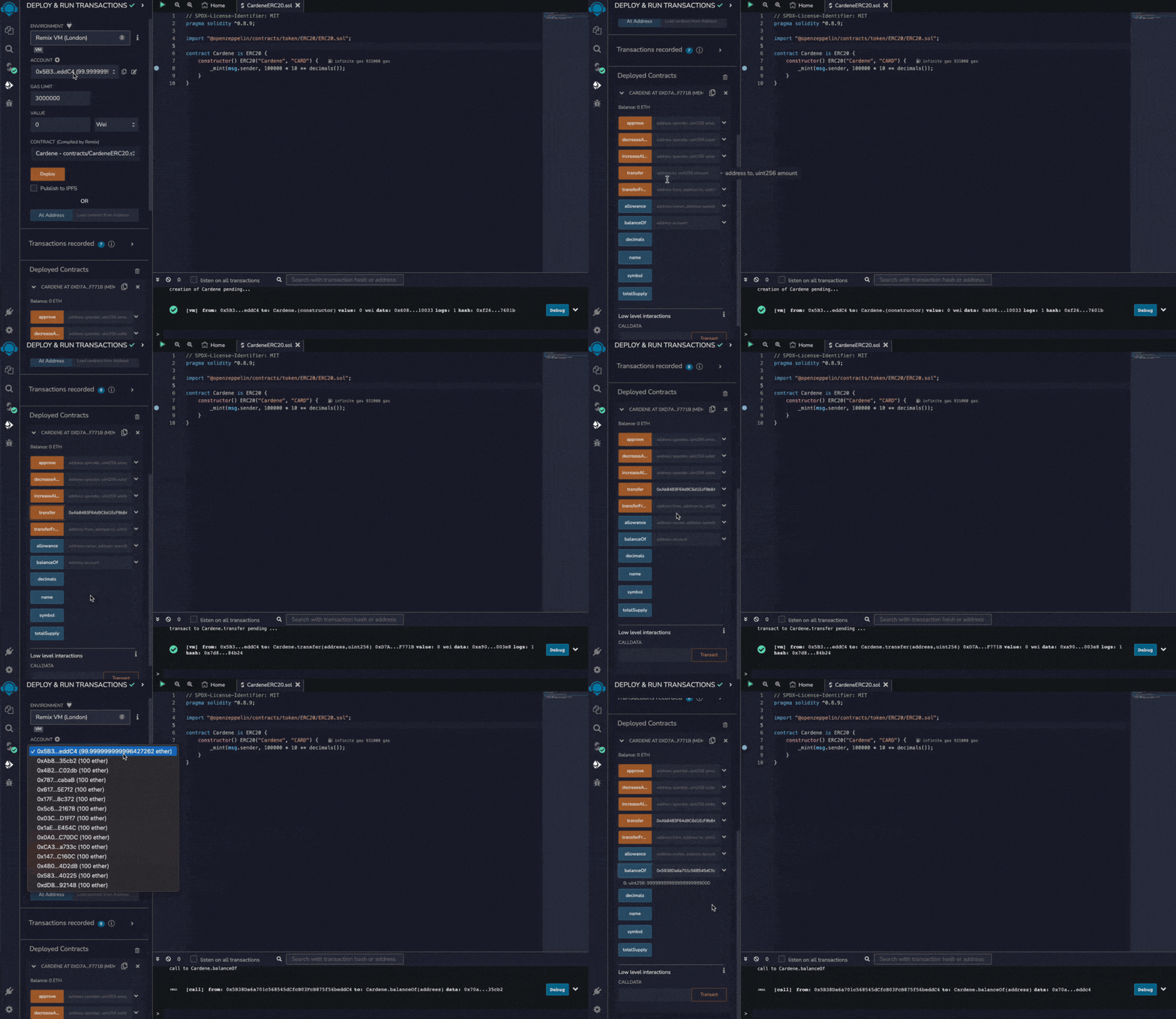
We specified another address and successfully sent 1000 token units.
approve
Now grant another address permission to transfer tokens that you own.
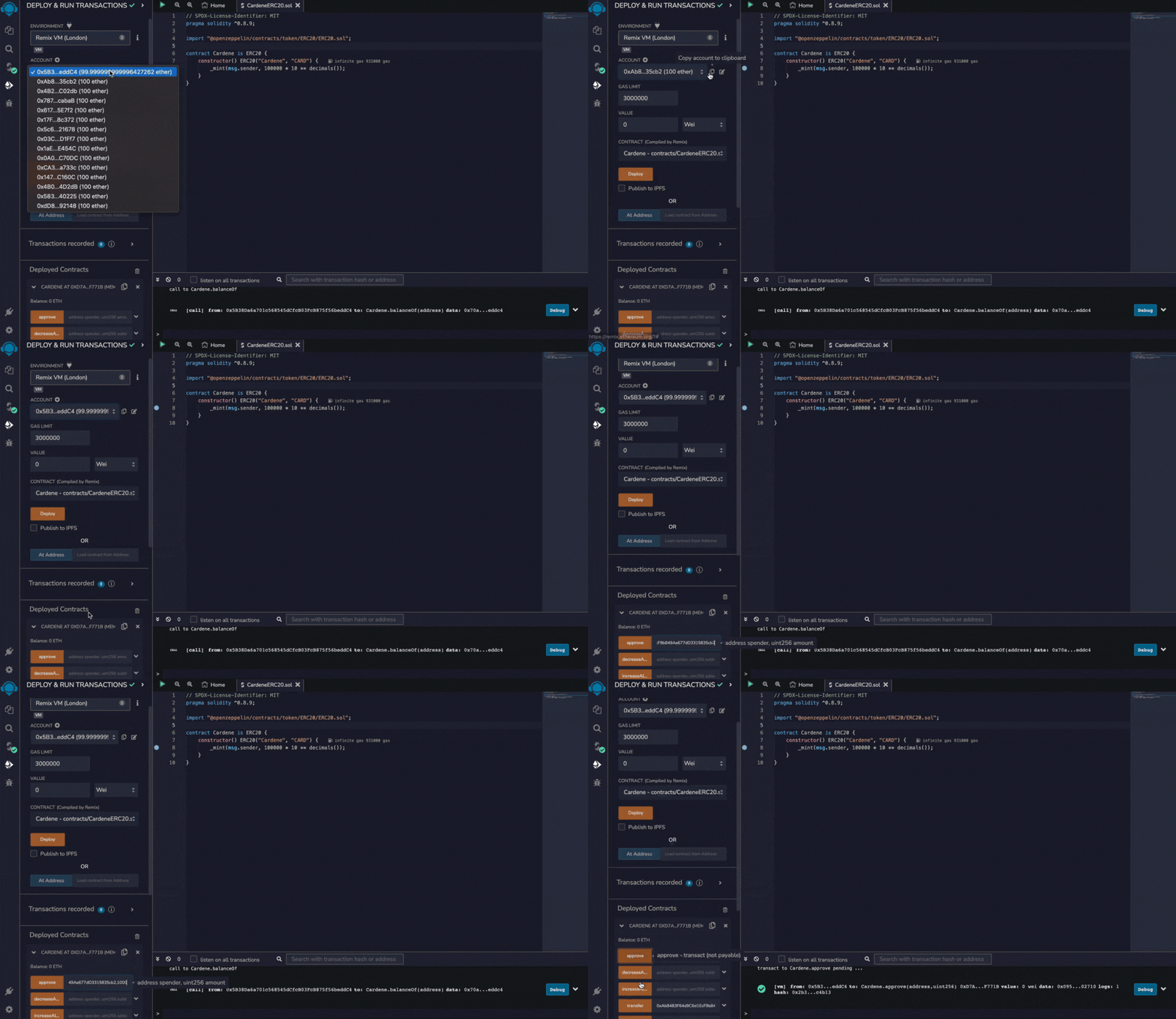
By specifying another address and a token amount, then calling approve, we granted transfer permission.
allowance
Now check whether the transfer permission has actually been granted.
Calling allowance reveals the amount that can be transferred.
Providing the token owner's address and the address just authorized displays 10000, the value specified when calling approve.
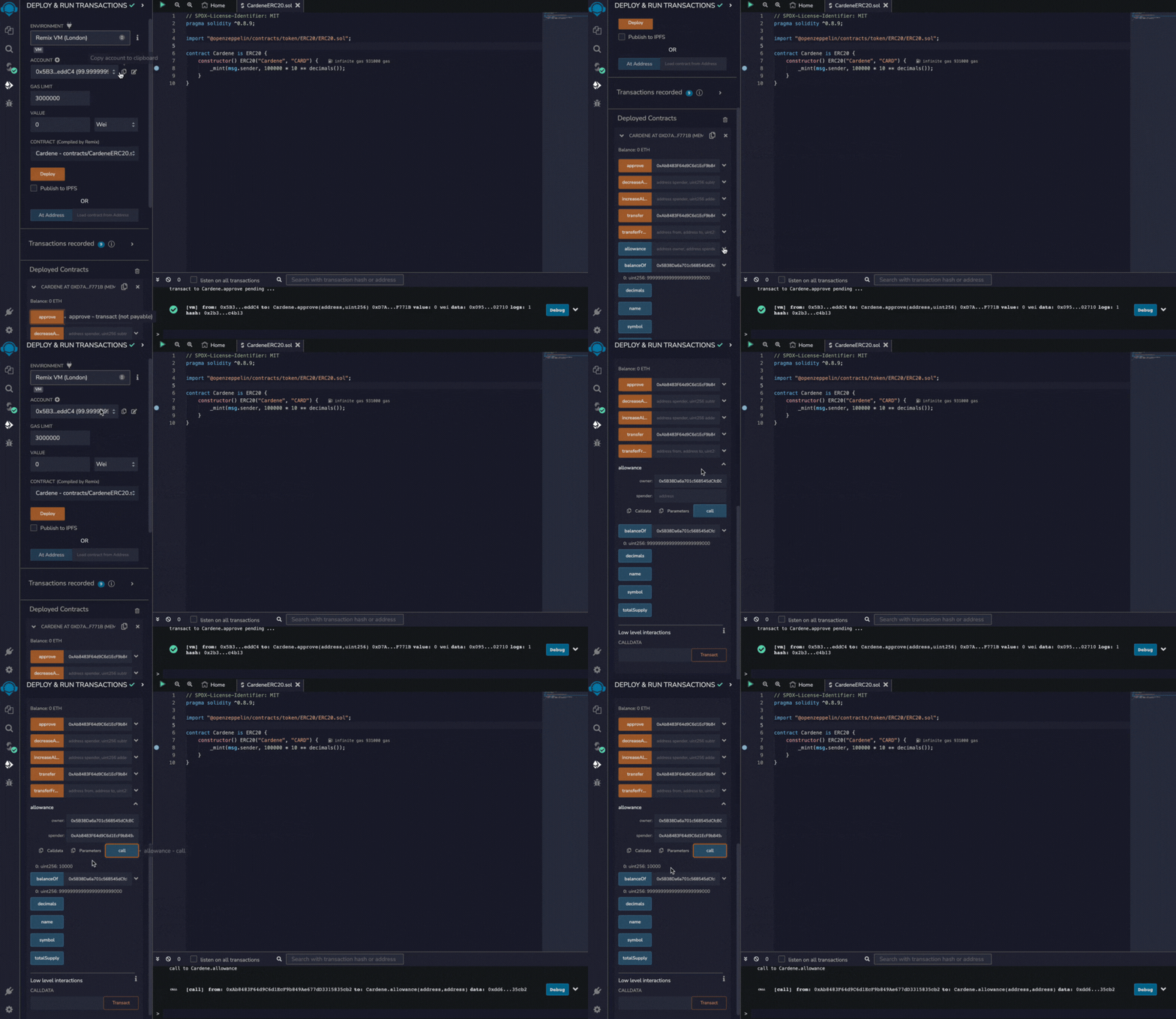
This confirms that the transfer permission has been granted.
transferFrom
Now use the authorized address to send tokens to a different address.
We specified the token owner's address and a third address, then called transferFrom from the authorized address to send 1000 token units.
Try calling transferFrom from an address other than the token owner that has not been granted transfer permission; the call will fail.
decreaseAllowance
Now reduce the amount of tokens that the spender is authorized to transfer.
You might think calling approve again is enough to adjust the allowance.
However, approve replaces the allowance rather than incrementing or decrementing the existing value.
Calling decreaseAllowance lets us reduce the value from 10000 to 5000.
(Because the new value is exactly half, it may look like a replacement, but the function performs subtraction.)
increaseAllowance
Finally, call decreaseAllowance's counterpart, increaseAllowance, to increase the amount of tokens the spender may transfer.
After adding 10000 token units, the value increases to 15000.
Deploying to the Goerli Testnet
As of November 2025, the Goerli testnet has been shut down. Use a testnet such as Sepolia instead.
The following walkthrough records the original deployment to Goerli.
Metamask
If you have not installed MetaMask yet, you can install it from the following link.
https://chrome.google.com/webstore/detail/metamask/nkbihfbeogaeaoehlefnkodbefgpgknn
Goerli Testnet ETH
The next step was to obtain Goerli testnet ETH. Test ETH was available from a service called a faucet. There were several ways to obtain it; the original walkthrough used the Alchemy faucet below.
It offered 0.5 Goerli ETH every 24 hours.
Preparing for Deployment
Here is how the deployment was prepared.
First, open MetaMask and switch to the Goerli test network. Return to Remix and click the trash icon if the previously deployed instance is still listed.
Set the highlighted field to Injected Provider - Metamask. This causes MetaMask to open when you deploy the contract. With Goerli selected, Goerli (5) network appears under Injected Provider - Metamask, confirming that Remix is connected to the testnet.
The deployment setup is now complete.
Deploying to the Goerli Testnet
Deploy the contract to Goerli. If Etherscan shows Success for the transaction after following the steps above, the deployment is complete.
https://goerli.etherscan.io/tx/0x4998868509277a35c7a2bc1484177a877ed436c67ac89eb7f55a6e8e820f6ab6
The following address shows the creation of the CARD token.
https://goerli.etherscan.io/address/0xdb8452c7df969c6248b3e87d89d1f0d39a1e6836
Conclusion
This article covered ERC20.
I also write articles elsewhere; feel free to explore them using the links below.




References
- https://bitflyer.com/ja-jp/s/glossary/ico
- https://news.mynavi.jp/techplus/article/20210922-1969988/
- https://fisco.jp/media/erc-20/
- https://www.coindeskjapan.com/keywords/utility-token
- https://phemex.com/ja/academy/イーサリアムのerc-20トークン-知っておくべきすべてのこと
- https://www.ledger.com/ja/academy/blockchain/ercトークンとはなぜ利用すべきのか
- https://eips.ethereum.org/EIPS/eip-20