Introduction
Hi, I'm cardene, a software engineer and technical writer focused on blockchain and AI.
I've also authored Japanese technical books on specification-driven development with LLMs and decentralized application (DApp) development.

I also build and publish a variety of tools, libraries, and open-source projects.
Overview
When adding a price range filter to an existing search API, you need to tell the AI both how to filter results and which conventions the existing code follows. Changing the response format or input error identifiers can affect existing callers even if the price filtering itself works. Restating these conventions in every conversation makes it easy to omit details, while pasting every convention brings in material irrelevant to the current change.
Agent OS v3.0.0 provides instructions for documenting recurring decisions in existing code as project-specific standards and selecting relevant standards from a concise index.
A Markdown document recording a convention is called a standard, while documents recording the scope and implementation plan for a change form a spec.
Recording the selected standards in the spec allows someone taking over the implementation to recover the decisions from the same files.
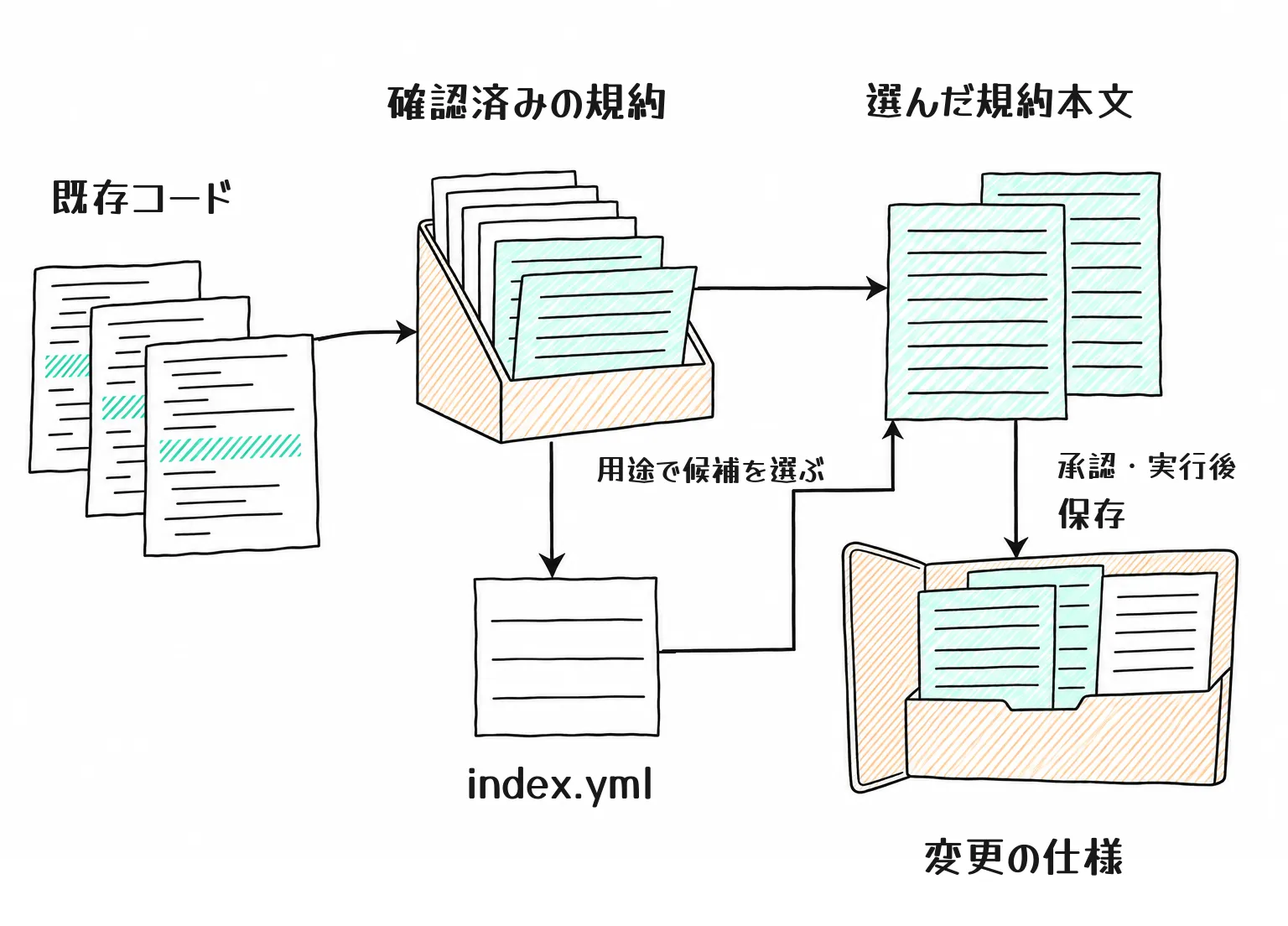
In v3.0.0, Agent OS assists with discovering and selecting standards; the AI development tool handles planning and implementation.
Saving a standard and verifying that generated code conforms to it are separate activities.
For a price range filter, recording the accepted prices in the specification is distinct from verifying that the implementation filters those prices correctly.
The diagrams and some illustrative code blocks in this article retain their original Japanese labels and text.
What is Agent OS?
Agent OS consists of Markdown instructions and supporting scripts for discovering project standards and bringing relevant ones into a conversation or plan.
Standards document decisions such as what an API response should contain and which identifiers to use for input errors.
While a skill describes a repeatable workflow, a standard records the conventions the implementation should satisfy.
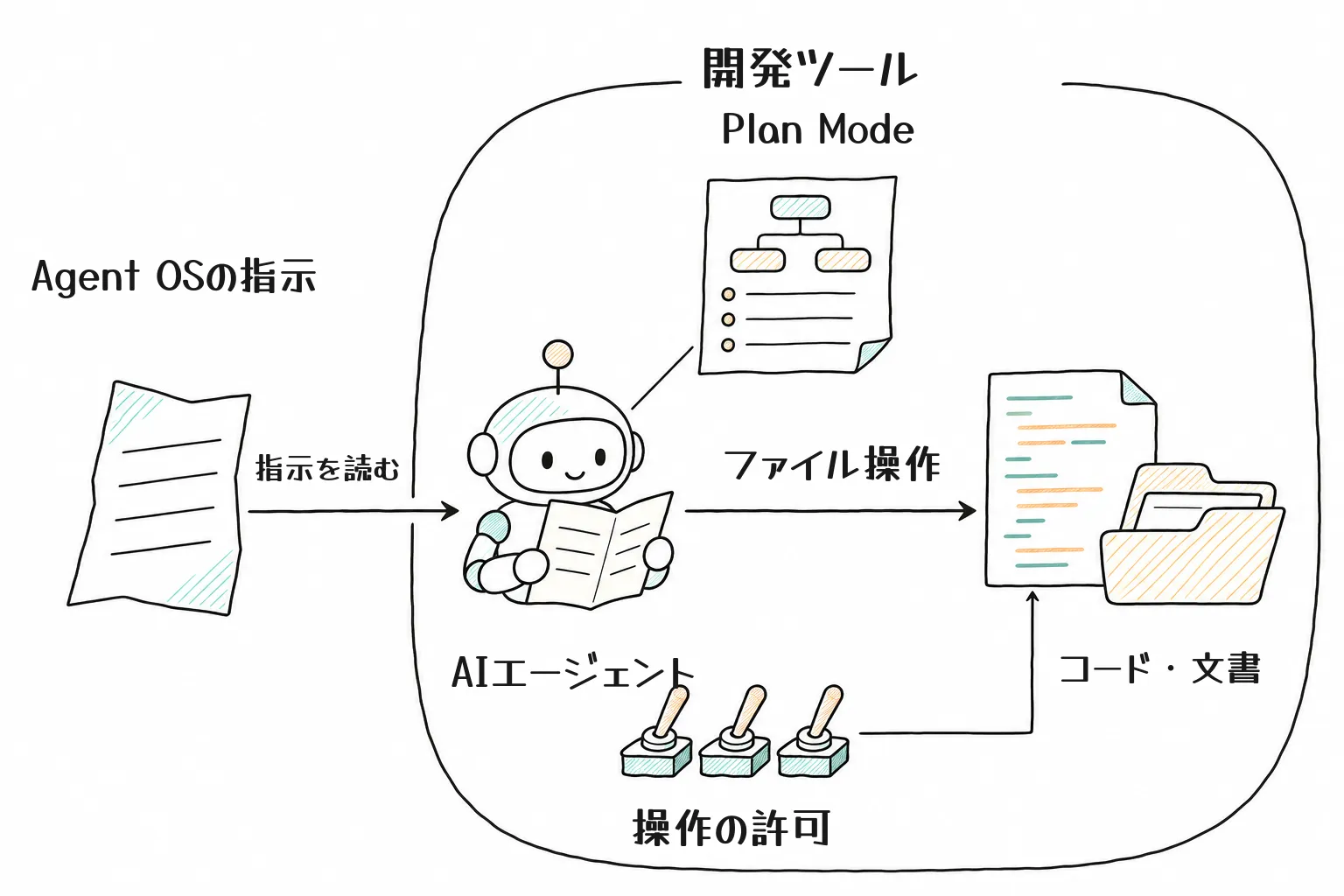
The commands are implemented as commands/agent-os/*.md files that an AI agent reads.
For example, discover-standards describes the order in which to inspect code, what questions to ask the user, and what to verify before saving.
An agent running in a development tool such as Claude Code reads these instructions and uses its available tools to inspect files or ask the user questions.
This distinction also affects stop conditions.
shape-spec instructs the agent to stop and request a switch to Plan Mode if it is not already in the mode for planning changes before implementation.
The Markdown itself, however, does not implement a mechanism that blocks file writes.
Permissions for writing files, running shell commands, and communicating over the network are configured in the development tool.
The version covered here is v3.0.0, at the tag's commit 809fb4e.
The installation instructions on the official website can change, so the script locations and behavior there may differ from those in the pinned tag.
The examples describe expected behavior derived from the pinned instructions; AI-generated standards, spec saving, and implementation were not actually executed.
Discovering standards in existing code
discover-standards works with the user to define the area of existing code to inspect and searches representative files in that area for candidate standards.
If it is unclear whether to inspect the API or the UI, the agent presents possible areas and waits for the user's selection.
The 5–10 representative files mentioned in the instructions are a guideline, not a threshold that guarantees exhaustive discovery.
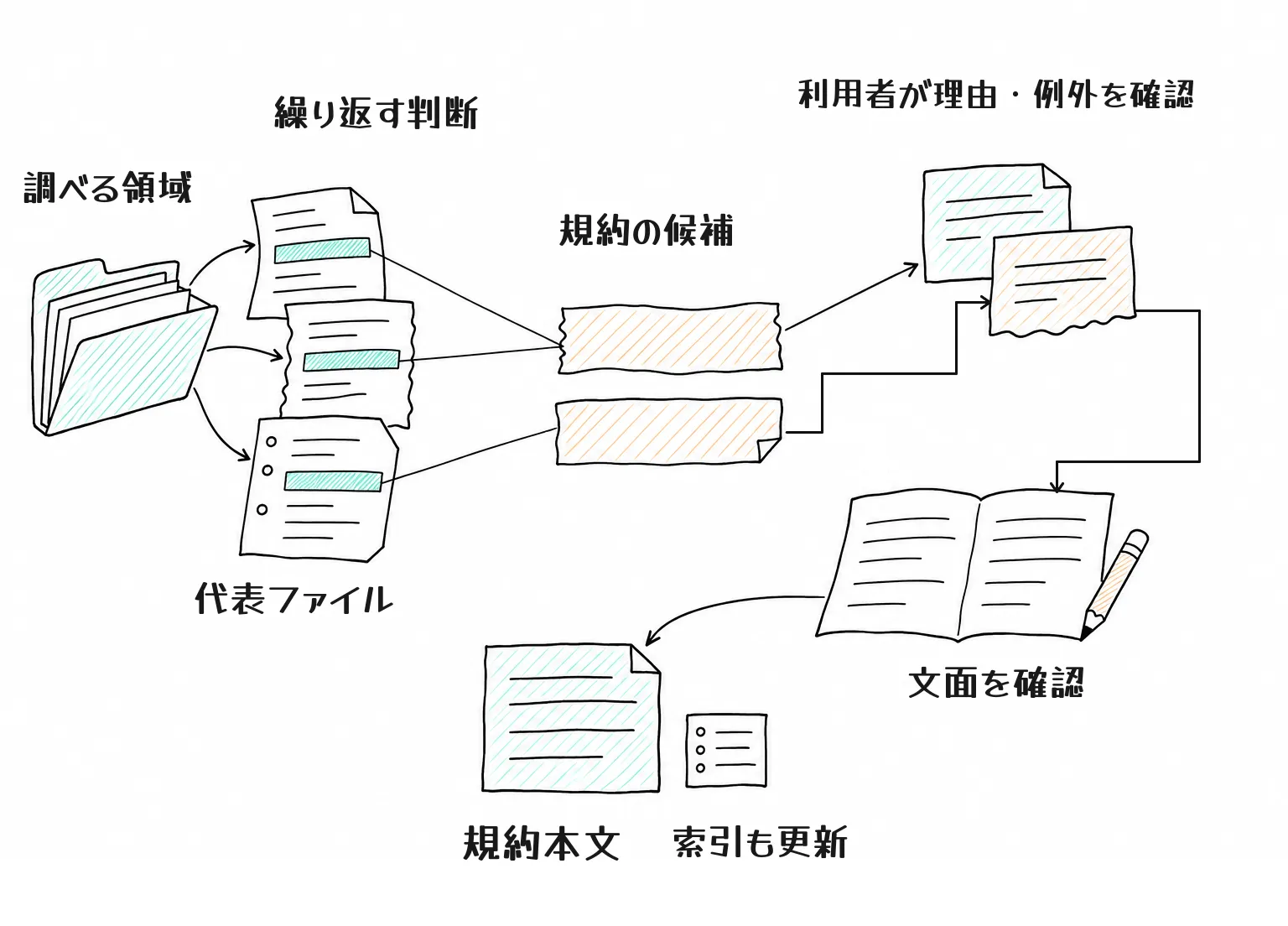
For the hypothetical search API that needs a price range filter, inspect the existing search implementation, input validation, and related tests. A response format shared by several APIs may be worth documenting, but copying ordinary framework conventions into standards creates documents that are not useful for project-specific decisions. Keep decisions that the project made among viable alternatives or conventions whose rationale a new developer would struggle to infer from code alone.
The agent presents candidates and, once the user chooses which ones to keep, asks about the rationale and exceptions. If an existing standard covers the same subject, extend it instead of creating another file indiscriminately. The user also reviews the proposed Markdown before it is saved.
If the recurring implementation reflects an outdated design or known bug, exclude it or correct the proposed standard before saving.
For example, an input error standard confirmed in this hypothetical project could be saved to agent-os/standards/api/validation.md as follows.
# 入力エラー

不正な検索条件にはHTTP 400を返す。
応答は {"success":false,"error":{"code":"VAL_001","message":"検索条件を確認してください"}} とする。
内部の例外やSQLの内容は応答へ含めない。
入力エラー
不正な検索条件にはHTTP 400を返す。 応答は {"success":false,"error":{"code":"VAL_001","message":"検索条件を確認してください"}} とする。 内部の例外やSQLの内容は応答へ含めない。
400 and VAL_001 are project-specific decisions confirmed by the user in this example.
They are not values that Agent OS mandates for every API.
Keeping response formatting and test naming in separate documents also allows a change limited to price validation to select fewer standards.
Selecting only the relevant standards from index.yml
As the number of standards grows, the agent uses agent-os/standards/index.yml before reading the full documents.
The index maps file locations to short descriptions of when each standard applies.
Here is an excerpt from an index relevant to the price range filter.
api:
  response-format:
    description: 検索APIの成功応答と結果の返し方
  validation:
    description: 検索条件が不正な時のHTTP状態とエラー形式
testing:
  naming:
    description: 入力条件と期待結果が分かるテスト名
api is the standards folder, and validation is the filename without its extension.
The agent reads the description and identifies api/validation.md as a candidate for changes to input errors.
The reserved name root refers to documents directly inside the standards directory; it does not specify an actual root/ directory.
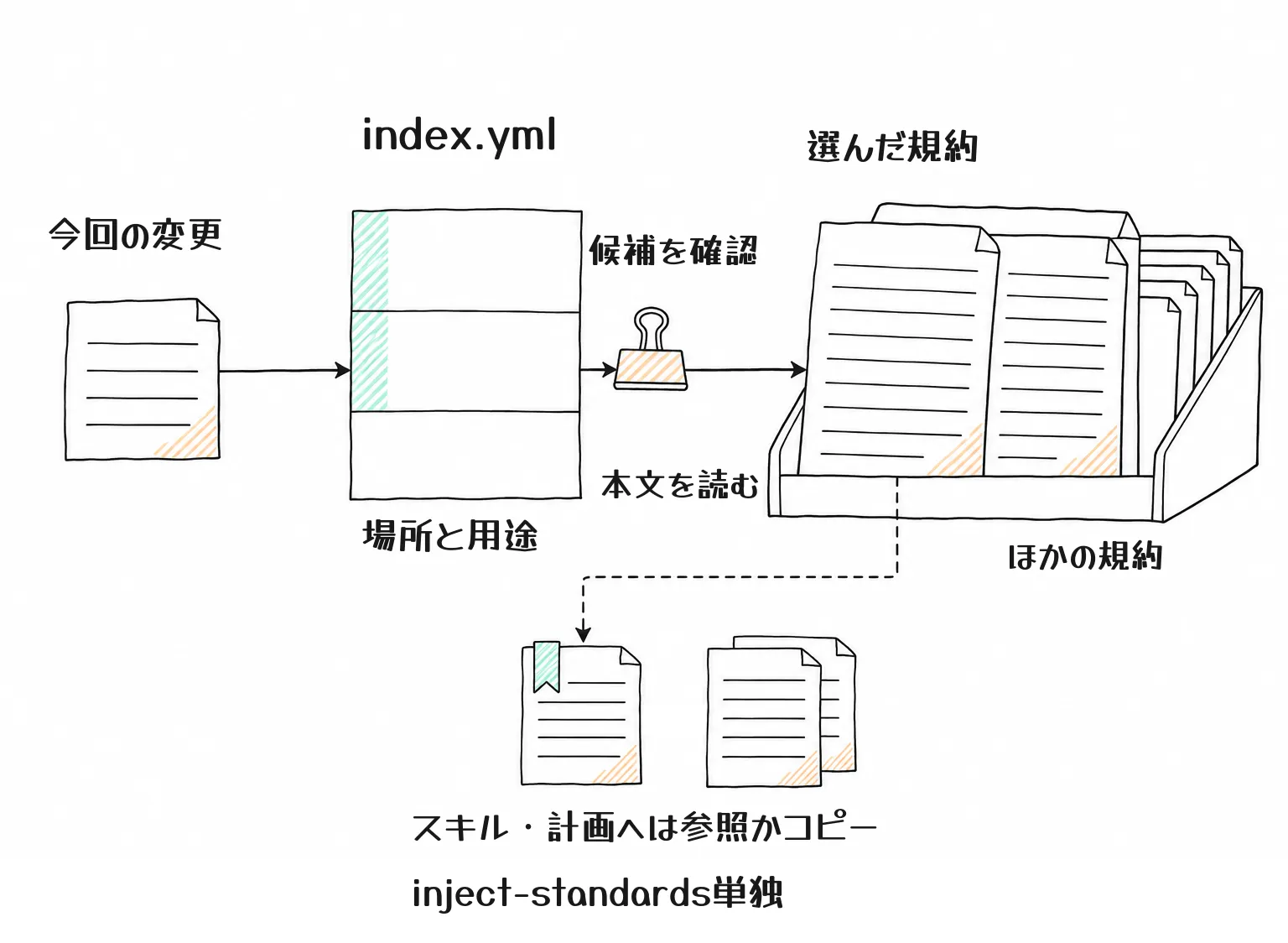
When inject-standards is invoked without arguments, it first proposes relevant candidates using only the index.
After the user confirms the selection, the agent reads the selected standards in full.
The suggested 2–5 candidates are a guideline in the instructions, not a product limit.
When files or folders are explicitly supplied as arguments, the agent skips automatic suggestions and verifies that the specified locations exist.
The possible destinations are a conversation, skill creation, or plan creation.
If the agent is in Plan Mode, or the conversation clearly indicates an intent to create a spec, plan, or shape, it treats the plan as the destination.
Otherwise, if the intent to create a skill is clear, it targets the skill; it asks the user only when neither destination can be determined.
For an ordinary conversation, the full text of the standards is added.
When creating a skill or plan, the agent asks whether to retain file references or copy the full text.
A reference such as @agent-os/standards/api/validation.md preserves the location of the canonical document, but the content read later changes if that document is updated.
A copy preserves the content supplied to the plan, but subsequent changes to the canonical document are not automatically reflected in the copy.
The choice between referencing and copying applies when using inject-standards on its own.
By contrast, the pinned version's shape-spec instructions save the full text of the selected standards in standards.md.
If the index is missing or empty, return to discovering standards or creating the index.
After manually adding a standard, use index-standards to confirm the new description and remove entries for deleted files.
Existing descriptions are preserved, so when a standard's purpose changes, review its description as well to avoid selecting candidates based on outdated information.
Bringing standards into product documents and specs
Standards define implementation conventions, whereas product-wide documents record whose problem the product solves and in what order it will address those needs.
plan-product asks the user questions and saves three documents under agent-os/product/.
If documents already exist, it first asks whether to replace all of them, update specific documents, or cancel.
| Document | Information used in planning |
|---|---|
mission.md |
Whose problem the product solves and what that problem is |
roadmap.md |
Features in the initial release and those to be added later |
tech-stack.md |
Selected technologies and architecture |
For example, if filtering products by price is in scope for the initial release, align that decision in roadmap.md with the scope of the current change.
Items without enough information remain undecided, so the mere presence of three files does not mean the product direction has been finalized.
If global/tech-stack.md exists among the standards, the agent also asks whether to use that content for the technology stack.
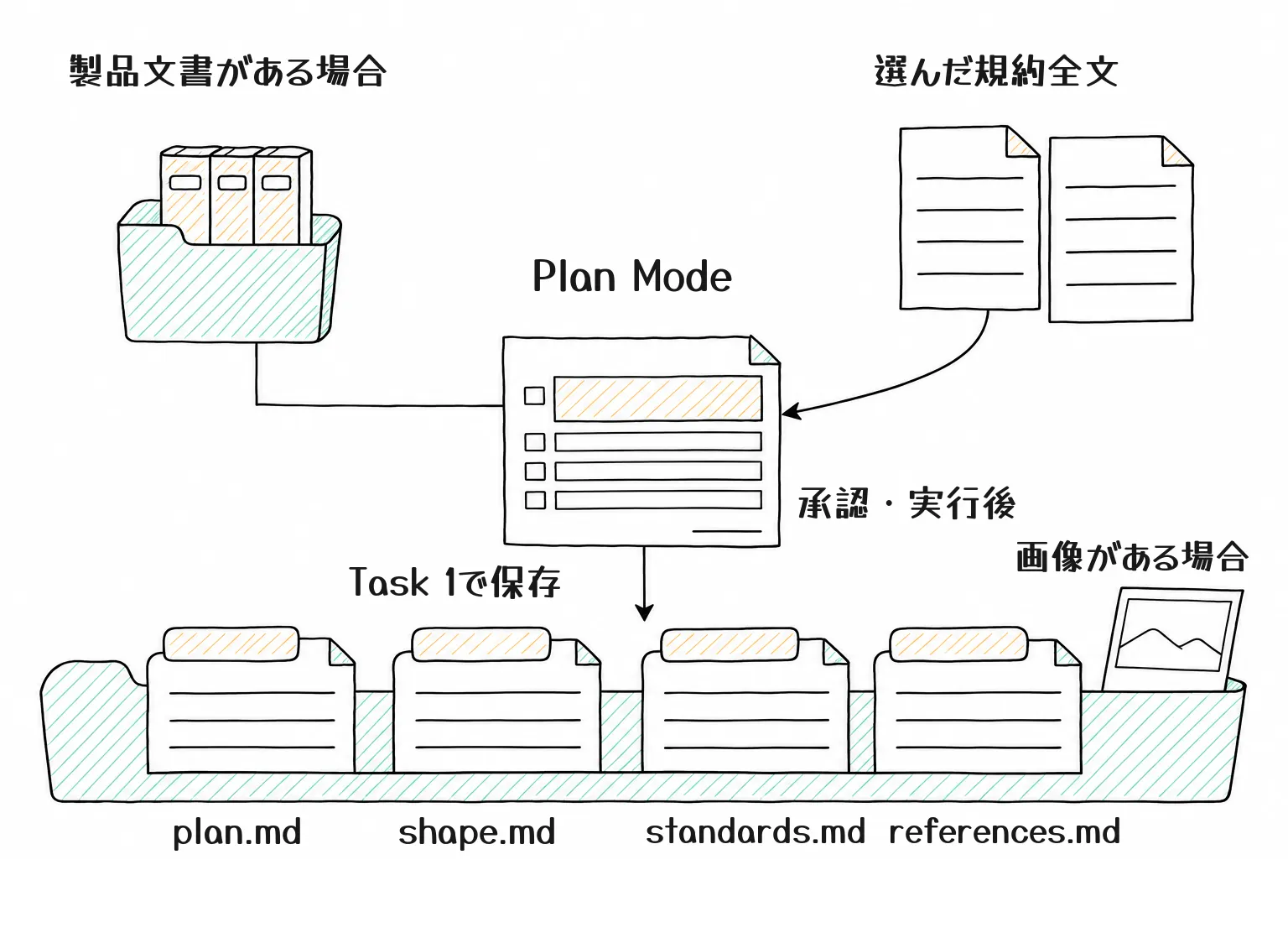
shape-spec creates a plan for a specific change in the development tool's Plan Mode, reviewing the scope of the requirements, visual materials, and similar existing implementations.
If product documents exist, it checks the current requirements against them; if not, it skips that check.
It then selects the relevant standards from the index and reads the full text of those confirmed by the user.
Creating product documents is not a mandatory prerequisite for every change.
The plan starts with Task 1, which saves the spec documents.
This records the rationale for decisions before implementation tasks begin.
Once the user approves the plan and moves to execution, this task saves the documents under agent-os/specs/YYYY-MM-DD-HHMM-price-filter/.
| Destination | Content to preserve |
|---|---|
plan.md |
The entire approved plan and implementation tasks |
shape.md |
Requirements scope, decisions made in discussion, and context |
standards.md |
Full text of each selected standard |
references.md |
Locations of similar implementations and why they were selected as references |
visuals/ |
Images, if the user supplied visual materials |
The timestamp in the destination is the creation time, and the feature name is short and hyphen-separated.
Rather than just listing filenames in references.md, record which aspects of which implementations are relevant so that subsequent work can reassess the references.
Because standards.md captures the content at the time of selection, later updates to the canonical standards do not automatically propagate to previous specs.
Basic workflow from standards to specs
To discover standards and incorporate them into a spec, first establish the canonical standards, then plan a specific change. Check not only the command responses but also which documents are read and what is saved at each stage.
A shared collection of standards grouped by type is called a profile.
When installing the pinned tag, first check the shared source configuration and actual directory layout.
The bundled configuration defaults to test-profile, but that profile is not included.
Even when --profile default is specified, bundled documents reside in profiles/default/global/, not in profiles/default/standards/, where the script looks for standards.
The scripts also combine set -e with post-increment operations starting at zero and depend on tac.
These are installation concerns identified through static inspection, not results of a successful installation test.
The basic workflow begins with the pinned command instructions available in the development tool and the standards layout verified.
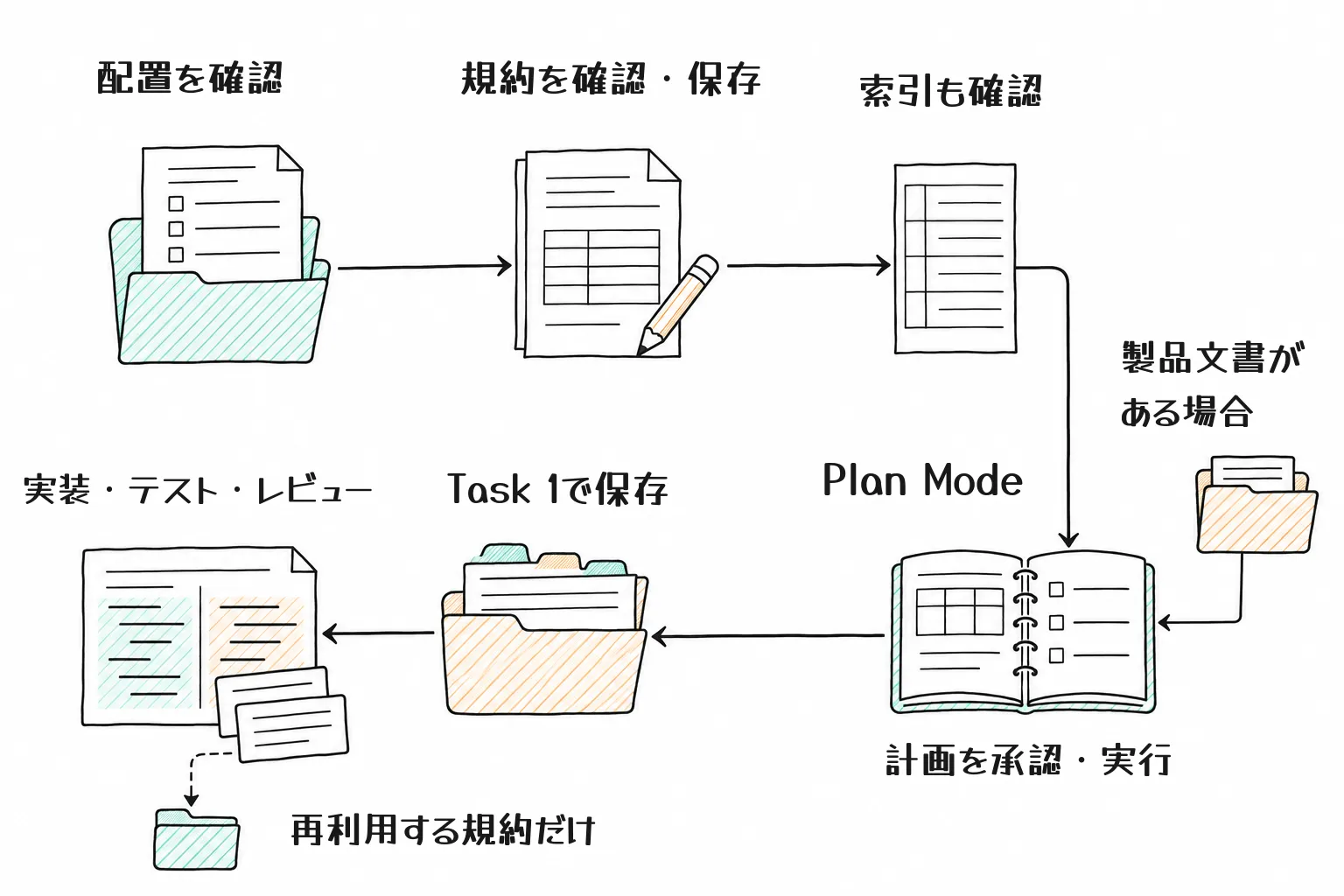
- Verify the pinned instructions and standards layout
Check the command instructions read by the development tool and
agent-os/standards/. The pinned installation script uses.claude/commands/agent-os/as its copy destination; verify separately how other tools load the instructions. - Choose an inspection area and candidate standards
Use
discover-standardsto select the API area and check recurring decisions and their exceptions across multiple files. Do not adopt existing bugs or implementations undergoing migration as standards without review. - Save the approved standards
Review and save the proposed Markdown, then verify that the standards and index correspond.
discover-standardsupdates the index at the end; useindex-standardsif manual additions or deletions cause discrepancies. - Check the product direction
If product documents exist, check consistency with the requirements.
If the direction needs clarification, use
plan-productand choose which existing documents to update. - Define the change scope in planning mode
Use
shape-specinPlan Modeto review requirements, existing implementations, and selected standards. Verify that the standards and implementation tasks are reflected in the plan and that the saving task comes first. - Approve the plan and save the spec
After the user approves the plan and moves to execution, save the spec in
Task 1. Verify thatplan.mdand its supporting documents are in the same change directory and match what was approved. - Check the implementation and verification results Implement using the development tool, then inspect the code diff, test results, and review findings. Treat selecting and saving standards separately from determining implementation completion.
- Share reusable standards Return only standards that also apply to other projects to the shared source. Check the destination differences and backups; propagate them to other projects separately.
Example: incorporating standards into a price range filter
Add min_price and max_price to a hypothetical product search API.
Prices are integers denominated in yen, and the results include the specified minimum and maximum prices.
When both are omitted, retain the existing search behavior; when only one is supplied, apply only that condition.
The design rejects negative values, non-integer input, and a minimum greater than the maximum using the existing input error format.
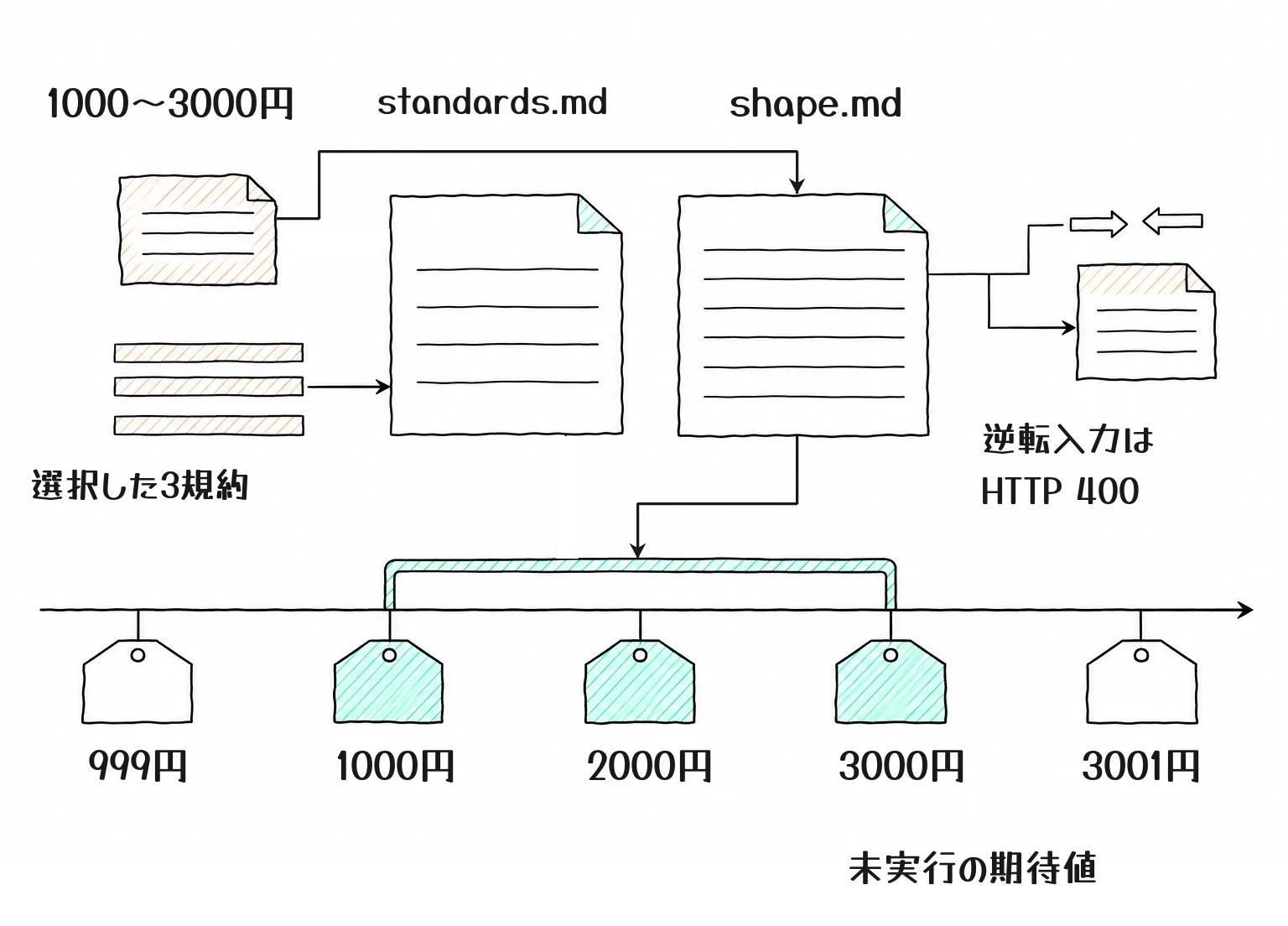
The input in this example is GET /products?min_price=1000&max_price=3000.
Assume the existing search implementation is src/api/products/search.ts and the search tests are tests/products/search.test.ts; record their locations and relevant behavior in references.md.
The index suggests three documents on response formatting, input validation, and test naming, which the user confirms.
The amounts, paths, and API format are hypothetical settings for illustration, not built-in specifications of Agent OS.
After confirming the scope with shape-spec, an excerpt of the decisions recorded in shape.md might look like this.
# 価格帯フィルター

## 範囲
既存の商品検索へmin_priceとmax_priceを追加する。
指定した価格の境界を含め、両方未指定なら従来の検索を維持する。

## 判断
価格は円単位の非負整数とする。
不正な形式とmin_price > max_priceは既存の入力エラーで拒否する。
通貨換算と検索結果の並べ替え変更は含めない。
価格帯フィルター
範囲
既存の商品検索へmin_priceとmax_priceを追加する。 指定した価格の境界を含め、両方未指定なら従来の検索を維持する。
判断
価格は円単位の非負整数とする。 不正な形式とmin_price > max_priceは既存の入力エラーで拒否する。 通貨換算と検索結果の並べ替え変更は含めない。
This record lets you return to the approved scope if someone attempts to change sorting during implementation.
Save the entire input error standard in standards.md as well, so the implementation does not introduce a different error response format.
In plan.md, which contains the implementation tasks, the following work can follow the initial saving task.
1. 仕様文書を保存する。
2. 既存の検索条件へ価格の入力検証と絞り込みを追加する。
3. 価格境界と不正入力のテストを追加する。
4. 応答形式、範囲外の差分、既存検索への影響をレビューする。- 仕様文書を保存する。
- 既存の検索条件へ価格の入力検証と絞り込みを追加する。
- 価格境界と不正入力のテストを追加する。
- 応答形式、範囲外の差分、既存検索への影響をレビューする。
Putting the saving task first is an instruction in the pinned version; the remaining task breakdown is specific to this price filter example. The user reviews the tasks for minimum and maximum boundaries, specifying just one bound, omitting both bounds, and input errors before approving them. Saved specifications alone cannot verify behavior, so after implementation, run tests with fixed product prices.
| Input | Expected results for product prices of 999, 1000, 2000, 3000, and 3001 yen |
|---|---|
min_price=1000&max_price=3000 |
Return products priced at 1000, 2000, and 3000 yen |
min_price=1000 |
Return products priced at 1000 yen or more |
max_price=3000 |
Return products priced at 3000 yen or less |
| No price conditions | Return the same results as before the change |
min_price=3000&max_price=1000 |
Return HTTP 400 with the confirmed error format |
min_price=-1 or min_price=abc |
Return HTTP 400 with the confirmed error format |
These are expected results designed for hypothetical inputs; the tests have not been run.
If the actual results differ, inspect changes to input validation and search conditions first. If the interpretation of the standards differs, compare the saved standards.md with the canonical documents.
Even if the functional requirements are met, correct deviations in response format or test names during review.
Checking saved documents, actual test results, and code differences against standards separately helps determine whether the problem lies in the plan or the implementation.
Updating standards and syncing them back to a profile
If you decide to use the same price validation method in other search APIs, the user confirms the update to the standard.
If the price handling applies only to this project, there is no need to extend the standard to other products.
Manage the shared collection of standards as a profile, which serves as the source for copying to other projects.
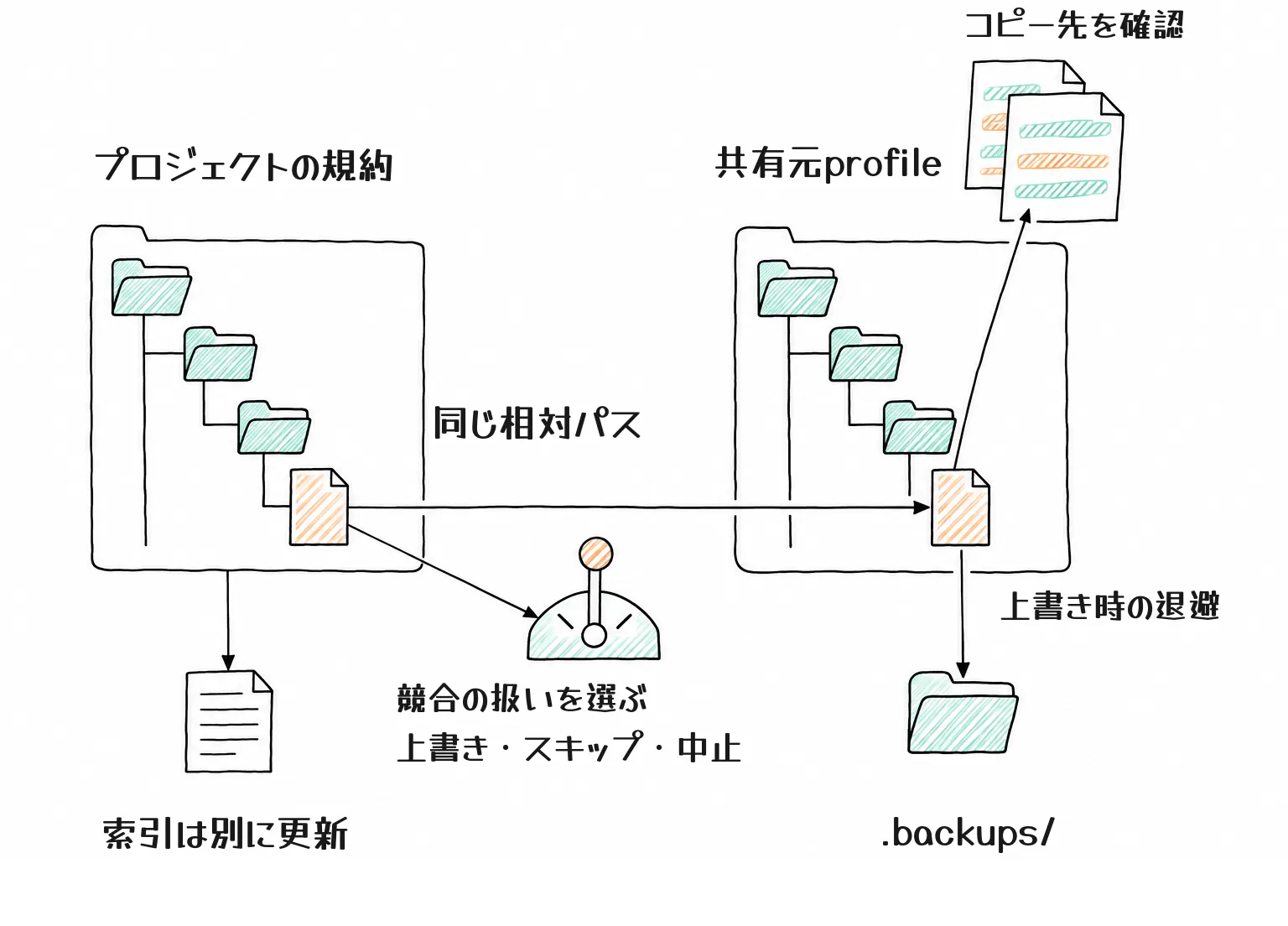
The pinned sync-to-profile.sh finds Markdown files under agent-os/standards/ in the project where it is run.
It does not use index.yml as the entry point for selection; it builds the list from actual files, excluding .backups/.
Updating the index and copying standards to a shared destination are therefore separate operations.
A file with the same relative path at the destination is treated as a conflict; the script does not check whether its content is identical.
If files already exist, choose whether to back them up and overwrite them, skip them, or cancel synchronization.
Before overwriting, the script copies the original files to the same relative paths under standards/.backups/YYYY-MM-DD-HHMM/ in the shared source.
--all skips target selection, while --overwrite skips overwrite confirmation.
Neither instructs the script to merge content automatically, so inspect the diff before copying to avoid losing destination-specific exceptions.
As with installation, the pinned version contains post-increment operations under set -e. Do not assume synchronization has completed successfully; check the exit result and destination files.
Updating the shared source does not automatically update other projects where it has already been installed or older standards.md files.
The installation process is designed to copy to matching relative paths in inheritance order, with later profiles taking precedence.
Specify parent profiles in the shared config.yml. If a parent is missing or inheritance is circular, stop installation and correct the configuration.
During normal installation, if a standards directory already exists, the process is designed to confirm overwriting before copying.
Even --commands-only, which retains existing standards, invokes index creation, so not copying the standard documents does not mean the index remains unchanged.
At the destination, check the saved standards and index descriptions, then decide whether to apply them to changes already in progress.
Suitable use cases and limits
Separating standard documents from the index is useful in projects that reuse the same custom conventions across multiple changes. It allows you to select response and validation standards for an API change or naming standards for a test-only change. For a few lines of code whose correction is self-evident and involves no reusable decision, ordinary planning and testing may be sufficient.
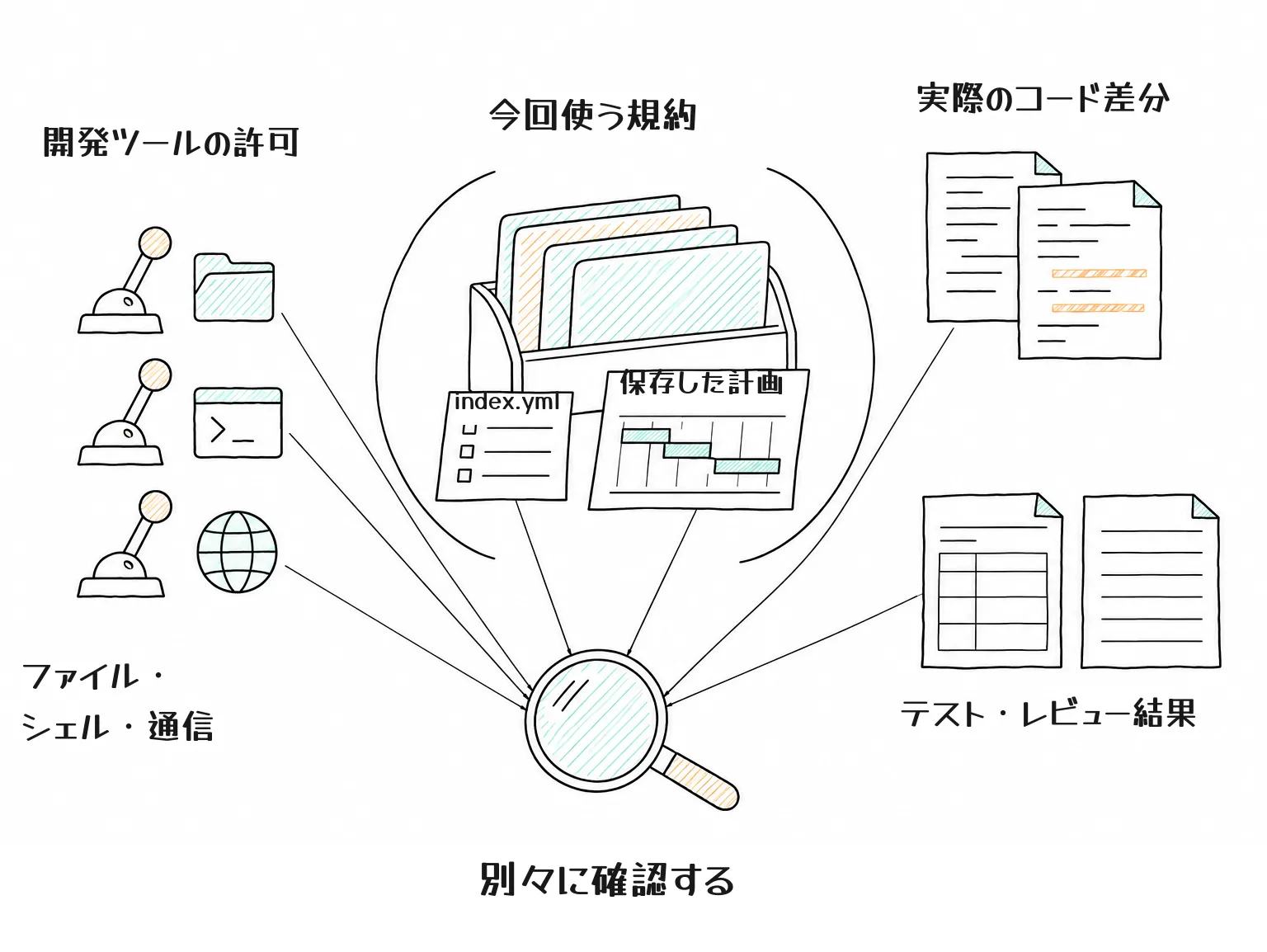
The user decides whether to adopt candidate standards, keep existing exceptions, and execute the plan. The development tool reads the instructions and modifies code and documents within the permissions it has been granted. Supplying standards alone does not verify file access controls, network restrictions, secret protection, or test success. The project must check code diffs and actual verification results.
If index descriptions are outdated, relevant standards may be omitted from the candidates; excessively long standards also increase the context supplied to the plan. The number of candidates and representative files are guidelines in the pinned instructions. These figures establish neither a limit on standards or tokens nor any guaranteed execution time.
To assess adoption, check whether the relevant documents can be selected for actual requests and whether approved decisions can be saved to specs. There are no measured comparisons of generation quality, speed, or cost.
When to choose Agent OS v3
v3.0.0 focuses on discovering and selecting standards and assisting with specification creation.
It removes the implementation and multi-agent task distribution stages provided in v2, leaving planning and task execution to the development tool.
Adding implementation commands from older articles to the basic v3 workflow would alter that division of responsibility.
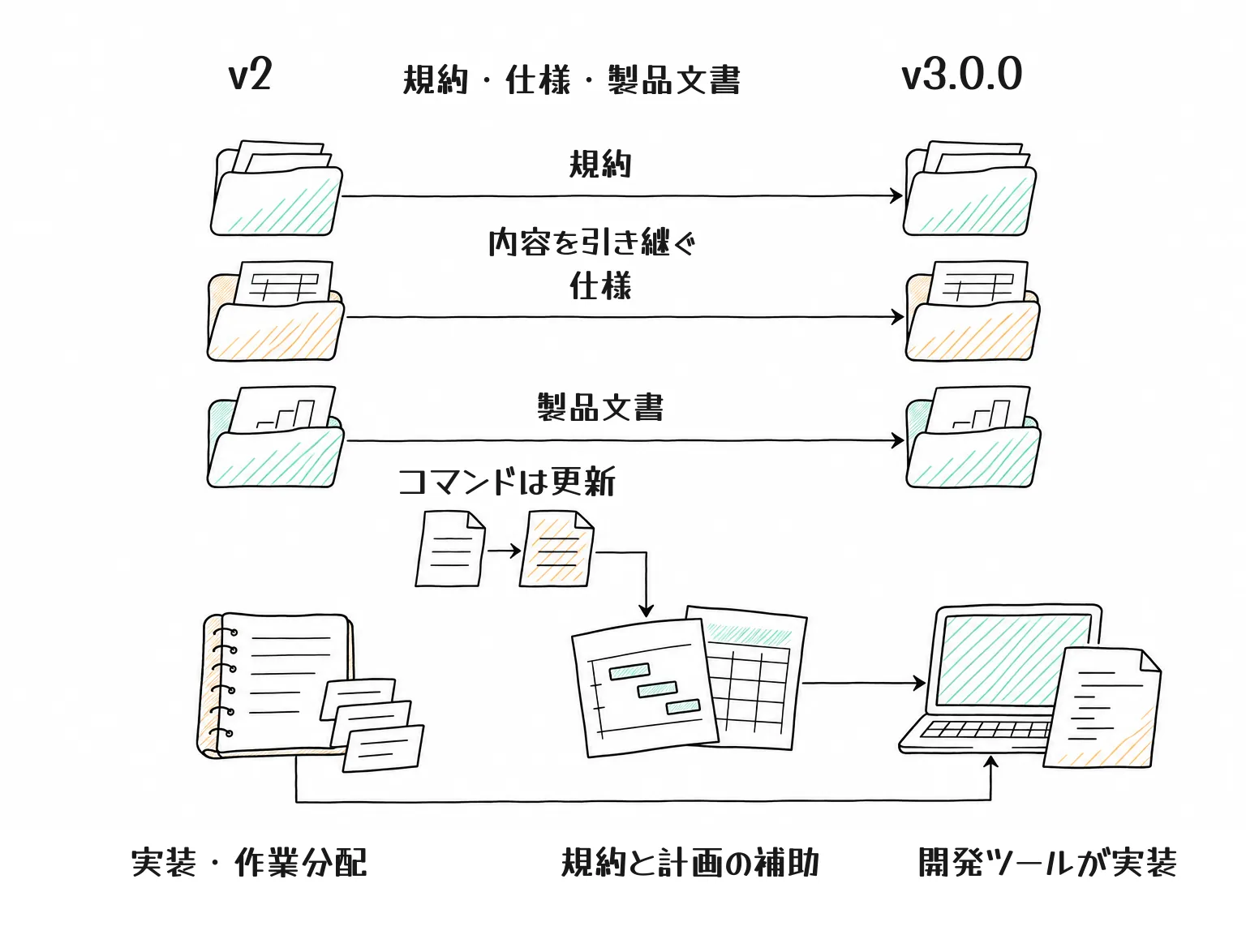
Existing standards, spec directories, and product documents can be carried forward, but the commands and scripts have changed.
Choose v3 when you want to provide project standards to the planning workflow of a development tool you already use.
If your workflow also requires distributing implementation tasks and verifying results, define those responsibilities in the development tool.
Distinguish the evolving installation instructions on the official website from the distribution pinned to a tag.
Results obtained using another version's default profile or a corrected script are not evidence of a successful v3.0.0 installation.
Conclusion
With Agent OS v3.0.0, users confirm decisions discovered in existing code and preserve them in standards and an index.
When planning a change, select the relevant standards and save the requirements, decisions, full standards, and references before implementation.
This makes it possible to recover the price range filter's inputs, applicable standards, and expected post-implementation results from the same plan.
Determine whether implementation is complete using code diffs, tests, and reviews in addition to the saved documents.
The pinned command instructions and scripts are available in the official tag.