Introduction
Hi, I'm cardene, a software engineer and technical writer focused on blockchain and AI.
I've also authored Japanese technical books on specification-driven development with LLMs and decentralized application (DApp) development.

I also build and publish a variety of tools, libraries, and open-source projects.
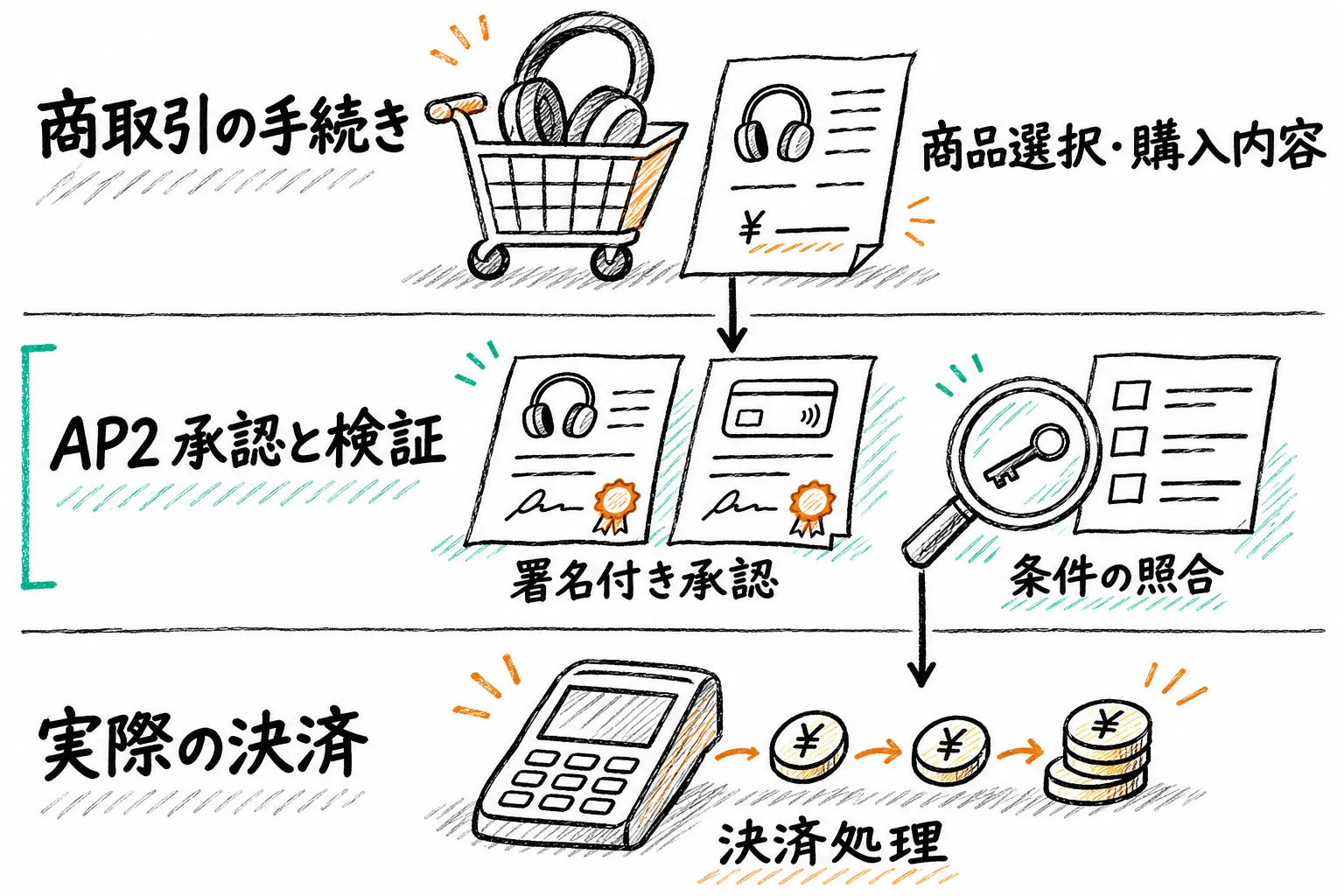
This article explains AP2, a protocol for approving purchases and payments made by AI agents.
Using a headphone purchase as an example, we will examine how the merchant and payment side verify what the user has authorized and what happens when the purchase conditions change after approval.
What Is AP2?
AP2, short for Agent Payments Protocol, is a protocol for conveying the user's authorization for purchases and payments delegated to an AI agent as data that other parties can verify.
It incorporates the presentation and verification of authorization into the purchase process.
Signatures allow recipients to verify who created the data and whether it has been modified.
When an agent proceeds with a purchase, the merchant and payment side check whether the user authorized the item, amount and payee. Inferring consent from a conversational request alone cannot establish whether the purchase details have changed since approval. AP2 uses signed authorizations so recipients can verify both their correspondence with the transaction details and the trust relationship behind the signatures.
Commerce protocols such as UCP handle product discovery and updates to checkout details.
AP2 incorporates authorization into that purchase process, supporting both purchases the user reviews individually and purchases made under conditions authorized in advance.
The following example uses v0.2 to purchase headphones from Store A for JPY 19,000, including shipping.
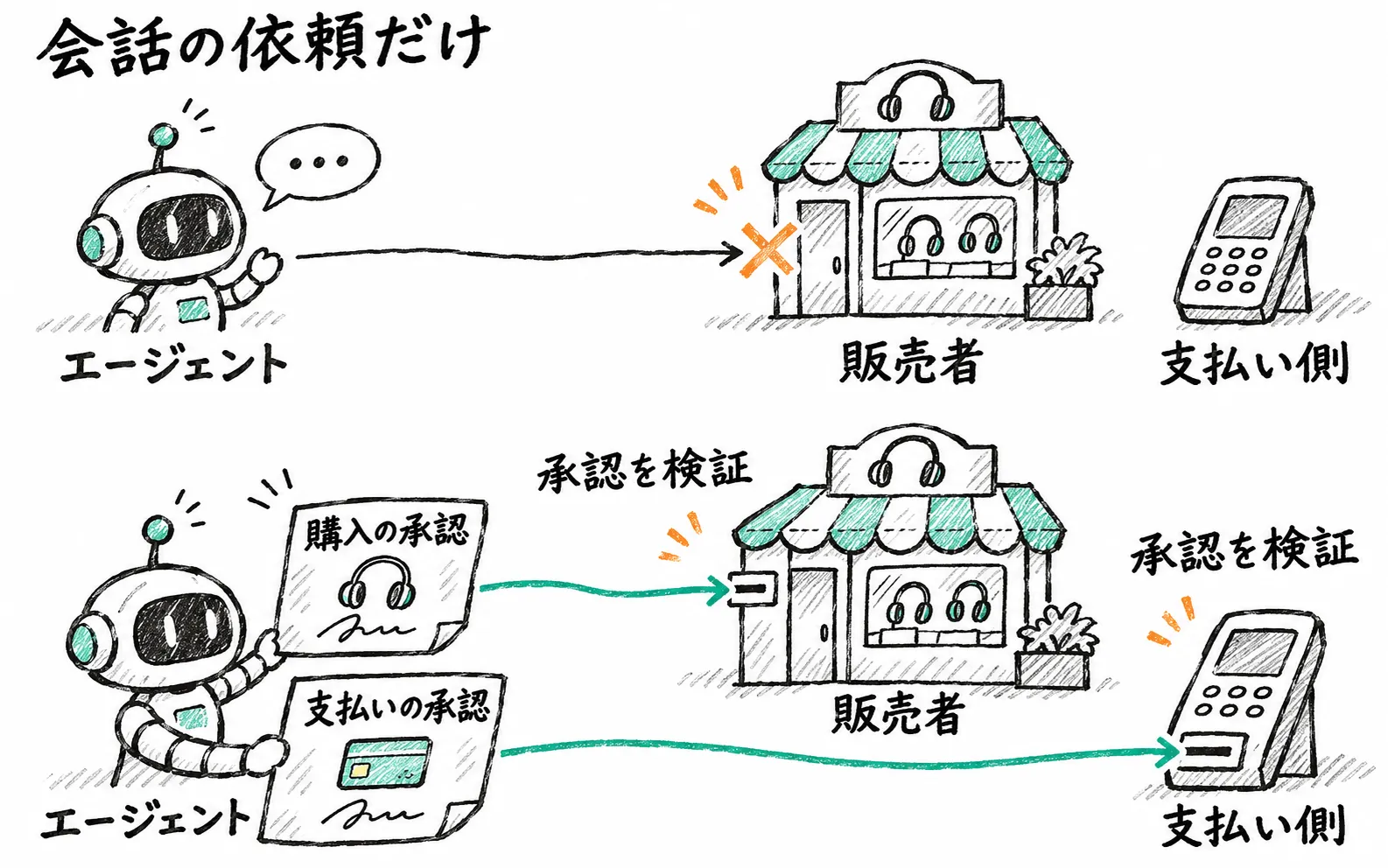
The existing figures and interactive diagram in this article retain their original Japanese labels.
Participant Roles
The purchasing agent obtains checkout details from the merchant, obtains the user's approval and presents it to the appropriate parties.
The Credential Provider verifies payment authorization and supplies payment credentials for the purchase.
The party that receives payment credentials from the merchant and processes the payment is referred to here as the payment processor.
Even when one provider performs multiple roles, it performs the verification associated with each role.
The Trusted Surface displays the checkout details and payment conditions to the user and obtains consent and authentication.
It consists of a trusted approval interface and the non-agent code connected to that interface.
For example, even within a single application, the agent selecting products is separate from the process that establishes approval.
Checkout Details Referenced by Both Mandates
When delegating a purchase, the user communicates both what may be purchased and how much may be paid to whom.
In AP2, the authorization data that recipients verify to determine what an agent may execute is called a Mandate.
The authorization presented to the merchant is the Checkout Mandate, and the authorization presented to the payment side is the Payment Mandate.
If these two mandates referred to different products, approval of one purchase could be reused for another payment. Both therefore record a hash calculated from the same merchant-signed checkout details. A hash is a value calculated from the original data and used here to check whether the checkout details correspond.
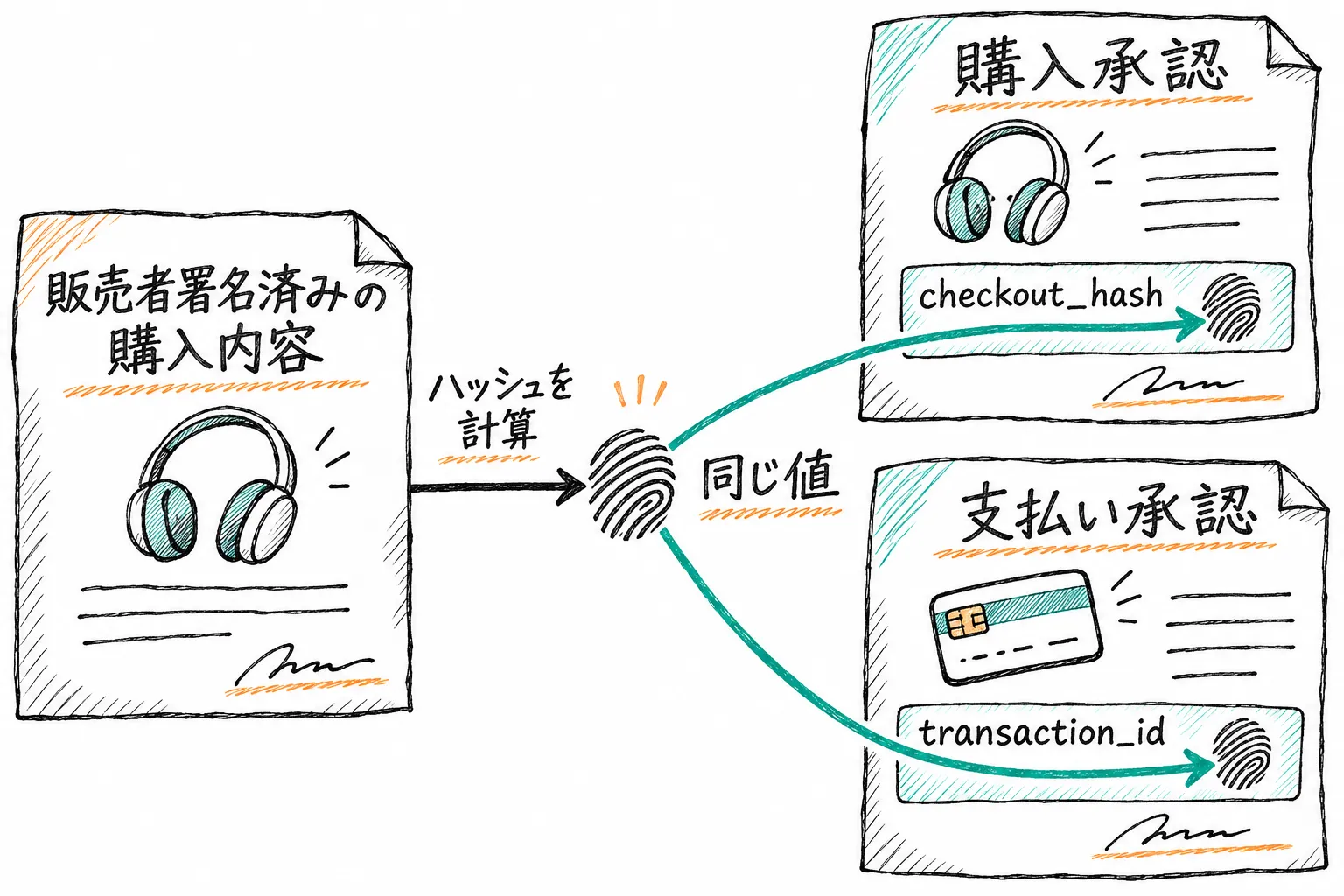
The merchant checks the checkout details it signed. Attempting to execute a transaction with changed items or quantities under the same approval causes the comparison to fail. However, a matching hash does not establish who approved the transaction, so the recipient also verifies the mandate signature and the underlying trust relationship.
Approval at the Time of Purchase
The flow in which the user reviews the specific items and payment for each purchase is called Human Present, or Direct.
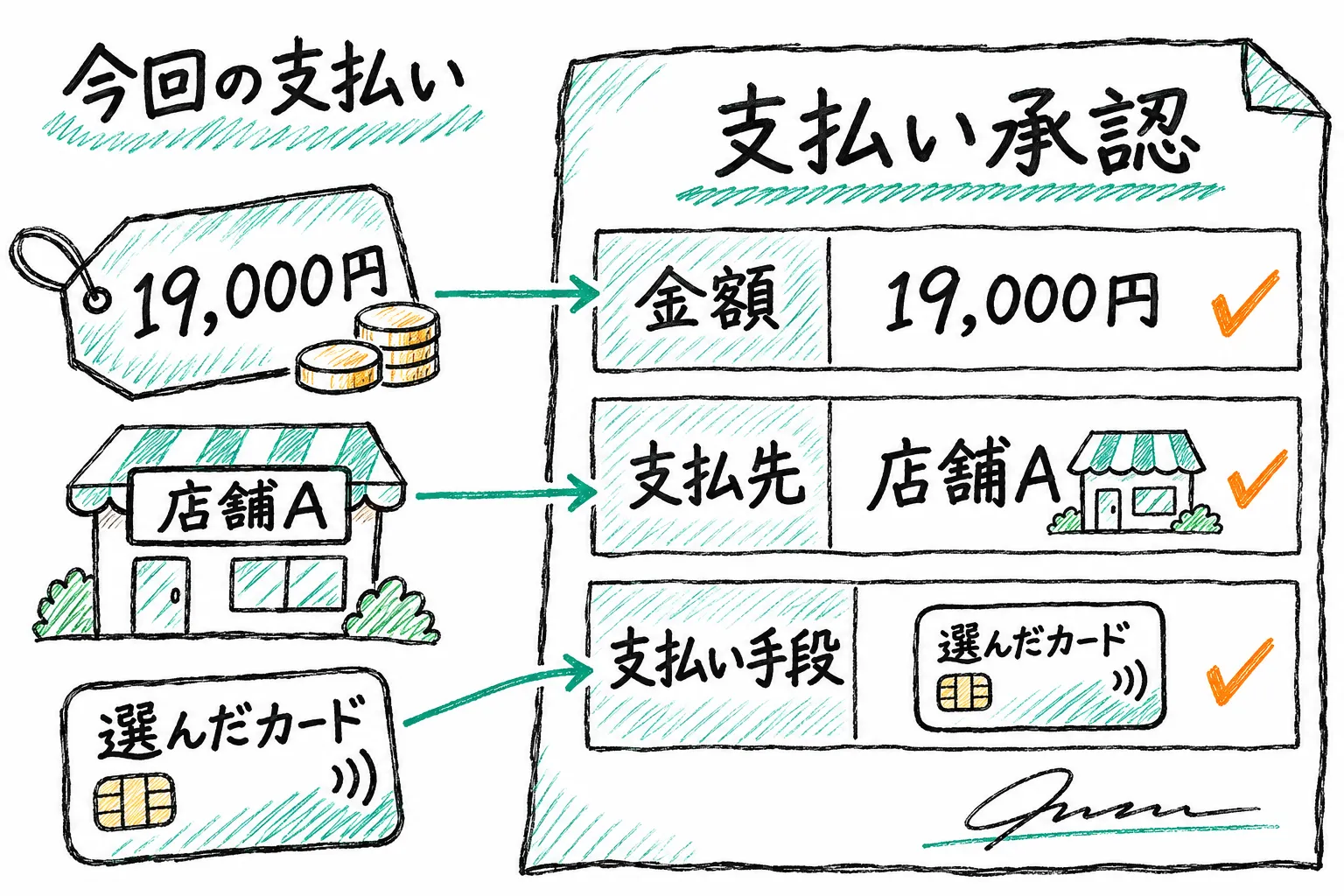
If the headphones from Store A cost JPY 18,000 and shipping costs JPY 1,000, the total amount the user approves is JPY 19,000.
After displaying the item and shipping charges, the interface identifies the separate payment terms to which the user consents.
| Item to approve | Details for this purchase |
|---|---|
| Total | JPY 19,000 including shipping |
| Payee | Store A |
| Payment instrument | The card selected by the user |
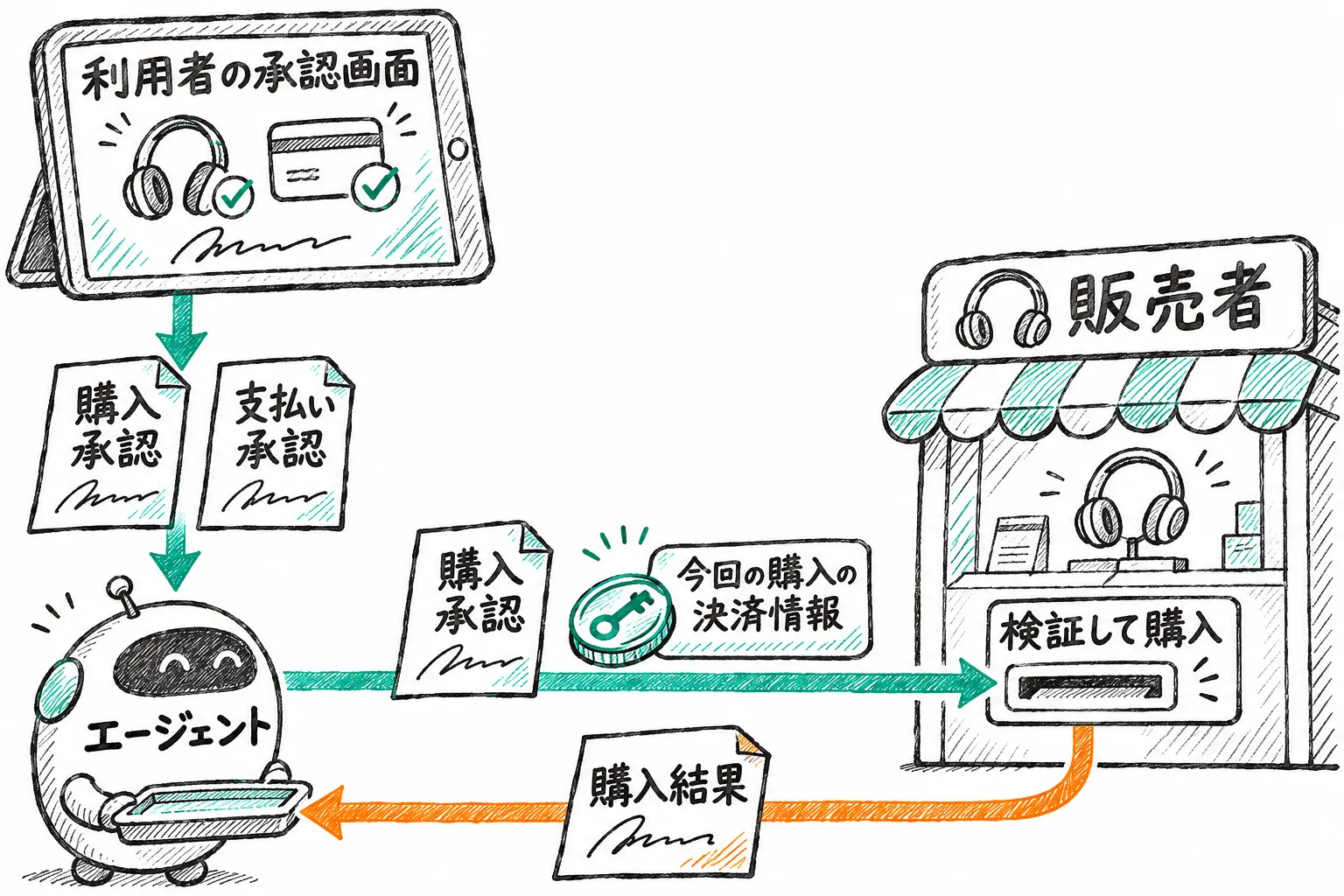
- The agent receives the signed checkout details from the merchant It constructs the values for the Checkout Mandate and Payment Mandate from checkout details containing one pair of headphones and the shipping charge.
- The approval interface displays the checkout and payment details After the user consents and authenticates, two mandates authorizing this specific transaction are created.
- The agent sends the Payment Mandate to the
Credential ProviderIf verification succeeds, payment credentials limited to this purchase are returned. - The agent sends the Checkout Mandate and payment credentials to the merchant The merchant verifies the mandate and checks the checkout details. In a merchant-initiated charging model, the merchant requests payment processing from the payment processor.
- The merchant and payment processor return signed results The application stores the checkout and payment results together, preserving their relationship.
In this flow, consent to the checkout details is a prerequisite for payment, and verification of the Payment Mandate leads to the provision of payment credentials. The agent carries information to the recipients but cannot replace the approved content or the verification results at its own discretion.
In a model where the payer transfers funds to the merchant, the merchant receives confirmation of the transfer and verifies that it has received the funds. The exchange of payment credentials or transfer confirmations follows the payment method used by the counterparty.
Try the Approval Binding
Select and approve the checkout conditions, then change the quantity or delivery method and run verification. The approval continues to refer to the original details. Using the changed details requires returning to the approval step.
approval-binding ap2 as "購入内容と2つの承認" [version: 1, note: "承認後に条件を変え、参照先の違いを確かめます。"]

product order as "ヘッドホン" [price: 18000, quantity: 1, min: 1, max: 3, currency: JPY, artwork: headphones]
variant black as "ヘッドホン(黒)" [of: order, tone: dark, initial: true]
variant white as "ヘッドホン(白)" [of: order, tone: light]
delivery standard as "通常配送" [of: order, fee: 1000, initial: true]
delivery express as "速達配送" [of: order, fee: 1500]
payee store_a as "店舗A" [initial: true]
payee store_b as "店舗B"

approval checkout as "購入承認" [color: blue]
approval payment as "支払い承認" [color: violet]
reference checkout_ref as "購入への参照" [from: checkout, to: order]
reference payment_ref as "購入への参照" [from: payment, to: order]

response normal as "通常どおり応答" [outcome: normal, initial: true]
response lost as "応答が届かない" [outcome: lost]
control approve as "この内容を承認する" [action: approve]
control verify as "承認を検証する" [action: verify]
control reset as "最初から" [action: reset]
The symbols A and B in the diagram distinguish checkout details within this educational example.
Actual AP2 represents this relationship using a hash of the merchant-signed checkout details and also verifies the mandate signatures.
The diagram is an educational tool for repeatedly testing the relationships. It does not generate or verify signatures, place orders or execute payments.
Binding Checkout Details to Payment
We can examine the checkout reference, payee and amount used during approval by looking at the main data fields. We will consider the Checkout Mandate for the merchant separately from the Payment Mandate for the provider of payment credentials.
Checkout Mandate Verified by the Merchant
The merchant signs the checkout details it will present to the user and returns them to the agent.
This signed data uses a format called JWT and is placed in the Checkout Mandate's checkout_jwt field.
The Checkout Mandate also records checkout_hash, calculated from that string.
The following example shows the main fields after decoding the mandate and applying the necessary disclosures.
Decoding a JWT is different from decrypting it. Extracting its contents alone does not verify the signature.
This illustrative JSON is intended to show the relationship between the values.
It omits the process of generating a token containing signatures and disclosures, so it cannot be sent as-is.
{
  "vct": "mandate.checkout.1",
  "checkout_jwt": "<販売者署名済みの購入内容JWT>",
  "checkout_hash": "<checkout_jwtのハッシュ>"
}
vct identifies the mandate type and version of its data format.
The merchant checks the entire value, including the trailing .1, and validates the data as that type.
The merchant checks that the value calculated from the checkout JWT presented for approval matches checkout_hash.
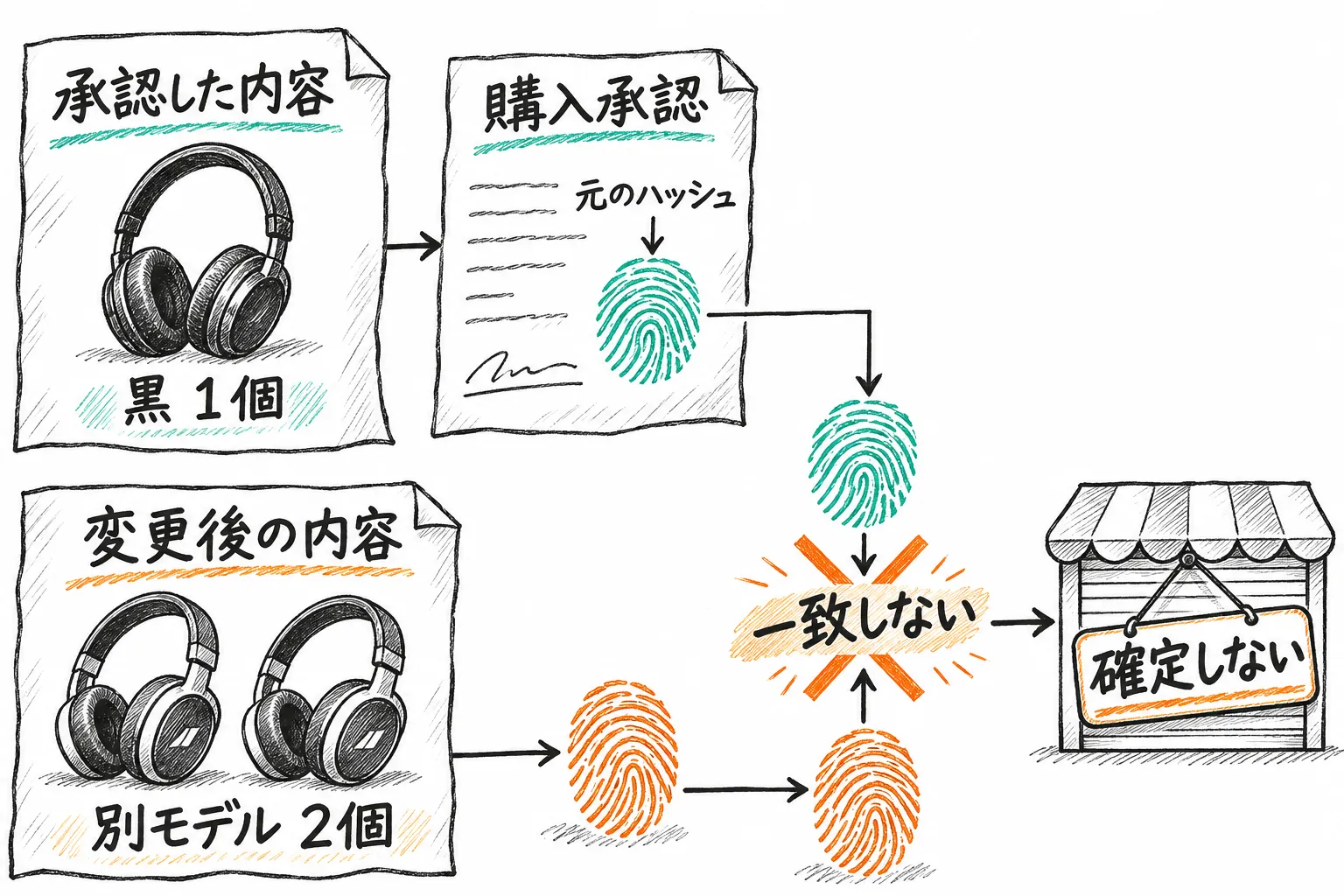
For example, suppose the user consents to one pair of black headphones and the agent then changes the purchase to two units of a different model. The merchant does not finalize the changed checkout using a mandate bound to the original hash. To proceed with the new details, it returns to a flow in which authorization for those details can be verified.
Payment Mandate Verified by the Payment Side
The Payment Mandate records a reference to the checkout and the conditions under which payment is authorized.
The Credential Provider verifies this mandate and returns a payment token that can be used for the specified purchase.
Here too, simply receiving authorization data is not enough to release payment credentials.
As with the Checkout Mandate, the following illustrative JSON shows only the main fields after decoding.
{
  "vct": "mandate.payment.1",
  "transaction_id": "<checkout_jwtのハッシュ>",
  "payee": {"id": "<店舗Aの識別子>", "name": "店舗A"},
  "payment_amount": {"amount": 19000, "currency": "JPY"},
  "payment_instrument": {
    "id": "<選択したカードの識別子>",
    "type": "card",
    "description": "<利用者に表示するカードの説明>"
  }
}| Field | What the payment side verifies |
|---|---|
transaction_id |
The hash of the same checkout details referenced by the Checkout Mandate's checkout_hash |
payee |
Store A, which receives the payment |
payment_amount |
JPY 19,000 in JPY |
payment_instrument |
The payment instrument selected by the user |
Amounts are represented as integers in the currency's smallest unit.
For Japanese yen, 19000 represents JPY 19,000, the total for this purchase including shipping.
Moreover, transaction_id is not an arbitrary order number. It records the hash of the checkout details.
When the merchant uses the returned payment credentials, the payment processor also checks whether those credentials are authorized for this purchase. Checking both the checkout reference and the payee makes it possible to reject an attempt to extract only the approved amount and use it to pay a different merchant.
Purchases Authorized in Advance
If a purchase is delegated while the user is away, the permitted scope is established before product selection is complete. For example, the user might delegate a purchase subject to the following conditions.
| Item to authorize | Condition |
|---|---|
| Item and quantity | One pair of black or white headphones |
| Merchant | Store A |
| Total | No more than JPY 20,000 including shipping |
| Deadline | By the end of today |
The flow in which the user consents to the conditions first and the agent selects a specific purchase within those conditions is called Human Not Present, or Autonomous.
A conditional mandate that is not yet bound to a specific transaction is open, while a mandate bound to a specific checkout or payment is closed.
Both are authorization data. The terms do not mean that open is unapproved and closed is approved.
In direct approval, the user reviews the closed details; in advance approval, the user reviews the open conditions.
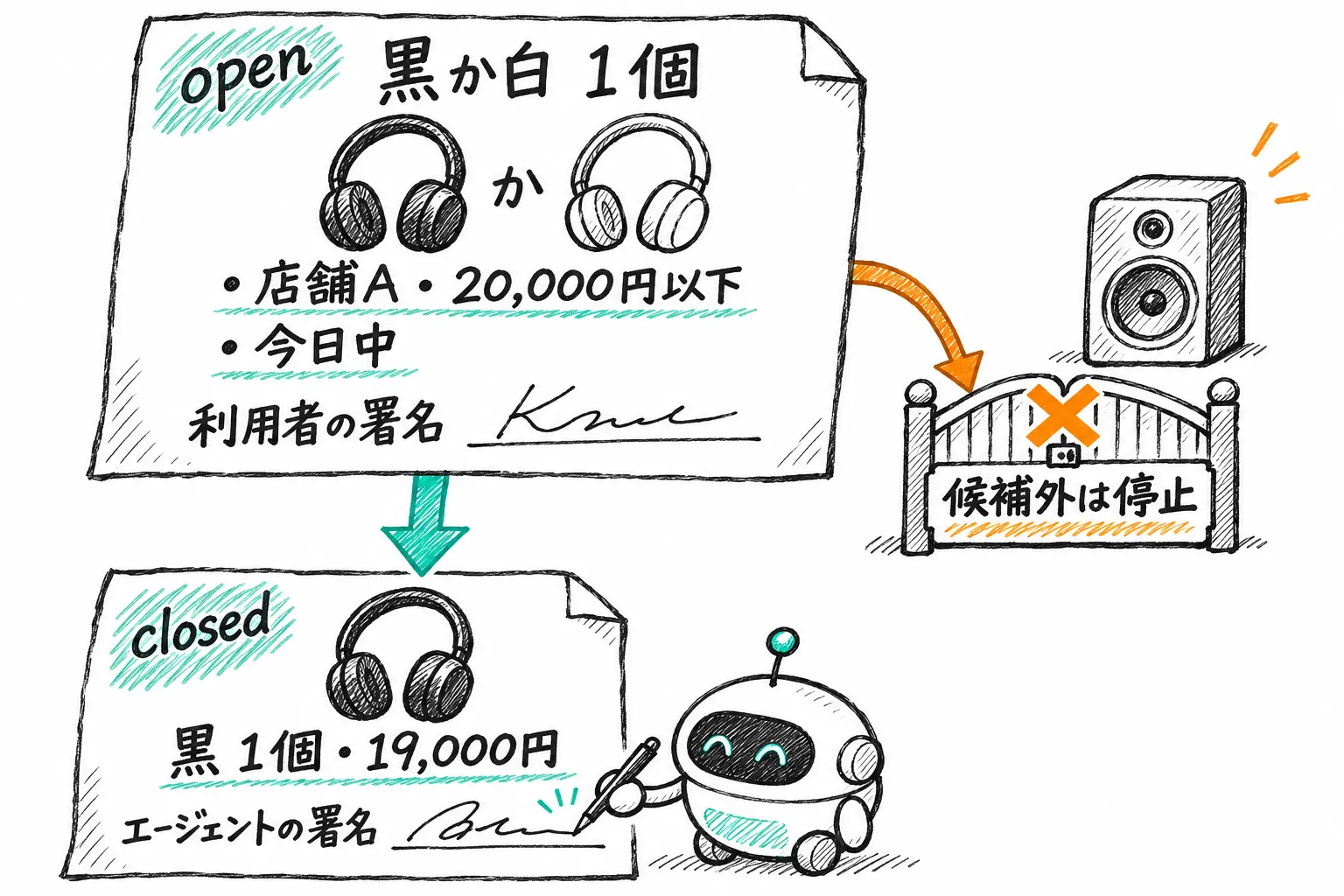
Advance approval also specifies the public key the agent may use, along with the conditions.
When the agent obtains the checkout details for JPY 19,000, it signs the closed mandate with its own key.
Recipients obtain both the user-authorized open mandate and the agent-signed closed mandate, then verify that the specified key was used and that the transaction falls within the conditions.
- The user reviews the permitted conditions in the approval interface
Create checkout and payment
openmandates and specify the agent key that may be used. - The agent receives checkout details satisfying the conditions
Sign the checkout and payment
closedmandates bound to the merchant-provided checkout details using the specified key. - The agent presents the necessary
openandclosedmandates to each verifier The verifier checks the delegation and every constraint, processing only transactions that pass. - The application stores signed results Record what was executed under which advance authorization and use this information when determining whether subsequent execution is permitted.
If the price rises to JPY 20,500 or only products outside the permitted candidates remain, the agent does not proceed with the purchase under this authorization. Permitting the agent to make a selection does not give it authority to rewrite the conditions.
Item and Merchant Conditions
The permitted item candidates and quantities specified by the user are recorded in the checkout open mandate's constraints array.
The merchant condition is checkout.allowed_merchants, and the item and quantity condition is checkout.line_items.
The following illustrative JSON shows the checkout conditions, omitting signature and key information.
{
  "vct": "mandate.checkout.open.1",
  "constraints": [
    {
      "type": "checkout.allowed_merchants",
      "allowed": [{"id": "<店舗Aの識別子>", "name": "店舗A"}]
    },
    {
      "type": "checkout.line_items",
      "items": [{
        "id": "<商品要件の識別子>",
        "acceptable_items": [
          {"id": "<黒のヘッドホンの商品識別子>", "title": "黒のヘッドホン"},
          {"id": "<白のヘッドホンの商品識別子>", "title": "白のヘッドホン"}
        ],
        "quantity": 1
      }]
    }
  ]
}
The merchant verifies that it is among the allowed merchants and that the checkout line items satisfy the specified requirements. This example permits buying one pair of either black or white headphones. Buying one of each fails the quantity requirement, and buying one unit of a model outside the candidate list fails the item requirement.
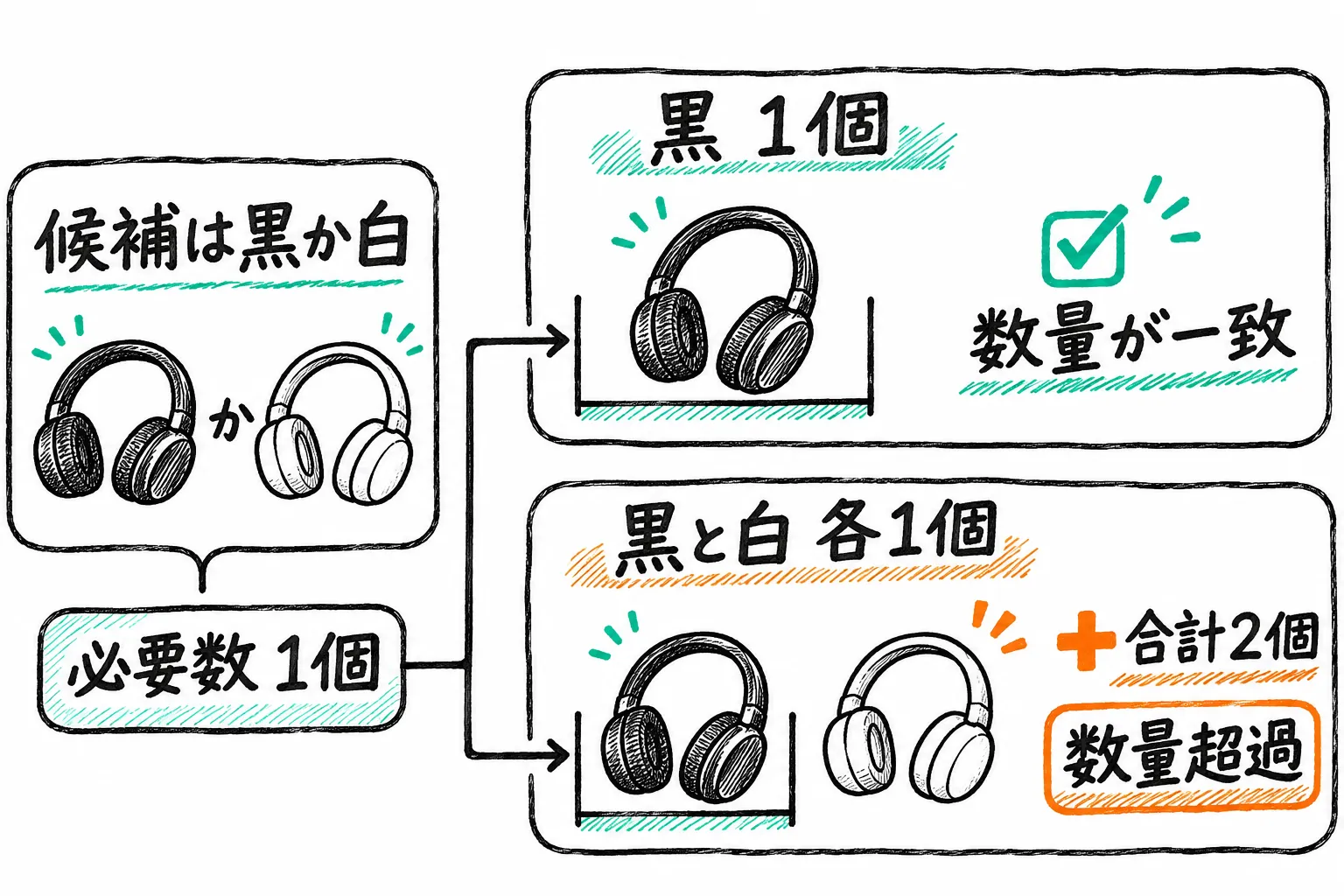
When there are multiple purchase requirements, the verifier checks not only the required quantity for each requirement but also whether all items in the checkout correspond to those requirements. The same item or requirement cannot be counted twice to satisfy the constraints. This constraint does not cover splitting one Checkout Mandate across multiple checkouts, so it cannot be interpreted as allowing the purchase to be divided into separate orders.
Amount and Execution Conditions
Even when the selected item matches the permitted candidates, payment cannot be authorized if the amount or payee differs.
The payment open mandate records the following conditions as separate constraints.
- Payment amount
- Payee
- Payment instrument
- Execution timing
Combining these with the checkout conditions limits how much can be spent on which purchase.
Per-Payment Amount and Payee
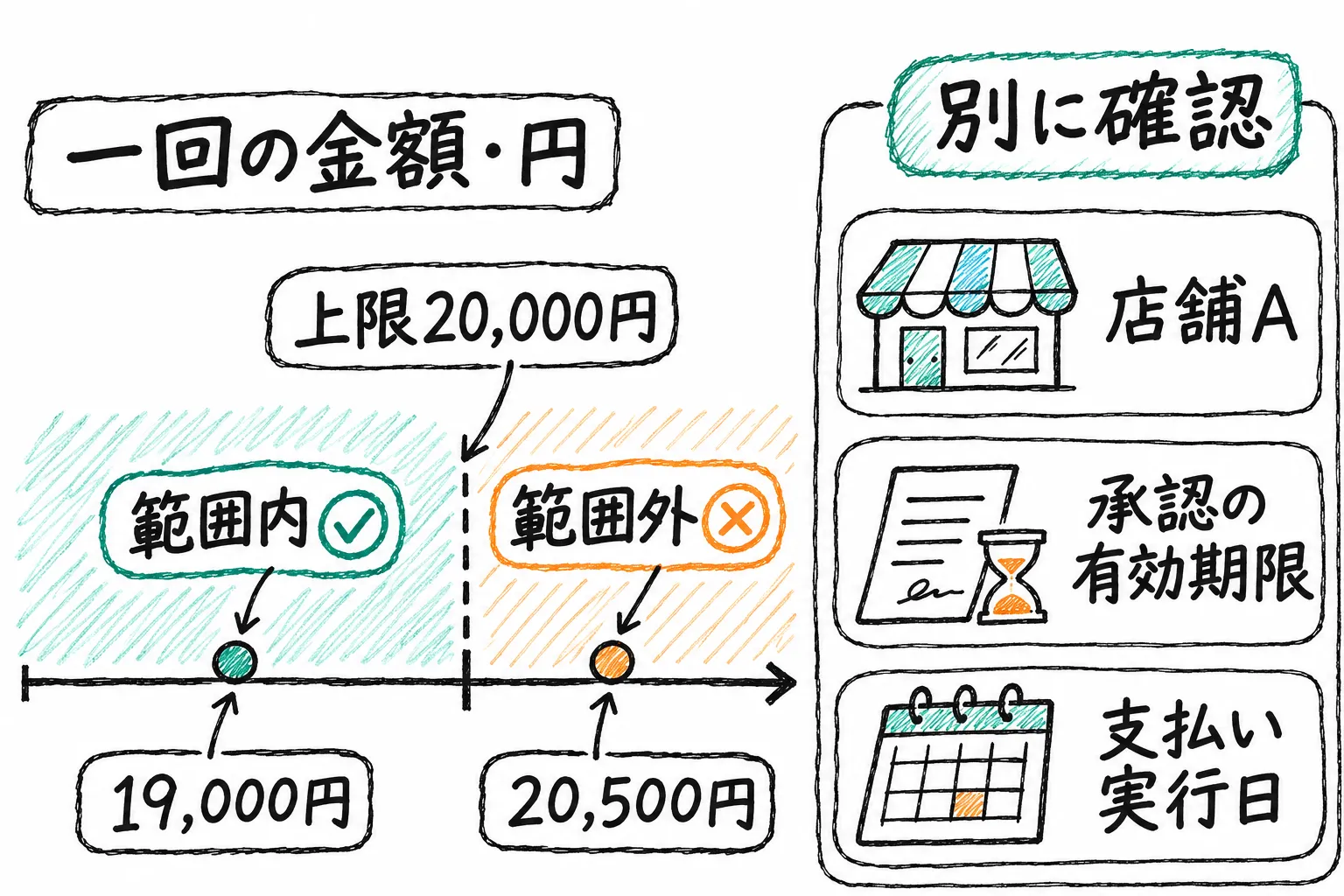
Use payment.amount_range to set a limit for a single payment.
With currency JPY and maximum max set to 20000, JPY 19,000 is within the range and JPY 20,500 is outside it.
The following example isolates a single amount-range constraint from the Payment Mandate's constraints array.
{
  "type": "payment.amount_range",
  "currency": "JPY",
  "max": 20000
}
The payment side verifies both the total and the currency.
Even when the numerical value is no more than 20,000, a payment in a different currency from the authorized one cannot pass.
The merchant can be restricted using payment.allowed_payees and payment instruments using payment.allowed_payment_instruments. These are evaluated separately from whether the amount is within range.
Mandate Expiry and Payment Execution Date
In the example of delegating a purchase by the end of today, the exp field indicating the mandate's expiration is set to a short period.
AP2 does not require exp for every mandate, but recommends the shortest validity period that allows the delegated task to be completed for advance approval.
The longer a mandate remains usable, the longer it can be used after it is no longer needed.
The permitted payment execution period, by contrast, is specified using payment.execution_date.
Whether the authorization data itself is valid and whether the payment may be executed on a particular date are separate conditions.
Checking expiry does not establish that the execution-date constraint has also been satisfied. Each specified condition is verified independently.
Recurrence and Cumulative Budget
payment.agent_recurrence specifies conditions for recurring payments under the same authorization, and payment.budget limits cumulative spending.
Even when an individual payment falls within its limit, adding it to the amount already spent may exceed the budget.
The evaluator therefore stores previous expenditure and execution counts and checks the result of adding the current payment.
A valid signature alone cannot enforce a cumulative budget without checking previous usage.
The budget examples and schema in the examined v0.2 specification also leave some uncertainty about how the amount units correspond.
When implementing cumulative budgets, confirm the units with the counterparty rather than assuming the same integer representation used for a single-payment amount range.
Mandate Verification
The merchant checks whether the received Checkout Mandate authorizes the current checkout.
The Credential Provider and any necessary payment network verify the Payment Mandate, and the payment processor checks that the supplied payment credentials are authorized for the current purchase.
Separating who selects the product from who authorizes execution avoids proceeding with orders or payments solely on the basis of text generated by the agent.
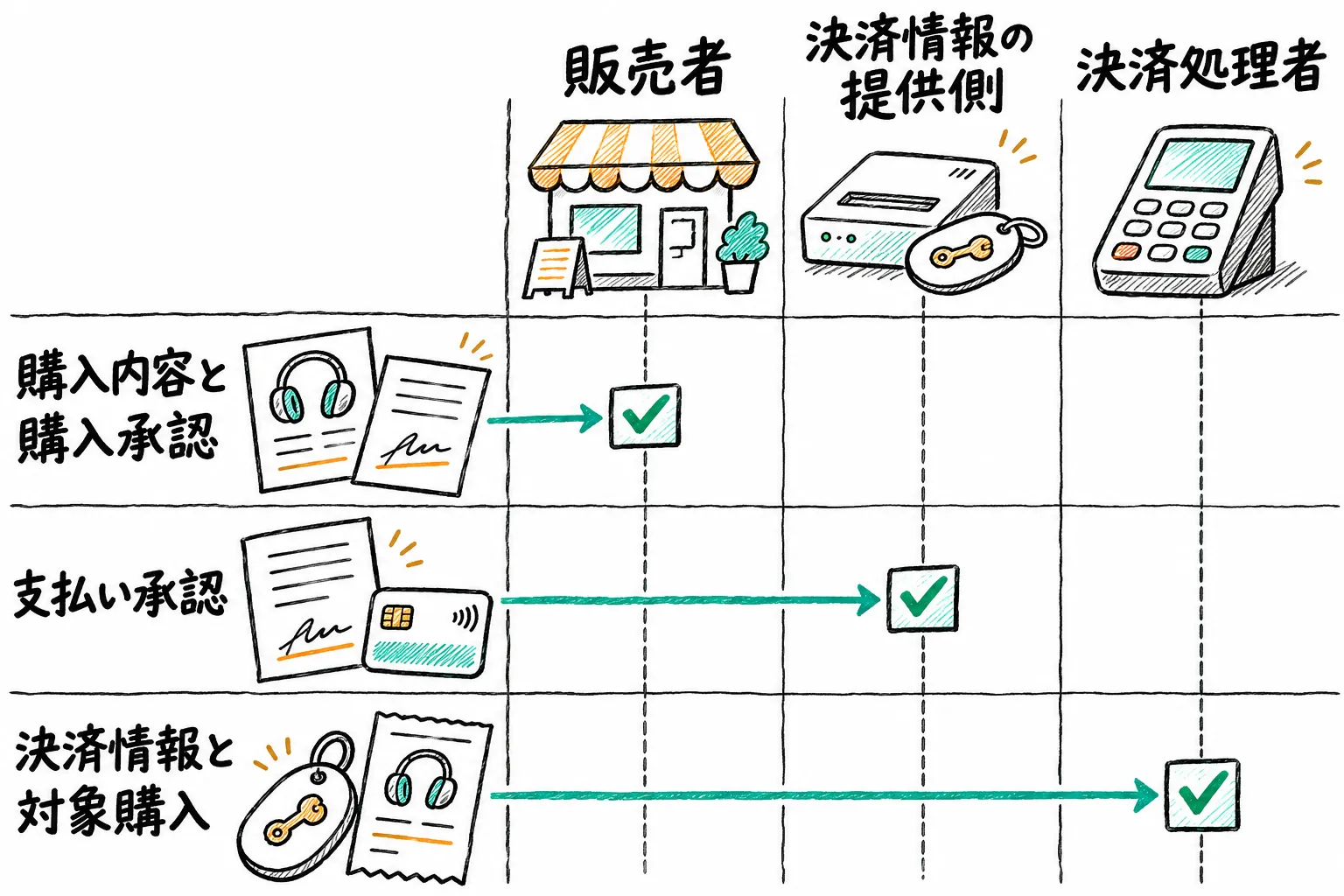
These checks are performed by deterministic code that processes the same input according to defined rules.
Even when a large language model (LLM) selects products or communicates with other parties, signature and constraint decisions cannot be delegated to the LLM.
For example, generating text that authorizes JPY 20,500 as an exception to a JPY 20,000 limit does not change the verification result.
Separating the Approval Interface from Signing Keys
If the items or amount displayed in the approval interface differ from what is signed, the user's consent cannot be established.
The Trusted Surface implements the process from display through consent, authentication and mandate creation as non-agent code.
Although the agent may supply purchase candidates, it must not have a path to create mandates freely without consent.
There are two approaches for verifiers to trust the mandate: using the user's credential or directly trusting the agent provider.
With the former, User Credential, the verifier establishes the trust relationship behind the mandate through an issuer it trusts.
With the latter, Trusted Agent Provider, a provider trusted by the verifier signs the mandate.
Both have the responsibility of obtaining the user's consent through the approval interface.
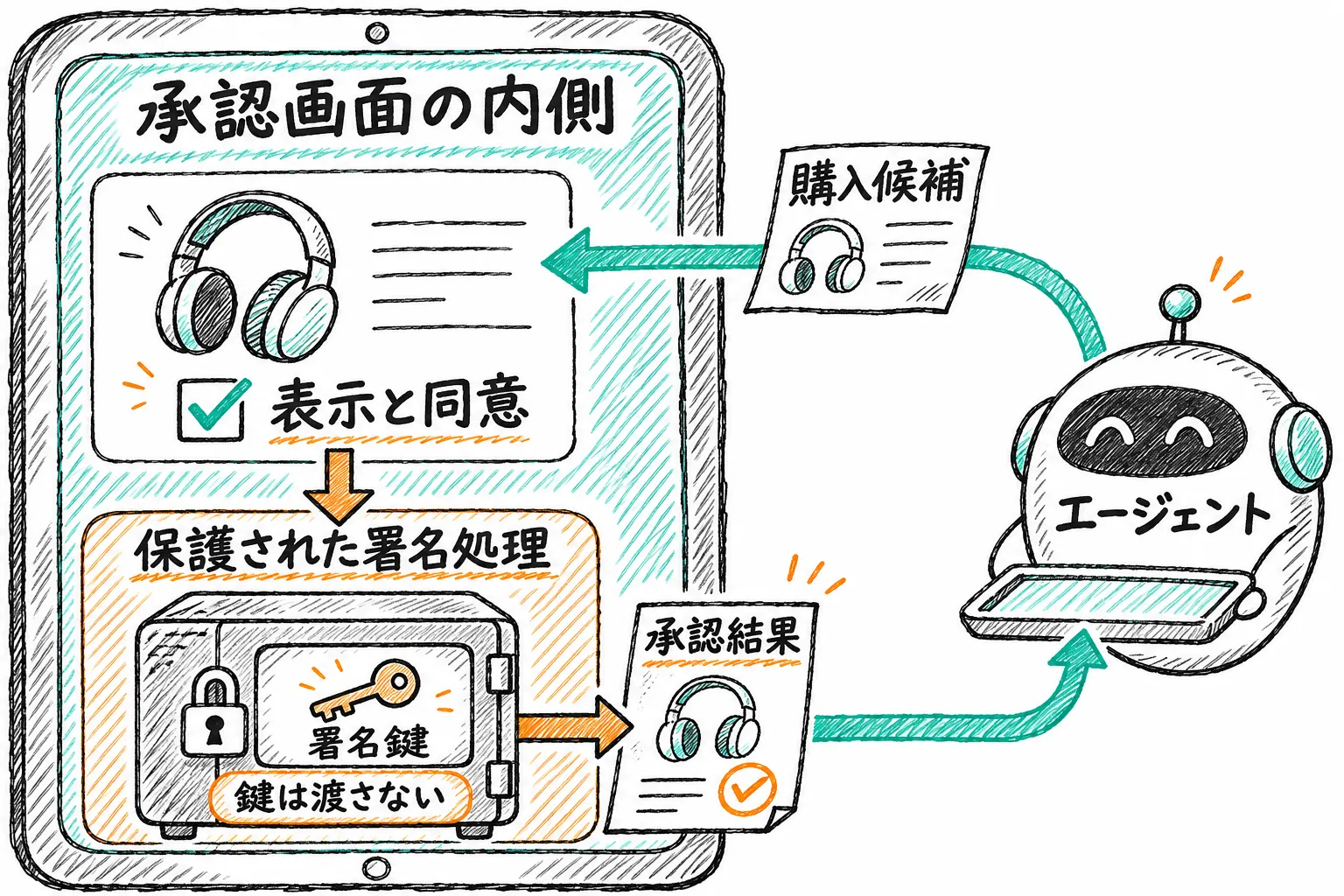
Even when the provider signs, the architecture prevents the agent from accessing the provider's signing key or using that key without going through the approval interface.
In advance approval, the authority given to the agent is the authority to sign a closed mandate within the approved conditions.
Separating the key that establishes the user's approval from the agent key that signs subsequent specific transactions prevents conditional authority from being used to rewrite the original approval itself.
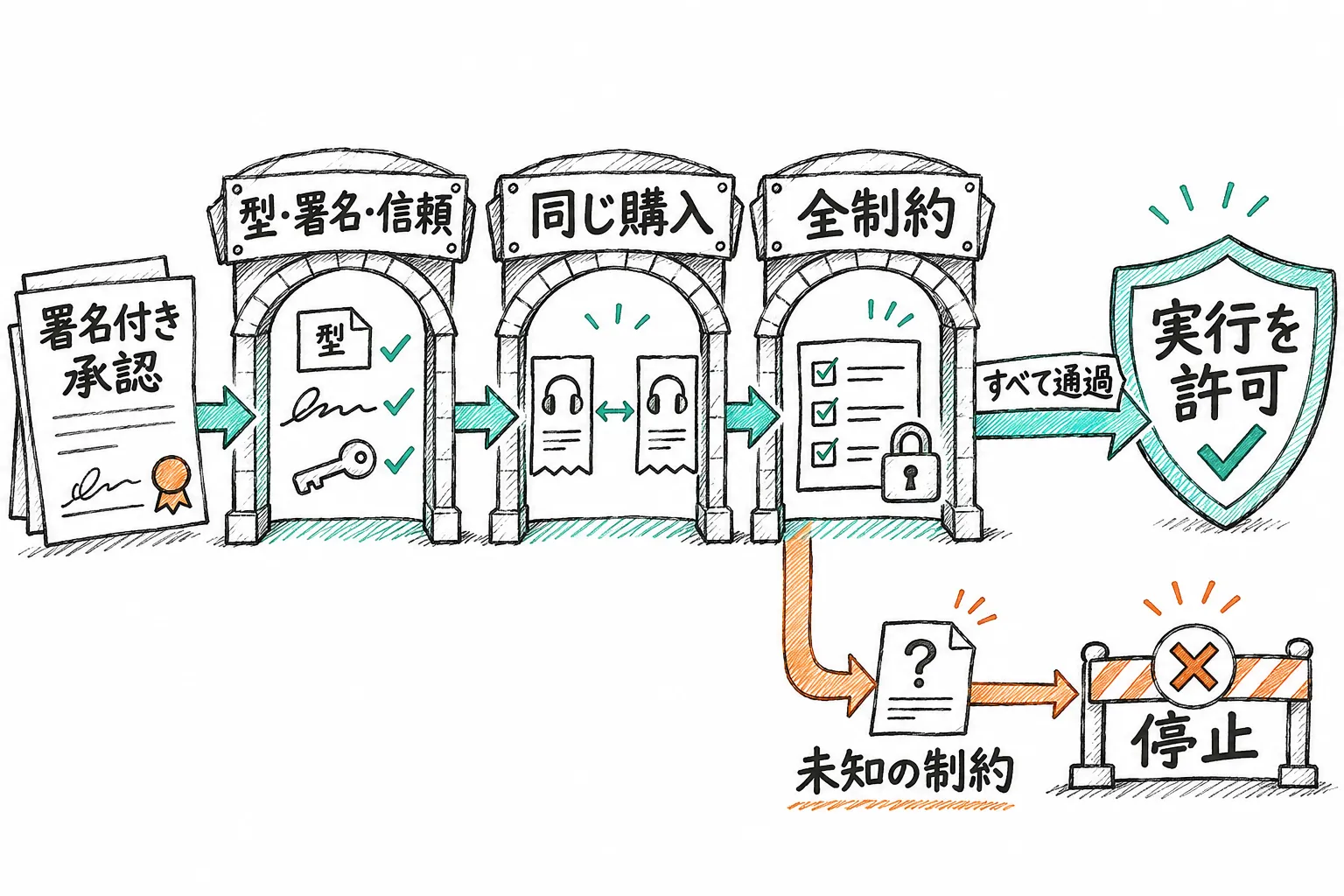
Checking Signatures and Constraints
Checking the signature alone cannot establish whether the current product and amount fall within the permitted scope. Verifiers check the mandate's validity against each condition.
- The mandate issuer is trusted.
- For advance approval, the specified agent key signed the mandate.
- The target checkout matches the mandate.
- Every constraint in the mandate is satisfied.
JSON Schema is also used to check field types, but passing schema validation alone cannot authorize execution.
Delegation and Checkout References
Mandates use SD-JWT, a signed format that allows only the necessary fields to be selectively disclosed to a recipient.
For advance approval, the verifier checks the delegation relationship from open to closed and the signature made with the key specified by cnf.
cnf specifies the key authorized to use the mandate and is required in an open mandate.
The payment open mandate also references the advance checkout authorization to which the payment applies.
The conditional_transaction_id in the payment.reference constraint points to the hash of the checkout open mandate.
Even when the item and payment conditions are authorized separately, this prevents the delegation from being substituted with one for a different purchase.
Once a specific checkout has been selected, the Checkout Mandate's checkout_hash and the Payment Mandate's transaction_id refer to the hash of the same checkout_jwt.
The calculation uses the original string representation of the merchant-signed JWT, not a reserialized version of the extracted JSON.
The hash algorithm follows the mandate's _sd_alg, defaulting to sha-256 if none is specified.
Verifying Approved Values and All Constraints
If the user fixed a value in the open mandate, the verifier checks that the value has not changed in the closed mandate.
It then evaluates every constraint in the open mandate and rejects execution if even one is not satisfied.
Unknown constraints also cause verification to fail, so unsupported conditions cannot simply be ignored to let a purchase proceed.
The following verifier-side pseudocode illustrates this order. The function names are illustrative, representing operations such as signature verification and usage checks.
def authorize(open_mandates, closed_mandate, checkout_jwt, usage):
    verify_signatures_and_trust(open_mandates, closed_mandate)
    verify_types_and_delegation_keys(open_mandates, closed_mandate)
    verify_applicable_times(open_mandates, closed_mandate)
    verify_references(open_mandates, closed_mandate, checkout_jwt)
    verify_preserved_values(open_mandates, closed_mandate)
    for mandate in open_mandates:
        for constraint in mandate["constraints"]:
            evaluator = evaluators.get(constraint["type"])
            if evaluator is None:
                raise UnresolvedConstraint()
            if not evaluator(constraint, closed_mandate, usage):
                raise UnresolvedConstraint()
return Authorized()- Verify signatures and trust relationships
verify_signatures_and_trustchecks the signatures of each mandate against the basis for trusting the signer. - Check the mandate types and delegate keys
verify_types_and_delegation_keyschecks the mandate types and data formats and confirms that the delegate signed with the specified key. - Check the valid time periods
verify_applicable_timeschecks mandate validity periods and permitted execution times. - Check references to the current checkout
verify_referenceschecks references between mandates and their correspondence with the merchant-signed checkout details. - Check values fixed in advance
verify_preserved_valueschecks that fixed values in theopenmandate remain unchanged in theclosedmandate. - Extract every constraint from each mandate
The outer
forloop selects eachopenmandate, and the innerforloop extracts each constraint from that mandate. - Select the verifier for the constraint
evaluators.getretrieves the function corresponding to the constraint type. If it does not exist, the firstUnresolvedConstraintrejects execution. - Evaluate the constraint
The evaluator receives the current mandate and usage information. If the condition is not satisfied, the second
UnresolvedConstraintrejects execution. - Authorize only requests that pass every check
Return
Authorizedonly if none of the checks rejected the request.
In an actual implementation, budget and usage-state checks and updates are also combined with concurrency control.
Disclosed Information and Original Records
Even when authorization permits buying either black or white headphones, sending candidates unnecessary to verify the selected product would reveal additional purchase intent.
The agent presents only the disclosures from the open mandate needed for the current verification, and the recipient verifies those disclosures and signatures.
Even when limiting disclosures, all constraints necessary for the current purchase are evaluated.
To check the correspondence between checkout and payment later, however, the original data from which hashes can be recalculated is required.
Store the original compact representation of the SD-JWT used for transmission, along with its disclosures.
Also preserve the relationships between the Checkout Mandate, Payment Mandate and their respective processing results.
AP2 does not prescribe a retention period, an API for retrieving records or a dispute adjudication procedure.
Recording Results and Re-execution
Even after the user approves a purchase, the subsequent payment may not succeed.
The application stores authorization data separately from the execution results returned by the merchant and payment processor.
A signed result returned by a recipient to indicate acceptance or rejection of processing is called a Receipt.
The merchant returns a Checkout Receipt, and the payment processor returns a Payment Receipt.
Each contains Success or Error in status, and reference points to the hash of the processed closed Mandate.
This reference is different from the hash of checkout_jwt shared by the two mandates.
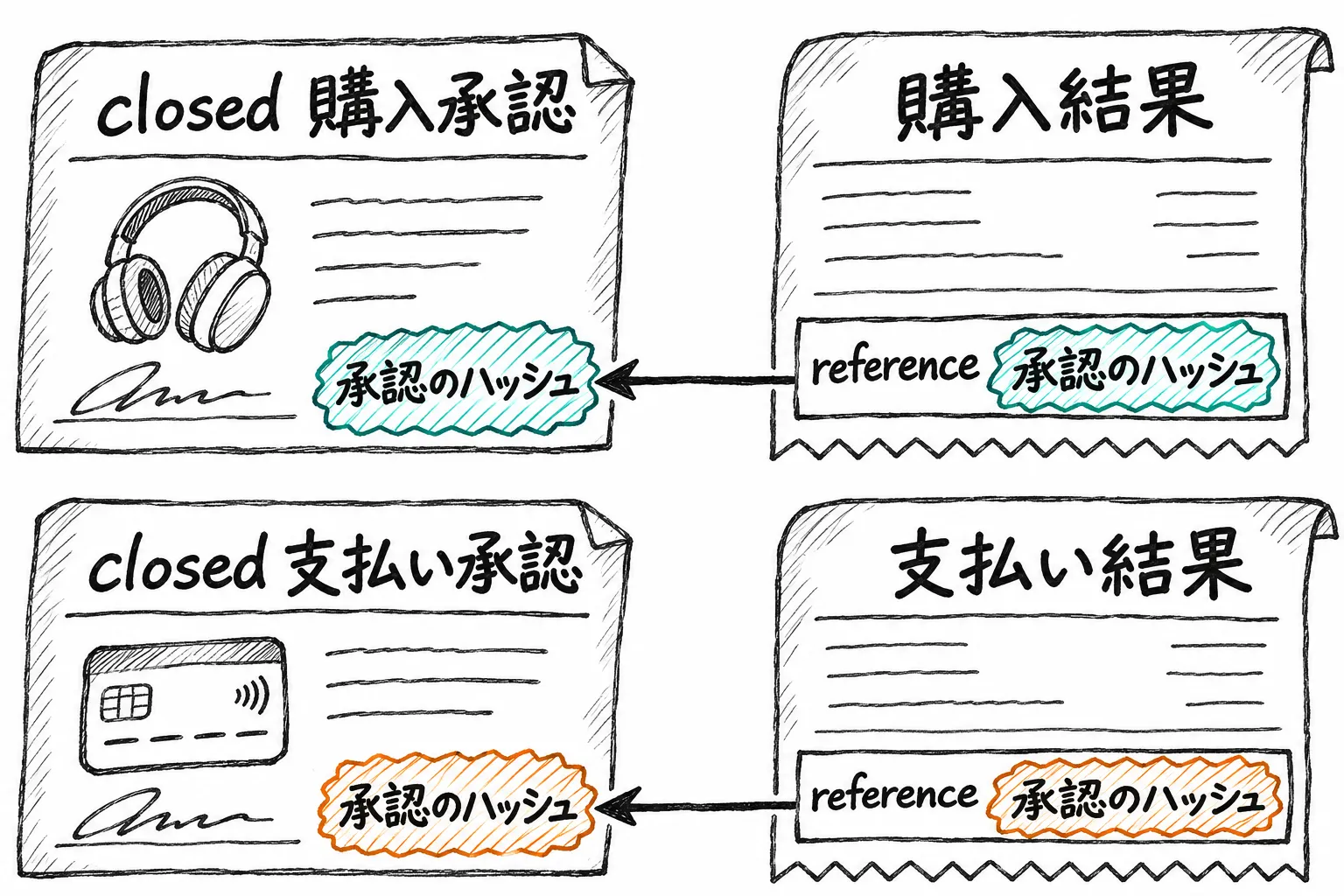
| Result | Target of reference |
Transaction identifier |
|---|---|---|
| Checkout result | Hash of the processed closed Checkout Mandate |
order_id on success |
| Payment result | Hash of the processed closed Payment Mandate |
payment_id |
The application verifies the result signature and its reference to establish which mandate the result corresponds to.
In the event of an error, error and error_description identify the cause.
The Payment Receipt's payment_id is required even on error, so its presence alone does not establish success.
Successful payment results may also contain psp_confirmation_id or network_confirmation_id, indicating confirmation by a payment service or network.
Where to Return After Failure
Where the application returns the user depends on why verification failed. For example, if the signature or mandate itself is invalid, the request is terminated. If conditions cannot be evaluated, the application can return to a flow where the user directly approves specific checkout details. Error codes distinguish these cases.
| Error | Handling |
|---|---|
invalid_credential |
Terminate the request because the credential is invalid |
invalid_mandate |
Terminate the request because the mandate is invalid |
unresolved_constraint |
The condition cannot be verified; consider returning to direct approval of specific details |
mandates_not_supported |
Consider returning to a non-agent purchase flow using the merchant's ordinary interface |
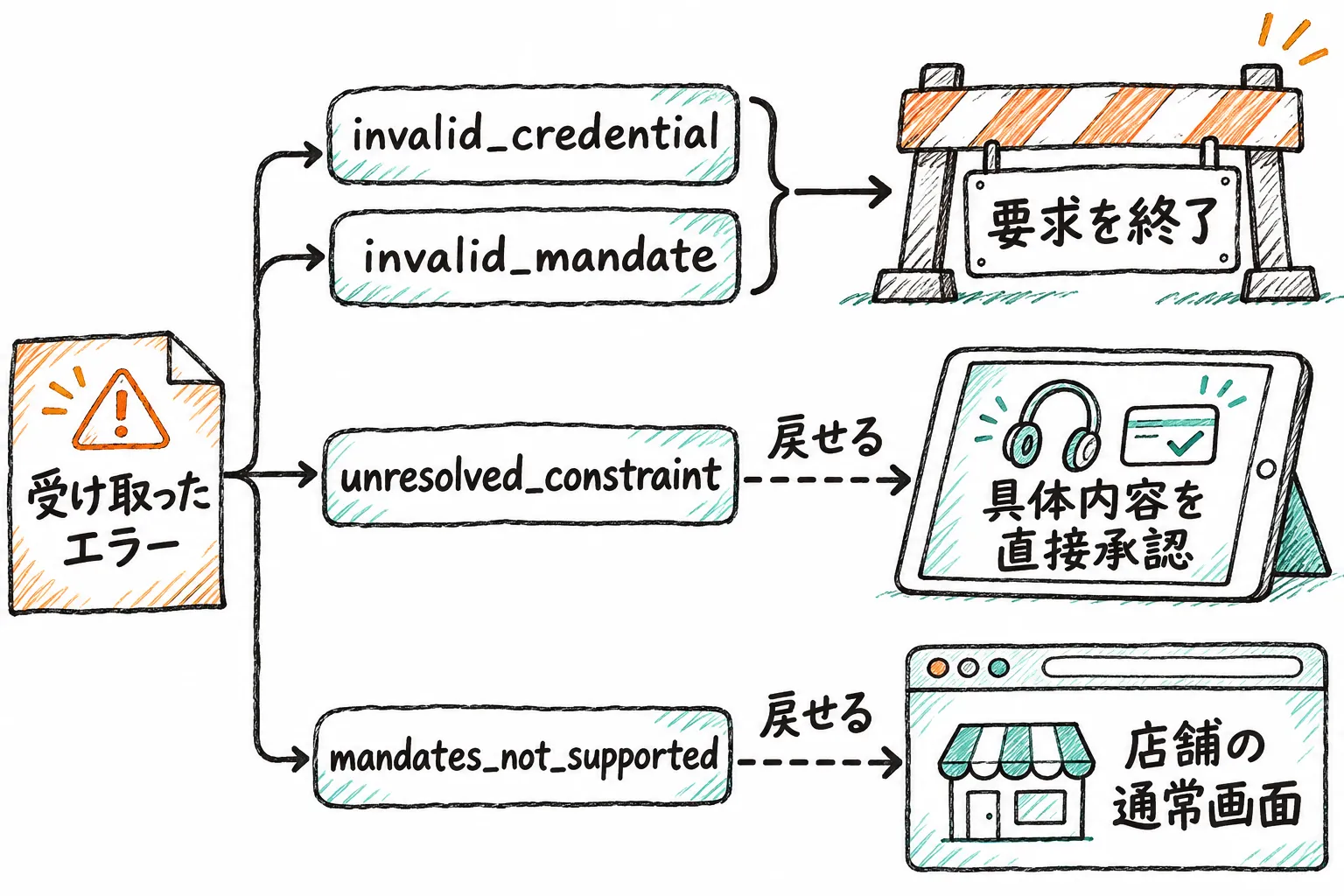
On receiving unresolved_constraint, do not remove the problematic condition and resend the request.
Doing so would expand the scope the user authorized conditionally.
When returning to direct approval, display the items and amount to be executed and obtain consent again.
Do not treat terminal errors as resolved by automatically resending the same input. Record that the request has ended.
Missing Responses and Duplicate Execution
If a result does not arrive, the application cannot conclude that the checkout or payment failed. The merchant may have completed processing and only the response may have been lost. The application keeps the outcome unconfirmed, distinguishing it from a confirmed rejection.
AP2 requires avoiding multiple signatures for duplicate closed mandates from the same open mandate, which would increase execution, before receiving a rejection Receipt for the previous mandate.
Creating another Checkout Mandate because a result is delayed could cause the same purchase to be completed more than once.
The Receipt used for that decision is also protected from modification by the agent's LLM.
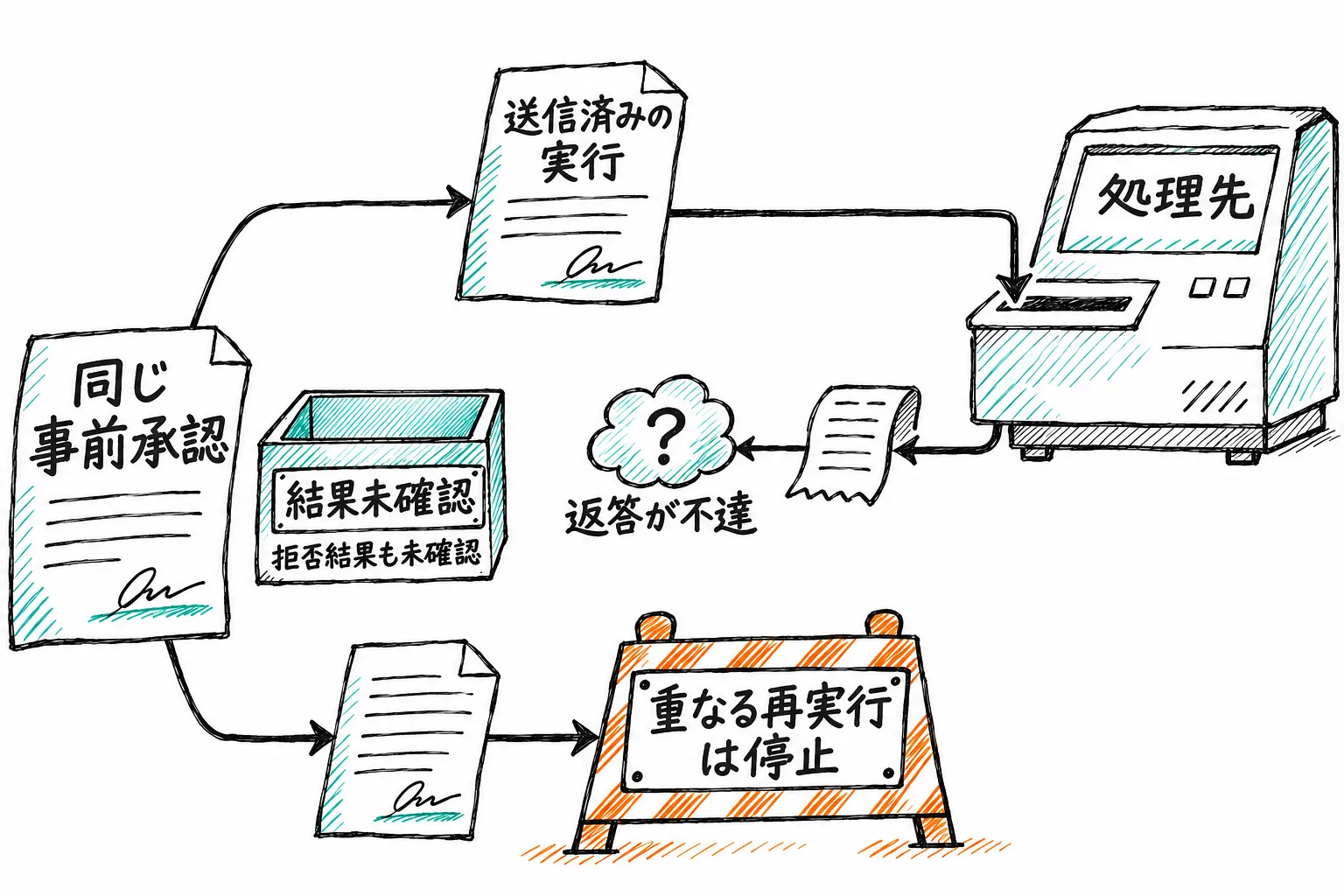
Operationally, provide a way to reconcile stored mandates and results against the counterparty's transaction records or through the responsible provider.
This is an operational decision for the implementer, not an indication that AP2 defines a common status-query API.
Until the unconfirmed state is resolved, the architecture avoids issuing overlapping new transactions based solely on a timeout.
In addition to signed mandates, combine payment-side duplicate detection, records of used authorizations and concurrency control. Operations such as cancellation and refunds must also be designed with the counterparties. Connect mandate signature verification with duplicate-prevention and post-transaction processing.
Adoption Requirements and Scope
When an agent conveys mandates to a party with which it exchanges checkout details, the counterparty needs a way to verify those mandates.
Integrating AP2 requires connecting commerce operations with merchant-signed checkout creation, an approval interface, signature trust relationships and constraint verification.
Providing payment credentials limited to the current purchase and storing results and usage information must also work before purchases can be executed within the scope authorized in advance.
When a user buys directly through the merchant's ordinary interface and the approval interface and merchant communicate without an agent as intermediary, existing purchase flows are also an option.
The main scope of AP2 is enabling parties to verify what the user has authorized when an agent proceeds with a transaction.
It does not guarantee product quality, delivery or selection of the cheapest item.
ACP and UCP, which define commerce procedures, and AP2, which handles approval of checkout details and payments, have different scopes.
The MPP known as Machine Payments Protocol is also a separate protocol for paying API usage fees.
The formal name for the payment processor in AP2 is Merchant Payment Processor. Because it is also abbreviated MPP, this article uses the term payment processor to distinguish it.
Redelegation from one agent to another is outside the scope of v0.2.
Check ambiguous descriptions of cryptographic algorithms and constraints against the version being adopted, the counterparty and the verification library.
Common processing performance, token size limits and overall cancellation or revocation procedures likewise cannot be specified as uniform values or operations from the examined materials alone.
Summary
AP2 separates checkout and payment authorizations and binds them through references to the same merchant-signed checkout details.
Direct approval obtains consent for a specific transaction, whereas advance approval specifies conditions and an agent key, leaving recipient-side code to verify the permitted scope.
By storing signed processing results and usage information, applications can compare what users authorized with the purchases and payments that actually occurred.
The official AP2 specification provides details of checkout and payment mandate formats, constraints and verification procedures.