Introduction
Hi, I'm cardene, a software engineer and technical writer focused on blockchain and AI.
I've also authored Japanese technical books on specification-driven development with LLMs and decentralized application (DApp) development.

I also build and publish a variety of tools, libraries, and open-source projects.
This article explains A2A, a protocol for exchanging requests and results between different AI agents.
Using a public-documentation research example, we will follow the process from selecting an agent through waiting for additional input or authentication, checking the state after a disconnection, and receiving artifacts.
The original diagrams and interactive examples retain their Japanese labels.
What Is A2A?
A2A, short for Agent2Agent, is a communication protocol for sending requests between independent AI agents, checking their progress, and receiving results.
An AI agent here means an application that uses models and search tools to carry out work in response to a request.
When delegating research to another agent, the requesting application still needs to determine whether work is underway, further information is needed, or results are ready to retrieve. A2A exchanges requests, states, and results in common formats. Even when the other agent uses a different model or development platform, the two can work together according to the published connection requirements and data formats.
The requesting application or agent is called the A2A client, and the endpoint receiving requests is the A2A server. The agent performing research decides for itself which models and search tools to use internally. This separation allows work to be delegated without sharing private instructions or internal search procedures.
Suppose a customer-support application asks an agent that researches public documentation to find out how to resolve error E17. If the research agent cannot identify the product, it asks for clarification and continues researching after receiving an answer. The requesting application needs information to determine whether work is continuing, whether the user needs to respond, or whether results are available.
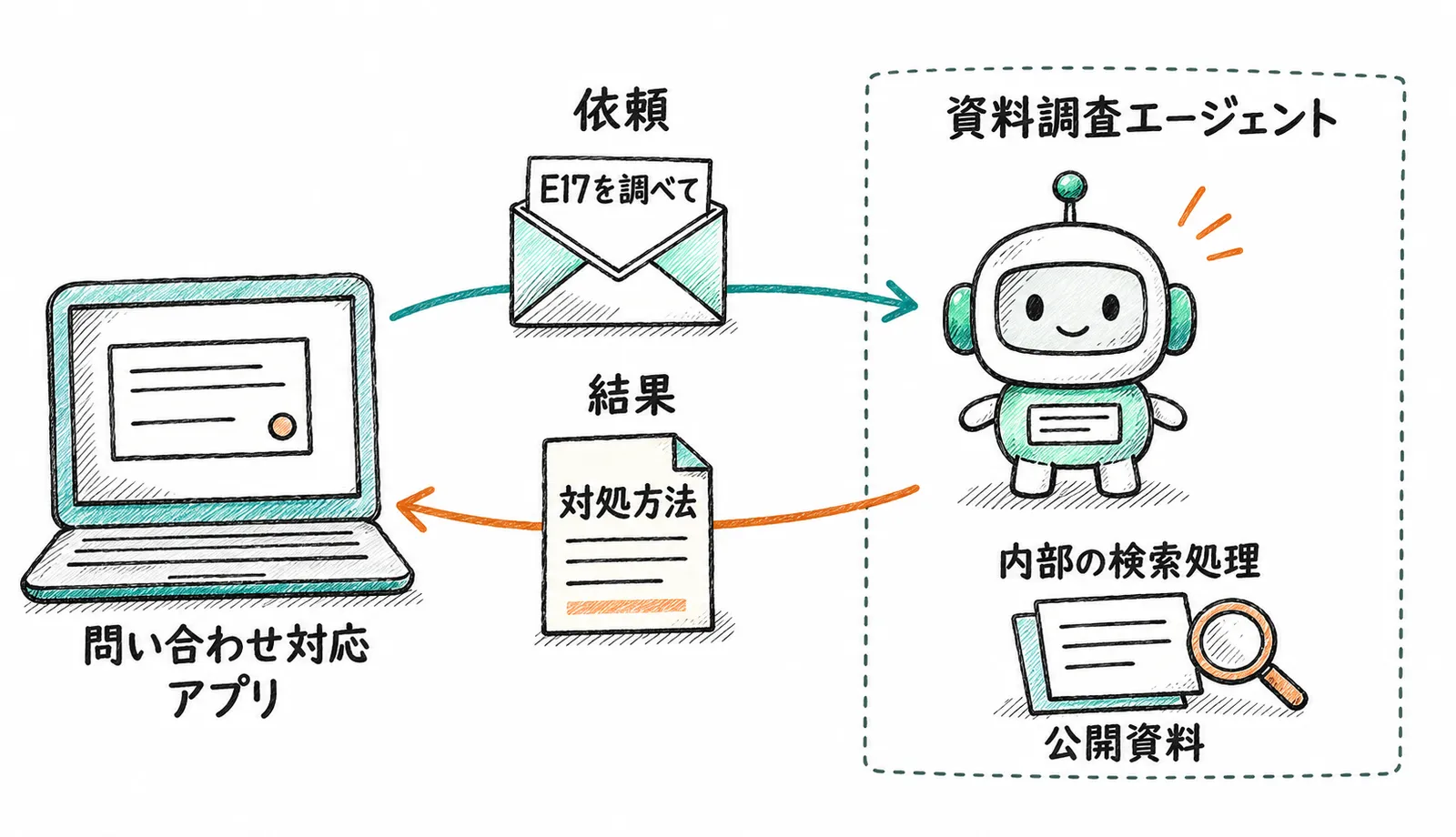
Request Data and Internal Processing
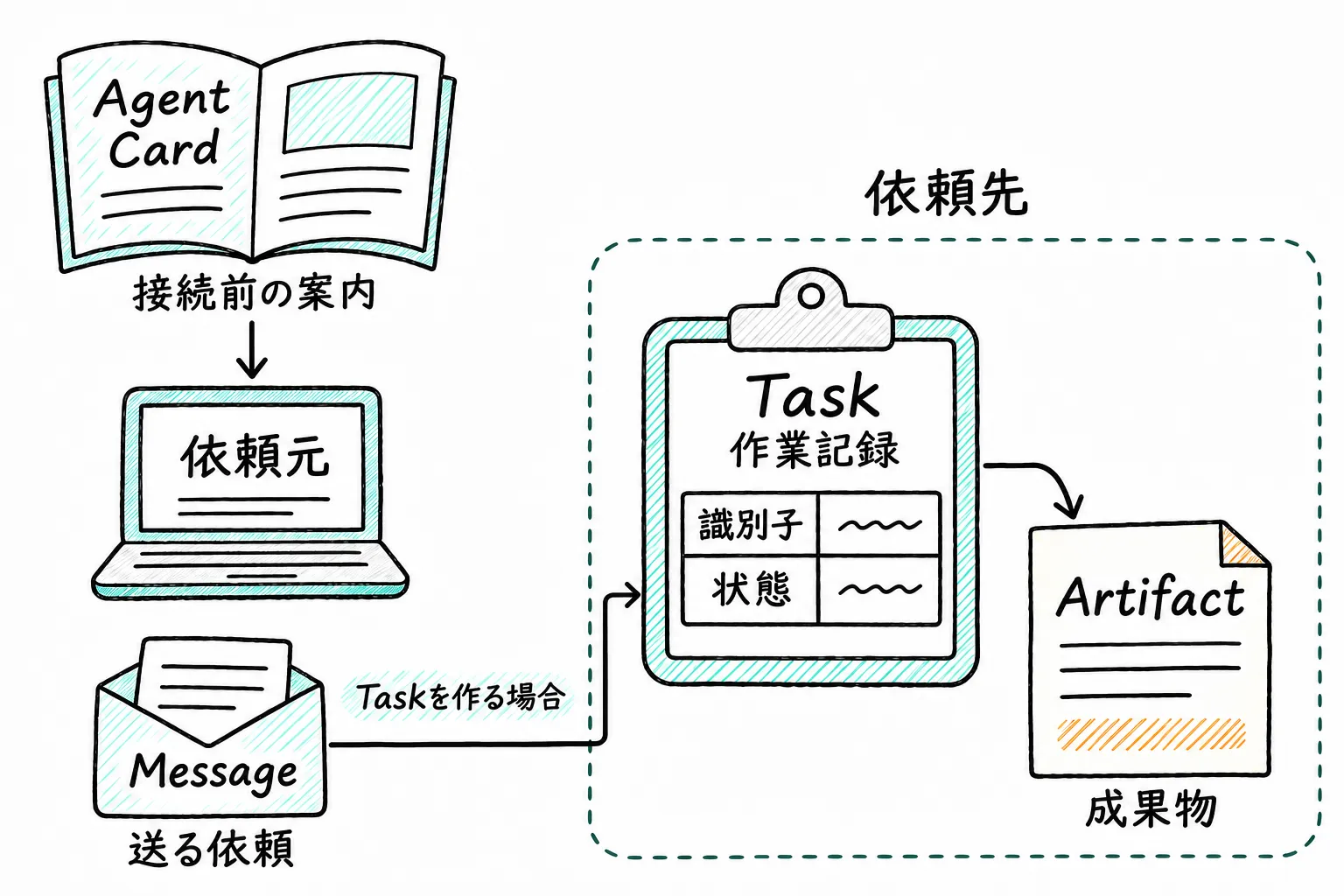
The client first checks what the endpoint accepts.
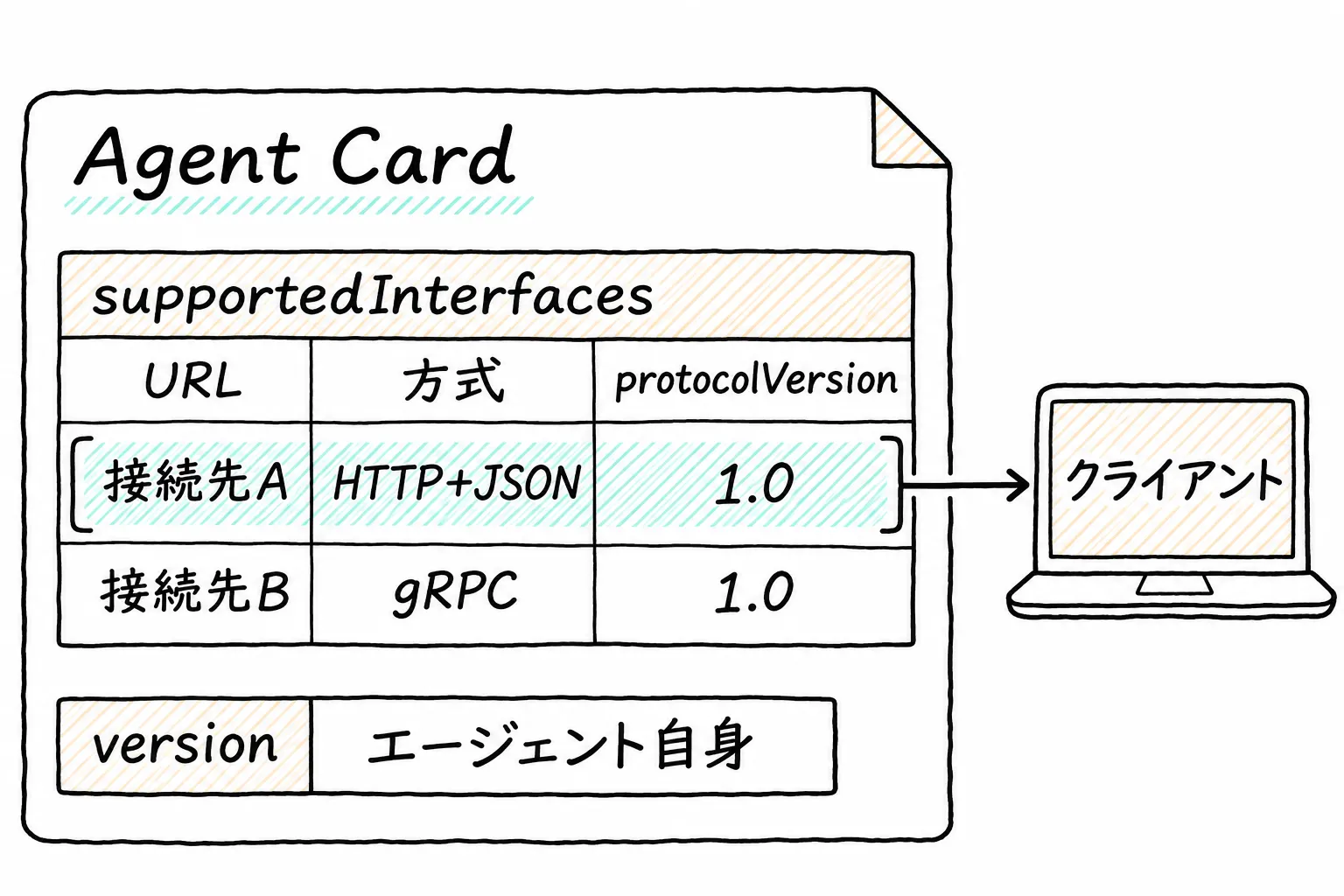
The server publishes this information as a JSON document called an Agent Card.
The client reads the endpoint URL, supported operations, and required authentication to decide whether the agent can handle the research request.
Once an agent has been selected, the client sends instructions and any accompanying materials.
This individual unit of communication is called a Message, whose contents are divided into elements such as text, structured data, and files.
Each element is a Part, allowing instructions and a supporting file in the same Message to be passed as separate pieces of content.
If the server accepts the work and creates a record to track its progress, that record is a Task.
A Task has an identifier and a processing state; the client can retrieve the same work using that identifier.
Answers and files produced by the work are returned as Artifact objects.
An Artifact also consists of Parts.
For interactions that finish immediately, the server may return a Message directly without creating a Task. The client examines the response to distinguish a direct reply from work whose identifier must be stored for tracking. When a Task is created, exchanging interim clarifications through Messages and receiving work outputs as Artifacts makes their respective roles easier to follow.
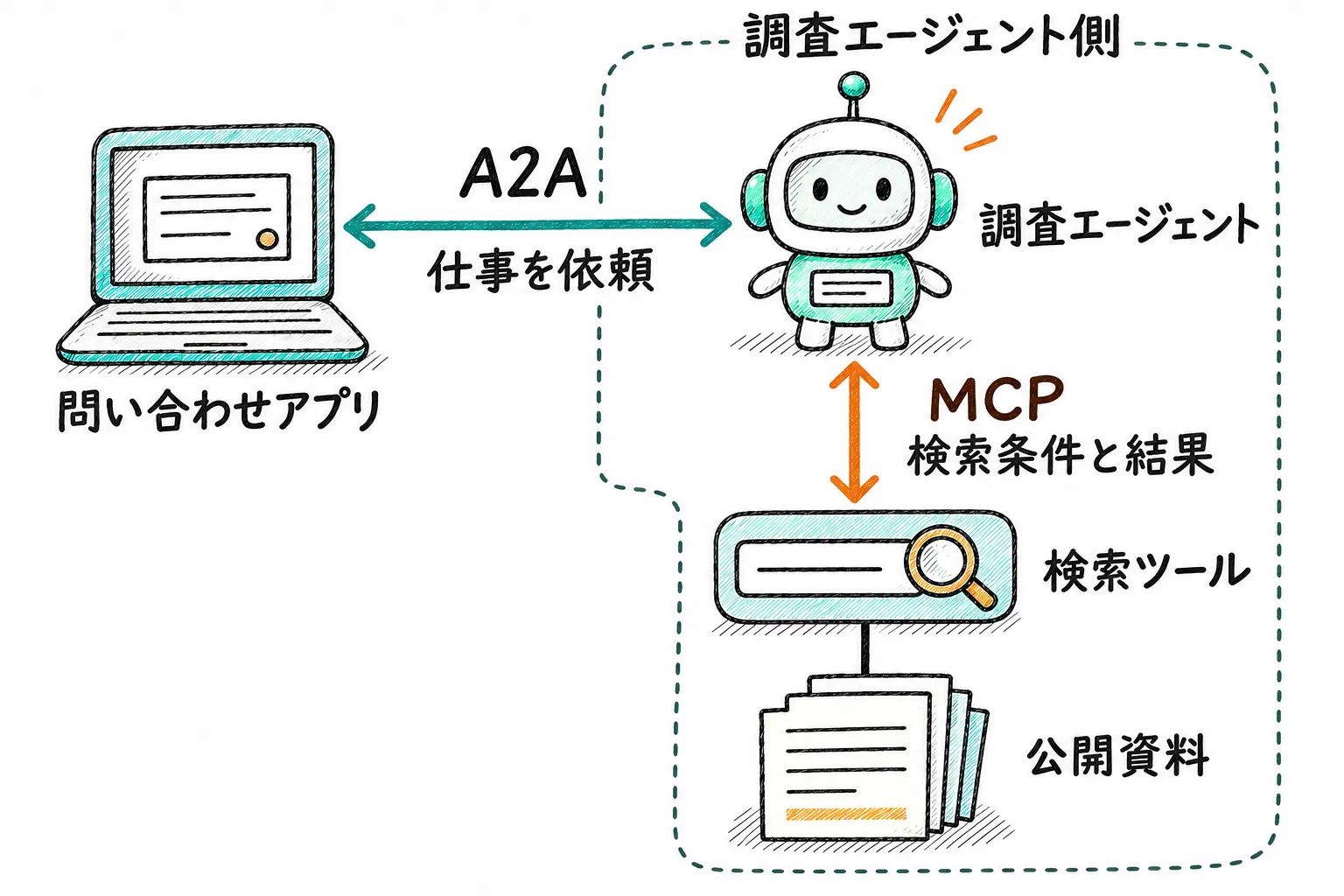
Division of Responsibilities with MCP
After receiving a request, the research agent may invoke search tools.
MCP is a protocol for connecting models and applications to tools and data sources.
An agent can receive an A2A request externally and use MCP internally to search public documentation.
Calling a search tool with search criteria and receiving its results is different from delegating the decisions about what to investigate and whether to ask for clarification to another agent. The former involves tool inputs and outputs; the latter involves tracking the progress of delegated work. The ability to connect through A2A must nevertheless be verified separately from the correctness of the agent's answers.
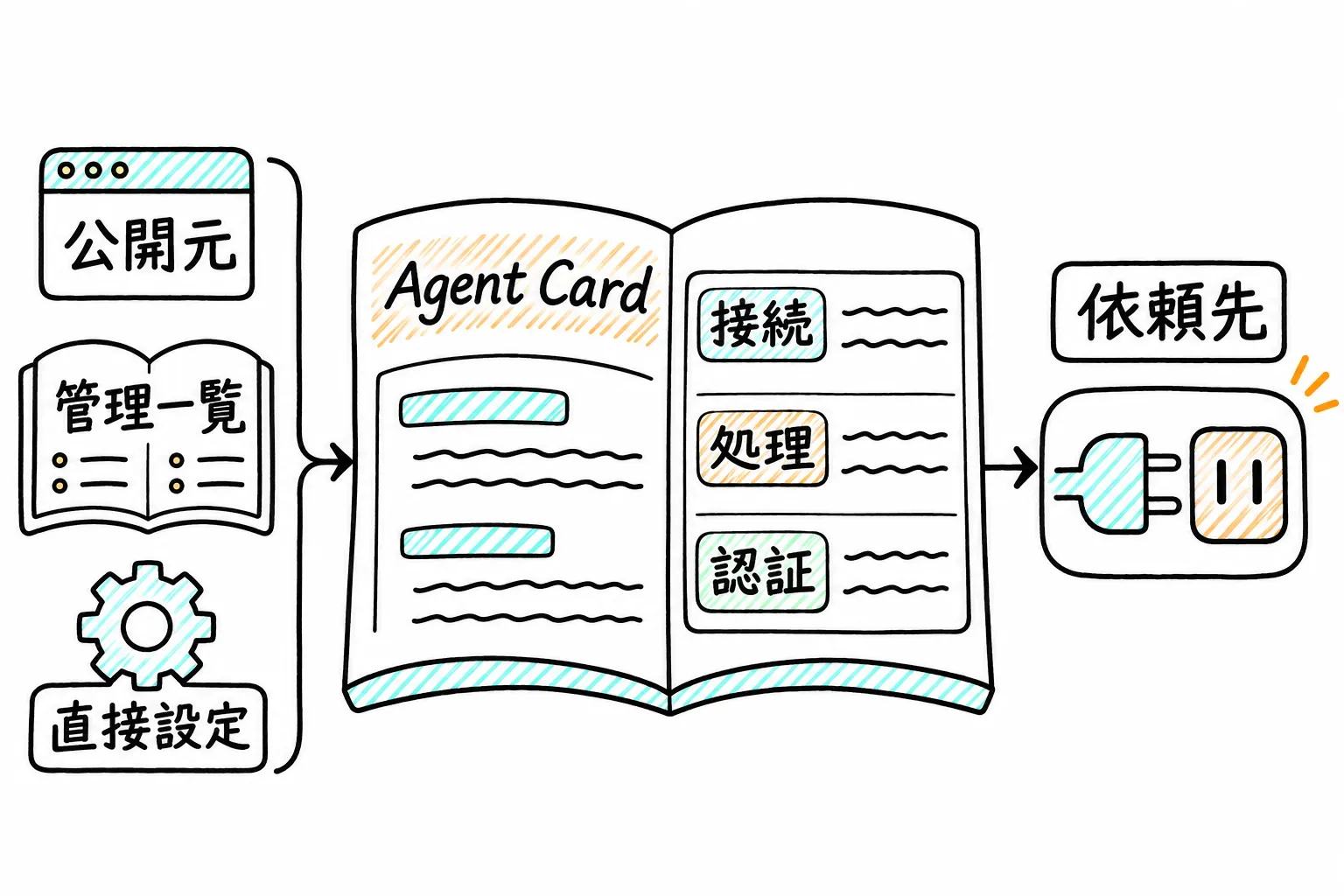
Selecting an Agent Using an Agent Card
The client obtains the endpoint's description before constructing its request.
Options include retrieving /.well-known/agent-card.json under a domain, selecting an agent from a managed directory, or having an administrator configure the URL.
Choose a discovery mechanism suited to the deployment environment, such as a public service or integration within an organization.
After finding the description, check the operations and connection requirements. For example, select an agent that supports public-documentation research, accepts text input, and provides a transport and authentication mechanism the client can use. Trusting the description also requires verifying its publisher and checking authentication and permissions when making actual requests.
Endpoints and Versions
An endpoint URL alone does not identify how to invoke it.
Each entry in the Agent Card's supportedInterfaces records a URL, protocol binding, and supported protocol version.
The first entry is the server's preferred interface, but the client selects a combination that it also supports.
With HTTP+JSON, the endpoint URL and HTTP method select the operation, and the JSON body carries the request data.
For example, connection information for an interface using HTTP and JSON is represented as follows.
{
  "supportedInterfaces": [
    {
      "url": "<資料調査エージェントの接続URL>",
      "protocolBinding": "HTTP+JSON",
      "protocolVersion": "1.0"
    }
  ]
}
Send the requests defined by HTTP+JSON to the url.
The protocol version used in this example is 1.0.
If the interface also specifies a tenant, pass the same value in subsequent requests so that the endpoint can route them.
By contrast, the top-level version describes the agent itself.
Its purpose differs from the communication specification's protocolVersion.
For communication conforming to specification v1.0.1, specify 1.0 using the major and minor version numbers; the patch number is not included in the protocol compatibility decision.
Supported Operations and Input/Output
After confirming connectivity, determine whether the agent accepts the intended request.
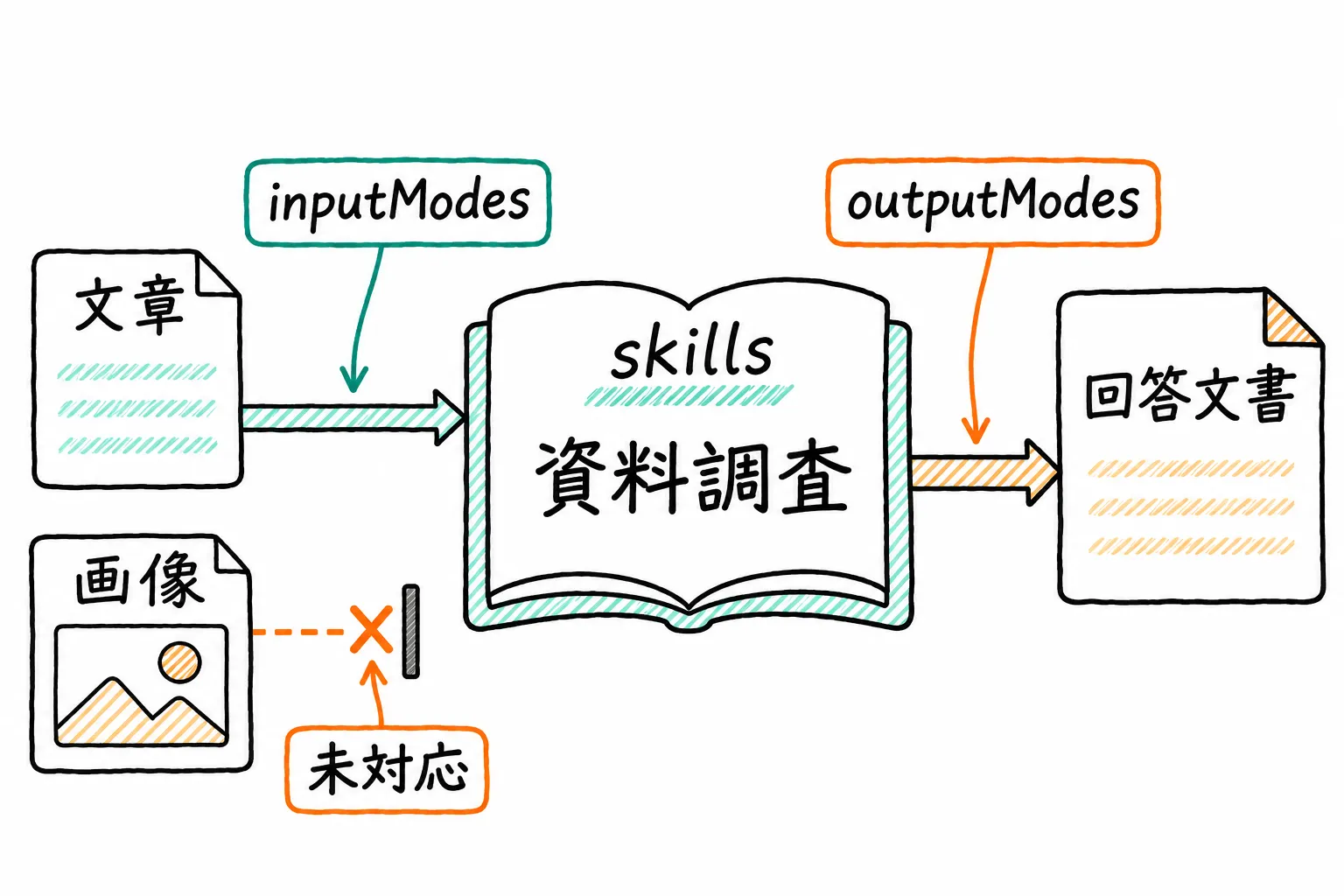
skills is an array describing supported operations individually.
Read each entry's name, description, and examples to determine whether it supports a request to research a solution to an error using public documentation.
These advertised skills are distinct from local skill files loaded into development tools.
Also check the media formats that can be sent and received.
If a skill defines inputModes or outputModes, those values take precedence over the corresponding agent-wide defaults.
Do not assume an agent accepting text also accepts images; check supported formats before sending a documentation file.
If updates will be received by streaming, also check capabilities.streaming.
capabilities indicates support for optional features.
Choose an available delivery mechanism, such as ordinary retrieval when streaming is unsupported.
Authentication and Extended Descriptions
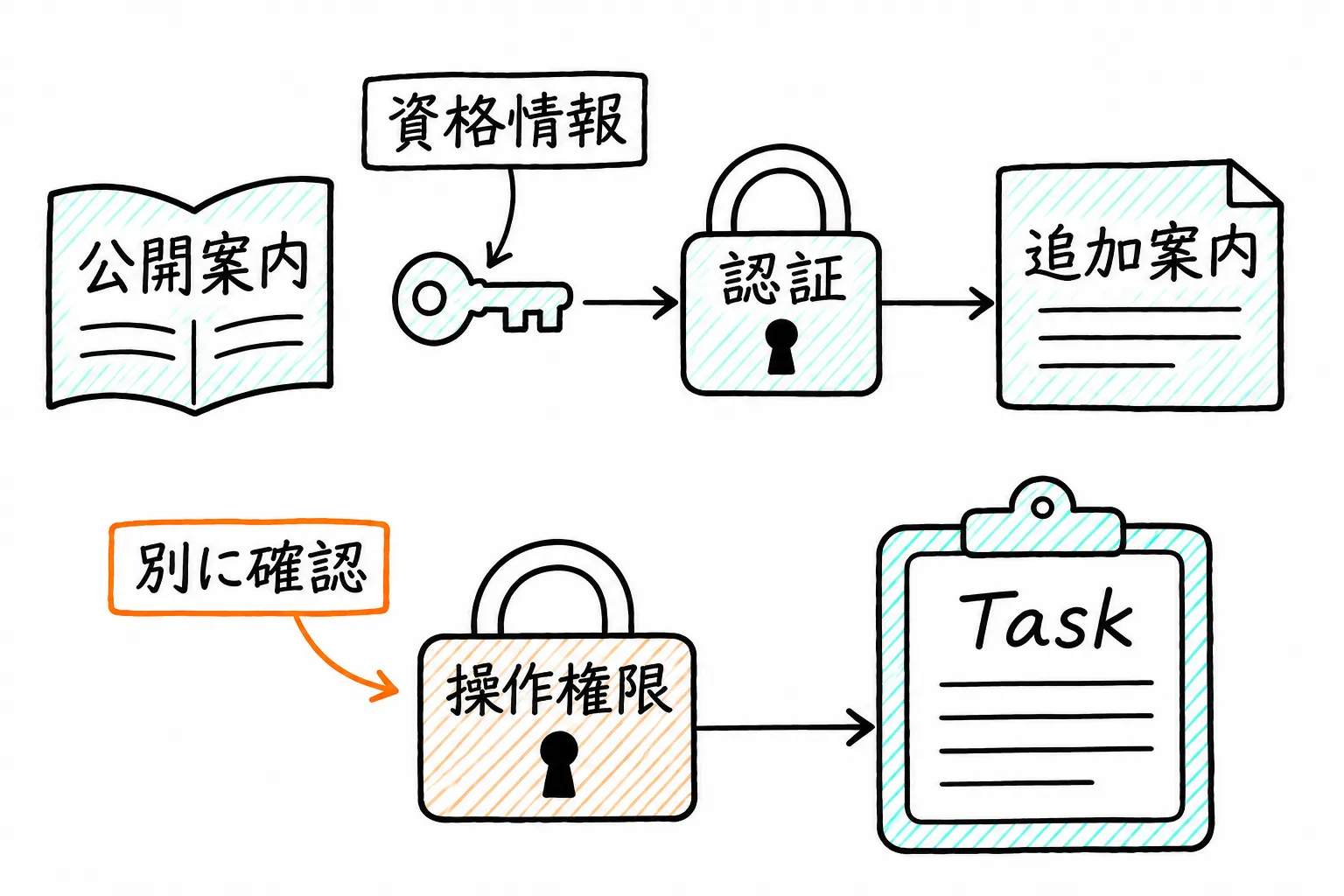
If the endpoint requires authentication, the client prepares the necessary credentials.
securitySchemes defines the mechanisms, while securityRequirements specifies the requirements that must actually be satisfied.
The scheme names referenced by the latter correspond to names defined by the former.
oauth is an example of obtaining credentials with the necessary permissions from an authentication service, while apiKey uses an issued API key.
mtls also verifies the client's certificate during communication.
For example, suppose one alternative requires both the defined oauth and apiKey schemes, and another uses mtls. The requirements have the following structure.
{
  "securityRequirements": [
    {
      "schemes": {
        "oauth": {"list": ["<要求されるスコープ>"]},
        "apiKey": {"list": []}
      }
    },
    {
      "schemes": {
        "mtls": {"list": []}
      }
    }
  ]
}
Each array element is a separate alternative. The first requires both oauth and apiKey; the second requires mtls. Distinguish multiple schemes within one alternative from multiple alternatives.
The list records scopes, or the permissions required by the scheme, rather than the secret credentials themselves.
Obtain actual credentials through the authentication procedure appropriate to the scheme.
When sending requests, attach them through the prescribed headers or metadata rather than placing passwords or tokens in a request Part.
Servers supporting an extended description after authentication also expose GetExtendedAgentCard, which retrieves more detailed information according to the caller's permissions.
Even if the extended description is accessible, authorization to operate on an individual Task is checked for each request. When caching a description, consider the publisher's update requirements and the authentication session. Rather than continuing to use features listed in an outdated description, refresh it and select an appropriate interface if the endpoint's requirements change.
From Request to Artifact
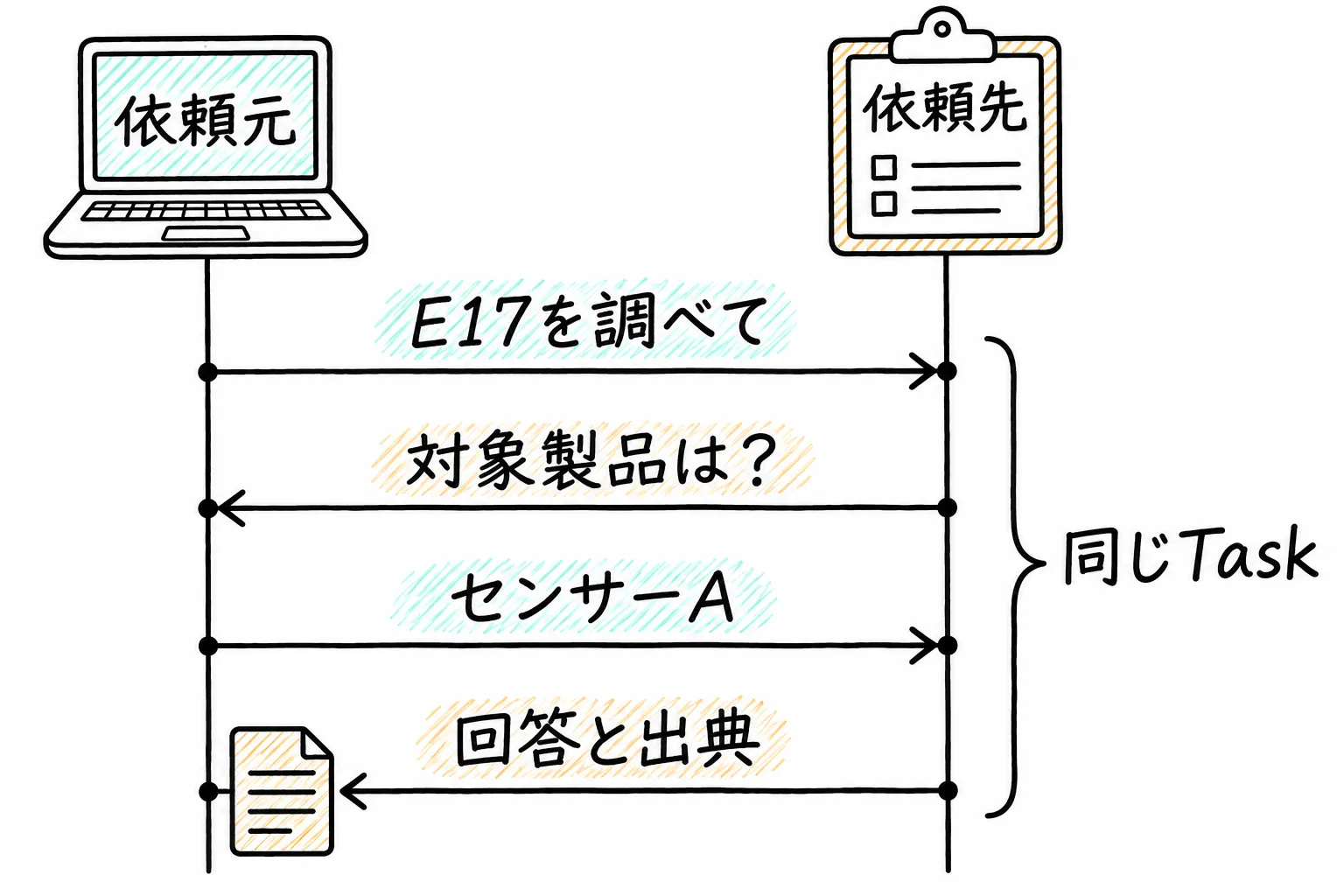
Follow one public-documentation research request through to receiving its result. The client sends Please research how to resolve error E17 using public documentation, and the server asks for the product if it has not been specified. When the user answers Sensor A, the server continues the same work and returns an answer with sources.
// @article-player
state 追加入力で同じ作業を再開

box working as 処理中 [color: blue, icon: server]
box input as 入力待ち [color: amber, icon: user]
box done as 完了 [color: green, icon: check]

strip 作業: ID

step 作業を開始
  say 調査側が作業を開始します。
  start -> working: 依頼
  set ID: task-001

step 追加情報を待つ
  say 対象製品が不足しているため、回答を待ちます。
  working -> input: 対象を確認

step 同じ作業を再開
  say 同じTaskへ追加Messageを送り、調査を再開します。
  input -> working: 追加回答

step 調査を完了
  say 回答が完成して作業が終了します。終了したTaskは再開しません。
  working -> done: 回答を保存
  done -> finish
The basic operations are as follows.
-
Check the endpoint description
Verify that the endpoint URL, input and output formats, authentication, and optional features support the intended request.
-
Send the request as a Message
If the response is a Task, store the identifier and state issued by the server.
-
Respond to a request for input
Confirm the target product and send an additional Message referencing the same Task.
-
Check work updates
Receive updates, and if the connection is lost, retrieve the current Task using the stored identifier.
-
Verify and receive artifacts
Confirm completion and the required Artifacts, then validate their formats and contents before use.
Sending the Request
The client creates a Message representing the request and sends it to POST /message:send.
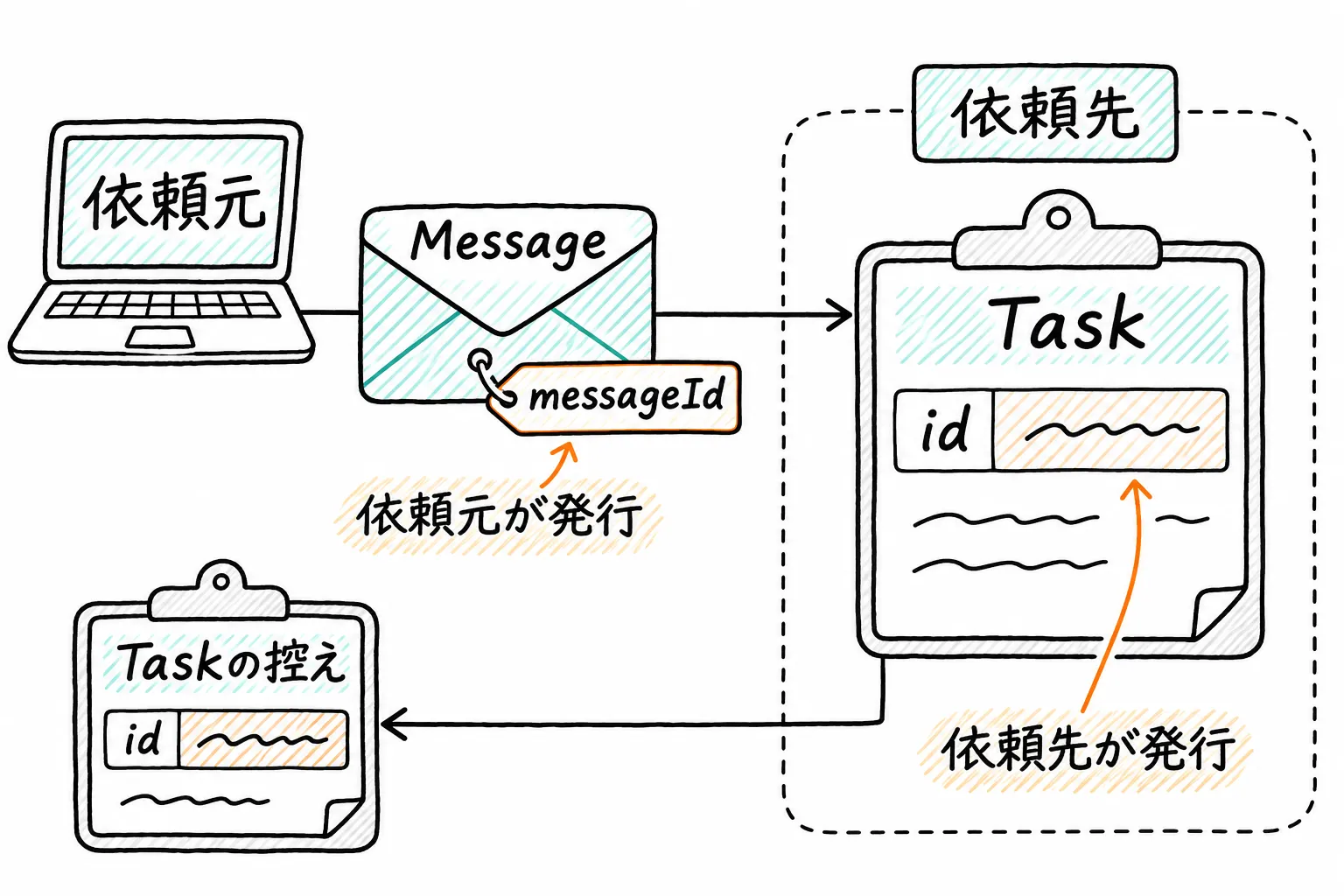
The sender creates the messageId that identifies each Message.
To receive a Task first and track its progress, set returnImmediately to true.
{
  "message": {
    "messageId": "<依頼側が発行したMessageの識別子>",
    "role": "ROLE_USER",
    "parts": [
      {"text": "エラーE17の対処方法を公開資料で調べてください"}
    ]
  },
  "configuration": {
    "returnImmediately": true
  }
}
Place the individual communication in message and the actual content in each element of parts.
ROLE_USER indicates the client-to-server direction; it does not mean a human sent the message directly.
returnImmediately: true instructs the server to respond after creating a Task.
If the server accepts the work, the response's task contains the work record.
{
  "task": {
    "id": "<サーバーが発行したTaskの識別子>",
    "contextId": "<関連する会話の識別子>",
    "status": {
      "state": "TASK_STATE_SUBMITTED"
    }
  }
}
Extract the record from the outer task field and use its id for subsequent retrieval.
TASK_STATE_SUBMITTED means the request has been accepted, not that the research or answer preparation is complete.
The server creates the Task identifier; the client does not issue a new taskId in the initial request.
contextId identifies a group of related interactions.
A conversation can contain multiple Tasks, so this identifier serves a different purpose from the Task identifier.
The client retains the values returned by the server to reference the same conversation or work later.
Response timing depends on the configuration.
With the default returnImmediately value of false, the response waits until the work reaches a terminal state or an interruption requiring input or authentication.
The example explicitly sets true to obtain the work identifier promptly; do not assume that sending a request always returns an accepted state immediately.
Additional Input and Resumption
If the server interrupts processing, the client reads the reason. The operations differ depending on whether additional user information or authentication and authorization are required. Neither interruption should be displayed as completion; present the necessary input or procedure to the user.
Responding to an Input Request
When error E17 alone is insufficient to identify the product, the server updates the Task to TASK_STATE_INPUT_REQUIRED.
It may use status.message accompanying the state to say Please specify the target product.
The client presents the question to the user and sends the answer as a new Message to the same Task.
{
  "message": {
    "messageId": "<追加のMessageの識別子>",
    "taskId": "<入力待ちのTaskの識別子>",
    "role": "ROLE_USER",
    "parts": [
      {"text": "対象製品はセンサーAです"}
    ]
  }
}
Use taskId to associate the additional information with the originally accepted work.
When only taskId is provided, the server determines contextId from that Task.
When both are sent, contextId must match the one associated with that Task.
Requests combining identifiers from different conversations are rejected.
After sending the answer, check updates to the same Task. Here the target product is now known, so the server can continue researching the documentation. Do not assume that every answer to a follow-up question creates a separate new work item.
Continuing After Authentication
If authentication or authorization is needed during work, the state becomes TASK_STATE_AUTH_REQUIRED.
The server communicates the necessary procedure alongside the state; the client directs the user or authentication service through the prescribed channel.
Pass credentials through the authentication channel rather than pasting secrets into the request text as an answer.
When the server receives credentials through that channel, it can continue the same Task without waiting for an additional Message. Keeping an active streaming connection open is also recommended, so reaching an authentication-required state does not necessarily close every connection. The client subscribes to updates or retrieves the Task to confirm that processing has resumed.
For this reason, do not implement answering an input request and completing an authentication procedure as if they were equivalent. The specific authentication interface and credential acquisition method follow the authentication scheme and agreements between the integrated services.
// @article-player
state 認証待ちは認証の経路で再開

box working as 処理中 [color: blue, icon: server]
box auth as 認証待ち [color: amber, icon: shield]
box done as 完了 [color: green, icon: check]

strip 作業: ID

step 作業を開始
  say 同じTaskを追跡します。
  start -> working: 依頼
  set ID: task-001

step 認証を待つ
  say 必要な認証を専用の経路で行います。依頼文へ資格情報を貼りません。
  working -> auth: 要認証

step 認証後に再開
  say 認証の完了を受け取り、追加Messageなしで同じTaskを再開できる場合です。
  auth -> working: 認証完了

step 回答を完成
  say 再開と完了をTaskの更新で確認します。
  working -> done: 完了
  done -> finish
Receiving Artifacts
The server conducts the research and returns the answer and sources as Artifacts. The answer and list of references can be separate artifacts or multiple Parts of the same artifact. The client checks the agreement with the endpoint to determine which artifact contains the required information.
For example, a response containing a text answer from completed work has the following form.
{
  "task": {
    "id": "<調査したTaskの識別子>",
    "contextId": "<関連する会話の識別子>",
    "status": {"state": "TASK_STATE_COMPLETED"},
    "artifacts": [
      {
        "artifactId": "<回答のArtifactの識別子>",
        "name": "調査結果",
        "parts": [
          {"text": "<公開資料から作成した回答文>"}
        ]
      }
    ]
  }
}
Each element of artifacts is an artifact.
Identify it using artifactId and read text or data from its parts.
After confirming TASK_STATE_COMPLETED, verify that the required artifacts are present and that their content and format are usable.
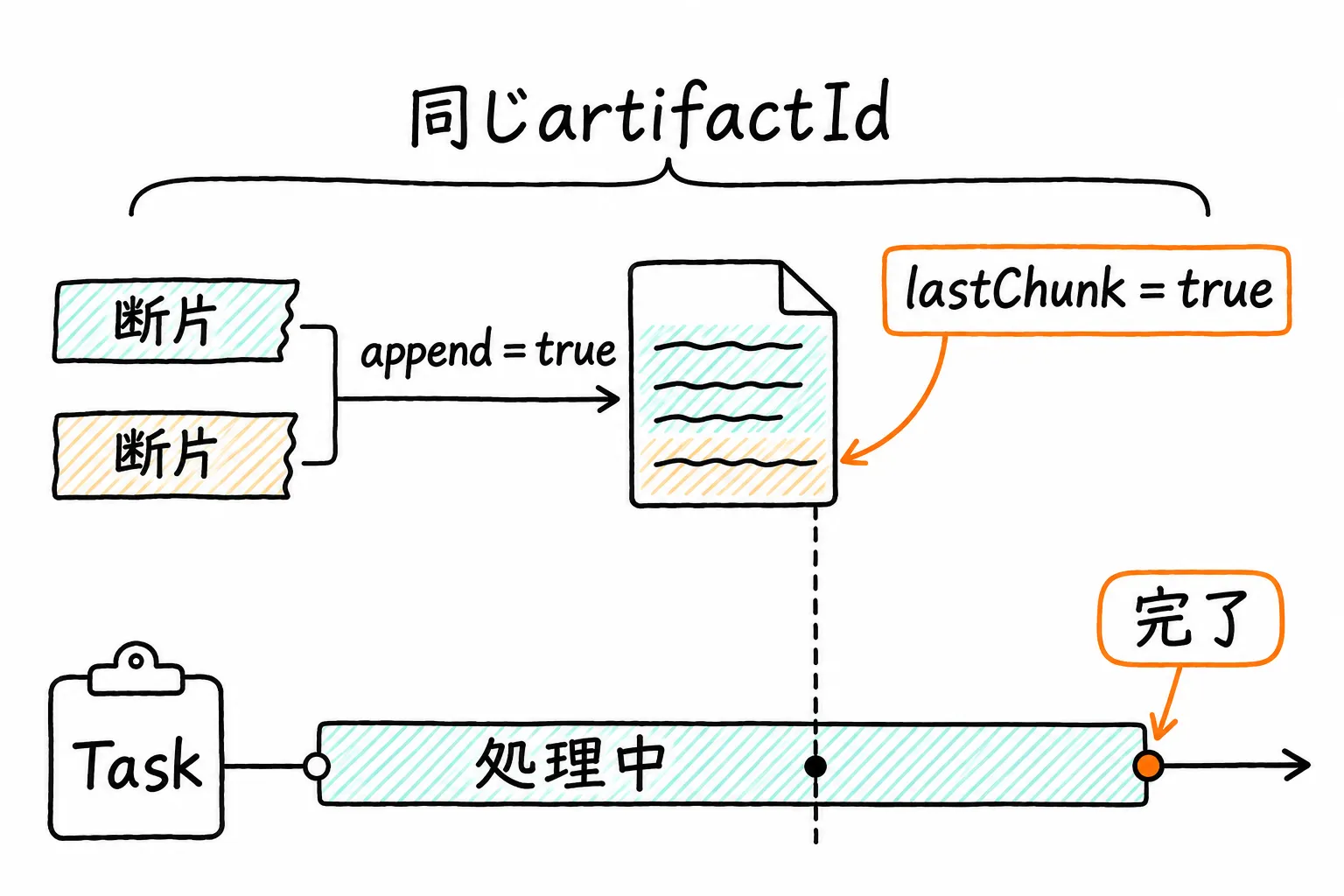
If an artifact arrives in chunks, check append and lastChunk in its update events.
With append: true, append the received content to the existing content with the same artifactId.
lastChunk: true indicates that the final chunk of that artifact has arrived.
This is distinct from completion of the entire Task, so check artifact assembly and work completion separately.
Follow-Up Requests After Completion
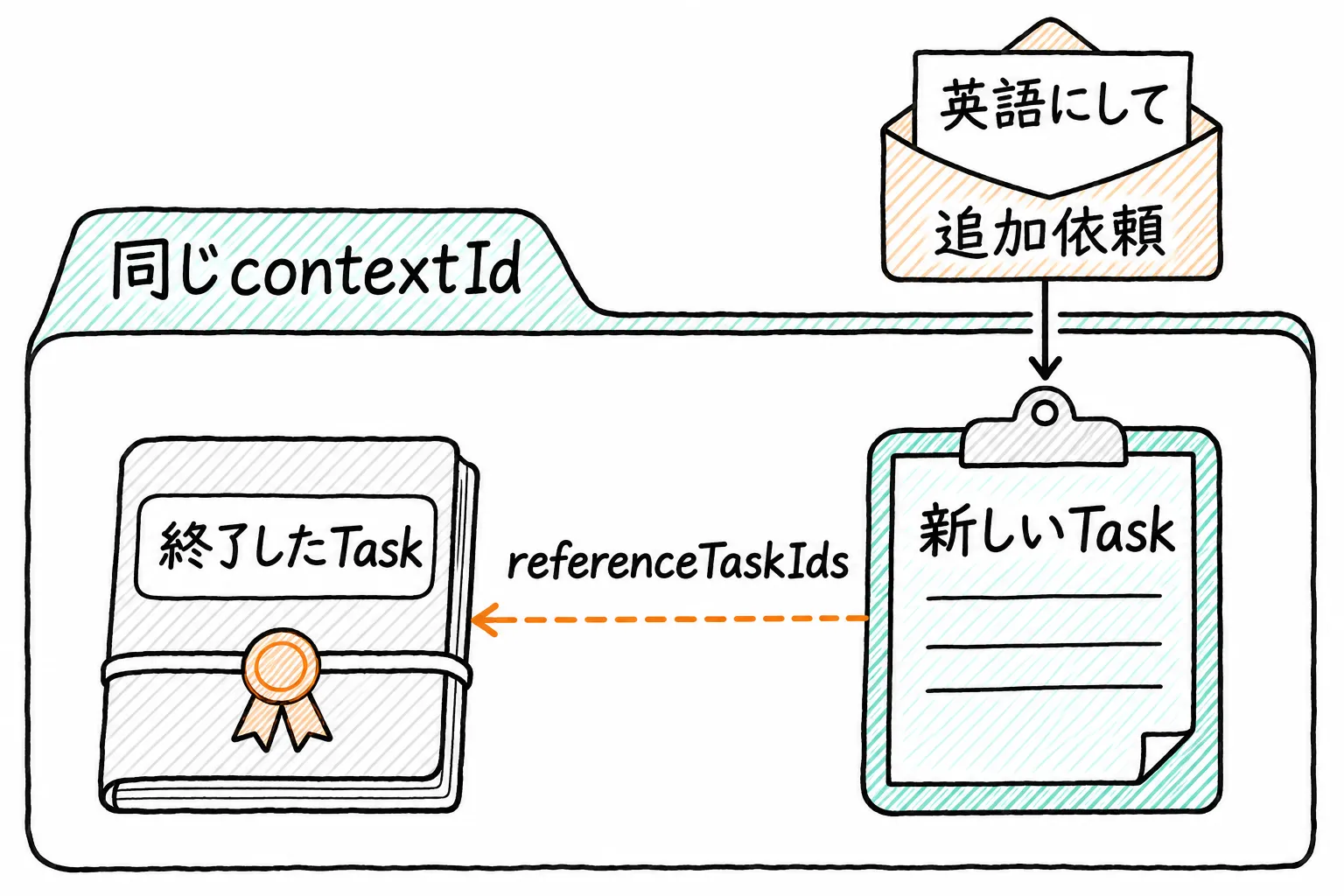
After receiving the research results, the user may ask to translate this answer into English.
Reference the completed Task and request new work.
Using the same contextId and referring to the previous Task through referenceTaskIds communicates that the requests are related.
Use the same taskId when responding to work awaiting input, but receive a new Task when initiating new work based on a finished result. Distinguish continuing a conversation from resuming an individual work item. Tasks that have failed, been canceled, or been rejected are terminal records, just like completed Tasks.
Tracking Long-Running Work
While documentation retrieval and research continue, the client checks Task progress. After acceptance, change the interface and available operations according to the returned state. The states traversed before termination depend on the request and the endpoint's processing. In particular, distinguish interruptions requiring further action from terminal states that cannot resume.
| State | Meaning | Client operation |
|---|---|---|
TASK_STATE_SUBMITTED |
Request accepted | Receive updates or retrieve the Task |
TASK_STATE_WORKING |
Processing underway | Display progress |
TASK_STATE_INPUT_REQUIRED |
Waiting for additional input | Respond to the same work item |
TASK_STATE_AUTH_REQUIRED |
Waiting for authentication or authorization | Complete the prescribed authentication and check updates |
TASK_STATE_COMPLETED |
Finished successfully | Verify artifacts |
TASK_STATE_FAILED |
Finished with failure | Check the reason |
TASK_STATE_CANCELED |
Canceled and terminated | Display the cancellation result |
TASK_STATE_REJECTED |
Execution rejected and terminated | Check the reason for rejection |
The Task at the endpoint may continue processing even after the connection to the requesting interface is lost. Check connectivity separately from whether the work is underway or complete.
Receiving Updates
Choose an update mechanism according to endpoint support and whether the client can maintain a connection. Even when tracking the same Task, the party initiating communication differs.
| Method | Initiator | How updates are checked |
|---|---|---|
| Polling | Client | Call GetTask at regular intervals |
| Streaming | Client | Maintain a connection and receive updates |
| Notifications | Server | Send updates to the registered receiver |
// @article-player
architecture 更新を受け取る方法

group polling as ポーリング [color: slate]
  box pollApp as アプリ [icon: app]
  box pollServer as サーバー [icon: server]
end
group streaming as ストリーミング [color: blue]
  box streamApp as アプリ [icon: app]
  box streamServer as サーバー [icon: server]
end
group notification as 通知 [color: green]
  box hookApp as 受信先 [icon: app]
  box hookServer as サーバー [icon: server]
end

step その都度問い合わせる
  say アプリが現在のTaskを取得します。
  pollApp -> pollServer: GetTask
  pollServer -> pollApp: 現在のTask

step 接続を保って受け取る
  say 対応するサーバーから接続上で更新を受け取ります。
  streamApp -> streamServer: 購読
  streamServer -> streamApp: 現在のTask
  streamServer -> streamApp: 後の更新

step 登録先へ通知する
  say 通知に対応するサーバーが、登録された受信先へ送ります。
  hookServer -> hookApp: Webhook通知
Polling retrieves the current Task each time the client makes a request. It works for jobs with infrequent updates and environments where persistent connections are impractical. Shorter intervals increase request volume, while longer intervals delay interface updates; choose an interval appropriate to processing time and load.
Streaming receives state and artifact updates over a maintained connection.
HTTP-based transport uses SSE, through which the server continuously sends events.
SendStreamingMessage sends a request while receiving updates from the start, whereas SubscribeToTask subscribes to an existing work item.
With SubscribeToTask, the first event returns the Task as it exists when the subscription begins. The client checks its current state using that data and applies subsequent updates. Even if processing advances immediately after a GetTask call, the client can start from the state at subscription time.
For notifications, the client registers a destination URL for updates.
This HTTP endpoint accepting events is called a Webhook, and the server sends POST requests to it.
The notification body uses the same StreamResponse format as streaming and contains exactly one of Task information, a Message, a state update, or an artifact update.
Streaming and notifications are optional features, so check Agent Card support before using them. Receiving an update does not establish that the artifact contents are correct; validate the target Task and received data before updating the interface.
Checking State After Disconnection
When streaming disconnects, the client calls GetTask using the stored Task identifier. The response indicates whether processing continues, input or authentication is required, or work has already ended. Do not infer a cancellation or completion at the endpoint; distinguish its state from the last state confirmed by the requesting client.
If the Task is not terminal, the client can subscribe to updates through SubscribeToTask.
Read the current Task returned first and then receive subsequent state and artifact updates.
If the work ends between retrieval and subscription, the subscription is rejected with UnsupportedOperationError; use GetTask to confirm the final state and artifacts.
Reconnecting does not guarantee that every missed event will be replayed. Some interim Messages are not persisted in the work history. Keep results that must remain available in an artifact retrievable under the service agreement or in business-side records, rather than relying solely on interim display messages.
If the work cannot be found after its retention period expires, treat the result as unconfirmed. Check the endpoint's conditions for retention and querying results after deletion.
// @article-player
sequence 状態取得と購読の間に完了したら

box app as クライアント [icon: app, color: slate]
box server as サーバー [icon: server, color: blue]

step 切断後に状態を取得
  say 保存したTask IDでGetTaskを呼び、現在の作業を確認します。
  app -> server: GetTask [tag: task-001]
  server -> app: 処理中 [side: below]

step 購読前に完了
  say 状態の取得直後に、サーバー側で作業が完了する場合があります。
  act server: 完了

step 終了済みの購読は拒否
  say SubscribeToTaskは終了済みTaskを購読できず、UnsupportedOperationErrorが返ります。
  app -> server: SubscribeToTask
  server -> app: 終了済みのため拒否 [side: below]

step 同じ作業を再取得
  say GetTaskで最終状態と成果物を取得します。依頼を新しく送る操作ではありません。
  app -> server: GetTask [tag: task-001]
  server -> app: 完了と成果物 [side: below]
Failures and Cancellation
Errors before a request is accepted and failures of accepted work require different checks. Likewise, resending a request when its outcome is unknown and explicitly requesting cancellation are different operations. Choose the subsequent action based on the returned error and stored Task identifier.
Request Errors and Task Failures
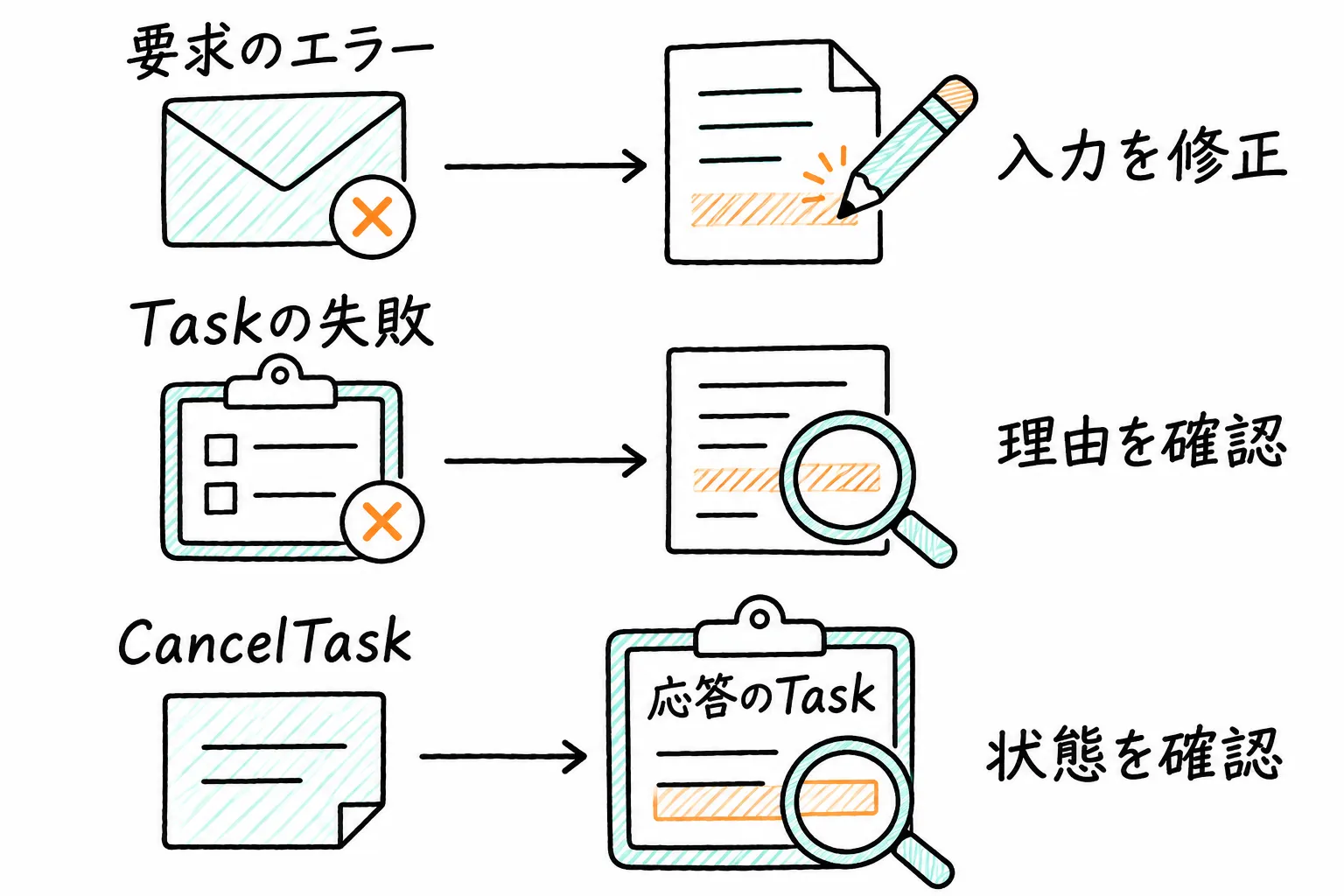
If credentials or input are invalid, the request may return an error without creating a Task.
The client corrects the input or repeats authentication so the request can be accepted.
By contrast, if documentation retrieval fails after acceptance, the existing Task changes to TASK_STATE_FAILED.
In the latter case, check the reason that particular work failed. A terminal Task does not accept additional Messages; request new work to repeat the research. Do not conflate an HTTP error response with a failed Task successfully retrieved over HTTP.
Resending When the Response Is Unknown
If a send operation times out, the client may not know whether the server accepted it. Whether resending the same messageId deduplicates the request depends on the endpoint implementation. Do not infer exactly-once execution from the common A2A specification alone.
If a Task identifier has been received, first check the work's state using GetTask. If no identifier was received, consult the endpoint's deduplication and outcome-query agreements. Distinguish retrying a read from resending a request that might initiate new work.
Confirming Cancellation
CancelTask requests cancellation of ongoing work at the endpoint.
The client should not display the work as canceled merely because it invoked the operation; confirm that the returned Task is in TASK_STATE_CANCELED.
Work that cannot be canceled may produce an error, in which case check the work's state.
A connection loss alone does not send a cancellation request. If the design cancels work when the interface closes, implement the cancellation request in the application. Explicitly handle the cancellation request and its outcome to distinguish work that continues after the user leaves from work the user has stopped.
Common Operations and Protocol Bindings
The preceding requests involved sending Messages, retrieving Tasks, and canceling when necessary. A2A separates exchanged data, operations on that data, and their representation on the wire. This structure allows the client to select an endpoint-supported binding while retaining the same work identifiers and states.
The bindings include HTTP+JSON, JSON-RPC, and gRPC.
Regardless of binding, the meanings of acceptance, waiting for input, and receiving artifacts remain common.
What differs is the wire format, such as expressing an operation through a URL and HTTP method or naming a remote procedure.
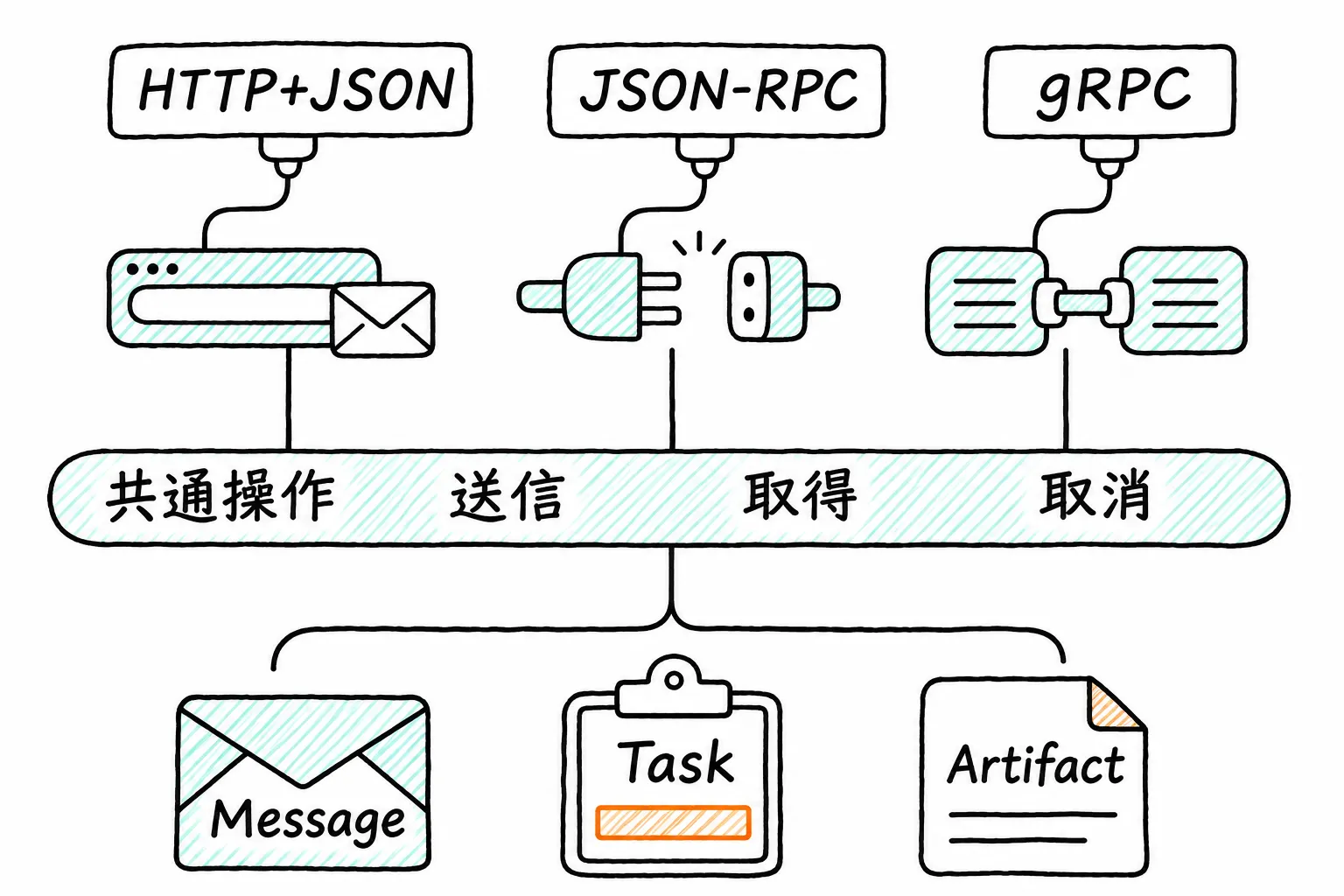
Basic HTTP and JSON Operations
With HTTP+JSON, the endpoint URL and HTTP method select the operation, and the JSON body carries request data. Representative operations map as follows.
| Operation | HTTP request | Response |
|---|---|---|
| Send a request or additional information | POST /message:send |
Task or Message |
| Send a request while receiving updates | POST /message:stream |
A sequence of StreamResponse objects |
| Retrieve work | GET /tasks/{id} |
Current Task |
| Subscribe to existing work | GET /tasks/{id}:subscribe |
Current Task and subsequent updates |
| Cancel work | POST /tasks/{id}:cancel |
Task representing the cancellation request's outcome |
Attach A2A-Version: 1.0 to the request and use application/a2a+json as the body's media type.
Handle VersionNotSupportedError if the server does not support the version.
Even a successful HTTP response can contain a Task in the submitted state, indicating that work is ongoing.
JSON-RPC passes the operation name and arguments as JSON.
In v1.0, the send operation is named SendMessage.
Do not mix names from earlier versions, such as message/send, directly into current requests.
gRPC invokes remote operations through a client generated from service and data-type definitions.
It communicates over HTTP/2, which can efficiently carry multiple requests and responses over one connection.
Calling an A2AService operation serves the same purpose: tracking the returned Task and receiving Artifacts.
Agreeing on Extensions
Adding sources or execution paths to research results may require agreements beyond what the common data model expresses.
An Extension specifies additional data or processing and allows supporting parties to use it together.
Each extension has a URI identifying it.
The server declares supported extensions in its Agent Card.
The client requests extension URIs through A2A-Extensions and checks which extensions have been activated in the response.
Do not assume an optional extension can be used unconditionally when the peer does not support it.
An extension marked required: true is a condition of using that endpoint.
The client verifies that it understands and supports the extension before sending a request, and the server rejects requests that do not declare support for required extensions.
Check the meaning and processing of additional information against the extension specification associated with each URI.
// @article-player
sequence 拡張は宣言と要求で合意

box app as クライアント [icon: app, color: slate]
box server as サーバー [icon: server, color: blue]

step 対応を確認
  say Agent Cardの拡張URIと必須条件を読みます。宣言だけでは有効化済みになりません。
  server -> app: 対応する拡張URI

step 使う拡張を要求
  say クライアントが使いたいURIをA2A-Extensionsで指定します。
  app -> server: 拡張URIを指定 [tag: A2A-Extensions]

step 有効化を確認
  say 応答で有効な拡張を確認します。未対応の必須拡張は拒否されます。
  server -> app: 有効な拡張URI
Adding Sources and Creation Timestamps
To attach sources to a research answer, define an agreement to record source titles, references, and relevant passages in the Artifact's additional information.
metadata is the field for this information.
A citation extension can be designed this way, but the citation fields used here are not a common citation format built into the core specification.
A public example for adding creation timestamps to Messages and Artifacts is the Timestamp Extension.
The example records a timestamp in a dedicated metadata field. For instance, adding a timestamp to a Message answering a question about the target product produces the following structure.
{
  "messageId": "<追加のMessageの識別子>",
  "taskId": "<入力待ちのTaskの識別子>",
  "role": "ROLE_USER",
  "parts": [{"text": "対象製品はセンサーAです"}],
  "metadata": {
    "github.com/a2aproject/a2a-samples/samples/extensions/timestamp/v1/timestamp": "<Messageを作成したUTCのRFC 3339形式の時刻>"
  }
}
The long metadata field name is the key used by this extension.
The value on the right records when the Message was created.
RFC 3339 defines a date and time representation; this example records a UTC (Coordinated Universal Time) timestamp as a string.
Do not interpret it as the reception time or work completion time.
The URI identifying this extension is https://github.com/a2aproject/a2a-samples/samples/extensions/timestamp/v1.
The actual specification file location, the URI defined by the extension, and the metadata key serve different purposes.
When attaching it to an Artifact, use the same key with that Artifact's creation time.
The public sample uses X-A2A-Extensions for activation.
Because the name differs from the current core's A2A-Extensions, simply copying the sample code does not establish that the v1.0 connection requirements have been satisfied.
Check the chosen extension specification and the activation mechanism used by the connected implementation.
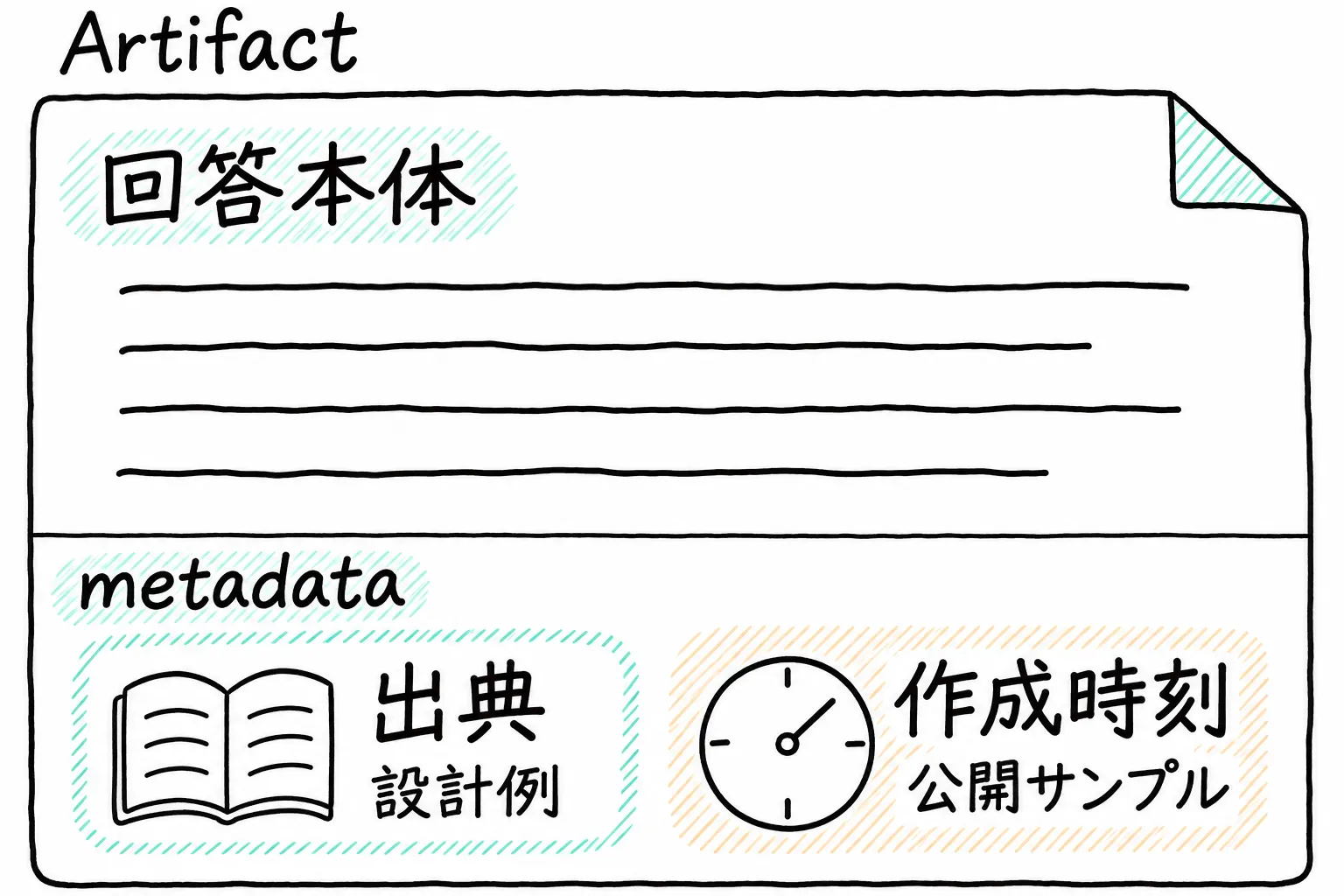
Recording Execution Paths
After invoking a search tool and delegating further work to another agent based on its result, it may be useful to trace the operations performed. The Traceability Extension is a public example for recording tool calls and agent delegation.
A trace uses a structure called ResponseTrace, containing a trace_id identifying the whole trace and steps, an array with one element per operation.
A TOOL element records a tool invocation, and an AGENT element records a request to another agent.
The relationships among these fields are illustrated in the following excerpt.
{
  "trace_id": "<親の追跡識別子>",
  "steps": [
    {
      "step_id": "<検索の処理識別子>",
      "call_type": "TOOL",
      "step_action": {
        "tool_invocation": {
          "tool_name": "document_search",
          "parameters": {"query": "センサーA エラーE17"}
        }
      }
    },
    {
      "step_id": "<委任の処理識別子>",
      "call_type": "AGENT",
      "step_action": {
        "agent_invocation": {
          "agent_url": "<委任先のURL>",
          "requests": {"query": "センサーAの公開マニュアルを確認"},
          "response_trace": {
            "trace_id": "<委任先の追跡識別子>",
            "steps": []
          }
        }
      }
    }
  ]
}
In the first element, step_action.tool_invocation records the search tool's name and input.
In the second, step_action.agent_invocation records the delegated agent and request contents.
Its response_trace can contain the child trace returned by a supporting delegated agent.
Whether the child trace is returned depends on the delegated agent's support; do not assume all internal processing is necessarily recorded.
The sample places this record in the metadata of a Message or Artifact, or returns it as an additional Artifact in the completion response.
The metadata key is github.com/a2aproject/a2a-samples/extensions/traceability/v1/traceability.
If recording cost or latency, the implementations agree on the units.
// @article-player
architecture 親と子の追跡記録

group parent as 親のResponseTrace [color: blue, icon: doc]
  box tool as ツール呼出 [icon: app, color: slate]
  box delegation as エージェント呼出 [icon: server, color: blue]
end
group child as 子のResponseTrace [color: violet, icon: doc]
  box childSteps as 委任先の処理 [icon: doc, color: violet]
end

step ツール呼出を記録
  say 親のstepsに、検索ツールの入力と呼出を記録します。
  act tool: TOOL

step 委任を記録
  say 別のエージェントへ送った要求を、親のstepsへ記録します。
  act delegation: AGENT

step 子の記録を含める
  say 対応する委任先から子の記録が返る場合、agent_invocationのresponse_traceへ含めます。
  delegation -> childSteps: response_trace [carry: none]
Additional Operations and Compatibility
Extensions may define new operations or processing rules as well as additional data.
For instance, the task-history extension example in the official explanation illustrates the possibility of additional operations for searching past work.
This does not mean search criteria or a tasks/search invocation are provided as standard operations in the core specification; check the extension specification for its inputs and outputs.
Use a new URI when changing extension data or processing in an incompatible way. Do not activate a different version unconditionally when the peer does not support the requested extension version. Apply the same authentication and authorization checks to additional operations as to common operations.
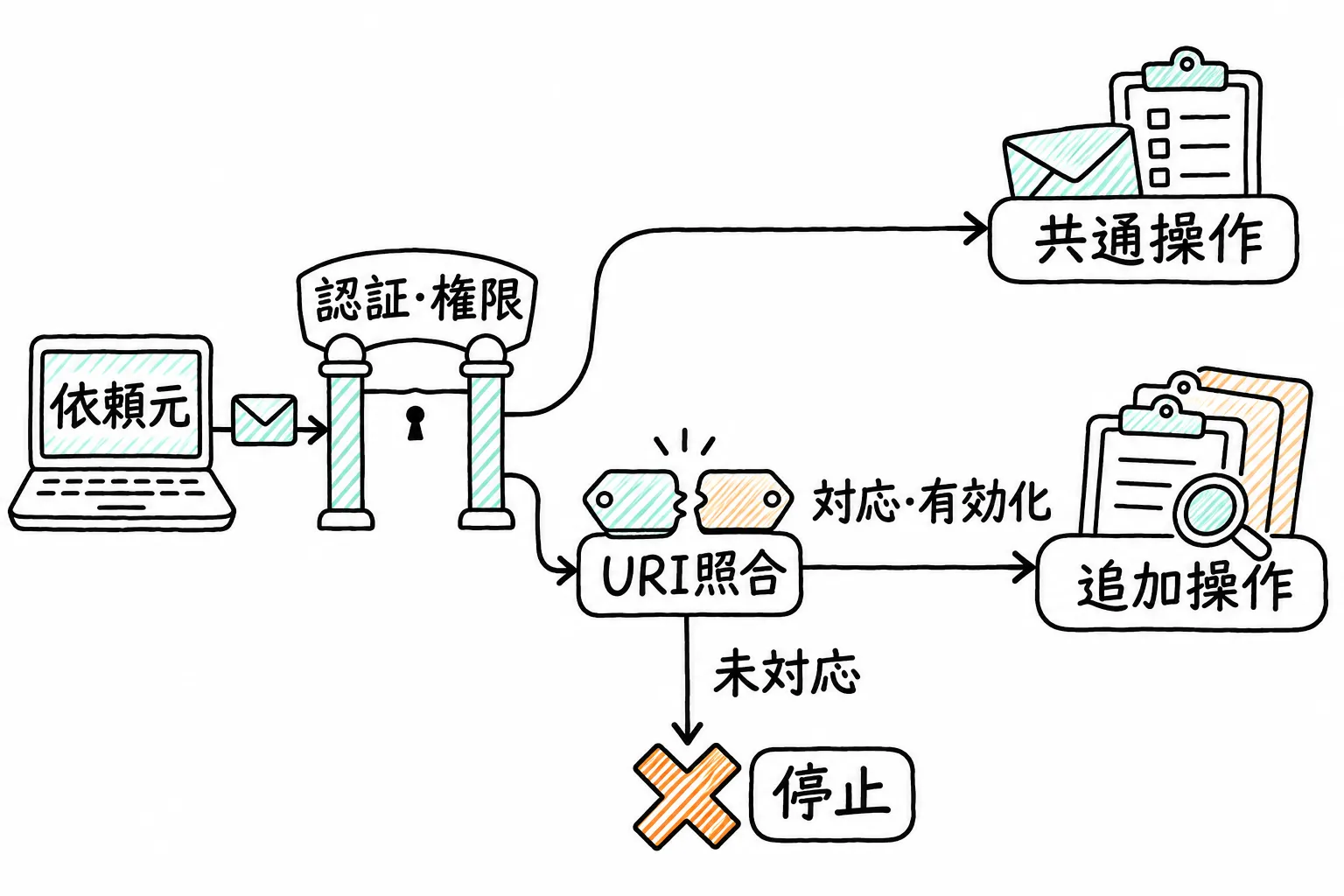
Validating Requests and Artifacts
Even if the endpoint declares support for an operation, separately check whether the current user is authorized to operate on the work. Also distinguish receiving a result from being able to display or use it in subsequent processing. The necessary checks differ for Task access, notifications and files, processing volume, and retention.
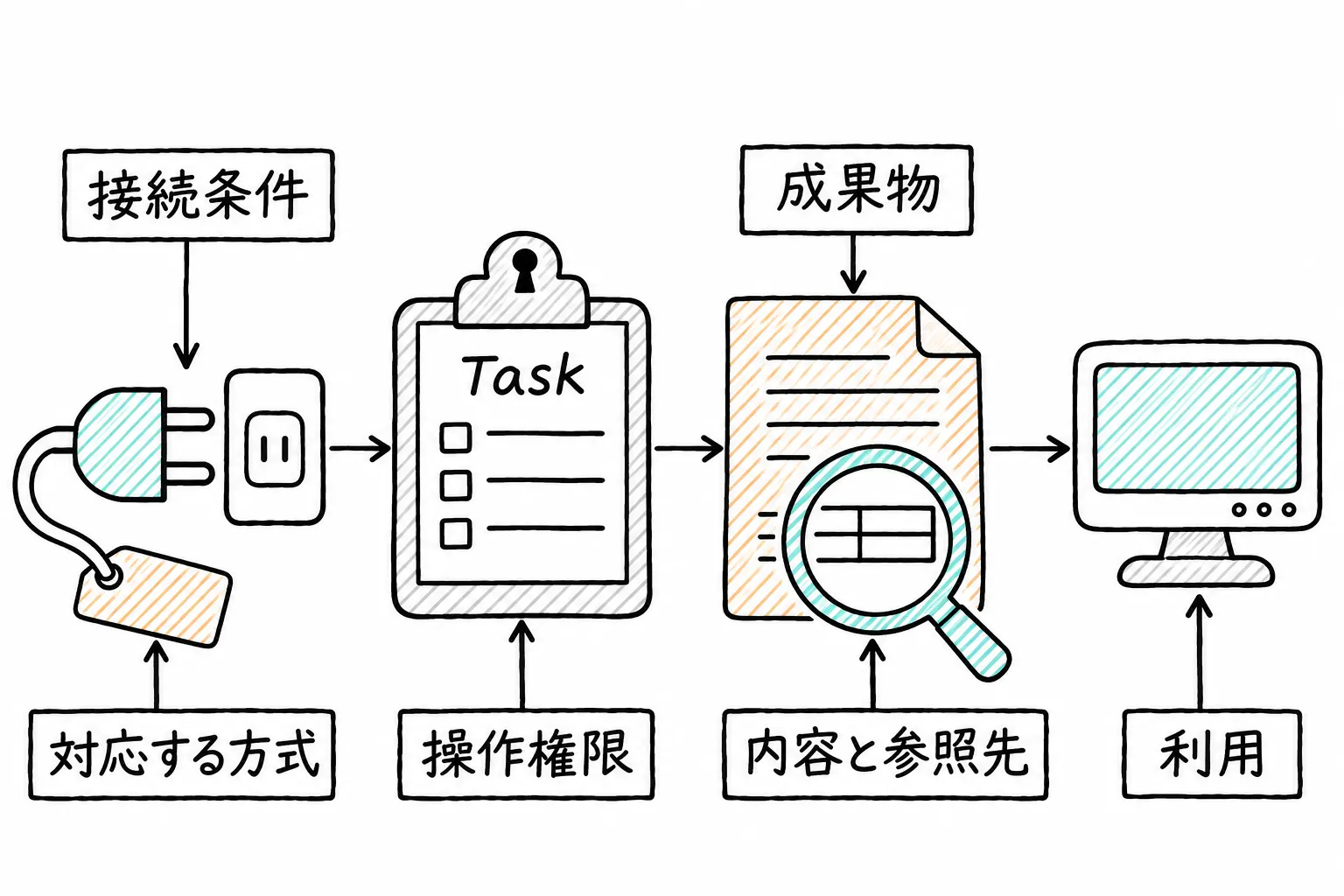
Task Access Control
The server checks the caller's permissions each time it accepts a request to retrieve, list, cancel, subscribe to, or configure notifications for work. Knowing the Task identifier or contextId is not sufficient authorization. Even when listing Tasks without a conversation filter, return only work that may be disclosed to that client.
The endpoint's authorization model determines whose work may be disclosed and to whom. For instance, in a design separating work by user, use the user's identity to exclude other users' Tasks from retrieval or cancellation. This is one implementation example, not the only authorization model available in A2A.
Avoid disclosing the existence of work to unauthorized parties. The specification calls for responses that do not allow unauthorized clients to distinguish work does not exist from work exists but access is denied.
// @article-player
flow Taskの操作は毎回認可

box request as 取得や取消の要求 [icon: app, color: slate]
choice identity as 認証は有効?
choice permission as 操作権限がある?
box allow as 操作を実行 [icon: check, color: green]
box deny as 要求を拒否 [icon: x, color: rose]

step 要求を受け取る
  say Task IDを知っていても操作権限の証明にはなりません。
  start -> request

step 呼出元を確認
  say 認証情報から呼出元を確認します。
  request -> identity

step 対象と操作の権限を確認
  say 本人の識別と、対象Taskへの権限を分けて確認します。
  identity -> permission: はい
  identity -> deny: いいえ

step 許可した要求だけ実行
  say 取得・一覧・取消・購読などの操作ごとに判定し、未許可の相手へ作業の存在を漏らしません。
  permission -> allow: はい
  permission -> deny: いいえ
  allow -> finish
  deny -> finish
Validating Notifications and Files
A Webhook receiver verifies the sender's credentials and the expected Task identifier. Handle duplicate notifications so they update the system to the same result, and return a successful HTTP response for accepted notifications. Do not interpret the server's obligation to attempt delivery at least once as a guarantee that the notification reaches the receiver.
The sender is also responsible for validating the registered destination URL. Fetching an externally supplied URL without validation risks sending unintended requests into an internal network. Align destination validation, network timeouts, and retry policies between both integrated parties.
If an artifact contains a file URL, verify its destination, media format, and size before retrieving or displaying it. Validate text and structured data as external input as well; do not adopt it unconditionally as new instructions for a model or executable code. Task completion is not a reason to bypass validation required for subsequent processing.
// @article-player
flow 通知と成果物を検証して使う

box incoming as 通知や成果物 [icon: doc, color: slate]
choice expected as 相手とTaskが一致?
choice valid as 参照先と内容は妥当?
box use as 表示や後続処理へ [icon: check, color: green]
box stop as 利用を止める [icon: x, color: rose]

step 外部データを受信
  say 通知元と対象Taskを確認します。Task完了だけでは受信内容を信頼しません。
  start -> incoming
  incoming -> expected

step 対応するデータか確認
  say 認証情報と、受け取る予定のTask IDを照合します。
  expected -> valid: はい
  expected -> stop: いいえ

step 検証後に利用
  say 内容、URL、形式、サイズを確認し、外部の文章を命令として無条件に実行しません。
  valid -> use: はい
  valid -> stop: いいえ
  use -> finish
  stop -> finish
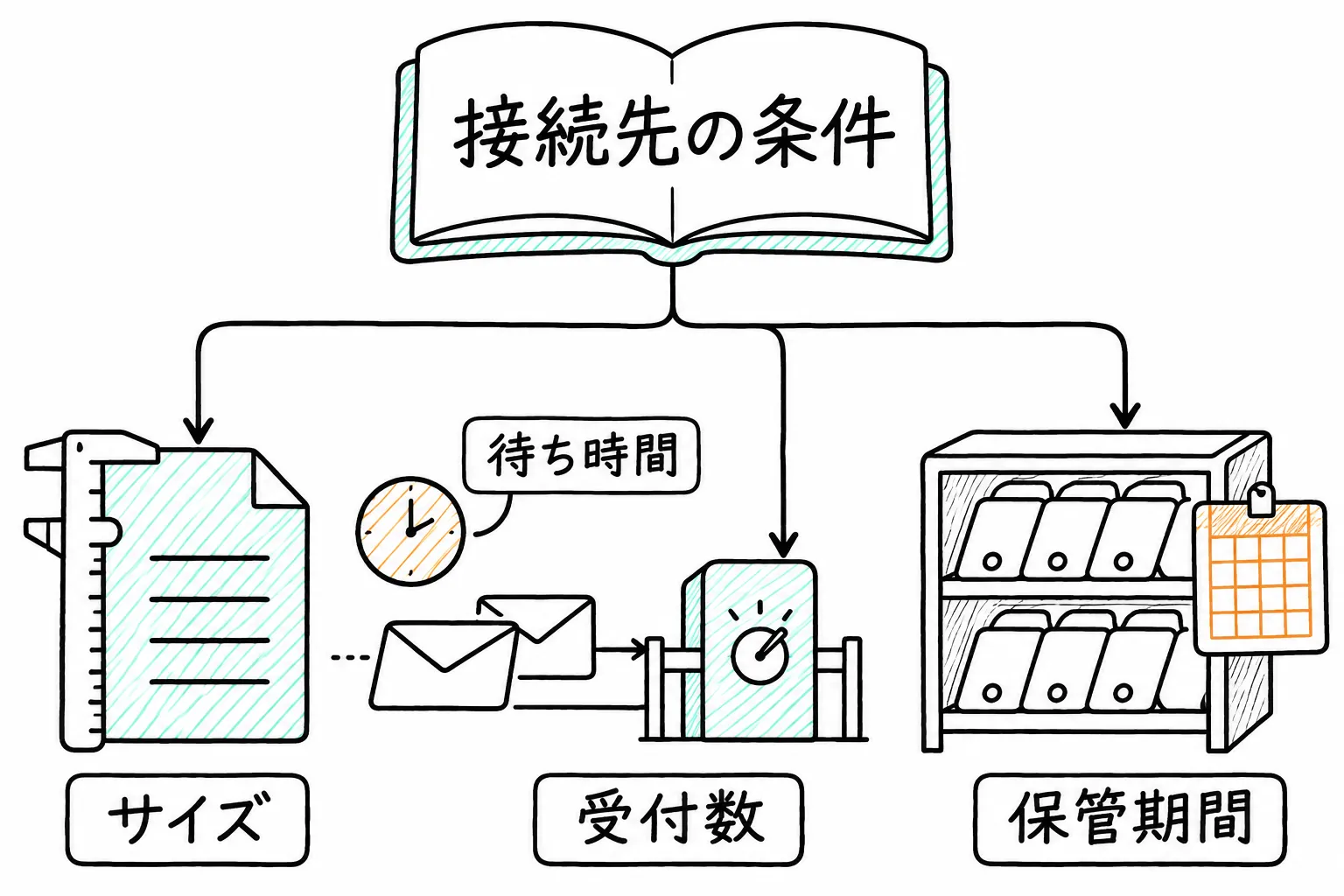
Operational Limits
Determine accepted message and file sizes, concurrent work limits, wait times, and Task retention periods based on implementation and endpoint conditions. Do not assume the same values apply to all services; select limits according to business processing requirements and how long results must remain retrievable. Set polling intervals and interface waiting times accordingly.
Record the identifiers, states, and update times used to track work. Separate troubleshooting information from secrets, and design logging to avoid exposing credentials or personal information directly. Determine where results are stored and for how long they remain accessible, and agree on how to handle subsequent checks or requests after deletion.
Division of Responsibilities with Related Standards
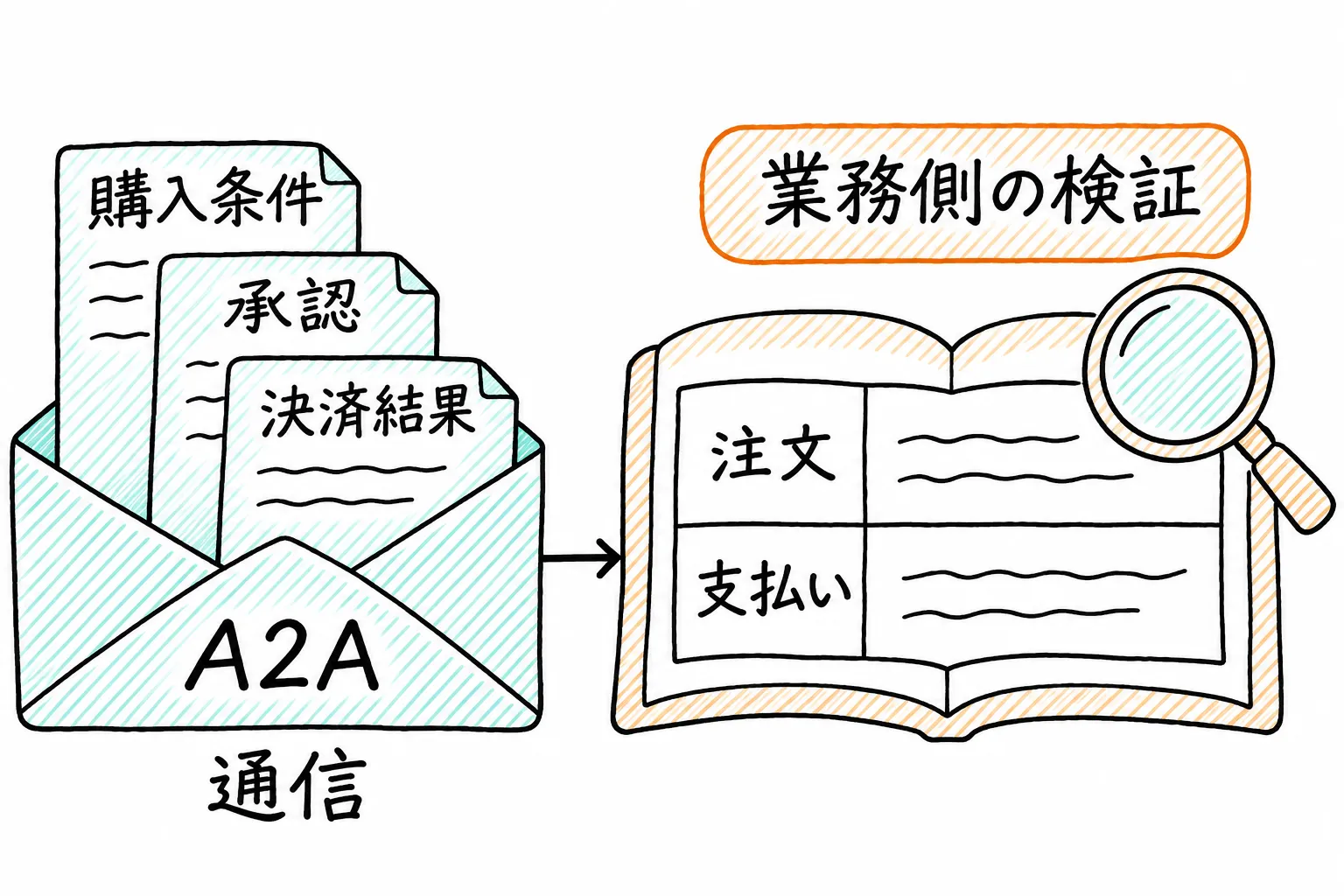
Requests and artifacts carried by A2A may include purchasing or payment information. Even then, updating purchase terms, confirming orders, authorizing purchases and payments, and determining settlement results remain the responsibilities of the relevant business standards and services. Do not substitute completion of a communication Task for evidence that an order or payment has succeeded.
For example, How AP2 Binds Checkout Details to Payment Authorization explains how the recipient verifies what the user authorized. Sending a related request through A2A does not remove the need to verify that authorization. Design communication of requests, progress, and results separately from purchasing and payment data and decisions.
The official description of the agent-to-agent communication protocol Agent Communication Protocol also explains that it has become part of A2A.
Use the A2A specification as the basis for new implementations.
Although both are abbreviated ACP, it is distinct from Agentic Commerce Protocol, which handles purchases.
Conclusion
With A2A, select an operation using the endpoint description, send a Message, track the returned Task, and receive artifacts. Distinguishing input and authentication interruptions, terminal work, and disconnections helps determine what to send to the same work item and when to initiate new work. When using artifacts, distinguish successful communication from business outcomes and verify endpoint permissions and data.
Consult the official A2A specification and definitions for the same version for data types, common operations, and protocol bindings.
The timestamp and execution-path extension examples are published in the official sample collection.

The interpretation of alternative and combined authentication requirements can also be checked against the official Java SDK's description of SecurityRequirement.
The official description of the agent-to-agent communication ACP records its integration into A2A.