Introduction
Hi, I'm cardene, a software engineer and technical writer focused on blockchain and AI.
I've also authored Japanese technical books on specification-driven development with LLMs and decentralized application (DApp) development.

I also build and publish a variety of tools, libraries, and open-source projects.
Distributing from a single folder
agent-shared consists of a command that installs skills, rules, and hooks from one folder into the locations and formats understood by Claude Code, Codex, and GitHub Copilot CLI, together with a specification defining how to install them.
Suppose you want all three agents to follow the same commit message convention.
Claude Code reads files in ~/.claude/rules/, Codex reads ~/.codex/AGENTS.md, and Copilot CLI reads ~/.copilot/copilot-instructions.md. You would therefore need to copy the same instructions into three places.
Every time you update those instructions, you need to update all three copies. If you forget even one, the agents follow inconsistent instructions. Furthermore, when instructions are appended after lines written by the user, there is no way to distinguish the appended content later when you want to remove it.
With agent-shared, write skills, rules, and hooks once in ~/.shared, then run agent-shared deploy.
Skills and rules for agents that read rules from a directory are installed as symbolic links pointing to the actual files in ~/.shared.
For agents that read rules from a single file, rule contents are written inside a block delimited by markers identifying the source folder.
Hooks are written to each agent's configuration file, with a marker at the end of the command.
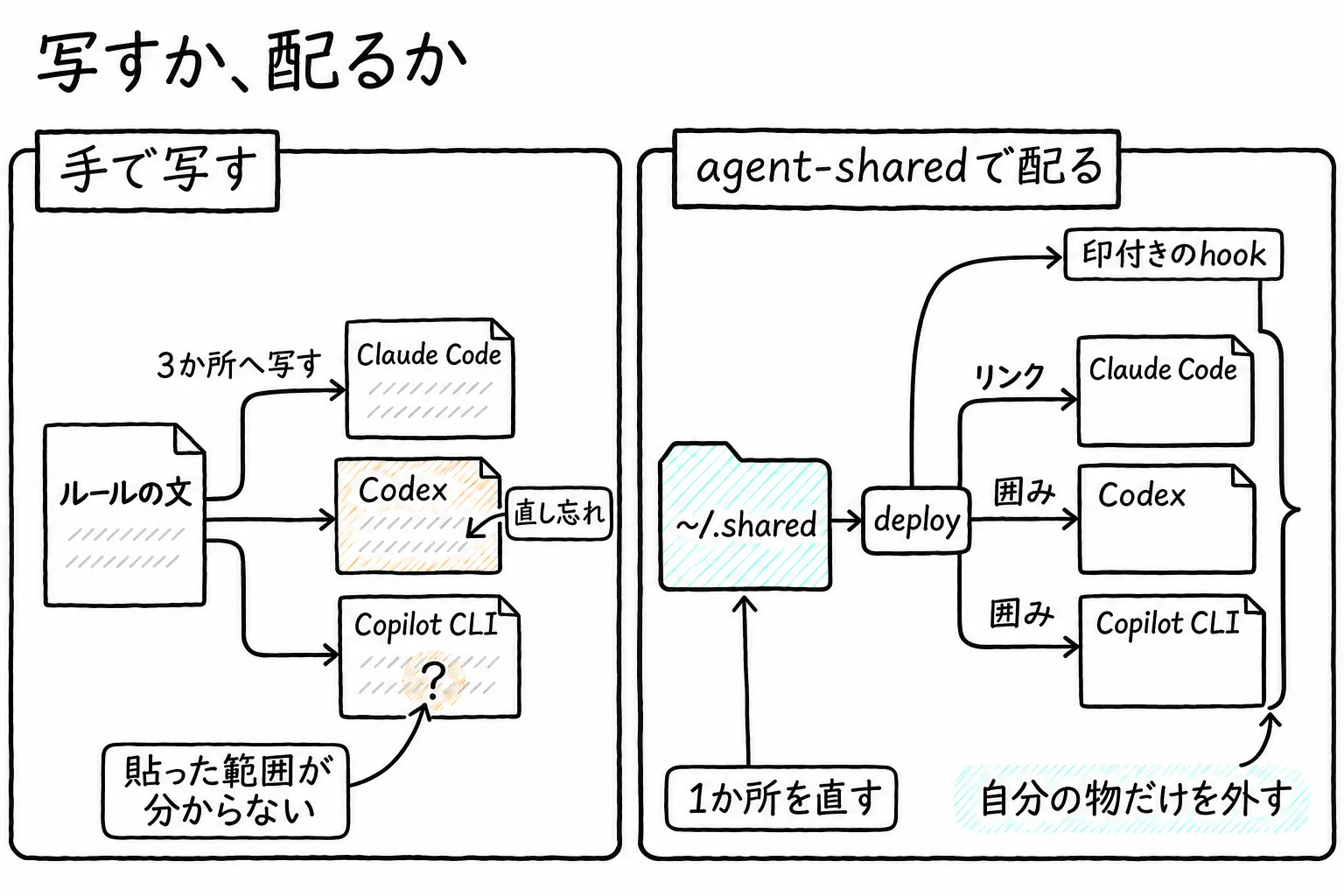
These markers and a record of installed links allow agent-shared to update or remove only the items it installed.
agent-shared itself has no network transmission logic; it reads and writes files on the local computer.
It does, however, execute commands such as claude --version to read agent versions and launch codex app-server to write Codex trust markers.
The installation method is defined in the public specification spec/agent-shared.md, and the table of installation locations is also public, allowing other tools to install files in the same locations with the same markers.
The author developed and published agent-shared and its specification. The behavior and output shown below are from agent-shared v0.2.4.
Source folders and the agent table
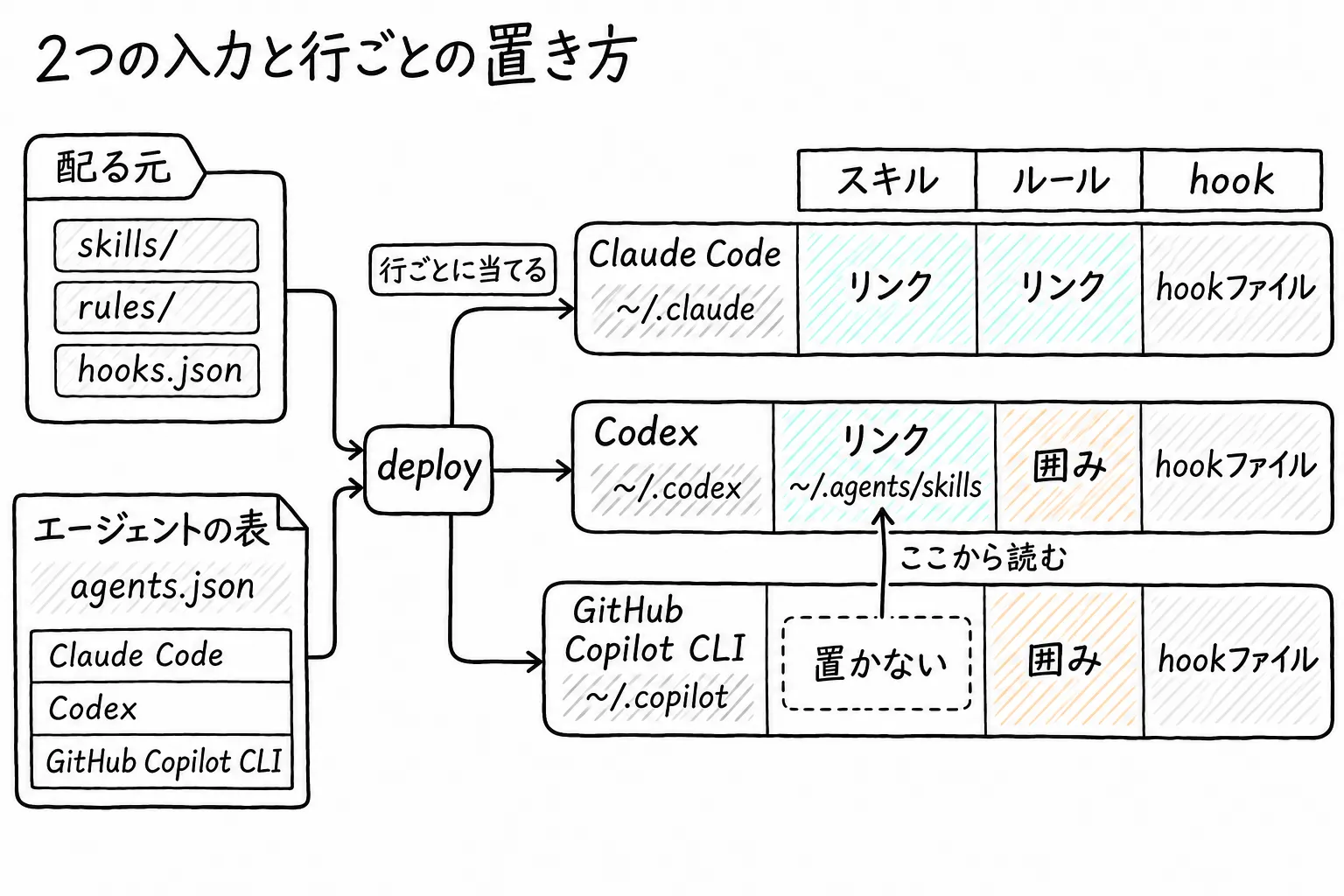
Two inputs determine what agent-shared installs and where.
One is a folder containing the skills, rules, and hooks themselves, referred to as the source folder.
The other is a table containing a row for each agent that specifies where and in what format the agent reads skills, rules, and hooks. This is the agent table.
agent-shared deploy applies the contents of the source folder to every row in the table and determines the location and format for each row.
The default table is src/agent_shared/agents.json included in the package.
Users can add agents or replace rows with the same name by writing entries in ~/.shared/agents.json.
For example, the GitHub Copilot CLI row is as follows.
{
  "name": "GitHub Copilot CLI",
  "needs_command": "copilot",
  "rules": {"place": "~/.copilot/copilot-instructions.md", "form": "block"},
  "hooks": {"file": "~/.copilot/hooks/agent-shared.json", "version": 1},
  "repo_hooks": {"file": ".github/hooks/agent-shared.json", "version": 1},
  "events": ["SessionStart", "SessionEnd", "UserPromptSubmit", "PreToolUse", "PostToolUse", "PostToolUseFailure",
             "Stop", "SubagentStop", "ErrorOccurred", "PreCompact", "PermissionRequest"],
  "checked": {"command": "copilot --version", "from": "1.0.62", "to": "1.0.114"}
}
The main values in this row have the following meanings.
-
The
formfield ofrulesBecause it is
block, the rules are written as a single delimited block inside the file specified byplace. -
The absence of a
skillsfieldThis row does not install skill links. Copilot CLI reads skills from
~/.agents/skills, where the Codex row installs them. Whether skills reach Copilot CLI therefore depends on whether the Codex row is applied. -
The
versionfield ofhooksThis is the
"version": 1written at the top of the hook file. -
needs_commandThis row is applied only if the
copilotcommand is present inPATH. -
eventsandcheckedeventslists the hook events supported by this row, andcheckedspecifies the version range declared by agent-shared for the row. Both are used for checks before writing files.
The tests in this article did not verify whether agents within the specified version range actually read the installed files.
Source folders
A source folder contains one or more of skills/, rules/, and hooks.json.
A user's own source folder is ~/.shared. Another application's folder containing its skills and hooks can be included in the same run using --source <folder>.
A repository can maintain its own source folder as .shared at its root.
~/.shared/
├── skills/plain-words/SKILL.md
├── rules/commit-messages.md
├── hooks.json
├── hooks/no-force-push.sh
└── agents.json
A skill is a folder containing the SKILL.md file defined by Agent Skills. Its folder name must match the name in SKILL.md.
Each .md file directly under rules/ represents one rule, with the filename serving as the rule name.
agents.json is needed only to add rows to the table. The command works without it.
If two source folders in one run contain a skill or rule with the same name, the operation is rejected before any files are written.
Define hooks once in hooks.json using the same structure as the hooks field in Claude Code settings.
This declaration serves as the source for hooks copied to each agent.
The following is hooks.json from agent-shared's examples/basic.
{
  "hooks": {
    "PreToolUse": [
      {
        "matcher": "Bash",
        "hooks": [
          {"type": "command", "command": "bash ${CLAUDE_PLUGIN_ROOT}/hooks/no-force-push.sh", "timeout": 5}
        ]
      }
    ]
  }
}
The values in this declaration have the following meanings.
-
PreToolUseAn event that runs immediately before the agent uses a tool.
-
Bashas thematcherRestricts the hook to tools that execute shell commands.
-
${CLAUDE_PLUGIN_ROOT}in thecommanddeployreplaces it with the actual path to the source folder. -
timeoutThe time to wait for the command to finish, in seconds.
If a hook declares a tools field, it is installed only for the agents listed by name, and the tools field itself is not written to the agents' files.
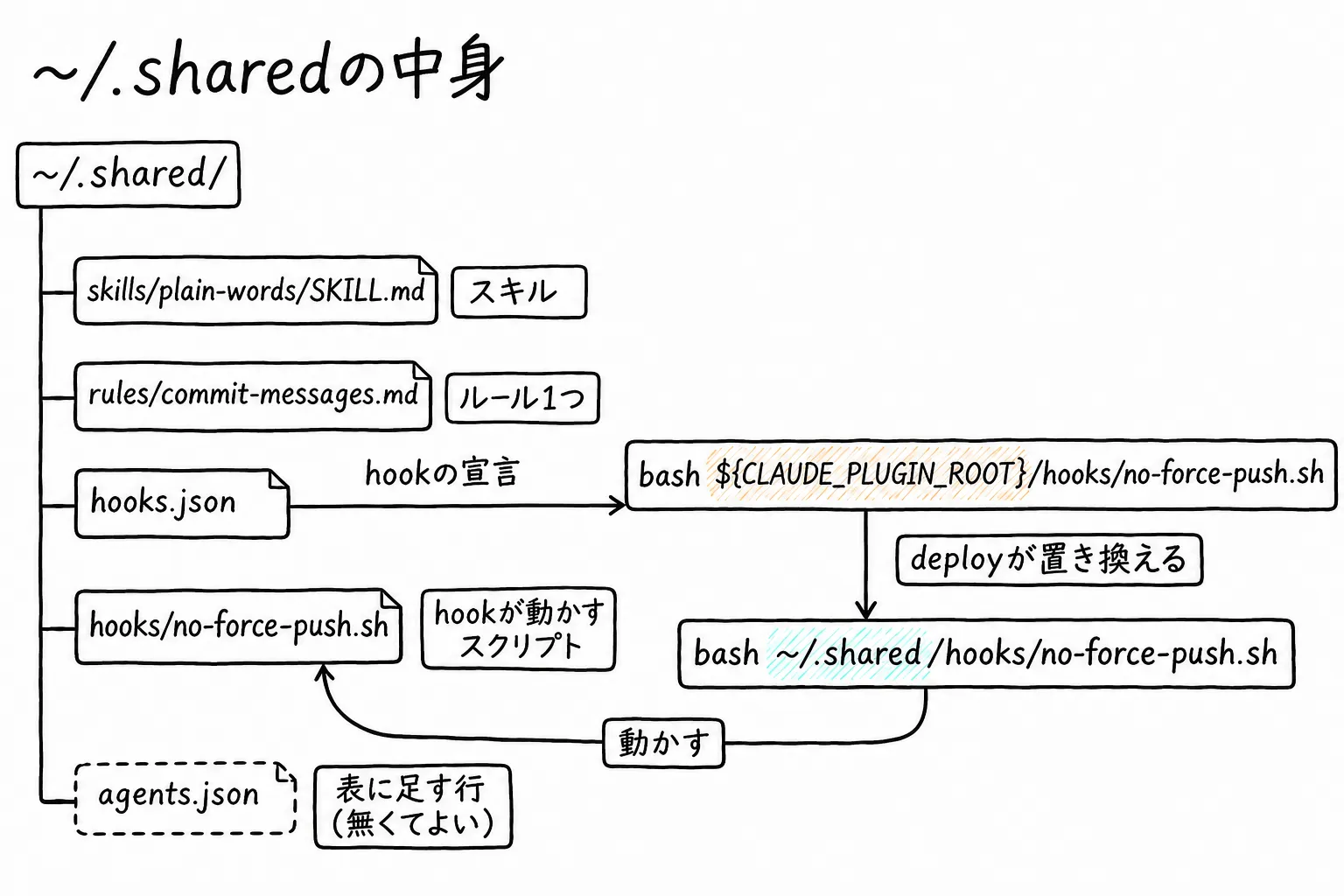
hooks/no-force-push.sh reads tool_input.command from the JSON that the agent passes to standard input. If it contains push --force or push -f, the script prints the reason to standard error and exits with code 2.
Whether this script actually blocks tool execution in all three agents depends on how each agent handles exit code 2 and timeouts.
The differences documented by the agents are explained in How hooks block execution and handle timeouts.
The script itself can be tested locally as follows. It prints a reason and exits with 2 only for a forced push.
$ printf '{"tool_input":{"command":"git push --force"}}' | bash ~/.shared/hooks/no-force-push.sh; echo $?
A force push rewrites history others may have pulled. Push without --force.
2
agent-shared only copies this command into each agent's files. It does not normalize differences in input fields or exit code handling across agents.
If a hook depends on a field supplied by only one agent, use tools to restrict distribution to that agent.
agent-shared check --source <folder> validates the source folder against the specification without writing files.
It detects the following issues.
- Events that none of the agents read
- Hooks without commands
- Unnamed rows in the agent table
- Skills whose names differ from their folder names
Each problem is printed on a separate line in the form <file>: <entry>: <problem>. The command exits with code 1 if it finds any problem.
examples/basic is an example source folder that passes check.
Installation locations for the three agents
The default table has three rows: Claude Code, Codex, and GitHub Copilot CLI. agent-shared installs either links or delimited blocks, depending on where each agent reads skills and rules.
| Agent | Skills | Rules | Hooks |
|---|---|---|---|
| Claude Code | A link per skill in ~/.claude/skills |
A link per rule in ~/.claude/rules |
~/.claude/settings.json |
| Codex | A link per skill in ~/.agents/skills |
One block in ~/.codex/AGENTS.md |
~/.codex/hooks.json |
| GitHub Copilot CLI | Reads the same ~/.agents/skills as Codex |
One block in ~/.copilot/copilot-instructions.md |
~/.copilot/hooks/agent-shared.json |
Claude Code's official documentation states that Markdown files in ~/.claude/rules/ are read as personal rules for all projects, including linked files.
This makes it possible to install a separate link for each rule in Claude Code.
Codex and Copilot CLI, by contrast, each read a single file as user instructions, so the rule contents are written in a delimited block within that file.
For skills, the official Codex documentation identifies $HOME/.agents/skills as the user-level skills location and states that linked skill directories are followed.
Copilot CLI also reads ~/.agents/skills, and its changelog states that it has read skills from linked directories since 1.0.62.
The checked range for the Copilot CLI row also starts at 1.0.62.
Hooks for all three agents use the same nested structure as Claude Code. Only the Copilot CLI file includes "version": 1 at the top.
The official Copilot CLI hook documentation states that capitalized events such as PreToolUse receive Claude Code tool names such as Bash.
The agent-shared README states that Codex also reads the older ~/.codex/skills location and that agent-shared installs nothing there to avoid listing the same skill twice.
The official Codex skills documentation does not mention ~/.codex/skills, so this should be understood as a decision by the tool's author.
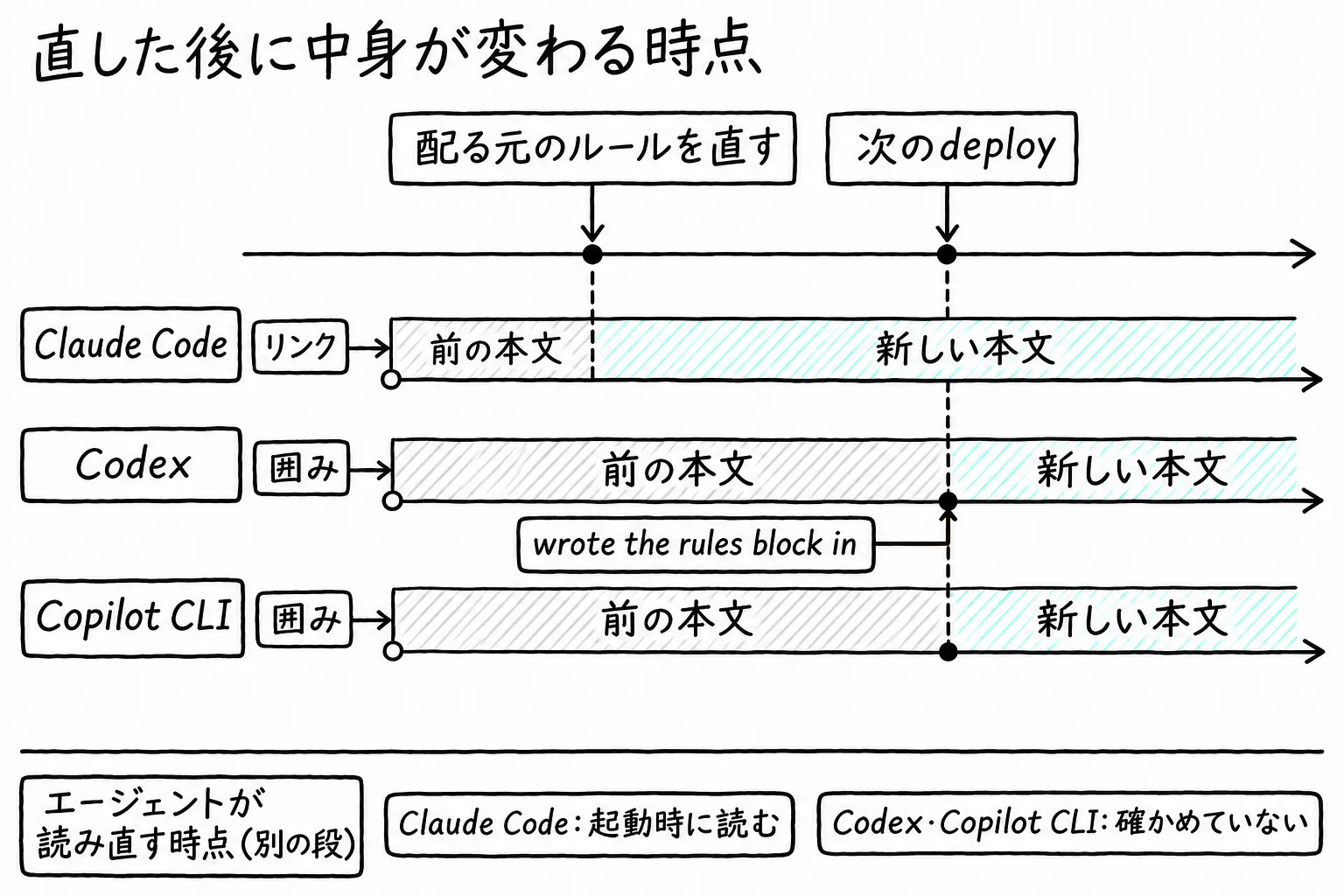
Linked files and copied blocks differ in when their contents change after the source is edited.
Links point to the actual files in ~/.shared, so editing the original file immediately changes the contents accessible through the link.
A block contains copied rule text, so changes take effect when the block is rewritten during the next deploy.
When an agent rereads these files is a separate question determined by each agent.
The official Claude Code documentation states that rules without paths are read at startup, and that skill folders are watched so changes during a session are also loaded.
When Codex and Copilot CLI reread the files was not verified in the tests for this article.
The Copilot CLI row has a needs_command field, so it writes nothing on a computer without the copilot command in PATH.
The agent-shared changelog explains the reason for this condition.
The Copilot IDE extension also creates a ~/.copilot directory, so the existence of the directory alone cannot establish whether Copilot CLI is installed.
The Claude Code and Codex rows do not have needs_command, so they write files even on computers where those agents are not installed.
In the tested example, running deploy on a computer without the codex or copilot commands wrote ~/.agents/skills, ~/.codex/AGENTS.md, and ~/.codex/hooks.json, and listed Codex in the final line.
$ agent-shared deploy
could not read the version of Codex from `codex --version`; wrote it as before
...
warning: Codex was not found, so it does not trust the hooks yet. Open /hooks in Codex once and trust the hooks in ~/.codex/hooks.json.
deployed 1 skills and 1 rules from 1 source to Claude Code, Codex
The could not read the version and warning: lines indicate that the Codex version could not be read and its trust markers could not be written.
Trust markers allow Codex to run only hooks that the user has reviewed. They are explained in Codex trust markers.
To avoid writing files for an unused agent, copy its default row, add needs_command, and place the replacement row with the same name in ~/.shared/agents.json.
However, adding needs_command to the Codex row prevents ~/.agents/skills from being written on computers without the codex command, so Copilot CLI will not receive skills either.
With needs_command added, deploying on a computer without the codex command did not create ~/.agents/skills, even though the final line read deployed 1 skills and 1 rules from 1 source to Claude Code, GitHub Copilot CLI.
There are two ways to use skills in Copilot CLI without using Codex.
One is to keep the default Codex row and accept that files are written in ~/.codex.
The other is to replace the Codex row in ~/.shared/agents.json with a row containing only {"name": "Codex", "skills": "~/.agents/skills"}.
Because this row has no rules or hooks fields, agent-shared installs only skill links in ~/.agents/skills and writes nothing in ~/.codex.
Deploying with this row on a computer without the codex command installed ~/.agents/skills/plain-words without creating ~/.codex. The final line still listed Codex: deployed 1 skills and 1 rules from 1 source to Claude Code, Codex, GitHub Copilot CLI.
The replacement row also lacks the default row's repo_skills, repo_rules, and repo_hooks, so this approach is for deployment to the home directory.
If you have already run deploy with the default row, remove the distributed items before replacing the row.
deploy and remove search for blocks and hooks only in the locations named by the current table rows. After replacement, they can no longer remove the old blocks and hooks in ~/.codex.
The procedure is explained in Removing everything from a source folder.
The table hardcodes locations under ~/.claude, ~/.codex, and ~/.copilot. agent-shared does not read the environment variables that relocate agent directories.
Claude Code can use CLAUDE_CONFIG_DIR to relocate files normally stored in its home directory, including settings files.
When this is set, the hooks written by agent-shared to ~/.claude/settings.json are not read.
Whether ~/.claude/rules and ~/.claude/skills are also relocated, causing the installed links to be ignored, was not verified.
Codex uses CODEX_HOME to relocate its home directory and reads AGENTS.md and hooks.json from that location.
The skill location remains $HOME/.agents/skills, so the skill links are still read.
Copilot CLI uses COPILOT_HOME to relocate ~/.copilot, and its changelog states that setting this variable also stops it from reading ~/.agents/skills.
If you have relocated these directories, update the locations in the corresponding rows in ~/.shared/agents.json.
If you update the rows after running deploy, blocks and hooks in the previous locations will no longer be removable. Remove them first using Removing everything from a source folder.
Codex trust markers are also written using the directory containing the Codex hook file specified in the table as CODEX_HOME.
If a plugin installed in Claude Code or Codex contains a skill with the same name, that skill is not distributed to that agent, and the names of the skill and plugin are printed.
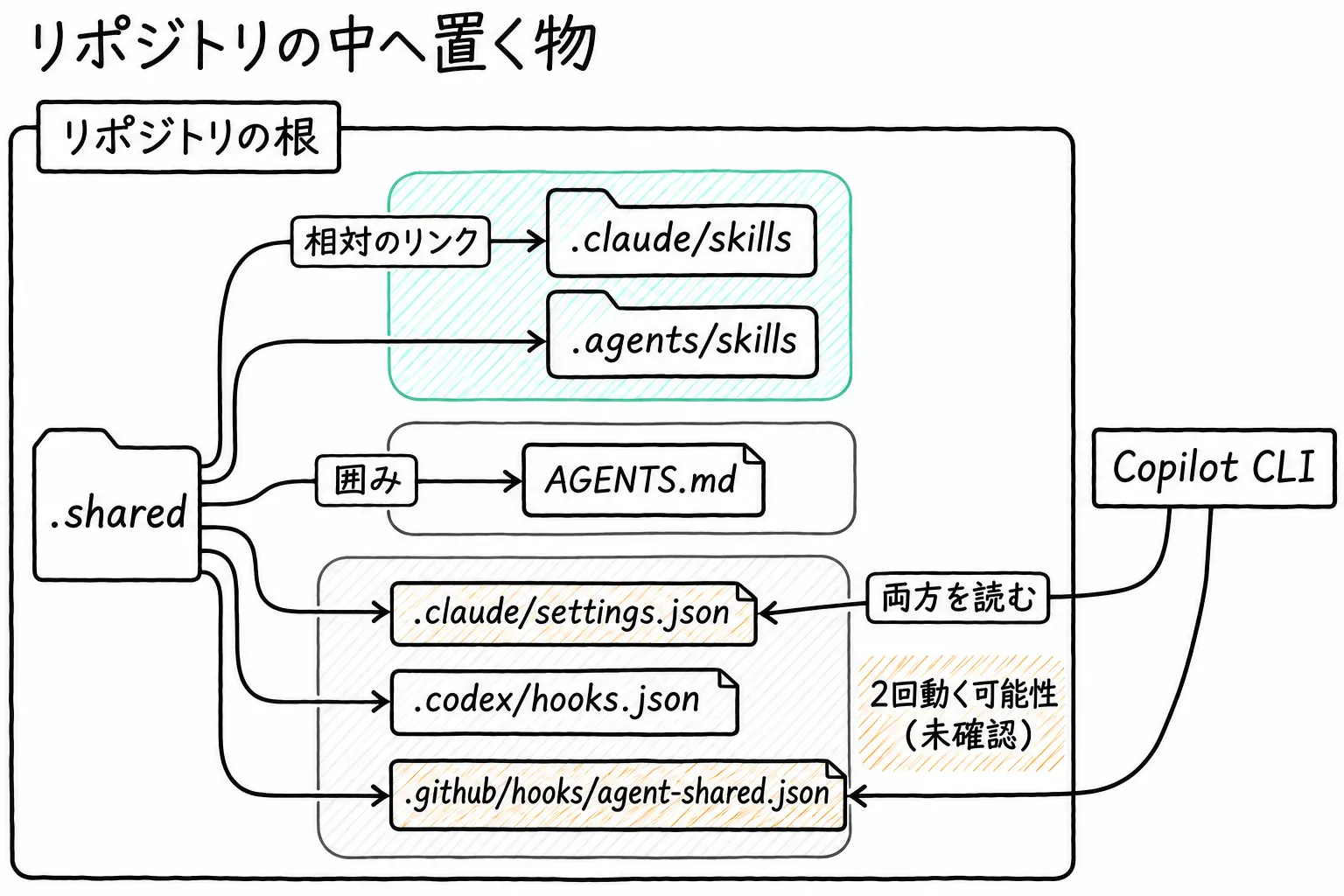
Repository-level .shared
When a repository has a .shared directory at its root, running deploy within the repository or with --repo <folder> installs files into the repository itself.
Because the installed items are repository files, committing them makes the same files available to others who clone the repository.
| Item | Location |
|---|---|
| Skills | Relative links in .claude/skills and .agents/skills pointing inside .shared |
| Rules | One delimited block in the repository's AGENTS.md |
| Hooks | ・.claude/settings.json・.codex/hooks.json・.github/hooks/agent-shared.json |
Whether Claude Code reads this block depends on the repository's CLAUDE.md. agent-shared does not write CLAUDE.md.
The official Claude Code documentation states that, by default, it reads AGENTS.md directly only when neither CLAUDE.md nor CLAUDE.local.md exists in the working directory or its ancestors (from v2.1.277 onward). When CLAUDE.md exists, it reads AGENTS.md if that file imports it with an @AGENTS.md line.
Users of repositories with a CLAUDE.md should therefore add the @AGENTS.md line.
In hook commands, ${CLAUDE_PLUGIN_ROOT} is replaced with .shared, producing a path relative to the repository root, such as bash .shared/hooks/no-force-push.sh.
The official Claude Code documentation states that hooks run in the current working directory, while the official Codex documentation states that hooks run in the session's working directory.
Claude Code's working directory also changes when cd is used during a session.
If the hook runs from a working directory below the repository root, the script cannot be found and the hook does not block the operation.
Running the same command in a disposable repository produced exit code 2 at the root and exit code 127, indicating the script could not be found, from the src/ subdirectory.
The official Copilot CLI documentation does not specify the directory in which hooks run.
This issue is scheduled to be addressed in agent-shared issue #35. In v0.2.4, repository hooks work only when their working directory is the repository root.
Repository hooks are installed only after the person running deploy has approved that .shared folder once.
Whether those hooks run on a computer that clones the repository is determined by each agent's trust mechanism, not by agent-shared. This is explained in Repository hooks and agent trust mechanisms.
In a repository, the same item can be read from two locations.
The official Copilot CLI hook documentation states that it reads the repository's .claude/settings.json in addition to files in .github/hooks/, and executes hooks from all sources for the same event.
It does not describe any deduplication.
agent-shared writes repository hooks to both .claude/settings.json and .github/hooks/agent-shared.json, so the same hook could execute twice in Copilot CLI.
Skills and instruction files are also read from two locations.
According to the official documentation, Copilot CLI reads both .claude/skills and .agents/skills as repository skill locations. agent-shared installs relative links to the same skill in both.
The Copilot CLI changelog states that from 1.0.66 onward, files referenced with @ in AGENTS.md and CLAUDE.md are expanded inline, and from 1.0.26 onward, instruction files with identical content are not sent twice.
Whether adding an @AGENTS.md line to CLAUDE.md causes the block of rules to be deduplicated cannot be determined from the official documentation.
None of these potential overlaps were verified by running Copilot CLI. When distributing hooks with side effects, such as sending external notifications, make them safe to run twice.
Deploying and verifying the result
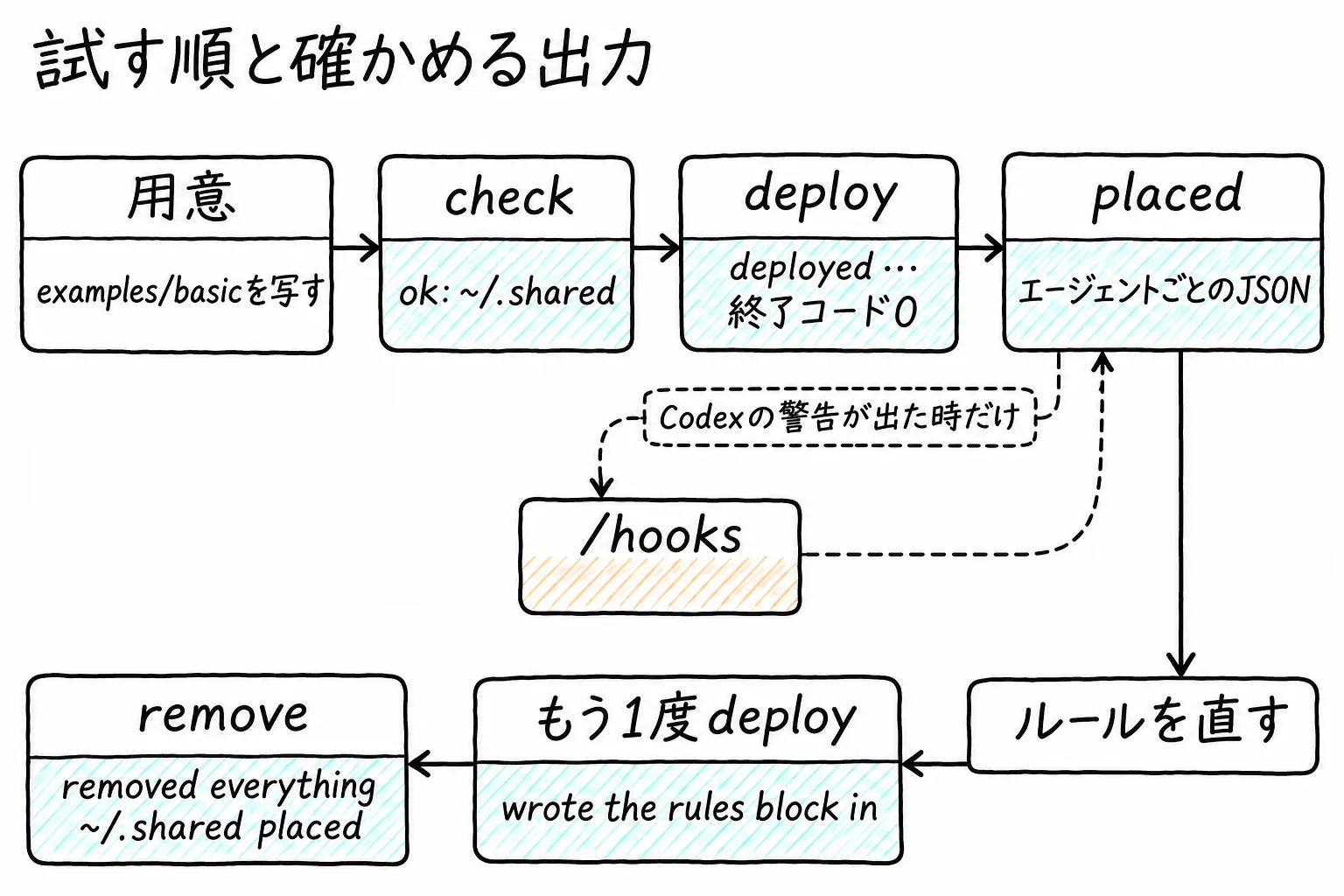
To try agent-shared, copy examples/basic into ~/.shared, distribute it to the three agents, inspect the results, and then remove it.
The output accompanying the steps was produced by running agent-shared 0.2.4 in a disposable home directory.
The three agents' commands were replaced by stubs returning version strings only, all within the table's checked ranges.
AGENT_SHARED_CODEX_BIN was set to an empty value to prevent agent-shared from launching codex app-server, so Codex trust markers were not written and a warning was displayed.
The home directory was initialized with three user-written lines in ~/.codex/AGENTS.md and a "model" field in ~/.claude/settings.json.
The deploy in step 5 modifies files in your own home directory.
It installs a PreToolUse hook intended to block forced git push commands in ~/.claude/settings.json, ~/.codex/hooks.json, and ~/.copilot/hooks/agent-shared.json.
It adds blocks containing commit message rules to ~/.codex/AGENTS.md and ~/.copilot/copilot-instructions.md, and installs links in ~/.claude/ and ~/.agents/skills.
These rules and hooks are intended to be read by agents started afterward and prevent forced pushes.
Whether an agent reads them or a hook blocks execution depends on that agent's trust settings and behavior. The differences are explained in How hooks block execution and handle timeouts.
On a computer with the codex command, agent-shared also attempts to write Codex trust markers. If successful, hooks may begin running without the Codex confirmation screen.
This mechanism is explained in Codex trust markers.
If you are only testing, you can remove the installed items in the final step, step 9.
-
Install the command
Run
uv tool install "git+https://github.com/cardene777/agent-shared@v0.2.4"and confirm thatagent-shared --versionprintsagent-shared 0.2.4. The command in the README omits@v0.2.4and installs the latest version available at that time. -
Prepare the source folder
Clone the example with
git clone --branch v0.2.4 https://github.com/cardene777/agent-shared. If~/.shareddoes not already exist, copy the example withcp -R agent-shared/examples/basic ~/.shared. Confirm thatskills/plain-words/SKILL.md,rules/commit-messages.md,hooks.json, andhooks/no-force-push.share all present. -
Make a backup before deployment
If
~/.codex/AGENTS.mdexists, make a copy withcp ~/.codex/AGENTS.md ~/AGENTS.md.beforeand confirm thatcat ~/AGENTS.md.beforedisplays your own instructions. The backup will be used later to verify that the lines outside the managed block have not changed. If the file does not exist, skip the backup and thediffin step 6. -
Validate the source folder
Run
agent-shared check --source ~/.sharedand confirm that the output contains a line starting withok:followed by the absolute path to~/.shared, and that the exit code is 0. If any problems are reported, fix the indicated<file>and<entry>before continuing. -
Deploy
Run
agent-shared deployand confirm that it exits with code 0 and lists the agents you use in the finaldeployedline. If any output requires attention, follow the corresponding guidance in the table below. -
Inspect the installed items
Use
agent-shared placed --source ~/.sharedto inspect the list for each agent. Confirm thatdiff ~/AGENTS.md.before ~/.codex/AGENTS.mddisplays only added lines (>). If the last line ofAGENTS.mddid not end with a newline, the added newline will also appear in the diff. -
Trust the Codex hooks
Only if a warning about Codex trust markers appeared, open
/hooksonce in Codex and confirm on the screen that the hooks in~/.codex/hooks.jsonare trusted. -
Redeploy after editing
Edit the rule in
~/.shared/rules/commit-messages.md, rundeployagain, and check that thewrote the rules block inline confirms that the block was rewritten. -
Remove the test example
If you do not intend to keep using the example, run
agent-shared remove --source ~/.sharedand confirm the final line begins withremoved everything, includes the absolute path to~/.shared, and ends withplaced, with an exit code of 0. Confirm thatdiff ~/AGENTS.md.before ~/.codex/AGENTS.mdproduces no output, showing thatAGENTS.mdcontains only your own lines again. If the last line originally lacked a newline, the newline added bydeployis the only remaining difference. Open~/.claude/settings.jsonwithcatand confirm that your own settings remain and theno-force-push.shhook is absent.
The output from step 5 is as follows.
$ agent-shared deploy
placed ~/.agents/skills/plain-words
placed ~/.claude/rules/commit-messages.md
placed ~/.claude/skills/plain-words
wrote the rules block in ~/.codex/AGENTS.md
wrote the rules block in ~/.copilot/copilot-instructions.md
wrote the hooks in ~/.claude/settings.json
wrote the hooks in ~/.codex/hooks.json
wrote the hooks in ~/.copilot/hooks/agent-shared.json
warning: Codex was not found, so it does not trust the hooks yet. Open /hooks in Codex once and trust the hooks in ~/.codex/hooks.json.
deployed 1 skills and 1 rules from 1 source to Claude Code, Codex, GitHub Copilot CLI
The single skill became two links. The single rule became one link in Claude Code and two managed blocks in Codex and Copilot CLI.
The single hook was written once into each of the three agents' hook files.
Exit code 0 indicates that writing to all installation locations has finished. The command still exits with 0 if there is a Codex trust warning.
If the destinations are already in the desired state, rerunning the same deploy produces no placed or wrote lines, only warnings and the final summary.
The output from deploy consists of informational lines and lines that require attention.
| Line | Meaning | What to do |
|---|---|---|
・placed・wrote・removed |
・Installed a link・Wrote a file・Removed an item | No action required |
wrote Codex's trust for the hooks in |
agent-shared wrote the Codex trust markers | No action required. See Codex trust markers for which steps are skipped |
・is newer than・could not read the version |
Files were written for an agent outside the table's checked range or whose version could not be read |
See Installation locations for the three agents for unused agents, or Version ranges declared by the table for version concerns |
warning: wrote nothing for |
The agent is older than the checked range, so no files were written for it |
Update that agent and rerun the command |
・warning: Codex was not found・warning: Codex's hook trust was not written |
Codex trust markers could not be written | Step 7 |
refused: and Nothing was written. |
The operation was rejected without writing anything | See refusal conditions in Refusal conditions and write failures |
A line beginning with Traceback |
A failure occurred during writing | See write failures in Refusal conditions and write failures |
Since Codex was not run in this test, neither the wrote Codex's trust line nor the /hooks screen was observed. The meaning of the line was determined by reading the code.
The default table also restricts Claude Code's range to the single version 2.1.330. An actual Claude Code installation newer than that version produces the is newer than line.
The placed command in step 6 returned the following JSON.
{
  "source": "~/.shared",
  "agents": {
    "Claude Code": {
      "skills": ["plain-words"],
      "rules": ["commit-messages.md"],
      "hooks": [{"event": "PreToolUse", "matcher": "Bash", "command": "bash ~/.shared/hooks/no-force-push.sh"}]
    },
    "Codex": {
      "skills": ["plain-words"],
      "rules": ["commit-messages.md"],
      "hooks": [{"event": "PreToolUse", "matcher": "Bash", "command": "bash ~/.shared/hooks/no-force-push.sh"}]
    },
    "GitHub Copilot CLI": {
      "skills": [],
      "rules": ["commit-messages.md"],
      "hooks": [{"event": "PreToolUse", "matcher": "Bash", "command": "bash ~/.shared/hooks/no-force-push.sh"}]
    }
  }
}
Copilot CLI's skills field is empty because its row does not install skills; it reads ~/.agents/skills, where the Codex row installs them.
Copilot CLI receives the skill only if ~/.agents/skills/plain-words exists.
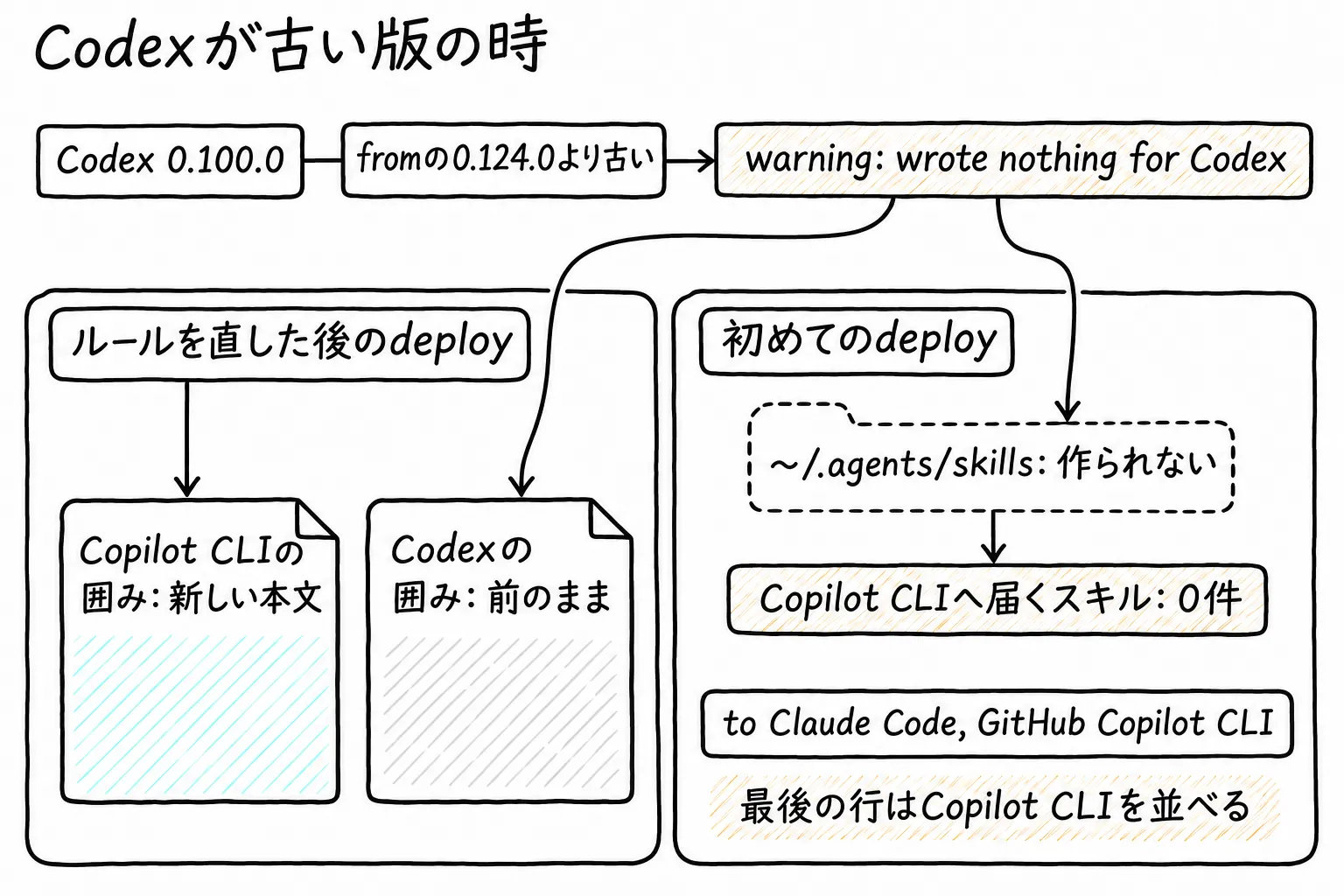
If the Codex row is skipped because the agent's version is too old, this link is not created either, and zero skills reach Copilot CLI. The test is shown in Version ranges declared by the table.
The command field in hooks is displayed without the marker line.
The diff showed only that a seven-line block was appended after the user's three lines.
$ diff ~/AGENTS.md.before ~/.codex/AGENTS.md
3a4,10
> <!-- agent-shared begin source=a6b2c1fd365a -->
> <!-- agent-shared rule commit-messages.md -->
> # Commit messages
>
> Write the first line of a commit message as what the change does, in under 72 characters.
> Say why the change was made in the body, one point per line.
> <!-- agent-shared end source=a6b2c1fd365a -->
The items removed and retained by remove in step 9 are shown in Removing everything from a source folder and Directories left empty.
Refusal conditions and write failures
Before writing, deploy prepares and checks the entire set of changes.
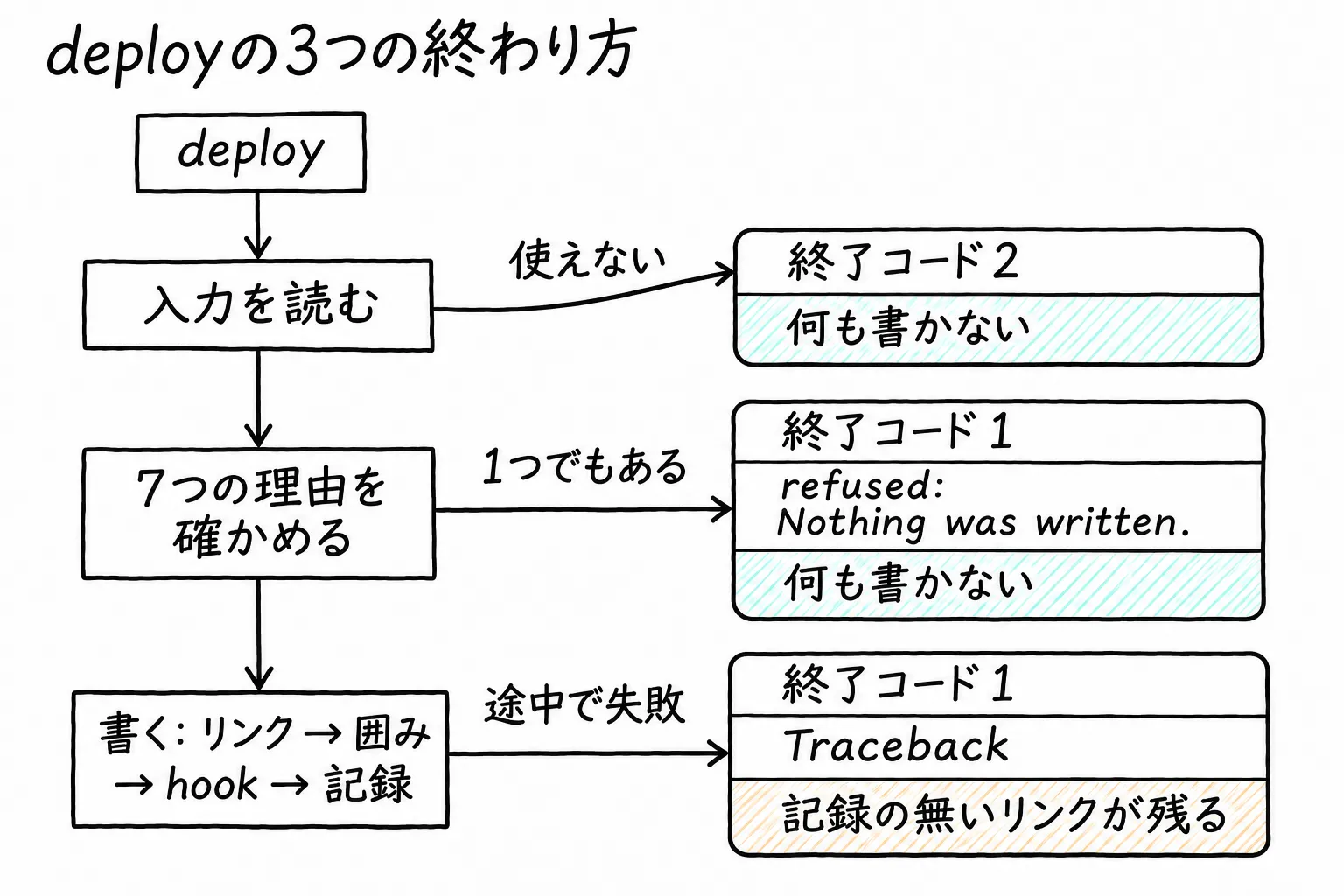
If any of the seven conditions in the table below is met, it writes nothing, prints each reason on a separate refused: line, and exits with code 1 after printing Nothing was written..
Since no files were written in this case, the user can correct the problems and rerun the same command.
For example, if the source folder contains a skill named hand-made and the user has manually placed a directory at ~/.claude/skills/hand-made, the command refuses as follows.
refused: ~/.claude/skills/hand-made is in the way: agent-shared did not place it
Nothing was written.| Reason | Resolution |
|---|---|
| Two source folders contain a skill or rule with the same name | Rename one of them |
| The destination contains an item not installed by agent-shared | Move the item or rename the skill or rule |
| The destination contains an item from another source folder | Deploy both source folders in one run. If the source folder has moved, run remove using the old path before deploying from the new path |
| A manually written hook has the same command as a declared hook | Remove one of the hooks |
| The agent configuration file is not valid JSON | Fix the file |
| A managed rule block in the file is malformed | Remove the marker lines manually |
| A rule contains a line beginning with the same format as a marker | Change that line |
All seven conditions risk confusing items installed by agent-shared with those belonging to the user.
The third condition also occurs when the source folder is moved or renamed.
The source folder's <id> is derived from its path and is distinct for each source. A relocated folder is treated as a different source, so links installed using the previous path conflict with it.
In the test, moving ~/team to ~/team-moved and running deploy produced the following lines for three links.
refused: ~/.agents/skills/plain-words was placed from another source, ~/team; deploy both sources in one runThe old source path no longer exists, so both sources cannot be deployed in a single run.
Running agent-shared remove --source ~/team to remove items associated with the old path, then deploying with --source ~/team-moved, installed them again successfully.
Approvals are also recorded per source folder <id>, so hooks from the relocated folder are not installed until it is approved with approve using the new path.
Preflight checks cover the seven conditions and reading inputs, but do not check file permissions during writing or insufficient disk space.
deploy writes links, managed rule blocks, and hooks in that order, then saves its record. If writing fails midway, items already installed remain without a corresponding record.
In the test, running deploy with ~/.claude/skills unwritable stopped with a Python exception and exit code 1.
Traceback (most recent call last):
PermissionError: [Errno 13] Permission denied: '~/.shared/skills/plain-words' -> '~/.claude/skills/plain-words'
The links already installed at ~/.agents/skills/plain-words and ~/.claude/rules/commit-messages.md remained, but the placed.json record was not created.
After permissions were restored, rerunning deploy refused because both remaining links were reported as is in the way: agent-shared did not place it.
Removing those links manually and rerunning the command wrote all destinations successfully.
Both failures use exit code 1. However, refused: followed by Nothing was written. means nothing was written, while a line beginning with Traceback means writing may have progressed partway.
Exit code 2 indicates that one of the following inputs could not be used. Nothing is written in this case either.
- Command arguments
- Source folder
- Agent table
- Installation record
- Disabled-items list
Identifying installed items
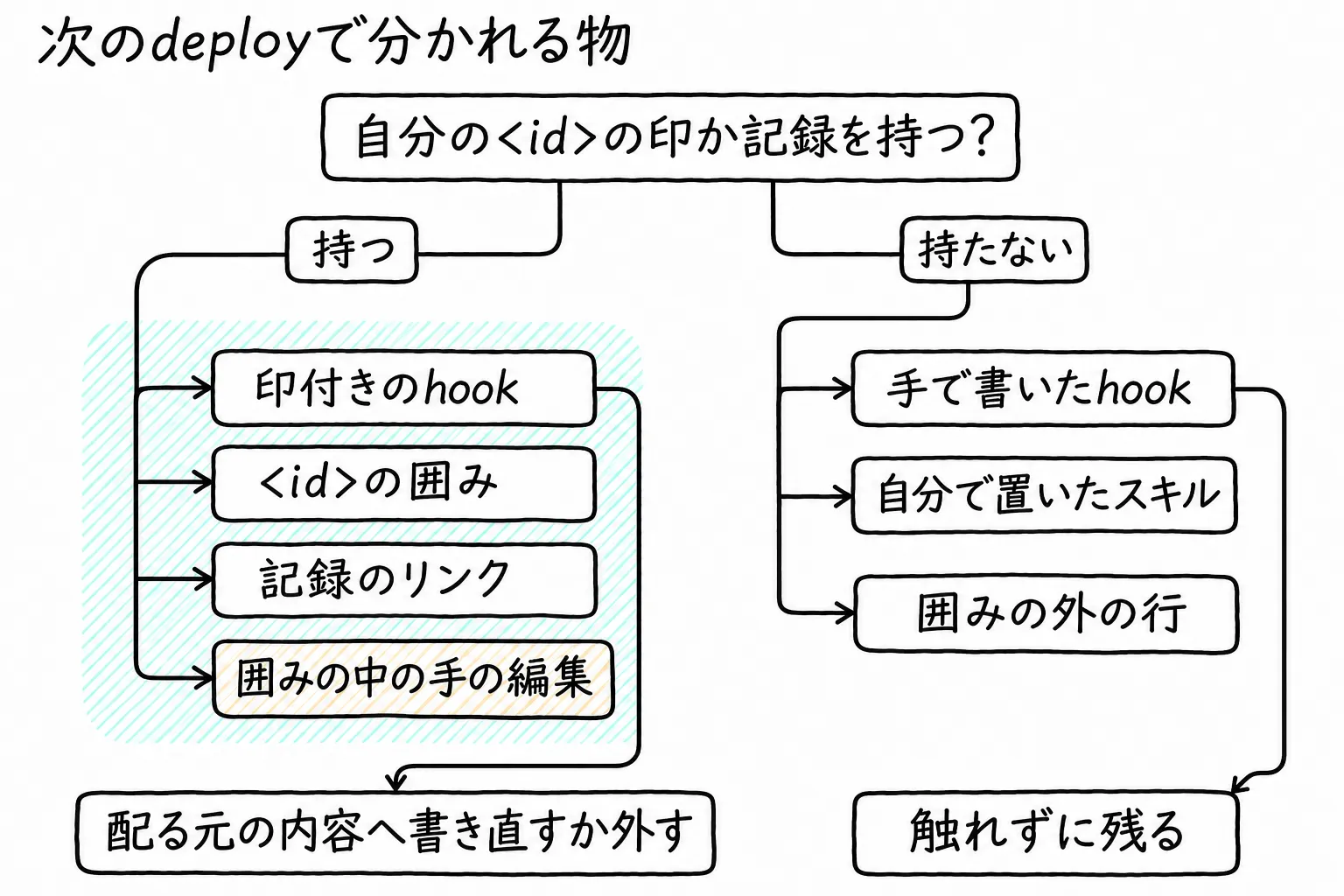
agent-shared can remove only the items it installed because it leaves identifying information for each item. Hooks and managed rule blocks contain marker lines in the agents' files. Links cannot contain marker lines, so agent-shared records the installed links in its own record file.
| Installed item | How it is identified |
|---|---|
| Hook | The final line of the command, # agent-shared 1 source=<id> |
| Rules written to a single file | Opening and closing marker lines sharing the same <id> |
| Skill and rule links | Link locations and targets recorded in placed.json |
The <id> consists of the first 12 hexadecimal digits of the SHA-256 hash of the source folder's actual path and differs for each source folder.
Consequently, even if two source folders are deployed to the same agent, each updates only the items carrying its own <id>.
Items with neither markers nor records remain untouched, including manually written hooks, manually installed skills, and lines outside managed blocks.
Conversely, identifiable items are treated as agent-shared's own and rewritten to match the source during the next deploy.
In the test, one line inside the block in ~/.codex/AGENTS.md and the timeout of a marked hook in ~/.claude/settings.json were edited manually. Running deploy restored both to their source values.
Make changes in the source files instead.
To give only one agent different content, use the disabled-items list described later or a separate source folder.
Hook command markers
deploy appends a newline and marker line to the hook command declared in the source, then writes it to the agent configuration file.
Below is the content of ~/.claude/settings.json after deployment, where the user had previously set a "model" field.
{
  "model": "opus",
  "hooks": {
    "PreToolUse": [
      {
        "matcher": "Bash",
        "hooks": [
          {
            "type": "command",
            "command": "bash ~/.shared/hooks/no-force-push.sh\n# agent-shared 1 source=a6b2c1fd365a",
            "timeout": 5
          }
        ]
      }
    ]
  }
}
The "model" field remains unchanged, and one group is added to hooks.
The second line of command, # agent-shared 1 source=a6b2c1fd365a, is a shell comment beginning with #.
The 1 is the version of the marker format, and the value following source= is the source folder's <id>.
The actual command contains the absolute path to the source folder. Here, ~ represents the home directory.
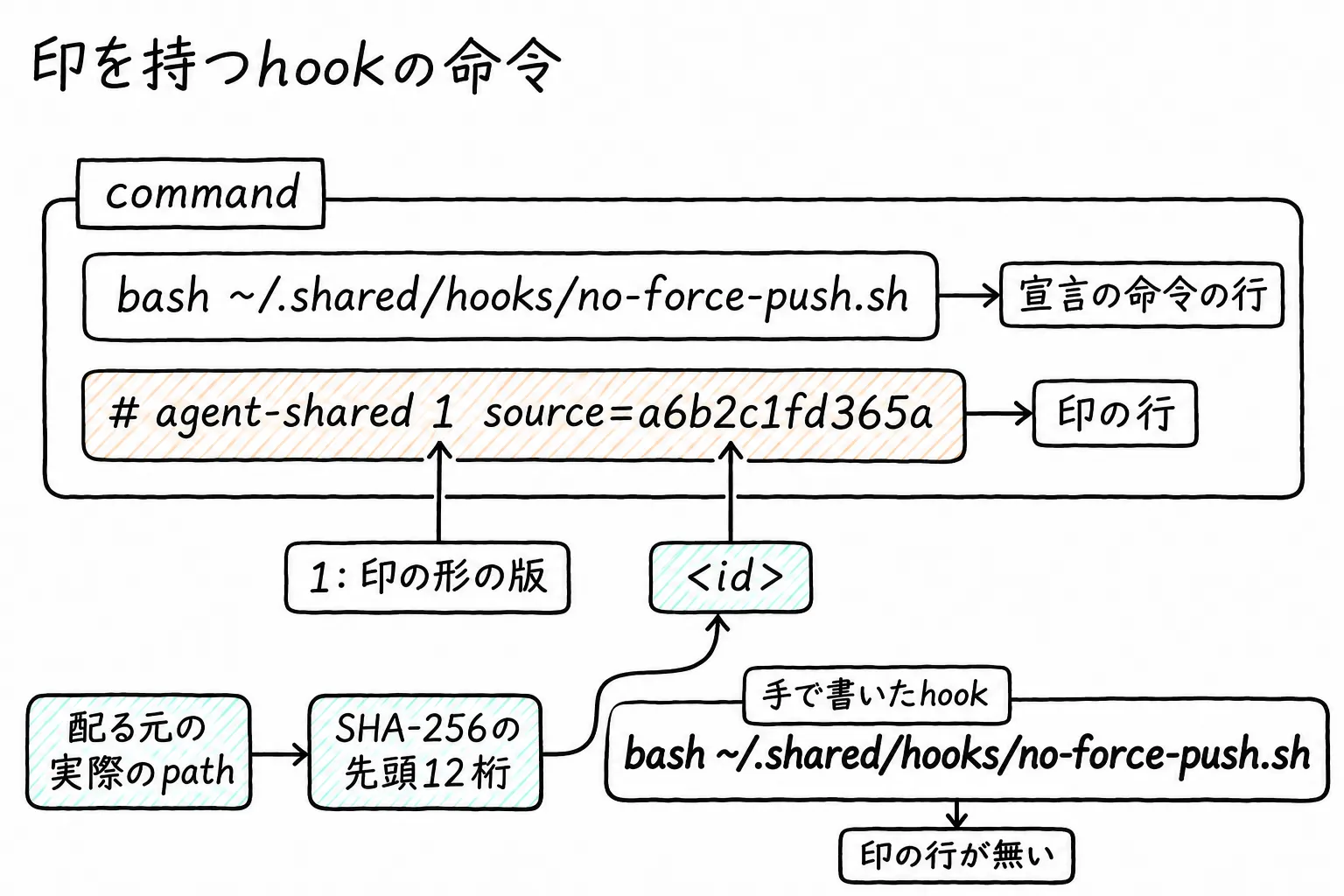
How the comment line is treated depends on how the agent executes the command.
Claude Code's official documentation states that commands of this form are passed to sh -c on macOS and Linux, so the comment line is not executed as a command.
Copilot CLI's documentation states that it copies command into the bash and powershell fields. Codex's documentation does not specify whether it runs the command through a shell.
Neither of these two agents was run in the tests for this article.
During the next deploy, hooks carrying the current source folder's <id> are removed before the declared hooks are added, preventing duplicates.
agent-shared's architectural decision record (ADR 0001) gives three reasons for placing the marker inside the command instead of adding a field such as "source" to the hook.
First, the author concluded that Claude Code does not accept unknown fields in its settings.
The official Claude Code documentation confirms only that unknown event names are skipped; it does not describe how unknown hook fields are handled.
Second, recording installed hooks only in a separate record file would make ownership ambiguous when users manually edit settings and the file no longer matches the record. Third, Claude Code and Codex read agent-shared's hooks and the user's hooks from the same file, so agent-shared cannot claim ownership of the entire file.
Managed rule blocks
For agents that read a single instruction file, the rule text is written inside a managed block.
Below is the content of ~/.codex/AGENTS.md after deployment, where the user had previously written three lines.
# My own rules

- Answer in Japanese.
<!-- agent-shared begin source=a6b2c1fd365a -->
<!-- agent-shared rule commit-messages.md -->
# Commit messages

Write the first line of a commit message as what the change does, in under 72 characters.
Say why the change was made in the body, one point per line.
<!-- agent-shared end source=a6b2c1fd365a -->
My own rules
- Answer in Japanese.
Commit messages
Write the first line of a commit message as what the change does, in under 72 characters. Say why the change was made in the body, one point per line.
The block is enclosed by a begin line and an end line, both carrying the same <id>.
Between them, the <!-- agent-shared rule <name> --> marker and body appear for each rule.
The block is appended after the user's lines. Subsequent deploy runs rewrite only the lines inside it.
Lines outside the block remain unchanged byte for byte.
However, if the file's last line does not end with a newline, one newline is added before appending the block. That newline remains even after remove removes the block.
The test's AGENTS.md consisted of three newline-terminated lines. After removal, it returned to exactly the same bytes as before deployment.
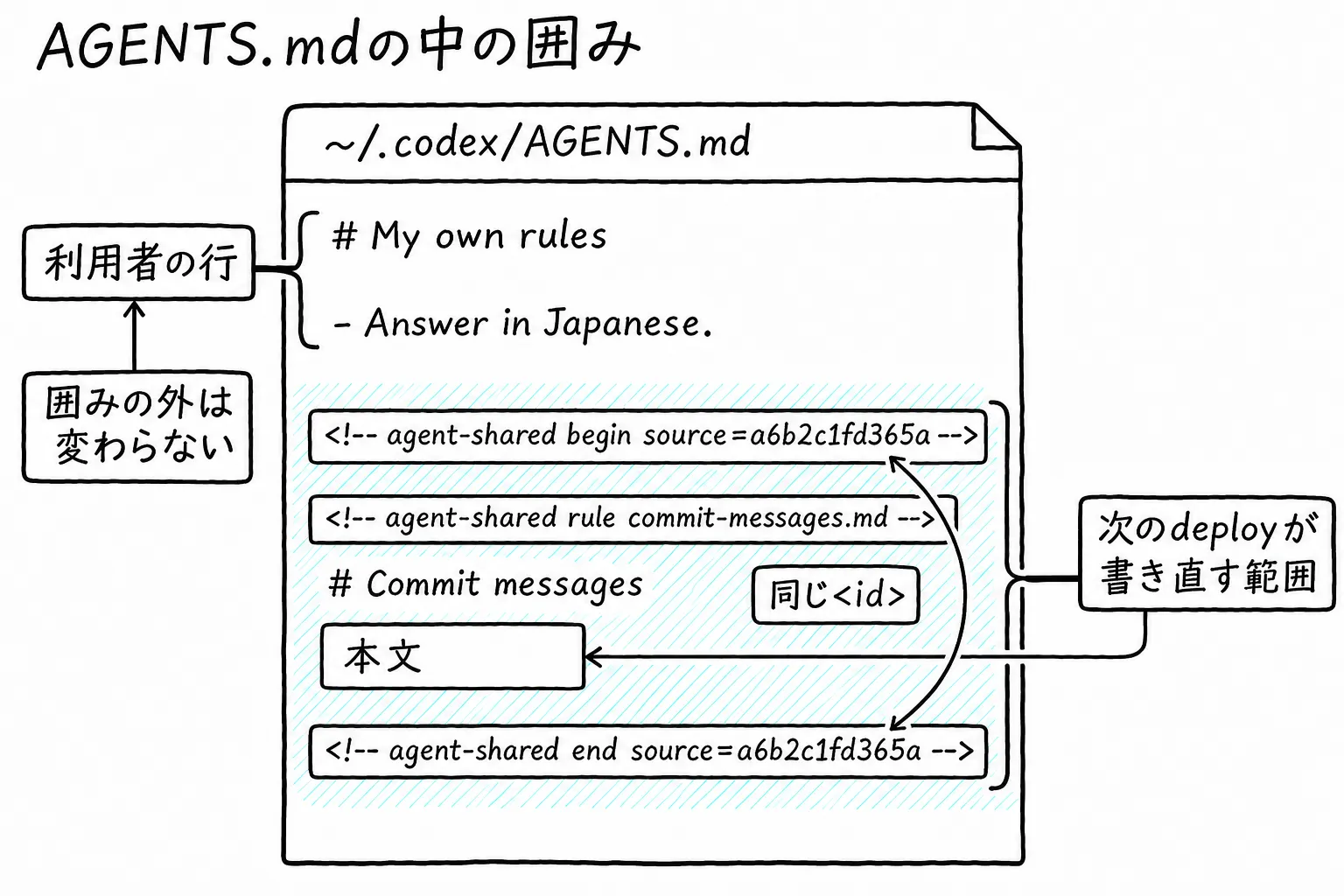
If rule text contains a line starting with the same format as a marker, the operation is refused without writing anything because it could be mistaken for the end of the block.
Malformed blocks lacking a matching pair of begin and end markers are also refused, with instructions to remove the marker lines manually.
Manually editing the content inside a block will not persist; the next deploy rewrites it using the source text.
Because the block contains a copy of the source, make edits in the files under the source folder's rules/ directory.
Records maintained by the tool
agent-shared stores two files of its own in ~/.local/share/agent-shared/.
This directory can be changed with AGENT_SHARED_STATE, and both files are written with permissions restricting access to the owner.
In the test, file permissions were 600 and directory permissions were 700.
placed.json is the installation record. It records installed links and hook approvals for each source folder's <id>.
{
  "version": 1,
  "sources": {
    "a6b2c1fd365a": {
      "path": "~/.shared",
      "links": {
        "~/.agents/skills/plain-words": "~/.shared/skills/plain-words",
        "~/.claude/rules/commit-messages.md": "~/.shared/rules/commit-messages.md",
        "~/.claude/skills/plain-words": "~/.shared/skills/plain-words"
      },
      "approved": true
    }
  }
}
The main values have the following meanings.
-
pathThe path to the source folder.
-
linksThe left-hand value is the installed link's location; the right-hand value is its target.
-
approvedIndicates whether the source folder's hooks have been approved. It is used for the hook approval mechanism described later.
deploy and remove remove links as their own items only if they are recorded and still point to the recorded targets.
If the user deletes a link or redirects it to another target, agent-shared no longer treats it as its own.
off.json is the switch list. It lists individual rules or hooks from a source folder that should not be installed for a particular agent.
Entries are added with agent-shared off and removed with agent-shared on or agent-shared remove, which removes everything from the source.
For example, running deploy after agent-shared off --source ~/.shared --agent Codex rules/commit-messages.md removes the block from Codex's AGENTS.md while retaining the Claude Code link.
{
  "version": 1,
  "off": [
    {"source": "~/.shared", "agent": "Codex", "item": "rules/commit-messages.md"}
  ]
}
Entries can identify any of the following three items.
rules/<name>.md- A hook file under the source folder
- The full command of a hook that does not execute a file
Specifying a hook file disables all commands that execute that file for the specified agent.
deploy, hooks, and placed read this list on every invocation. If it cannot be read, they exit with code 2 without writing anything.
agent-shared placed reads the record, switch list, and agent files, and outputs JSON showing what one source folder currently has installed and where.
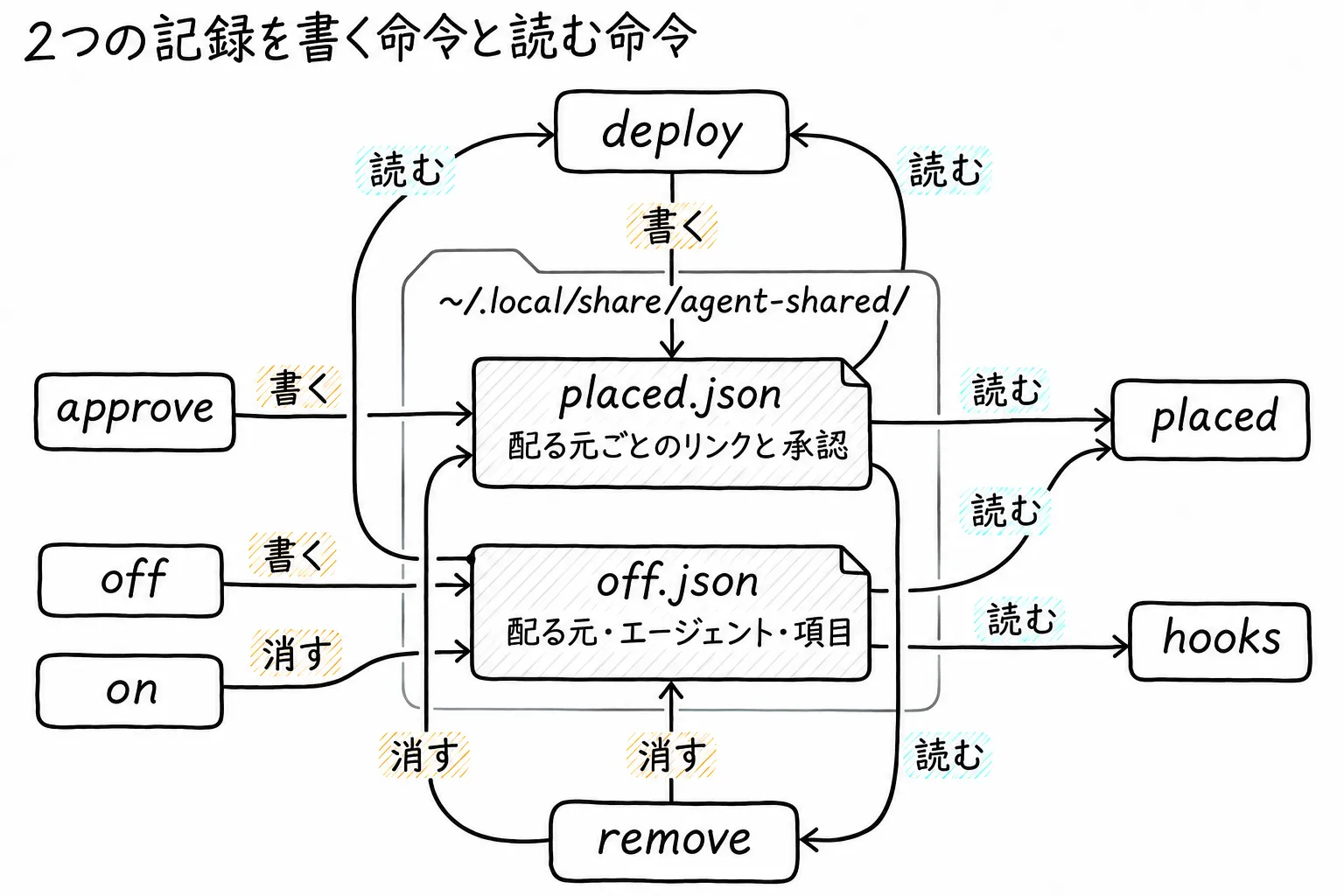
Approval before installing hooks
Hooks allow an agent to execute shell commands. Silently installing hooks from other source folders could run commands the user has not reviewed on their computer. Therefore, agent-shared installs a source folder's hooks only after that source has been approved once. However, this approval shows only the commands present at the time of approval. The path from hook installation to execution also involves each agent's own trust mechanism in addition to agent-shared approval.
For Codex, agent-shared writes the Codex trust markers itself. For repository hooks, trust on the part of the person who clones the repository is also involved.
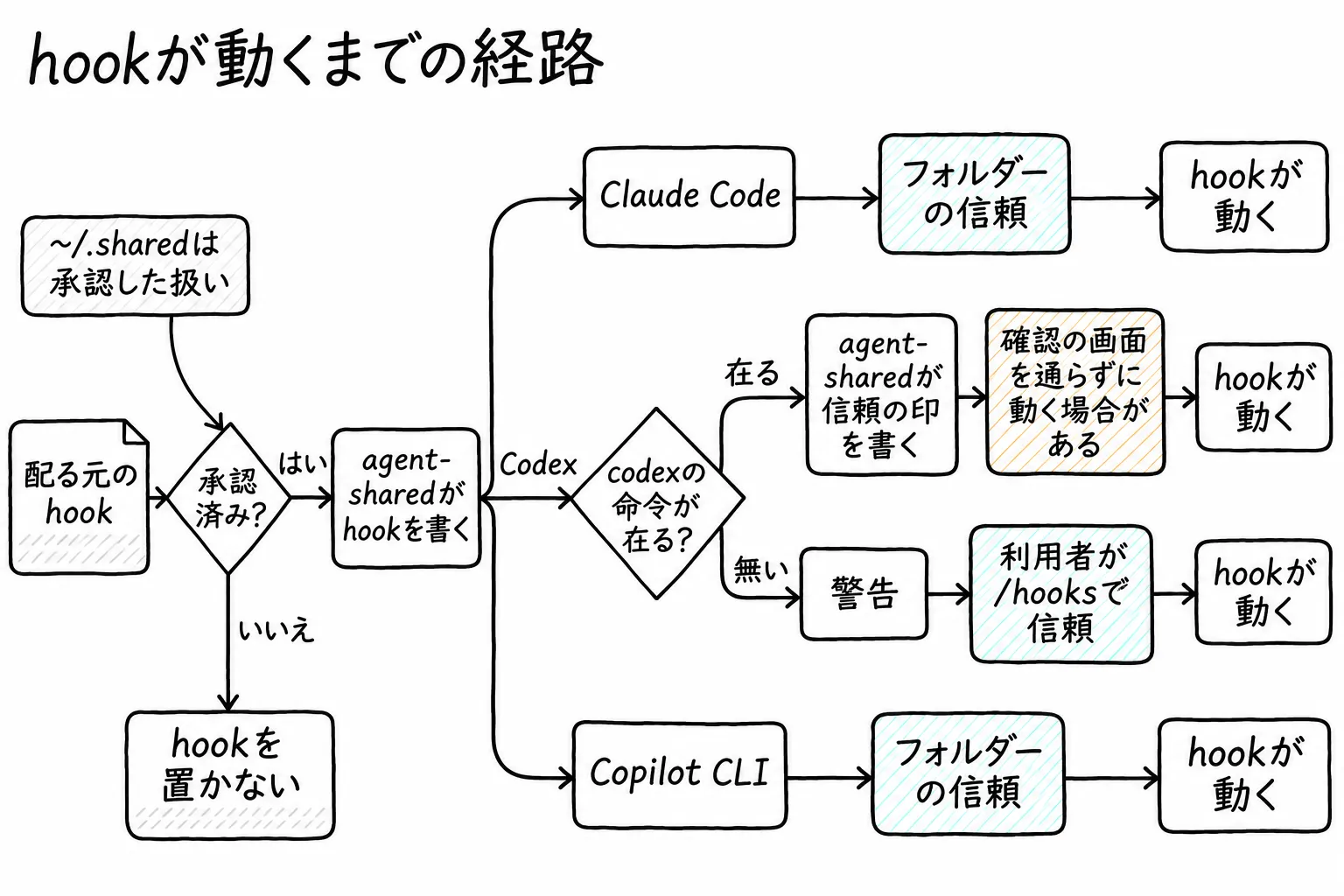
Source folder approval
Approval is handled as follows for each source folder.
| Source folder | Approval |
|---|---|
~/.shared |
Treated as approved because it belongs to the user |
Folder specified with --source |
Approve once with agent-shared approve |
Repository-level .shared |
Approve once with agent-shared approve |
| Source folder already recorded before the approval mechanism was introduced | Treated as approved |
Skills and rules from unapproved sources are still installed. Only hooks are withheld, and the output identifies the command to approve them.
$ agent-shared deploy --source ~/apps/my-tool/.shared
the hooks of ~/apps/my-tool/.shared were not placed: approve them with `agent-shared approve --source ~/apps/my-tool/.shared`
placed ~/.agents/skills/release-notes
placed ~/.claude/skills/release-notes
warning: Codex was not found, so it does not trust the hooks yet. Open /hooks in Codex once and trust the hooks in ~/.codex/hooks.json.
deployed 2 skills and 1 rules from 2 sources to Claude Code, Codex, GitHub Copilot CLI
agent-shared approve --source <folder> displays all hook commands from the source folder. Answering y sets approved to true in the record.
$ agent-shared approve --source ~/apps/my-tool/.shared
The hooks of ~/apps/my-tool/.shared run these commands:
  Stop: sh ~/apps/my-tool/.shared/hooks/stop-check.sh
Approve them, so deploy places this source's hooks in every agent? [y/N] y
approved ~/apps/my-tool/.shared
During the deploy after approval, this Stop hook was written to all three agents' hook files.
Approval is recorded as a single approved value per source folder <id>. The command contents themselves are not recorded.
Consequently, adding a command to the source folder's hooks.json after approval results in its installation on the next deploy without requesting approval again.
In the test, a PreToolUse hook running added-later.sh was added to an approved source at ~/apps/my-tool/.shared. Running deploy installed it in all three hook files without confirmation.
Changing the contents of a script that a hook command executes also does not trigger a new approval during deploy, because the command string remains the same.
Approval applies only to hooks. Skills and rules are installed before approval.
Because ~/.shared is treated as approved, its hooks never pass through the approval prompt.
Moving the source folder changes its <id>, so it must be approved again using the new path.
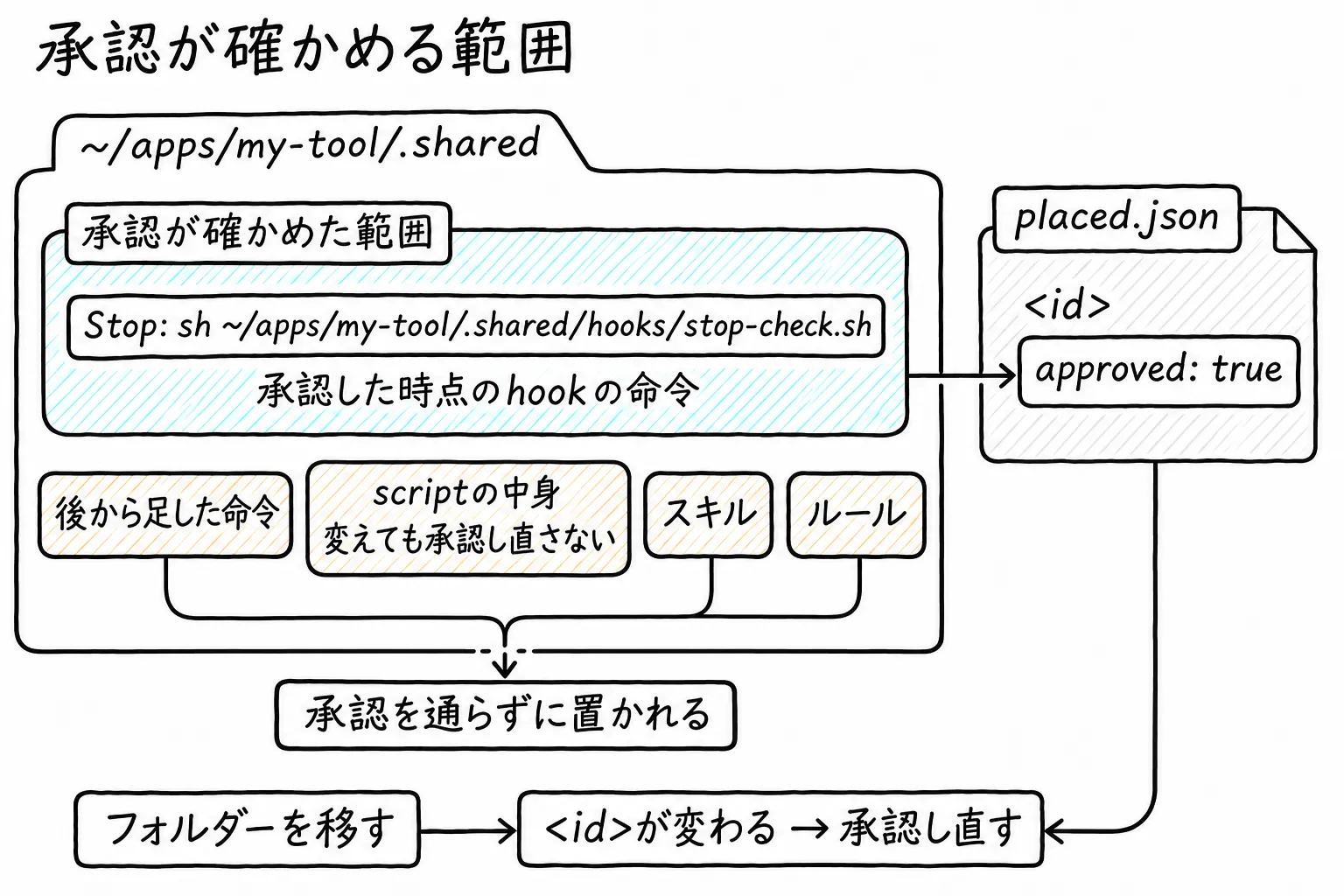
Before adding a source folder, read its hooks.json and the scripts that the hooks execute.
After updating an approved source, agent-shared hooks --agent <name> --source <folder> can show the combined set of hooks that deploy will add from ~/.shared and the specified source before writing them.
Codex trust markers
The official Codex documentation states that unmanaged hooks are not executed until the user reviews and trusts them. Hooks that change after being trusted are also skipped until they are trusted again.
Users review and trust hooks in Codex's /hooks interface.
For hooks bearing its own markers, agent-shared's deploy writes these trust markers itself.
It does this only for hooks in the user-level ~/.codex/hooks.json. It does not write trust markers for repository-level .codex/hooks.json, instead warning the user to trust them through /hooks.
The implementation starts Codex's App Server with codex app-server, retrieves the current hash of each hook using hooks/list, and writes it as trusted_hash under hooks.state in the user's config.toml using config/batchWrite.
App Server provides a way to operate Codex from another program.
Its documentation lists hooks/list and config/batchWrite, but does not document the trust marker location or the procedure for writing trust through App Server.
Therefore, neither the official Codex documentation nor the tests in this article establish whether this method produces the same result as trusting a hook through Codex's /hooks.
As a result of this mechanism, installed hooks may start running on a computer where codex is in PATH and the config/batchWrite operation succeeds, without the user ever opening the Codex confirmation interface.
If an approved source folder later changes a hook command, agent-shared also installs the command without requesting approval again and rewrites the Codex trust marker using the new hash.
The confirmation that Codex normally requires under its rule to skip changed hooks until they are trusted again may therefore not be shown for hooks bearing agent-shared's markers.
Because ~/.shared is treated as approved, its hooks pass through neither agent-shared approval nor the Codex confirmation screen.
If trust markers cannot be written, two types of warnings are displayed depending on the reason. Both direct the user to open /hooks once in Codex.
If the codex command cannot be found, the output includes warning: Codex was not found.
If the command exists but cannot be started, fails to respond, or refuses the write, the output includes warning: Codex's hook trust was not written along with the reason.
In these cases, the user reviews and trusts the hooks on the Codex screen.
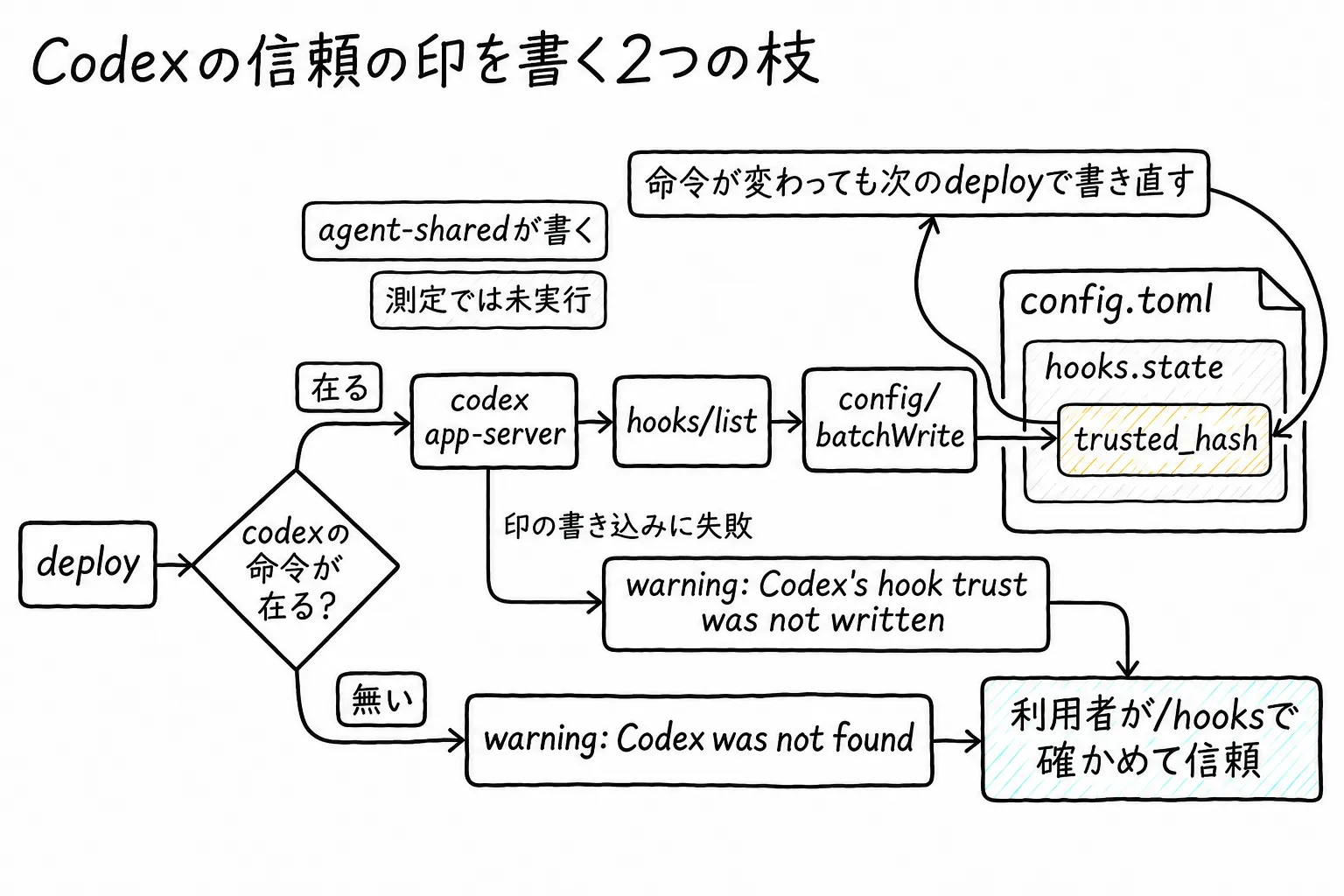
After removing entries from the record and switch list, remove rewrites the trust markers only if it removed hooks from ~/.codex/hooks.json.
When rewritten, trust markers for hooks no longer in the file are deleted, while those for remaining hooks stay unchanged.
If the codex command cannot be found, the command displays a warning and the trust markers for removed hooks remain in config.toml.
Because the tests in this article set AGENT_SHARED_CODEX_BIN to an empty value, the trust-writing path was not executed. The preceding explanation is based on the code and the official Codex documentation.
Repository hooks and agent trust mechanisms
Deploying a repository's .shared writes hooks to repository files: .claude/settings.json, .codex/hooks.json, and .github/hooks/agent-shared.json.
agent-shared's approval remains only in the ~/.local/share/agent-shared/placed.json of the person who ran deploy.
Once the files containing the hooks are committed, agent-shared approval plays no role on the computers of people who clone the repository.
Whether hooks execute on their computers is determined solely by the trust mechanism of each agent.
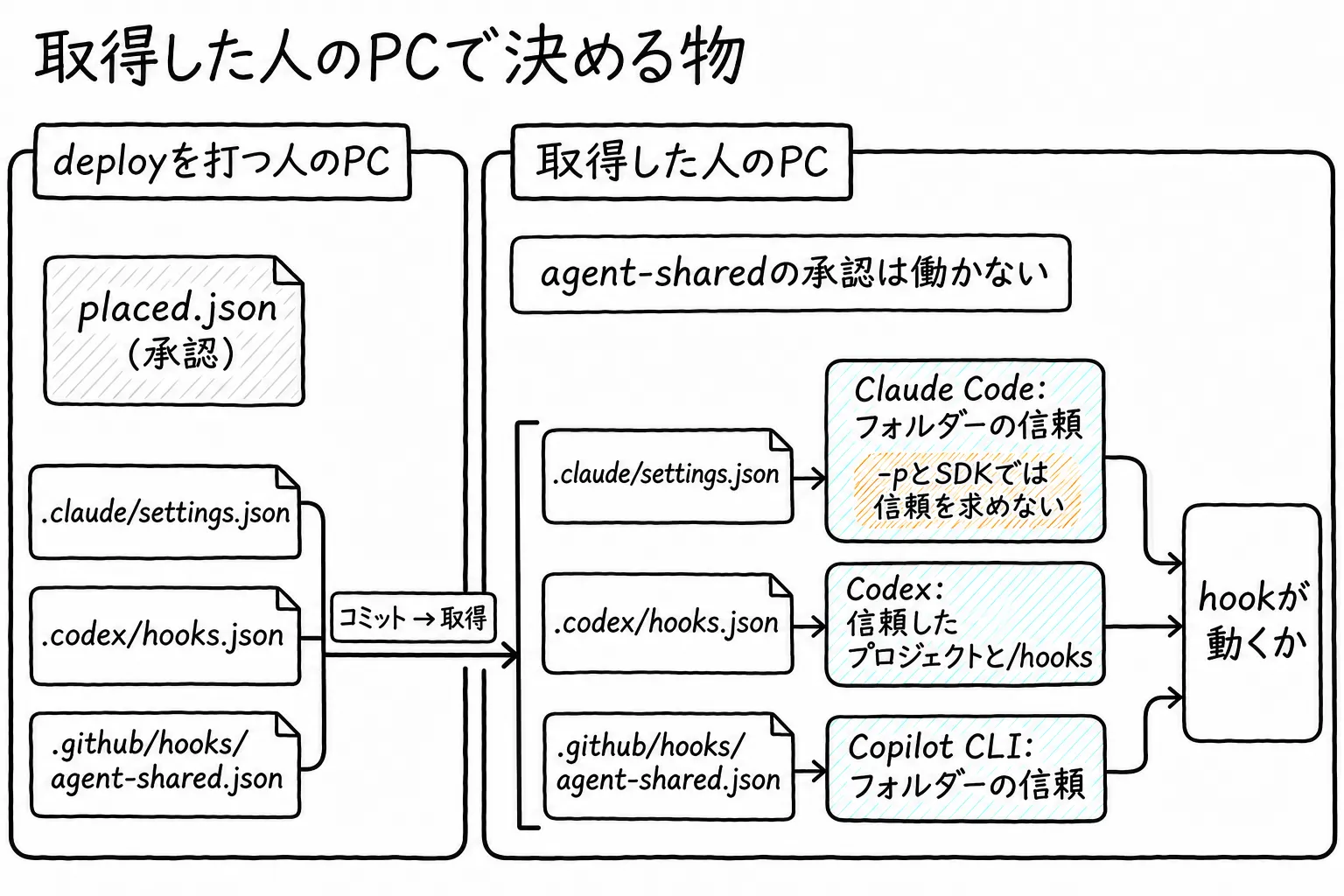
In Claude Code and Copilot CLI, folder trust determines whether repository hooks run, restricting their execution to trusted folders. The following conditions are documented for each agent.
| Agent | Conditions for executing repository hooks (official documentation) |
|---|---|
| Claude Code | In interactive sessions, hooks from all settings files, including ~/.claude/settings.json, do not execute until the folder is trusted. With -p and the SDK, hooks in the repository's .claude/settings.json execute without requesting trust |
| Codex | Repository hooks are read only in trusted projects, and unmanaged hooks do not execute until reviewed and trusted through /hooks |
| Copilot CLI | Repository hooks are skipped in untrusted folders |
In automated workflows running Claude Code with -p, hooks from a cloned repository execute without a trust screen.
In repositories distributing hooks, review the hook commands and the scripts they execute just as you would review any other code.
Even on the computer where deploy was run, Codex does not read repository hooks until the project is trusted, so deploy prints instructions to open /hooks in Codex.
The three conditions in the table are taken from official documentation. None of the agents were run in the tests for this article.
Agent versions and supported events
Agents release new versions frequently, and configuration file formats and supported hook events may change between versions.
Each row in the agent table therefore contains checked, the version range declared by agent-shared, and events, a list of supported events.
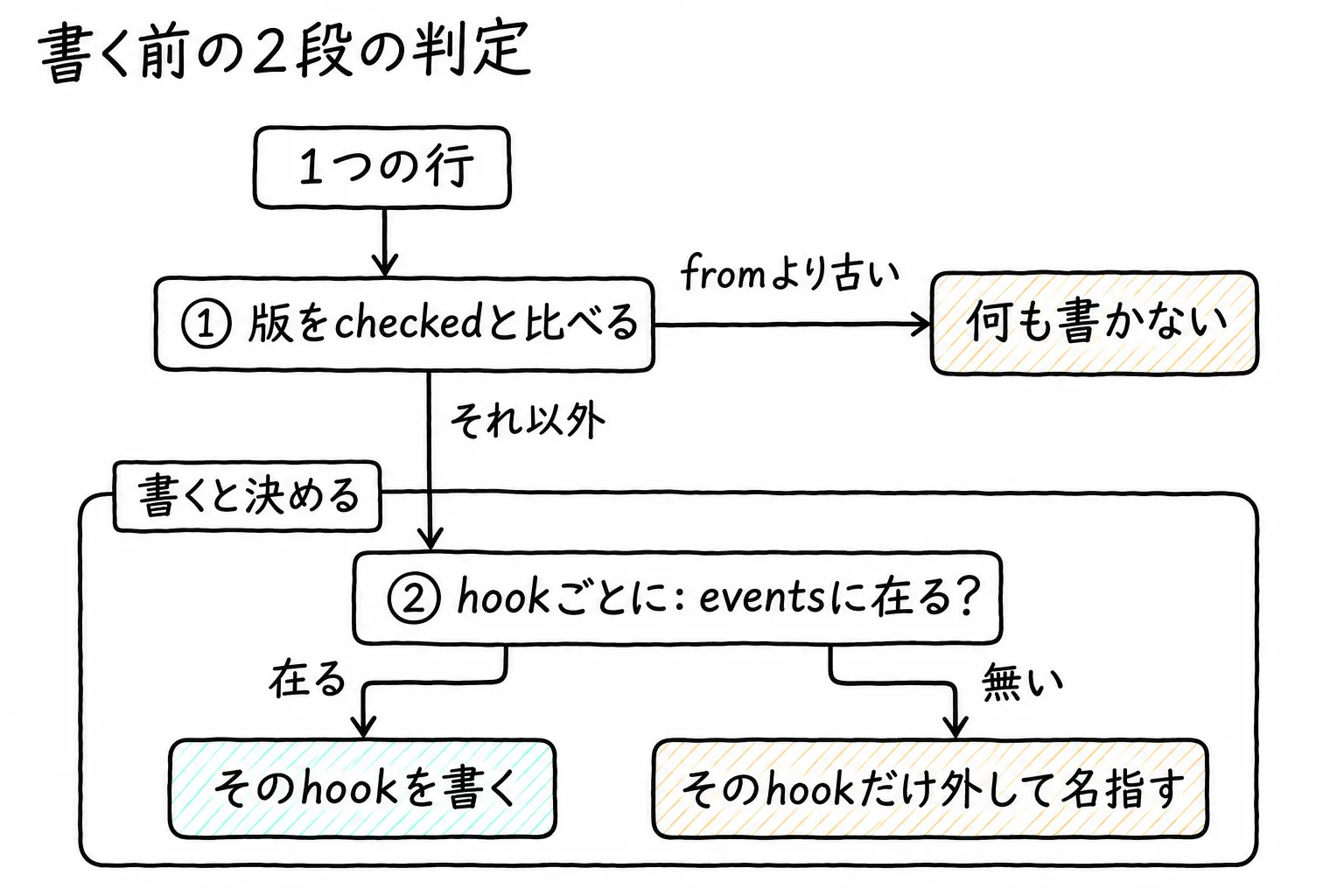
Before writing files for an agent, deploy first checks its version to determine whether to write, then checks the event of each hook for agents it will write to.
How installed hooks block operations and when they time out differs between agents. agent-shared does not normalize these behaviors.
Version ranges declared by the table
deploy changes its behavior depending on where the installed version falls between from and to in the row's checked field.
The version is read from the output of the row's checked.command, such as codex --version.
| Installed version | Behavior of deploy |
|---|---|
Older than from |
Write nothing, leave previously installed items unchanged, and display a warning |
Between from and to |
Write normally |
Newer than to |
Write as before and report that the version is newer |
| Version cannot be read | Write as before and report that the version cannot be read |
The default table specifies Claude Code 2.1.330, Codex 0.124.0 through 0.171.0, and Copilot CLI 1.0.62 through 1.0.114. These are the ranges declared by agent-shared in its table. The tests in this article did not verify whether agents within these ranges actually read the installed items. The specification explains that newer versions are not blocked because agents release frequently and newer versions generally retain the formats in use when the row was checked. Older versions are likely blocked because the format written for versions earlier than the range may not be readable by the agent.
The following output was produced after editing one line of a rule and running deploy with stubs representing Codex 0.100.0, Copilot CLI 1.0.200, and Claude Code without a version output.
$ agent-shared deploy
could not read the version of Claude Code from `claude --version`; wrote it as before
GitHub Copilot CLI 1.0.200 is newer than 1.0.114, the highest version agent-shared checked; wrote it as before
wrote the rules block in ~/.copilot/copilot-instructions.md
warning: wrote nothing for Codex: its version 0.100.0 is older than 0.124.0, the lowest version agent-shared checked; update Codex and deploy again
deployed 1 skills and 1 rules from 1 source to Claude Code, GitHub Copilot CLI
The edited line appeared in Copilot CLI's managed block, while Codex's previously installed block in AGENTS.md remained unchanged.
Restoring Codex to a version within the range and rerunning the command also rewrote the Codex block to include the edited line.
The Codex version also affects whether skills reach Copilot CLI.
This is because Copilot CLI reads skills from ~/.agents/skills, where the Codex row installs them.
In the test where Codex was at 0.100.0 during the first deploy, ~/.agents/skills was not created, and zero skills reached Copilot CLI.
Nevertheless, the final line still listed Copilot CLI: deployed 1 skills and 1 rules from 1 source to Claude Code, GitHub Copilot CLI.
To determine whether skills reached Copilot CLI, check for links in ~/.agents/skills rather than relying on the final line.
Supported events
Events are checked for each hook.
The default table's events lists the events selected by the table's author for each agent: 33 for Claude Code, 14 for Codex, and 11 for Copilot CLI.
When compared with each agent's official documentation on November 24, 2026, Claude Code's 33 and Codex's 14 events matched the documented lists.
The official Copilot CLI hook documentation, however, lists 14 events, including notification, subagentStart, and userPromptTransformed, which are absent from the table.
Neither the table nor the specification explains whether those three events were deliberately excluded or the 11-event list predates the documentation.
If a declared hook event is not in a row's events, only that hook is skipped for that agent and identified in the output.
For example, a ConfigChange hook is written only for Claude Code, which includes it among its 33 events. The following lines are displayed for Codex and Copilot CLI.
left the ConfigChange hook `sh ~/.shared/hooks/no-force-push.sh` out of Codex: it reads no ConfigChange event
left the ConfigChange hook `sh ~/.shared/hooks/no-force-push.sh` out of GitHub Copilot CLI: it reads no ConfigChange event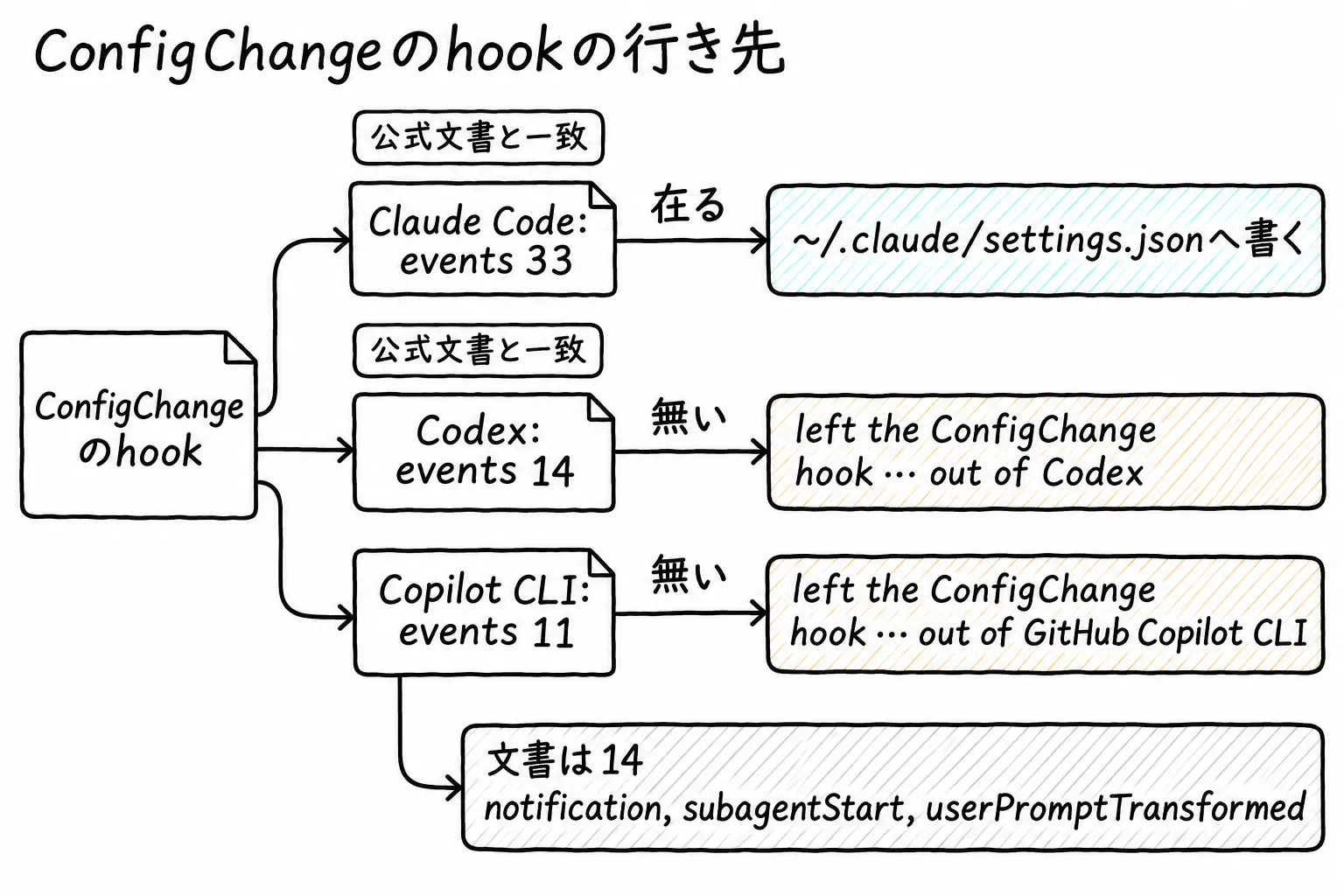
Even if an agent supports an event, the hook is skipped and identified in the output if that event is absent from the table's events.
If the official documentation confirms that the agent accepts that event name, write a replacement row with the same name in ~/.shared/agents.json and add the event to events.
How hooks block execution and handle timeouts
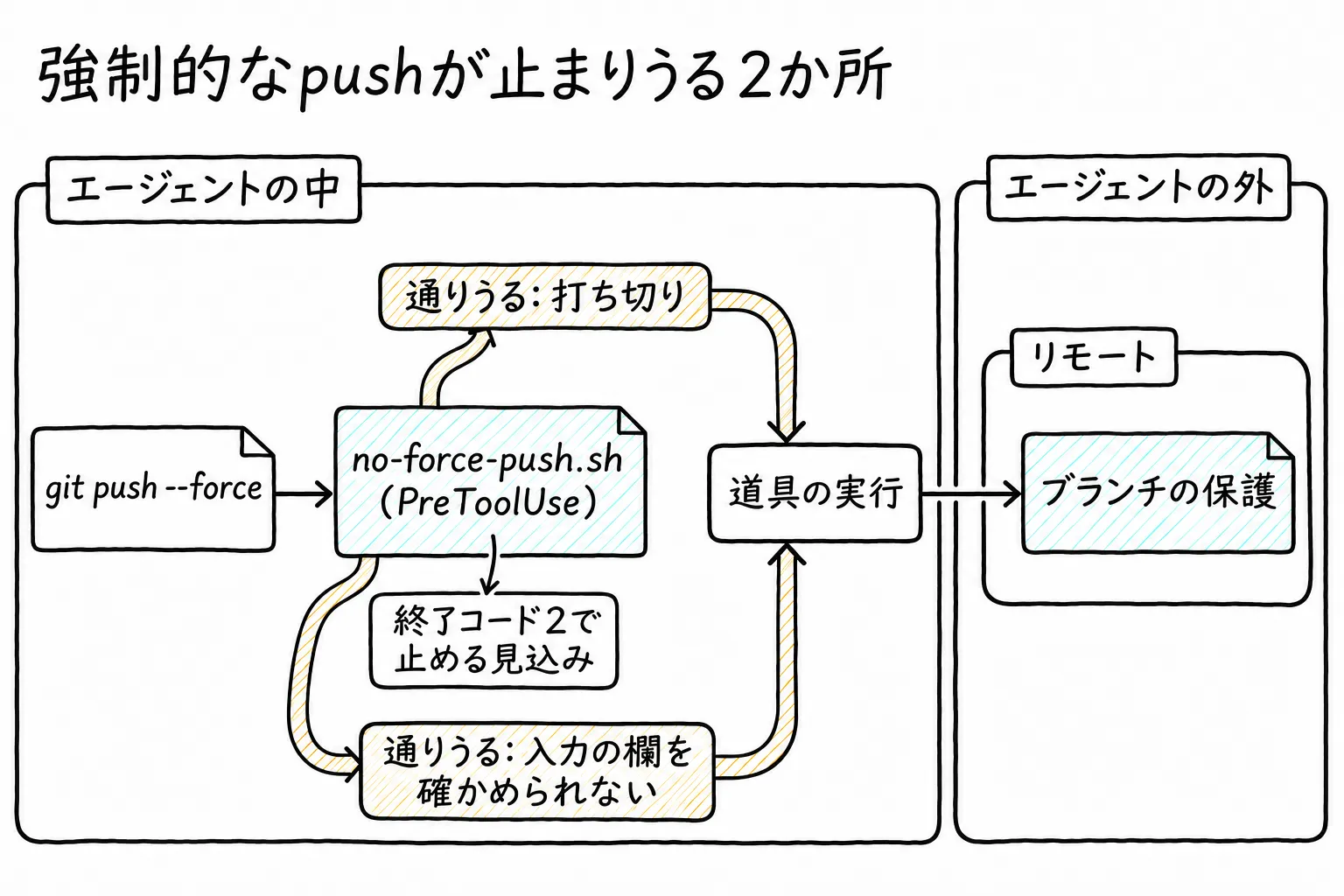
The example no-force-push.sh is designed to block tool execution by exiting with code 2 as a PreToolUse hook.
The following behavior was confirmed in the official documentation for the three agents.
| Agent | Exit code 2 | Input field tool_input.command |
Default timeout | Behavior on timeout |
|---|---|---|---|---|
| Claude Code | Blocks tool execution and passes the standard error message to the agent | Documented | 600 seconds; 30 seconds for certain events including UserPromptSubmit |
Terminates the hook and discards its output; does not block unless configured to block on failure with onFailure |
| Codex | Blocks a Bash call in PreToolUse and passes the standard error message as the reason |
Documented | 600 seconds; 1 second for SessionEnd and Interrupt |
Not documented |
| GitHub Copilot CLI | Rejects the tool call | Not confirmed in documentation | 30 seconds (timeoutSec; timeout is an alias) |
Allows the call to proceed without blocking |
The official Codex documentation states that hooks are not a complete enforcement boundary.
In Claude Code and Copilot CLI, if the hook exceeds its timeout, the tool call proceeds without being blocked.
agent-shared copies the declared timeout to all three agents unchanged, so the time before a hook is terminated is consistent.
However, timeout handling is not normalized. At least two agents allow calls to proceed, while Codex's behavior is not documented.
The official documentation does not confirm whether Copilot CLI passes the tool_input.command input field, and no hooks were executed by any of the agents in the tests for this article.
Consequently, the example hook's ability to block forced pushes across all three agents can only be inferred from documented exit code 2 behavior. It is not guaranteed.
To reliably prevent forced pushes, do not rely on hooks alone. Combine them with mechanisms outside the agent, such as remote branch protection.
Removing installed items
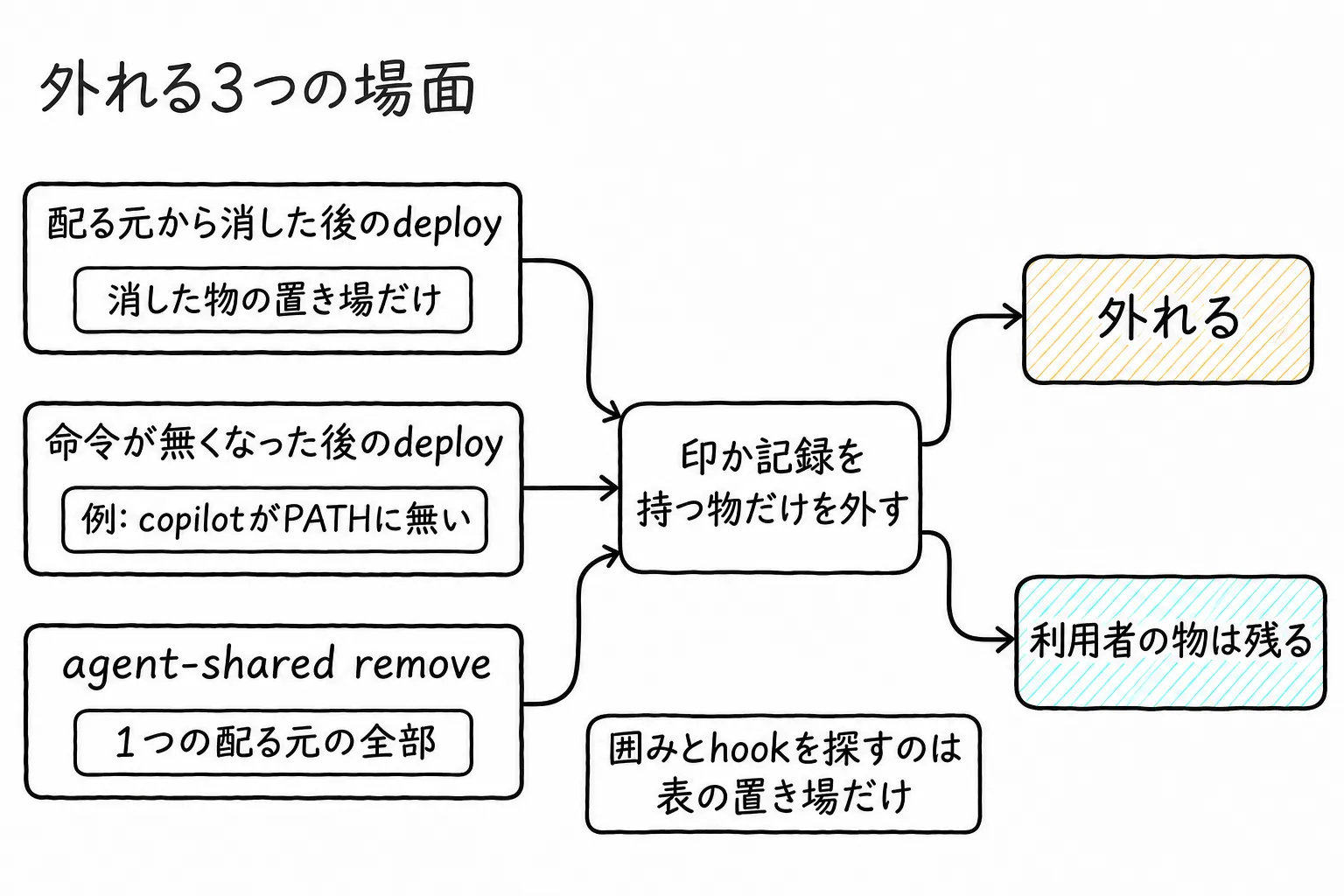
Items installed by agent-shared are removed in the following three situations.
-
Running
deployafter deleting items from the sourceRunning
deployafter deleting skills, rules, or hooks from the source removes only the corresponding installations. -
Running
deployafter an agent command disappearsFor example, if the
copilotcommand disappears fromPATH, the current source's managed blocks and marked hooks are removed from files in~/.copilot. Files with nothing left in them are deleted. -
agent-shared remove
Removes everything installed by one source folder from all agents at once.
In all three cases, only items carrying agent-shared's markers or records are removed. User-owned items remain.
Because managed rule blocks and hooks are searched for only in the locations named by the current agent table rows, remove installed items before replacing or editing those rows.
The items removed by remove are explained in Removing everything from a source folder.
Removing everything from a source folder
agent-shared remove --source <folder> removes the items that one source folder installed for all agents.
It removes the following items.
- Links recorded in the installation record that still point to the same targets
- Managed rule blocks and marked hooks carrying that source folder's
<id>
It then removes that source folder's entries from the installation record and switch list.
Finally, if hooks were removed from ~/.codex/hooks.json, it rewrites Codex trust markers and deletes the markers for the removed hooks.
Because the operation relies only on markers and records, items can be removed even after the source folder itself has been deleted.
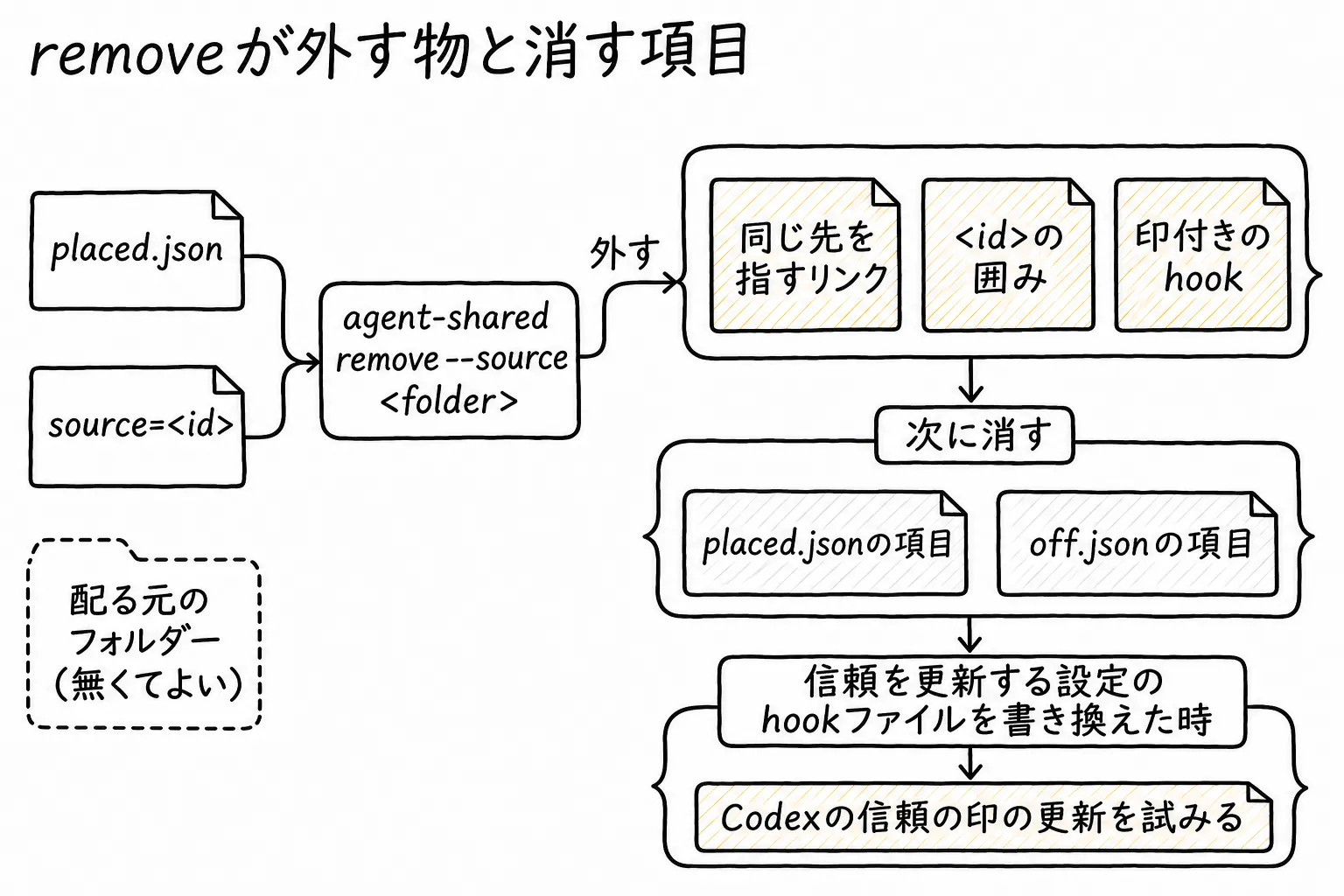
The following output was produced by running remove after deleting the ~/apps/my-tool/.shared folder.
$ agent-shared remove --source ~/apps/my-tool/.shared
removed ~/.agents/skills/release-notes
removed ~/.claude/skills/release-notes
took the hooks out of ~/.claude/settings.json
took the hooks out of ~/.codex/hooks.json
took the hooks out of ~/.copilot/hooks/agent-shared.json
warning: Codex was not found, so it does not trust the hooks yet. Open /hooks in Codex once and trust the hooks in ~/.codex/hooks.json.
removed everything ~/apps/my-tool/.shared placed
Two skill links and the Stop and PreToolUse hooks in three hook files were removed. Items installed from ~/.shared remained.
The warning indicates that Codex trust markers could not be written for ~/.codex/hooks.json, which still contained hooks from ~/.shared.
When ~/.shared was also removed in the same test, ~/.codex/AGENTS.md returned to exactly the same bytes as before deployment, and ~/.claude/settings.json contained only the user's "model" field.
When a repository's .shared is specified, installed items are also removed from files within that repository.
Manually written hooks, manually installed skills, and lines outside managed blocks remain in every case.
However, managed blocks and hooks are searched for only in the locations specified by the current agent table rows.
Once a location is removed from or changed in the table, neither remove nor deploy removes the old blocks or hooks. If you need to change a row after running deploy, remove the previously installed items first.
Examples include replacing the Codex row with a skills-only row, as described in Installation locations for the three agents, or updating a row to point to a relocated directory.
Because remove deletes the source folder's hook approval from the record and its entries from the switch list, approvals and disabled items must be restored before redeployment.
Follow these six steps.
-
Record disabled items
Use
cat ~/.local/share/agent-shared/off.jsonto record the items disabled throughagent-shared off. If the file does not exist, there is nothing to record. -
Remove all deployed source folders
Run
agent-shared remove --source <folder>for each source:~/.shared, each folder added with--source, and each repository's.shared. Becauseremoveremoves only items from the specified source, run it separately for each source. -
Replace or edit the table row
In
~/.shared/agents.json, replace the Codex row with askills-only row or update the row's locations to point to their new directories. -
Approve the sources again
For each source containing hooks other than
~/.shared, runagent-shared approve --source <folder>and answery.approveonly records approval and does not write hooks, so run it beforedeploy. -
Restore disabled items
Disable each item recorded in step 1 again with
agent-shared off --source <folder> --agent <name> <item>. -
Redeploy
Run
agent-shared deploywith the same--sourceoptions as before. If you removed a repository's.shared, run the command inside that repository or specify--repo <folder>.
In a test where the table row was replaced before steps 1 and 2, running remove produced removed everything ~/.shared placed and exit code 0, but managed blocks and marked hooks in two files remained.
Restoring the default row and running remove removed both.
The prescribed sequence was also tested.
In a test that deployed ~/team containing a Stop hook alongside ~/.shared, with the ~/.shared rule disabled for Copilot CLI, the switch list went from one entry to zero after the two remove operations.
After restoring approvals and disabled items as described and running deploy, no managed blocks or hooks remained in ~/.codex.
The Stop hook from ~/team was installed in one deploy run, the disabled rule was not installed for Copilot CLI, and the switch list contained one entry again.
Directories left empty
When removing files or links leaves a directory empty, that directory is removed. If its parent directory then becomes empty, removal continues upward.
For example, removing ~/.copilot/hooks/agent-shared.json deletes ~/.copilot/hooks as well if that directory becomes empty.
However, the specification requires directories directly under the home directory and repository roots to remain even when empty.
Directories immediately below the home directory include agent directories such as ~/.claude, ~/.codex, ~/.copilot, and ~/.agents.
Directories containing user-owned files are not empty and remain untouched.
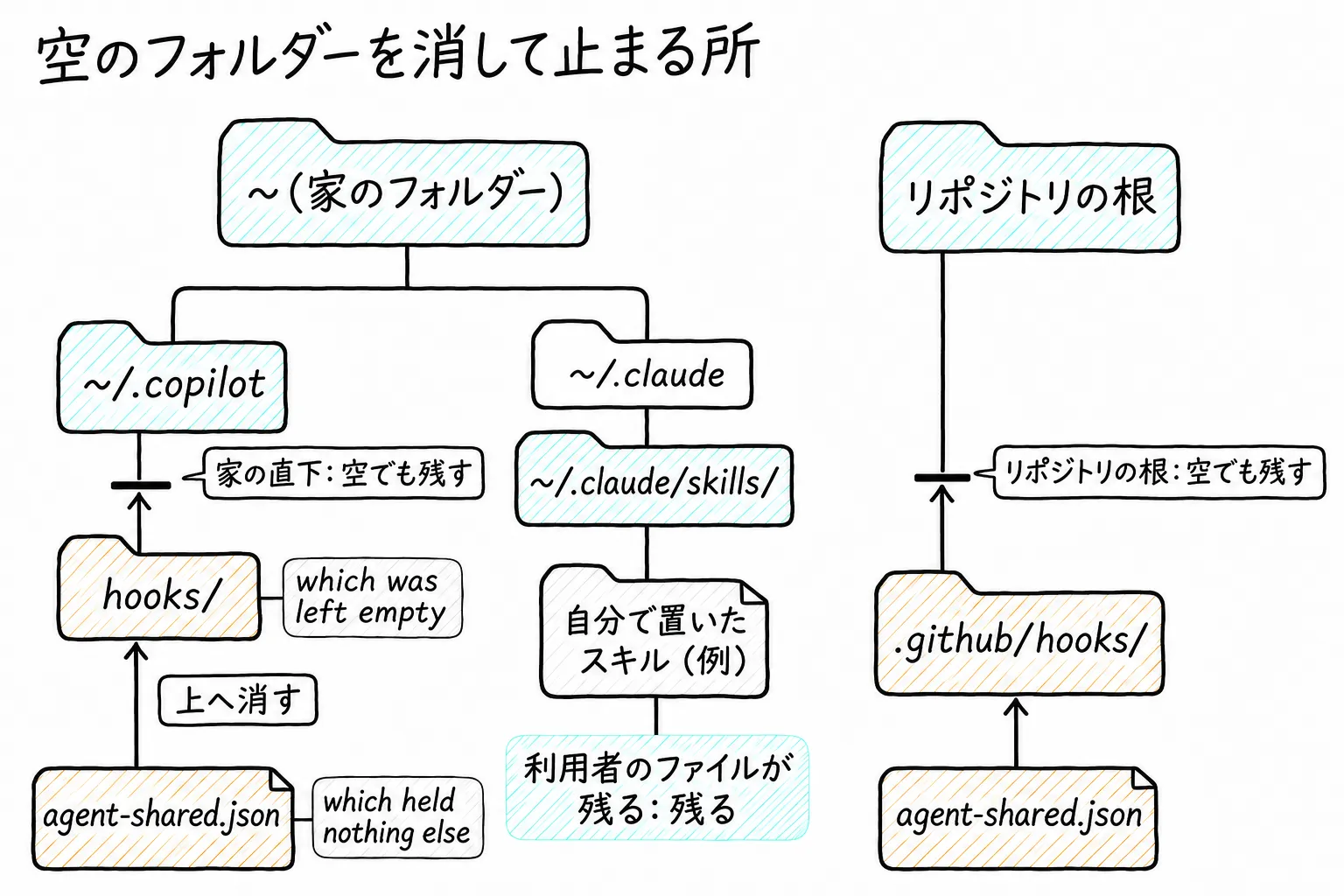
In the test, running deploy after deleting everything from the source produced the following lines.
removed ~/.copilot/hooks/agent-shared.json, which held nothing else
removed ~/.copilot/hooks, which was left empty
deployed 0 skills and 0 rules from 1 source to Claude Code, Codex, GitHub Copilot CLI
~/.copilot/hooks was removed, while the empty ~/.copilot directory remained.
~/.agents, ~/.claude, and ~/.codex also remained after their contents were removed.
When everything from the source was removed using agent-shared remove --source ~/.shared, the same four directories directly under the home directory remained empty.
Relationship to Agent Plugins
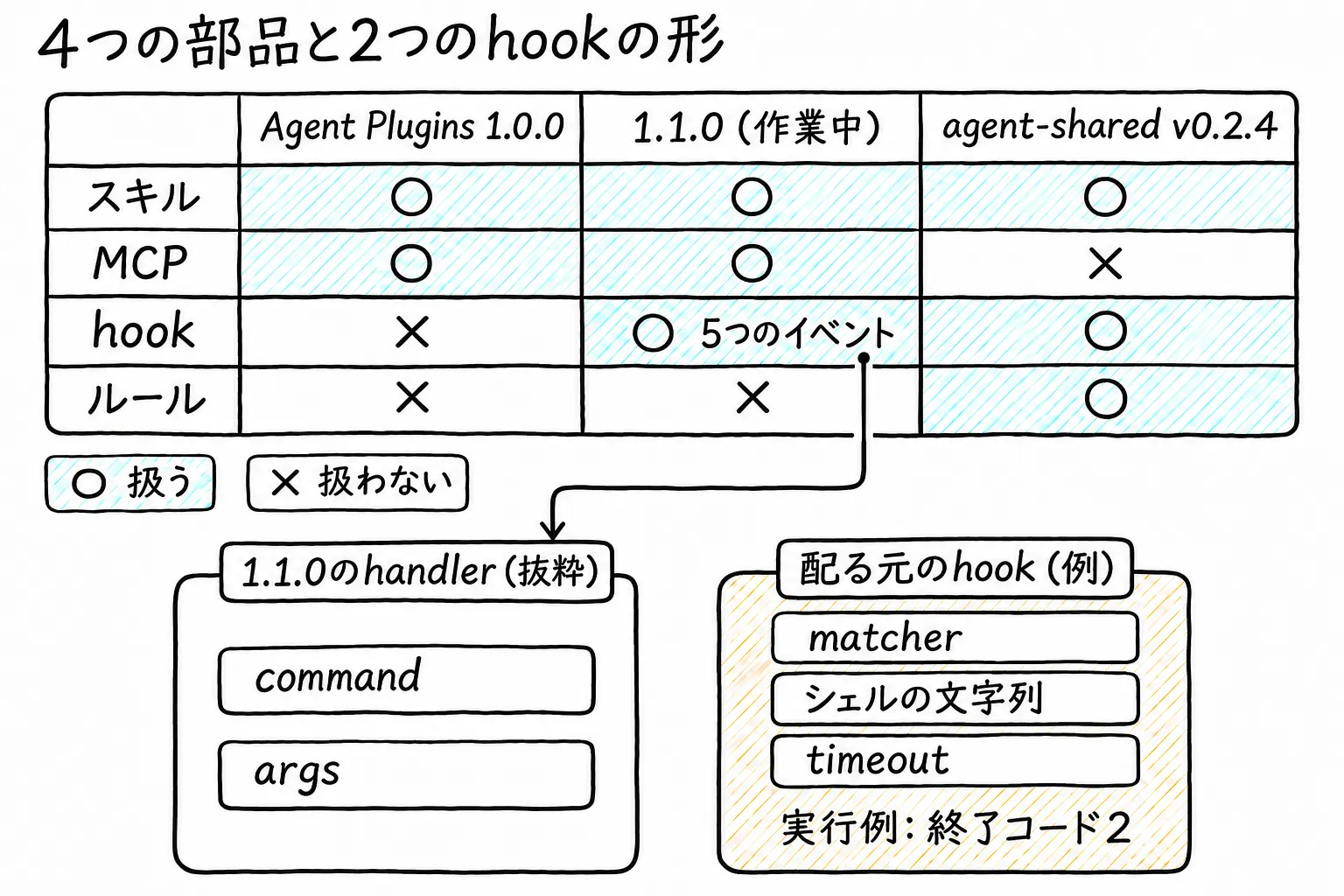
Agent Plugins is an open specification for packaging components that extend agent capabilities as plugins and distributing them across clients. A client in the specification refers to an agent that loads plugins. The published version 1.0.0 defines Agent Skills and MCP servers as portable components that can be used in the same format across clients. MCP enables agents to use external tools and data.
Components such as hooks and rules remain outside the specification until their formats converge, because they differ substantially across clients.
The in-progress version 1.1.0 (Working Draft) adds hooks in a plugin's root-level hooks.json and defines five events: SessionStart, UserPromptSubmit, PreToolUse, PostToolUse, and Stop.
Rules remain outside the scope of version 1.1.0.
The hook format in 1.1.0 differs from the hooks.json in an agent-shared source folder in ways beyond the number of events.
The command in 1.1.0 is not a shell command string, but the name of an executable or a path beginning with ./.
Arguments are specified separately in args, where substitution of ${PLUGIN_ROOT} is defined.
There is no matcher field for filtering by tool name or timeout field.
The specification explains the absence of matcher by noting that hooks can inspect the same input themselves.
Nonzero exit codes are treated as hook failures, while decisions about whether to block an operation are returned as JSON on standard output.
Therefore, the example hook that filters on Bash using matcher, specifies a shell command string, and blocks execution with exit code 2 cannot be expressed unchanged in the 1.1.0 format, even though PreToolUse is one of its five events.
agent-shared's marker is also a comment line appended to a shell command string, so it appears that this marker cannot be placed unchanged in a 1.1.0 command.
Another option is to distribute components through each agent's own plugin system.
Claude Code plugins can contain skills and hooks in hooks/hooks.json, but no rule component. The official documentation states that a plugin's root-level CLAUDE.md is not read.
Codex's official documentation states that hooks from enabled plugins are read but not run until reviewed and trusted.
Copilot CLI plugins can also contain hooks. Its changelog states that version 1.0.62 enabled preToolUse and permissionRequest hooks from Claude-style plugins to work with a matcher such as Bash.
When distributing through plugins, users need to install and enable the plugin for each agent. At least for Claude Code, rules would need to be installed separately from the plugin. Based on these differences, agent-shared is useful under the following conditions.
- You want to distribute the same rules across multiple agents.
- You want to install hooks unchanged across multiple agents, including events beyond the five in version 1.1.0,
matcher, shell command strings, and blocking through exit codes.
This is the author's assessment based on the current specifications and tools, both of which may change in the future.
The agent-shared specification states that it will also accept hooks in the 1.1.0 format as a source once that version is published. It will retain the Claude Code format for events not covered by version 1.1.0. As of November 24, 2026, support for reading the 1.1.0 format remains open as agent-shared Issue #25.
Adding features to the Agent Plugins specification requires opening a GitHub Discussion first and explaining the following points.
- The problem
- Who is affected
- Why the feature belongs in the specification
- An implementation that adopts it
As the author of agent-shared, I used the findings from the tool to prepare two proposals following these requirements and submitted them to Discussions on November 24, 2026.
The proposal text is also available in agent-shared's docs/proposals/.
Both are still proposals and have not been incorporated into the specification.
Proposal to make rules a component
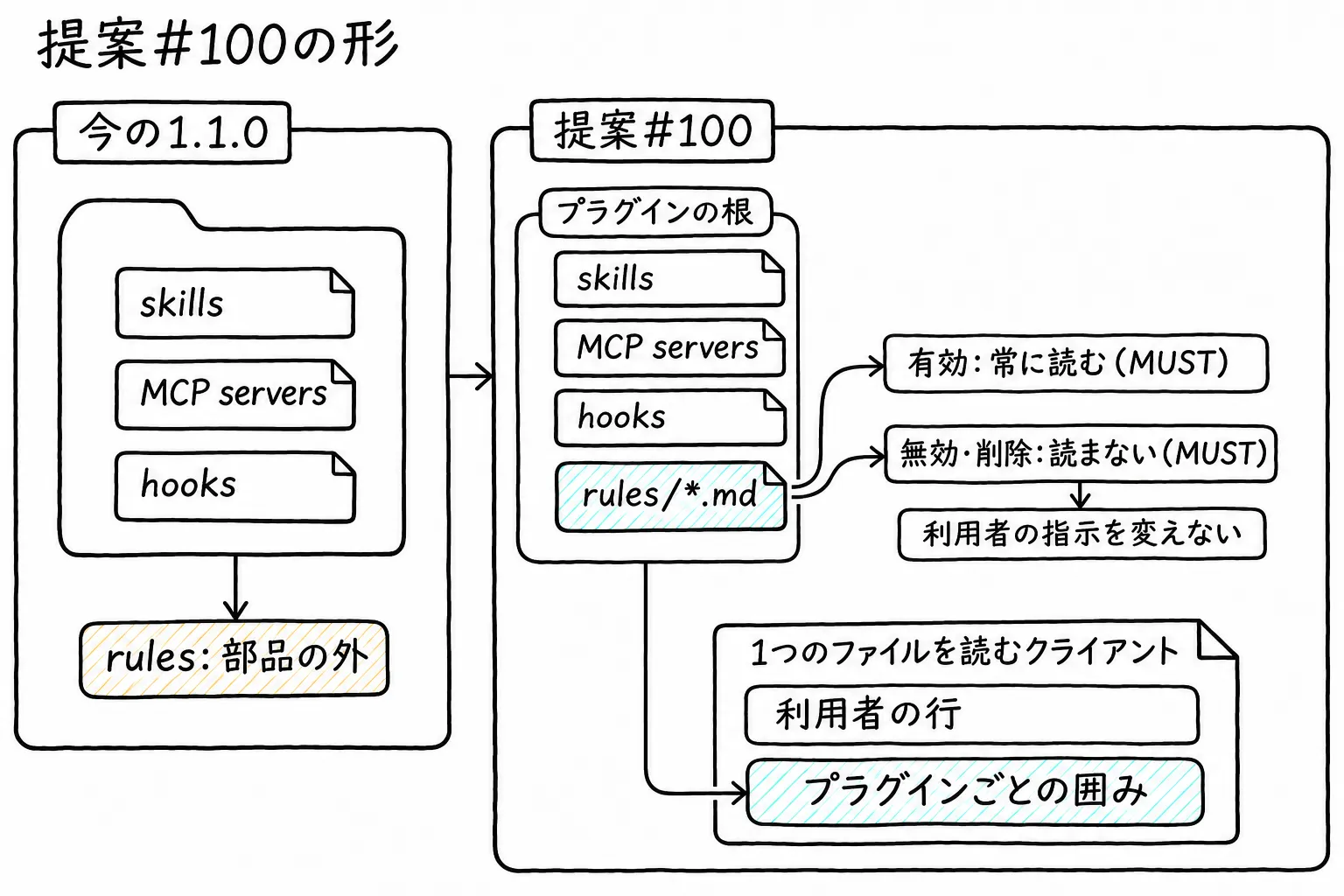
The first proposal makes rules portable plugin components. The current 1.1.0 draft keeps rules outside its components until a stable contract across multiple clients has been demonstrated. The proposal argues that rules already share a common format across clients: Markdown instructions read throughout a session. The only difference is where clients read them.
The proposed format consists of three requirements.
- A plugin may contain a root-level
rules/directory, with each*.mdfile representing one rule. - Clients supporting rules MUST read all rules from enabled plugins as instructions that are always loaded.
- When a plugin is disabled or removed, clients MUST stop reading its rules without modifying user-written instructions.
MUST indicates a mandatory requirement for clients conforming to the specification.
For clients that read a single instruction file, the proposal includes a format identical to agent-shared's managed blocks as an example of meeting the third requirement.
One block per plugin is appended after the user's lines. Updates rewrite only the contents of the block, and removal deletes the entire block.
The proposal cites operation of this installation method across the three client versions in the table as evidence. Another piece of evidence is agent-shared's tests, which verify that lines outside the managed block remain unchanged byte for byte and that the block can be removed even after the source folder has been deleted. The tests in this article did not run the agents, so operation in the three clients was not independently verified here. agent-shared is currently the only implementation cited as adopting this approach, and feedback from client authors is being sought.
The following questions remain open.
- Precedence when plugin rules conflict with user instructions
- Rules applied to specific paths
- Size limits for rules loaded on every invocation
If the proposal is incorporated into the specification, plugin authors will be able to distribute rules in the same plugins as skills, and users will be able to remove those rules simply by disabling the plugin. Until then, agent-shared's managed blocks distribute and remove rules using the same installation approach.
Proposal for an event support table
The second proposal concerns hooks that a client does not execute and the events supported by each client version.
The current 1.1.0 draft requires clients to skip undefined event entries and hook handlers that do not meet requirements, but only recommends notifying the user with SHOULD.
If a hook intended to block a dangerous command silently fails to run on an older client, users may mistakenly assume they are protected.
The client versions supporting even the five events defined in 1.1.0 are not uniform. For example, Copilot CLI version 1.0.6 introduced support for Claude Code's nested format and capitalized event names. Passing Claude Code tool names to Claude-style plugin hooks was introduced in version 1.0.62.
The proposal requests two changes.
First, make the notification that is currently a SHOULD (recommendation) a MUST (requirement).
When a client does not execute a hook in an enabled plugin because an event, field, or value is unsupported, it must report this when the plugin is enabled rather than silently skipping it.
The report identifies the plugin, the event, and the reason.
Second, maintain a table within the project, owned by implementers, showing which client versions support each event and field.
The rationale is that events and checked in agent-shared's table already serve this role: unsupported hook events are identified, and nothing is written for versions older than from.
Where the table should reside and whether plugins should declare required events so clients can reject them before installation remain open questions.
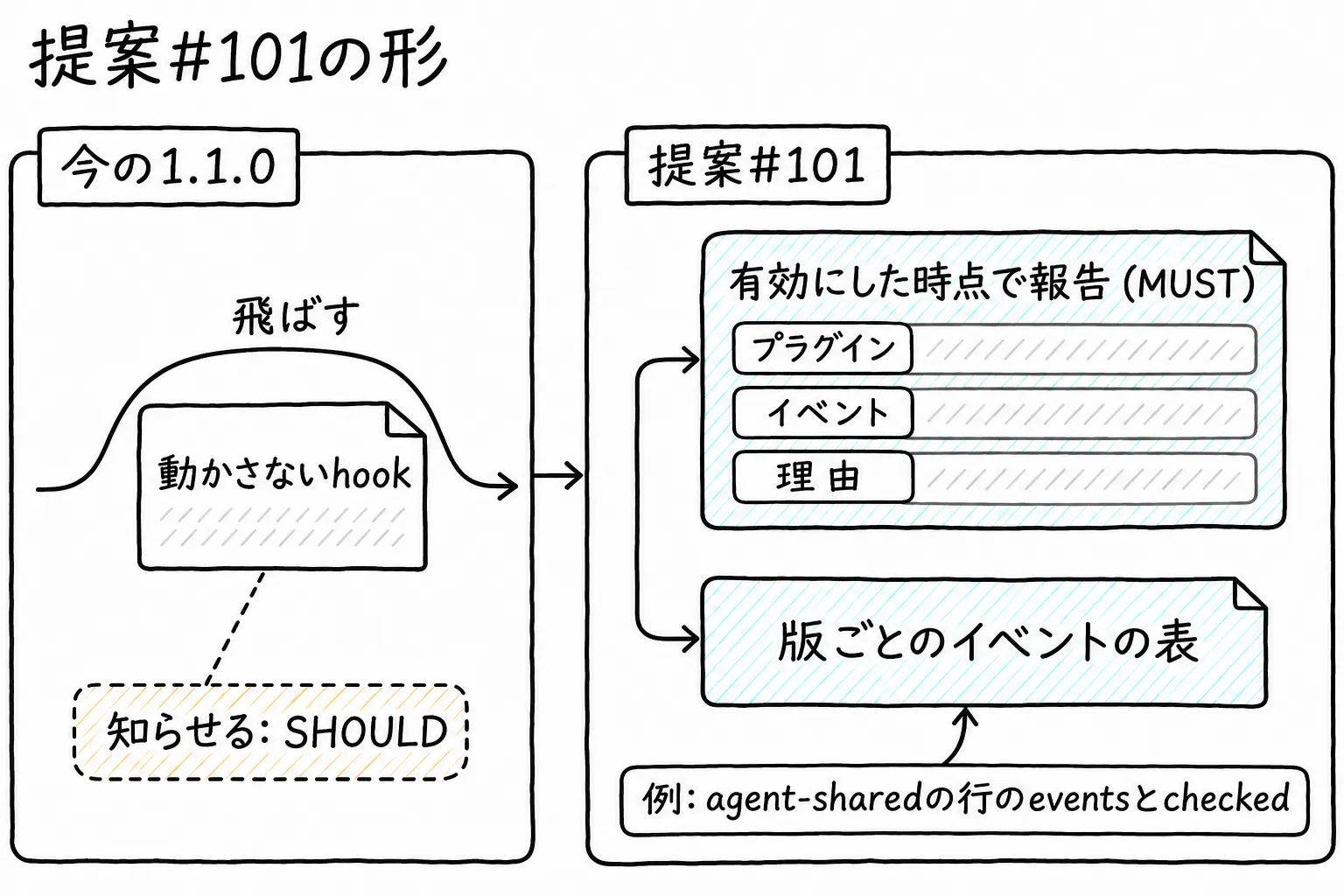
If the proposal becomes part of the specification, users will know which hooks cannot run on their client version when they enable a plugin.
Until then, agent-shared can identify only hooks not written because they are absent from the table's events (the left the ... hook ... out of lines) and versions outside the checked range (the corresponding notices).
agent-shared's output cannot establish whether the installed hooks will actually run in the client version in use.
Use cases and limits of verification
agent-shared is useful when you use two or more agents on the same computer and want all of them to share the same skills, rules, and hooks.
Applications distributing their own skills and hooks to multiple agents can also add their source folder with --source and list installed items with agent-shared placed.
If you use only one agent, writing directly to that agent's configuration locations is sufficient.
If you use only some of the three agents, files are still written to unused Claude Code or Codex locations unless you add needs_command to the relevant row in ~/.shared/agents.json.
However, adding it to the Codex row prevents skills from reaching Copilot CLI on computers without the codex command. If you want to use skills in Copilot CLI, replace the Codex row with a skills-only row instead.
Before replacing or editing table rows after deployment, run agent-shared remove --source <folder> for every deployed source, then restore approvals and disabled items before redeploying.
Follow the six steps in Removing everything from a source folder.
If you have relocated configuration directories using CLAUDE_CONFIG_DIR, CODEX_HOME, or COPILOT_HOME, agents may not read some of the installed files until you update the table rows to point to the new locations.
To give agents different instructions, disable specific items using agent-shared off or split them into separate source folders.
The command runs on macOS and Linux.
agent-shared verifies only that it writes files to the specified locations in the specified formats and removes only its own items. Whether agents subsequently read the rules and execute the hooks depends on their specifications, versions, and trust settings.
agent-shared's tests also inspect the files written in disposable home directories without running Copilot CLI itself.
The table's checked range is declared by agent-shared. Even for versions in that range, the evidence in this article does not establish that the agents read the installed files.
Because hook approval occurs once per source folder and agent-shared also writes Codex trust markers, users are responsible for reviewing source hook commands and scripts.
agent-shared's installation method is to write items from one source folder and identify its own items through markers and records so that they can be removed. The installation method is published as a specification, allowing other tools to implement it, although agent-shared is currently the only implementation.
The agent-shared command and specification are available in the following repository.

The Agent Plugins specification and Discussions for the two proposals are available below.
