Introduction
Hi, I'm cardene, a software engineer and technical writer focused on blockchain and AI.
I've also authored Japanese technical books on specification-driven development with LLMs and decentralized application (DApp) development.

I also build and publish a variety of tools, libraries, and open-source projects.
Overview
Adding a price-range filter to product search might require only an extra condition in an existing API, or it might require migrating several consumers. Even when an AI agent receives the same feature name, the decisions to make up front and the amount of implementation work to split up can differ.
BMad Method v6.12.4 is a collection of skills that examine the intent of a change and the existing code, then guide the work from planning through implementation and verification.
It first classifies the overall change as a direct edit, a single Build, an epic containing multiple stories, or a project containing multiple epics.
A Build is the unit of implementation for a single intent or story. Within a Build, investigation determines whether to use the lightweight oneshot route or the approval-based dispatch route.
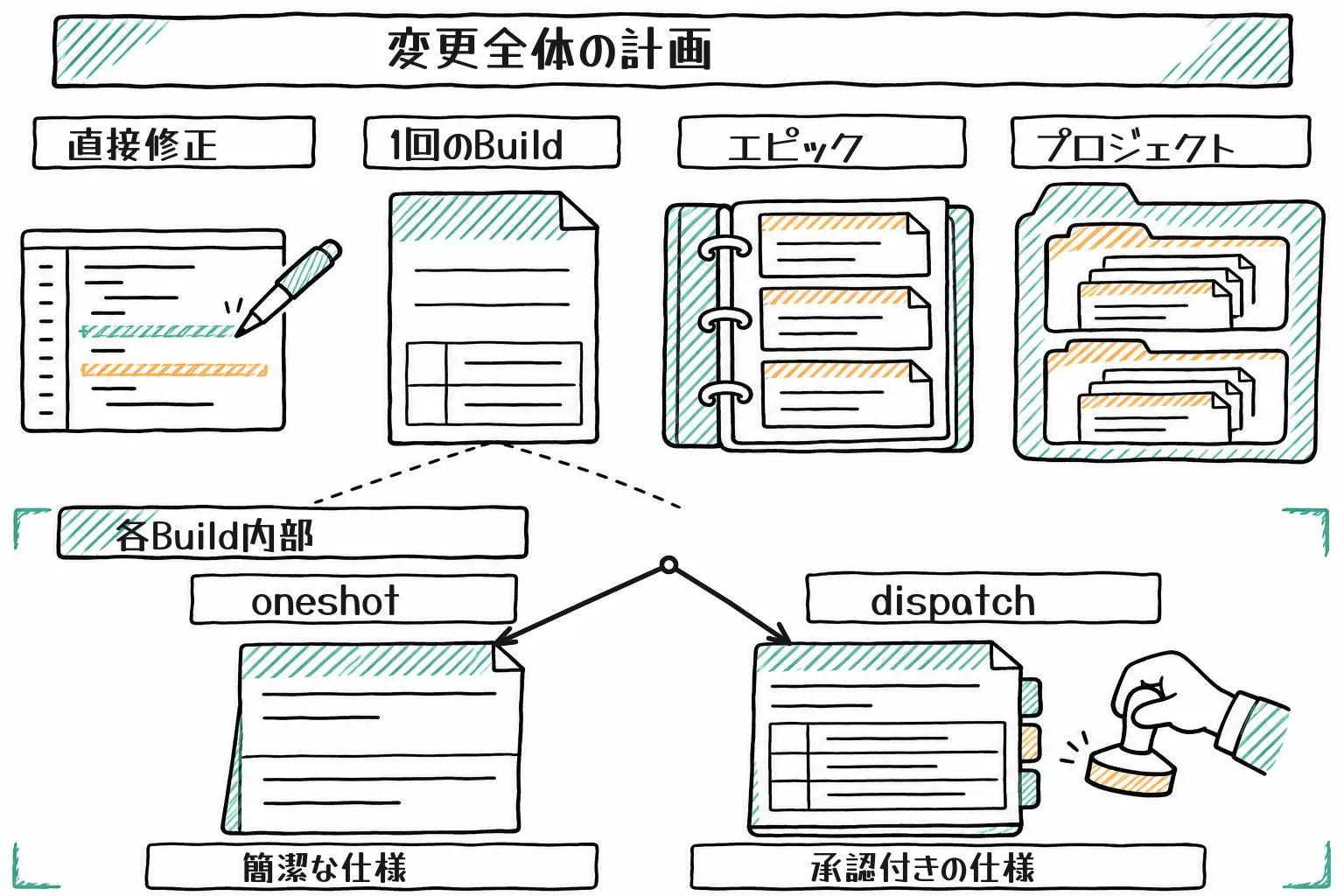
Deciding how many implementation units a change requires is separate from deciding how much planning a single Build needs. Questions are reserved for decisions only the user can make, while documents carry decisions and verification results forward.
The existing diagrams and illustrative code blocks are retained from the Japanese article; some labels and example text remain in Japanese.
What the AI Does After Installation
This article covers the official BMad Method tag v6.12.4 and npm package bmad-method 6.12.4.
The source commit identified by the npm metadata is bab9082c3e884e0d72c759bcd1a6d90bcc01be84.
The explanation is based on these pinned instructions and does not generalize their behavior to other versions.
Node.js 20.12 or later is a prerequisite for installation.
The README for the specified tag also lists Python 3.10 or later and uv, and the installation guide explains that Python operations, including bmad-build, require uv.
Installation can complete with a warning when uv is missing, but that does not establish that a Build is ready to run.
Choose a supported AI development environment and check that it recognizes the skills installed in the project.
npx bmad-method@6.12.4 installThis example pins the version in the official installation command.
The installer places skills where the selected AI development environment can discover them and prepares shared configuration and helper scripts in the project's _bmad directory.
After checking the installation location and warnings, invoke bmad-help in the AI development environment for the same project to verify that the skills are recognized.
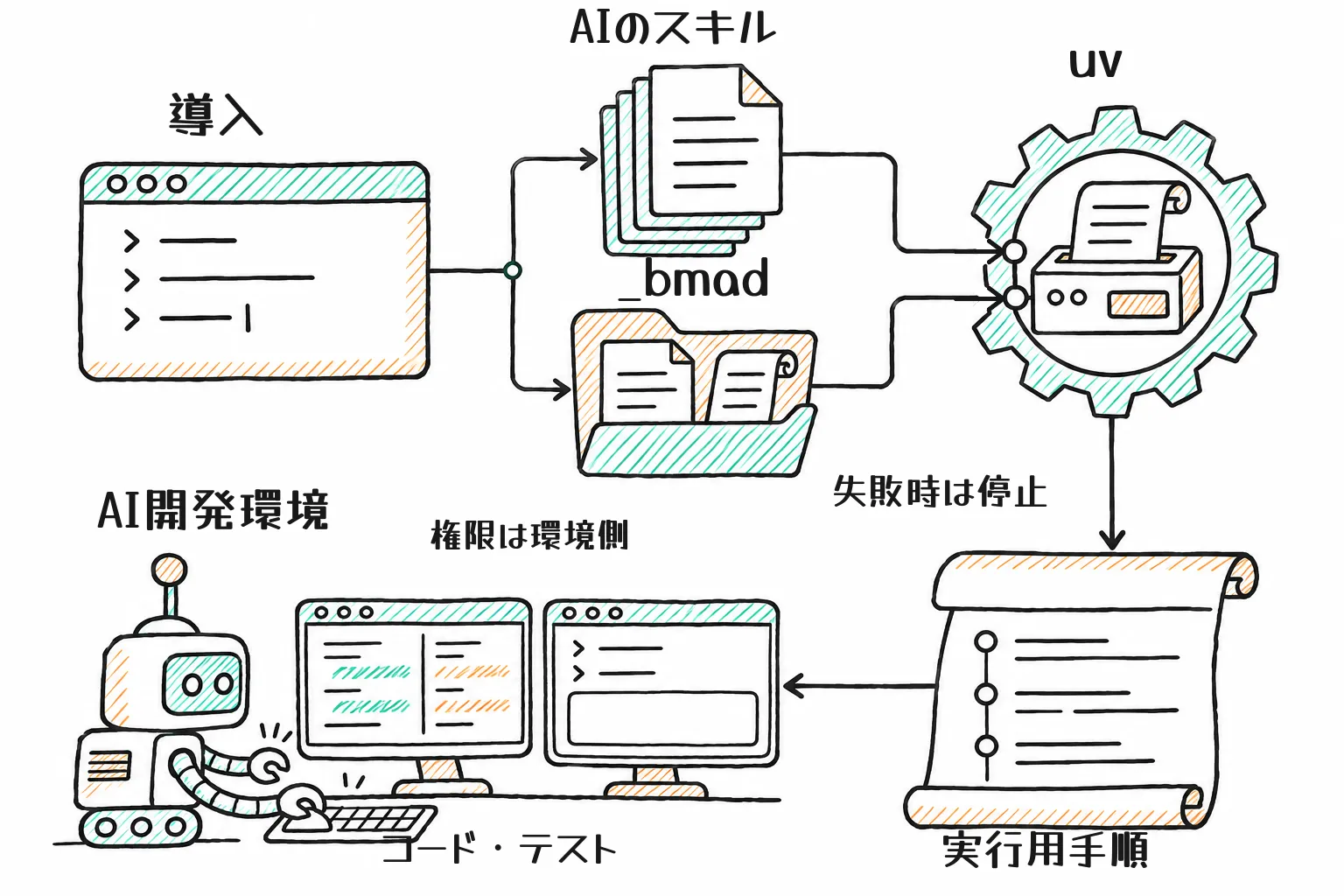
At the start of bmad-build, uv runs _bmad/scripts/render_skill.py.
This generates workflow instructions reflecting the project configuration. The AI reads the workflow.md at the absolute path returned by the script and follows it.
If the startup command fails, the instructions require reporting its output and stopping, rather than reading the original workflow files directly and continuing.
The AI development environment actually reads and writes code, runs tests, and operates Git. BMad skills define the order of investigation, questions, approval, and verification; they do not add a mechanism for restricting filesystem or network permissions. Configuration can also change how implementation and review responsibilities are assigned. This article uses the default assignments for the version under discussion.
Choosing a Plan for the Overall Change
The starting point for planning is the intent: a description of what must hold after the change, what must remain unchanged, and what is out of scope.
The question is whether someone else can read it and implement the change without guessing at decisions the user should make.
For a price-range filter, those decisions include not just the input fields, but also compatibility when they are omitted and how to respond to invalid ranges.
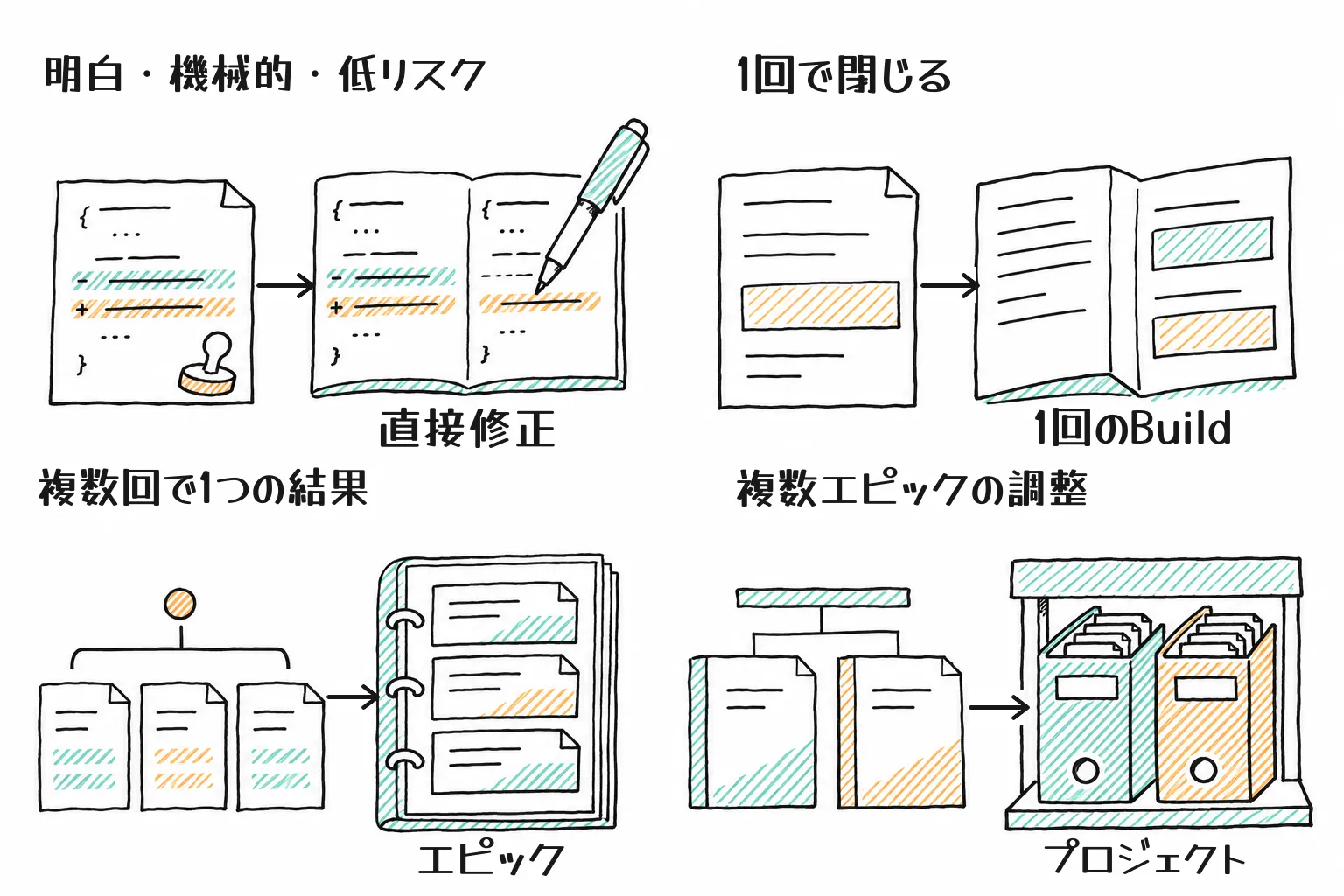
| Change conditions | Planning approach | Input to implementation |
|---|---|---|
| An obvious, low-risk mechanical change that a developer can verify directly | Direct edit | Change instructions and diff inspection |
| A change whose single outcome can be delivered in one implementation pass | One Build | A request, issue, or specification |
| A single outcome requiring multiple implementation passes | Epic | Shared specification and ordered stories |
| Multiple epics requiring consistency and coordination across contributors | Project | Shared requirements and design, plus specifications for individual epics |
A small, well-defined change can go directly to bmad-build.
When a larger intent needs planning first, bmad-spec turns it into a contract for implementation and splits it into stories when needed.
A separate planning specification is not mandatory before every Build.
If what to build is unclear, the missing decisions must be resolved. Research establishes the basis for a decision, UX design defines user interactions, and technical design establishes decisions shared across implementations. Each is used when needed. These are not mandatory stages that every change must pass through in a fixed sequence. When multiple stakeholders need agreement or several epics need a shared understanding, use a PRD (a product requirements document that establishes agreement on what the product will deliver and why).
For an epic, implement the stories satisfying the shared specification in order, then verify how they work together. Completion of individual Builds does not by itself establish that all stories have been integrated. Choosing which story to invoke and setting overall priorities remain responsibilities outside a single Build.
Separating the Planning Specification from the Build Specification
The planning SPEC.md produced by bmad-spec is distinct from the implementation specification produced by bmad-build.
The former represents the contract shared by multiple implementations; the latter contains the investigation, tasks, verification, and progress state needed for the current implementation.
Although both are specifications, they have different owners and different meanings of completion.
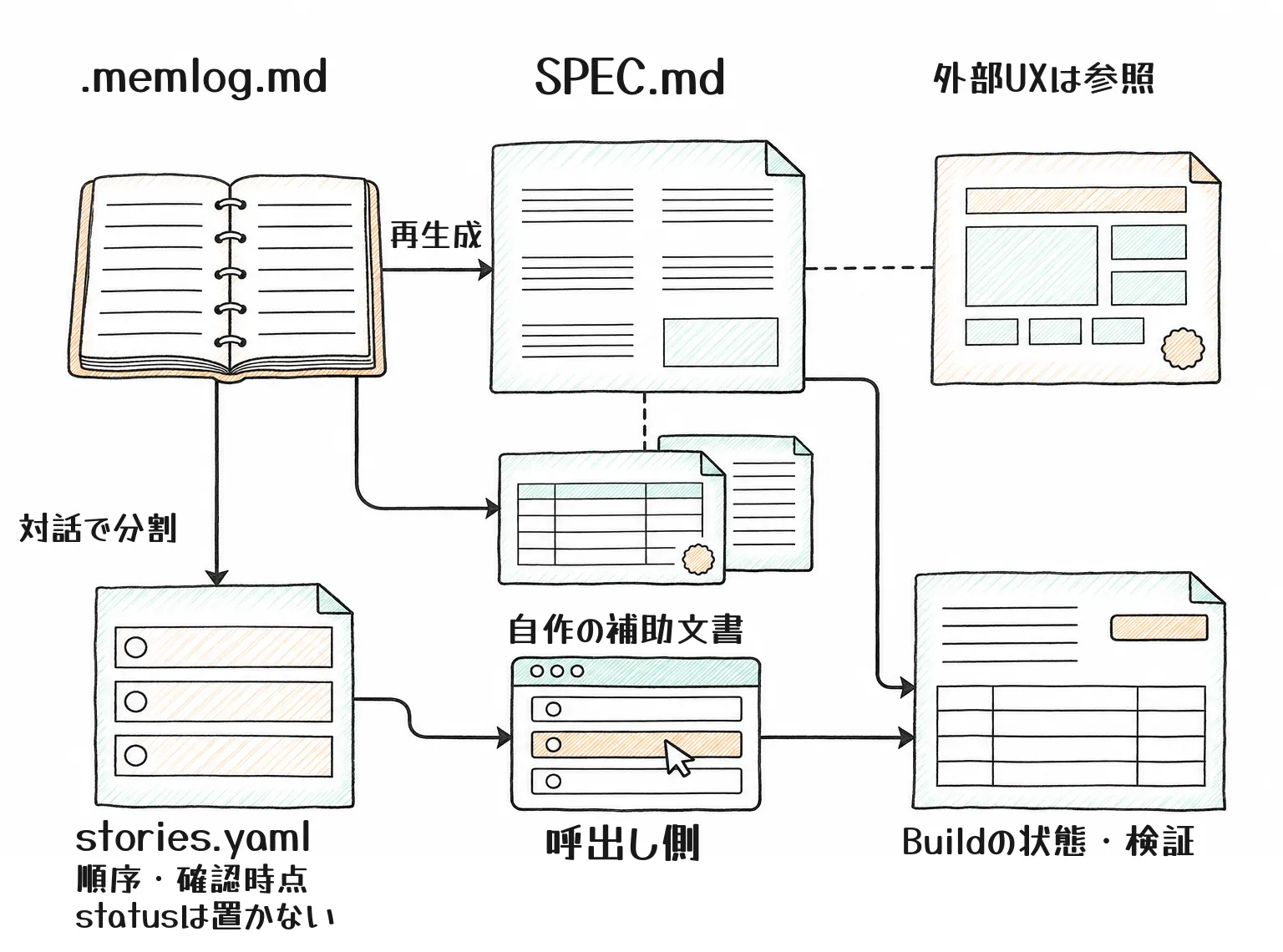
| Document | Author | Purpose in later stages |
|---|---|---|
.memlog.md |
bmad-spec appends entries using a shared script |
Preserve the history of decisions and changes so the planning specification can be regenerated |
SPEC.md |
bmad-spec |
Share the rationale, capabilities, constraints, non-goals, and success conditions |
Supporting documents listed in companions |
bmad-spec or the skill that originally created them |
Read details that affect implementation decisions alongside the main document |
stories.yaml |
Interactive Story Breakdown |
Pass the implementation order and human checkpoints to the caller |
| Build implementation specification | bmad-build |
Tie investigation, implementation, verification, review, baseline, and state to a single unit of work |
The planning specification is saved under specs/spec-<slug>/ in the configured output location.
Capability identifiers such as CAP-1 are preserved across updates, and new capabilities receive new identifiers.
Decisions are appended to .memlog.md, and SPEC.md is regenerated from that record and the sources. Manual edits to the main document alone will therefore be overwritten during a later regeneration.
Supporting documents have different ownership rules too.
Documents created by bmad-spec are regenerated from the same decision record, while documents created by other skills, such as UX designs, are referenced without unilaterally editing the original author's files.
Documents required during implementation are listed in companions. Sources already incorporated into the contract and retained for auditing are listed in sources.
The former are contractual material that later implementations must read alongside the main specification. The two lists are not interchangeable.
Story Breakdown is interactive and divides the change into independently verifiable implementation units.
stories.yaml is an array executed in order from top to bottom, and each id is a quoted string.
The list does not contain a status field; progress belongs in separate implementation records.
Settings for pausing before specification approval or after completion are values read by the caller. Writing a value into a story alone does not establish that the Build's execution mode will change.
A standalone Build creates spec-<slug>.md in the configured implementation artifacts location.
When a planning specification and story ID are provided, it uses stories/<id>-<slug>.md in the same planning folder.
If multiple implementation specifications match the same ID, or the specified story is absent from the list, it stops rather than guessing another destination.
Investigating and Selecting the Build Route
A new Build examines the request, relevant planning materials, existing code, and history before choosing an implementation approach. Even a detailed user request is not a reason to skip investigation or the implementation specification. Conversely, rather than asking the user about everything up front, the AI checks what the code can establish and reserves questions for decisions that remain unresolved.
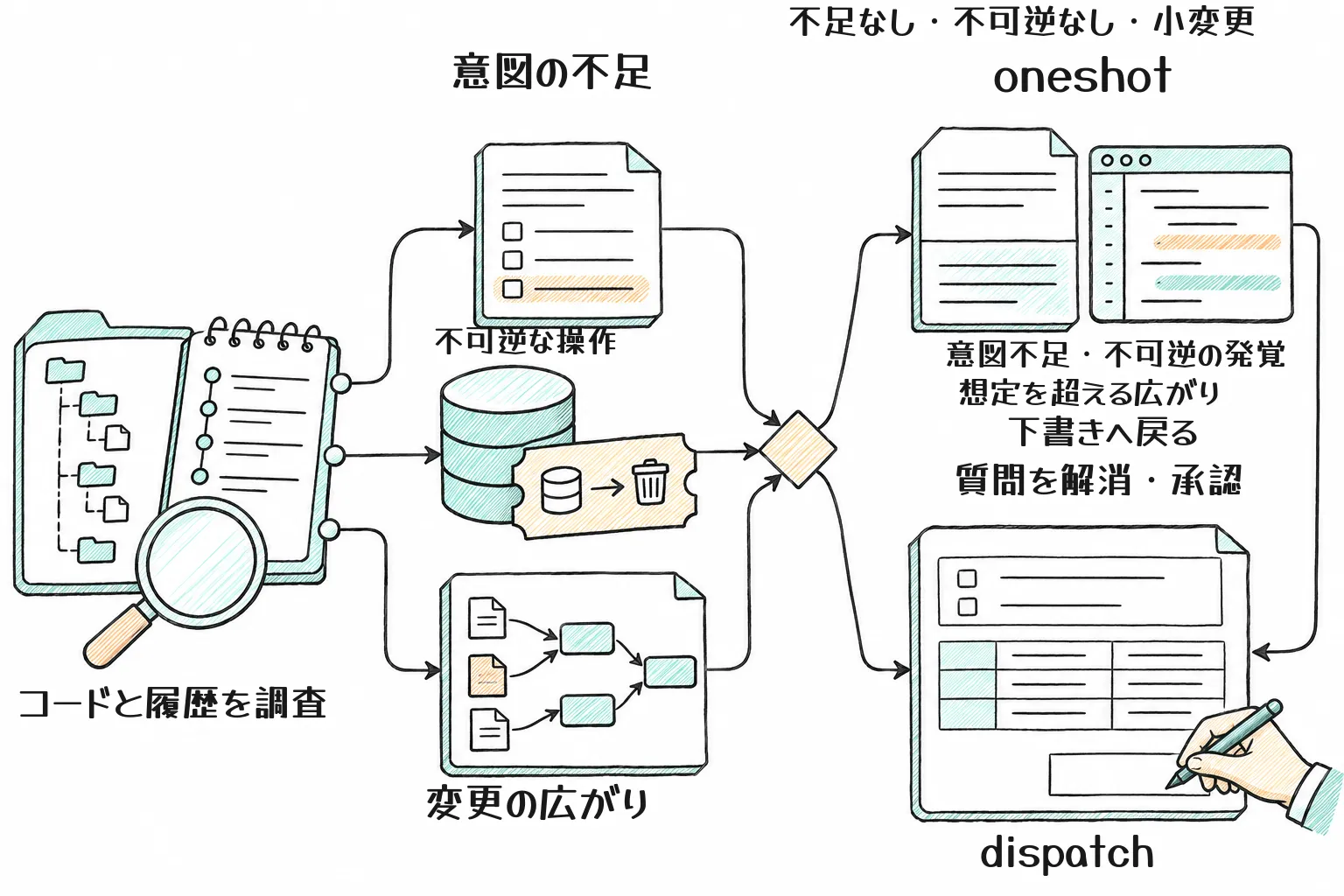
| Fact to investigate | Effect on the decision |
|---|---|
| Intent gaps | Ask a human about choices that are neither specified in the request nor established by the code and whose outcomes the user can distinguish |
| Irreversible operations | Make migrations, deletion, external side effects, and triggering deployment or configuration changes explicit in the plan |
| Change scope | Examine changed files and newly introduced dependencies from other code to determine whether the change is small |
If there are no intent gaps or irreversible operations and the change is small, use oneshot.
This does not require zero changed files.
Record Intent and Implementation Notes in a minimal implementation specification, set route: oneshot and status: in-progress, and proceed to implementation in the same conversation.
This route does not prescribe a separate plan approval before implementation.
Otherwise, use dispatch.
Create a specification containing a code map, tasks, acceptance criteria, and verification methods, and list decisions that only a human can make under Open Questions.
Record answers as decisions in the region that becomes frozen after approval. Once no questions remain, proceed to approval.
The user can approve the specification and continue, or approve it and stop at ready-for-dev to resume in another conversation.
Immediately before approval, reread the saved specification.
Stop if the file has disappeared; if it has been edited externally, recognize the edits and use the updated contents.
After approval, the contents of <frozen-after-approval> represent human decisions, not a region the implementer may rewrite for convenience.
Reassess the route during oneshot implementation too.
If new intent gaps, irreversible operations, or unexpected scope expansion appear, record the reason and return to dispatch with draft status.
The initial determination that the change was small is not an immutable justification for continuing implementation.
When starting new work, stop and ask the user if there are uncommitted changes or the current branch clearly does not match the objective.
If there are multiple independently releasable goals, the human also chooses whether to split them or accept the risk of handling them in the same Build.
Only when the work is split are goals excluded from the current scope appended to deferred-work.md.
Basic Flow of a Single Build
In the approval-based dispatch route, the saved implementation specification is the shared input to implementation and verification.
When resuming an existing specification, read its saved state and return to the corresponding stage.
The following is the main path for a newly started Build.
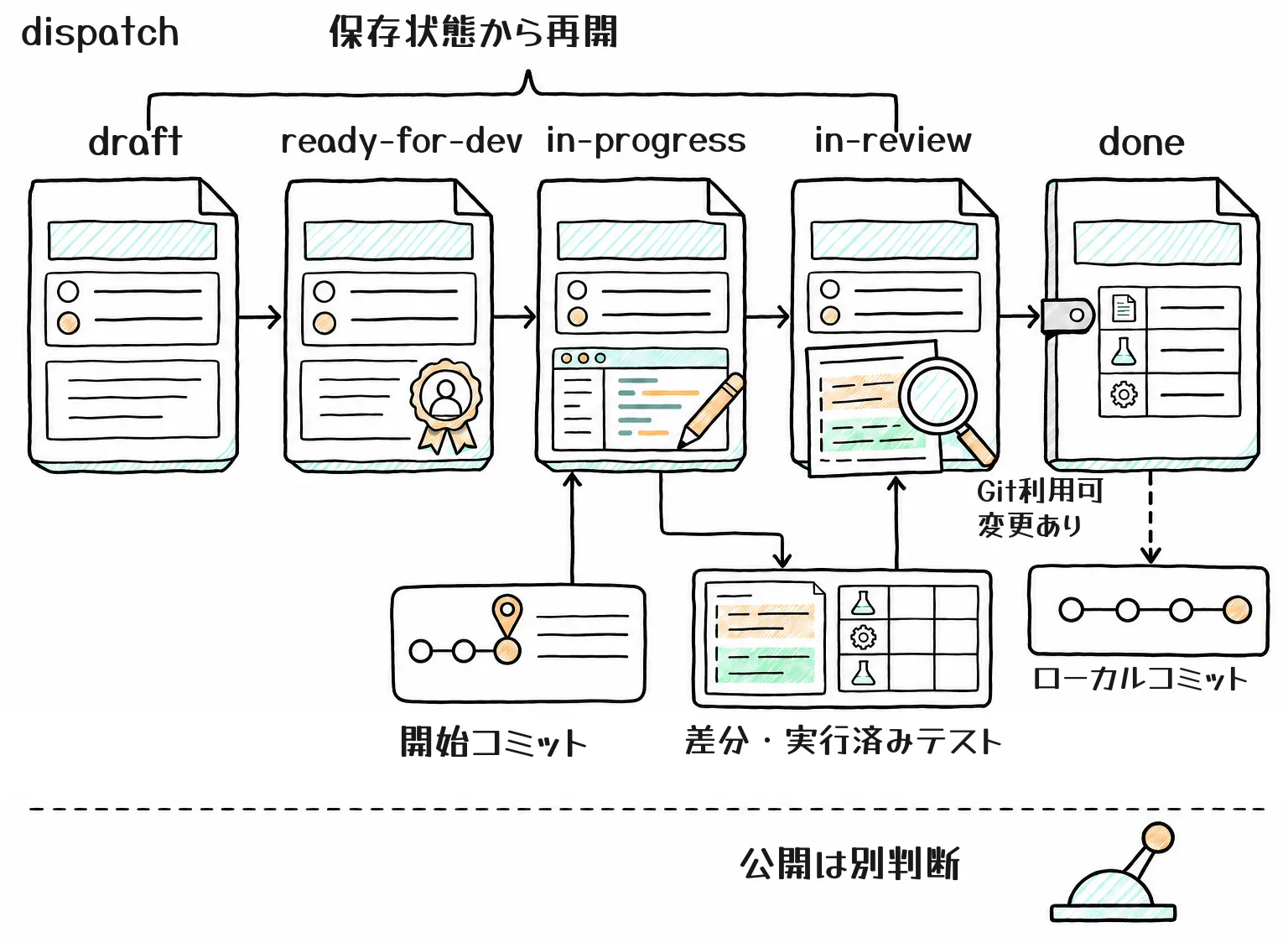
- Read the request and relevant materials to establish the work's scope. Perform the startup checks for Git and the objectives, and choose where to save the implementation specification.
- Investigate the code and history, recording intent gaps, irreversible operations, and change scope in the specification.
For
dispatch, resolve questions and confirm the post-approvalready-for-devstate. - Before implementation, save the starting commit in
baseline_commitand set the status toin-progress. When resuming, do not overwrite the existing baseline. - The AI changes the code and tests according to the tasks and acceptance criteria in the specification. The lead agent does not rely solely on the implementer's report; it reads the diff from the baseline, including untracked files.
- Match the tasks to the acceptance criteria. If there is a table of inputs and boundary conditions, check that the test corresponding to each row was actually run and passed. Tests that did not run because they were unregistered, filtered out, or skipped do not count as verified.
- Change the status to
in-review, gather independent review findings, and handle them according to their causes. If the cause lies in the specification or intent, correct that contract and redo the implementation. - Once verification and review are complete, set the implementation specification to
doneand create a local commit if Git is available and there are changes. In the summary, confirm the actual verification results and deferred work.
When resuming, the saved implementation specification state determines which stage to return to.
| Saved state | Stage to resume |
|---|---|
draft |
Return to planning |
ready-for-dev, in-progress |
Return to implementation. Preserve the oneshot route if route: oneshot is set |
in-review |
Return to review |
done |
Read it as completed context without reopening that Build |
Do not proceed to implementation without an implementation specification. If test expectations and the code disagree, do not rewrite the expected values to match the code. Instead, return to the decision of whether to correct the code or ask the human to clarify ambiguous conditions.
oneshot is a separate route that carries out implementation and review with a minimal specification and may not contain all the detailed specification fields above.
Both routes nevertheless track completion state and local changes, and neither automatically pushes as part of ordinary completion.
When a story has a corresponding sprint-status.yaml, Build completion synchronizes its status to review.
A Build marked done does not signify release or completion of the entire epic.
Specifying and Verifying a Price-Range Filter
Consider adding minPrice and maxPrice to GET /api/products in a fictional project.
Assume existing prices are non-negative integers in Japanese yen and the API already rejects invalid numeric input with a 400 response.
The initial user request is as follows.
商品検索へ最低価格と最高価格の条件を追加する。
両方を省略した時は従来と同じ商品と順序を返す。
最低価格が最高価格を上回る入力は拒否する。
境界の価格の商品を含めるかは、まだ決めていない。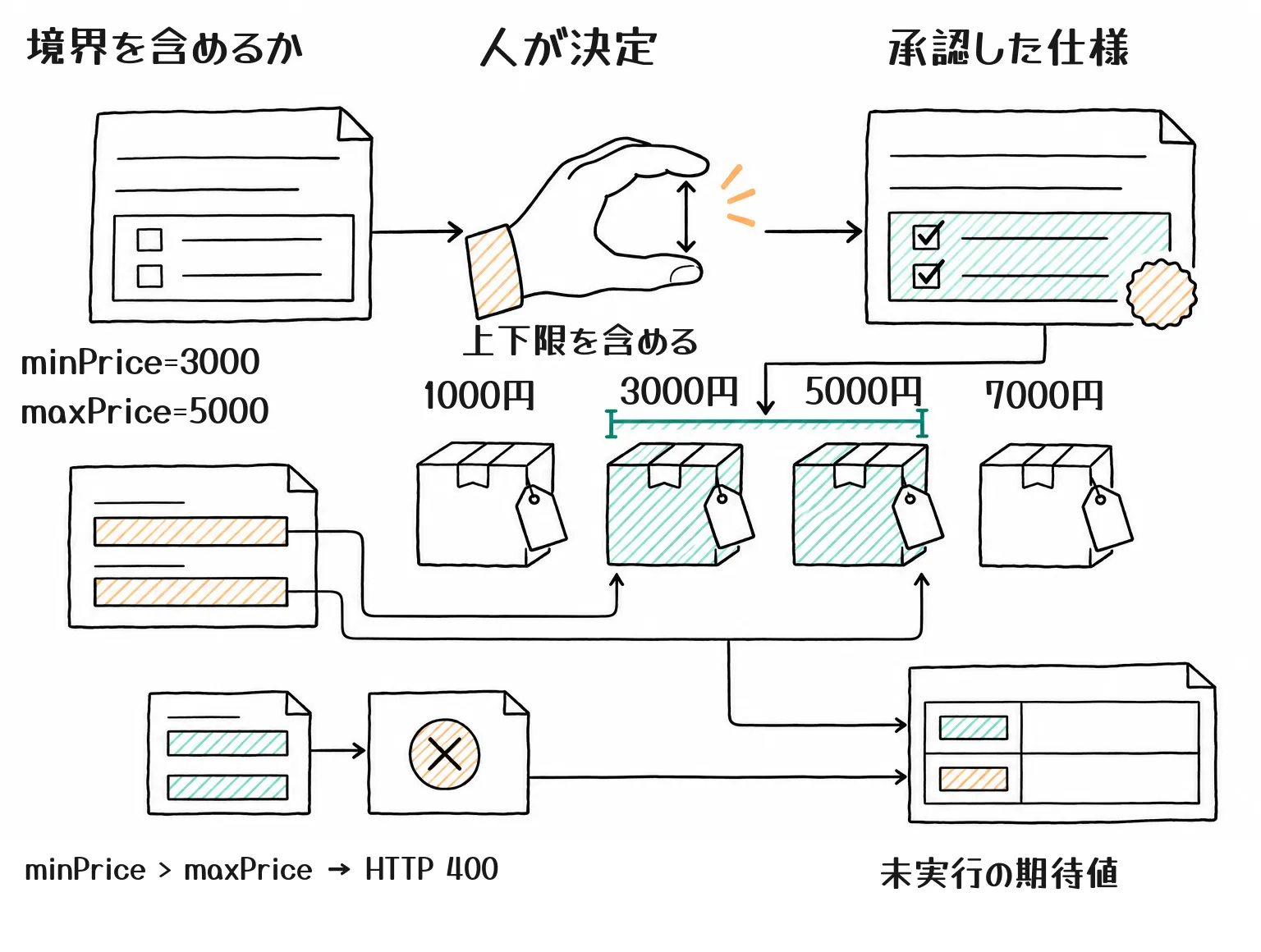
When the request is passed to bmad-build, the AI investigates the existing price representation and invalid-input handling.
It can reuse the implementation that rejects invalid numeric input with a 400 response, but whether a condition of at least 1000 yen should include an item priced at exactly 1000 yen remains a matter of user intent.
If neither the code nor the planning materials settle that question, it is recorded in the implementation specification, leading to the main dispatch path.
This is an expected observation derived from the instructions of the specified version, not the result of running the workflow for this API.
Assume the human answers that both bounds are inclusive. That decision is recorded in the region to be frozen, the question is resolved, and the specification is approved. The principal parts of the specification map to the following contents. The filenames are examples for this fictional project, not findings from an actual repository.
| Implementation specification section | Contents |
|---|---|
Intent |
Filter product search by price. Preserve existing results if both bounds are omitted |
Boundaries & Constraints |
Include both bounds. Use non-negative integers in yen and follow the existing 400 response for invalid input |
Code Map |
Assume src/api/products.ts handles input and src/search/filter.ts handles price comparisons |
Tasks & Acceptance |
Map input extraction, application of the price conditions, and addition of tests/price-filter.test.ts |
Verification |
Run the relevant tests and existing project checks and confirm each acceptance criterion |
Given test data with product prices of 1000, 3000, 5000, and 7000 yen, the expected values are as follows. These are conditions to include in the specification being approved, not actual test results.
| Input | Expected result | Condition verified |
|---|---|---|
| Both omitted | Same products and ordering as before | Compatibility |
minPrice=3000 |
Products priced at 3000, 5000, and 7000 yen | Inclusive lower bound |
maxPrice=5000 |
Products priced at 1000, 3000, and 5000 yen | Inclusive upper bound |
minPrice=3000&maxPrice=5000 |
Products priced at 3000 and 5000 yen | Combined conditions |
minPrice=3000&maxPrice=3000 |
Products priced at 3000 yen | Equal lower and upper bounds |
minPrice=5000&maxPrice=3000 |
HTTP 400 | Rejection of reversed ranges |
| Negative numbers or nonnumeric strings | HTTP 400 | Rejection of invalid input |
For a larger change whose plan is shared first, record the same intent in the planning SPEC.md as well.
The main parts of the capability ID and success conditions take the following form.
## Capabilities
- **CAP-1**
  - **intent:** 利用者が商品を価格帯で絞れる。
  - **success:** 上下限を含め、両方省略時は従来の結果を保ち、逆転入力は400で拒否する。
## Constraints
- 価格は円の非負整数とし、既存の並び順を変えない。
## Non-goals
- 通貨換算と検索インデックスの再構築は含めない。
Capabilities
- CAP-1
- intent: 利用者が商品を価格帯で絞れる。
- success: 上下限を含め、両方省略時は従来の結果を保ち、逆転入力は400で拒否する。
Constraints
- 価格は円の非負整数とし、既存の並び順を変えない。
Non-goals
- 通貨換算と検索インデックスの再構築は含めない。
If multiple consumers are to migrate on different release dates, the same feature warrants an epic instead.
In stories.yaml, order the backward-compatible server-side addition, migration of each consumer, and cleanup of obsolete processing.
Each story reads the shared capability ID and constraints and is passed individually to a Build.
In addition to completing the list, verify the combined behavior at the end.
Routing Review Findings Back to Their Root Cause
The default dispatch configuration has three reviewers: one that looks for shortcomings in the diff without being given assumptions, one that traces boundary conditions, and one that looks for gaps in verification.
oneshot defaults to a single reviewer, so the two routes cannot be described as performing the same number of reviews.
If assignments have been changed through configuration, check the instructions actually in effect.
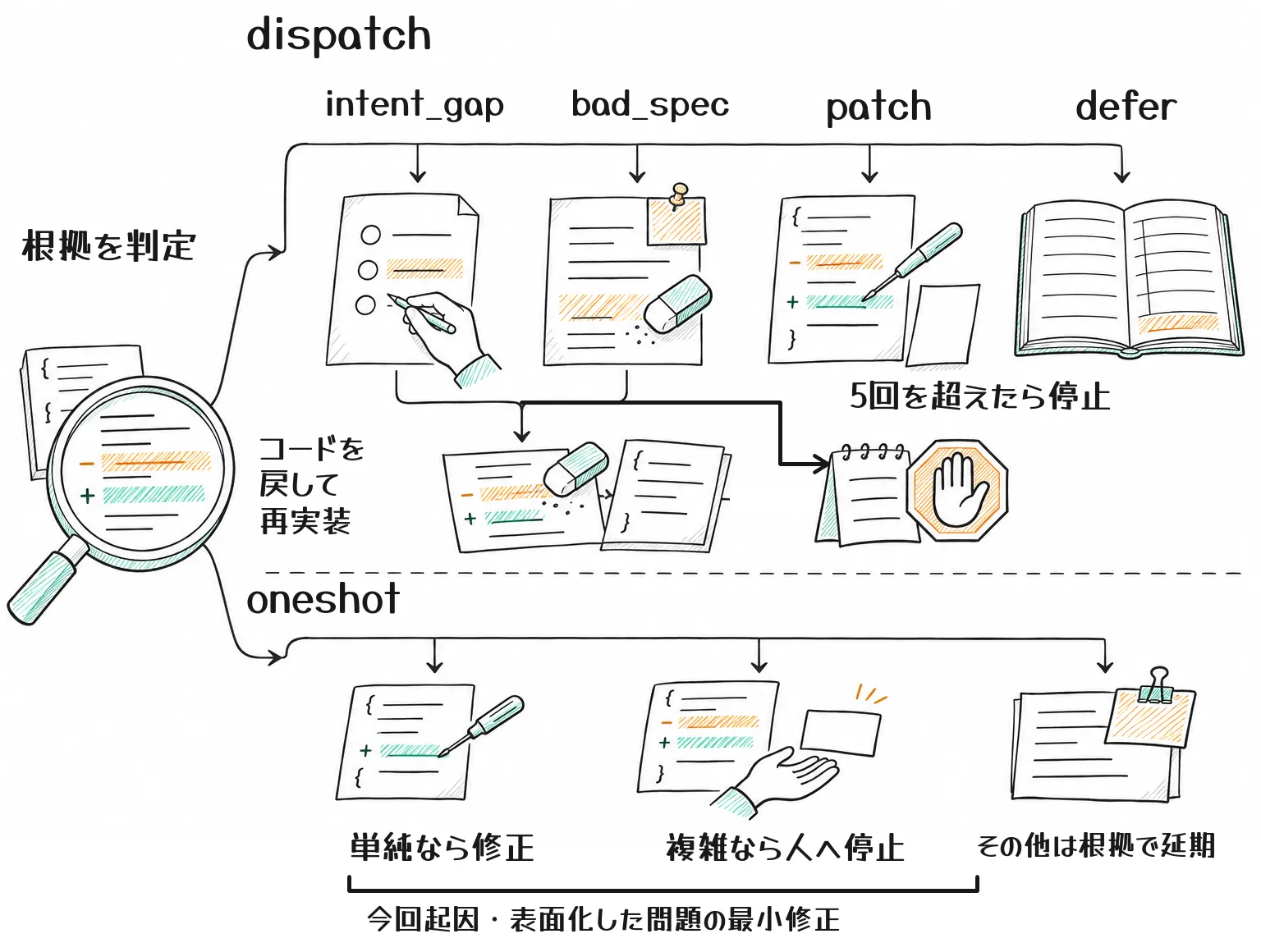
After all reviewers return their results, the lead agent evaluates each finding.
For ordinary findings, it reads surrounding code and callers to establish whether the reported undesirable outcome can actually occur.
There is an exception for gaps reported by the reviewer specializing in verification: the lead agent trusts the evidence investigated by that reviewer when classifying those findings.
The lead records each finding's disposition and rationale in the Review Triage Log and groups findings with the same cause before selecting the stage to return to.
dispatch uses four classifications to determine where to return.
| Route | Condition | Action |
|---|---|---|
intent_gap |
A missing user decision means the cause lies in the frozen intent | Revert code changes, return to the human, and investigate the plan again |
bad_spec |
The intent is clear but the implementation specification's instructions or acceptance criteria are at fault | Record instructions to preserve what worked, revert code changes, and redo implementation from the specification |
patch |
The current change caused the issue, and the smallest fix is simple and adds no new public capability | Apply the local fix, then rerun verification defined by the specification |
defer |
A pre-existing issue not caused by this change, an important but unverified suspicion, or a change to AI instruction documents | Append the reason and evidence needed for confirmation to the deferred-work record |
A mere readability preference or a proposal to add defensive handling for a state not shown to occur is not treated as a confirmed bug.
When a finding requires returning to intent or specification, stop making local fixes at a lower stage and rebuild the code from the contract.
Increment dispatch's review_loop_iteration before returning. If it exceeds 5, report it to the human and stop.
After oneshot review, the process differs from these four classifications.
For an issue caused or exposed by the current change, apply a patch if the smallest fix is simple; if the smallest fix is complex, stop and ask the human.
Otherwise, record it under defer according to the evidence, such as a pre-existing issue or an unverified suspicion.
If a separate AI implementer cannot be launched, the lead agent can read the specification and implement it itself. However, if the review instructions require a separate reviewer and none is available, save instructions for execution in another conversation and stop. Resume classification after the user returns findings from that separate conversation to the original Build. The lead agent's self-check is not a substitute for independent review.
Suitable Use Cases and Limits of Its Guarantees
BMad Method suits work where the scope of a change determines the amount of planning, and humans retain control over decisions about intent while handing implementation to an AI. It is also useful when multiple implementation passes must inherit shared requirements or when review findings need to be traced back to gaps in the specification rather than only to the code.
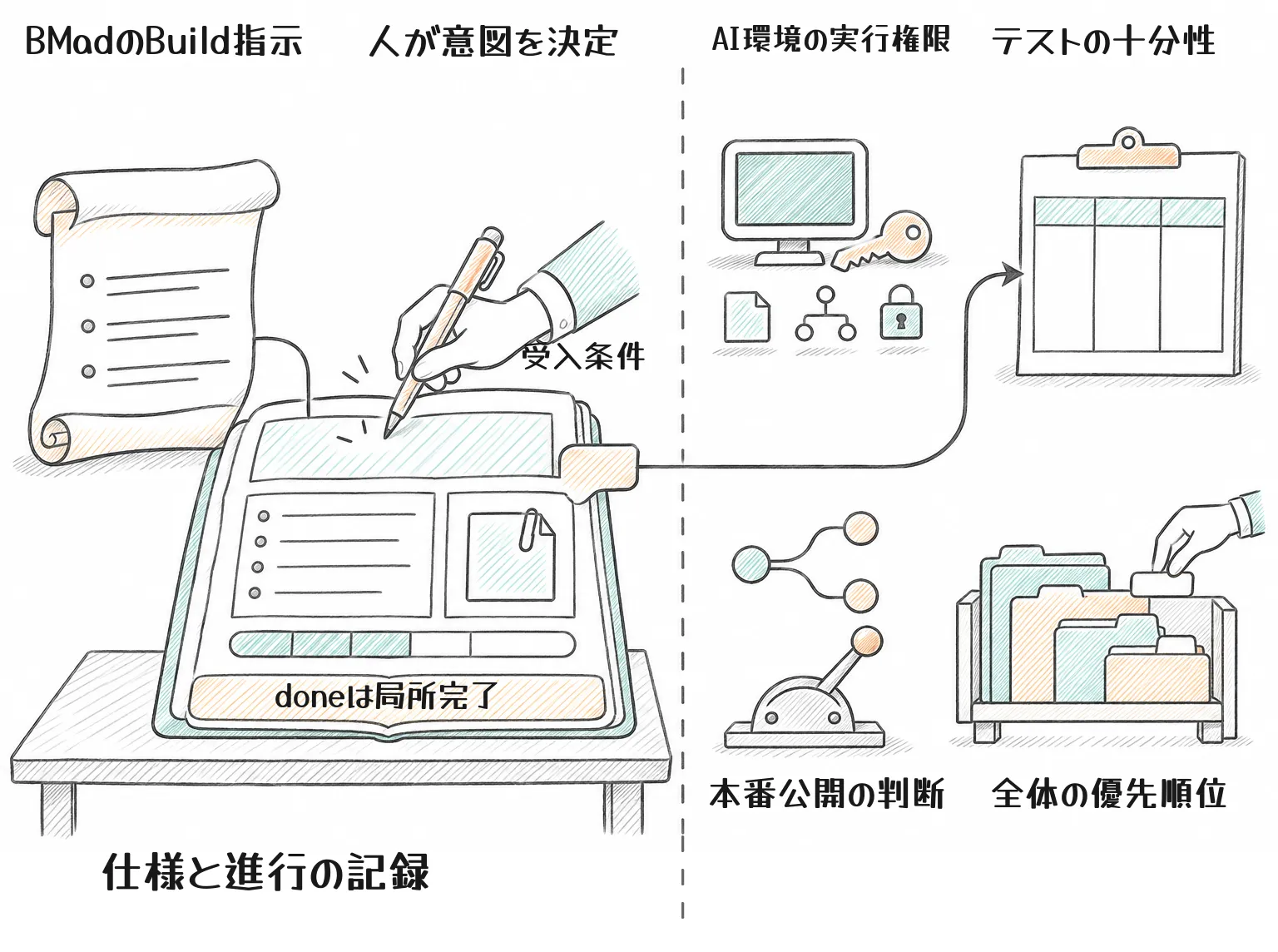
For an obvious fix that a developer can verify directly, adding an entire Build workflow to a mechanical change creates considerable overhead. For changes whose desired behavior cannot yet be defined, conduct the necessary research or establish agreement first. Do not assume that passing work to one Build also establishes priorities for the entire product.
The typical change sizes and specification token counts given in the official materials are guidelines for splitting implementation work. Even when a specification exceeds 1600 tokens, do not truncate it automatically. Present the human with a choice between splitting it and retaining it in full. Do not replace the assessment of intent gaps, irreversibility, and change scope with a size-only criterion.
The specified version is distributed under the MIT license. This explanation is based on static inspection of the pinned tag, package, and workflow files; the price-range filter implementation, installation, and generation of implementation workflow instructions were not executed. Processing time, cost, token consumption, AI model quality, and performance across execution environments were not measured either.
Filesystem and network permissions, credentials, branch protection, and production release decisions are defined by the AI development environment and the project. The existence of reviewers does not guarantee test coverage or production safety. This explanation covers Build in v6.12.4, not optional extensions that automatically coordinate multiple units of work or behavior in other versions.
Summary
BMad Method separates planning for the overall change from the implementation route used within a single Build. It examines the intent and existing code, recording whether the change can be completed through a lightweight implementation or whether human decisions and approval are required. By connecting saved specifications, actual tests, and evidence behind review findings, it ties the necessary planning and the decision to mark work complete to the same change.