Introduction
Hi, I'm cardene, a software engineer and technical writer focused on blockchain and AI.
I've also authored Japanese technical books on specification-driven development with LLMs and decentralized application (DApp) development.

I also build and publish a variety of tools, libraries, and open-source projects.
Giving an AI agent a specification and a list of tasks does not establish when implementation is complete. Before development begins, the team must decide whether passing tests is sufficient, whether a separate reviewer should inspect the diff, and whether the entire feature should be checked after all tasks are finished.
cc-sdd connects the creation of requirements, design, and task records with per-task TDD, review by a designated reviewer, and remediation with bounded retries.
Once all tasks are complete, their changes are passed to feature-wide revalidation.
Using the addition of a price-range filter to product search as an example, this article explains which records each stage reads and what it checks before proceeding.
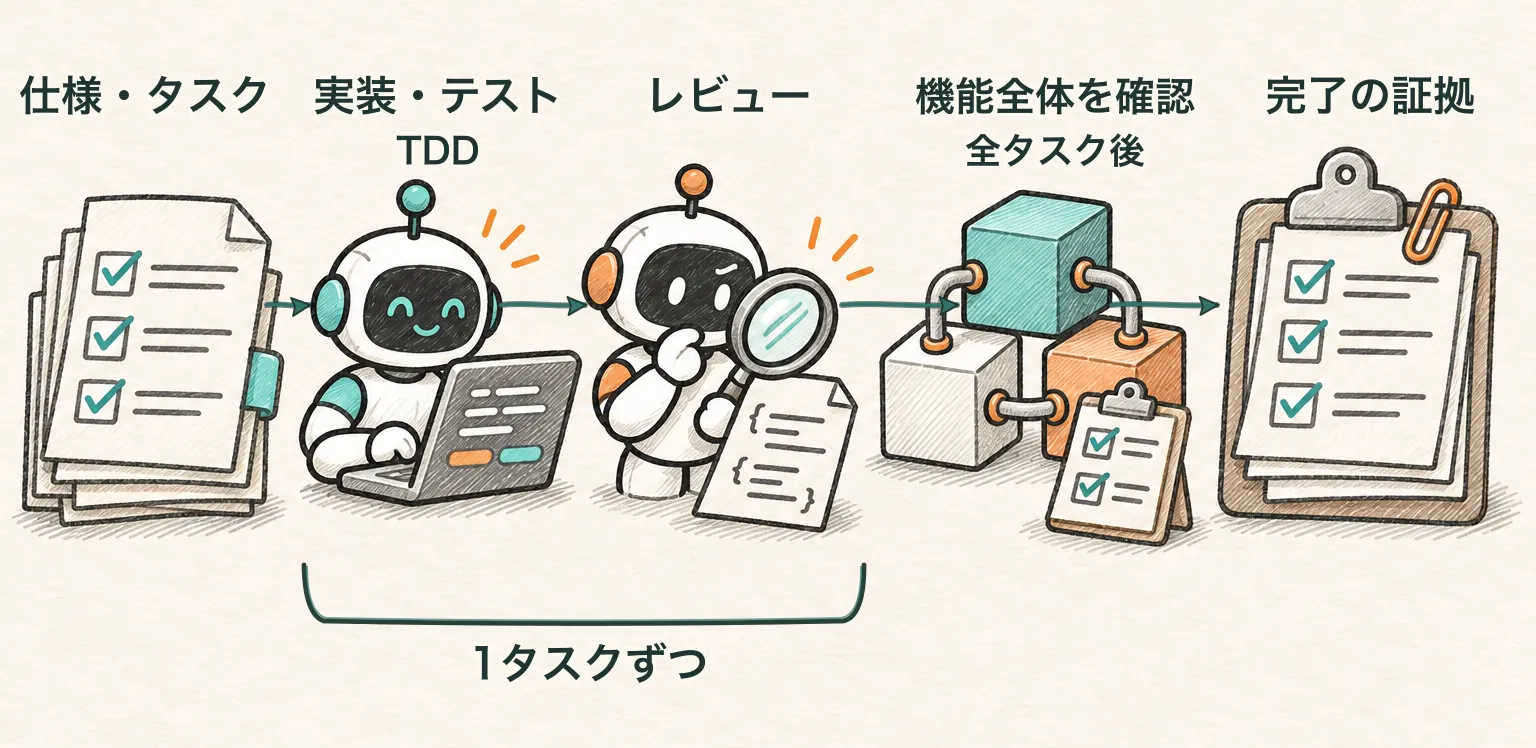
The existing diagrams are retained from the Japanese article and contain Japanese labels.
Completing the requirements, design, and tasks does not yet change the code or tests.
cc-sdd passes approved tasks to implementation and checks task-level evidence separately from feature-level evidence.
What is cc-sdd?
cc-sdd integrates specification-driven development into AI-agent development workflows.
In specification-driven development, user-visible behavior and design responsibilities are defined before implementation. These records then guide task decomposition and verification.
cc-sdd provides more than templates for writing specifications.
It also supplies skills for implementing approved tasks one at a time, deciding where to return after a failed review, and revalidating the entire feature at the end.
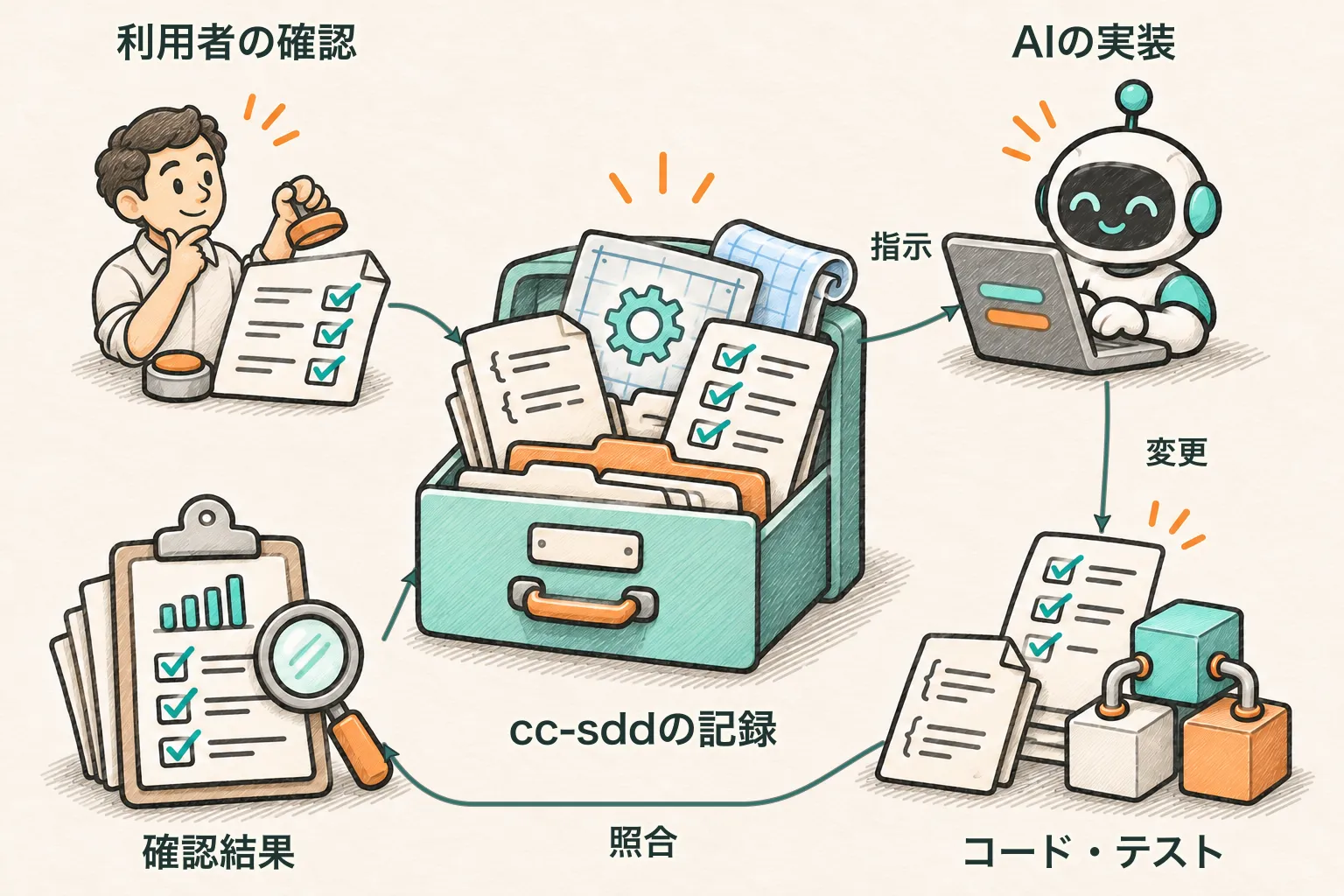
The user reviews requirements, design, and tasks at each stage.
The AI agent reads the approved records and modifies code and tests.
However, a feature-wide GO does not automatically authorize merging or publishing.
Integration with Codex Skills
In the Codex configuration, the cc-sdd CLI installs skills for implementation, review, root-cause investigation, and completion verification in .agents/skills/.
It also places agent configuration in .codex/agents/ and specification templates and rules in .kiro/settings/.
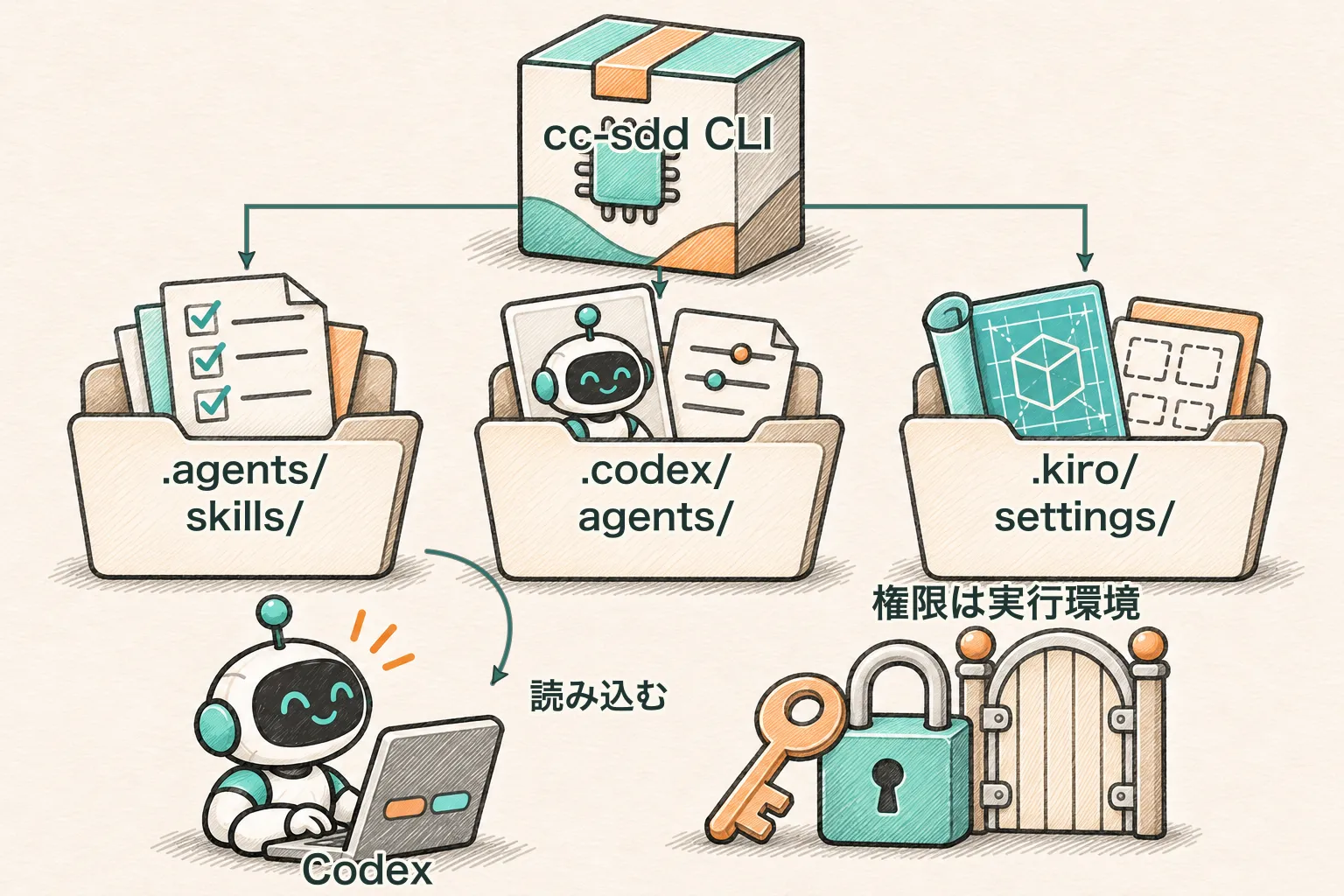
The CLI installs files; Codex reads the installed skills and carries out implementation and verification.
With --dry-run, users can inspect the planned file placement before existing files are changed.
Actual permissions to read code or execute commands are governed by Codex and the execution environment, not by cc-sdd.
Records from specifications to tasks
cc-sdd stores project-wide policies separately from feature-specific specifications.
Project-wide policies document the product's purpose, technology choices, directory structure, and team conventions.
Feature specifications are grouped under .kiro/specs/<feature>/.
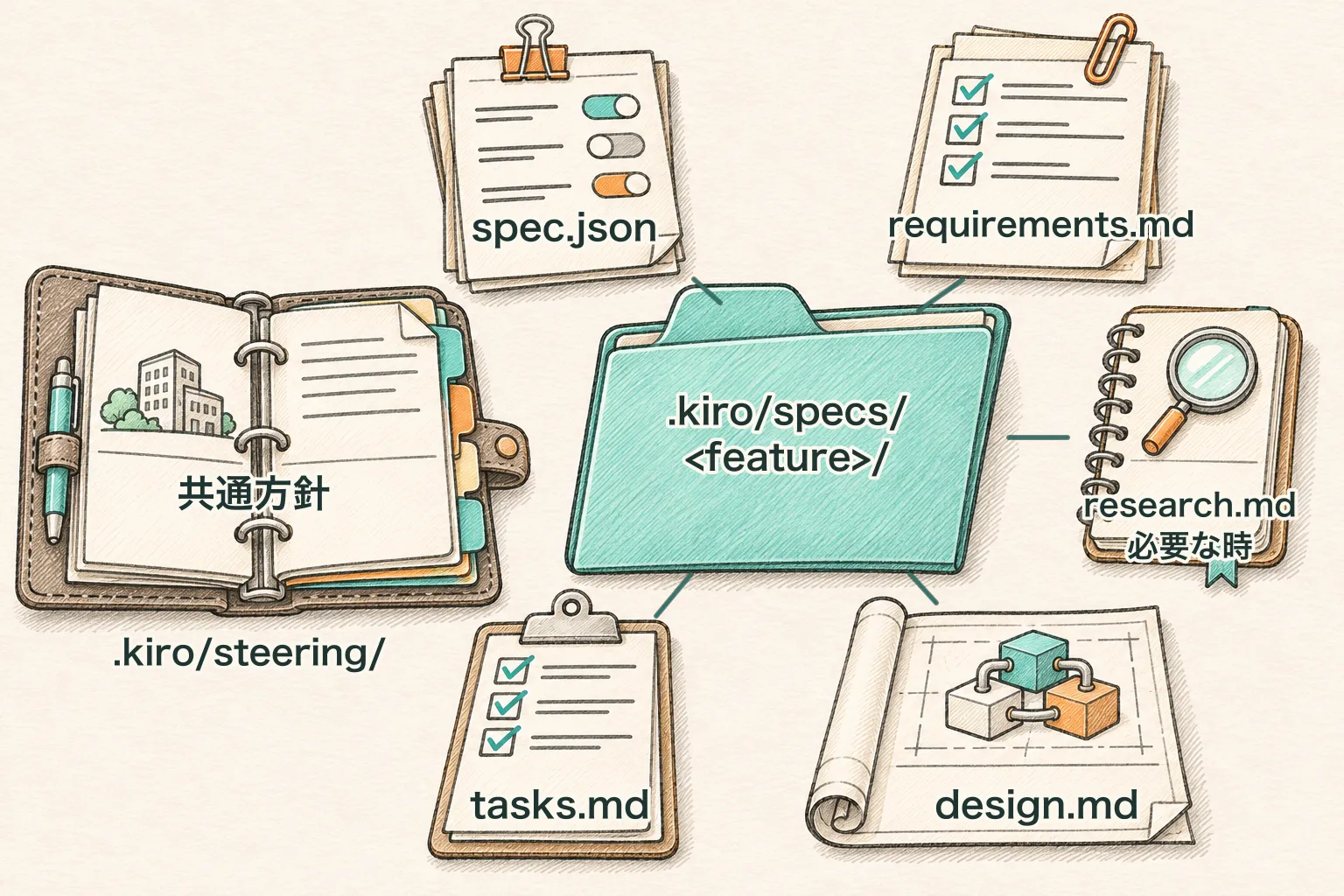
Each feature record has a distinct purpose.
-
spec.jsonRecords the specification stage and approval status.
-
requirements.mdRecords user-visible behavior and verifiable acceptance criteria.
-
Research record
research.mdRecords findings and the rationale for decisions only when existing code or external information must be investigated.
-
design.mdDefines component responsibilities, integration methods, and files to modify before implementation.
-
Task list
tasks.mdBreaks the design into work items ordered by dependency and tracks their mapping to requirements and completion status.
Define responsibility boundaries first
The code is the source of truth for actual behavior. Feature specifications, by contrast, document the contracts that different parts of the code must honor.
For example, if search query construction is separated from input validation, the design specifies which component checks the ordering of price bounds. Reviewers can then inspect not only test results but also whether the search logic has improperly absorbed input validation.
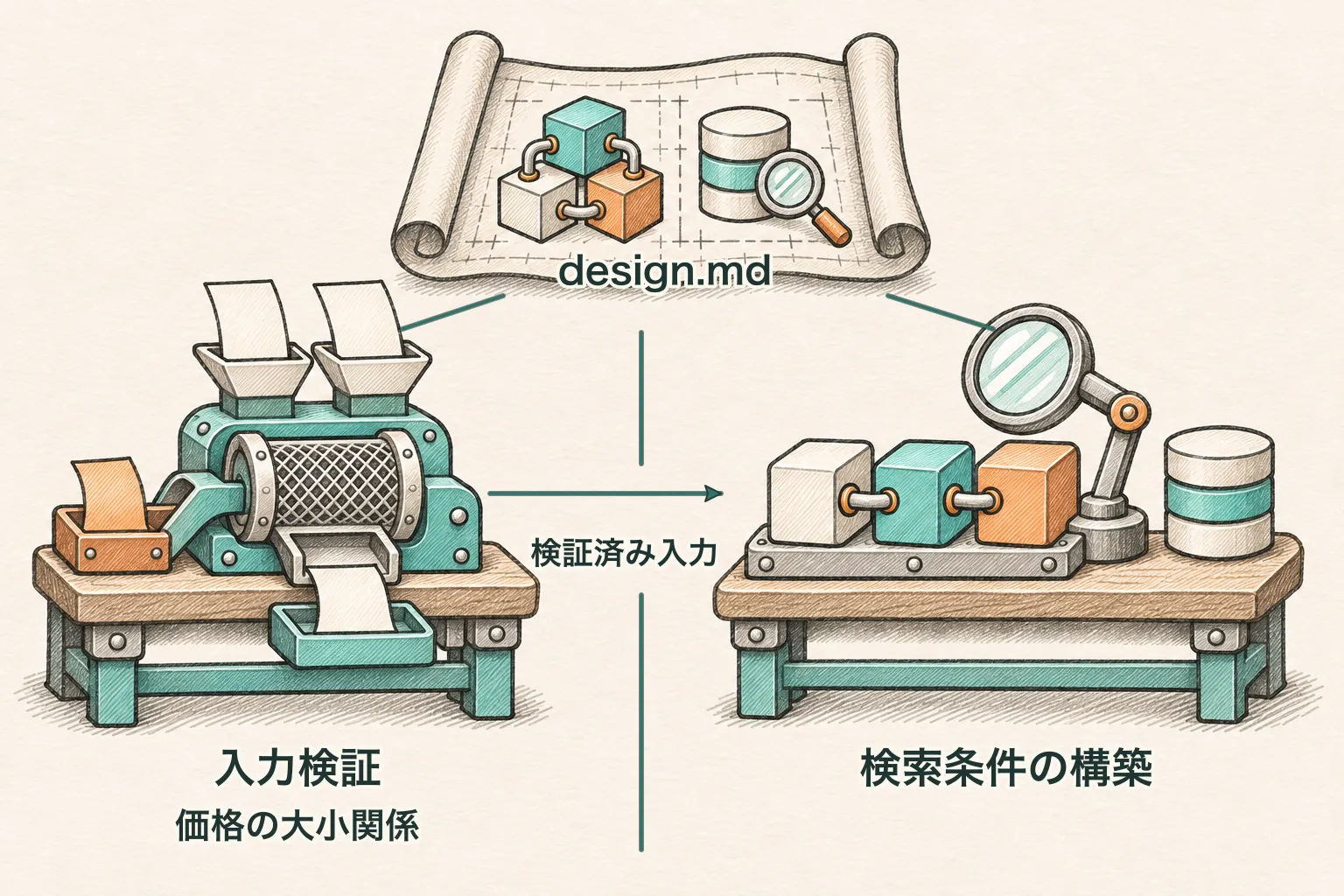
Requirements describe commitments to users, while the design describes contracts between parts of the code. Tasks assign changes to the corresponding responsibility boundaries. This preserves flexibility in implementation while making it easier to identify changes that accidentally take over another component's responsibilities.
Human approval points
Requirements, design, and tasks await human review at each stage. Moving to design only after reviewing requirements, and to tasks only after reviewing the design, reduces rework caused by later changes to assumptions.
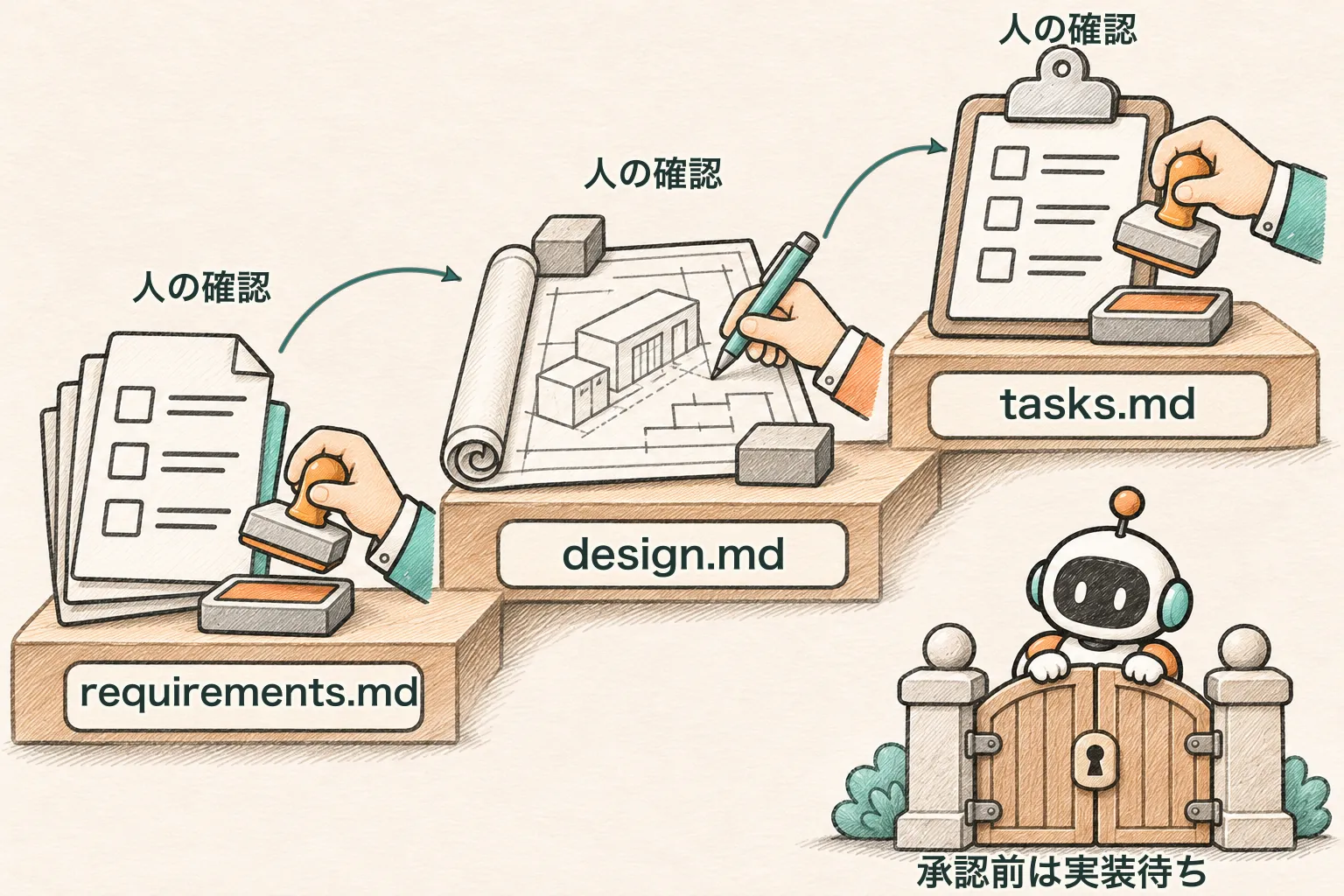
Automatic approval is available, but for changes that lead to production, the workflow assumes that a person checks whether the requirements and design match the intended behavior.
At the start of implementation, kiro-impl also checks the required specification files and task approval status, and does not begin implementation if these conditions are unmet.
Basic workflow
From requirements creation through feature-wide revalidation, records and evidence are passed along in the same order.
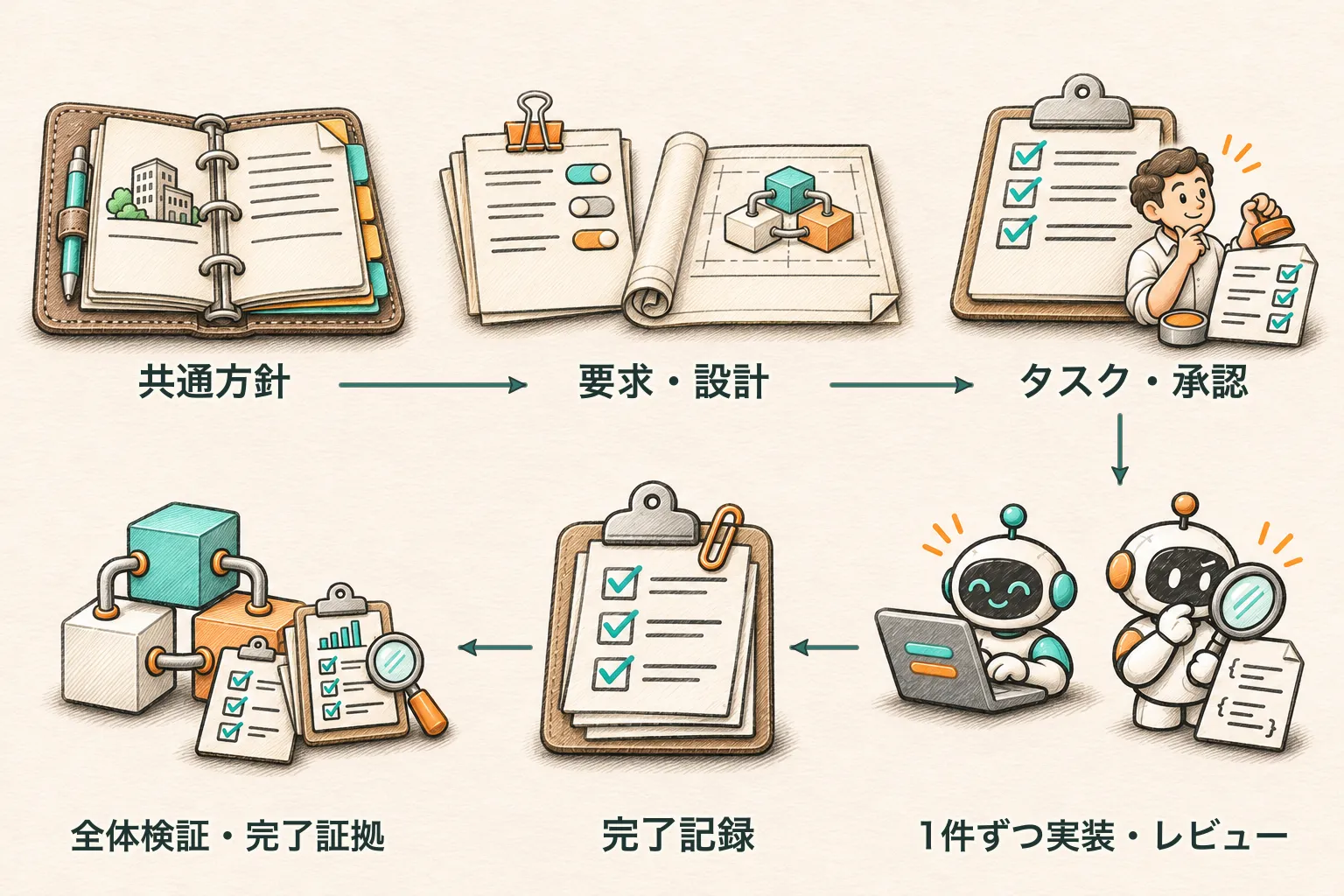
-
Review project-wide policies
Read the product, technology, structure, and team conventions to establish the assumptions for the feature specification.
-
Document user-visible behavior
Record user actions and verifiable acceptance criteria in
requirements.md. -
Conduct research and design
Record necessary research in
research.mdand define changes and responsibility boundaries indesign.md. -
Break the work into implementable units
Create work items in dependency order in
tasks.md, preserving their mapping to requirements and design. -
Review each stage
Have a person review requirements, design, and tasks, and record their approval status in
spec.json. -
Select one incomplete task
kiro-implchecks the required specification files and limits each iteration to one task. -
Implement and review
For behavior-changing tasks, use TDD with a feature flag, and inspect the actual diff and test evidence.
-
Record completion
After verifying completion, update
tasks.mdand commit only the files changed by that task andtasks.md. -
Revalidate the entire feature
In automatic execution, revalidation always follows all tasks. When specific tasks are requested, revalidation is normally proposed. If review is disabled, revalidate before reporting feature completion.
-
Verify evidence of feature completion
After
GO, perform theFEATURE_GOcompletion check and pass the result to the merge or publication decision.
Implementing one task at a time
kiro-impl handles only one task per iteration rather than implementing several at once.
Smaller diffs make it easier for reviewers to trace changes back to requirements and design.
Tasks that add or change behavior use TDD with a feature flag. First, confirm that the test fails with the new behavior disabled. Then enable the flag and make the test pass with the minimum implementation. Finally, refactor the code without changing its behavior.
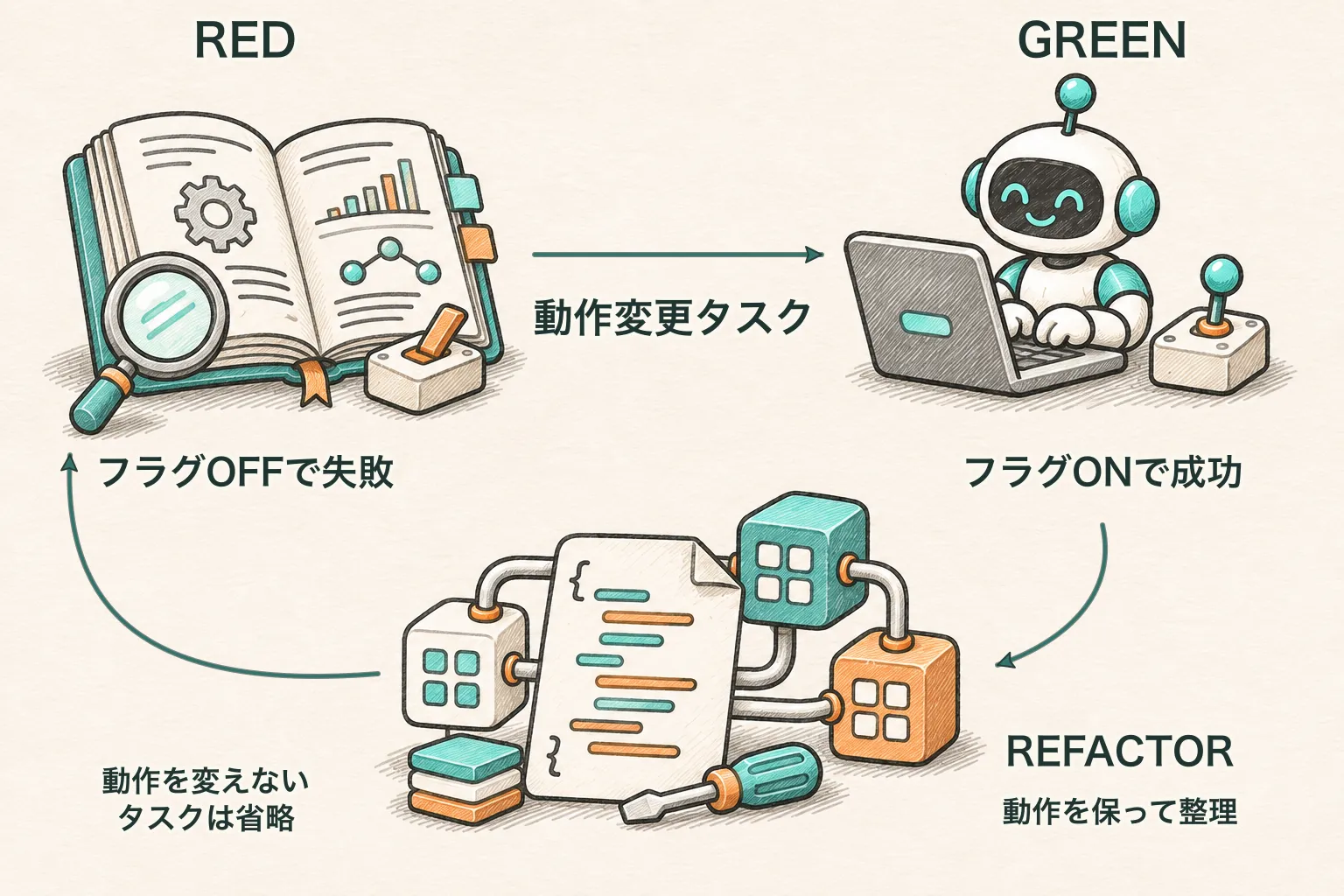
Refactoring, configuration changes, documentation updates, and tasks that do not change behavior skip the feature-flag procedure. Rather than applying the same process mechanically to every task, the workflow distinguishes tasks based on whether they change user-visible behavior.
Separate implementers from reviewers
When the execution environment supports subagents, automatic execution creates a fresh implementer and reviewer for each task. The reviewer does not accept the implementer's report as grounds for approval, but instead reads the requirements, design, actual diff, and test results again.
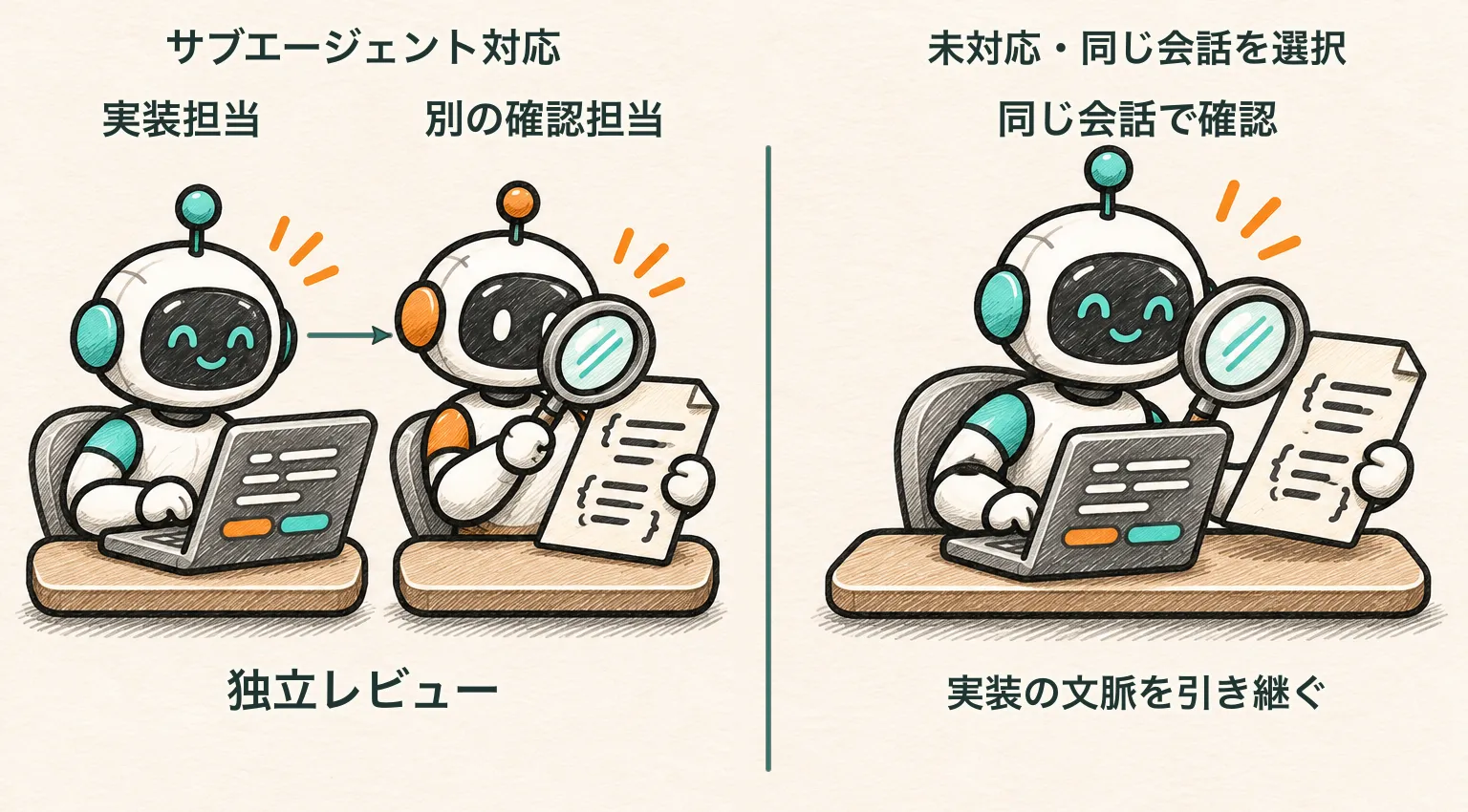
In environments without subagent support, the workflow falls back to review within the same conversation. Because this path inherits the implementation context, it cannot be called independent review.
In cc-sdd v3.1.0, users can choose to require review, conduct it within the same conversation, or disable it.
Even when implementing a specific task number, the ability to separate review into another execution context depends on the connected environment's subagent support.
When to stop after repeated review failures
If a reviewer rejects a change, it is returned to the implementer with the findings. For the first two failures, the implementer fixes the issues and the reviewer checks the changes again under the same conditions.
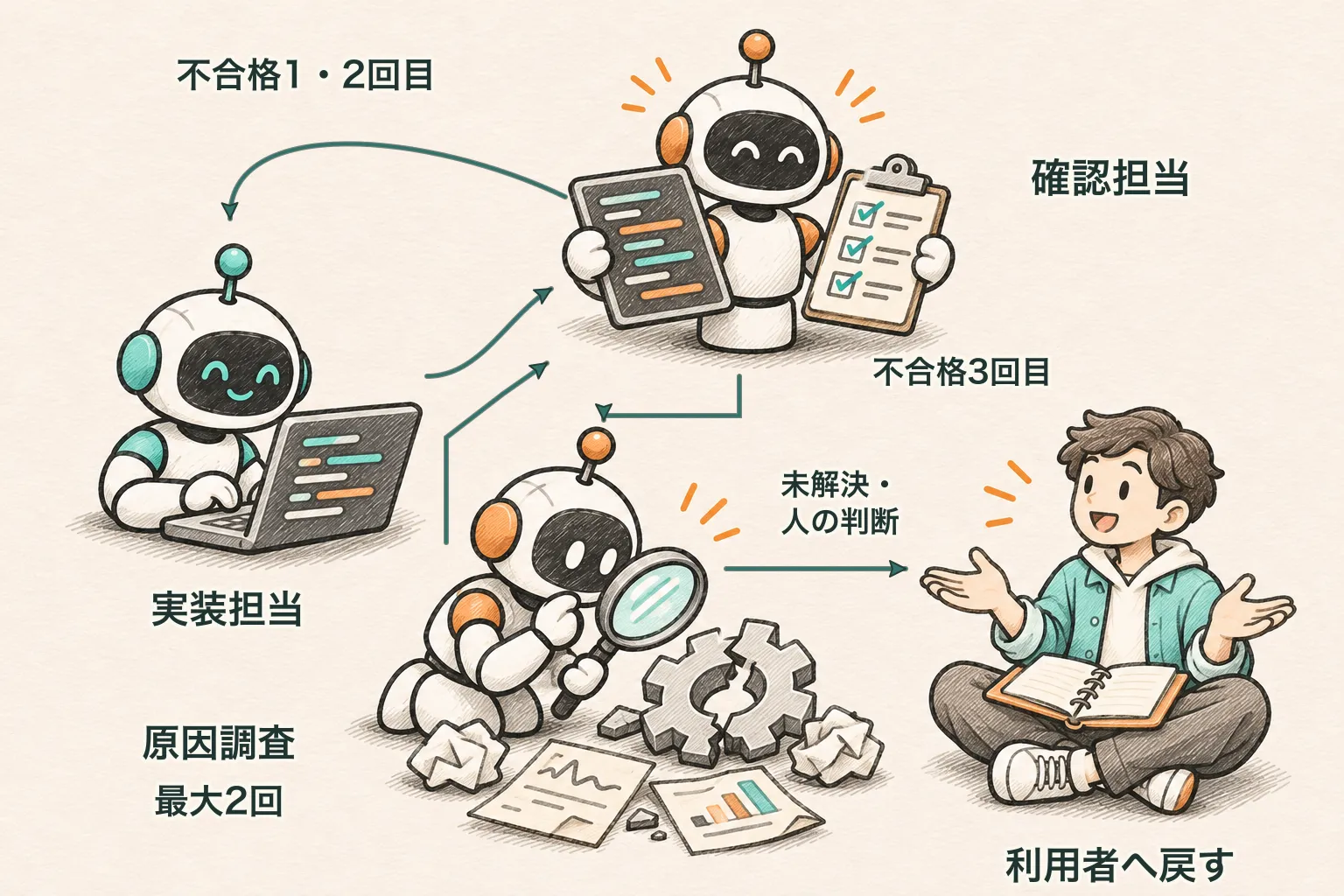
On the third consecutive failure, a root-cause investigator reads the failure output, diffs, and fixes already attempted. Investigation is limited to two attempts. If the issue remains unresolved or requires human judgment, the task stops and control returns to the user. By avoiding indefinite retries of the same fix, the workflow prevents the AI agent from accumulating unsupported changes.
Record completion and hand off to the next iteration
Passing review does not immediately advance the workflow to the next task.
kiro-verify-completion connects the completion claim to freshly run tests and the actual diff.
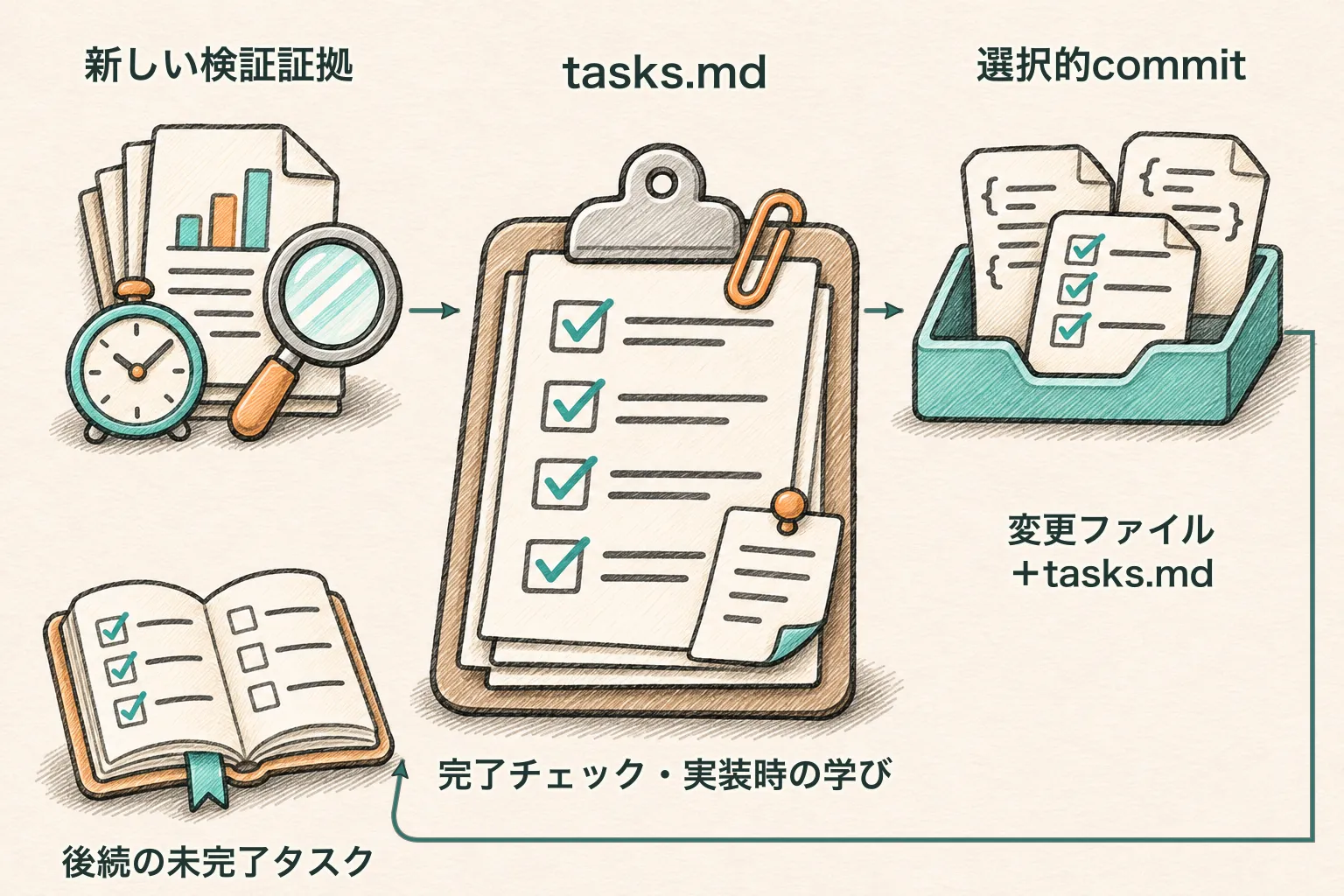
Once completion is verified, the checkbox in tasks.md is updated.
Constraints and decisions relevant to later tasks are recorded in the same file as implementation lessons (Implementation Notes).
In automatic execution, a selective commit includes only the files changed by that task and tasks.md.
The workflow then rereads tasks.md and selects the next incomplete task.
When resuming partway through, checkboxes are reconciled against commits. However, recovery of the connected environment's conversation and execution state is not guaranteed across all environments.
Revalidate the entire feature
Task-level reviews may miss defects that emerge when changes from different tasks are combined.
In automatic execution, after all tasks are finished, kiro-validate-impl runs project tests and checks whether the application starts.
It also examines coverage and integration, design conformance and responsibility boundaries, and whether any tasks remain blocked.
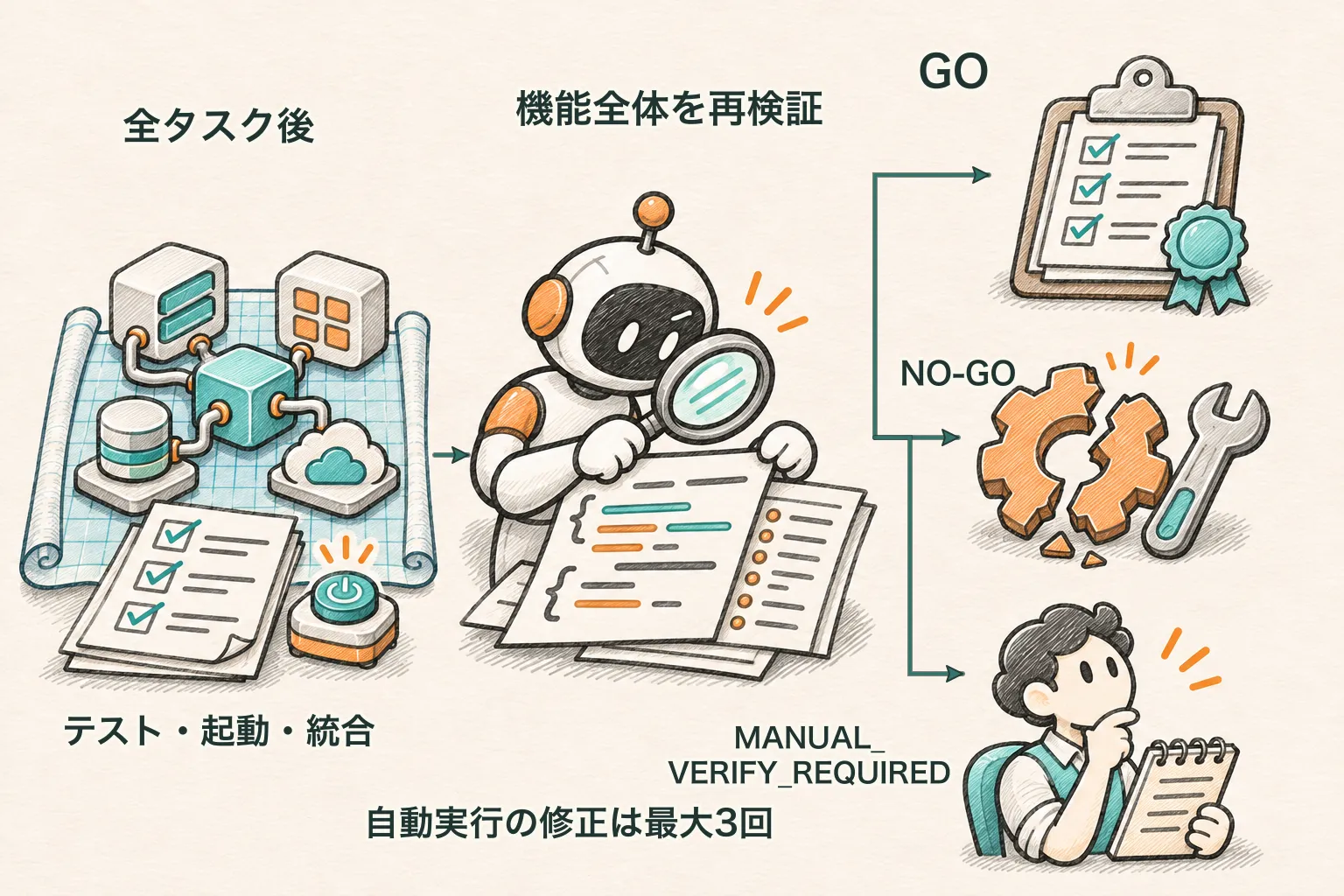
Revalidation has three possible outcomes.
-
Ready for completion:
GOMandatory feature-wide checks have passed, and the workflow can proceed to completion verification.
-
Remediation required:
NO-GOA specific defect has been identified. The workflow specifies the required fix and returns to revalidation.
-
Manual verification required:
MANUAL_VERIFY_REQUIREDA necessary verification method or execution environment is unavailable. Completion is not reported until a person checks it.
If automatic execution produces NO-GO, kiro-impl limits remediation and revalidation to three attempts.
Even after GO, the workflow reports completion only after kiro-verify-completion checks the evidence for the FEATURE_GO feature completion verdict.
When execution targets specific task numbers, feature-wide revalidation is normally proposed to the user. If review is disabled, revalidation is performed before reporting feature completion.
Example: a price-range filter
When adding min_price and max_price to product search, simply accepting price values is not an acceptance criterion.
The requirements specify expected behavior when only the lower or upper bound is provided as normal input cases.
They also define the result returned when the lower bound exceeds the upper bound.
In addition, the acceptance criteria cover search results when the price filter is combined with the existing category filter.
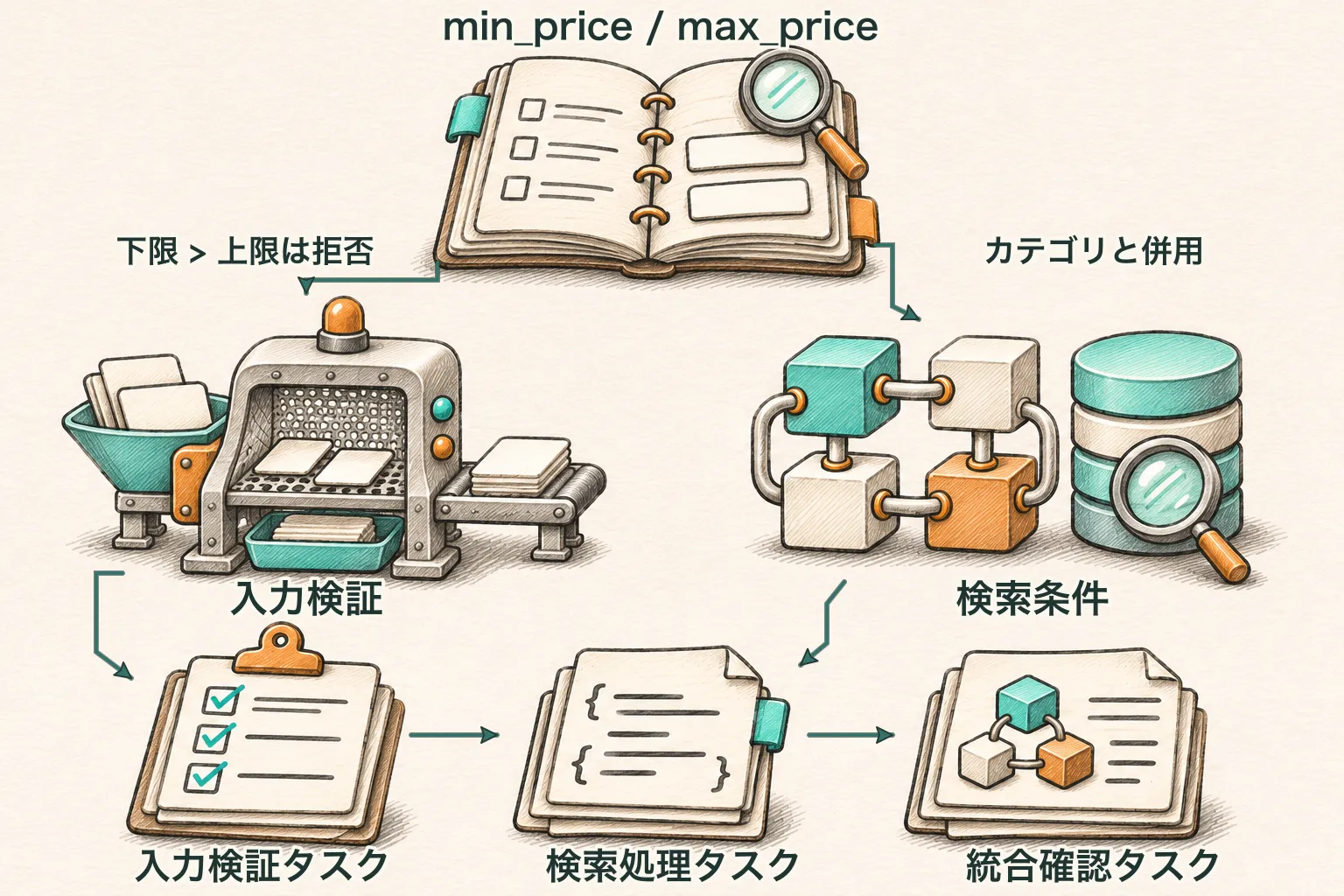
The design separates responsibility for input validation from responsibility for constructing search conditions. Tasks are ordered as input validation, search logic, and integration checks with existing features. This order lets later tasks rely on already verified input conditions.
Completing an individual task
Because input validation changes user-visible behavior, the task uses TDD with a feature flag.
First, add a test for the case where min_price exceeds max_price, and confirm that it fails with the new validation disabled.
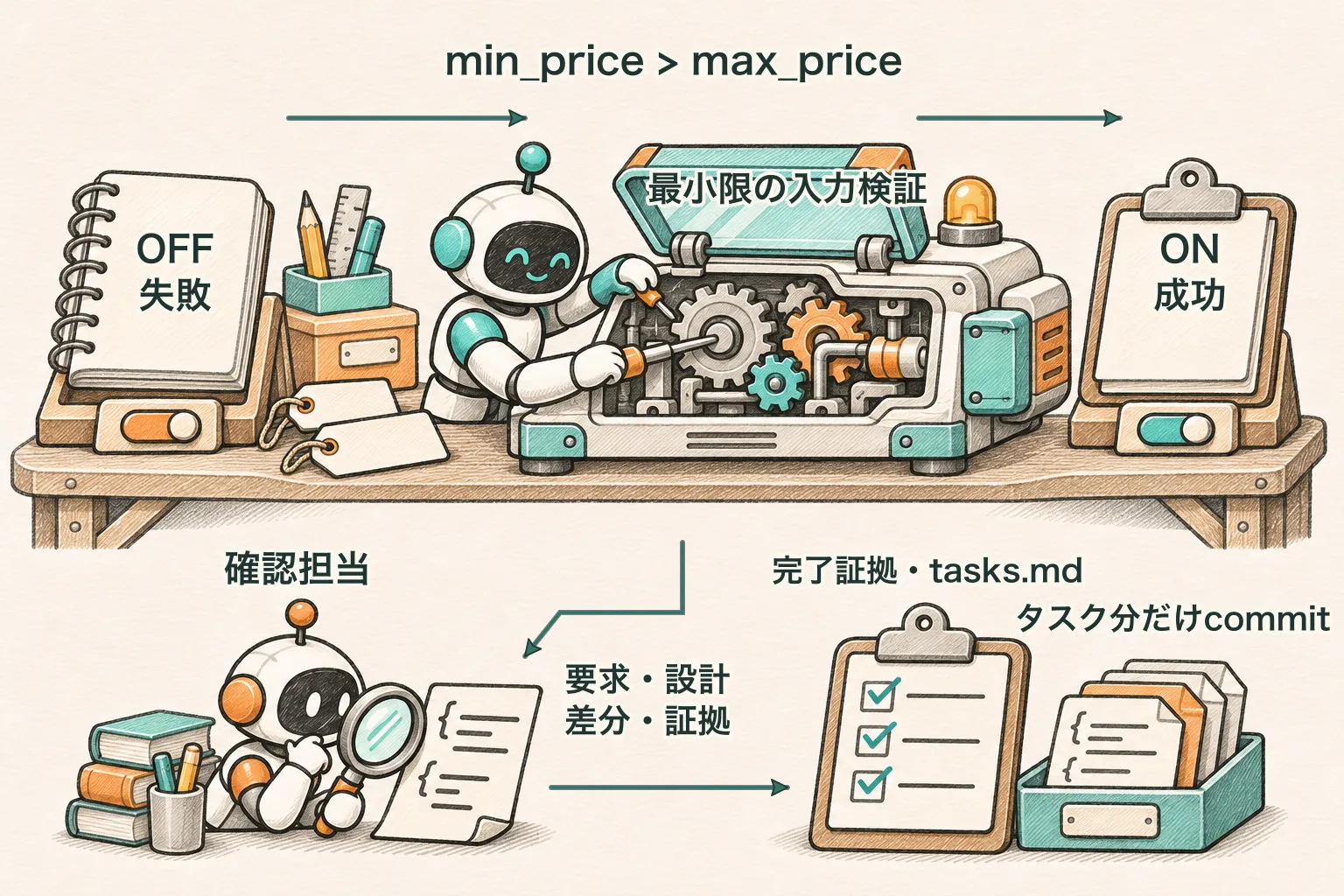
Then add the minimum logic to check price ordering, enable the feature flag, and make the test pass. The reviewer compares the acceptance criteria, design responsibilities, actual diff, and test results.
After approval, verify completion evidence and update tasks.md.
If a decision also affects the subsequent search task, record it as an implementation lesson. Commit only the files changed by the input validation task and tasks.md.
The test results described here are expected checkpoints inferred from the publicly available skills.
They are not measurements from executing cc-sdd in a real project.
What to check after all tasks
Even if the input validation and search tasks pass individually, verification cannot stop at the price-range filter alone. Check its interaction with the existing category filter, authorization, prior search behavior, and application startup together.
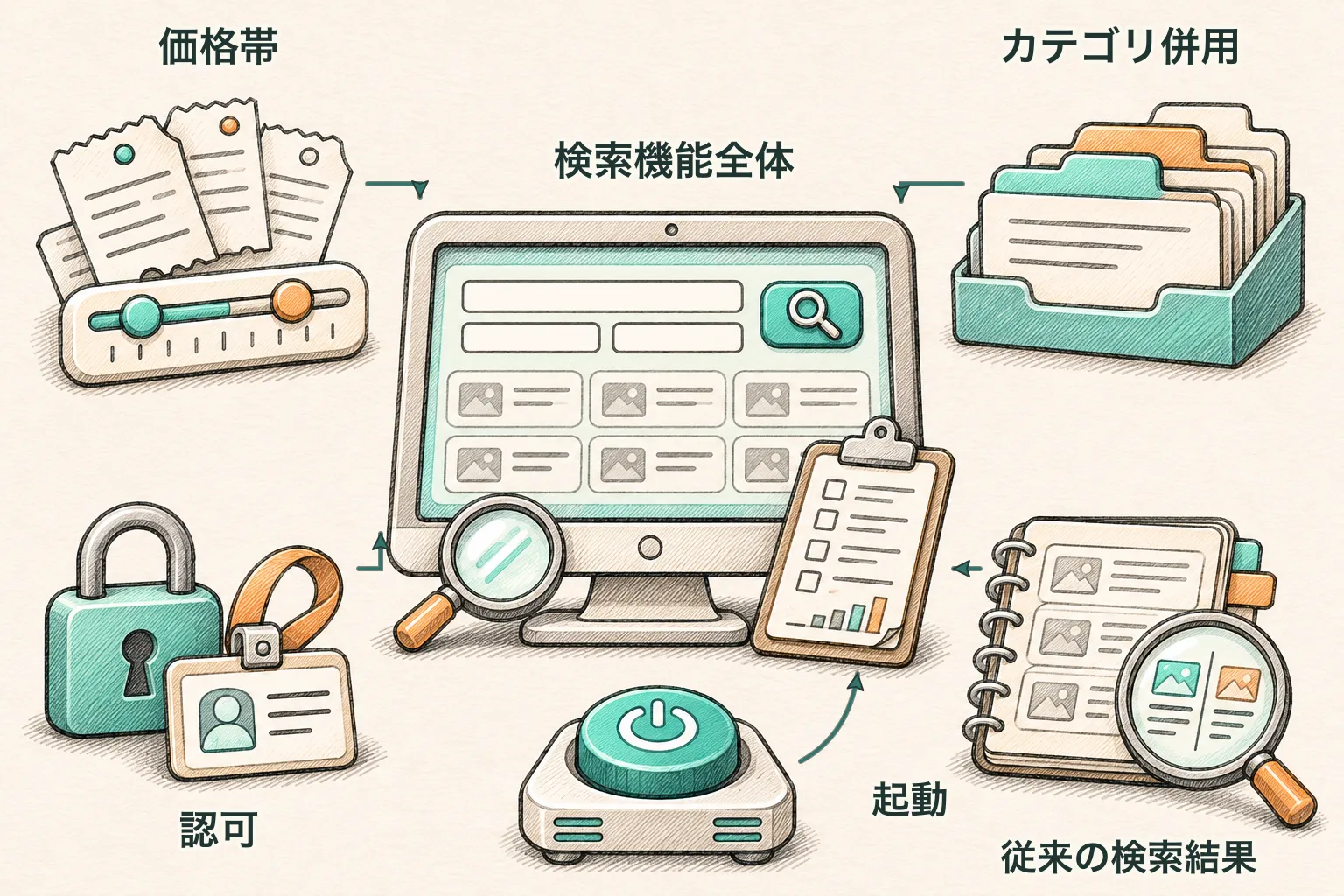
If tests fail, the result is NO-GO.
If the project's official test command or necessary runtime cannot be identified, stop with MANUAL_VERIFY_REQUIRED rather than assuming success.
Even after GO, feature completion is not reported until the FEATURE_GO evidence check passes.
When to use cc-sdd and what to consider
cc-sdd is suited to changes that cross multiple responsibility boundaries and require extended implementation while preserving evidence for each task.
If work stops partway through, task checkboxes, implementation lessons, and commits identify where to resume.
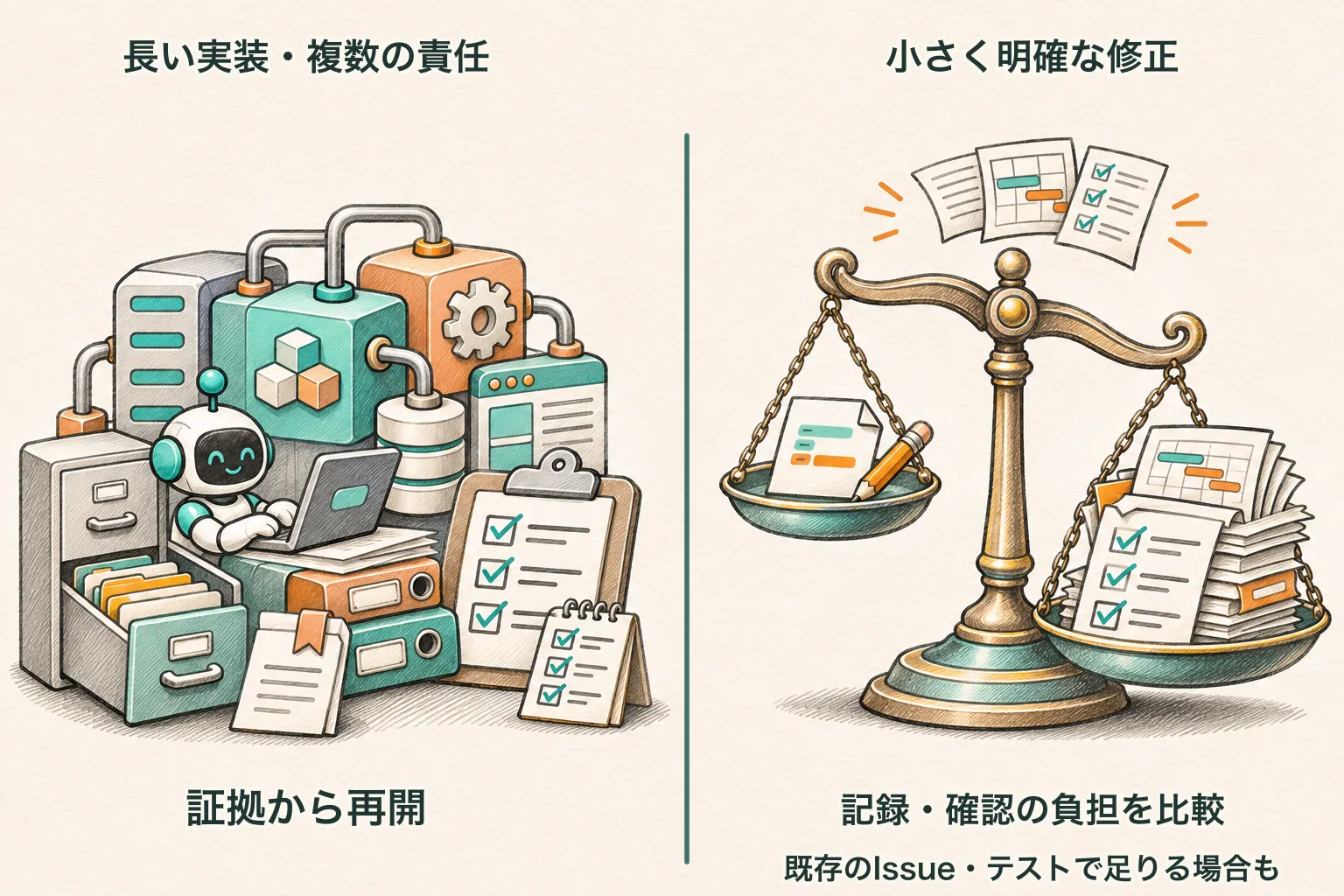
For an obvious change of just a few lines, however, the overhead of maintaining specification files and stage-by-stage reviews may outweigh their value. Exploratory work where the desired result has not yet been decided is also a poor fit for a process that fixes requirements and responsibility boundaries upfront. If existing issues, tests, and reviews already manage responsibilities and completion criteria adequately, there is no need to duplicate those records.
What cc-sdd does not guarantee
cc-sdd organizes handoffs from specification through post-implementation verification.
However, the execution environment manages the permissions and sandbox of the connected AI agent.
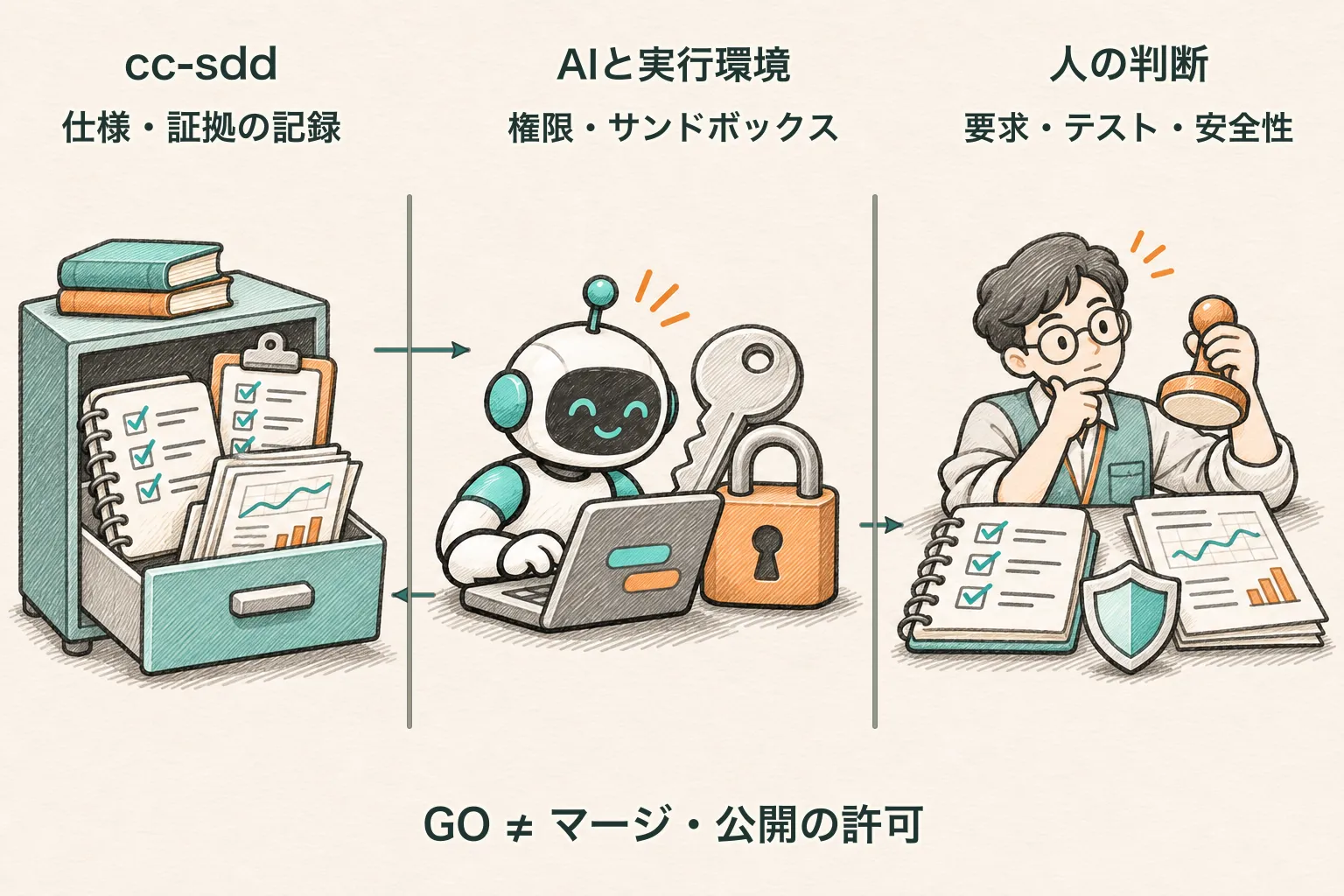
Independent review is available only when the connected environment supports subagents.
The adequacy of project-specific tests, correctness of the requirements themselves, and whether security review has passed must also be assessed separately.
Furthermore, GO and FEATURE_GO do not authorize merging or publishing.
Conclusion
cc-sdd connects requirements, design, and task creation with implementation completion decisions through the same set of skills.
It runs TDD and review one task at a time, limits remediation attempts after failures, and finally checks the entire feature against separate evidence.
Before adoption, verify whether independent execution contexts are available, whether project test commands can be identified, and whether the team can maintain specifications and review records.
