Introduction
Hi, I'm cardene, a software engineer and technical writer focused on blockchain and AI.
I've also authored Japanese technical books on specification-driven development with LLMs and decentralized application (DApp) development.

I also build and publish a variety of tools, libraries, and open-source projects.
Overview
When you repeatedly ask an AI coding agent to make changes to the same repository, feature-specific requirements alone become insufficient. The product's purpose, technology choices, testing policy, and commit policy also need to carry over into each new change. For example, if the input-validation decisions made when adding a price range filter remain only in a conversation, the same questions will arise when sorting is added later.
Conductor is a Gemini CLI extension that separates reusable project-wide policies from tracks (units of change) for individual features or bugs within the repository. Gemini CLI is a development tool for asking AI agents to edit code and run commands from the terminal. Conductor connects the user-approved spec (change requirements) and plan (implementation plan) to implementation, review, and rollback.
Using the example of adding a price range filter to an existing product search API, we will follow how shared policies feed into a track and how implementation and correction records are retained in Git.
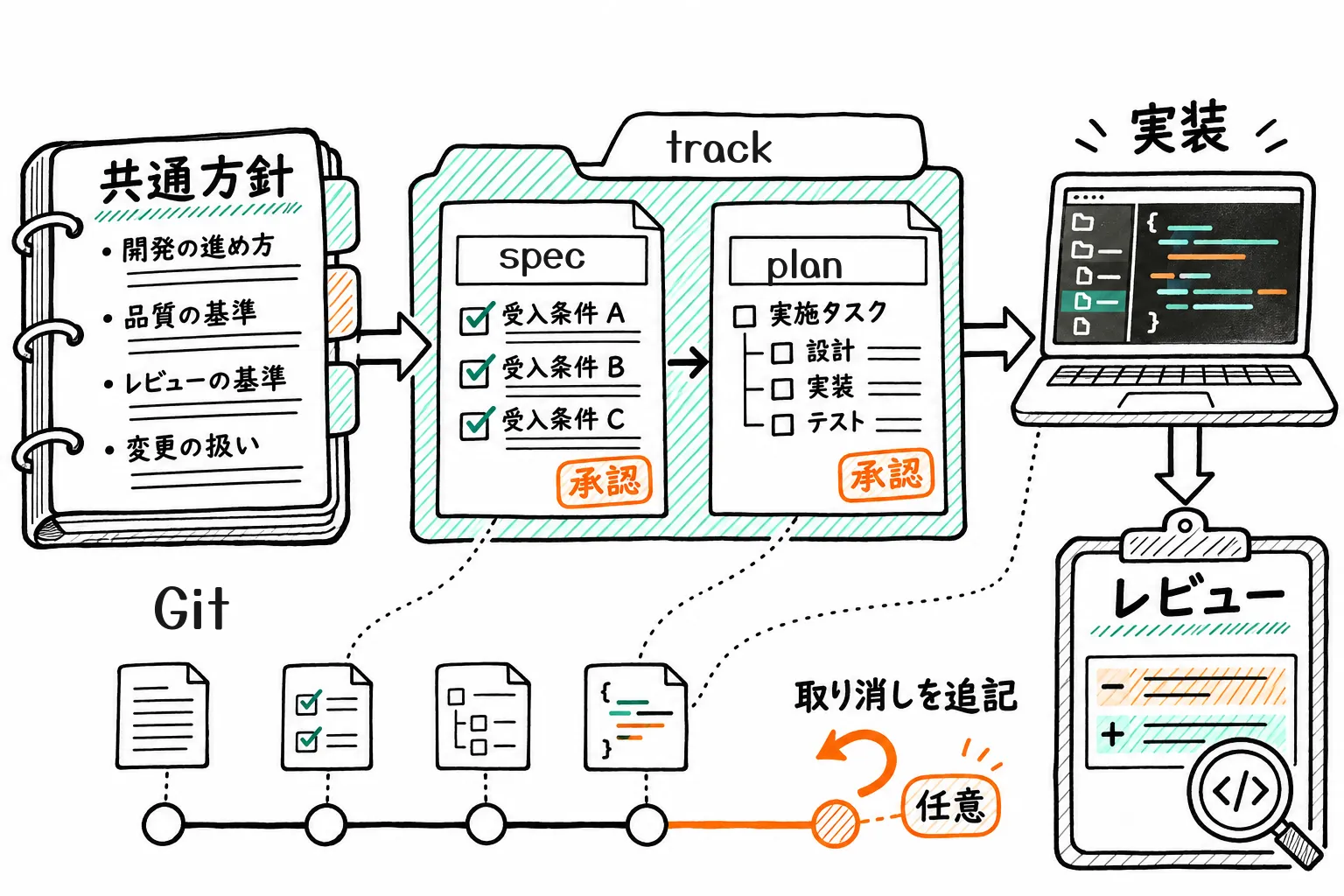
The original diagrams and some example text in this article retain their Japanese labels.
Conductor records the context supplied to an AI agent, the content approved by the user, and the relationship between work and Git history. It does not guarantee that the model always produces correct code or that the execution environment has safe permissions.
What Is Conductor?
Conductor v0.4.1 is an extension for Context-Driven Development that operates through Gemini CLI commands. Context-Driven Development is an approach in which product objectives, technology choices, and work procedures are passed into changes as repository documents rather than being kept solely in conversations.
Shared project documents store the product description, design guidelines, technology stack, workflow, and code style. A track, by contrast, stores the spec, plan, and progress state for one change. This separation lets multiple changes reference the same testing policy while maintaining independent requirements and work histories.
When a price range filter and sorting are developed separately, the database and test execution method are shared. How to validate the ordering of price values, however, is a requirement of the price range filter, not of sorting. By putting lasting decisions in shared documents and change-specific requirements in a track, you can distinguish what the agent should read when starting a new change from what you should consult after finishing it.
Within a track's plan, a task is a unit of testing and implementation work, and a sub-task is a constituent step. A phase groups several tasks and includes user verification of their behavior. Price input validation and search logic can be separate tasks while sharing a single phase in which the user checks the API response.
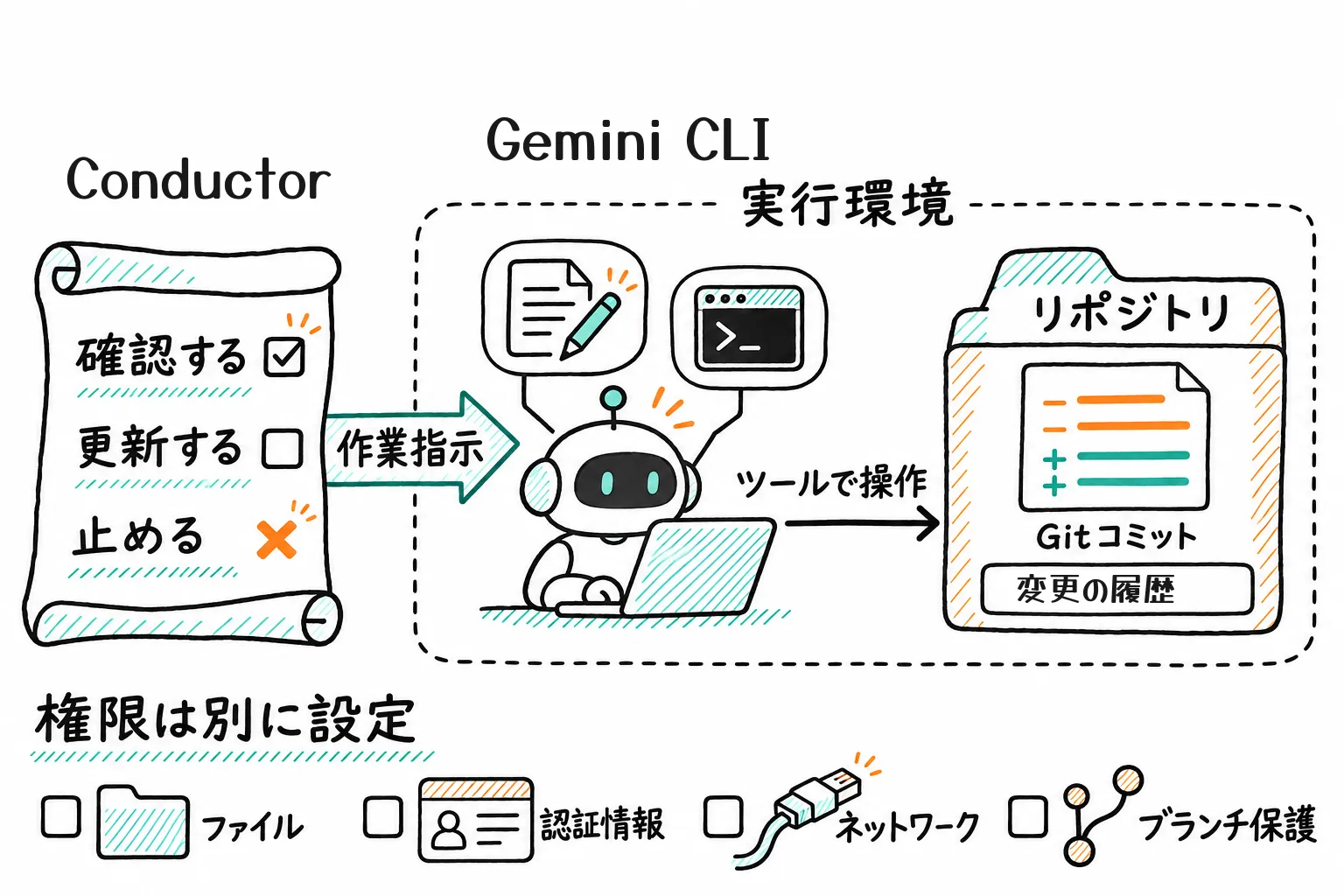
Conductor commands pass prompts to Gemini CLI specifying when to ask questions, the order of file updates, how to test and commit, and when to stop. The tools available to Gemini CLI perform the actual file and Git operations. The extension also provides a policy (rules for authorizing tool execution) that asks the user for confirmation, but credentials, network access, and branch protection are configured in the execution environment.
The command definitions make this distinction clear.
Each .toml file in commands/conductor/ contains a description and a prompt with instructions for the AI agent.
When a command is invoked, the agent follows those instructions to read documents, ask questions, and call editing or shell execution tools.
Following Conductor's confirmation procedure and having permission in Gemini CLI to perform an operation are separate conditions.
For example, setup and newTrack use Gemini CLI's Plan Mode to prepare a plan before implementation.
In this mode, the extension policy assigns an ask_user decision to document edits under relative paths starting with conductor/ and to the enumerated shell operations.
Specifically, this covers edits using write_file and replace, and shell execution matching specified command prefixes including git status and git commit.
The policy has priority 100.
Even when the instructions call for creating documents, a denied tool invocation cannot be counted as a success. The newTrack and implement procedures report tool failures and stop; setup attempts to correct itself based on the error and stops if recovery fails.
The version covered here, v0.4.1, was released on March 11, 2026, under the Apache License 2.0. Gemini CLI Plan Mode and extension policy support were introduced in v0.4.0, and v0.4.1 corrected the README. Unreleased features for other hosts on the main branch are not treated as behavior of v0.4.1.
Prepare an environment with Gemini CLI and Git, and confirm support for Plan Mode, the question tool, and extension policies.
The manifest declaring the extension name and version, gemini-extension.json, does not specify a minimum Gemini CLI version.
The extension version v0.4.1 alone therefore does not establish compatibility with an arbitrary Gemini CLI version.
The --auto-update option in the README's installation example updates the extension when a new version becomes available.
If you want to keep using the same procedure, check the installed extension version against the workflow saved in the repository.
Setting Up Shared Documents
When you run /conductor:setup, Conductor first inspects existing artifacts.
If shared documents have already been partially created, it resumes from the missing stage instead of recreating everything.
For example, if only product.md exists, it proceeds to defining product guidelines; if documents through workflow.md exist, it proceeds to creating the index.
However, it still determines whether the project is new or existing before resuming.
That determination is distinct from the detailed investigation of existing source code; the procedure does not reread the entire codebase every time setup resumes.
In an existing project, after the user authorizes a read-only investigation, Conductor examines dependency definitions and source structure while respecting exclusion rules.
It does not begin reading the entire repository before obtaining permission.
The initial classification checks for dependency definitions such as package.json and source directories, while the detailed investigation prioritizes the README and small configuration files.
It checks the exclusions in .geminiignore and .gitignore, giving precedence to .geminiignore when they conflict.
The inferred technology stack is also confirmed with the user, so shared policies are not finalized merely from the detected framework names.
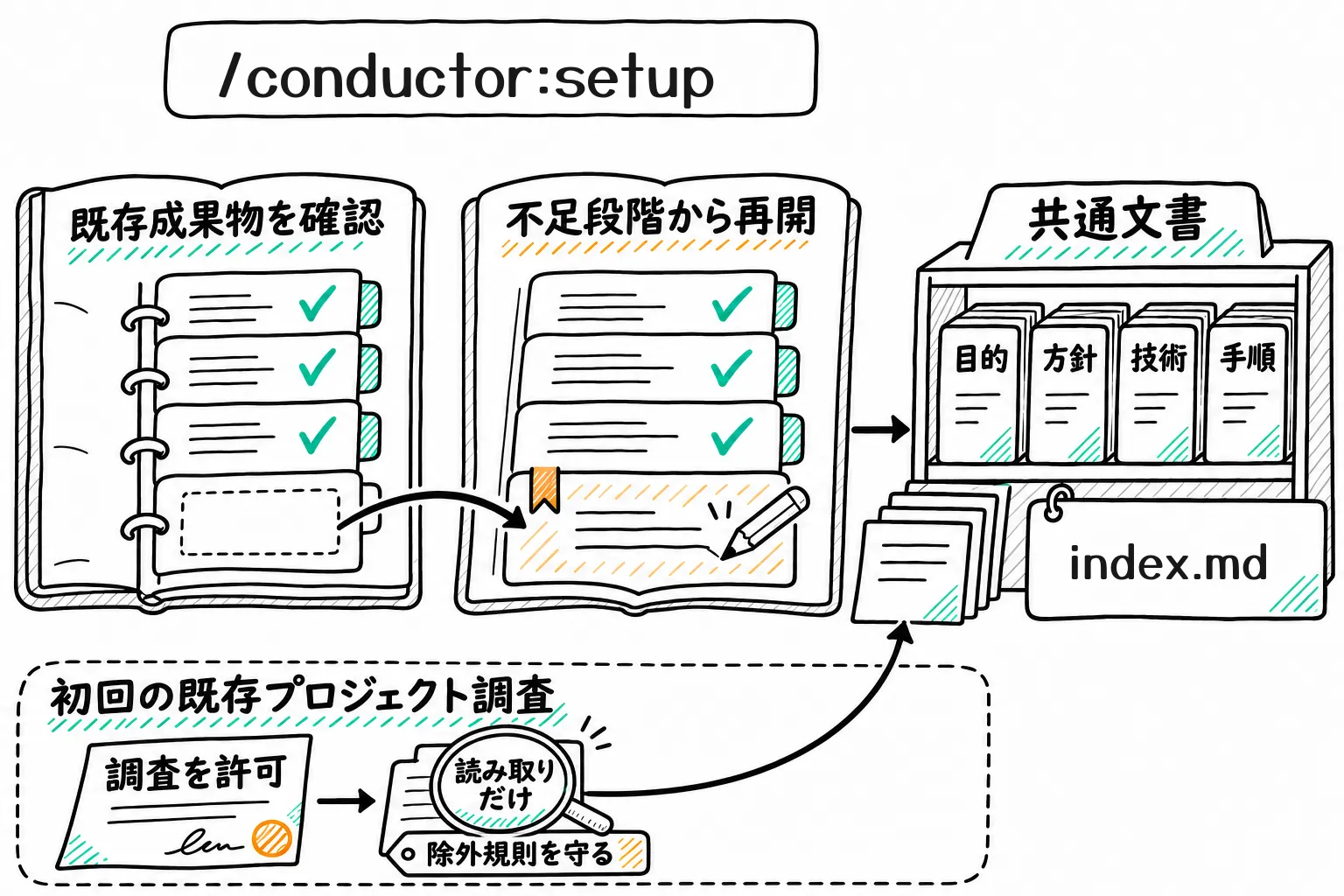
The main documents created by setup are as follows.
| Path | Recorded content | Consumed by |
|---|---|---|
conductor/product.md |
Product purpose and users | Track spec creation |
conductor/product-guidelines.md |
Product-specific guidelines, including wording and appearance | Implementation review |
conductor/tech-stack.md |
Technology choices and architecture | Selecting implementation approaches |
conductor/workflow.md |
Testing, committing, and verification procedures | Executing tasks and phases |
conductor/code_styleguides/ |
Code policies for individual languages or domains | Implementation and review |
conductor/tracks.md |
Track state and storage location | Checking implementation targets and progress |
Because shared documents can be reached through conductor/index.md, the AI agent rereads saved documents instead of inferring the same policies from conversations for every change.
However, outdated documents cause new tracks to reference outdated policies.
Update the shared documents when product policies or the technology stack change.
The extension manifest specifies GEMINI.md as the context file loaded by Gemini CLI and conductor as the directory for plans.
GEMINI.md defines document discovery rules that prioritize links in the project index.md and the track index.md.
If the index or relevant link is missing, the procedure falls back to the standard path and checks whether the resolved file exists.
Consequently, updating the document referenced by the index, rather than creating identically named documents in multiple locations, is essential to carrying decisions into subsequent commands.
For example, the goal of helping users narrow down products belongs in product.md, and the chosen API framework and database belong in tech-stack.md.
The tone of error messages and UI presentation guidelines belong in product-guidelines.md, while when to run tests and what to commit belong in workflow.md.
For the same price range filter, the track spec defines valid input ranges, while existing test execution procedures are inherited from the shared workflow.
When selecting a workflow, the user can choose the default procedure or customize it. By default, it uses TDD (test-driven development), writing failing tests first, and targets coverage above 80%. Each completed unit of work is committed, and a summary is attached to the commit as a Git note. Coverage measures the portion of code exercised by tests. During setup, users can change that target, choose whether to commit per task or per phase, and choose between Git notes and commit messages for summaries.
The following sections follow the default workflow.
Initial setup proceeds beyond creating shared documents to proposing and creating the first track. Once the track title is approved, its spec and plan are generated automatically. This differs from the interactive newTrack procedure used for later changes, in which spec and plan are approved in sequence. If setup created a track for the price range filter, review its generated documents and proceed to implement rather than creating a duplicate change with newTrack.
There is also a resume branch to be aware of.
If the initial track artifacts are complete, setup stops and directs the user to newTrack or implement. If initial track generation was interrupted, however, the instructions call for deleting the incomplete conductor/tracks/ and retrying that stage.
Resuming while preserving shared documents does not imply that partially written tracks are always preserved.
Recording the Spec and Plan in a Track
When you supply a change description to /conductor:newTrack, Conductor reads the shared documents and asks questions appropriate to the type of change.
For a new feature, it confirms what to build, why it is needed, the acceptance criteria, and what is out of scope, then summarizes these in spec.md.
From here, consider adding a subsequent change to a project that has completed setup. If the change description is brief, Conductor infers whether it is a feature or a bug fix and asks for the missing information accordingly. For a price range filter, the code may run without establishing that the requirements are met unless you decide the unit of price, whether the specified boundary values are included, whether only one bound can be supplied, and how invalid values are returned.
Once the user approves the spec, Conductor creates phases, tasks, and sub-tasks according to workflow.md and records them in plan.md.
Because the plan is approved separately, agreement on what to build does not by itself finalize the implementation procedure.
The distinction becomes clear when you separate the requirement to include price boundaries in search results from the order in which the API and data access should be modified. Whether to include products whose price equals the specified value is a spec decision. Dividing that requirement into API input validation, search logic, and verification of their combined behavior is a plan decision; you can revise the work order without changing the requirement.
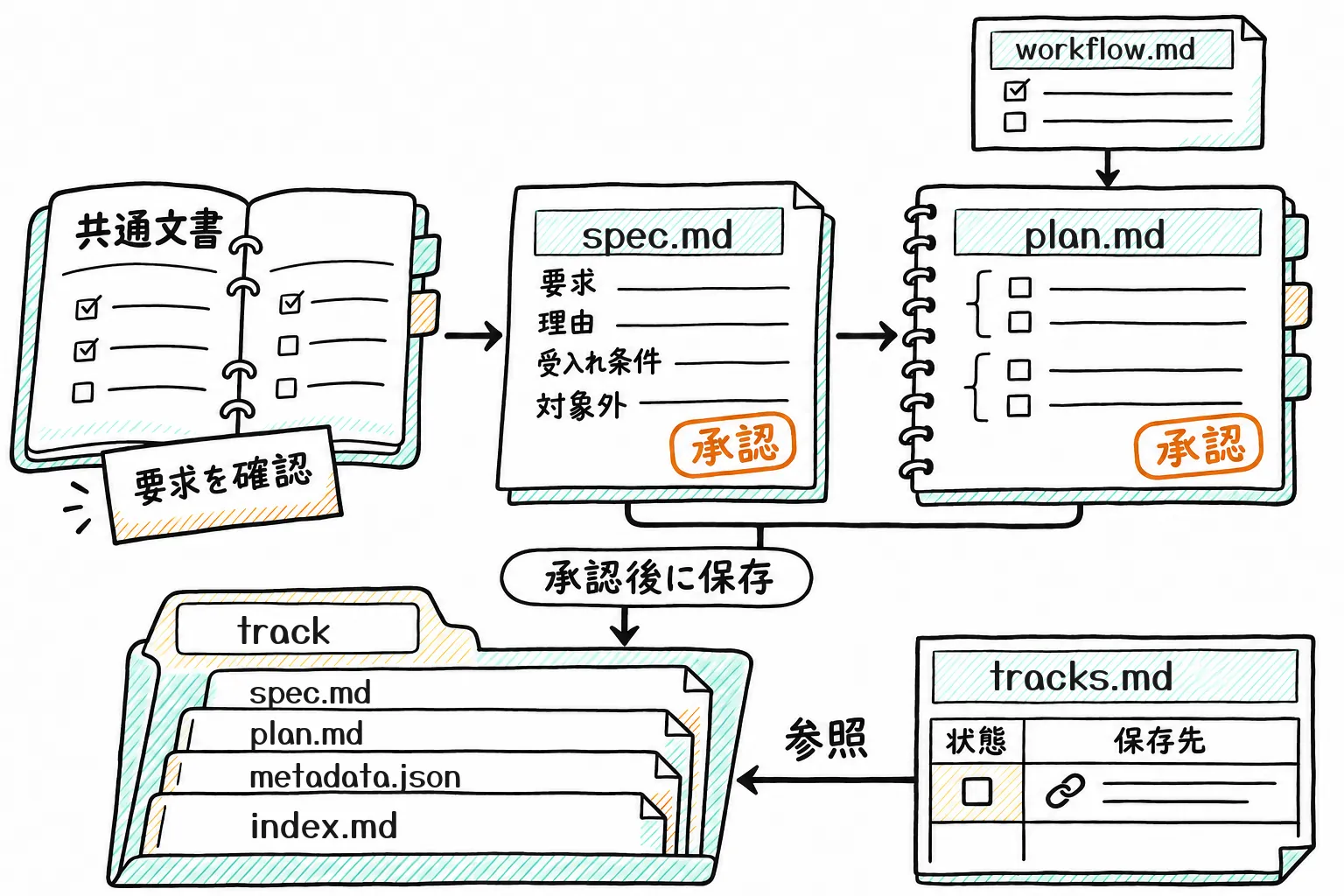
The approved track directory contains the following files.
spec.mdRecords the change requirements, rationale, acceptance criteria, and exclusions.plan.mdRecords phases, tasks, sub-tasks, task states, and short SHAs identifying implementation commits.metadata.jsonRecords the track ID, type, creation time, update time, and description.index.mdProvides an index for navigating the documents within the track.
A track status and a link to its directory are added to tracks.md.
If a track with the same short name already exists, creation stops instead of creating a duplicate directory.
Separating spec and plan lets you review requirement changes independently of changes to the implementation sequence. The mere fact that the AI agent generated a plan does not constitute approval; it is saved after user confirmation.
Task completion records the relationship between work and commits, whereas phase completion records verification of how multiple changes behave together.
Note that newTrack stops if the product, tech stack, or workflow documents cannot be found.
Because storage paths are resolved through index links, check their correspondence with index.md when moving documents.
The presence of a named document does not establish that its contents are correct. If the input-validation policy changes, check at approval time whether the current spec conflicts with shared policies.
Basic Track Implementation Flow
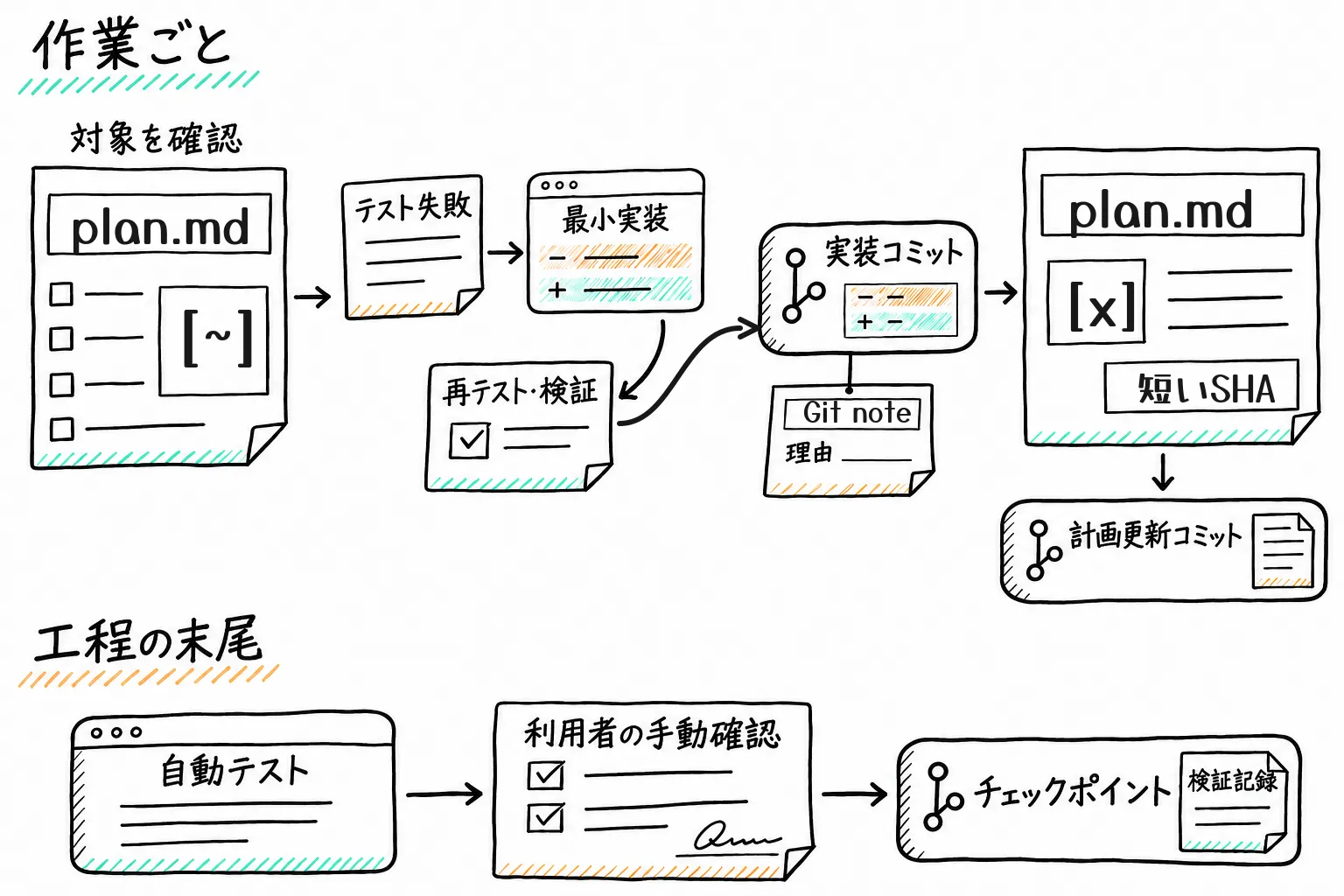
/conductor:implement confirms the target track with the user and then marks it as in progress in tracks.md.
For each task, plan.md serves as the authoritative work record, and the default workflow.md specifies the sequence of TDD, testing, committing, and recording.
- Set up Conductor
Install Conductor v0.4.1 in Gemini CLI and start
/conductor:setupat the repository root. Check the audit results for existing artifacts and whether this is initial setup or a resumed session. - Confirm shared documents
Authorize the initial investigation of the existing project and finalize the product description, presentation guidelines, technology stack, and workflow.
Confirm that each document and
tracks.mdcan be reached fromconductor/index.md. - Approve the spec
In the configured project, provide
/conductor:newTrackwith a description of the subsequent price range filter change and answer its questions. Check thatspec.mdcontains input constraints, backward compatibility, acceptance criteria, and exclusions, and that the plan has not been finalized before approval. - Approve the plan Create phases, tasks, and sub-tasks from the approved spec and workflow. The user approves a plan with state markers for each task and manual verification at the end of each phase.
- Register the track
Save the spec, plan, metadata, and index, and add the track to
tracks.md. Verify the track artifacts and registry update in a Git commit. - Start a pending task
Select the track with
/conductor:implementand mark the next task in progress. Confirm thattracks.mdshows the track in progress and that the target task inplan.mdis marked[~]. - Perform TDD and record the work in Git
Write failing tests, implement the minimum code, rerun tests, and check coverage, then commit the task implementation.
Record the rationale in a Git note and the implementation commit's short SHA in
plan.md. - Verify the phase Run automated tests at the end of the phase and request specific manual verification from the user. After explicit user confirmation, check the checkpoint commit recording phase verification, the verification Git note, and the phase's checkpoint SHA.
- Record review fixes
Use
/conductor:reviewto compare the plan, guidelines, diff, and tests. If the user chooses fixes and also agrees to the subsequent commit and recording, check the relationship among Review Fixes (the corrective phase at the end of the plan), the fix commit, and the plan-update commit. - Revert the required scope
Use
/conductor:revertto match a task, phase, or track to its commits and review the final plan. Confirm that new revert commits are created only after user approval and that execution stops on conflicts.
Each task separates the implementation commit from the plan-update commit. This separation lets you inspect the code-changing commit and the commit that associates it with the work record independently in Git history.
In test-driven development, or TDD, you first write a test for the expected behavior and confirm that it fails because the behavior is not implemented. Then you write the minimum code and check whether the same test passes. Simply adding tests that already pass cannot distinguish the state without the new feature from the implemented state. Conductor's default workflow runs the failing test before implementation to establish this distinction.
After committing the code, attach a Git note summarizing the change.
The summary records the task name, changed files, changes, and rationale, while the plan records the first seven characters of the commit SHA.
The task in the plan changes from [~] to [x]; its SHA leads to the actual diff, and the Git note explains the rationale.
The plan update recording this relationship is also committed separately, allowing code and records to be traced without conflating them into one change.
At the end of a phase, inspect code files changed since the previous phase's checkpoint and check whether corresponding tests exist. For the first phase, which has no previous checkpoint, consider changes since the first commit. Then communicate the automated test command to the user and run it. After it succeeds, propose manual verification specifying actions and expected outcomes. Even when task tests pass, separately verify here whether the combined user-facing behavior of multiple changes works as intended.
If automated tests at the end of the phase fail, the default workflow attempts fixes up to twice. If the tests still fail after the second fix, it reports the failure to the user and stops.
Presenting manual verification instructions alone does not constitute a pass.
After explicit user confirmation, create a checkpoint commit and record the automated test command, manual verification steps, and user confirmation in its Git note.
Append [checkpoint: <SHAの先頭7文字>] to the phase heading in the plan and commit this plan update separately.
Subsequent phases use this checkpoint to determine the scope of changes, so skipping verification and merely adding the marker also removes the basis for later verification.
Once all tasks finish, implement marks the track complete in tracks.md, commits that update, and considers updates to shared documents.
For example, it presents a diff proposing that product.md reflect the ability to find products by price, then edits it after user approval.
If the technology stack has not changed, it does not rewrite tech-stack.md, and an ordinary feature addition does not by itself change branding or presentation guidelines.
Reflecting the track spec in shared documents lets later tracks assume the newly added feature.
After document synchronization, the user chooses whether to review, archive the completed track, delete it, or retain it.
Example: Implementing a Price Range Filter
Add min_price and max_price to an existing product search API.
When neither is supplied, return the same products as before; reject input where the minimum price exceeds the maximum.
The following is a hypothetical example designed to illustrate the mechanism.
Prices are non-negative integers in yen, products priced exactly at the specified boundaries are included, and invalid input returns 400 Bad Request.
These API behaviors are not Conductor's standard specification; they are requirements defined by the user for this track.
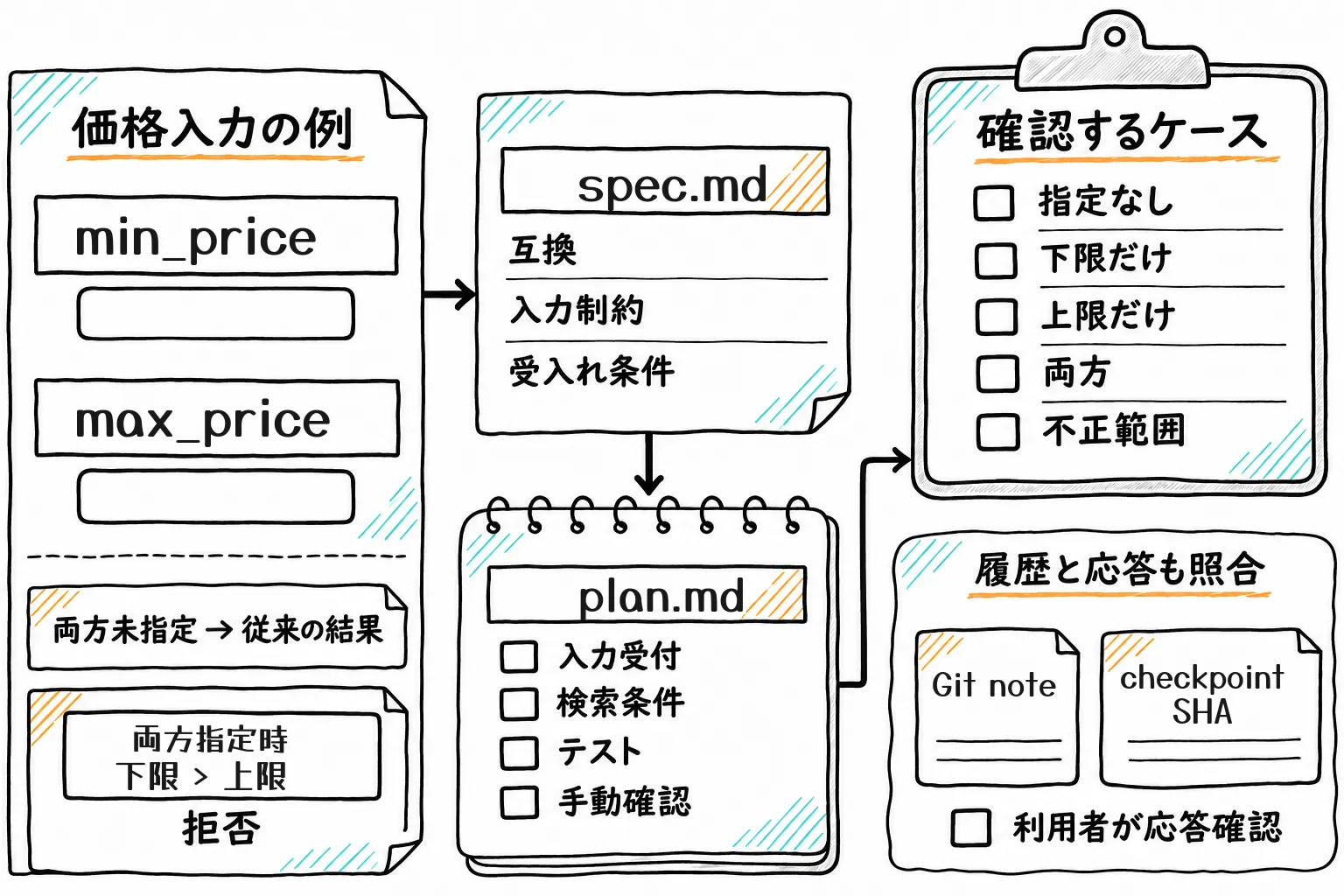
Assume shared tech-stack.md stores the API and data access architecture, and workflow.md stores testing and commit procedures.
The new track's spec.md records input values, backward compatibility, invalid input handling, and acceptance criteria.
The user supplies the change description to Gemini CLI.
/conductor:newTrack 商品検索APIにmin_priceとmax_priceを追加する。
価格の範囲を指定しない場合は従来の検索結果を保ち、逆転した範囲は拒否する。
This input alone leaves open whether equal prices are included and how negative numbers and decimals are handled. After answering Conductor's questions, the user checks whether those decisions are reflected in the spec. For example, the central requirements to approve could be written as follows.
## Functional Requirements
- min_priceとmax_priceは、それぞれ省略できる0以上の整数とする。
- 指定した下限以上、上限以下の商品を返す。
- 両方未指定なら、既存の検索結果と並び順を維持する。
- 不正な値と、min_price > max_priceの範囲は400で拒否する。

## Acceptance Criteria
- 指定なし、下限だけ、上限だけ、両方指定の結果が期待と一致する。
- 下限と上限が同じ場合は、その価格の商品だけを返す。
- 逆転した範囲、負数、小数、数値以外を指定すると400を返す。

## Out of Scope
- 通貨換算、割引価格の計算、並び替えの仕様変更。
Functional Requirements
- min_priceとmax_priceは、それぞれ省略できる0以上の整数とする。
- 指定した下限以上、上限以下の商品を返す。
- 両方未指定なら、既存の検索結果と並び順を維持する。
- 不正な値と、min_price > max_priceの範囲は400で拒否する。
Acceptance Criteria
- 指定なし、下限だけ、上限だけ、両方指定の結果が期待と一致する。
- 下限と上限が同じ場合は、その価格の商品だけを返す。
- 逆転した範囲、負数、小数、数値以外を指定すると400を返す。
Out of Scope
- 通貨換算、割引価格の計算、並び替えの仕様変更。
Separating compatibility when neither value is specified from the condition allowing just one bound helps verify the impact on callers of the existing API.
The requirement to include products at equal prices prevents confusing > with >= in search logic.
Documenting exclusions also prevents scope expansion, such as changing sorting while adding price constraints.
After approving the spec, review in the plan how the requirements will be implemented and verified. For example, put input handling, search conditions, tests combining both, and manual verification into one phase. Instead of planning to write all tests at the end, explicitly start each implementation task with a failing test.
## Phase: 価格帯フィルター
- [ ] Task: 価格入力を検証する
    - [ ] 未指定と不正入力のテストを失敗させる
    - [ ] 入力検証を実装してテストを通す
- [ ] Task: 検索条件へ価格範囲を加える
    - [ ] 片方指定と境界値のテストを失敗させる
    - [ ] 検索処理を実装してテストを通す
- [ ] Task: API全体の互換性と価格指定のテストを通す
- [ ] Task: Conductor - User Manual Verification '価格帯フィルター' (Protocol in workflow.md)
Phase: 価格帯フィルター
The user approves the plan after checking that each spec requirement has a corresponding verification task, that failing tests precede code changes, and that API responses can be manually verified at the end.
After approval and saving, select the track with /conductor:implement.
For example, starting the input-validation task changes its line to [~]; finishing testing and implementation changes it to [x] with a short implementation commit SHA.
The plan evolves from an implementation schedule into a record of what has been implemented and which diff corresponds to it.
After completing the input-validation task, the plan contains a line in this form.
- [x] Task: 価格入力を検証する <実装コミットの先頭7文字>This SHA identifies the commit containing the input-validation code and tests. It is not the SHA of the commit that recorded completion in the plan. In the history, check the code commit and its Git note, and verify that the subsequent plan-update commit records the same SHA.
For input-validation TDD, check that the test supplying an inverted range to the existing API fails before implementing the new validation. If it fails merely because of a connection error or database initialization failure, it has not verified the price constraint. Confirm that it failed because the required rejection behavior was absent, then check that both the same test and existing tests pass after implementation.
The main cases to compare in automated tests and manual verification can be organized as follows.
| Input | Expected result from the spec |
|---|---|
| No price specified | Same products and ordering as before |
Only min_price |
Products at or above the specified value |
Only max_price |
Products at or below the specified value |
| Both lower and upper bounds specified | Products within the range, including both endpoints |
| Lower bound greater than upper bound | 400 Bad Request |
For example, if setting both bounds to the same value causes matching products to disappear, the boundary behavior does not match the spec. Passing only rejection tests also does not establish backward compatibility of search results, so compare results with no price specified.
Success is not determined by plan checkboxes alone. Check the test results for no price, lower bound only, upper bound only, both bounds, and invalid ranges, and read the phase checkpoint SHA and Git note. In addition, close the phase when the user has checked the actual response and it matches the spec's acceptance criteria.
For manual verification, first establish the prices of products in the test data, then examine API responses both with and without price constraints. Show the user a request command appropriate to the actual development environment, products that should be included or excluded, and the error response for invalid ranges. If the approved checkpoint's Git note retains those verification details, you can later determine what was checked before closing the phase, not merely that the plan was marked complete.
This example describes expected observations derived from the public v0.4.1 commands and workflow. It is not the result of running Gemini CLI and Conductor to measure quality, speed, or token consumption.
Making Corrections with Review and Revert
After implementation, running /conductor:review causes Conductor to compare the plan, product guidelines, code style guides, and Git diff, and run tests.
Findings receive severity levels, and the user decides whether to apply fixes.
Here, a finding identifies a code location, why it is problematic, and a proposed fix. When reviewing a track, the procedure identifies the parent of the first commit and the last commit using the commits recorded in the plan, determining the diff range to review. If findings exist, the user chooses whether to apply automatic fixes, fix them manually, or proceed to completion with warnings remaining. Reporting high-severity findings is not the same as forcibly stopping implementation regardless of the user's choice.
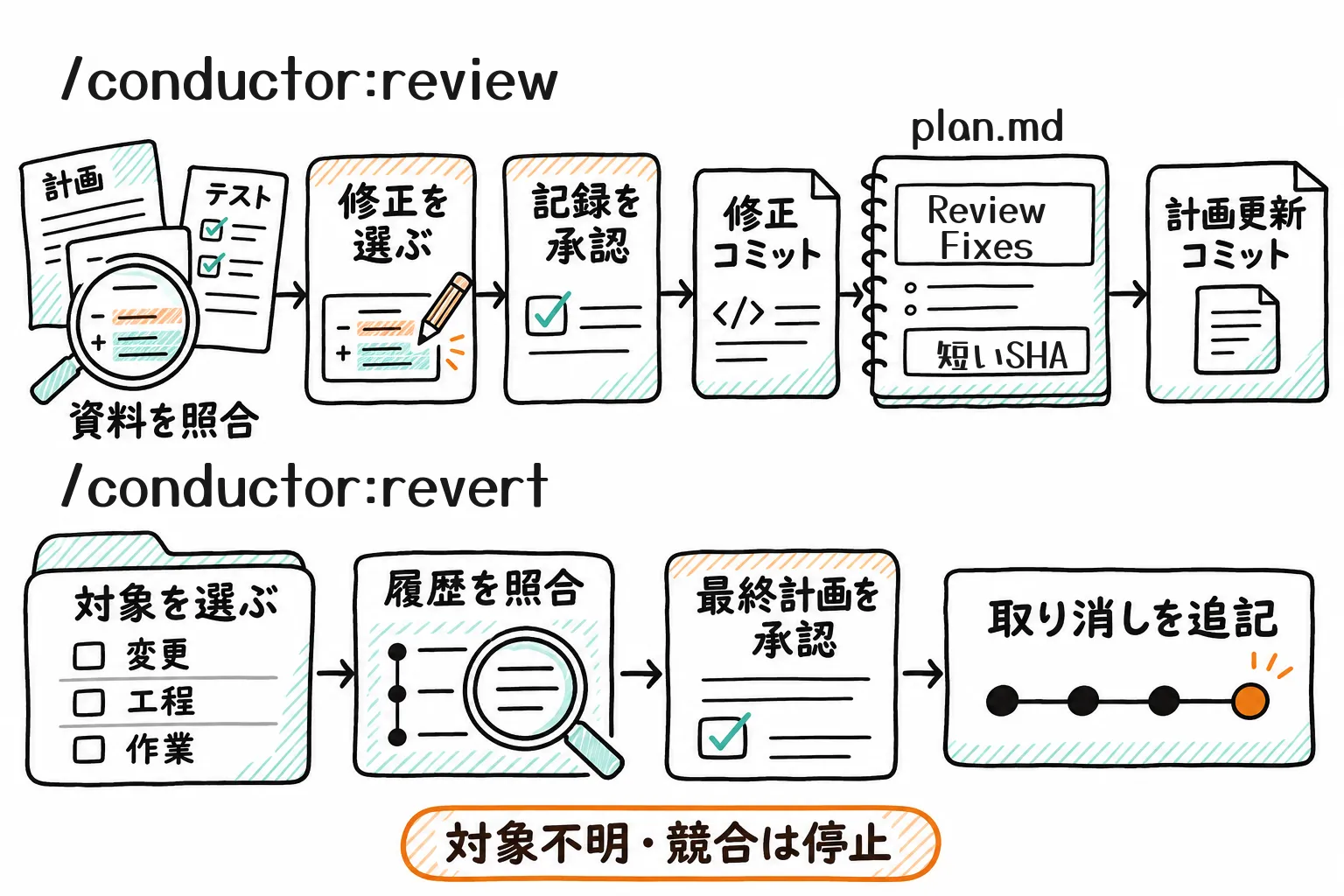
Choosing to apply fixes edits the code, but committing and recording those changes in the plan require separate confirmation. When reviewing a track plan, Conductor detects uncommitted changes after fixes and asks whether to commit them and record them in the track. If the user agrees, it adds a corrective phase named Review Fixes and its tasks at the end of the plan.
Commit the corrected code, record its short SHA in the corrective task, then commit the plan update separately. The plan and Git history let you trace which fix commit resolved each review finding.
For example, if products priced exactly at the lower bound were excluded, associate the commit correcting that condition with the completed Review Fixes line. If the user declines recording, the commit and plan update are skipped, so merely choosing to apply a fix does not establish that a traceable record exists. Also, when reviewing only uncommitted changes without specifying a track, there is no corresponding plan, so the same Review Fixes recording procedure is not used.
To undo work itself, /conductor:revert matches a track, phase, or task to implementation commits and plan-update commits.
Only after the user approves the final rollback plan does it create new commits with git revert.
Because this does not erase earlier commits, the history also records what was undone.
Even when reverting a single task, the code commit is not the only thing investigated.
The procedure finds the subsequent commit that marked the relevant task complete in the plan and includes both in the rollback plan.
For an entire track, it also includes the commit that first added the track to tracks.md.
When executing, it applies git revert --no-edit from newest to oldest, avoiding a mismatch where the code is reverted but the plan still shows completion.
If target commits cannot be uniquely identified in Git history or a revert conflicts, execution stops. The procedure does not automatically select another commit and simply mark the plan complete.
For example, after a squash combining several commits or a rebase rewriting the commit sequence, a SHA in the plan may no longer be found in Git. Conductor searches for candidates with similar commit messages but stops unless the user confirms a replacement commit. For conflicts, it provides manual resolution instructions and rereads the plan after all reverts succeed. If the reverted items' states have not been restored, the procedure also corrects the document and commits the correction.
Suitable Use Cases and Limits of Its Guarantees
Conductor fits development in which shared project policies feed multiple tracks and changes are divided into several phases. It can be used when you want to record spec and plan approval, per-task tests and commits, phase-level manual verification, post-review fixes, and corresponding rollbacks in Git.
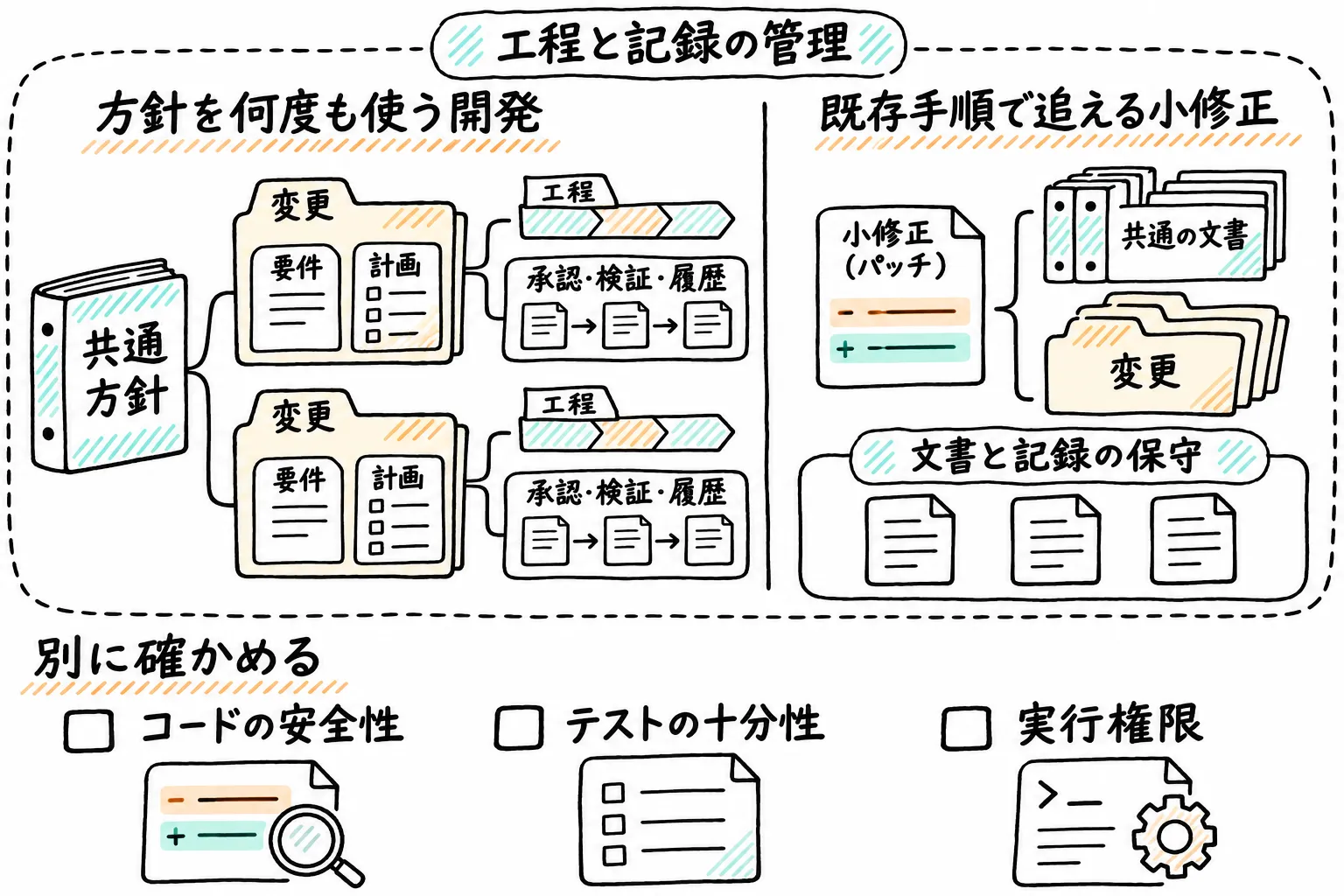
Conversely, if a straightforward change of a few lines can already be tracked with an issue, branch, tests, and pull request, maintaining shared documents, tracks, task commits, plan commits, and phase checkpoints adds work. Whether that maintenance is worthwhile depends not only on implementation size, but also on how much documentation is needed to confirm requirements and resume work.
If per-task commits are unsuitable, setup lets you change the frequency to per phase. There is also an option to store summaries in commit messages instead of Git notes, so the default Git recording method alone does not make the extension unusable. On the other hand, if change-specific documents cannot be stored in the repository, or the user cannot confirm specs, plans, and phase behavior, Conductor's document and confirmation procedures cannot function as intended.
The v0.4.1 README warns that token consumption increases for large projects or long planning and implementation sessions. The public materials define no numerical limits for project size or concurrency and no response-time guarantees. The absence of a specified limit should not be interpreted as unlimited operational capacity.
You can check consumption for actual large input documents or plans per session with Gemini CLI's /stats model.
Keeping shared documents does not eliminate the cost of reading and analyzing them each time.
Conductor's command instructions and extension policies provide the agent running in Gemini CLI with confirmation and stopping procedures. The scope of file, shell, and Git operations, and access to credentials and the network, are configured in Gemini CLI. Branch protection, automated checks, and test adequacy are verified on the repository side.
The checkboxes counted by /conductor:status record the number of phases and tasks, the current task, and subsequent tasks.
They do not establish code quality or readiness for production without checking test results, user manual verification, review findings, and Git commits.
For example, even if all tasks are complete, the diff to examine differs depending on whether review warnings were left unresolved or fixes were applied and recorded.
Use status to find where work should resume, and use the spec, test results, manual verification, and review conclusions together when deciding whether to release.
Conclusion
Conductor separates shared project documents from track-specific specs and plans, and records implementation work for tasks and phases in Git. Post-review fixes are recorded in Review Fixes; rollbacks are recorded as new revert commits after matching the plan with commit history. When adopting it, distinguish the progress records Conductor maintains from the permissions and quality guarantees provided by Gemini CLI, CI, and the repository.
The official materials are collected in Conductor's README, command definitions, default workflow, and extension policy.
