Introduction
Hi, I'm cardene, a software engineer and technical writer focused on blockchain and AI.
I've also authored Japanese technical books on specification-driven development with LLMs and decentralized application (DApp) development.

I also build and publish a variety of tools, libraries, and open-source projects.
Overview
When working with AI coding agents on a project that lasts several months, the most recent conversation alone is not enough to resume development. The requirements assigned to each change, the work already implemented, and the remaining checks must be recorded in a form that a new contributor can read.
GSD v1.42.3 divides development into milestones and phases, storing requirements, plans, implementation results, and verification results in the repository's .planning directory.
A milestone groups several changes for a completion decision; a phase takes a single objective from planning through verification.
Within each phase, implementation is divided into multiple plans and assigned to AI agents according to their dependencies.
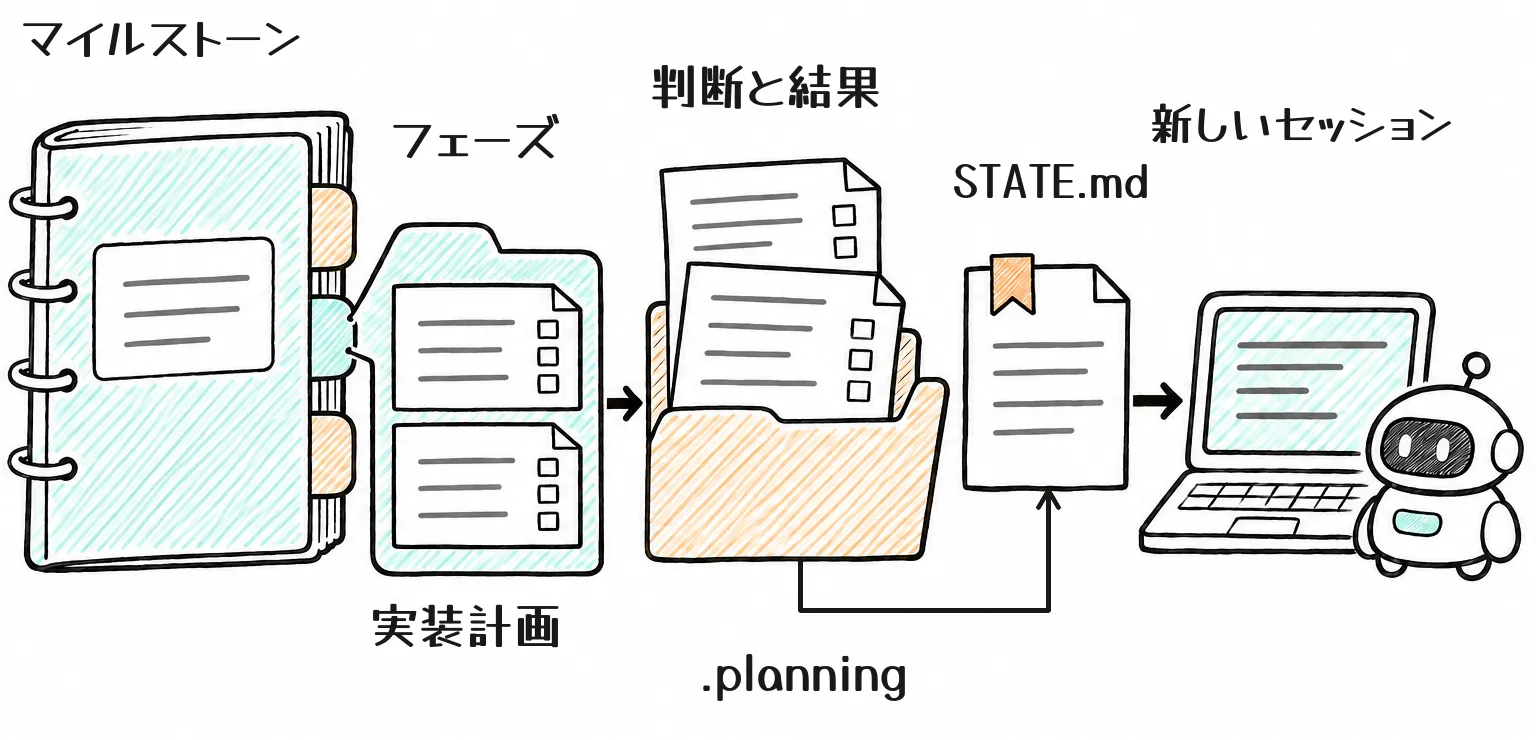
The files contain objectives, decisions, and execution results needed for later decisions, rather than full conversation transcripts. Finishing a plan, having code in place, and having a user verify its behavior are tracked as separate records. This distinction allows defects found after implementation to become inputs to a new corrective plan.
This article covers the pinned v1.42.3 release of the former gsd-build/get-shit-done repository.
The old repository has been archived and now directs users to open-gsd/gsd-core, but this article does not mix the behavior of the two.
Using a hypothetical price-range filter for a product search API, we examine which files the pinned release's instructions produce and what they check.
The original diagrams and code examples are retained; some labels and example text remain in Japanese.
What Is GSD?
GSD installs skills, workflows, role-specific instructions, and helper programs into supported AI development environments. When a user invokes an operation, the lead AI reads the saved state and instructions and carries out research, planning, implementation, and verification. The AI development environment itself reads and writes code and executes tests and Git commands.
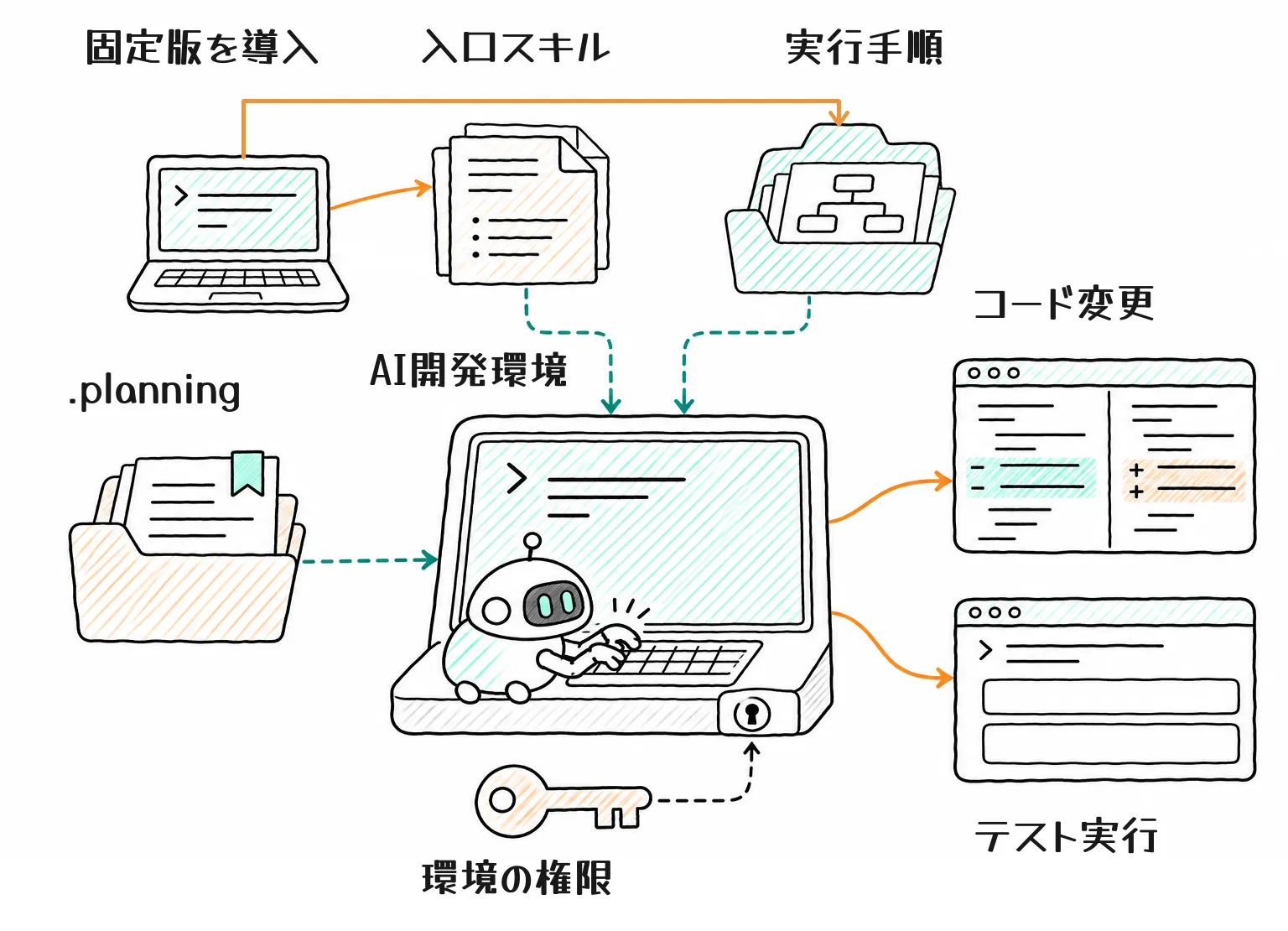
When an implementation plan is handed to another contributor, that contributor receives the project objectives and current position as well as the code and previous implementation results required for the plan. This makes it possible to specify the inputs for each assigned plan instead of forwarding an entire lengthy conversation every time. Giving a contributor a fresh context does not itself guarantee correct implementation or sufficient testing.
Version 1.42.3 of the get-shit-done-cc npm package requires Node.js 22 or later.
The Codex entry points support Codex CLI 0.130.0 and later, and are invoked with commands such as $gsd-new-project.
Claude Code uses the /gsd-new-project notation.
The following is an example installation for Codex. Because this operation installs skills and execution workflows within the project, run it from the root of the target project.
npx get-shit-done-cc@1.42.3 --codex --localAfter installation, verify that the operation entry points are recognized in a new session and that the target project is open.
In this version, execute-phase also stops before launching implementers in Codex if workflow.use_worktrees remains true.
When using Codex, set the corresponding option in .planning/config.json to false and check the conditions for sequential execution in the shared working tree.
Parallel execution also depends on the execution environment. Environments without an API for launching contributors switch to sequential execution, and Copilot likewise uses direct sequential execution by default. Configure the checks specified by GSD separately from the file, command, and network access permitted by the environment.
The installation command arguments were checked against the help in the official source. Installation, AI-driven workflow execution, and implementation and testing of the price-range API were not performed; the files and responses shown after operations represent expected observations.
Recording Projects and Milestones
Initialization stores what to build and the order in which to build it in separate files.
This allows the implementation order to be revised without changing the project's intent when its objectives remain unchanged.
When resuming work, read STATE.md, which identifies the current position, alongside the authoritative requirements and objectives.
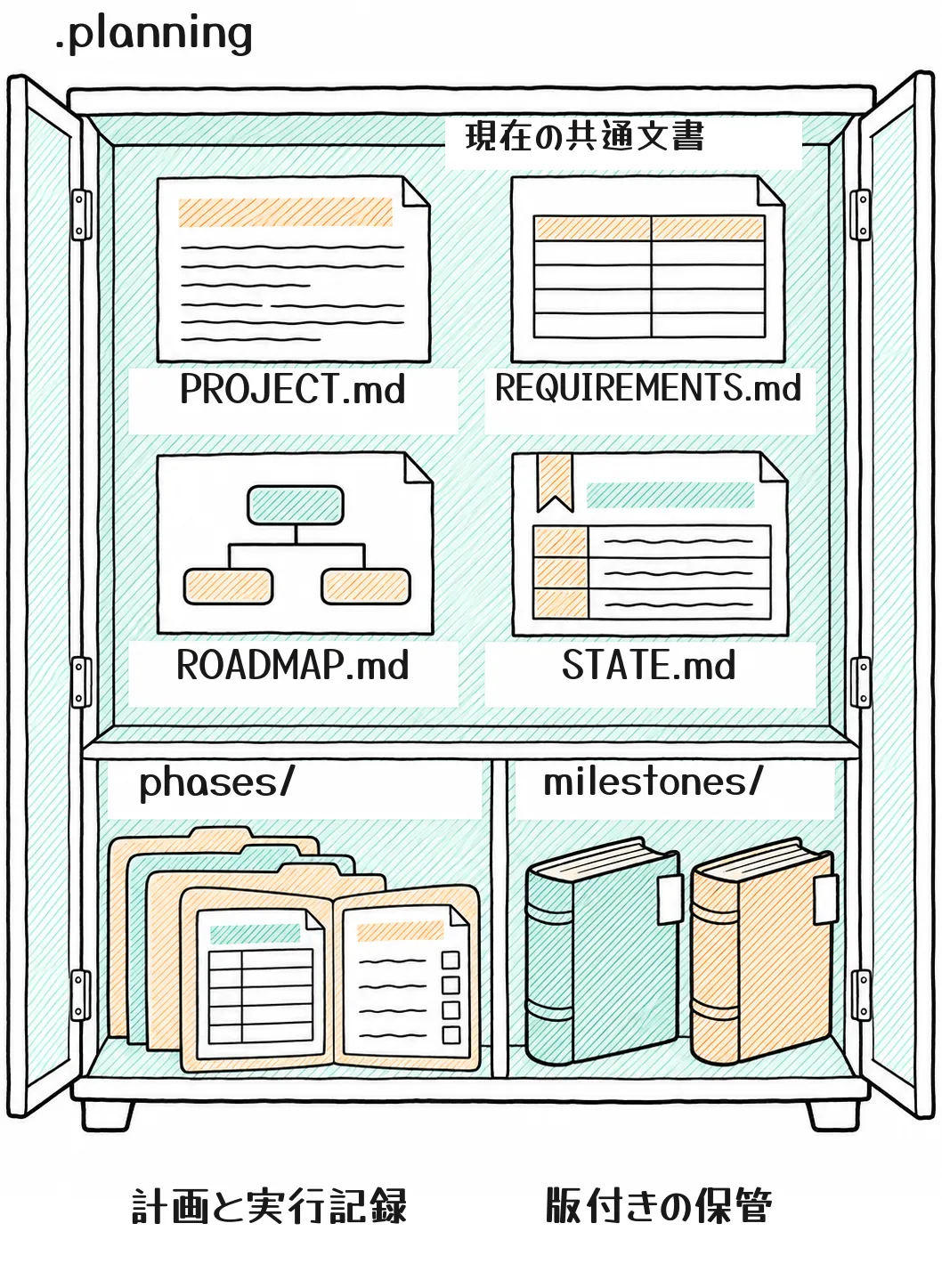
| File | Contents | When to consult it |
|---|---|---|
.planning/PROJECT.md |
Objectives, target audience, constraints, key decisions | Check whether a change aligns with development objectives |
.planning/REQUIREMENTS.md |
Requirement IDs, requirements, assigned phases | Map requirements to plans and verification |
.planning/ROADMAP.md |
Phase objectives, success criteria, dependencies | Check implementation order and completion criteria |
.planning/STATE.md |
Progress, decisions, concerns, resume position | Identify work in progress and outstanding checks |
For example, put the objective preserve existing calls when adding search criteria in PROJECT.md.
Record the price-related requirements in REQUIREMENTS.md and assign them to the implementation phase objective in ROADMAP.md.
Even when contributors change, they can then check not only whether the task list was completed but also whether existing calls were preserved.
new-project handles discussion, research, requirements definition, and roadmap creation.
In the interactive path, the user reviews the requirements and roadmap; with --auto, they are created from a prepared concept document and automatically approved.
Initialization alone therefore cannot serve as proof that a person approved every item.
A milestone groups several phases, such as price search, a search interface, and saved search criteria. Because a single phase can itself contain multiple implementation plans, milestones, phases, plans, and tasks should not be counted as equivalent units of completion.
For Git records of documents, distinguish configuration from actual commit results.
GSD's normal helper routine for committing documents returns an uncommitted result if commit_docs is false.
Untracked documents covered by .gitignore may also remain uncommitted if git add fails.
For handoffs, check separately whether a file exists locally and whether it has entered the shared Git history.
Phase Decisions and Planning
A phase objective such as allow products to be filtered by price does not specify whether products priced exactly at the boundary are included or how omitted values are handled.
Ask the user to decide the intended behavior through discuss-phase and save it in CONTEXT.md.
Before researching code locations or libraries, establish the behavior that subsequent plans must not change.
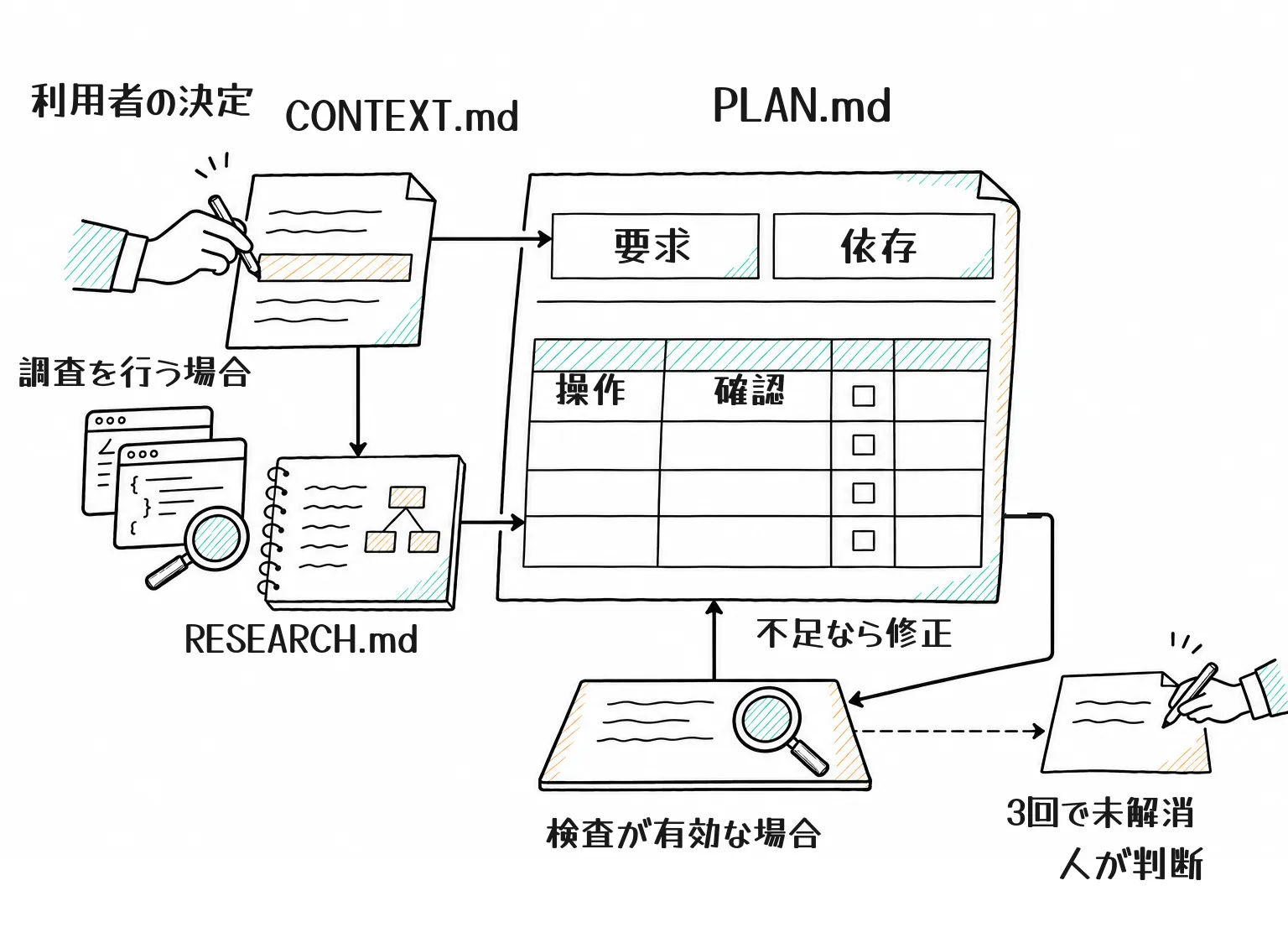
plan-phase records necessary research in RESEARCH.md and the operations assigned to implementers in PLAN.md.
Research can be skipped depending on configuration and available documentation, and plan checking can also be disabled.
A checked plan and one created without a check do not carry the same evidence.
The beginning of a plan identifies dependent plans, files to change, assigned requirements, and behavior to verify. The task body specifies the change targets, files to read first, implementation details, verification methods, and completion criteria. The contributor reads this contract, performs the tasks, and returns the implementation results.
| Plan field | Contents | Impact on execution or verification |
|---|---|---|
wave and depends_on |
Groups that can proceed together and prerequisite plans | Wait until dependent implementations are available |
files_modified |
Files to change | Switch to sequential execution if targets overlap within a group |
requirements |
Assigned requirement IDs | Check whether requirements are missing from the plan |
must_haves |
Required behavior, implementation files, and critical connections | Inspect whether the actual code meets the objective after implementation |
The plan checker determines whether completing the tasks will satisfy the phase objective. The revision loop has a limit: if findings remain after three iterations, the user is offered the options of proceeding anyway, providing additional instructions, or stopping. The existence of a checker does not mean all omissions will automatically be resolved.
Ordinary plan-phase stops when asked to replan a completed phase.
The Complete condition used for this decision means that summaries for all plans and a verification record with status: passed are present.
--force deliberately overrides this stop condition; it is not an option for viewing previous results.
For a closed phase, the path using --reviews cannot replan even with --force.
Basic Phase Execution Flow
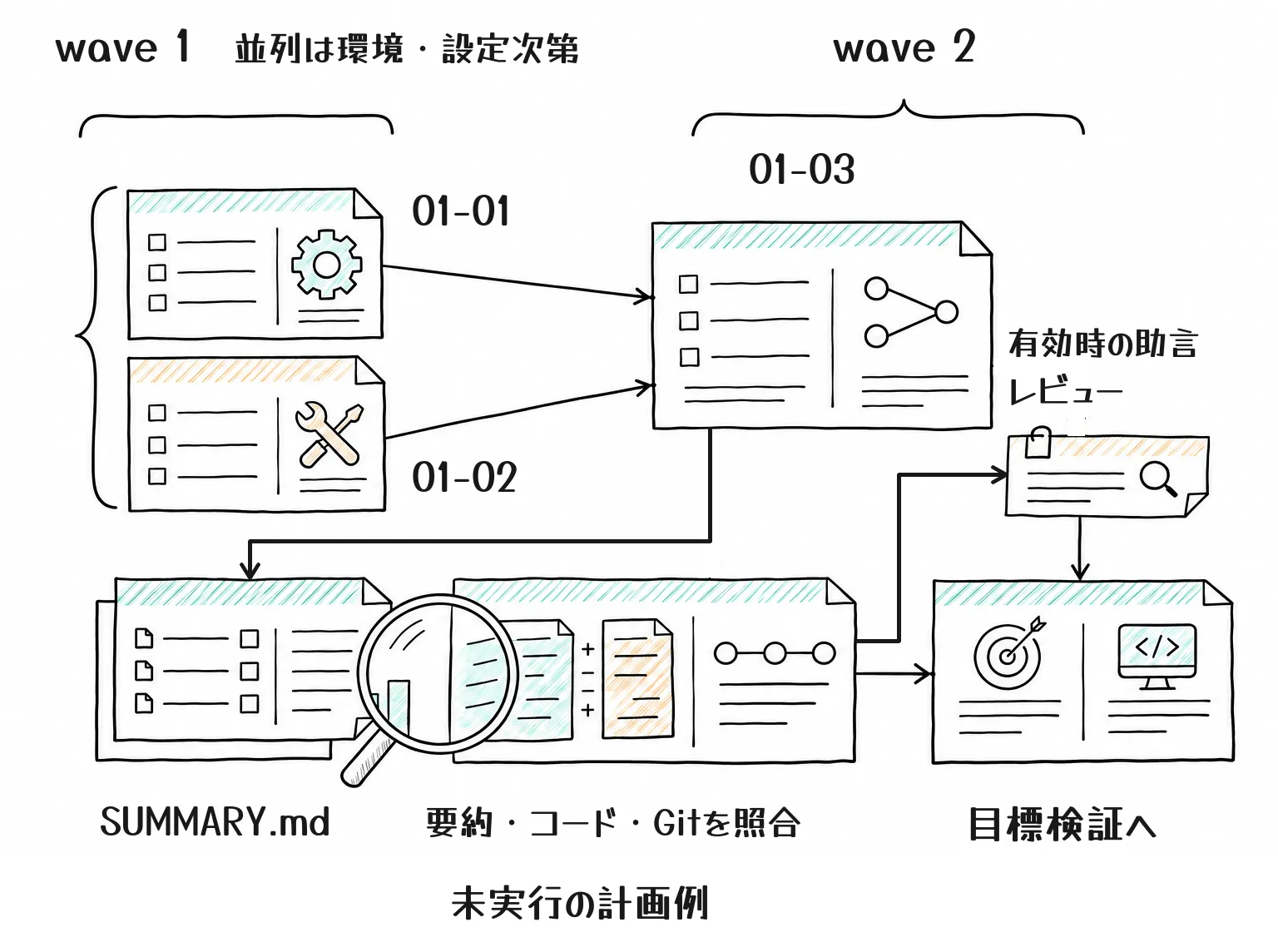
The lead contributor reads the plan dependencies and runs groups of plans that can start together in successive waves (each a wave).
It hands each implementer the plan and required materials, then checks the summaries, code, and Git history after receiving completion reports.
Even with parallel execution enabled, if plans within a group have overlapping files_modified entries, the group switches to sequential execution.
- Initialize the project
Install the pinned release in a supported AI environment and use
new-projectto create objectives, requirements, and phases. Read the four shared documents and.planning/config.jsonto determine whether confirmation was interactive or automatic. - Decide the phase behavior
Use
discuss-phaseto determine inputs, boundaries, and compatibility. Check thatCONTEXT.mdcontains user decisions and distinguishes them from unresolved questions. - Create implementation plans
Use
plan-phaseto investigate the code and create plans with requirement IDs and dependencies. Read the change targets, verification methods, completion criteria, and execution group assignments inPLAN.md. - Implement according to dependencies
Run unfinished plans through
execute-phase. Compare each plan'sSUMMARY.md, task commits, and modified files. - Review the changes
Read the
code-reviewreport invoked whenworkflow.code_reviewis enabled, checking the findings and review scope. If fixes are chosen, address the findings and inspect the fix report, diff, and subsequent review. - Verify the phase objective
The verifier compares requirement IDs and plan prerequisites against the actual code and its connections.
Read the
passed,gaps_found, andhuman_neededstates inVERIFICATION.mdalong with their evidence. - Have the user check the behavior
Use
verify-workto compare expected and actual behavior item by item. Read each result, issue, and unchecked item inUAT.md; if issues exist, proceed to diagnosis and corrective planning. - Execute corrective plans and check the same conditions
Pass plans with
gap_closure: truetoexecute-phase --gaps-only. Read the corrected code and verification records, then retest the original defect with the same input. - Archive the milestone
Check the audit and unfinished requirements, and archive completion records with
complete-milestone. Check archive locations, updates to shared documents, known gaps, and the handling of local tags and remote pushes.
Automatic code review in this version is advisory.
It is skipped if workflow.code_review is false, and execute-phase proceeds to phase verification even if the review identifies issues or fails to run.
A project can choose to fix important findings before acceptance, but this is distinct from GSD automatically stopping based solely on severity.
The review selects its scope in order from explicitly specified files, changed files in summaries, and the Git diff.
The command description advertises fixes via --fix; a separate corrective workflow defaults to Critical and Warning findings, with --all also including Info.
However, no explicit branch invoking that corrective workflow from --fix was identified in the pinned review implementation.
Rather than assuming the flag automatically applies fixes, check whether REVIEW-FIX.md, code changes, and a subsequent review were actually produced.
On resumption, plans with completed summaries are skipped and execution continues with unfinished plans.
However, if an implementation commit exists without the corresponding summary, execution stops to prevent duplicate implementation.
In that case, inspect the commit and reconstruct the summary and state, or reconcile the partial implementation before rerunning.
Do not regenerate code solely because of the progress shown in STATE.md.
Example: Completing a Price-Range Filter Within a Phase
Consider a hypothetical change adding min_price and max_price, which accept integer yen amounts, to an existing product search API, GET /api/products.
The four product prices are 1,000, 3,000, 5,000, and 7,000 yen, and existing non-price criteria are preserved.
The responses below are designed expectations, not measurements from an implemented API.
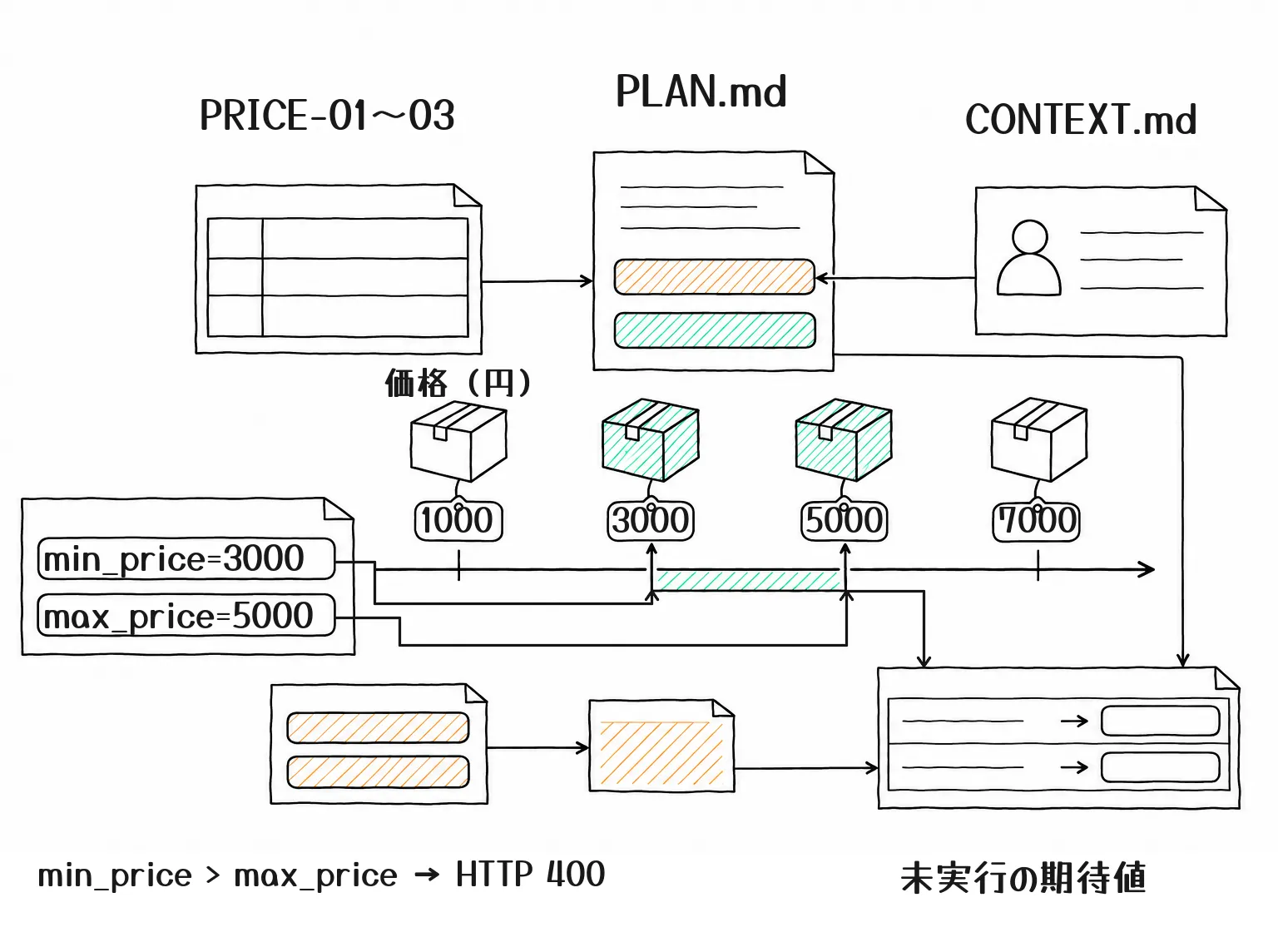
Record separate requirements in .planning/REQUIREMENTS.md and assign them to the same phase.
Retaining requirement IDs in subsequent plans and verification records makes it possible to identify whether compatibility has been overlooked despite implementing the happy path.
| Requirement ID | Requirement | Expected observation |
|---|---|---|
PRICE-01 |
Return only products within the specified range | A range of 3,000–5,000 yen returns the 3,000 and 5,000 yen products |
PRICE-02 |
Preserve existing calls that omit both parameters | Identical results when non-price criteria are unchanged |
PRICE-03 |
Reject invalid price inputs | HTTP 400 for negative values, non-integers, or a minimum greater than the maximum |
The requirement names alone do not determine whether boundary prices are included or whether only one parameter may be supplied.
Through discuss-phase, the user decides that both boundaries are inclusive and that omitting one parameter leaves that side unrestricted.
For example, the decision record 01-CONTEXT.md contains the following:
## Decisions
- min_price/max_priceは0以上の整数の円額。
- 最低価格以上、最高価格以下の商品を返す。
- 片方の省略はその側で絞り込まない。両方省略は従来結果を保つ。
- min_price > max_priceはHTTP 400。商品一覧の取得処理を行わない。
Decisions
- min_price/max_priceは0以上の整数の円額。
- 最低価格以上、最高価格以下の商品を返す。
- 片方の省略はその側で絞り込まない。両方省略は従来結果を保つ。
- min_price > max_priceはHTTP 400。商品一覧の取得処理を行わない。
Research and planning take these decisions as inputs and locate the existing route, search logic, and tests. If input validation and search-filter helpers can be separated into different files, they can become independent plans. API integration and integration tests use both and are therefore executed later.
| Plan | Example files to change | Dependencies | Execution group |
|---|---|---|---|
01-01 |
src/search/price-input.ts and unit tests |
None | 1 |
01-02 |
src/search/price-query.ts and unit tests |
None | 1 |
01-03 |
src/api/products.ts and API tests |
01-01, 01-02 |
2 |
The API integration plan, 01-03-PLAN.md, maps required implementation work to checks.
The following is an excerpt of its dependencies and tasks.
wave: 2
depends_on: ["01-01", "01-02"]
files_modified: [src/api/products.ts, tests/products.test.ts]
requirements: [PRICE-01, PRICE-02, PRICE-03]
The implementer waits for the two prerequisite plans to complete and performs integration work using the same requirement IDs. The task body connects input validation before searching to the API tests.
<task type="auto">
  <name>価格入力と検索処理を接続する</name>
  <files>src/api/products.ts, tests/products.test.ts</files>
  <action>価格入力を検査し、不正値は検索前に400を返す。有効な値だけを検索条件へ渡す。</action>
  <verify>npm test -- tests/products.test.ts</verify>
  <done>範囲、片側省略、両方省略、不正値のAPIテストが期待どおりになる。</done>
</task>
This assumes that the example project provides an npm test command capable of running the specified test file.
The implementer investigates existing execution methods and records a verification command suited to the actual project in the plan.
wave: 2 represents the second execution stage.
Dependencies on the two preceding plans are specified by depends_on.
After implementation, 01-03-SUMMARY.md records modified files, checks performed, task commits, and deviations from the plan.
The lead contributor does not decide completion based on that report alone, but compares it with the actual files and commits.
Likewise, the verifier uses must_haves to inspect the implementation and connections that must exist, checking whether the route calls input validation and whether validated values are passed to the search.
| API input | Expected result |
|---|---|
min_price=3000&max_price=5000 |
HTTP 200, two products priced at 3,000 and 5,000 yen |
min_price=5000 |
HTTP 200, products priced at 5,000 and 7,000 yen |
| No price specified | Identical results when non-price criteria are unchanged |
min_price=5000&max_price=3000 |
HTTP 400, product search is not called |
min_price=-1 or min_price=1.5 |
HTTP 400, product search is not called |
In addition to the number of returned products, verify products at the boundaries and the existing search criteria. A test checking only HTTP 200 would miss an implementation that ignores price criteria and returns all four products. Mapping inputs, returned products, and conditions under which search must not run makes it possible to identify the evidence required for each requirement ID.
Turning UAT Defects into Corrective Plans
Code review, phase verification, and user acceptance check different things.
Code review looks for defects in changed code, while phase verification works backward from the objective to check the required implementation and connections.
In UAT (user acceptance testing), verify-work presents the expected behavior and the user reports the results of actually operating the system.
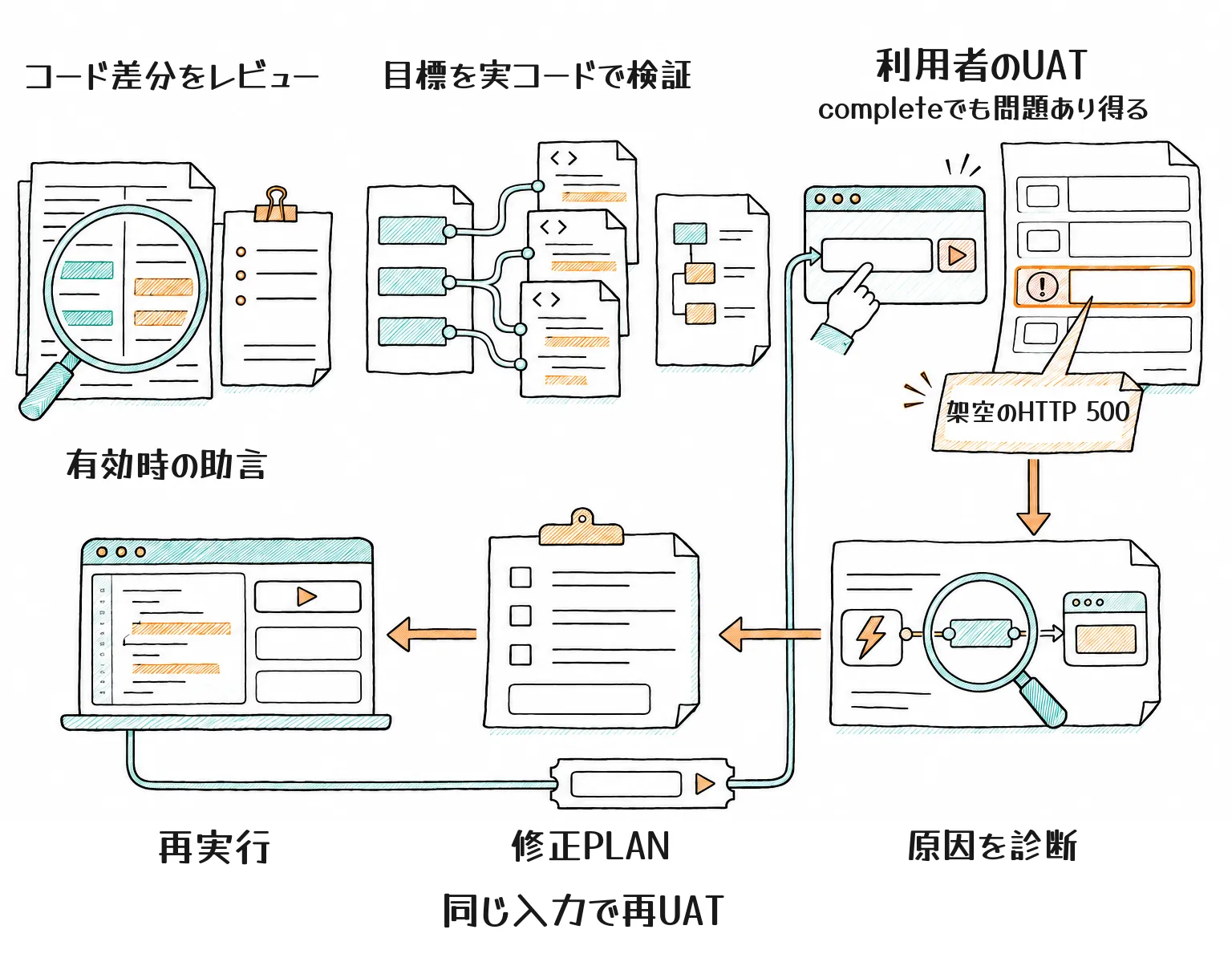
The verifier records requirement ID mappings, implementation existence, connections, and evidence from feasible behavior checks in VERIFICATION.md.
It attempts checks that can be run immediately but hands checks requiring a new server or external service to a person.
Read the verification states as follows:
| State | Meaning | Next action |
|---|---|---|
passed |
Required conditions and connections are verified, with no human checks remaining | Proceed to progress updates |
gaps_found |
Implementation or connections needed to satisfy the objective are missing | Use plan-phase 1 --gaps to plan gap closure |
human_needed |
Behavior still needs to be tested by a person | Save it in HUMAN-UAT.md for human verification |
With human_needed, unchecked items are recorded in a file.
This version includes a path that proceeds to progress updates if the user responds with approved, but the saved HUMAN-UAT.md remains partial.
Progress being updated does not mean all human checks have been performed.
Suppose the user finds that submitting a reversed price range returns HTTP 500.
This is a hypothetical, unexecuted failure scenario, but if the API tests do not check the correct status code, the existence of code alone would not reveal the problem.
After receiving the user's response, the contributor records the discrepancy between expected and actual results in 01-UAT.md, and diagnosis investigates where input exceptions are converted into responses.
Once the cause is diagnosed, the planner creates a corrective plan with gap_closure: true, and the plan checker reviews it.
For example, 01-04-PLAN.md fixes exception conversion and API tests, and $gsd-execute-phase 1 --gaps-only runs the unfinished corrective plans.
This option limits execution to unfinished plans for closing gaps; it does not rerun all existing plans.
After the fix, use $gsd-verify-work 1 to try the same reversed input, checking HTTP 400 and that product search was not called.
Actual acceptance checks also retest a valid price range and the absence of price parameters to ensure the fix has not changed the happy path.
These are the conditions for accepting the example requirements; an automatically generated corrective plan alone does not guarantee they have been met.
The UAT value status: complete means that all items have a definitive result.
Issues and skips with reasons also count as definitive results, so that value alone cannot establish the absence of defects.
Read individual test results, issue counts, any unchecked items, and the checks repeated after fixes.
Closing Phases and Milestones
When deciding whether a phase is complete, compare plan summaries, review results, objective verification, and user acceptance records.
However, the conditions under which this version closes progress do not necessarily match the project's acceptance conditions.
If unresolved advisory code-review findings exist or human verification remains partial, record those details in the completion report and make a decision.
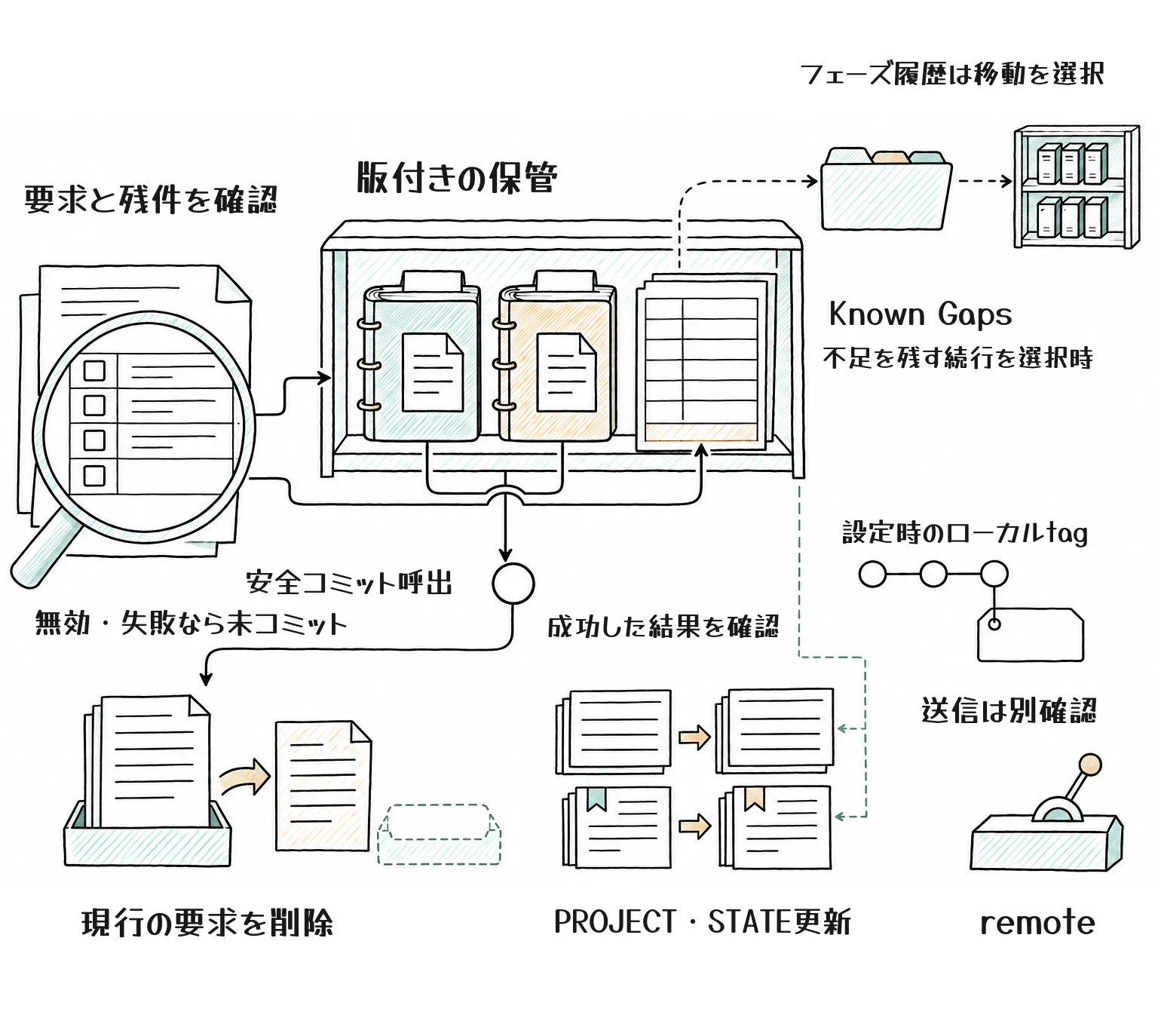
complete-milestone checks unfinished records and requirements and finalizes the milestone.
Even if requirements remain, a path allows the user to record known gaps and proceed.
In that case, requirement IDs and details are recorded under Known Gaps in MILESTONES.md; archiving itself cannot serve as proof that all requirements were satisfied.
Versioned copies of ROADMAP.md and REQUIREMENTS.md are created in .planning/milestones/.
At the same time, history is added to MILESTONES.md, PROJECT.md is reviewed, and STATE.md and the current roadmap are updated.
The milestone workflow instructs the agent to delete the current REQUIREMENTS.md after invoking a commit for the archived files.
However, that workflow does not contain a branch that prevents deletion when the SDK returns committed: false.
Even with document commits enabled, check that the commit actually succeeded; if it did not, do not assume that Git contains a safe checkpoint.
Moving phase directories to a versioned archive is a separate choice.
If they are not moved, execution history can remain in .planning/phases/, so not all phase records necessarily move to the same location.
A Git tag is also a local record created when git.create_tag is enabled; pushing it to a remote requires a separate check.
Each project decides the quality of changes to release, the gaps to retain, and what to push remotely. GSD milestone archival separates requirements and implementation history from current plans so that the history can be read later.
Suitable Use Cases and Limits of the Guarantees
GSD is suitable for development spanning multiple phases and sessions when the correspondence between requirements, decisions, plans, implementation, and checks must be retained. If a PLAN and required materials can be passed to another contributor and the returned summary compared with code and Git history, resuming work need not depend solely on long conversations. To obtain this benefit, keep requirement-to-plan mappings, execution records, and unchecked items up to date.
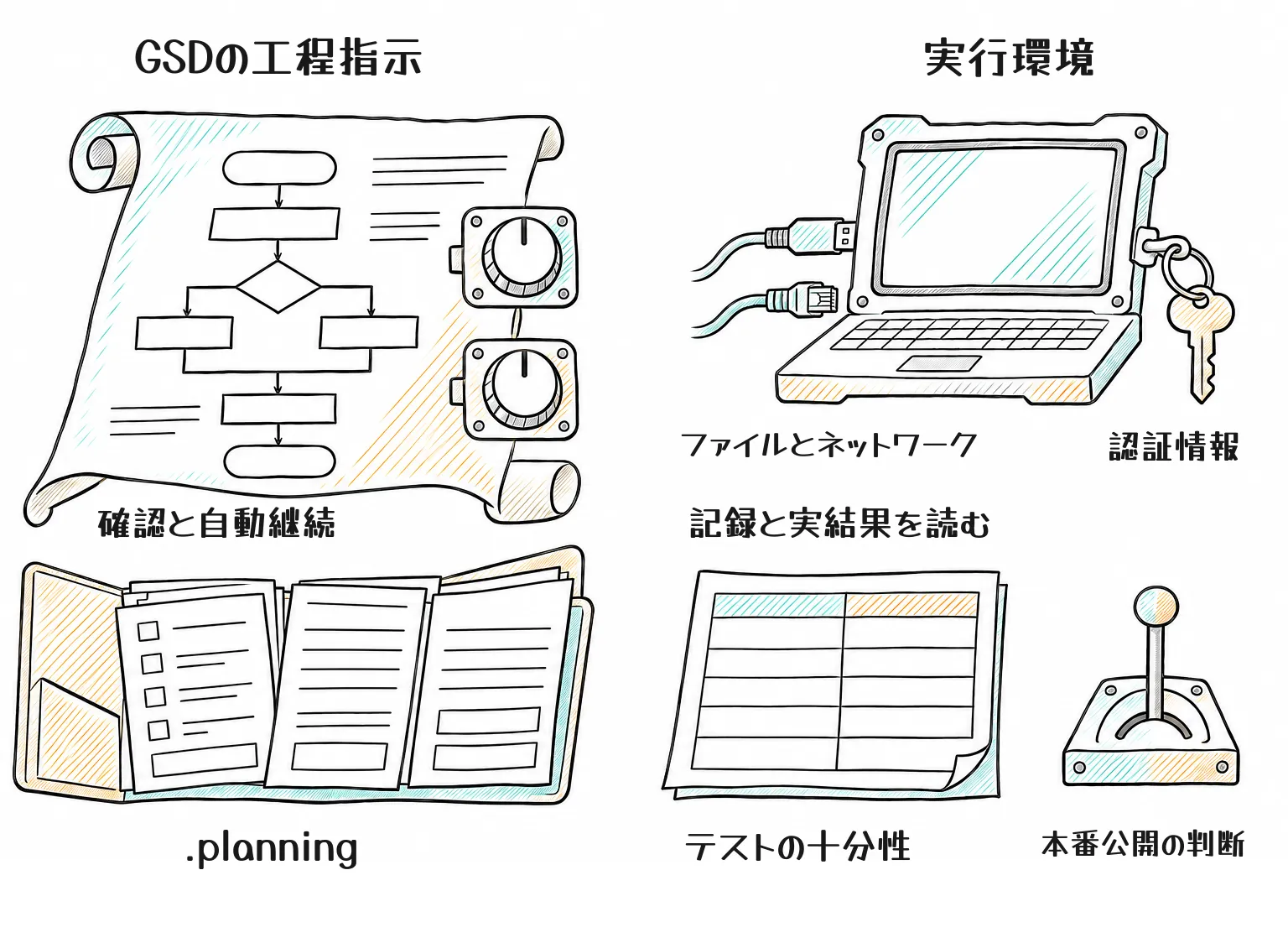
For an obvious change of a few lines, existing issues and diffs may suffice to trace requirements through tests. Even for a change such as the price-range filter, if one implementation pass without separate contributors can verify all conditions, compare the cost of adding documents and workflow stages. Multiple GSD plans are useful when the dependencies between divided tasks, the specifications handed off, and the evidence checked later can be maintained.
interactive requests confirmation for major decisions, while yolo automatically approves workflow decisions.
These settings change how instructions proceed; they do not configure the AI environment's sandbox, credentials, network, or branch protections.
Even when using automatic approval, define execution permissions and conditions for external operations separately.
When implementation pauses for confirmation, the automatic continuation path is used if either workflow._auto_chain_active or workflow.auto_advance is true.
In that case, human-verify continues as approved and decision automatically selects the first option.
human-action and operations requiring authentication wait for human action.
Likewise, parallelism and context capacity do not guarantee processing speed or quality.
Execution depends on available contributor-launch APIs, working trees, overlapping changed files, and model usage limits.
Interpret verification's passed, UAT's complete, and milestone archival individually, and let the project determine test adequacy and production release readiness.
Conclusion
GSD v1.42.3 divides requirements into phases and implementation plans, handing implementation results and verification records to subsequent contributors through .planning and Git.
It connects dependency-aware execution, objective-based verification, and user acceptance, allowing defects to be fed back into corrective plans.
When using it, distinguish the existence of a file from the results actually demonstrated by its records. Understanding advisory reviews, outstanding human checks, and paths that close with known gaps helps prevent completion records from being interpreted beyond their supporting evidence.
The workflows and file formats of GSD v1.42.3 are available in the official source for the pinned release.