Introduction
Hi, I'm cardene, a software engineer and technical writer focused on blockchain and AI.
I've also authored Japanese technical books on specification-driven development with LLMs and decentralized application (DApp) development.

I also build and publish a variety of tools, libraries, and open-source projects.
Overview
Consider a developer who edits acceptance criteria in a browser and an AI agent that reads those criteria again before implementation. If you keep separate copies of specifications for the terminal, browser, and AI, it becomes difficult to establish which requirements were implemented.
LeanSpec records the purpose, acceptance criteria, and progress of a change in one specification that people and AI can read through different interfaces. It provides a command-line interface (CLI), a terminal user interface (TUI), a browser-based Web UI, and MCP, a protocol through which AI can invoke external tools. When the project root, adapter configuration, and implementations with the required features are aligned, all four interfaces read specifications from the same storage backend. Write and validation operations vary depending on the combination of interface and adapter.
We will follow an example of adding per-user rate limiting to a hypothetical Web API, from creating the specification and having a human review it to implementation by an AI agent and checking the implementation against tests. We will also examine the differences in supported operations and the limits of concurrent-update protection.
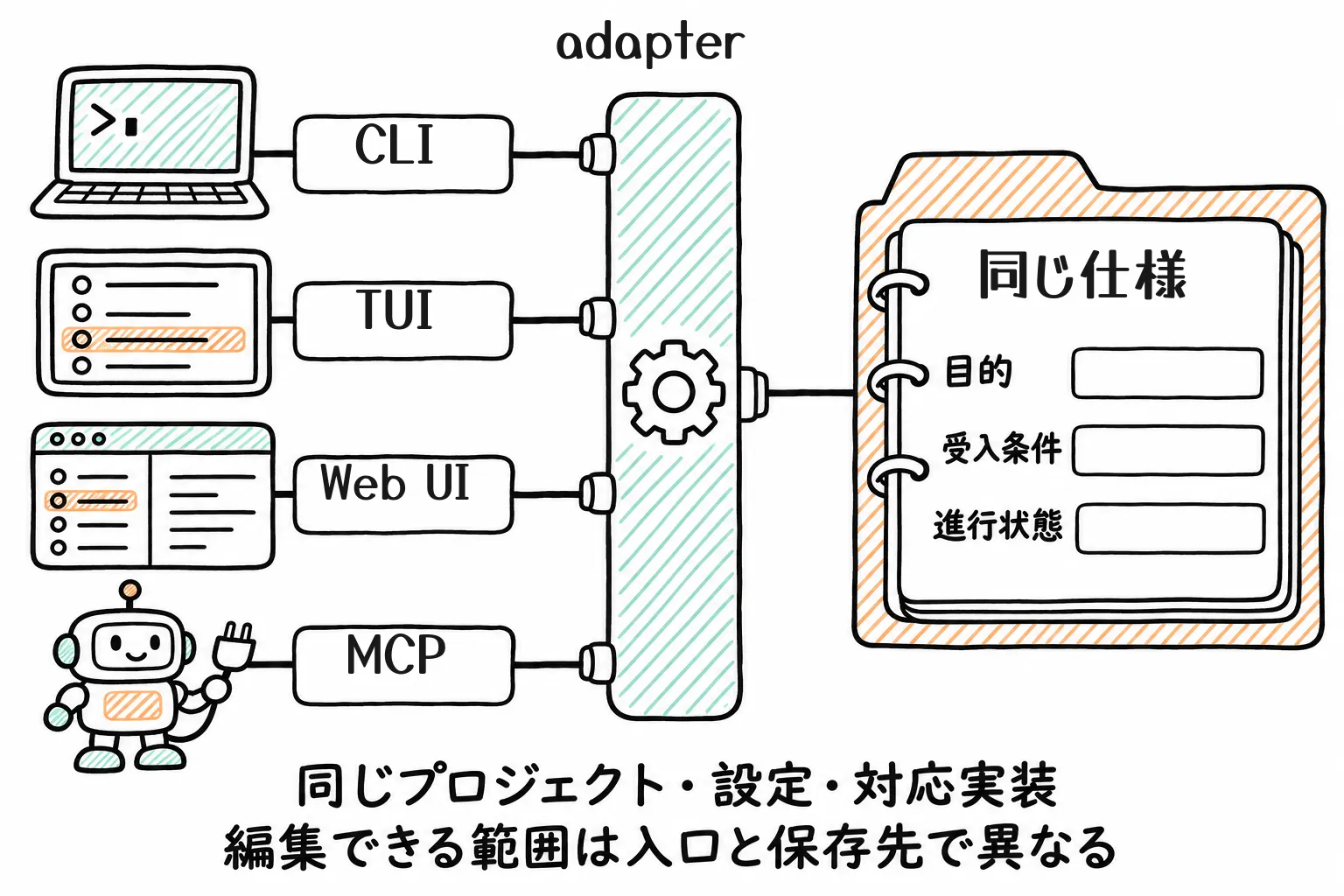
The existing diagrams and illustrative code samples retain their original Japanese labels and text.
An adapter connects backend-specific read and write operations to a common set of operations. Using the default Markdown backend as an example, we will examine the shared specification data and the features to verify for each interface.
Packages and Runtime Environment
This article examines version 0.3.0 of @leanspec/cli and version 0.3.0 of @leanspec/mcp, both distributed through npm.
Although their version numbers match, their gitHead values identifying the source at publication differ.
For the CLI, the reference is the commit beginning with 783cf3f; for MCP, it is the commit beginning with 6203927.
These identifiers associate package metadata with source code; they do not establish that the distributed binaries were reproducibly built from that source.
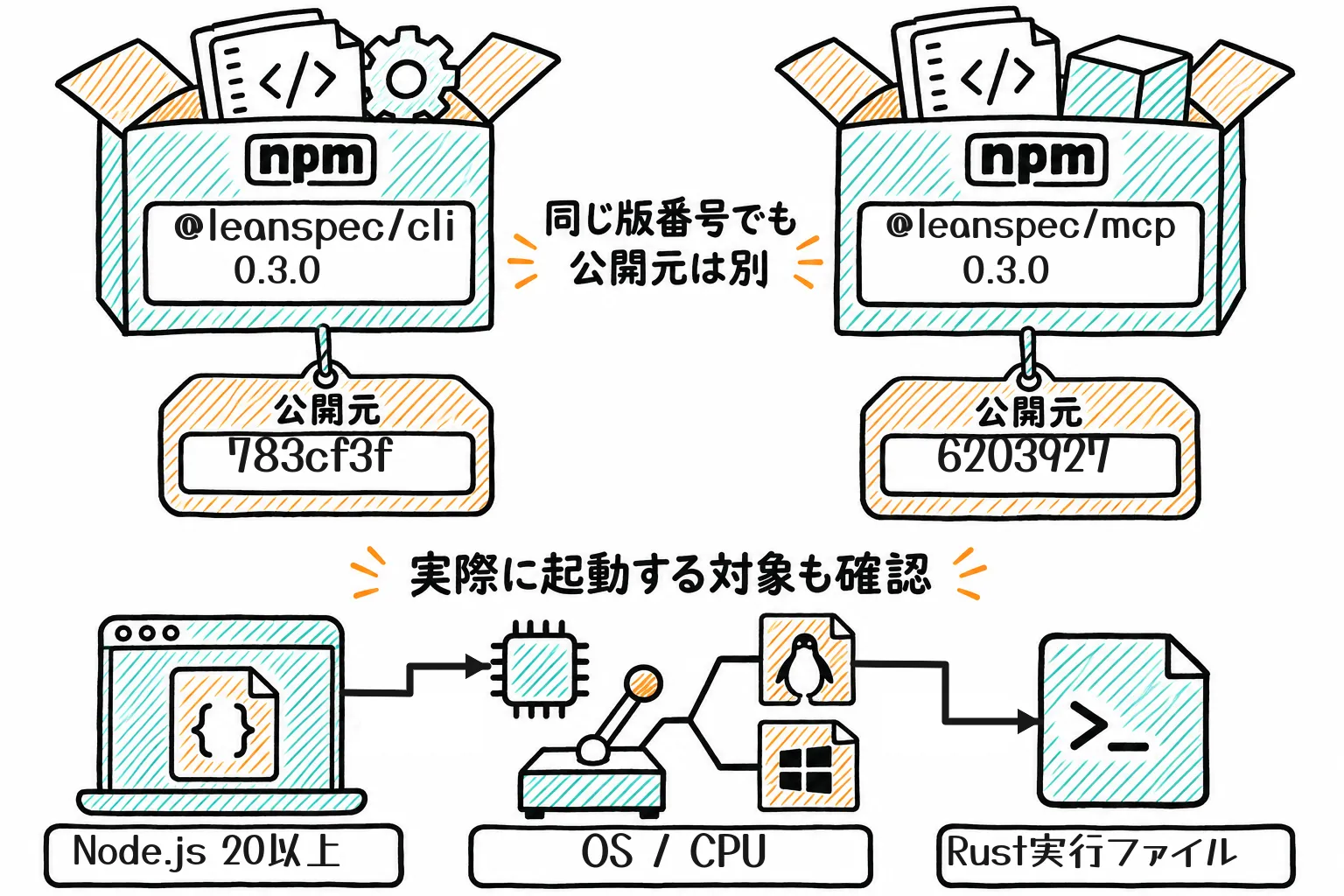
Both packages require Node.js 20 or later and are distributed under the MIT license. However, not all processing runs on Node.js. A JavaScript launcher detects the OS and CPU and invokes an executable implemented in Rust. When using the distributed executable, users do not need to install a Rust compiler and build it themselves.
The launcher under examination defines package names for macOS x64 and arm64, Linux x64, and Windows x64. It looks for an executable in the following order: a local development build, a platform-specific npm package, and a bundled binary. In addition to checking the Node.js version, verify that the corresponding executable is available and which file actually runs. If a local build exists, the npm version alone cannot identify the implementation being executed.
The Web UI requires a separate check.
The CLI command leanspec ui passes the project root using --project and launches @leanspec/ui via pnpm dlx, yarn dlx, or npx depending on the environment.
The source does not pin the UI package version, so pinning the CLI to 0.3.0 does not pin the version of the UI that is downloaded.
The Web UI and HTTP code examined here belong to the selected CLI commit; they do not guarantee how an unpinned UI package will behave.
The original investigation examined package metadata and source code, as well as the distributed CLI's help, schema, capability queries, and validation command. Reading, status updates, and validation using the distributed MCP binary were also checked against an isolated Markdown test specification on macOS 26.5.2 arm64. The end-to-end development workflow described below, involving the API, browser UI, and external service adapters, was not executed. The API inputs and test results are hypothetical requirements and expected outcomes used to explain the mechanism.
Adapters and Specification Data
To access the same specification, align the project in which commands run, the project selected in the Web UI or TUI, and the directory from which the MCP server starts. The project root here is the project directory from which the adapter configuration search begins. Identical specification IDs in different project roots do not imply that the same backend is being accessed.
The Markdown specification example assumes a project initialized with the target CLI version and containing .lean-spec.
For an uninitialized project, run leanspec init --adapter markdown in the target directory.
Standard initialization creates specs and .lean-spec if they do not exist and provides a status configuration file, config.json, and specification templates.
It also adds AGENTS.md if absent while preserving existing files.
After initialization, to explicitly select Markdown storage, put the following configuration in leanspec.adapter.yaml at the project root.
adapter: markdown
directory: specs
The configuration search order is leanspec.adapter.yaml, .lean-spec/adapter.yaml, the legacy leanspec.provider.yaml, and .lean-spec/provider.yaml.
If none exists, the Markdown adapter and specs directory are the defaults.
An existing configuration file that cannot be parsed results in a configuration error, so distinguish an absent configuration from invalid syntax.
The Markdown adapter reads specs/<仕様ID>/README.md and converts its front matter (metadata such as status and priority at the beginning of the document) and body into the common data model, SpecDoc.
SpecDoc contains the specification data exchanged between interfaces.
| Field | Description |
|---|---|
id |
Specification ID identifying the target of retrieval or update |
title |
Human-readable specification title |
schema_id |
Identifier of the field definitions used by the specification |
fields |
Typed values storing status, content, and other fields |
links |
References to other specifications representing parent-child relationships or dependencies |
The body is represented as content within fields.
The CLI and MCP read specifications through this common model and pass update requests back to the adapter.
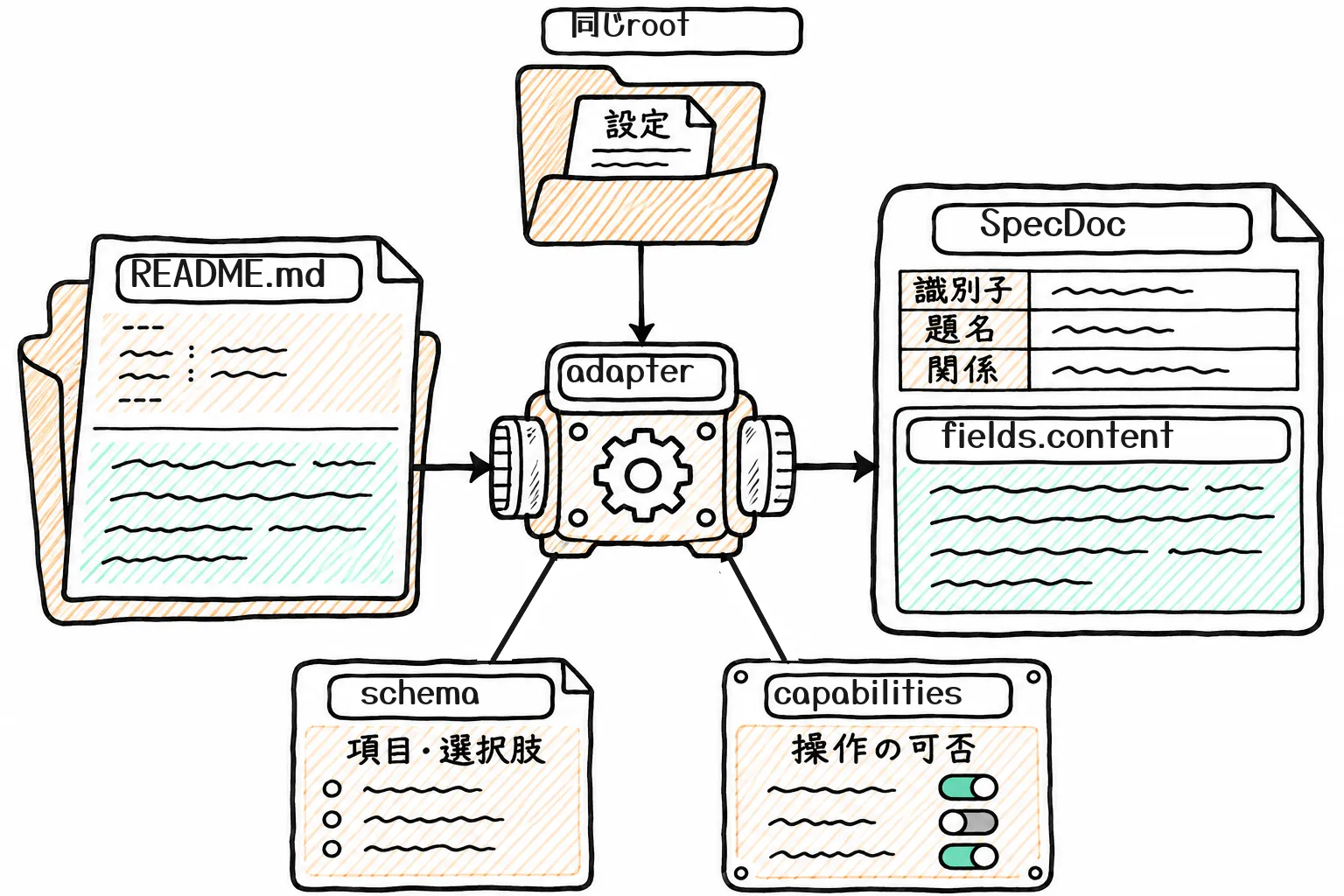
Using a shared model does not mean all backends use identical field or status names. Choose the values for creation and updates based on the schema.
| Definition | Decision for creation or updates |
|---|---|
| Field name | Determine which field receives the value |
| Type | Check whether strings, numbers, or other values are accepted |
| Allowed values | Choose supported status or priority values |
| Relationships between specifications | Check which references can represent parent-child relationships or dependencies |
capabilities indicates whether the adapter supports operations such as creation, updates, deletion, and search.
The schema determines which values can be supplied, while capabilities determine which operations can be selected.
In the CLI, leanspec capabilities -o json returns the adapter name, supported operations, and schema together.
With MCP, get_capabilities returns supported operations, while get_schema separately returns fields and allowed values.
Because the response structures differ, do not treat the CLI JSON as an MCP response.
The Markdown schema in the target version is leanspec:markdown.
Its statuses are draft, planned, in-progress, complete, and archived.
These represent a specification being written, awaiting implementation, in implementation, marked complete after verification, and no longer in use, respectively.
For other adapters, find the equivalent status field and allowed values in the schema rather than sending Markdown's names unchanged.
The target Markdown adapter returns a fixed schema.
Even if the CLI's schema command can read another YAML definition, that does not establish that the definition has been applied to Markdown storage.
Nor should changing schema_id in the configuration be treated as a mechanism for using arbitrary fields or statuses.
If creation and updates are supported and the status choices include planned, a specification awaiting implementation can be created with that value.
If updates are unsupported, leave status changes out of the workflow and use the adapter for reading, or investigate the backend's own editing interface.
A value appearing in the schema does not mean every interface can save it correctly; the target implementation and stored result still require verification.
Feature Differences Across the Four Interfaces
Even when the CLI, TUI, Web UI, and MCP read through the same adapter, they do not expose identical operations. For each intended operation, check three things: the interface implementation, the adapter's capabilities, and any backend-specific restrictions. Retrieving a list successfully does not establish that editing and validation are available.
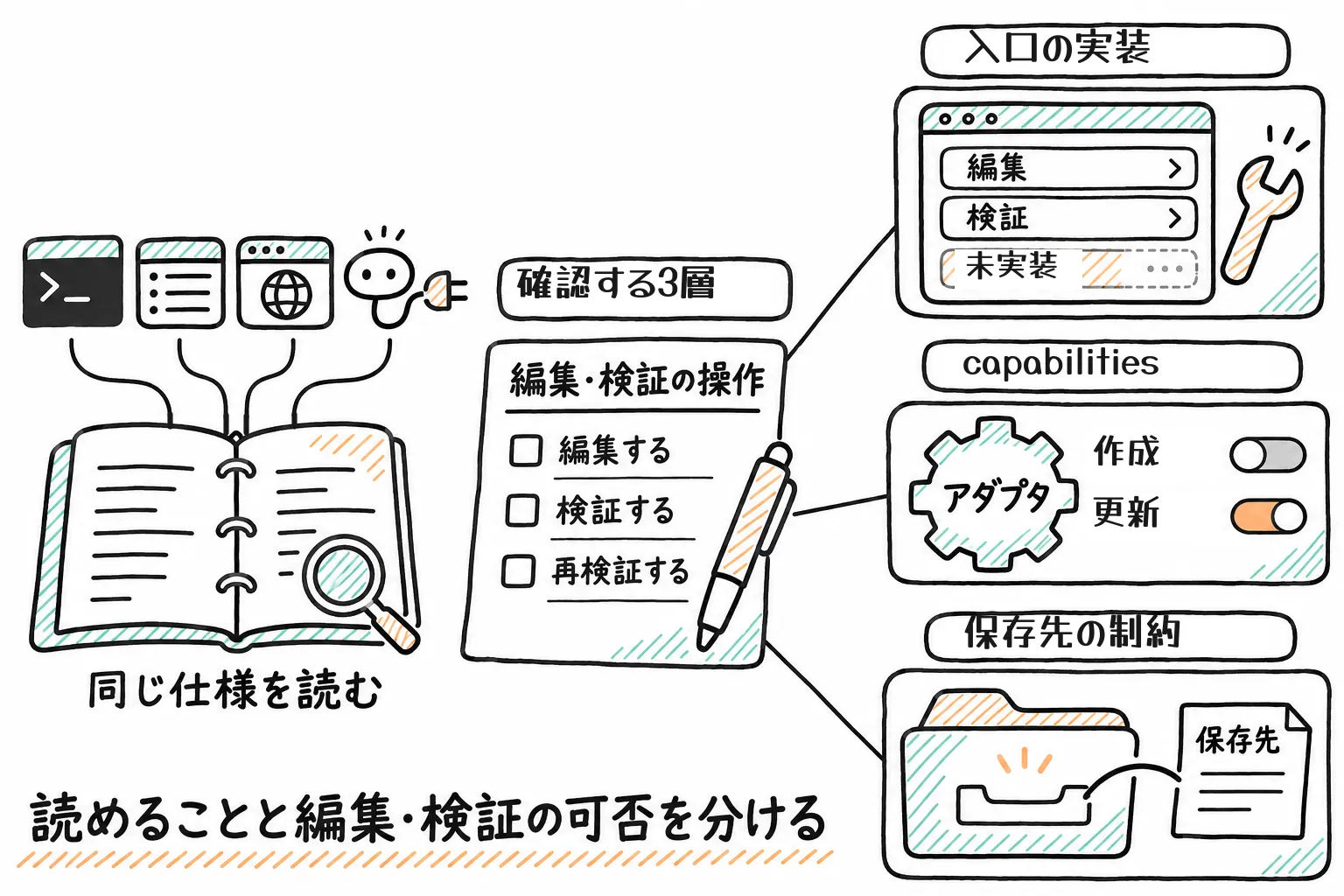
| Interface | Role observed in the target source | Distinctions to check before use |
|---|---|---|
| CLI | Passes operations to the adapter through create and update |
Some existing commands are still being migrated |
| TUI | Displays specification lists, search, content, and dependencies in the terminal | Do not assume it has the same editing features as the CLI |
| Web UI and HTTP | Read through the adapter and expose supported editing operations | Creation, full-document editing, and supplementary documents have Markdown-specific paths |
| MCP | Exposes specification search, reading, creation, and updates as tools for AI agents | Check tool availability, adapter support, and update results separately |
It would also be inaccurate to classify all Web UI editing as Markdown-only. In the target source, operations that update status or checklist items in the main document also use the adapter. Full-document editing and supplementary-document handling, on the other hand, have branches that assume Markdown. Check which path implements the editing operation you need before selecting a storage backend.
The shared MCP tools include list_specs, get_spec, create_spec, update_spec, search_specs, get_schema, get_capabilities, and reload_schema.
The list also includes validate_spec, get_dependencies, and get_stats, but calling these three with an adapter other than Markdown returns ADAPTER_NOT_SUPPORTED.
A tool listing describes how to invoke tools, not whether those invocations will succeed with the selected adapter.
The MCP server retains the adapter and schema resolved at startup.
After changing configuration or field definitions, use reload_schema to resolve the adapter again and recheck the schema and capabilities.
This operation does not change the MCP server's working directory to another project.
The actual tools read specifications through the adapter, so the storage backend is resolved from the adapter configuration.
Validation commands also differ in the target version.
The CLI's validate checks whether the project uses Markdown, then exits with an error indicating that migration to the adapter API is incomplete.
The distributed CLI was also observed to exit with code 1.
Distinguish the official skill's recommendations from the validation that this CLI version can actually perform.
MCP's validate_spec has a separate implementation that checks required fields, allowed values, and types against the schema.
However, in a test validating a normal Markdown specification with status: planned, it returned valid: false because the status type did not match.
The investigation therefore did not establish that MCP can replace the CLI to successfully validate a normal specification.
Both operations are distinct from executing the API tests described below to verify acceptance criteria.
The adapter registration code includes branches for GitHub, Azure DevOps, and Jira in builds with the corresponding features enabled.
A service appearing in the README does not establish that it is available in the target distribution.
There is also code that emits a warning and returns a static schema when allowed values cannot be retrieved from an external service.
Displaying capabilities does not establish successful connectivity, authentication, or refresh of allowed values.
Verify connectivity, including authentication and networking, as well as required editing operations, with the chosen backend and runtime environment.
Basic Workflow from Specification to Implementation
The official skill describes the sequence Discover, Create, Refine, Implement, and Verify, from finding existing specifications to verification.
These are work instructions for an AI agent, not a feature that automatically executes all stages with one command.
The developer or AI agent invoking LeanSpec is responsible for editing the implementation and running tests.
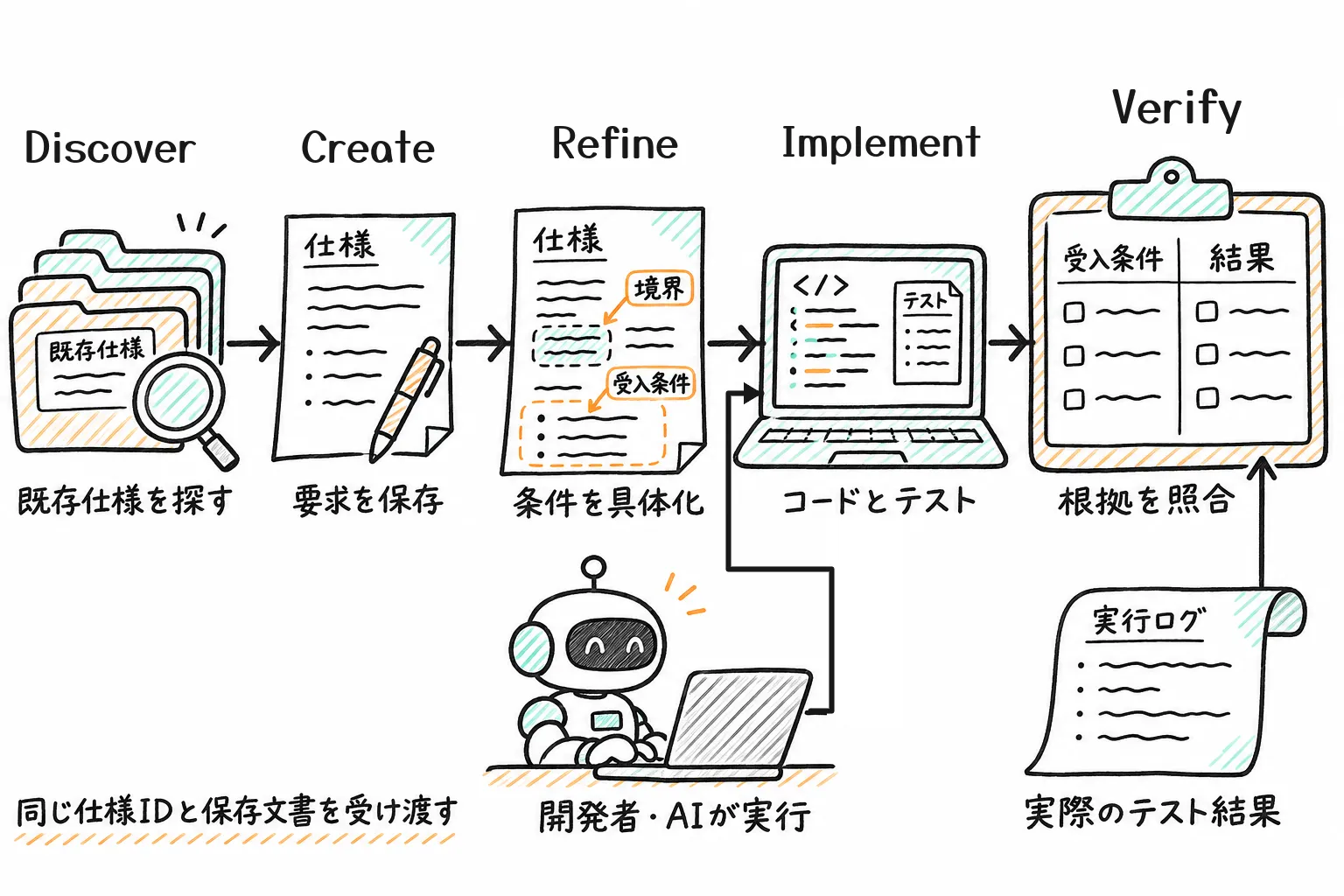
- In
Discover, read the schema and capabilities and search existing specifications. Check whether an existing specification covers the change or whether dependencies exist, then decide whether a new specification would duplicate existing work. - In
Create, save the purpose, requirements, exclusions, and acceptance criteria in the specification. Read the returned specification ID and storage location to confirm it was created in the intended project. - In
Refine, read the actual code and related specifications to clarify ambiguous conditions. Determine inputs, boundaries, failure responses, and out-of-scope work, and confirm no unresolved decisions block implementation. - In
Implement, reread the target specification and its dependencies, record the in-progress status, and change the code and tests. Read the saved status and diff to check for changes outside the specification's scope. - In
Verify, compare tests and changed files against each acceptance criterion. Record the actual evidence in the specification, set its completed status only after verifying every criterion, and read it back.
Each stage passes along the specification ID and saved document.
Requirements recorded in the body become implementation inputs even when switching interfaces.
Changing the status to complete records that verification has been performed; it does not prove that LeanSpec has established the sufficiency of the tests.
If a human must review requirements before AI implementation, establish that approval as part of the development process. The sequence in the official skill alone does not imply that every creation or update operation enforces a human approval screen. Who finalizes specifications and under which permissions code is changed depends on the AI environment and project procedures.
Example: Implementing API Rate Limiting
Add per-user rate limiting to a hypothetical GET /api/items endpoint.
Use the authenticated user_id as the aggregation key and accept up to three requests in fixed 60-second windows aligned to server time.
Return HTTP 429 for the fourth and subsequent requests from the same user, with independent windows for other users.
Exclude GET /health and return HTTP 401 for unauthenticated requests before counting them.
An accepted request counts even if subsequent API processing fails. Rejected requests above the limit do not increment the count, and requests at the window boundary count toward the new window. This example covers counting within a single process; it excludes sharing counts across processes, IP-based limits, and billing. These are illustrative requirements for the hypothetical API in this article.
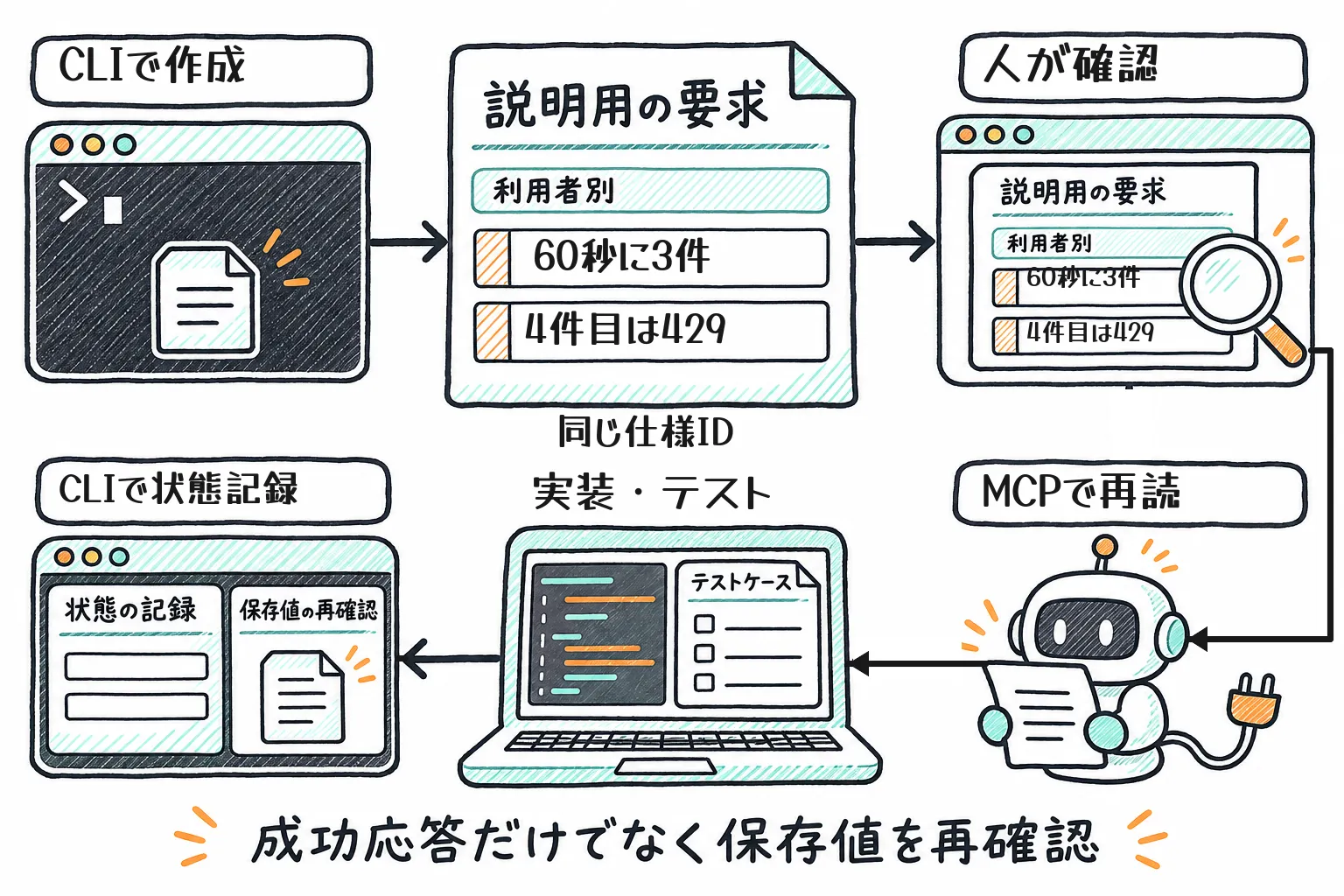
In an initialized project containing .lean-spec, confirm that the Markdown adapter supports creation and updates and that planned and high are valid schema choices.
Save the heading and everything below it in the Markdown example that follows as rate-limit-body.md, then perform the following operations from the same project root.
The create arguments and the --file, --status, and --priority options follow the definitions in the target source.
leanspec capabilities -o json
leanspec search "rate limit"
leanspec create api-rate-limit --title "利用者単位のAPIレート制限" --status planned --priority high --file rate-limit-body.md
--file supplies the body, while title and status are separate arguments.
If an existing specification already contains the same requirement, modify that specification rather than creating a new one.
For a new specification, the actual ID is assigned on creation; do not infer its number from the example name.
The storage location is specs/<作成時に返された仕様ID>/README.md.
Excluding automatically generated fields such as creation and update timestamps, the main content looks like this.
The heading is stored in the body, status and priority in front matter, and acceptance criteria correspond to later tests.
---
status: planned
priority: high
---
# 利用者単位のAPIレート制限

認証済みuser_idごとにGET /api/itemsを60秒枠で3件まで受け付ける。
枠はサーバー時刻の60秒区切りとする。
受け付けた要求は後続処理の成否によらず数える。
- [ ] 同じ利用者の1〜3件目は既存処理へ進み、4件目は429になる
- [ ] 別の利用者と新しい時間枠では独立して3件受け付ける
- [ ] GET /healthは件数を使わず、未認証の要求は集計前に401になる
- [ ] 複数プロセスの件数共有は実装しない| status | planned |
|---|---|
| priority | high |
利用者単位のAPIレート制限
認証済みuser_idごとにGET /api/itemsを60秒枠で3件まで受け付ける。 枠はサーバー時刻の60秒区切りとする。 受け付けた要求は後続処理の成否によらず数える。
The actual saved document also records the background, exclusions, and verification methods.
planned is explicitly supplied here.
The default initial status also depends on project configuration, so do not assume it is identical in every environment.
The developer opens the same specification ID in the TUI or Web UI and checks that the aggregation key, time windows, and exclusions are recorded. In this example, a human checks these conditions before handing the change over for implementation. Simply saying "three requests per minute" in a conversation leaves unresolved whether the limit is per IP or per user and whether the minute begins with the first request or follows fixed windows.
The AI agent reads MCP's get_capabilities and get_schema, then passes the following argument to get_spec.
Replace the angle-bracketed placeholder with the actual specification ID returned at creation.
{"id":"<作成時に返された仕様ID>"}The response is a SpecDoc, and status and body are stored as typed fields.
The status portion alone looks like "status":{"kind":"string","value":"planned"}.
The AI reads content, the specification ID, and the status rather than relying on requirements from an older conversation.
The target version also has a caveat concerning MCP status updates.
When update_spec was tested with status: "complete" on a test Markdown specification, the response indicated success, but the status in the response and the saved file remained planned.
The source also shows a mismatch between the conversion of enum input into multiple values and Markdown status updates accepting a single string.
This example uses the CLI for status changes and does not treat an MCP success response alone as evidence that work has started or finished.
The example assumes that the CLI updates the target specification to in-progress, the stored value is checked, and the AI agent changes the API code and tests.
A test-controlled clock can create 60-second boundaries to verify which window receives each count.
The following table describes expected results for the unexecuted API to satisfy its specification.
| Input and initial conditions | Expected result | Requirement verified |
|---|---|---|
| User A sends three requests at the start of the window | All three proceed to existing processing; 200 in tests where existing processing succeeds | Acceptance within the limit |
| User A sends a fourth request in the same window | 429 without invoking the API handler | Rejection above the limit |
| User B sends a first request after user A reaches the limit | Proceeds to existing processing | Independence between users |
| Send the fourth request 59 seconds into the window and a new request at 60 seconds | 429 at 59 seconds; proceeds to existing processing at 60 seconds | Boundary assignment and window rollover |
User A has used two requests, calls GET /health, and calls the target API twice |
Health retains its existing behavior; the first target API request is accepted and the second returns 429 | Excluded requests do not consume the allowance |
| Send an unauthenticated request | 401 without creating a user count | Authentication before counting |
| Cause the API handler to fail on a request within the limit and continue requesting in the same window | Count the failed request and return 429 for the fourth request in total | Counting point and handling of failures |
After running the tests, link the test names, changed files, and actual results to the acceptance criteria. Leave unsuccessful checks unverified and distinguish implementation defects from missing specification conditions when making corrections. A completed checklist alone is not proof that tests ran.
Update the status as follows once the actual checks support the transition.
leanspec update <仕様ID> --status in-progress
leanspec update <仕様ID> --status complete
The first line is performed when implementation begins; the second is performed after verification.
In normal updates, the target CLI rejects transitions that skip planned from draft and attempts to complete a specification with unfinished checklist items.
Do not treat those rejections as a guarantee that the code's tests are executed automatically.
Read the stored status again, and use the verification records in the body together with the implementation diff as evidence of completion.
Concurrent Updates and Failure Handling
If a human adds acceptance criteria in the Web UI while an AI agent writes verification results back to an older copy of the body, the new requirements may be lost. Even when updating a specification immediately after reading it, another edit can occur between the read and the write.
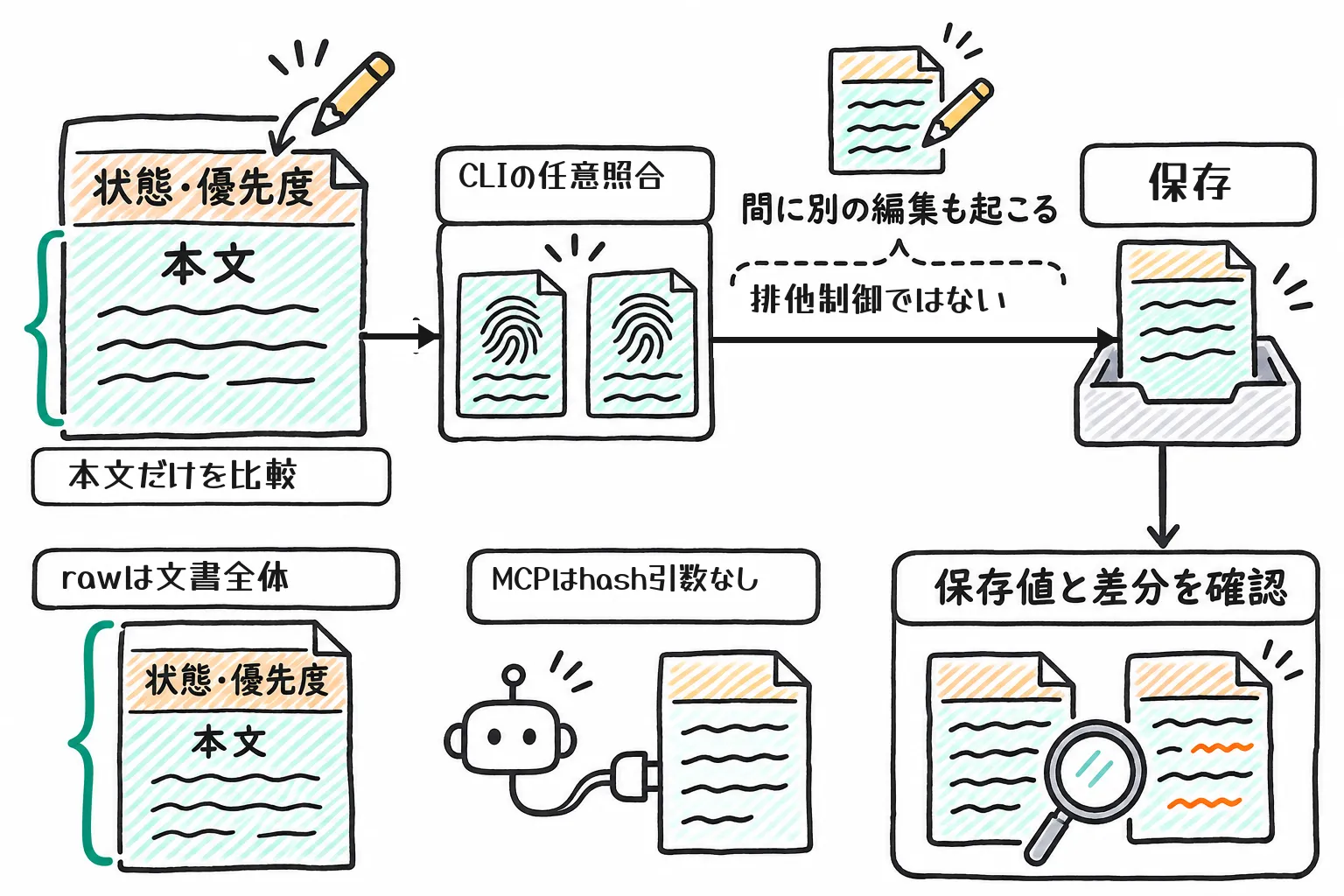
The CLI's update accepts an optional --expected-hash argument specifying the content fingerprint expected at read time.
In the target source, the compared value is a hash of the body.
An update can be stopped if it does not match, but changes limited to status or priority are not detected if the body stays the same.
This comparison is not always applied to updates that omit the value.
HTTP updates also differ in what they compare depending on the route. Full-document editing compares content including front matter and body, while updates to fields or checklist items in the main document compare the body. Some code paths return HTTP 409 when the supplied value does not match. Do not generalize these differences into a claim that every update detects conflicts across the entire document.
Moreover, comparing before writing does not lock the entire read-write operation. Another edit can occur after the comparison completes, so it cannot guarantee full serialization of concurrent updates. Even where some Markdown writes use a temporary file and replacement, this is distinct from mutual exclusion across the entire update operation.
MCP's update_spec has no argument for an expected hash.
When writing back the entire body, assign responsibility for editing, reread immediately before updating, retrieve the result afterward, and inspect the stored file and Git diff.
This is an operational proposal for making conflicts easier to detect, not a product guarantee that races between rereading and saving are eliminated.
If a conflict is suspected, do not resend the old body; apply only the intended change to the newer document.
When an error occurs, retrying the exact same input is not always appropriate.
For InvalidField, check the schema and input; for NotSupported, check the interface and adapter; for AuthError, check authentication.
RateLimit is an adapter error indicating a usage limit imposed by the connected service; the caller decides whether to wait or retry.
This error concerns a different system from the rate limiting implemented in the hypothetical API above.
After fixing configuration, resolve the adapter and schema retained by MCP again. Then read the specification ID and body and check that the necessary operation is supported and the intended value was saved. Record tool invocation success, the actual stored specification value, and implementation test success as separate checks.
Suitable Use Cases and Limits of the Guarantees
LeanSpec is useful for changes in which humans review requirements in a browser or terminal and AI agents retrieve the same specification before implementation. With shared specification IDs and storage, search, implementation status, and acceptance criteria can carry across stages. This assumes consistent project roots and adapter configuration and the ability to check support for the intended operations.
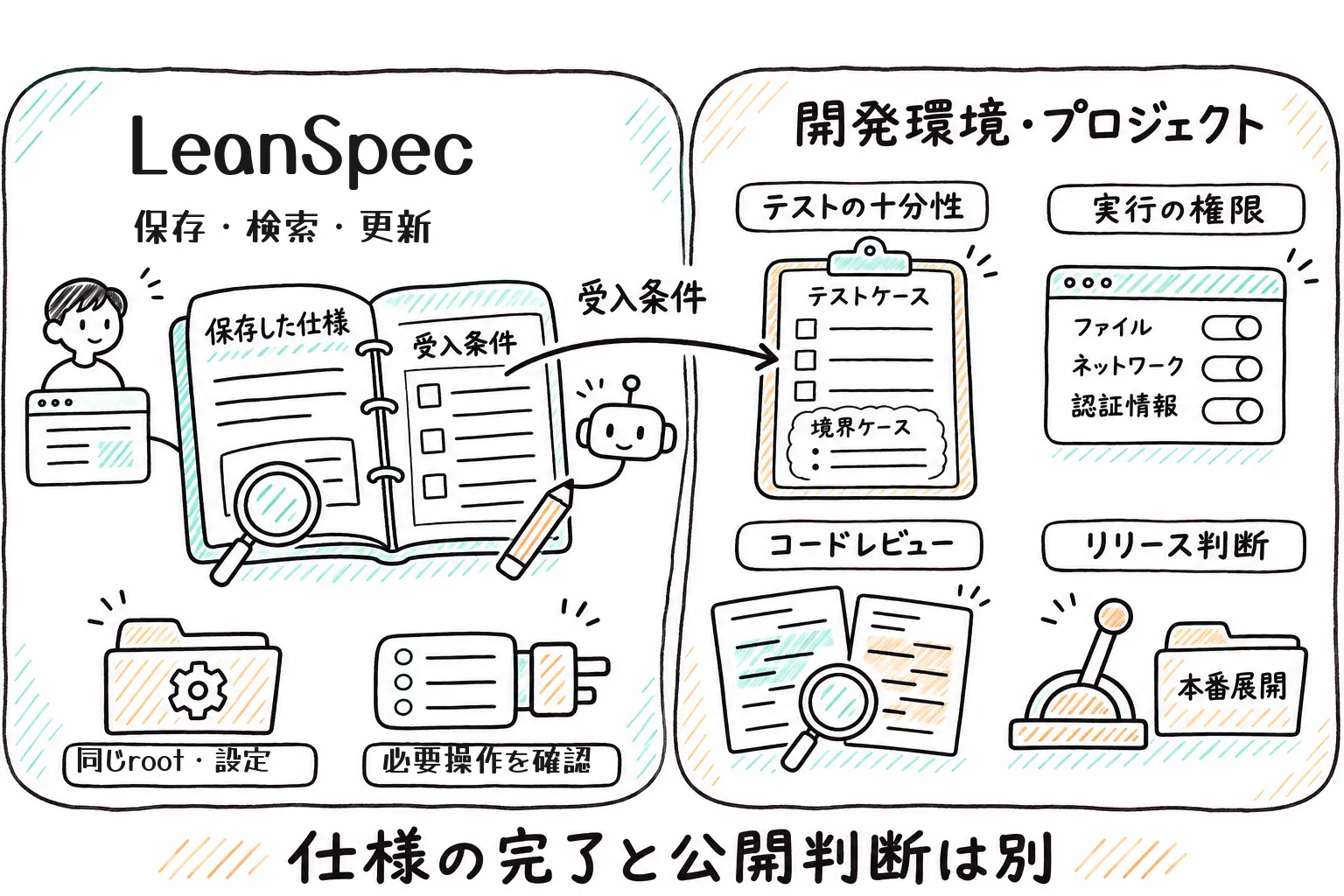
If one person handles an obvious change of a few lines and existing issues and tests can track the requirements, there is less reason to incur the overhead of maintaining another specification ID or MCP server. If identical editing capabilities across interfaces or complete product-level prevention of conflicting updates is mandatory, first check whether the target version's boundaries meet those requirements. Successful reads from an external adapter alone do not establish that Markdown-specific editing and validation can be migrated.
LeanSpec handles specification storage, search, updates, and the data required for those operations.
Restrict the AI agent's access to files, networks, and credentials in the environment running the AI.
The project is also responsible for test sufficiency, security, code review, and the decision to release to production.
Even a specification marked complete cannot substitute for those checks.
The materials and tests examined here do not establish guarantees for project scale, concurrent update count, or response time. During adoption, use a small test specification to verify the actual versions of the packages and UI, required adapters, editing operations, and failure recovery. The end-to-end API development workflow and production load were not measured.
Summary
In LeanSpec, an adapter selected from project configuration connects the storage backend to the common specification model. With consistent conditions for accessing the same specification, saved requirements can serve as inputs for implementation and verification even when people and AI agents use different interfaces. Checking supported operations and actual stored values, and connecting acceptance criteria to tests, makes that shared specification useful for development decisions.