Introduction
Hi, I'm cardene, a software engineer and technical writer focused on blockchain and AI.
I've also authored Japanese technical books on specification-driven development with LLMs and decentralized application (DApp) development.

I also build and publish a variety of tools, libraries, and open-source projects.
The original illustrations and interactive Dragon diagrams are retained in this translation and may contain Japanese labels.
The Role of Link Agent Wallet
Link Agent Wallet is a service that gives AI agents card details or tokens that can be used for purchases authorized by a buyer. The agent presents the purchase details, and once the buyer approves them, it can obtain the information needed to pay the merchant. This is useful when the agent is expected not only to select products but also to place orders after obtaining the buyer's confirmation.
Link is Stripe's wallet for storing a buyer's payment methods and addresses. In a standard Link payment, the buyer selects a card on the merchant's checkout page and initiates the payment personally. With Link Agent Wallet, the buyer confirms the connection to the application and the purchase details through Link, and the agent carries out the purchase on the merchant's side.
The virtual card number or token used to make the payment is called a payment credential. The available credentials are a virtual card, a Link Pay Token (LPT), or a Shared Payment Token (SPT). An SPT authorizes a designated merchant to use a payment method and is one of the credentials that the wallet can provide. The wallet service and the SPT credential can therefore be used together for the same purchase.
Consider buying one book from Merchant A for $35, including shipping and taxes. The agent sends the purchase terms to Link and, after the buyer approves them, receives a credential suited to the merchant's checkout method. Link's record of the purchase details, the buyer's approval, and the subsequent outcome is called a spend request.
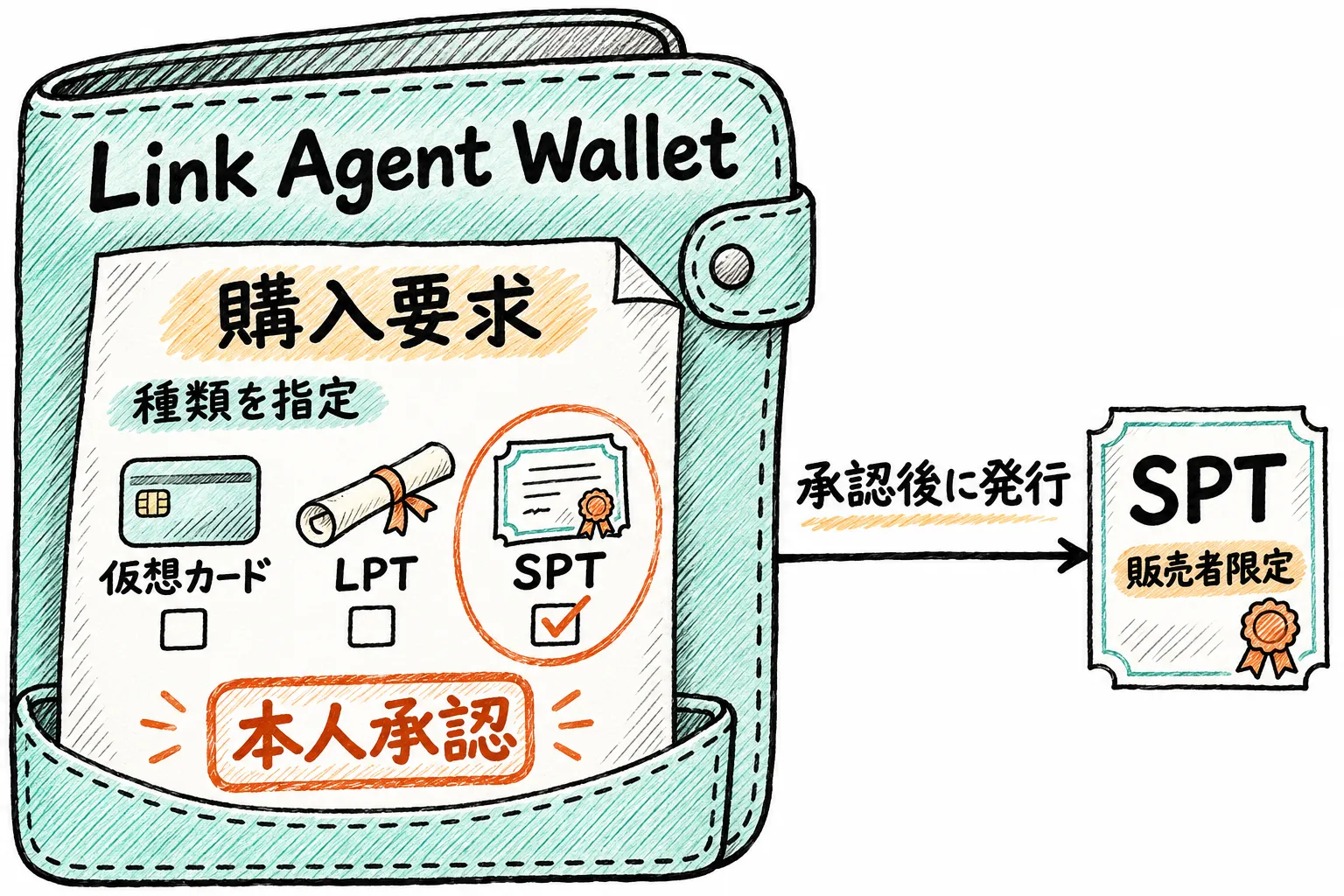
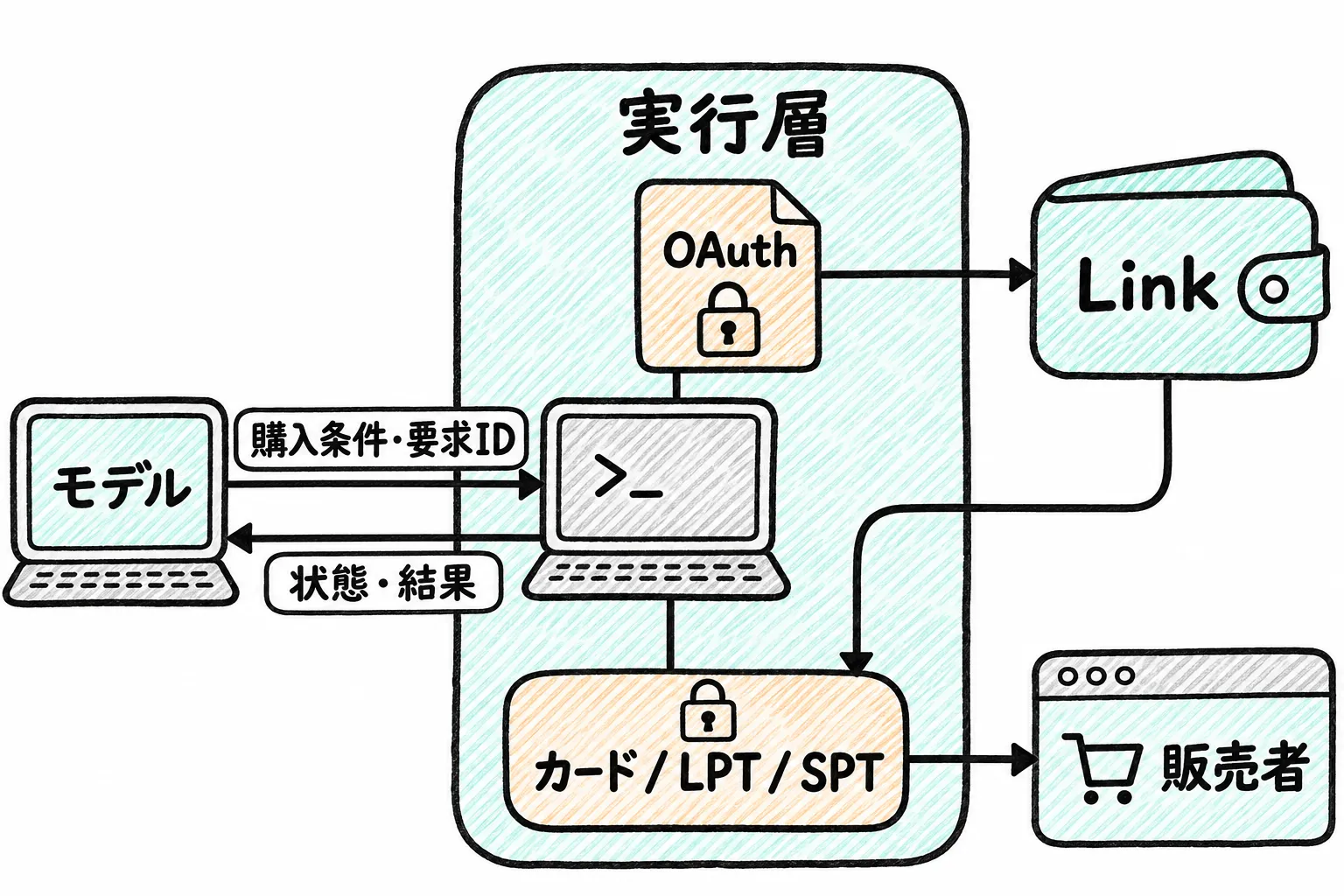
It is also useful to distinguish the model that evaluates product options and purchase terms from the execution application that interacts with the checkout page. In this example, the execution application manages the Link connection and payment credentials, while the model receives purchase terms and processing results. Keeping payment credentials out of the model is an application design choice, not a guarantee that Link automatically prevents credentials from reaching the model.
- 購入条件を実行アプリへ渡す
この例では、モデルが本と販売者A、$35の購入条件をまとめ、実行アプリへ渡します。
- Linkへ購入要求を作る
実行アプリが購入者から許可された接続を使い、購入条件をLinkへ送ります。
- 本人承認後の資格情報を受け取る
実行アプリが承認済みの同じ要求から資格情報を取得します。
モデルへ戻さないことは、このアプリの設計です。 - 販売者の方式に合わせて使う
作成時に選んだ仮想カード、LPT、SPTの一つを販売者へ渡します。
注文と支払いの結果を別に確認します。
From Account Connection to Purchase Approval
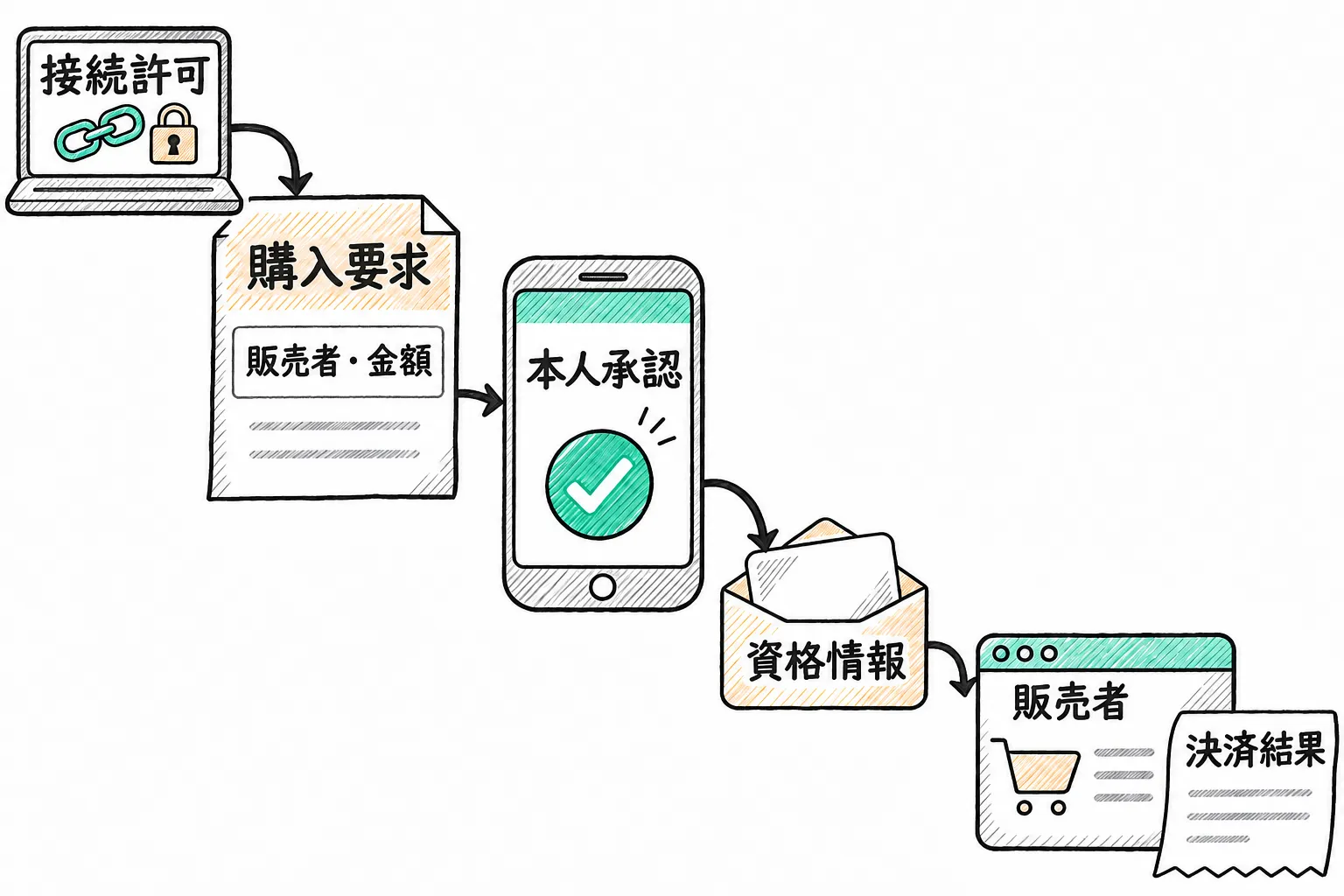
Permission to connect an application to a Link account is separate from approval to buy a book from Merchant A for $35. The connection allows the application to request purchases, and approval for each purchase allows it to retrieve a credential for the approved terms. Even after obtaining a credential, the application does not mark the purchase as paid until it verifies the merchant's payment result.
1. Choose a Connection Method
OAuth allows buyers to grant an application access to Link. If a business provides a purchase feature through its own service, the service manages a separate connection for each buyer. If the agent runs on the user's device, it can use the Link CLI, which includes connection functionality.
With either approach, the buyer checks the application name and the scope of the information being shared. Read access to transaction history or balances is separate from permission to make payments. An application should distinguish sharing information needed for purchases from also authorizing access to financial information.
2. The Buyer Authorizes the Application Connection
The buyer opens the Link page provided by the application, checks its name and requested permissions, and authorizes the connection. When connecting manually from a device, the buyer opens the verification URL and enters the short verification phrase displayed for the same connection. When connecting through a hosted service, the buyer proceeds through Link's authorization screen and returns to the service.
This operation authorizes the application to connect to the buyer's Link account. It does not yet approve the book purchase or the $35 payment.
3. Create a $35 Spend Request
The agent's application confirms the purchase of one book from Merchant A and the $35 order total, then creates a spend request in Link. If the merchant uses a standard card entry form, the application selects the virtual card type, card. The type is chosen when the request is created; it is not treated as something that can be switched freely within the same request after approval.
| Item the buyer verifies | Value in this example |
|---|---|
| Product | One book |
| Merchant | Merchant A |
| Total | $35 |
| Currency | USD |
| Payment method | Payment method selected in Link |
| Credential type | Virtual card (card) |
The application also provides information about what is being purchased and why the purchase fulfills the buyer's request. The buyer should be able to verify not only the merchant and the amount but also the details of the book and that the total includes shipping and taxes.
The ID of the payment method selected in Link refers to a payment method in that buyer's wallet. It refers to a different resource from the ID of a PaymentMethod object, which represents payment method information in standard Stripe payments. The application should not assume that a Link payment method ID can be used directly as the ID for issuing a Stripe SPT.
4. The Buyer Approves This Purchase
The application associates the spend request with its own order and asks the buyer to approve that request. On the Link web page or app, the buyer reviews Merchant A, the $35 total, the reason for the purchase, and the payment method, then chooses whether to approve or decline. Unlike the application name confirmation during account connection, this screen asks the buyer to decide whether to purchase a specific item at a specific price.
The application does not proceed merely because approval has been requested; it waits for the result of the same spend request. The standard approval window is 30 minutes from the request for approval. If the waiting application's connection is interrupted, the application checks the same request rather than treating the interruption alone as a denial or expiration.
5. Retrieve the Credential and Verify the Payment Result
Once the spend request reaches approved, the application retrieves the credential from the approved request immediately before using it. For a virtual card, the execution application enters the credential into the merchant's card form and proceeds with the purchase. The request ID itself is not a card number.
The identifiers book-001, sr_example_001, and credential-A below are illustrative names used to distinguish the records. They are not actual issued IDs or card numbers, nor are they records of an executed API call or purchase. The example associates three records after the buyer has approved the purchase.
| Item | Application order | Link spend request | Retrieved credential |
|---|---|---|---|
| Illustrative name | book-001 |
sr_example_001 |
credential-A |
| Purpose | One book | Purchase of one book | Payment for this purchase |
| Merchant | Merchant A | Merchant A | Used at Merchant A |
| Amount | $35 total | $35 purchase amount | Within the approved purchase scope |
| Type | — | card |
Virtual card |
| Status | Awaiting payment confirmation | approved |
Available for retrieval |
The currency is USD. The application manages its order and asks Link to create the spend request. Link returns the request status and credential, and the application checks those results. credential-A is only a reference name; the actual payment-capable number or token is not shown.
The following table tracks one possible progression from pending approval to success using the same spend request. submitted indicates that the agent has received the virtual card credential after approval. The application checks this separately from the merchant's payment success.
| Purchase progress | Link spend request | Merchant payment | Application order |
|---|---|---|---|
| Approval requested | pending_approval |
Not started | Awaiting approval |
| Buyer approved | approved |
Not started | Awaiting payment confirmation |
| Card credential received | submitted |
Success not confirmed | Awaiting payment confirmation |
| Success event verified | succeeded |
Payment succeeded | Paid |
The application order status names are specific to this application's design. Rather than arbitrarily changing the spend request's status, the application reflects results verified with Link and the merchant in its own order record. The table describes one card purchase; it does not imply that every credential type necessarily follows the same sequence or timing.
Shipment of the book proceeds only after the merchant confirms successful payment. Distinguishing buyer approval, credential retrieval, and successful payment helps prevent shipment before payment or repeated purchases when the outcome is unknown. Delivery completion is checked separately against the merchant's order result.
In addition to standard per-purchase approval, a path exists that follows approval policies set in advance by the buyer. It can approve permitted operations within a per-purchase limit, but is offered as a beta limited to certain connections, so its availability requirements should be checked. This example does not rely on that path; the buyer confirms each purchase individually.
- 購入要求を作成する
アカウント接続後、実行アプリが販売者A、3500セント、USD、購入理由を送ります。
- 同じ要求への承認を依頼する
要求IDを注文へ対応付け、その要求への承認を依頼します。
Linkが承認URLを返します。 - 購入者へURLを案内する
購入者は案内されたLinkの画面で販売者と合計、購入理由、決済手段を確認します。
- 購入者が今回の購入を承認する
接続許可とは別に、購入者本人が$35の購入を承認します。
- 同じ購入要求の承認結果を取得する
実行アプリは同じ要求IDを取得し、approvedを確認します。
承認依頼を送っただけでは進みません。 - 資格情報を取得する
承認後、選んだ種類の資格情報を取得します。
取得できたことと販売者での支払い成功は別です。
Payment Paths Based on Merchant Support
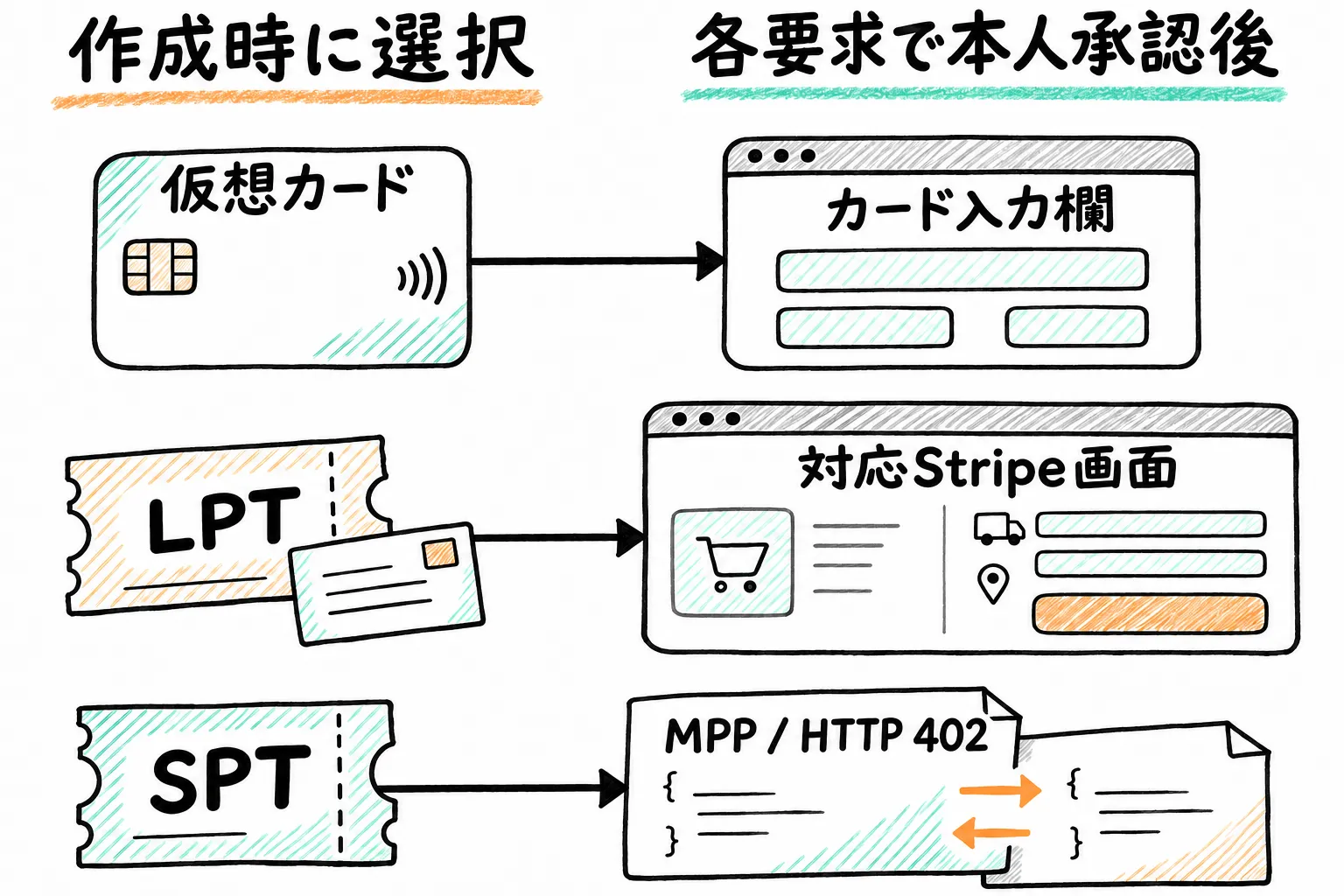
Before creating a spend request, the application determines which payment methods the merchant accepts. It chooses a credential suitable for either a card entry form or a supported checkout page or API, then requests the buyer's approval for that credential type. The process does not retrieve all three credential types together from one approved request.
Virtual Cards
If the merchant has a standard card entry form, the application uses a virtual card. It enters the number and expiration date obtained after approval into that form. This can work on a standard web checkout page even if the merchant has not integrated Stripe or Link.
The application receives credentials issued for the current purchase, not the original card number the buyer stored in Link. Since the issued number can also be used for payment, the execution application handles it without including it in model-generated text or user-facing logs. Before using it, the application checks the validity periods of the spend request and credential and proceeds while both are valid.
Link Pay Token
An LPT can be used on supported Stripe checkout pages that integrate Link. Rather than entering a card number, the application passes a token to facilitate payment and the entry of billing and shipping addresses. It verifies that the checkout supports this mechanism before creating a spend request of this type.
After passing the LPT, the application still verifies the selected payment method and purchase details before proceeding to the merchant's purchase confirmation. A checkout page is not assumed to support LPT merely because it displays a Link logo. If it accepts card entry, the application can choose the virtual card path.
Shared Payment Token
An SPT can be used when the merchant accepts Stripe payments through the Machine Payments Protocol (MPP). MPP allows a merchant's API to present payment terms and a caller to access the API by including payment information that satisfies those terms. The agent uses the amount and currency presented by the same merchant to create the spend request and passes the SPT after the buyer approves it.
Here too, receiving an SPT and completing payment to the merchant are separate stages. Obtaining the credential alone does not establish that the purchase succeeded.
| How the SPT is obtained | Interaction with the buyer | What the merchant receives |
|---|---|---|
| Issued through standard Stripe | The buyer selects a payment method on the application's checkout page | SPT |
| Obtained through Link Agent Wallet | The buyer connects Link and approves a spend request | SPT |
The wallet is a service that includes account connection and purchase approval, while the SPT is the credential passed to the merchant. The difference is who provides the buyer interaction before issuance; they are not mutually exclusive payment methods. The standard issuance path is described in the article on Stripe Link and Shared Payment Tokens.
A PaymentIntent is the record used to track an individual payment on the merchant's side. The Link spend request, Stripe SPT, and merchant payment record are separate records even when they relate to the same purchase. The following example concerns a purchase using an SPT, rather than the virtual card purchase described earlier.
| Record | Example status | What the status establishes |
|---|---|---|
| Link spend request | approved |
The selected credential can be retrieved |
| Stripe SPT | active |
The SPT can be used for payment |
| Merchant PaymentIntent | succeeded |
The merchant's payment succeeded |
The table does not describe a sequence of changes to a single status. The application checks the merchant's result rather than marking the order as paid solely because the spend request is approved or the SPT is active.
Recovering from Pending Approval and Failures
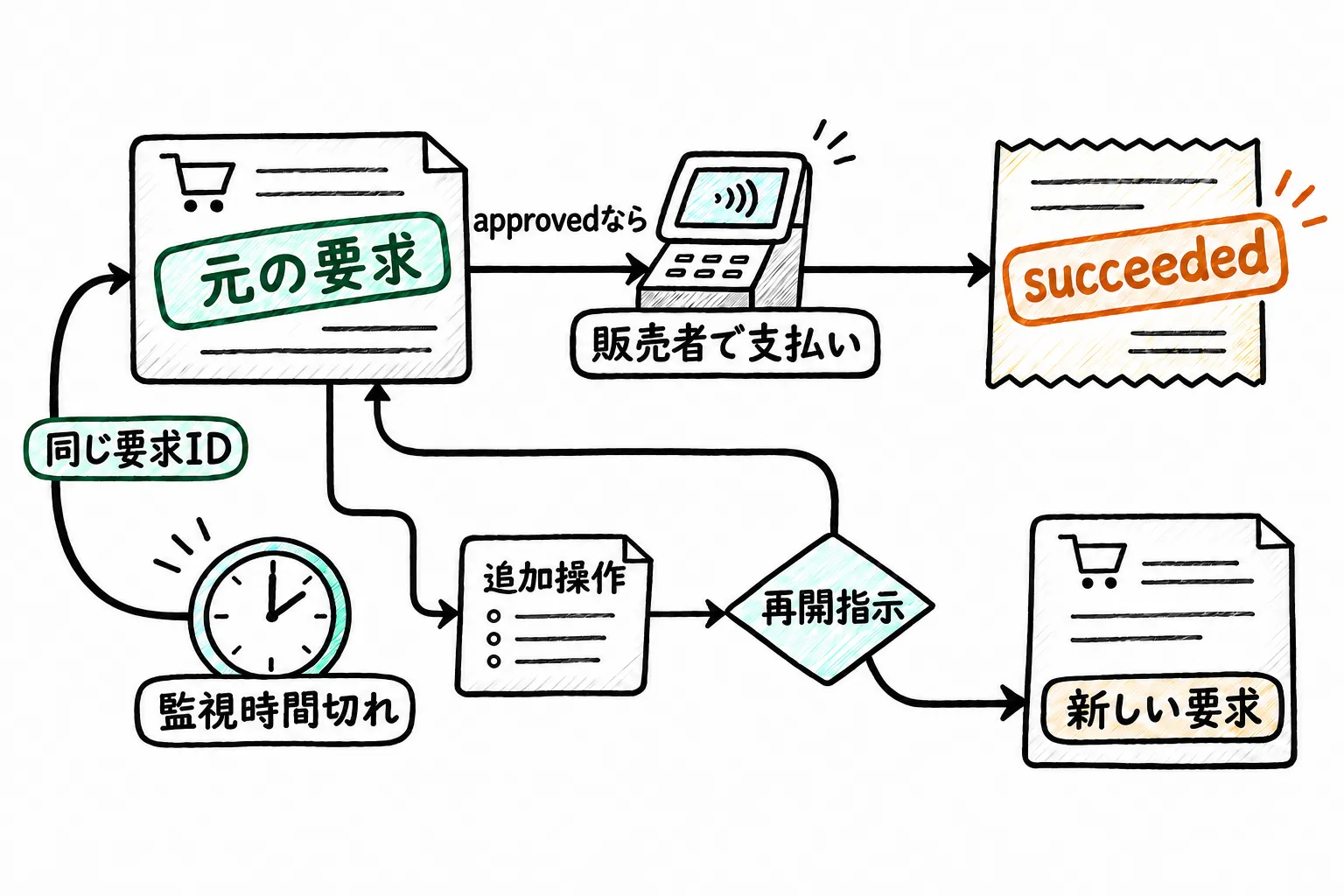
While waiting for a buyer's action or after a communication interruption, the application checks the saved spend request. Completion of the status-check operation is distinct from successful buyer approval or payment. Recreating a purchase unconditionally can duplicate requests or purchases, so the application first determines what it is waiting for.
Branching on Request Status
Link returns the following statuses to indicate how far a spend request has progressed. In particular, distinguish approved, which allows the application to obtain a credential, from succeeded, which indicates that Link has verified a successful payment.
| Status | Meaning | Application action |
|---|---|---|
created |
Request created | Request approval |
pending_approval |
Awaiting the buyer's decision | Check the same request |
requires_action |
Additional buyer action required | Check the returned instructions and recovery method |
approved |
Credential available for retrieval | Proceed with the merchant purchase |
denied |
Buyer declined | Stop the purchase |
expired |
Approval or usage period expired | Create a new request if continuing the purchase |
canceled |
Request canceled | Stop the current purchase |
submitted |
Card credential received after approval | Check separately from the merchant's result |
succeeded |
Link confirmed a successful payment | Reflect the result in the order |
failed |
Request ended in failure | Check the reason and recovery method |
While awaiting approval, the application checks the same request ID. The diagram illustrates one path toward buyer approval rather than covering all 10 statuses. Denial is shown as a separate dashed path that is not taken in this example.
- 承認を依頼して待つ
この例はpending_approvalから始めます。
同じ購入要求のIDを注文へ保存しておきます。 - 同じIDの状態を確認する
まだ承認待ちなら同じ要求を確認します。
監視コマンドの時間切れだけで別の要求を作りません。 - 本人の承認を確認する
approvedで資格情報を取得できます。
ここは支払い完了ではなく、次に販売者で購入を進める段階です。
If the buyer declines, the application stops the purchase. If the buyer asks to purchase the item again, it is treated as a new request and verified again. If payment succeeded and only the delivery status is unknown, the application investigates the merchant's order result rather than buying the same book again.
When to Check the Same Request and When to Recreate It
When additional buyer verification is required, the application communicates the returned instructions to the buyer. If a URL is returned for opening a screen, the application uses it; otherwise, it follows the returned message to explain the required action. The recovery method is determined by the instructions returned for that specific request, not merely by the name of the verification step.
| Returned recovery method | How to proceed |
|---|---|
| Continue the same request | Guide the buyer through the action and check the original request |
| Create a new request | Correct the specified purchase terms and recreate the request |
| Create a new request after an action | Recreate the request after the buyer completes verification or configuration |
For example, if the instructions indicate that the same request should be continued, the application waits until the buyer completes the action for sr_example_001 and then checks that request. If the instructions call for a new request, the application checks the original request's outcome and the required corrections before proceeding with another one. A communication timeout alone does not justify creating a new request.
The standard 30-minute approval window, the spend request's own usage deadline, and the issued credential's expiration are separate. An LPT is valid for up to 30 minutes after retrieval or until the spend request expires, whichever comes first. This deadline is not treated as a common expiration for virtual cards or SPTs; the application checks the respective returned deadlines.
A single-use SPT cannot be reused after it has been consumed. If a payment fails and a new spend request is needed, the application first checks the original request and the merchant's result. Canceling a spend request is also different from refunding a completed payment. Refunds and order cancellations are verified on the merchant's side.
Integration Requirements and Application Responsibilities
Regional availability applies to the buyer's Link account. The FAQ checked on November 18, 2026 listed users in the United States, Canada, Japan, Mexico, Singapore, and Australia as eligible. However, the overview page and the official hosted integration guide described support for buyers in the United States and Canada. Because these official pages differ, the latest requirements for the intended integration method should be checked.
Businesses and the merchants receiving purchases can be located outside the supported buyer countries. Standard SPTs also have their own regional eligibility requirements, which should be checked separately from wallet availability.
Published spending limits should also be checked before making purchases. The following values are from the official CLI documentation as checked on November 18, 2026.
| Item | Published limit |
|---|---|
| Per spend request | $500 |
| Daily spending | $5,000 |
| Spending over the last 30 days | $20,000 |
| Concurrent active spend requests | 30 |
| Concurrent approved spend requests | 10 |
The application also verifies the buyer's individual limits and remaining allowance, rather than proceeding based only on the amounts in the published table. If the total for the book changes from $35 to $40, the application presents the updated terms to the buyer and rechecks the scope of approval.
What the Application Manages
An application operating as a hosted service manages each buyer's Link connection and the spend requests associated with its orders. When using the Link CLI on a device, it likewise checks that the current order, the request awaiting approval, and the merchant's result are associated. It separates the model's product selection from the execution application's handling of payment information.
For recurring payments, the buyer authorizes a spending limit for each billing period. When approving a monthly limit, the amount and interval should also be included in the purchase reason. The merchant schedules billing; the agent does not repeatedly create the same spend request every month.
To stop a subscription, cancel it on the merchant's side and also revoke the Link credential. Revoking the credential alone is not treated as terminating the subscription agreement with the merchant.
Summary
Link Agent Wallet provides agents with payment credentials through a buyer connection and approval of individual purchases. The purchase proceeds while buyer approval, credential retrieval, and successful merchant payment are verified through their respective records.
The relationship between the wallet and an SPT is that of a service encompassing purchase approval and a credential that can be obtained as a result. The application chooses the credential type that suits the merchant's payment method and, after a failure or timeout, determines what to do based on the original spend request and the returned recovery instructions.
The official Link documentation describes spend requests, approval, and payment paths.
The official Stripe documentation describes the role of standard SPTs and merchant payment processing.
The official repository documents the scope and change history of the publicly available tools.
