Introduction
Hi, I'm cardene, a software engineer and technical writer focused on blockchain and AI.
I've also authored Japanese technical books on specification-driven development with LLMs and decentralized application (DApp) development.

I also build and publish a variety of tools, libraries, and open-source projects.
This article explains Link Pay Token, which enables AI agents to pay at compatible Stripe checkout pages.
Even when shoppers delegate purchases to an agent, they still need to decide what to buy and how much to spend. Using a $35 book purchase as an example, we will follow the information the buyer reviews and the data passed to checkout after approval.
The original figures and interactive diagram are retained; their labels may be in Japanese.
What Is a Link Pay Token?
A Link Pay Token (LPT) is a token that an AI agent can use to pay at a compatible Stripe checkout page.
Once the buyer approves a purchase, the agent-side application can obtain an LPT and pass it to the merchant's checkout.
Instead of filling in card details field by field, it uses the token, which also populates billing and shipping information.
The underlying service, Link, is Stripe's wallet for saving payment methods and addresses and reusing them for future purchases.
In a conventional Link checkout, the buyer selects a card on the merchant's page and proceeds with payment.
When delegating the purchase to an agent, the application uses Link Agent Wallet to obtain the buyer's permission to connect, request purchase approval, and obtain an LPT for a compatible checkout.
Card details and tokens returned by the Wallet that can be used for payment are called payment credentials. An LPT is one type of payment credential. The Wallet connects buyer approval to credential retrieval, while the execution application passes the LPT to the merchant's checkout.
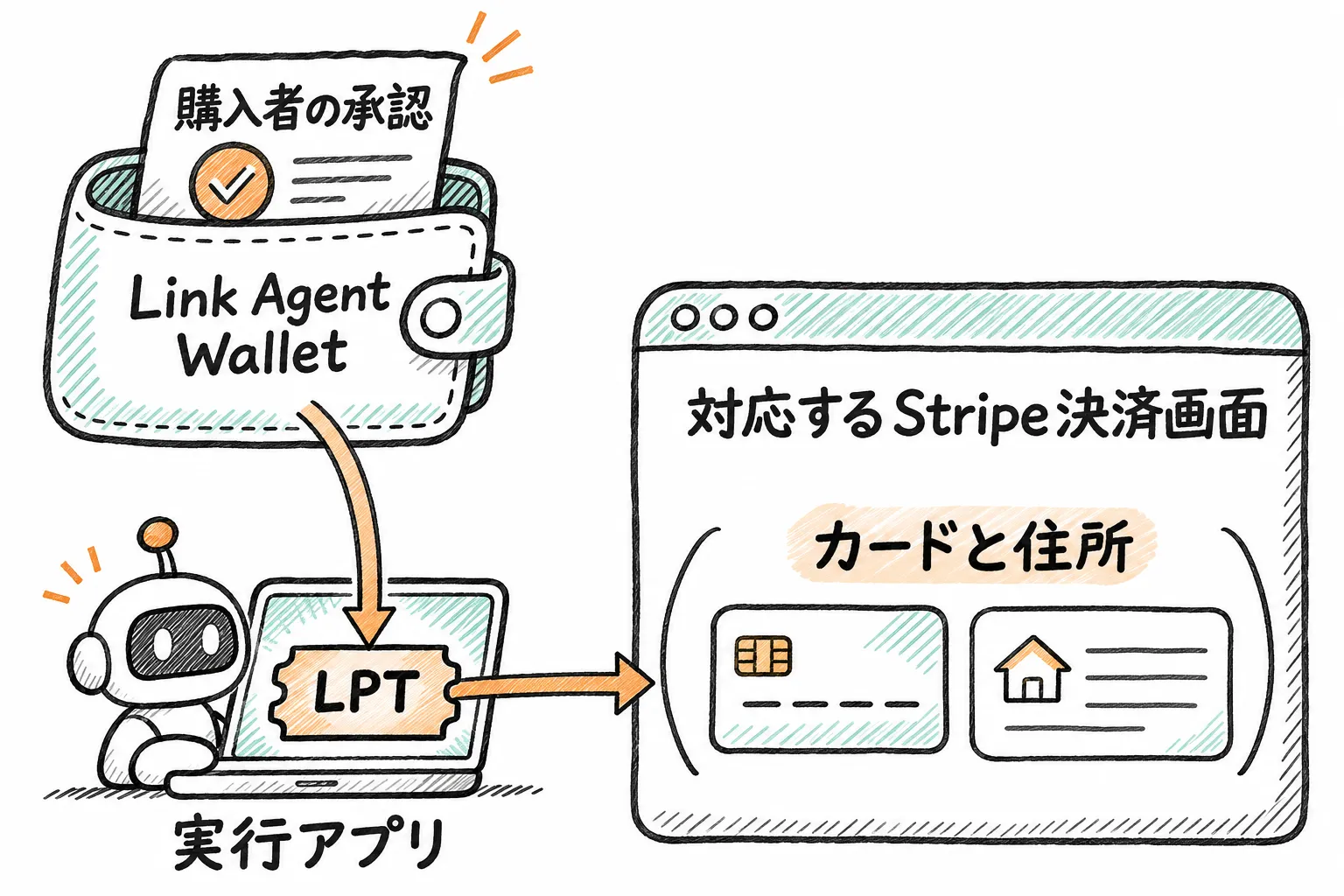
Consider buying one book from Merchant A for $35, including shipping and tax. The buyer approves the purchase in Link, and the agent operates the merchant's checkout using the LPT. Even after the page accepts the LPT, the purchase still needs to be confirmed. We will therefore distinguish buyer approval, token acceptance, and successful payment.
Compatible Checkouts and the Purchase Flow
Before creating a purchase request, the agent-side application checks whether the merchant's checkout supports LPT. Once compatibility is established, it uses the merchant identifier obtained from that page to request the purchase through Link. The presence of a Link logo alone does not establish LPT compatibility.
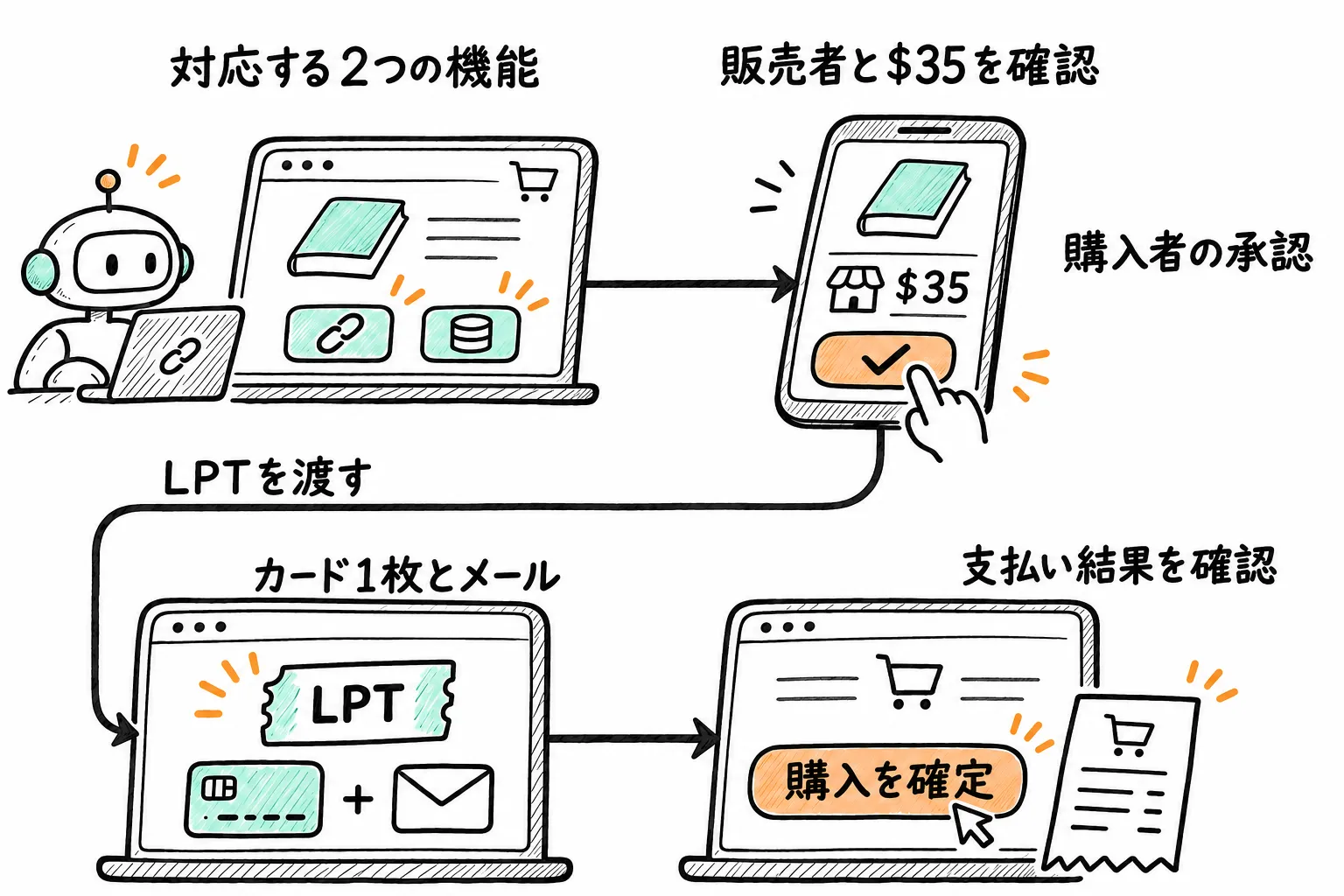
1. Identify the Compatible Checkout and Merchant
WebMCP enables web pages to expose actions to agents.
An LPT-compatible checkout provides an action for reading the merchant's Stripe account and another for passing the LPT.
The application first verifies that both actions are available, then retrieves the merchant's account ID to identify the recipient of the payment.
This ID refers to the merchant receiving payment, not to the buyer's Link account where cards are stored. If either action is unavailable or the merchant cannot be identified, the application does not create an LPT request. Instead, it checks whether ordinary card input fields can be used. The same verified checkout and merchant ID are used throughout the purchase.
2. Check Connection Permission and Purchase Conditions
The buyer authorizes the agent-side application to connect to their Link account. Allowing an application to connect and approving a $35 payment for this book are separate decisions. Even for an already-connected account, the application checks the merchant and order total again.
If the checkout displays a total of $35 in USD, the purchase request uses that amount and currency. The application checks the total including shipping and tax rather than requesting approval for the product's base price alone. It also checks the buyer's spending limits and authentication requirements, resolving any issues before proceeding.
3. Create a Purchase Request and Ask for Approval
A spend request records what the application intends to purchase and the result of the buyer's approval in Link.
The application uses the merchant ID obtained from checkout and the current purchase conditions to create a request for an LPT.
Link identifies the recipient using the merchant ID rather than relying solely on a display name supplied by the application.
| Information the buyer reviews | Example |
|---|---|
| Item | One book |
| Merchant | Merchant A |
| Order total | $35 |
| Currency | USD |
| Reason | Purchase the book the buyer asked the agent to find |
| Credential type | LPT |
After creating the request, the application directs the buyer to its approval page. The buyer reviews the purchase and payment method in the Link website or app and chooses whether to approve or reject it. The standard approval window is 30 minutes from the request, and the application waits for the outcome of that same request.
4. Retrieve the LPT After Approval
When the spend request reaches approved, meaning credentials can be retrieved, the application obtains the LPT just before using it.
Merely directing the buyer to the approval page does not establish that they have authorized the purchase.
If the request is rejected or expires, the application checks its outcome rather than proceeding to retrieve a token.
The retrieved LPT is passed within the execution application that operates the merchant's page. The application does not return the token to the model selecting products or include its actual value in conversations or logs. Keeping the token away from the model is a responsibility of the application; connecting to Link alone does not guarantee this separation.
5. Pass the Token to Checkout and Check the Display
The execution application passes the LPT to the checkout where it verified Merchant A. After the page accepts the token, the application waits for the buyer's email address and one saved card to appear. It verifies that the card and billing and shipping details are populated before proceeding to purchase confirmation.
A response indicating that the token was accepted means the payment input has been prepared. Because purchase confirmation is still required, the application does not record LPT acceptance as a successful payment. If the page changes to a different merchant or order, the application verifies the recipient and purchase conditions again.
6. Confirm the Purchase and Check the Outcome
After checking the payment method and purchase details, the application confirms the purchase on the merchant's page. It then reads the merchant's payment result and associates it with the order for the book. If further action by the buyer is required, the application conveys the returned instructions before resuming.
The order is marked paid only after the application confirms that payment succeeded at the merchant. Buyer approval or LPT retrieval alone does not justify proceeding to shipment. Delivery completion is also verified separately through the merchant's order information. If the result is unknown, the application checks the existing order and spend request before continuing to avoid purchasing the same book twice.
Purchase Records and Payment Results
The order, spend request, and LPT are separate data associated with the same purchase. The application's order tracks the items and delivery, while Link's spend request tracks buyer approval and purchase outcomes. The LPT is a credential passed to checkout, so the spend request ID itself cannot be used as the token.
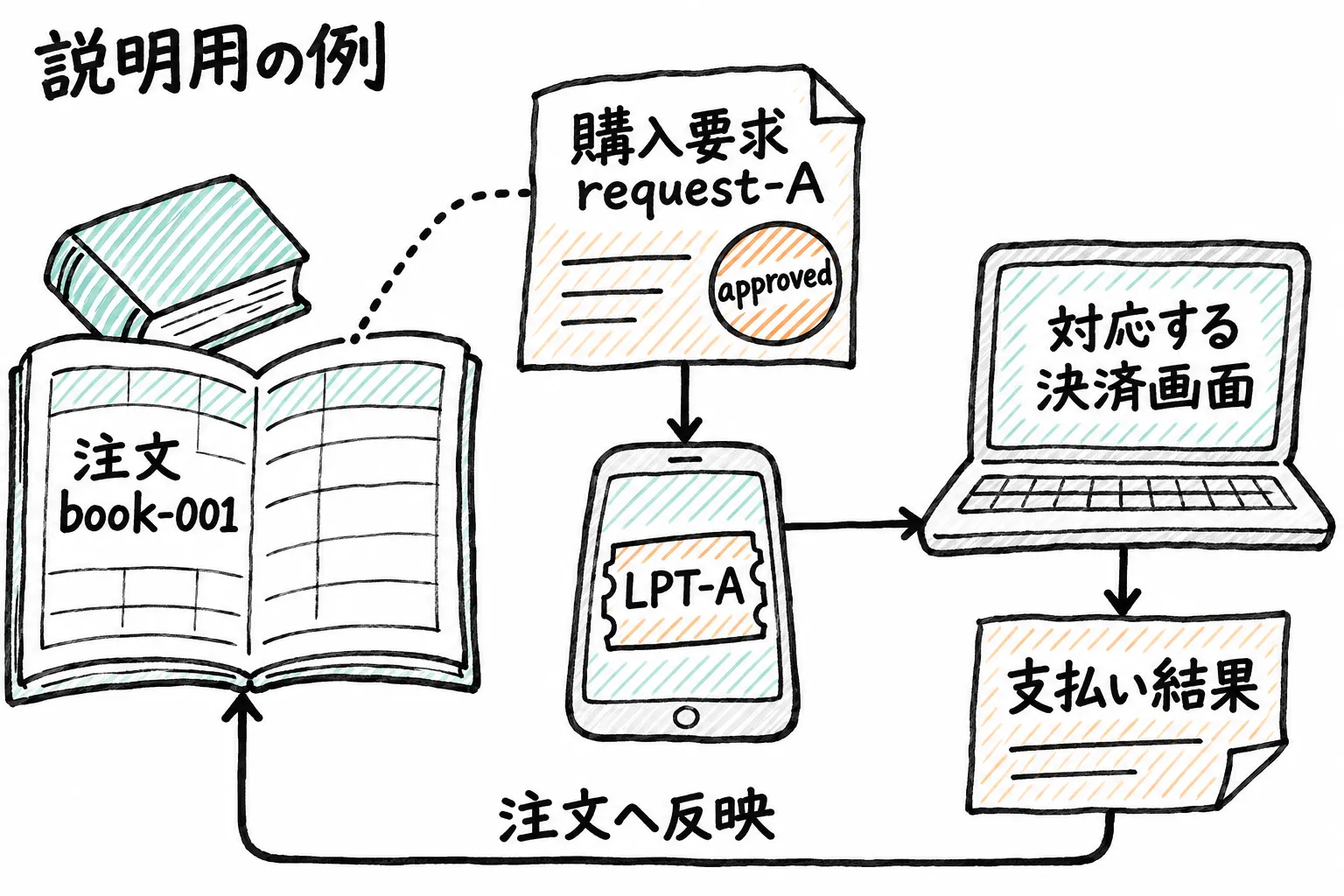
The following identifiers, book-001, request-A, and LPT-A, are fictional data illustrating the relationship.
They are not actual API responses or purchase results, and no usable payment token is shown.
| Field | Application order | Link spend request | LPT |
|---|---|---|---|
| Illustrative name | book-001 |
request-A |
LPT-A |
| Merchant | Merchant A | Merchant ID obtained from checkout | Passed to the same merchant's checkout |
| Amount | Total $35 | Purchase amount $35 | Used for the approved purchase |
| Type | Order for one book | link_pay_token |
Payment token |
| After approval | Awaiting payment confirmation | approved |
Can be retrieved and used |
The application stores the association between book-001 and request-A so it can identify the same purchase after an interruption.
LPT-A is an illustrative token reference, not an example of writing the real token value into the order.
The merchant's account ID must also be distinguished from the buyer's account and the order ID.
When recording purchase progress, the application distinguishes Link's official statuses from its own order statuses. The application can observe that checkout accepted the LPT, but it should not assume that this necessarily causes the Link spend request to enter a particular status.
| Observed event | Information from Link or checkout | Example application order status |
|---|---|---|
| Buyer approval requested | pending_approval |
Awaiting approval |
| Buyer approves | approved |
Preparing payment |
| Checkout accepts LPT | One card and email address displayed | Awaiting purchase confirmation |
| Merchant confirms successful payment | Merchant's success result | Paid |
A Link spend request reaches succeeded when Link receives a successful payment event.
The merchant's result, the event received by Link, and the application's order update are separate records.
Rather than assuming identical names or timing, the application updates its order based on the outcomes it has verified.
- 承認済みの要求からLPTを取得する
実行アプリが同じ購入要求のapprovedを確認して、使用直前にLPTを取得します。
- 確認した販売者の画面へ渡す
販売者Aの対応する決済画面へLPTを渡します。
トークンの実値はモデルへ戻しません。 - カードとメールの表示を確認する
カード1件とメールの表示を待ちます。
受付できたことと支払い成功は別です。 - 購入を確定して結果を確認する
実行アプリが購入を確定し、販売者の成功結果を確認してから注文を支払済みにします。
Expiration and Recovery
An LPT is usable until the earlier of 30 minutes after retrieval or the spend request's expiration. The 30-minute window for buyer approval and the validity period of a retrieved LPT are measured separately. If time has passed since approval, the application checks the request status and expiry rather than sending an old token.
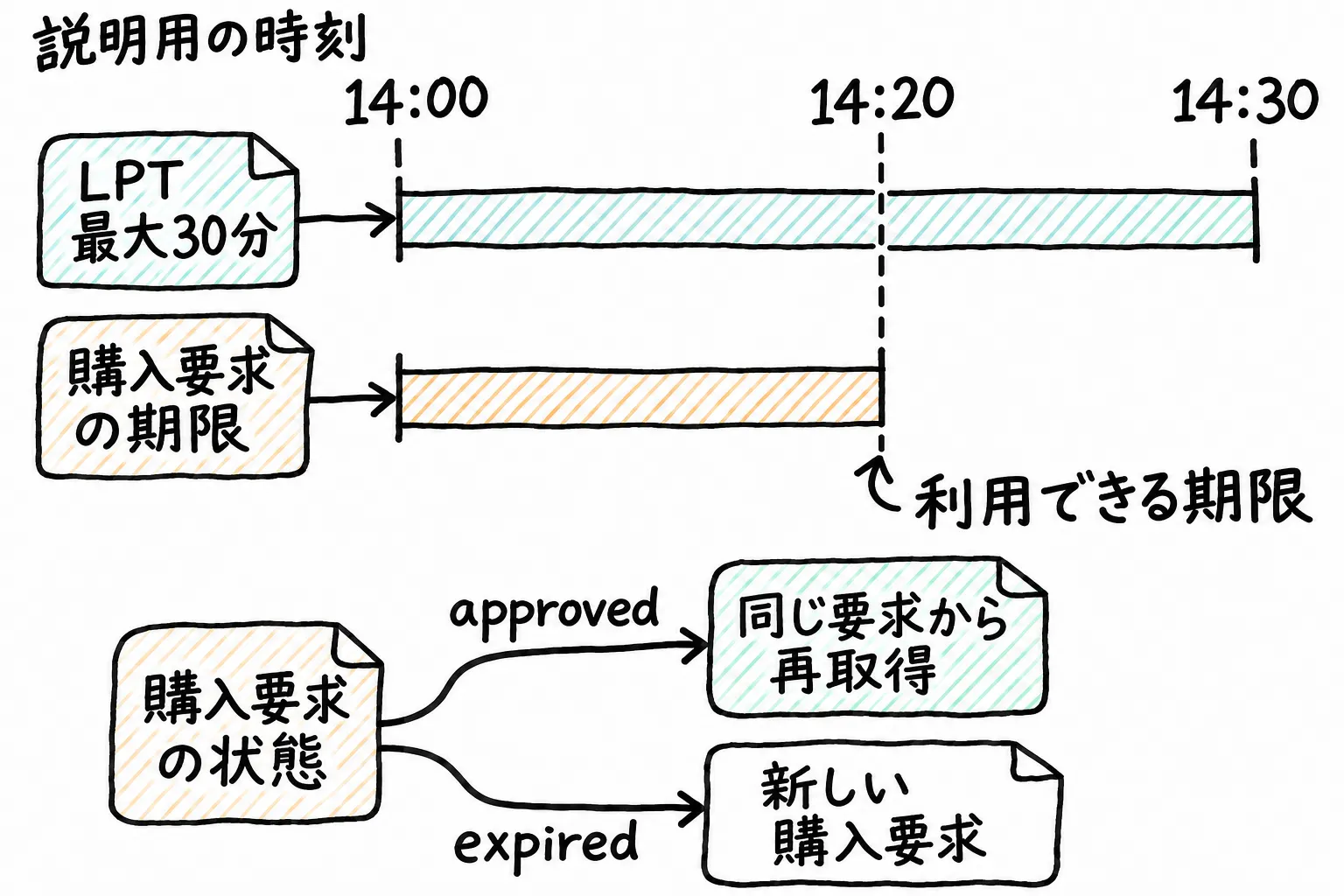
| Time to check | Illustrative example | Decision |
|---|---|---|
| Time the LPT was retrieved | 14:00 | Maximum usable time is 14:30 |
| Spend request expiration | 14:20 | In this case, the LPT also expires at 14:20 |
If the spend request is still approved, the application can retrieve a new token to replace an expired LPT.
If the request itself has expired, the application checks whether the buyer wants to continue and creates a new request.
If the merchant's payment result is unknown, it first investigates the existing purchase and does not retry an already-paid order.
| What happened | Recovery action |
|---|---|
| Compatible actions or merchant ID cannot be verified | Cancel any existing request and check the card input route |
| Token has not reached checkout | Check the handoff of the retrieved LPT |
| Only the LPT has expired | Retrieve a new token from the same approved request |
| Spend request has expired | Confirm the buyer's intention and create a new request |
| Additional buyer action is required | Follow the instructions returned with the request |
| Merchant's payment result is unknown | Investigate the original order and payment result |
For requires_action, the returned instructions also determine whether to continue the same request or create a new one.
The application does not choose a fixed recovery path solely because an authentication step is involved; it tells the buyer what action is required.
A network interruption alone does not establish rejection or failure. The application checks the original request before resuming.
Eligibility and Other Payment Routes
Choosing LPT requires that the buyer meets Link's eligibility conditions and that the application can verify LPT actions on the merchant's checkout. If the checkout is incompatible, the application can consider a virtual card for conventional card input fields. The credential type is selected according to how the merchant accepts payments; an unavailable LPT does not mean the application can freely switch credential types within the same request.
For merchants that accept programmatic payment rather than checkout-page interaction, a Shared Payment Token (SPT) can authorize the merchant to use a payment method.
The Wallet route for retrieving an SPT is used when the merchant accepts Stripe payments through the Machine Payments Protocol (MPP).
MPP lets a merchant API return payment conditions and the calling application supply a matching credential.
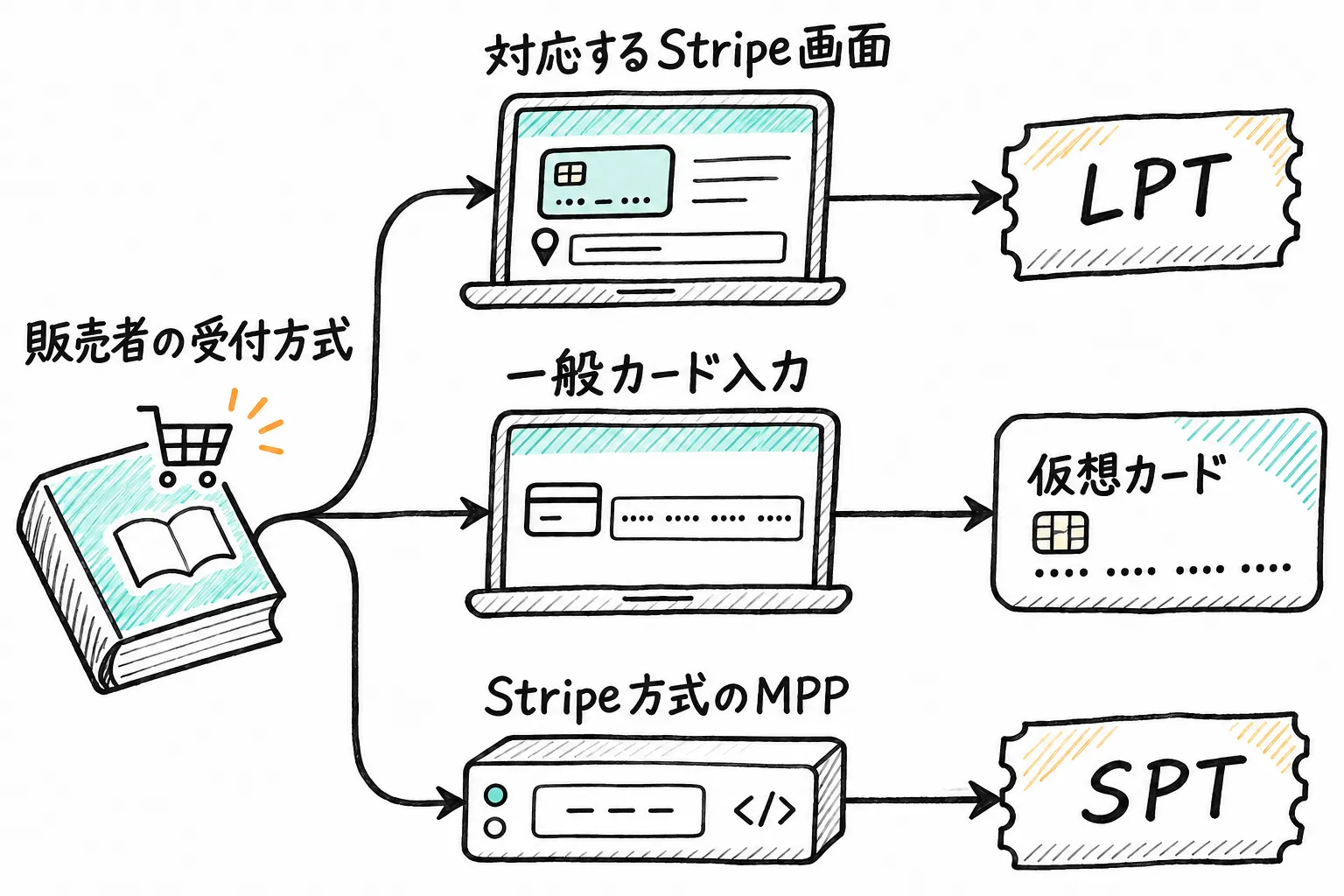
| Merchant acceptance method | Credential retrieved from the Wallet |
|---|---|
| LPT-compatible Stripe checkout | LPT |
| Conventional card input fields | Virtual card |
| Stripe payments through MPP | SPT |
LPT and SPT are not credentials retrieved together for the same spend request. The application first determines the merchant's acceptance method, then chooses the credential type for that purchase. The Link Agent Wallet article covers connection and approval in more detail.
LPT does not support test mode, and the official guide describes it as a route for issuing credentials usable for real payments. The test facilities available for virtual cards or SPT should not be assumed to work for LPT. The $35 example throughout this article is illustrative.
The official materials differ in their descriptions of eligible regions. The FAQ reviewed on November 18, 2026 listed users in six countries, including Japan. However, the overview and the guide for first-party services identified buyers in the US and Canada. Check the current conditions applicable to the integration you plan to use rather than assuming every connection method is available in Japan.
LPT can also be used for recurring payments, but the spend request specifies the spending limit per period and the cadence, and the buyer approves those conditions. Even when approving a monthly spending limit, the merchant schedules the charges. Retrieving an LPT and scheduling recurring charges are separate responsibilities.
Conclusion
Link Pay Token connects a buyer-approved purchase to a compatible Stripe checkout. The flow moves from compatibility checks to buyer approval, LPT handoff, and purchase confirmation. The application updates the order after verifying that payment succeeded at the merchant. If an expiration or additional action interrupts the flow, the application checks the same spend request and follows the returned recovery instructions before continuing.
The official Link documentation describes compatible checkout pages and the spend request mechanism.