Introduction
Hi, I'm cardene, a software engineer and technical writer focused on blockchain and AI.
I've also authored Japanese technical books on specification-driven development with LLMs and decentralized application (DApp) development.

I also build and publish a variety of tools, libraries, and open-source projects.
This article explains MPP, a protocol that enables applications to pay for API usage.
Using a paid report API as an example, we will examine how an application checks the price, makes a payment, receives the result, enforces a budget, and handles failures.
What Is MPP?
MPP is a common protocol for presenting API usage fees and verifying the payment credentials returned by an application.
Its full name is Machine Payments Protocol.
It defines how consumer applications and API providers exchange payment terms, credentials, and receipts.
When an application or AI agent uses a paid API, it incorporates price checks and payment authorization into its API calls. Instead of implementing a separate payment format for each endpoint, both parties can use the common format supported by MPP. The application checks the quoted amount against its budget, and the API provider verifies payment before granting access.
For example, a paid report API responds to a request with HTTP 402 to indicate that payment is required.
If the application accepts the terms, it retries the same report request with proof of payment.
The provider verifies that proof and returns the report for a request whose payment it has accepted.
In this exchange, the application paying the fee is the Client, and the API quoting the fee is the Server.
The payment network records transactions and confirms transfers.
Handling API requests and moving funds on the payment network are separate responsibilities, even within the same service.
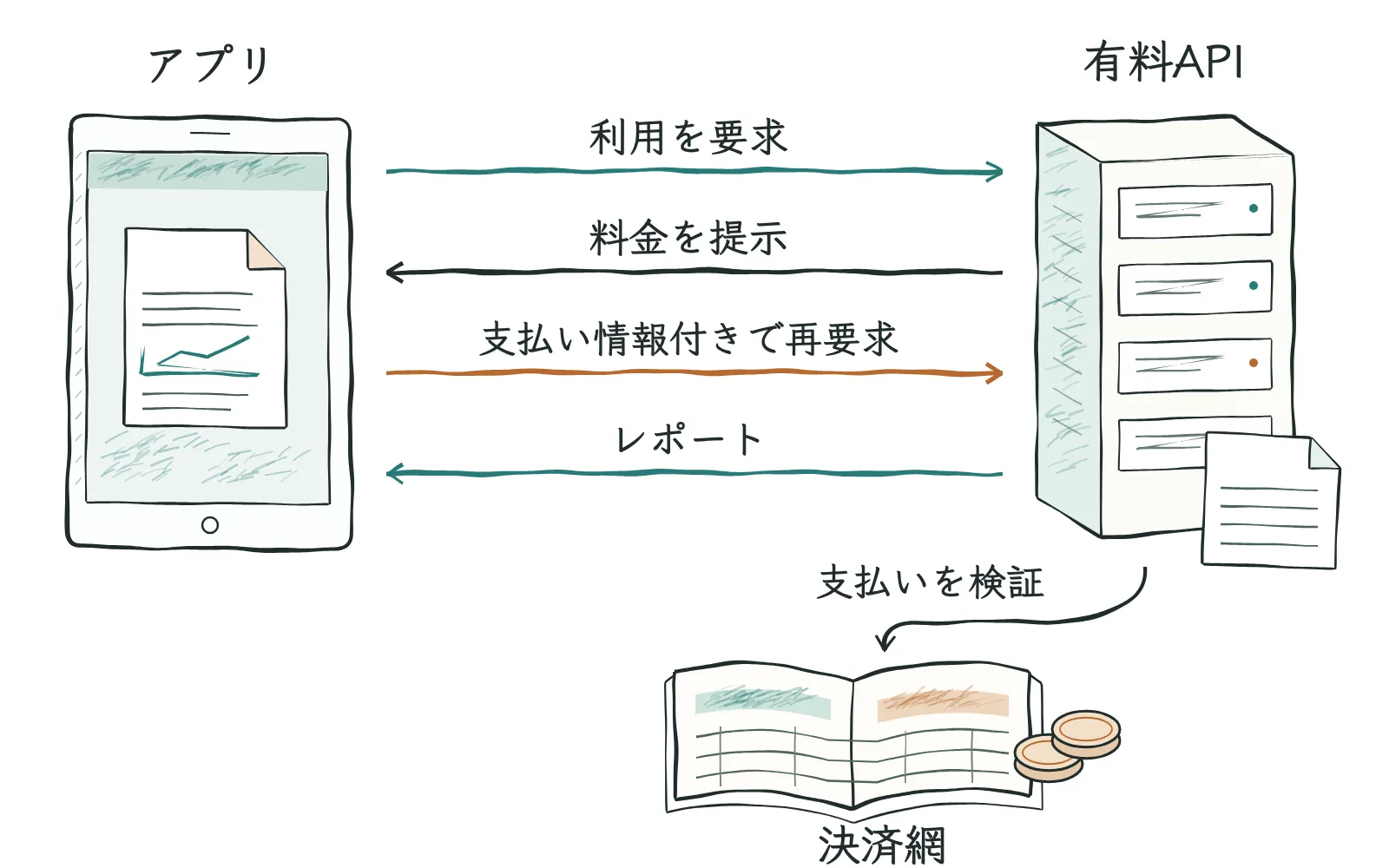
This example uses Tempo, a payment network that records and verifies transactions.
The payment currency is a token called OUSD, whose amounts are represented in atomic units with six decimal places.
Signing creates data that allows another party to verify approval of the payment.
For example, if an API costs 0.01 OUSD per call, the application can decide whether to authorize that individual payment.
If an AI agent uses the API repeatedly, the application also checks the total budget authorized by the user.
Being able to make one payment is not the same as being authorized to make an unlimited number of payments.
The common HTTP authentication scheme is defined in the work-in-progress specification draft-httpauth-payment-01.
The proof format and settlement procedure for each payment network are defined by its payment method specification.
The revision number of this document and the SDK version are separate; the common HTTP scheme does not require the document version as a field.
The original diagrams, interactive example, and code samples below retain their Japanese labels and placeholders.
mpp-payment report_api as "料金と予算を変えてAPIを利用する" [version: 1, note: "署名前に予算を確認し、結果が不明な支払いは予約を残します。"]

service report as "レポートAPI" [price: 10000, prices: "5000|10000|30000", currency: OUSD, method: tempo, intent: charge]
policy app_budget as "アプリの支払い許可" [total: 20000, totals: "10000|20000|40000", per_call: 10000, expires: 60]

party application as "アプリ" [role: app, note: "要求を送信"]
party signing as "署名担当" [role: signer, note: "条件を検査"]
party provider as "有料API" [role: api, note: "料金を提示"]

scenario ordinary as "通常" [outcome: normal]
scenario too_late as "期限切れ" [outcome: expired]
scenario bad_proof as "証明を拒否" [outcome: invalid]
scenario no_response as "応答不達" [outcome: lost]

stage request_api as "要求" [effect: request]
stage read_price as "料金確認" [effect: challenge]
stage authorize as "支払い許可" [effect: authorize]
stage retry_api as "再要求" [effect: retry]
stage receive as "結果確認" [effect: result]
Payments over HTTP
Retrieving a report begins with an ordinary request. The application receives the payment terms and retries the request with a payment credential. The API verifies the payment and returns the result. Distinguishing between receiving a quote, paying, and receiving the report helps identify where a failure occurred.
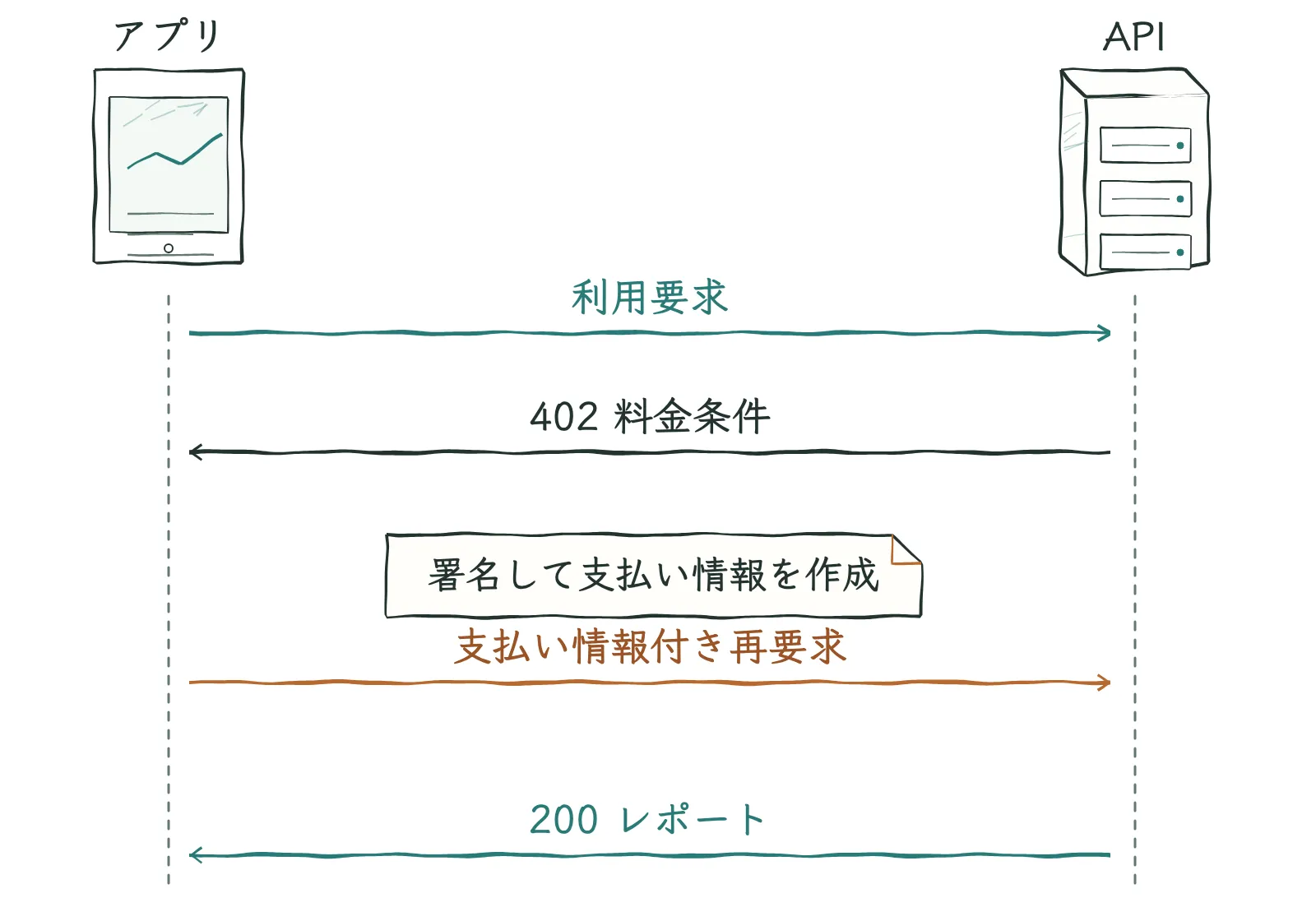
Assume the report costs 0.01 OUSD per call and the application's total budget is 0.02 OUSD.
The API provider sets the fee, which is 0.01 OUSD in this example.
The application checks its budget before signing, and the API returns the report after accepting payment.
1. Request the Paid API
The application sends an ordinary GET request to the path of the report it wants to retrieve.
To indicate which payment methods it supports, it can specify a preferred combination in Accept-Payment.
GET /<レポートのパス> HTTP/1.1
Host: <有料APIのホスト>
Accept-Payment: tempo/charge
tempo/charge indicates a preference for a one-time payment using Tempo.
The API selects and returns compatible payment terms; sending this preference does not itself execute a payment.
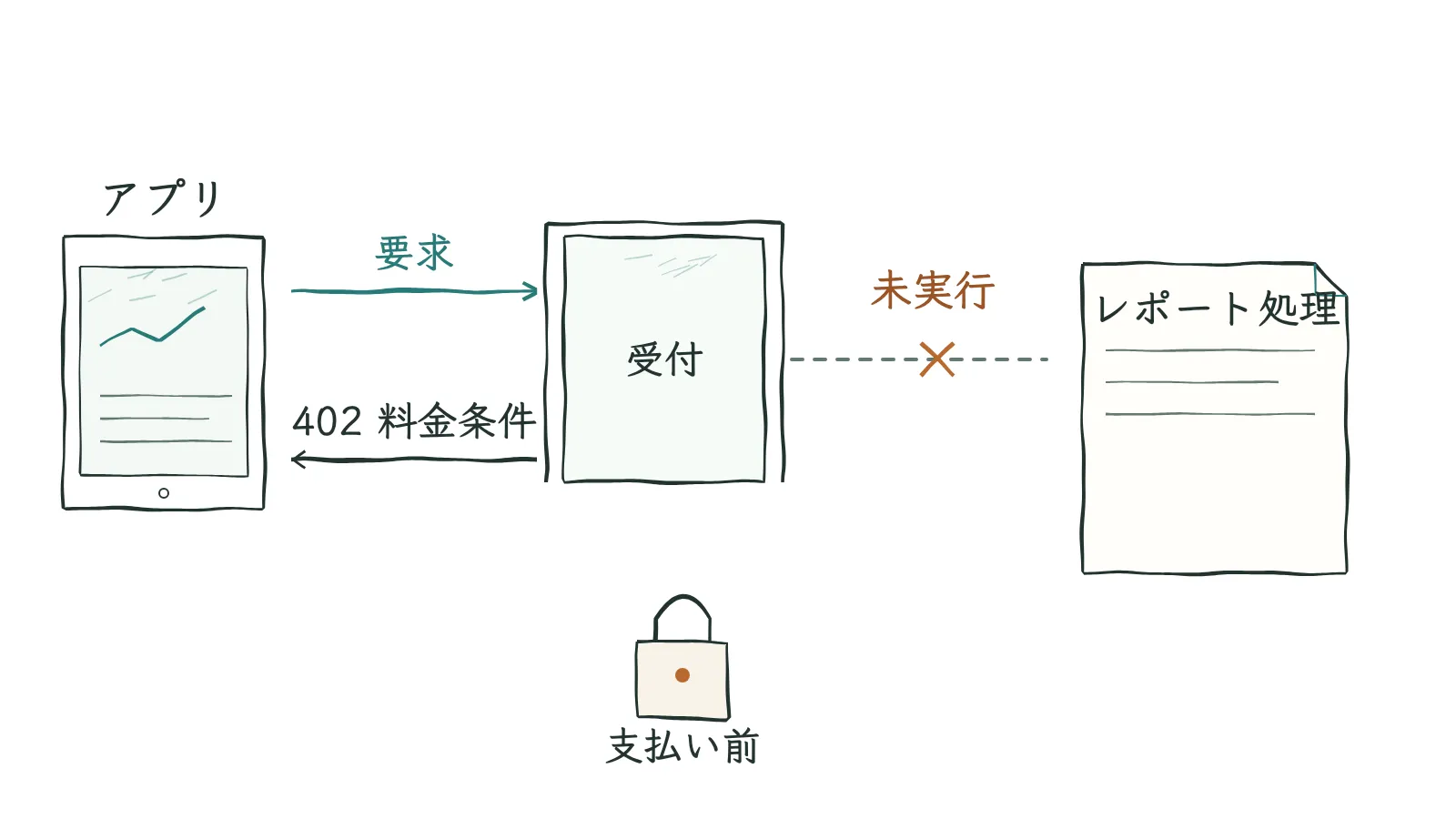
If payment is required, the API returns 402 without generating the paid report at this stage.
2. Check the Payment Terms
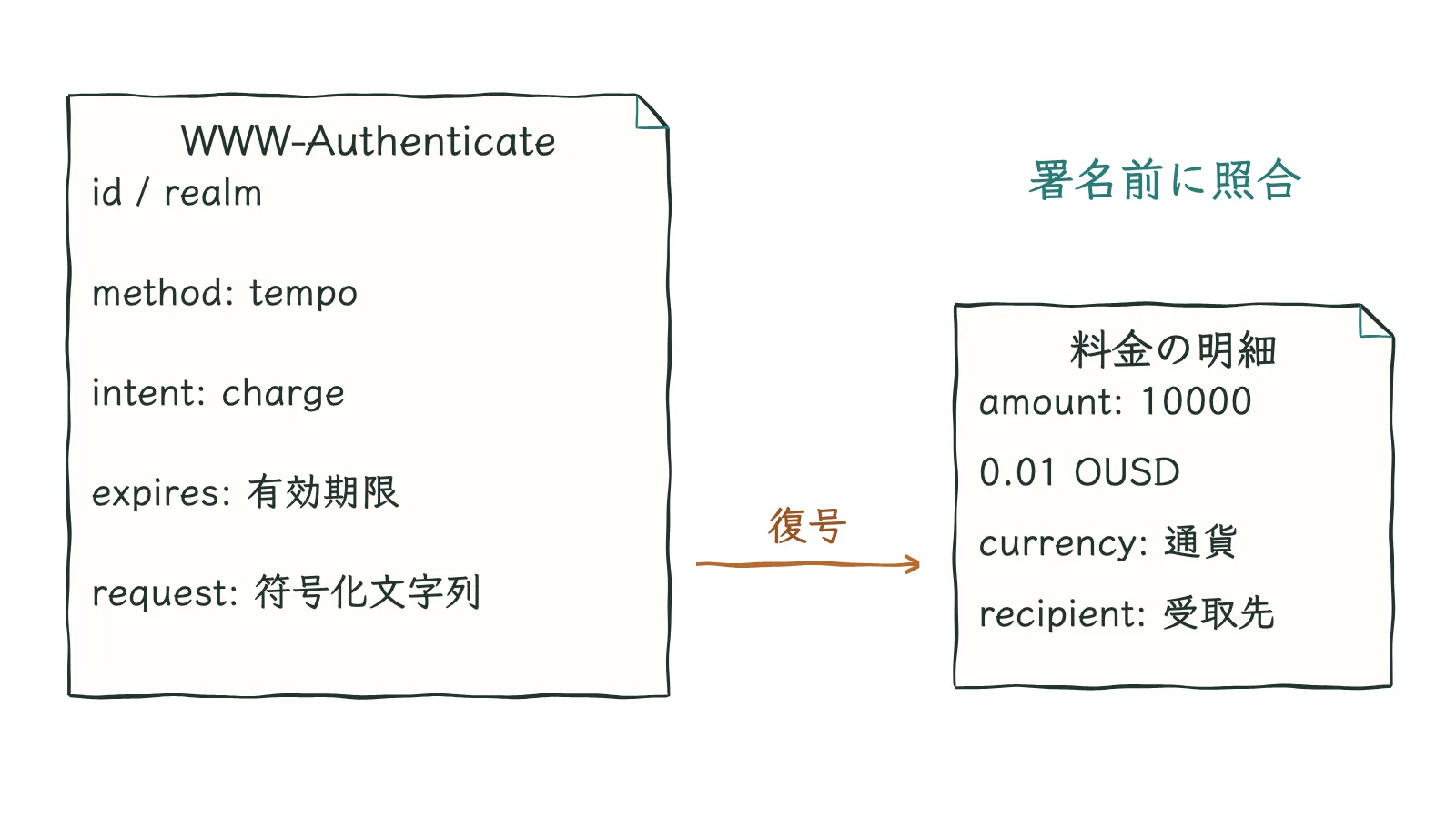
The API places the usage fee and payment method in the WWW-Authenticate response header.
This data describing the payment offer is called a Challenge.
The application selects a supported offer from the response and decides whether it is authorized to pay.
HTTP/1.1 402 Payment Required
Cache-Control: no-store
WWW-Authenticate: Payment id="<料金提示ID>", realm="<APIの保護範囲>", method="tempo", intent="charge", request="<料金条件を符号化した文字列>", expires="<有効期限>"
Payment identifies the payment authentication scheme.
The parameters that follow associate the API issuing the offer with the payment method to use.
| Field | What the application checks |
|---|---|
id |
Identifier of the payment terms issued by the API |
realm |
The API protection space to which payment applies |
method |
Payment method that defines how to create and verify proof |
intent |
The charging model that specifies what is being paid for |
request |
Method-specific terms, including amount, currency, and recipient |
expires |
Expiration time to check before paying, if supplied |
The HTTP header's request is a JSON value canonicalized according to a defined rule and encoded using base64url.
The JSON canonicalization scheme is called JCS.
The application decodes the value to inspect the amount.
A one-time Tempo payment can include the following terms, for example.
{
  "amount": "10000",
  "currency": "<OUSDのトークンアドレス>",
  "recipient": "<API事業者の受取先>"
}
The amount 10000 is expressed in atomic units, corresponding to 0.01 OUSD here.
The application checks not only the amount but also the currency's token address and the recipient against the user's authorization.
If the offer has expired or exceeds the budget, it stops before signing or transferring funds.
If multiple offers are returned, the application selects one based on a supported payment method and charging model.
It keeps the decoded JSON used for inspection separate from the original encoded string to be returned in the retry.
Reconstructing the original request or the opaque value carrying additional information would cause it to differ from the terms issued by the API.
3. Retry with a Payment Credential
After authorizing the terms, the application creates proof of payment according to the selected payment method.
The data that returns the original terms together with method-specific proof is called a Credential.
Typically, the application retries the same report request with the credential in the Authorization header.
GET /<レポートのパス> HTTP/1.1
Host: <有料APIのホスト>
Authorization: Payment <Credentialを符号化した文字列>
One-time Tempo payments support pull, in which the application passes a signed transaction to the API for submission, and push, in which the application submits the transaction and then passes its hash.
In the latter case, the transaction hash lets the API verify the payment on the payment network.
Decoding the credential for a push payment shows how the original terms and the hash are associated.
{
  "challenge": {
    "id": "<受信した料金提示ID>",
    "realm": "<受信したAPIの保護範囲>",
    "method": "tempo",
    "intent": "charge",
    "request": "<受信した料金条件の文字列>",
    "expires": "<受信した有効期限>"
  },
  "source": "<支払者の識別子>",
  "payload": { "type": "hash", "hash": "<支払い取引のハッシュ>" }
}| Field | What the API checks |
|---|---|
challenge |
Whether it matches the terms issued by the API |
source |
The payer's identifier |
payload |
The transaction hash supplied as method-specific proof in this example |
challenge.request preserves the string received in the previous response.
If the terms include opaque, the application also includes the received string unchanged.
The API does not accept a proof simply because a transaction hash exists; it verifies that the specified amount was paid in the specified currency to the specified recipient and that the payment corresponds to the relevant terms.
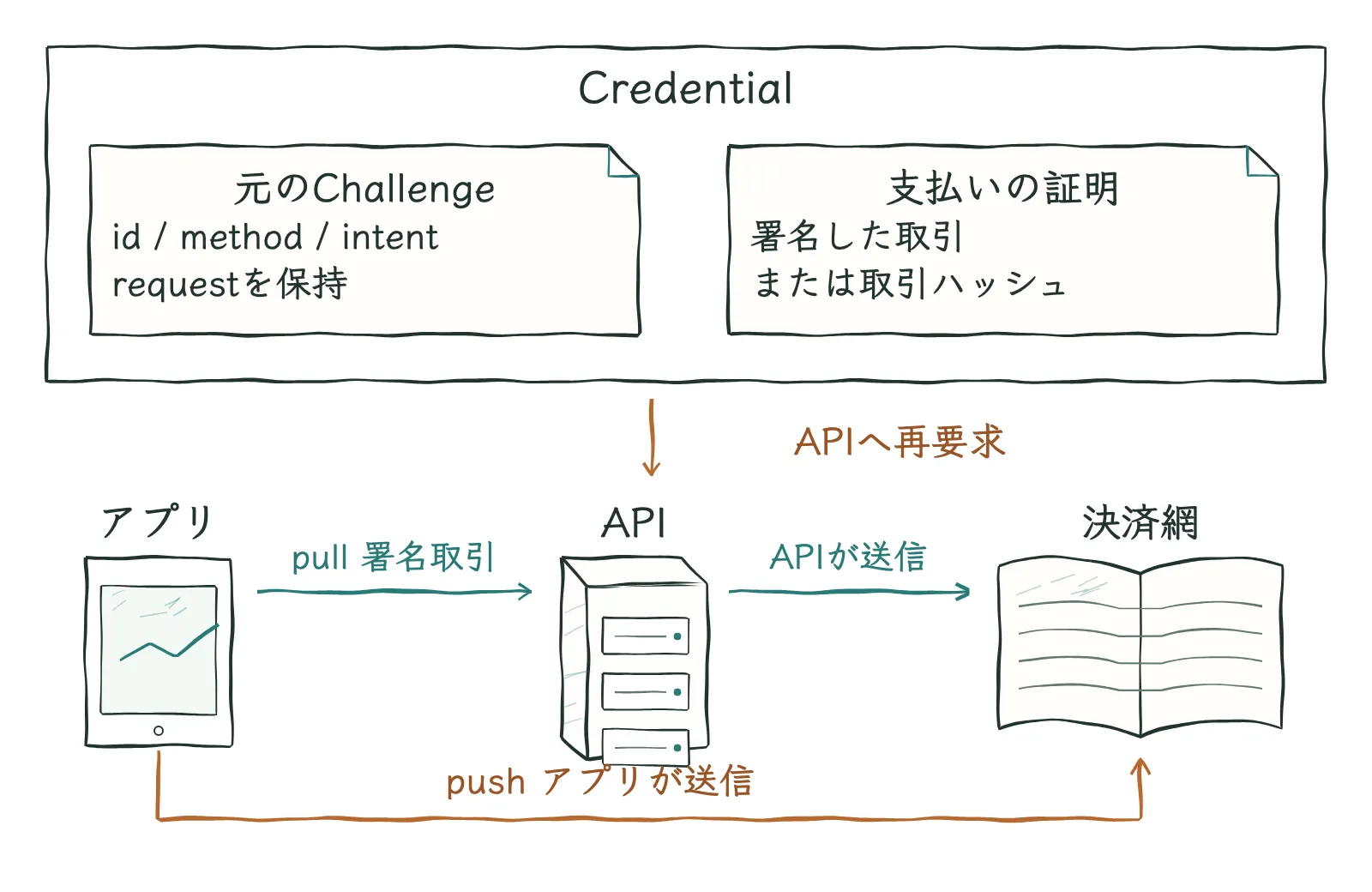
Payment verification also checks whether the proof has already been accepted for another request. Checking only the amount and recipient cannot prevent someone from presenting the same transfer repeatedly to execute a paid operation multiple times. The API's records and the payment method's rules enforce one-time acceptance of the proof.
Tempo also has a zero-amount path that returns only proof of the payer's identity, without transferring funds.
The 0.01 OUSD payment for the paid report in this example is distinct from that zero-amount path.
4. Receive the API Result and Payment Confirmation
Once the API accepts payment, it can generate the report and return a successful response.
The data confirming payment acceptance is a Receipt, which can be returned in the HTTP Payment-Receipt header.
The application reads the report and payment confirmation for their respective purposes.
HTTP/1.1 200 OK
Content-Type: application/json
Cache-Control: private
Payment-Receipt: <決済確認を符号化した文字列>

{"report":"<要求したレポート>"}
The report in the response body is the result that the application requested.
Decoding Payment-Receipt reveals the payment method and settlement reference, among other details.
{
  "method": "tempo",
  "reference": "<決済の参照番号>",
  "status": "success",
  "timestamp": "<決済処理日時>"
}
reference is used to reconcile the payment, while status indicates the result of accepting it.
The application reads the response body to determine whether the report matches its request.
A successful Receipt should not be treated as proof that every business operation succeeded.
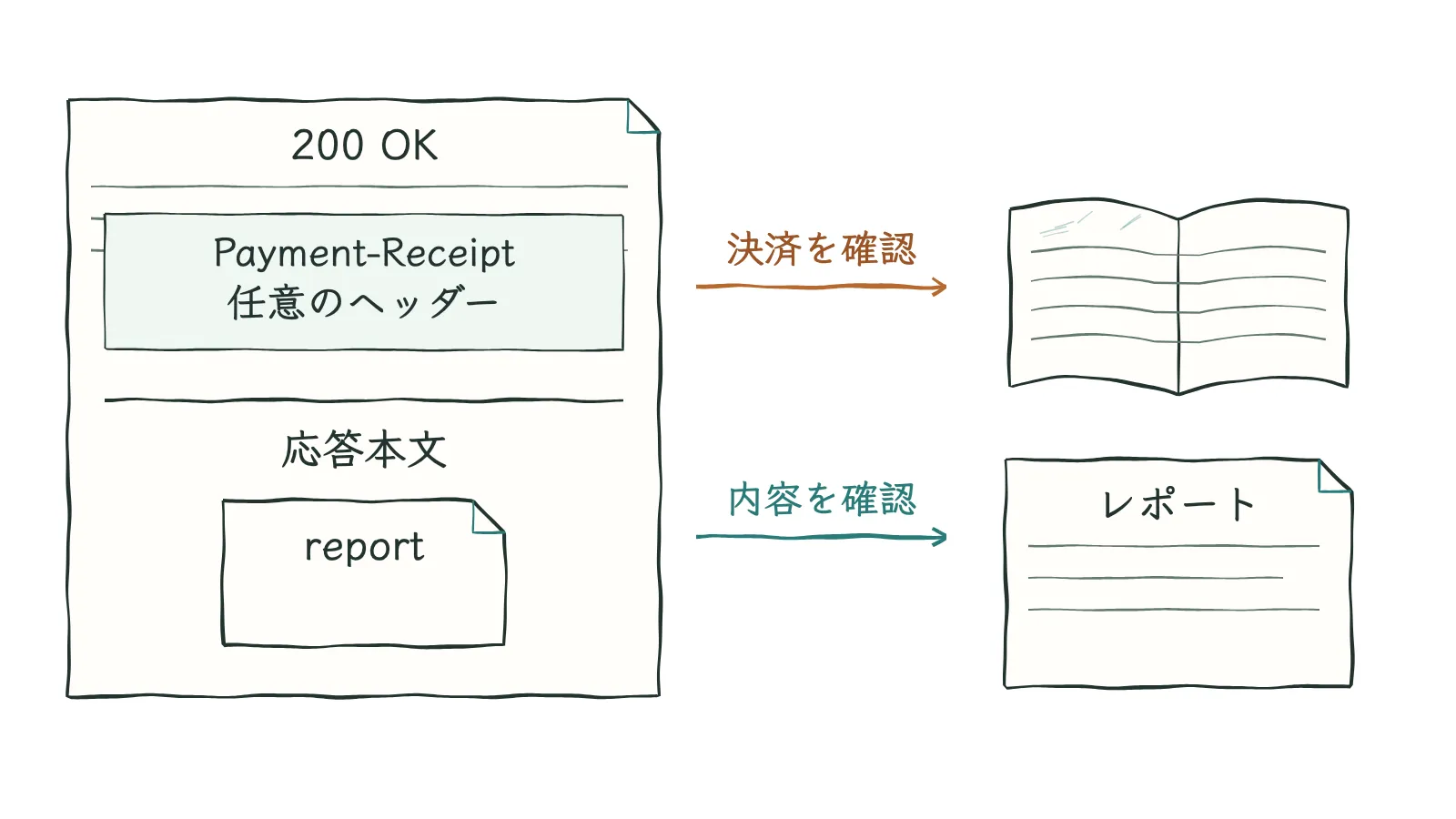
The header is optional, so a successful response may omit payment confirmation. Conversely, a missing response does not necessarily mean that payment did not occur. Communication may fail after settlement, so the application reconciles the records before retrying a request whose result is unknown.
Payment Methods and Charging Models
Even for the same payment terms, the payment network and the unit of usage being charged for are determined separately.
The former is the method, which defines proof creation, verification, and settlement for each payment method.
The latter is the intent, which describes the charging unit, such as one-time usage, ongoing metered usage, or a billing period.
| Charging model | How it relates to the fee |
|---|---|
charge |
Associates a one-time payment with access to a paid resource |
session |
Records additional authorizations and usage for ongoing consumption |
subscription |
Associates a fixed amount per billing period with an entitlement to use the service |
The report retrieval example so far uses charge.
Not every payment method necessarily supports every charging model, so the application selects a combination based on the API's offer and the capabilities of the payment method.
For example, Tempo supports one-time, metered, and recurring charging models.
When using metered payments with a Stripe integration that handles payment instruments such as cards, the Tempo payment method is added.
Rather than relying on the integration provider's name alone, check the payment method and charging model specified in the offer.
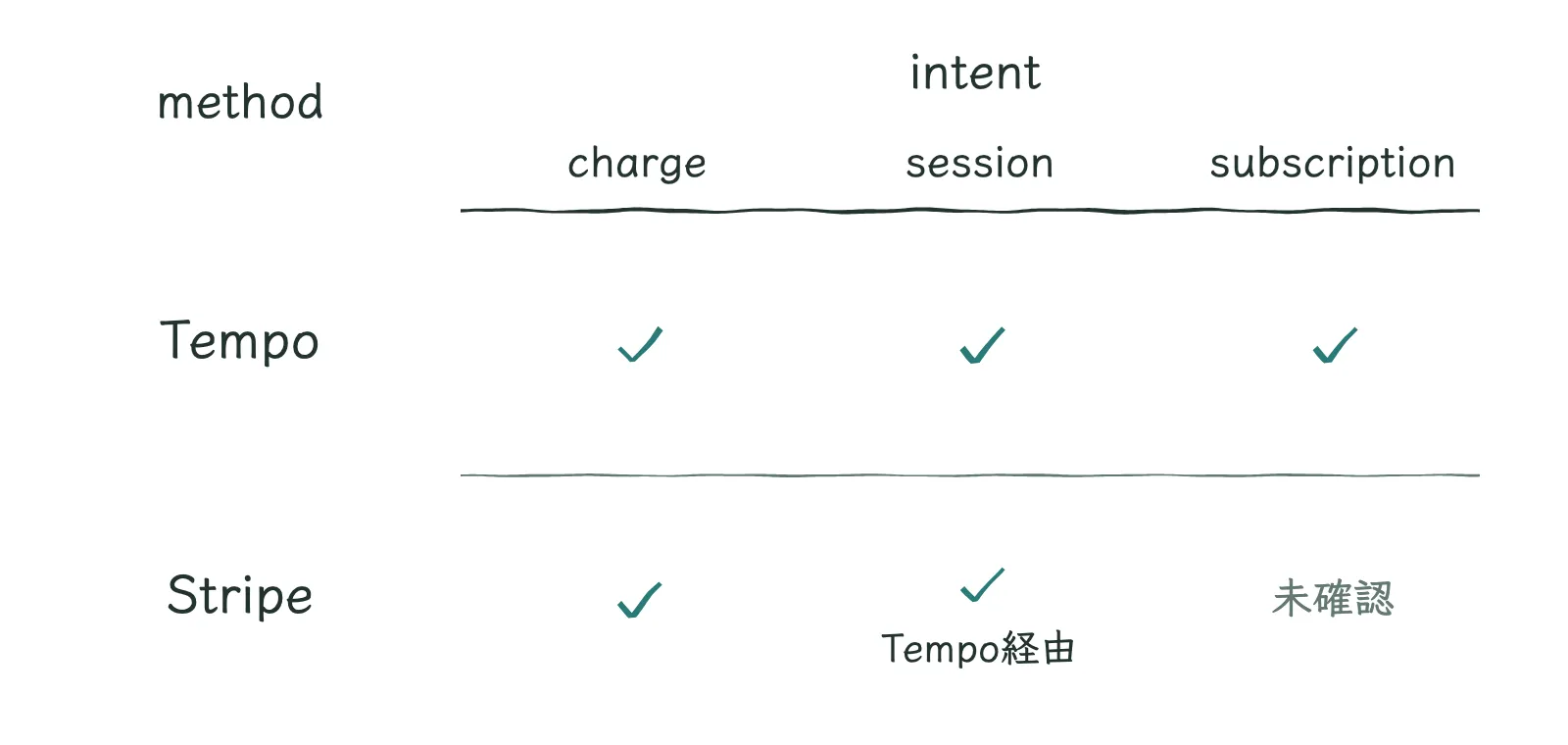
Metered Payments
APIs that repeatedly perform small operations or continuously stream data can receive ongoing payments based on usage.
The model that records authorization and consumption in the same payment state is called a session.
Instead of settling an independent transfer for every use, the consumer authorizes additional payments and the provider records and settles the amount consumed.
With Tempo, funds are deposited into a channel that stores the ongoing payment state.
The amount authorized by the consumer and the usage recorded by the provider are associated with this channel.
Increasing the deposit, authorizing usage, settling, and closing are distinct operations.
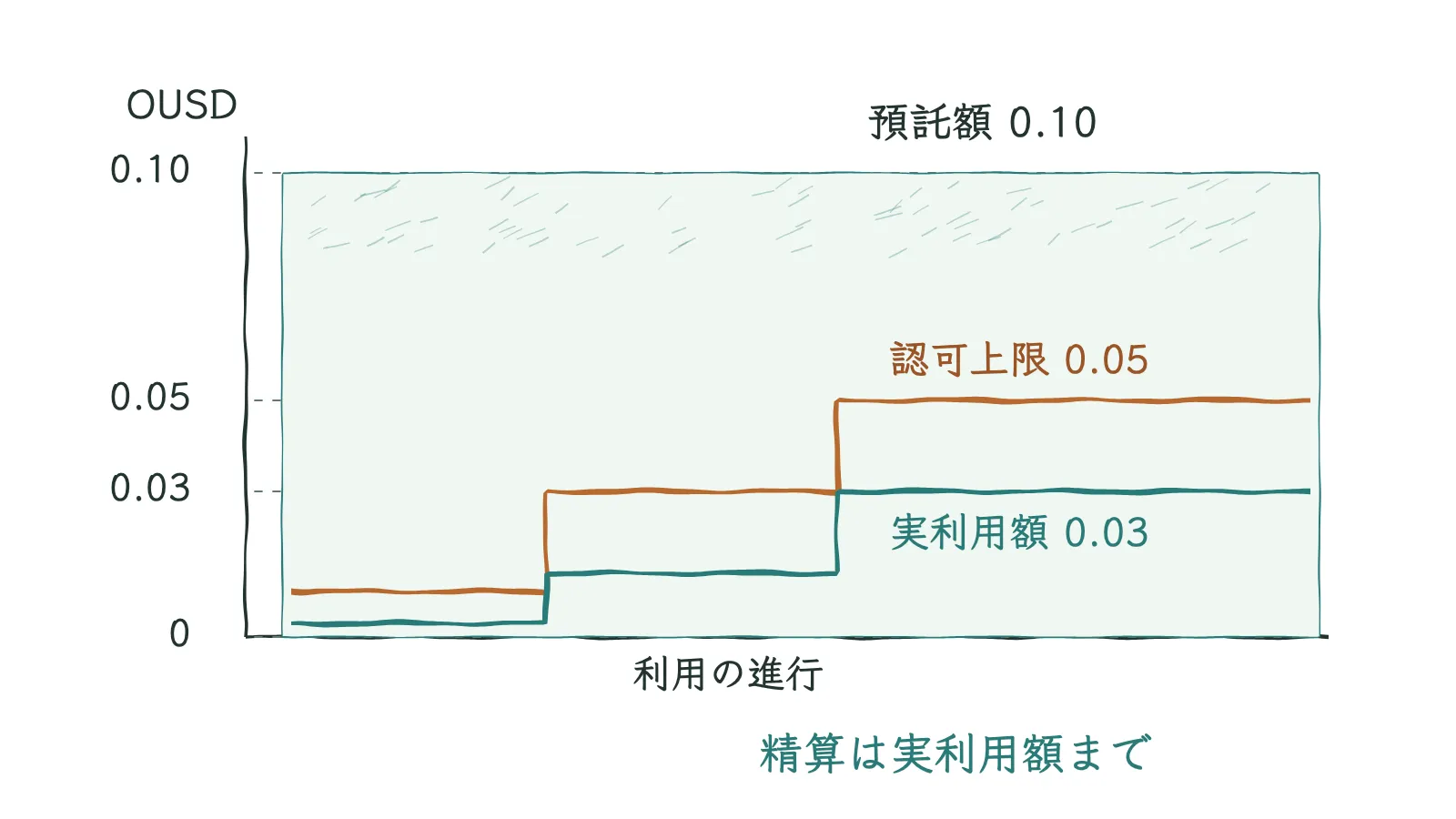
Authorization Limit and Usage
Suppose the application deposits 0.10 OUSD into a channel and authorizes cumulative payments of up to 0.05 OUSD.
The signed data representing this cumulative authorization limit is a voucher.
The API provider accepts it and adds the amount of usage it processes to its own records.
If actual usage is 0.03 OUSD, the deposit, authorization limit, and consumed amount differ as follows.
| Amount type | Value | Meaning |
|---|---|---|
| Deposit | 0.10 OUSD |
Funds made available in the channel |
| Cumulative authorization limit | 0.05 OUSD |
Limit signed and authorized by the application |
| Actual usage | 0.03 OUSD |
Usage processed by the provider |
Authorizing up to 0.05 OUSD does not establish that the same amount has been consumed.
The provider records usage separately and does not count authorized but unused funds as revenue.
As continued usage approaches the authorization limit, the application checks its remaining budget and issues additional authorization.
Settlement and Closure
The provider uses accepted voucher data to settle within the amount of recorded usage.
The channel remains usable after an interim settlement. During normal closure, the final usage is settled and unused funds are returned.
Closing the application's connection and completing channel settlement or refunds are separate events.
The consumer can also request channel closure directly on the payment network, without going through the API.
With Tempo, after a 900-second grace period, the consumer can withdraw deposited funds, including amounts for unsettled usage. The provider therefore monitors close requests.
If the provider does not protect accepted usage during that period, it may be unable to recover fees for operations it has already processed.
For monitoring, mppx 0.19.0 provides tempo.session.superviseCloses.
The provider stores the relevant channelId and periodically checks for and responds to close requests.
The grace period is defined by each payment method's specification; in this Tempo implementation, it is 900 seconds.
Recurring Payments
A subscription charges a fixed amount for each billing period and grants access to an API for that period.
Once the consumer approves the recurring payment terms, the provider stores the subscription and paid-through period.
Later requests within the same period are checked against that record rather than charged again for the period.
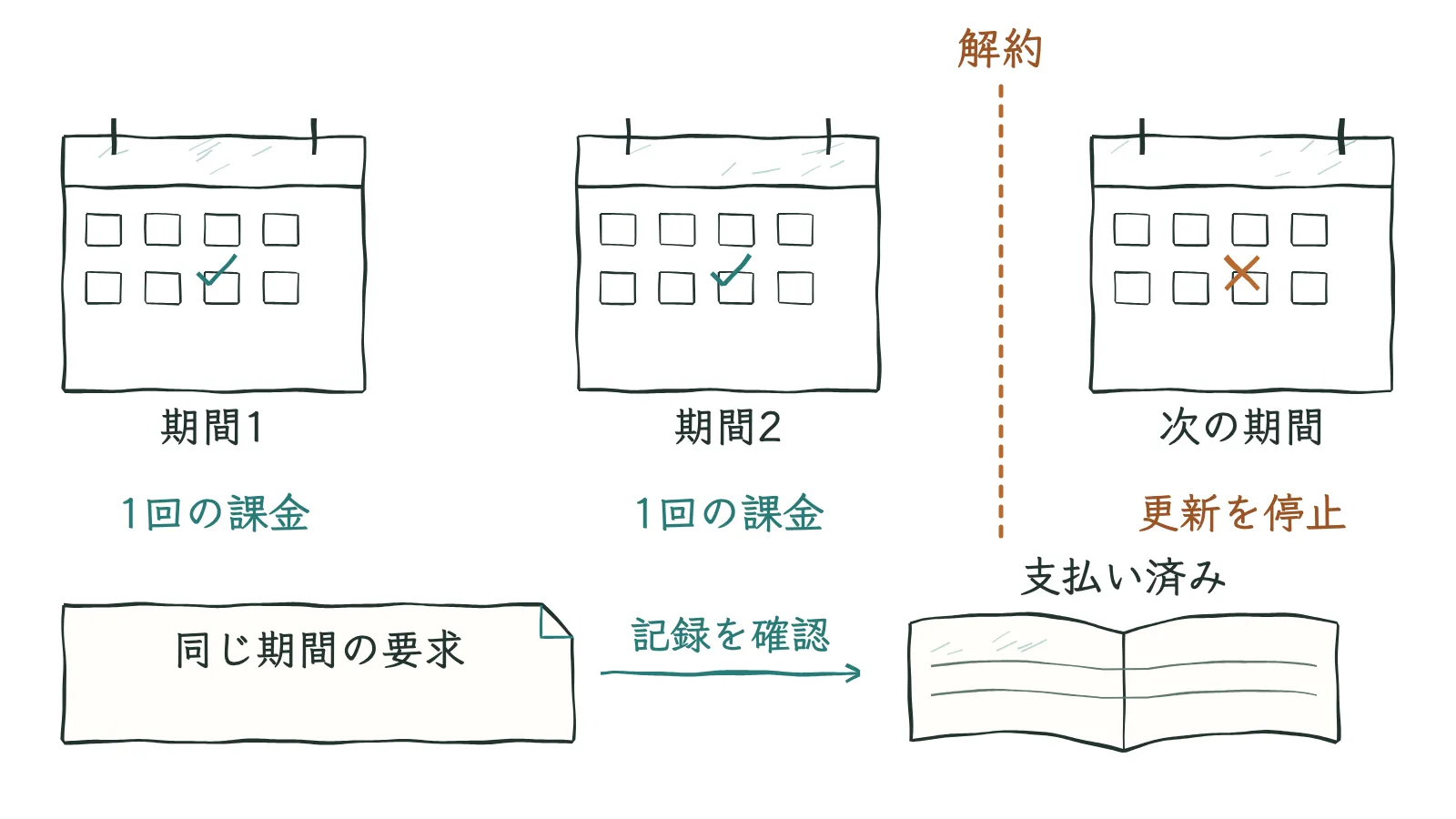
The API does not grant access based solely on the subscription identifier subscriptionId. It also checks whether the authenticated user and requested operation correspond to the subscription.
Knowing an identifier and having permission to use the subscription are different things.
Tempo also distinguishes recording a cancellation on the provider's side from revoking signing authority on the consumer's side.
The provider's cancellation record informs later access and billing decisions, while revocation of signing authority stops the previously authorized payment operations.
Revoking key permissions does not automatically update the subscription records stored by the provider.
To end recurring billing, check which records and permissions have been changed.
Implementation with the SDK
To support MPP, both the application and API need to read and write payment terms and implement the operations specific to each payment method.
mppx is a TypeScript SDK for implementing these operations.
Providers can present terms and verify payments, while consumers can create credentials from the offers they receive.
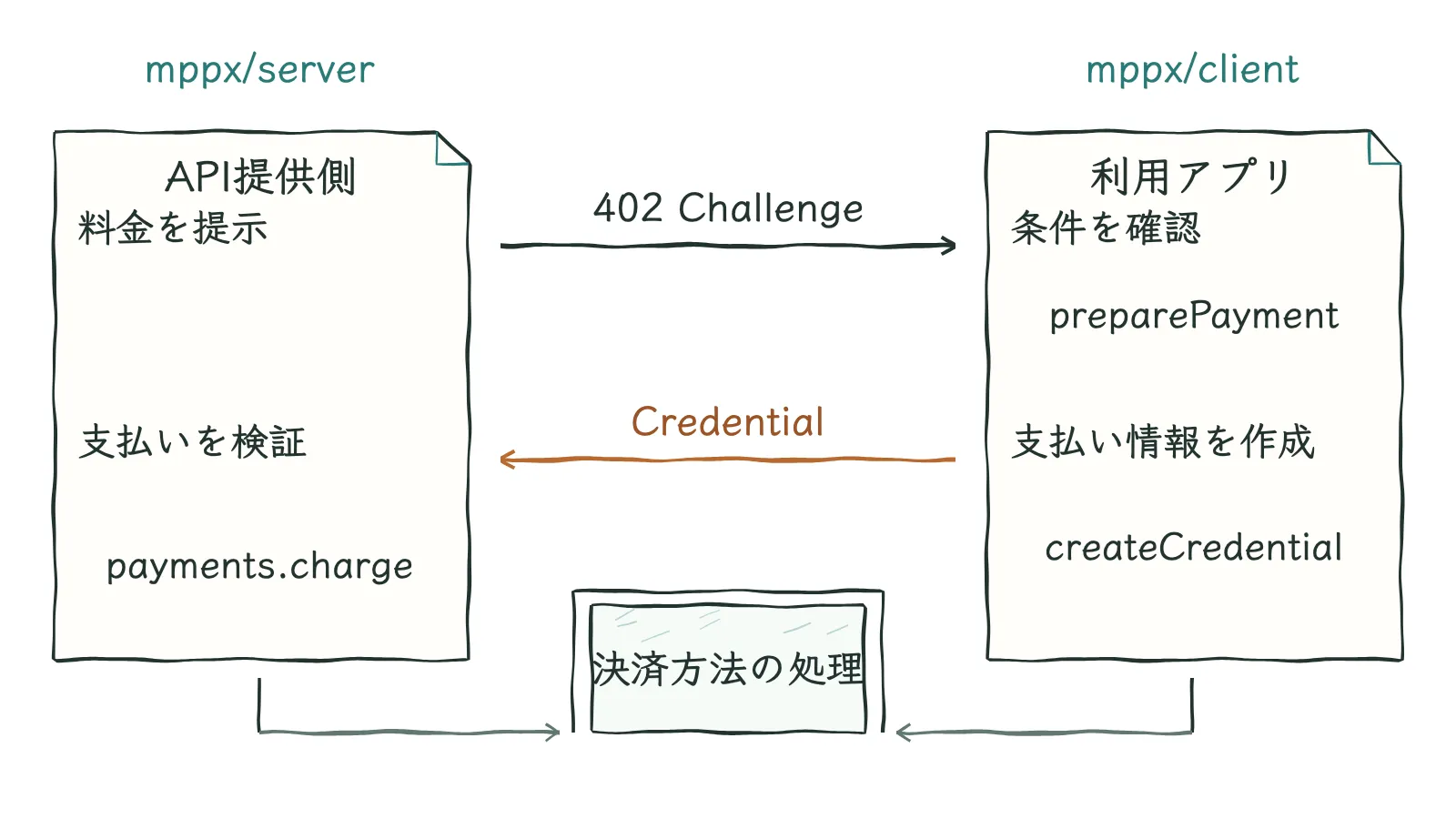
The following examples use the mppx 0.19.0 API.
Testnet currencies, recipients, and secrets are configured in the runtime environment, while report generation and budget management are implemented by the application.
Distinguishing SDK functions from application-defined functions clarifies which responsibilities are delegated to the SDK.
API Provider
The provider registers the accepted currency and recipient and sets a fee of 0.01 OUSD for the operation that returns a report.
If payment cannot be accepted, the provider returns the SDK's response. It generates a report only for requests whose payment has been accepted.
import { Mppx, tempo } from 'mppx/server'

const payments = Mppx.create({
  secretKey: config.challengeSecret,
  methods: [tempo.charge({
    currencies: [config.ousdToken],
    recipient: config.recipient,
    testnet: true,
    store: sharedAtomicStore,
  })],
})

async function handle(request: Request) {
  const result = await payments.charge({ amount: '0.01' })(request)
  if (result.status === 402) return result.challenge
  const report = await createReport(request)
  return result.withReceipt(Response.json({ report }))
}| Value in the code | What the provider supplies |
|---|---|
config.challengeSecret |
Server secret used to verify the association between issued terms and their IDs |
config.ousdToken |
Token address of the accepted OUSD currency |
config.recipient |
Recipient of the fee |
sharedAtomicStore |
Shared storage that atomically enforces one-time proof acceptance across instances |
createReport |
Business operation executed after accepting payment |
A request stopped by the payment check does not invoke createReport.
result.status === 402 is the SDK's result category, while the actual HTTP status of result.challenge can also be 403, depending on the rejection reason.
Return the response to the consumer as it is, rather than reconstructing it as 402.
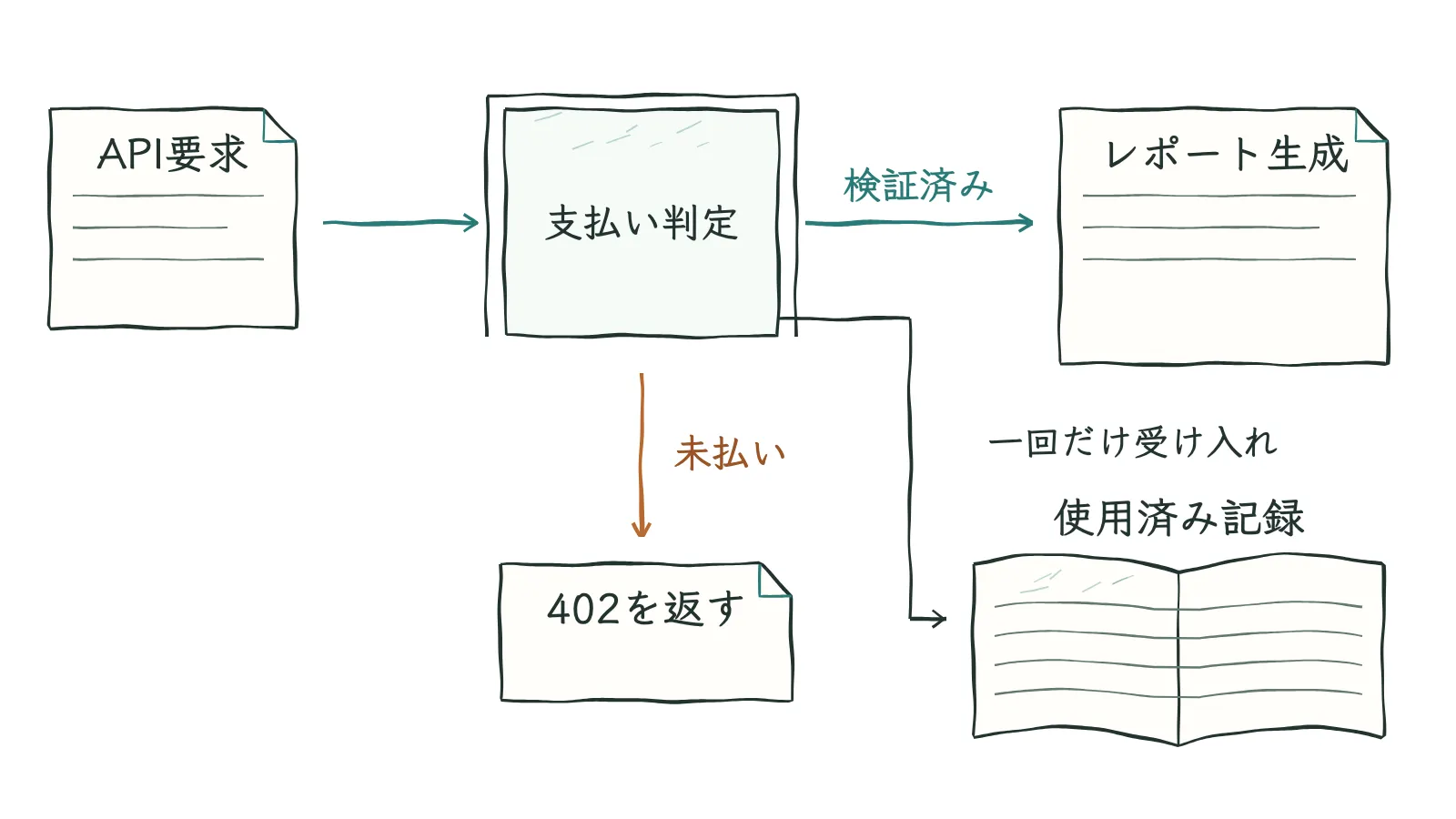
This example uses a configuration in which the API verifies payment directly. When running multiple servers, atomically record accepted proofs in shared storage so that two servers cannot accept the same proof simultaneously. Local in-memory storage alone cannot determine whether another instance has accepted a proof. If verification is delegated to a relay, that relay is also responsible for preventing duplicate acceptance.
By default, Tempo charge waits for confirmation on the payment network.
If configured to respond without waiting, a later transaction failure may not be reflected in a receipt that has already been returned.
When using that configuration, also implement reconciliation between API usage authorized before confirmation and subsequent payment failures.
amount: '0.01' is the decimal representation supplied to the SDK.
It differs from the atomic-unit value 10000 used in the HTTP payment terms, so convert according to the currency's decimals instead of copying the configuration value directly.
Also, do not treat the example with testnet: true as confirmation of a production payment.
API Consumer
The consumer creates a payment client and uses it separately from ordinary fetch calls.
With polyfill: false, the application can perform its own authorization checks after reading the terms and before proceeding with payment.
It checks the endpoint, fee, and permitted authority before signing or transferring funds.
import { Mppx, tempo } from 'mppx/client'

const payments = Mppx.create({
  methods: [tempo.charge({
    account: restrictedSigningAccount,
    allowedChainIds: [42431],
    currencies: [config.token],
    expectedRecipients: [config.recipient],
    maxAtomicAmount: 10000n,
  })],
  polyfill: false,
})
async function fetchReport(resourceUrl: string) {
  const unpaid = await fetch(resourceUrl, { redirect: 'error' })
  if (unpaid.status !== 402) return handleWithoutNewPayment(unpaid)
  const payment = await payments.preparePayment(unpaid)
  const reservation = authorizeAndReserve(resourceUrl, payment.challenge)
  const credential = await payment.createCredential()
  const paid = await fetch(resourceUrl, payment.setCredential({ redirect: 'error' }, credential))
  return reconcileResult(reservation, paid)
}
This example registers only tempo.charge, restricting payments to one-time charges.
allowedChainIds fixes the chain to testnet 42431, while currencies and expectedRecipients receive the currencies and recipients authorized by the user.
expectedRecipients checks both the primary and additional recipients, and maxAtomicAmount limits the amount to 10000 atomic units.
Both requests also reject redirects to prevent signing terms from a different endpoint or forwarding credentials elsewhere.
preparePayment reads the returned payment terms.
The subsequent createCredential can initiate signing or a transfer, depending on the selected payment method, so authorization is checked between the two operations.
Once a credential is created, setCredential attaches it to the original request for resubmission.
authorizeAndReserve and reconcileResult are application-defined functions in this example.
The former handles authorization and budget reservation before payment, while the latter reconciles the request result with payment records.
Budget management is implemented on the application side and runs before and after the SDK's payment operation.
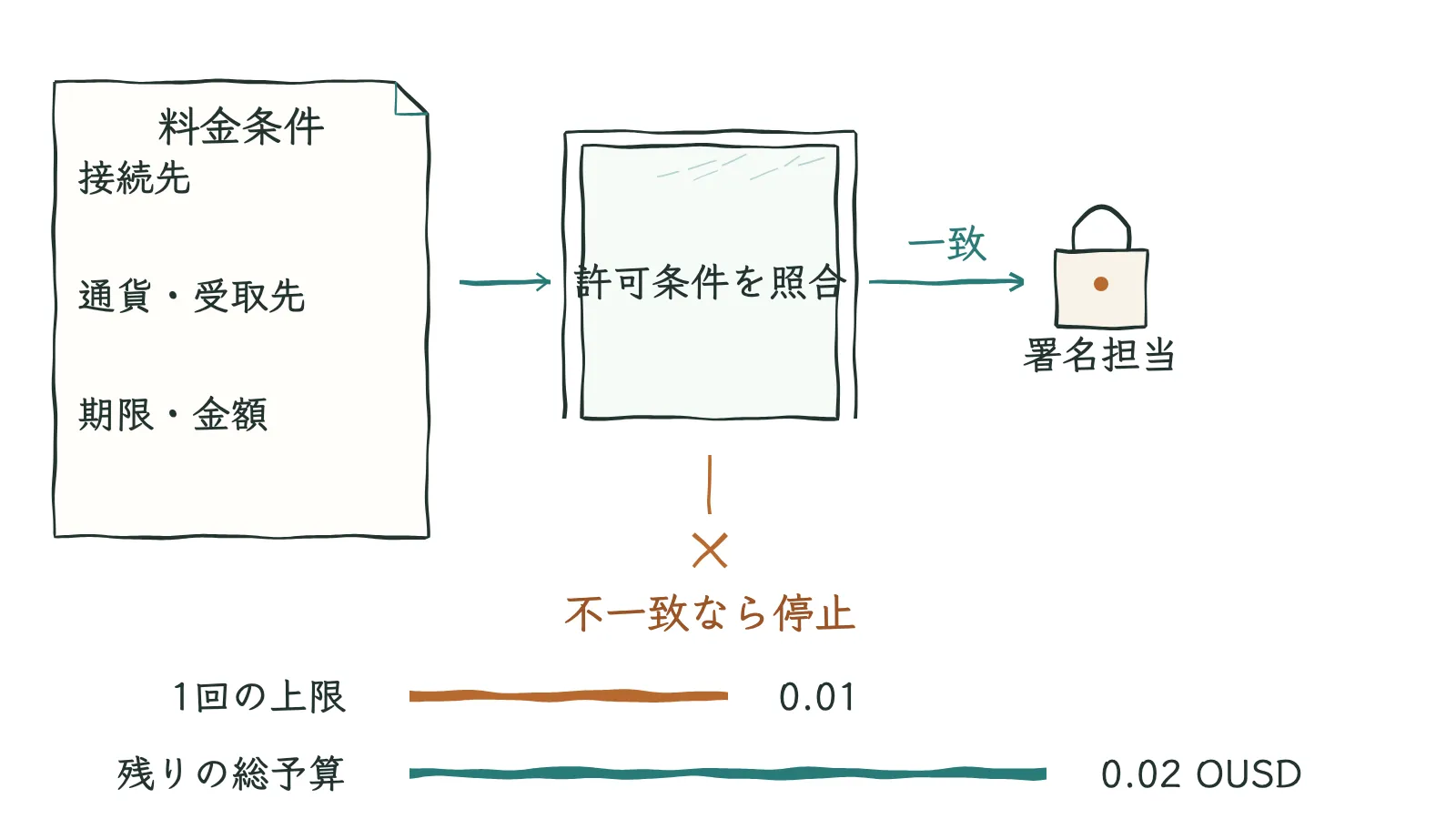
For agents that repeatedly use APIs, set separate per-call and total spending limits.
The SDK's maxAmount limits a single charge or a session unit price; it does not represent total spending across multiple calls.
Store user-authorized settings in the payment tool, where the model cannot change them.
The following settings limit one-time payments to 0.01 OUSD per call and 0.02 OUSD in total.
const permission = Object.freeze({
  origin: '<許可したAPIのオリジン>',
  method: 'tempo',
  intent: 'charge',
  chainId: 42431,
  token: config.token,
  recipients: Object.freeze([config.recipient]),
  expiresAt: '<本人が決めた有効期限>',
  maxPerCall: 10000n,
  maxTotal: 20000n,
})
let spent = 0n
let reserved = 0n| Value | Check before signing |
|---|---|
origin |
Whether the API endpoint is authorized for payment |
method and intent |
Reject combinations other than one-time tempo/charge |
chainId |
Confirm that payment uses the authorized testnet 42431 |
token and recipients |
Check the currency and all recipients, including the primary recipient, against the authorized scope |
expiresAt |
Whether payment authority is still valid |
maxPerCall |
Whether the fee is within the per-call limit |
maxTotal |
Whether the total budget would be exceeded when spent and reserved amounts are included |
In this example, a single process invokes the payment tool sequentially. Before handing work to the signer, the consumer checks the actual endpoint, payment method, charging model, network, currency, all recipients, and the expiration of its authority. If the payment terms have an expiration, the consumer checks that as well, compares amounts as integers in atomic units, and reserves the budget.
The pseudocode below shows the order of operations.
authorizeAndReserve(url, challenge)
  接続先が許可したHTTPSのオリジンと一致しなければ停止
  methodとintentがtempo/chargeでなければ停止
  chainIdは条件の値を使い、省略時だけ許可した42431を使う
  chainIdが許可設定と一致しなければ停止
  通貨または主受取先と追加受取先のいずれかが未許可なら停止
  権限または料金条件の有効期限が切れていれば停止
  amount = 条件の金額を整数として読む
  amount > maxPerCall なら停止
  spent + reserved + amount > maxTotal なら停止
  reserved = reserved + amount
  この要求専用の予約を返す

reconcileResult(reservation, response)
  決済を確認できたら reserved から spent へ移し、業務の結果は別に記録する
  結果不明なら予約を保持し、署名を増やさず照合を待つ
未決済を確認できた予約だけを解放する-
Check the payment terms
Stop without invoking the signer if the endpoint, payment method, charging model, network, currency, all recipients, or expiration do not match the user's authorization.
-
Reserve the payment amount within the total budget
Keep
spent, the amount already spent, separate fromreserved, the amount allocated to pending requests. Stop if adding the current fee to both amounts would exceedmaxTotal. -
Reconcile the result and update the reservation
Move a reservation into spent funds when payment is confirmed, and retain it if the result is unknown. Release only reservations for which non-payment has been confirmed.
When two requests costing 0.01 OUSD each succeed, spent is 20000 and reserved is 0.
The third request would exceed the total budget of 20000, so createCredential is not called.
If the first request's result is unknown, retaining its reservation also prevents the application from restoring the budget and making an additional payment merely because no response arrived.
Even if payment is confirmed, the report may still be unavailable. In that case, do not return the funds to the available budget. Track the payment record and the business result separately. Do not infer payment confirmation or the ability to retrieve the report again solely from a communication error.
When running multiple processes, these local variables alone cannot enforce a total budget.
Reserve the budget atomically in shared state, or combine this approach with delegated limits enforced by the payment network.
Tempo provides access keys that restrict expiration, recipients, and token spending limits, which can be used to constrain signing authority itself.
Publishing Pricing Information
Applications can discover potential prices even before calling an API.
Providers can add payment information for each operation to OpenAPI, which describes operations, inputs, and outputs in machine-readable form.
Applications use this advance information when choosing among multiple APIs.
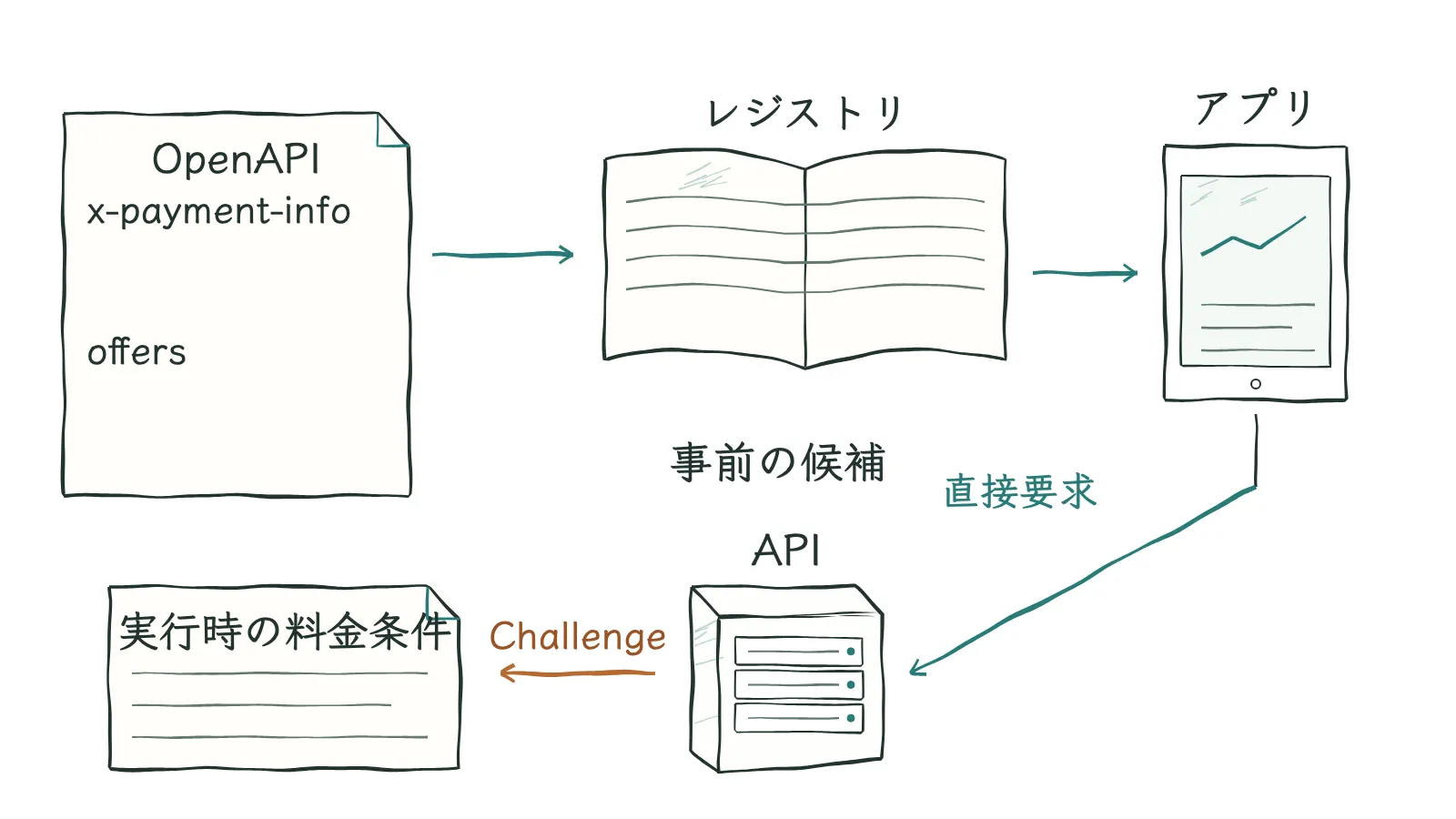
For example, the following definition publishes a one-time Tempo price for the report retrieval operation.
{
  "openapi": "3.1.0",
  "info": { "title": "<APIの名前>", "version": "<APIのバージョン>" },
  "paths": {
    "/<レポートのパス>": {
      "get": {
        "x-payment-info": {
          "offers": [{ "method": "tempo", "intent": "charge", "amount": "10000", "currency": "<OUSDのトークンアドレス>" }]
        },
        "responses": {
          "200": { "description": "レポート" },
          "402": { "description": "支払い条件" }
        }
      }
    }
  }
}
x-payment-info adds payment information to the get operation.
Each element of offers represents one price offer, allowing the application to select candidates by payment method, charging model, amount, and currency.
Registries that aggregate pricing information for multiple APIs can also be used to discover candidates.
However, published information can contain outdated prices.
The application uses published prices to select candidates and checks the terms returned by the API immediately before signing.
If the previously advertised 0.01 OUSD differs from the returned amount, it checks the new terms against the user's authorization again.
MCP and WebSocket
MCP is a protocol for agents to invoke external tools by specifying a name and inputs.
It uses JSON-RPC, which exchanges JSON containing operation names and request IDs to correlate requests and responses.
WebSocket, on the other hand, is a communication protocol for continuing to exchange data over a persistent bidirectional connection.
These transports can also use the roles of receiving payment terms, returning credentials, and receiving payment confirmation. However, the location and encoding of payment data vary by transport.
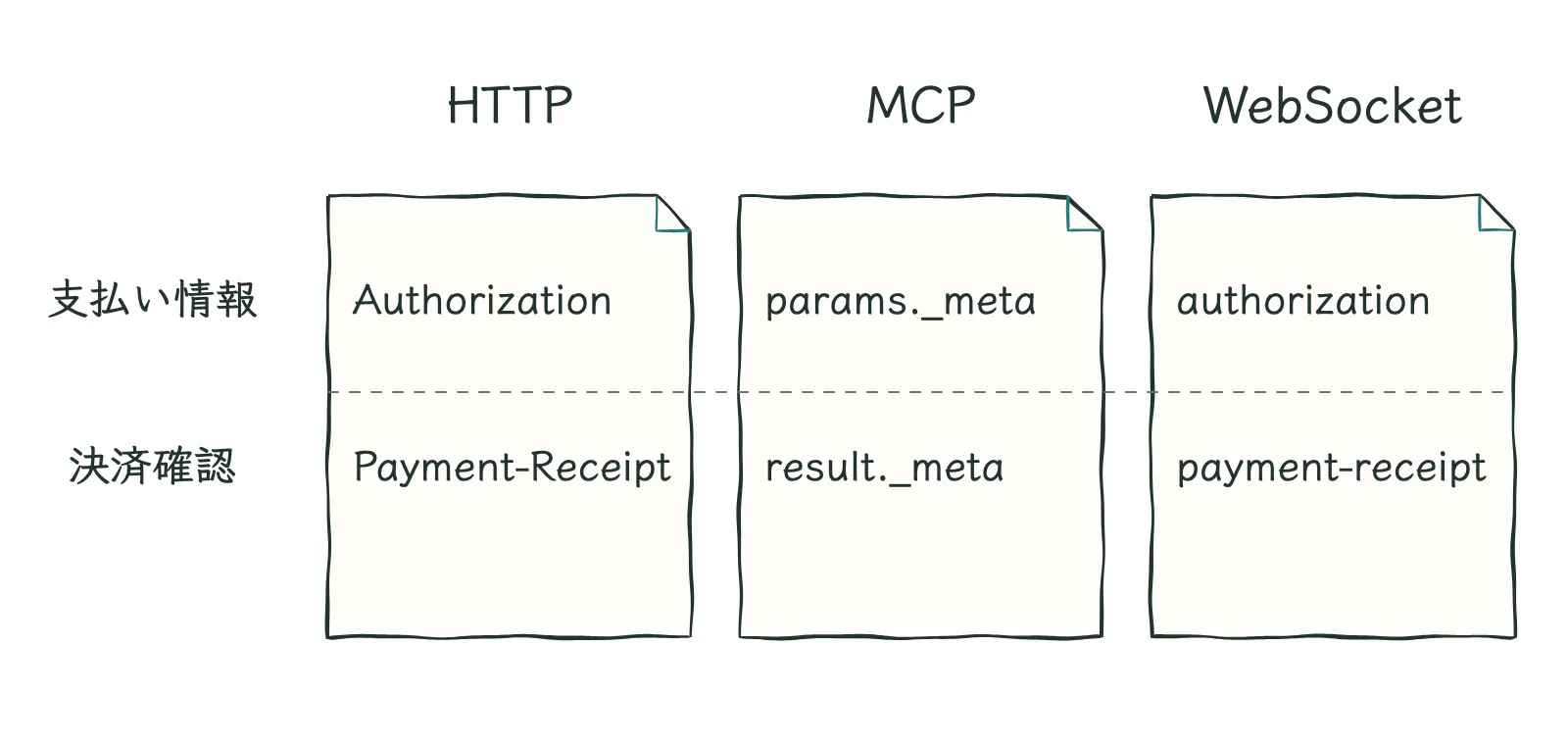
MCP
If a report retrieval tool requires payment, the provider returns the terms in a JSON-RPC error.
After authorizing the terms, the consumer calls the same tool again with a payment credential.
draft-payment-transport-mcp-00 uses error code -32042 for payment requirements.
{
  "jsonrpc": "2.0", "id": "<要求ID>",
  "error": {
    "code": -32042, "message": "Payment Required",
    "data": { "httpStatus": 402, "challenges": [{
      "id": "<料金提示ID>", "realm": "<保護範囲>", "method": "tempo", "intent": "charge",
      "request": { "amount": "10000", "currency": "<OUSDのアドレス>", "recipient": "<受取先>" }
    }] }
  }
}
Here, request is a JSON object containing the amount and currency.
Its representation differs from the encoded string received in an HTTP header, so read and write the structure appropriate to the transport.
Verification failure is indicated by -32043, so do not repeatedly pay based on the error message text alone.
After checking the terms, the consumer adds _meta to its tool call.
The following retry separates ordinary business inputs from payment information.
{
  "jsonrpc": "2.0", "id": "<再要求ID>", "method": "tools/call",
  "params": {
    "name": "<レポート取得ツール>", "arguments": { "reportId": "<取得対象>" },
    "_meta": {
      "org.paymentauth/credential": {
        "challenge": {
          "id": "<受信した料金提示ID>", "realm": "<保護範囲>", "method": "tempo", "intent": "charge",
          "request": { "amount": "10000", "currency": "<OUSDのアドレス>", "recipient": "<受取先>" }
        },
        "source": "<支払者の識別子>",
        "payload": { "type": "hash", "hash": "<支払い取引のハッシュ>" }
      }
    }
  }
}
arguments.reportId specifies the report to retrieve.
Rather than mixing payment information into those arguments, put it in org.paymentauth/credential within params._meta.
The provider reads the original terms and method-specific proof from this location and verifies payment.
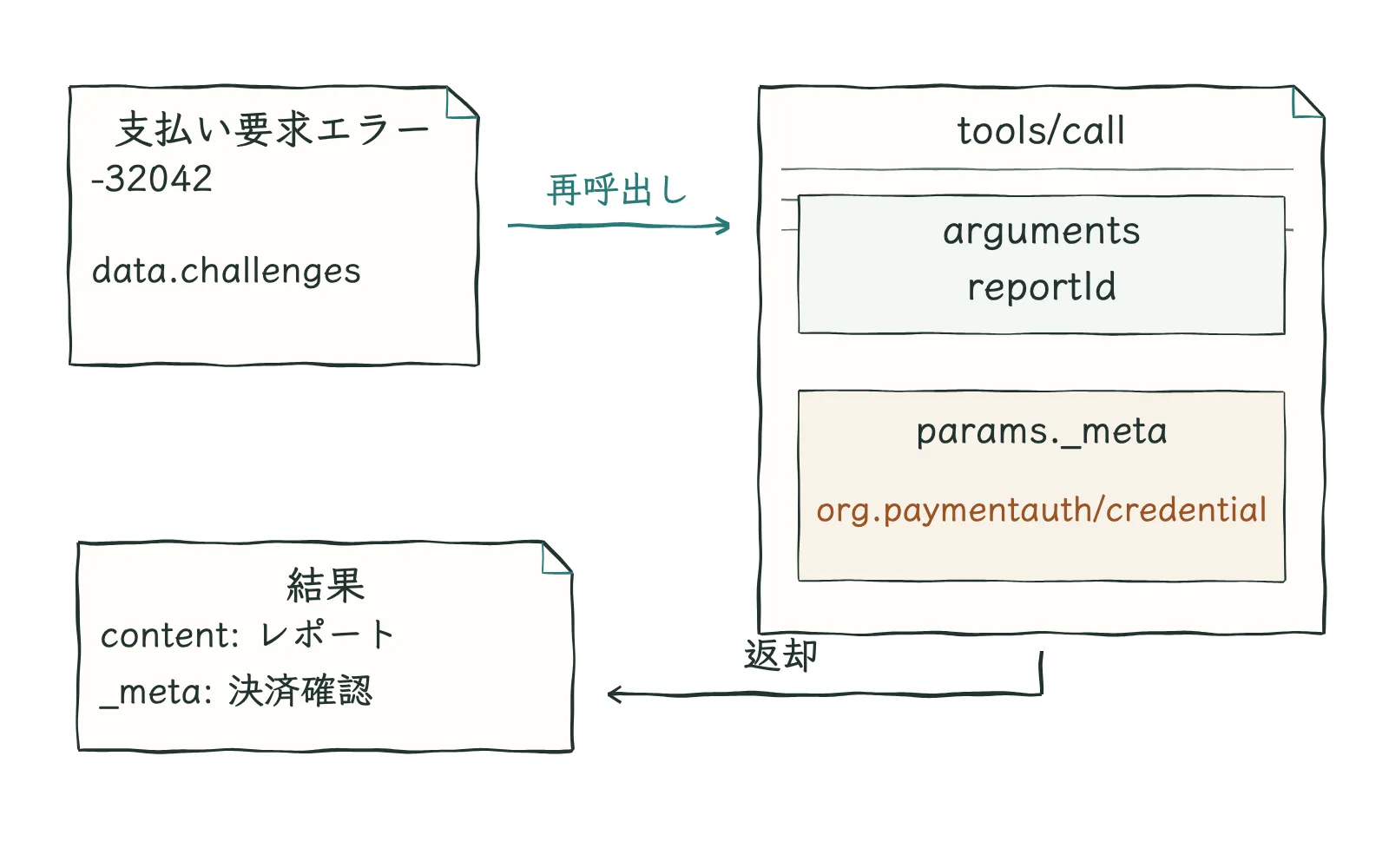
After accepting payment, the provider can return the tool result.
If it includes payment confirmation, it places the confirmation in org.paymentauth/receipt within the result's _meta.
{
  "jsonrpc": "2.0", "id": "<再要求ID>",
  "result": {
    "content": [{ "type": "text", "text": "<要求したレポート>" }],
    "_meta": { "org.paymentauth/receipt": {
      "method": "tempo", "status": "success", "reference": "<決済参照>", "timestamp": "<決済処理日時>"
    } }
  }
}
The application reads the report from content and reconciles payment using reference.
id associates the tool call with the returned result.
As with HTTP, check payment acceptance separately from whether the expected report was received.
WebSocket
With WebSocket, the parties can exchange streamed data and additional payment authorizations over a persistent connection.
The mpp field distinguishes payment authorization, payment confirmation, requests for additional authorization, and requests to close.
In mppx 0.19.0 messages, the consumer can send initial authorization in the following form.
{"mpp":"authorization","authorization":"<支払い認可を符号化した文字列>"}The provider verifies the authorization, returns payment confirmation, and sends data corresponding to usage. When usage increases and additional authorization is required, the provider can send the following message containing channel amounts.
{
  "mpp": "payment-need-voucher",
  "data": {
    "channelId": "<チャネルID>",
    "requiredCumulative": "<次に必要な累積額>",
    "acceptedCumulative": "<受け入れ済みの認可上限>",
    "deposit": "<現在の預託額>"
  }
}
requiredCumulative is the cumulative amount required to continue, while acceptedCumulative is the authorization limit already accepted.
If the required amount exceeds the limit, the consumer checks its remaining budget and creates additional authorization.
If it also exceeds the deposit amount, the consumer checks whether an additional deposit is needed.
Additional authorization uses the same message type.
{"mpp":"authorization","authorization":"<追加認可を符号化した文字列>"}Once authorization has been verified, the provider can continue streaming data. If the amount would exceed the authorized spending limit, the consumer does not issue additional authorization, and streaming stops until the conditions for continuation are met.
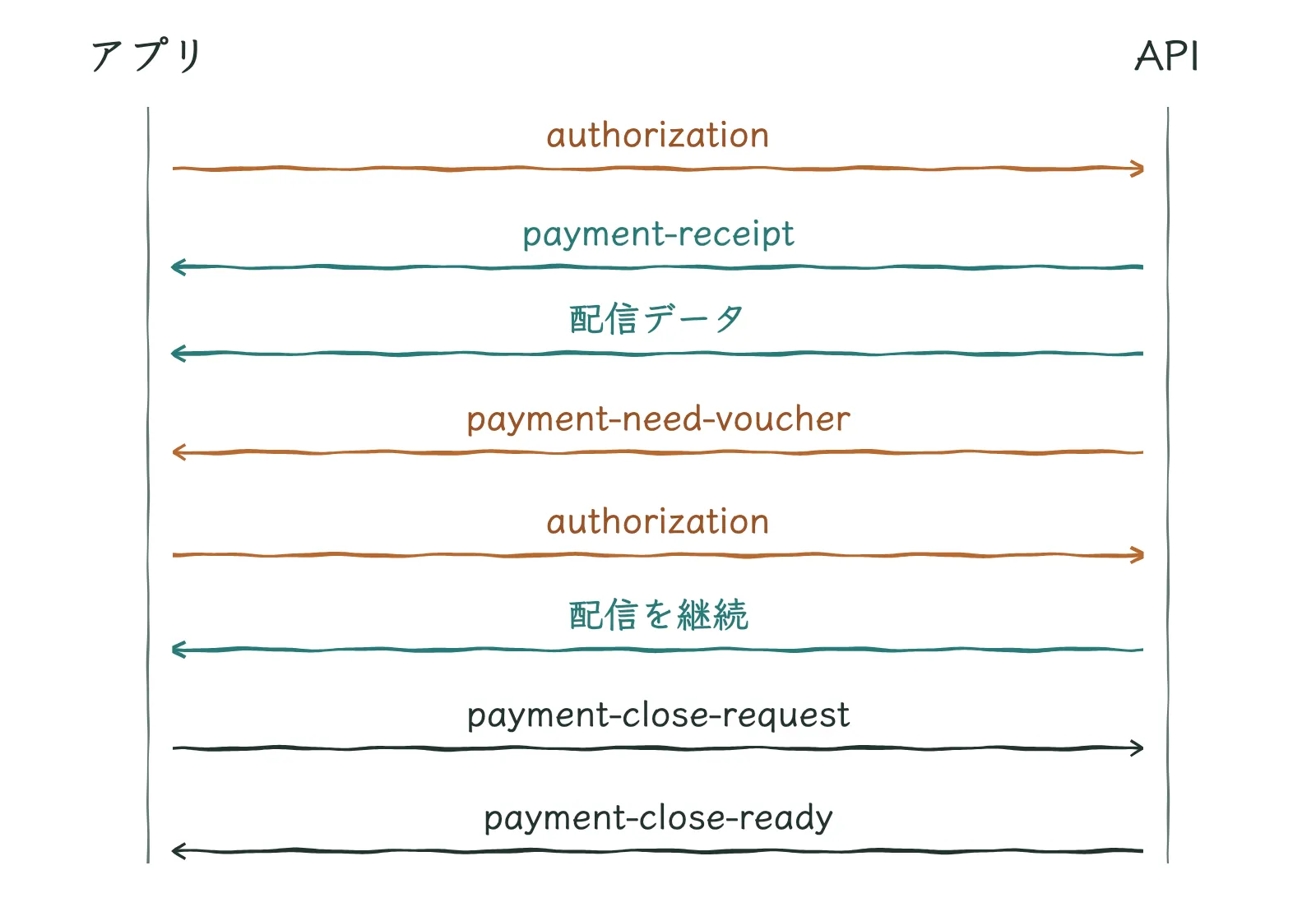
When usage ends, the consumer requests closure.
{"mpp":"payment-close-request"}The provider reconciles actual recorded usage with the accepted authorization and returns a close confirmation.
{
  "mpp": "payment-close-ready",
  "data": {
    "method": "tempo", "intent": "session", "status": "success",
    "timestamp": "<処理日時>", "reference": "<チャネルID>",
    "challengeId": "<料金提示ID>", "channelId": "<チャネルID>",
    "acceptedCumulative": "<累積の認可上限>", "spent": "<記録した実利用額>"
  }
}
spent is the amount of actual usage recorded, distinct from the authorization limit in acceptedCumulative.
The application reads this confirmation and the payment record before closing the connection.
A disconnected transport alone does not establish that the final usage has been settled.
Failures and Retries
When the application cannot receive an API result, it checks whether it is safe to initiate a payment. The appropriate next action differs between failures before signing, rejected payment proofs, and missing responses after settlement. Receiving a payment offer alone is not a sufficient reason to pay again.
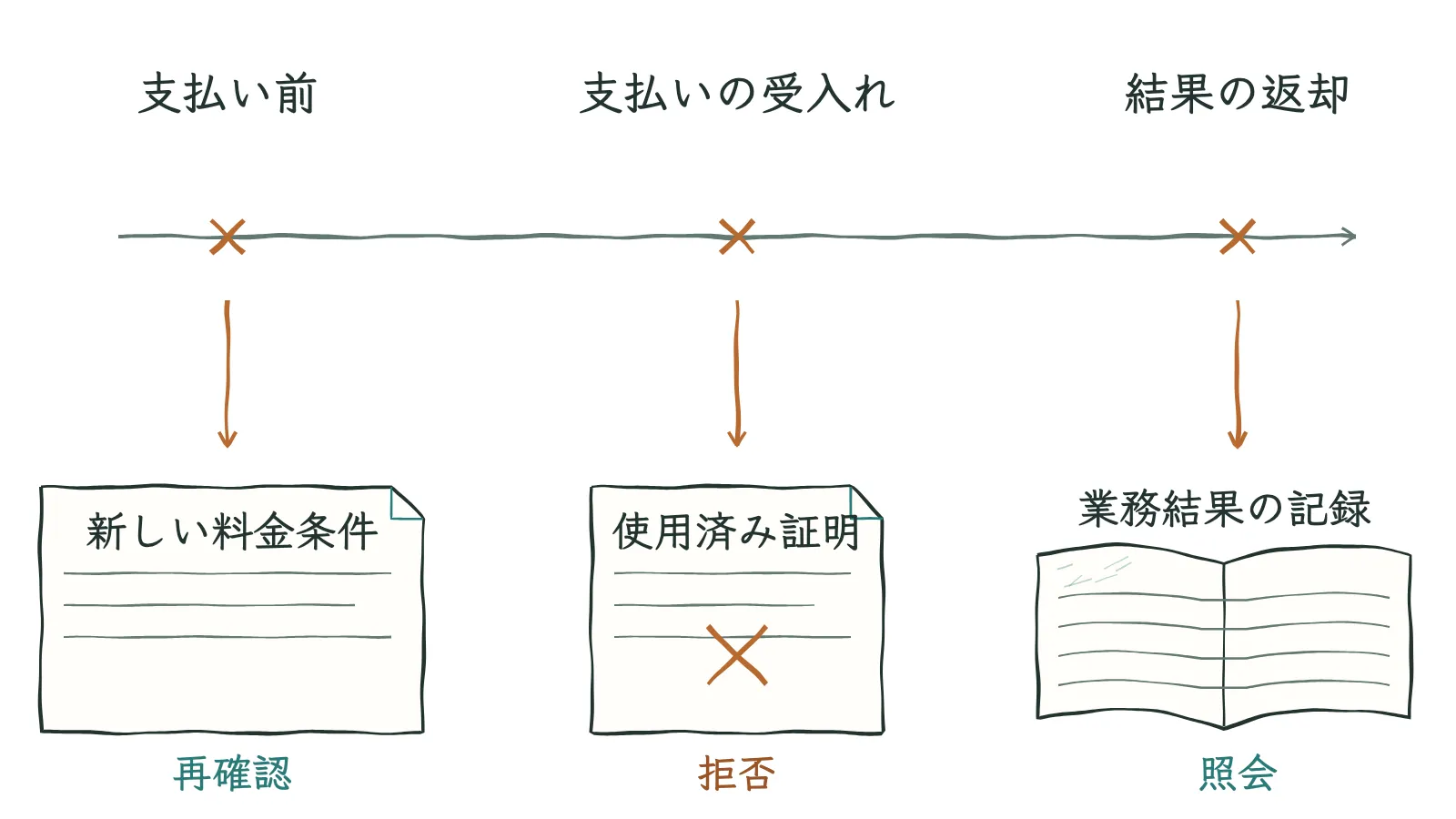
Failures Before Payment
If payment terms have expired, the application can obtain new terms from the API and retry.
The application reads the payment terms in the response headers together with the Problem Details JSON describing the failure.
It checks the new amount and expiration and proceeds only with terms that satisfy its budget and authorization.
When retrying, the application also checks the attempt count and payment history. If there is a record of a request for which a payment has already been created, it reconciles that record first. It releases the retained budget reservation only after confirming that payment did not settle.
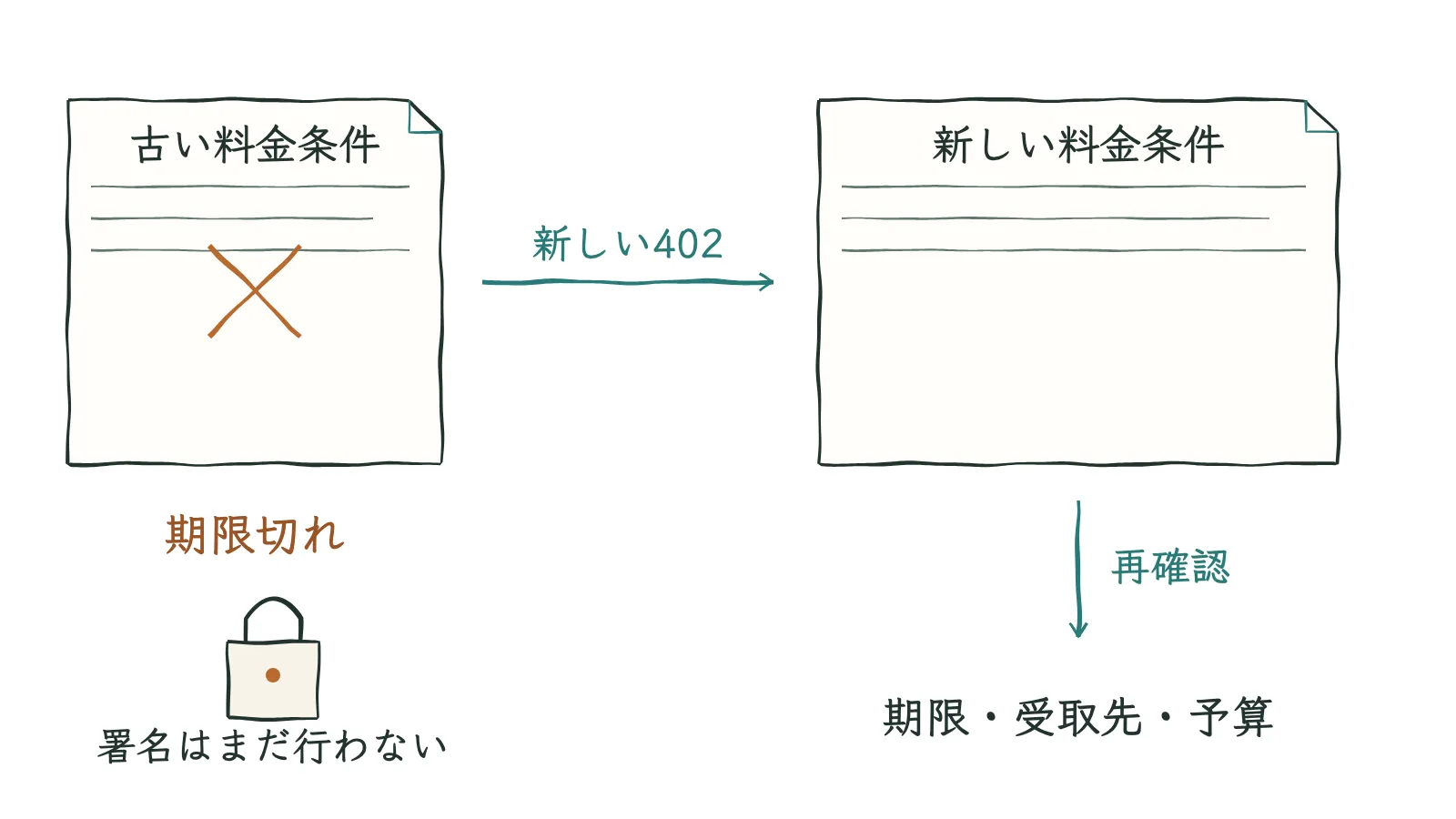
Also, 401, which indicates a login failure, differs from 402, which indicates a payment requirement.
If the user cannot be authenticated, correct the login credentials.
Check the status and returned terms to avoid creating a new payment in response to an authentication failure.
Confirmed Payment and Unknown Results
If the report does not arrive after settlement, reconcile the original request with the payment record before paying the same fee again. A communication error establishes only that the result was not received; it is not proof that a transfer did not execute. The application retains the pending budget reservation and moves it to spent funds once payment is confirmed.
With mppx's Tempo charge, rejecting a previously used proof or a mismatched transfer returns 403 without a new payment challenge.
An application receiving this response does not automatically create another credential.
Check the returned status and retry conditions for each payment method and implementation, including whether the response includes new payment terms.
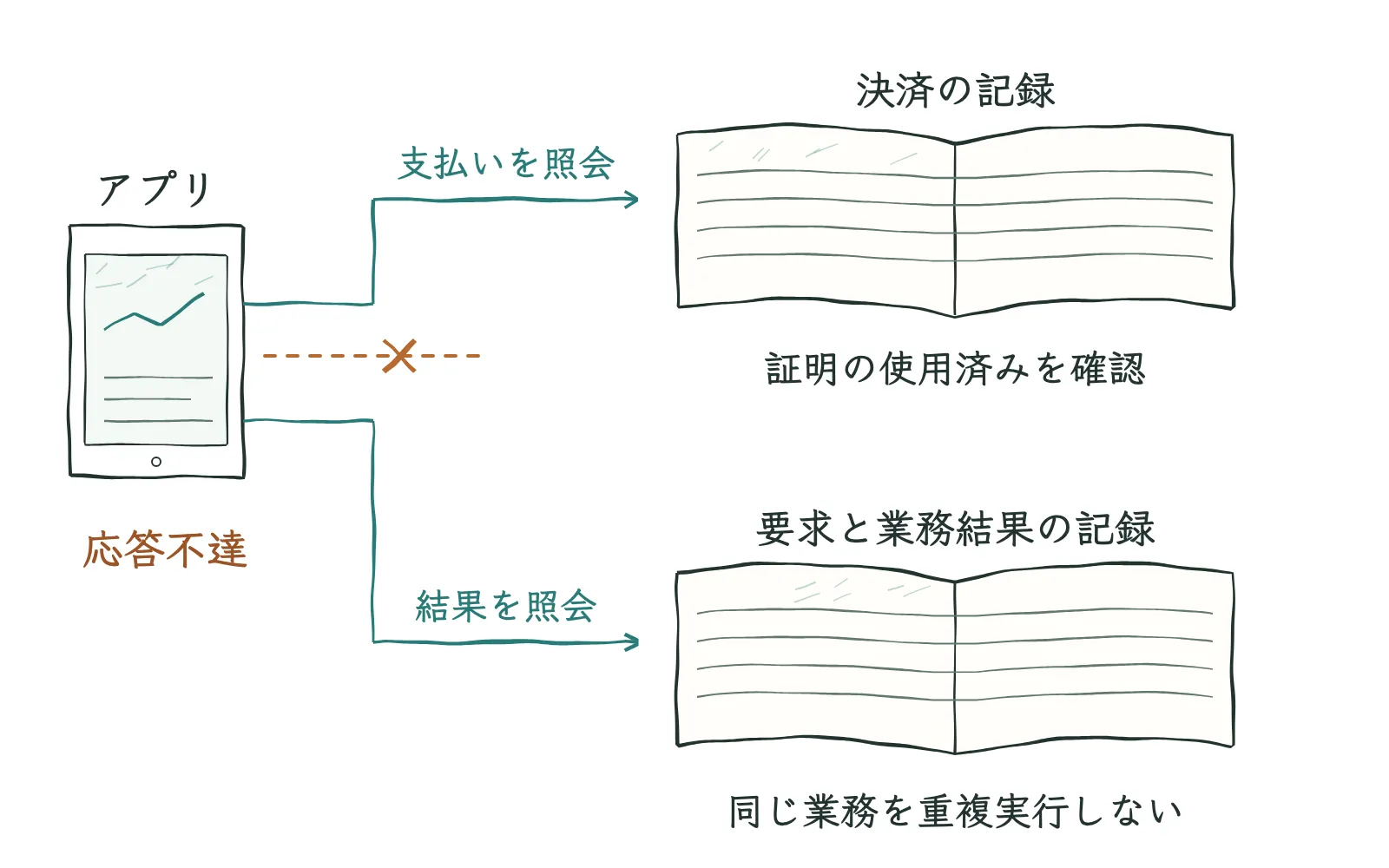
In addition to accepting a payment only once, prevent the API from executing the business operation repeatedly.
Idempotency is the property of not repeating the business operation when the same operation is resubmitted.
The common HTTP specification recommends supporting Idempotency-Key for non-idempotent operations.
If the API stores the key and business result, it can associate a retried request with the original operation. However, not every API necessarily offers a way to retrieve previous results. The application uses the payment reference, request identifier, and retrieval mechanisms published by the API to check separately whether payment occurred and whether the report can be recovered.
Payment Security
The party signing a payment pays only amounts within the authorized limit to endpoints and recipients approved by the user. The API provider verifies that the issued terms have not been modified and that the received proof corresponds to the target operation. In addition to encrypting communications, both parties check the conditions relevant to their own decisions.
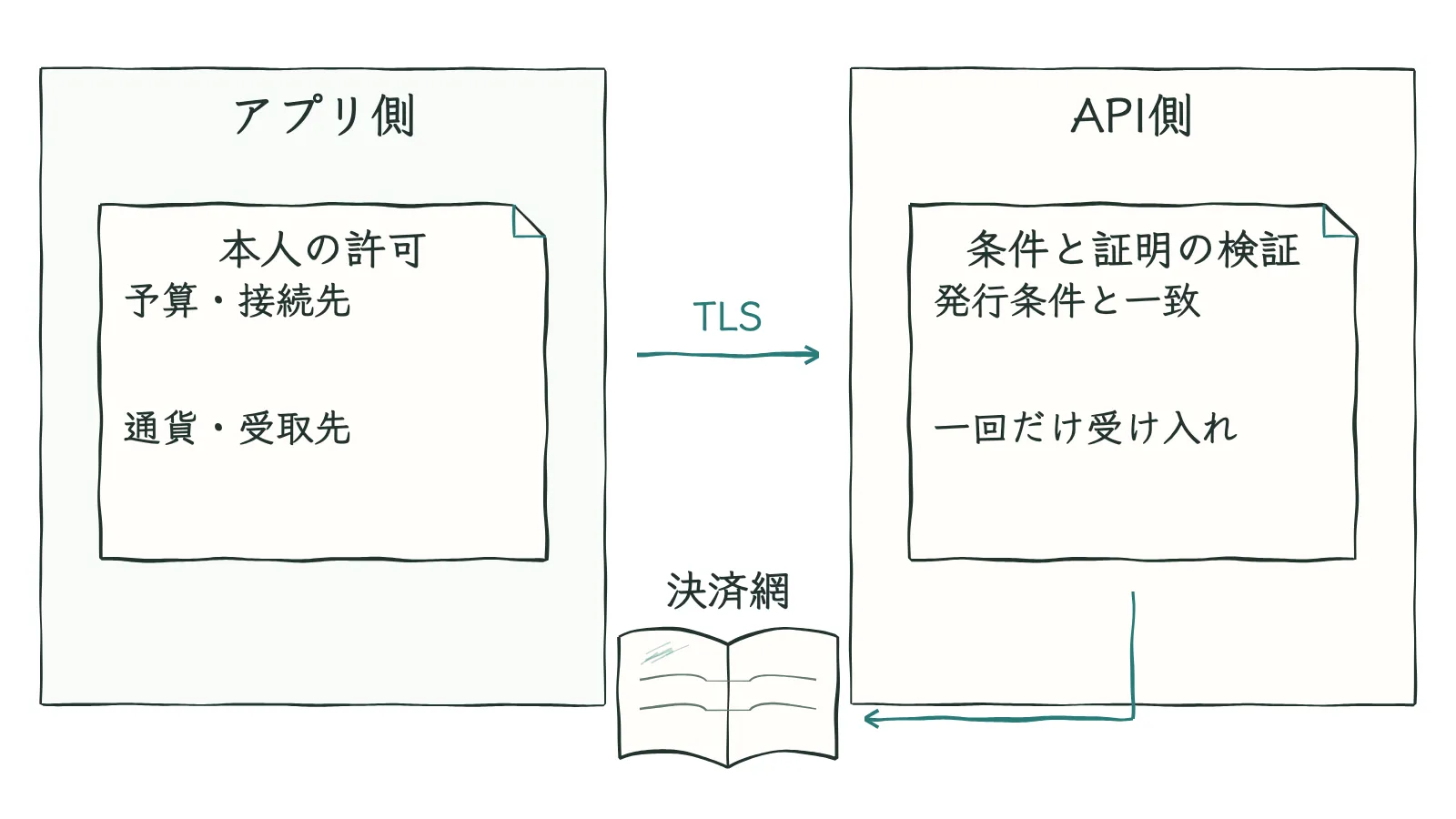
Connections carrying this information use TLS.
Also ensure that login credentials are not overwritten by payment credentials and that secrets are not exposed to the model or logs.
If a proxy or cache sits in front of the API, check whether payment headers reach the API.
Authentication and Payment Credentials
When an API requires login, the provider authenticates the user before returning payment terms.
If the ordinary Authorization header is used for login, the API can specify Payment-Authorization in the challenge's header field.
The application preserves the original authentication credentials and adds payment information in the designated header.
Authorization: Bearer <ログイン用の認証情報>
Payment-Authorization: Payment <支払い情報>
Authorization authenticates the user connecting to the API, while Payment-Authorization carries payment information.
Payment alone must not grant a user access to reports that they are otherwise unauthorized to retrieve.
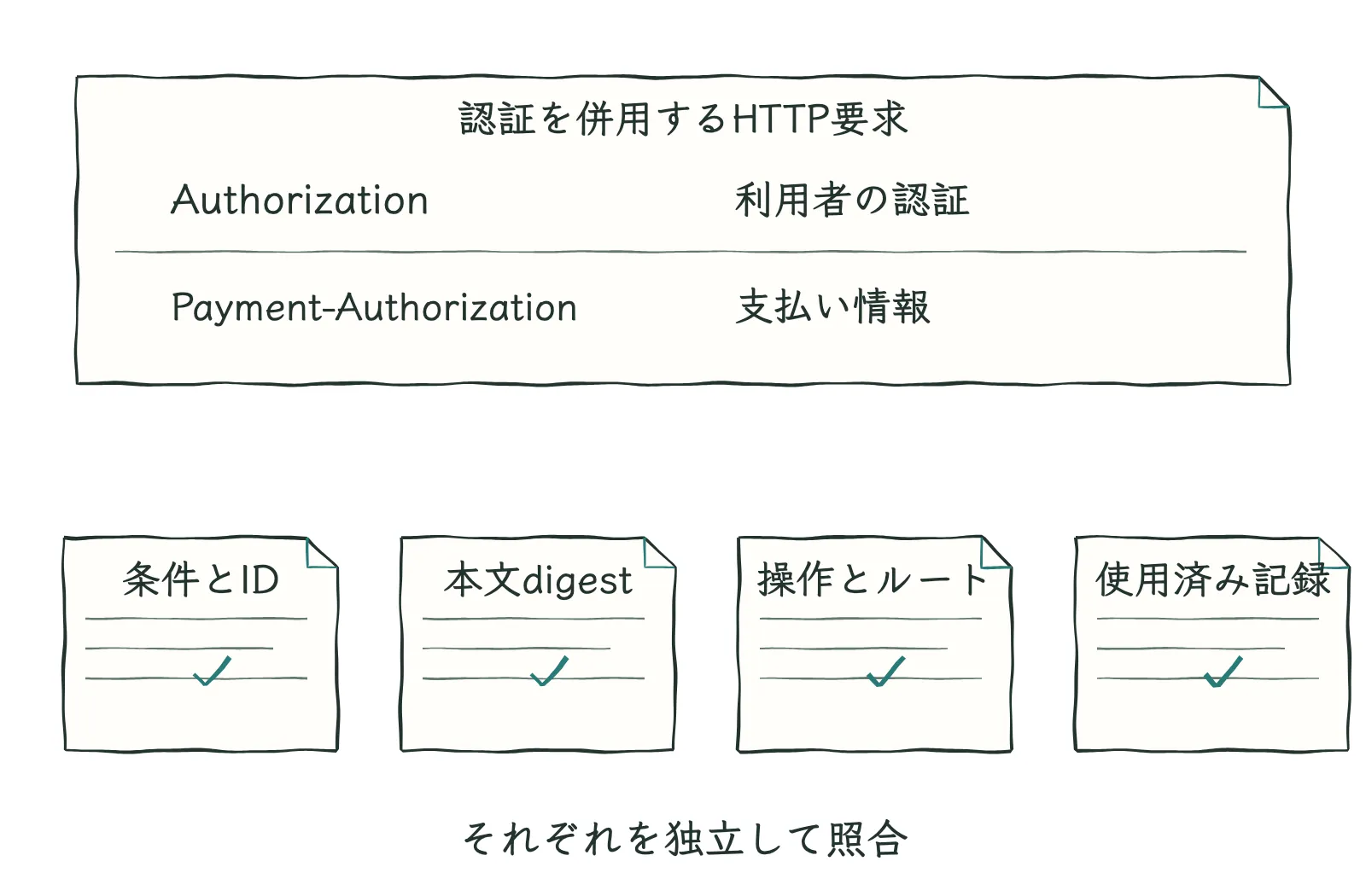
Payment verification checks several associations separately.
It binds the challenge id to the issued terms and verifies that the amount, currency, and recipient have not changed.
Do not use the display-oriented description as the basis for authorizing payment.
For requests containing a body, also check whether the body bytes match using digest.
However, matching the body alone cannot prevent reuse on another API route.
If multiple operations accept the same body, the provider checks the target route and report against expected values stored at issuance or tamper-resistant business information returned in opaque.
Even for a proof that satisfies these conditions, the provider additionally checks whether it has already been used.
Storing Secrets
The API secret used to create payment terms and the consumer's private key used to sign payments have different roles.
The API's MPP_SECRET_KEY is used to verify the association between issued terms and their IDs.
The consumer's private key authorizes movement of funds, so only operations permitted to sign should have access to it.
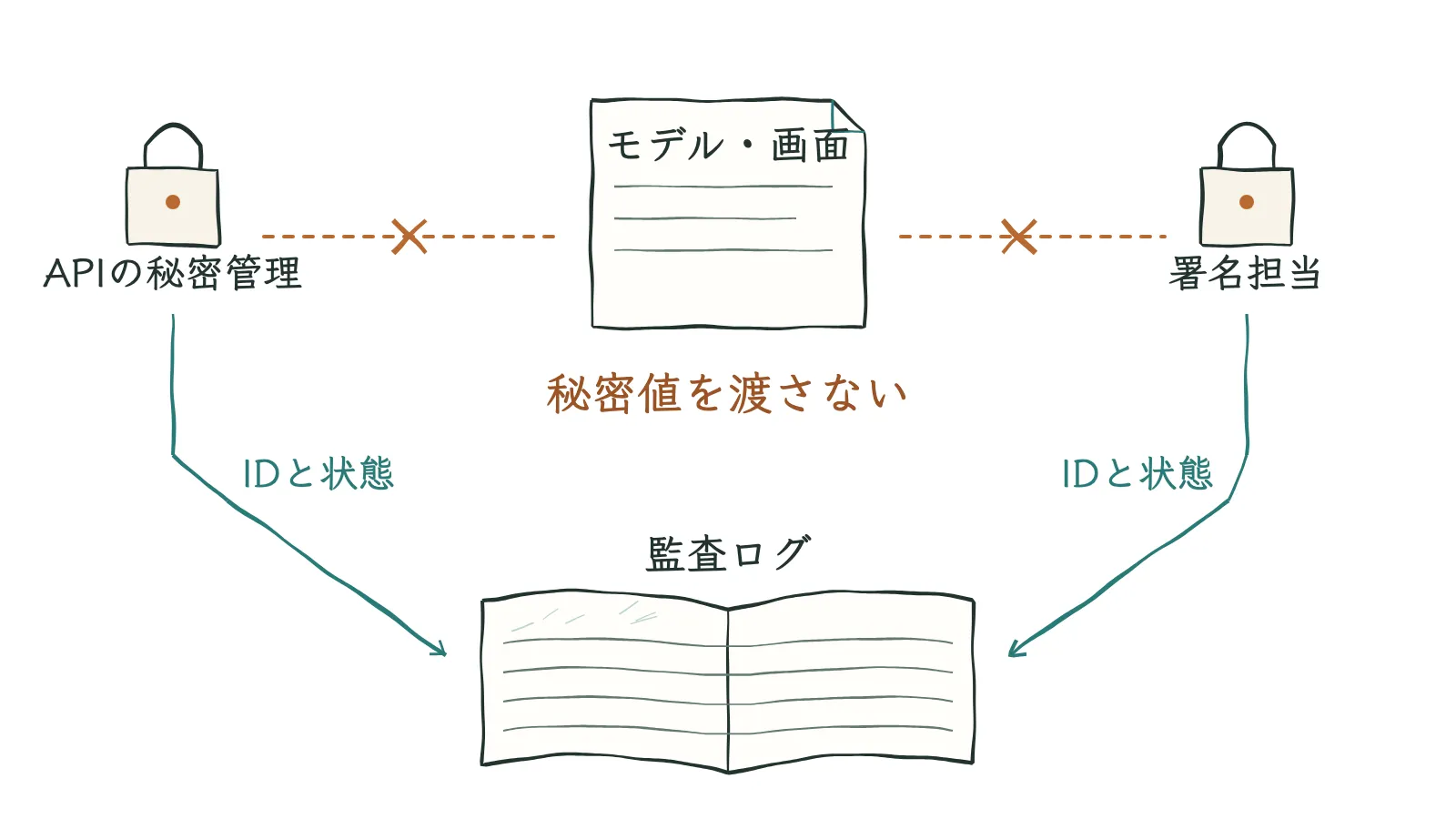
Store API secrets in server-side secret management and signing keys within the consumer's restricted signing process. Do not expose either to model inputs or public interfaces. The payment tool called by the model checks the user-authorized scope and reserves the budget, in a configuration where the model cannot modify the authorization settings itself.
Remove payment credentials and receipts from logs and traces. Exclude login authentication headers from records as well. For troubleshooting, retain the request ID, challenge ID, payment method, and processing state so that relevant associations can be traced. Storing complete payment credentials is distinct from storing the records needed to trace processing.
Proxies and Caches
Even when a proxy sits in front of the API, it forwards challenge and credential headers without removing them.
In responses to the application, make WWW-Authenticate and any required payment confirmation readable.
If a browser uses a cross-origin API, also check the configuration that exposes the required headers.
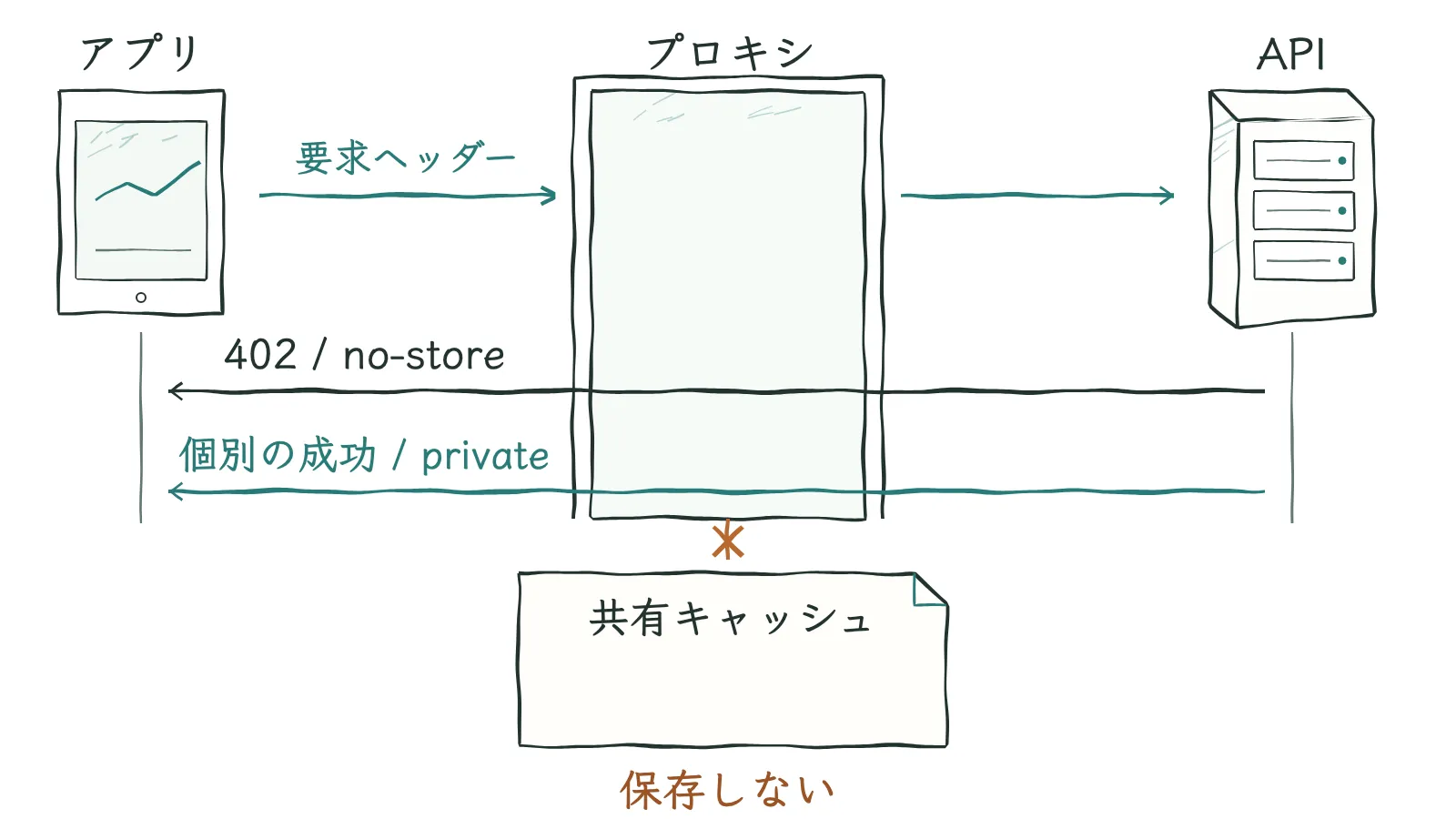
Attach Cache-Control: no-store to 402 responses containing payment terms to prevent old terms from being stored and reused.
Use private for successful responses containing individual payment confirmations so that they are not stored in caches shared by multiple users.
This prevents one user's payment results from being returned to another application.
If payment credentials are carried in a header other than Authorization, attach Cache-Control: private or no-store to every response, regardless of whether it contains a receipt or whether the operation succeeds.
Also verify header size limits across the actual delivery path. The common HTTP specification recommends keeping challenges below 8KB and requires clients to handle at least 4KB challenges and servers to handle at least 4KB credentials. This requirement does not guarantee that proofs of arbitrary size will pass through, so also check API gateway and proxy limits.
Relationship to x402
Both MPP and x402 use HTTP 402 to request payment for API usage.
However, the headers and data formats for presenting terms, returning proof, and confirming payment differ.
Using the same status code does not mean that payment credentials can be forwarded unchanged.
| Role | MPP | x402 v2 |
|---|---|---|
| Present payment terms | WWW-Authenticate |
PAYMENT-REQUIRED |
| Send payment credentials | Header specified by the payment method (Authorization in the example) |
PAYMENT-SIGNATURE |
| Confirm payment | Payment-Receipt |
PAYMENT-RESPONSE |
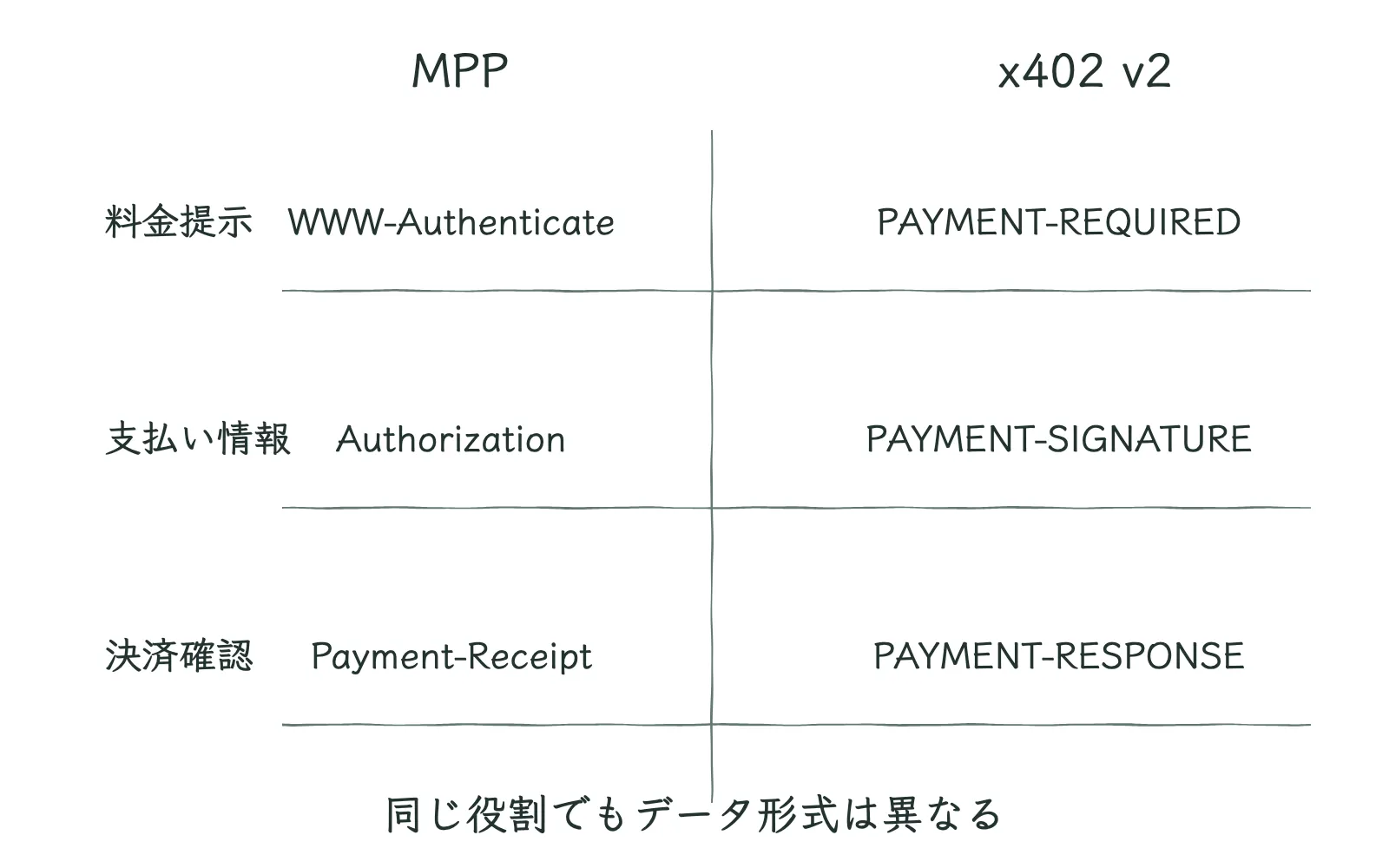
mppx provides a way to accept both formats through the same API.
The provider supports the formats and payment methods used by connecting applications, while applications use the processing appropriate to the returned format.
Avoid treating functionality that both protocols can implement, such as metered payments, as a feature exclusive to one protocol.
Summary
With MPP, the API presents payment terms, the application returns an authorized payment credential, and the provider verifies payment and returns the result.
The application checks the terms and total budget before signing and investigates requests with unknown results using payment and business records.
Distinguishing one-time, metered, and recurring charging models from the transport makes it possible to distinguish payment authorization, settlement, and receipt of the API result.
The official MPP documentation describes payment terms, payment methods, and how to use the SDK.
The common HTTP authentication scheme is defined in the work-in-progress payment authentication specification.
The payment authentication transport extensions describe where MCP carries its payment data.
The official x402 documentation describes the x402 communication format.