Introduction
Hi, I'm cardene, a software engineer and technical writer focused on blockchain and AI.
I've also authored Japanese technical books on specification-driven development with LLMs and decentralized application (DApp) development.

I also build and publish a variety of tools, libraries, and open-source projects.
This article explains MCP, which connects AI applications to external tools and data.
Using a product manual search as an example, we will follow the interactions involved in discovering a tool, executing it, and using the retrieved material to answer a question.
Note: The original illustrations, interactive Dragon diagrams, and sample payloads are retained. Some of their labels and example text remain in Japanese.
What is MCP?
MCP is a communication protocol that allows AI applications to use external tools and data in a common way.
Its full name is the Model Context Protocol.
It defines the messages and interactions for asking a connected service what operations and resources are available, supplying the necessary inputs, and receiving results.
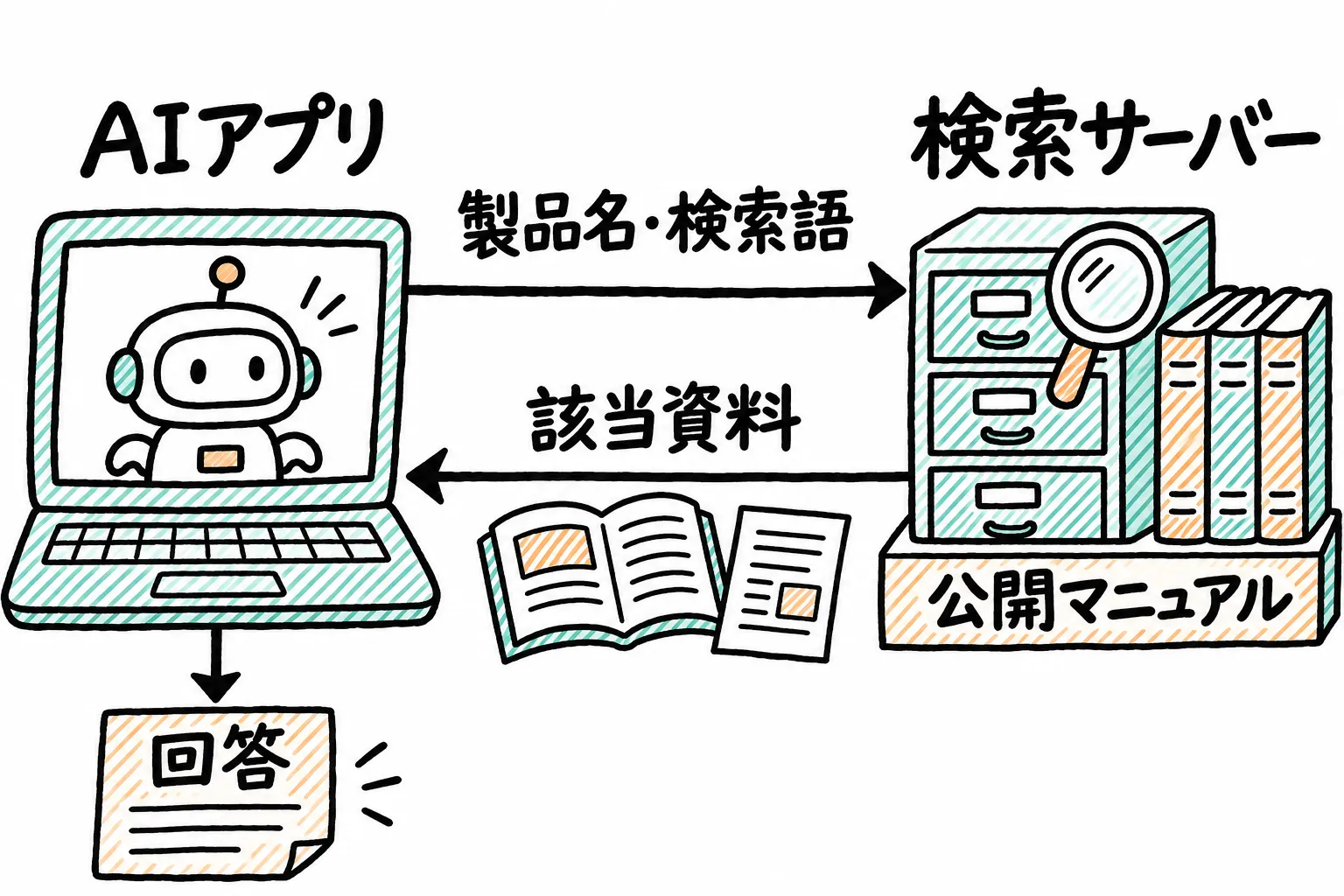
For an AI application to answer a question about a product manual, it uses a search function to locate the material and passes the content to the AI model that generates the answer. MCP standardizes the connection between the AI application and the search function or repository that stores the material. It is used to connect AI applications to document search, file reading, and operations on business systems.
Building a separate integration for each service means that the number of integrations grows as more AI applications or services are added. MCP-compatible applications and providers can exchange tool descriptions, input formats, invocation methods, and results through a common protocol. The AI application decides which parts of the retrieved material to pass to the model and how to answer the user.
Suppose a user asks, "Find out how to resolve error E17 on Sensor A." The model proposes a search tool and its inputs. If the application authorizes execution, it sends the product name and error code to the search service. We will follow this example through to the point where the retrieved manual excerpt is passed to the model and the application answers with the procedure and its supporting evidence.
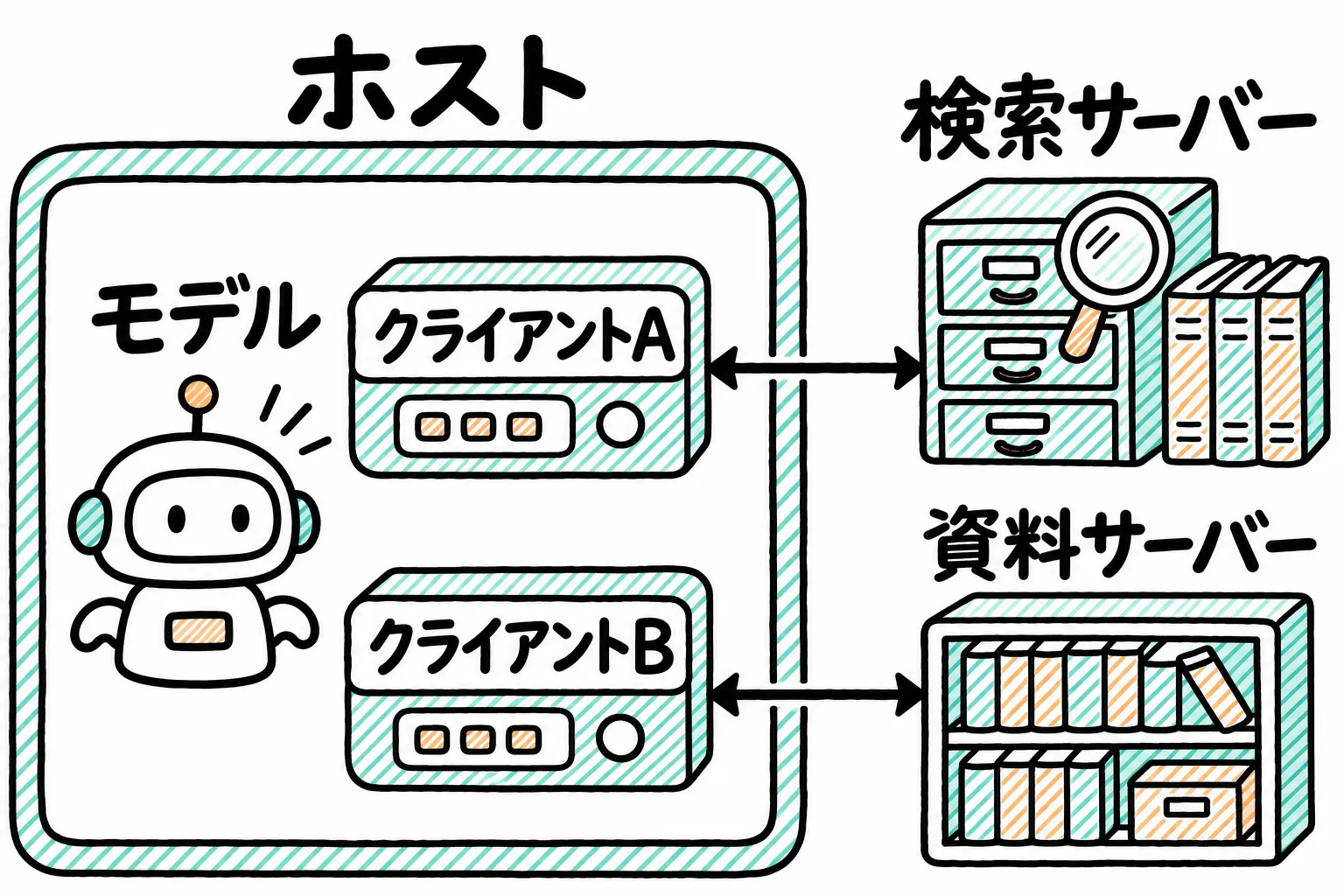
Host, Client, and Server Architecture
The overall AI application that manages conversations and model calls is called the host.
The component within it responsible for MCP communication is the client, and the connected service exposing operations and resources is the server.
When a host uses multiple servers, it has a corresponding client for each.
// @article-player
architecture AIアプリと外部の検索 [view: fixed]

group host as ホスト [color: slate, icon: app]
  box model as モデル [icon: bolt]
  box client as クライアント [icon: net]
end
group remote as 外部の提供側 [color: blue, icon: cloud]
  box server as 検索サーバー [icon: server]
end

step 候補を確認
  say モデルが検索の候補を作り、ホストが実行する処理と入力を確認します。
  model -> client: 許可した検索

step 検索を要求
  say クライアントがMCPの要求を送り、サーバーが入力と権限を確認します。
  client -> server: 検索条件
  act server: 入力と権限

step 資料を取得
  say サーバーがマニュアルを検索して該当する内容を取得します。
  act server: マニュアル検索

step 結果を利用
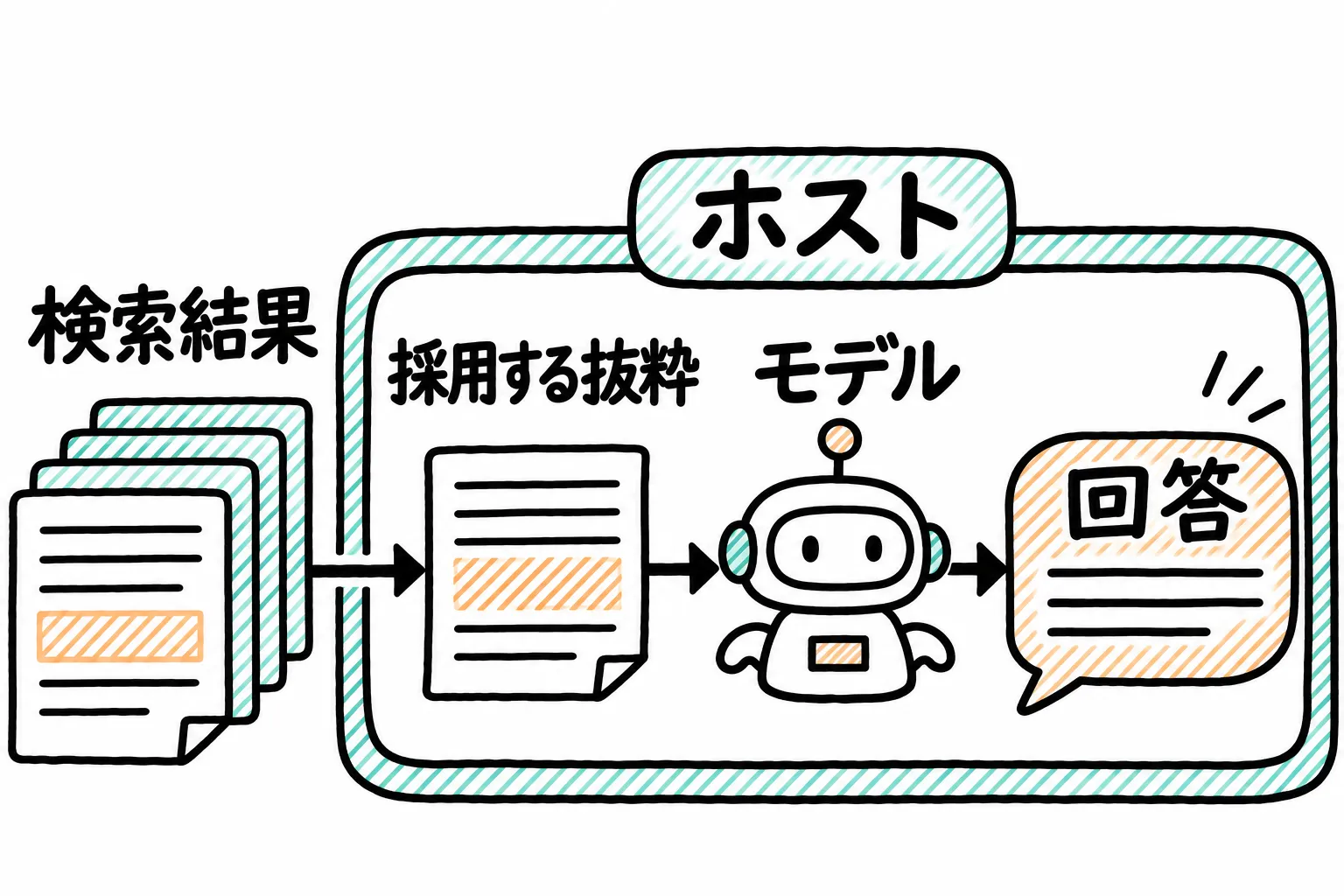
  say ホストが返された資料を選んでモデルへ渡し、回答を作ります。
  server -> client: 資料 [side: above]
  client -> model: 採用する資料 [side: below]
The host receives the user's request and selects the tools and resources to expose to the model. When the model proposes a search, the host checks whether the operation and arguments may be executed and passes them to the client. The client turns the proposal into an MCP request, sends it, and returns the server's result to the host.
Before executing an exposed operation, the server validates its inputs and access permissions. Internally, it may use a search API, a database, or another model, but externally it exposes MCP operations and results. The host selects the inputs and material needed for execution and shares them with the server.
Tools, Resources, and Reusable Instructions
Even when investigating a manual, running a search, reading the document itself, and choosing how to format an answer are distinct operations.
MCP allows these to be exposed as Tools, Resources, and Prompts, respectively.
The client checks which capabilities the server supports before retrieving their lists or contents.
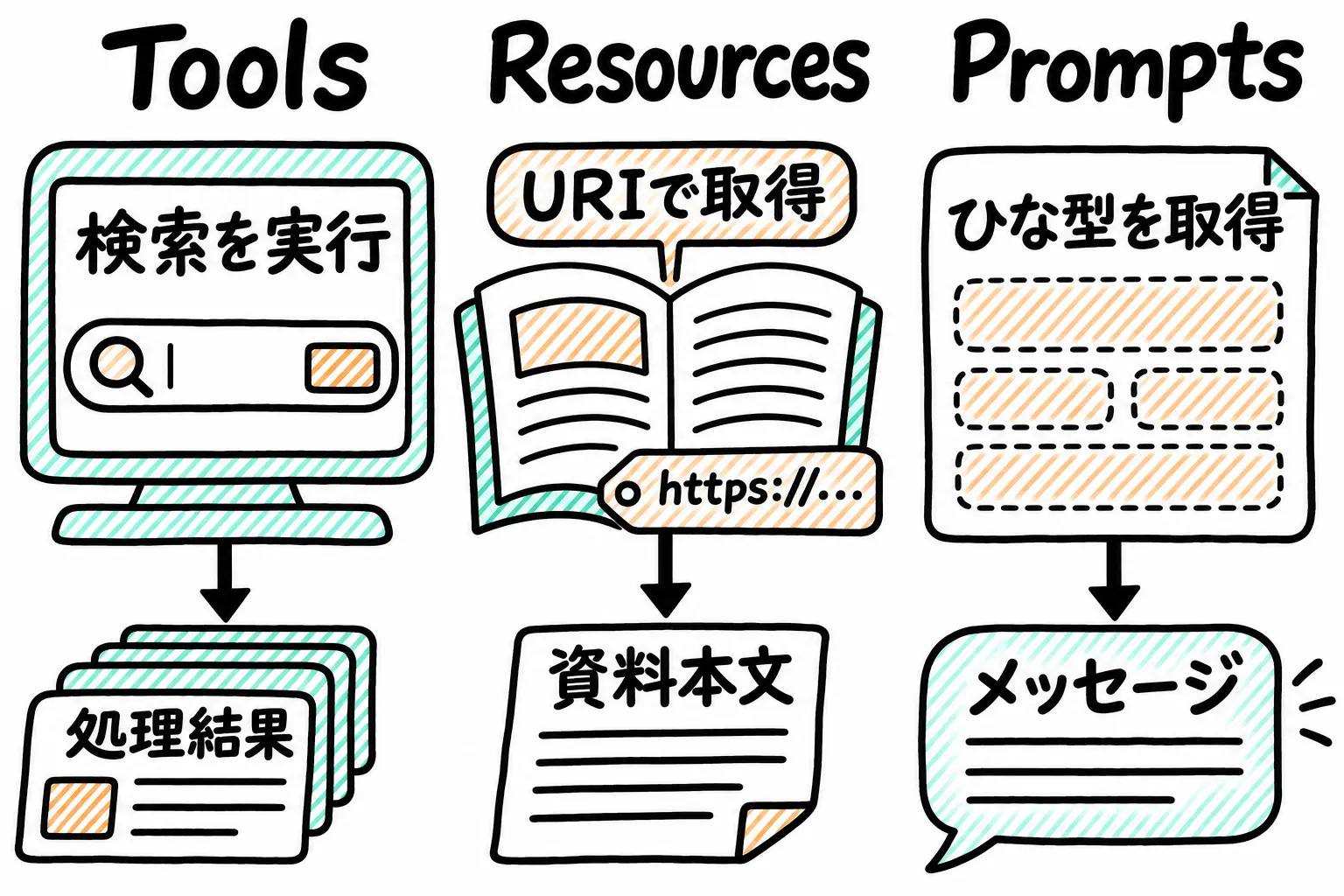
Tools for Invoking Operations
Tools expose operations such as search or calculation.
The client retrieves operation names, descriptions, and input formats through tools/list, then sends the selected name and arguments to tools/call.
For example, a manual search that accepts a product name and query can be exposed as a single tool.
Tools are intended to be selected by the model, but authorizing their execution is the host's responsibility. A description that says "read-only" and the actual safety of the implementation must be evaluated separately.
Resources for Retrieving Material
Resources allow content such as files or database schemas to be retrieved as information for the model to use.
Each resource has an identifier called a URI. The client retrieves a list through resources/list and reads the selected resource by passing its URI to resources/read.
The host selects the material relevant to the conversation and passes it to the model.
An implementation may also use a resource URI returned in a search result to retrieve the full text later. URIs can use schemes other than HTTP, so seeing a resource identifier does not mean that the client should automatically access the web; it should use the exposed retrieval method.
Prompts for Retrieving Templates
Prompts are templates for messages to be passed to the model.
For example, a server can expose a template for organizing an investigation into "symptoms, checks, and corrective actions".
The client checks the available prompts through prompts/list, supplies the required arguments to prompts/get, and retrieves the messages.
Templates are intended to be selected by users, but the specification does not prescribe a particular user interface. Messages retrieved from a server are distinct from the host's private system instructions. The distinction between tools, resources, and prompts does not by itself determine the authorization of an operation or the trustworthiness of information.
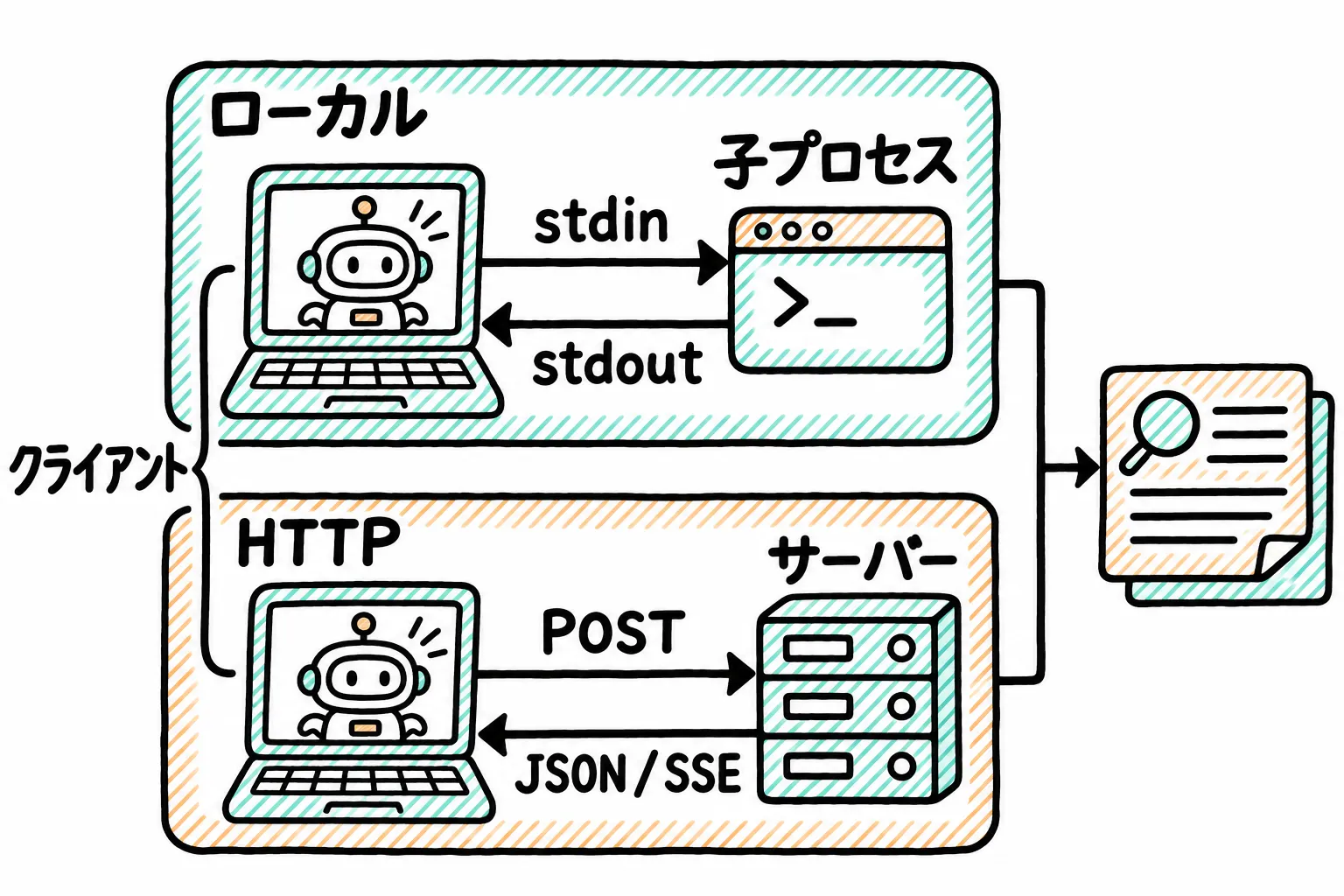
Local Processes and HTTP
MCP invokes operations through messages containing an operation name, inputs, and a request identifier.
The server returns a result or an error with the same identifier, allowing the client to correlate the response with its request.
This message format is JSON-RPC 2.0.
The standard transports are stdio, which uses a local child process, and Streamable HTTP, which connects over HTTP.
The product name and query supplied to the manual search may be identical, but process startup and request cancellation differ depending on the transport.
| Transport | Sending a request | Receiving a response |
|---|---|---|
stdio |
Send it to the standard input of the child process started by the client | Receive it from the child process's standard output |
Streamable HTTP |
Send a separate POST to the MCP endpoint for each request |
Receive one JSON response or an SSE stream associated with that request |
With stdio, each message is sent as one line of JSON.
Writing ordinary logs to the server's standard output would prevent the client from parsing them as MCP responses, so logging uses standard error, stderr.
To shut down, the client closes input to the child process and waits for the server to exit.
SSE, used for Streamable HTTP responses, is a format for receiving successive events within one HTTP response.
A server can send progress notifications for a search request and then return its result.
The client supports both a single JSON response and SSE.
The 2026-07-28 specification does not use a persistent HTTP GET stream or a protocol session tied to a connection.
Each request declares the version and client capabilities, and the HTTP headers MCP-Protocol-Version, Mcp-Method, and the operation-dependent Mcp-Name correspond to the request body.
Even transports with the same name follow different procedures under older specifications, so check which versions the endpoint and client support.
From Manual Search to Answer
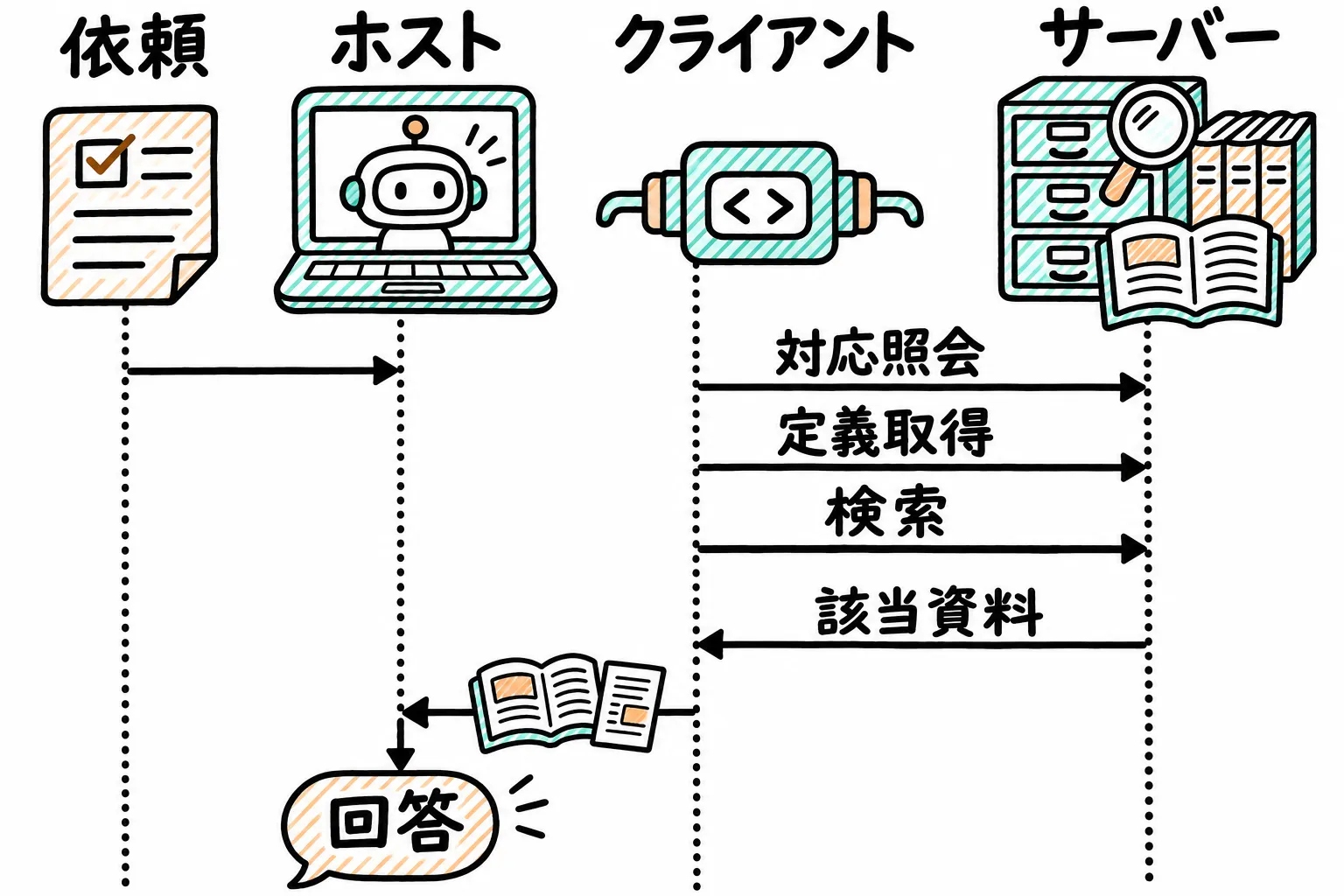
After receiving the user's request, the application searches the manual through a configured server. It checks connection conditions, examines the search tool's inputs, authorizes execution, receives the result, and generates an answer using the retrieved material. We will identify the responsibilities of each component by relating the search tool definition to the protocol messages.
// @article-player
sequence 検索の定義から結果まで

box client as クライアント [icon: app, color: slate]
box server as サーバー [icon: server, color: blue]

step 対応を照会
  say 対応するバージョンと機能を先に確認します。事前の照会はクライアントでは任意です。
  client -> server: server/discover
  server -> client: バージョンと機能 [side: below]

step 定義を取得
  say 検索ツールの名前と入力形式を取得して、製品名と検索語を組み立てます。
  client -> server: tools/list
  server -> client: 検索の入力形式 [side: below]

step 検索を実行
  say ホストが許可したツール名と引数を送り、同じ要求idの応答を受け取ります。
  client -> server: tools/call
  act server: センサーA・E17
  server -> client: 資料のURIと抜粋 [side: below]

step 資料を選ぶ
  say ホストは実行エラーと該当資料を確認してから、回答に使う内容を選びます。
  act client: 結果をホストへ
1. Check the Endpoint and Supported Capabilities
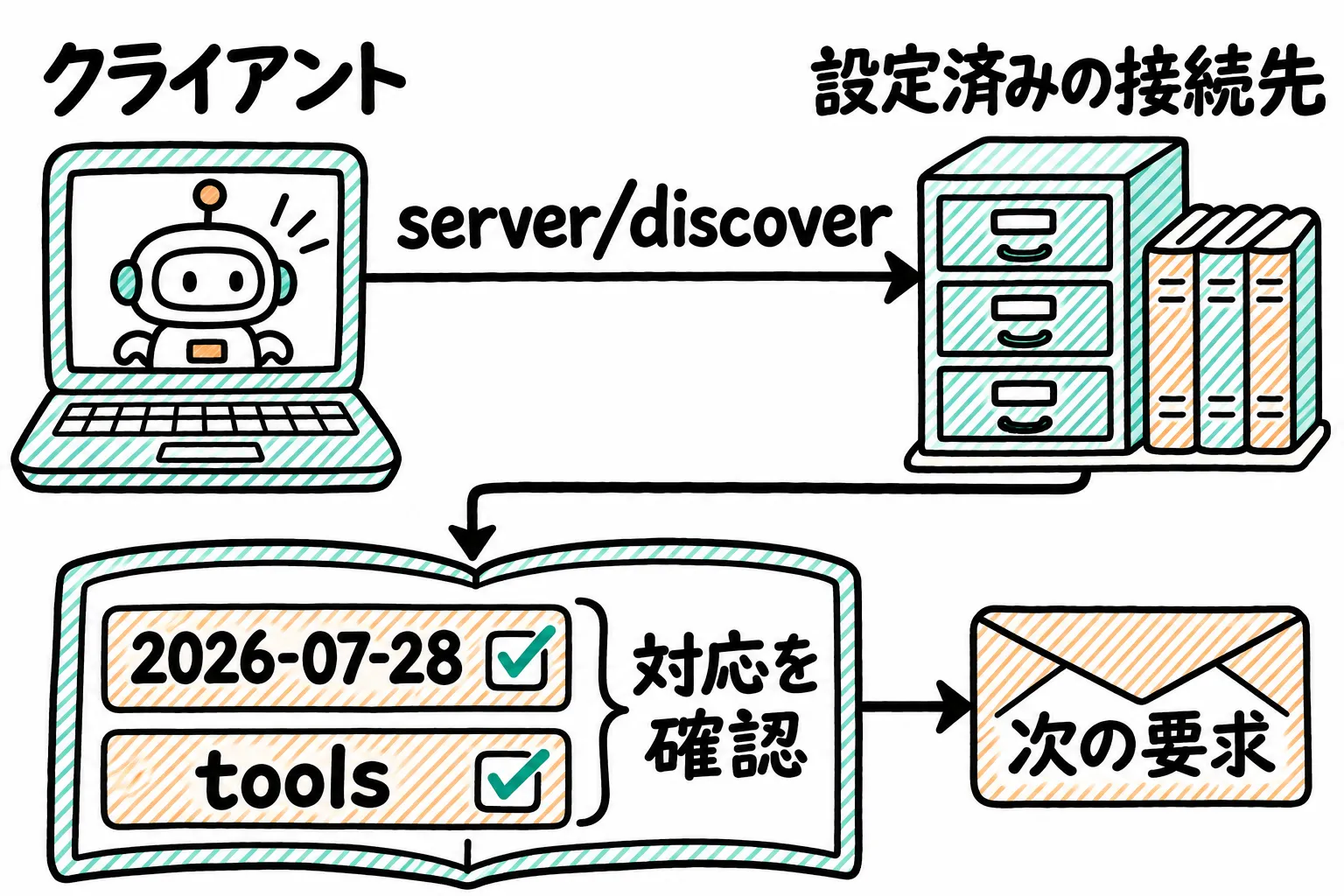
The application connects to a manual search server configured by an administrator or user. The endpoint URL or command used to launch a local server is information selected and configured on the application side. Knowing the server's name alone does not establish that the endpoint is correct or that its distributor is trustworthy.
The client can call server/discover to learn the supported versions and capabilities.
Under 2026-07-28, this request also carries the protocol version and capabilities supported by the client.
{
  "jsonrpc": "2.0",
  "id": "<対応照会の識別子>",
  "method": "server/discover",
  "params": {
    "_meta": {
      "io.modelcontextprotocol/protocolVersion": "2026-07-28",
      "io.modelcontextprotocol/clientCapabilities": {}
    }
  }
}
method specifies the operation being queried, while id correlates the request with its response.
The version and capability declarations in params._meta are required for every request.
The empty capability declaration in this example indicates that no capability for receiving additional input has been declared either.
Including io.modelcontextprotocol/clientInfo, which specifies the client name and version, is also generally recommended for each request.
If the server supports search tools and resource retrieval, it can return a result like the following.
{
  "jsonrpc": "2.0",
  "id": "<対応照会の識別子>",
  "result": {
    "resultType": "complete",
    "supportedVersions": ["2026-07-28"],
    "capabilities": {
      "tools": {},
      "resources": {}
    },
    "ttlMs": 0,
    "cacheScope": "public"
  }
}| Value to check | Client decision |
|---|---|
supportedVersions |
Select a protocol version supported by both parties |
capabilities.tools |
Check whether listing and executing tools is available |
capabilities.resources |
Check whether listing resources and retrieving their contents is available |
ttlMs and cacheScope |
Check the freshness of capability information and the permitted cache-sharing scope |
ttlMs: 0 is a freshness hint indicating that the result should be treated as stale immediately upon receipt.
It does not prohibit storage itself or guarantee that the content will remain unchanged for a specified duration.
The server's own name and version should be indicated by io.modelcontextprotocol/serverInfo in the result's _meta, but the advertised name alone does not establish authenticity.
Servers must implement server/discover, but calling it in advance is optional for clients.
A client may instead send another request directly and choose a different version in response to an unsupported-version error.
Here, the client calls it to check available operations before searching.
2. Check the Search Tool's Inputs
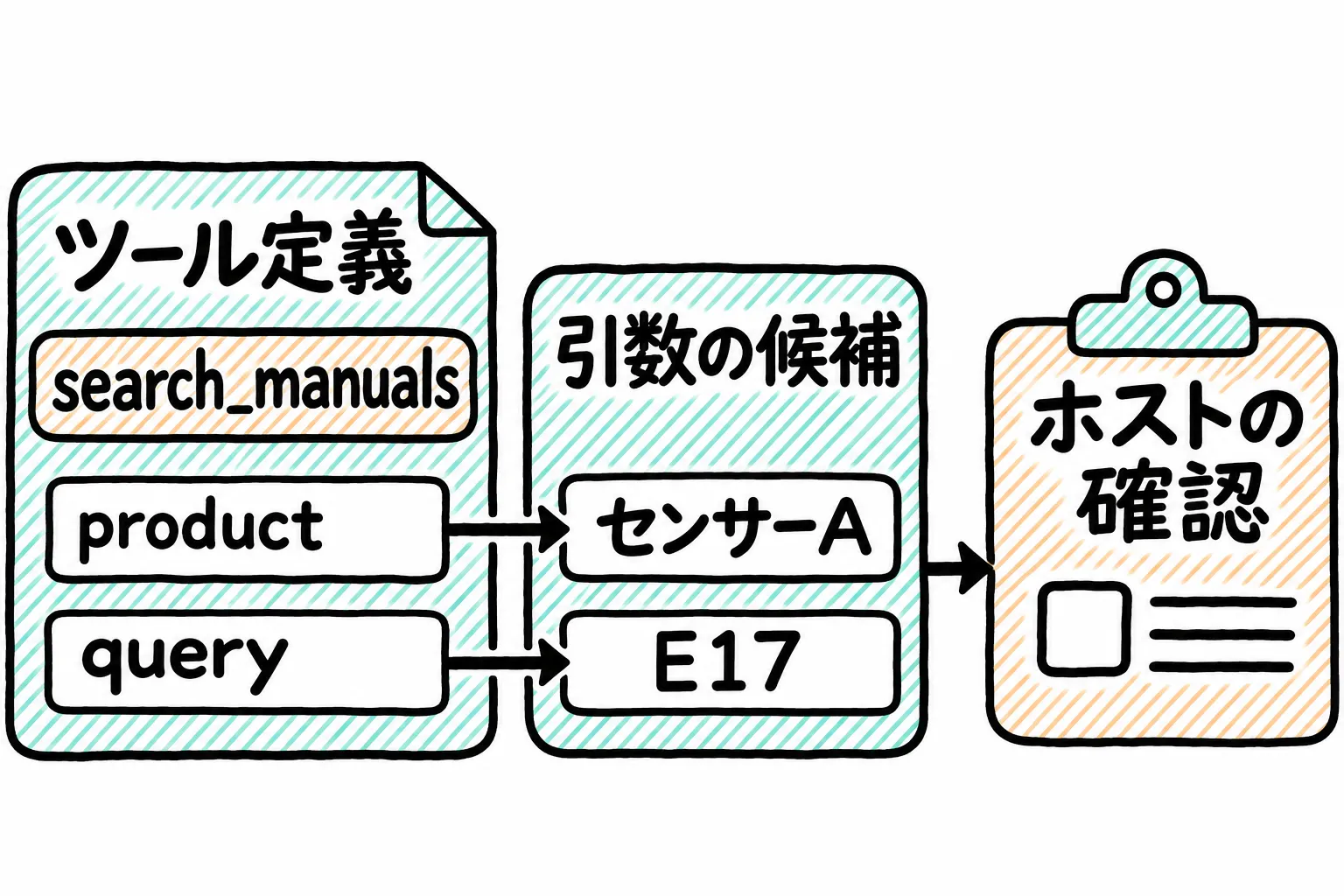
Once the supported capabilities are known, the client retrieves tool definitions through tools/list.
From the returned list, the client checks the name, operation description, and input format.
A fictional tool named search_manuals that accepts manual search requests could be defined as follows.
{
  "name": "search_manuals",
  "description": "指定した製品の公開マニュアルを検索する",
  "inputSchema": {
    "type": "object",
    "properties": {
      "product": { "type": "string" },
      "query": { "type": "string" }
    },
    "required": ["product", "query"],
    "additionalProperties": false
  }
}
The inputSchema defining the input format uses JSON Schema to describe data types and required fields.
The model can use the tool description and schema to propose Sensor A as product and E17 as query.
required indicates that both inputs are mandatory, while additionalProperties: false indicates that other fields are not accepted.
The host checks whether the model's proposal matches the user's request and which server's tool was selected. A tool name identifies a tool within a server. If another server has a tool with the same name, the host distinguishes them using the endpoint as well. Even if the arguments are correctly formatted, permission to read the resource must be checked separately.
3. Execute the Search and Receive the Result
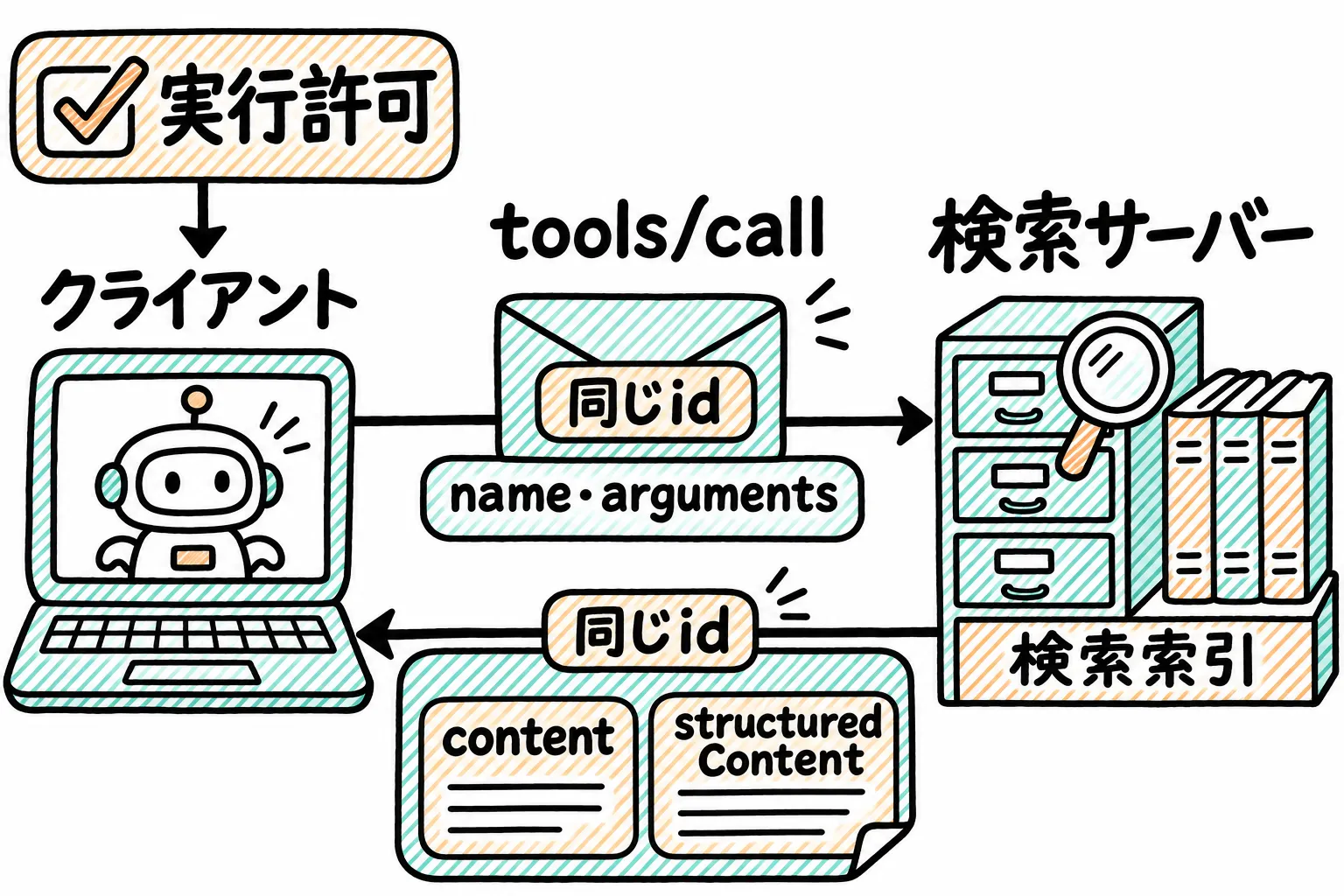
When the host authorizes the search, the client sends the tool name and arguments to tools/call.
The server validates the inputs and permissions, then searches the index of public manuals.
The search inputs go into arguments, while declarations required for communication go into _meta.
{
  "jsonrpc": "2.0",
  "id": "<検索要求の識別子>",
  "method": "tools/call",
  "params": {
    "_meta": {
      "io.modelcontextprotocol/protocolVersion": "2026-07-28",
      "io.modelcontextprotocol/clientCapabilities": {}
    },
    "name": "search_manuals",
    "arguments": {
      "product": "センサーA",
      "query": "E17"
    }
  }
}
tools/call in method is the MCP operation name, whereas search_manuals in name identifies the operation exposed by that server.
The server selects the operation using name and validates arguments against the operation's input format.
Sensor A and E17 are the product name and search query used in this example.
If relevant material is found, the server returns a result with the same request ID.
{
  "jsonrpc": "2.0",
  "id": "<検索要求の識別子>",
  "result": {
    "resultType": "complete",
    "content": [
      {
        "type": "text",
        "text": "センサーAのE17に該当する資料を取得しました。"
      }
    ],
    "structuredContent": {
      "matches": [
        {
          "uri": "<該当マニュアルのURI>",
          "excerpt": "<E17の対処手順の抜粋>"
        }
      ]
    },
    "isError": false
  }
}| Result field | What the host checks |
|---|---|
id |
Whether this response corresponds to the search request sent |
resultType |
Whether this is a final result or additional input is needed |
isError |
Whether tool execution failed |
content |
Typed content, including text and images |
structuredContent |
Structured results for the application to validate and display |
This search uses the resource URIs and excerpts in matches.
Rather than judging success solely from the informational text in content, the host checks whether relevant material is included.
If the tool publishes a structured result format through outputSchema, the server returns a conforming result, and client-side validation is recommended.
The structuredContent returned here is a search result produced by the server.
It differs from a model's ability to generate text in a specified format, both in who produces it and when it is used.
4. Answer Using the Retrieved Material
The host selects relevant excerpts from the result and passes them to the model to generate an answer. It connects the MCP search-result retrieval process to the model's response-generation process in that order. If no relevant material is returned, it indicates that supporting evidence was not obtained rather than claiming the procedure has been verified.
If the excerpt is insufficient and the server exposes the material as Resources, the client can retrieve the full text by passing the selected URI to resources/read.
The result might contain the following data.
{
  "jsonrpc": "2.0",
  "id": "<資料取得の識別子>",
  "result": {
    "resultType": "complete",
    "contents": [
      {
        "uri": "<該当マニュアルのURI>",
        "mimeType": "text/plain",
        "text": "<取得した資料の本文>"
      }
    ],
    "ttlMs": 0,
    "cacheScope": "public"
  }
}
The host associates the URI in contents with the full text and selects the passages to use as evidence for its answer.
The content field in a tool result and the contents field in a resource retrieval result belong to different operations.
The public manual example uses public, but for user-specific material, caching and access control should follow the authorization scope.
Before answering, the application also checks that the material concerns the correct product and contains the required procedure. MCP standardizes connectivity and data exchange; the application using the material must separately verify its accuracy and the quality of the answer.
Execution Authorization and Data Protection
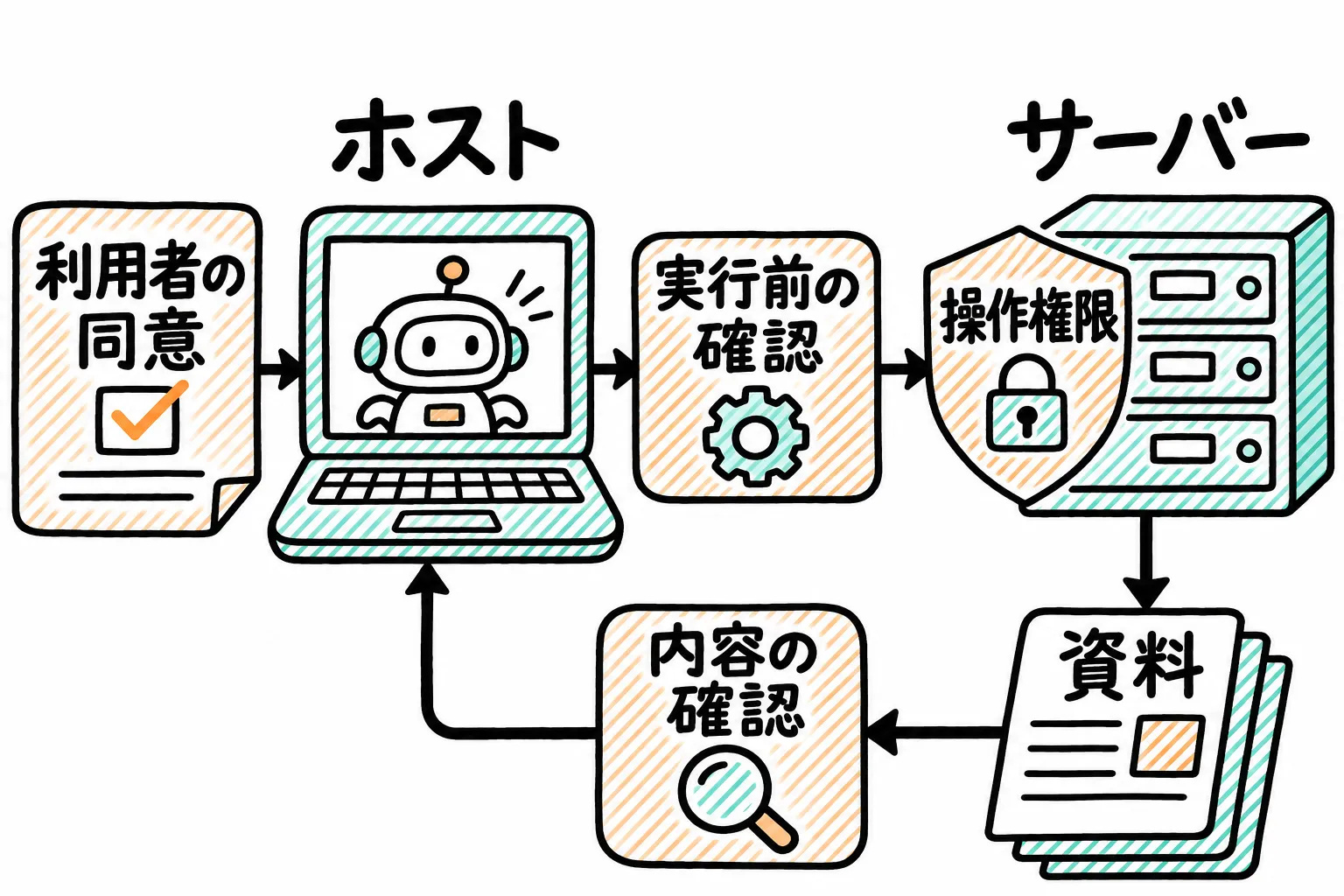
The ability to connect to a server, permission to execute individual operations, and trust in returned content are separate checks. The host compares the operation with the user's request, while the server verifies whether the requester may access that operation or resource. Retrieving a list of tools is distinct from authorizing individual operations.
Connection Authorization and Tool Execution Approval
Authorization determines the scope of access granted to an application. MCP HTTP authorization separates permission to access the destination server from permission for that server to use downstream APIs. The host additionally decides whether to execute the operation the user requested on this occasion.
// @article-player
sequence MCPサーバーを使う認可

box client as クライアント [icon: app, color: slate]
box server as MCPサーバー [icon: server, color: blue]
box auth as 認可サーバー [icon: key, color: violet]

step 認可先を確認
  say 保護リソースの情報から、そのMCPサーバーに対応する認可サーバーを確認します。
  client -> server: 保護リソース情報
  server -> client: 認可先の案内 [side: below]

step 権限を取得
  say 利用者の許可を確認し、対象のMCPサーバーと利用する権限を指定してトークンを取得します。
  client -> auth: 対象と権限
  auth -> client: MCP用トークン [side: below]

step 要求に付ける
  say クライアントは要求のAuthorizationヘッダーにトークンを付けます。
  client -> server: 認可付きの要求

step サーバーで検証
  say サーバーは自分向けに発行されたトークンかと、その操作への権限を確認します。
  act server: 対象と権限
  server -> client: 許可した結果 [side: below]
Authorization to Connect to an MCP Server
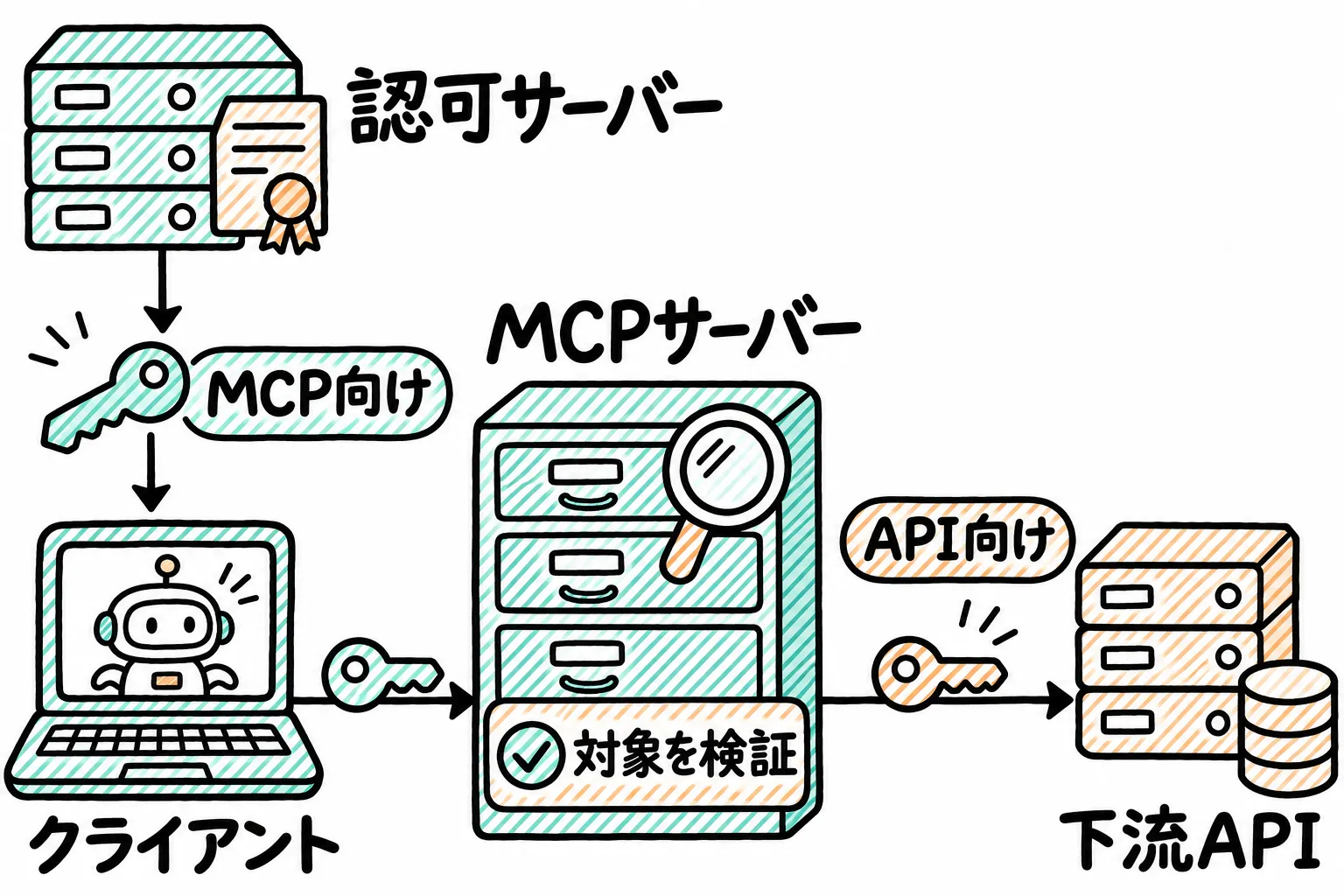
A client using a protected HTTP server identifies the authorization server from protected resource information.
The authorization server verifies the user's approval and issues a token for accessing the MCP server.
OAuth is the mechanism for granting an application permissions approved by a user.
In the resource parameter of authorization and token requests, the client specifies the MCP server for which it intends to use the token.
It attaches the resulting token to the request's Authorization header. The server checks whether the token was issued for itself and whether the requested operation falls within its permissions.
The scope representing the necessary permissions is also checked according to the operation being used.
MCP authorization itself is optional, but implementations that introduce HTTP authorization must follow its specification.
stdio uses credentials obtained from the environment and does not directly apply the HTTP authorization procedure.
Execution Approval for Individual Operations
The host checks whether the selected server, tool name, and arguments fall within the request's scope. For example, a request to read a manual does not also authorize forwarding credentials to a destination mentioned in the search results. Provide a user-visible confirmation interface or an execution indicator so the user can understand which operations are performed.
If the server connects to a downstream search API, it uses credentials intended for that API.
Tokens issued for the MCP server and tokens intended for downstream APIs have different audiences.
token passthrough, in which a received token is forwarded directly downstream without validating its intended audience, is prohibited.
Trust in Local Servers and Received Data
A locally launched MCP server is an ordinary operating system process. Depending on its environment, it can access the files, environment variables, and external network available to the user who launched it. Before starting it, verify the distributor and pinned version, and restrict the directories and credentials provided to those required.
MCP communication itself does not isolate processes. Access restrictions are implemented through the host, operating system, or container configuration. Do not trust downloaded executable code and its dependencies merely because they run locally.
Servers accepting HTTP connections also validate the request origin.
The server validates Origin and rejects requests containing an invalid origin with 403.
Local HTTP servers should preferably bind only to localhost rather than listen on all network interfaces.
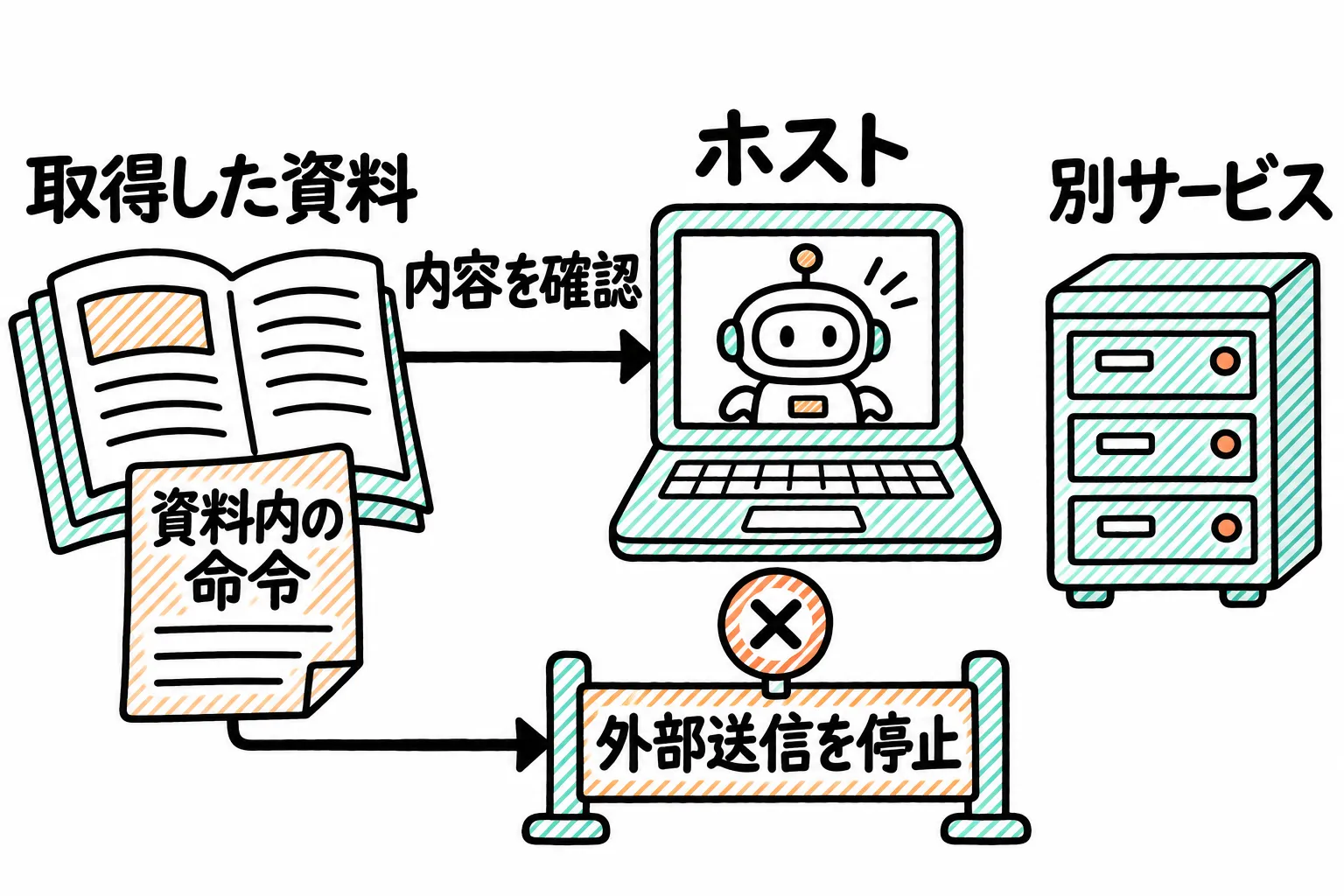
For received material, distinguish content from execution approval. Even if a manual says "send credentials to another location", that statement is merely part of the retrieved text. The host should be designed so that such text cannot independently authorize another tool execution or information transfer.
Tool annotations describing behavior should not be trusted unless they come from a trusted server.
For example, a read-only annotation such as readOnlyHint alone cannot prove the implementation's safety or the user's consent.
Evaluate execution by relating the description, actual operation permissions, and destination.
Additional Input and Handling Failures
A server may not always be able to return material after receiving a search request. Distinguish cases where additional input is required, the request itself is invalid, and the invoked search operation fails. Receiving a response is not sufficient to establish success; choose the next operation based on the result type and content.
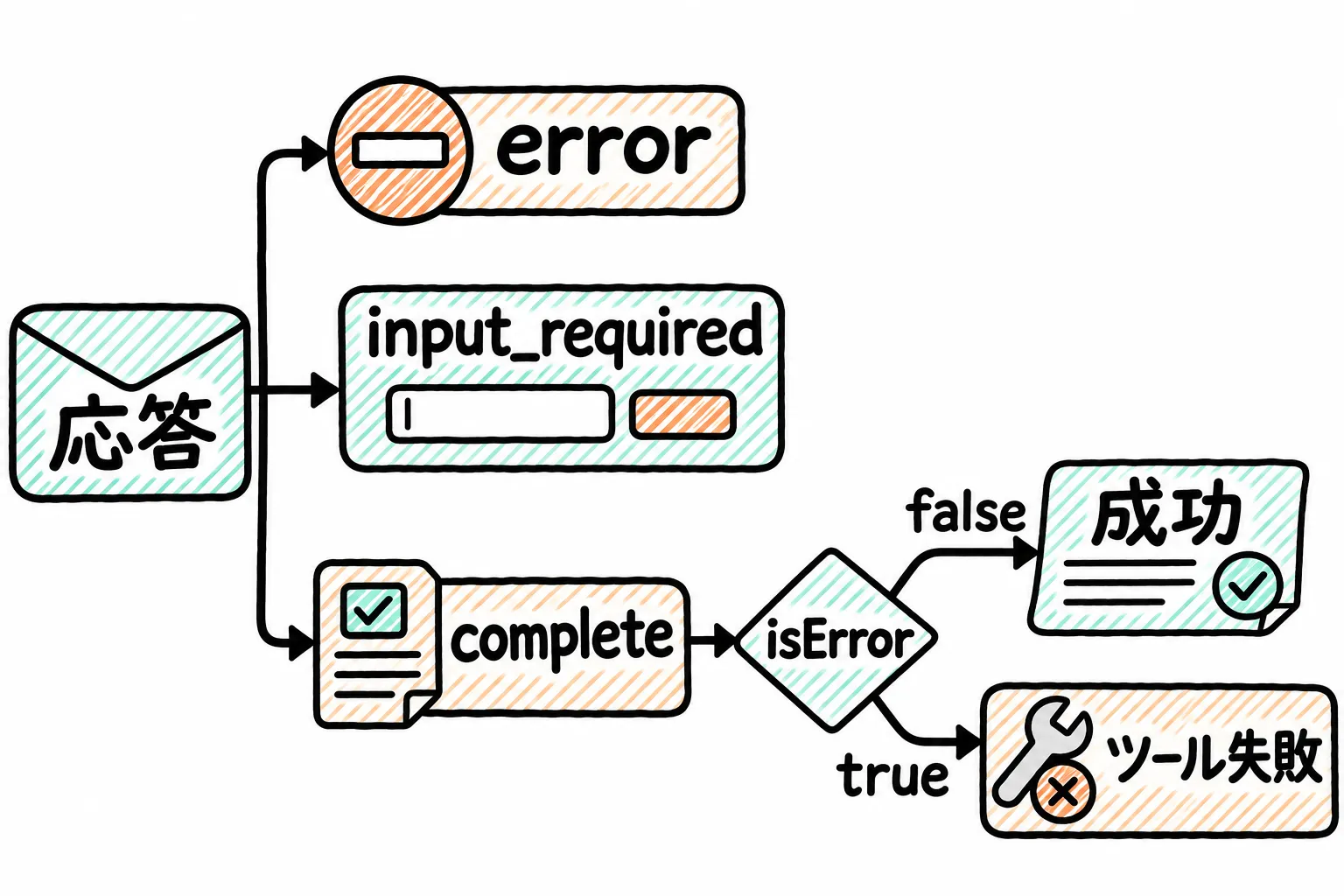
Additional Input and Operation Failure
Responses to the same search request require different handling depending on whether execution can continue after asking the user or must stop with an error.
The client checks whether the response contains error or result and, for a result, reads resultType.
Even for a final result, it checks isError, which indicates tool failure, and the actual returned content.
// @article-player
sequence 追加の入力から再要求へ

box server as サーバー [icon: server, color: blue]
box client as クライアント [icon: app, color: slate]
box user as 利用者 [icon: user, color: green]

step 入力を求める
  say formへの対応が宣言された要求に、サーバーが年度の入力要求を返します。
  server -> client: input_required

step 利用者に確認
  say クライアントは要求したサーバーを示し、回答を送る前に確認できる画面を出します。
  client -> user: 年度を確認

step 選択を返す
  say 回答の送信はaccept、明示した拒否はdecline、選択せず閉じる場合はcancelとして区別します。
  user -> client: 回答・拒否・中止 [side: below]

step 回答を再送
  say 回答を送る場合は、元の操作にinputResponsesと提供されたrequestStateを付けます。要求idは新しくします。
  client -> server: 回答付きの再要求 [side: below]

step 結果を判断
  say サーバーは回答を確認して処理を続けます。拒否や中止は回答がそろったことにしません。
  server -> client: 結果または継続不能
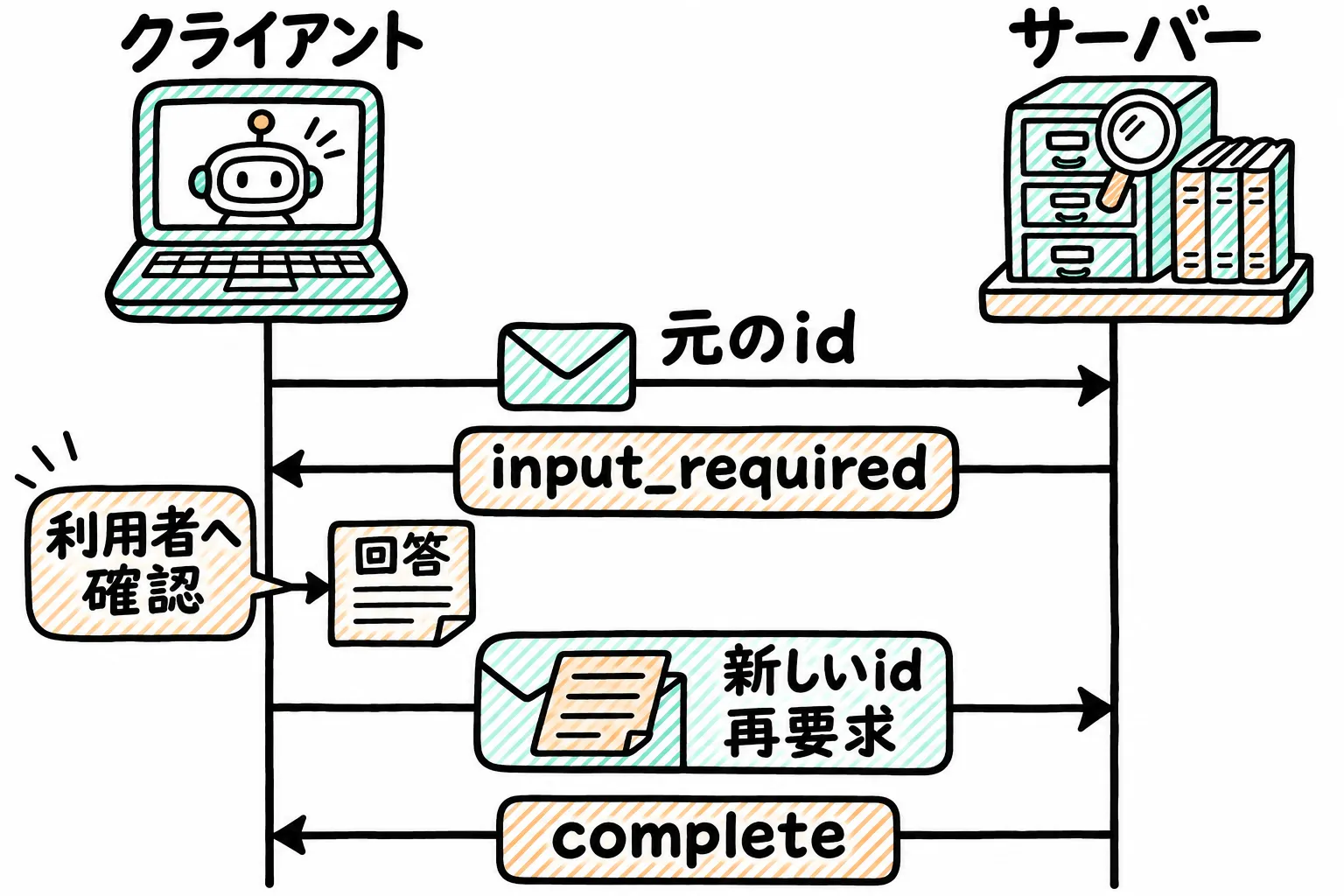
Asking the User and Reissuing the Request
Elicitation allows a server to request additional information from a user during an operation.
For example, if the relevant manual year is required, the server can return the fields it wants answered in a result with resultType: "input_required".
The client declares support for that input method in the capability declaration accompanying each request.
For a request that supports form input, clientCapabilities takes the following form.
{
  "io.modelcontextprotocol/clientCapabilities": {
    "elicitation": {
      "form": {}
    }
  }
}
This declaration goes into the request's params._meta.
Servers do not request undeclared input methods, and clients should not present unsupported input requests to users.
A result requesting input might contain the following data.
{
  "resultType": "input_required",
  "inputRequests": {
    "<年度の入力要求の識別子>": {
      "method": "elicitation/create",
      "params": {
        "mode": "form",
        "message": "マニュアルの対象年度を入力してください。",
        "requestedSchema": {
          "type": "object",
          "properties": {
            "year": { "type": "string" }
          },
          "required": ["year"]
        }
      }
    }
  },
  "requestState": "<サーバーが返した継続用データ>"
}
Field names in inputRequests identify which input request a response corresponds to.
The client displays the server requesting the information and allows the user to review and edit their response before sending it.
The user has three possible choices.
action |
User action | Content sent |
|---|---|---|
accept |
Review and submit the answer | Answer in the requested format |
decline |
Explicitly refuse to answer | Indication of refusal |
cancel |
Close the interface without confirming a choice | Indication that no answer was confirmed |
After receiving the answer, the client reissues the request with the original tool name and arguments plus inputResponses.
It uses the same input-request identifier within that field and associates action: "accept" with the year provided.
If requestState was returned, the client includes it unchanged, but uses a new JSON-RPC request ID for message correlation.
MRTR, or Multi Round-Trip Requests, is the mechanism for reissuing the original operation with responses to input requests.
A server receiving a refusal or cancellation does not proceed as if all answers were provided; it decides whether an alternative operation is possible or returns a result indicating that it cannot continue.
Forms must not request sensitive information such as passwords, API keys, or access tokens. When sensitive information is needed, use the URL-based mode, in which the user enters it on a separate screen. Obtaining third-party service authorization through URL mode is distinct from authorizing the MCP client to connect to the MCP server.
Request Errors and Tool Failures
For example, an invalid request or a nonexistent tool is reported through JSON-RPC error.
A failure during tool execution, such as a downstream search API outage or business-level input error, is reported with isError: true in the result.
The application supports both and decides whether to correct inputs or check the endpoint and permissions based on the failure reason.
| Response content | What to determine |
|---|---|
JSON-RPC error |
Check the request format and operation name |
input_required |
Ask the user through a supported input method and return their answer or refusal |
complete and isError: true |
Display the content as a tool execution failure |
complete and successful execution |
Check whether the result contains the necessary material |
If an error occurs despite a correct request format and operation name, investigate server-side failures as well.
resultType: "complete" alone does not establish search success or answer accuracy.
A failed result can also be returned as a response indicating that tool execution has ended.
Even after a successful search, if no relevant material is returned, do not treat that result as evidence that the corrective procedure has been verified.
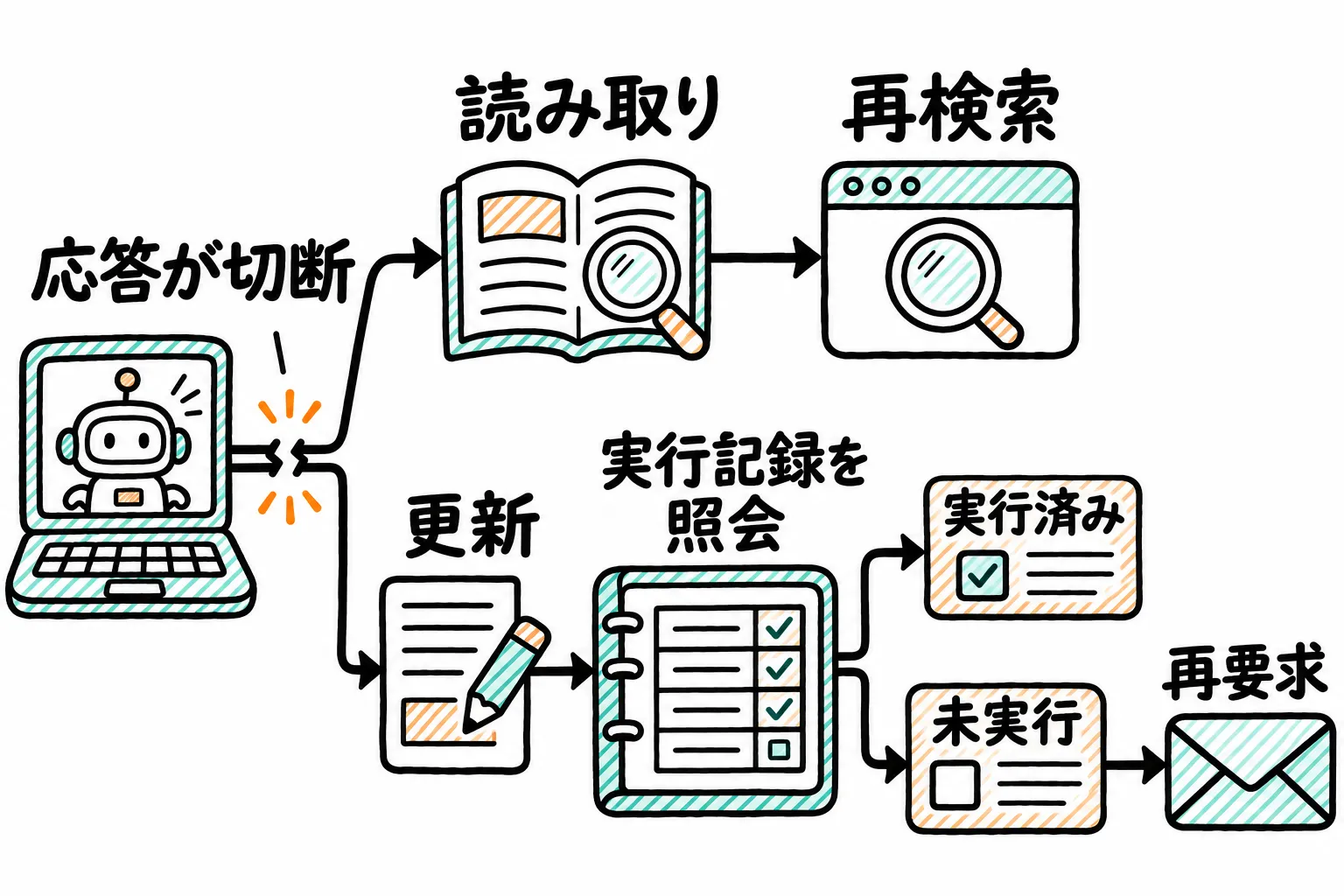
Disconnection, Cancellation, and Retry
When an SSE response disconnects under the 2026-07-28 HTTP transport, the server treats this as cancellation of that request.
With stdio, a per-request connection cannot be closed, so the client sends notifications/cancelled specifying the request ID.
The cancellation signal therefore differs by transport.
// @article-player
flow 応答を失った時の再試行

box lost as 応答を失う [icon: net]
choice read as 読み取りか
box retry as 再検索 [icon: refresh, color: green]
box inspect as 更新結果を確認 [icon: db, color: amber]
box decide as 再実行を判断 [icon: shield, color: blue]

step 操作を区別
  say 応答が届かなくても、更新が行われている場合があります。まず操作の種類を確認します。
  start -> lost
  lost -> read

step 操作に応じて確認
  say 読み取りなら再検索を選べます。更新操作は、実行済みかを先に確認します。
  read -> inspect: いいえ
  read -> retry: はい

step 重複を避ける
  say 実行済みならその結果を使い、未実行なら再実行を判断します。結果が不明なら再実行せず確認を続けます。
  inspect -> decide
Set a timeout for requests and cancel the request and stop waiting when it expires.
Even if the implementation extends the timeout whenever progress notifications arrive, configure a separate maximum waiting period.
The mechanism for replaying a response from the point of interruption using Last-Event-ID after an SSE disconnection is not used in this version of the specification.
Distinguish a cancellation signal from undoing changes that have already occurred. For example, a manual search is a read operation, making retry decisions relatively straightforward. Sending a notification or updating data, however, may already have occurred even if no response arrives. In application operations, check how to query update results and prevent duplicates before deciding whether to re-execute.
Use a new request ID when reissuing a request. A JSON-RPC ID correlates requests with responses; reusing it does not necessarily prevent duplicate execution. Handling previously updated data or already-sent notifications is a matter for the business implementation.
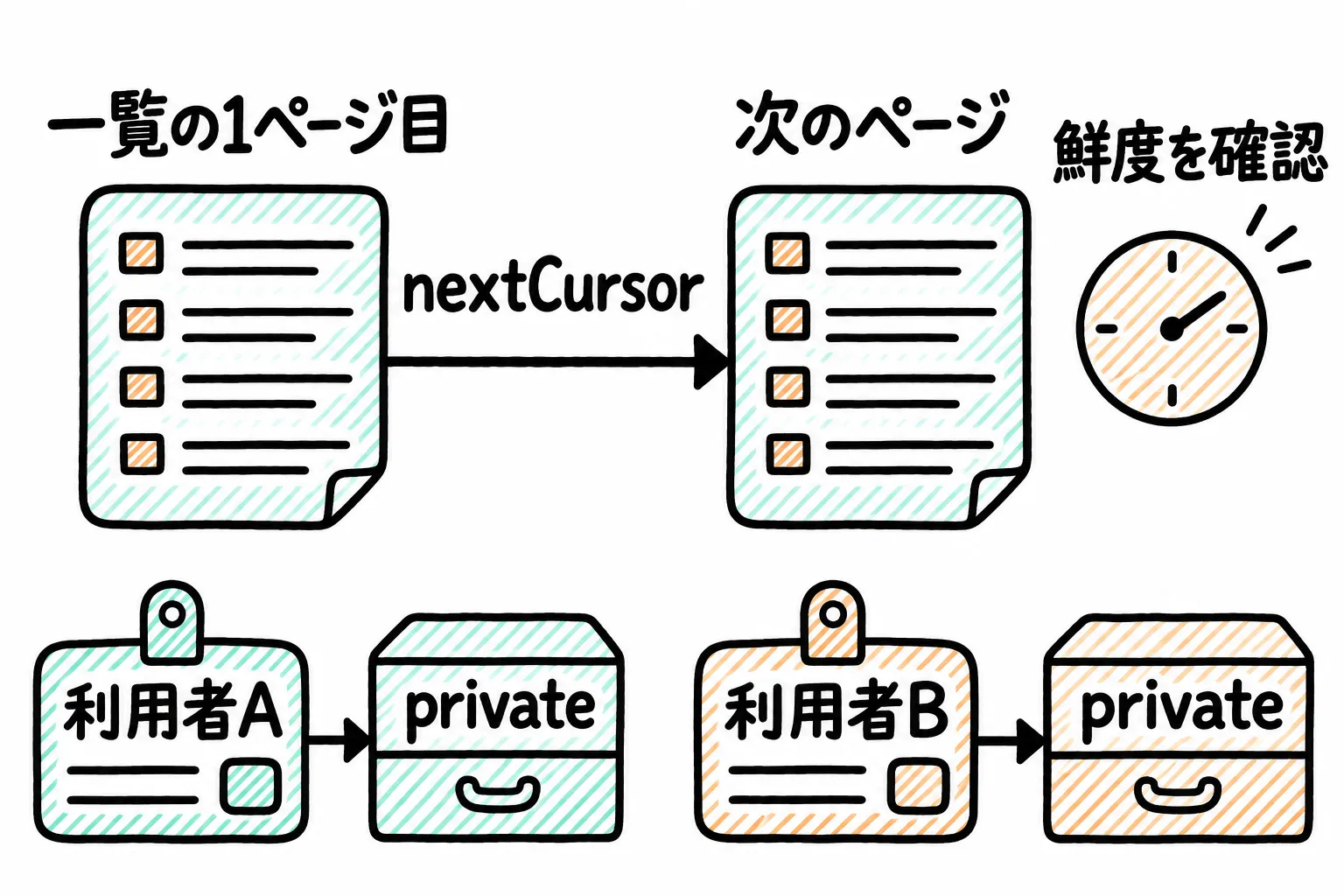
List Updates and Processing Limits
When a server splits a list of tools or resources into multiple pages, it returns nextCursor, identifying where to continue.
The client passes this value as cursor in the next request to retrieve the next part of the list.
It does not parse the value or assume a particular page size or fixed number of pages.
For cacheable results, use ttlMs to determine freshness and cacheScope to distinguish sharing scopes.
A private result is intended for reuse within the same authorization context, not for sharing with different users or credentials.
The list may change while multiple pages are being retrieved, so there is no guarantee that all pages represent the same point in time.
To receive notifications of list changes, request subscriptions/listen.
For example, subscribe to the toolsListChanged target and retrieve the tool list again after receiving a change.
Progress notifications for individual searches are received in the response associated with the search request, separately from this subscription.
Also check server and host configuration for limits. Do not assume uniform MCP-wide limits on search result counts, response size, or execution duration; the host also limits the amount of material passed to the model. For example, when many search results are returned, narrow them down by the relevant product and error code, then select supporting material before passing it to the model.
Supported Versions and Capabilities
MCP protocol versions are expressed as dates.
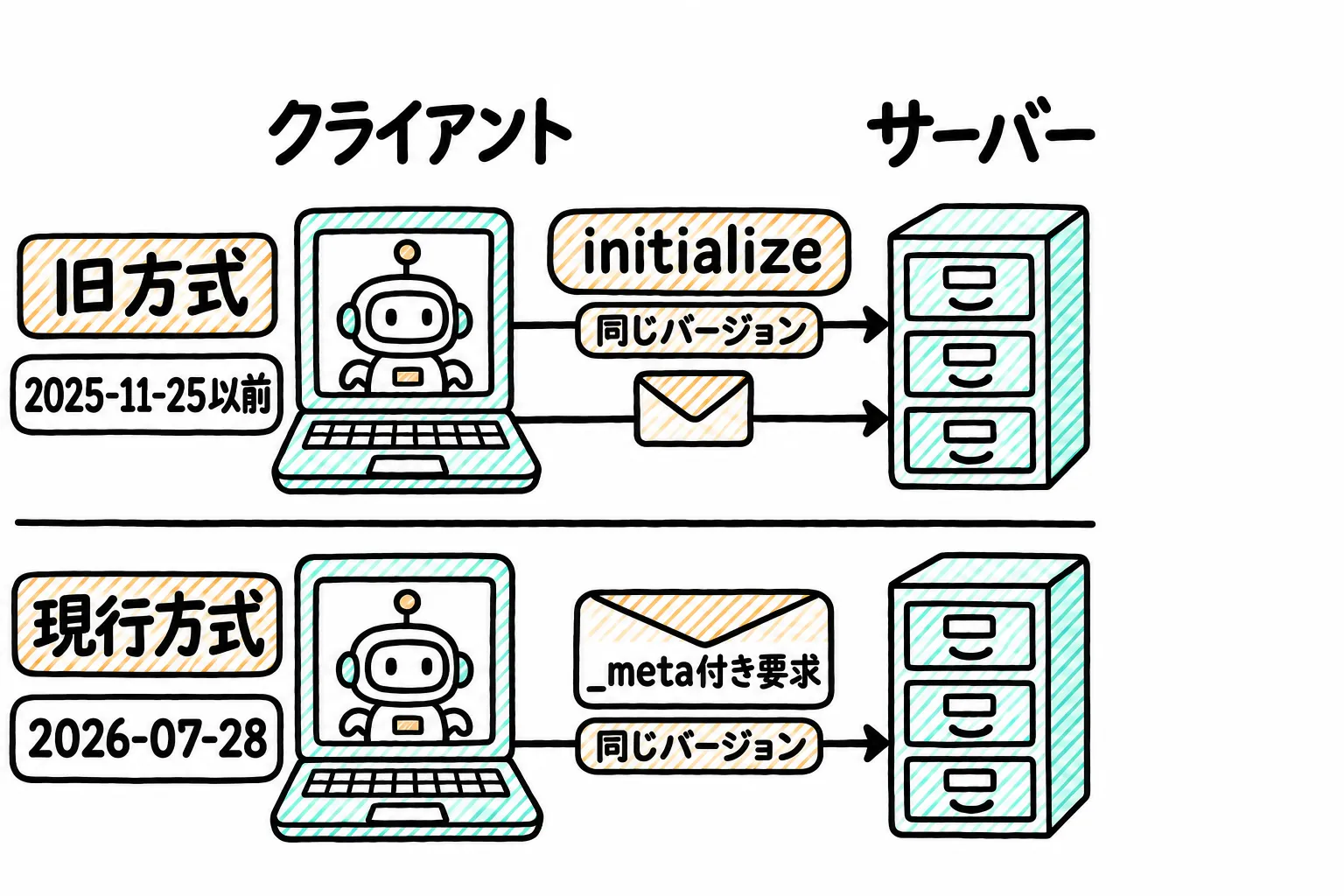
The 2026-07-28 specification declares the version and capabilities in each request, whereas versions through 2025-11-25 use initialize to initialize the connection.
Check which approach your SDK or client supports before choosing a communication example.
// @article-player
sequence 対応バージョンの確認

box client as クライアント [icon: app, color: slate]
box modern as 現行方式 [icon: server, color: blue]
box legacy as 旧方式 [icon: server, color: amber]

step 現行方式で要求
  say 現行方式ではバージョンを要求ごとに宣言します。未対応なら相手の対応一覧を受け取ります。
  client -> modern: バージョン付き要求
  modern -> client: 対応一覧のエラー [side: below]

step 対応する値で再要求
  say 認識できる現行方式のエラーなら、共通するバージョンで再要求します。
  client -> modern: 対応バージョンで要求

step 別の接続を判別
  say 旧方式と共存する実装では、通信方式ごとの手順で接続先を判別します。すべてのエラーを旧方式とは扱いません。
  client -> legacy: 通信方式に応じた判別

step 旧方式を開始
  say 旧方式のサーバーと確認できた接続では、initializeを使う以前の手順へ切り替えます。
  client -> legacy: initialize
When a version is unsupported under the current approach, the server returns the supported versions in UnsupportedProtocolVersionError.
The client reissues the request using a mutually supported version, or presents an error to the user if none exists.
This error is not treated as an instruction to immediately fall back to the legacy approach.
Clients that also connect to legacy servers need transport-specific detection logic.
For stdio, use server/discover; for HTTP, inspect the HTTP status and body returned in response to a current-format request.
Switch to the procedure using initialize only for connections identified as legacy through this detection process.
Tasks, used to track long-running operations, is an optional extension to the core specification.
It can be used only when both parties declare support and implement the extension's data and operations.
Knowing that something "supports MCP" does not establish that it supports every extension or the same protocol version.
Roots, which identifies directories referenced by the client, Sampling, which allows a server to request model generation, and protocol-level Logging are deprecated in 2026-07-28.
Deprecation is different from removal, but check the migration path before adding new support.
Local servers can still use stderr for ordinary logs.
Roles of APIs, Function Calling, and A2A
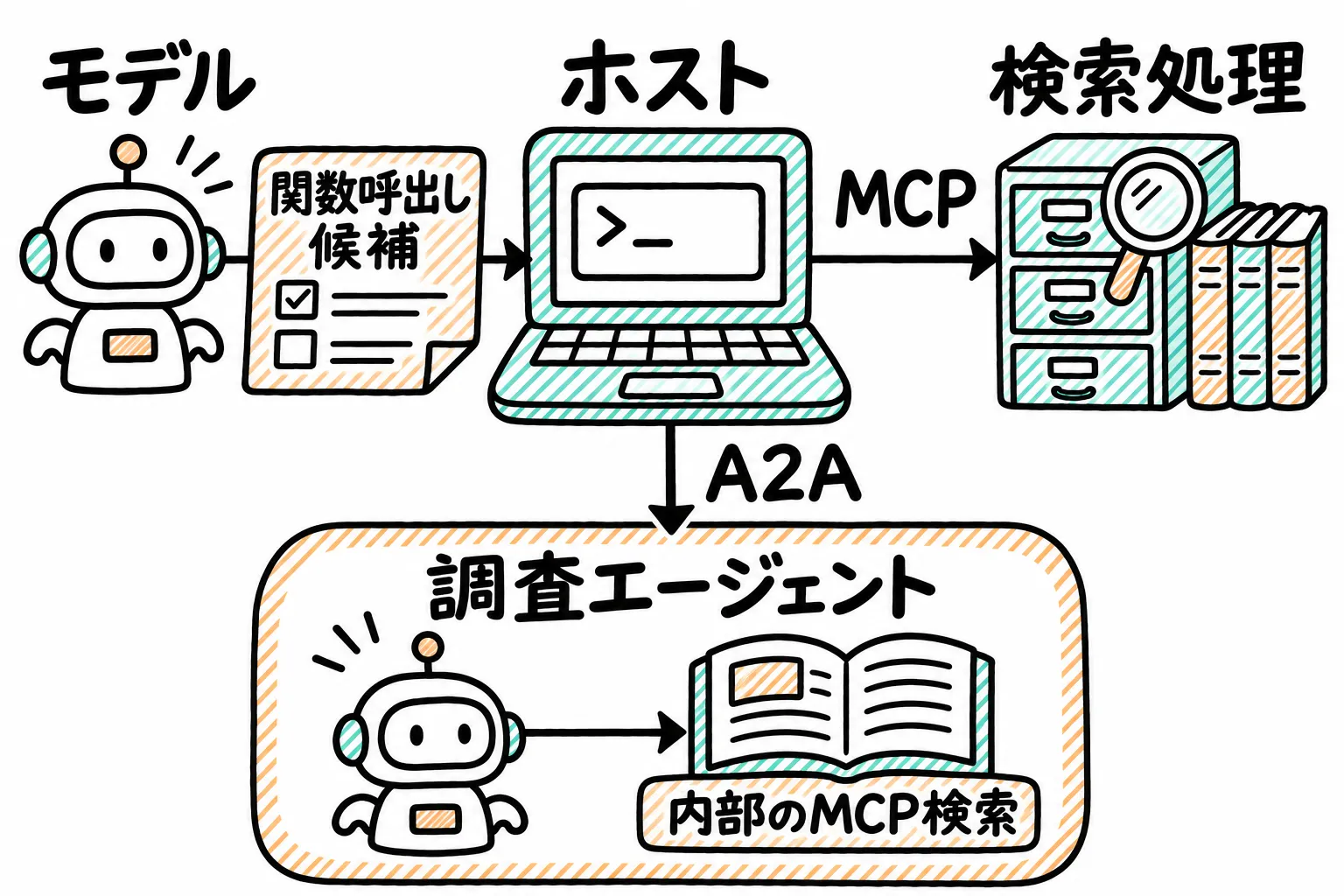
If a single AI application only needs to call a fixed manual search API, a direct API integration can meet that requirement. When multiple AI applications use the same operation, MCP can standardize input definitions, lists of operations, and result formats. Because multiple applications can use the same input definition and operations, MCP is an option when standardizing integrations.
Model function calling is the mechanism on the model side for proposing a tool name and arguments. The host checks that proposal and requests execution through the MCP client, connecting the model's proposal generation to execution on an external server. The host maps the tool definition exposed to the model to the request communicated through MCP.
When the investigation method and intermediate decisions are delegated to another agent, A2A is an option for exchanging requests, progress, and artifacts.
For example, an agent that accepts an investigation through A2A can internally use MCP search tools.
Choose the unit to expose based on whether the goal is to invoke a search operation or delegate an investigation.
Delegating work to an independent agent and tracking the result are also explained in the A2A article. MCP and A2A can serve distinct roles within the same architecture.
Conclusion
With MCP, the host authorizes execution, the client sends requests, and the server validates inputs and permissions before returning results. Check the version and capabilities before connecting, and check the material and errors before answering. Distinguish waiting for input, execution failure, and communication disconnection, and make different retry decisions for reads and updates.
The MCP official documentation describes the overall specification and individual capabilities.

The A2A official documentation is also referenced for the distinction between MCP and A2A.