Introduction
Hi, I'm cardene, a software engineer and technical writer focused on blockchain and AI.
I've also authored Japanese technical books on specification-driven development with LLMs and decentralized application (DApp) development.

I also build and publish a variety of tools, libraries, and open-source projects.
When adding a price-range filter to a product search API, documenting existing search behavior and the proposed change in the same document makes it difficult to distinguish what has already been implemented. Before writing code, the team also needs to decide whether users can specify only a minimum price, whether boundary values are included in search results, and what happens when the minimum exceeds the maximum.
OpenSpec separates currently effective specifications from changes in progress within a repository, then incorporates reviewed changes into the current specifications. Using the price-range filter as an example, this article explains the file structure, change workflow, post-implementation verification, and archiving.
What is OpenSpec?
OpenSpec is a lightweight, configurable framework for creating and managing software specifications. Currently effective specifications and proposed changes are managed separately in Markdown files. AI coding agents read the same records to plan and implement changes. Users review the reasons for a change and externally observable behavior. They also review technical decisions and the task list, then decide which changes should be incorporated into the current specifications after implementation.
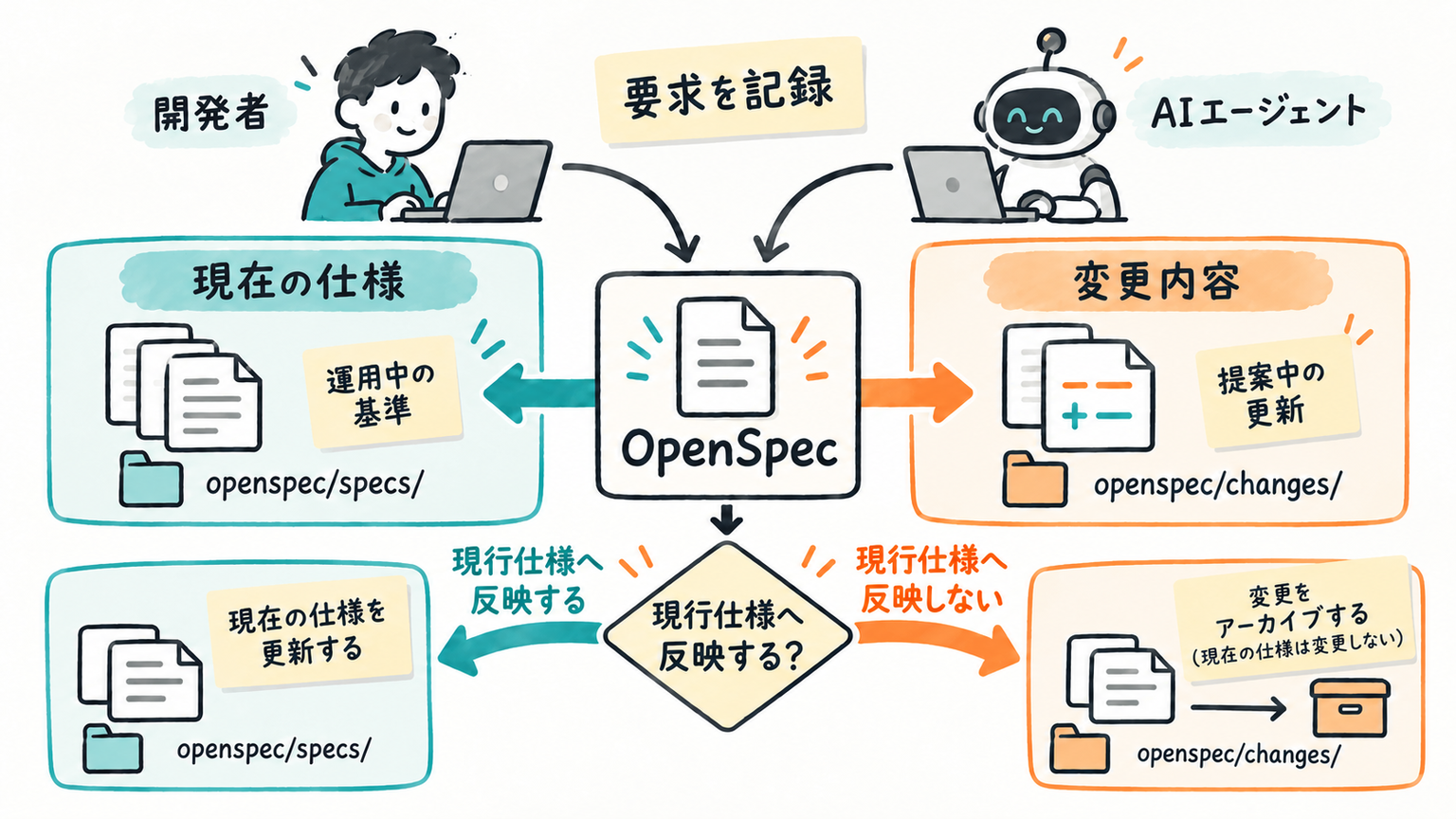
The existing diagrams and fenced examples are retained from the Japanese article. Some labels and example text are in Japanese.
Changes in progress remain in openspec/changes/, while currently effective specifications remain in openspec/specs/.
Creating a new proposal does not modify the current specifications.
Once implementation and verification are complete and the user approves the update, the changes are incorporated into the current specifications.
Integration with AI agents
The OpenSpec CLI installs the openspec/ directory and operating instructions for AI tools in the target project.
When Codex is selected, skills documenting OpenSpec operations are created in .agents/skills/.
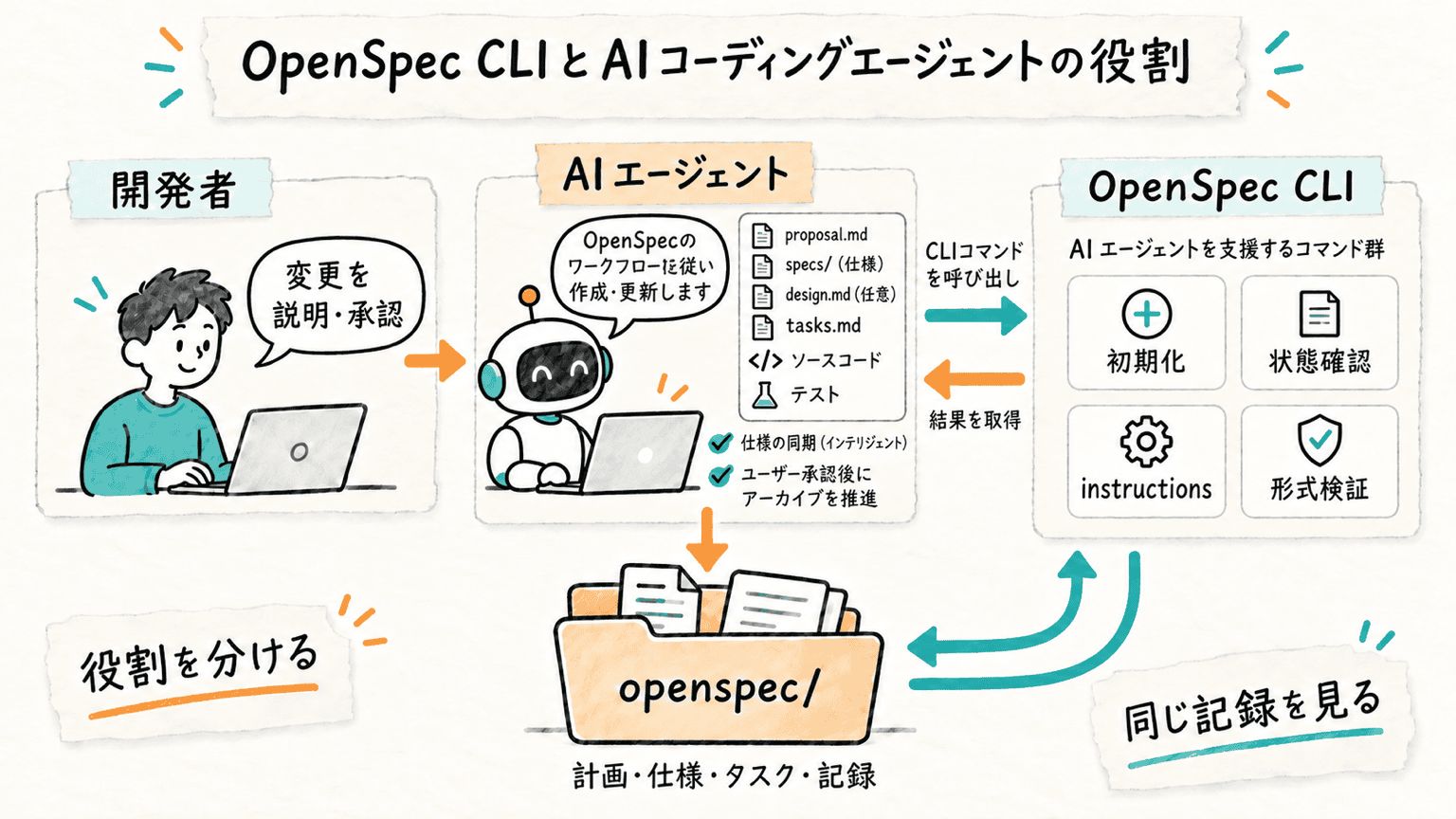
OpenSpec manages operating procedures and record formats. Permissions to read source code, edit files, and execute commands are managed by Codex and the execution environment. When incorporating delta specifications into the current specifications, the AI agent reads both sets of records, evaluates their contents, and edits the current specifications. With the Archive skill, the AI agent also checks synchronization and moves the change into the history directory, invoking CLI commands for status checks and validation along the way.
File structure
OpenSpec stores configuration, current specifications, changes in progress, and completed change history in separate locations. When a change is started, planning files are added under a directory named after the change.
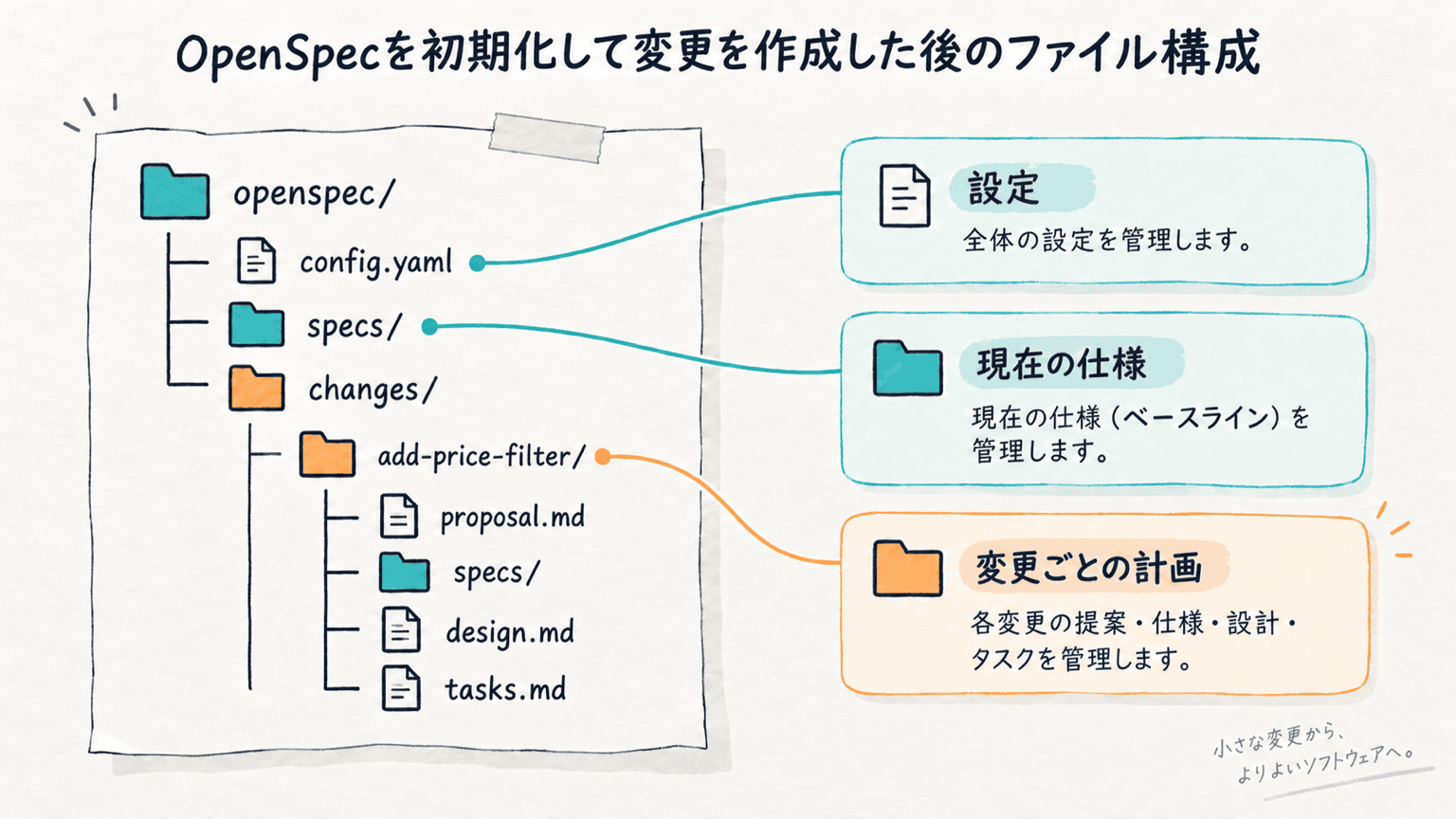
For a price-range filter change named add-price-filter, the main structure is as follows.
project/
├── openspec/
│   ├── config.yaml
│   ├── specs/
│   │   └── product-search/
│   │       └── spec.md
│   └── changes/
│       ├── add-price-filter/
│       │   ├── .openspec.yaml
│       │   ├── proposal.md
│       │   ├── specs/
│       │   │   └── product-search/
│       │   │       └── spec.md
│       │   ├── design.md
│       │   └── tasks.md
│       └── archive/
└── src/
openspec/config.yaml defines additional project rules and the schema to use.
Meanwhile, openspec/changes/add-price-filter/ stores only the price-range filter change, keeping its decisions separate from other feature changes.
Current specifications and proposed changes
openspec/specs/ stores current behavior already documented in OpenSpec, organized by capability.
Introducing OpenSpec into an existing project does not automatically convert the entire codebase into specifications.
The specifications grow incrementally as changes are made.
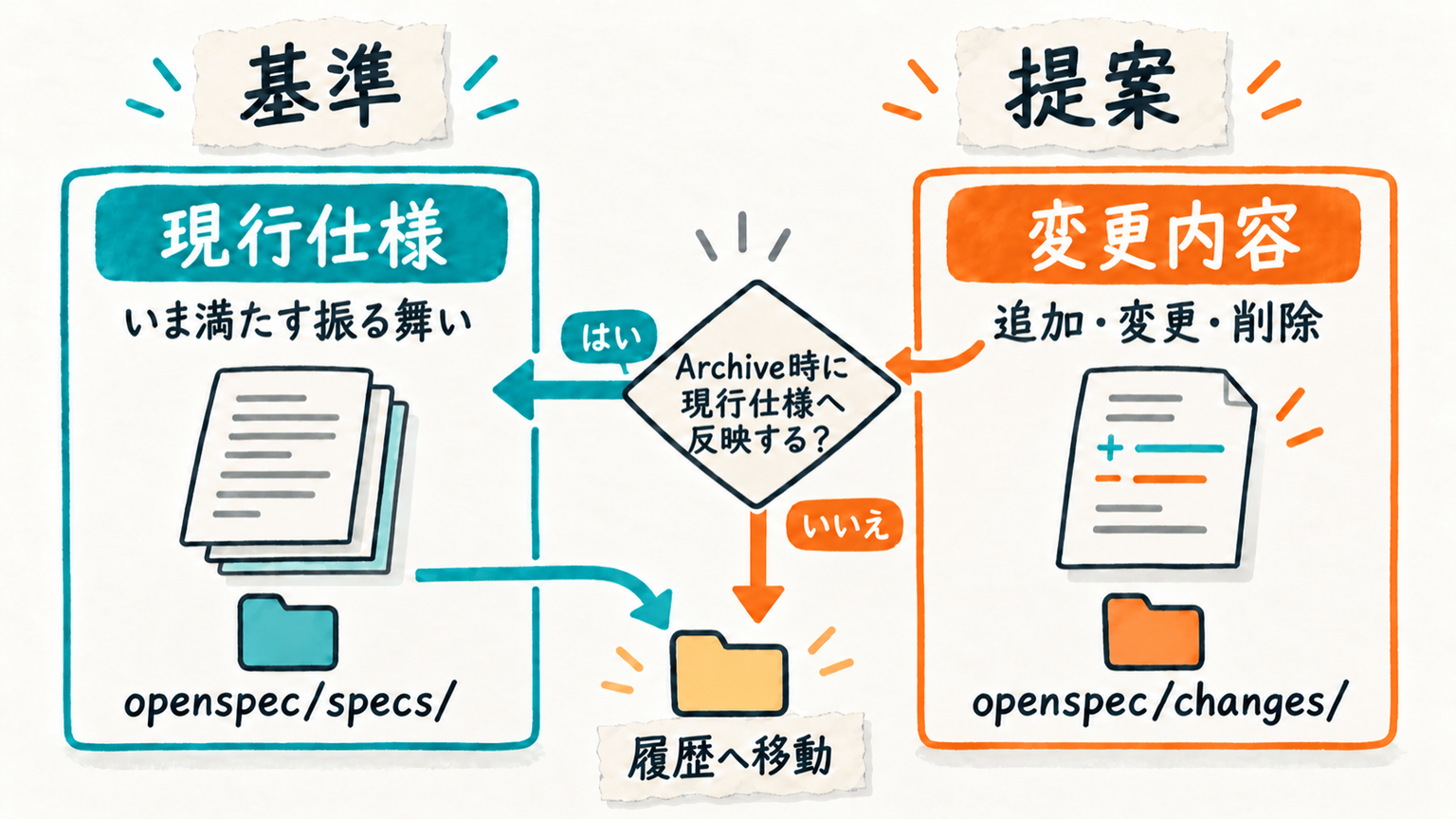
openspec/changes/<変更名>/specs/ records requirements that this change adds, modifies, removes, or renames.
For example, when adding price conditions to an existing product search capability, record only the behavior affected by the price inputs as a delta rather than duplicating the entire current specification.
When synchronization with the current specifications is approved during archiving, the changes are incorporated into openspec/specs/.
If the change is archived without approving synchronization, its directory is moved into the history directory, but the current specifications are not updated.
Records in the change directory
The change directory stores the reasons for the change, user-visible behavior, implementation approach, and verification tasks in separate files.
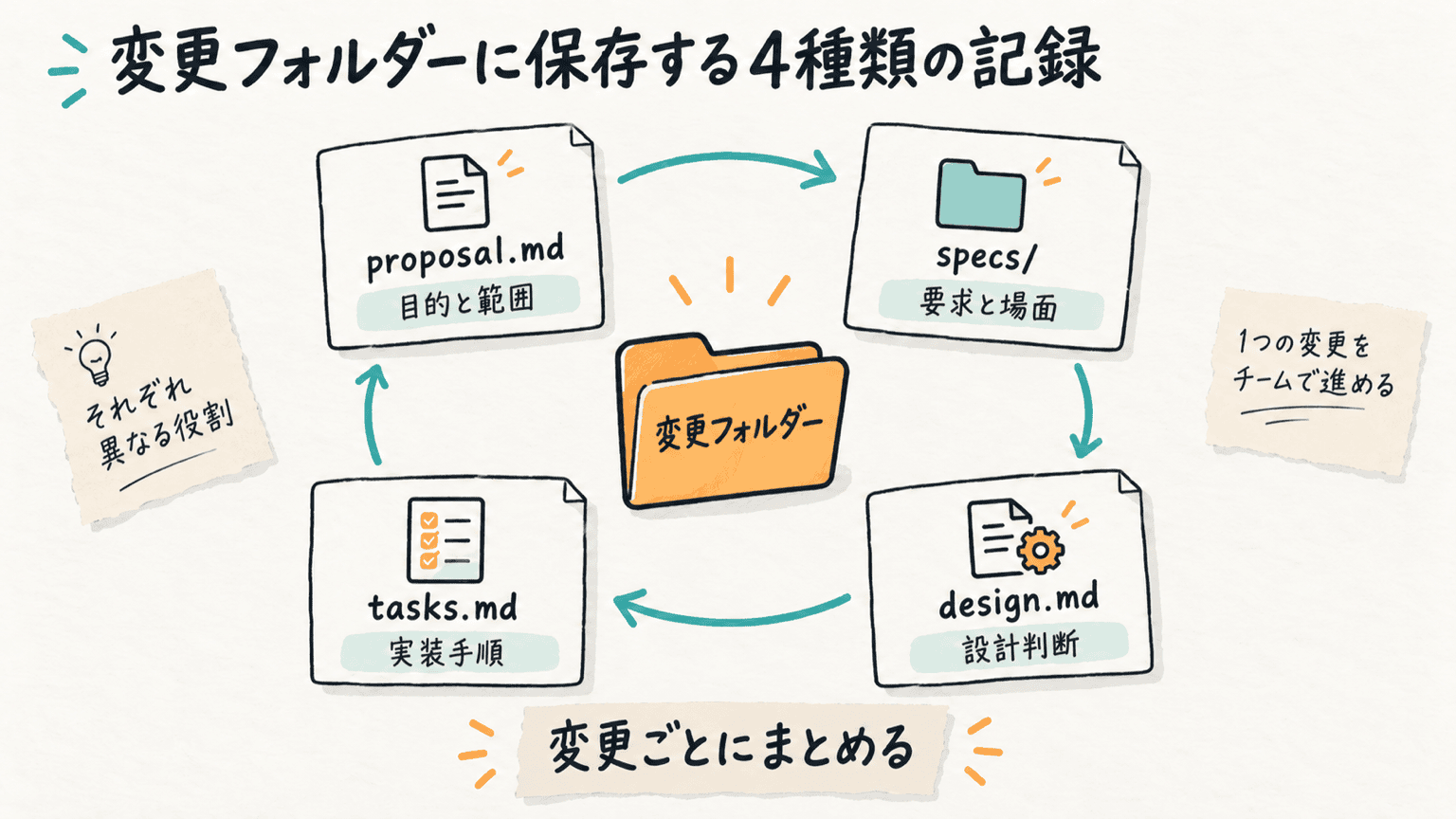
| File | Contents | When to revisit |
|---|---|---|
proposal.md |
Rationale, scope, and affected capabilities | When the purpose or scope changes |
| Delta specifications | Externally observable behavior and acceptance criteria | When user-visible behavior changes |
design.md |
Technical decisions, data flow, and chosen approach | When the implementation approach or architecture changes |
tasks.md |
Order of implementation and verification tasks | When missing tasks or dependencies are identified |
design.md is not mandatory for every change.
Create it when technical decisions need to be recorded separately.
For refactoring or documentation changes that do not alter user-visible behavior, skip_specs can also be specified to avoid creating unnecessary requirements.
Basic workflow
In OpenSpec, select a change directory in progress and proceed in the following order. If a check reveals missing information, return to the file where that information belongs and make corrections.
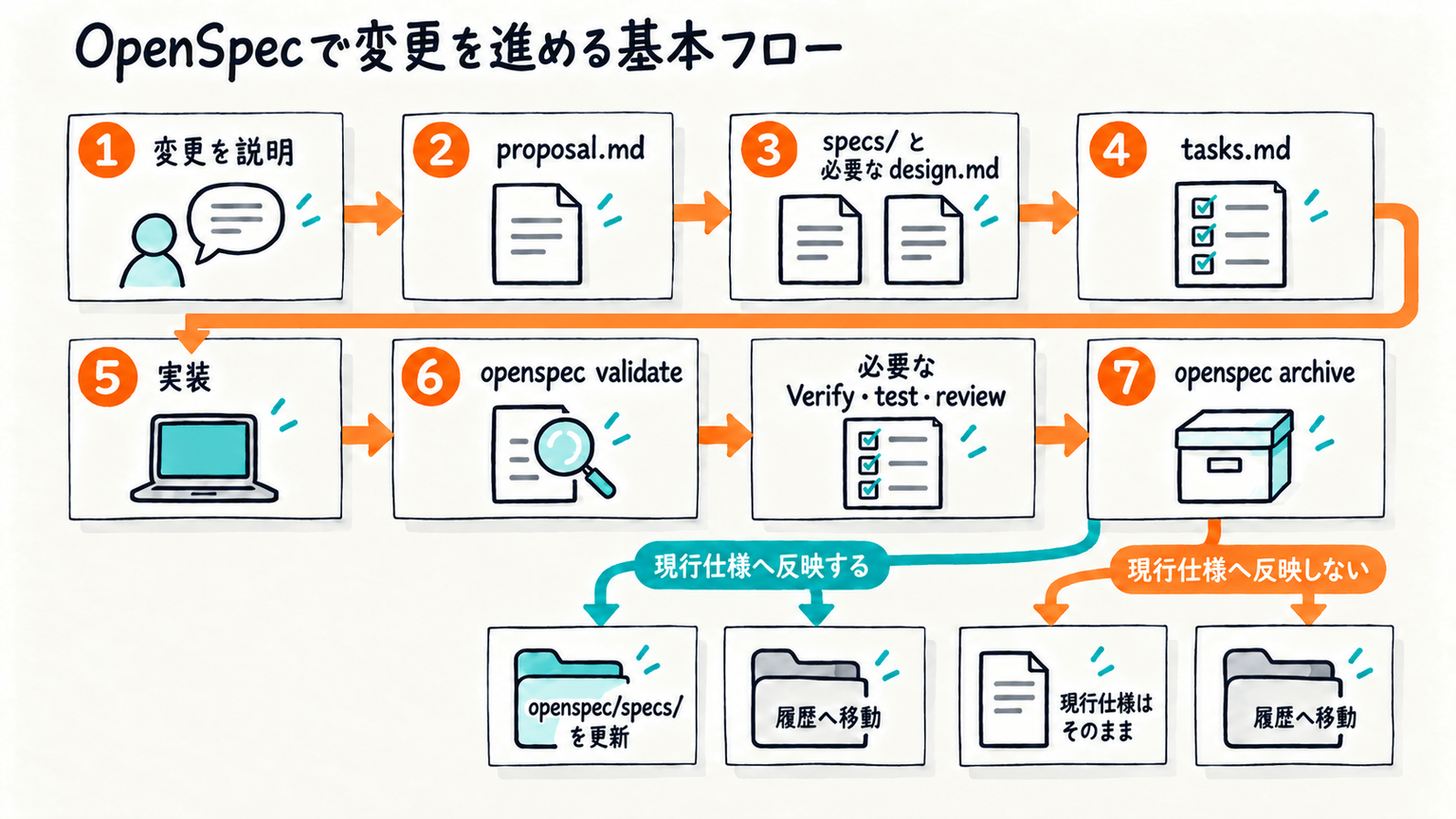
-
Clarify the behavior to change
Use
$openspec-exploreto investigate the problem, constraints, and unresolved decisions. Do not modify the code. Establish which behavior should be specified and what requires further investigation. -
Create a change plan
Use
$openspec-proposeto choose a change name and createproposal.md, delta specifications, any necessarydesign.md, andtasks.md. Verify that files are created in dependency order and that each task has a verification method. -
Have the user review the plan
Review the change rationale, acceptance criteria, technical decisions, and missing tasks. If there is a problem, edit the Markdown directly or use
$openspec-update-changeto update the relevant files. -
Implement from the task list
Use
$openspec-apply-changeto implement incomplete items intasks.mdfrom top to bottom. Verify that completed items have their checkboxes updated intasks.md. -
Verify records and implementation separately
Use
openspec validate <変更名> --strictto check record formats and, if necessary, the Verify skill to examine the correspondence between specifications and implementation. After validating the records, run project-specific tests and code review as well. -
Incorporate deltas into current specifications
Use the Sync skill if incorporating them beforehand, or approve synchronization when archiving. Verify that
openspec/specs/has been updated to describe the implemented behavior. -
Move the change into the history directory
Use
$openspec-archive-changeto move the change directory into dated history. Check the current specification synchronization result and the archive destination separately.
Create and review the plan
The Propose skill creates planning files in the dependency order defined by the standard schema. Because source code is not changed at this stage, users can review the requirements and scope before implementation.
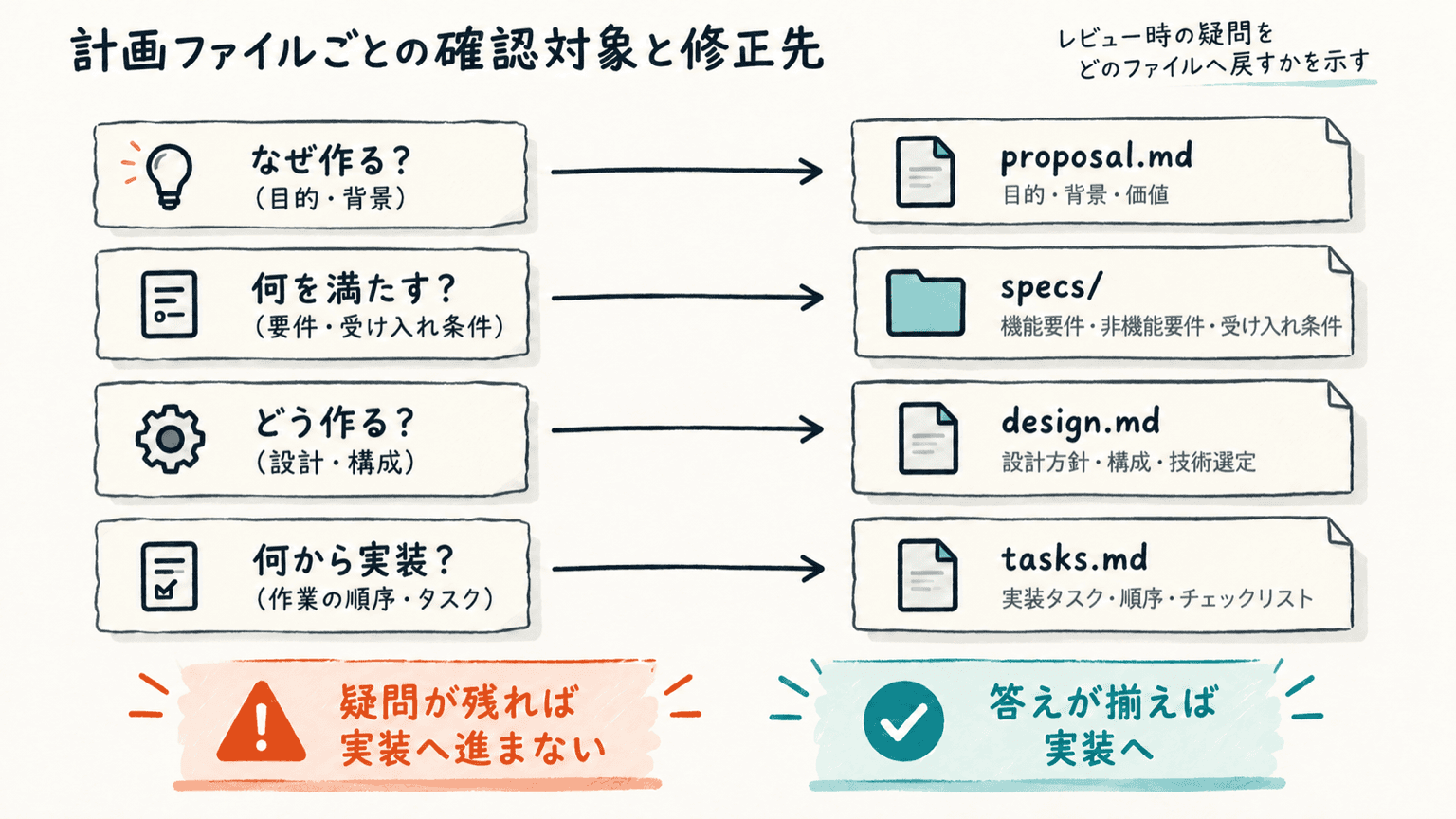
Review the problem and scope in proposal.md, and input conditions and expected results in the delta specifications.
For changes that require technical decisions, read design.md, then use tasks.md to identify missing implementation or verification work.
Return to the delta specifications when requirements are incorrect, or to design.md when only the implementation approach changes. This prevents the specifications from falling behind changes made only in the code.
Implement and resume work
The Apply skill updates the checkboxes in tasks.md as a progress record.
Even if a session ends halfway through, a new AI coding agent can read the change directory and resume from the first incomplete item.
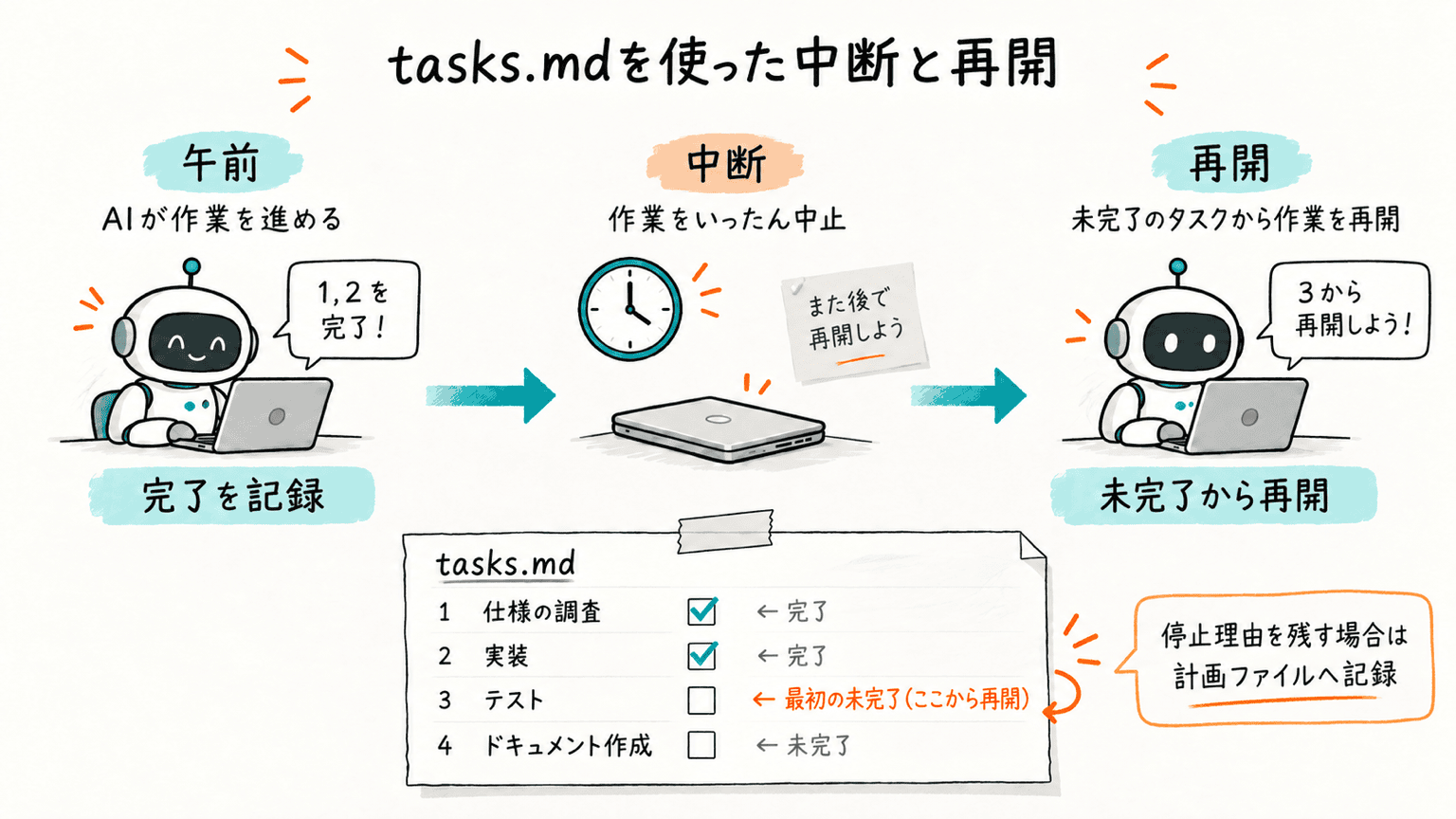
On resumption, read tasks.md and its related files rather than restoring conversation history.
Completed and incomplete tasks can be identified by their checkboxes.
If work stopped because the plan was incorrect, the user or AI agent explicitly records the reason in the relevant planning file, corrects the delta specification or design, and runs the Apply skill again.
Price-range filter example
Consider a change that adds min_price and max_price to the product search API to filter results by price range.
The change handles three cases: specifying only the minimum, only the maximum, or both prices.
Invalid ranges and compatibility when neither price is specified are also tracked in the same change directory.
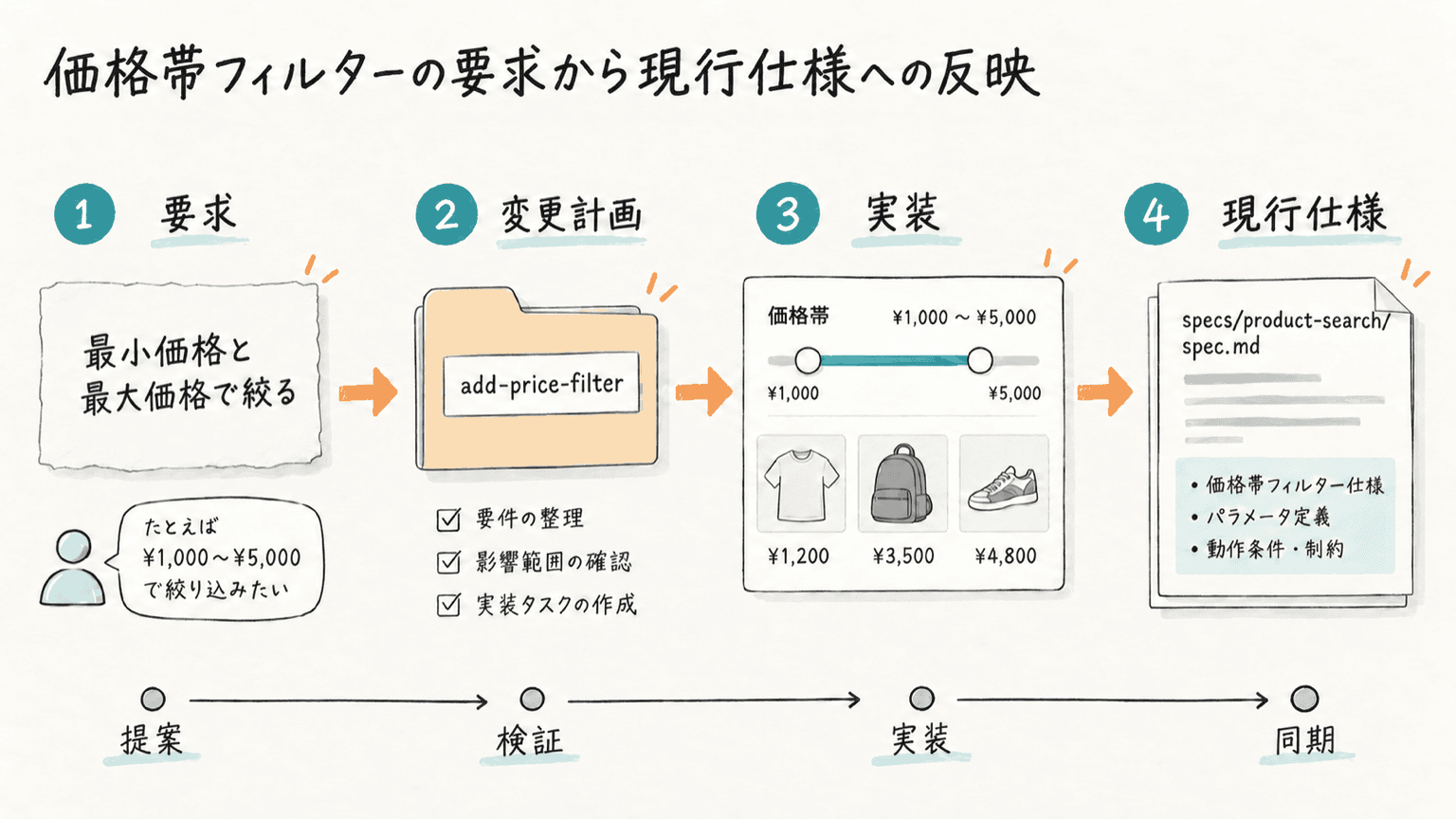
Propose the change
In proposal.md, describe the inability to filter products by price range and the scope of the product search API change.
If a product-search specification already exists, specify the same capability path as the target of the change.
## Why

利用者が予算内の商品だけを検索できない。

## What Changes

- 商品検索APIへ min_price と max_price を追加する
- 2つの価格入力の片方だけを指定できるようにする
- min_price が max_price を超える入力を拒否する

## Capabilities

### Modified Capabilities

- product-search: 価格帯による絞り込みを追加する
Why
利用者が予算内の商品だけを検索できない。
What Changes
- 商品検索APIへ min_price と max_price を追加する
- 2つの価格入力の片方だけを指定できるようにする
- min_price が max_price を超える入力を拒否する
Capabilities
Modified Capabilities
- product-search: 価格帯による絞り込みを追加する
If product-search does not yet exist in openspec/specs/, register it as a new capability rather than a modification.
Because the destination for incorporating the delta differs between existing and new capabilities, compare the capability path in proposal.md with the delta specification directory name after running Propose.
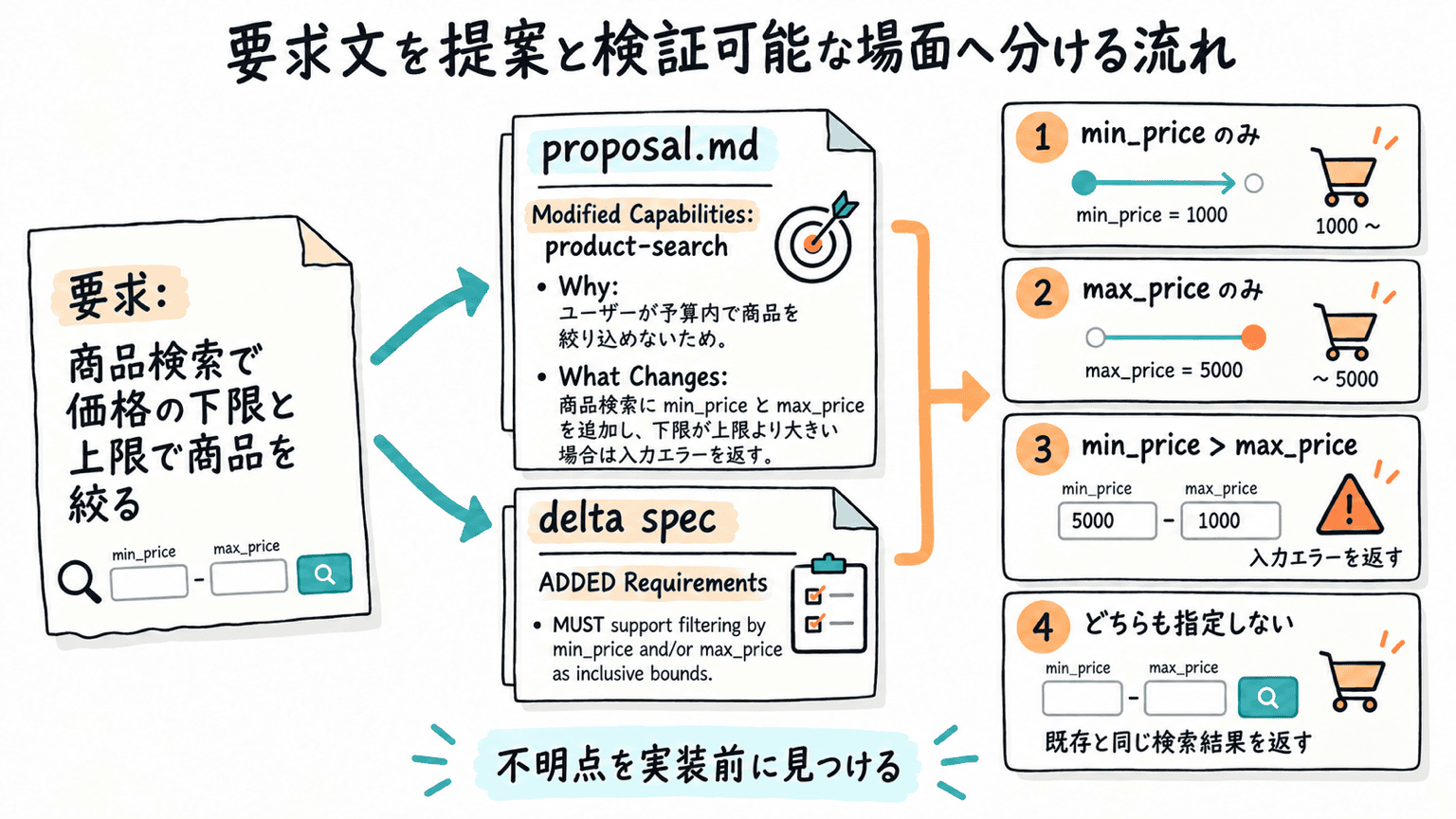
Delta specifications describe externally observable behavior as requirements and concrete scenarios. SQL and class names do not describe user-visible behavior and therefore do not belong in the delta specification.
## ADDED Requirements

### Requirement: 商品を価格帯で絞り込める
検索APIは、指定された価格条件を満たす商品だけを返さなければならない(MUST)。

#### Scenario: 金額の下限だけを指定する
- **WHEN** min_price に 3000 を指定する
- **THEN** 価格が 3000 以上の商品だけを返す

#### Scenario: 金額の上限だけを指定する
- **WHEN** max_price に 10000 を指定する
- **THEN** 価格が 10000 以下の商品だけを返す

#### Scenario: 価格範囲が逆転している
- **WHEN** min_price に 10000、max_price に 3000 を指定する
- **THEN** 検索を実行せず入力エラーを返す

#### Scenario: 価格条件を指定しない
- **WHEN** min_price と max_price を指定しない
- **THEN** 既存の検索結果を維持する
ADDED Requirements
Requirement: 商品を価格帯で絞り込める
検索APIは、指定された価格条件を満たす商品だけを返さなければならない(MUST)。
Scenario: 金額の下限だけを指定する
- WHEN min_price に 3000 を指定する
- THEN 価格が 3000 以上の商品だけを返す
Scenario: 金額の上限だけを指定する
- WHEN max_price に 10000 を指定する
- THEN 価格が 10000 以下の商品だけを返す
Scenario: 価格範囲が逆転している
- WHEN min_price に 10000、max_price に 3000 を指定する
- THEN 検索を実行せず入力エラーを返す
Scenario: 価格条件を指定しない
- WHEN min_price と max_price を指定しない
- THEN 既存の検索結果を維持する
Explicitly stating that the boundary values of min_price and max_price are included in the results means implementers do not need to guess whether to use > or >=.
Defining an input error for an inverted range also makes it possible to test the difference from an implementation that returns zero search results.
Break the change into design decisions and tasks
Once acceptance criteria are established, define input types, validation locations, and search query construction in design.md.
For example, the HTTP layer can convert strings to monetary amounts, the search service can validate range ordering, and the query builder can add lower and upper bounds independently.
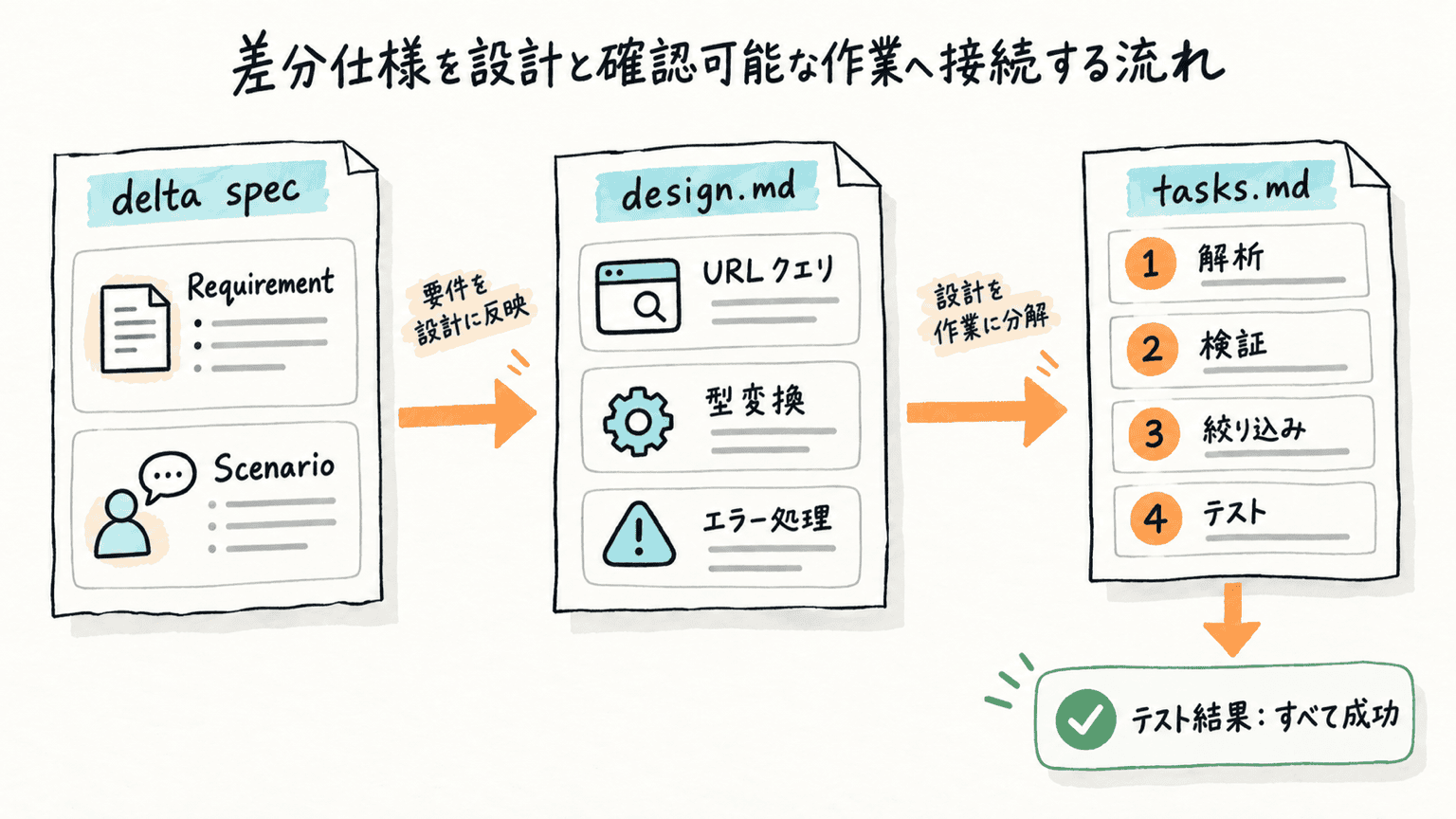
In tasks.md, organize implementation and verification in dependency order.
## 1. API入力

- [ ] 1.1 min_price と max_price を任意項目として受け取る
- [ ] 1.2 数値へ変換できない入力を拒否するテストを追加する
- [ ] 1.3 min_price > max_price を拒否するテストを追加する

## 2. 検索処理

- [ ] 2.1 下限条件を検索クエリへ追加する
- [ ] 2.2 上限条件を検索クエリへ追加する
- [ ] 2.3 境界値を含むintegration testを追加する
- [ ] 2.4 価格条件を指定しない既存テストが通ることを確認する
1. API入力
2. 検索処理
Each item specifies both the logic to change and a verification method. A single task such as "Implement the price-range filter" does not establish the implementation scope for the lower and upper price bounds. Nor does it record whether invalid inputs and compatibility with existing behavior have been checked.
Verify and integrate into current specifications
After implementation, verify the OpenSpec record formats and project execution results separately. The following command performs strict validation of a named change.
npx --yes @fission-ai/openspec@1.14.2 \
  validate add-price-filter --strict
This command checks the structure of the delta specifications and their references. Whether the product search API returns correct results at boundary values is verified through the project's unit and integration tests. Profiles that provide the Verify skill can also check the correspondence between specifications, task lists, and implementation.
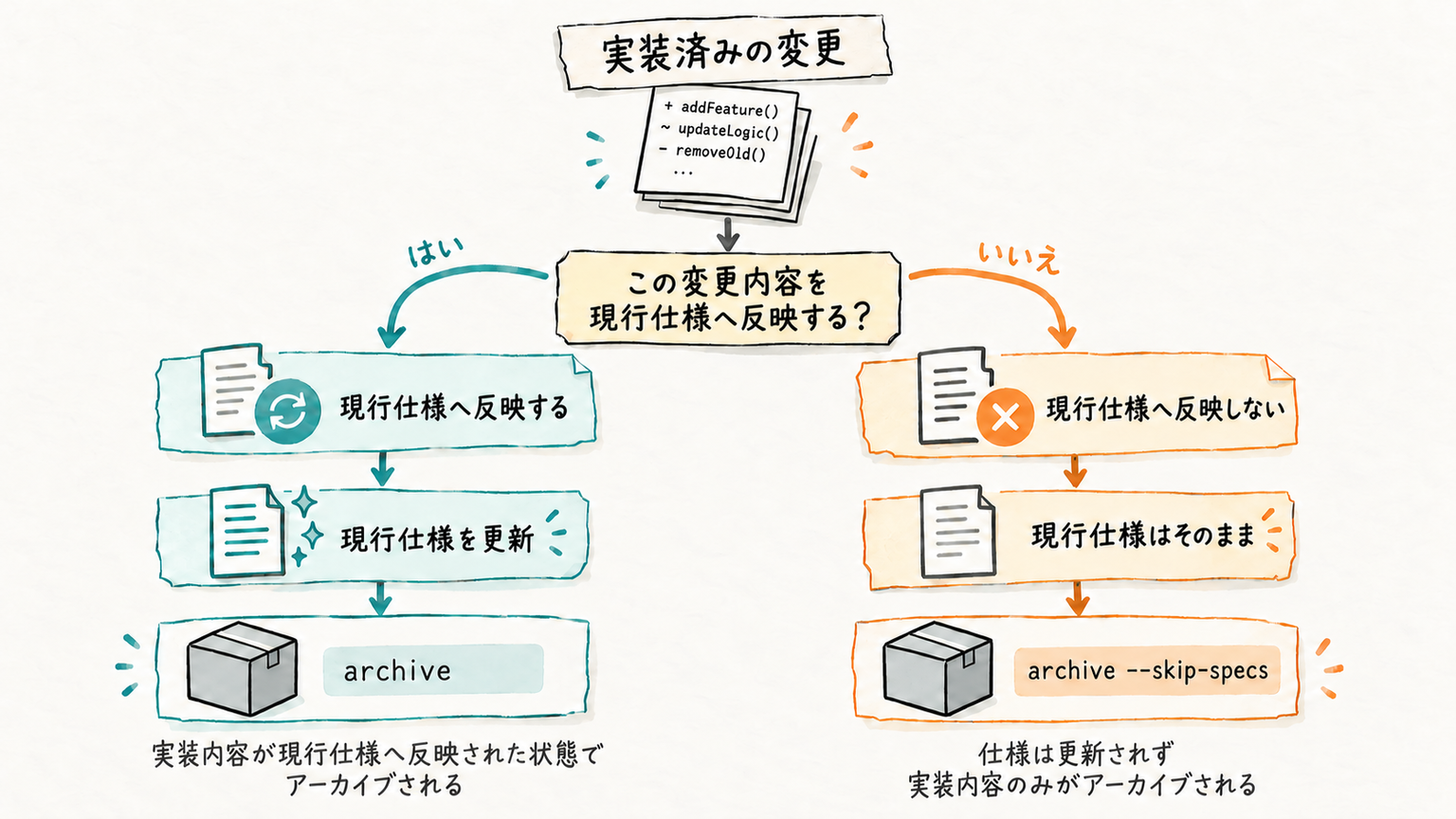
To incorporate changes into the current specifications before archiving, run the Sync skill and leave the change directory in progress.
When synchronizing through the Archive skill, the user is asked whether to apply outstanding deltas to the current specifications.
On approval, additions, modifications, removals, and renames are incorporated into openspec/specs/, after which the change directory is moved into dated history.
A change directory can also be archived without approving synchronization. Do not treat the existence of an archive destination and the updating of current specifications as the same completion condition. Verify whether the current specifications were actually updated.
Boundaries of verification and completion
OpenSpec's Validate, Verify, and Archive operations check different things from project tests and code review. Do not decide completion on the basis of a single result. Combine the checks needed for the type of change.
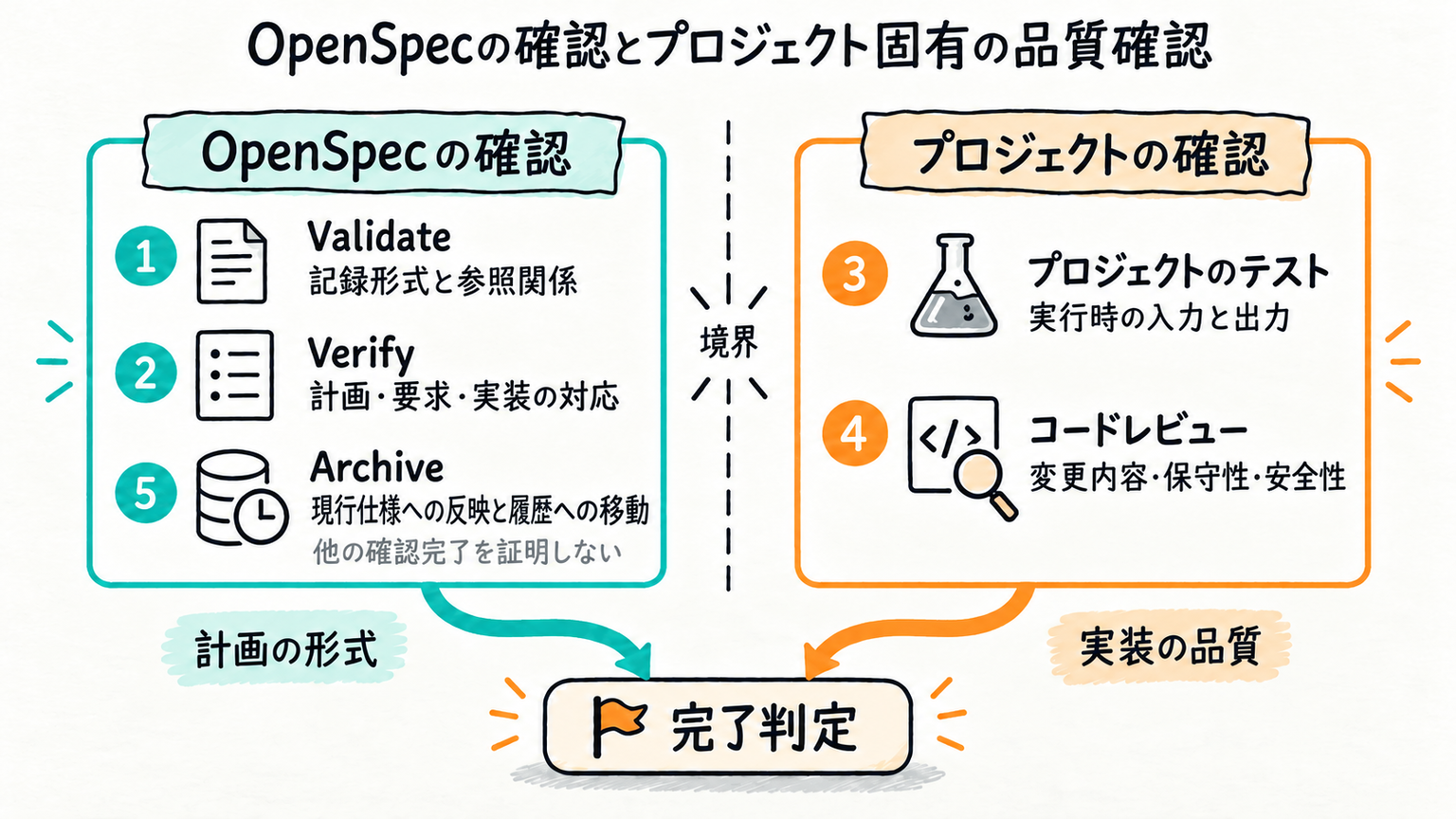
| Check | Primary verification target | What it cannot establish |
|---|---|---|
| Validate | OpenSpec record formats and references | Correct API behavior at runtime |
| Verify | Correspondence between plans, requirements, and implementation | All behavior under load or with production data |
| Project tests | Runtime inputs and outputs | All aspects of maintainability and soundness of design decisions |
| Code review | Changes, maintainability, and safety | Automated verification of all execution paths |
| Archive | Synchronization of deltas and movement into change history | Success of all the checks above |
Archive may warn about incomplete work but continue if the user chooses to proceed.
Validation can also be skipped by explicitly specifying --no-validate.
The fact that a change has been moved to openspec/changes/archive/ is therefore not, on its own, evidence that the task list, tests, and review are complete.
If writing specifications or moving the change directory fails before completion, OpenSpec restores the previous specifications and the change in progress.
Before retrying, verify that openspec/specs/ and openspec/changes/<変更名>/ have been restored to their original locations.
If only removal of the original directory fails after copying into history is complete, the completed history and synchronized specifications remain.
In this case, do not synchronize the same delta again. Check the archive path reported by the CLI and the remaining in-progress directory.
OpenSpec does not perform Git commits, pushes, or merges.
The team decides whether to synchronize and archive after merging the PR or to include the code and archive in the same PR.
Whichever approach is chosen, establish the point at which the adopted code and the contents of openspec/specs/ must agree.
Conflicts between concurrent changes
If multiple changes modify the same capability or requirement, a change synchronized first may alter the assumptions of a later delta. For example, if change A renames an existing requirement and change B then tries to modify it using the old name, the target cannot be found.
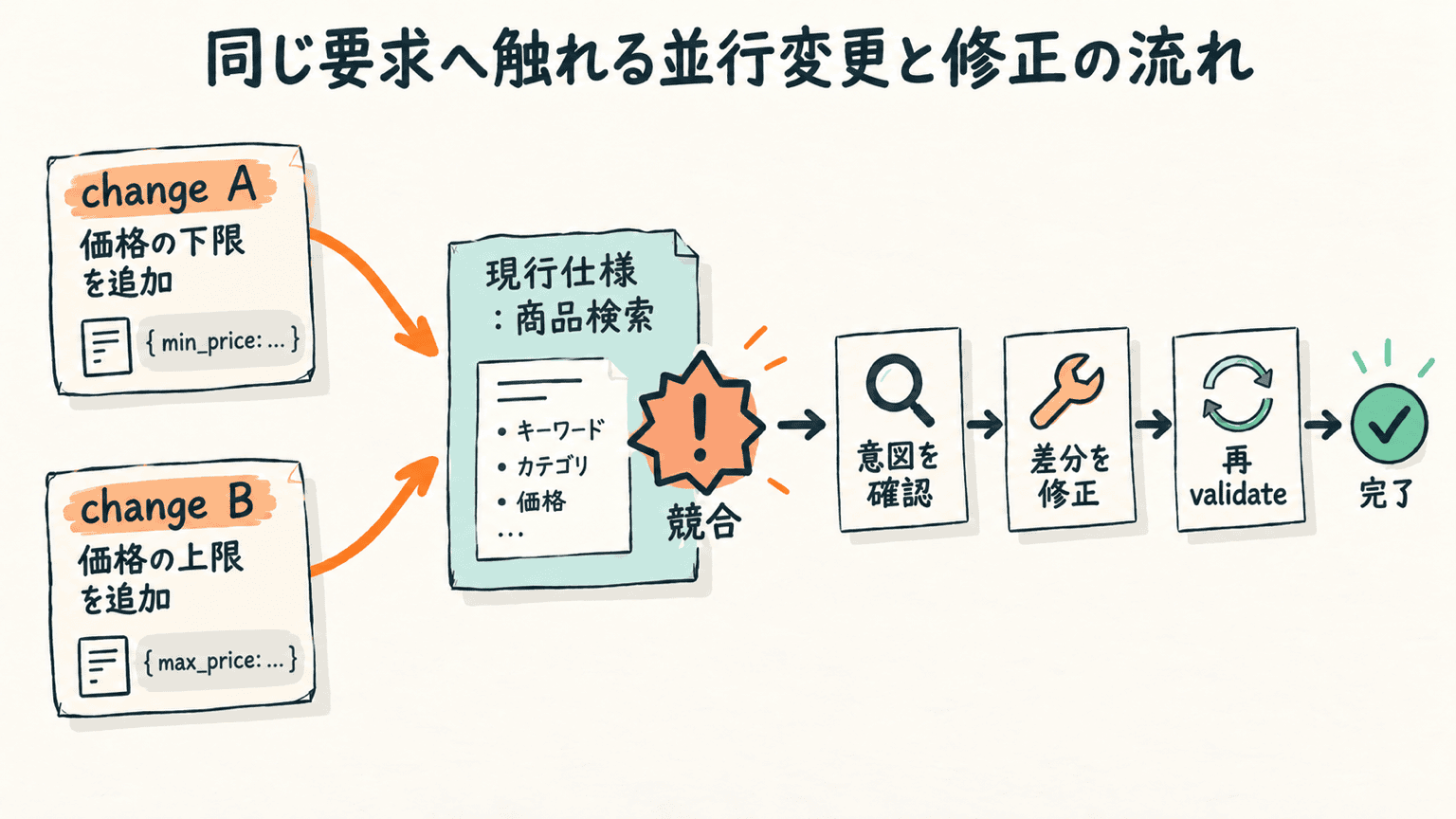
Conflicts also occur when two changes add requirements with the same name.
For the change being synchronized later, reread the latest openspec/specs/ and update its delta specification to match.
Then rerun Validate, project tests, and review.
Bulk Archive detects changes affecting the same specification and synchronizes implemented deltas in chronological order, oldest first. Do not use the automatically chosen order as a substitute for approval. Check the current specification after each change is incorporated.
Suitable use cases and considerations
OpenSpec is suited to projects that need to maintain current specifications, separate multiple proposed changes, and incorporate only implemented deltas into the current specifications. Because the Markdown records for each change can be shared through Git, work can resume from the same change directory even when AI coding agents or sessions change.
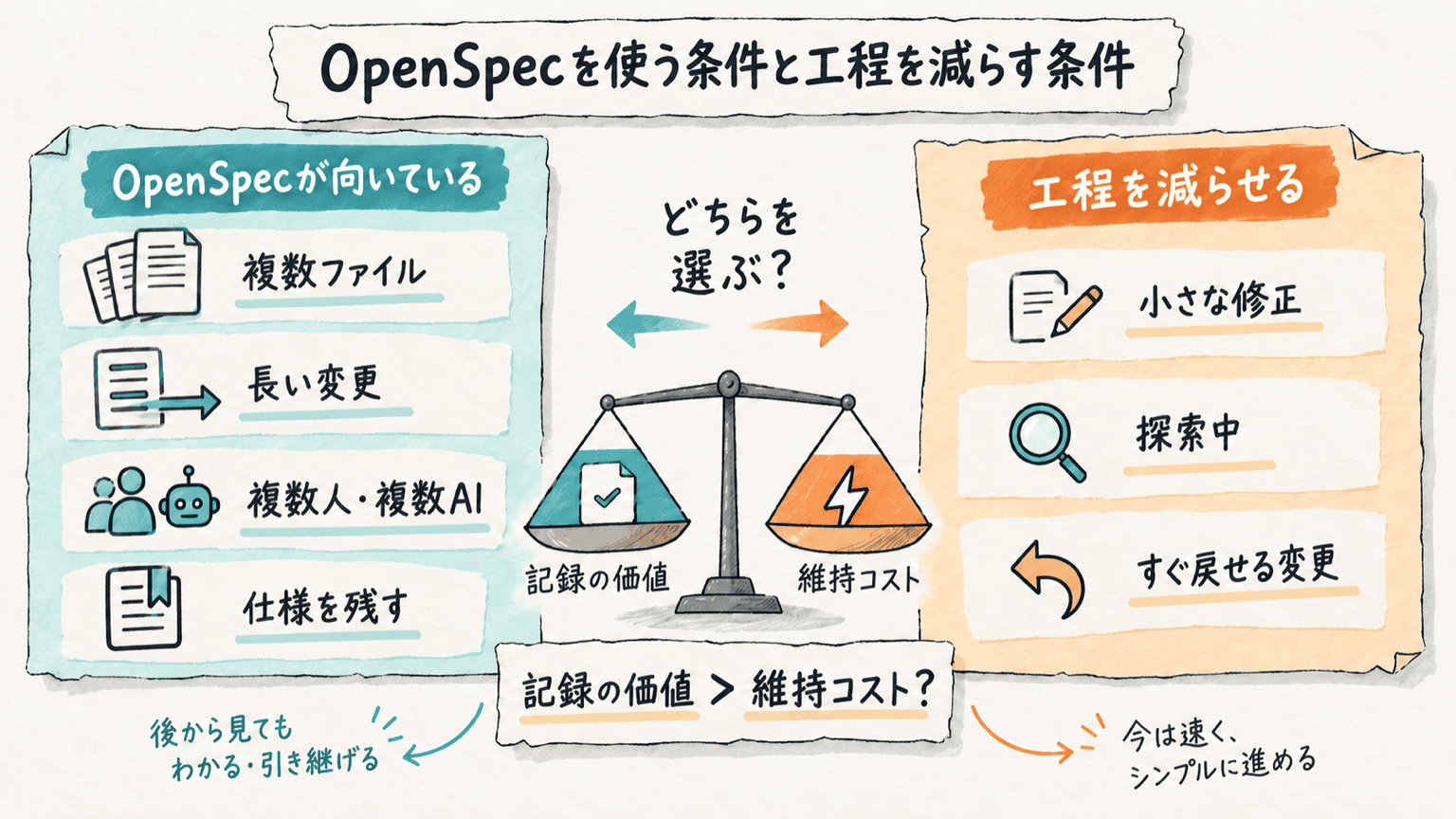
The standard workflow is particularly useful under the following conditions.
-
Externally observable behavior changes
Acceptance criteria are recorded in delta specifications and can be revisited after implementation.
-
Multiple changes proceed concurrently
Each change can have a separate directory, but changes affecting the same requirement need synchronization ordering and conflict resolution.
-
Specification change history is reviewed in Git
Current specifications and dated archives distinguish adopted behavior from the reasons for past changes.
-
Responsibility for maintaining specifications can be assigned
The team can continue updating delta specifications and current specifications when code changes.
For an obvious fix of a few lines, or work that does not change user-visible behavior, using only issues, tests, and review can reduce recordkeeping.
Even when tracking changes in OpenSpec, use skip_specs for refactoring or documentation edits rather than recording nonexistent behavior changes as requirements.
The standard schema validates the format of requirements and concrete scenarios. However, no official guaranteed values for the number of supported changes or specifications have been published. There are also no guarantees for file capacity or execution performance. When introducing OpenSpec into a large repository, measure CLI execution time with the actual number of changes and volume of specifications.
Conclusion
OpenSpec stores currently effective specifications in openspec/specs/ and keeps changes in progress separate in openspec/changes/.
It separates the rationale for a change from its acceptance criteria, and also stores technical decisions and task lists independently.
AI coding agents read these records and can resume from incomplete tasks.
When deciding whether a change is complete, check not just whether it has been archived but also whether the current specifications have been updated and what the task list says. Individually verify results from Validate, any required Verify checks, project tests, and code review. Maintaining these distinctions keeps the behavior currently provided separate from the changes that will be incorporated later.
The official OpenSpec documentation and repository are available below.

I also write articles elsewhere. Please feel free to explore them.