Introduction
Hi, I'm cardene, a software engineer and technical writer focused on blockchain and AI.
I've also authored Japanese technical books on specification-driven development with LLMs and decentralized application (DApp) development.

I also build and publish a variety of tools, libraries, and open-source projects.
Overview
When a price range filter is added to a product search, users want to know whether entering a price actually narrows down the results. Even if an AI agent reports that the tests passed, three questions remain distinct: were all the agreed conditions implemented, did someone examine the changed files from a different perspective, and could the search criteria be submitted from the UI?
Pilot Shell is a development support system that adds planning, implementation procedures, review, and runtime checks around Claude Code and Codex.
In v11.0.11, spec stores requirements in a Markdown plan and connects task-level tests and post-implementation verification to the completion criteria of that same plan.
The user examines the latest changes and verification results before deciding whether the plan can move to VERIFIED.
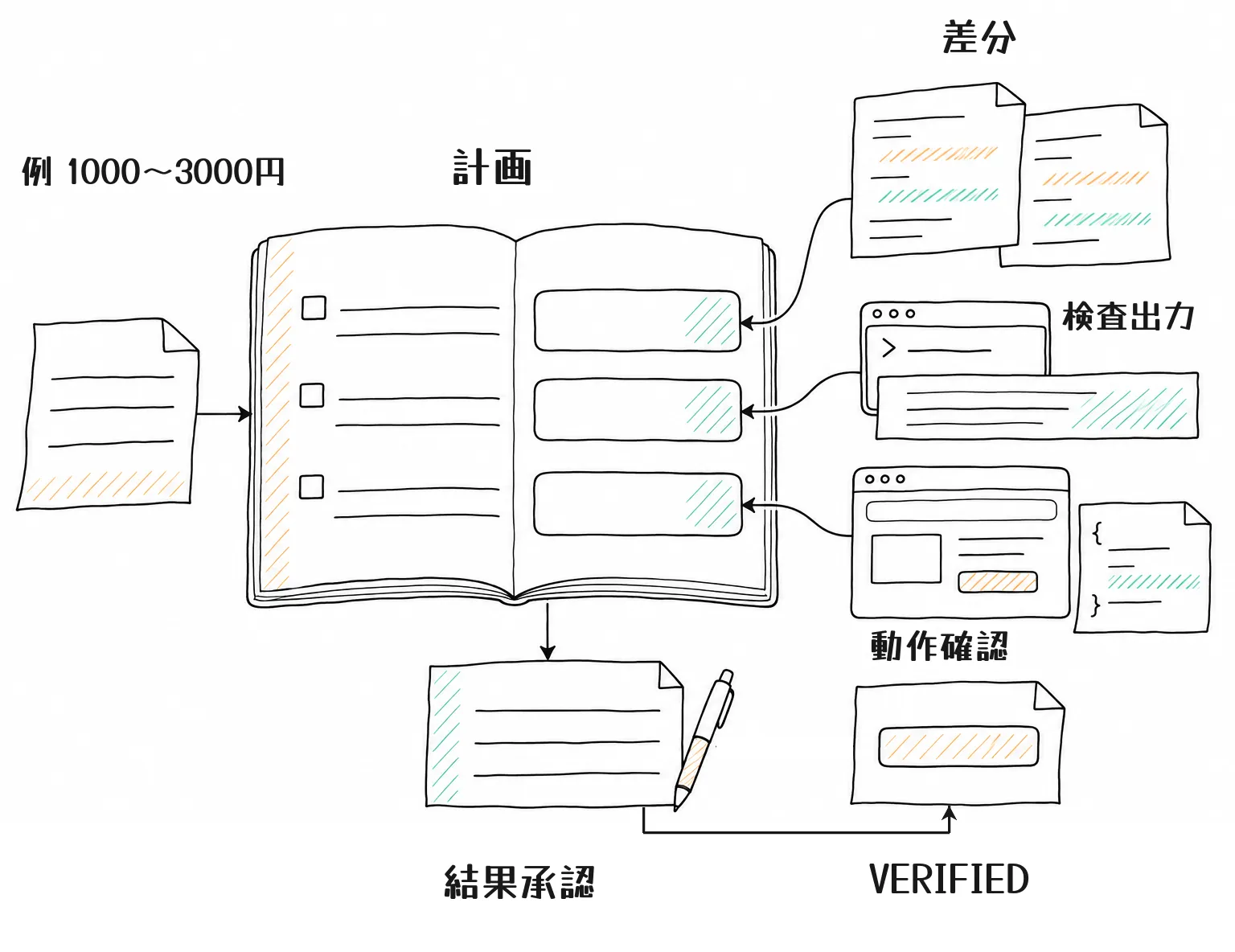
For example, a change that allows searching for products priced between 1,000 and 3,000 yen would record more than the addition of input fields. The plan would also cover searches that include both endpoints, searches with no specified range, and the response when the minimum exceeds the maximum. Later verification compares those conditions with the code diff, test output, and actual API responses or UI behavior. The price range search below is a fictional example. All responses, test results, and UI results are unexecuted expectations.
The existing diagrams are reused from the Japanese article and contain Japanese labels.
What Pilot Shell Is
Claude Code or Codex edits the code and executes commands. Pilot Shell supplies instructions on how to read the plan, the order of implementation, how to request a review, and which results to check. Instructions read by an agent are called skills; processes invoked after edits or when a session attempts to stop are called hooks. A UI called Console lets users inspect plans and diffs and send their annotations back into the workflow.
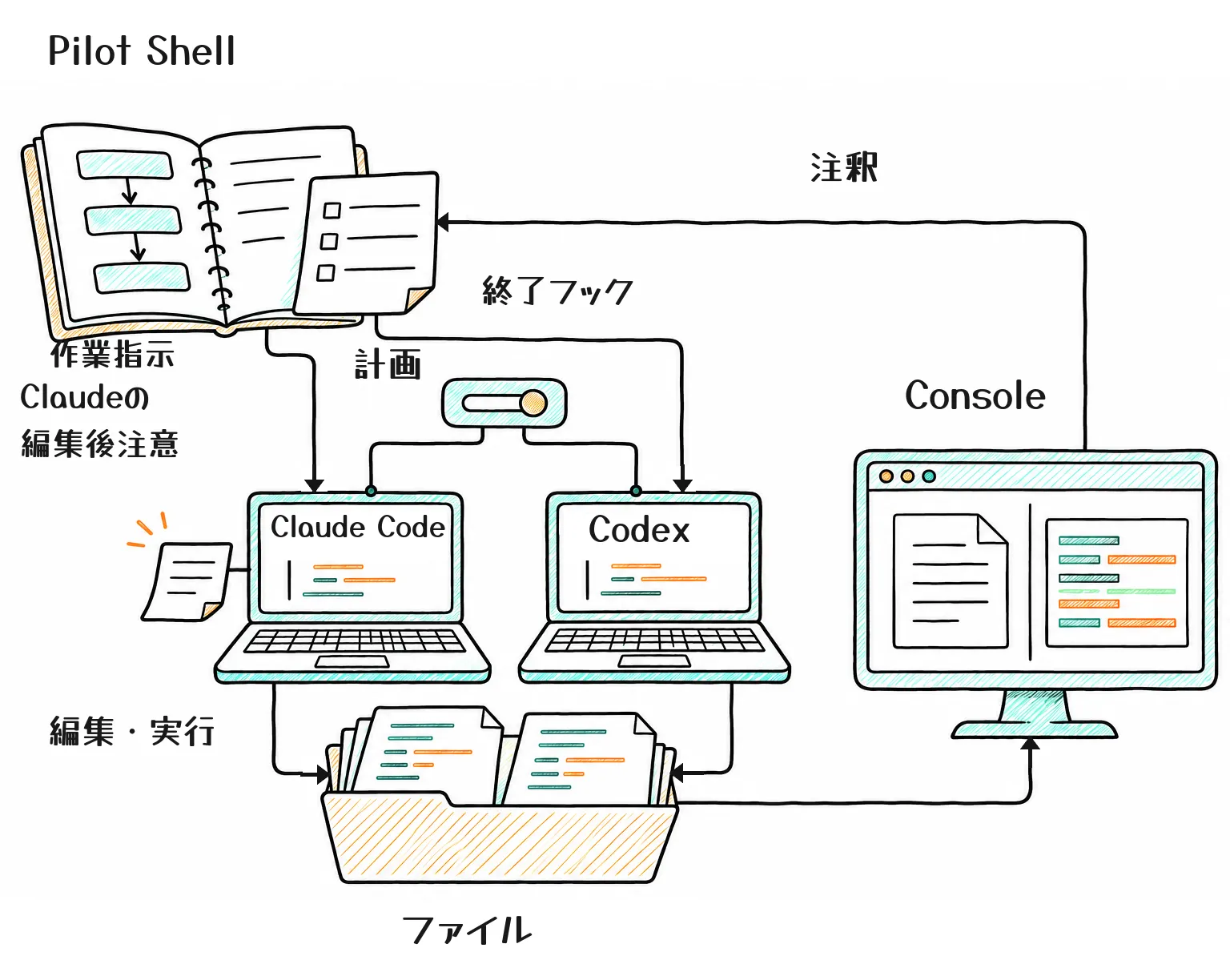
Users can choose to make a direct request, use the planning features built into Claude Code or Codex, or use a Pilot workflow.
When ordered tasks need approval before implementation, they can choose spec, invoked as /spec in Claude Code or $spec in Codex.
Not every change is automatically routed to spec.
Both agents have procedures for the planning, implementation, and verification stages used by spec.
Claude Code invokes a skill for each stage. Codex follows the corresponding instructions while keeping its current model and permitted mode.
Even if the conversation context is compacted midway, the plan path and progress carry over, and the agent rereads the contents from the file.
The editing helpers are not identical across the two hosts, however.
Claude's TDD helper issues a reminder after a relevant Write or Edit if it cannot find a related test.
It skips the reminder when an existing test is found or when the file format is out of scope. Even when issued, the reminder does not block the operation.
Consequently, it is not proof that a failing test preceded every edit, and Codex's hook registration does not contain the same edit-time TDD check.
Distinguishing the instructions for practicing TDD from verification of the expected failures and successes makes it easier to understand what the system can enforce. File access and permitted network destinations are configured in the agent and its execution environment. Approval of a plan and permission to execute commands are separate decisions.
Making the plan the source of truth across stages
spec stores requirements and implementation tasks in a Markdown file such as docs/plans/2026-11-12-price-filter.md.
The official instructions call this document a plan, and the planning, implementation, and verification stages all read it from the same path.
The objective, ordered tasks, files to change, and completion criteria are recorded outside the conversation so they can still be checked after implementation.
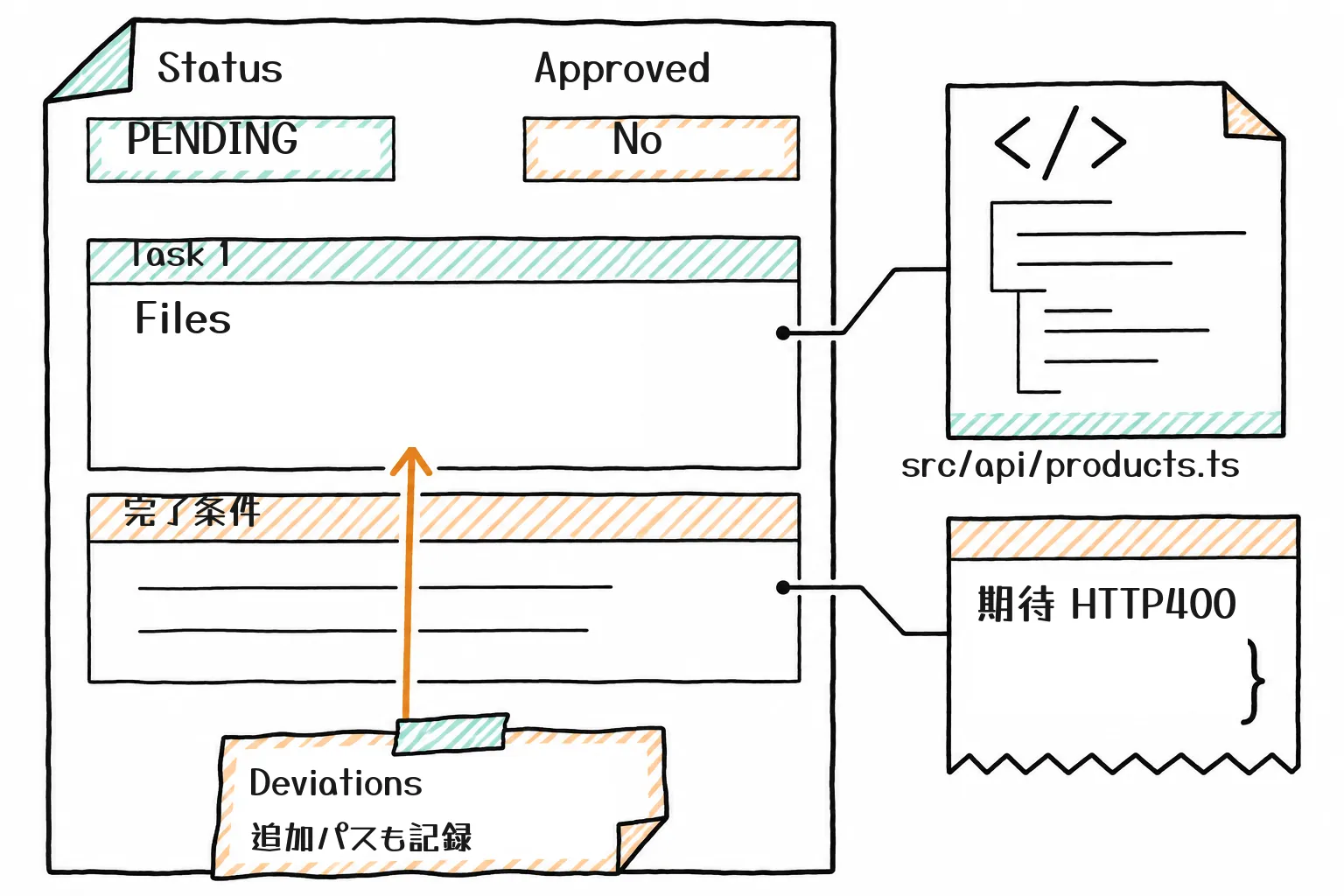
The plan records Status, which tracks progress, separately from Approved, which tracks pre-implementation approval.
The status is PENDING both before approval and during implementation, so the status alone cannot establish that the plan has been approved.
| Record | Meaning |
|---|---|
Status: PENDING |
Planning or implementation is in progress |
Status: COMPLETE |
Tasks have been implemented and await verification |
Status: VERIFIED |
Verification and approval of the latest results are complete |
Approved: No |
The current plan has not received pre-implementation approval |
Approved: Yes |
The current plan has been approved |
For a Feature plan, the progress checklist corresponds to the implementation task numbers.
Each task contains an Objective describing the change, Files listing the relevant paths, Key Decisions / Notes explaining the rationale, and a Definition of Done specifying completion criteria.
The prescribed bold labels, consecutive task numbers, and LF line endings are also part of the format contract.
pilot spec validate checks these requirements, but a valid format does not establish that the plan satisfies the requirements.
In particular, Files identifies the files that will be read during the later review.
For API input validation, it might list src/api/products.ts and tests/products-price.test.ts, along with whether each file is to be created, modified, deleted, renamed, or tested.
If a file to be changed is missing from this field, it may be excluded from the diff scope or treated as an out-of-plan change.
Missing entries for files used by verification commands are also checked: normally they produce warnings, but under --strict they become errors.
If implementation reveals that a helper function has a different name, the agent can correct the details without changing the task objective and record the discovery under Deviations.
This section provides a record of departures from the plan.
When a new file must be touched, its concrete path is recorded and the task's Files field is updated.
By contrast, a discovery that changes the scope, approach, or a user decision, such as also changing the sort order of search results, requires pausing for the user's decision. Once agreement is reached, the agent updates the tasks, assumptions, relevant files, and reasons for the change before resuming. The instructions for this agreement-recording path do not require an additional formal reapproval of the plan.
The workflow from approval to VERIFIED
During planning, in addition to format validation, an enabled spec-review examines the requirements and risky assumptions from a separate context.
After addressing the findings, the agent presents the current plan to the user and proceeds to implementation upon approval.
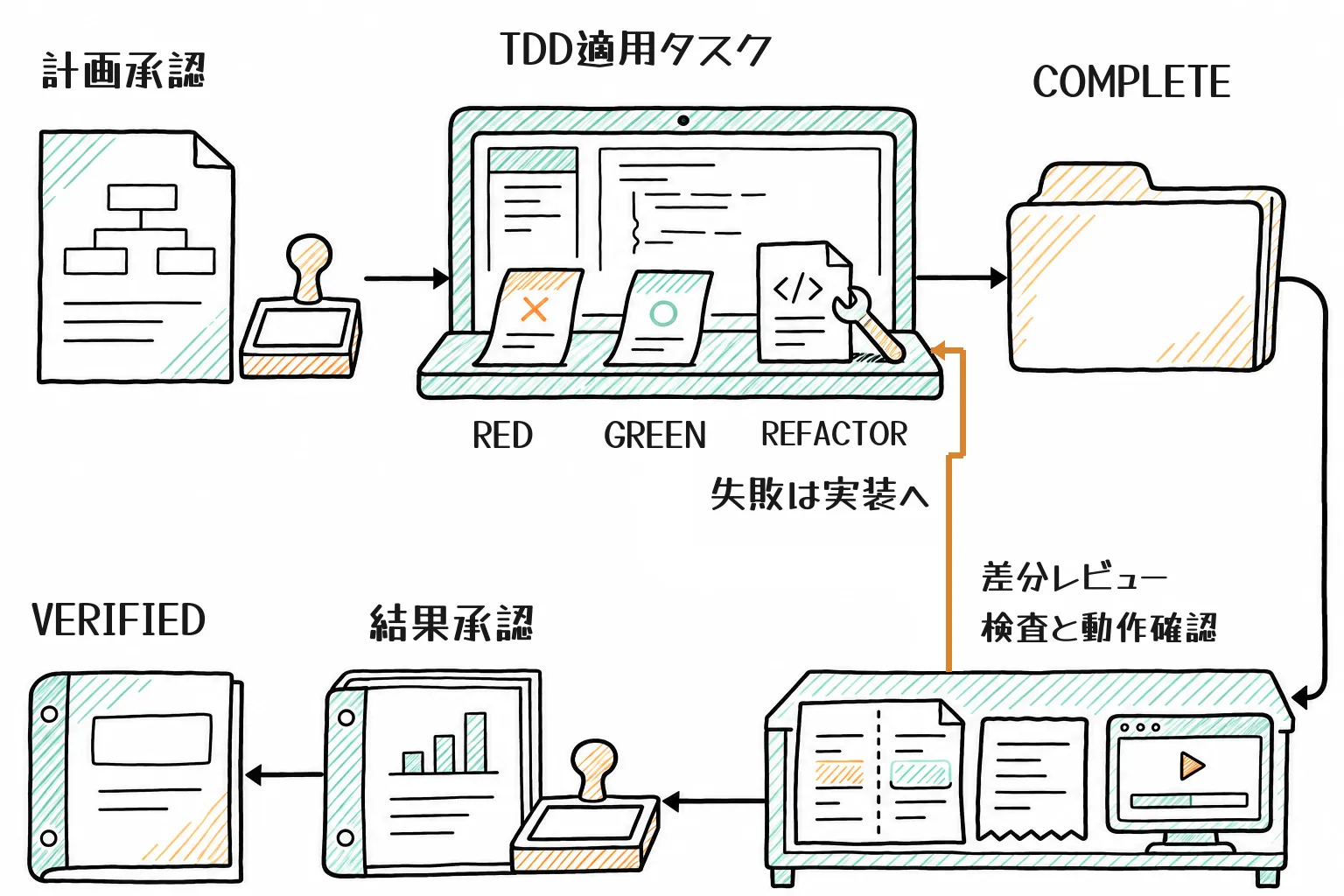
Approving the plan before implementation and approving the results after implementation are distinct checks.
-
Choose the contract for the change
Route changes requiring pre-approval of ordered tasks to
spec. Distinguish them from changes whose steps are discovered during implementation based on completion criteria and from short fixes to existing bugs. -
Create the plan and register it with the session
Write the objective, tasks,
Files, completion criteria, execution environment, and verification scenarios underdocs/plans/. Usepilot register-planso the session'sactive_plan.jsonpoints to the same plan. -
Check the format and content of the plan
Resolve errors and well-founded warnings from
pilot spec validate. Address required and recommended fixes from an enabledspec-reviewand confirm that the results correspond to the current plan. -
Approve the current plan
If plan approval is enabled, update the plan to
Approved: Yesin response to the user's explicit answer. WithPILOT_PLAN_APPROVAL_ENABLED=false, continue with automatic approval; retain existing approval for the same unchanged plan. -
Test and implement each relevant task
Follow RED, which establishes a failure caused by the missing behavior; GREEN, which passes the test with a minimal implementation; and REFACTOR, which improves the structure while the tests pass. Update the task's progress check as soon as its completion criteria are met.
-
Distinguish user tasks from changes requiring agreement
For tasks marked
Owner: User, wait for the user's work and check observable conditions after receiving the exactdoneresponse. Record discoveries that change scope or approach as awaiting a decision, then resume after updating the agreed tasks and reasons for the change. -
Record completion of all implementation tasks
Confirm that every task in the progress section is checked off and that evidence exists for each completion criterion, then change the plan to
COMPLETE. Pass the same path to verification, keeping implementation completion separate from verification completion. -
Check the diff and project checks
Resolve the scope of the diff to review and run the current
changes-reviewalong with tests, type checking,lint, andbuild. Do not substitute the planning-stage review for a review of the implemented diff. -
Run the finished product and check for gaps
Check the completion criteria and scenarios in an appropriate execution environment, recording observed API responses or UI behavior. Fix relevant failures and record what was attempted and why for any item that could not be checked.
-
Confirm approval of the latest results
Present the changes, check results, runtime evidence, and significant gaps. Confirm explicit approval of those same results or applicable standing delegation. Make sure later changes or unresolved feedback have not invalidated that approval before moving to
VERIFIED. -
Check the state when the agent attempts to stop midway
If the registered plan is
PENDINGorCOMPLETE, the stop hook prompts the agent to continue unless a valid pause or pending question applies. AtVERIFIED, the hook does not prevent termination; it is not a step that necessarily restarts the work after completion.
TDD checks the relevant task's failure and implementation before moving to subsequent tasks.
However, documentation, configuration, infrastructure configuration, and formatting-only changes in a Feature plan are exempt. Tasks with a documented rationale under Trivial can also skip RED if the specified existing check passes.
If that check fails, remove Trivial and return to RED; later verification also checks whether the rationale covers the actual change.
For a Bugfix, a RED test reproducing the bug is mandatory and these exemptions do not apply.
The conditions for pausing midway also vary by host.
With Claude's default Manual model switching, a main session with plan approval enabled waits after approval for the user to invoke /model and continue.
Paths with plan approval disabled, alternative switching settings, or parallel work lanes proceed under their corresponding conditions. Codex does not perform this Claude-specific switch.
Disabling plan approval does not automatically waive final result approval.
Example: completing a price range filter
Add minimum and maximum price parameters, min_price and max_price, to a fictional GET /api/products endpoint.
Prices are nonnegative integers in yen, and both specified endpoints are inclusive.
When only one endpoint is supplied, apply only that condition; when both are omitted, preserve the existing search results.
Suppose there are five products priced at 999, 1,000, 2,000, 3,000, and 3,001 yen. A range of 1,000–3,000 yen should return the middle three. Verification also checks that the two conditions reach the API from the minimum and maximum price fields in the UI.
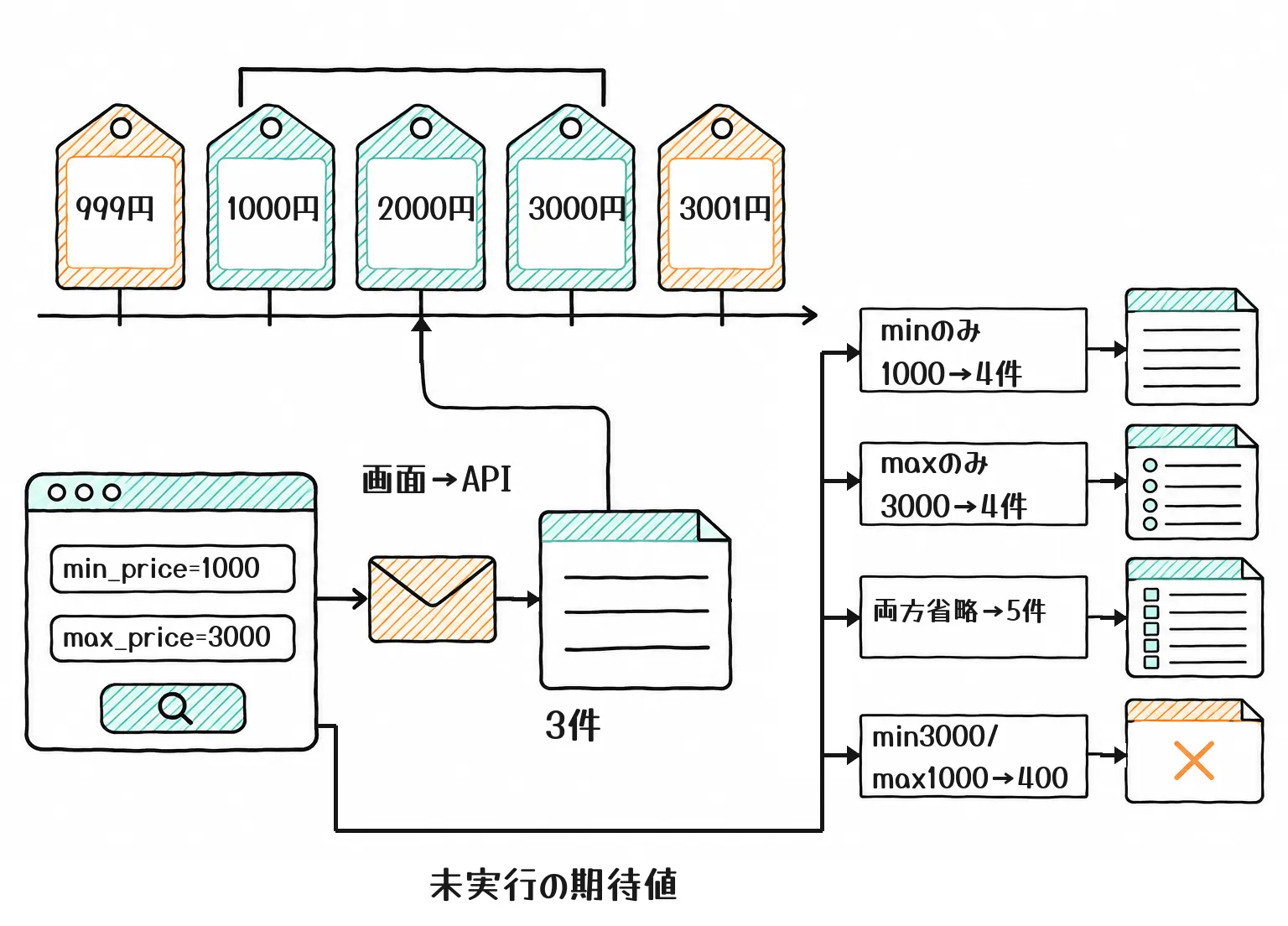
The plan divides the work into three tasks: API input validation and filtering, submitting the conditions from the UI, and integrated runtime verification. The illustrative files and completion criteria are as follows.
| Task | Targets listed in Files |
Completion criteria |
|---|---|---|
| API input validation and search | src/api/products.tstests/products-price.test.ts |
Verify expected responses for valid ranges and invalid inputs with targeted tests |
| Submit conditions from the UI | src/components/PriceFilter.tsxtests/price-filter.test.tsx |
Both minimum and maximum prices are sent, and the three returned products are displayed |
| Integrated runtime verification | tests/e2e/price-filter.spec.ts |
Verify omitted, valid, and reversed ranges against a running UI and API |
Before implementation, specify concrete API responses as well. The error name and HTTP status 400 used here belong to the design of this search feature. Pilot does not prescribe them for every API.
| Input | Expected response (not executed) |
|---|---|
min_price=1000&max_price=3000 |
Three products priced at 1,000, 2,000, and 3,000 yen |
min_price=1000 |
Four products priced at 1,000 yen or higher |
max_price=3000 |
Four products priced at 3,000 yen or lower |
| Both omitted | The same five products as before the change |
min_price=3000&max_price=1000 |
HTTP 400 and INVALID_PRICE_RANGE |
min_price=-1min_price=1000.5min_price=abc |
HTTP 400 input error |
For task 1, RED establishes that a test passing a reversed range fails because the API returns 200 instead of the expected 400. A syntax error or broken test environment is not evidence of missing functionality. Implement input validation and filtering to reach GREEN, then check boundaries, one-sided ranges, and omitted parameters before refactoring. Once the completion criteria are met, update task 1's progress and proceed to task 2.
Task 2 isolates the bug in which the maximum price from the UI is not sent to the API. Enter 1000 and 3000, check that both values appear in the outgoing request, and verify that the response matches what is displayed. Seeing three products on the screen would not detect a missing parameter if the data happened to contain only those three. The example therefore includes a product priced at 3,001 yen.
After all tasks, resolve the diff review scope from the plan's Files and recorded additional changes.
Map the review findings, project check output, and results from the running UI and API to the corresponding completion criteria.
Record each scenario's result under E2E Results in the plan, and document why any scenario that could not be run remains under Not Verified.
Creating a file is not a substitute for observing the actual UI.
All file names, product data, responses, and test results in this example are fictional designs and expectations. The example is constructed from published procedures; it does not measure an AI execution or a successful installation.
Separating independent review from the quality gate
A plan review examines requirements and the implementation approach, while a change review examines the diff after implementation.
In addition to the plan, relevant files, and changes recorded during implementation, changes-review receives the boundaries of the diff.
Together these inputs allow it to investigate discrepancies between requirements and implementation within the scope of the current change.
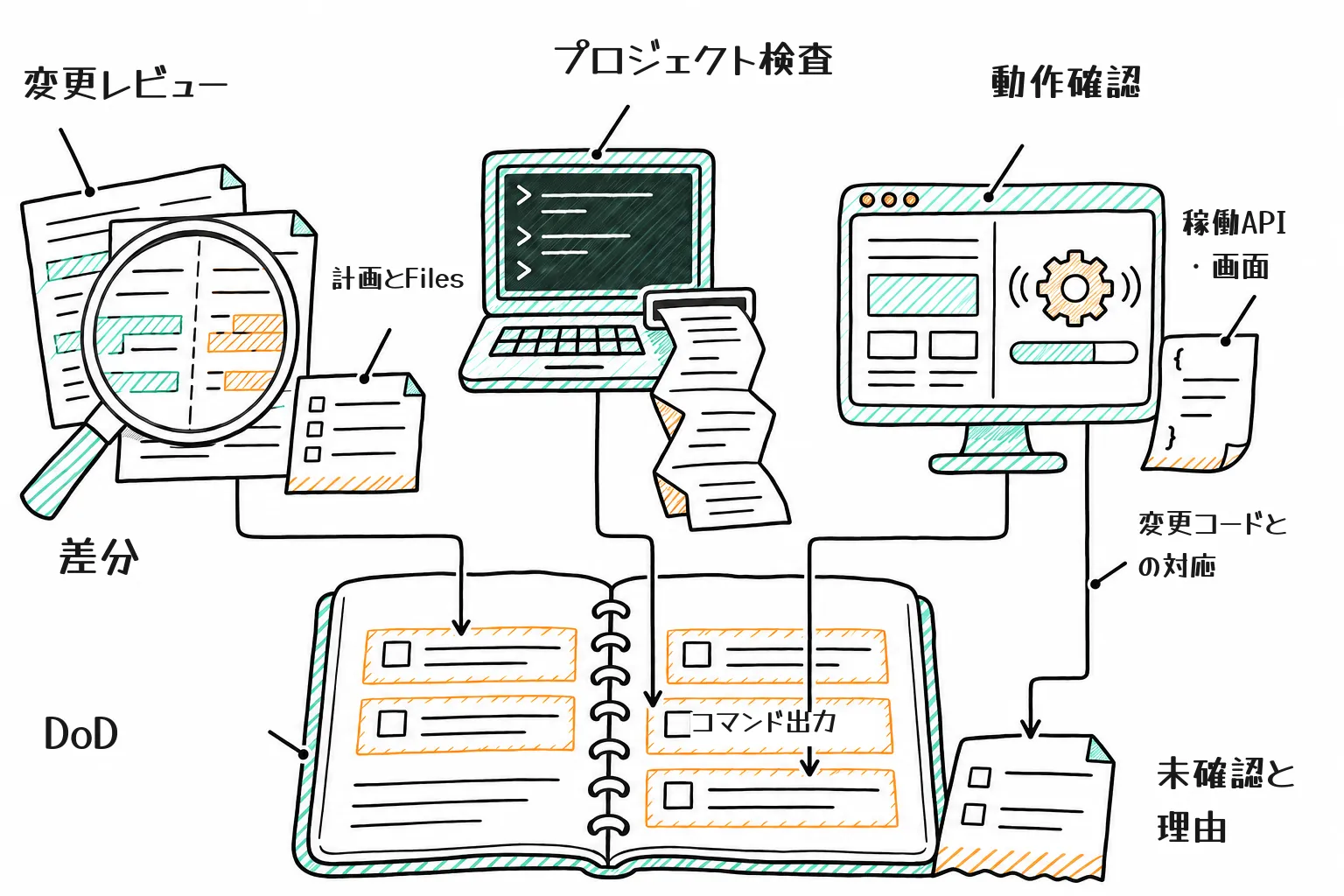
Resolve the diff scope with pilot review-scope.
When tasks are committed individually in a worktree (a mechanism for placing a working branch in a separate directory), use a three-dot diff from the detected branch base to HEAD.
When changes are made in the working tree, stage relevant new files so they are included in the diff against HEAD.
If someone else has edited the same file, however, distinguish their changes from the current work rather than staging the entire file.
If the scope resolution returns a warning, fix the cause instead of reviewing a scope with missing information.
For example, reading only the working tree for already committed changes can give the impression that everything was reviewed even though the diff was empty.
For older CLI versions without the command, use the manual procedure: distinguish working-tree changes from a worktree and determine the scope from the detected branch base.
Do not assume the base is always main.
For the independent reviewer, record an identifier for the current execution and its association with the plan or work lane. Claude uses a subagent; Codex uses a dedicated custom agent. Collect the results returned when that execution completes. Do not treat old findings files or intermediate output as passing results for the current review. Request correction of an invalid response. If recovery still fails, record independent review as incomplete with a reason and switch to the prescribed self-review.
Independence here means examining the change in a context separate from the implementation conversation.
It does not guarantee physically separate OS permissions or sandboxes.
Ordinary plan and change reviews can be disabled through configuration. The companion review that Claude can additionally request from Codex (an extra review by another model) has separate settings.
This extra review is also limited to at most one invocation within the corresponding spec call; it is distinct from Codex's own ordinary review.
By contrast, a quality gate (a requirement to pass project-specific checks) runs the commands defined by the project.
Execute tests, type checking, lint, build, and task-specific verification commands and examine their results and exit status.
Within the same execution, successful results can be reused if the code, configuration, and environment remain unchanged.
If a fix changes the inputs, rerun the affected checks.
Failures involving changed files, generated artifacts, reachable execution paths, security, or data integrity must be sent back for correction.
If a failure can be demonstrated to be pre-existing and unrelated to the change, using the failing path or a targeted check, it may be recorded in the unverified section with a reason.
There is no universal numerical test coverage threshold. Existing measurements and behavioral checks are used to determine whether important paths lack verification.
Tasks that skipped RED under Trivial in a Feature plan are also audited to see whether their specified checks cover the actual change.
The depth of runtime verification depends on what was changed.
Minimal runs the modified CLI or script; for documentation or configuration, it checks generated or consumed files and relevant behavior.
API checks a running API, and Full extends to E2E verification that includes the UI.
Passing unit tests is not equivalent to a LIVE_PASS observed on an actual UI or service.
Prefer an existing local environment that has been confirmed to load the changed code.
If none is available, start one on a free port. Use a remote preview only when the target and operation are already authorized.
If the target cannot be prepared, record the attempted operation, blocker, and scenarios whose behavior could not be verified under Not Verified.
Possessing credentials does not itself grant permission to deploy to production.
Compare completion criteria with command output, generated artifacts, API responses, and observed UI behavior.
Known serious issues classified as Critical in E2E verification are sent back for correction without being marked as verified. There are paths for recording known High or Medium issues and proceeding.
Environmental gaps are also presented with their reasons, so VERIFIED does not guarantee the absence of defects or omissions.
Update the status only after confirming explicit approval of the latest results or standing delegation applicable to those results.
Conditions enforced by the stop guard
When an agent attempts to stop midway, a hook called spec_stop_guard is invoked.
It reads the plan path from the session's active_plan.json and checks whether the plan exists within the current project.
It then reads Status from the plan body. If the status is PENDING, it tells the agent to continue planning or implementation; if it is COMPLETE, it tells the agent to continue verification.
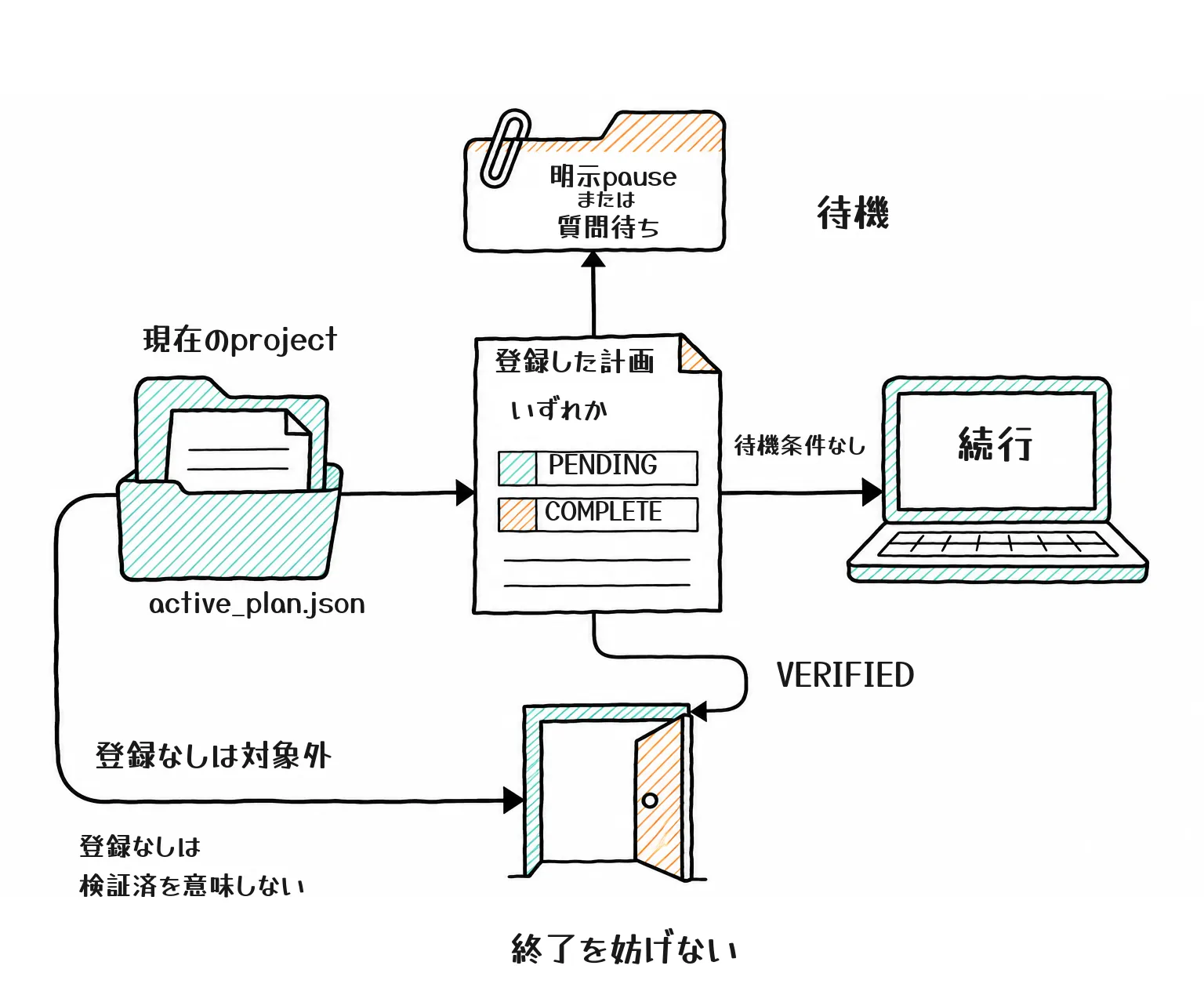
The hook applies to plans whose registration and state can be confirmed.
It does not prevent termination when there is no registration, the file is missing or unreadable, the plan belongs to another project, or the state is out of scope, such as VERIFIED.
Nor does the hook itself reread and judge the merits of task content or review findings.
It assumes normal plan registration, state updates, and hook execution.
When a user's answer is required, the agent can wait for it in a pause or question-pending state associated with the plan.
The applicable waiting record conditions differ between presenting an unapproved plan and presenting the latest results of a COMPLETE plan.
Waiting for a manual model switch in the Claude main session or for a supported asynchronous operation to finish is likewise distinguished from simply abandoning the work.
For tasks that involve human work, the plan records Owner: User and describes what the user should do.
The implementer stops with a manual pause and checks observable completion criteria after the user returns the exact done response.
Conditions established by human testimony are recorded on that basis; receiving only resume is not sufficient to mark the task complete.
If unresolved issues remain, the verification procedure determines their nature and where work must resume.
For failures that can be corrected, record the gap, add a task, return to PENDING, and continue implementation.
Only a genuine missing user decision leads to waiting for a decision; not every gap automatically becomes a waiting state.
The plan's Iterations section is a history of verification, not a fixed attempt limit.
By default, the agent investigates failures and continues fixing them. Only when the optional runawayGuard is enabled does a repetition without progress prompt the agent to ask the user.
The stop hook also tracks consecutive blocked stops without task completion or a question; when configured to do so, it prompts a question so the agent can break out of the loop.
The system does not automatically pass after a certain number of attempts or cut off the work by default.
Suitable use cases and limits of the guarantees
Use spec when multiple changes should be approved in advance as ordered tasks and the implementation diff, tests, and runtime evidence should be tied to the same plan.
When the completion criteria are clear but the tasks should be discovered during implementation, choose build. When starting by reproducing an existing bug, choose fix.
Even short changes can use spec if the tasks need advance approval, so the choice does not depend solely on line count or scale.
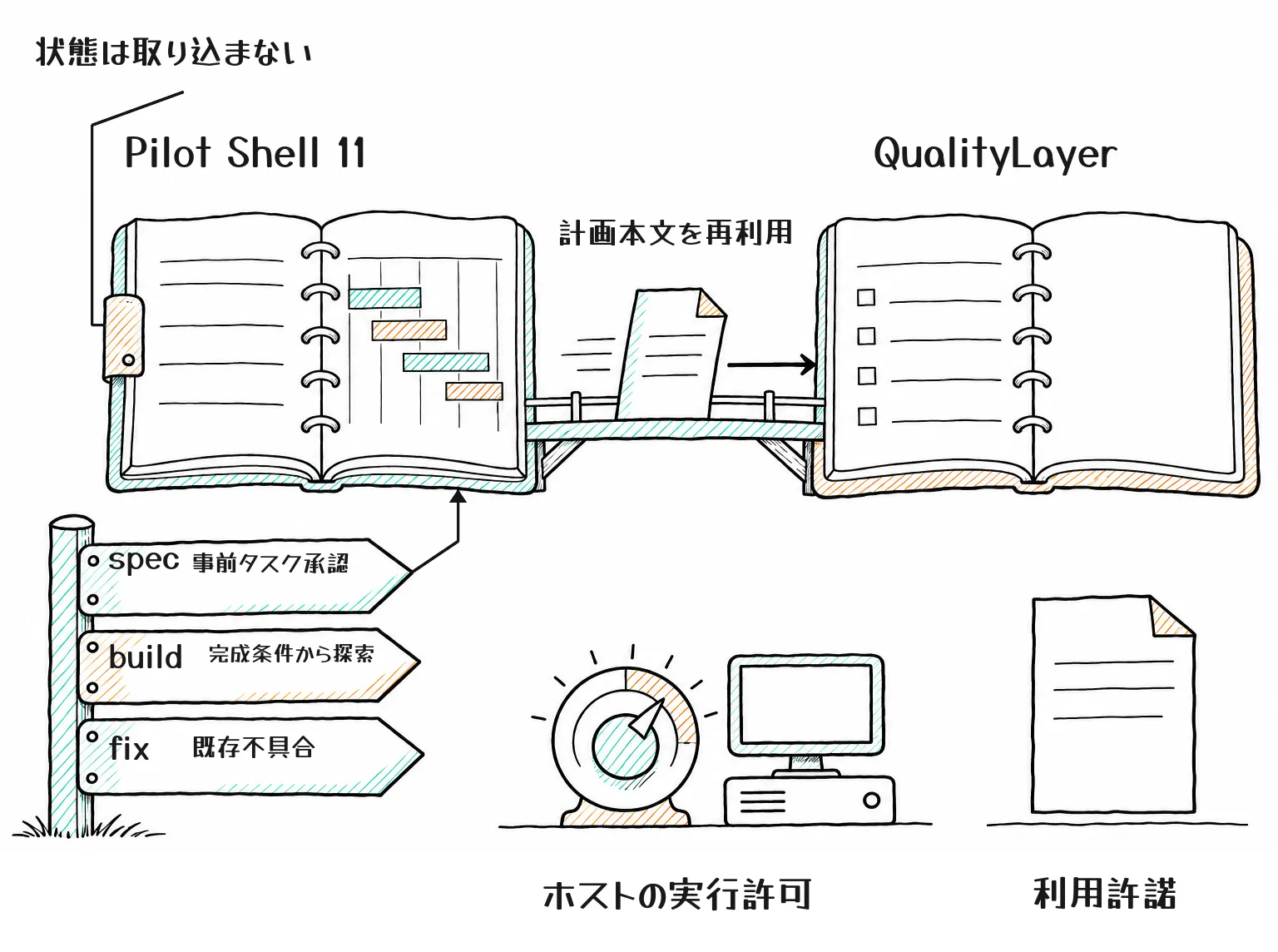
Before installation, check what will change beyond the project documents.
The v11 installer targets macOS, Linux, and Windows through WSL2, and requires Claude Code or Codex to be available first.
On macOS it also detects Codex bundled with the ChatGPT desktop app.
This is a system-wide setup that changes not only ~/.pilot/, but also agent skills, rules, hooks, MCP connections to external tools, settings, dependencies, and shell configuration.
A new session may be required to load generated or updated instructions. An already running session may not immediately discover new skills or agent types. This explanation does not rely on results from a successfully executed installer.
For Claude, the default bypassPermissions setting skips tool execution approval prompts. The official guidance recommends using it in a trusted local environment, container, or virtual machine.
An explicitly configured defaultMode is retained across updates.
The crossSessionInbound setting for receiving messages from other sessions defaults to accept, but input can also arrive from another process running as the same OS user.
On a shared machine, users can choose hold to pause incoming messages for inspection.
Codex execution permissions are managed through host settings, including approval_policy.
Both hosts distinguish plan or result approval from execution permissions. Runtime verification uses a local environment corresponding to the changed code or an already authorized remote preview.
Credentials alone do not authorize production deployment. If a target cannot be prepared, record the attempted action and reason under Not Verified.
Users remain responsible for checking the conditions covered by tests, handling secrets, and making production release decisions.
Licensing should not be inferred from source visibility either.
The Pilot Shell v11 LICENSE permits internal use, source inspection and auditing, and internal modifications during a valid subscription or trial.
Redistribution and hosting for third parties are restricted; it is not an open-source license permitting free redistribution.
On the other hand, Output, including generated code, belongs to the user, and those rights survive termination of the agreement.
Product versions also matter. Pilot Shell v11.0.11 was released on October 27, 2026, and from v12 onward the product was renamed and redesigned as QualityLayer. The latest official release checked on November 12, 2026 was QualityLayer v12.99.0. The v11 plan format and hooks should not be read as describing the current version's behavior.
The official migration guide explains that Pilot Shell 11 and QualityLayer can coexist and existing files can be retained.
Existing plan text can be reused through the new task's Existing plan option, but workflow state is not imported.
A valid Pilot license works for both products, and memory import is a separate operation for each project.
For new installations or migration, consult the successor product's documentation and terms, distinguishing reuse of the plan text from migration of workflow progress.
Conclusion
Pilot Shell v11's spec records tasks to approve and files to edit in a plan, linking the implemented diff, check output, and runtime evidence to its completion criteria.
The stop hook prompts continuation based on the registered state, and the plan moves to VERIFIED once approval of the final results is confirmed.
When using it, check host-specific verification and permissions. When migrating to QualityLayer, distinguish transfer of plan text from transfer of workflow state.
