Introduction
Hi, I'm cardene, a software engineer and technical writer focused on blockchain and AI.
I've also authored Japanese technical books on specification-driven development with LLMs and decentralized application (DApp) development.

I also build and publish a variety of tools, libraries, and open-source projects.
Assigning the product search UI and backend to different AI agents does not, by itself, make their changes safe to integrate. Beyond providing separate workspaces to prevent changes to the same files from becoming mixed, the team must decide who checks each change and in what order changes are integrated into the target branch.
Spec Kitty is a CLI that records these responsibilities from specification through integration.
It is used to conduct specification-driven development with multiple AI coding agents.
It records a change as a mission, divides implementation into units called a work package, and carries out work in the worktree of the assigned execution lane.
The results are passed to regression checks, independent review, acceptance, and integration.
Using the addition of a price-range filter to product search as an example, this article explains the records and decisions from specification to completion of a mission.
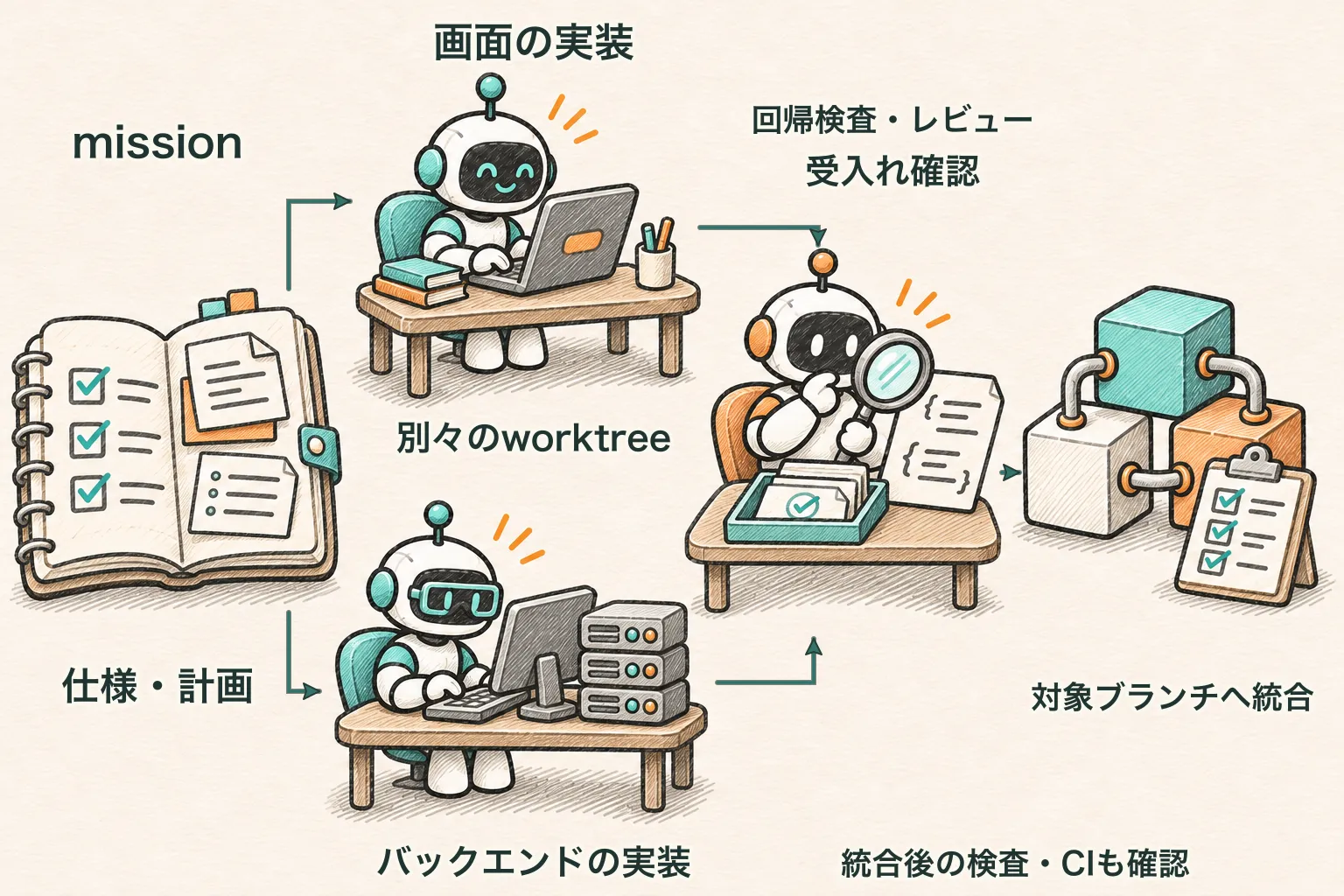
The existing diagrams are retained from the Japanese article and contain Japanese labels.
Even if implementation proceeds in parallel, the team cannot determine which changes may be integrated unless the acceptance criteria and review results can be traced back to a single mission.
Spec Kitty records not only workspace separation but also the handoffs of decisions in Git.
What is Spec Kitty?
Spec Kitty is an open-source CLI that connects the process of writing requirements with post-implementation integration through records in Git. Once the user reviews requirements and acceptance criteria, AI agents read the approved records and modify code and tests in their assigned workspaces. Even after a separate reviewer checks the diff, acceptance and integration into the target branch remain separate operations.
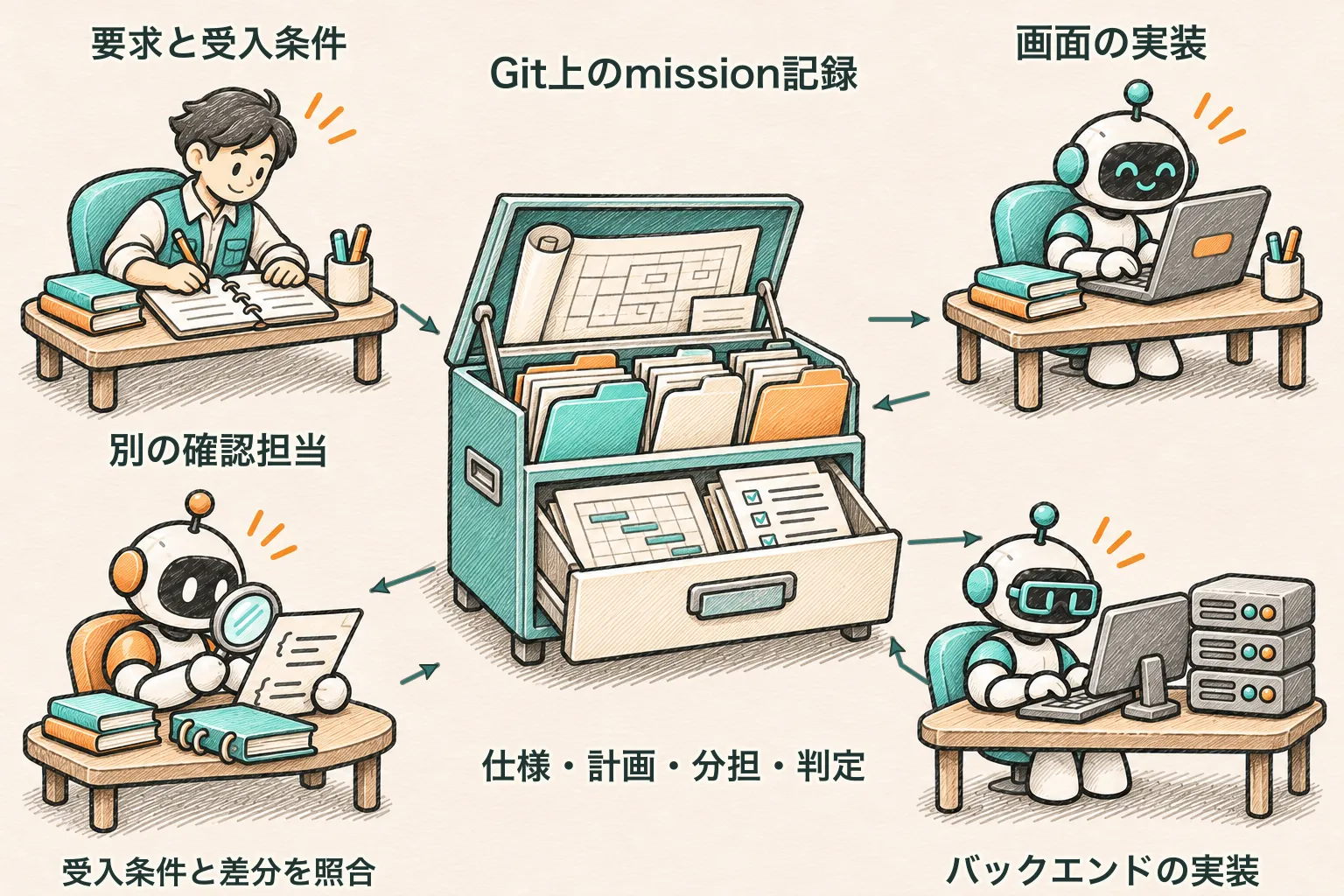
Spec Kitty manages specifications, plans, work decomposition, progress, and review verdicts. Permissions for AI agents to read code or execute commands, however, are managed by the AI CLI and execution environment in use.
mission and work package
A mission groups the specification, plan, individual work package units, and progress records for one change.
A mission type is a reusable template that defines the stages, deliverables, and gate conditions for that mission.
Stable version v3.2.7 includes several kinds of mission type, but this article covers only software-dev, the one intended for software development.
A work package is a unit of work obtained by breaking a mission into pieces small enough for one person or AI agent to implement and hand off for review.
Each work package is assigned to an execution lane corresponding to its branch and worktree.
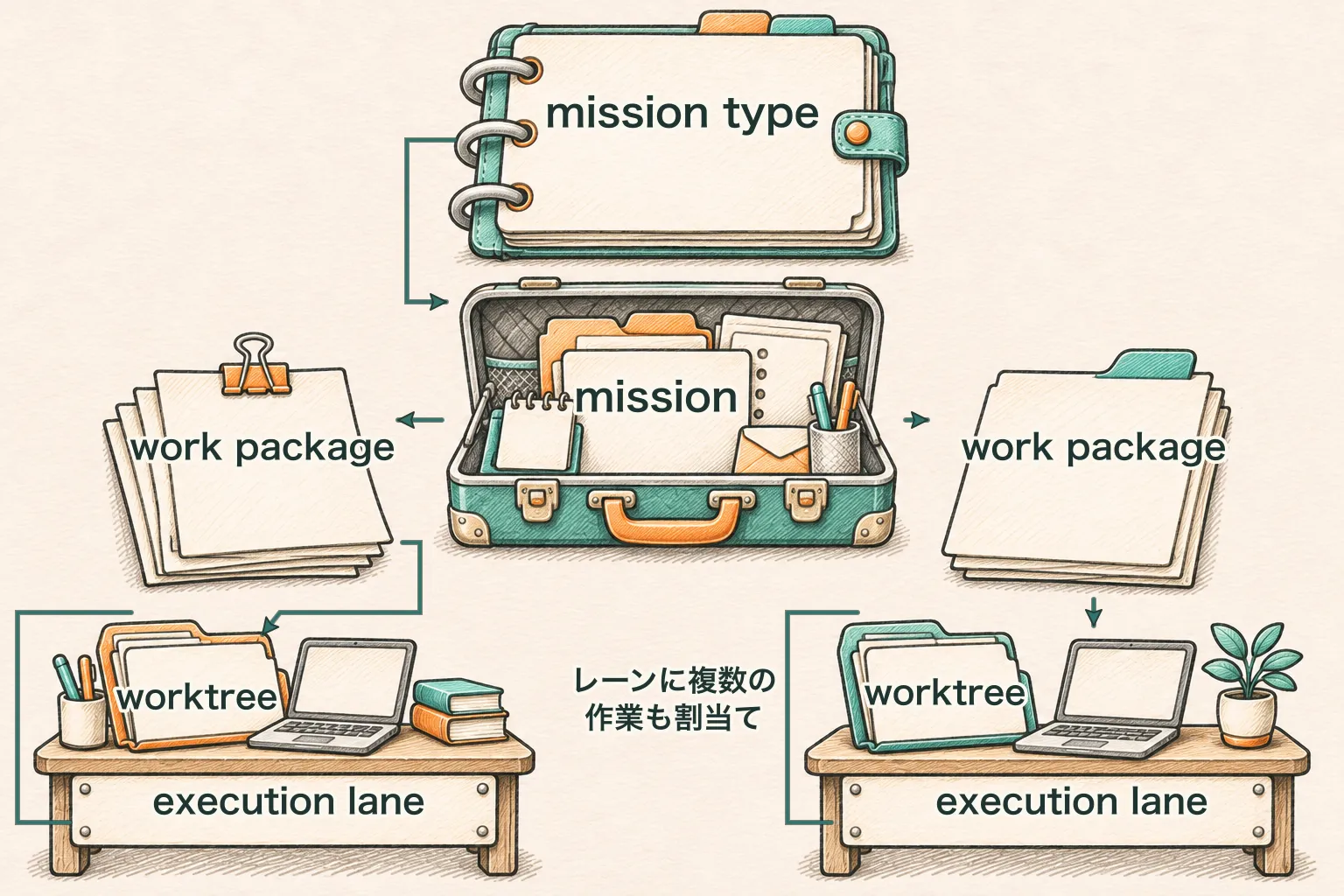
This hierarchy preserves the overall objective of the mission while assigning only independently executable work to separate AI agents.
A dependent work package waits until its prerequisites have been approved.
Records stored in Git
Records for a mission are stored under kitty-specs/.
Even if the conversation with an AI ends, another contributor can reread the requirements, technical decisions, and assigned responsibilities from the following files.
-
meta.jsonRecords the
missionID,mission type, and target branch, identifying which change is in progress. -
spec.mdRecords user requirements, constraints, and verifiable acceptance criteria.
-
plan.mdRecords the technical approach to implementing the specification, areas to change, and interface conditions shared across
work packageunits. -
tasks.mdRecords the decomposition into
work packageunits, dependencies, and overall progress of themission. -
tasks/WP*.mdRecords each
work package's scope, acceptance criteria, and progress.
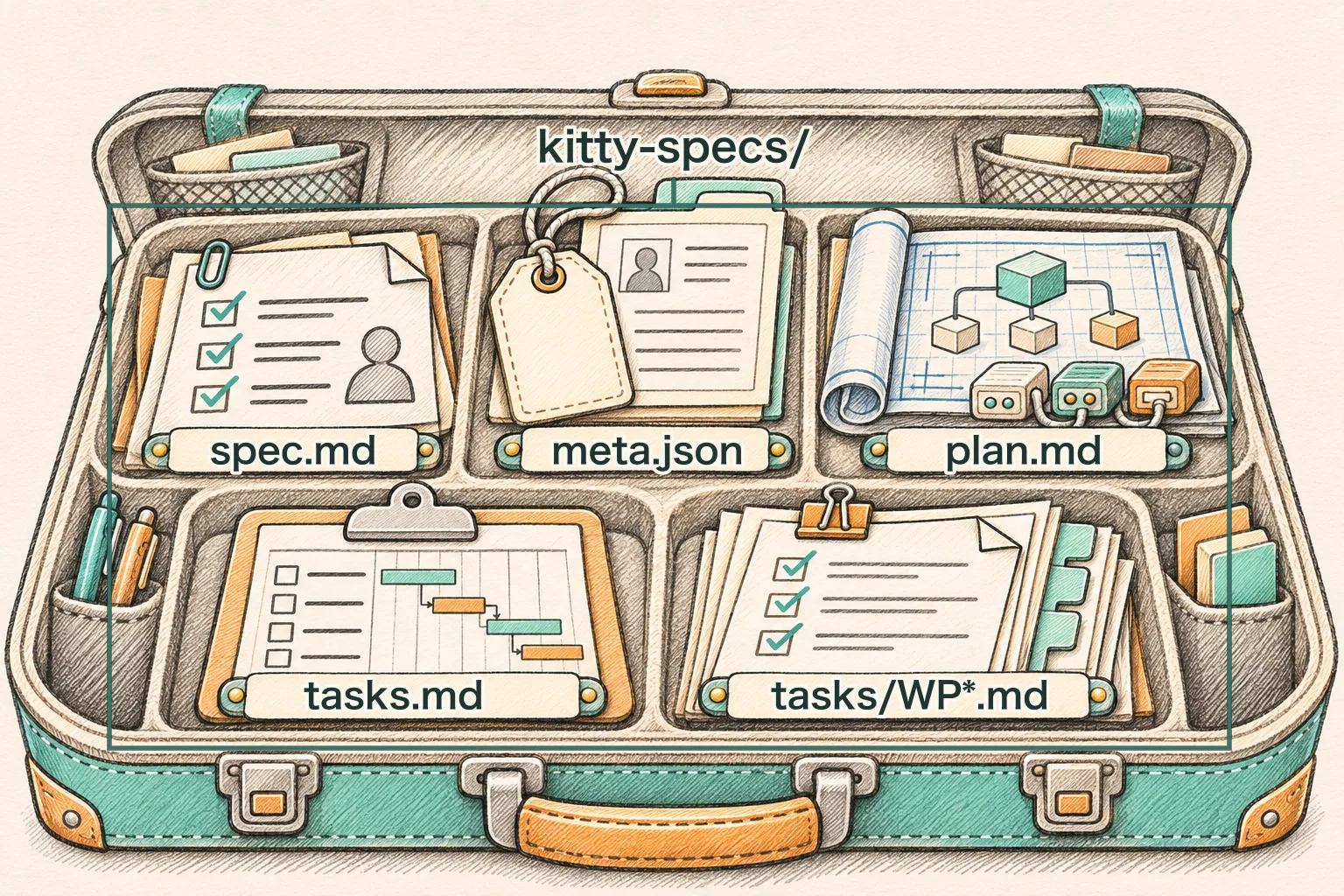
spec.md and plan.md do not repeat the same information.
The former fixes the behavior delivered to users, and the latter determines where in the code that behavior will be implemented.
tasks.md and the individual WP files turn the plan into work ordered by dependency.
How multiple AI agents are isolated
In parallel implementation, the overall stages of a mission and progress of each work package are managed separately.
Each work package is also assigned to an execution lane, with a branch and worktree for each lane.
Multiple work package units may also be assigned to the same execution lane.
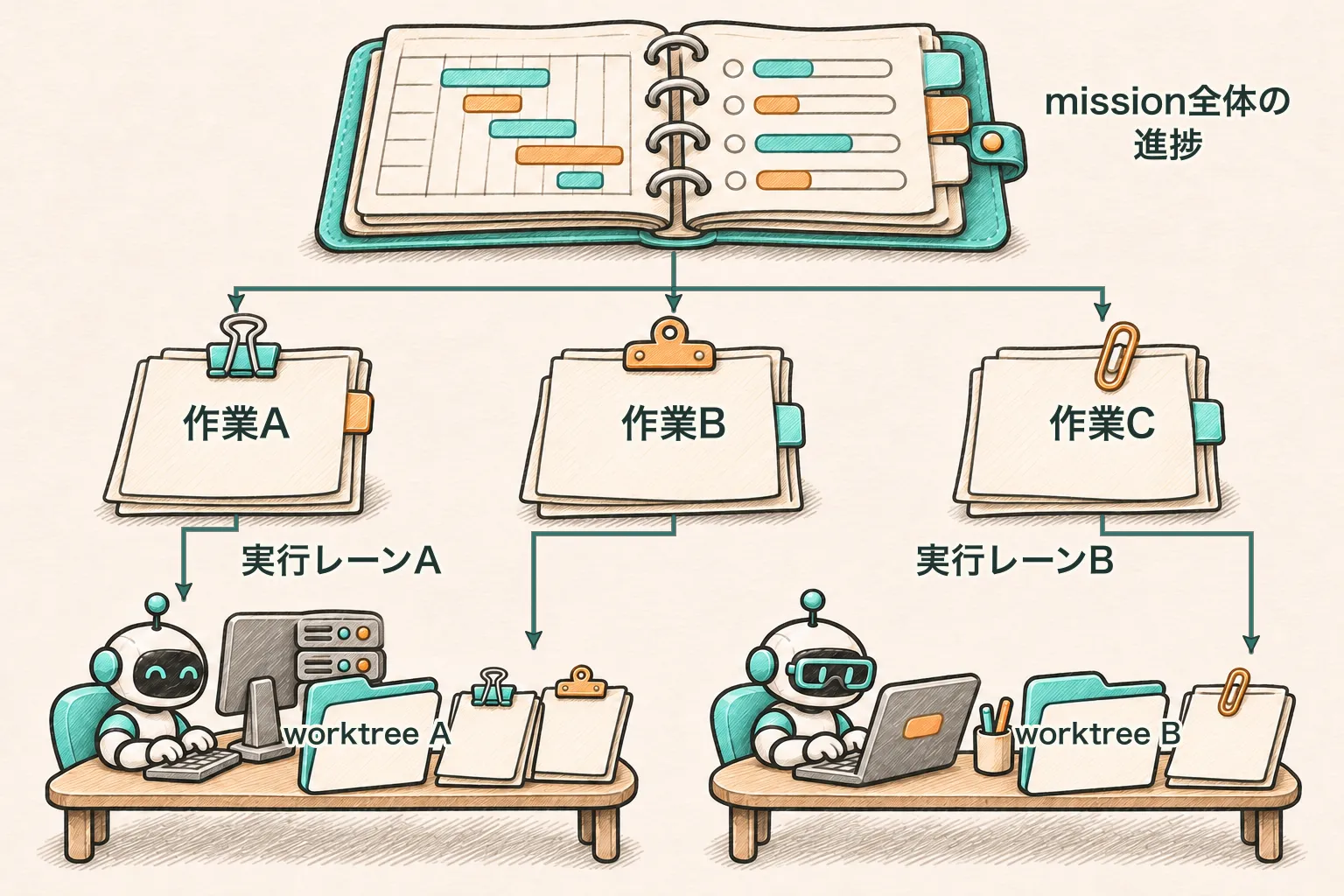
Separating workflow stages from workspaces allows individual AI agents to proceed only with their assigned changes while determining whether the overall mission is ready for acceptance.
Two kinds of progress tracking
The stage of a mission indicates whether it is at specification, planning, work decomposition, implementation, review, or acceptance.
The progress of a work package indicates whether the individual unit is not started, being implemented, awaiting review, or approved.
A work package has recorded states such as planned, claimed, in_progress, for_review, in_review, approved, and done.
spec-kitty next reads both kinds of progress and returns an available operation, the reason for a stop, or a point that requires a user decision.
Even if one work package is approved, acceptance cannot proceed until all the work package units in the mission are ready.
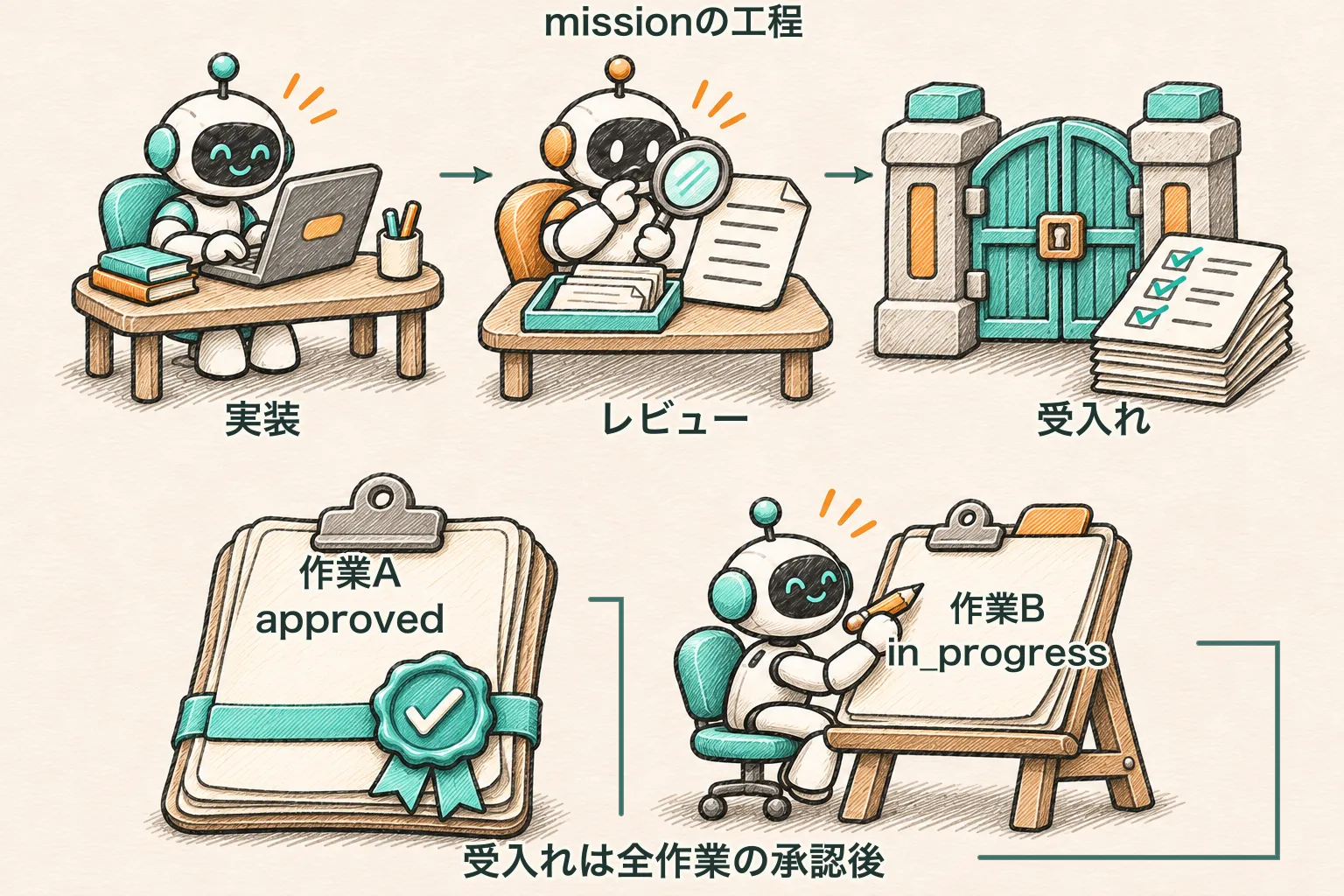
Separating these two types of progress avoids mistaking completion of individual work for completion of the whole mission.
Workspace isolation with worktree
The worktree of each execution lane shares Git history with the other lanes.
However, HEAD, the index, working files, and uncommitted changes are separate for each lane.
Unfinished code from the AI modifying the backend does not appear in the workspace of another AI modifying the UI.
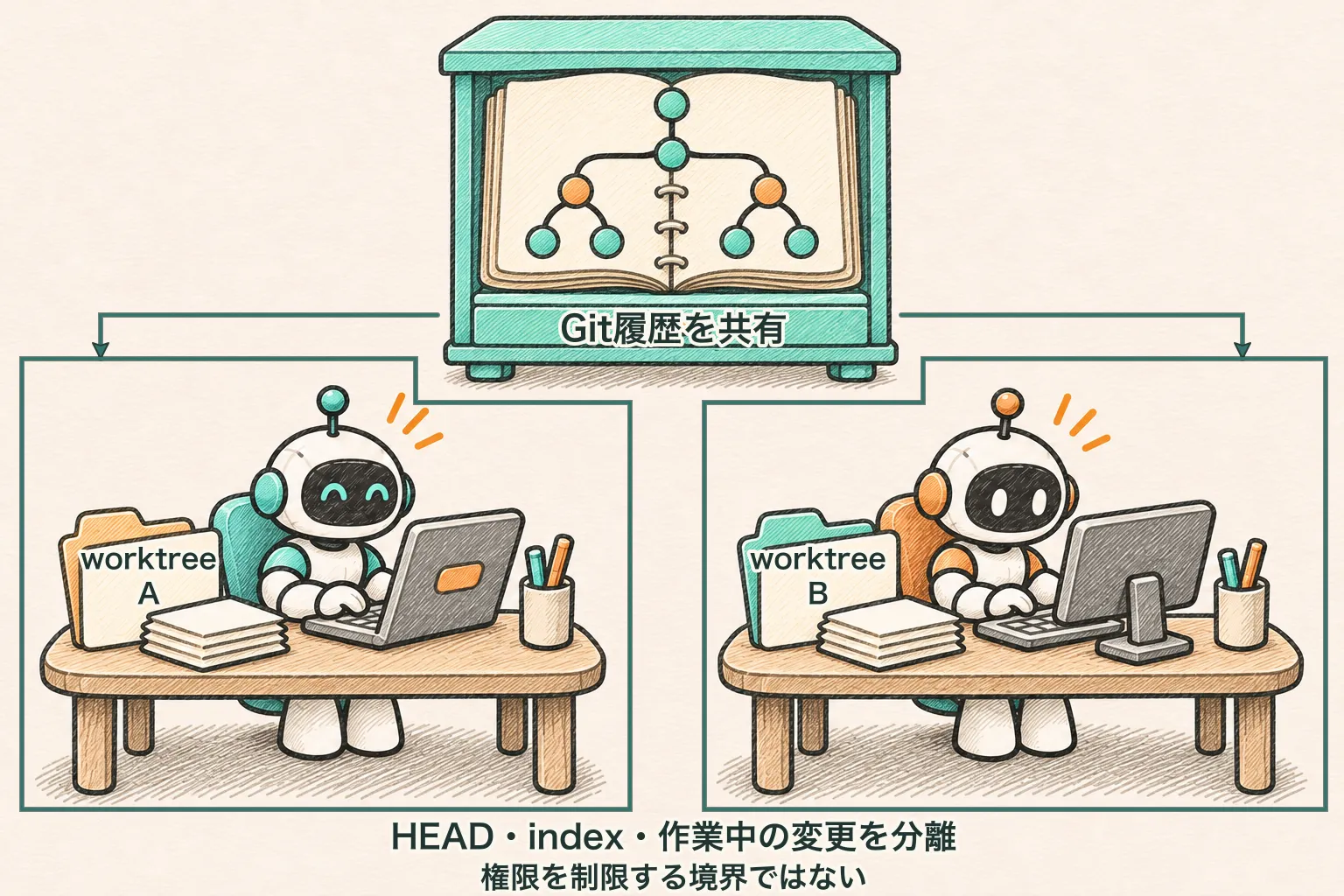
A worktree is nevertheless a complete checkout of the repository.
It is not a sandbox that hides files outside the assigned scope, so AI CLI permissions must be restricted separately.
Boundaries between separate mission instances
Isolation through a worktree applies to each execution lane within the same mission.
If two mission instances concurrently execute commands that advance their workflows in the same primary workspace, operations on the shared branch, index, and HEAD may interfere.
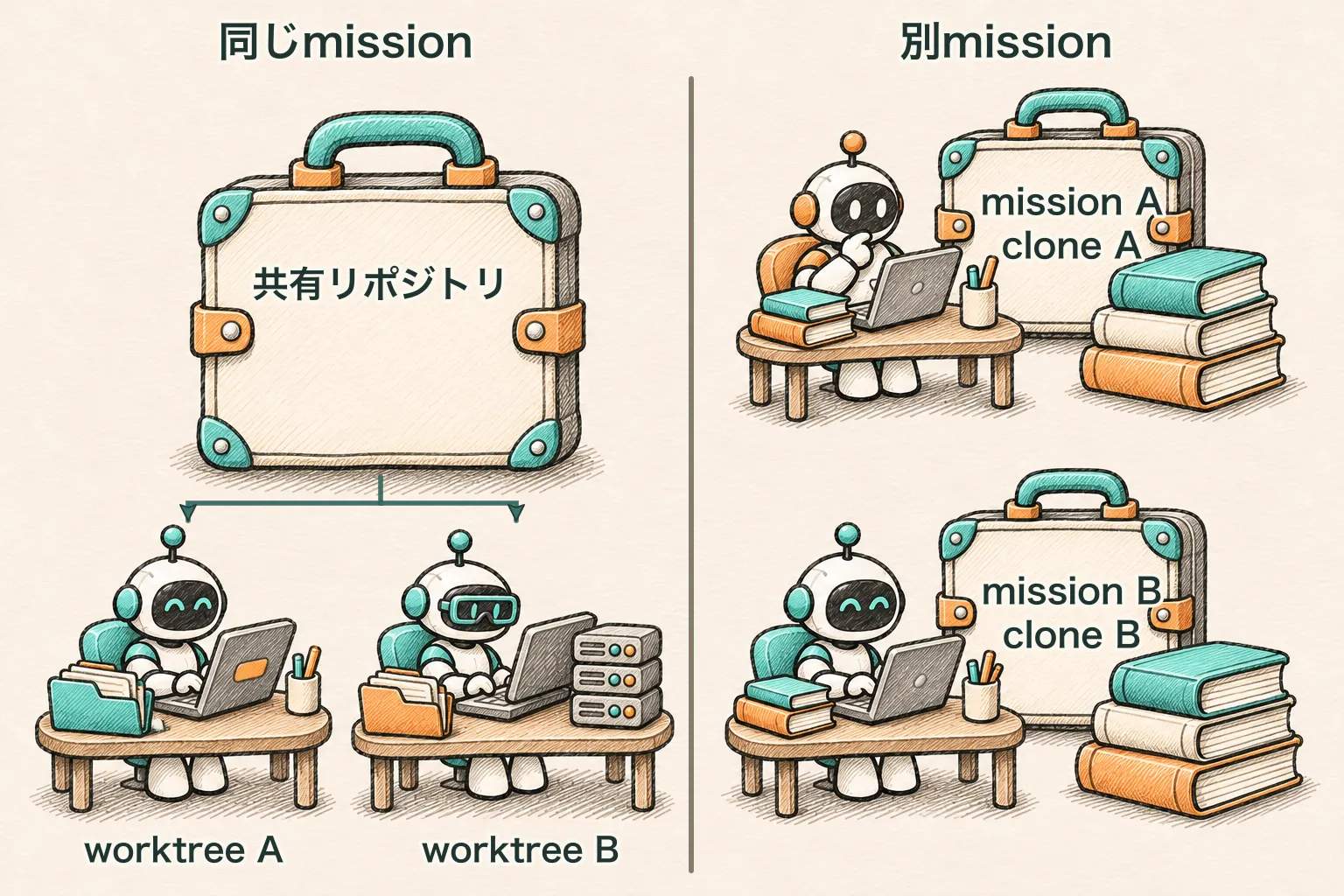
Use a worktree for parallel work within the same mission.
To run separate mission instances simultaneously with complete isolation, provide a separate clone for each mission.
Basic workflow from specification to integration
Spec Kitty combines skills or commands used in AI agent chats with a CLI used in the terminal.
specify, plan, and tasks are invoked from the corresponding AI agent's chat, while spec-kitty next, verify-setup, and recovery operations for interrupted integration are executed from the terminal.
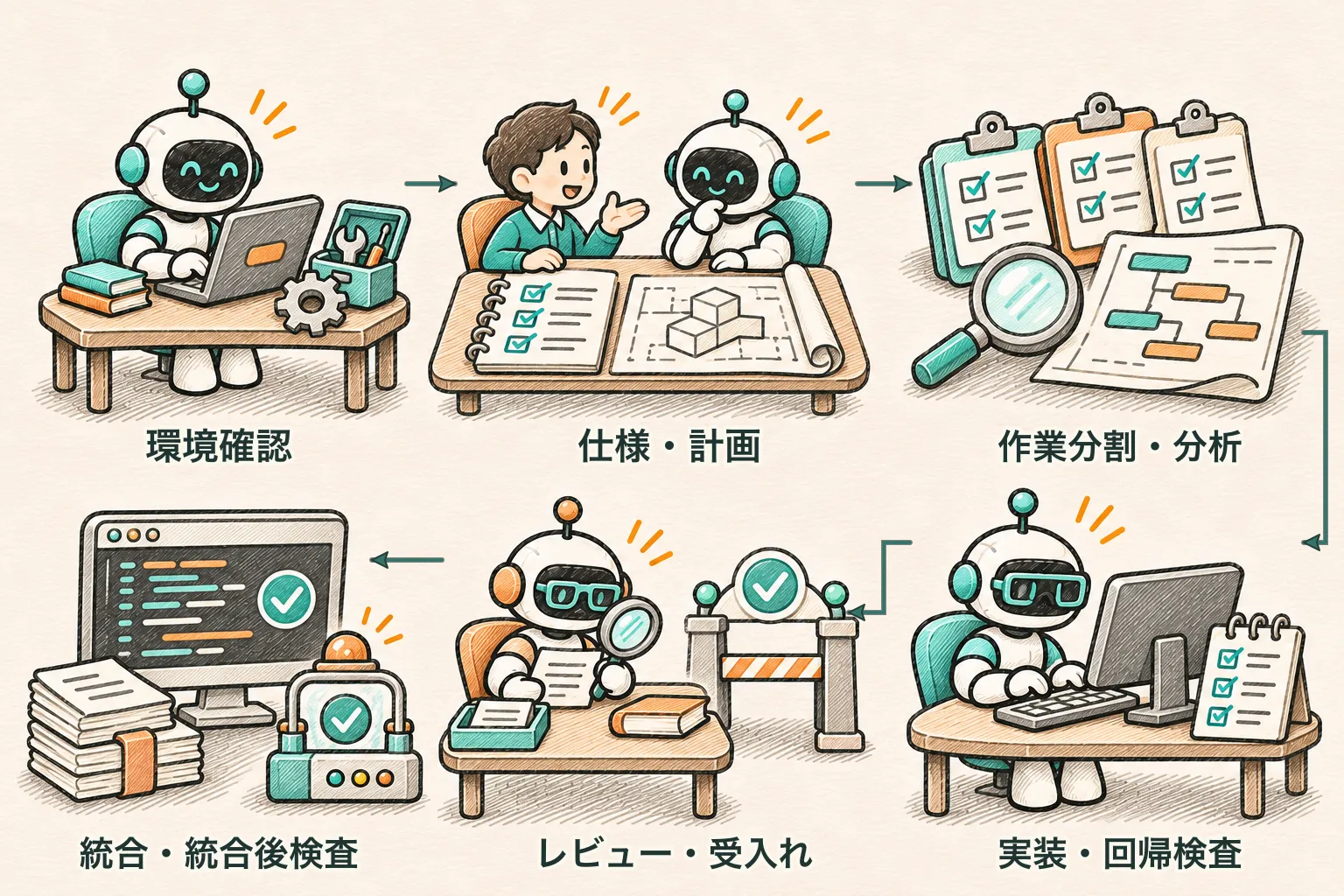
-
Check that the environment is ready
Prepare Python 3.11 or later, Git, an initialized repository, and configuration for the AI agents to be used. Verify prerequisites with
verify-setup. -
Record requirements and acceptance criteria
Invoke
specifyfrom the AI agent's chat, recording user-facing behavior and verifiable criteria inspec.md. -
Record the technical approach
Use
planto document changes, responsibility boundaries, and interface conditions shared acrosswork packageunits inplan.md. -
Break the work into
work packageunitsUse
tasksto createtasks.mdand WP files, and check their assigned scope and dependencies. -
Cross-check records before implementation
Use
analyzeto check for inconsistencies and missing assignments across the specification, plan, and eachwork package, without modifying them. -
Select a
work packageready for implementationInspect the available operation through
spec-kitty nextin the terminal, or usespk-run-implement-reviewin the agent execution environment to claim work and implement it. -
Wait for preliminary regression checks
Run regression checks synchronously when moving a
work packagetofor_review. If checks fail, return it to implementation rather than sending it for review. -
Have a separate contributor review the changes
Check acceptance criteria and the diff against the correct comparison base. Record
approvedif the review passes, or specific required fixes if it fails. -
Check acceptance criteria and unresolved items
Run
acceptafter review of allwork packageunits, checking required records, unresolved verification items, and prohibited conditions. -
Integrate into the target branch
Use an integration preview and pre-integration checks to inspect the
worktree, target branch, potential conflicts, and cleanup policy before integration. -
Finish remaining post-integration checks
Check deferred tests, repository-side CI gates, the
missionreview, and retrospective. Mark themissioncomplete only after unresolved items have been cleared.
Create a work package from the specification and plan
The user records in spec.md that a minimum and maximum product price can be specified.
Acceptance criteria also state that existing search results must remain unchanged when no prices are specified and that an input error is returned when the minimum exceeds the maximum.
In plan.md, the interface contract specifies that the backend validates price ordering and that the UI reflects min_price and max_price in the URL query.
Then tasks.md divides backend work, UI work, and integration tests into separate work package units.
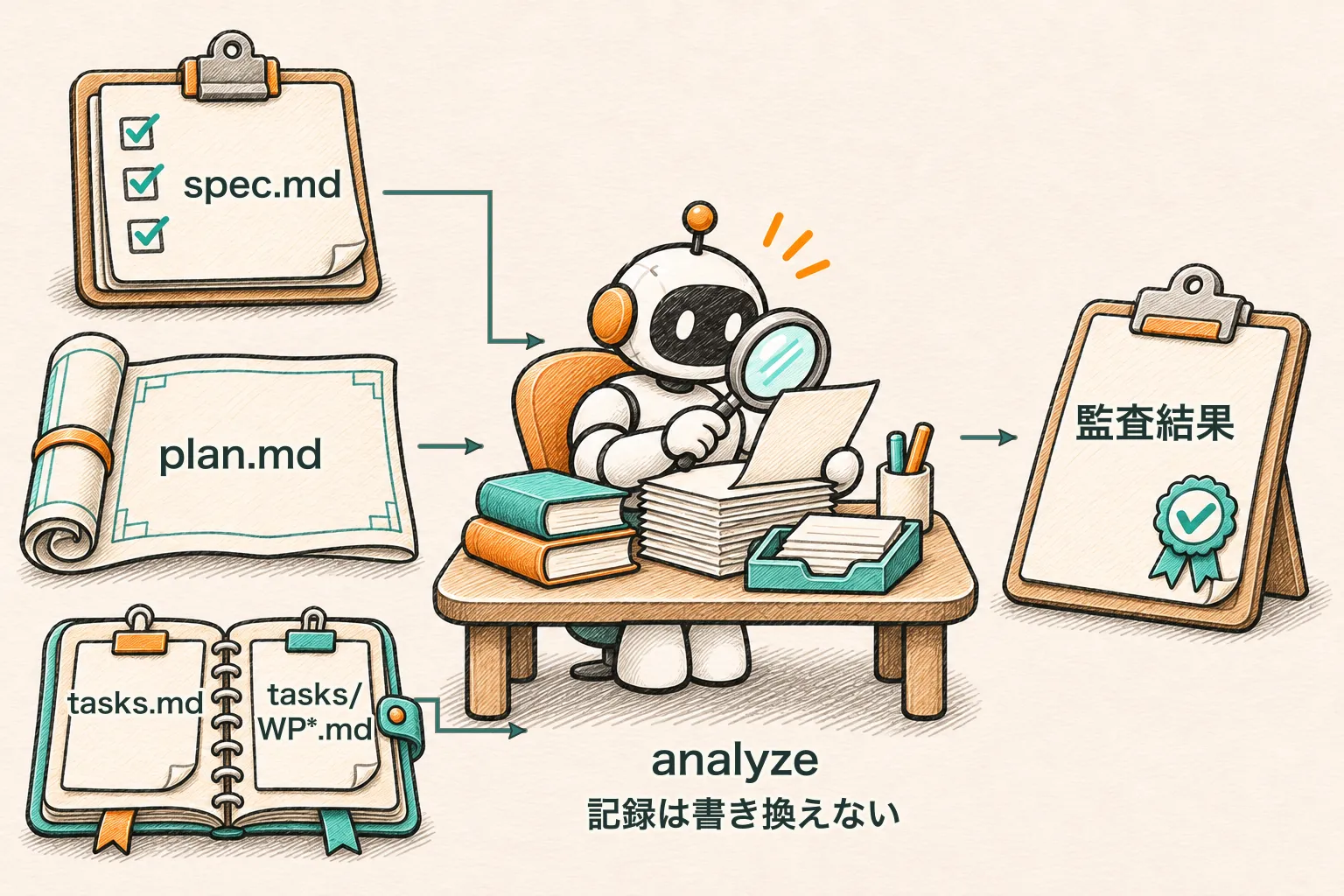
analyze reads the three records and reports missing requirements, inconsistencies with the plan, and requirements not assigned to a work package.
Because it does not automatically rewrite the records or code, the user and AI review and address its findings.
Repeat implementation and review
The terminal command spec-kitty next returns an implementation or review operation when a work package is ready to proceed.
spk-run-implement-review is not a CLI command but a skill within the agent execution environment that assigns and monitors claiming work, implementation, independent review, and requests for changes.
In environments without this skill, read the result of next and carry out implementation and review manually.
When a work package is moved to for_review, preliminary regression checks run synchronously.
The assigned AI agent waits for them to finish, and cannot proceed to review if they fail.
Flags and environment variables for skipping checks exist, but their use does not produce the same result as the normal path in which checks pass.
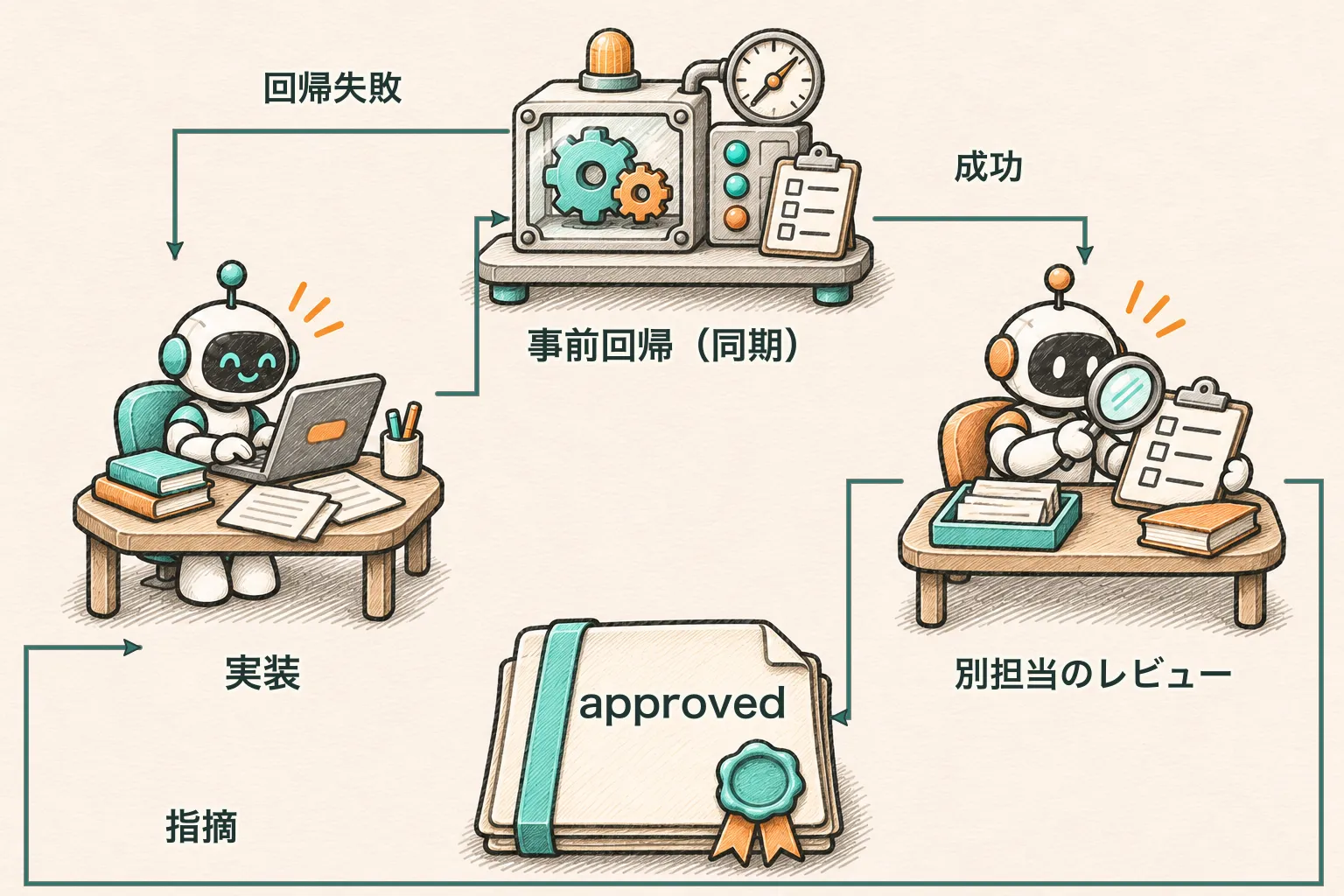
Rather than evaluating based on personal preference, reviewers inspect the project's operating rules (charter), the acceptance criteria in the WP file, and the diff against the correct comparison base. If changes are required, the reviewer records where to make them and how to verify them, and returns the work to the original implementer.
Separate acceptance from integration
accept checks that all work package units have passed review, that the required supporting information and activity records exist, and that no verification items remain unresolved.
If the specification contains prohibited conditions, the corresponding verification commands are rerun rather than relying on stored results.
Normally, merge is executed after accept.
However, when something to be checked exists only after integration, the workflow instead integrates the work into the local target branch before running accept.
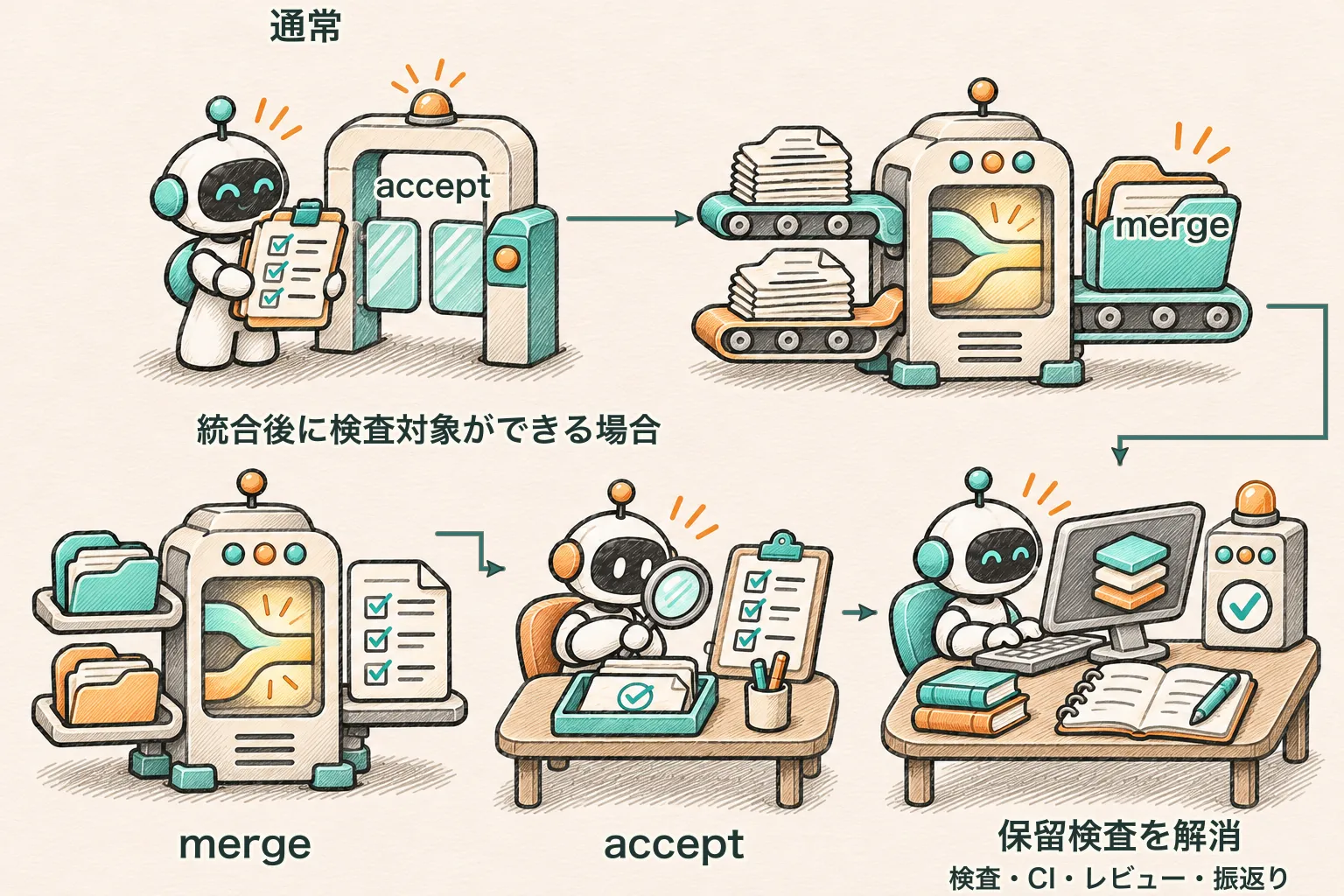
Items whose verification targets do not yet exist receive the state deferred_to_consolidation, indicating a check deferred until after integration.
The corresponding pending post-integration verdict, pass_pending_consolidation, is not a complete success.
Post-integration checks reevaluate deferred items, and repository-side CI gates ensure unresolved items are not overlooked.
Only after unresolved items from the mission review and retrospective are also cleared can it advance to done.
Example: implementing a price-range filter in parallel
Add minimum and maximum price input fields to product search and modify the backend search conditions and UI in parallel.
spec.md records that only products in the specified range should be returned, that results should remain unchanged without a range, and that invalid price ordering should be rejected.
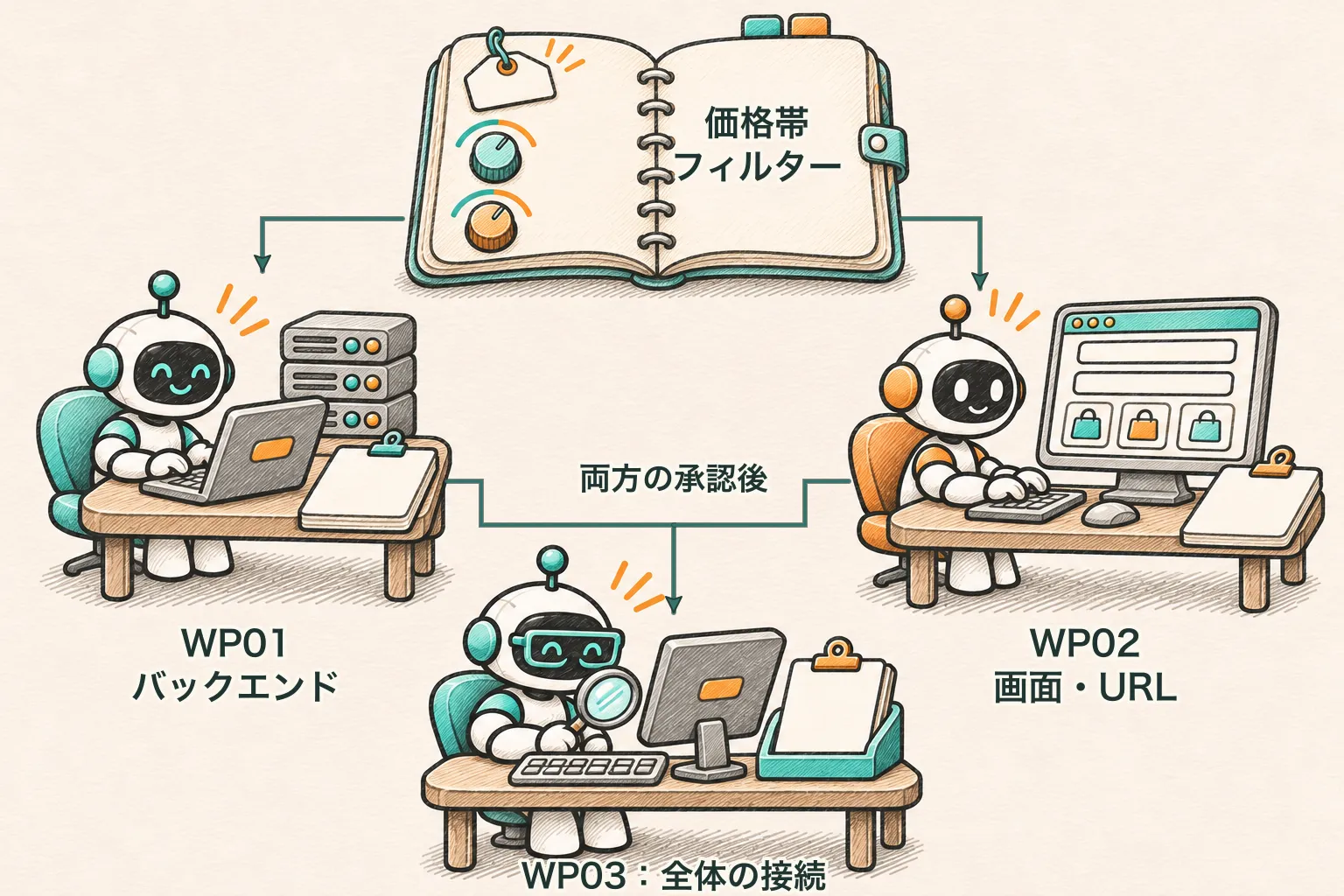
WP01 covers the backend and WP02 covers the UI. After both are approved, WP03 checks the flow from UI inputs to search results.
Two changes that can proceed independently
WP01 implements input validation and search conditions for min_price and max_price.
WP02 implements the price input fields and URL query updates.
For these two work package units, the names of the values and error behavior are fixed upfront in plan.md.
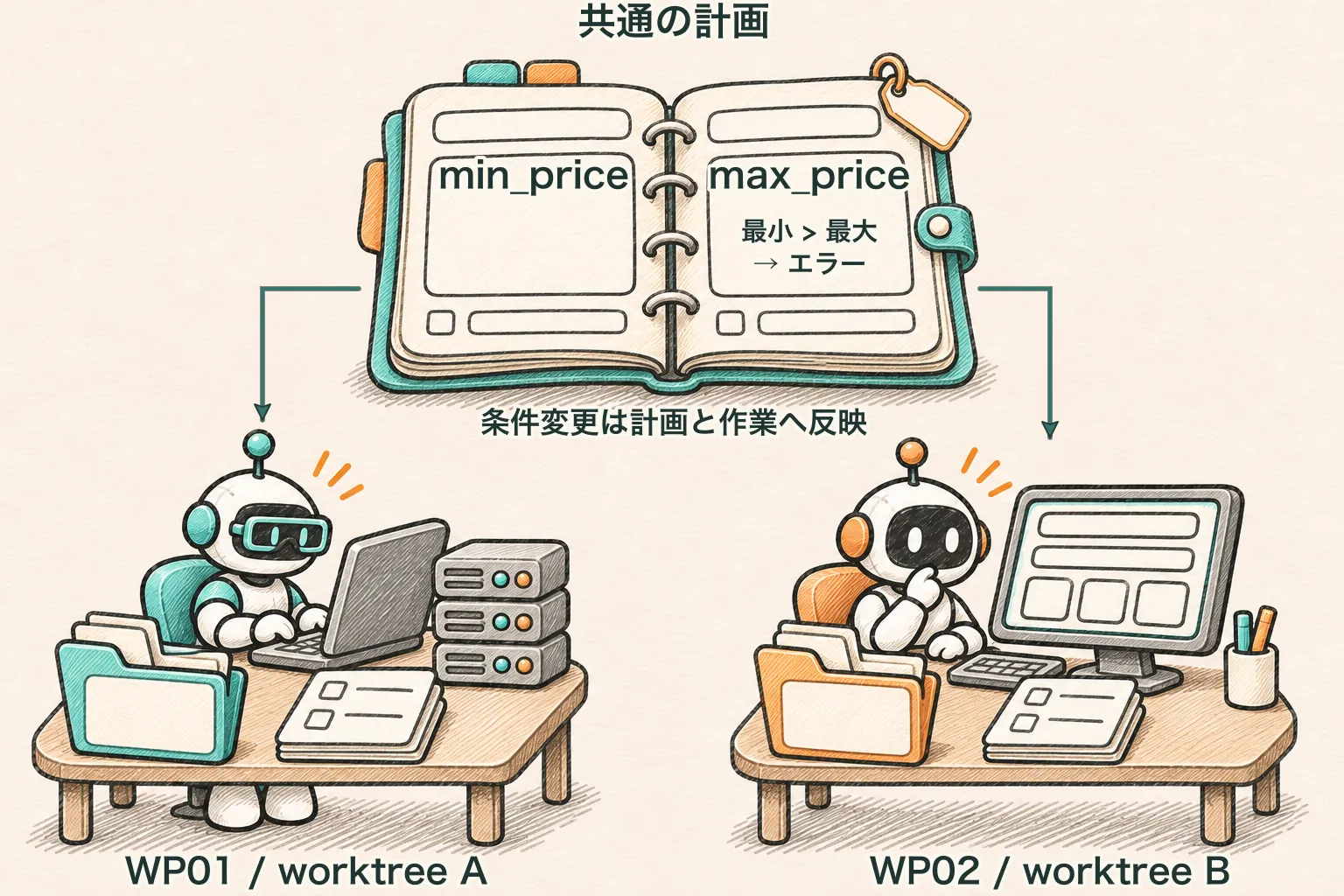
Assigning each to a different execution lane keeps unfinished backend changes out of the UI contributor's worktree.
However, when the shared input contract changes during development, update plan.md and the dependent work package units rather than modifying just one worktree.
Requests for changes during review
Before sending WP01 for review, wait for preliminary regression checks to finish. If existing search tests fail, return the work to implementation before sending it to the reviewer.
Even if regression checks pass, if a test for the minimum price exceeding the maximum is missing, the reviewer records the required fix and returns WP01 to implementation. Even when WP02 is approved, WP03 does not begin until the review of WP01 is complete.
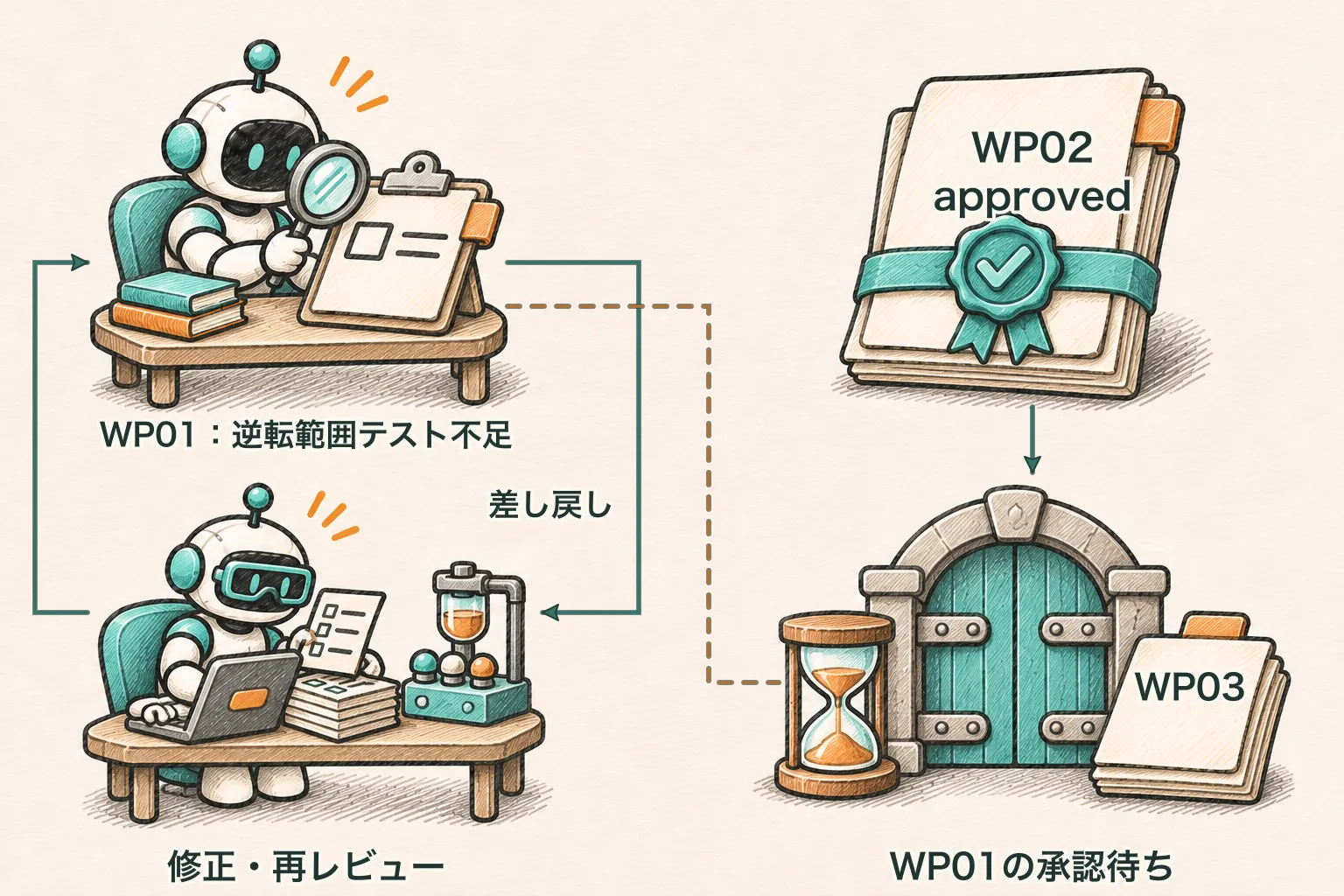
After the fix, check the same acceptance criteria and regression tests again.
Instead of reusing the previous review verdict, reread the updated diff before advancing to approved.
From integration tests to the target branch
Once WP01 and WP02 are approved, WP03 checks the entire flow from price input fields to filtered backend results.
Run accept after the review of all work package units, checking required records and unresolved items.
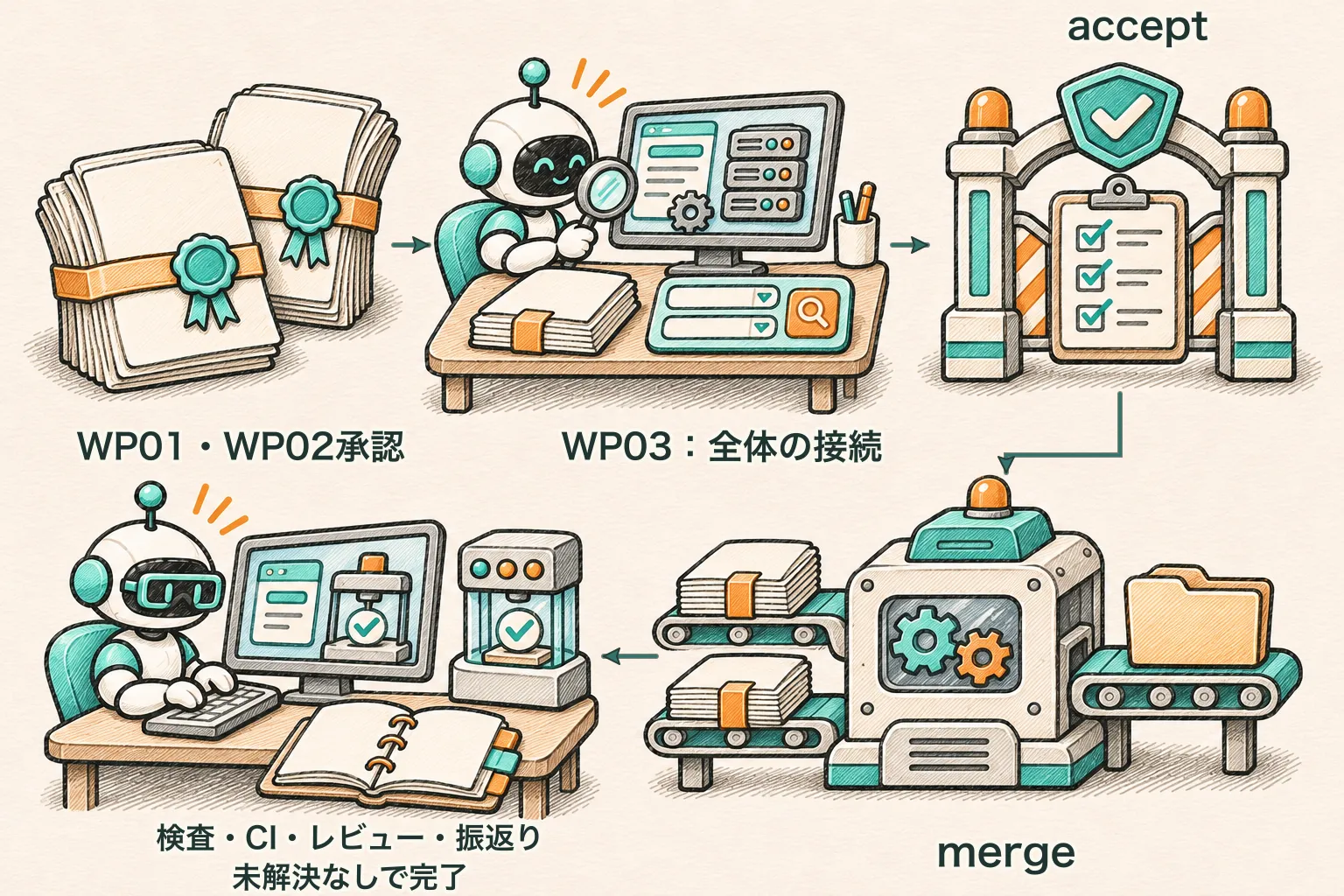
The integration preview shows integration order, potential conflicts, and whether to remove or retain each worktree and branch.
If tests that can run only after integration into the target branch were deferred, run them.
Also check repository-side CI gates, the mission review, and the retrospective, and complete the mission only when no unresolved items remain.
Checking and resuming blocked work
Even in an automated workflow, AI does not resolve every type of stop. Missing records, user decisions, test failures, requests for changes during review, and Git conflicts require different recovery paths.
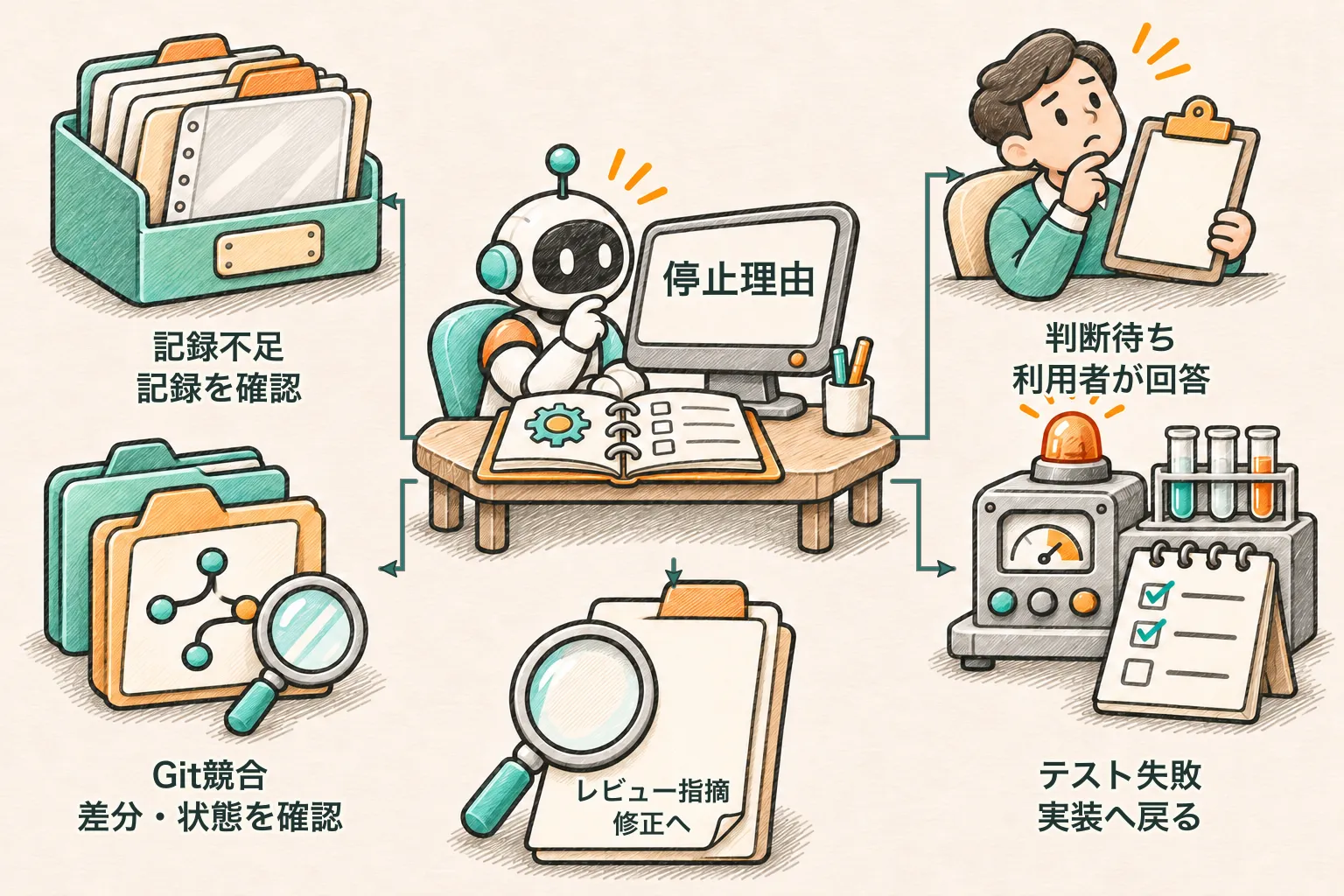
Repeating the same command without checking why it stopped cannot resolve a state requiring a user response or an interrupted integration.
Stopping reasons returned by next
spec-kitty next returns the following five kinds of decisions.
-
queryInspects state without modifying the repository.
-
stepExecute the generated operation to advance the
missionor awork package. -
blockedDoes not proceed until missing records or state required by gate conditions have been corrected.
-
decision_requiredWaits until the user responds to the specified decision ID.
-
terminalThe implementation and review loop has finished, and work is ready to be handed off for acceptance.
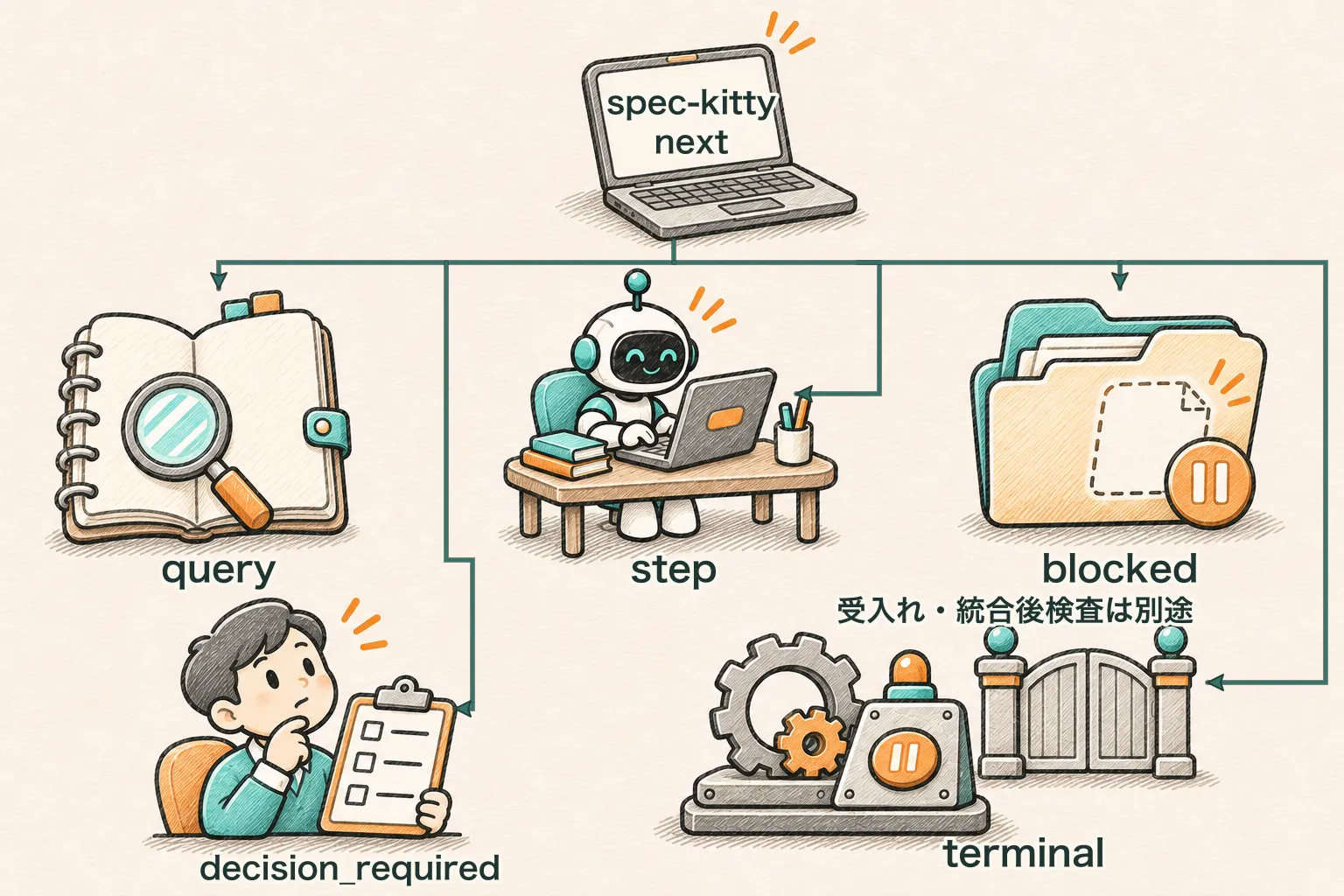
terminal does not indicate that the entire mission has been published.
Acceptance, pre-integration checks, and any required post-integration checks still remain.
Pre-integration checks
Before integration, verify that no worktree contains uncommitted changes, that required workspaces exist, and that the target branch is synchronized with the remote.
The preview also shows planned integrations, potential conflicts, and retention policies for workspaces and branches.
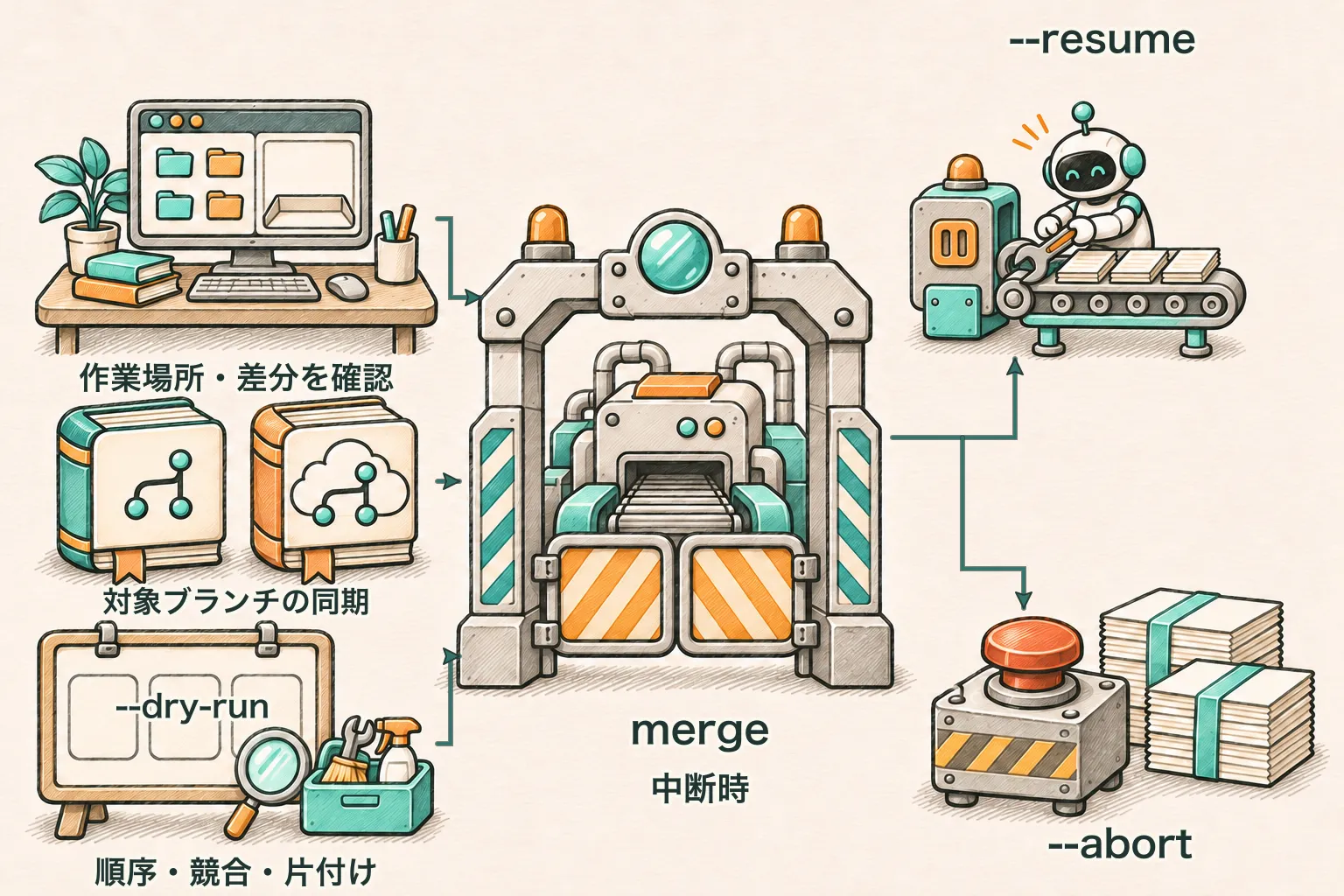
If integration stops partway through, choose whether to resume or discard the interrupted operation.
Use --resume to resume and --abort to discard it.
If the target branch is not synchronized, do not force it through with reset or force-push.
Instead, switch from the mission branch or a dedicated branch to a pull request containing a focused set of changes.
Suitable use cases and limits of guarantees
Spec Kitty is suited to projects where a single change can be divided into independent work package units and implemented in parallel by multiple AI agents or developers.
It also fits projects that need to track acceptance criteria, review verdicts, and integration decisions in Git.
For an obvious fix of just a few lines, however, maintaining a mission, each work package, and review records introduces substantial overhead.
When requirements and acceptance criteria are still being explored and work cannot yet be divided, finalize the requirements first.
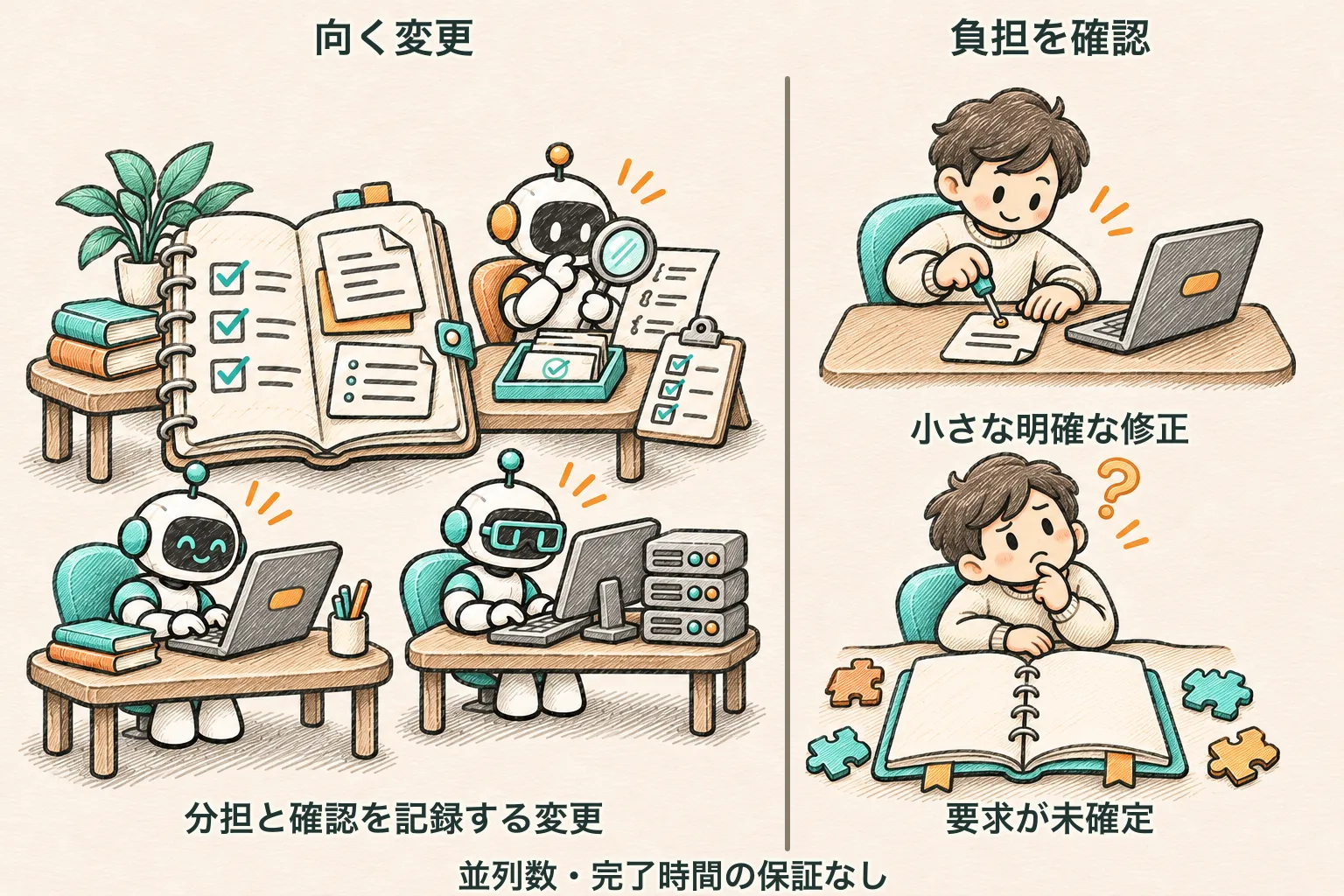
Isolation through a worktree and workflow gates does not guarantee sufficient project-specific testing, security review, or publication decisions.
The public documentation also does not specify product limits or an SLA for the number of execution lane units, concurrent AI agents, repository size, or execution time. Unlimited parallelism and completion within a fixed duration are therefore not guaranteed.
AI agent permissions
The core of Spec Kitty does not enforce the approval mode, sandbox, or network access of the connected Claude Code or Codex environment.
External orchestrators are also optional components introduced separately from the core.
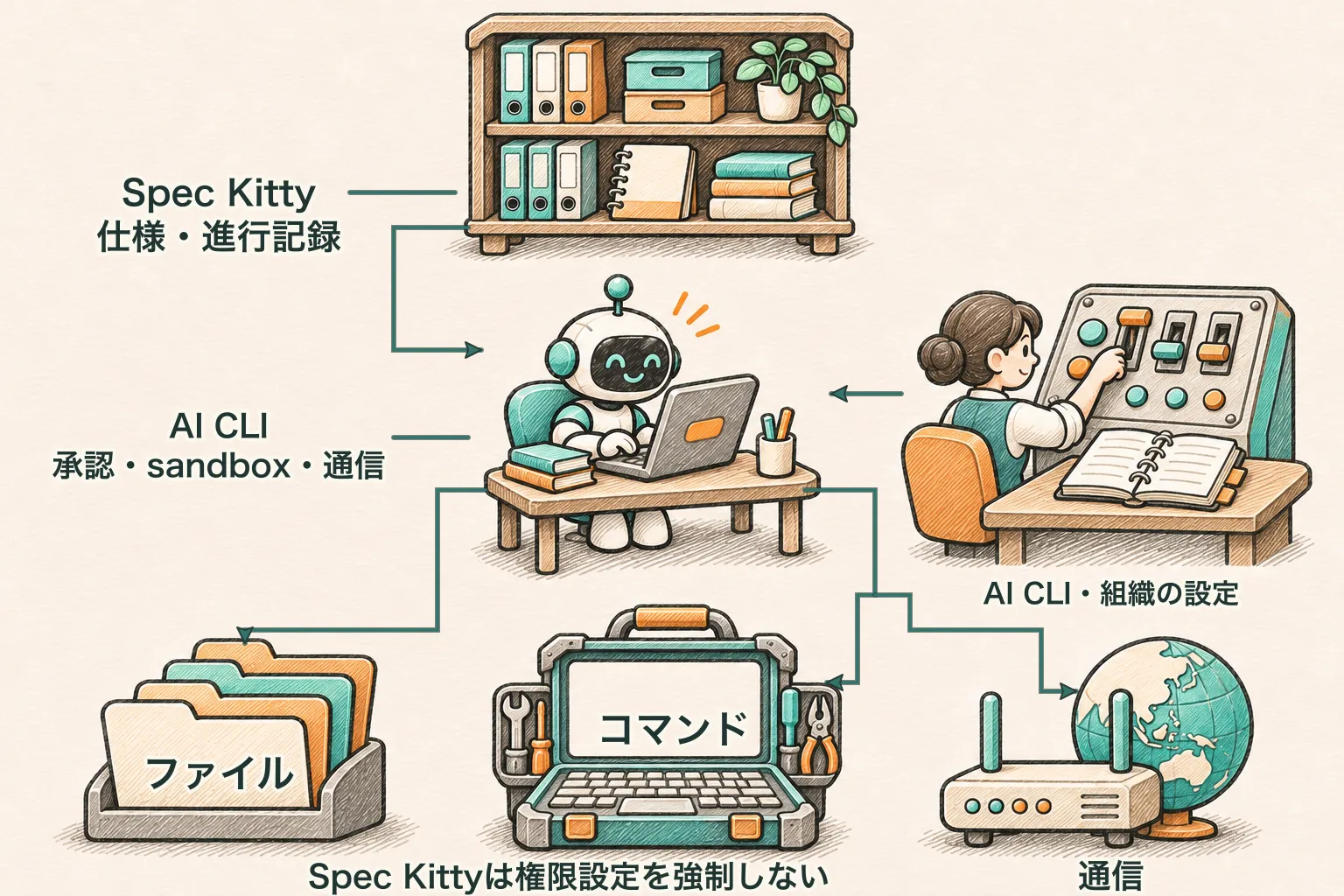
The Security Position recommends operating AI CLIs under organizationally approved controls and managing the scope of credential permissions operationally.
Credentials should therefore be managed as security conditions defined separately by the organization or project, rather than treated as something Spec Kitty configures automatically.
Stable and development versions
As of October 30, 2026, the latest stable version was v3.2.7. The v4.0.0rc series is a prerelease that includes breaking changes to commands, terminology, and state management.
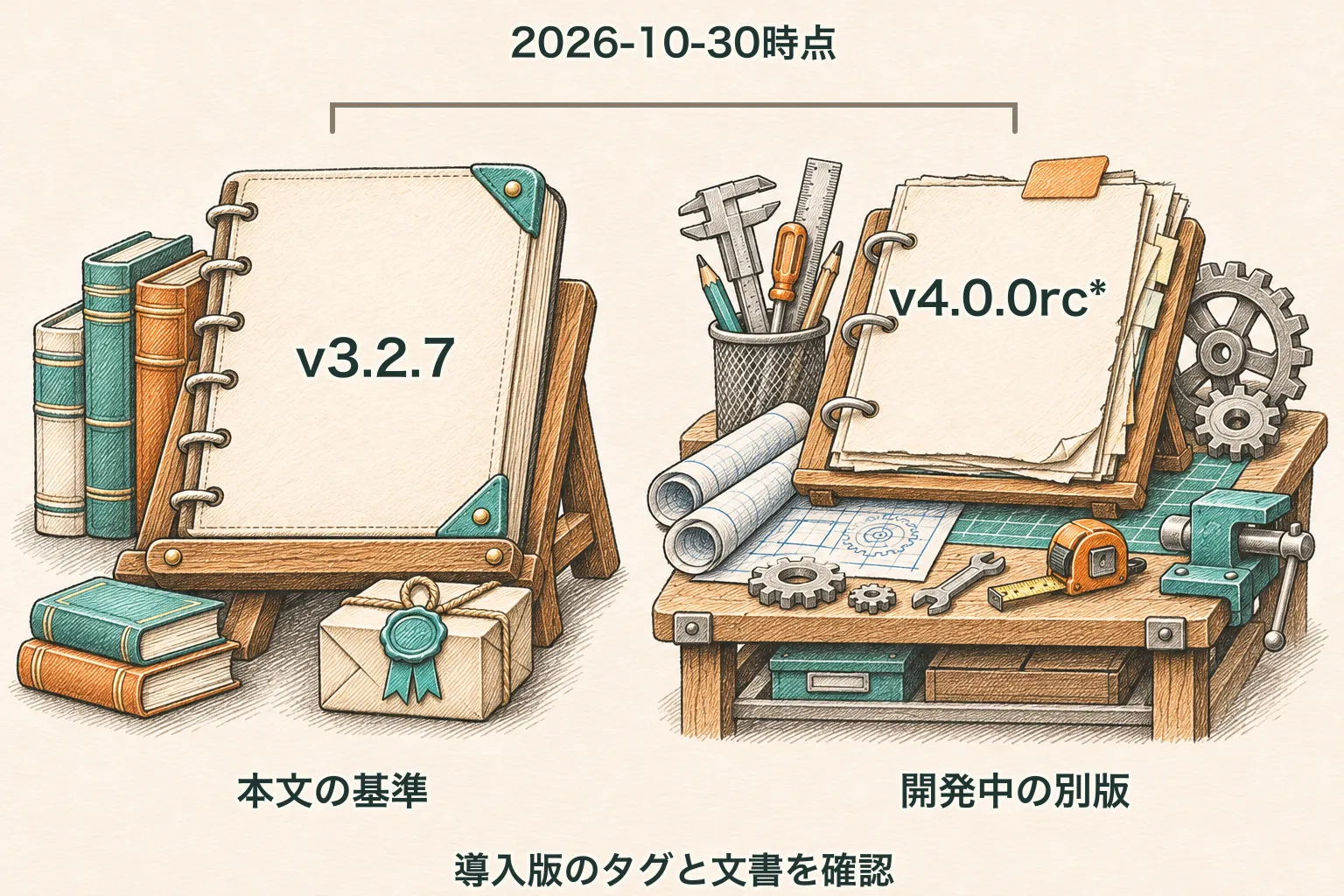
Mixing v4 procedures into a v3.2.7 mission introduces assumptions about commands that do not exist or states with different names.
For projects that already use Spec Kitty, check the installed version and consult documentation corresponding to that version's tag.
Conclusion
Spec Kitty does more than create specifications: it assigns each work package to an execution lane and carries out implementation in each lane's worktree.
It also records in Git how results are passed to preliminary regression checks, independent review, acceptance, and integration.
When certain items can be checked only after integration, deferred checks and repository-side CI gates can be incorporated into completion criteria.
Before increasing the number of concurrent AI agents, define assigned responsibilities, acceptance criteria, where rejected work returns, and pre- and post-integration checks. Use ordinary Git and review for small changes, and choose Spec Kitty for changes that require work decomposition and a recorded decision history.
Official documentation: https://github.com/spec-kitty/spec-kitty/tree/v3.2.7