Introduction
Hi, I'm cardene, a software engineer and technical writer focused on blockchain and AI.
I've also authored Japanese technical books on specification-driven development with LLMs and decentralized application (DApp) development.

I also build and publish a variety of tools, libraries, and open-source projects.
Overview
When you ask an AI agent to add a feature, decisions about requirements, design, and implementation can become scattered throughout the conversation. For humans to review the work later, they need a record not only of what to build, but also of which documents were approved and how far implementation has progressed.
Spec Workflow MCP is an MCP server that stores requirements, design, and task documents in a project and returns the approval outcome for each document through a dashboard. AI agents follow the workflow instructions they receive, while humans read documents and choose whether to approve them, request revisions, or reject them.
The original diagrams retain their Japanese labels. Code examples are unchanged.
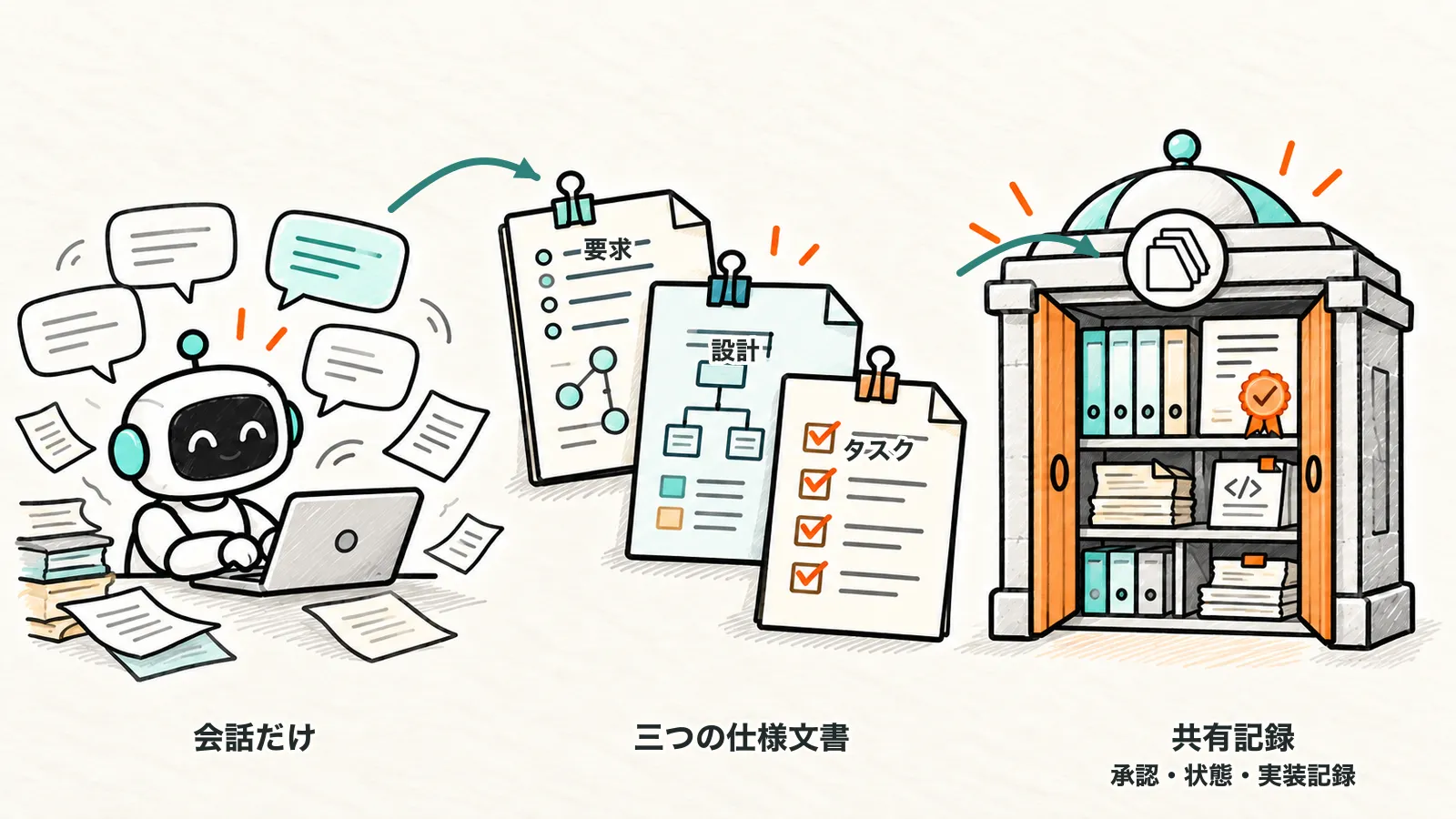
Waiting for approval, however, does not technically prevent file changes. Distinguishing the document validation performed by Spec Workflow MCP from the workflow instructions followed by the AI agent clarifies what the tool can be trusted to handle.
What Is Spec Workflow MCP?
Spec Workflow MCP connects the documents, approvals, task progress, and implementation logs used in spec-driven development to MCP and a dashboard. A spec (feature specification) is a unit that groups requirements, design, and tasks for one feature.
This article covers version 2.2.5 of @pimzino/spec-workflow-mcp, which was the latest version on npm as of October 31, 2026.
The separately distributed VS Code extension is discussed only within the scope of version 1.1.7, which can be inspected at the same gitHead; it is not assumed to match the current Marketplace release.
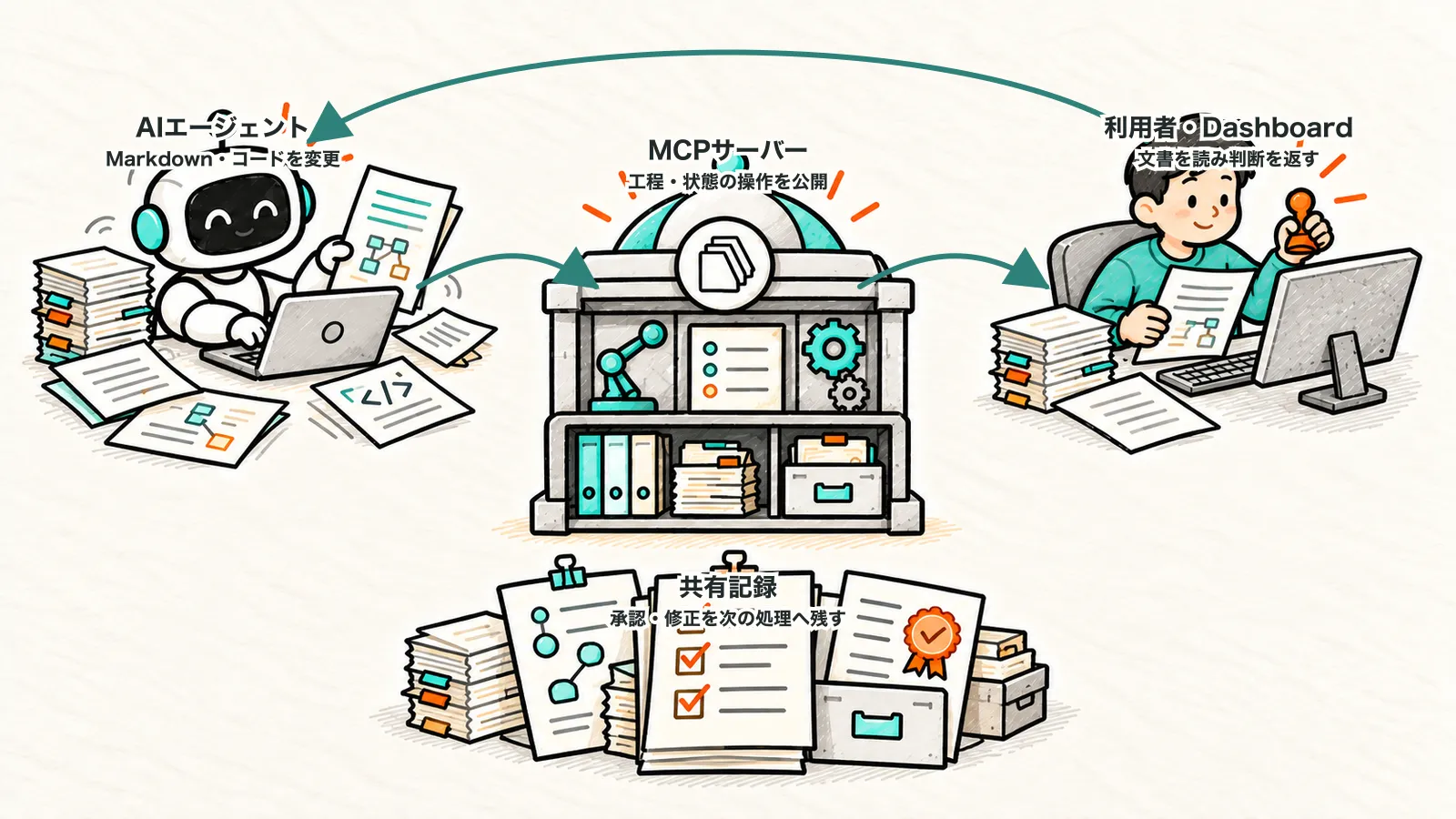
The AI agent modifies Markdown files and code directly. The MCP server exposes operations for reading and writing workflow guidance, approval states, progress, and implementation logs, while the dashboard provides an interface for users to view and update the same data.
Responsibilities of MCP Tools and the Dashboard
Version 2.2.5 exposes five MCP tools for working with state and seven MCP prompts that assemble workflow instructions for AI agents. The tools handle workflow guidance, approvals, progress, and implementation logs, while the prompts explain to the agent how to draft requirements or implement tasks.

The dashboard displays specifications, approvals, tasks, and implementation logs, and can update document and task states. Because the server and dashboard read files within the same project, humans can review what the agent has written in a separate interface.
Connection information is stored in ~/.spec-workflow-mcp/activeSession.json by default.
In environments with a read-only home directory, setting SPEC_WORKFLOW_HOME moves the storage location under the specified directory.
Four Phases from Requirements to Implementation
The standard workflow has four phases: requirements, design, tasks, and implementation. During the first three phases, the agent creates documents and checks their approval outcomes. During implementation, it modifies code and tests while updating task states and implementation logs.
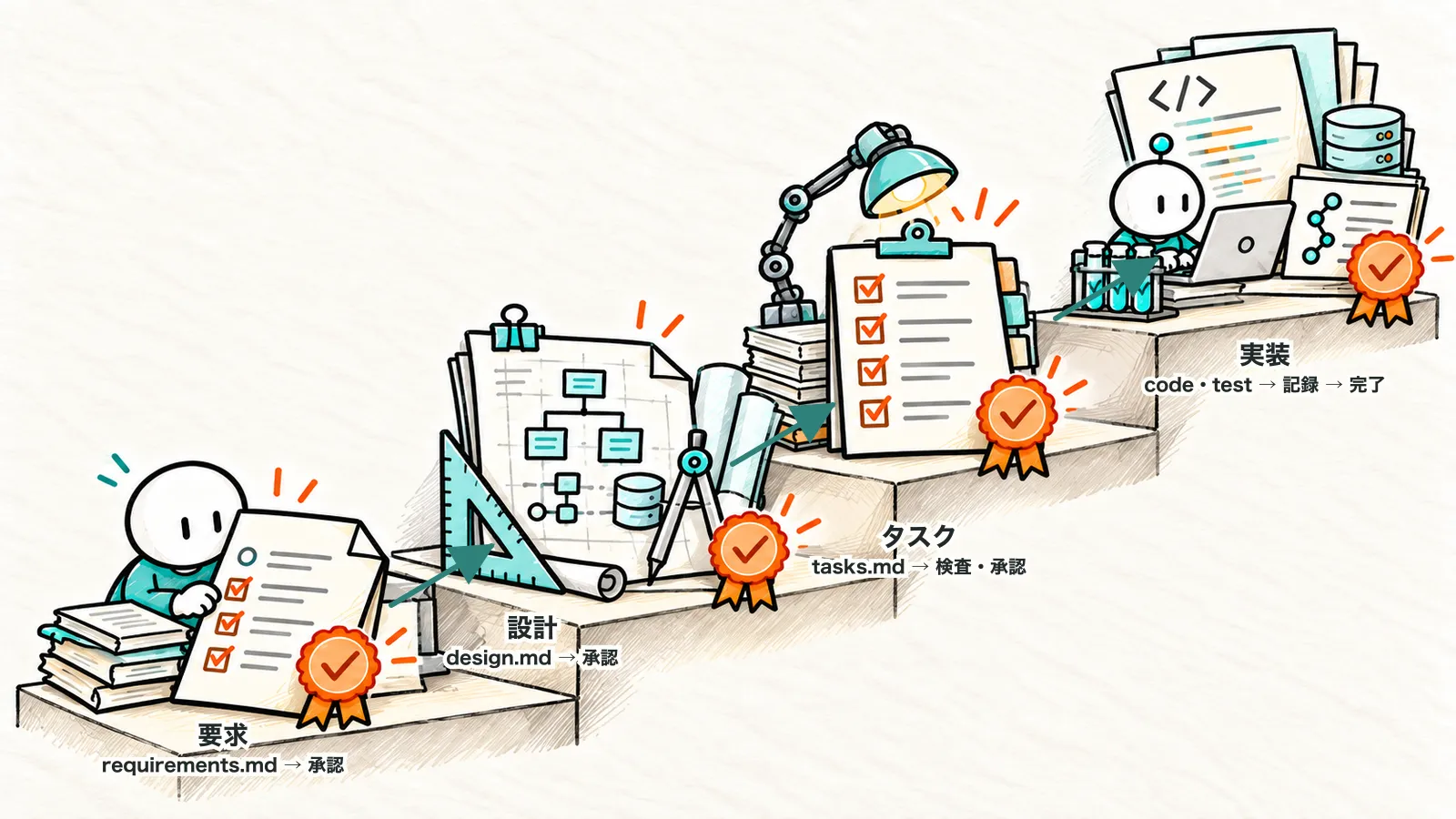
The purpose of separating the phases is not to produce more documentation. Requirements establish user-visible outcomes, design determines how those outcomes will be reflected in code, and tasks define the implementation order and target files. Each successive document becomes more concrete, making it possible to identify which document to revisit when an assumption changes.
Contents of the Three Documents
The requirements document, requirements.md, contains user stories expressing user goals and acceptance criteria in EARS format for deciding whether the work is complete.
The design document, design.md, records the reuse of existing code, architecture, components and interfaces, data models, error handling, and testing strategy.
The task document, tasks.md, specifies implementation order, target files, links to requirement IDs, and implementation instructions for the AI agent.
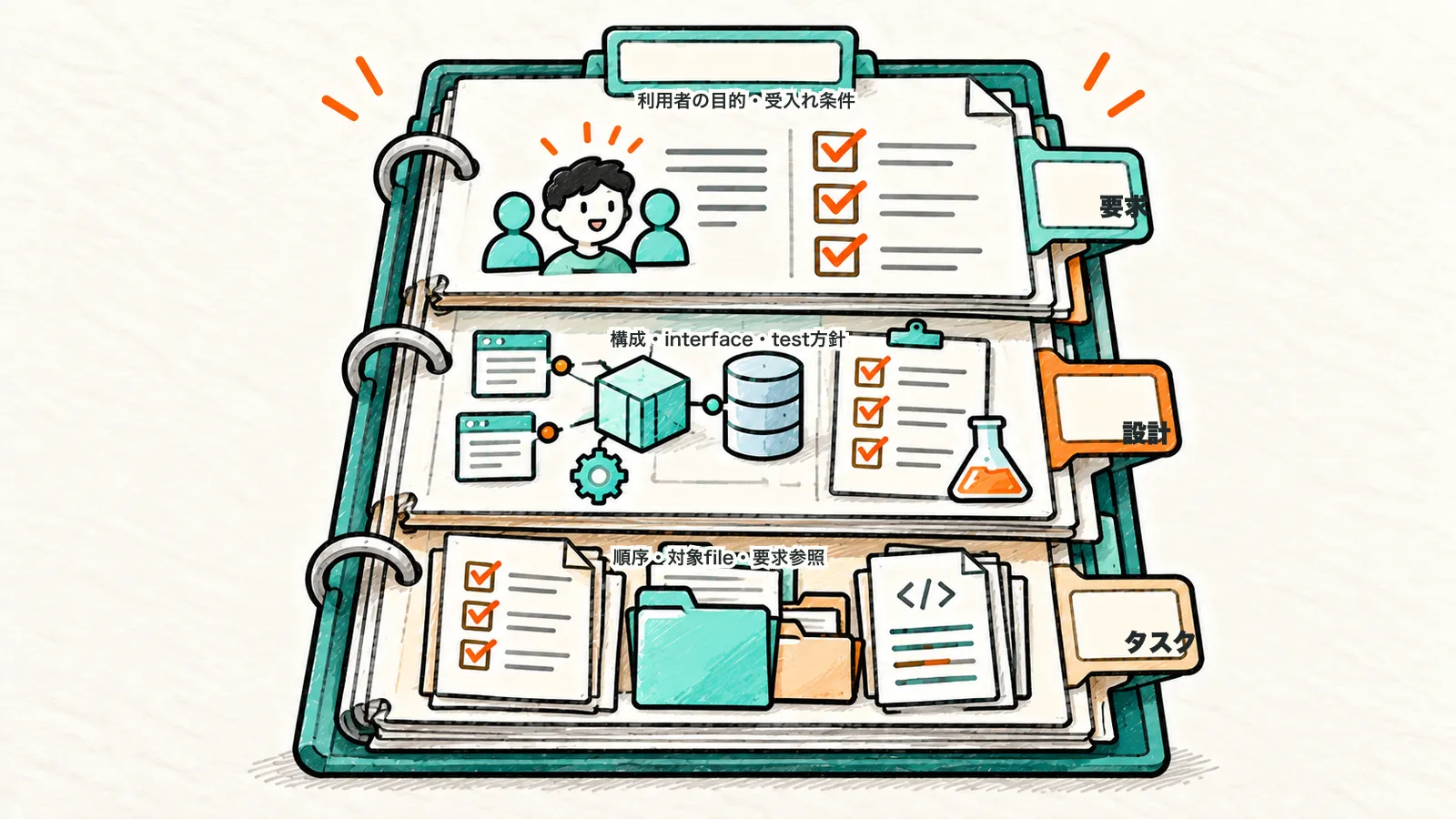
An approval request cannot be created if task status markers or task IDs are invalid, or if the Markdown cannot be parsed as MDX. Missing required elements in an implementation prompt, by contrast, generate warnings without preventing creation of an approval request. Warnings are not included in a successful response, so a human should read the task document and check whether the target files, requirement references, and success criteria are sufficient.
Project steering documents that store product, technical, and structural guidelines are optional. They are not generated merely by starting the standard workflow; they are generated only when explicitly requested.
Approval for Each Document
An approval request identifies the document to review through filePath.
It also supplies title, type, category, and categoryName, and uses the returned approvalId to check the outcome.

The outcome is one of pending, approved, needs-revision, or rejected.
While the outcome is pending, the MCP tool instructs the AI agent not to proceed to later phases.
This pause depends on the agent following those instructions; it does not mean that the server blocks file editing.
Revision Requests and Approval Records
For needs-revision, the agent revises the same document according to the user's comments and creates a new approval request.
For rejected, the tool also instructs the agent to read the feedback and make revisions, but it does not prescribe a fixed resubmission procedure.
If the underlying approach must be reconsidered, the agent reads the reason and stops work.
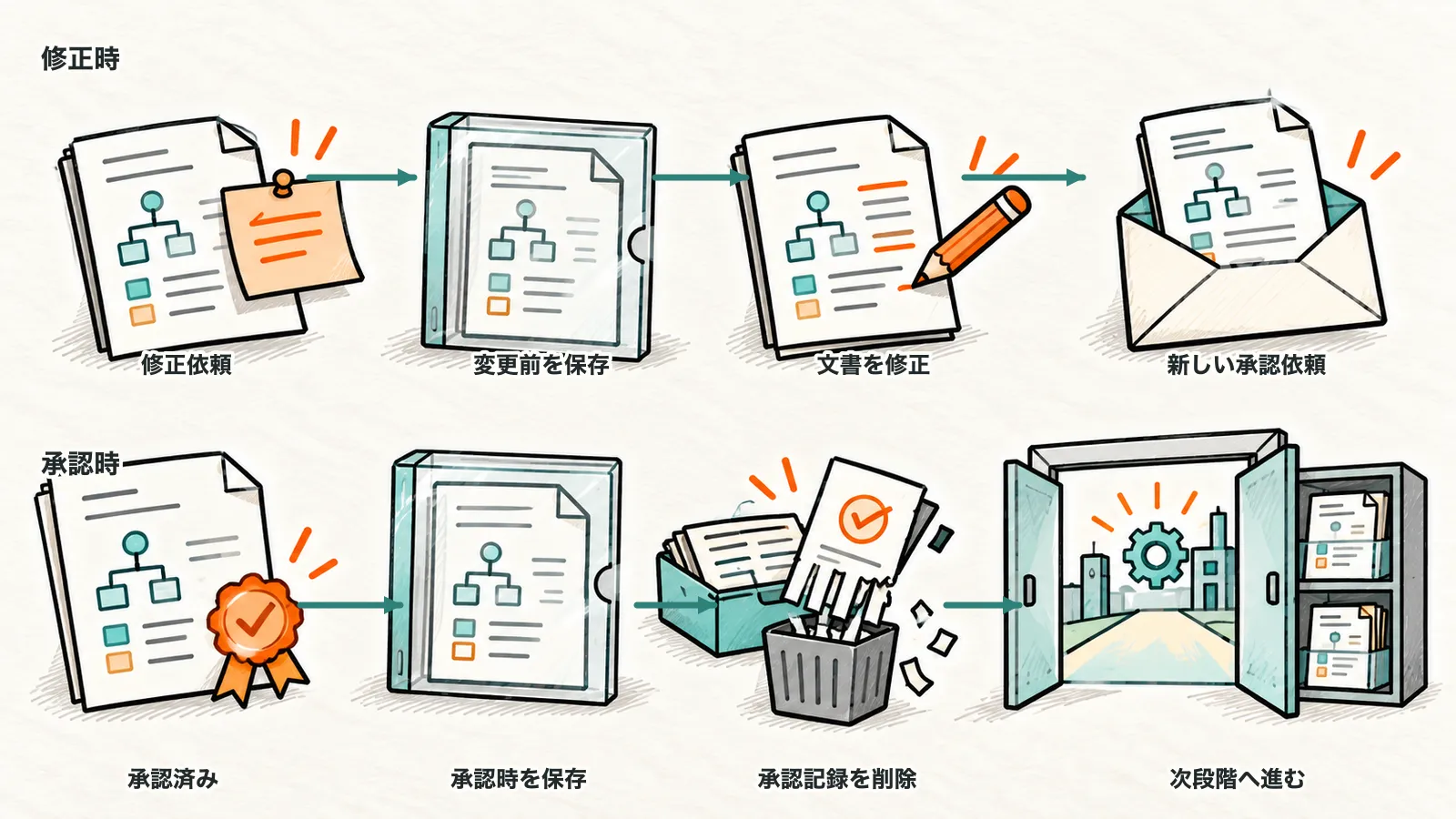
Creating an approval request stores an approval JSON file. Requesting revisions or approving the document also creates a document snapshot. Snapshot files remain even if the approval JSON is deleted after approval. However, once the JSON has been deleted, the dashboard can no longer use it to display the approved state or snapshots. To inspect them later, read the snapshot metadata directly from the files.
The approval JSON does not record the approver's identity. Dashboard approvals should therefore be used as records of review within the specification workflow, not as authenticated audit trails.
Basic Workflow from Specification to Implementation
The following sequence is based on the publicly available implementation of version 2.2.5. These are expected observations derived from static inspection, not measurements obtained by running the MCP server for this article.
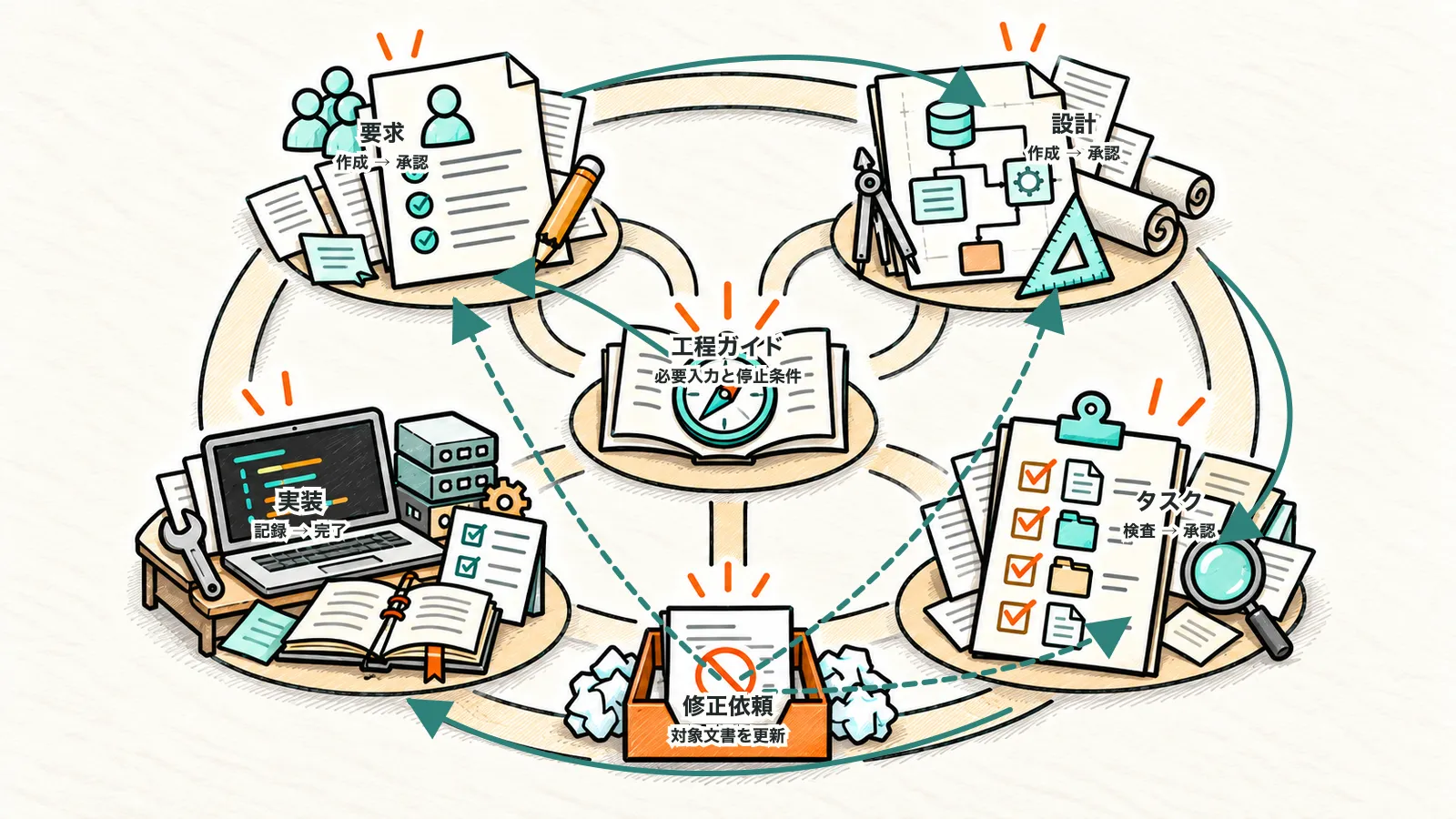
- Read the specification workflow guide
Use
spec-workflow-guideto identify the inputs, documents, and stopping conditions for the current phase. - Create the requirements document and wait for approval
Write user stories and acceptance criteria in
requirements.md, and do not create downstream documents until the approval request returnsapproved. - Create the design document and wait for approval
Describe an architecture satisfying the approved requirements in
design.md. If revisions are requested, update the same document and resubmit it. - Create and validate the task document
Put task IDs, target files, requirement references, and implementation instructions in
tasks.md. Resolve formatting errors before waiting for approval. - Search existing implementation logs Read records of the same components, interfaces, and functions to avoid duplicating existing functionality.
- Mark the task as in progress
Change the target task from
[ ]to[-], then modify the code and tests. - Record the implementation and mark the task as complete
Pass changed files, statistics, and artifacts to
log-implementation, then change the task to[x]after recording the implementation.
At each phase, read the MCP tool responses alongside the three documents, approval state, [ ], [-], and [x] markers, and implementation logs.
Keeping these four kinds of records allows another session to resume work from the same decisions.
Example Workflow: Adding a Price Range Filter
Consider adding min_price and max_price to product search while preserving existing results when both parameters are omitted.
This is a hypothetical example illustrating how specifications are handed off, not the result of an actual MCP execution.

Separating requirements, revision requests, design, tasks, and implementation logs makes it possible to trace which decisions have been finalized and which earlier phase was revisited. For example, if sorting behavior is underspecified, the requirements document can be returned for revision and the expected behavior added before implementation.
Drafting Requirements and Requesting Revisions
The requirements document specifies that a lower and an upper price bound can be supplied, that searches work with either bound alone, and that omitting both returns existing results. Acceptance criteria link inputs to observable outcomes.
### Requirement 1

WHEN a user provides min_price and max_price,
THE search API SHALL return products within the inclusive range.

WHEN both values are omitted,
THE search API SHALL preserve the existing result set.
Requirement 1
WHEN a user provides min_price and max_price, THE search API SHALL return products within the inclusive range.
WHEN both values are omitted, THE search API SHALL preserve the existing result set.
If sorting behavior has not been defined, the user can include the comment "Preserve the existing sort order for products with the same price" in a needs-revision response.
The AI agent adds the condition to the requirements document and creates a new approval request with the same title, filePath, type, category, and categoryName.
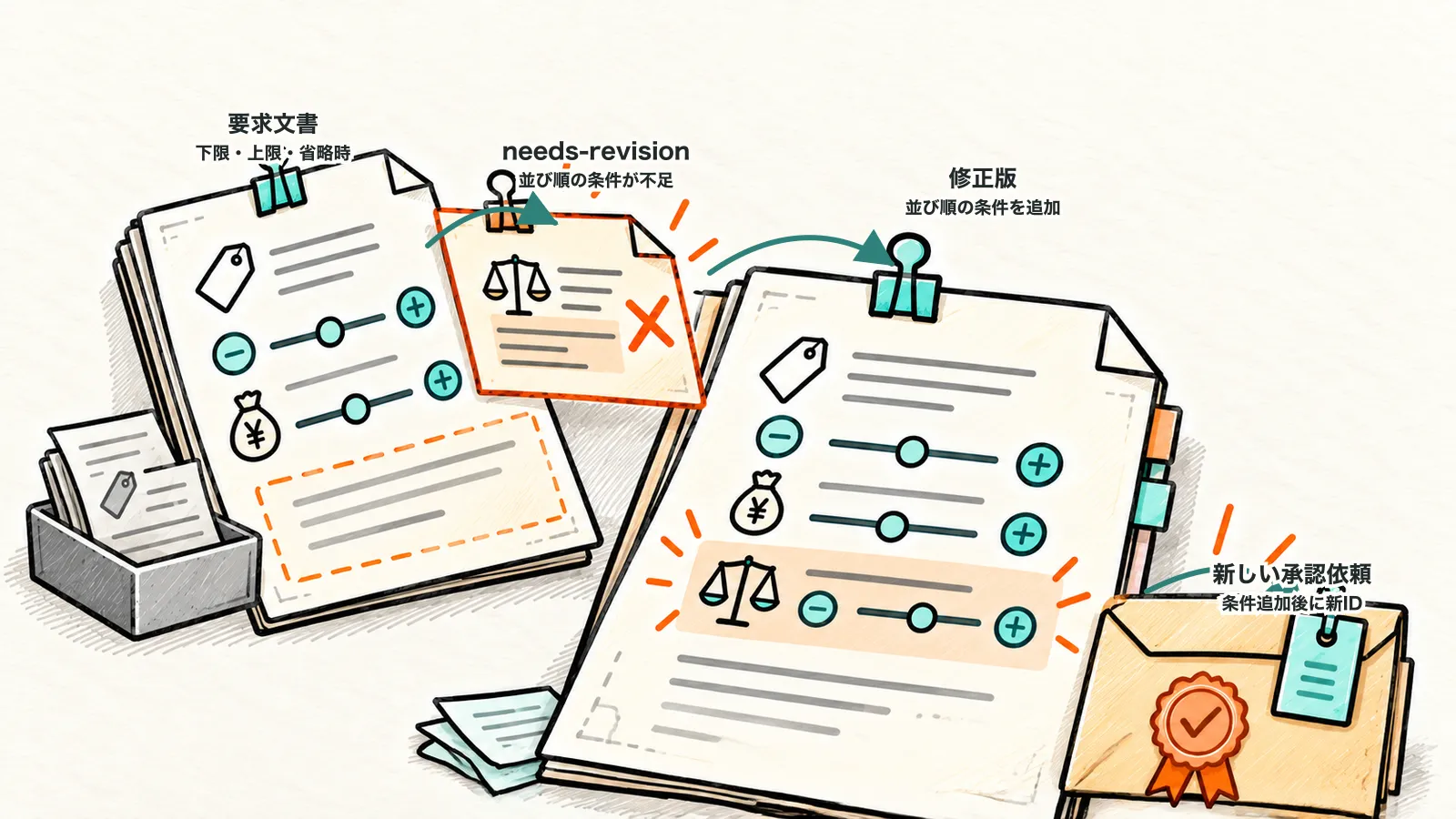
The approvalId identifies an approval request.
Editing the document alone does not change the previous request's outcome, so the agent waits for the result of a new request that returns a new approval request ID (<承認依頼ID> in the original example).
Design Approval
Once requirements are approved, the design document separates changes to the search interface, search UI, input validation, and tests. Identifying where existing search conditions are reused and where new price conditions are introduced avoids duplicating the same checks in the interface and UI during implementation.
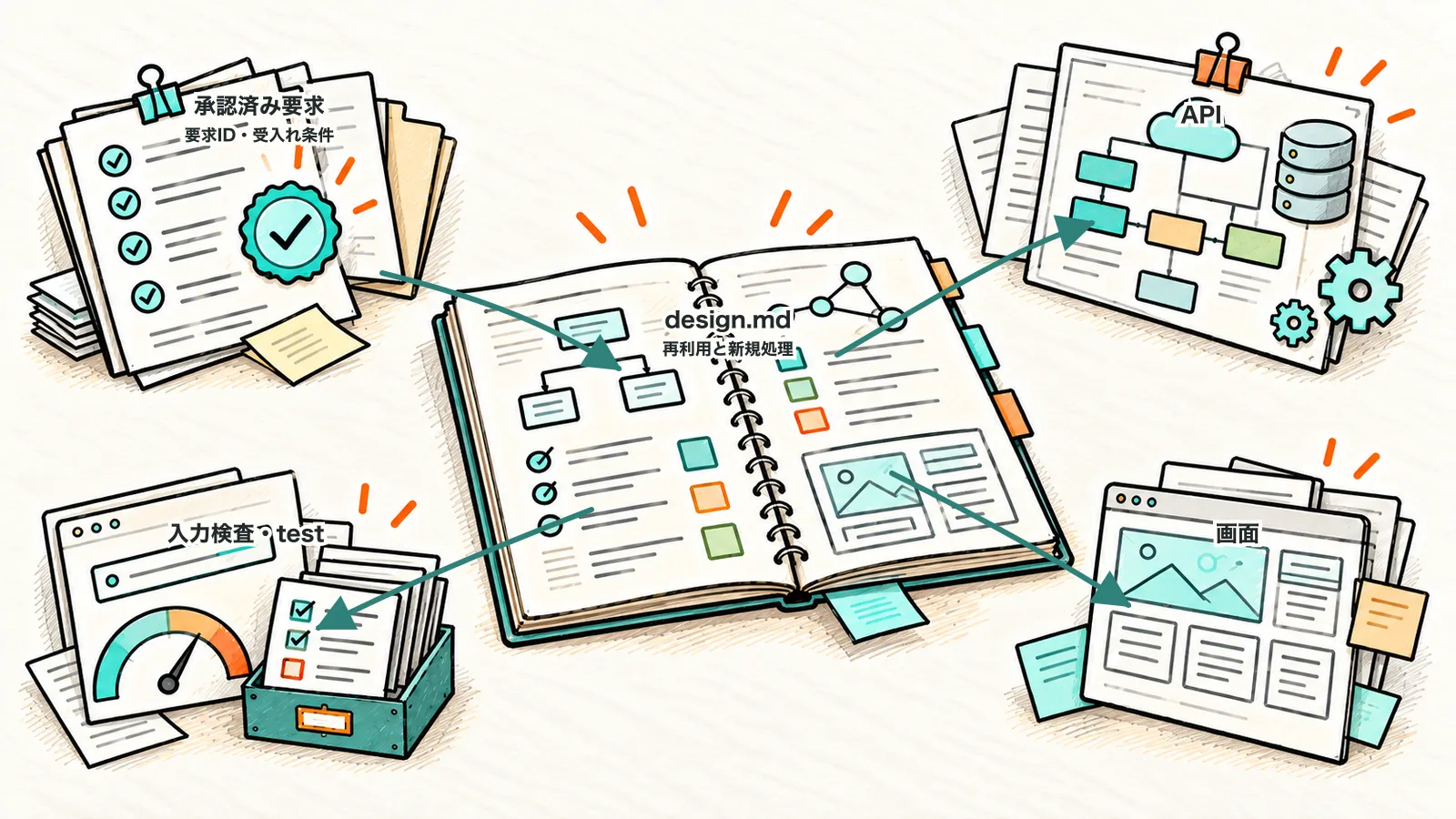
In this hypothetical example, a mapping table connects design elements to requirement IDs to help identify design gaps.
When the design document reaches approved, delete the approval JSON and proceed to creating the task document.
Validating the Task Document
For each task, the task document specifies an ID, target files, requirement references, an implementation prompt, and success criteria. For example, a task adding input validation to the search interface might look like this:
- [ ] 1.1 Add inclusive price validation
  - File: src/search/filters.ts
  - Requirements: 1.1, 1.2
- Prompt: Validate min_price and max_price, preserve omitted values, and add boundary tests.- File: src/search/filters.ts
- Requirements: 1.1, 1.2
- Prompt: Validate min_price and max_price, preserve omitted values, and add boundary tests.
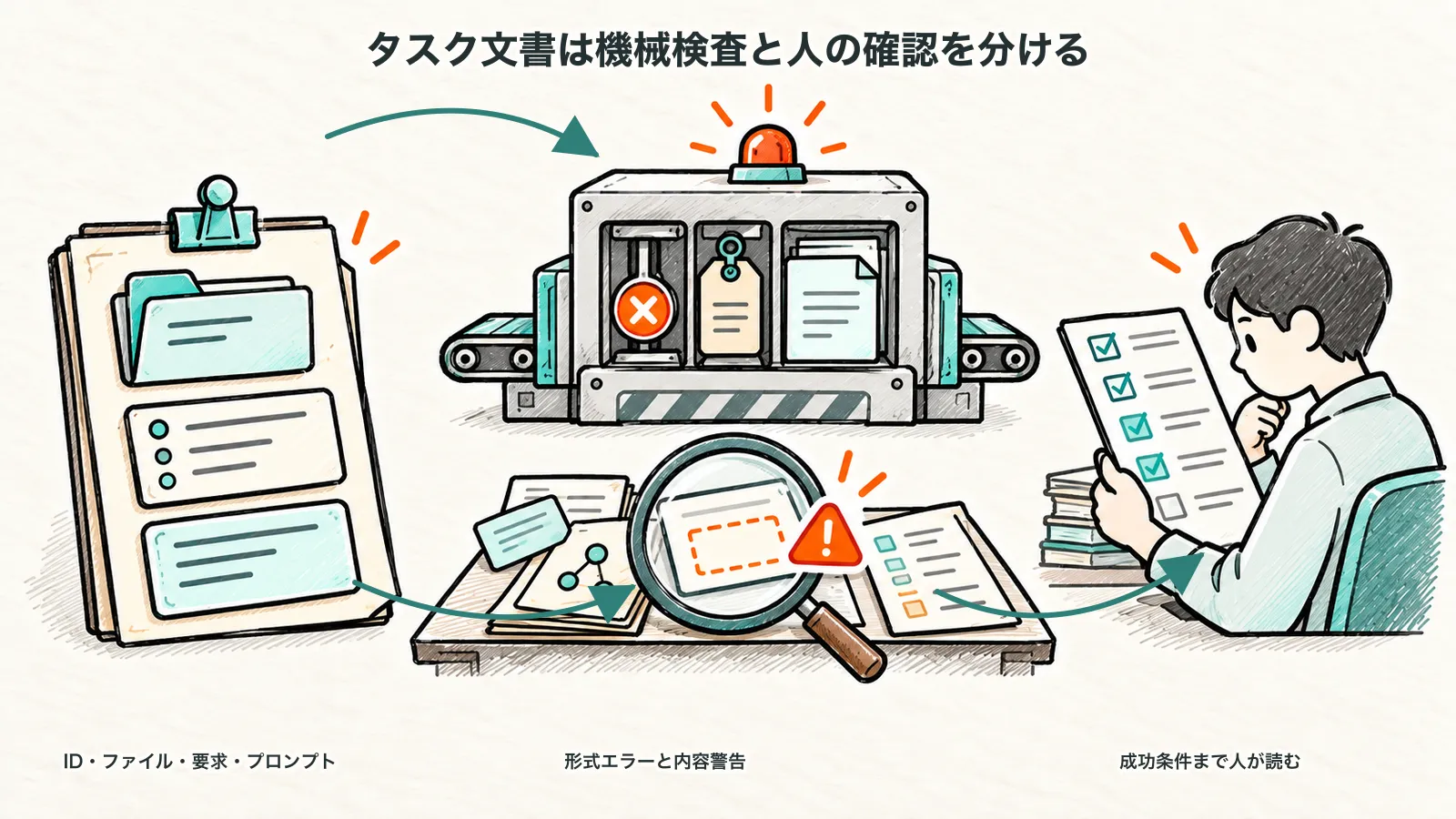
Errors in task status markers, task IDs, or MDX compatibility prevent creation of an approval request. Missing prompt elements generate warnings but do not block the request. Humans should therefore read the target files, proposed changes, and success criteria and resolve ambiguity before approval. Task status markers attached to headings are also counted in progress calculations, so their completion states should be updated using the same criteria as implementation tasks.
Implementation and Logging
When implementation begins, change the task to [-] and first search existing Implementation Logs (implementation log files that future AI agents can search).
After modifying code and tests, pass the task ID, changed files, statistics, and artifacts to log-implementation.
{
  "taskId": "1.1",
  "summary": "価格の下限と上限の入力検査を追加",
  "filesModified": ["src/search/filters.ts"],
  "filesCreated": ["src/search/filters.test.ts"],
  "statistics": {"linesAdded": 84, "linesRemoved": 6},
  "artifacts": {"functions": ["validatePriceRange"], "integrations": ["search API"]}
}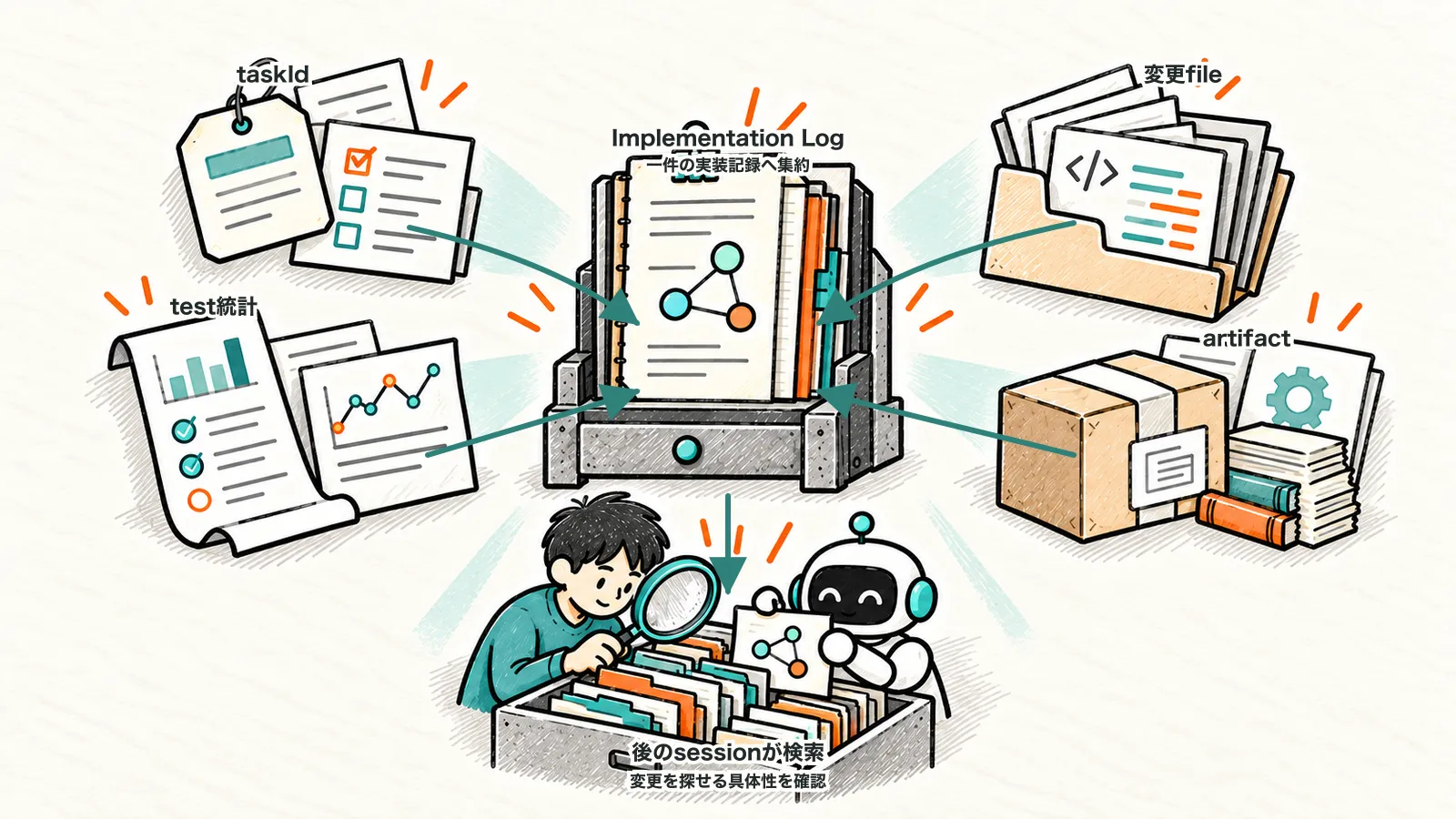
The taskId links the log to a task in the task document.
The filesModified and filesCreated fields help future AI agents locate changes, while artifacts records added interfaces, components, functions, and integrations in a searchable form.
The version 2.2.5 handler accepts empty artifacts, so check the sufficiency of the recorded information separately before changing the task to [x] upon completion.
Managing State During Implementation
Task status markers and implementation logs provide the information needed to pause work and resume in another session. Status markers are declarations made by whoever performs the work; they do not prove that tests passed.
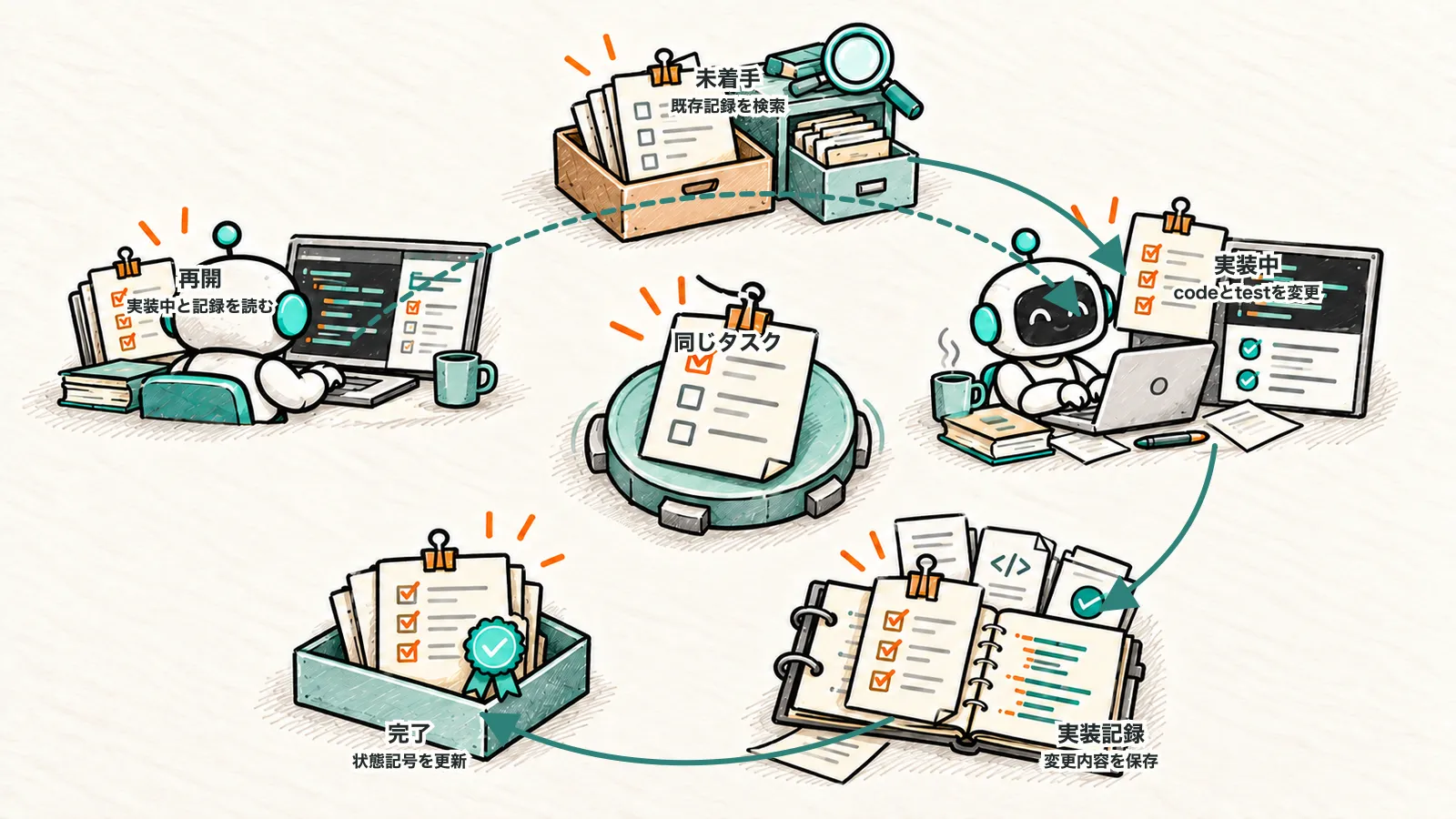
[ ] means not started, [-] means in progress, and [x] means complete.
Searching existing implementation logs before starting and recording changes against an existing task ID helps prevent duplicate implementation when work resumes.
Task States and Implementation Logs
The input schema for log-implementation requires summary, arrays of modified and created files, statistics, and artifacts.
The handler itself, however, rejects requests when artifacts is falsy, statistics is missing, the task document cannot be read, or the task ID does not exist.
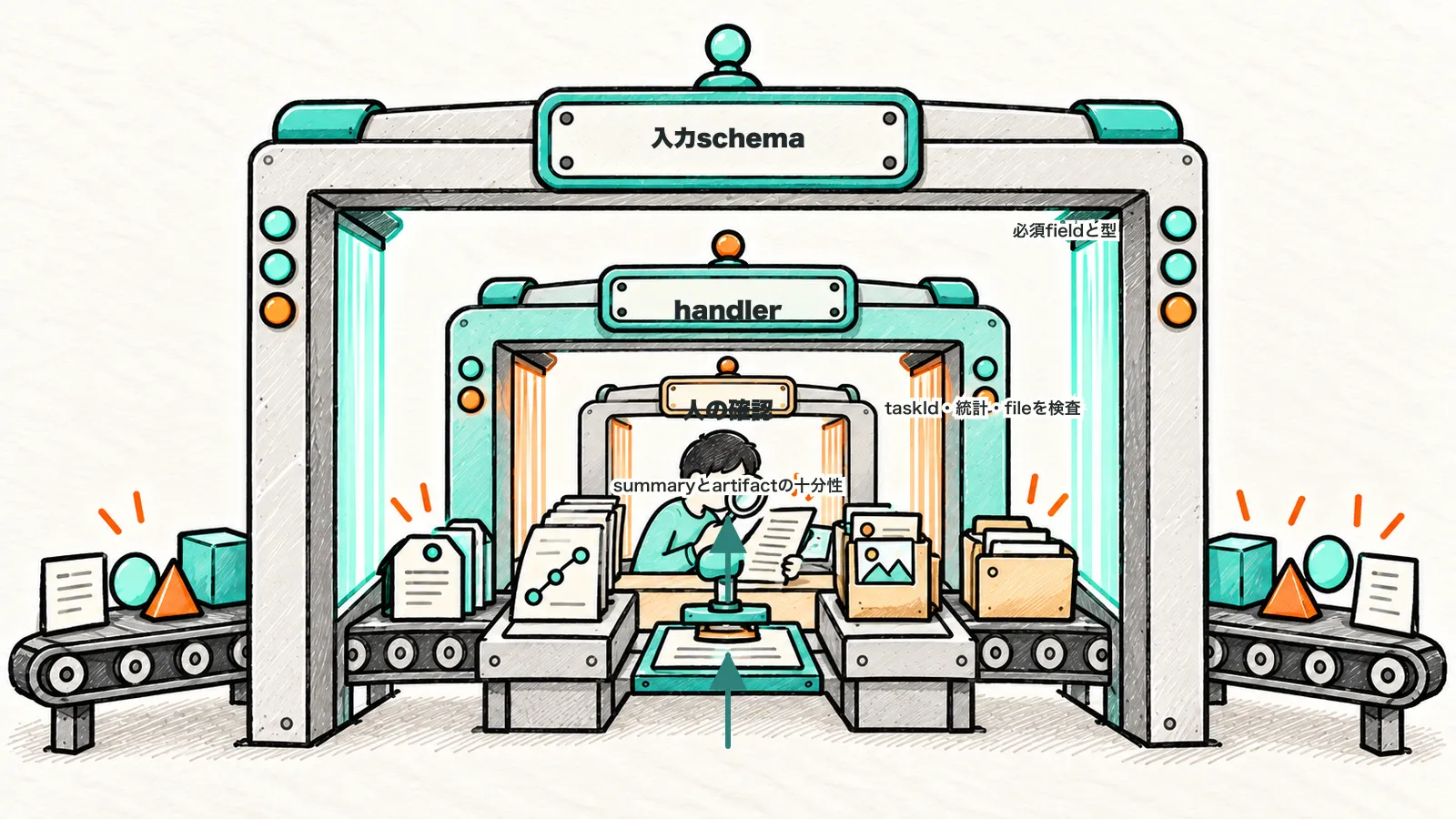
The fields required by the input schema differ from the conditions that cause the actual handler to reject a request. Automated validation alone cannot prevent empty artifact information or an excessively short summary. Check whether future contributors can locate changed interfaces, components, functions, and integrations from the record.
Checking Progress After an Interruption
spec-status returns the current phase and progress based on the existence of the three documents and the counts of [ ] and [x] markers.
If the task document exists, the current phase becomes implementation even before approval, and the number of [-] markers is not returned.

When resuming, cross-check the existence of downstream documents, the task document's status markers, and implementation logs. Approval requests that have not been deleted can be inspected in the dashboard, but after the approval JSON is deleted, the approved state and snapshots cannot be read through the dashboard. If necessary, inspect the snapshot metadata directly in the files.
With Git worktrees, the main repository's .spec-workflow directory is shared by default.
When using --no-shared-worktree-specs, verify before resuming that the AI agent and dashboard are looking at the same storage location.
Suitable Use Cases and Limits of the Guarantees
Spec Workflow MCP is suited to changes involving multiple tasks when you want to review requirements, design, and tasks document by document and pass implementation logs to future sessions. For an obvious fix of only a few lines, the cost of maintaining three documents and their approval requests may exceed that of the change itself.
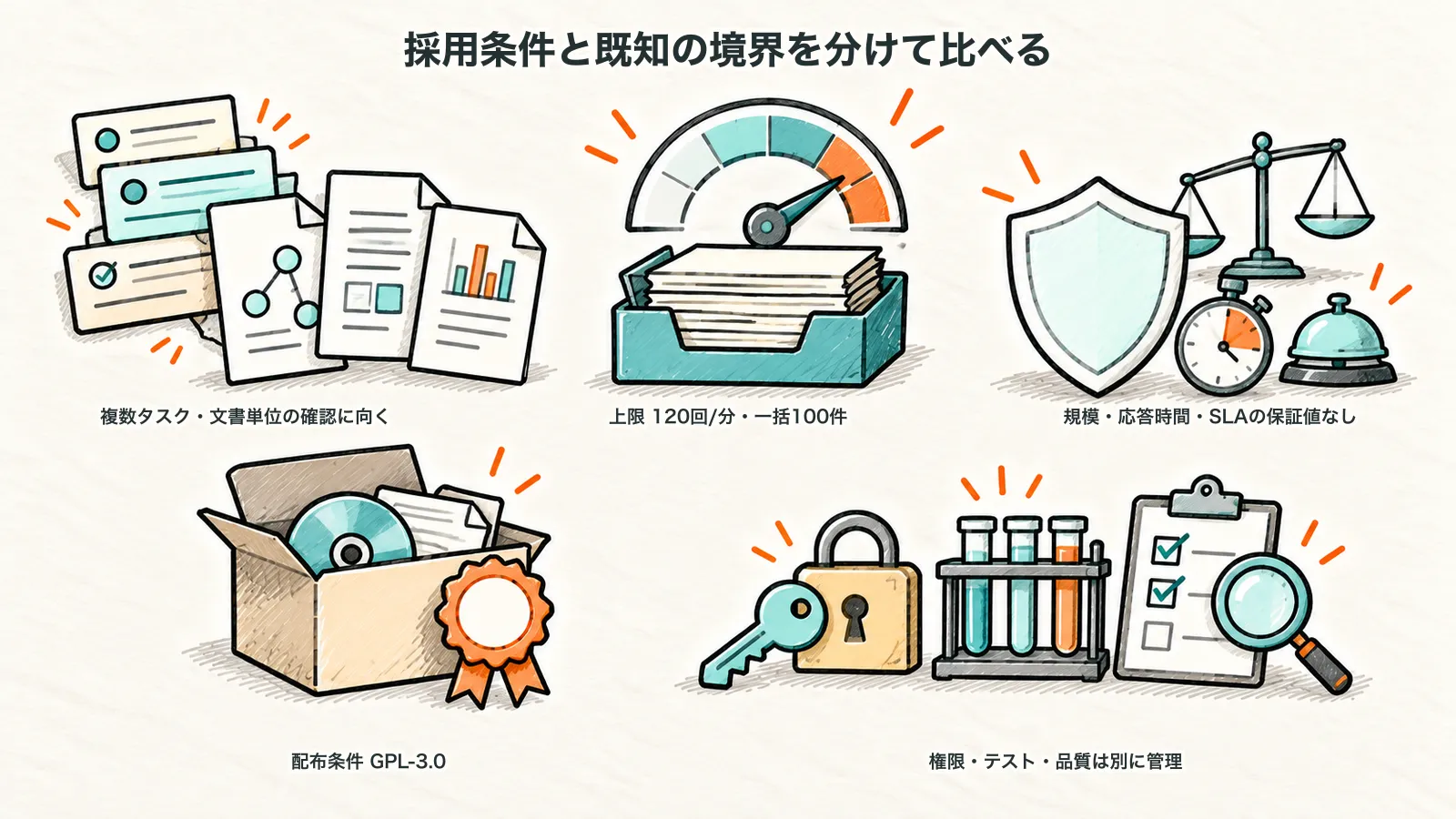
By default, the dashboard rate limit is 120 requests per minute per client, and bulk approval is limited to 100 items. The public materials do not establish guaranteed values for concurrency, project size, response times, or an SLA. The package is released under GPL-3.0, but an organization's ability to adopt it must be assessed separately based on how it will be used and the organization's legal policy.
Dashboard Exposure
By default, the dashboard listens only on 127.0.0.1.
It cannot start on a non-localhost address unless allowExternalAccess is explicitly enabled.
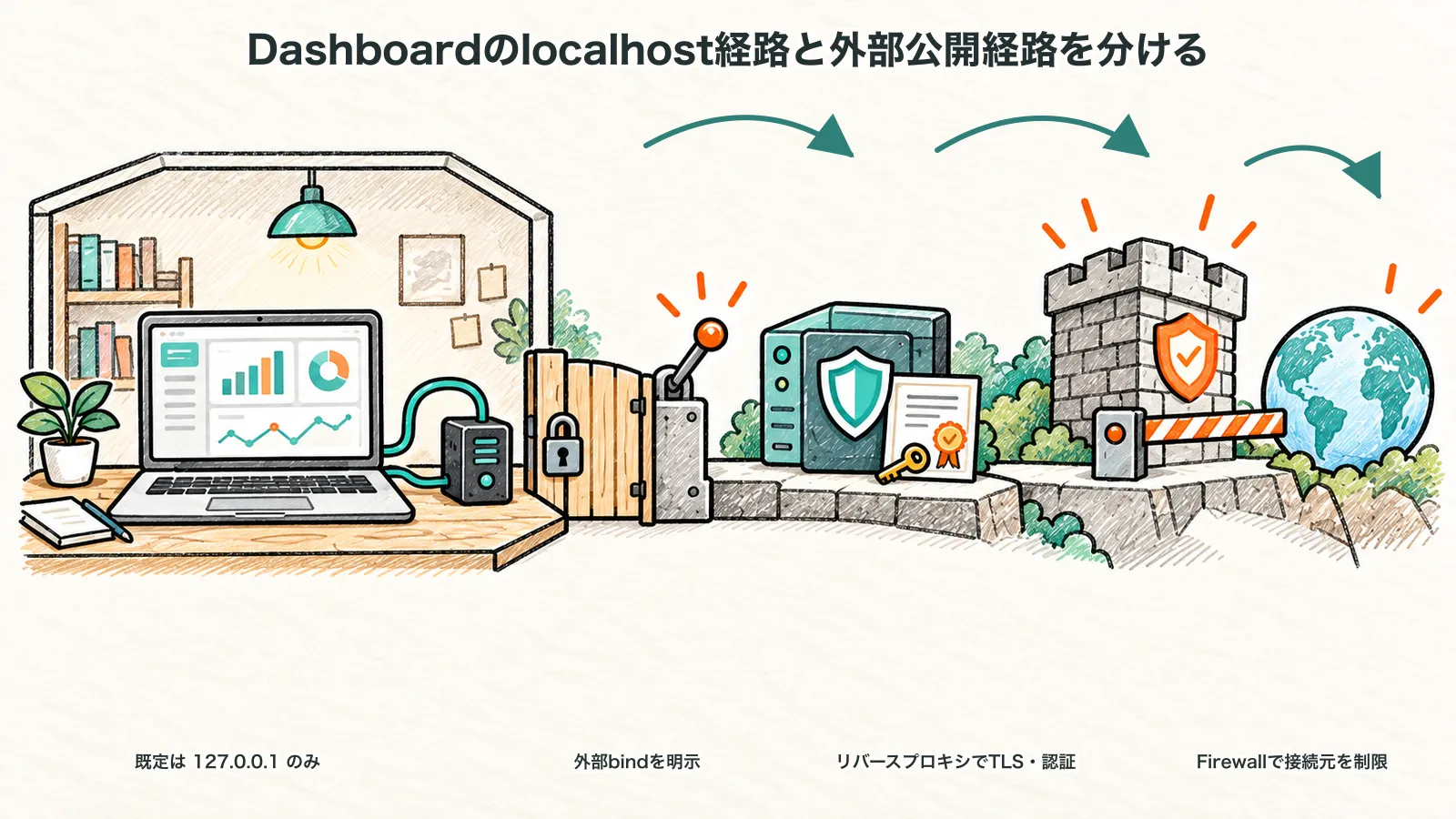
Version 2.2.5 does not implement TLS or user authentication. The README recommends an authenticated reverse proxy and a firewall when exposing the dashboard externally. In environments where TLS, authentication, and a firewall cannot be provided, use the dashboard only on localhost.
Boundaries of Execution Permissions and Code Quality
Although MCP tools return workflow guidance and progress, they do not restrict the AI agent's sandbox, credentials, network access, or command execution approvals. Because the approval process does not authenticate users and the approval JSON does not record the approver's identity, it cannot prevent another process with the same permissions from performing approval operations.
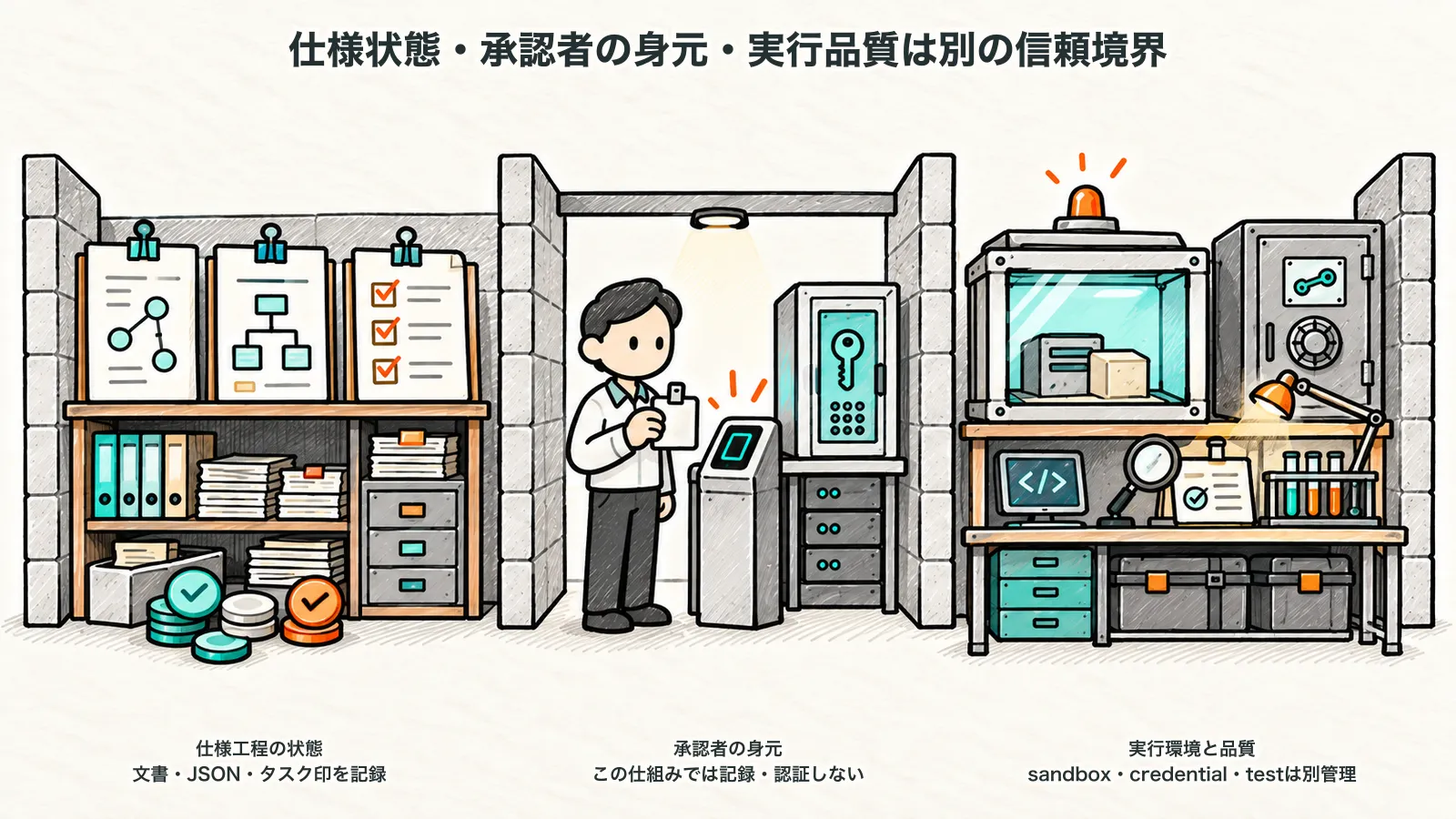
Changing a task to [x] does not prove that testing is sufficient or that the code is ready for production.
Project-specific tests, code reviews, execution checks, and release decisions take place outside Spec Workflow MCP.
Conclusion
Spec Workflow MCP stores requirements, design, and tasks within a project and provides AI agents with instructions for proceeding based on dashboard approval outcomes. Combining task status markers with implementation logs makes it possible to resume work and review existing implementation in another session.
Waiting for approval is an instruction for the AI agent to pause the workflow. Blocking file operations, verifying approver identities, ensuring code quality, and controlling AI agent execution permissions require separate mechanisms. In addition to document validation and human approval, establish project-specific tests and permission controls.
