Introduction
Hi, I'm cardene, a software engineer and technical writer focused on blockchain and AI.
I've also authored Japanese technical books on specification-driven development with LLMs and decentralized application (DApp) development.

I also build and publish a variety of tools, libraries, and open-source projects.
What the public release of SpecD does
When an AI agent is assigned a change, requirements and verification methods may live in different places, while implementation plans and tasks are also separate. It is then up to the person responsible to decide what to satisfy and in what order. SpecD connects specification files describing system behavior, documents created during a change, and conditions for advancing through the workflow in a single configuration.
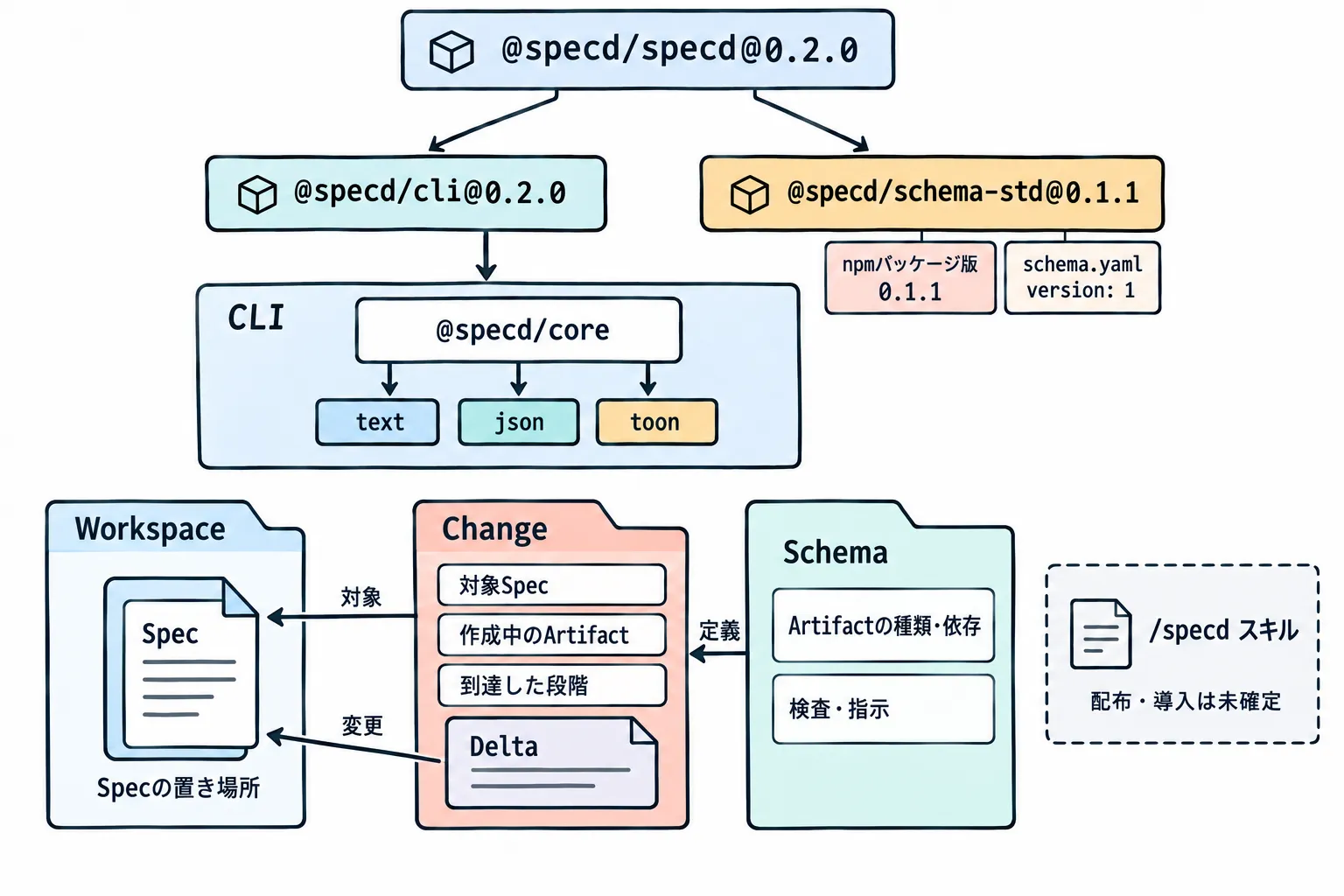
A Spec is a set of specification files, a Change is a named specification effort in progress, and an Artifact is a typed file created during a change.
A Change tracks its target Specs, completed Artifacts, and the stage the change has reached.
A Schema refers to schema.yaml, which defines Artifact types, dependencies, structural validation, and instructions for agents.
A Workspace is a location for Specs with its own storage path, code roots, and ownership relationships.
A Delta is a semantic operation consisting of a selector identifying a document target and the resulting content, rather than a line-based diff.
This article examines three packages: the aggregate package @specd/specd@0.2.0, the CLI package @specd/cli@0.2.0, and the standard Schema package @specd/schema-std@0.1.1.
I inspected the three distribution archives statically without running the CLI.
The return values in the command examples are those that can be established from the published input formats and CLI source code.
@specd/specd@0.2.0 depends on the other two packages at pinned versions.
The npm package version 0.1.1 of @specd/schema-std is distinct from version: 1 inside schema.yaml.
The CLI formats the results of @specd/core operations as text, json, or toon.
This article uses json to examine fields that guide branching decisions and text to examine human-readable guidance. For toon, it covers only the availability of that output format.
The /specd mentioned in the README is the SpecD skill invoked by an agent, but the public README does not establish how it is distributed or installed.
Artifact scope and dependencies
The standard Schema defines five Artifacts: proposal, specs, verify, design, and tasks.
proposal records the rationale, target Specs, and unresolved questions; specs contains the full text of a new Spec or a Delta against an existing one; and verify records verification conditions for each requirement as scenarios.
design covers the implementation approach, and tasks covers the implementation work.
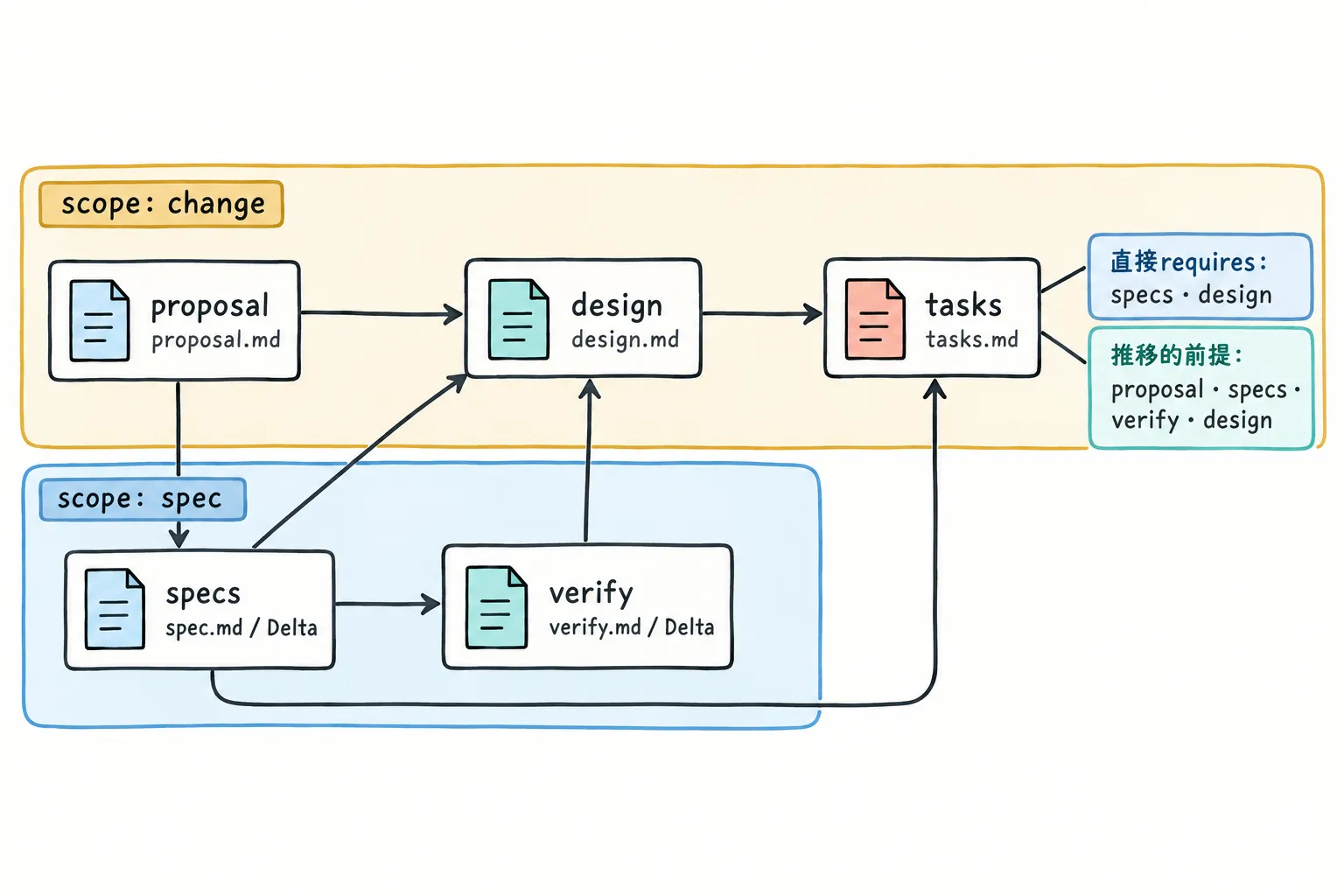
proposal, design, and tasks belong to a Change with scope: change, while specs and verify belong to a Spec with scope: spec.
The direct requires dependencies are as follows.
Artifact |
Directly required Artifacts |
|---|---|
specs |
proposal |
verify |
specs |
design |
• proposal• specs• verify |
tasks |
• specs• design |
Consequently, tasks directly depends only on specs and design, but following the dependency graph reveals that its transitive prerequisites include proposal, specs, verify, and design.
Specification IDs and locations of change deltas
SpecD identifies a Spec using a specification ID in the form <workspace>:<capability-path>.
For default:search/products, the Workspace is default and the capability path is search/products.
The unqualified search/products, without a :, is treated as default:search/products. An unconfigured Workspace name produces an unknown workspace error.
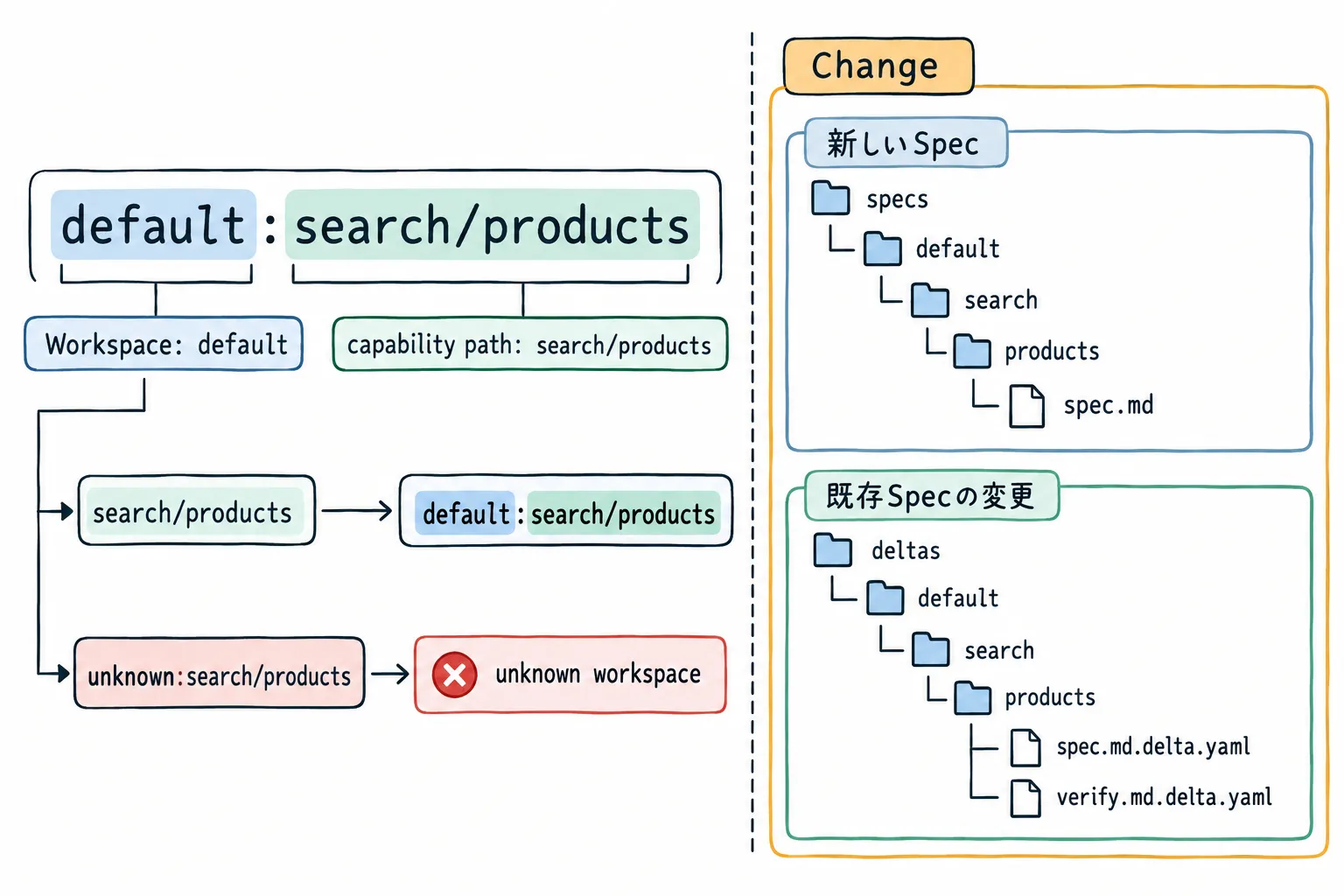
The defaults for project init are likewise a Workspace named default and the storage path specs/.
For a new Spec, write its full text to specs/<workspace>/<capability-path>/spec.md inside the Change.
To change an existing Spec, do not duplicate the full text. Write Deltas to deltas/<workspace>/<capability-path>/spec.md.delta.yaml and verify.md.delta.yaml.
The standard Schema requires reading the existing Spec with specs show before writing a Delta.
Delta operations
A Delta expresses additions, modifications, and removals at the level of headings in an existing Spec.
For added, which introduces a new requirement, position.parent identifies the Requirements section, and content includes the heading ### Requirement: and its body.
For modified, which changes an existing requirement, the selector identifies the exact heading text, while content contains only the body, without the heading.
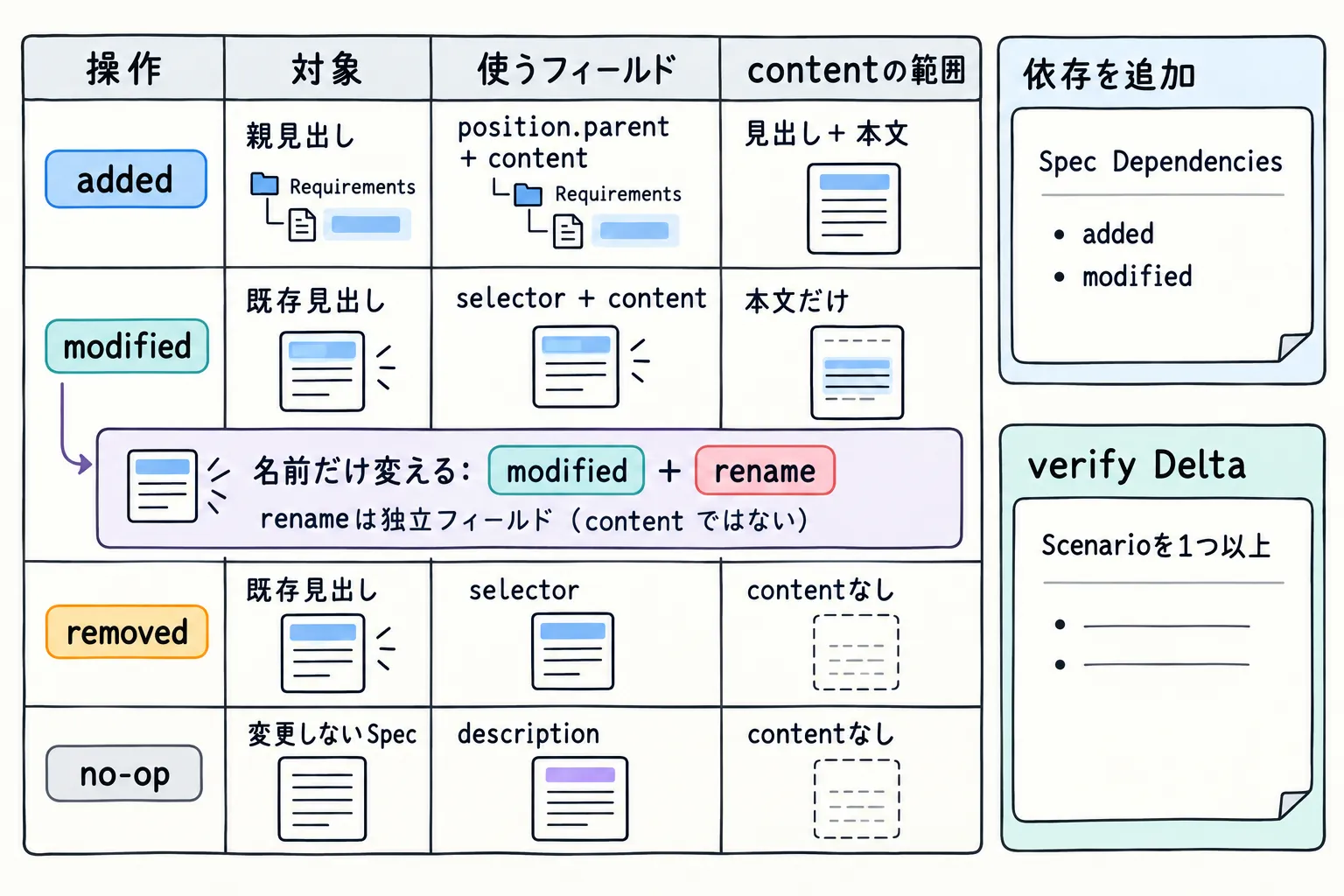
removed deletes both the heading and its body. To change only its name, attach rename to modified.
If a Spec listed in proposal is not to be changed, use - op: no-op and a description explaining why.
When a change introduces a dependency on another Spec, update the ## Spec Dependencies section separately from the requirement operations using added or modified, and include the canonical specification ID with its Workspace name and a reason.
In a verify Delta, use added to write one or more #### Scenario: entries for each new requirement.
For modified, write all scenarios for the affected requirement.
The selector format cannot be determined from the standard Schema prose alone. Consult delta.formatInstructions returned by artifact-instruction and selectorHints returned by specs outline --hints.
Task format and completion criteria
tasks.md groups related tasks under headings in the form ## 1. <group name> and uses checkbox lines in the form - [ ] 1.1 <short description> for individual tasks.
Under each task, indent the files and symbols to modify, the implementation approach beginning with Approach:, and (Req: <requirement name>).
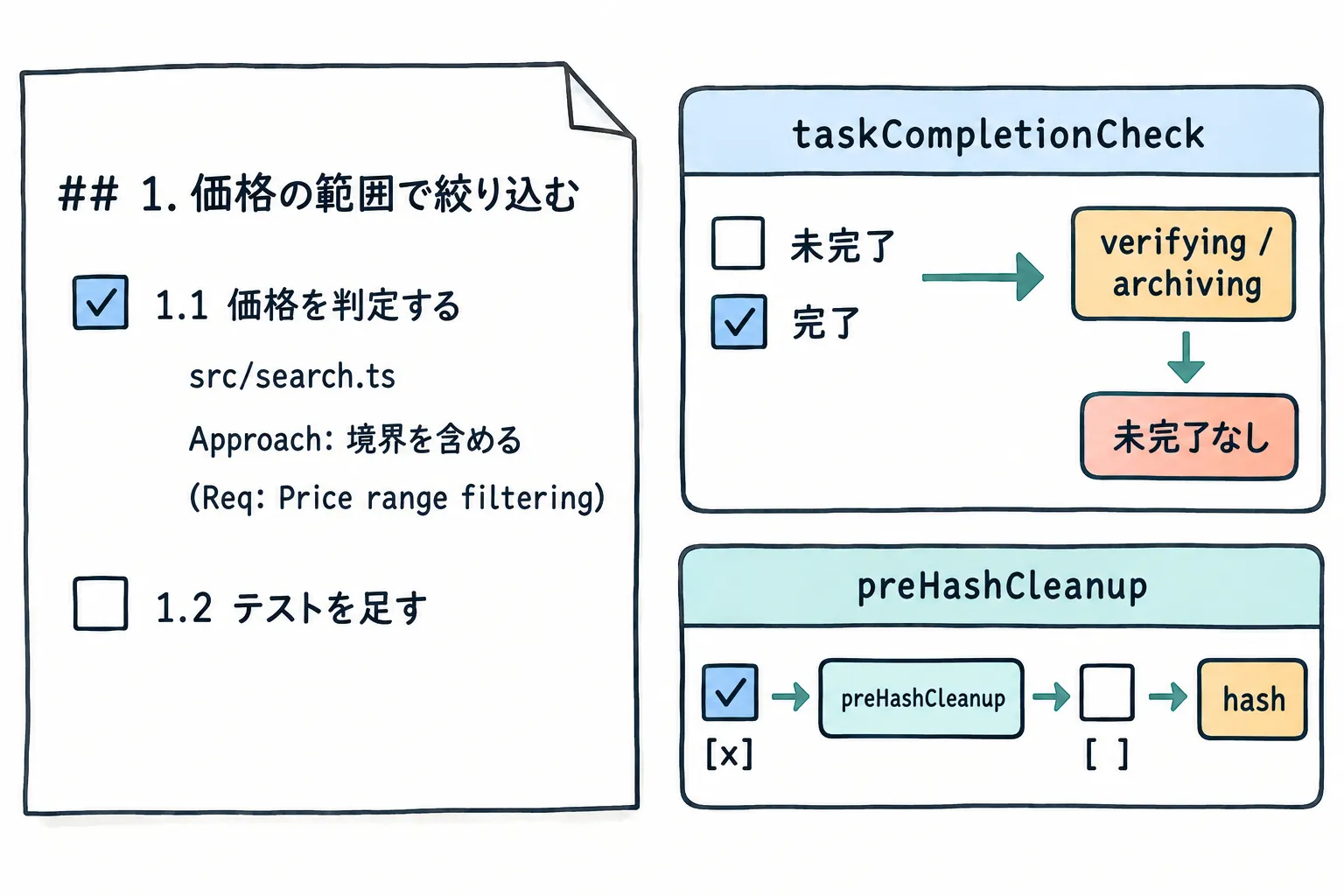
SpecD tracks checkbox lines: taskCompletionCheck counts - [ ] as incomplete and - [x] as complete.
To enter verifying or archiving, tasks must contain no incomplete lines.
However, preHashCleanup resets [x] to [ ] before hashing, so merely checking off a task does not count as a modification to tasks after validation.
Append newly discovered work as a new task or under a heading identifying it as additional work rather than rewriting an existing task.
Verification steps and lifecycle states
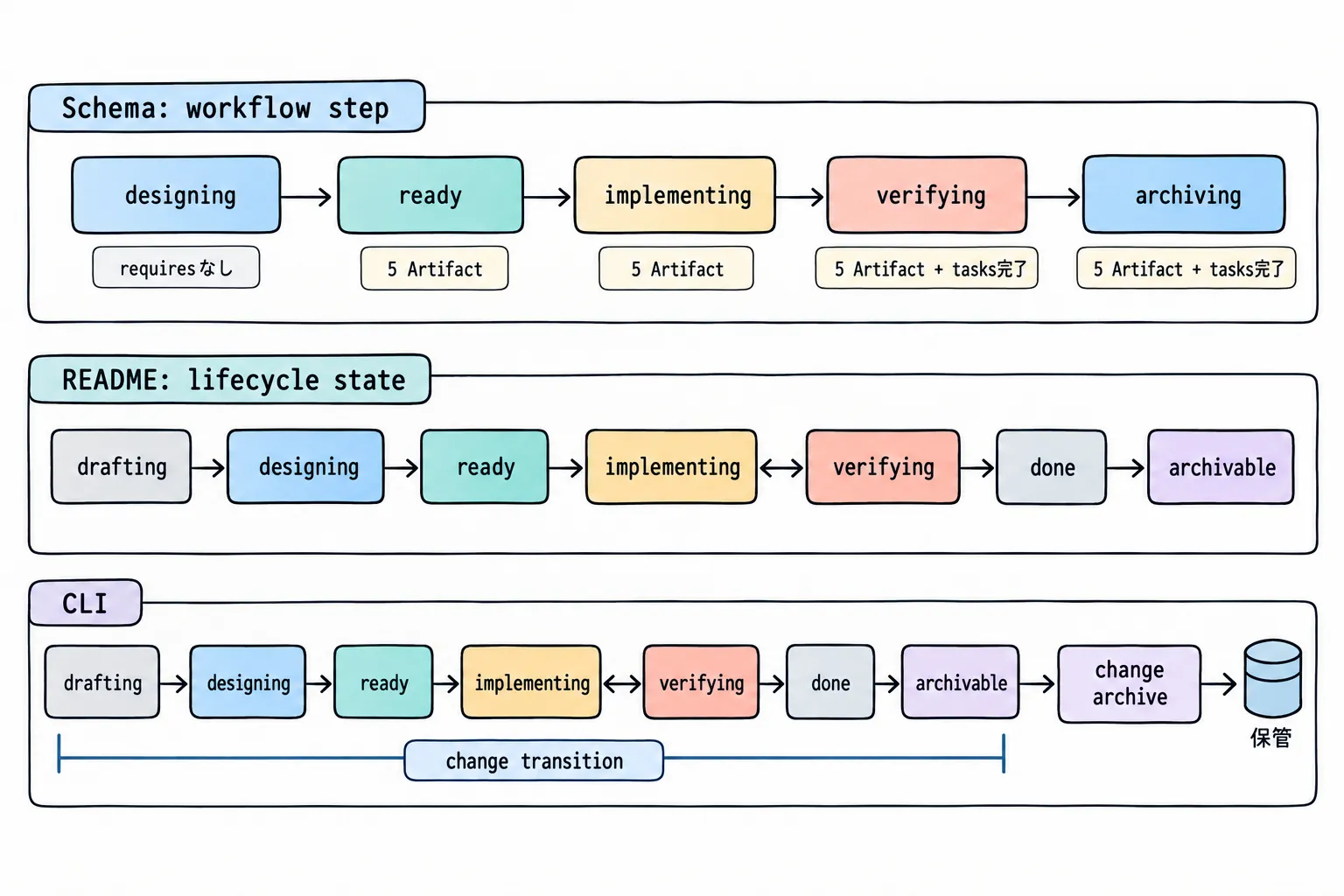
SpecD describes the progress of a change at three levels.
A workflow step in schema.yaml defines entry conditions; a lifecycle state in the README represents progress from drafting to archivable; and the CLI exposes operations such as change transition and change archive.
Even when the same name appears at multiple levels, these levels cannot be collapsed into one state table.
Approval gates introduce branches in the lifecycle.
Commands for putting a Change on hold or discarding it remove it from the active list, but differ in whether it can be restored.
Five verification steps defined by the Schema
The workflow in schema.yaml defines five verification steps: designing, ready, implementing, verifying, and archiving.
The requires list for designing is empty, while the other four steps require all five Artifacts.
verifying and archiving also require no incomplete tasks through requiresTaskCompletion: [tasks].
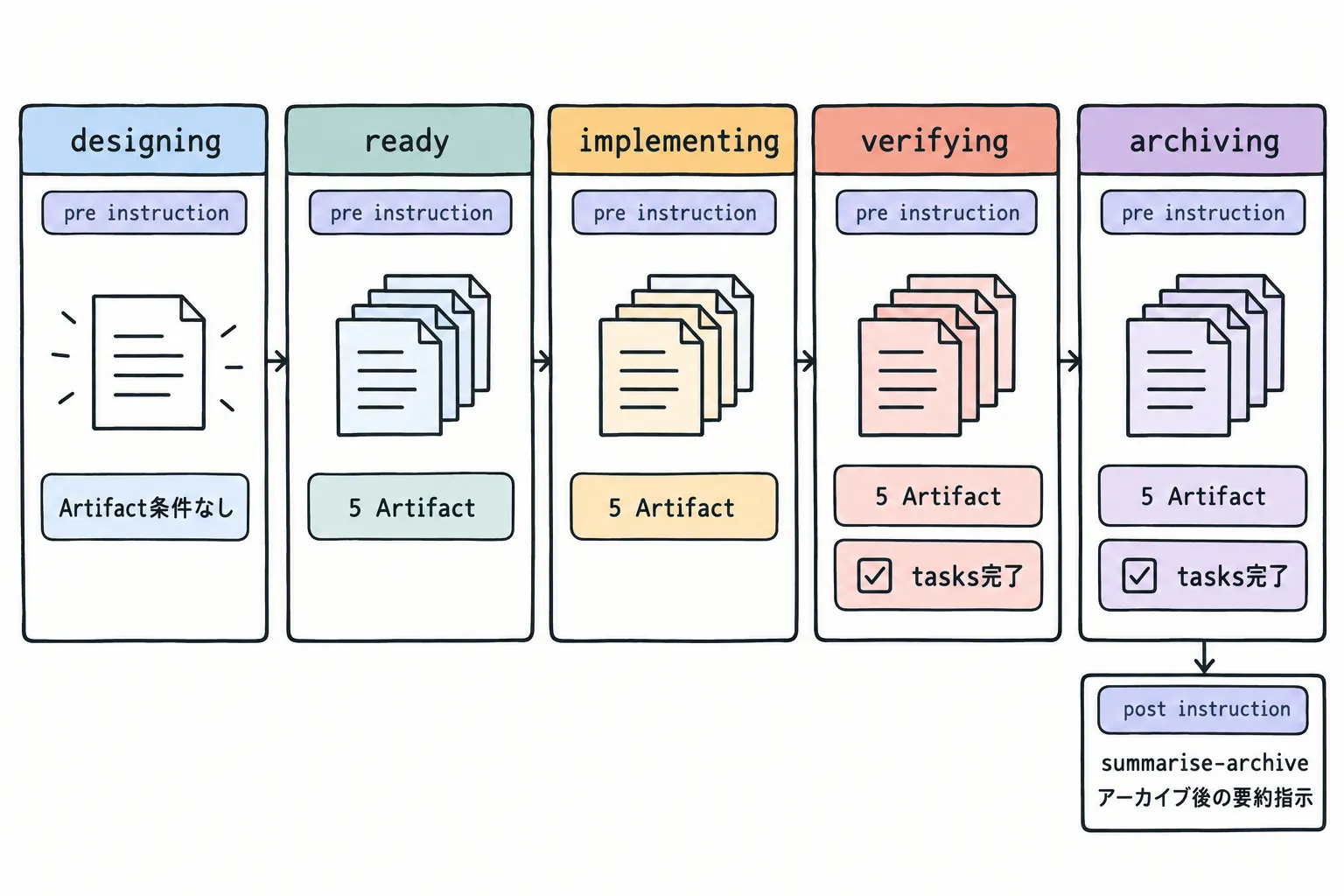
All five steps have pre-step instructions.
Only archiving has post-step instructions, returning summarise-archive to summarize the archived change.
The change lifecycle described in the README
The public README describes seven lifecycle states: drafting, designing, ready, implementing, verifying, done, and archivable.
A change can move back and forth between implementing and verifying. In verifying, compare the implementation with the relevant Specs and return to implementation if discrepancies or contradictions remain.
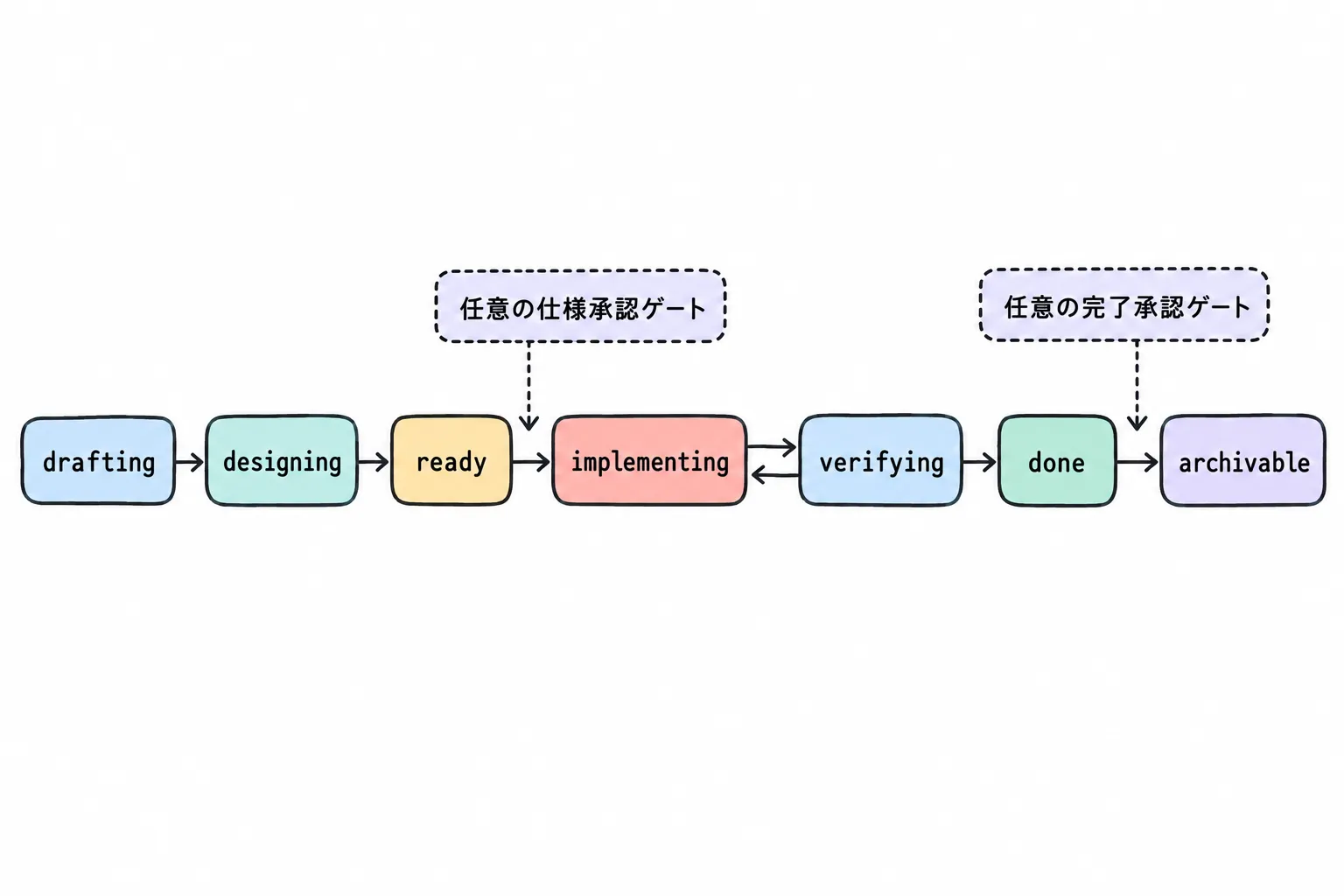
If optional approval gates are configured, branches awaiting approval appear between ready and implementing, and between done and archivable.
The README distinguishes mandatory verifying from optional approval gates.
Transitions and archiving in the CLI
change transition <name> [step] accepts an explicit destination <step>, or --next to advance by one step.
Passing both results in an error.
--next advances from drafting to designing, designing to ready, ready to implementing, implementing to verifying, verifying to done, and done to archivable.
To move from verifying back to implementing, specify the destination explicitly, as in change transition <name> implementing.
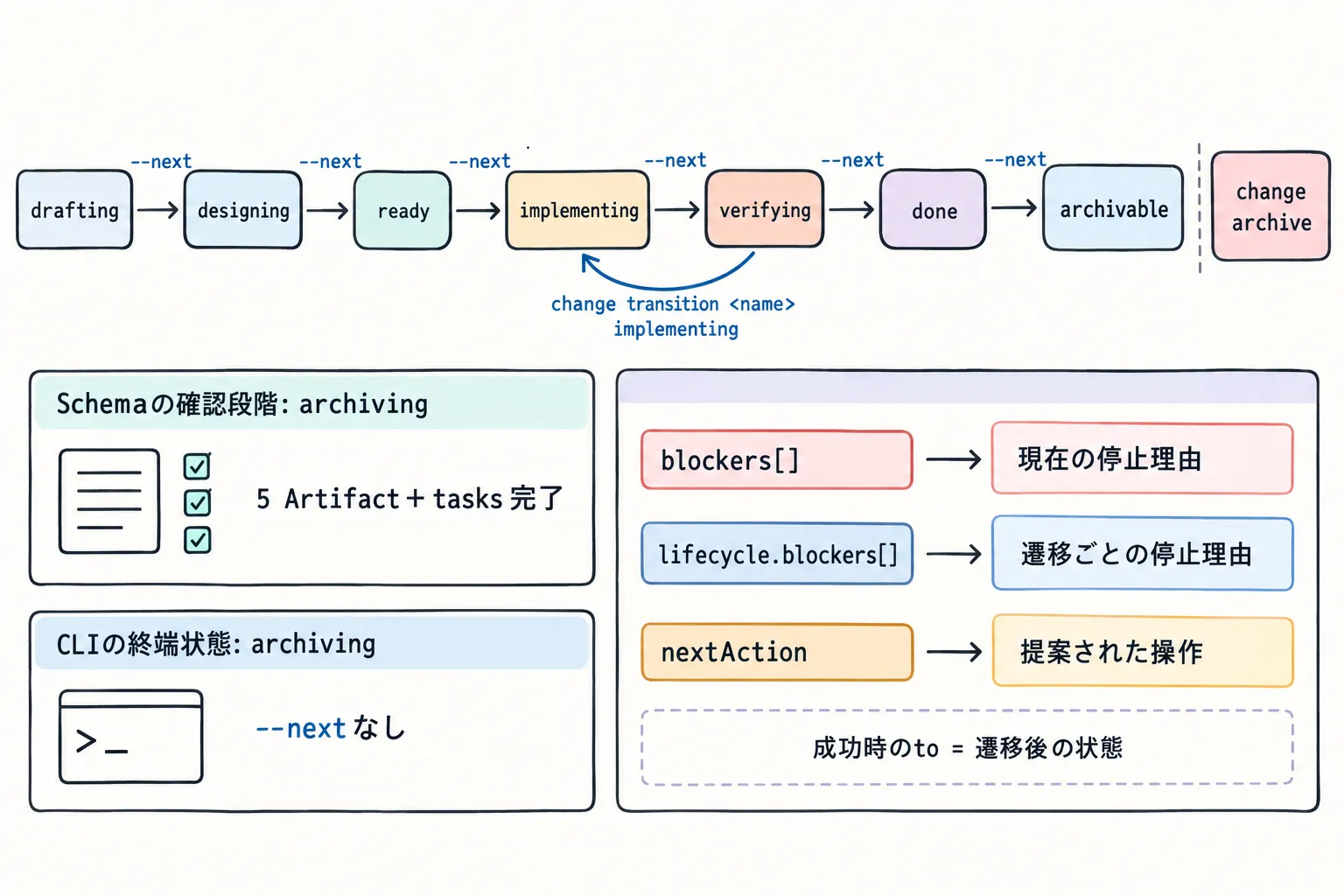
On success, the JSON returns from and to, where to is the actual state after the transition.
change status <name> --format json returns separate fields for blockers affecting the entire change, blockers for individual transitions, and suggested actions.
Decide which transition to request before proceeding and examine the returned values in the following order.
| Return location | Values to read | Decision |
|---|---|---|
Top-level blockers[] |
• code• message |
Identify blockers affecting the entire change. |
lifecycle.validTransitions[] and availableTransitions[] |
Whether the requested destination is valid and currently available | Do not transition if the requested destination is absent. |
lifecycle.blockers[] |
• transition matching the requested destination• reason• blocking |
Stop the requested transition only if a blocker remains for that transition. |
nextAction |
• targetStep• actionType• reason• command |
• Examine the reason.• Decide whether to follow the suggestion. |
Do not treat a lifecycle.blockers[] entry that applies only to another transition as a blocker for the transition you intend to request.
If nextAction.command is null, use the reason to decide whether to fix Artifacts, specify a destination explicitly, or stop work.
When a transition fails, the text format displays a repair guide.
The JSON separates the following fields and the CLI exits with code 1.
-
result: failureIndicates that the transition failed.
-
fromandtoIdentify the previous state and the requested destination.
-
blockersExplain what blocked the transition.
-
nextActionIdentify the action suggested after the failure.
After a failure, use the same approach: distinguish current blockers, blockers for the requested transition, and suggested actions.
From archivable, --next cannot advance and returns archiving is not a lifecycle transition.
Archiving is handled by the separate change archive command, and the CLI treats archiving as a terminal state.
The Schema verification step archiving requires all five Artifacts and completed tasks, whereas archiving as a terminal CLI state is not a state from which --next advances.
Approval gates and transition destinations
The status fields approvalGates.specEnabled and approvalGates.signoffEnabled indicate whether the specification approval and sign-off gates are enabled.
If specification approval is disabled, --next from ready returns to: implementing and advances directly.
If enabled and the result is to: pending-spec-approval, stop there; after approval, --next advances from spec-approved to implementing.
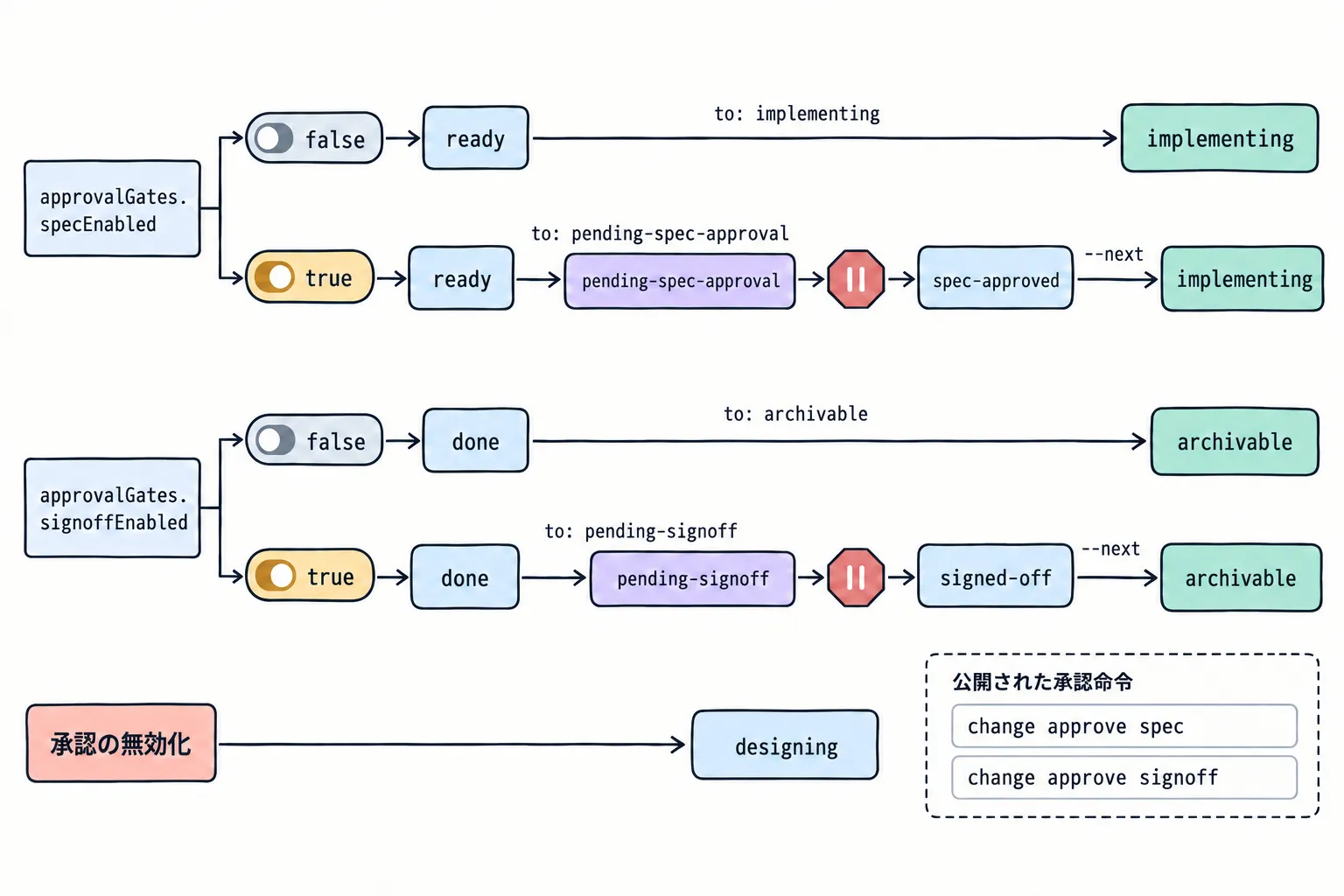
If sign-off is disabled, --next from done returns to: archivable.
If enabled and the result is to: pending-signoff, stop there; after approval, --next advances from signed-off to archivable.
Because @specd/core determines which transitions enter approval-pending states, examine approvalGates together with the actual to value.
Both approval invalidation through change edit and a transition back from archivable return the affected Change to designing.
The CLI reports the former as warning: approvals invalidated — change rolled back to designing and invalidated: true in JSON.
change approve spec <name> --reason <text> and change approve signoff <name> --reason <text> are published commands.
This article does not cover gate configuration, operating conditions, approvers, or the verification and management of approval records.
Putting a change on hold or discarding it
change draft <name> puts a change on hold as a draft and removes it from the active list.
Restore a change on hold to the active list using drafts restore <name>.
change discard <name> --reason <reason> moves a change to discarded and requires a nonempty reason.
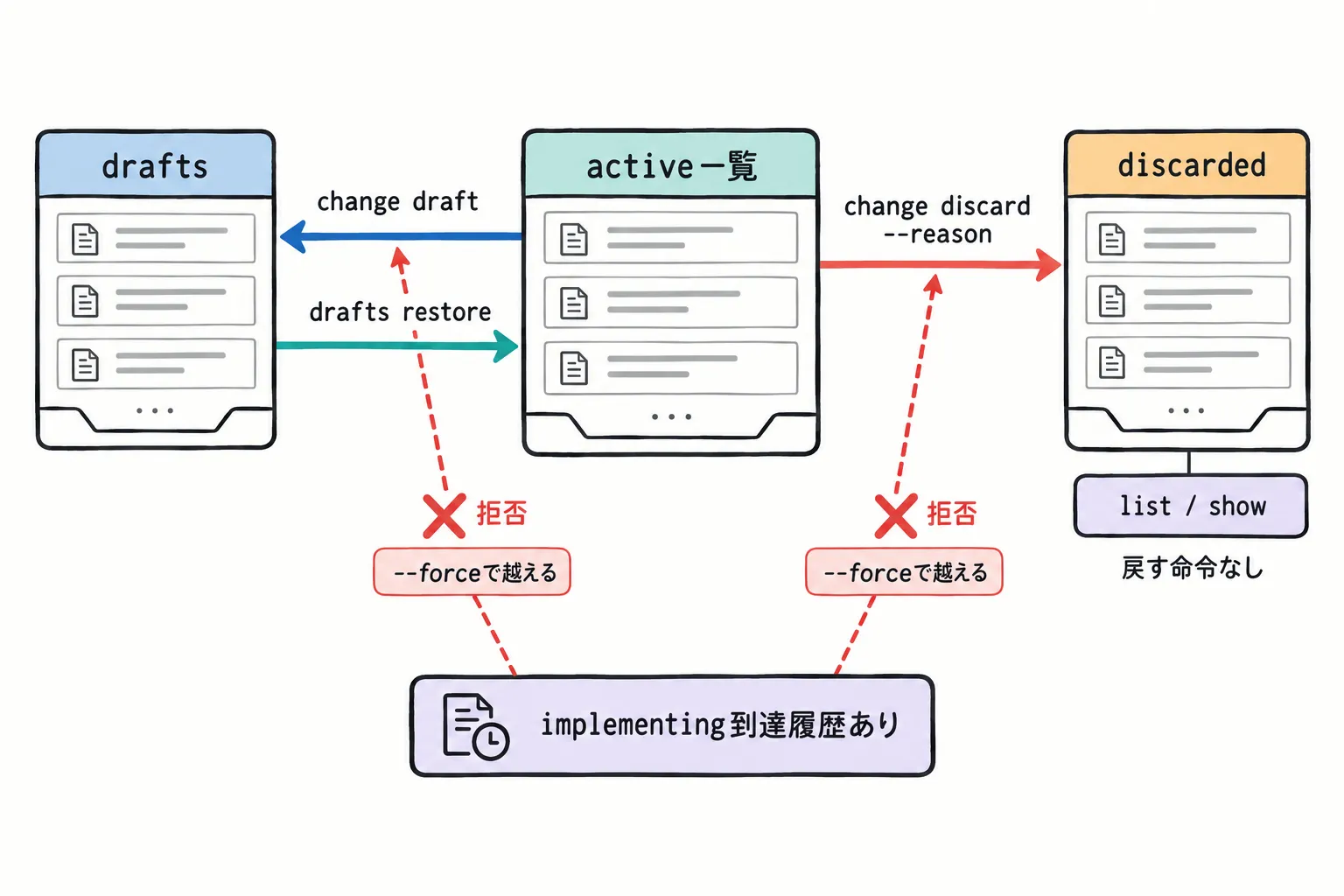
Discarded changes can be inspected with discarded list and discarded show, but there is no restore command.
Both drafting and discarding are rejected for changes that have previously reached implementing.
This restriction prevents discrepancies between code and specifications; it can be overridden only by supplying --force.
Agent instructions and structural validation
The information SpecD gives an agent and the conditions it checks mechanically are separate mechanisms.
The agent receives compiled context covering the relevant Specs, instructions and rules for writing Artifacts, and instruction hooks to read before and after verification steps.
Mechanical checks cover the exit codes of command hooks, the structure of document headings and Deltas, and whether an Artifact has changed since validation.
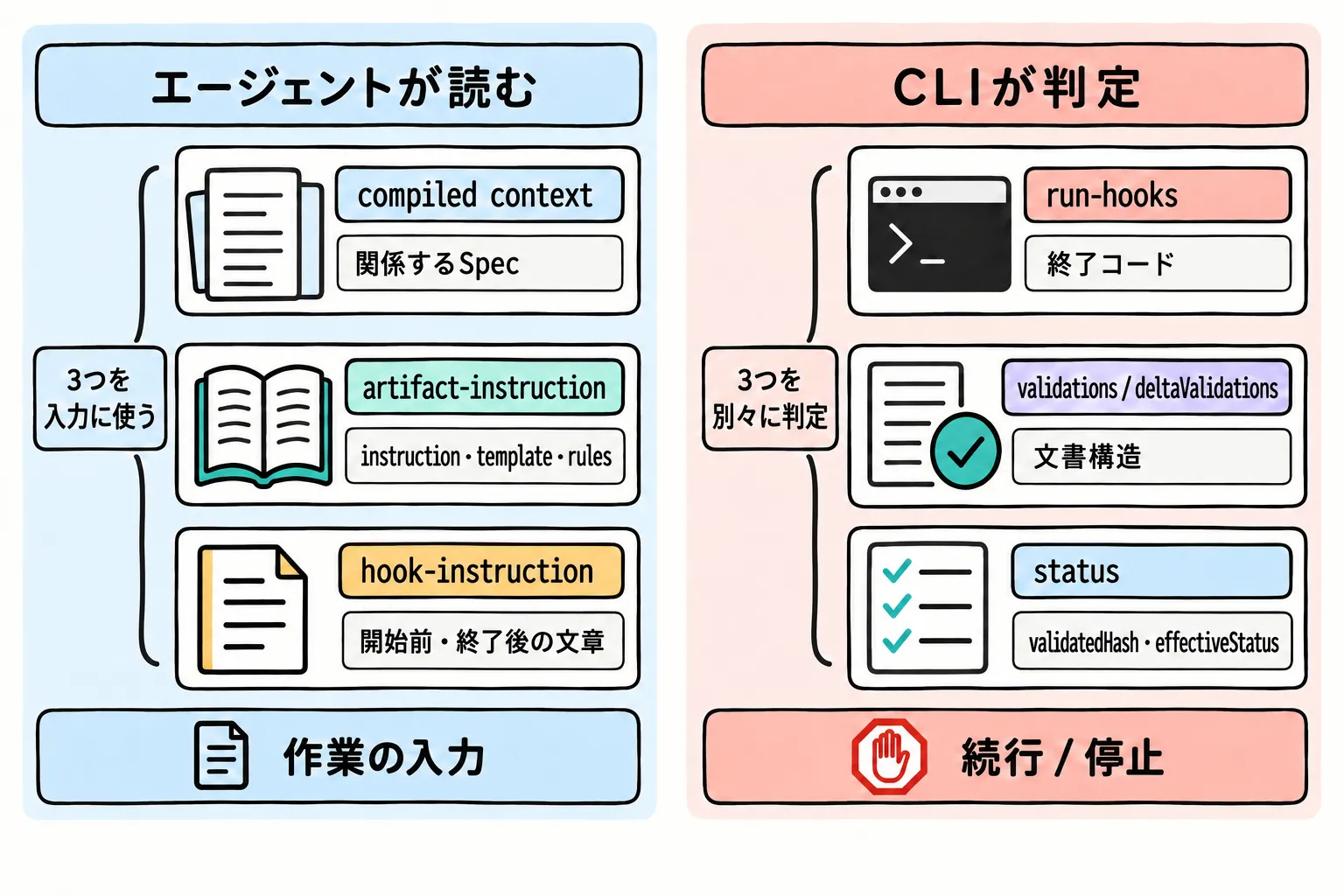
Compiled context and written instructions serve as inputs to the work. Command hooks, structural validation, and change detection can block further work.
Assembling compiled context
Examine compiled context in three parts: how target Specs are selected, the sources and uses of metadata extraction, and what can be observed directly through the CLI.
The public README describes target resolution and context assembly, the standard Schema declares what to extract from documents, and the CLI defines the contract for its public return values.
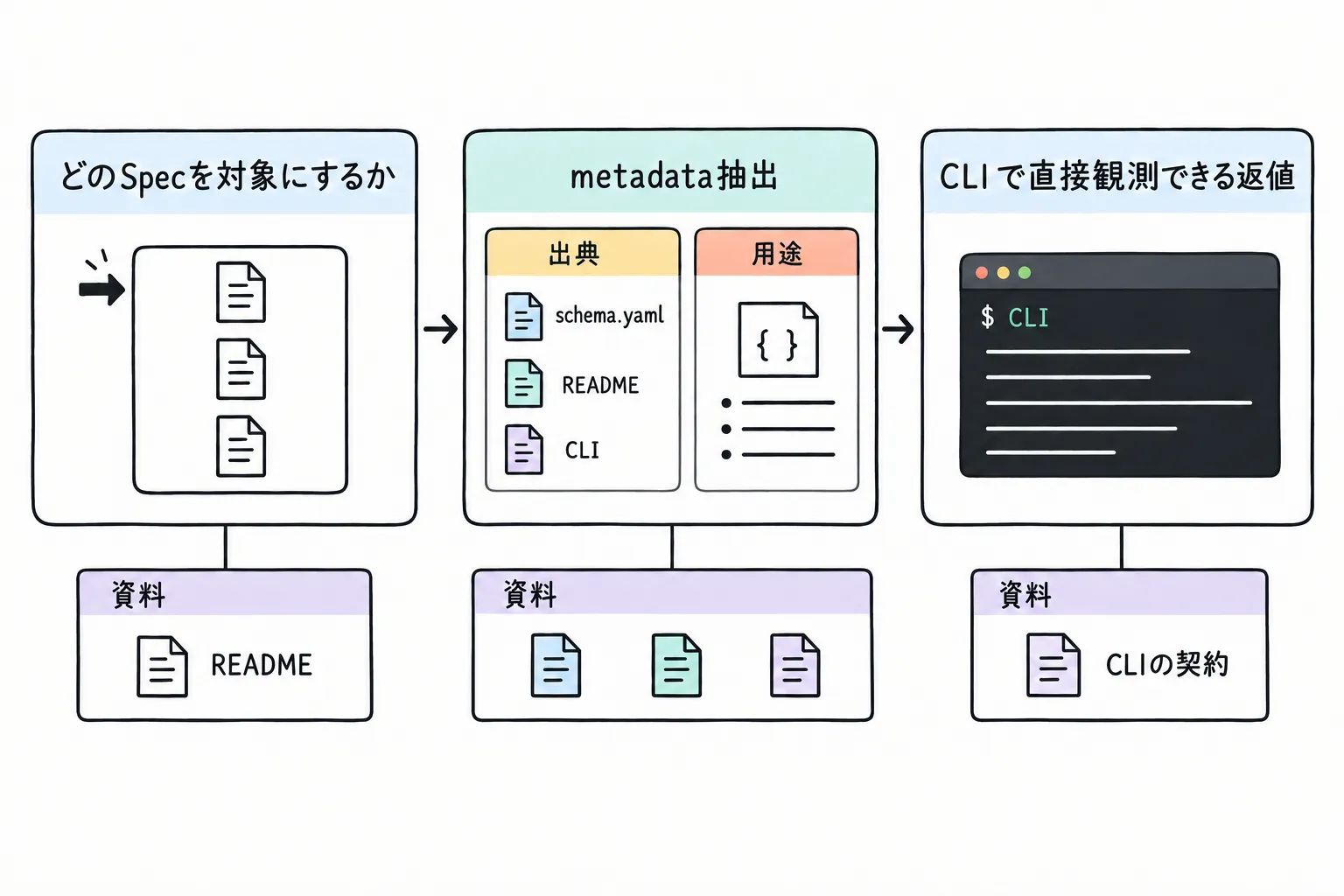
The target selection and information assembly described by the README are distinct from the scope of the JSON fields exposed by the CLI.
Selecting target Specs
According to the public README, project-level and Workspace-level inclusions and exclusions are applied first.
The five-stage process then follows dependsOn transitively and finally assembles the information.
The CLI option --include-change-specs, which starts from the specification IDs targeted by the change, defaults to false.
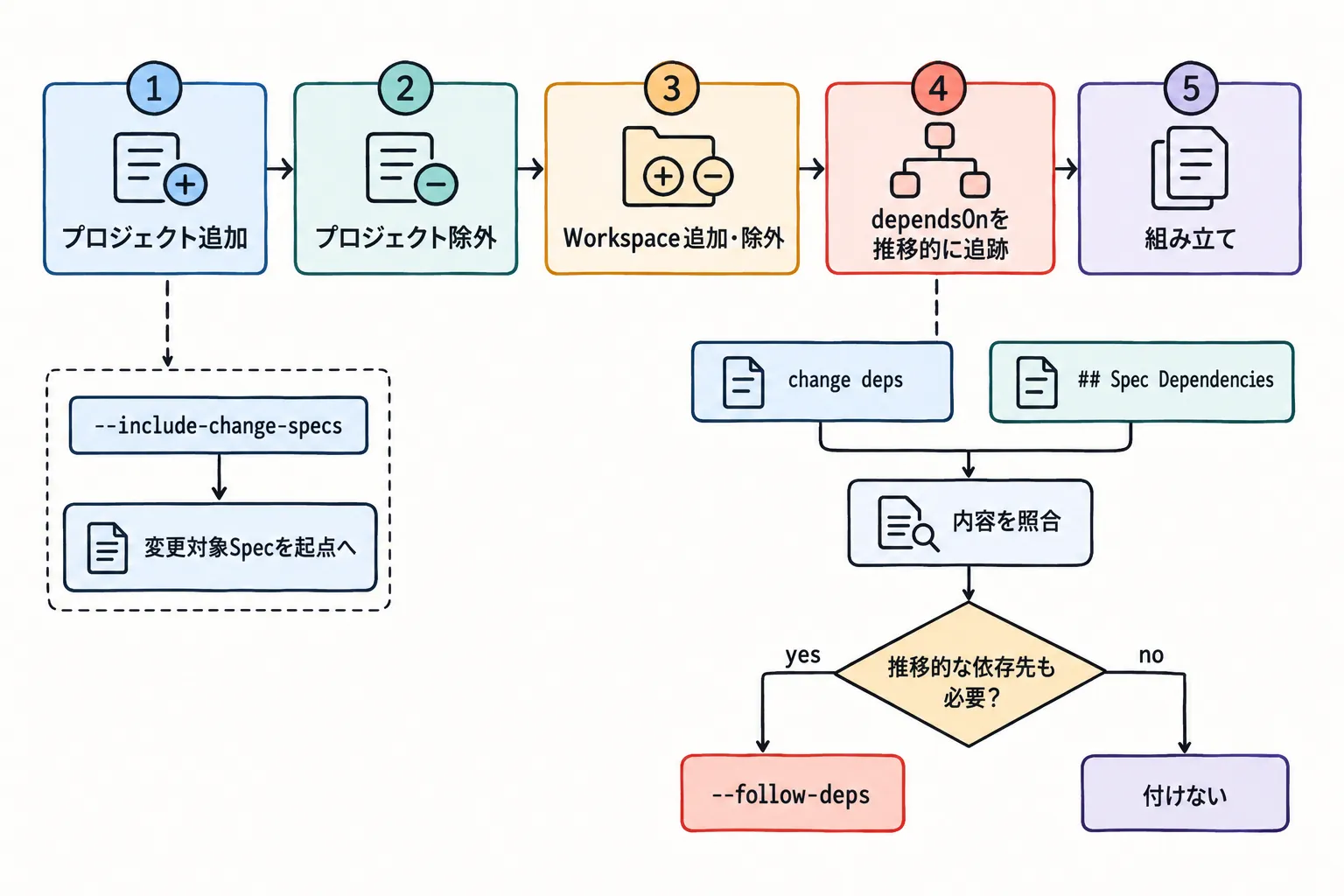
Running change context <name> designing --include-change-specs --format json also adds the target Specs of the change to the candidates.
Do not always enable --follow-deps. First confirm that change deps and the specification's ## Spec Dependencies section list the same dependencies, and add the flag only if transitive dependencies are also needed.
Sources and uses of metadata extraction
The standard Schema declares metadata extraction in metadataExtraction.
The mapping from extraction sources to destinations is as follows.
| Source | Destination |
|---|---|
H1 of the Spec |
title |
## Purpose |
description |
## Spec Dependencies |
dependsOn |
### Requirement: directly under ## Requirements |
rules |
List items under ## Constraints |
constraints |
Labels of #### Scenario: and their parent ### Requirement: in verify |
scenarios• name• requirement |
Input clauses GIVEN, WHEN, and THEN in verify |
scenarios• given• when• then |
Only scenarios is extracted from verify rather than the Spec document, mapping uppercase input clauses to lowercase destination keys.
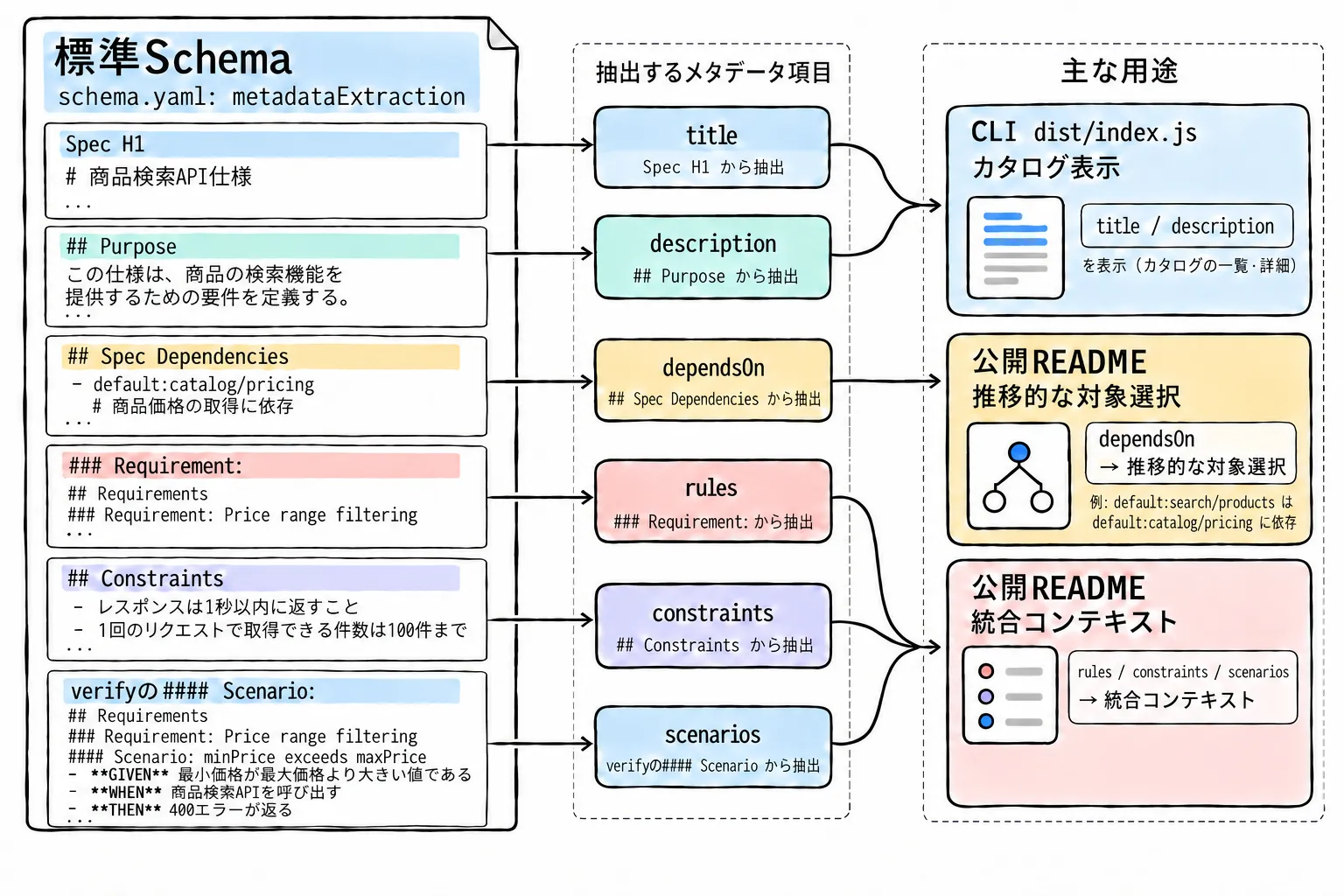
The sources differ in how they describe the use of extracted metadata. The mapping of extracted fields to their uses is as follows.
| Field | Use |
|---|---|
title |
CLI catalog display for target specifications |
description |
CLI catalog display for target specifications |
dependsOn |
Transitive dependency traversal described in the public README |
rules |
Compiled context assembly described in the public README |
constraints |
Compiled context assembly described in the public README |
scenarios |
Compiled context assembly described in the public README |
If the rules, constraints, or scenarios metadata used to assemble compiled context is stale or absent, the Spec body is used instead.
metadataExtraction defines the extraction source for each field, while the CLI and README separately describe where the extracted values are used.
CLI responses and conditions for direct observation
change context <name> <step> --format json returns different results for an initial request without a fingerprint and a subsequent request with the previous fingerprint.
If the initial request returns status: changed, it includes the eight fields in the following table.
When the fingerprint of the same content is supplied through --fingerprint <hash> and the status is status: unchanged, projectContext and specs are omitted.
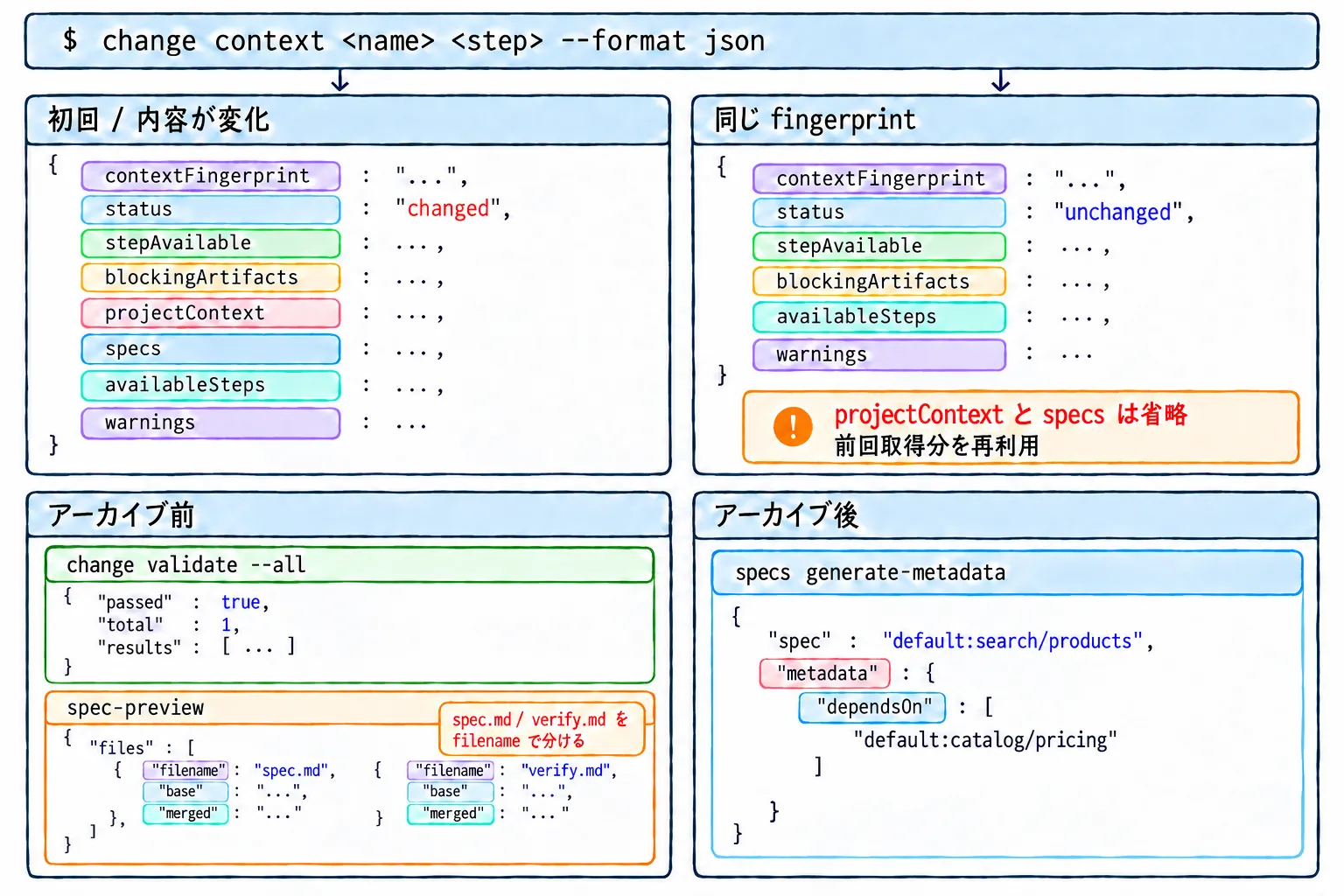
Use the returned values to make the following decisions.
| Returned fields | Decision |
|---|---|
contextFingerprint and status |
Pass the fingerprint to the next --fingerprint request and reuse the previously retrieved content if the status is unchanged. |
stepAvailable and blockingArtifacts |
Check whether the requested verification step is available and which Artifacts are missing. |
projectContext and specs |
Read them only when status: changed and confirm that they contain the project instructions and target Specs. |
availableSteps and warnings |
Choose an available verification step and use the warnings to decide whether to continue or stop. |
Do not treat the omission of specs under status: unchanged as a missing-field error.
Retrieve Artifact instructions separately through artifact-instruction and verification-step hooks through hook-instruction.
If the step is not yet available, warning: step '<step>' is not yet available is written to standard error. The text output directs the reader to spec-preview for specifications under change that are not included in full.
The following values guide decisions before archiving.
| Command | Values to read | Decision |
|---|---|---|
change validate --all |
• passed• total• results |
Check whether structural validation passed and inspect the result for each target specification. |
spec-preview |
• files[].filename• files[].base• files[].merged |
Select the required file and inspect its contents before and after the Delta is applied. |
In spec-preview, distinguish filename: spec.md from filename: verify.md when reading merged.
The public CLI accepts a missing base, null, or a string. To compare before and after, confirm that the target file exists and that both base and merged are strings.
Inspect ## Spec Dependencies in merged for spec.md.
change context does not establish a contract to directly return metadata outside the eight fields of its public schema as named values.
The CLI shapes the JSON of change validate --all into the fields in the table, so the response does not include extracted metadata values.
By contrast, the normal JSON output of spec-preview passes through the result of an external operation.
The CLI's use of the file information in the table can be confirmed, but the three public distributions alone cannot establish the complete return type or whether metadata is present.
Therefore, before archiving, inspect ## Spec Dependencies in merged for filename: spec.md.
After archiving, metadata.dependsOn can be observed directly in metadata, alongside spec, which specs generate-metadata default:search/products --format json explicitly returns.
Instructions for agents creating artifacts
artifact-instruction <name> [artifact-id] returns five kinds of information for the agent to read about a candidate or specified Artifact.
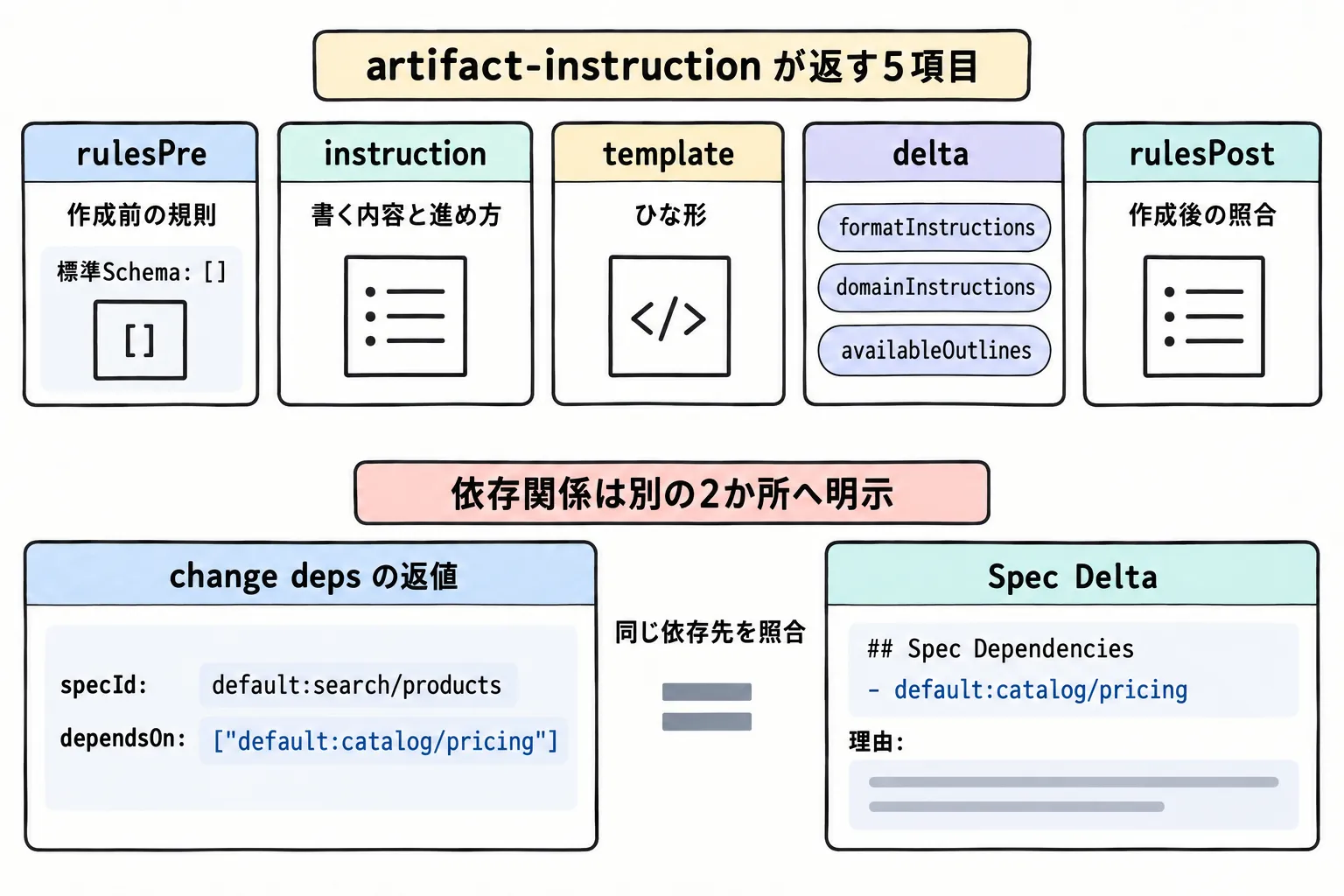
| Returned field | Information for the agent |
|---|---|
rulesPre |
Rules to follow before creation |
instruction |
What to write in the Artifact and how to proceed |
template |
Template for starting the file |
delta |
Information for modifying an existing Spec• formatInstructions• domainInstructions• availableOutlines |
rulesPost |
Rules for checking correspondence and unresolved issues after creation |
When the standard Schema is used without changes through schemaOverrides, rulesPre is an empty array.
The rulesPost for proposal requires the agent to stop before writing specs and design if unresolved questions affect downstream Artifacts, until the questions are resolved with the user.
The rulesPost for design similarly requires stopping before tasks if unresolved questions affect implementation tasks.
The standard Schema requires ## Spec Dependencies in every Spec and requires a Delta to update that section when a new dependency is introduced.
The CLI distinguishes the dependent specification from its dependency. Register the dependency with specd change deps price-filter default:search/products --add default:catalog/pricing --format json.
The options for modifying dependencies are as follows.
-
--add <id>Adds the specified dependency and can be repeated.
-
--remove <id>Removes the specified dependency and can be repeated.
-
--set <id>Replaces the dependencies with the specified list and can be repeated.
At least one option is required, and --set cannot be combined with the other two.
On success, confirm that specId is the dependent default:search/products and dependsOn is an array of strings containing default:catalog/pricing.
Keep the CLI record and specification section aligned by explicitly listing the same dependency in change deps and the Delta for ## Spec Dependencies.
Other rulesPost instruct the agent to check the relationships from proposal to specs, from specs to verify and design, and from design to tasks.
Hooks returning instructions and hooks executing commands
The CLI command schema show displays three hook types: run with a command, instruction with text, and external.
All hooks in the standard Schema verification steps are instruction hooks. They provide text before each of the five steps and after archiving only.
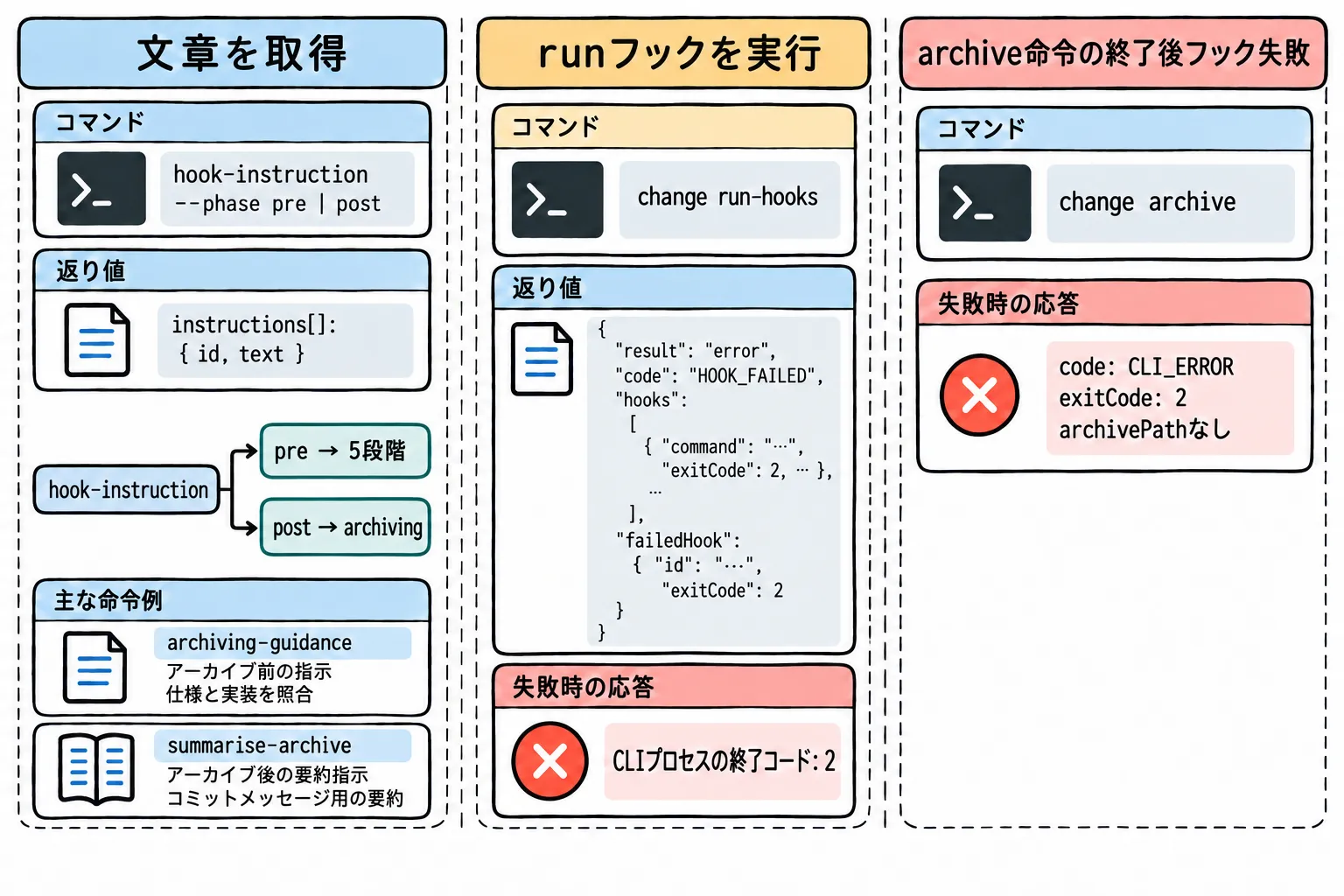
The pre-archive instruction archiving-guidance requires checking the deltas against the implementation and updating the Spec before archiving if they disagree.
The post-archive summary instruction summarise-archive asks for a commit-message summary of the created or modified Specs and their main Requirements.
change hook-instruction <name> <step> --phase pre|post only returns instructions as pairs of id and text; it does not execute commands.
Command-based run hooks are executed by change run-hooks <name> <step> --phase <pre|post>.
Read the following values in each element of hooks[].
-
commandThe command that was executed.
-
exitCodeThe exit code of the hook.
-
successWhether the hook succeeded.
If there are no applicable hooks, hooks is an empty array.
If at least one fails, the root JSON returns result: error and code: HOOK_FAILED, but no root-level exitCode.
The executed hooks' exit codes appear in hooks[].exitCode and, when present, failedHook.exitCode. After emitting the JSON, the CLI process exits with code 2.
The standard Schema has no run hooks, so run-hooks has nothing to execute when only the standard Schema is used.
The values accepted by --skip-hooks differ by command.
| Command | Accepted values |
|---|---|
change transition |
• source.pre• source.post• target.pre• target.post• all |
change archive |
• pre• post• all |
The text output of change transition displays hook start and finish events, along with their commands and exit codes.
change archive returns exit code 2 if a post-archive execution hook fails.
The public CHANGELOG records a fix allowing post-step instructions to be retrieved even after a Change has been moved.
Structural document validation
validations checks the following headings.
| Target | Headings checked |
|---|---|
specs |
• Purpose• Requirements• Requirement |
verify |
• Requirements• Requirement• Scenario |
The deltaValidations for verify checks whether added and modified operations include #### Scenario:.
The standard Schema requires ## Spec Dependencies in every Spec, with dependencies written as canonical specification IDs including Workspace names and the reasons for them.
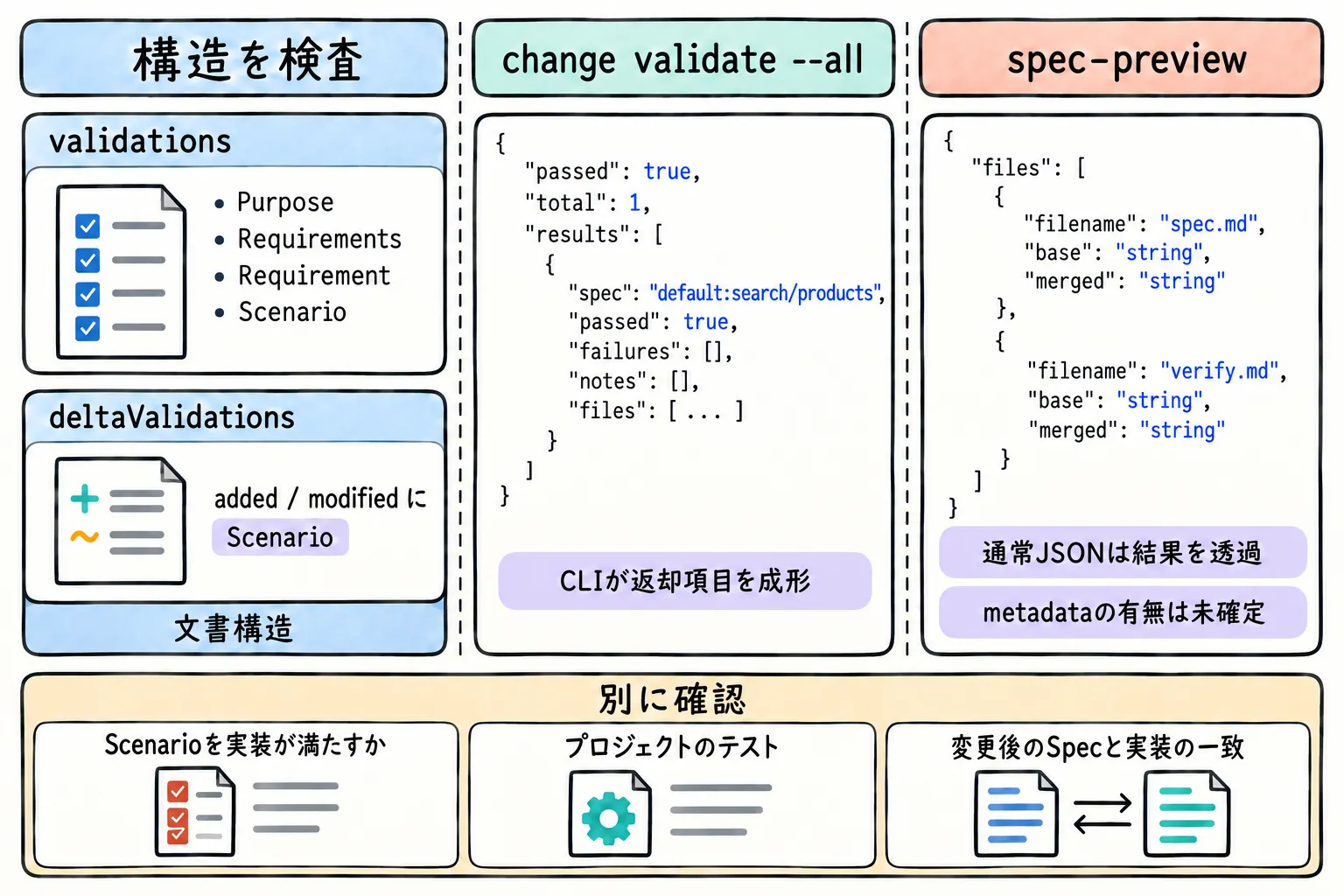
change validate <name> --all --format json returns the following values.
| Return location | Values to read |
|---|---|
| Root | • passed• total• results |
Each element of results |
• spec• passed• failures• notes• files |
total is the number of specification IDs validated, and each element of results corresponds to one specification ID.
If any validation fails, the overall result is passed: false and the CLI exits with code 1.
The CLI selects only the fields in the table from the underlying validation results to construct this JSON, so extracted metadata values are not included.
The text output includes note: validation is structural; review artifact content separately before relying on it.
The normal JSON output of change spec-preview <name> <specId> passes through the result of an external operation.
The CLI selects the required file by filename, confirms that merged is a string, and distinguishes spec.md from verify.md.
To compare before and after, also require base to be a string.
Since the three public distributions alone do not establish the full return type or whether metadata is present, pre-archive checks use the contents of files[].
For dependency checks before archiving, read ## Spec Dependencies in merged for filename: spec.md. Check the verification conditions in merged for filename: verify.md.
Structural validation covers document structure and whether metadata can be extracted. It does not determine whether the implementation satisfies the scenarios, project tests pass, or the changed specifications agree with the implementation.
Detecting changes after validation
The artifacts field of change status <name> --format json returns the validatedHash of each file and the effectiveStatus of each Artifact.
The JSON returns effectiveStatus without selecting individual values.
The CLI distinguishes the following seven values in its text output.
effectiveStatus |
Display symbol |
|---|---|
complete |
[✓] |
skipped |
[✓] |
missing |
[ ] |
drifted-pending-review |
[!] |
pending-review |
[~] |
pending-parent-artifact-review |
[~] |
in-progress |
[?] |
Values outside this list also use [?], so these seven values should not be treated as the complete type returned by @specd/core.
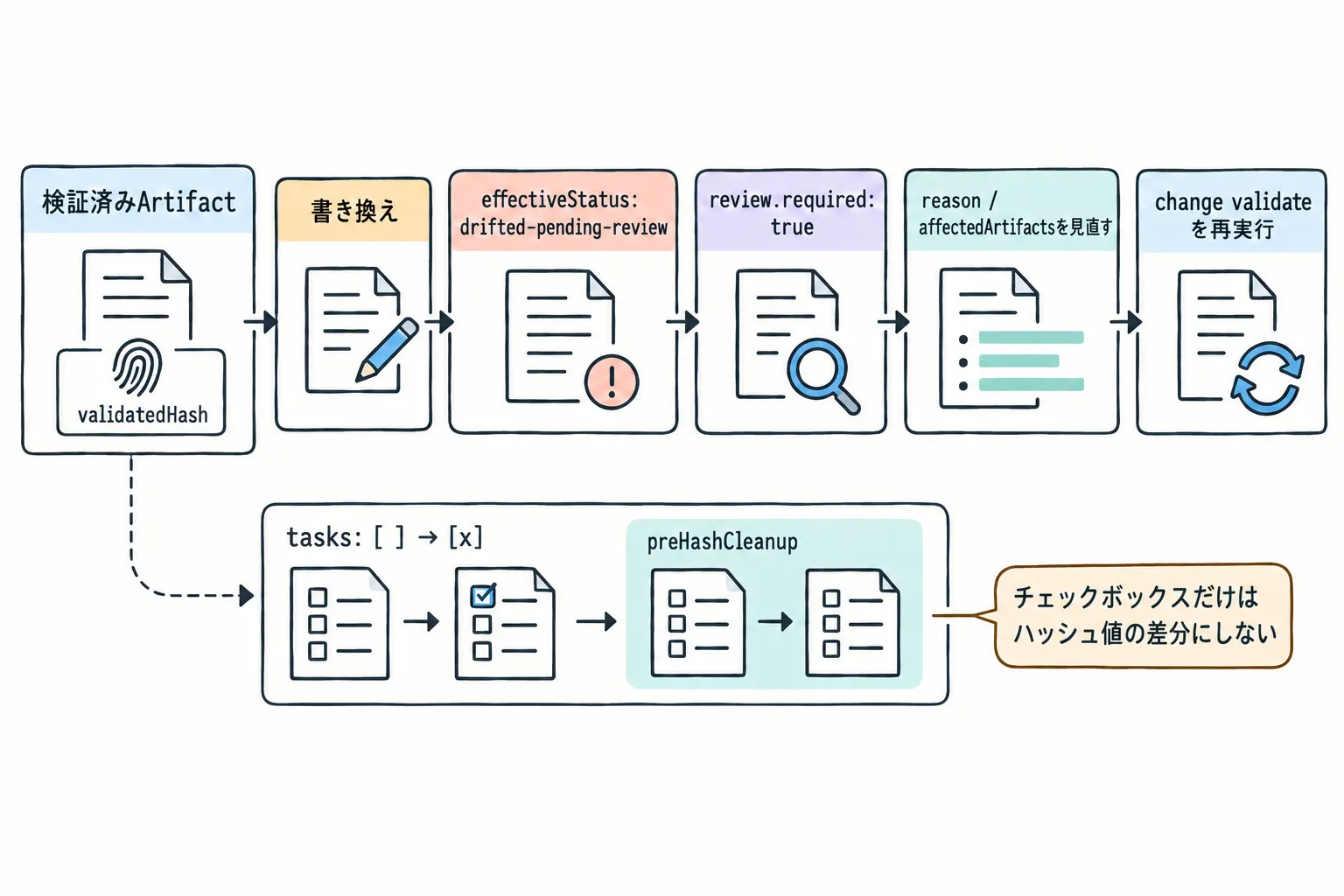
According to the public CHANGELOG, an Artifact that requires review after an external change is marked as drifted, and only that Artifact and its downstream dependents are invalidated.
SpecD detects modifications by comparing the validated and current hashes, but normalizes the checkbox states in tasks through preHashCleanup.
If review.required is true, review the targets indicated by reason and affectedArtifacts, rerun change validate, and then proceed.
If change edit invalidates approvals and rolls the change back to designing, it displays warning: approvals invalidated — change rolled back to designing.
CLI inputs and outputs
The CLI calls @specd/core and formats the results as text, json, or toon on standard output.
Use --format json for commands that inform branching decisions, and text for human-readable guidance.
Although toon is also supported, the examples here do not use it to check public fields.
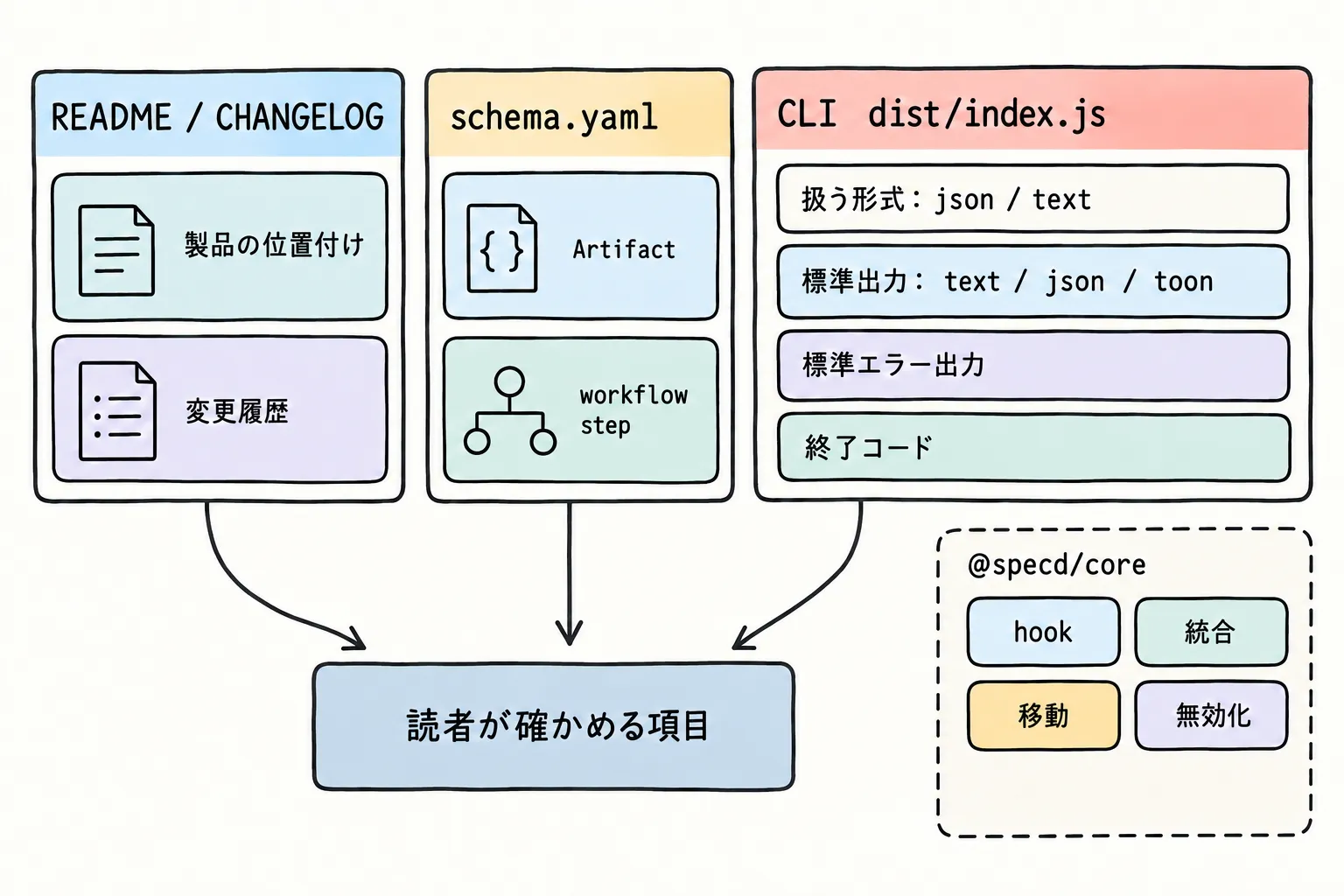
When examining return values, use the README and CHANGELOG as evidence for the product's positioning and change history, schema.yaml for Artifacts and verification steps, and the CLI's dist/index.js for command inputs and output formats.
Standard error and exit codes
The CLI writes command results to standard output.
Nonfatal warnings are written to standard error with a warning: prefix. If the operation succeeds, the exit code is 0.
However, whether to continue after receiving a warning: depends on the type of warning.
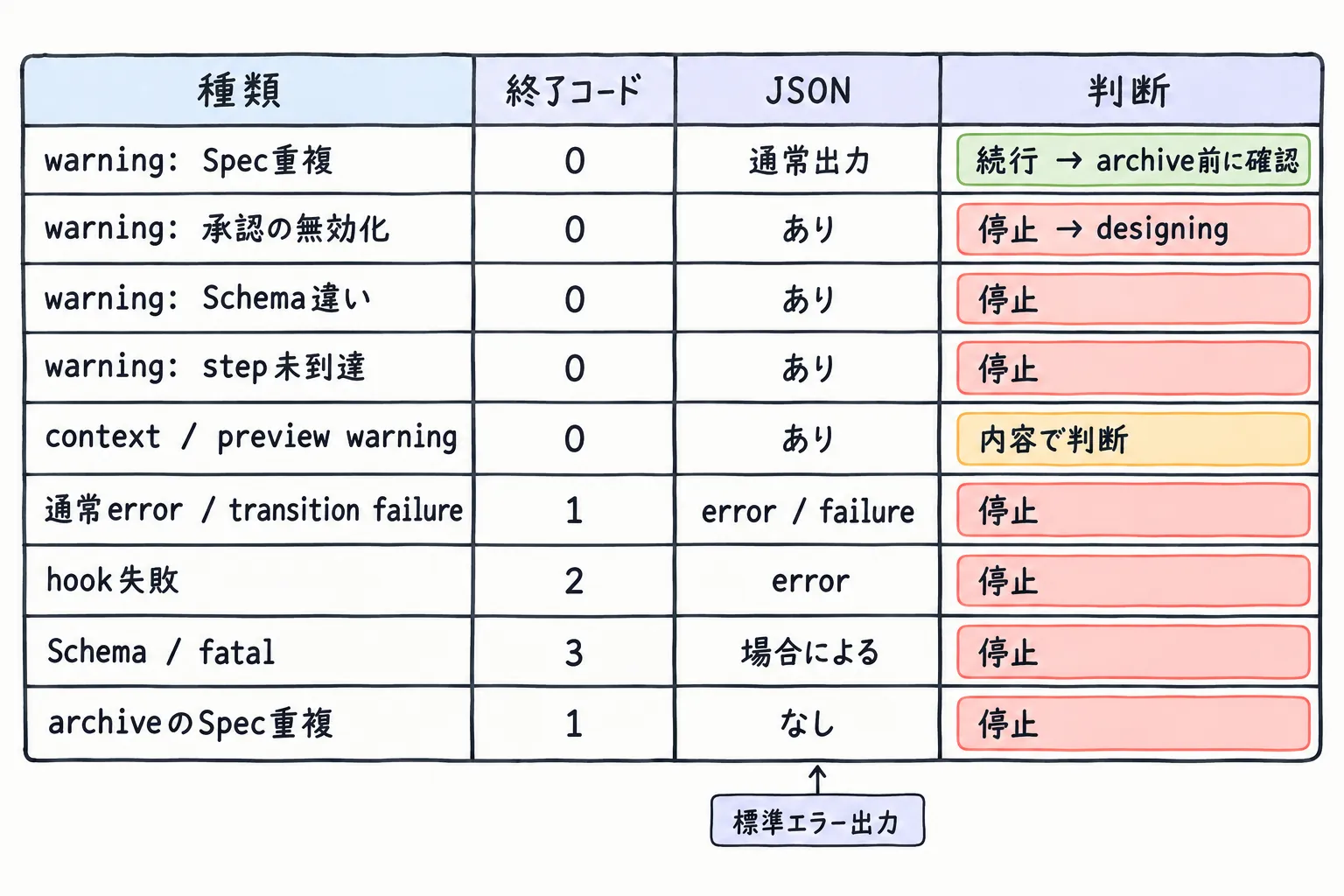
If change create or change edit warns that another Change targets the same Spec, creation or editing continues.
Remaining overlaps block archiving, so check them before archiving using change check-overlap.
By contrast, stop on warnings that approvals were invalidated and the change returned to designing, that the current Schema differs from the one used at creation, or that the step is not yet available.
Read context warnings and spec-preview warnings, and stop if the expected Spec is absent from specs or merged.
Ordinary errors are written to standard error with error:.
With --format json, the following fields are also written to standard output.
-
result: errorIndicates an error result.
-
codeIdentifies the error type.
-
messageDescribes the error.
-
exitCodeIndicates the CLI process exit code.
Ordinary errors and rejections after reaching implementing use exit code 1, hook failures use 2, and missing or invalid Schemas use 3.
Exit code 3 is accompanied by fatal:. Unexpected errors also terminate with fatal: and exit code 3, but the latter do not emit JSON.
Transition failures and overlapping specifications during archiving both use exit code 1, but their outputs differ.
A transition failure returns result: failure in JSON, whereas an overlap is reported only to standard error, without JSON.
Stop on error:, fatal:, or any nonzero exit code.
Being able to parse standard output as JSON is also a condition for continuing.
Basic workflow
When progressing through a Change, check the information passed to subsequent work and the decision to continue or stop at seven handoff points.
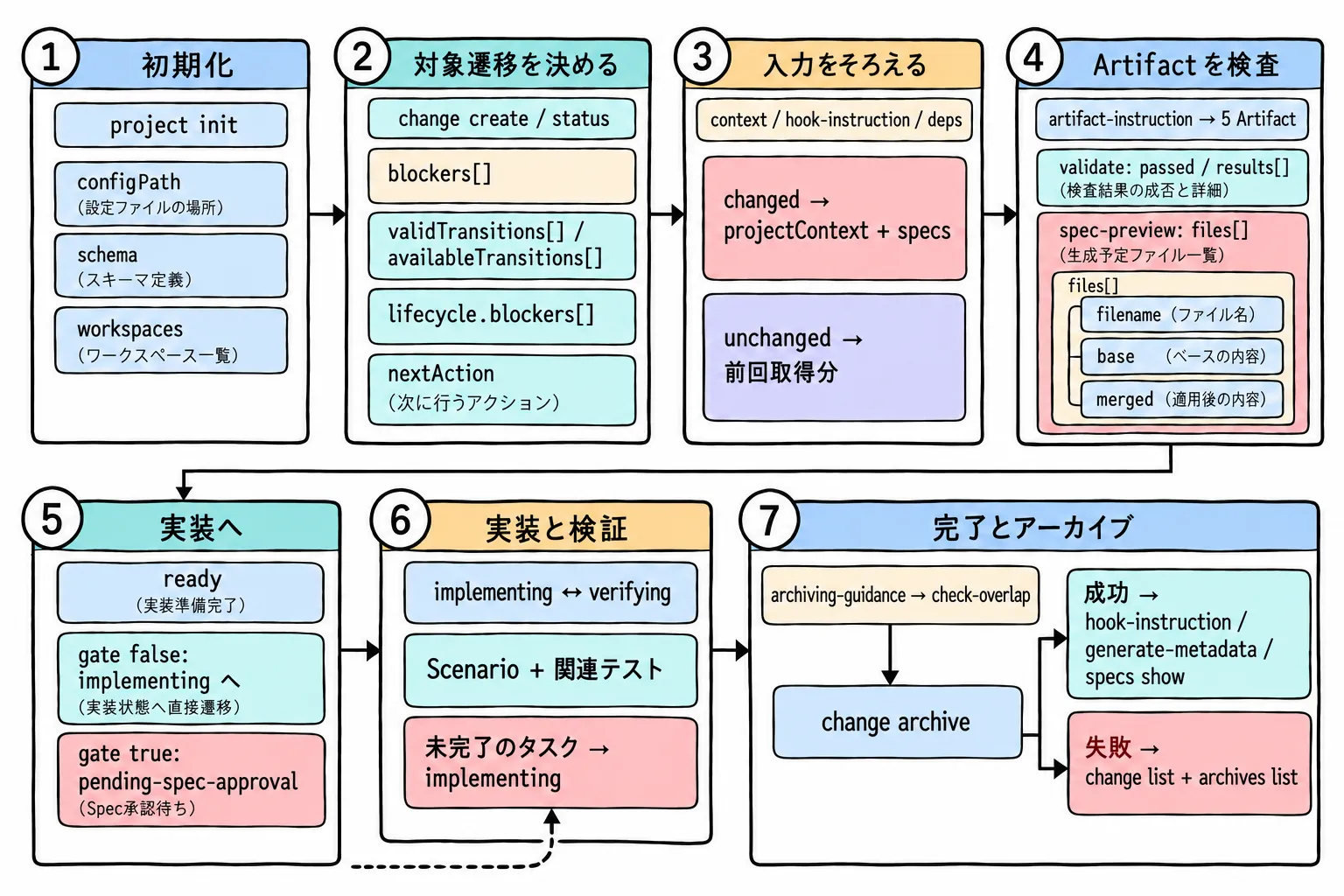
-
Initialize the project
Pass the following information from the initialization result to later work.
-
Configuration file location
Establish which project configuration subsequent commands will read.
-
Selected
SchemaChoose the workflow rules governing
Artifactdependencies and verification steps. -
Available
WorkspacesIdentify the locations of the
Specs to operate on.
Stop if required configuration cannot be confirmed or the exit code is nonzero.
-
-
Create a change and inspect blockers
After creating the change, use the status response to determine the requested transition. Read blockers for the whole change separately from those matching the requested transition, and stop if either remains. Do not stop for blockers belonging only to other transitions. Read the reason in
nextActionbefore deciding whether to follow it. -
Prepare inputs for
designingConfirm the transition to
designing, then pass the compiled context and pre-step instructions toArtifactcreation. Withstatus: changed, read the returned targetSpecs. Withstatus: unchangedfor the same fingerprint, reuse the previously retrievedprojectContextandspecsthat are omitted. Stop if the step is unavailable or anyArtifacts are missing. Record the same dependencies in the CLI dependency record and the specification's dependency section. -
Write the five
Artifacts and validate their structureWrite all five
Artifacts according toartifact-instructionand confirm whether structural validation passes. Inspec-preview, distinguish elements offiles[]byfilenameand readmergedfor the required files. Before comparing changes, confirm that the target files exist and that bothbaseandmergedare strings. Stop if there are unresolved questions, mismatches between the two dependency records, structural validation failures, or missing required files. -
Proceed from
readyto implementationIn
ready, compare the specification approval gate setting with the actualtoafter the transition. If the gate is disabled, transition directly toimplementing. If enabled, stop atpending-spec-approval. After approval, advance fromspec-approvedtoimplementing. The response indicates only the state transition; implementation is performed by the agent that reads the pre-step instructions. -
Check the implementation in
verifyingReceive the code changes and task completion records. Following the
Schemainstructions, the user or agent checks each scenario by inspecting code and running tests relevant to this change. On failure, explicitly transition back toimplementingand fix the issue through additional tasks. Do not transition todoneuntil the scenarios and relevant test results have been checked. Do not treat this as a branch where the CLI automatically detects test results and rejects the transition. -
Check sign-off, overlaps, and the archived result
In
done, compare the sign-off gate setting with the actualtoand advance toarchivable. Follow the pre-archive instructions to compare deltas with the implementation. For overlap detection, readhasOverlapand the affected changes rather than relying on the exit code. If archiving fails, do not retry automatically. Check the active and archived change lists to establish where the change is stored. On success, check the post-step instructions, extracted metadata, specification contents by file, and both lists.
Example: adding price-range filtering
Consider a change that adds filtering by minimum and maximum price to an existing search API. The example uses the following inputs.
-
WorkspaceUse
default. -
Existing
Specto modifyUse
default:search/products. -
Dependency containing the pricing assumptions
Use
default:catalog/pricing. -
ChangenameUse
price-filter.
Assume the existing Spec has spec.md and verify.md.
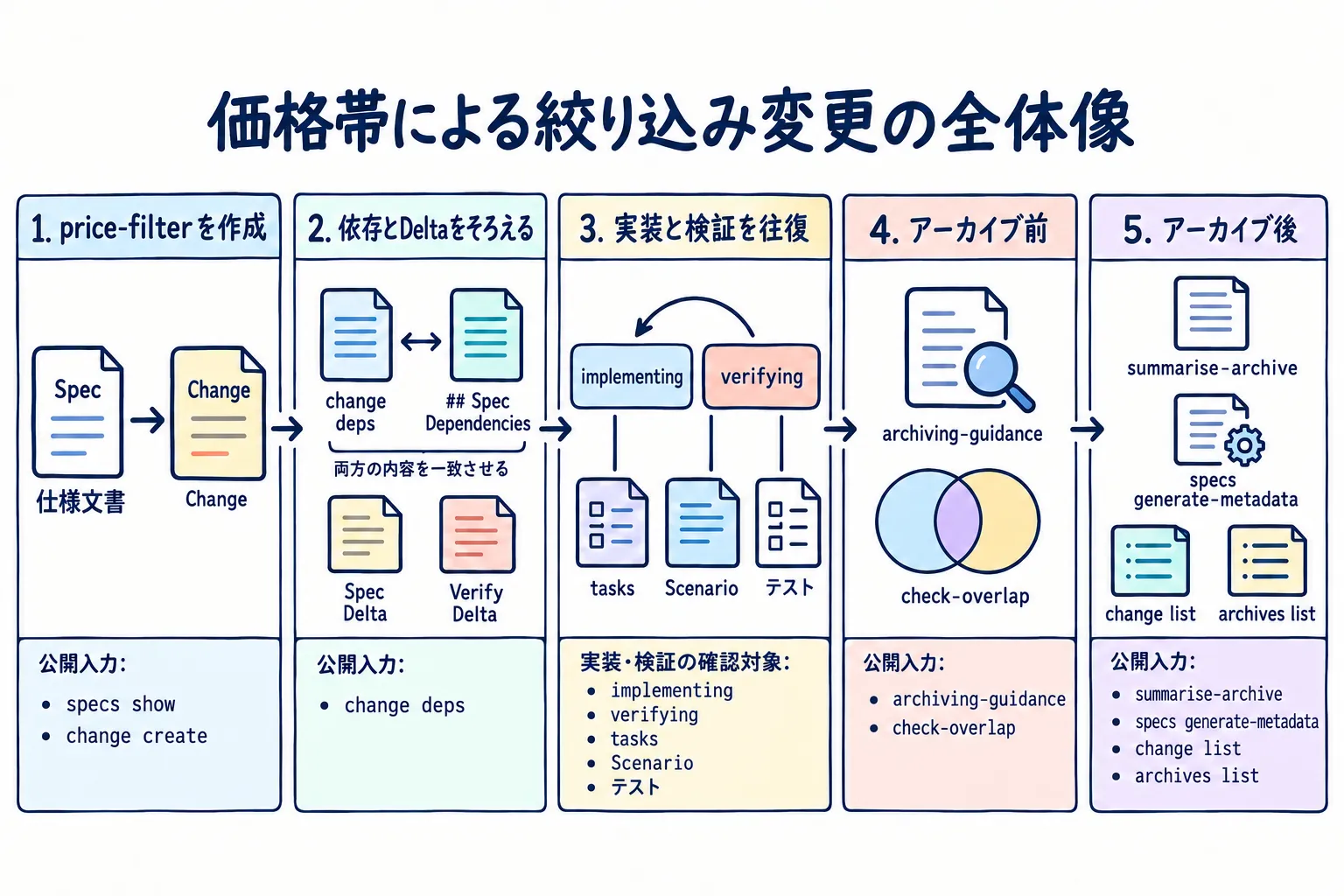
This example specifies both the contents of the stored Deltas and how to check return values for each filename.
Existing specifications and change creation
The first candidate command is specd specs show default:search/products --format json.
The return value is an array rather than an object, with a filename and string content for each file.
[
  { "filename": "spec.md", "content": "..." },
  { "filename": "verify.md", "content": "..." }
]
If the specification is not found, the CLI stops with spec 'default:search/products' not found and exit code 1.
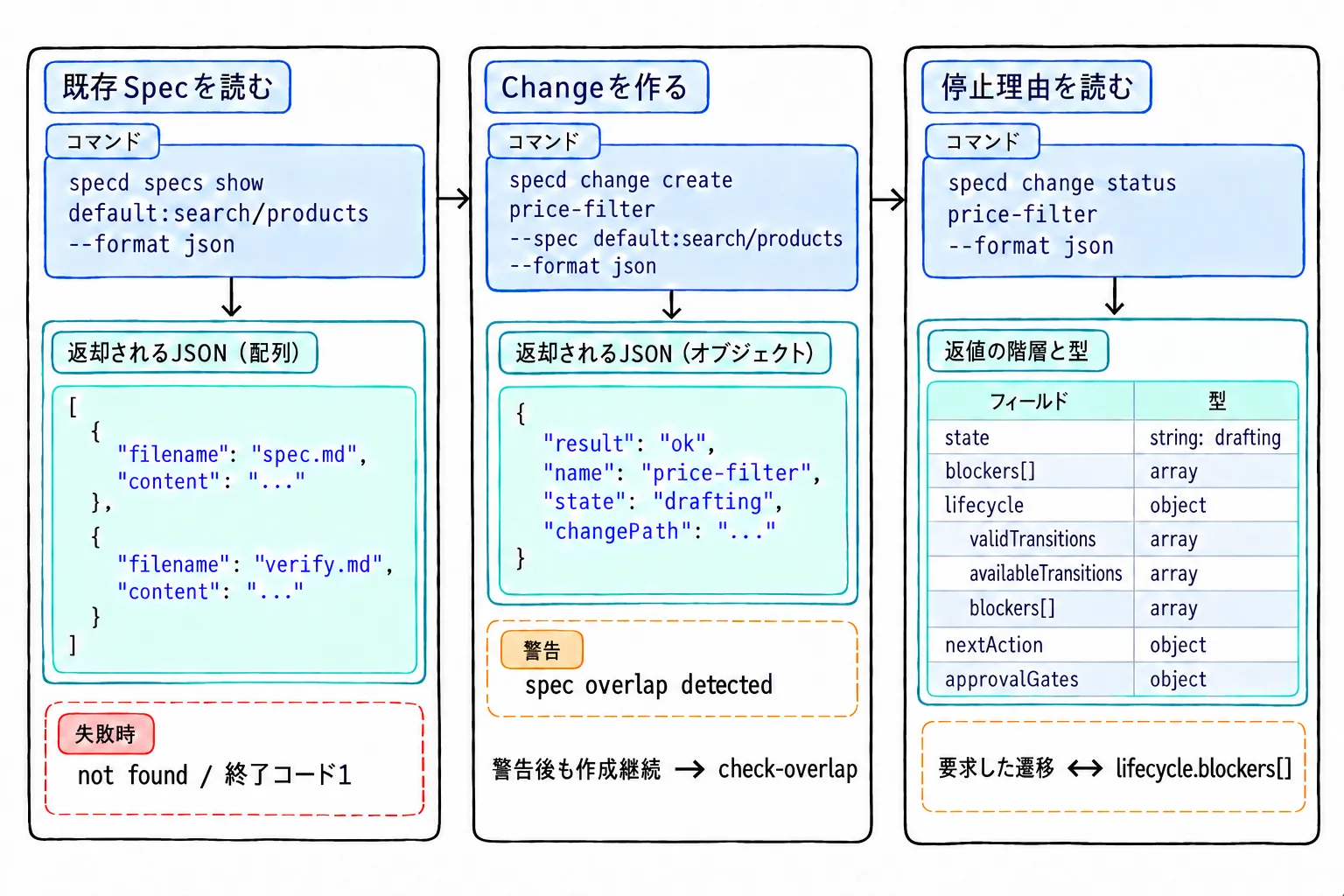
The next candidate command is specd change create price-filter --spec default:search/products --format json.
Because --spec search/products has no Workspace name, it is also interpreted as default:search/products.
The expected observations are as follows.
-
result: okIndicates that creation succeeded.
-
name: price-filterIdentifies the created
Change. -
state: draftingIndicates the lifecycle state immediately after creation.
-
changePathIndicates where the created change is stored.
If another Change targets the same Spec, warning: spec overlap detected: is displayed, but creation continues.
In this case, exclude price-filter itself from entries[].changes returned by change check-overlap price-filter and identify the other active changes.
In change status price-filter --format json, read the top-level blockers separately from lifecycle.blockers[] entries matching the transition from drafting to designing.
If the requested destination appears in both validTransitions[] and availableTransitions[] and nothing blocks that transition, proceed using --next.
Deltas for specifications and verification conditions
In Modified specs in proposal, list only default:search/products, which is actually being changed.
List the unchanged default:catalog/pricing separately under Depends on (added), with a reason for adding the dependency.
The candidate command is specd change deps price-filter default:search/products --add default:catalog/pricing --format json. Expect specId to identify the dependent specification and dependsOn to contain the dependency.
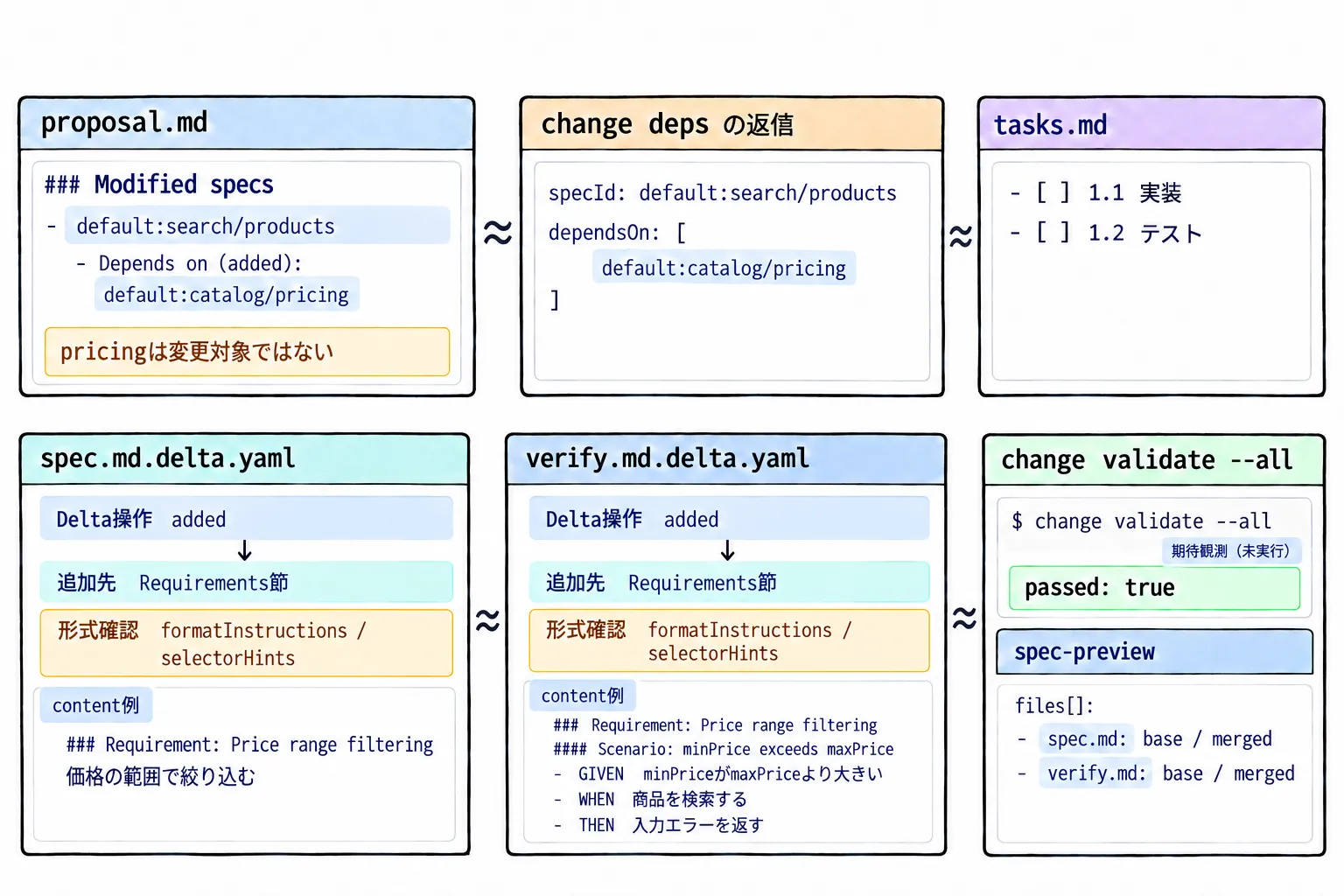
Since this introduces a dependency, also update ## Spec Dependencies in the specification Delta using added or modified. Include default:catalog/pricing and the reason for referencing its pricing assumptions.
The change-management record in change deps and the persistent ## Spec Dependencies section are separate records.
Explicitly list the same dependency in both and check that they agree before archiving.
Place the requirement addition in deltas/default/search/products/spec.md.delta.yaml.
The three published distribution archives establish only that added identifies the Requirements section as its parent and that content holds the requirement.
The two fragments below are conceptual examples omitting the concrete position.parent format. They are not minimal executable YAML.
For the actual parent selector, consult delta.formatInstructions in artifact-instruction and selectorHints in specs outline --hints.
- op: added
  content: |
    ### Requirement: Price range filtering
    The search API returns only products with prices greater than or equal to minPrice and less than or equal to maxPrice.
    If minPrice exceeds maxPrice, return an input error.
This requirement includes minPrice and maxPrice in the price range.
For an inverted range where minPrice exceeds maxPrice, the requirement specifies returning an input error rather than continuing the search.
Place the verification conditions in deltas/default/search/products/verify.md.delta.yaml, with at least one scenario under the same requirement.
- op: added
  content: |
    ### Requirement: Price range filtering

    #### Scenario: minPrice exceeds maxPrice

    - **GIVEN** `minPrice` exceeds `maxPrice`
    - **WHEN** searching for products
    - **THEN** return an input error
This scenario refers to the same Price range filtering requirement as the example above.
It checks the branch that returns an input error when an inverted price range is passed to the search.
In tasks.md, separate code changes from test additions.
## 1. Filter by price range

- [ ] 1.1 Evaluate the price range
    filterByPrice in src/search/products.ts
    Approach: Include both minPrice and maxPrice boundaries in the comparison
    (Req: Price range filtering)
- [ ] 1.2 Add a test for an inverted range
    tests/search/products.test.ts
    Approach: Verify input where minPrice exceeds maxPrice
    (Req: Price range filtering)
1. Filter by price range
Both tasks map to the same requirement through Req: Price range filtering.
Task 1.1 implements the inclusive price comparison, while task 1.2 tests an inverted price range, allowing implementation and verification work to be checked separately.
The rulesPre in artifact-instruction is an empty array. Stop if unresolved questions remain in rulesPost for proposal or design.
Before archiving, expect passed: true from change validate price-filter --all --format json.
With change spec-preview price-filter default:search/products --format json, select the filename: spec.md and filename: verify.md entries from files[] and read their string merged values.
Before comparing the contents, confirm that both required files exist and that each entry has string base and merged values.
Check the new requirement and updated dependency section in merged for spec.md, and the new scenario in merged for verify.md.
Check metadata.dependsOn directly in the extraction result after archiving.
Stop if passed: false is returned, dependency records disagree, or required files or contents are missing.
This example covers added for a requirement and does not include modified targeting a requirement itself.
Consult delta.formatInstructions and selectorHints for the parent selector used to add a requirement and the selector used to update the existing ## Spec Dependencies.
Moving between implementing and verifying
After entering implementing, follow the pre-step instructions, read all Artifacts, and change the code using design.md as the technical reference.
Mark completed tasks with - [x]. You cannot enter verifying while incomplete - [ ] tasks remain.
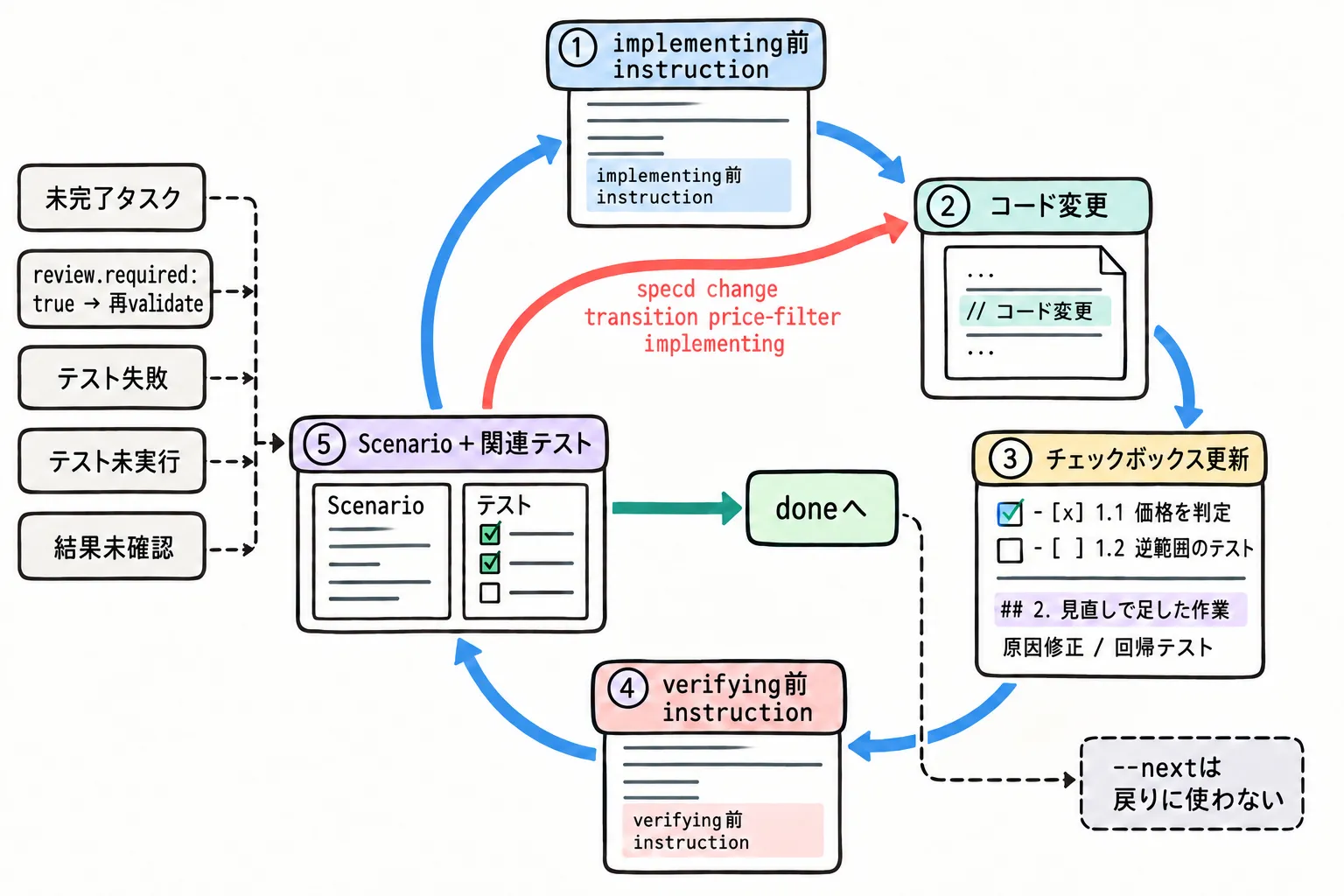
In verifying, read the pre-step instructions and check #### Scenario: minPrice exceeds maxPrice by inspecting code and running relevant tests.
If the scenario fails, return by specifying the destination explicitly, as in specd change transition price-filter implementing.
Do not use --next to return, because it advances from verifying to done.
After returning, do not rewrite existing tasks. Add the fix and regression tests under a group such as ## 2. Additional work identified during review.
If effectiveStatus: drifted-pending-review and review.required: true appear, rerun change validate before entering verifying.
The standard Schema instructions require code inspection and tests relevant to the change for each scenario, but do not require every test in the project.
The user or agent checks the results of tests relevant to this change.
Do not execute the transition to done while any relevant test has failed, has not been run, or has an unchecked result.
This does not mean that the CLI automatically detects test results and rejects a transition.
Checking overlaps before archiving
After moving from done to archivable, the candidate command is specd change hook-instruction price-filter archiving --phase pre --format json.
Expect instructions to include the pre-archive instruction archiving-guidance.
Compare the deltas with the implementation. If the specifications disagree, update the Spec or Delta and rerun change validate and spec-preview.
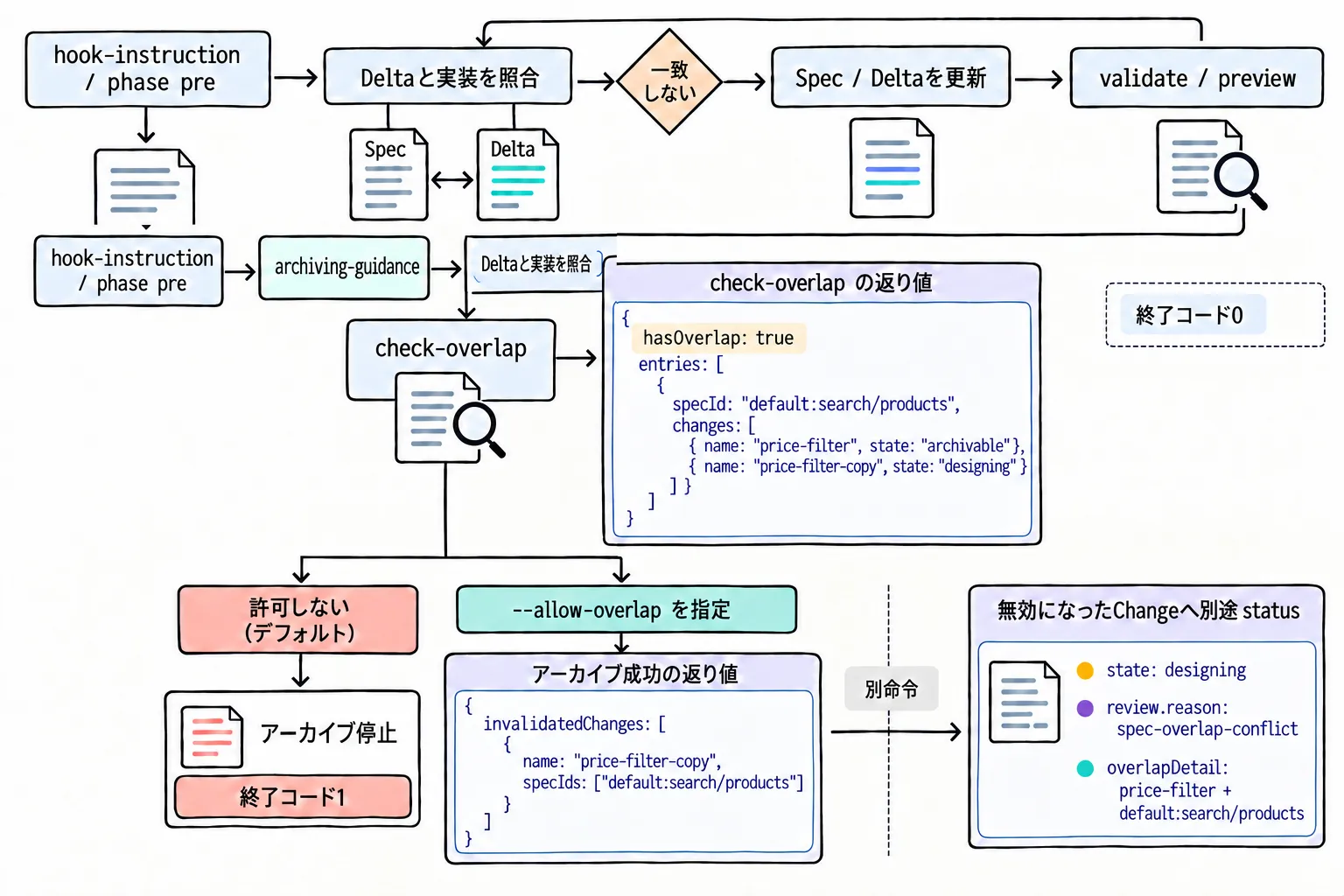
After checking the correspondence, the candidate command is specd change check-overlap price-filter --format json. Interpret its return fields as follows.
| Field | Interpretation |
|---|---|
hasOverlap |
Boolean indicating whether an overlap exists |
entries[].specId |
Specification ID of the overlapping Spec |
entries[].changes[].name |
Name of a Change targeting that Spec |
entries[].changes[].state |
State of that Change |
hasOverlap: true indicates that multiple active Changes target the same Spec.
Because the current price-filter may also appear in changes, exclude name: price-filter from each array and identify the other overlapping Changes from the remaining entries.
This exclusion identifies the other parties; it is not what establishes the existence of an overlap in the first place.
The exit code does not vary according to whether an overlap exists, so exit code 0 indicates only that the command succeeded.
If change archive price-filter is invoked while an overlap remains, the CLI is expected to write error: cannot archive — spec overlap detected:, the overlapping specifications, and Use --allow-overlap to proceed despite overlap. to standard error and terminate with exit code 1.
Do not expect JSON in this branch.
On success with --allow-overlap, the CLI passes through invalidatedChanges in JSON without selecting individual fields.
The text display of the same response reads the invalidated change's name and specIds.
Static inspection of the three published tarballs cannot establish the complete type of the JSON elements.
The public CHANGELOG records that such a change is invalidated with the reason spec-overlap-conflict and returns to designing.
Check the state of an invalidated change separately using change status and the following fields.
-
stateIndicates that the change returned to
designing. -
review.reasonReports
spec-overlap-conflictas the reason. -
overlapDetailIdentifies the archived change and overlapping specifications.
Do not proceed if the pre-archive instructions are missing, if the specifications and implementation have not been compared, or if the exit code is nonzero.
Checks after archiving
The public README and CHANGELOG state that archiving integrates a Change's Deltas and new Specs into the Workspace specifications, then moves the change to the archive.
The CLI also describes change archive as a command that moves completed changes into the archive and removes them from the active list.
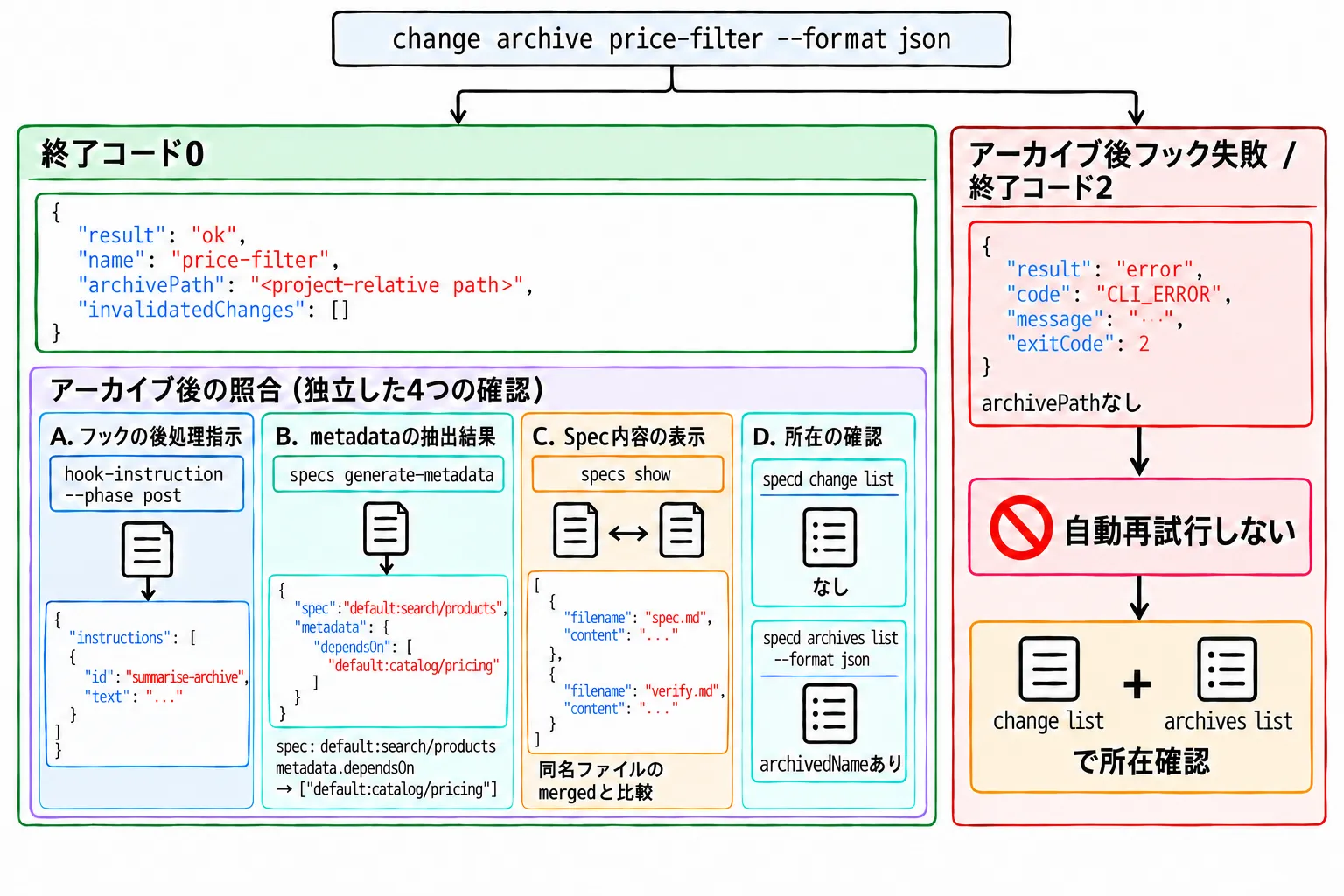
On success with specd change archive price-filter --format json, interpret the following fields separately.
| Field | Interpretation |
|---|---|
result |
Whether the operation succeeded |
name |
Name of the archived Change |
archivePath |
Path relative to the project root |
invalidatedChanges |
List of invalidated Changes |
A successful response is the following JSON object.
{
  "result": "ok",
  "name": "price-filter",
  "archivePath": "<archive-path>",
  "invalidatedChanges": []
}
Use the project-root-relative path returned in archivePath to establish the location of the archive.
In this ordinary command example, overlaps are resolved before archiving, so invalidatedChanges is an empty array.
Other invalidated changes enter this array only when --allow-overlap is supplied.
Do not treat all nonzero exits from change archive as having the same response.
On failure of a post-archive execution hook, post-archive hook(s) failed: ... is displayed and the JSON contains the following fields.
-
result: errorIndicates that the operation failed.
-
code: CLI_ERRORClassifies the failure as an error occurring in the CLI.
-
messageDescribes the error, including the failed hooks.
-
exitCode: 2Indicates the exit code in the root JSON.
This branch does not return archivePath.
By contrast, a change run-hooks failure returns code: HOOK_FAILED at the root, includes per-hook exit codes in hooks[].exitCode, and then terminates the CLI process with exit code 2.
In either case, do not automatically retry the same command. First establish the location of price-filter with change list and archives list.
Exit code 2 alone does not establish how far the operation progressed before failing.
After successful archiving, the candidate command is specd change hook-instruction price-filter archiving --phase post --format json. Expect instructions to include the post-archive summary instruction summarise-archive.
This text instructs the agent to summarize created and modified Specs and their main Requirements for a commit message.
The public CHANGELOG records a fix to allow retrieval of post-step instructions after moving the change, and change.archivedName for handling its archived name.
If instructions are missing or the exit code is nonzero, do not guess the summary and continue.
The next candidate command is specd specs generate-metadata default:search/products --format json.
In JSON without --write, dependsOn is an array of strings within metadata.
{
  "spec": "default:search/products",
  "metadata": {
    "dependsOn": ["default:catalog/pricing"]
  }
}
Stop if values are missing.
Then distinguish entries in the array returned by specd specs show default:search/products --format json by filename. Compare the content of spec.md and verify.md with the corresponding merged values in the pre-archive spec-preview.files[].
Also confirm that price-filter is absent from specd change list and that an entry returned by specd archives list --format json includes name: price-filter and archivedName.
Without a format option, specd archives list does not expose archivedName as a named field.
Stop if the exit code is nonzero or required fields are missing.
If the contents or metadata disagree, do not repeat the same command. First check the location of the change in the two lists.
Adoption criteria and limits of guarantees
Whether to adopt the public release of SpecD depends on how changes are managed and whether a tool still under development is acceptable. The public README explains that SpecD is under development and can be used from the source code of a single repository. Distribution and installation procedures are not finalized; the README directs users to commands for working within the repository workspace.
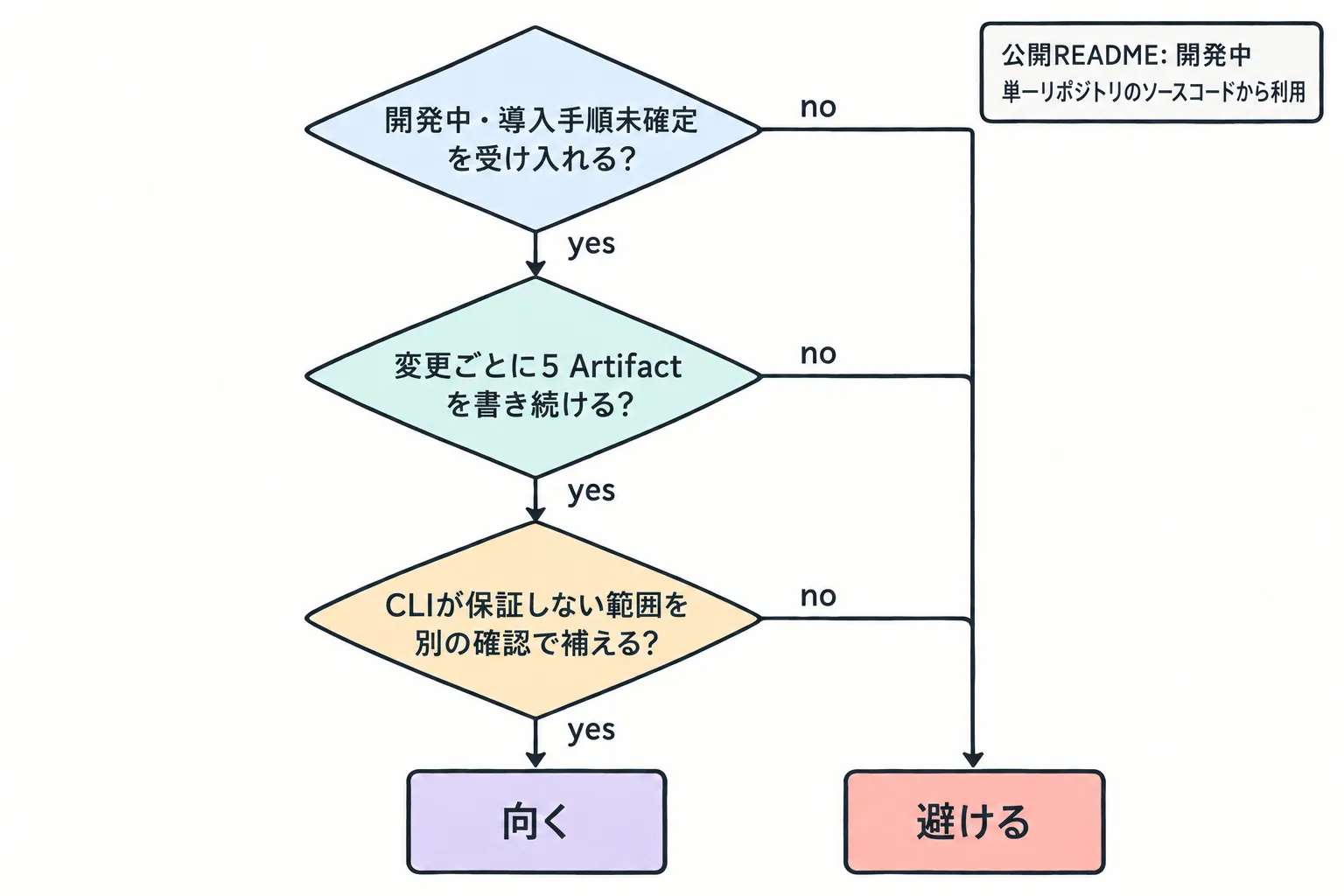
This level of maturity narrows the conditions under which adoption is appropriate.
The user or team's workflow must cover anything the CLI and standard Schema do not evaluate.
When to use or avoid SpecD
It fits projects that continually write proposal, specs, verify, design, and tasks for each change and want the same compiled context, verification steps, and blocking conditions even when the people or agents responsible change.
The team must also be able to try a pinned version in a test environment and verify its own installation and upgrade procedures.
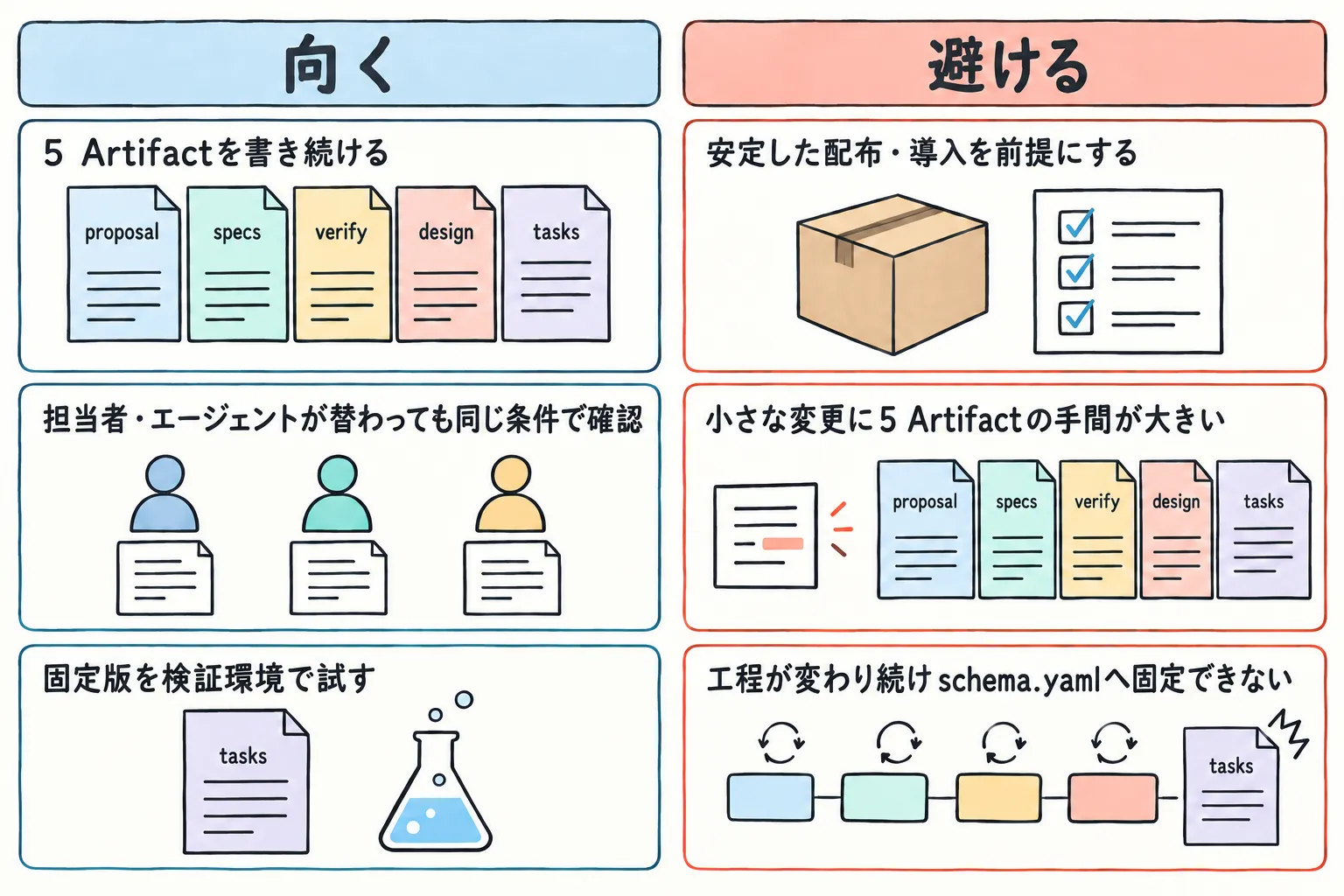
It is not suitable for immediate adoption as a production standard where stable distribution and upgrade compatibility are prerequisites.
It is also unsuitable if the team expects a product with established plugin or skill installation and startup procedures for different agent runtimes.
Small changes for which writing five Artifacts costs more than verification is worth, or constantly changing workflows that cannot be fixed in schema.yaml, are also outside the scope of the standard Schema.
The Functional labels in the README package table and the overall installation example indicate where functionality exists, but do not guarantee stable distribution or installation procedures.
What the public release does not guarantee
rulesPost and the standard Schema instruction hooks are text that agents read and follow.
The CLI evaluates direct requires dependencies of Artifacts, verification-step conditions, and completion of tasks.
Document structure and extractability of metadata are also validated.
It does not evaluate the technical correctness of documents, whether the implementation satisfies scenarios, every test in the project, or whether the changed specifications agree with the implementation.
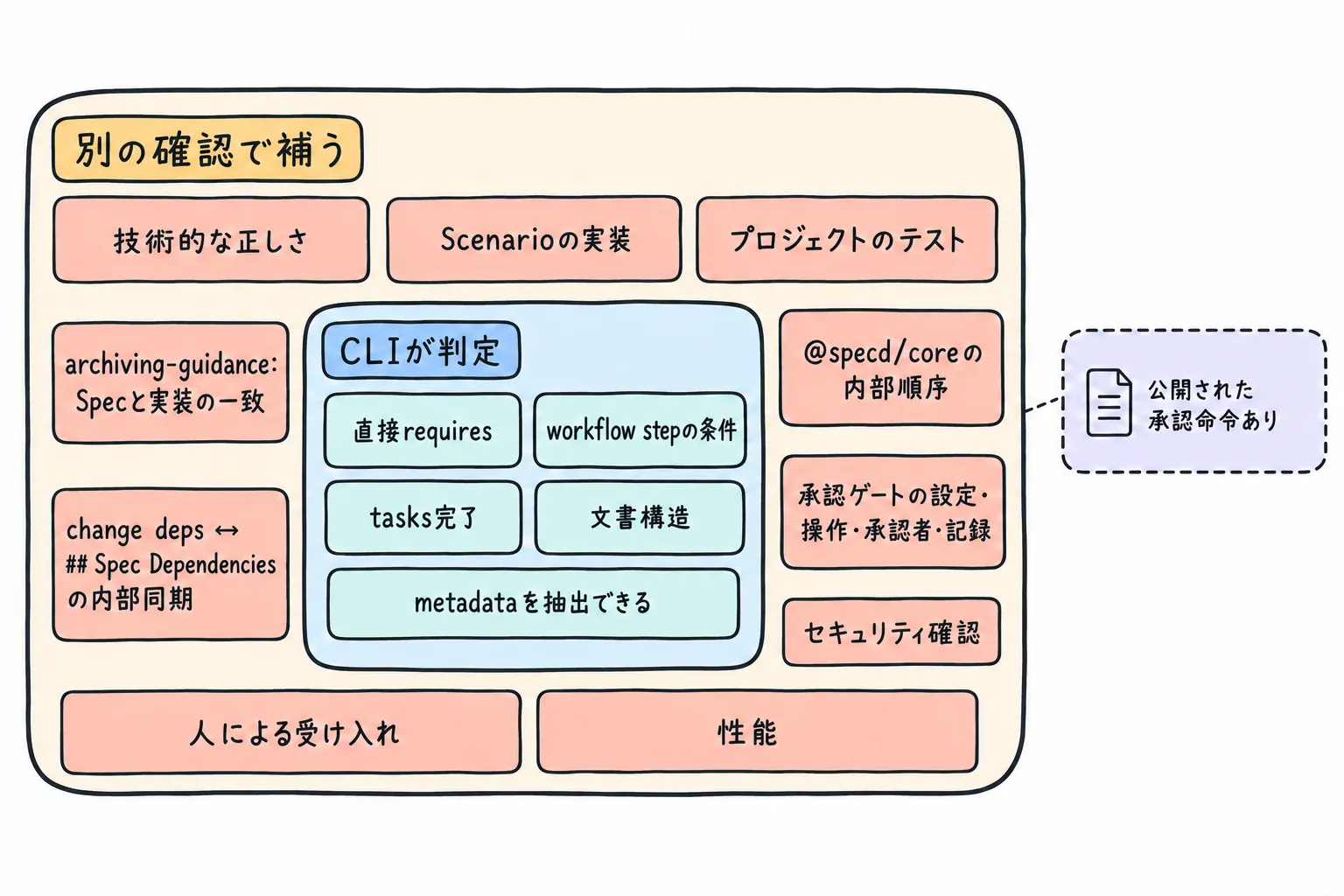
Because the pre-archive instruction archiving-guidance requires comparing specifications with the implementation and updating specifications when they disagree, the agent checks this separately.
Compare both the dependency record in change deps and ## Spec Dependencies in the specification, but the public materials do not establish how @specd/core synchronizes them internally.
The internal ordering of hooks, integration, movement, and invalidation is also not established, nor is the ordering of archive integration relative to the transition to archivable.
The archive exit code 2 and invalidatedChanges alone also cannot establish the persisted state of the change or the details of how other changes were invalidated.
change approve spec and change approve signoff are published approval commands.
This article covers only configured approvalGates and lifecycle branches.
Gate configuration, command procedures and conditions, approvers, and verification and management of approval records are outside its scope.
Security checks, human acceptance, numerical limits, and performance are also outside the mechanical checks provided by the three public packages.
Conclusion
SpecD's standard Schema separately declares the direct requires of the five Artifacts, verification-step conditions, agent instructions, and structural validation in schema.yaml.
Reading the two types of blockers returned by the CLI, per-file before-and-after contents, and post-archive locations separately preserves the boundary between decisions passed to agents and mechanical checks.
The primary sources for @specd/specd@0.2.0, @specd/cli@0.2.0, and @specd/schema-std@0.1.1 are the following three pinned distribution archives.
https://registry.npmjs.org/@specd/specd/-/specd-0.2.0.tgz
https://registry.npmjs.org/@specd/cli/-/cli-0.2.0.tgz
https://registry.npmjs.org/@specd/schema-std/-/schema-std-0.1.1.tgz