Introduction
Hi, I'm cardene, a software engineer and technical writer focused on blockchain and AI.
I've also authored Japanese technical books on specification-driven development with LLMs and decentralized application (DApp) development.

I also build and publish a variety of tools, libraries, and open-source projects.
When several AI agents or work sessions contribute to a single change, a conversation summary alone is not enough for the next contributor to resume work. They need records that show what must change, which tasks address each acceptance criterion, and which verification steps have been completed.
SpecWeave is a CLI that stores change definitions, work records, verification results, and handoffs in files within the repository.
SpecWeave calls the unit used to track a feature or fix an increment.
While working, contributors record a claim (ownership of a task), use handoff when pausing, and use pickup when resuming.
This article explains increments, verification, handoff, and resumption in version 3.0 as of the original article's publication, using a small feature change that moves between development environments.
The original diagrams and code examples are retained; some labels and example text are in Japanese.
Change Records Maintained by SpecWeave
SpecWeave turns the purpose of a change and its handoff into records that can be shared through Git. It separates acceptance criteria, claimed work, and verification results from individual conversations, allowing a different AI agent to resume work from the same records.
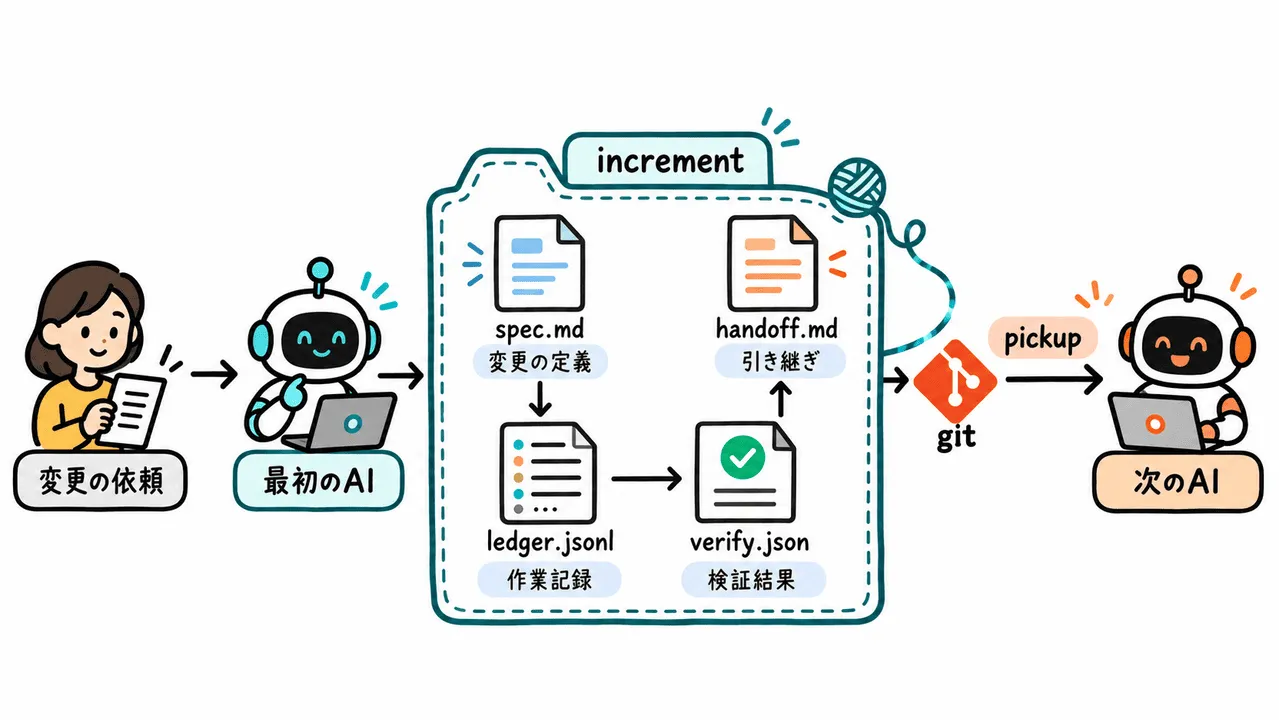
For a newly created increment, spec.md is the authoritative definition of the change for both humans and agents.
Events that occur during development are appended to ledger.jsonl, while verification results are stored in reports/verify.json.
When work is paused, a handoff is created; in the environment where work resumes, pickup reads the unfinished tasks.
Defining the Change in spec.md
The spec.md file created by specweave create-increment contains the problem, scope, acceptance criteria, approach, and tasks.
Each task identifies the acceptance criteria it addresses, the files to modify, and the commands used to verify the work.
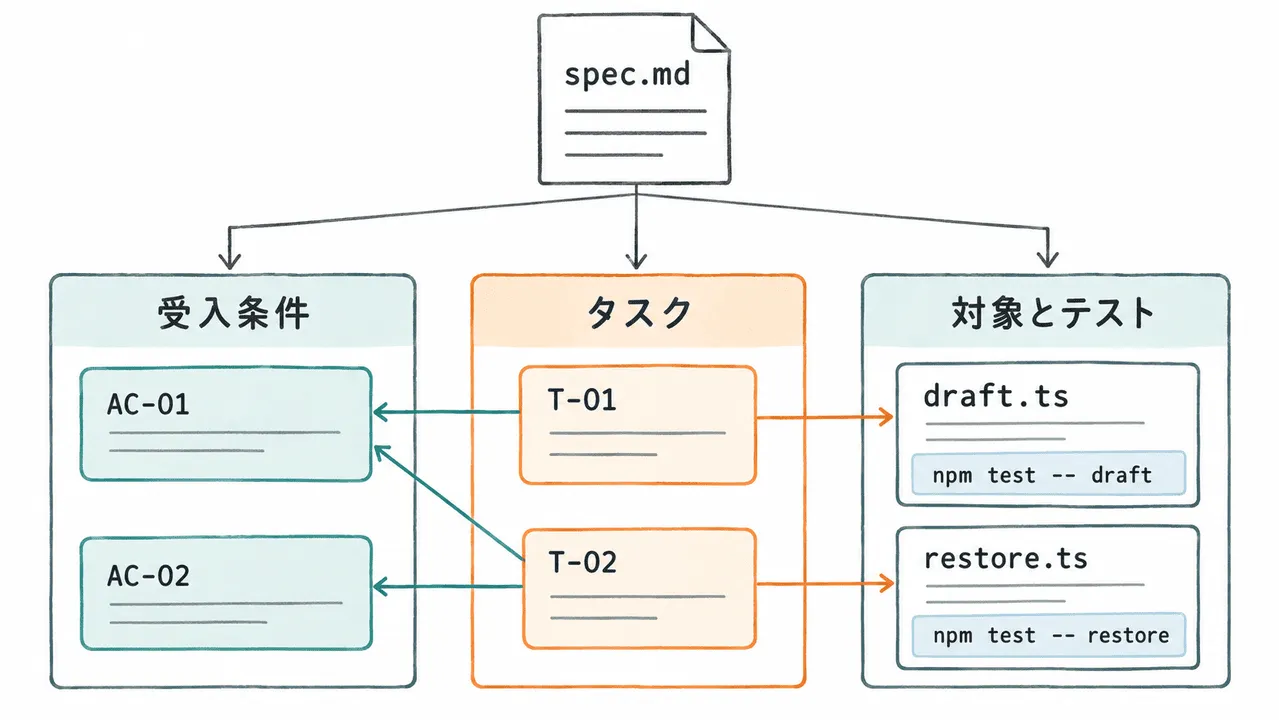
Acceptance criteria are not a checklist to tick off manually on a task board. They define the conditions used to determine whether the change is complete.
For example, a feature that restores a shopping cart could have the following criteria and tasks in spec.md.
## Acceptance Criteria

- [ ] AC-01: 24時間以内に戻った利用者へ、かごと配送方法を復元する
- [ ] AC-02: 支払い済みの注文は復元しない

## Tasks

### T-01 下書きを保存する
- AC: AC-01 | Files: src/checkout/draft.ts | Test: npm test -- draft

### T-02 戻った時に下書きを復元する
- AC: AC-01, AC-02 | Files: src/checkout/restore.ts | Test: npm test -- restore
Acceptance Criteria
Tasks
T-01 下書きを保存する
- AC: AC-01 | Files: src/checkout/draft.ts | Test: npm test -- draft
T-02 戻った時に下書きを復元する
- AC: AC-01, AC-02 | Files: src/checkout/restore.ts | Test: npm test -- restore
AC-01 and AC-02 describe user-observable behavior.
T-01 and T-02 are the tasks that implement and verify that behavior.
Linking files and test commands to each task allows the next contributor to identify both the files to change and the way to verify the change.
An Append-Only Work Log
Work-in-progress state is not written back to spec.md.
Events such as task claim, done, block, note, and handoff are appended to ledger.jsonl, recording who was responsible for what, when, and the associated verification evidence.
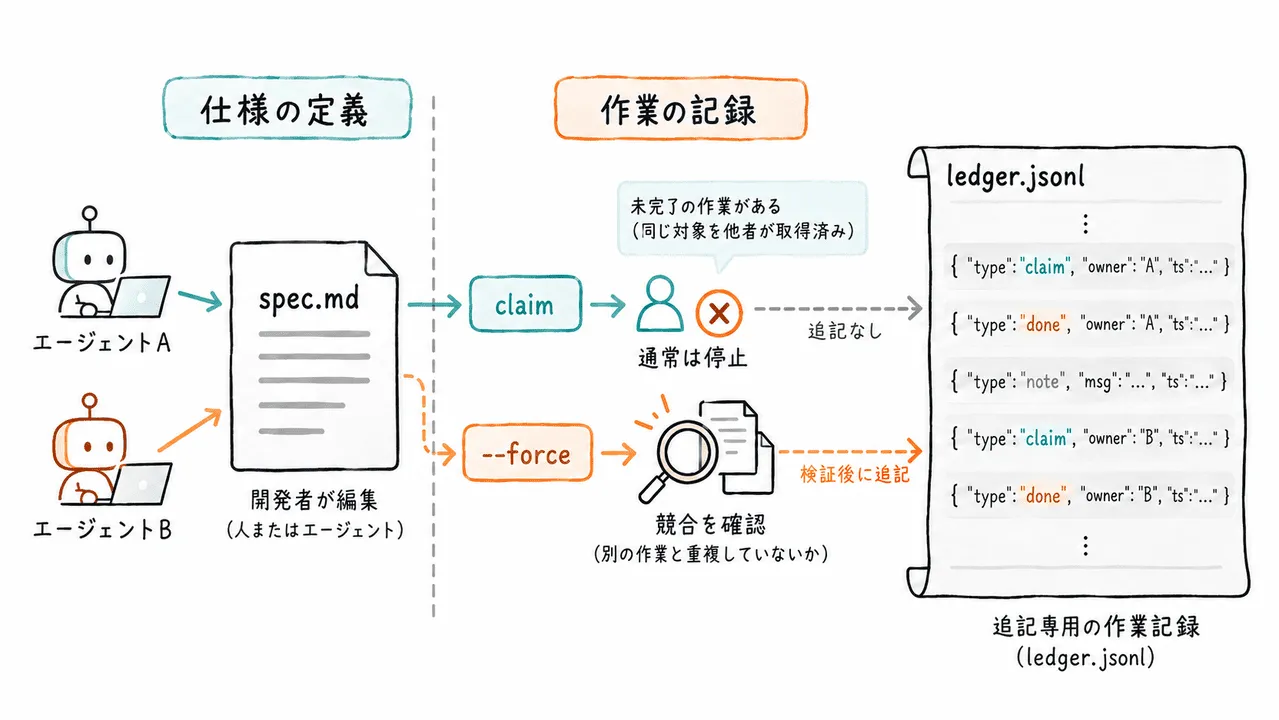
A claim records task ownership and normally prevents overlapping work when someone else is already responsible for the same file.
However, a claim can be forcibly acquired using --force.
Rather than treating claim as an absolute lock, contributors check the reason for the override and any file conflicts.
Verification from Implementation to Completion
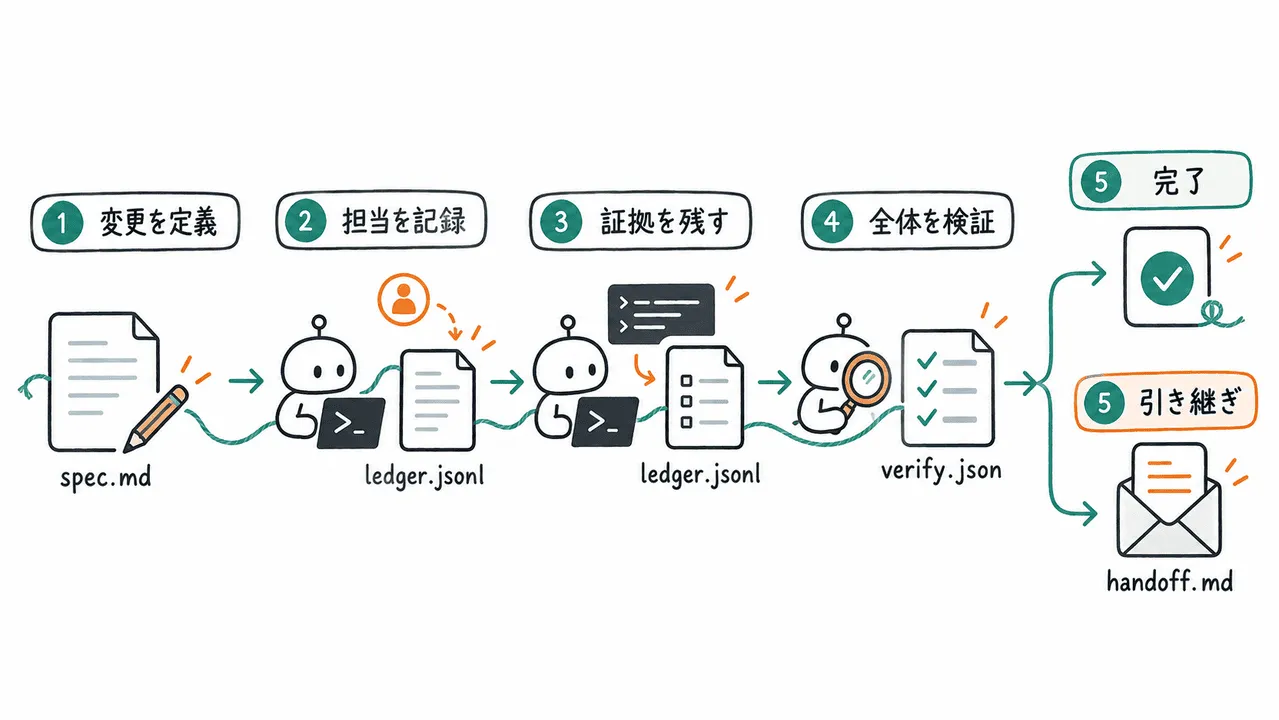
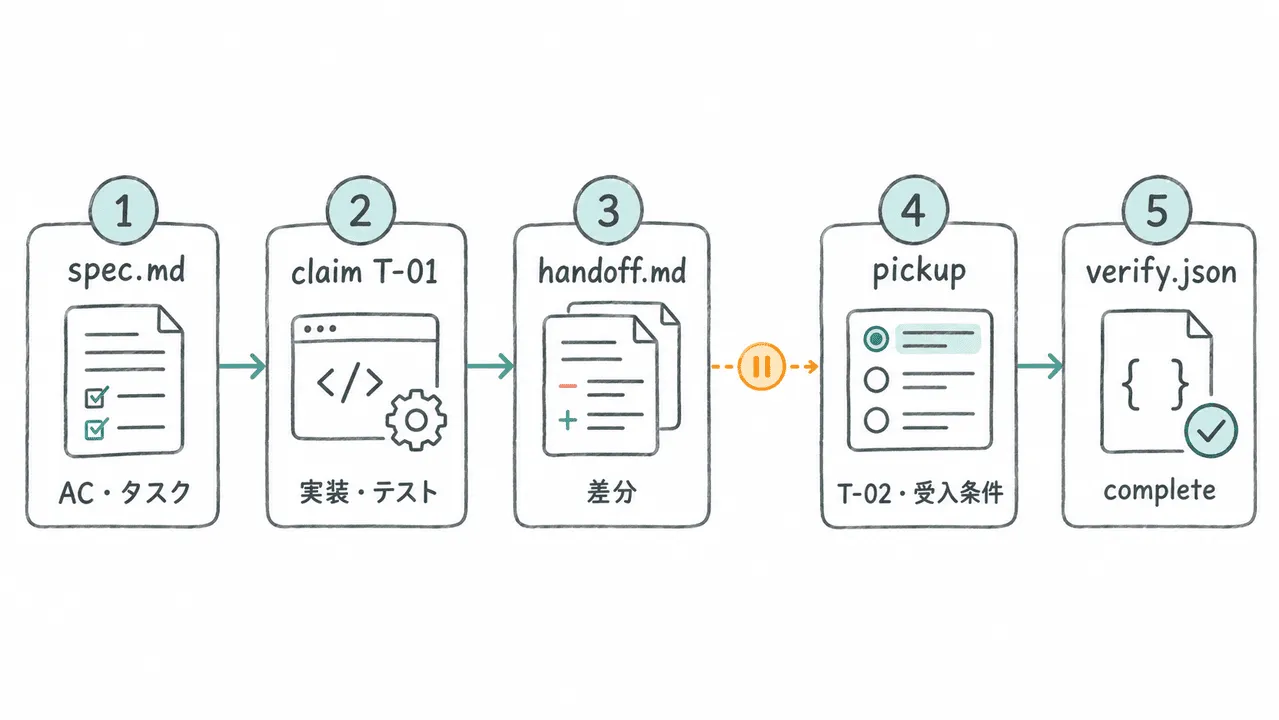
The basic SpecWeave workflow consists of defining the change and its tasks, recording ownership, verifying individual tasks, verifying the entire change, and recording completion or a handoff. By distinguishing the records updated at each stage from the conditions for proceeding, the workflow avoids closing a change solely because an AI agent reports that it is complete.
-
Define the change and its tasks
Create
spec.mdwithspecweave create-increment, then edit and save the problem, scope, acceptance criteria, approach, and tasks. Check that each task has acceptance criteria, target files, and verification commands. -
Record ownership and implement the task
Run
specweave task nextandtask claimfor the defined tasks. Check the task and its scope. Normally, stop if an existingclaimcovers the same file. -
Record evidence for the task
Run the test with
specweave task done T-01 --run "npm test -- draft". Check that the successful exit code and output have been recorded inledger.jsonl. -
Verify the entire change
Run the project's
test,lint, andbuildcommands withspecweave verify. Check thatreports/verify.jsonrecords a successful result. -
Record completion or hand off the work
Check the successful
verify.jsonresult and runspecweave complete. When pausing, usespecweave handoffto record what must be done after resuming.
Tasks and Verification Records
specweave task next identifies candidate tasks based on dependencies and other contributors' claim records.
A contributor records ownership with task claim, then passes the actual test command to task done after implementation.
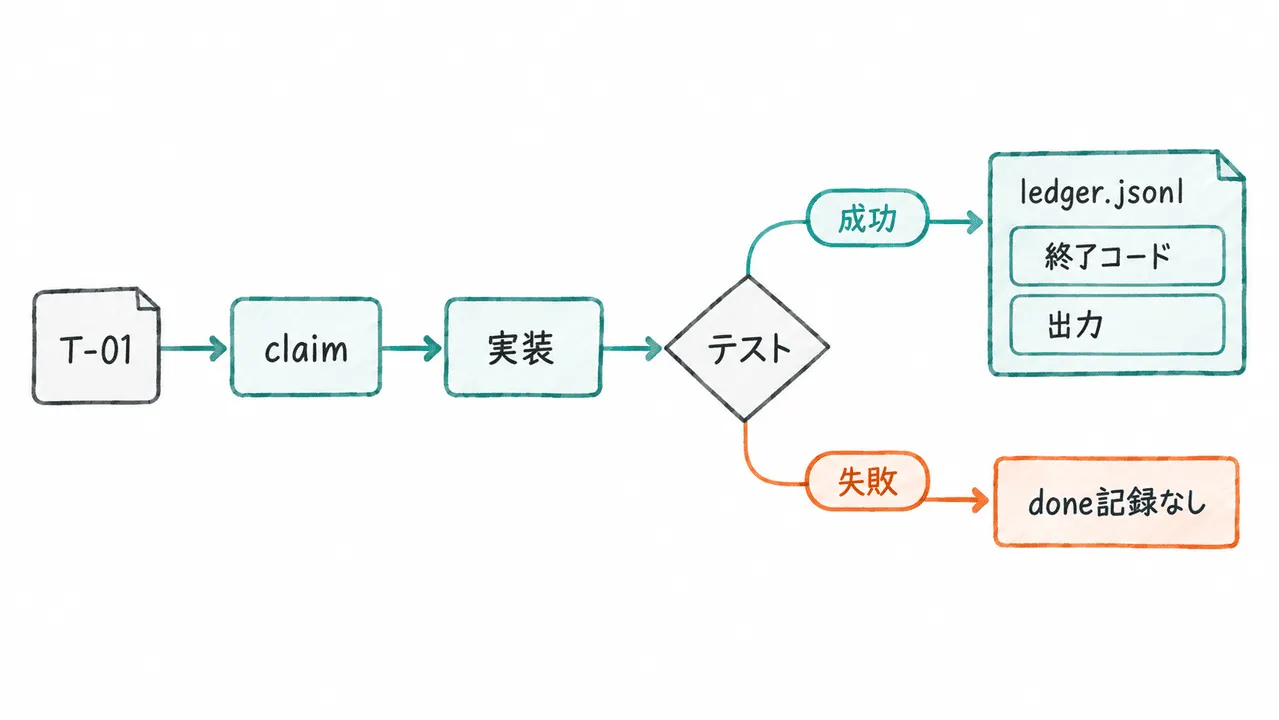
The operation normally stops when the target files overlap with an active claim.
Even when forcibly acquiring a claim, this does not authorize overwriting someone else's changes.
Before proceeding, examine the other contributor's diff and determine which task should update the file.
If the test command fails, task done does not record completion.
Only when the command succeeds are the exit code and the tail of its output stored as evidence.
This ties the basis for marking a task complete to an execution result rather than an AI agent's report.
Determining Whether the Entire Change Is Complete
task done records one task and the result of its command.
Before closing the entire change, run the project's test, lint, and build commands with specweave verify and inspect reports/verify.json.
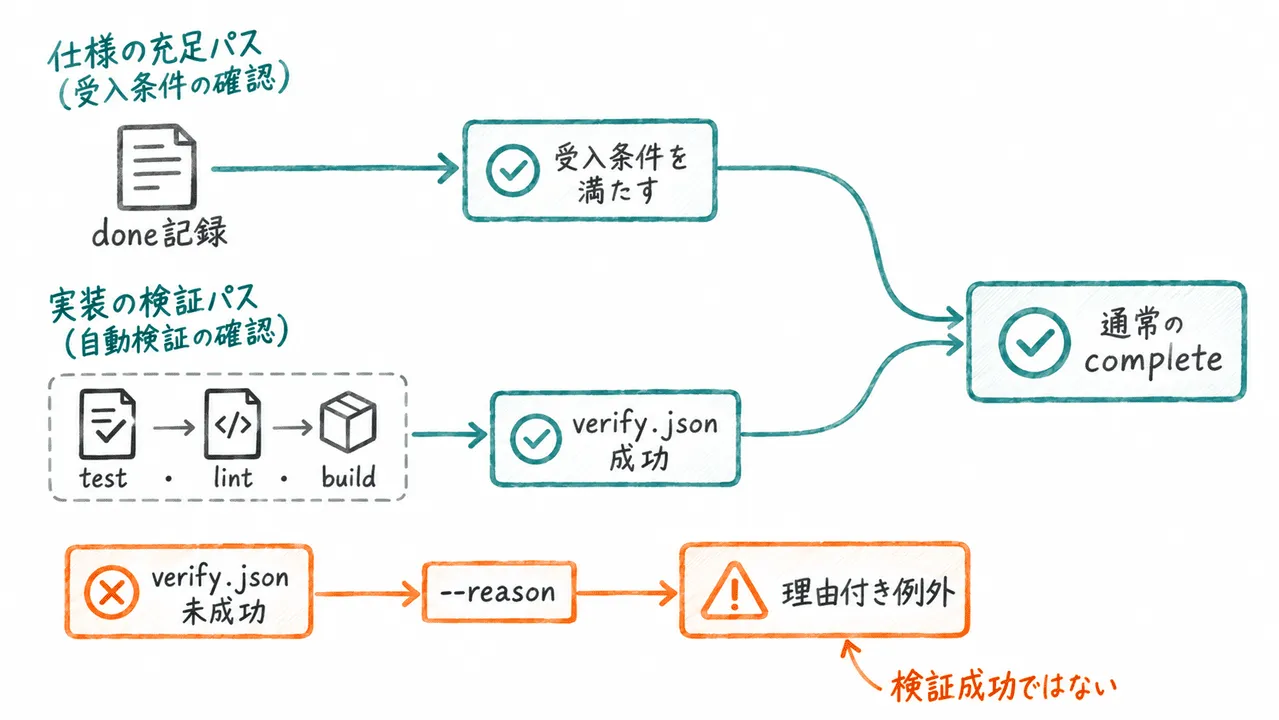
specweave complete normally refuses to close an increment without a successful verify.json result.
Passing --reason allows completion as an exception with a recorded justification.
This exception does not indicate successful verification.
Even if tasks are marked complete, the acceptance criteria are not considered proven without verifying the entire change. For changes completed with a recorded justification, the project's review or release process checks why verification was omitted and what still needs to be checked.
Handing Off and Resuming Work
Consider a change to restore a shopping cart after the user has been away, implemented across different development environments. The handoff does not consist of the full conversation. It covers the increment's specification, task records, verification results, diff, and the work to perform after resuming.
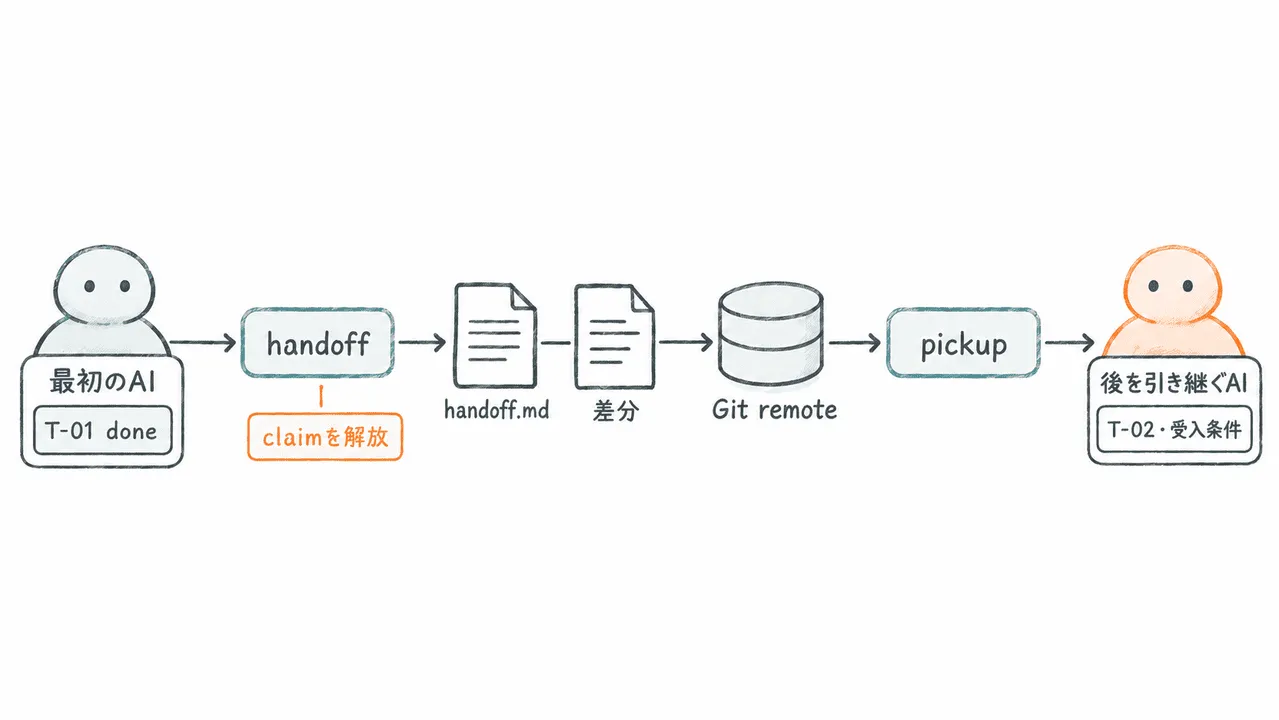
handoff creates a record when work is paused.
In the environment where work resumes, pickup checks whether the record and diff can be applied safely and displays candidate tasks.
Handoff and Resumption Steps
For the shopping cart restoration feature, T-01 saves the draft, and T-02 implements restoration.
Start with a test repository where specweave init has already been run and the project's test, lint, and build commands have been configured.
Define the Change and Its Tasks
Create spec.md using specweave create-increment "Restore checkout after return".
Note the change ID displayed in the command output.
Edit and save the problem, scope, AC-01 and AC-02, approach, and tasks T-01 and T-02.
Check that each task has target files and a test command.
Running task claim T-01 without these definitions would not communicate the assigned work or its success conditions.
Record Completion of the First Task
Use specweave task claim T-01 to record ownership of the files for saving the draft.
After implementation, run the following command.
specweave task done T-01 --run "npm test -- draft"When the test succeeds, the completion record for T-01 and the tail of the output are stored in ledger.jsonl.
If the test fails, completion is not recorded. Fix the failing behavior and repeat verification of the same task.
Record Where Work Stopped in a Handoff
When pausing work, record the reason and the next steps in a handoff.
specweave handoff \
  --reason "session end" \
  --next "Implement T-02"
handoff releases the claim and creates handoff.md along with a diff that SpecWeave has processed to exclude secret values.
If a Git remote is configured, it also performs a push of the branch and a snapshot of uncommitted changes.
This filtering does not replace secret scanning before sharing. Inspect the generated diff before sharing it.
Pick Up the Handoff in Another Environment
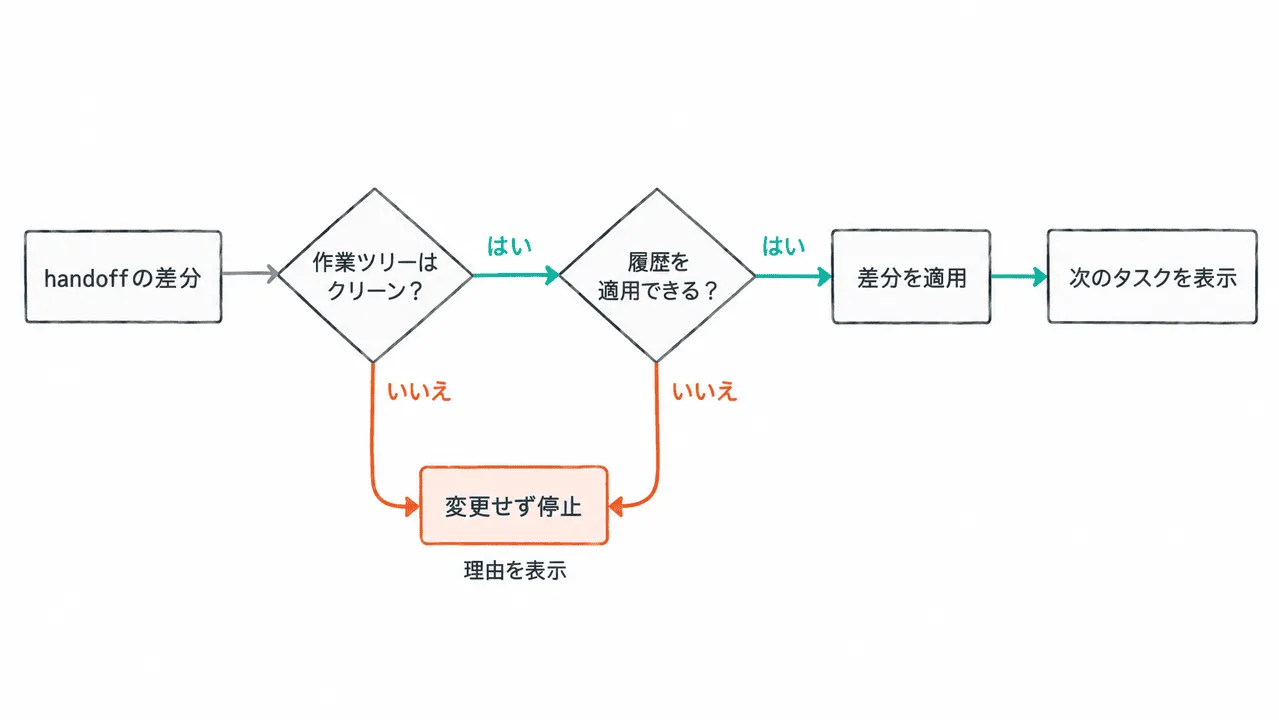
The next contributor ensures the working tree is clean before running specweave pickup.
pickup makes changes only if the handoff diff can be applied, and displays candidate tasks, the corresponding acceptance criteria, and unfinished work.
Verify and Close the Entire Change
After recording T-02, run specweave verify.
With a successful verify.json result, run specweave complete using the change ID displayed at creation time as an argument.
Check the tasks associated with the acceptance criteria and the verification results for the entire change before closing it.
Conditions That Prevent a Handoff from Being Applied
pickup does not overwrite arbitrary working trees.
If the working tree is not clean or the relationship between commits does not satisfy the application conditions, it displays the reason and stops without making changes.
In this situation, do not manually combine the diffs and continue.
Organize the current changes and check the handoff contents and branch state before trying pickup again, or have the responsible contributors resolve the conflict.
handoff does not perform verification on the contributor's behalf.
The next contributor checks the tests for unfinished tasks and verifies the entire change again.
Suitable Changes and Limits of the Approach
Records that allow work to resume are valuable for changes with explicit acceptance criteria, changes spanning multiple sessions, or changes where contributors or tools switch midway through development. There is no need to create additional increments for work such as a one-line fix that does not require acceptance criteria, task assignment, or a handoff.
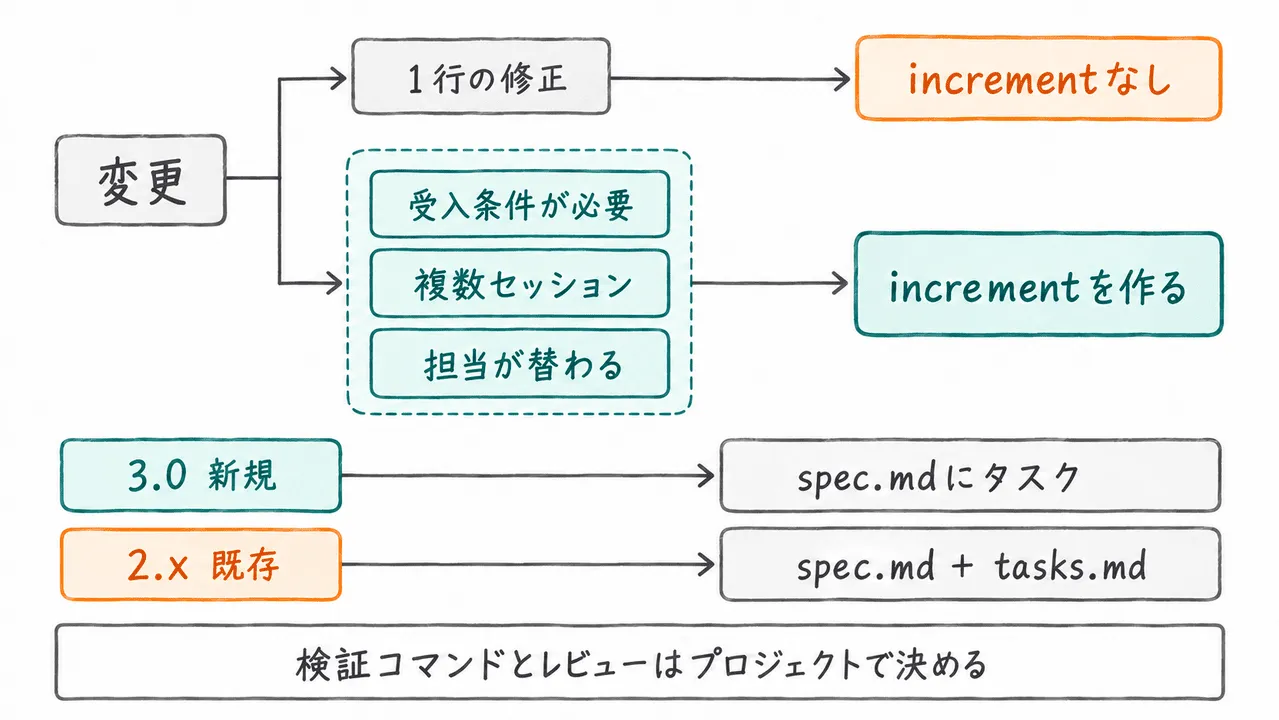
SpecWeave does not automatically guarantee code correctness, review, or release approval. The project determines which commands verify the entire change and how acceptance criteria are divided.
New increments created in 3.0 include tasks in a single spec.md file.
Existing increments from 2.x that contain a tasks.md file can still be used.
In repositories with both layouts, identify which layout the target increment uses before editing its files.
Conclusion
SpecWeave records the change definition in spec.md, work events in ledger.jsonl, verification results in verify.json, and handoff information as a handoff.
Instead of rereading a conversation, the next contributor can use pickup to inspect unfinished tasks, acceptance criteria, diffs, and records of decisions.
However, the existence of these records alone does not guarantee the quality of the change.
Run verification commands and reviews appropriate to the project separately, and examine completion with a recorded justification and forcibly acquired claim records as documented decisions.
References
The official overview describes SpecWeave's purpose and the records it maintains within a repository.
The official command reference describes the options and conditions under which commands stop.
The official migration guide describes the changes to the spec.md and ledger.jsonl structure in 3.0.