Introduction
Hi, I'm cardene, a software engineer and technical writer focused on blockchain and AI.
I've also authored Japanese technical books on specification-driven development with LLMs and decentralized application (DApp) development.

I also build and publish a variety of tools, libraries, and open-source projects.
Introduction to the Workflow
Large changes assigned to an AI coding agent may take more than one conversation to complete. Continuing in a later session requires more than the previous conversation: the agent needs the agreed specification, the approved plan, and the point reached during implementation.
Spektacular is a CLI that connects specification-driven development with AI coding agents. It treats specification, planning, and implementation as separate workflows and records their documents and current stages in Git. In a new session, the CLI reads the saved state and returns a single instruction for the next action.
Using the example of adding a price range filter to product search, this article explains how to resume midway through planning and where to return when requirements change after approval.
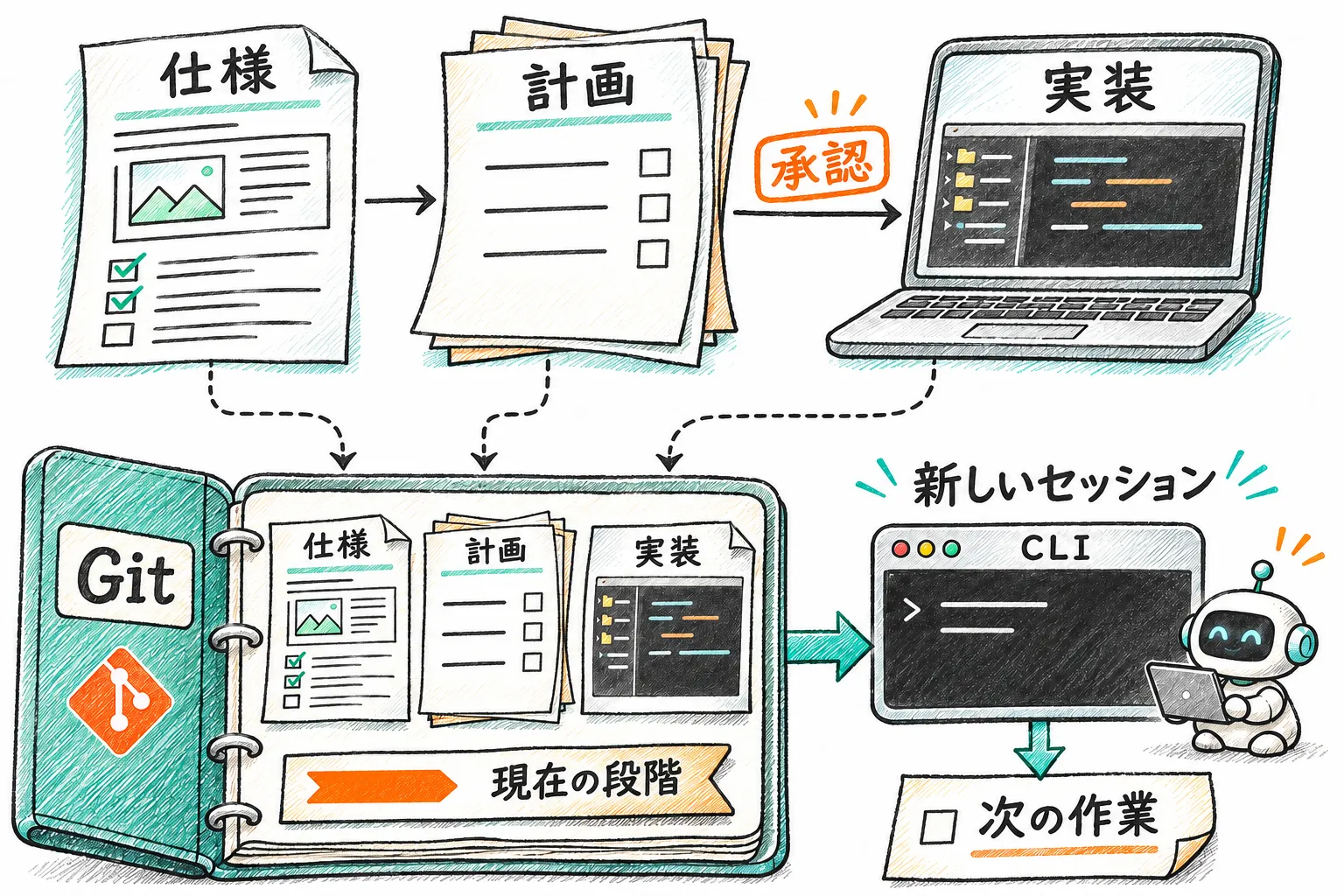
The original diagrams in this article retain their Japanese labels.
Spektacular does not save and replay AI agent conversations. Instead, it moves the decisions required for resumption into documents and records the workflow's position as state, allowing the same change to continue in a separate session.
What Is Spektacular?
Spektacular manages a workflow in which requirements are captured in a specification, a human reviews the implementation plan, and an AI agent changes the code according to that plan. The CLI returns the current stage and instructions, while the connected AI agent investigates, updates documents, implements changes, and performs checks.
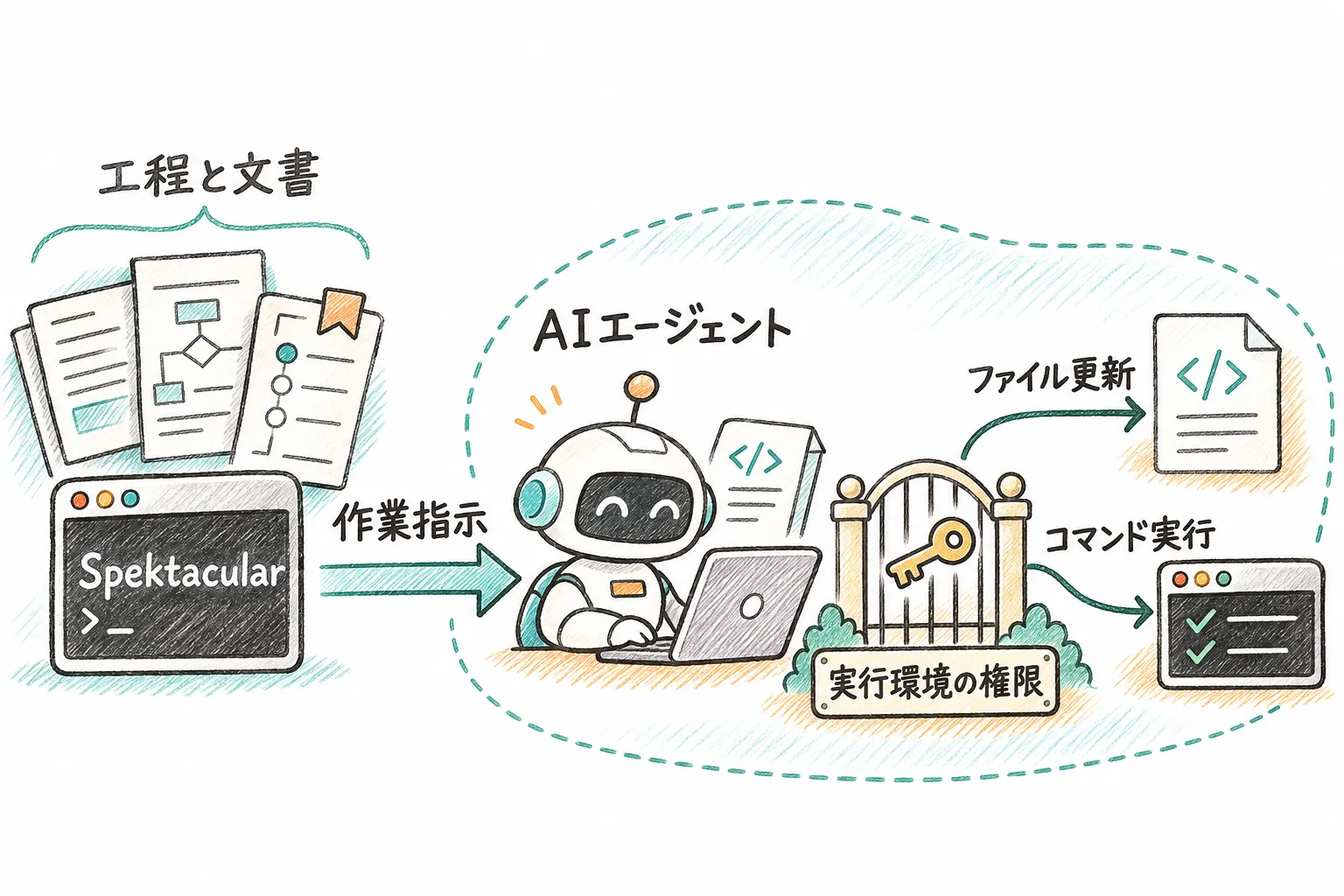
Spektacular manages workflow order, documents stored in Git, user approval, and the stage to resume. Permissions to modify files or execute commands, by contrast, are governed by AI agents such as Codex and their execution environments.
Three Workflows from Specification to Implementation
Work is divided into three workflows: specification, planning, and implementation. Spektacular uses a spek (specification document) containing requirements, constraints, and acceptance criteria.
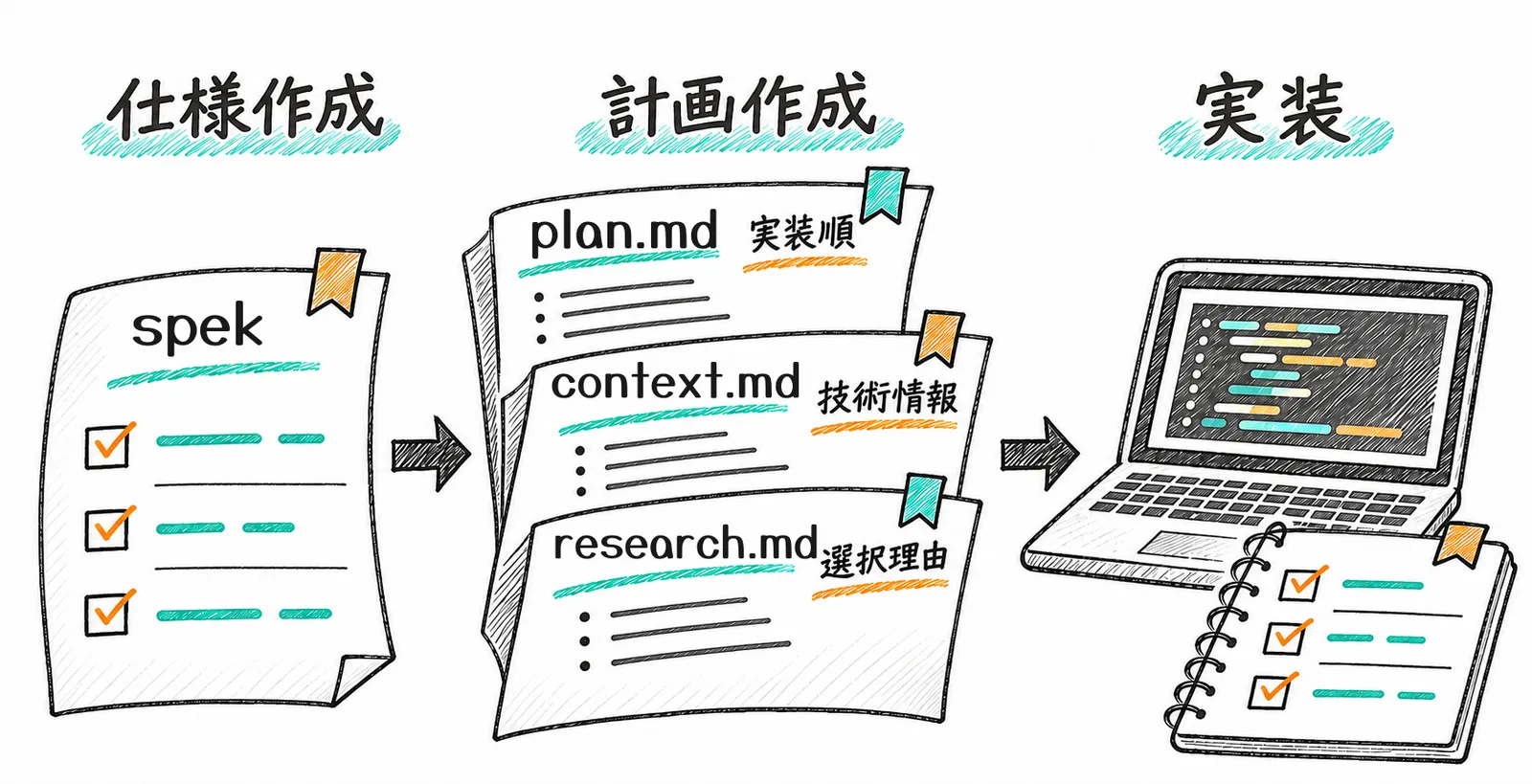
- Work through the specification workflow
Capture the desired outcome, constraints, and acceptance criteria in the
spek. - Work through the planning workflow
Investigate the codebase and record the implementation order in
plan.md, technical details incontext.md, and the rationale for choices inresearch.md. - Work through the implementation workflow Implement the plan task by task, then proceed through testing, goal review, change records, and reconciliation against the specification.
The three workflows are not simply a single checklist completed from top to bottom. Each workflow has a state machine through which the CLI manages the current and subsequent stages. Because each workflow has its own stages, a finalized specification can coexist with a plan that is still under investigation.
Documents and Progress State Stored in Git
Spektacular stores specifications and plans in Git as Markdown.
The active regular workflow is saved in .spektacular/state.json, while individual execution records are saved in state files under .spektacular/workflows/.
During planning, context.md captures technical information for implementation and research.md records the reasoning behind decisions for future reference.
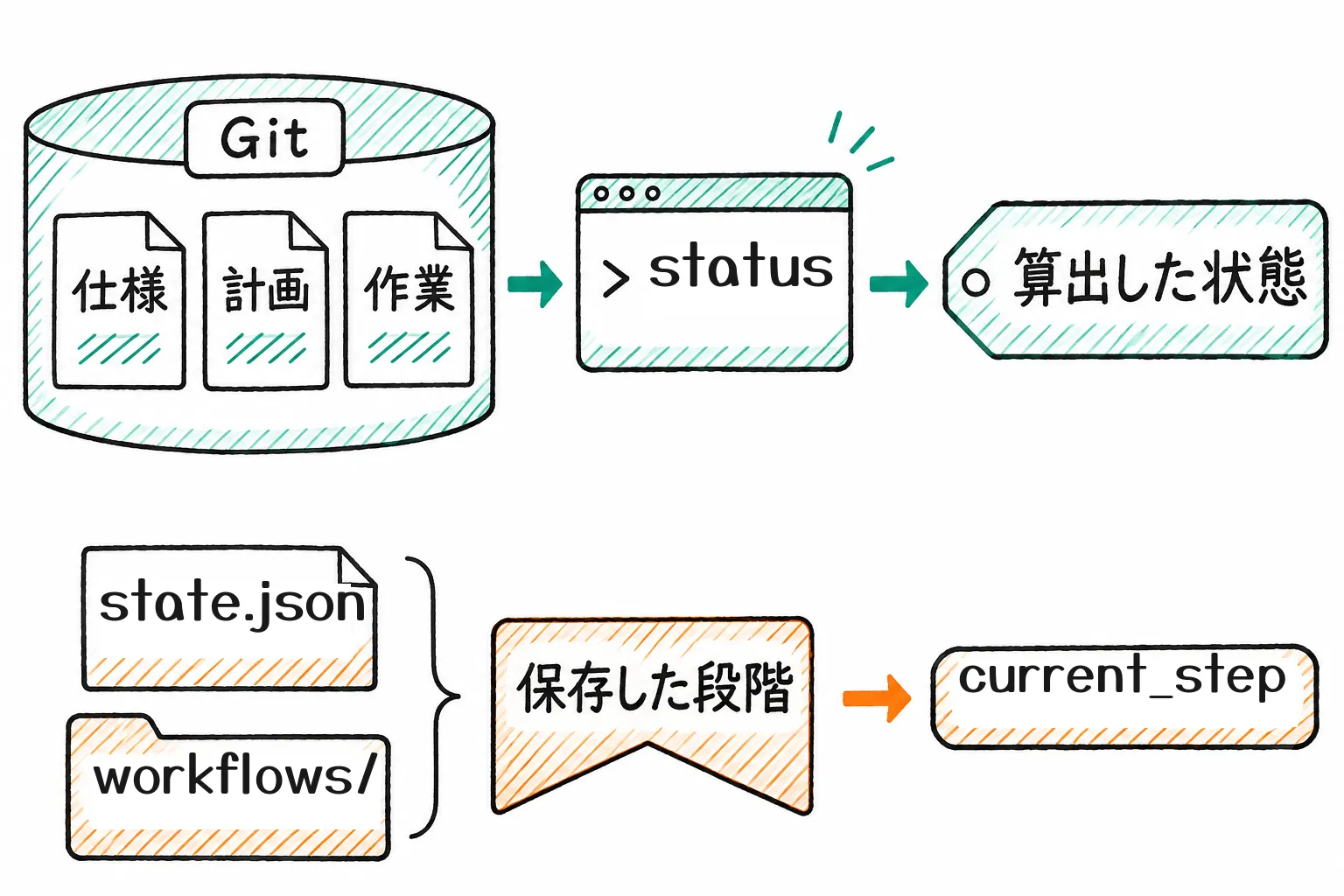
States such as specified and planned, however, are not stored as a single value.
The status command examines the presence and progress of specifications, plans, and tasks to derive one of six states: missing, stale, specified, planned, in_progress, or implemented.
This separation lets AI agents recover decisions from documents in Git and identify the stage to resume from state files, without reconstructing the previous conversation.
Advancing One Instruction at a Time
The new command for each workflow does not automatically run it to completion.
It initializes workflow state and returns one action for the AI agent as an instruction.
The agent updates documents or code according to the instruction and advances to the next stage with goto.
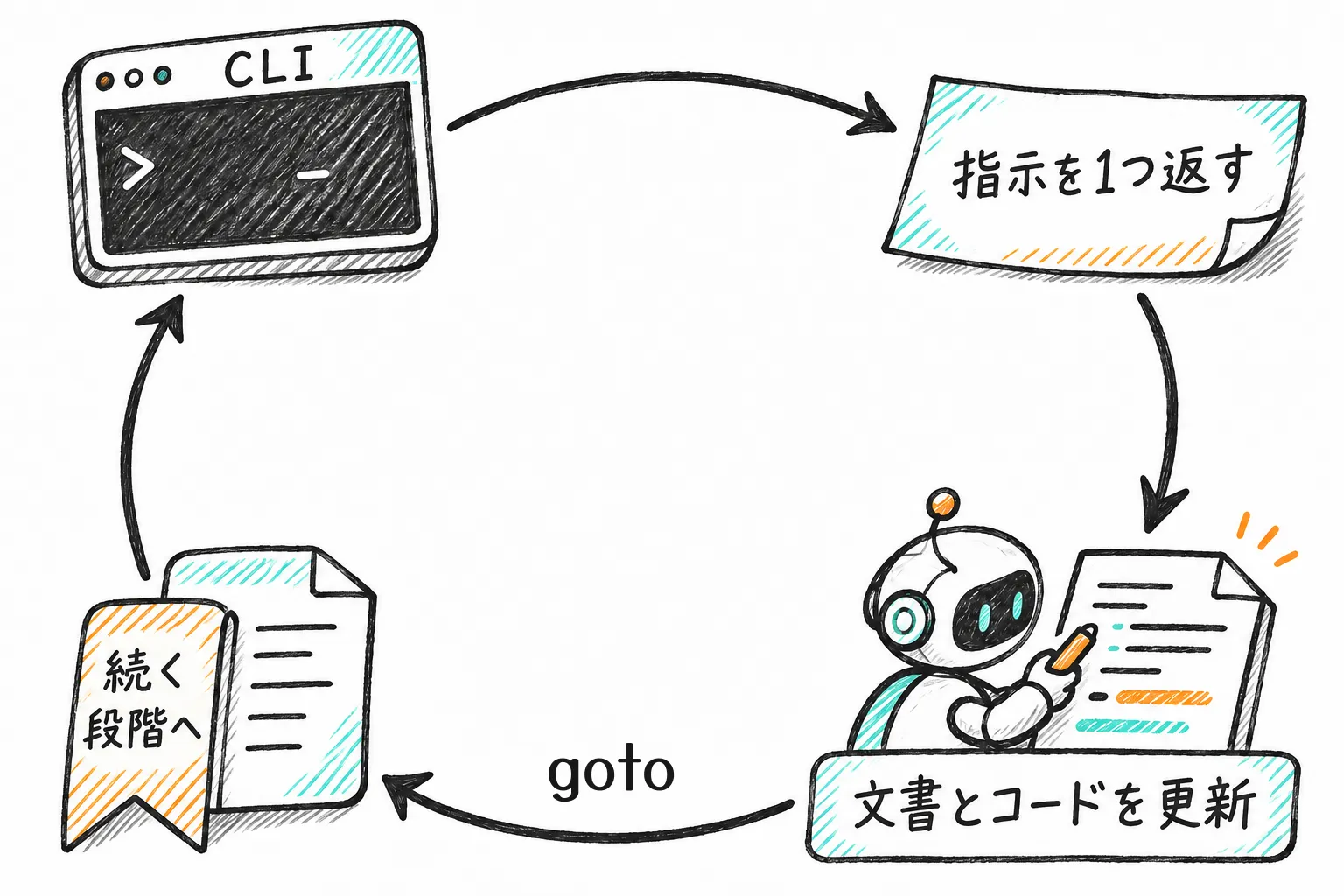
This loop does not skip completed stages as it proceeds. Even if a session ends midway, the next stage is saved in a state file, making it clear where to continue.
Two Positions Reported by status
When resuming, distinguish between the saved position within the workflow and the overall state of the change derived from documents.
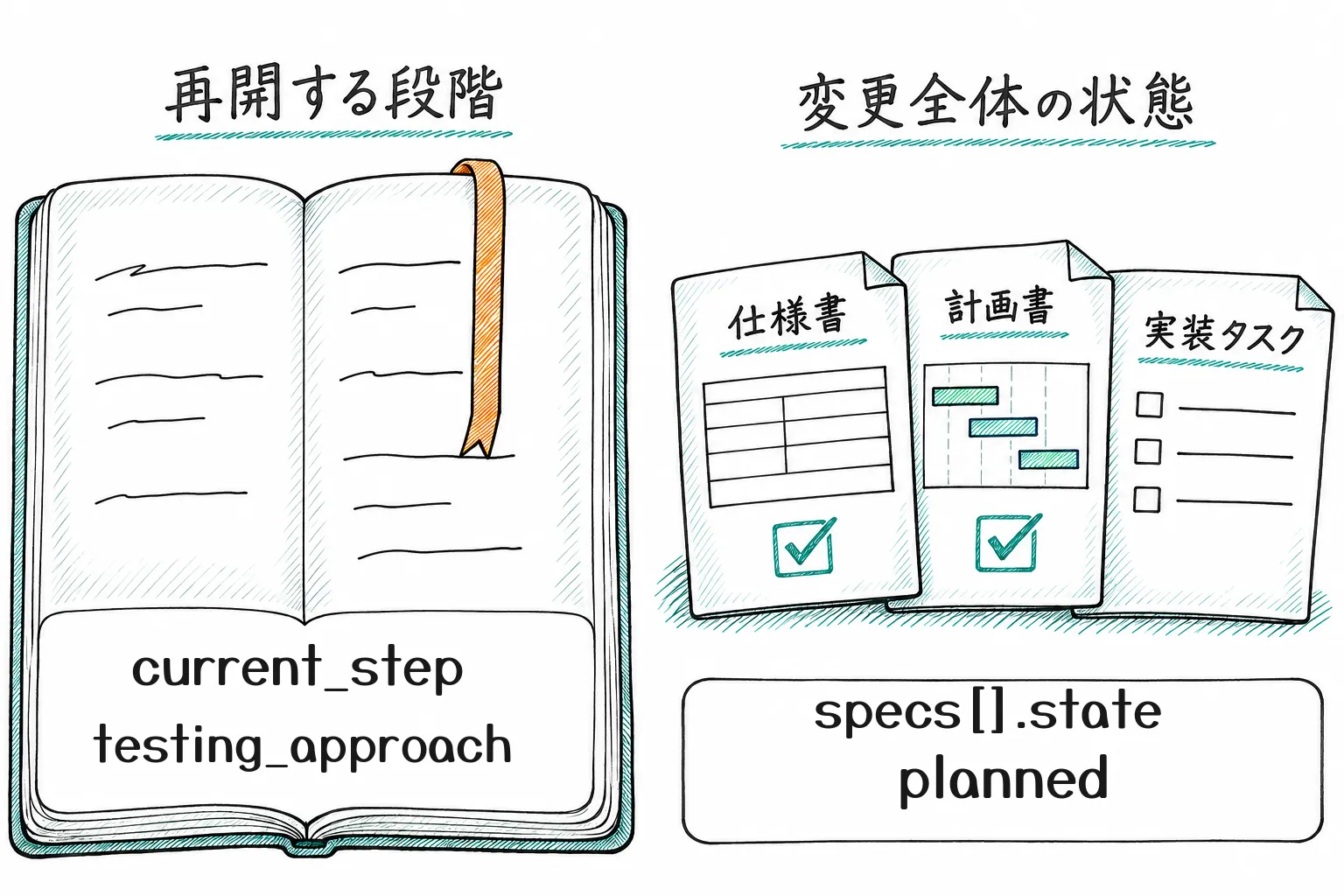
| Value | What it indicates | How to use it |
|---|---|---|
current_step |
The next stage in the active workflow | Resume the same workflow midway |
specs[].state |
Overall state of the change, derived from the specification, plan, and tasks | Check how far specification, planning, and implementation have progressed |
For example, if current_step is testing_approach, the workflow is in the planning stage where the testing strategy is defined.
If the derived state of the same change is planned, a plan exists but implementation has not yet begun.
Treating these values as the same measure of progress confuses the action to resume with the overall completeness of the change.
Choosing Between Resuming and Starting Over
If new is called while a workflow is active, Spektacular returns a resume report rather than starting another workflow on top of it.
The report includes whether the workflow can be resumed, its kind, the change name, the current stage, and that stage's instruction.
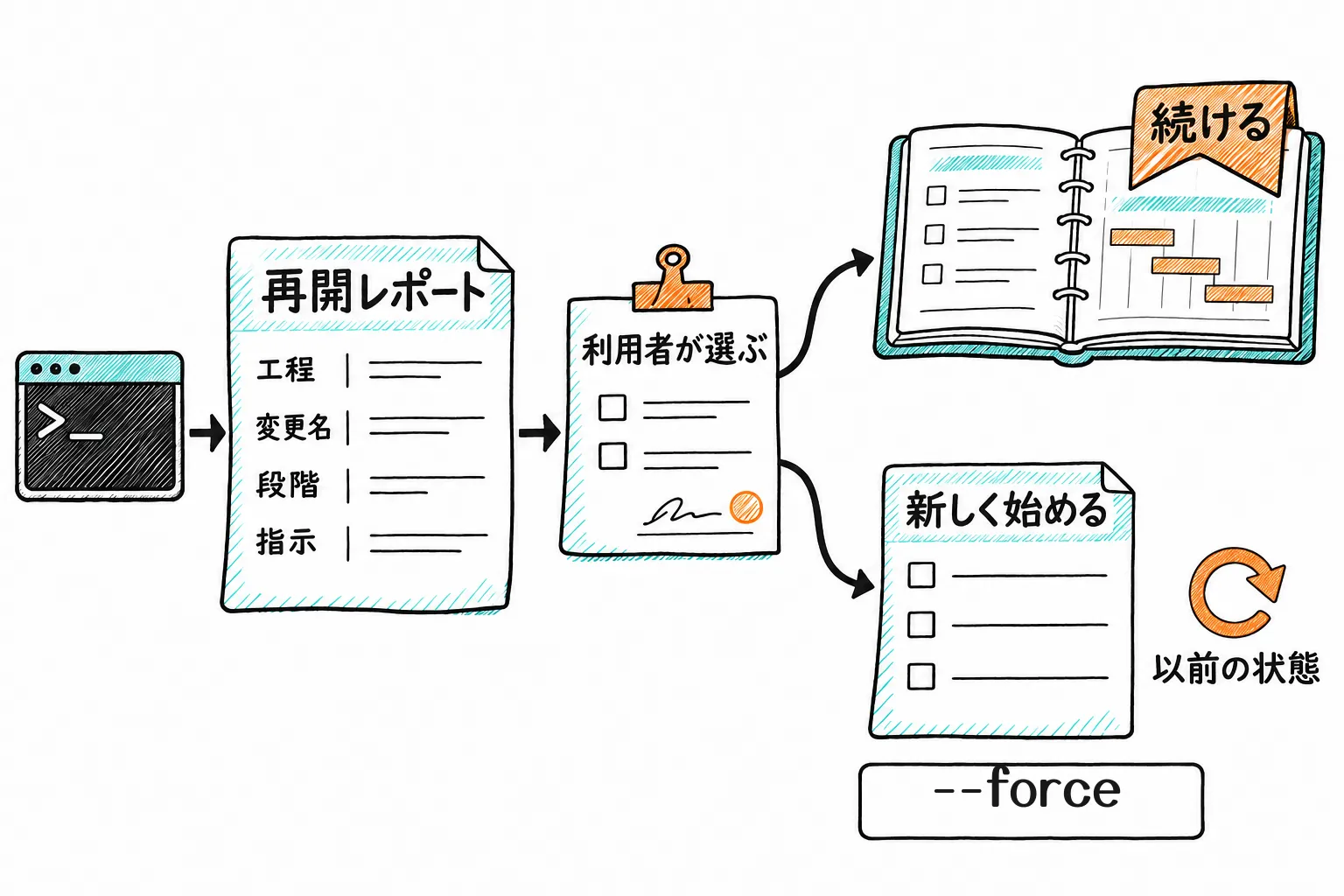
The user reviews the report and chooses whether to continue the existing workflow or start over with --force.
To resume, read the existing documents and continue the same kind of workflow from current_step.
Starting over discards the previous state, so confirm that it can be recovered from Git before proceeding.
If a different kind of workflow is active, do not force a goto from the current Skill.
For example, if planning is still in progress, switch from the implementation Skill to the planning Skill, or stop until the user discards the previous workflow.
The Basic Specification-to-Implementation Flow
The basic flow is to finalize the specification, approve the plan, implement, review goals, and integrate. After each operation, check the returned instruction and the documents in Git. The commands and return values shown here are expected observations based on static inspection of the published 0.29.0 implementation, not measurements from running the CLI for this article.
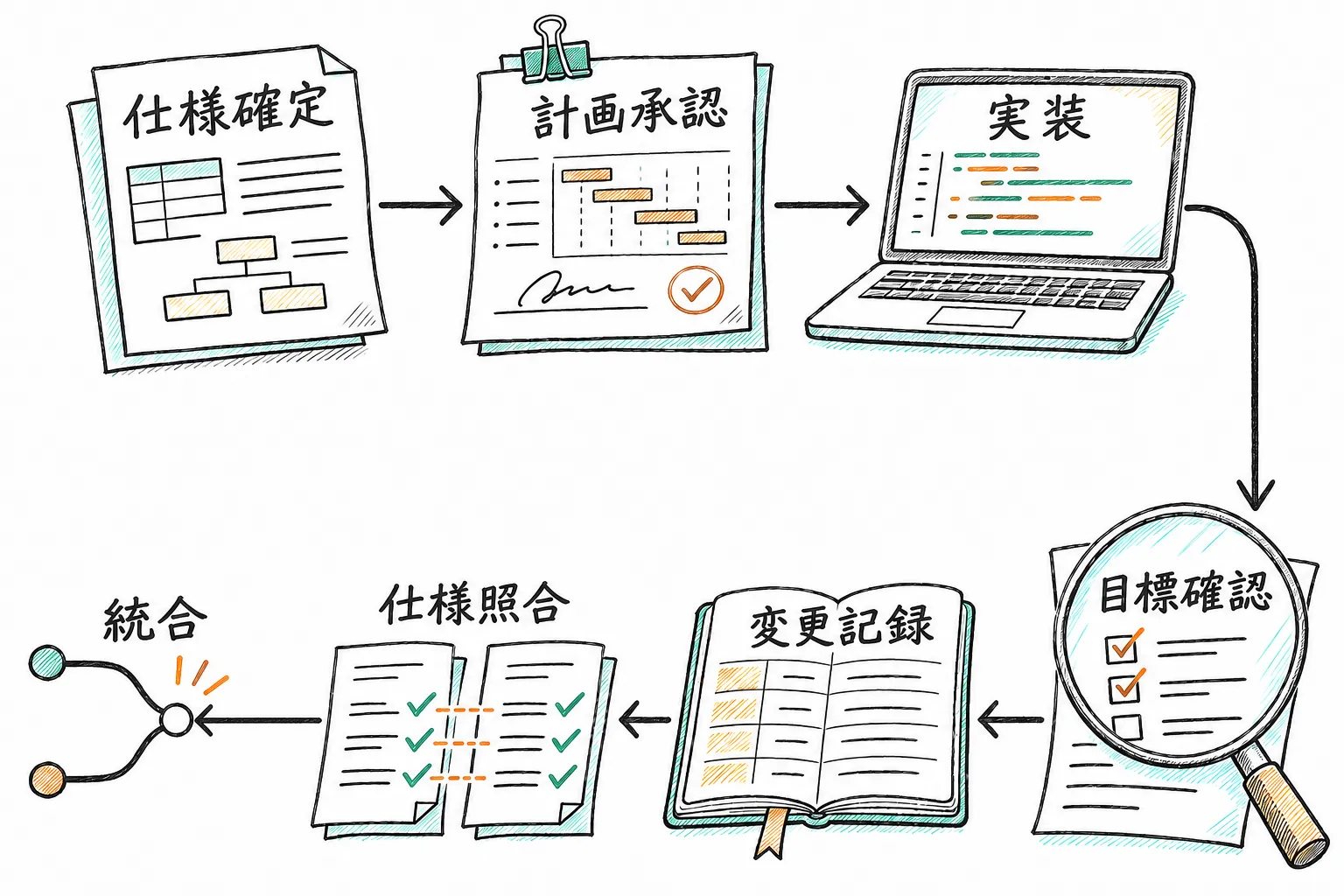
- Initialize the project
Prepare Skills for the AI agent in use and the configuration under
.spektacular/. - Check for an active workflow
Call
spec newwithout supplying data. If a resume report is returned, wait for the user's choice. - Create the
spekRecord requirements, constraints, and acceptance criteria stage by stage, and have the user finalize the content. - Create the implementation plan Investigate the codebase and record implementation order, technical details, and decision rationale in the three planning documents.
- Approve the plan Review scope, tasks, human actions, and assumptions, and obtain explicit user approval.
- Begin implementation Read the planned tasks and make changes in a dedicated worktree or the original checkout, depending on configuration.
- Check each task Make code changes, run project-specific tests, and check acceptance criteria.
- Review goals Examine task outcomes from a separate context and determine whether goals are met, unmet, or impossible.
- Record changes Document deviations from the plan and changes affecting users.
- Reconcile the specification and implementation Compare acceptance criteria with implementation results and resolve remaining discrepancies.
- Integrate the worktree If a worktree was used, integrate it into the target branch after all tasks succeed.
Creating the spek and Approving the Plan
A named spec new returns the normalized specification name and its storage location.
The AI agent adds requirements, constraints, and acceptance criteria at that location and obtains user confirmation at each stage.
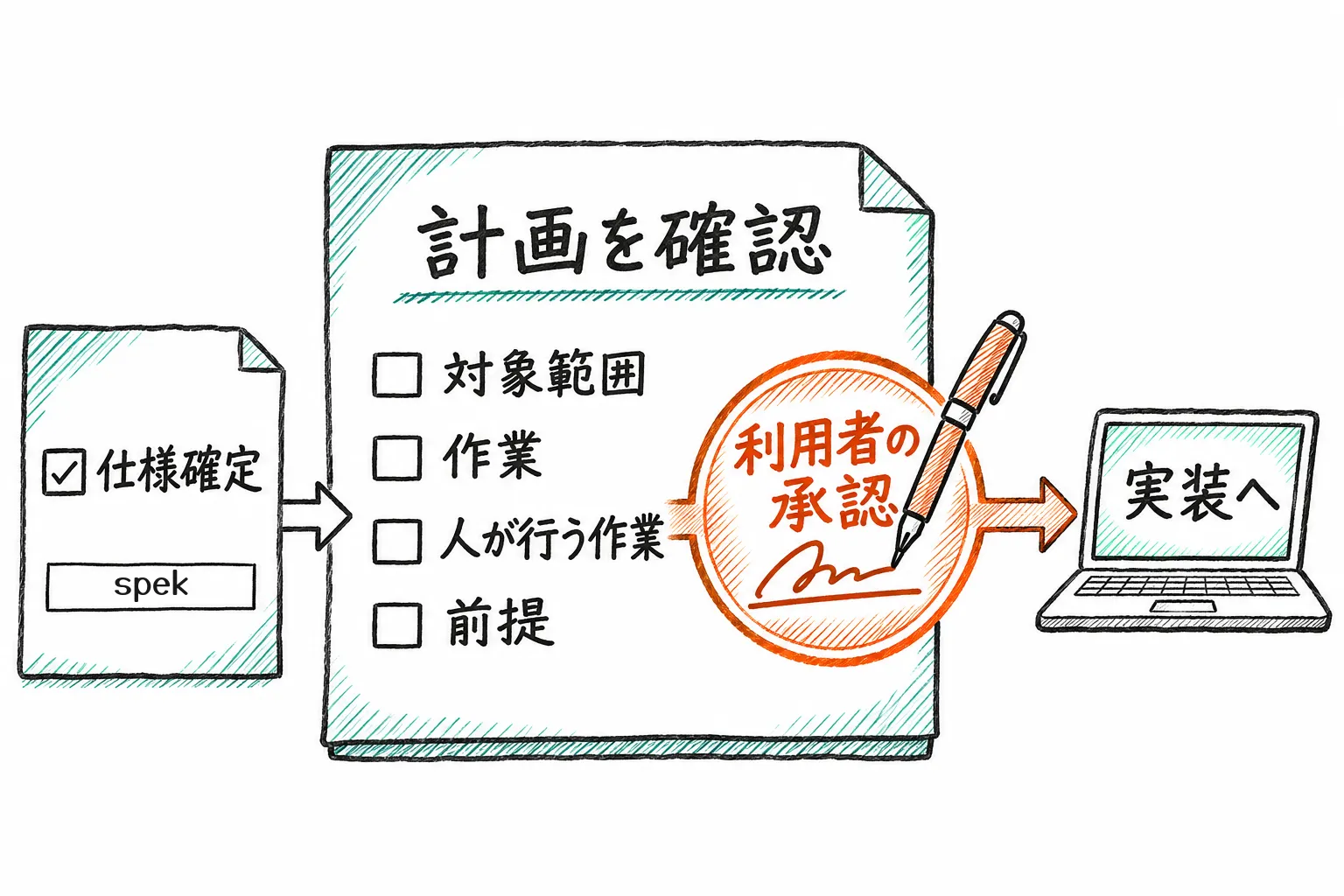
Once the specification is finalized, plan new begins investigating the codebase.
During plan review, the user sees not only the implementation order but also out-of-scope items, human tasks, and assumptions.
Only after the user reads this walkthrough and explicitly approves it is the plan treated as finalized and handed off for implementation.
Stopping Before Starting When Uncommitted Changes Exist
In projects configured for automatic commits at the workflow or full level, a new workflow cannot start if registered repositories have uncommitted changes.
Stopping before starting lets the user decide how to handle prior work before mixing it with changes from the new workflow.
Spektacular returns uncommitted_changes and asks whether to commit the existing changes separately first or include them in the workflow about to begin.
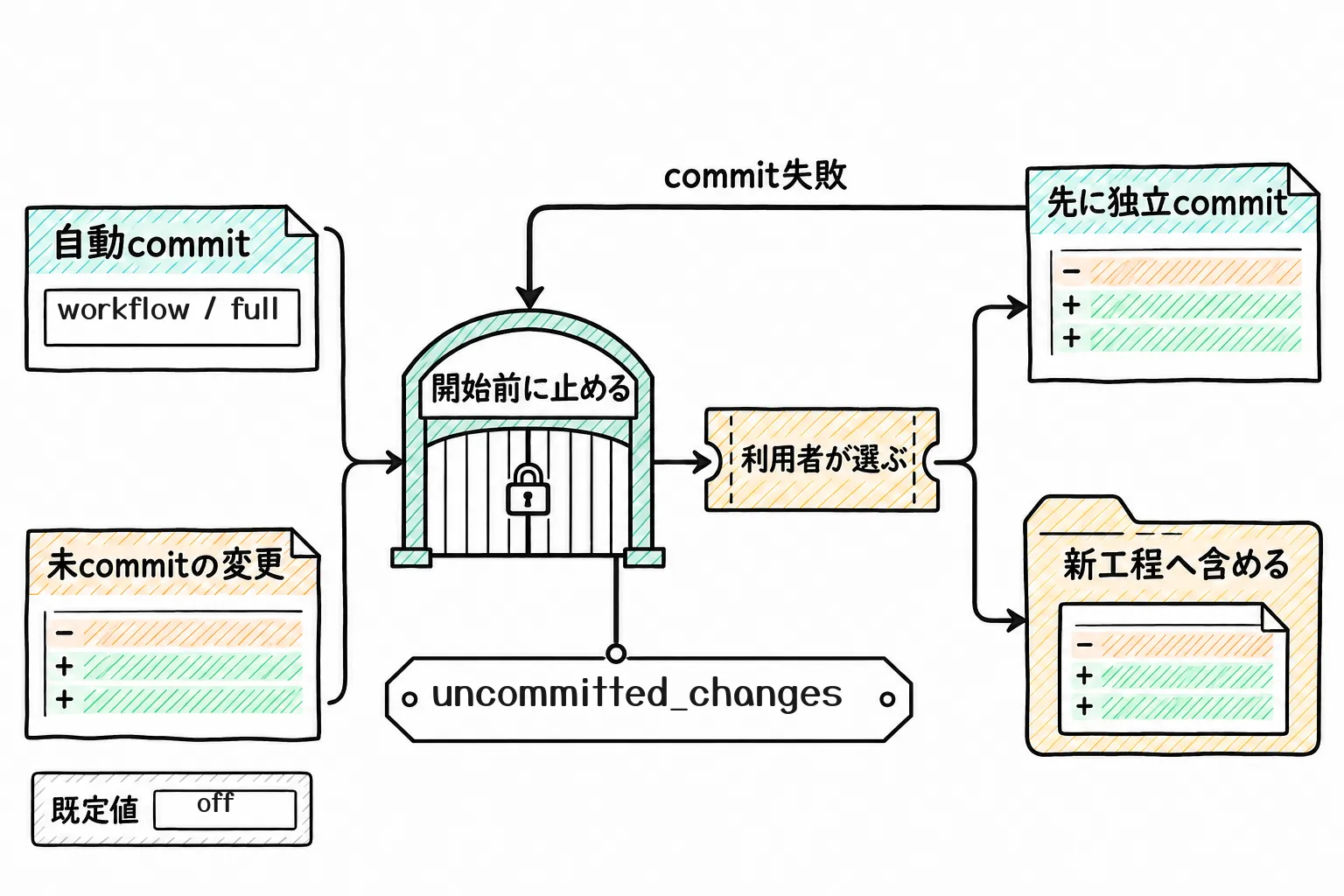
If the commit fails, the workflow does not start either.
The default automatic commit setting is off.
In the price range filter example, commit the existing changes first and start with a clean working tree.
Repeating Implementation and Goal Review
During implementation, change code and perform tests and verification for each planned task.
Goal review is enabled by default. A goal reviewer operating in a separate context from the implementation reads the acceptance criteria and returns met, not_met, or impossible.
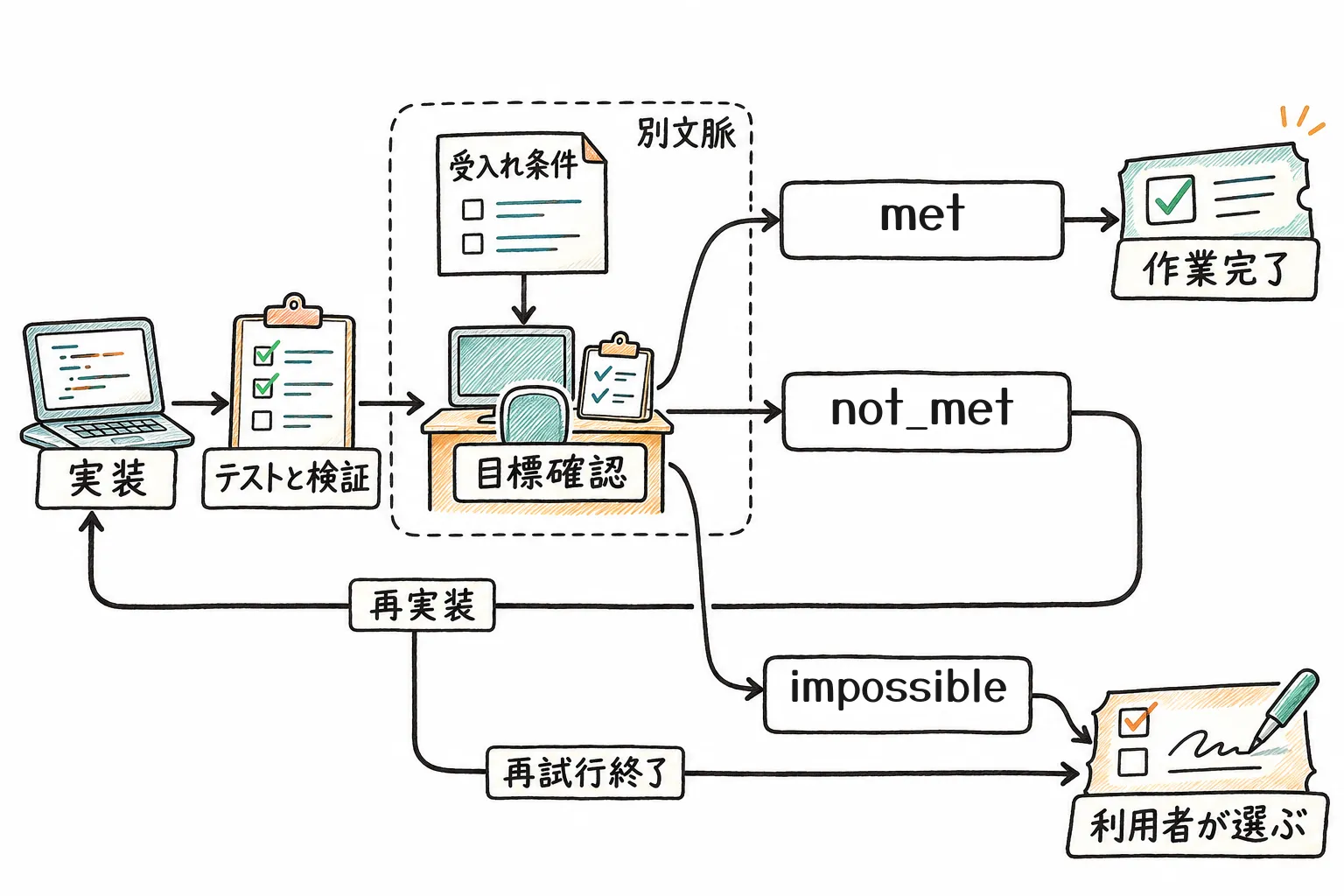
If the result is met, move the task toward completion; if it is not_met, return to implementation.
If a dedicated helper is unavailable, delegate the review to a sub-agent in a fresh context.
When retries are exhausted or the acceptance criteria cannot be satisfied, return the available choices to the user rather than allowing the AI agent to change the conclusion on its own.
Goal review can be disabled in the configuration. If disabled, separately determine which project-specific reviews and tests are required for task completion.
Pausing and Resuming a Price Range Filter
Consider adding min_price and max_price to product search, with the existing search results preserved when both are omitted.
The spek describes the results presented to users and input constraints, and the implementation plan divides the work into search API, UI, and testing tasks.
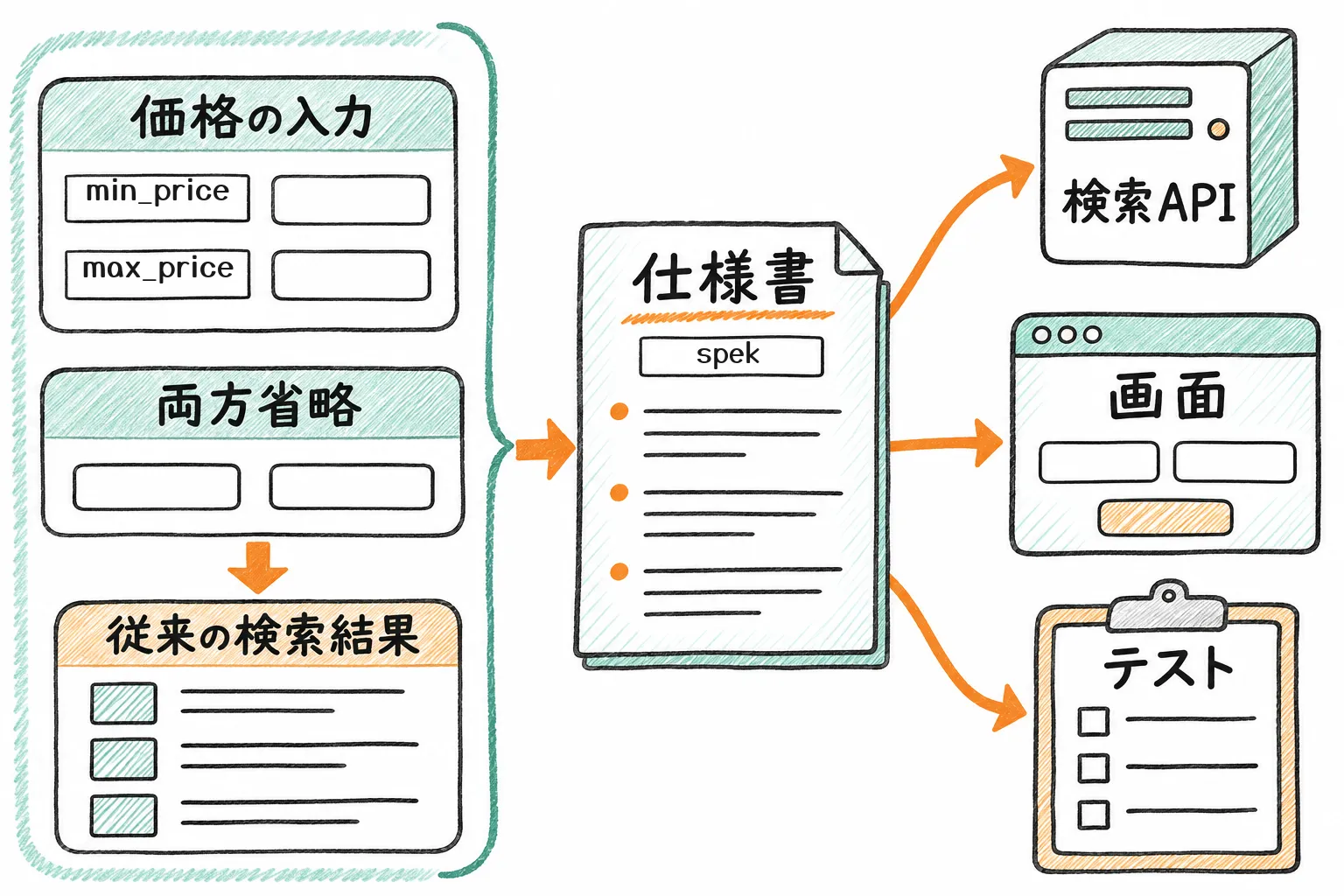
Rather than considering only an uninterrupted path to completion, this example covers two cases: the session ends midway through planning, and the desired search result ordering changes after approval.
Resuming Midway Through Planning
Suppose the session ends at testing_approach, where the testing strategy is being defined.
Calling plan new in a later session should return a resume report because an existing planning workflow is still active.
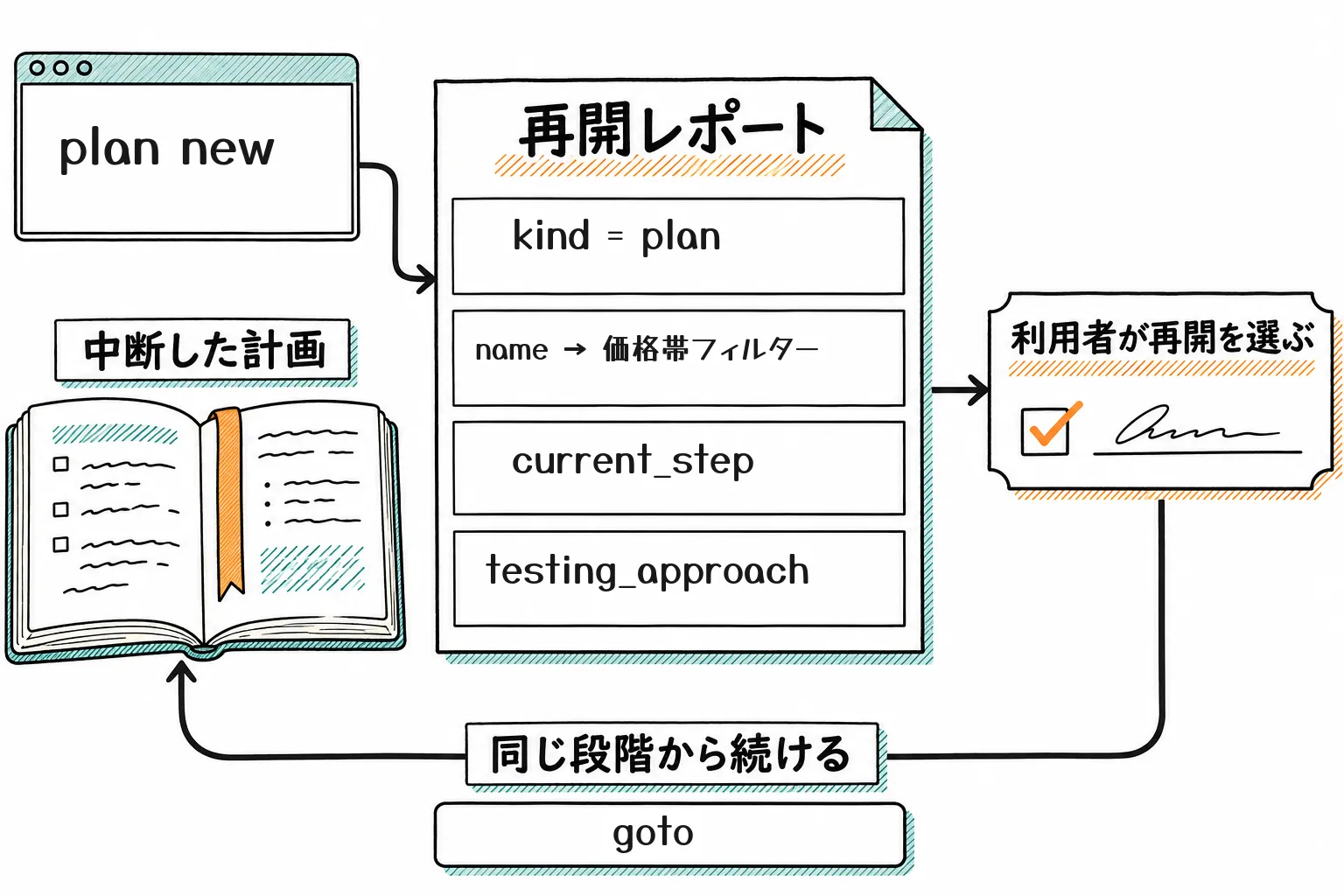
- Check the workflow kind
Confirm that
kindisplan; do not proceed from the implementation Skill. - Check the change name
Confirm that
nameidentifies the price range filter'sspek. - Check the stage to resume
Confirm that
current_stepistesting_approach. - Obtain the user's choice
Only if the user chooses to resume, read the existing planning documents and run
gotofrom the same stage.
This flow does not recreate the completed overview and design from scratch. However, returning a resume report does not automatically continue the workflow. The user chooses whether to preserve or discard the previous work.
Replanning After an Approved Specification Changes
In a project with plan.strict_spec_changes set to true, directly editing an approved spek makes the implementation plan stale.
For example, directly adding an ordering requirement alongside the price range causes status to report the plan as stale. Implementation stops until replanning and reapproval are complete.
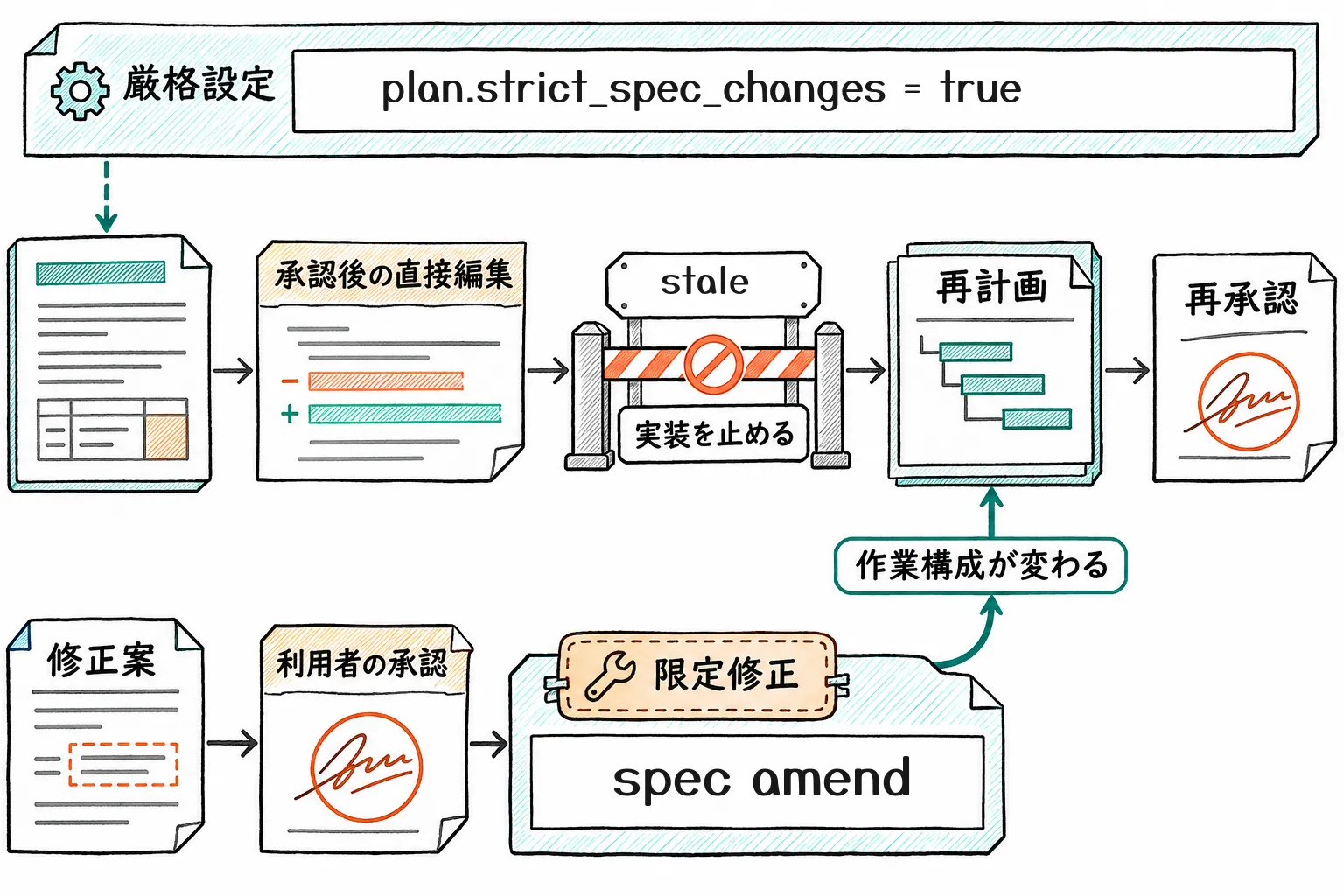
If an error in the acceptance criteria is discovered during implementation, show the user the affected document, section, conflict, and proposed correction.
After explicit user approval, use spec amend, the mechanism for approved specification amendments during implementation, to change only the affected requirements, acceptance criteria, constraints, and success metrics.
If the correction also changes how tasks are divided, do not proceed with a limited amendment alone.
Return to planning and the walkthrough to obtain fresh approval for an implementation plan that matches the revised specification.
What to Check When Work Stops
An interrupted workflow is different from a workflow stopped pending a user decision. A resume report guides the agent back to the same workflow, but unmet goals and integration conflicts cannot be resolved merely by repeating the same operation.
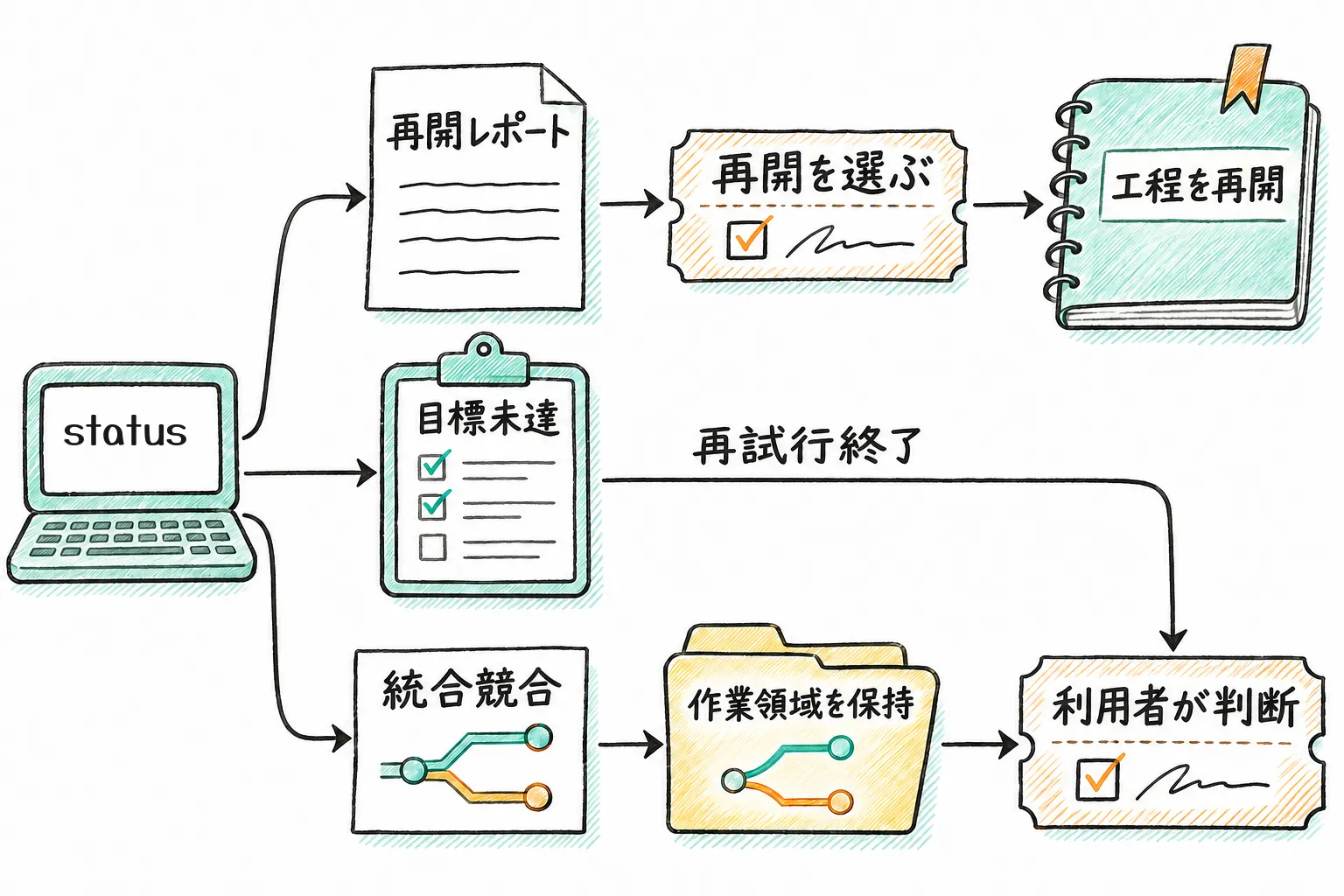
First use status to inspect the active workflow and document state.
Then read the goal review result, remaining worktree, and branch to determine whether the AI agent can continue or the user must choose a course of action.
Returning Choices to the User When Goals Are Unmet
If goal review returns not_met and retries in the same round are exhausted, the state becomes exhausted.
The user chooses whether to continue fixing the problem, accept the unmet goal, or skip the task, providing a reason for the choice.
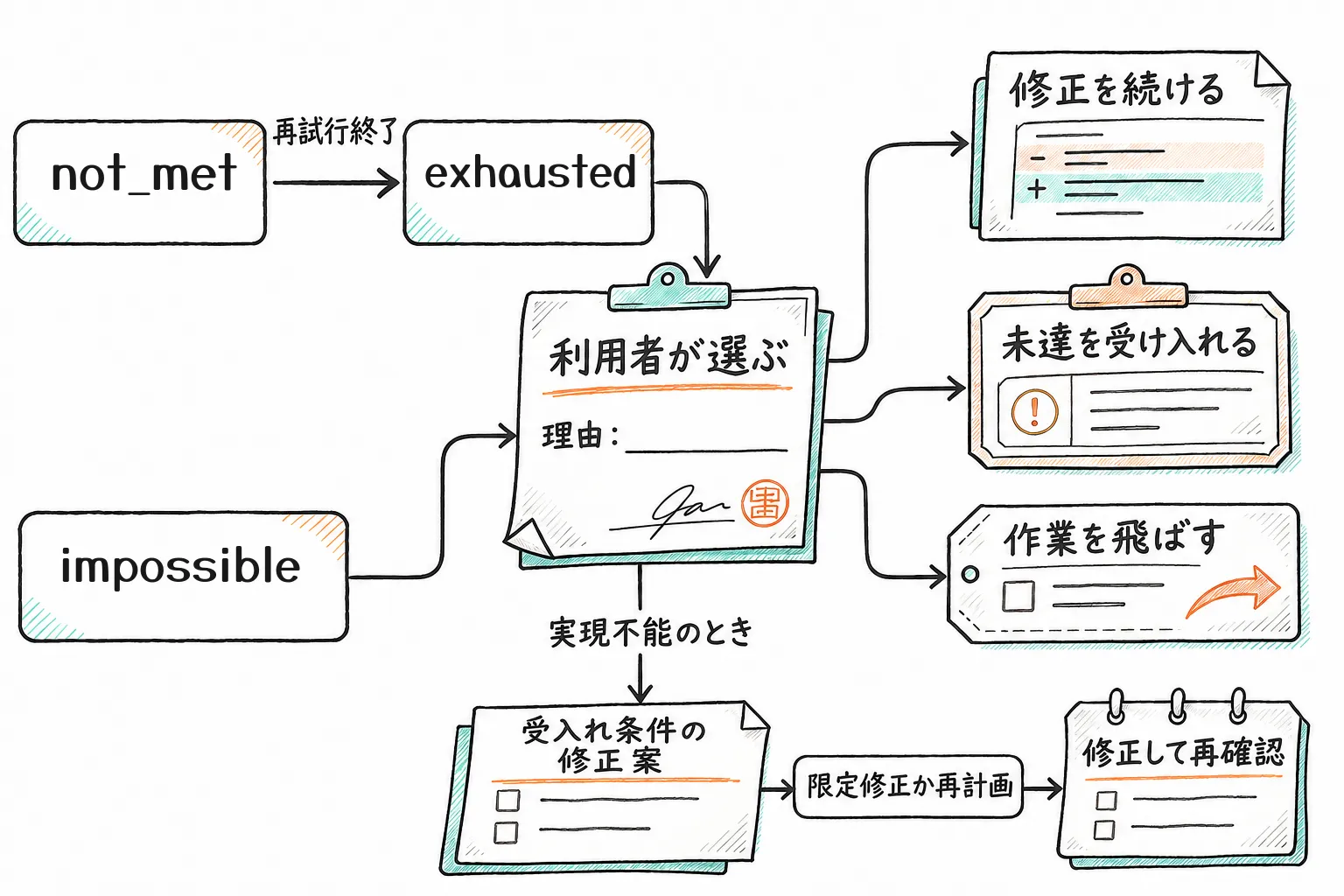
With impossible, another option is to revise the acceptance criteria themselves and review them again.
In none of these branches does the AI agent automatically convert its own implementation into a pass.
Before changing specifications or acceptance criteria, determine whether the change is an approved limited amendment or requires replanning.
Preserving the Worktree When Integration Conflicts Occur
Worktrees are enabled by default.
Tasks are separated from the original checkout, and after all tasks are complete, implement merge integrates the changes into the target branch.
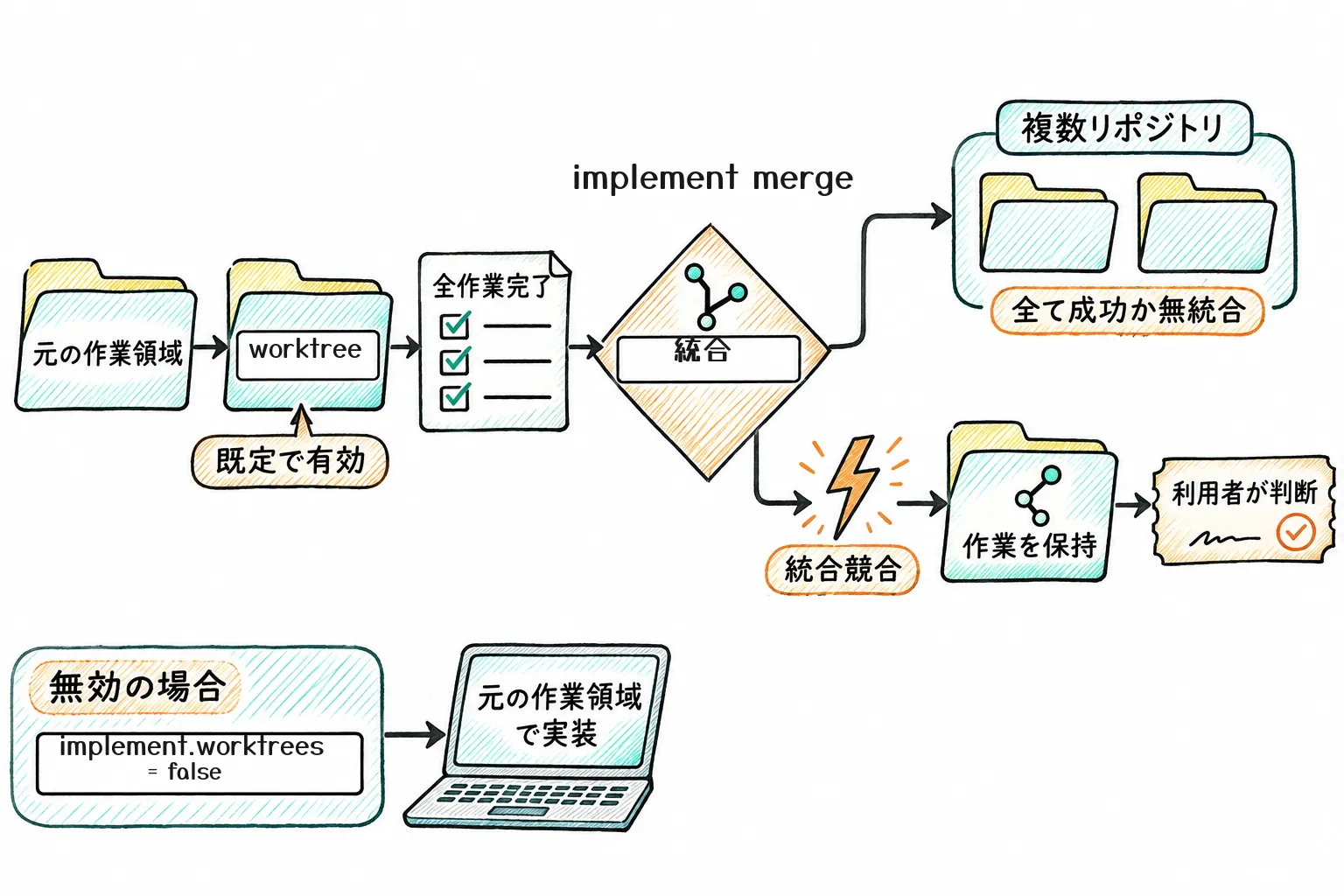
When modifying multiple repositories, integration proceeds on an all-or-nothing basis. If a conflict occurs, the CLI reports the affected repository and path and preserves the worktree and branch. The AI agent does not independently continue merging or rebasing; it stops until the user decides how to resolve the conflict.
Setting implement.worktrees to false makes implementation take place in the original checkout.
In this case, there is no workflow using a dedicated worktree and implement merge, so the project must decide how to isolate and integrate changes.
Suitable Use Cases and Limits of the Guarantees
Spektacular is suited to changes that require requirements to be reviewed in a specification, a human-approved plan, and task-level checks across multiple implementation sessions. A project knowledge base containing past design practices and cautions can also support planning research. For an obvious fix involving only a few lines, however, the cost of maintaining three workflows and their documents may outweigh the benefits.
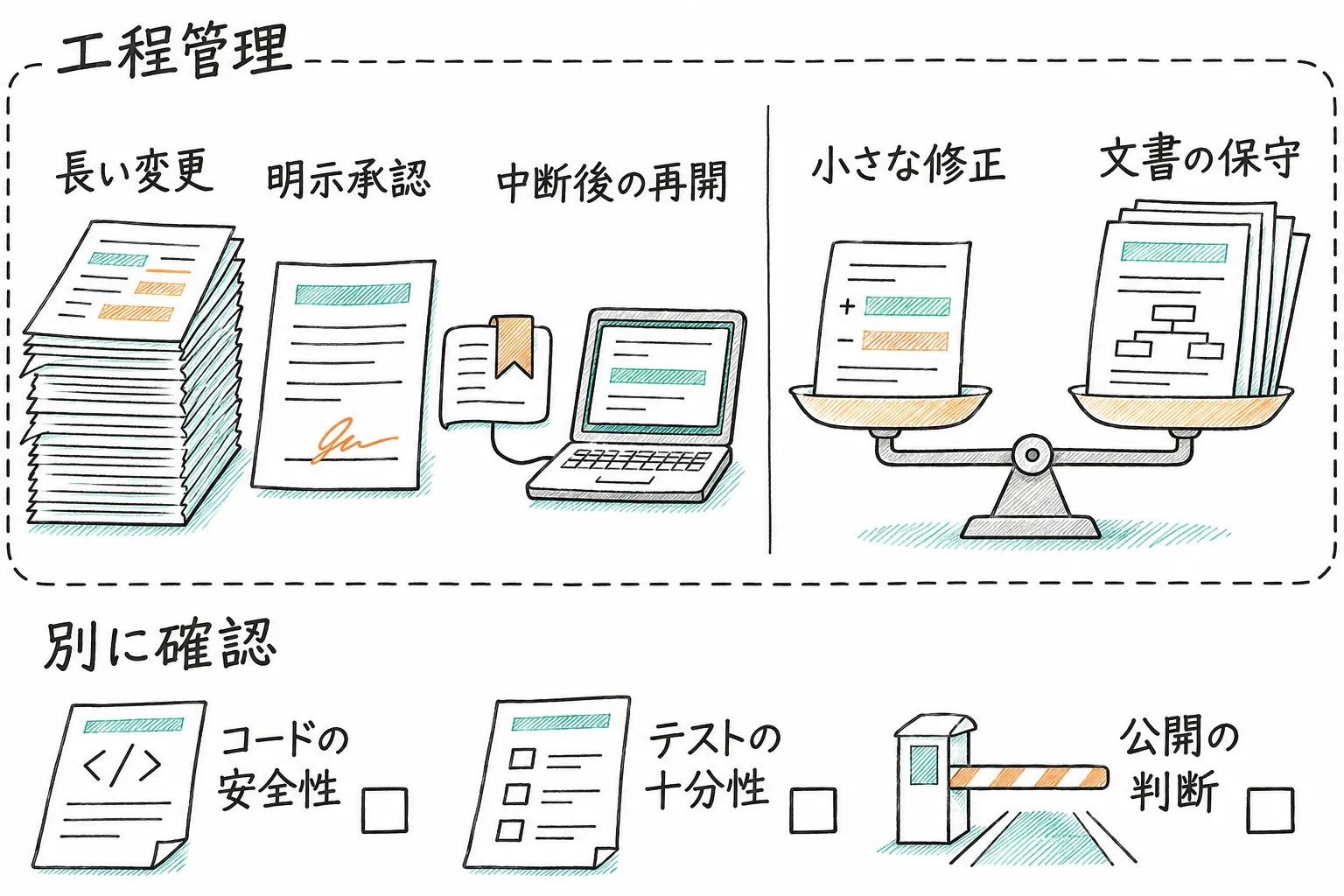
Even when the workflow manages execution order, it does not guarantee the security of generated code, the adequacy of project-specific tests, or that a change is ready to publish. When adopting it, consider whether preserving documents and state is worth the effort given the duration of changes and the number of AI agents involved.
Choosing Strict Specification Changes at the Project Level
The default value of plan.strict_spec_changes is false.
Each project chooses whether specification changes should make the plan stale every time or whether to allow changes during exploration.
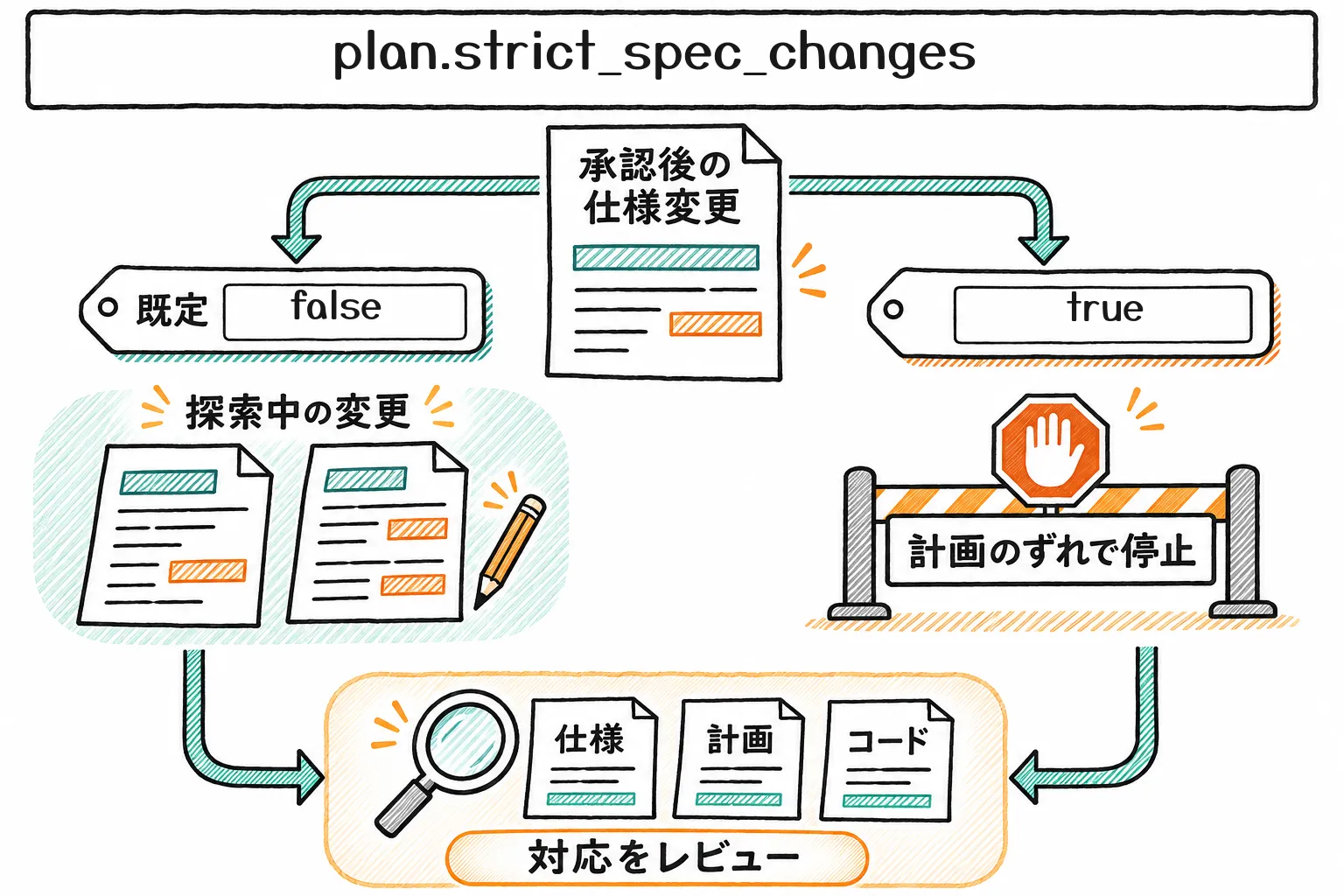
Setting it to true allows discrepancies between an approved specification and its plan to be blocked mechanically.
However, setting it to false does not automatically keep specifications and plans aligned.
With either setting, review the correspondence between the specification, plan, and code before implementation and before completion.
Checking AI Agent Permissions Separately from Workflow State
The init command installs workflow Skills for AI agents including Codex.
The connected AI agent performs the actual file modifications and command execution.
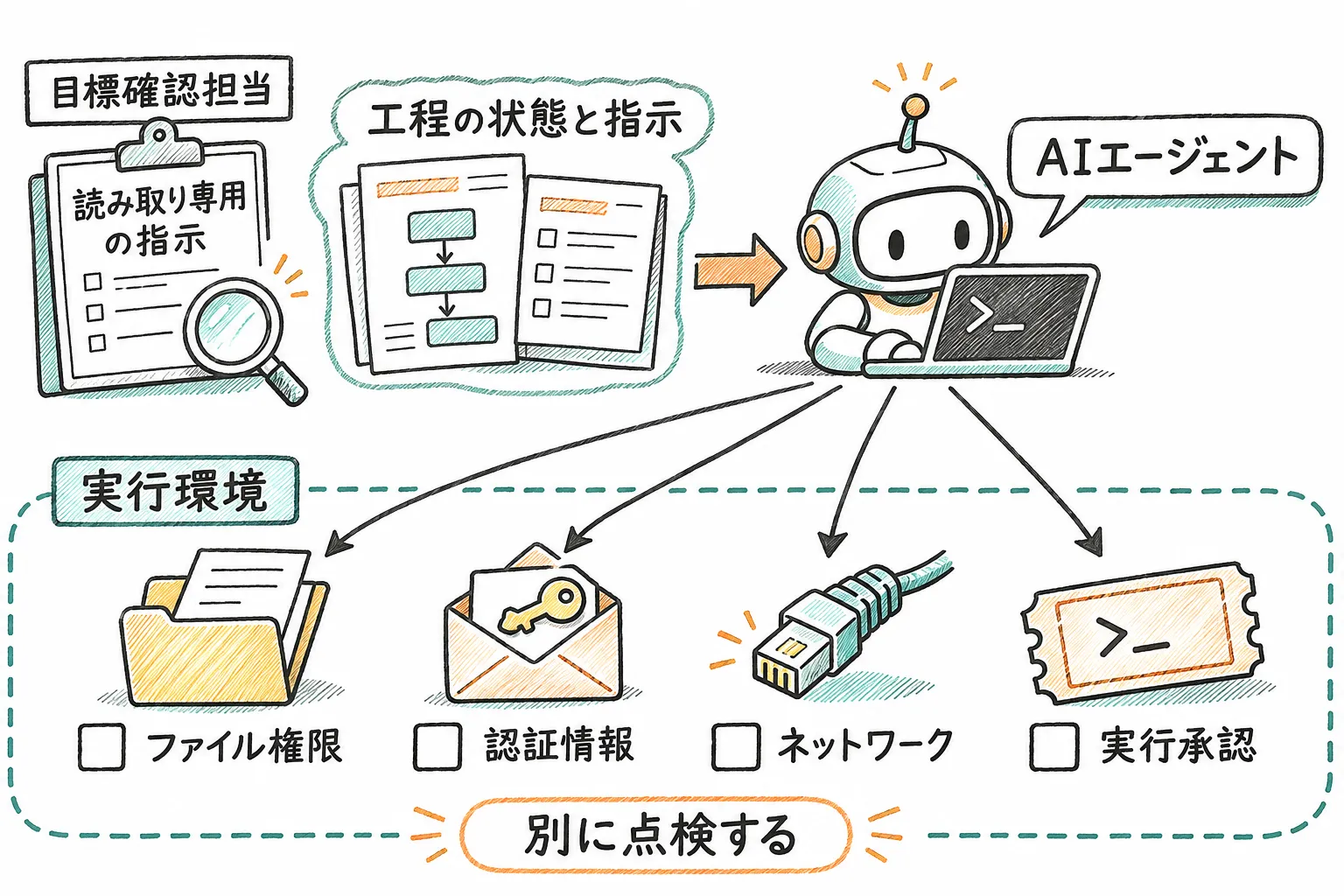
The goal reviewer for Codex is instructed to be read-only. However, the official documentation explains that Codex lacks a feature to enforce read-only access for the helper technically. Spektacular's state report alone therefore cannot establish file permissions, credentials, network access, or execution approval.
Inspect the permissions of the AI agent and its execution environment independently of workflow state.
Version 0.29.0 Is an Early Public Release
This article covers version 0.29.0, released on October 26, 2026. The official list of integrations in this version includes Claude, Bob, Codex, GitHub Copilot CLI, and oh-my-pi.
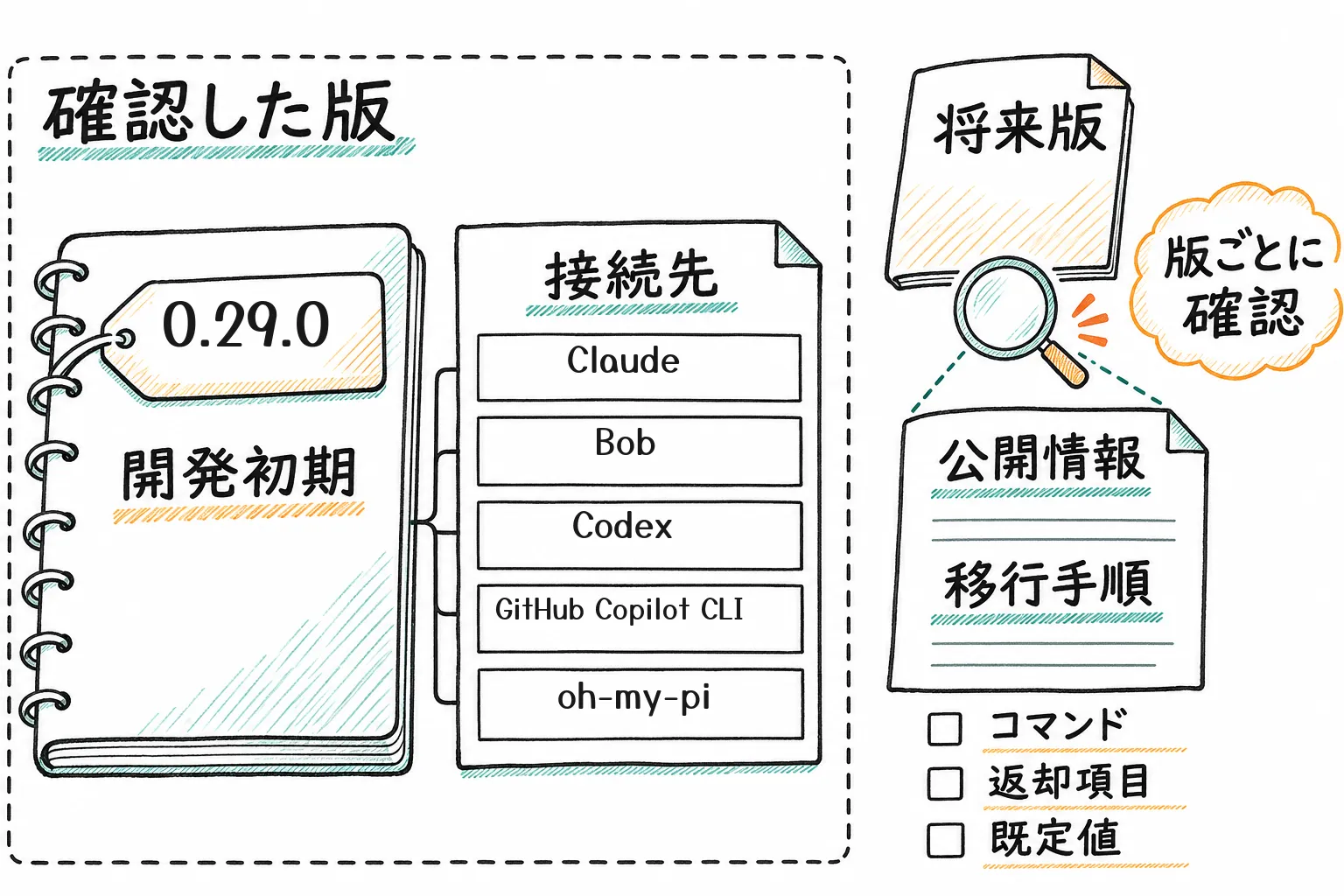
The README describes Spektacular as an early-stage product. When adopting it, consult the latest release and migration instructions rather than assuming that the commands, returned fields, and defaults shown in this article apply unchanged to future versions.
Conclusion
Instead of assigning everything from specification to implementation to an AI agent at once, Spektacular records the specification, approved plan, implementation tasks, and current stage separately.
After an interruption, return to current_step; if a specification changes under strict settings, return to planning and approval.
For changes spanning multiple sessions, documents and state in Git can provide a concrete resumption point rather than requiring the agent to guess how to continue a conversation.
