Introduction
Hi, I'm cardene, a software engineer and technical writer focused on blockchain and AI.
I've also authored Japanese technical books on specification-driven development with LLMs and decentralized application (DApp) development.

I also build and publish a variety of tools, libraries, and open-source projects.
This article examines Link Agent Wallet, Link Pay Token, and Shared Payment Token, three mechanisms supporting payments by AI agents.
When delegating a purchase to an AI agent, we need to establish what the buyer approves and who receives the payment information. Understanding Stripe's three mechanisms helps separate responsibilities, from connecting to the buyer through paying the merchant. We will use the same $35 book purchase to explain their respective roles, how they can be combined, and how each path completes the purchase.
The original diagrams are retained and contain Japanese labels.
The Roles of the Three Mechanisms
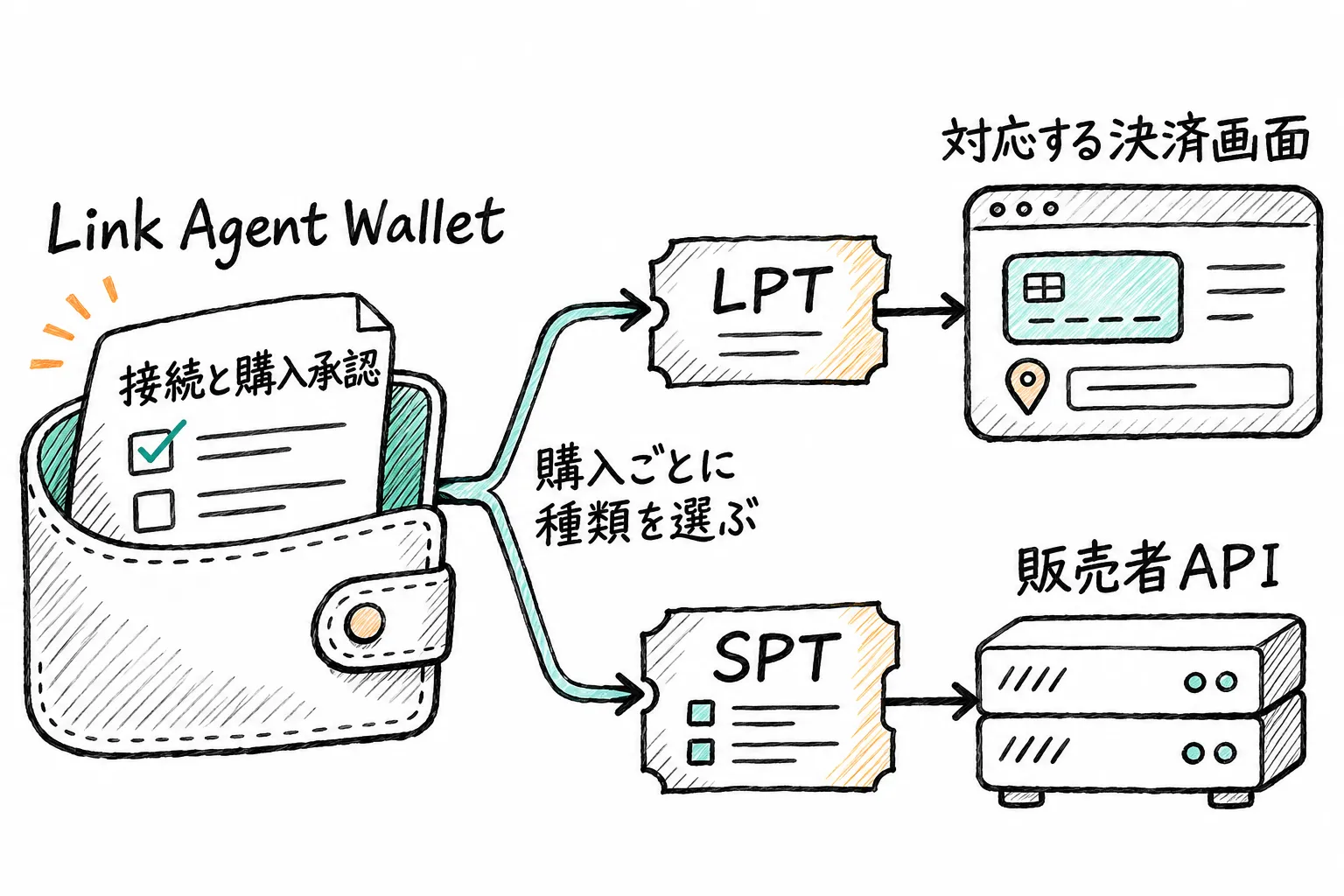
A delegated purchase involves obtaining the buyer's permission and processing the payment within the scope of that permission. After confirming what the buyer approved, the application supplies payment information in a form the merchant accepts. Link Agent Wallet connects the buyer to the purchase approval process, while LPT and SPT are payment credentials obtained after approval.
Link Agent Wallet
Link is Stripe's wallet that allows buyers to save payment methods and addresses for reuse when shopping. Link Agent Wallet is the service that connects to Link, obtains approval for a purchase, and returns information that can be used to pay. We will refer to it as Wallet.
In a conventional Link checkout, the buyer selects a payment method on the merchant's checkout page and initiates payment. With Wallet, the agent's application sends the purchase details to Link, and the buyer approves them on a Link screen. The application then receives virtual card details or a token and proceeds with the purchase.
These virtual card details and tokens are payment credentials. With Wallet, the application can choose the credential type according to what the merchant accepts. The article on Link Agent Wallet explains buyer connections and per-purchase approvals in more detail.
Link Pay Token
A Link Pay Token is a payment credential submitted to a compatible Stripe checkout in place of a card number. We will refer to it as LPT. Submitting an LPT obtained from Wallet allows checkout to proceed using a saved card and billing and shipping address information.
The checkout must support identifying the merchant's Stripe account and accepting an LPT. The agent checks that both capabilities are available before requesting the buyer's approval. Displaying the Link logo alone does not establish LPT compatibility.
Even after the checkout accepts an LPT, the purchase must still be confirmed. The application checks the displayed saved card, confirms the purchase, and verifies the merchant's payment outcome. The article on Link Pay Token explains the checkout operations in detail.
Shared Payment Token
A Shared Payment Token is a credential that enables a designated merchant to use the buyer's payment method within specified conditions. We will refer to it as SPT. The agent passes the SPT to the merchant, which then uses it to request a payment from Stripe.
When issuing an SPT, the issuer specifies the merchant, currency, maximum amount, and expiration. The merchant uses the received SPT in accordance with those conditions. If additional authentication is required during payment, the buyer must take the requested action.
An SPT can be obtained from Wallet or by asking the buyer to choose a payment method in the agent service's own checkout and requesting issuance from Stripe. This general issuance path does not require a Wallet connection. The article on Shared Payment Token explains issuance and merchant-side payment processing.
Wallet connects the buyer and obtains purchase approval before the application obtains an LPT or SPT. Wallet can therefore be combined with either LPT or SPT within a single purchase.
Payment Destinations and Data Handoffs
Separating records that track what the buyer approved from the values actually used for payment clarifies who receives each item. Wallet records the purchase proposal and approval, then returns the credential type specified in that request. The received credential is passed to the checkout or the merchant's payment processing system.
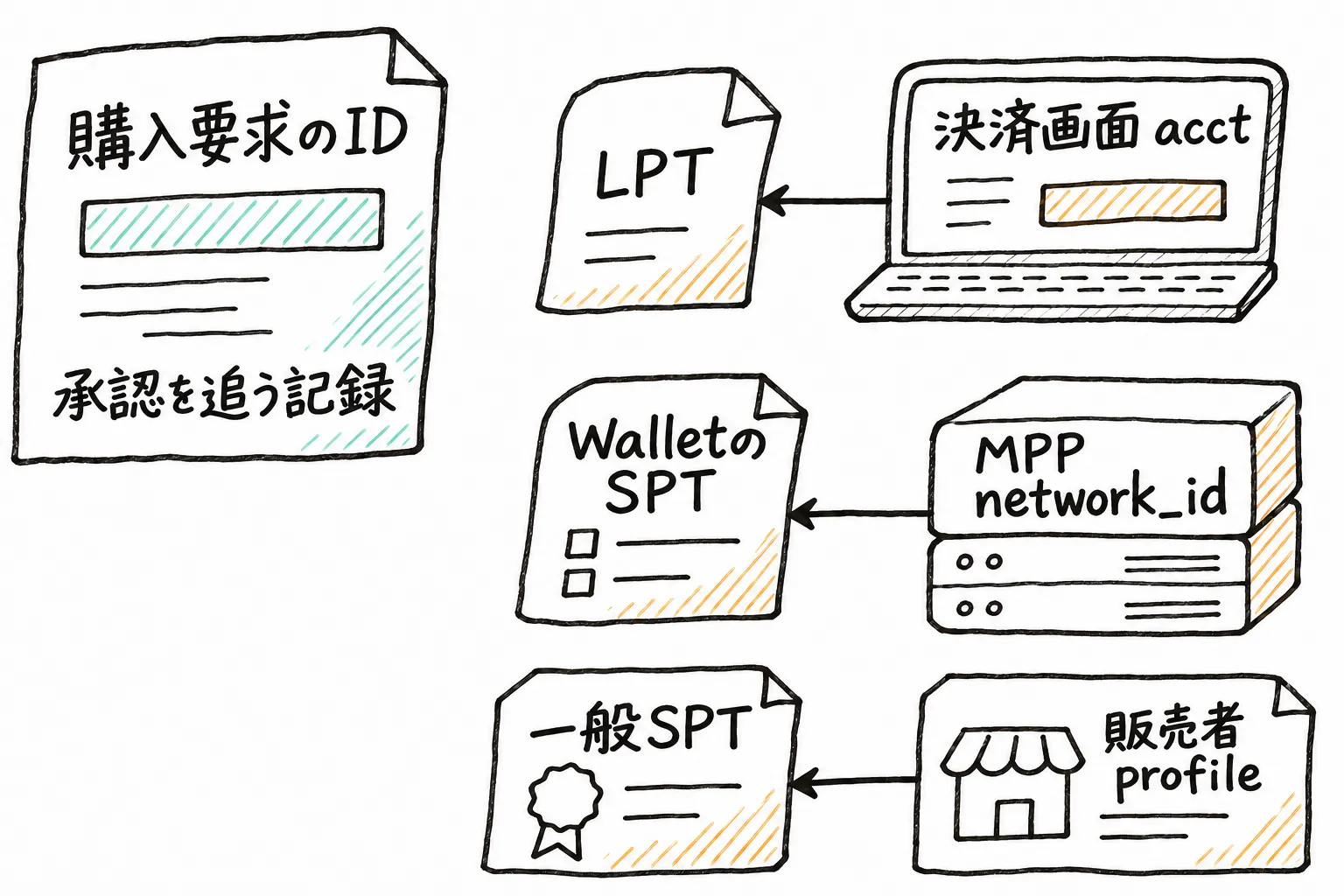
Purchase Approval and Payment Credentials
A spend request is the record Link uses to track a purchase proposed by an agent. It contains the merchant, purchase amount, and reason for the purchase, allowing the application to check the buyer's decision and the subsequent outcome.
Each spend request has an identifying ID. The application associates the order with this ID and uses it to check the same request while awaiting approval. Once the buyer approves, the application retrieves the payment credential from that request.
| Mechanism | Responsibility | Primary data exchanged |
|---|---|---|
| Wallet | Buyer connection and purchase approval | Spend request and approval outcome |
| LPT | Purchase through a compatible checkout | Token submitted to the checkout |
| SPT | Merchant-side payment processing | Credential granting the merchant limited use of a payment method |
The request ID tracks approval, whereas the LPT or SPT value is used for payment. The request ID cannot simply be passed to the merchant in place of a payment credential. The credential type is selected when the spend request is created; an LPT and an SPT cannot both be requested in the same request.
Merchant Identification in Checkouts and APIs
For LPT, the application specifies the merchant's Stripe account obtained from the checkout. WebMCP allows the agent to invoke capabilities exposed by the checkout. Browser-based agents can use operations exposed by the web page to identify the merchant and submit the LPT.
When obtaining an SPT from Wallet, the application instead uses payment conditions presented by the merchant's API. An API requesting payment returns HTTP 402, and the application obtains the merchant identifier from that response. The amount and currency also come from the same response and must not be mixed with conditions for another merchant or purchase.
Machine Payments Protocol, or MPP, defines how an API presents payment conditions and how a caller accesses it by supplying corresponding payment information. Wallet's SPT path supports the Stripe payment method for MPP.
| Path | Merchant identification | Credential destination |
|---|---|---|
| LPT | Stripe account returned by the checkout | LPT-compatible checkout |
| SPT from Wallet | Merchant ID and payment conditions returned by the API | MPP API supporting the Stripe payment method |
| General SPT issuance | Merchant's Stripe profile | Merchant accepting SPT |
When issuing a general SPT, the application specifies the merchant's previously verified Stripe profile. The account ID used by LPT, the merchant ID returned by MPP, and the profile used for general SPT issuance must be checked according to the selected path. All identify a merchant, but they are not interchangeable IDs.
Three Paths for a $35 Purchase
Consider buying one book from Merchant A for $35, including shipping and taxes. The currency is USD, and the book and total are identical across the three paths. Depending on what the merchant accepts, the application either confirms the purchase in a checkout or submits payment information to an API.
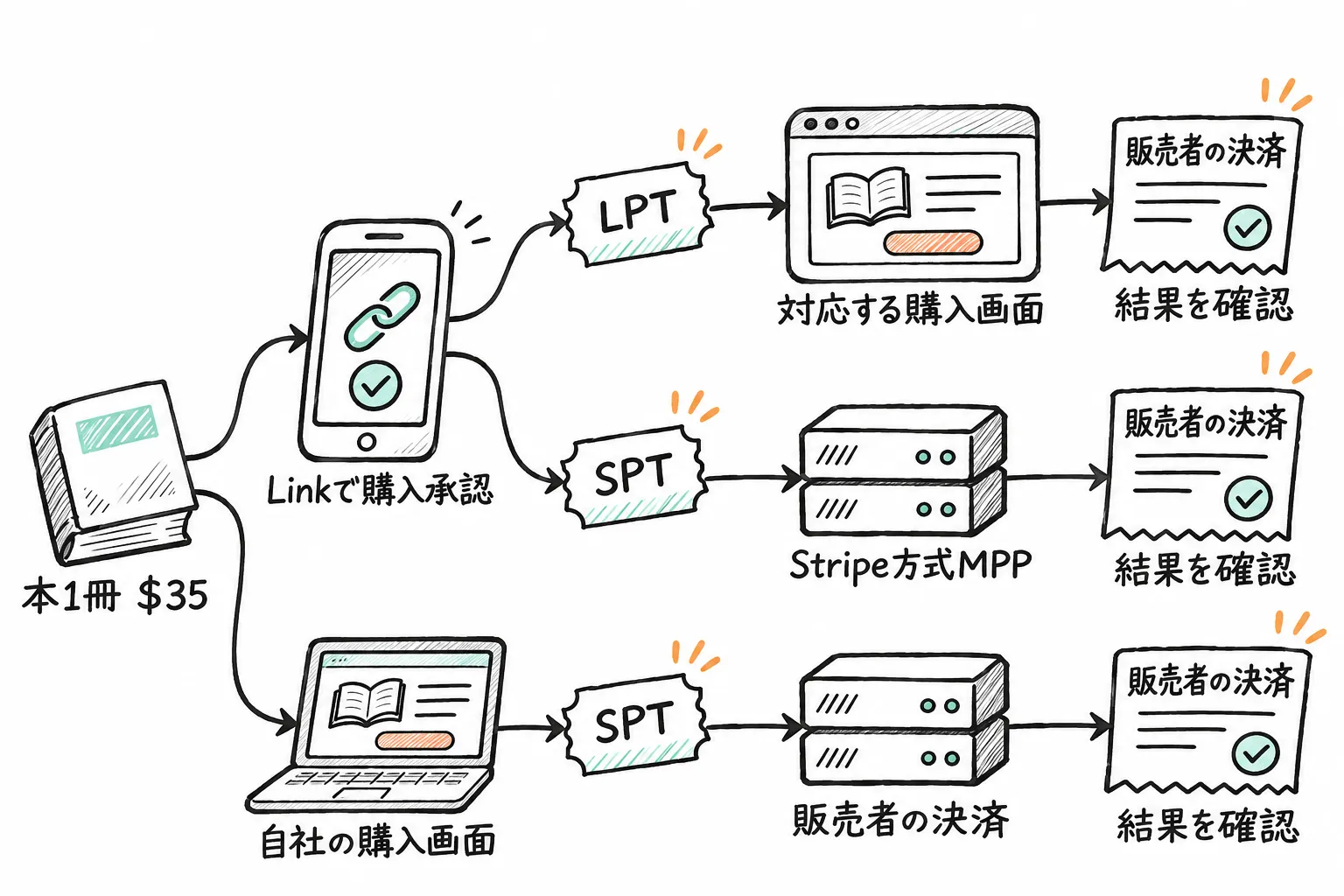
Submitting an LPT to a Compatible Checkout
The agent's application opens Merchant A's checkout, confirms that it supports LPT, and obtains Merchant A's Stripe account. It uses that account and the $35 total to send Link a spend request for an LPT. The buyer reviews the book, merchant, and total on the designated Link screen and approves the purchase.
After approval, the application that operates the checkout retrieves the LPT immediately before using it. It submits the LPT to the compatible checkout and waits for a single saved card to appear alongside the buyer's email address. After checking that display, the application performs the purchase confirmation action.
In this path, LPT helps populate payment and address information. Selecting the book and checking the total remain responsibilities of the agent's application. If the final total has changed to $40, the application does not confirm the purchase under the original $35 approval; it asks the buyer to review the updated conditions.
Submitting a Wallet-Issued SPT to an API
Suppose Merchant A provides a purchase API supporting the Stripe payment method for MPP. This is a hypothetical scenario for comparing payment methods for the same book, not a claim that ordinary bookstore APIs support MPP. Using the merchant identifier returned by the API, the $35 amount, and USD as the currency, the agent's application sends Link a spend request for an SPT.
Once the buyer approves in Link, the application can obtain the SPT. It associates the SPT with the conditions presented by the merchant and submits it to the original API. The merchant uses the SPT to process payment, and the application verifies both the payment outcome and the creation of the order.
This path shares the Link connection and per-purchase buyer approval steps with LPT. After approval, LPT proceeds through a compatible checkout, whereas SPT proceeds through the API that presented the payment conditions.
Issuing an SPT Through the Agent Service's Own Checkout
The agent service can also provide its own checkout where the buyer selects a payment method. The service references the selected payment method in Stripe and requests issuance of an SPT for Merchant A. It specifies USD as the currency, $35 as the maximum amount, and an expiration.
The service can also integrate conventional Link into its checkout so that buyers can retrieve saved payment methods. It issues an SPT from the selected method and passes it to Merchant A, which requests payment from Stripe. Unlike creating a spend request in Wallet, this path requires the agent service to provide its own interface for presenting purchase conditions and collecting the payment method.
In every path, the application verifies the merchant's payment outcome after receiving the credential. Successfully requesting a purchase does not, by itself, justify marking the order as paid.
Records of Approval and Payment Outcomes
Buyer approval, credential availability, and successful payment are established by different records. Associating records for the same order helps identify which steps remain after approval. When the outcome is unknown, the original request and the merchant's outcome determine where the process should resume.
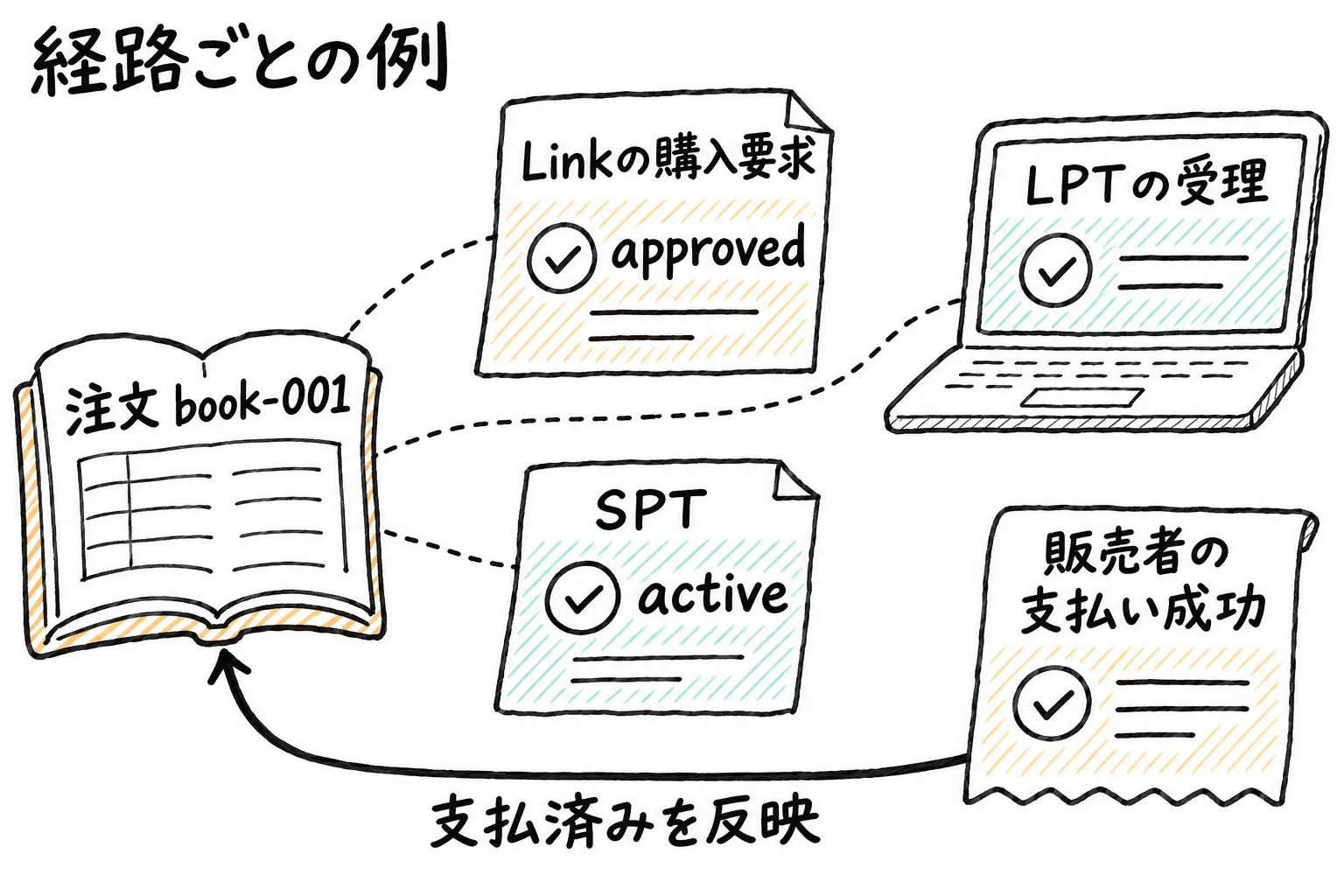
Three Records Used to Track the Same Purchase
To compare the same book purchase, let the application's order be book-001, the Link spend request be request-A, and the payment credential reference be credential-A. These illustrative names distinguish the records; they are not real issued IDs, tokens, or results from an executed purchase.
| Record to check | LPT path | Wallet SPT path | General SPT issuance path |
|---|---|---|---|
| Application order | book-001 |
book-001 |
book-001 |
| Spend request | request-A |
request-A |
No Wallet spend request |
| Merchant and total | Merchant A, $35 | Merchant A, $35 | Merchant A, $35 |
| Credential type obtained | LPT | SPT | SPT |
| Credential reference submitted | credential-A |
credential-A |
credential-A |
| Prepayment check | Credential reflected in the compatible checkout | Matches API payment conditions | SPT usage conditions |
The table compares alternative paths for buying the same book. The application associates the selected path's request and credential with the order, then verifies the merchant's outcome.
Approved Is Not the Same as Paid
If a Link spend request is approved, the specified credential can be retrieved. An SPT in the active state is available for payment. Neither state establishes that the merchant has successfully processed the payment.
A PaymentIntent is Stripe's record for tracking the processing of an individual payment. A merchant receiving an SPT creates this record to process the payment and checks its outcome for success. With LPT, the application also checks purchase confirmation after submission and the merchant's payment outcome.
| Record or state | What it establishes | What still needs to be checked separately |
|---|---|---|
Spend request approved |
Credential can be retrieved | Successful merchant payment |
SPT active |
SPT can be used | Successful merchant payment |
| LPT submission accepted | Checkout received the LPT | Purchase confirmation and payment outcome |
| Successful merchant payment | Payment succeeded | Delivery or fulfillment of the contract |
Wallet's submitted state means that the agent has received card credentials after buyer approval. It is not presented as a mandatory state for every credential type, including LPT and SPT. Wallet's succeeded state means that Link received a successful payment event; this is distinct from the book having been shipped.
Resuming After Waiting or Expiration
A Link spend request in pending_approval is awaiting the buyer's decision. The application checks the same request during that time rather than starting the purchase again simply because communication was interrupted. For requires_action, which indicates that an additional action is needed, the application follows the returned instructions and determines whether to continue the same request or create a new one.
An LPT expires at the earlier of 30 minutes after retrieval or the spend request's expiration. If only the token has expired and the request remains approved, the application retrieves a new LPT from that request. If the request has also expired, it confirms that the buyer still wishes to proceed before creating a new request.
For SPT, the application checks the returned expiration and usage conditions. An SPT obtained from a one-time Wallet request cannot be reused after consumption. Before creating a new request, the application checks the original payment outcome and any returned recovery instructions.
An SPT itself can enter requires_action, requiring additional buyer authentication. It may return to active after authentication, so credential availability must be tracked separately from successful payment. The time the buyer is asked to wait for approval and the validity period of each credential must also be checked separately.
Integration Requirements and Choosing a Path
When integrating these mechanisms, first decide whether to use Wallet for the buyer connection, then choose a credential that matches what the merchant accepts. Check the buyer's supported region and spending limits, as well as test-mode support for the selected credential. These conditions are not necessarily shared across all three Stripe mechanisms.
Choosing Based on Merchant Capabilities
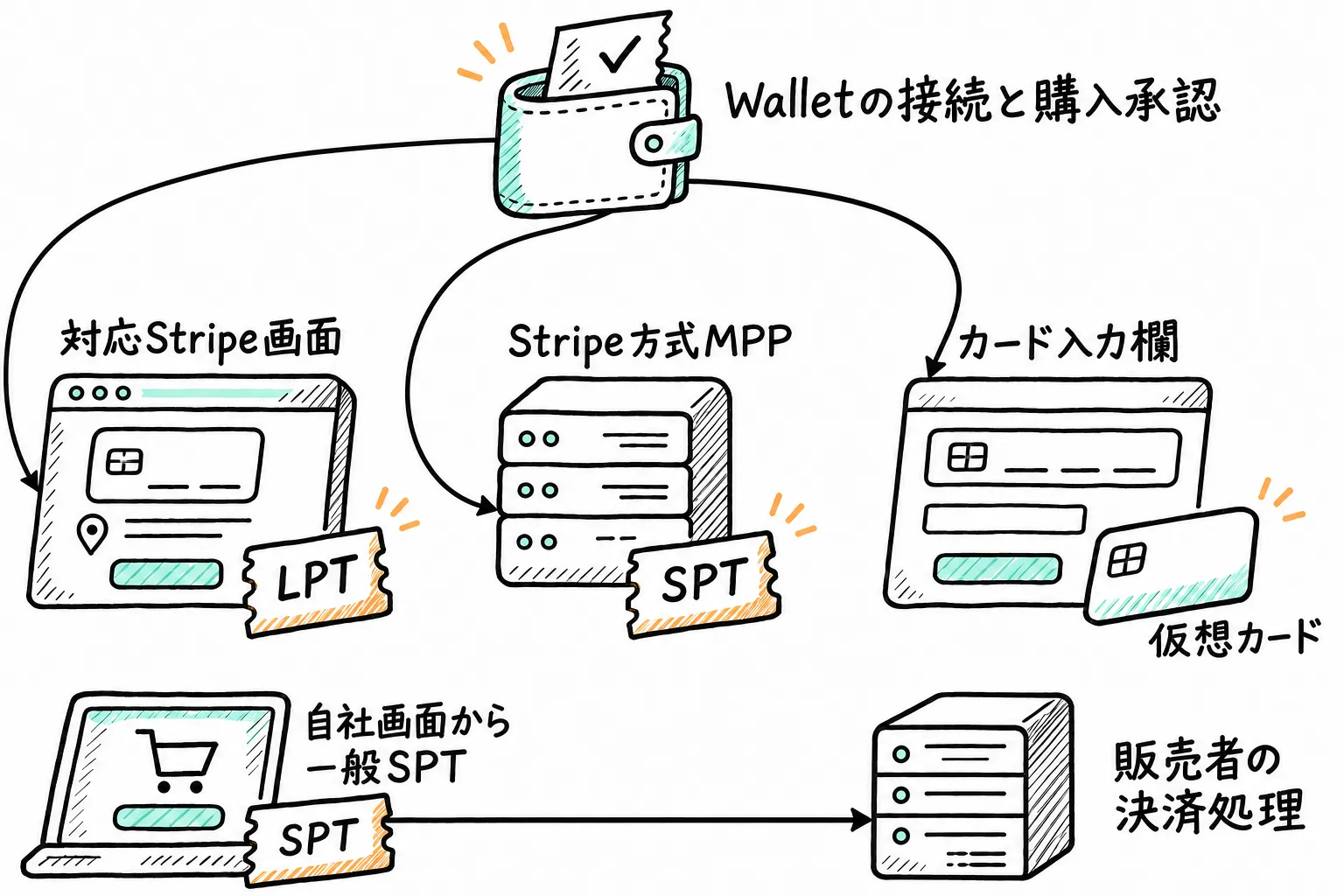
When using Link for buyer connection and approval, obtain a credential from Wallet that matches the merchant. Use LPT for a compatible checkout and SPT for an MPP API supporting Stripe. Virtual cards are also an option when purchasing through conventional card-entry fields.
| Merchant-side condition | Payment path | Reason |
|---|---|---|
| Checkout supports LPT discovery and submission | LPT from Wallet | Supplies payment information to the compatible checkout |
| API accepts the Stripe payment method for MPP | SPT from Wallet | Can be submitted against the API's payment conditions |
| Merchant accepts general SPTs | SPT issued through the agent service | Grants limited payment-method usage through the service's own checkout |
| Conventional card-entry fields are available | Wallet virtual card | Can be entered even in checkouts without LPT support |
If the necessary LPT capabilities cannot be found, cancel an existing spend request if one has already been created. If the checkout supports conventional card entry, switching to a virtual card is an option. If an API requires a different payment method, do not substitute a card number; check which methods the API supports.
If the agent service has its own checkout for presenting conditions and collecting payment methods, general SPT issuance is another option. Decide separately whether buyer interaction takes place through the service or Link, and what credential is passed to the merchant.
Regions and Test Environments
Wallet's regional eligibility must be checked for the buyer's Link account. The Link FAQ consulted on November 18, 2026, listed users in the United States, Canada, Japan, Mexico, Singapore, and Australia. The overview and hosted integration guide, however, stated that the service was available to buyers in the United States and Canada.
Because the official pages differ, check the latest requirements for the chosen connection method. This discrepancy should not be treated as a definitive difference in supported countries between connection methods. General Stripe SPT availability covers the United States, Canada, and designated European countries, under conditions separate from Wallet's.
The regions supported by conventional Link payments must also be distinguished from eligibility for Wallet or SPT. The fact that a person can pay using Link in a given location does not establish that each agent payment path is available there. The locations of the service operator and the merchant should also be checked separately from buyer eligibility.
Test credential support differs as well. Wallet virtual cards and SPT support test mode, while LPT does not. Before requesting an LPT, confirm the merchant, amount, and reason for the purchase, and present the approval to the buyer as one that can lead to a real payment.
Spend requests also have spending limits. In addition to the documented $500 limit per request, check the buyer's remaining allowance and whether identity verification is required. Do not apply this limit to general SPTs issued without Wallet.
Separating Model and Execution Application Responsibilities
Provide the model responsible for choosing products and reasoning about purchases with the purchase conditions and processing outcomes. The application executing the checkout or API operations retrieves the actual payment credentials and submits them to their intended destination. Both LPT and SPT are usable payment credentials, so their raw values should not be retained in conversations or logs.
This separation is an application-level boundary. Connecting Wallet alone does not automatically prevent payment information from entering model inputs or logs.
Wallet virtual cards, LPT, and SPT can also specify recurring billing arrangements that approve spending limits for each period. The merchant manages the actual billing schedule, and revoking a credential is distinct from canceling a subscription agreement with the merchant. Verify cancellations, refunds, and subscription termination with the merchant after a purchase is made.
Summary
Link Agent Wallet connects the buyer and obtains purchase approval, while LPT and SPT are credentials used to make the approved payment. Whether to submit an LPT to a checkout or pass an SPT to a merchant depends on what the merchant accepts. Associate the approval and payment records with the order and verify the merchant's payment outcome before considering the purchase complete.
The official Link documentation describes spend requests and the use of each credential.

Stripe's official documentation explains general SPT issuance and merchant-side payment processing.