Introduction
Hi, I'm cardene, a software engineer and technical writer focused on blockchain and AI.
I've also authored Japanese technical books on specification-driven development with LLMs and decentralized application (DApp) development.

I also build and publish a variety of tools, libraries, and open-source projects.
The Role of Shared Payment Tokens
Stripe's Shared Payment Token (SPT) is a token that allows a designated seller to use a buyer's payment method subject to specified conditions.
When requesting a token, the agent specifies the seller, currency, maximum amount, and expiration time, then passes the token to the seller.
Even when an AI agent handles everything from product selection to ordering, the seller charging the buyer still needs payment information. An SPT allows the seller to use the buyer's payment method while restricting where and under what conditions it can be used.
Link is Stripe's wallet that lets buyers save their cards and addresses and reuse them during purchases.
Link reduces the effort of selecting and entering payment methods, while an SPT represents permission for the seller to use the selected payment method.
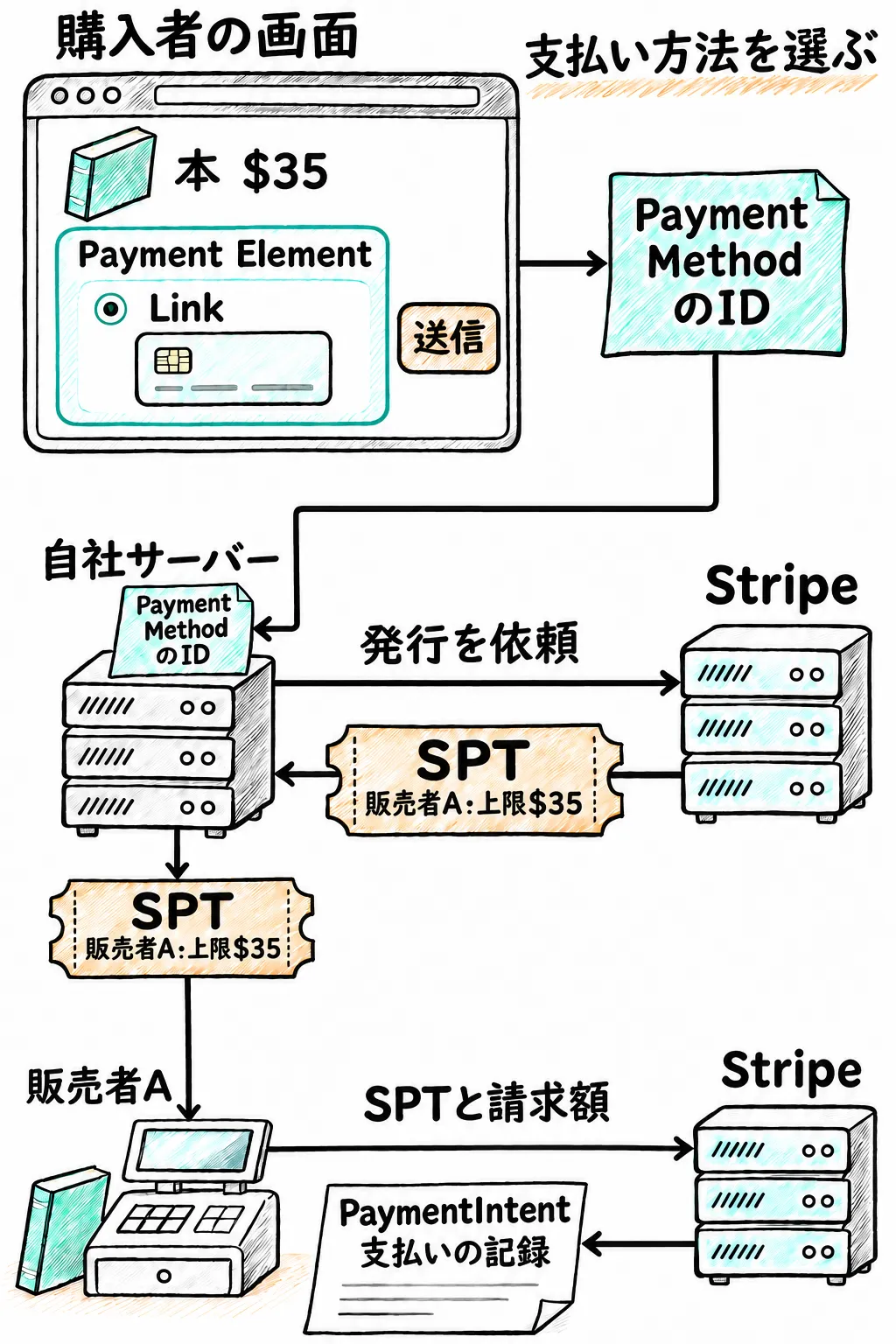
Consider buying a book from Seller A, with a total order amount of $35 including shipping and tax.
The buyer checks the seller and total on the agent's purchase screen and selects a card saved in Link.
The original illustrations and interactive diagrams in this article have been retained; some labels remain in Japanese.
The purchase screen uses Stripe's Payment Element for the payment method selection field.
The application's own interface displays the book's name and $35 total and provides the submission button.
The illustration distinguishes Stripe's input fields from the application's own submission button outside them.
The payment method selected by the buyer is represented by a record called a PaymentMethod. The application uses its ID to request an SPT.
What is passed to Seller A is not the original payment method ID itself, but an SPT with a designated seller and spending limit.
Seller A proceeds with the payment using the SPT and checks the outcome through a PaymentIntent, the record that tracks the payment.
Issuing an SPT and successfully paying for the purchase are two separate events that must be verified independently.
The AI model that considers product options and the application that handles payments also have separate roles. In this example, the application manages the actual payment method ID and SPT and returns only the order conditions and processing status to the model. Controlling what information reaches the model is an application design decision, not a guarantee that Stripe automatically prevents such information from reaching it.
In a Standard Link Checkout, the Buyer Confirms the Payment
If the buyer purchases the same book directly on Seller A's website, the buyer confirms the order on that website. Because the buyer makes the payment directly, no SPT needs to be passed from an agent to the seller.
1. Review the Purchase Details
On Seller A's screen, the buyer checks the book and the $35 order total. If changing the address affects shipping or tax, the buyer checks the updated total before proceeding to payment.
2. Select a Payment Method
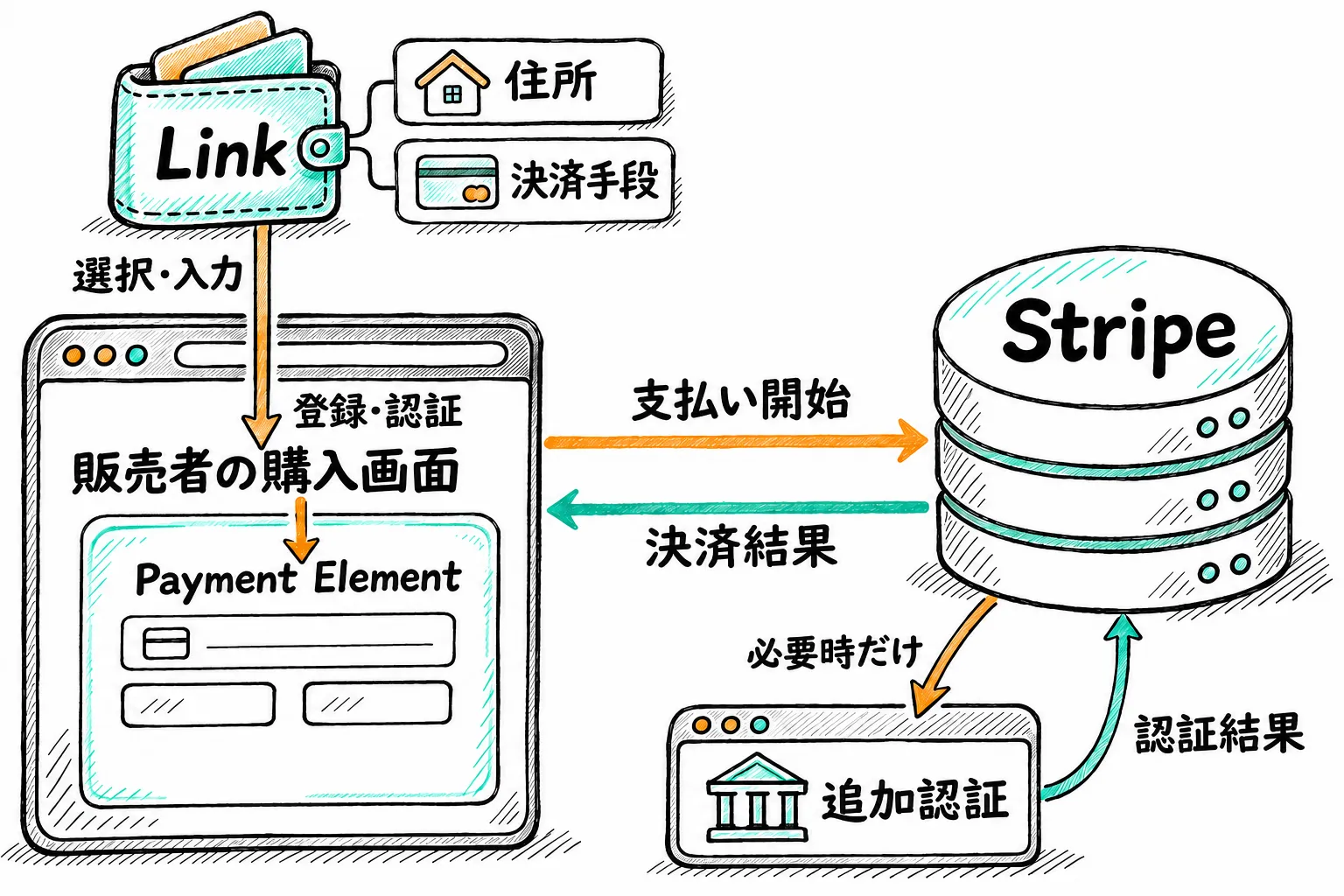
The buyer registers for or signs in to Link, selects a saved card, or enters a new payment method.
Stripe's official example displays a Use button for a saved card and a Pay another way option for choosing a different method.
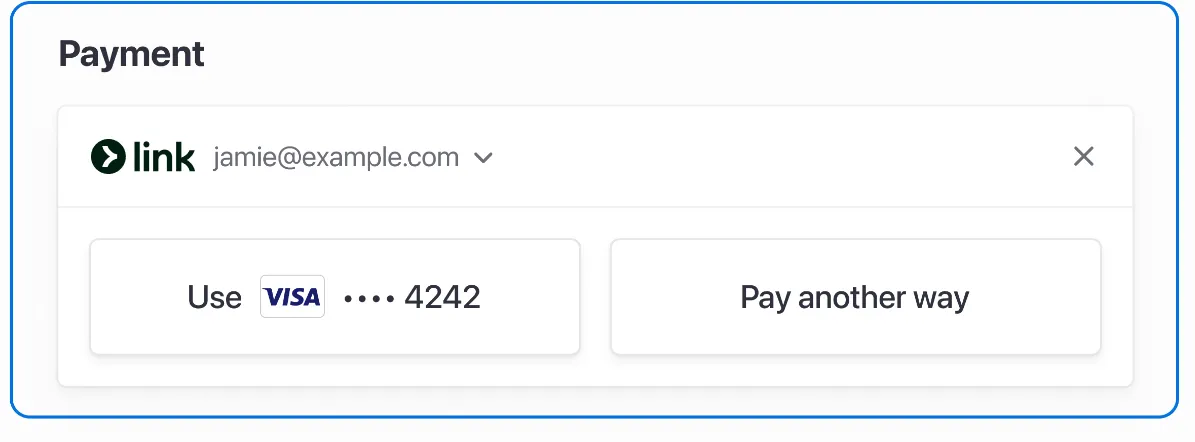
Source: Stripe official documentation / excerpt from an official screenshot, converted to WebP.
The email address and the card's last four digits, 4242, are sample values provided by Stripe.
3. Initiate the Payment
After selecting a card, the buyer presses the seller's submission button, and the seller's application proceeds with the $35 payment. Signing in to Link and initiating payment for the purchase are separate actions.
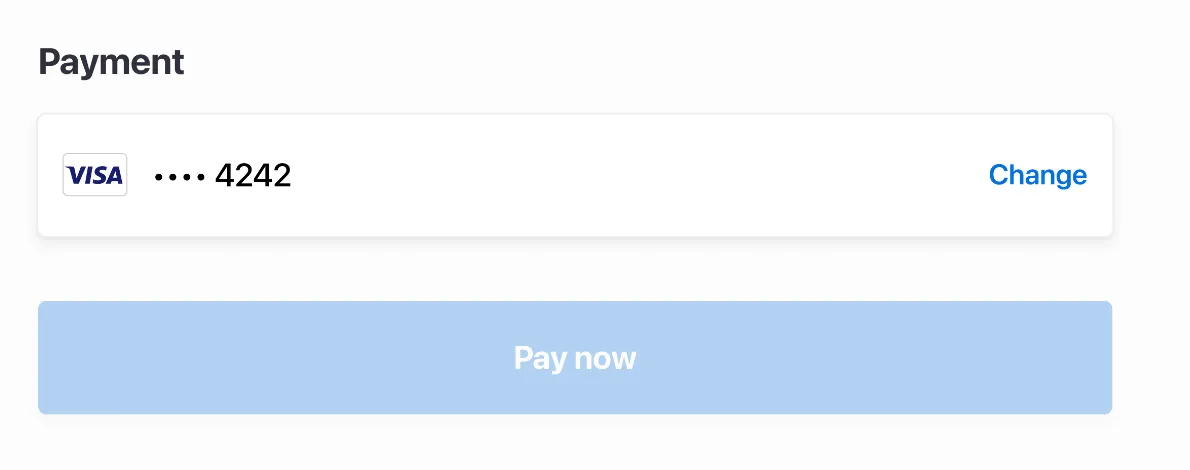
Source: Stripe official documentation / excerpt from an official screenshot, converted to WebP.
Stripe's official example after selection displays the card ending in 4242, the Change option for selecting another method, and the Pay now payment button.
The screenshot alone does not establish whether the button is enabled or the payment is complete. In an actual purchase, the outcome must be checked after submission.
4. Complete Any Required Authentication
If the card issuer requests additional authentication, the buyer completes it on the authentication screen. The seller waits for authentication and payment processing to finish rather than marking an order awaiting authentication as paid.
5. The Seller Checks the Payment Result
Even after the buyer closes the screen or finishes authentication, the seller checks the payment result from Stripe. Only after reflecting successful payment in the order does the seller proceed with fulfillment.
How an Agent Purchases a $35 Book
When purchasing through an agent's service, the first things to check are still the book, the seller, and the order total. An SPT is issued for the $35 order reviewed by the buyer, and Seller A uses that SPT to process the payment.
1. Set Up the Seller and Payment Method
The agent and the seller establish their business information on Stripe, and the application must be able to identify Seller A as the destination of the purchase.
Before purchasing, also check the settings for Link, which enables the use of saved payment methods.
In the Dashboard, open Payment methods under Settings and select Link under Wallets.
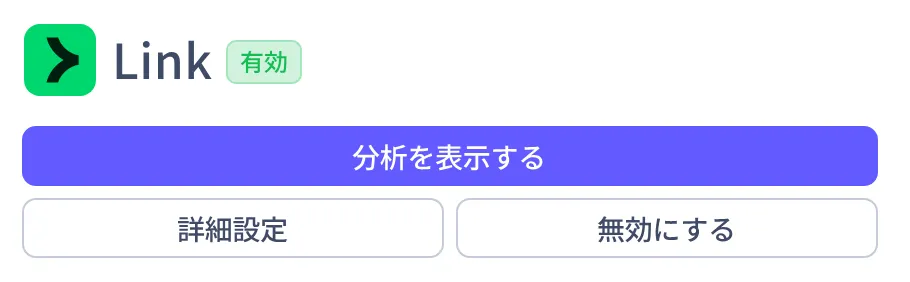
Source: Stripe official website / excerpt from an official screen example, rendered from SVG and converted to WebP.
This screen configures the use of Link. The seller authorized by an SPT and the maximum payment amount are specified when issuing a token for each purchase. The available payment methods also depend on the buyer, seller, and currency, so select from the methods the seller accepts.
2. The Buyer Checks the Book and Total
On the agent's purchase screen, the buyer reviews the following order and chooses a payment method. Any shipping charges and taxes are included in the $35 total.
| Item to verify | Order in this example |
|---|---|
| Product | Book |
| Seller | Seller A |
| Order total | $35 |
| Currency | USD |
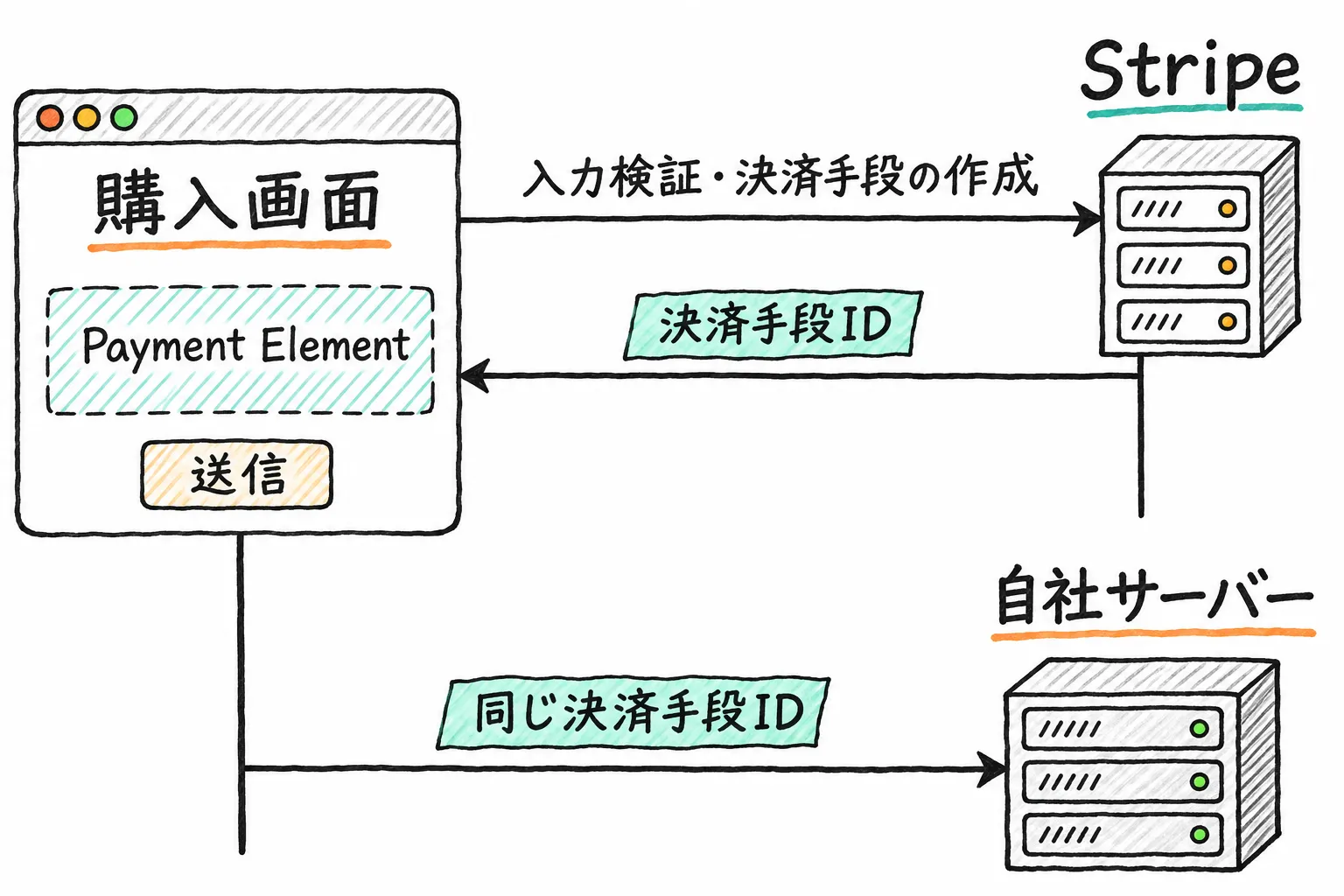
The payment method ID in the diagram is a reference to the card or other payment method selected by the buyer. The application receives that ID and associates it with the buyer and the current order. If there is a problem with the input, the application asks the buyer to correct it and does not issue an SPT until the payment method has been verified.
3. Issue an SPT with Purchase Conditions
The application checks that its order record also identifies Seller A and a total of $35 before requesting an SPT from Stripe. This enables the payment method selected on the screen to be used by the designated seller under the conditions of the purchase.
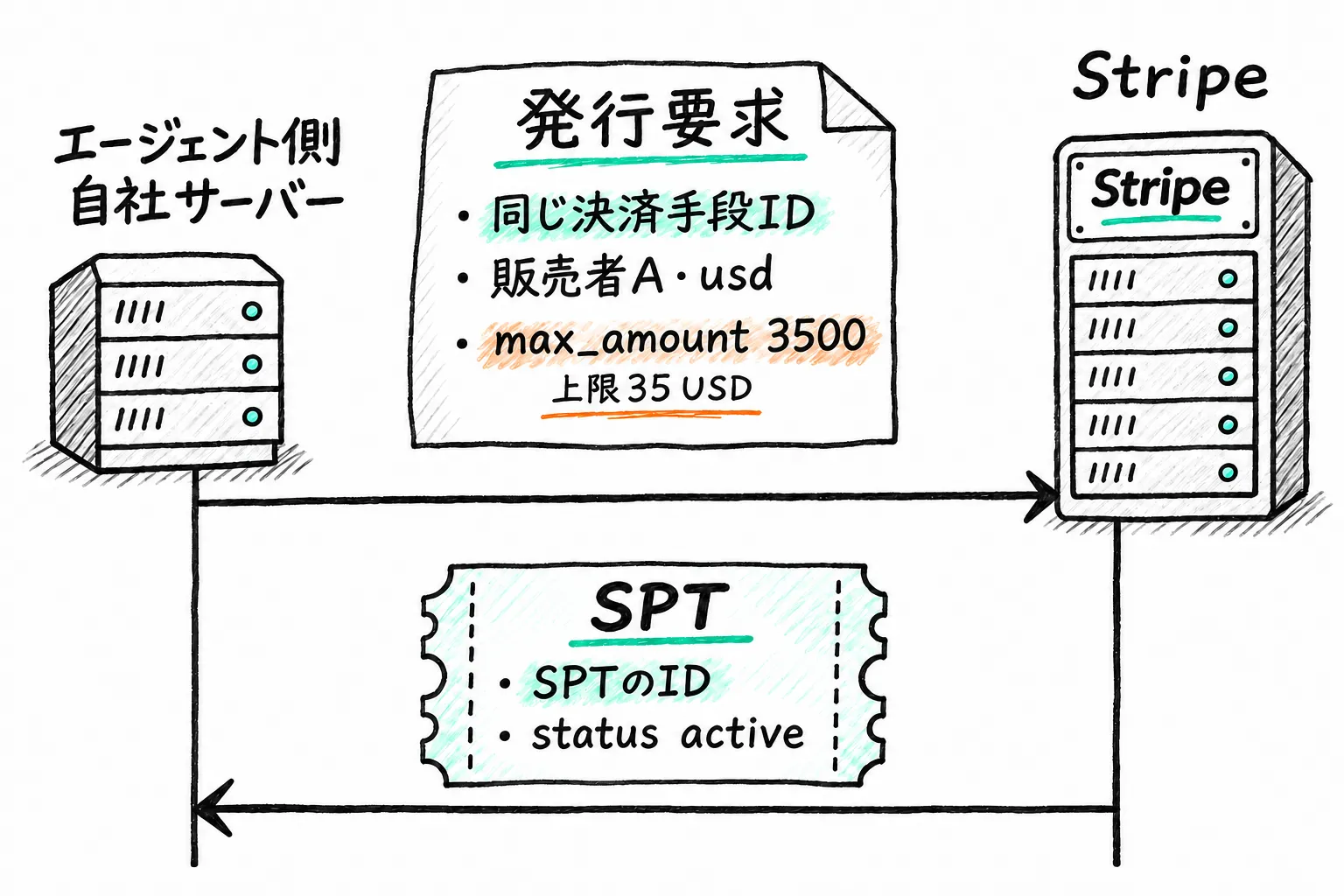
The conditions specified in this example are Seller A, USD, and a maximum capturable amount of $35. The expiration time is set to 15 minutes after issuance in this example. This is not a universal validity period imposed by Stripe.
The 3500 cents in the illustration represent $35. The amount shown on the purchase screen and the SPT's limit are separate conditions to verify, even when they are equal. The application sets the SPT limit to match the amount shown to the buyer.
When Stripe returns the SPT, the application checks whether it is usable. If further action from the buyer is required, the application provides instructions first and waits until the SPT is usable before handing it to the seller.
4. The Seller Processes the Payment
The agent-side application passes a usable SPT to Seller A. Seller A sends the SPT and the $35 charge amount to Stripe and checks the outcome through the payment record.
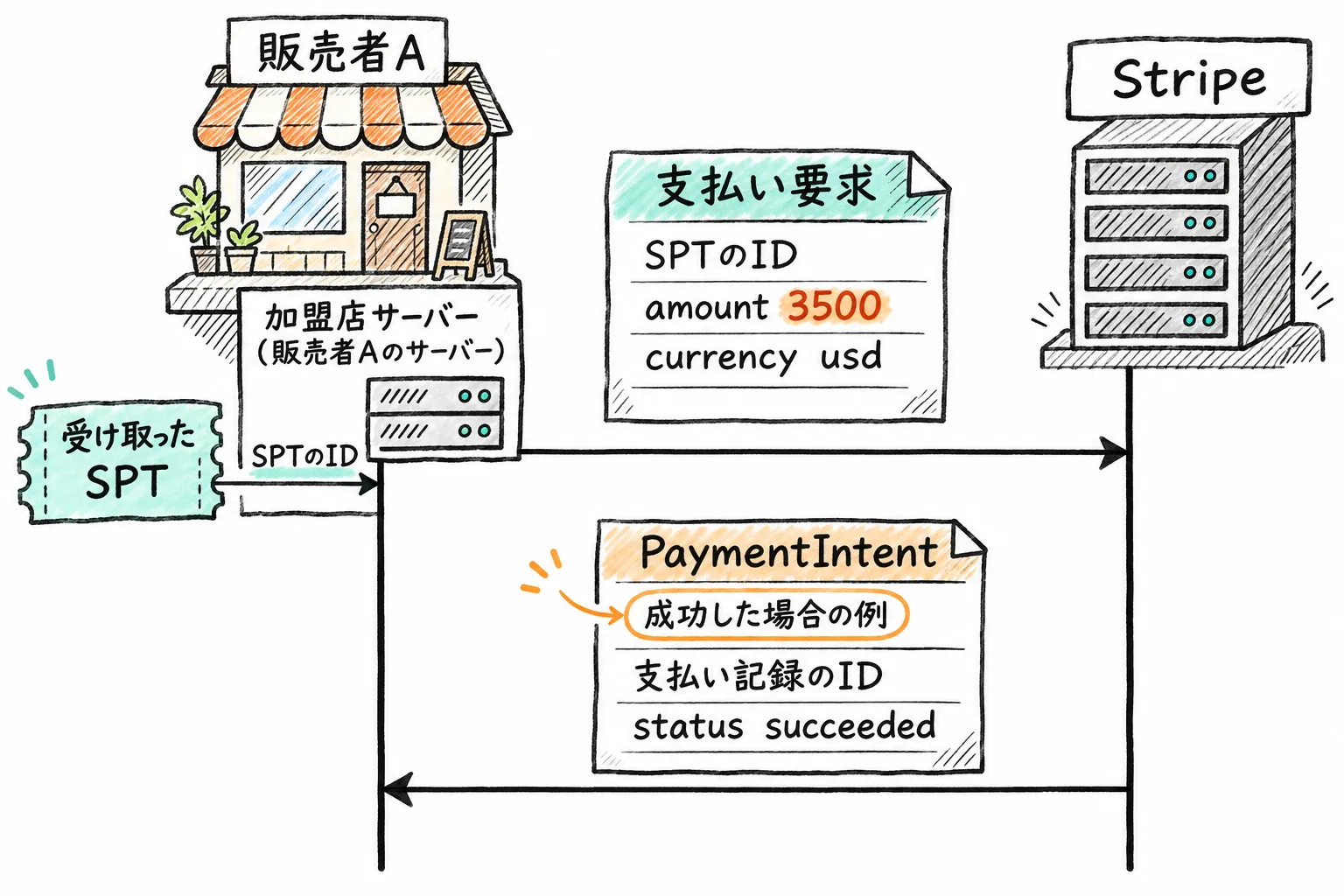
Once the seller starts processing the payment, the purchase has three associated records: the order, the SPT, and the seller's payment record.
The IDs book-001, spt_123, and pi_123 below are fictional examples, not actual payment data.
| Field | Order | SPT | Payment record |
|---|---|---|---|
| Example ID | book-001 |
spt_123 |
pi_123 |
| Amount | $35 total | $35 capture limit | $35 charge |
| Seller | Seller A | Seller A | Seller A |
| Expiration | — | 15 minutes after issuance | — |
| Status | Awaiting authentication | requires_action |
requires_action |
The currency is USD throughout. This example represents a point at which the seller has initiated payment and is waiting for additional buyer authentication. The application creates the order, Stripe issues the SPT under the conditions specified by the application, and the seller creates the payment record. Stripe returns the statuses of the SPT and the payment, which the application and seller check.
Here, the application associates order book-001 with the SPT used, spt_123, and the seller's payment record, pi_123.
This does not mean that Stripe universally maintains a one-to-one correspondence between orders and these IDs.
The application updates the order status it manages based on the result verified by the seller.
The succeeded status shown in the illustration represents a successful seller payment.
It is this payment result, not the SPT's active status, that provides the basis for marking the order paid and shipping the book.
The information passed from the application to Stripe and the seller changes in the following sequence. The diagram illustrates the processing order; it does not execute actual API calls or payments.
- SPT発行を要求する
エージェントのサーバーが、決済手段IDと販売者A・usd・上限3500をStripeへ送ります。
- 発行されたSPTを受け取る
SPTのIDと状態が返ります。
利用可能なactiveかを確認します。 - 販売者へSPTを渡す
元の決済手段IDではなく、SPTのIDを販売者Aへ渡します。
- 販売者が請求する
販売者AがSPTと請求額3500、通貨usdをStripeへ送ります。
- 販売者が結果を確認する
販売者Aが支払い記録の結果を確認します。
SPTのactiveは決済成功を意味しません。
What an SPT Restricts and What the Application Verifies
The order total, SPT spending limit, and seller's charge are distinct values even if all three are $35. The buyer reviews the book and total, the application requests an SPT under those conditions, and the seller charges the actual purchase amount.
| Item to verify | Example | Who verifies or specifies it |
|---|---|---|
| Order details | Selected book and $35 total | Buyer and application |
| SPT usage conditions | Seller A, USD, $35 capture limit | Application specifies them; Stripe enforces them |
| Current charge | $35 at Seller A | Seller charges the amount and checks the payment result |
The maximum amount that can be captured using an SPT is subject to the limit specified at issuance. Changing the seller's charge amount does not change the conditions of an already issued SPT.
| Illustrative charge | Relationship to the specified conditions |
|---|---|
| Seller A captures $35 | Within the designated seller, currency, and limit |
| Seller A captures $40 | Exceeds the $35 limit |
| Seller B captures $35 | Does not match the authorized seller, Seller A |
These are illustrations of the usage conditions, not records of actual successful charges. Even within the permitted conditions, additional authentication and payment verification may still be required. The out-of-bounds examples likewise do not represent measured error responses or the exact point at which Stripe rejects a request.
By contrast, the application checks the product and quantity in the order to verify that the book is the one selected by the buyer. Simply displaying a product name on the screen does not automatically encode that product constraint in the SPT.
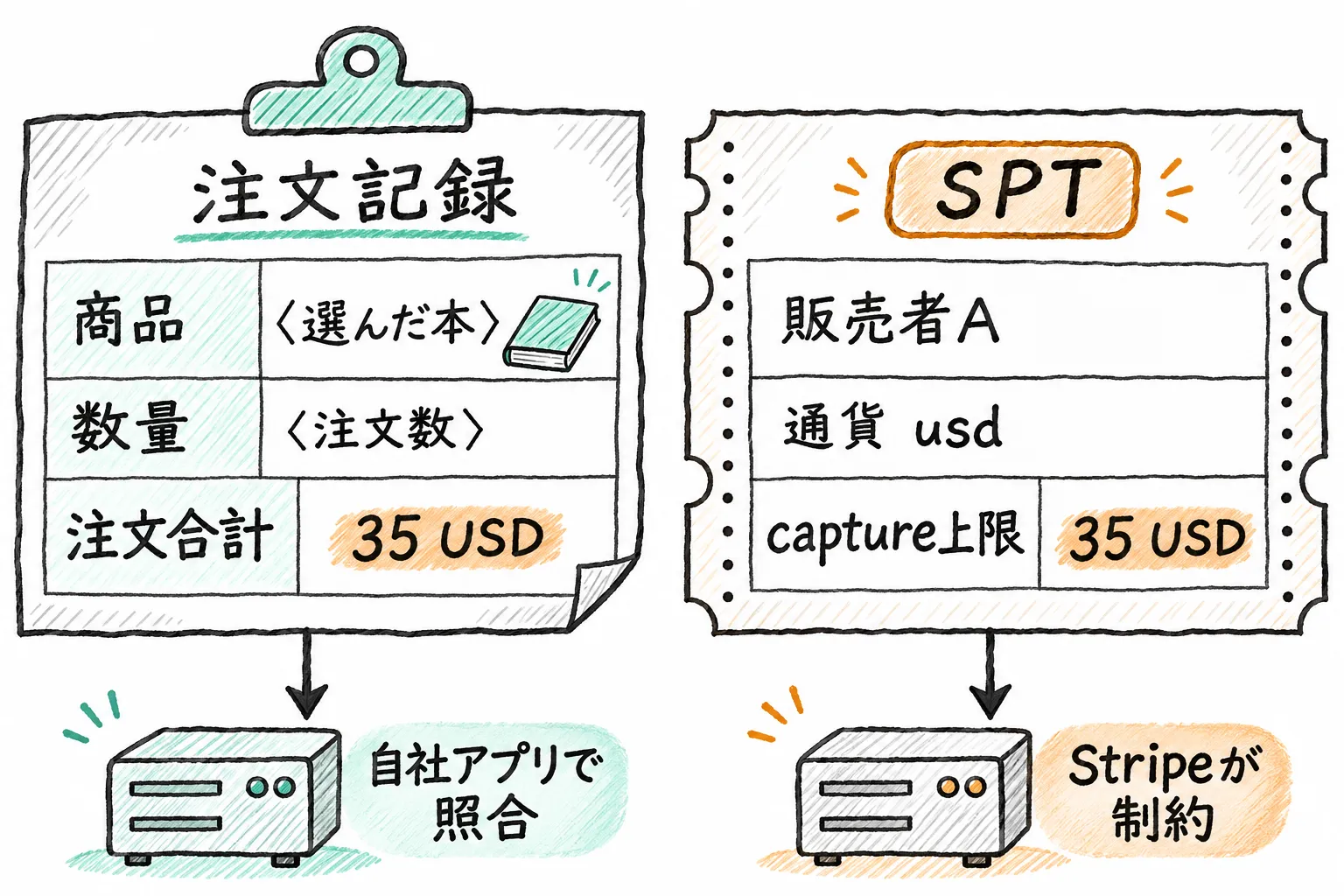
For example, if a shipping address change increases the total to $40, the application shows the updated order to the buyer and revisits the issuance conditions after the buyer confirms the amount. Even if the price remains within $35, the application stops the purchase during order validation if the book is different. A spending limit alone is not treated as proof that the purchase details are correct.
An expired SPT can no longer be used for a new payment. Expiration does not cancel an already completed order or refund the purchase price. The seller processes cancellations and refunds separately.
Resuming After Additional Authentication or Deactivation
An SPT can have an active status when usable, a requires_action status when awaiting further buyer action, or a deactivated status when it can no longer be used for a new payment.
Additional action may be required immediately after issuance or while the seller is processing the payment.
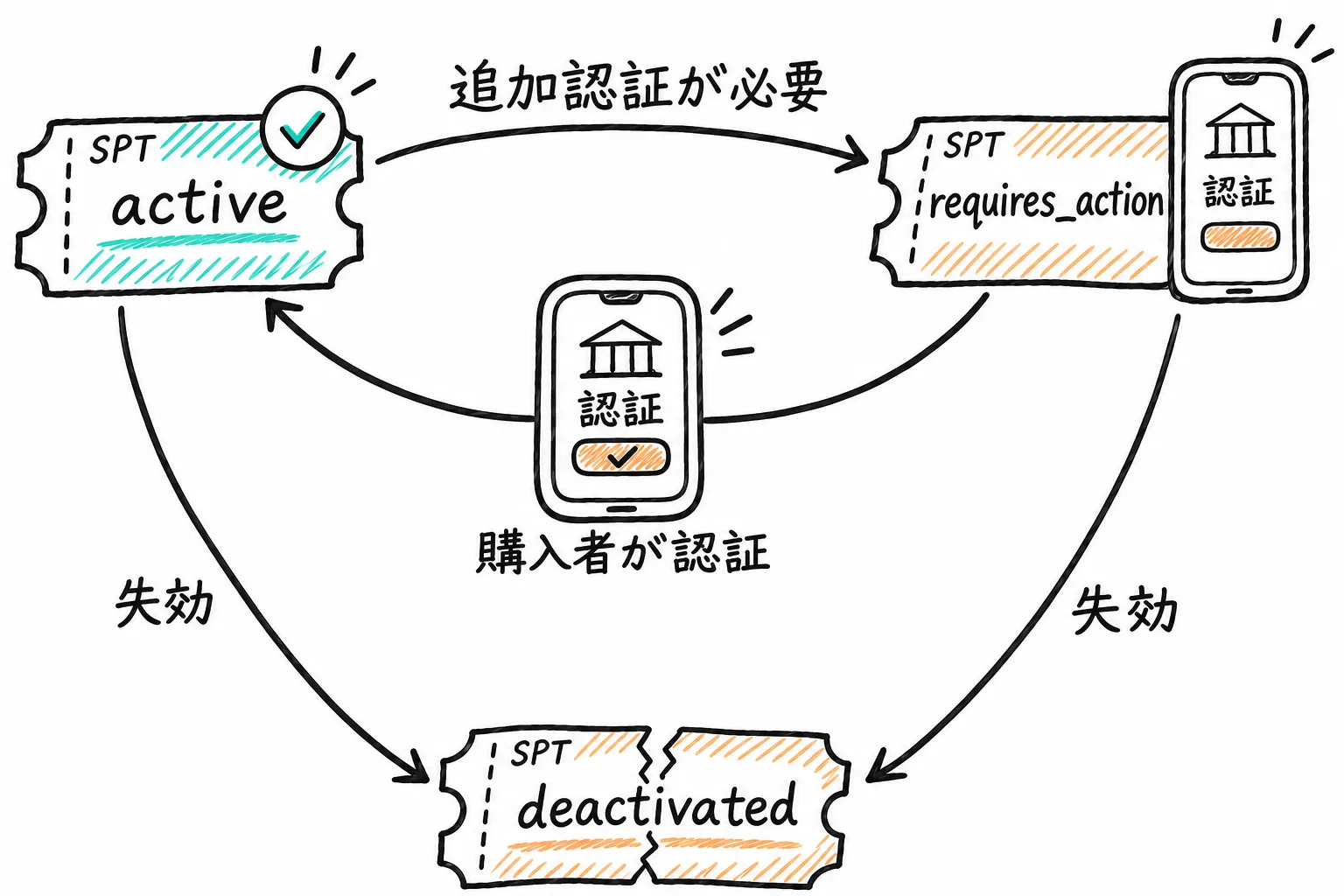
Consider the earlier order, book-001, where authentication is requested while the seller processes the payment.
This example follows the SPT spt_123 and payment record pi_123 as the purchase resumes after the buyer completes the required action.
| Purchase progress | SPT spt_123 status |
Payment record pi_123 status |
Application order status |
|---|---|---|---|
| Awaiting buyer authentication | requires_action (additional action needed) |
requires_action (additional action needed) |
Awaiting authentication |
| Verify after the buyer's action | active (usable) |
If processing, payment is being processed |
Awaiting payment confirmation |
| Verify successful payment | Example in which the SPT becomes deactivated after its limit is consumed |
succeeded (payment successful) |
Paid |
When awaiting authentication, the application directs the buyer to the required action. When awaiting payment confirmation, it waits for the seller's result. Shipping proceeds only after successful payment is verified and the order is marked paid.
The order statuses in the table are names managed by this particular application.
Even where the SPT and payment record share a status name, they describe the states of different records.
For example, requires_action on the payment record means that additional buyer action is needed for that payment.
This example describes authentication required during the seller's payment rather than immediately after SPT issuance.
Not every purchase follows the exact sequence or combination of statuses shown in the table.
Card payments may succeed immediately, and not every purchase involves waiting in a processing state.
An SPT may become unusable when its limit is reached, so the application does not assume that it always remains active after a successful payment; it updates the order using the seller's payment result.
1. Identify the Purchase That Requires Additional Authentication
The application receives a notification from Stripe about additional authentication and identifies the associated SPT and purchase. Receipt of the notification does not mean that the buyer's action or the payment has been completed.
2. Direct the Buyer to Authentication
The application follows Stripe's instructions and directs the buyer to the screen where action is required. Whether authentication happens inside the purchase screen or on a separate page, the application indicates the action the buyer must take.
3. The Buyer Completes Authentication
The buyer completes authentication on the indicated screen. In this example, information used for authentication is not sent to the model; it is handled between the buyer's screen and Stripe. The model neither authenticates on behalf of the buyer nor changes the authentication result to successful.
4. Check the SPT Status and Resume
After the buyer completes the action, the application retrieves the SPT status from Stripe. If the SPT has been deactivated in the meantime, it does not initiate a new payment. If it is usable, it returns to the seller's processing flow. Even after resuming, fulfillment is determined by the payment result verified by the seller.
The following example shows an active SPT requiring additional authentication and returning to a usable state after the buyer's action. Deactivation is represented by separate dashed paths, distinct from the sequence played back in the diagram.
- 利用可能なSPTで開始する
この例ではactiveのSPTから始めます。
まだ支払いの成功を表していません。 - 追加認証が必要になる
サーバーは署名を検証した通知とSPTの取得結果から、本人の操作待ちを確認します。
- 本人の操作後に状態を確認する
購入者が認証した後、サーバーがStripeからactiveへの復帰を確認します。
販売者は別に支払い結果を確認します。
Do Not Use a Deactivated SPT
When stopping a purchase, the agent can revoke the SPT's authorization for use. In addition to revocation, expiration or consuming the limit can make an SPT unusable. The application checks why the SPT was deactivated and the status of the purchase. Even if the purchase is to continue, it avoids unconditionally retrying with that same SPT.
Revoking an SPT prevents future use by the seller. Refunding a completed payment is a separate operation carried out by the seller using the payment record.
Reflect the Payment Result in the Order
For each order, the application associates the seller, the SPT passed to that seller, and the seller's payment record. It separately verifies completion of payment form entry, SPT issuance, and successful payment, and updates the order based on the payment result verified by the seller.
If a connection is interrupted and the result becomes unknown, the application first checks the payment record for the same order. Issuing another SPT and starting the purchase again could create a duplicate order, so the application does not initiate a new purchase while the result remains unknown. Associating payments with orders, preventing duplicates, and providing a screen to return the buyer to the flow are the application's responsibilities.
Choosing Between Direct and Agent Payments
If the buyer reviews the book and $35 total on the seller's screen and pays directly, use standard Link checkout. If an agent handles the order and the permission passed to the seller must be restricted by purchase destination and conditions, use an SPT. Link can be used to select the underlying payment method.
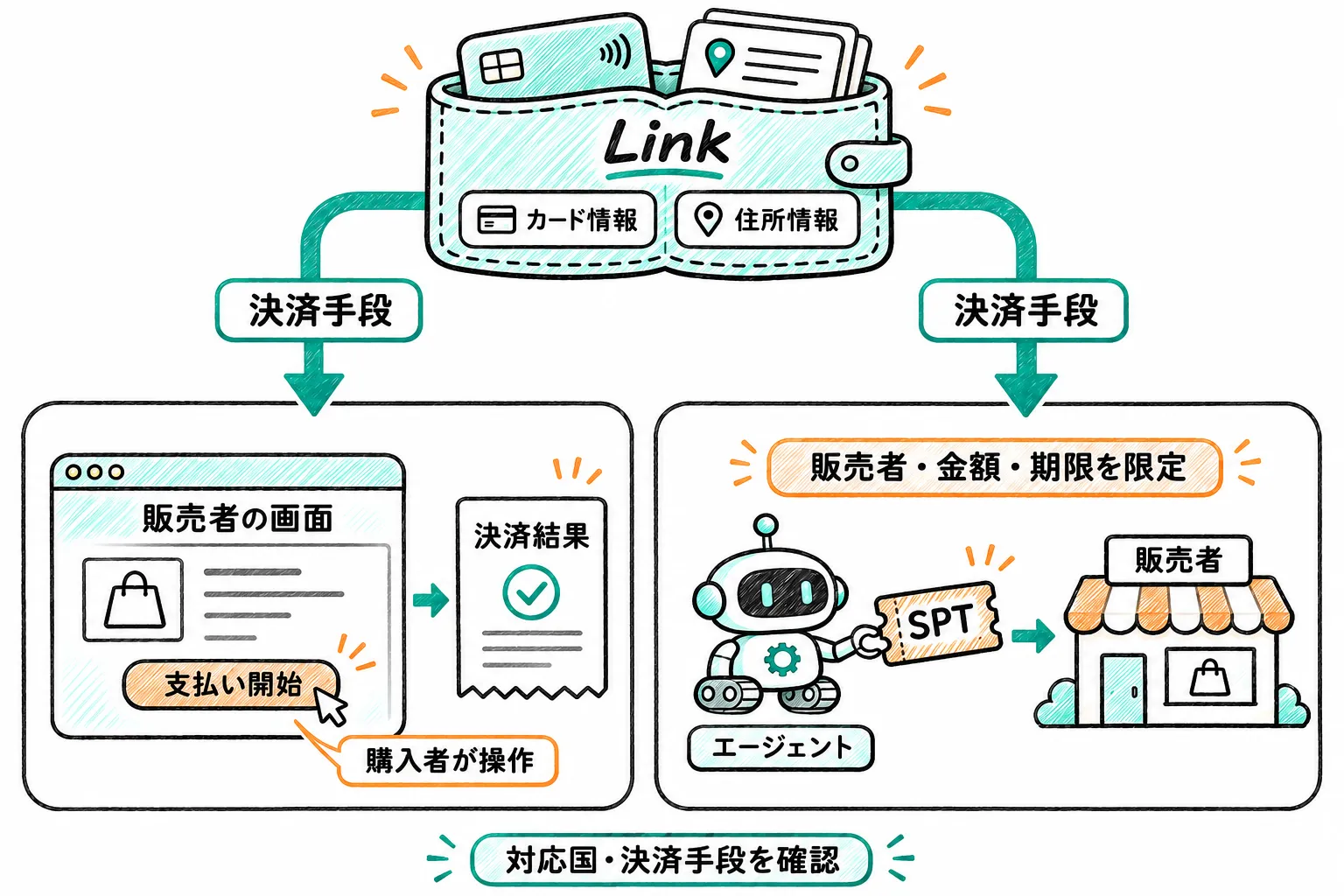
When integrating these services, check the supported regions for Link and SPT separately. As checked on November 17, 2026, SPT availability for agents, buyers, and sellers covered the United States, Canada, and certain European countries. Japan was not included in the list, so the availability of standard Link checkout alone does not establish that SPTs are available.
Link Agent Wallet is a service that also covers connecting the buyer and agent and obtaining the buyer's approval for purchase requests.
Receiving an SPT from the Wallet and collecting payment methods on the application's own purchase screen to issue an SPT differ in the scope of buyer interactions the application must implement.
An SPT is one credential passed to the seller, whereas the Wallet also handles the preceding connection and purchase approval.
Summary
The buyer selects a saved payment method using Link, and the application requests an SPT with the purchase conditions. The seller uses the received SPT to process the payment, checks the actual payment result, and updates the order.
Even when an SPT restricts the seller, maximum amount, and expiration, the application verifies that the correct book is being purchased. It directs the buyer to complete any additional authentication and verifies SPT usability independently from payment success.
Stripe's official documentation provides further information about how SPTs and Link work and their conditions of use.