Introduction
Hi, I'm cardene, a software engineer and technical writer focused on blockchain and AI.
I've also authored Japanese technical books on specification-driven development with LLMs and decentralized application (DApp) development.

I also build and publish a variety of tools, libraries, and open-source projects.
This article explores UCP, a protocol that connects AI agents and shopping applications with businesses' purchasing workflows.
Using a shoe purchase as an example, we will follow the process from discovering supported capabilities through updating checkout terms, paying, and checking the order afterward.
The original diagrams, interactive examples, and code samples are preserved; some labels and example values remain in Japanese.
What Is UCP?
UCP, short for Universal Commerce Protocol, is a commerce protocol connecting product selection, purchasing, and post-order tracking between AI agents or shopping applications and businesses. It defines common formats for exchanging supported capabilities, checkout terms, payment information, and order results.
When a shopping application connects to several businesses, it first determines which operations and data formats each supports. UCP lets peers publish their capabilities, select the capabilities they share, and then update checkout details. The business manages inventory and sales terms, while the shopping application presents the returned information to the buyer.
Participant Roles
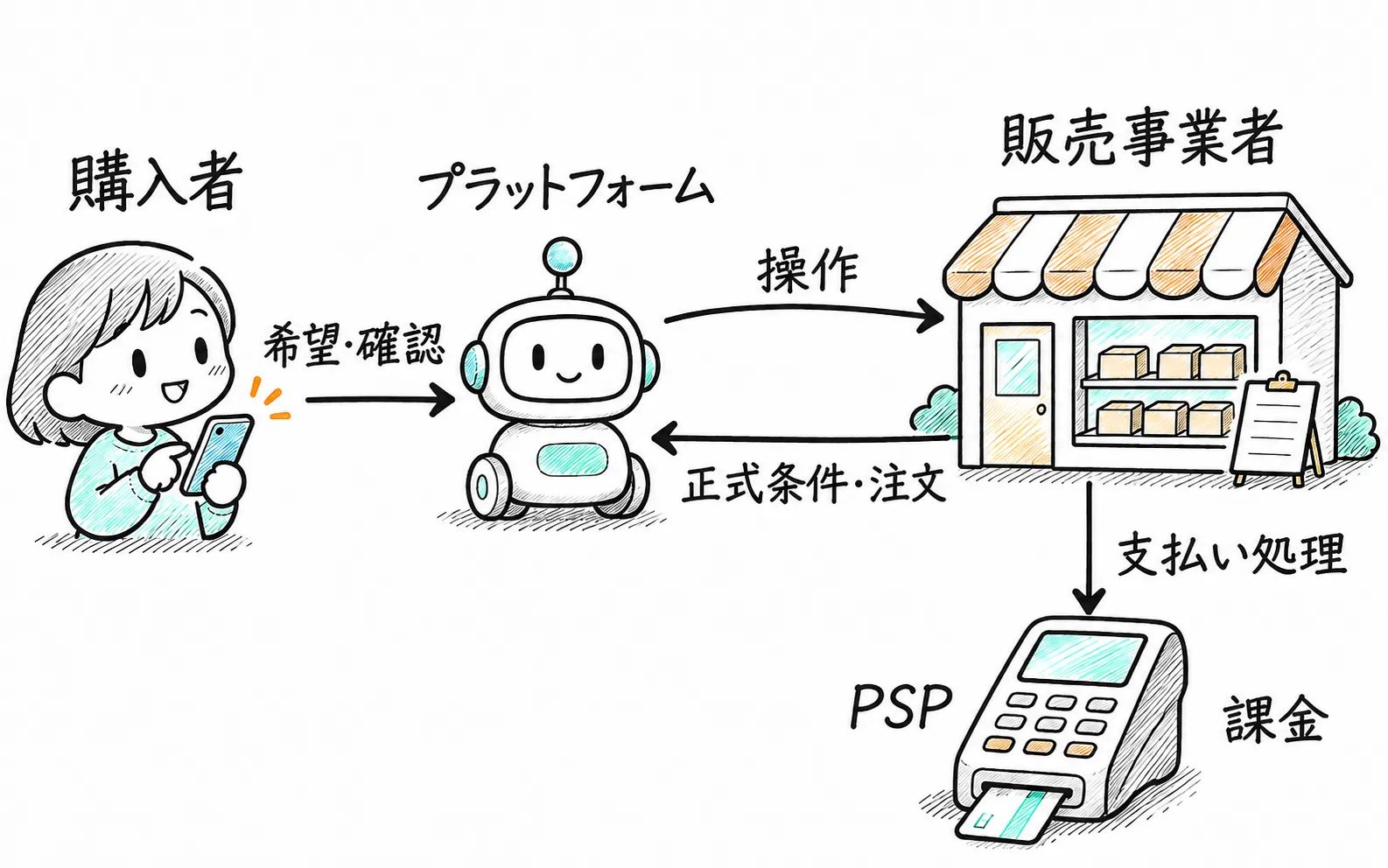
The application or agent that receives the buyer's request and sends requests to a business is called the platform. It constructs search criteria from the buyer's preferences, selects products and shipping options, and communicates those choices to the business. The platform also presents the returned amounts and required confirmations to the buyer.
The business calculates checkout details using its own inventory and sales terms. When an order is placed, it returns an order number and subsequently updates shipment, cancellation, and refund information. The platform uses those responses to complete purchases without directly manipulating the business's inventory management or pricing calculations.
Payment also involves a payment information provider and a payment service provider. For example, a wallet may prepare a token for a purchase, while a payment service provider processes the charge using the information received from the business. The latter is called a PSP. Even when one company performs several roles, returning checkout terms and verifying payment information remain distinct processes.
The party responsible for managing the sale and assuming financial responsibility is called the Merchant of Record. The business conducting the transaction typically performs this role.
The Roles of Purchase Data
The data used while searching for products differs from the data used when confirming a purchase. Product information used for search is the Catalog. It includes selectable colors and sizes, allowing the platform to narrow down the candidates.
If the buyer wants to edit selections later, the products and quantities can be stored in a Cart before purchase. The cart total is an estimate; the formal total, including the destination and shipping cost, comes from checkout. If selections do not need to be saved, the platform can start directly with checkout instead of creating a cart.
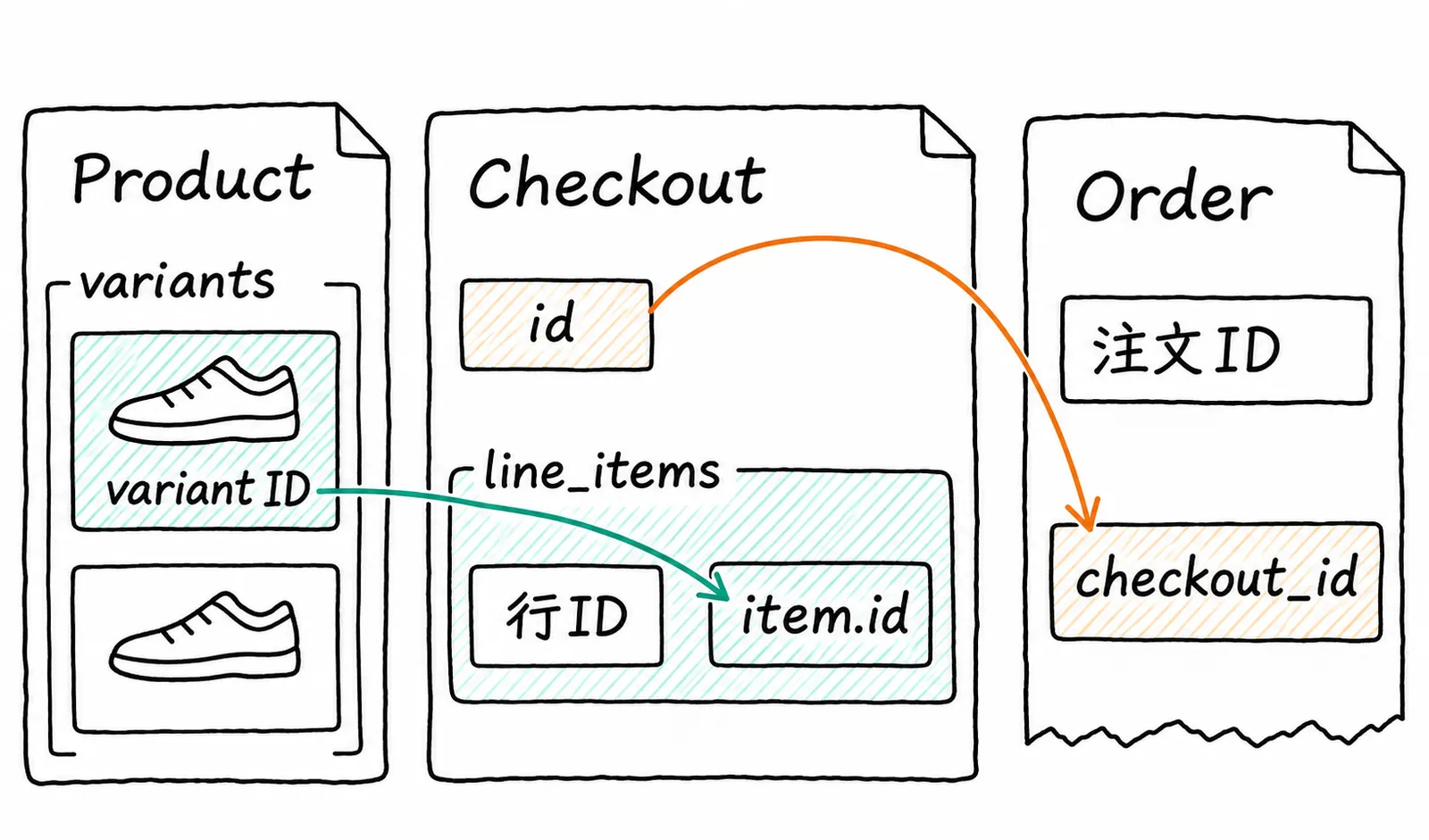
A Checkout session contains the products being purchased, amounts, required inputs, and processing progress returned by the business. The platform updates this session, checks the terms, and requests completion. A successful purchase produces a separate Order record, whose order number is used to track shipments and refunds.
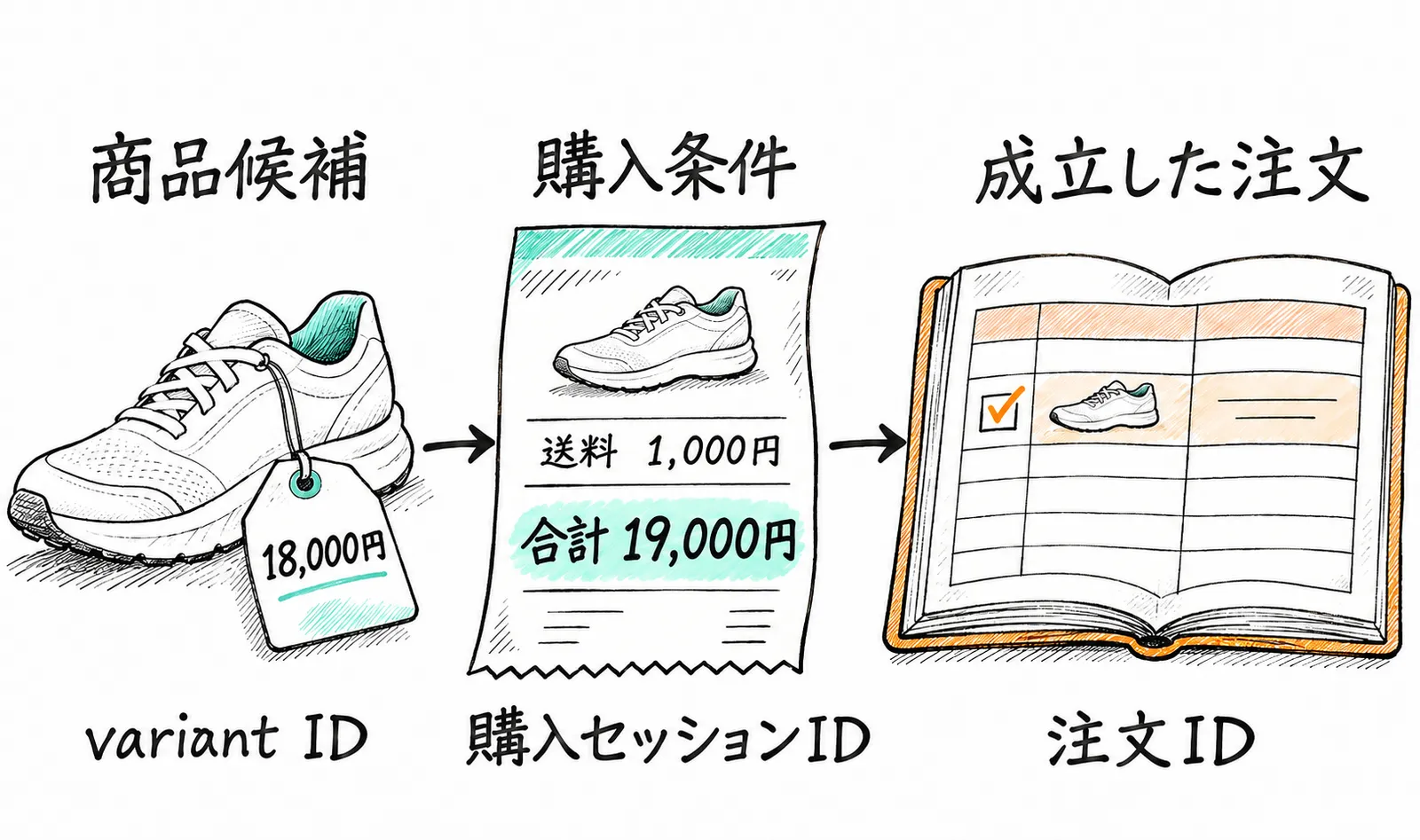
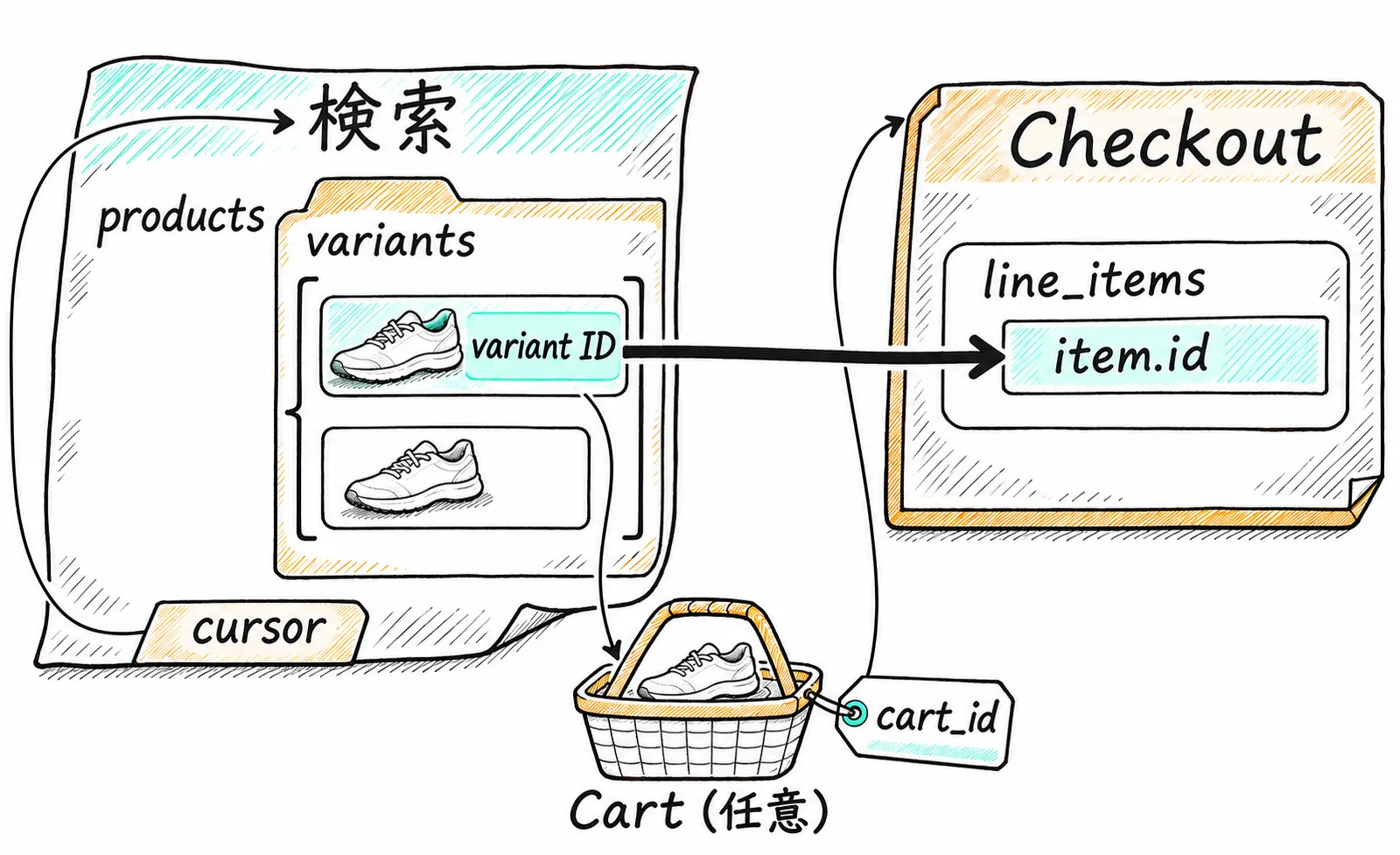
The ID that identifies a purchasable option down to color and size is the variant ID. The resulting checkout session and completed order each have their own ID. The platform records their relationship to track which order originated from the selected variant.
Product variant ID, checkout session ID, and order ID serve different purposes at different stages. Displaying a selection ID as the completed order number would prevent subsequent reconciliation. The platform receives each ID from the business and stores the relationship between the checkout session and completed order in its purchase records.
The Overall Purchase Flow
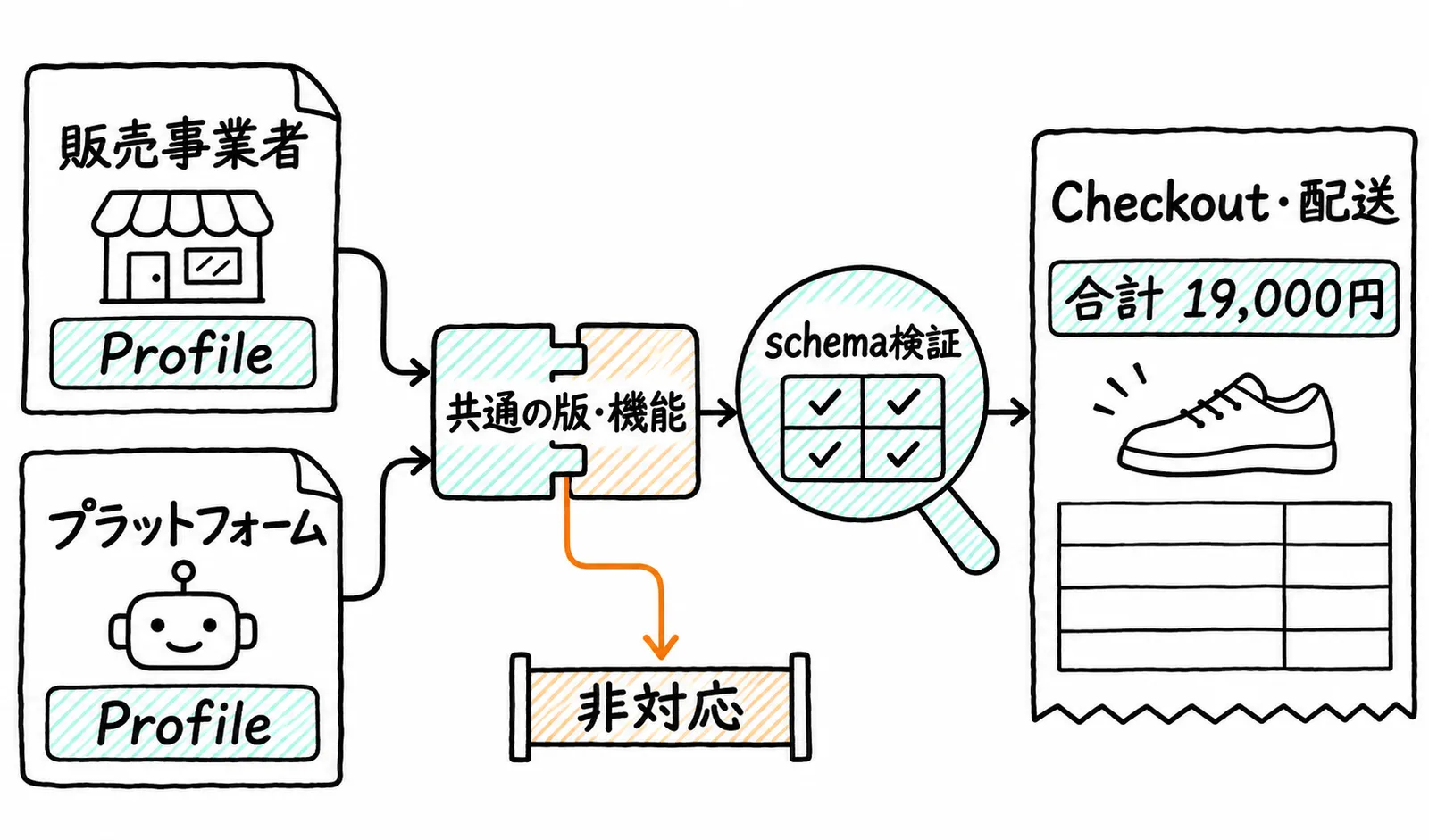
The candidate product costs JPY 18,000. Adding JPY 1,000 for standard shipping brings the total to JPY 19,000. The following diagram maps the product variant, checkout session, and order IDs described above to the stages of a purchase.
We will follow a fictional shoe purchase using the August 25, 2026 release of UCP. Before making a purchase, both parties check the supported operations and data structures. These structures are defined by schemas, which are used to validate requests and responses.
Suppose the buyer wants one pair of white running shoes for no more than JPY 20,000 including shipping. The shoes cost JPY 18,000; standard shipping costs JPY 1,000 and express shipping JPY 2,500. These fictional sales terms illustrate the mechanism.
Stopping when the total exceeds JPY 20,000 is the shopping application's policy based on the buyer's instructions. UCP provides a common format for exchanging the business's formal terms used in that decision and the results of proceeding with the purchase.
-
Check supported capabilities
Select a common protocol version and capabilities, and store the validation schemas and endpoints.
-
Select the product to purchase
Select a purchasable product
IDfrom the search results and create a checkout session. Save the returned sessionIDand line itemIDin the purchase record. -
Confirm shipping and the formal total
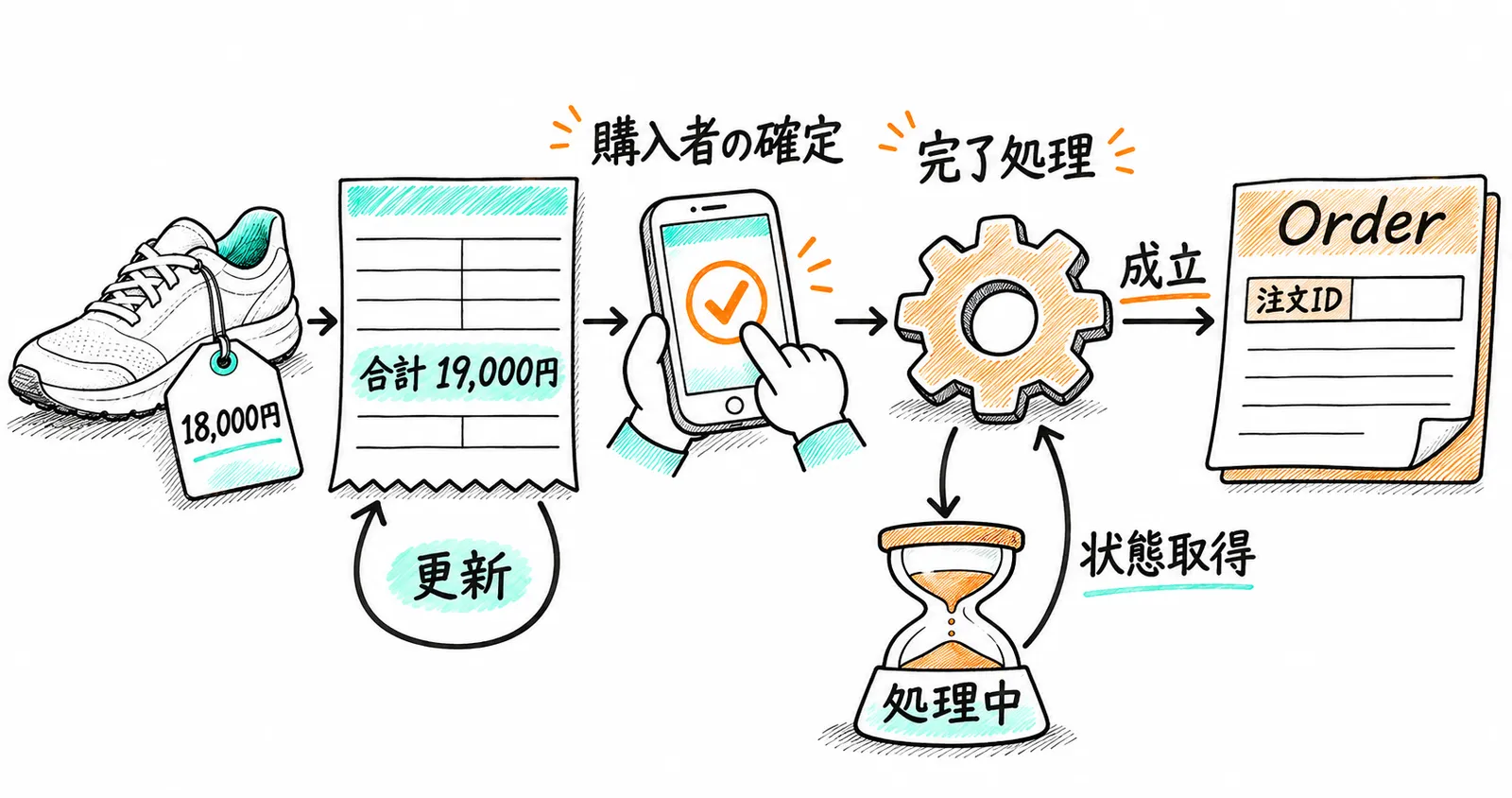
Update the shipping selection and receive the business's total. Standard shipping gives JPY 19,000; express shipping gives JPY 20,500, at which point the application stops because the budget is exceeded.
-
Have the buyer confirm the latest terms
Obtain final confirmation through a trusted interface. If additional approval evidence is used, also verify that it matches the confirmed terms.
-
Check the purchase result
Request completion using the payment information. Confirm the resulting order
ID; if processing is ongoing or a response is lost, continue checking by retrieving the state. -
Reflect post-order changes
Verify the order
IDand notification sender, then apply shipment and refund updates to the same purchase record.
Profiles and Supported Capabilities
Before sending checkout details to a business, the platform determines the operations and versions that the business supports. This published information is called a profile. Functions such as creating a checkout or retrieving an order are called a Capability; specifications that add shipping or discount data to a capability are extensions.
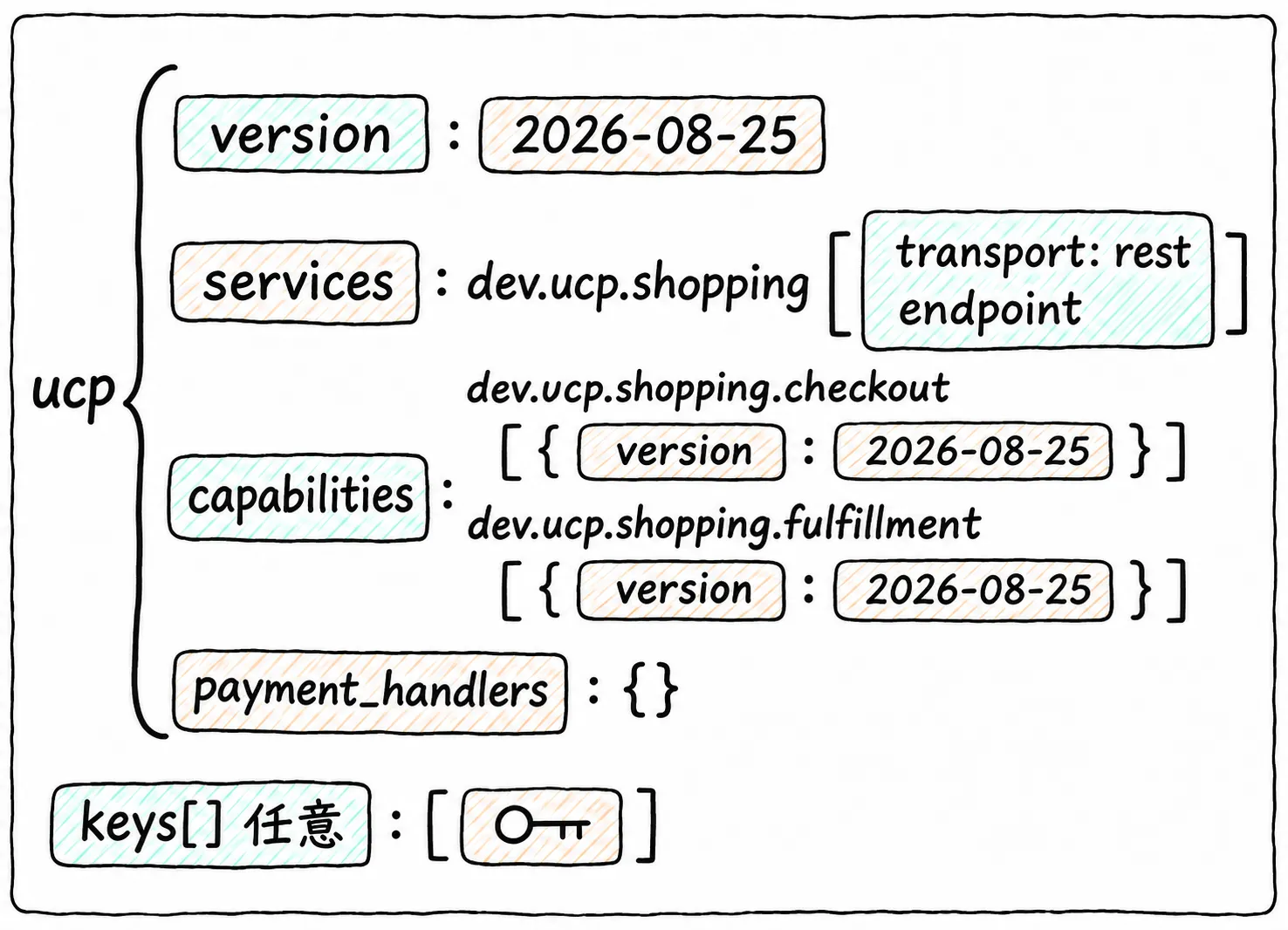
Information Published in a Profile
A business returns its profile as JSON at /.well-known/ucp. The platform selects a transport and endpoint from this profile and retrieves the data definitions for the capabilities it will invoke. These definitions are schemas used to validate the structure of outgoing and incoming JSON.
For example, a business that supports checkout and fulfillment can return the following profile.
{
  "ucp": {
    "version": "2026-08-25",
    "services": {
      "dev.ucp.shopping": [
        {
          "version": "2026-08-25",
          "transport": "rest",
          "endpoint": "[販売事業者のREST接続先URL]"
        }
      ]
    },
    "capabilities": {
      "dev.ucp.shopping.checkout": [
        {
          "version": "2026-08-25",
          "schema": "https://ucp.dev/2026-08-25/schemas/shopping/checkout.json"
        }
      ],
      "dev.ucp.shopping.fulfillment": [
        {
          "version": "2026-08-25",
          "extends": "dev.ucp.shopping.checkout",
          "schema": "https://ucp.dev/2026-08-25/schemas/shopping/fulfillment.json"
        }
      ]
    },
    "payment_handlers": {}
  }
}| Field | Value and role in this example |
|---|---|
ucp.version |
The protocol version being matched, 2026-08-25. |
services |
Uses service identifiers as keys and contains arrays of definitions for each transport. Required even if empty. |
transport and endpoint |
The endpoint used with rest. The platform sends HTTP requests to this endpoint. |
capabilities |
Uses capability names as keys and contains arrays of definitions for each supported version. |
schema |
Location of the data definition used to validate a capability's requests and responses. |
extends |
Indicates that the parent of fulfillment is dev.ucp.shopping.checkout. |
payment_handlers |
Payment method definitions. Required even if empty; the example's {} does not identify any usable method. |
keys |
An array outside ucp when public keys are provided. Omitted in this example. |
The platform confirms that both checkout and fulfillment are supported before sending a shipping update. The platform also supplies its own profile URL with each request so that the business can compare both parties' capabilities.
A Service groups operations and notifications for a domain such as shopping, including product search and checkout. Its identifier is dev.ucp.shopping. To access the same service through multiple transports, the transport-specific definitions are placed in the services["dev.ucp.shopping"] array.
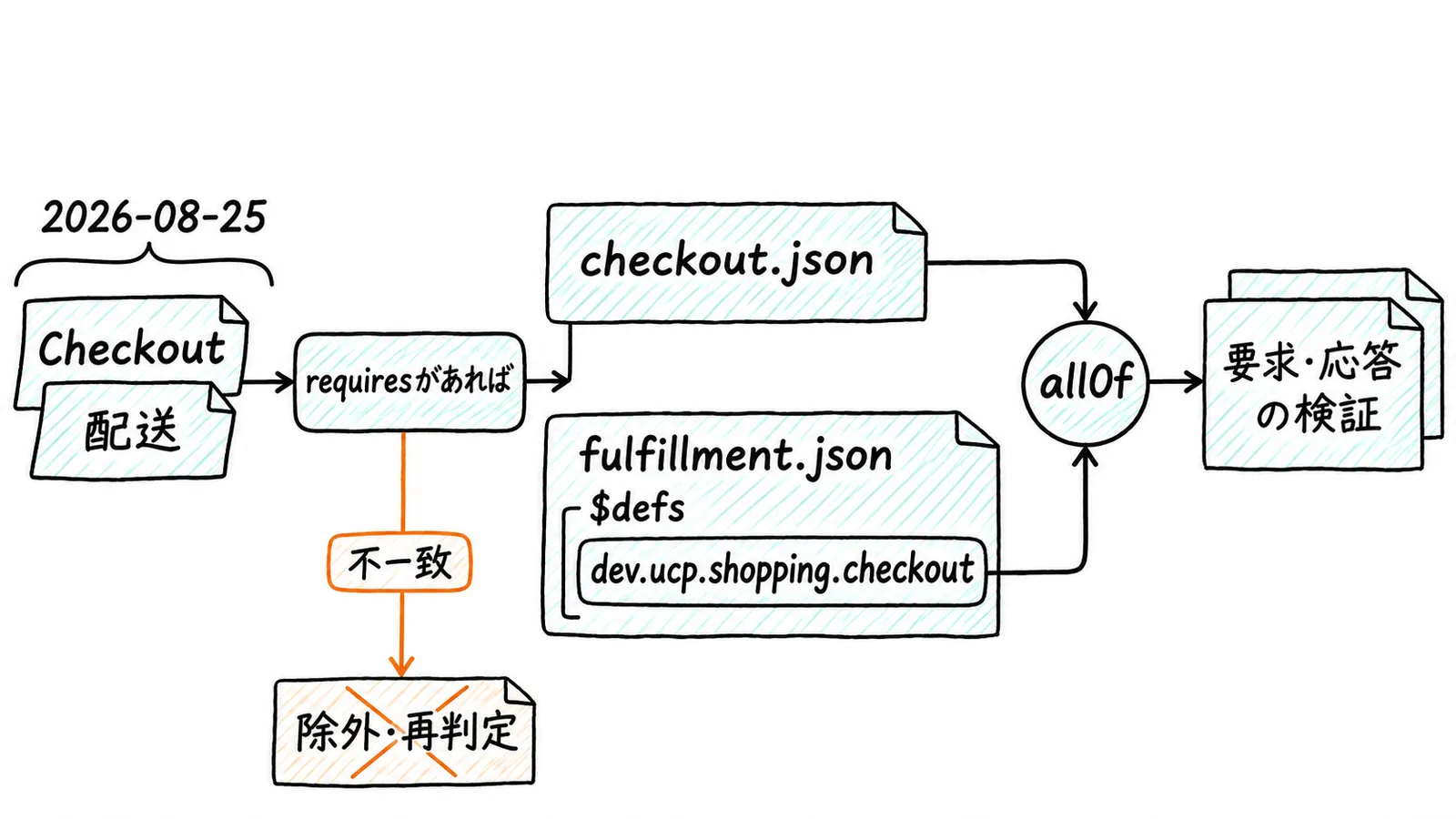
Selecting Versions and Capabilities
The platform and business first choose a single protocol version that both can use. If the peer supplies separate profiles for multiple versions, they retrieve the profile for the selected version. They also check the retrieved profile's ucp.version and avoid constructing requests from parts of different versions.
Next, they compare the names and versions of the capabilities both publish. A capability with the same name cannot be used with a mismatched version. Extensions must also be checked against their parents; an extension without an active parent is removed. If it has several parents, at least one active parent satisfies this condition.
After selecting capabilities, the platform retrieves the schemas for the base capability and active extensions. If an extension specifies requires, it also checks whether the selected protocol and capability versions satisfy that dependency. If removing an incompatible extension leaves another extension without a parent, that extension is removed as well.
The min and optional max in requires define a range against which the already selected versions are validated. They do not allow choosing a different convenient version for each capability at this point. Specifications defined by UCP itself under dev.ucp.* remain aligned within a release, while third-party extensions use the versions and dependencies defined by their authors.
Finally, a schema incorporating the selected extensions is composed. For fulfillment, for example, the parent capability definition in $defs of fulfillment.json uses allOf to combine the base checkout.json with fulfillment data. The platform validates requests and responses against this composed schema. This verifies not just matching capability names but the data structures available for that purchase.
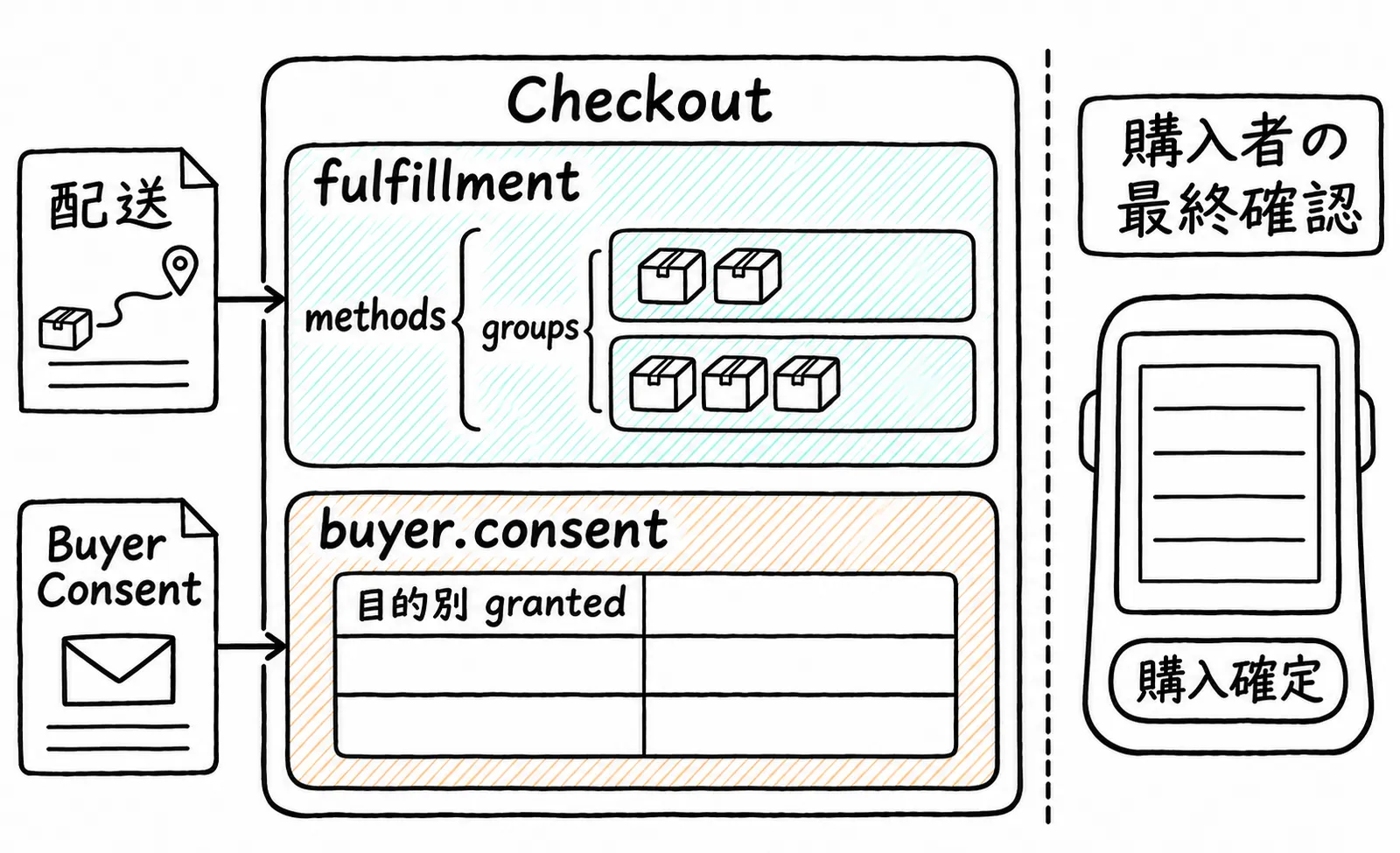
Fulfillment and Buyer Consent Extensions
To add a shipping destination or shipping method to checkout terms, use the fulfillment extension. When the platform sends the destination, the business returns available shipping methods and their prices. If the buyer switches to express shipping, the platform updates the same checkout session and obtains the recalculated total.
Another extension, Buyer Consent, communicates the buyer's consent for each purpose involving use of their data or contacting them. Consent information appears in buyer.consent within the checkout session, keyed by purpose ID. The following partial response shows a fictional store defaulting marketing consent to false. Required outer checkout fields such as ucp and id are omitted.
{
  "buyer": {
    "consent": {
      "dev.ucp.consent.marketing": {
        "granted": false,
        "source": "business",
        "description": "販売促進のご案内"
      }
    }
  }
}| Field | Value and role in this example |
|---|---|
dev.ucp.consent.marketing |
Identifies marketing communications as the purpose of use. |
granted |
Indicates consent to the purpose. The example's false means no consent. |
source |
Origin of the value. business is the business's default; platform represents the buyer's decision obtained by the application. |
description |
Description of the purpose shown to the buyer. Appears only in the business's response and is not echoed in requests. |
If the buyer explicitly consents to the purpose, the platform includes consent information in an update or completion request. In the following example, the store presented only this one consent purpose, with no finer-grained scopes.
{
  "buyer": {
    "consent": {
      "dev.ucp.consent.marketing": {
        "granted": true,
        "source": "platform"
      }
    }
  }
}
The combination of true and platform communicates that the buyer consented to this purpose. For purposes for which the buyer's decision has not been obtained, retain the presented value and source. When sending consent information, include every purpose and scope presented by the business; omission of a key does not encode a consent value. The business reads the decision for each purpose and determines how it may use the data.
Shipping selection and data-use consent both add information to checkout, but their roles differ. In particular, Buyer Consent cannot be reused as authorization to purchase at the displayed total. Obtain the buyer's final confirmation separately when confirming the purchase.
The Shoe Purchase Flow
We now map the shoe purchase terms from the overview to JSON requests and responses. In the interactive diagram, change shipping and quantity, then confirm the purchase after reviewing the latest terms returned by the business.
Using a fictional shoe purchase, you can switch the supported version and fulfillment capabilities, obtain checkout terms, and confirm them as the buyer. When a response is lost, retrieve the state to check the result before resending the same request, and resend only if necessary. This tutorial covers checkout states and recovery decisions; it does not implement the execution of arbitrary extension-defined Action objects, actual payments, or AP2 cryptographic verification.
ucp-purchase ucp as アプリとお店の対応を確かめて注文する [version: 1, note: アプリとお店のプロファイルを比べ、購入条件の確認から注文までを試せます。]
profile platform_checkout as platform [side: platform, capability: dev.ucp.shopping.checkout, version: 2026-08-25]
profile platform_fulfillment as platform [side: platform, capability: dev.ucp.shopping.fulfillment, version: 2026-08-25, parent: dev.ucp.shopping.checkout, toggle: delivery]
profile business_checkout as business [side: business, capability: dev.ucp.shopping.checkout, version: 2026-08-25, alternative_version: 2026-01-11]
profile business_fulfillment as business [side: business, capability: dev.ucp.shopping.fulfillment, version: 2026-08-25, parent: dev.ucp.shopping.checkout, toggle: delivery]
scenario shoes as 白いシューズ [type: product, price: 18000, currency: JPY, quantity: 1, max: 3]
scenario standard as 通常配送 [type: delivery, fee: 1000, initial: true]
scenario express as 速達 [type: delivery, fee: 2500]
scenario budget as アプリ予算 [type: budget, initial: 20000, min: 10000, max: 80000, step: 500]
scenario normal as 通常 [type: case, outcome: normal]
scenario escalation as 追加確認 [type: case, outcome: escalation]
scenario lost as 応答不達 [type: case, outcome: lost]
payment platform_payment as アプリの対応 [side: platform, methods: demo_card|demo_wallet, binding: demo, labels: "demo_card=カード決済|demo_wallet=ウォレット"]
payment business_payment as お店の対応 [side: business, methods: demo_card, binding: demo, labels: "demo_card=カード決済"]
state incomplete as 対応OK [status: incomplete]
state requires_escalation as 購入者へ追加確認 [status: requires_escalation]
state ready_for_complete as 購入条件が揃った [status: ready_for_complete]
state complete_in_progress as 注文処理中 [status: complete_in_progress]
state completed as 注文成立 [status: completed]
state canceled as 取り消し [status: canceled]
transition negotiate as アプリとお店の対応を確認する [action: MATCH, effect: negotiate, from: profile|unsupported|incomplete|ready_for_complete|requires_escalation, guard: unlocked, actor: agent, target: seller]
transition quote as お店に購入条件を確認する [action: QUOTE, effect: quote, from: incomplete|ready_for_complete, guard: negotiated, actor: agent, target: seller]
transition approve as 購入者画面でこの条件を確定する [action: APPROVE, effect: approve, from: ready_for_complete, guard: within_budget, actor: buyer, target: agent]
transition complete as この条件で注文を依頼する [action: COMPLETE, effect: complete, from: ready_for_complete, guard: approved, actor: agent, target: seller]
transition get as お店に購入結果を確認する [action: GET, effect: get, from: requires_escalation|complete_in_progress|unknown, guard: recovery, actor: agent, target: seller]
transition retry as 同じ内容で注文の依頼を再送する [action: RETRY, effect: retry, from: unknown, guard: same_request, actor: agent, target: seller]
transition cancel as 取り消す [action: CANCEL, effect: cancel, from: incomplete|ready_for_complete|requires_escalation, guard: cancelable, actor: buyer, target: seller]
transition reset as 最初の条件へ戻す [action: RESET, effect: reset, from: profile|unsupported|incomplete|requires_escalation|ready_for_complete|complete_in_progress|completed|canceled|unknown, guard: always, actor: buyer, target: agent]
view buyer as 購入者 [type: party, role: buyer, note: 条件を確定]
view agent as アプリ [type: party, role: agent, note: 照合と要求]
view seller as 店舗 [type: party, role: seller, note: 条件と注文]
view payment as 支払い [type: party, role: payment, note: 合意した方式]
view compatibility as 対応する機能とバージョン [type: panel, section: profiles]
view methods as 支払い方法 [type: panel, section: payment]
view purchase as 購入条件 [type: panel, section: terms]
view match_step as 対応確認 [type: step, action: MATCH]
view quote_step as 条件取得 [type: step, action: QUOTE]
view approve_step as 購入承認 [type: step, action: APPROVE]
view complete_step as 注文依頼 [type: step, action: COMPLETE]
view result_step as 結果確認 [type: step, action: GET]
Selecting a Product and Starting Checkout
The platform constructs search criteria from the buyer's preferences and sends them to the business's product search. The following request searches for white running shoes with a requested limit of 10 results.
{
  "query": "白いランニングシューズ",
  "pagination": {
    "limit": 10
  }
}
The query field expresses the buyer's search preferences in natural language. A search request includes this criterion, narrowing filters, or extension inputs recognized by the business. The business validates that recognized input is present and determines additional conditions, such as whether to accept an empty string.
The response contains products and the purchasable combinations of colors and sizes for each. Each purchasable combination is called a Variant. The following partial response includes the candidates and the data used to fetch further results.
{
  "products": [
    {
      "id": "[商品ID]",
      "title": "白いランニングシューズ",
      "description": {
        "plain": "白色のシューズ"
      },
      "price_range": {
        "min": {
          "amount": 18000,
          "currency": "JPY"
        },
        "max": {
          "amount": 18000,
          "currency": "JPY"
        }
      },
      "variants": [
        {
          "id": "[白色・サイズ選択済みvariant ID]",
          "title": "白色・選択したサイズ",
          "description": {
            "plain": "購入する一足"
          },
          "price": {
            "amount": 18000,
            "currency": "JPY"
          }
        }
      ]
    }
  ],
  "pagination": {
    "has_next_page": true,
    "cursor": "[次ページcursor]"
  }
}| Field | Value and role in this example |
|---|---|
products[].id |
The ID of the overall product, distinct from the ID identifying the size being purchased. |
variants[].id |
The ID of one selected color and size combination. Pass this value in the checkout request. |
price_range and variants[].price |
The product's price range and the variant price. Both are JPY 18,000 in this example, but the formal price is confirmed during checkout. |
pagination.has_next_page |
Because the value is true, another page exists regardless of the number of returned results. |
pagination.cursor |
Pass the returned value in the corresponding field of the next search request without interpreting it. |
If the overall product ID is sent in the checkout request, the business cannot identify the selected size. Even if fewer than the requested 10 results are returned, inspect pagination instead of ending the search based only on the count. If the product array is empty and additional actions are returned, examine the response to determine the next operation.
After selecting a product, the platform can create a checkout session with the following input.
{
  "line_items": [
    {
      "item": {
        "id": "[白色・サイズ選択済みvariant ID]"
      },
      "quantity": 1
    }
  ]
}
Each element of line_items is one purchase line. The item.id identifies the selected product, and quantity specifies the quantity. The business determines and returns the product name and price at creation time, so the platform does not write the search price as the formal price. The platform stores the returned checkout session id and each line_items[].id in its purchase record.
If selections need to be edited or saved later, place the same product and quantity in a cart before proceeding to checkout. In that case, create a checkout session by specifying the cart with cart_id, and the business initializes the session from the cart contents. If the same cart already has an unfinished checkout session, the existing session is returned, so repeating the creation request does not create another purchase.
Updating Shipping Terms and Confirming the Purchase
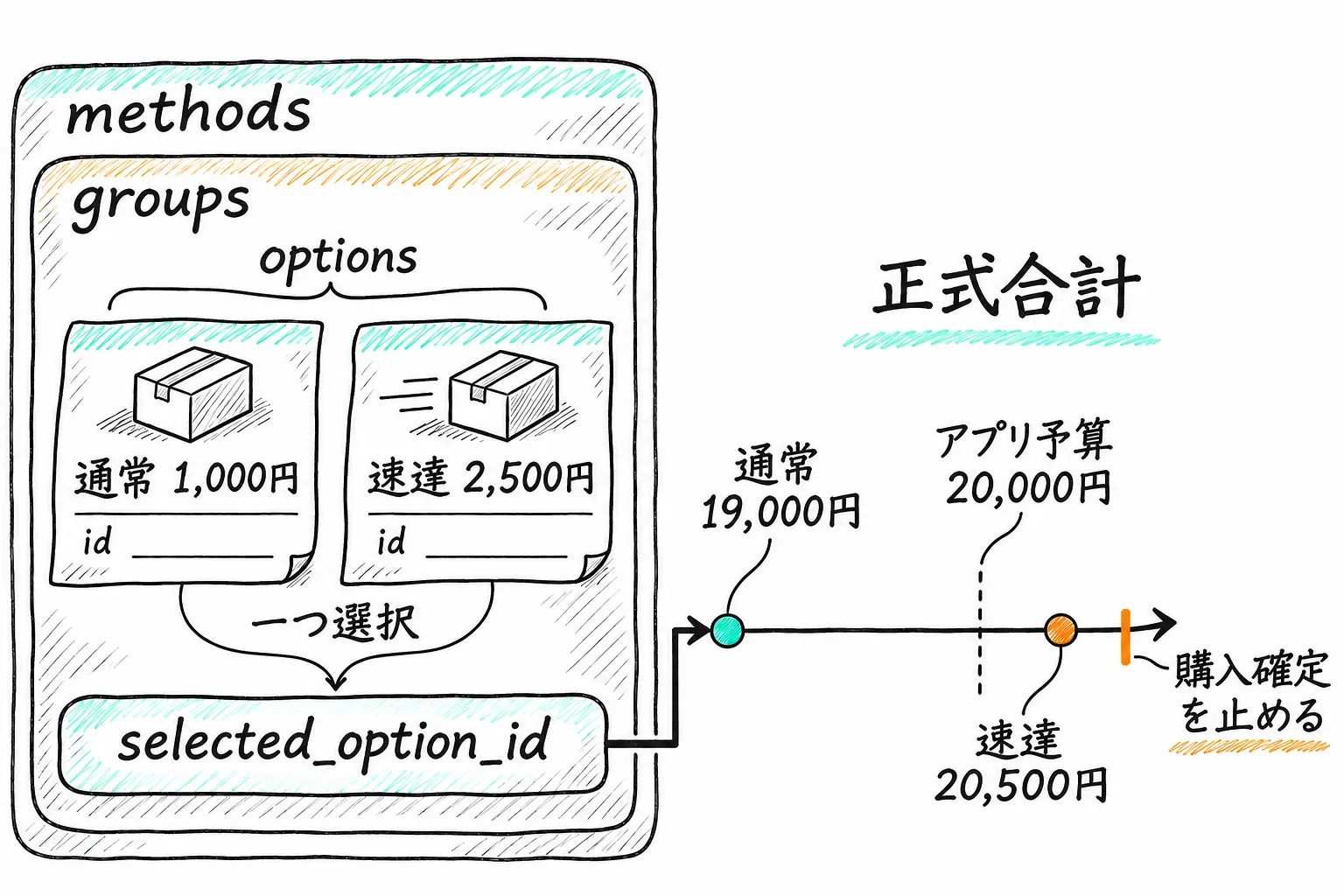
After the checkout session is created, its response reveals the available shipping options. If the destination has already been selected, the shipping selection portion of the response is as follows.
{
  "fulfillment": {
    "methods": [
      {
        "id": "[配送method ID]",
        "type": "shipping",
        "line_item_ids": [
          "[行ID]"
        ],
        "groups": [
          {
            "id": "[配送group ID]",
            "line_item_ids": [
              "[行ID]"
            ],
            "options": [
              {
                "id": "[通常配送option ID]",
                "title": "通常配送",
                "totals": [
                  {
                    "type": "total",
                    "amount": 1000
                  }
                ]
              },
              {
                "id": "[速達option ID]",
                "title": "速達",
                "totals": [
                  {
                    "type": "total",
                    "amount": 2500
                  }
                ]
              }
            ],
            "selected_option_id": "[通常配送option ID]"
          }
        ]
      }
    ]
  }
}| Field | Value and role in this example |
|---|---|
methods[].id and line_item_ids |
Identify a fulfillment method and the purchase lines fulfilled by that method. |
groups[].id |
Identifies the group of purchase lines for which a fulfillment option is selected together. |
options |
Standard shipping at JPY 1,000 and express shipping at JPY 2,500 are available for this group. |
selected_option_id |
The ID of the selected fulfillment option. Standard shipping is selected in this response. |
When the buyer selects express shipping, the platform updates the session using the ID of the corresponding fulfillment method and group. The following request keeps the same single pair of shoes and switches to express shipping.
{
  "line_items": [
    {
      "id": "[行ID]",
      "item": {
        "id": "[白色・サイズ選択済みvariant ID]"
      },
      "quantity": 1
    }
  ],
  "fulfillment": {
    "methods": [
      {
        "id": "[配送method ID]",
        "line_item_ids": [
          "[行ID]"
        ],
        "groups": [
          {
            "id": "[配送group ID]",
            "selected_option_id": "[速達option ID]"
          }
        ]
      }
    ]
  }
}
The business determines the shipping option from selected_option_id and recalculates inventory and shipping charges. The type:"total" entry in the returned totals is the formal amount payable by the buyer. Standard shipping costs JPY 19,000 in total, while express shipping costs JPY 20,500.
Because this application has a budget of JPY 20,000 including shipping, it stops purchase confirmation when the express shipping response arrives. If the buyer switches back to standard shipping, the application can send the new terms to the business and check the total again. Even when the total is within budget at JPY 19,000, this merely means the terms are ready. The buyer must finally confirm the latest details before proceeding to completion.
Proceeding with Payment and Checking the Order
Once the buyer confirms the terms, the platform sends payment information prepared using a supported payment method to the business. The business verifies that information and the checkout terms, then proceeds with payment processing. Obtaining payment information and receiving the buyer's confirmation are checked separately, so acquiring a payment token alone does not establish an order.
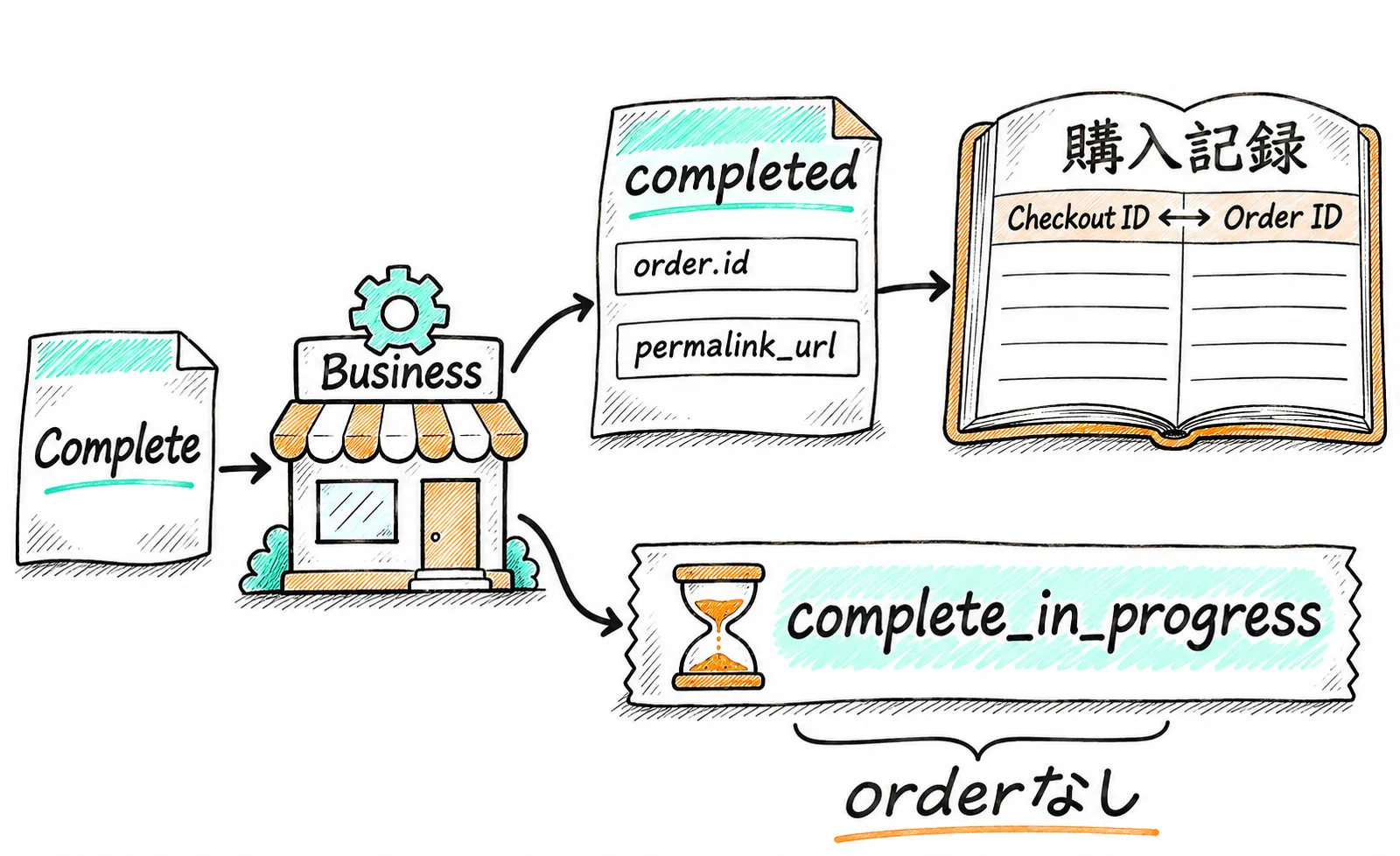
In a synchronously completed response, the checkout session's status is completed, and order contains the order information. This information requires the order id and a permalink_url where the order can be viewed. The platform associates that order ID with the checkout session ID and stores the relationship in its purchase record.
By contrast, complete_in_progress indicates that the completion request has been accepted and is being processed. After receiving this response, display the purchase as processing and confirm that the order exists only after retrieving the result. Subsequent shipments, cancellations, and refunds are tracked using the stored order ID.
Checkout and Order States
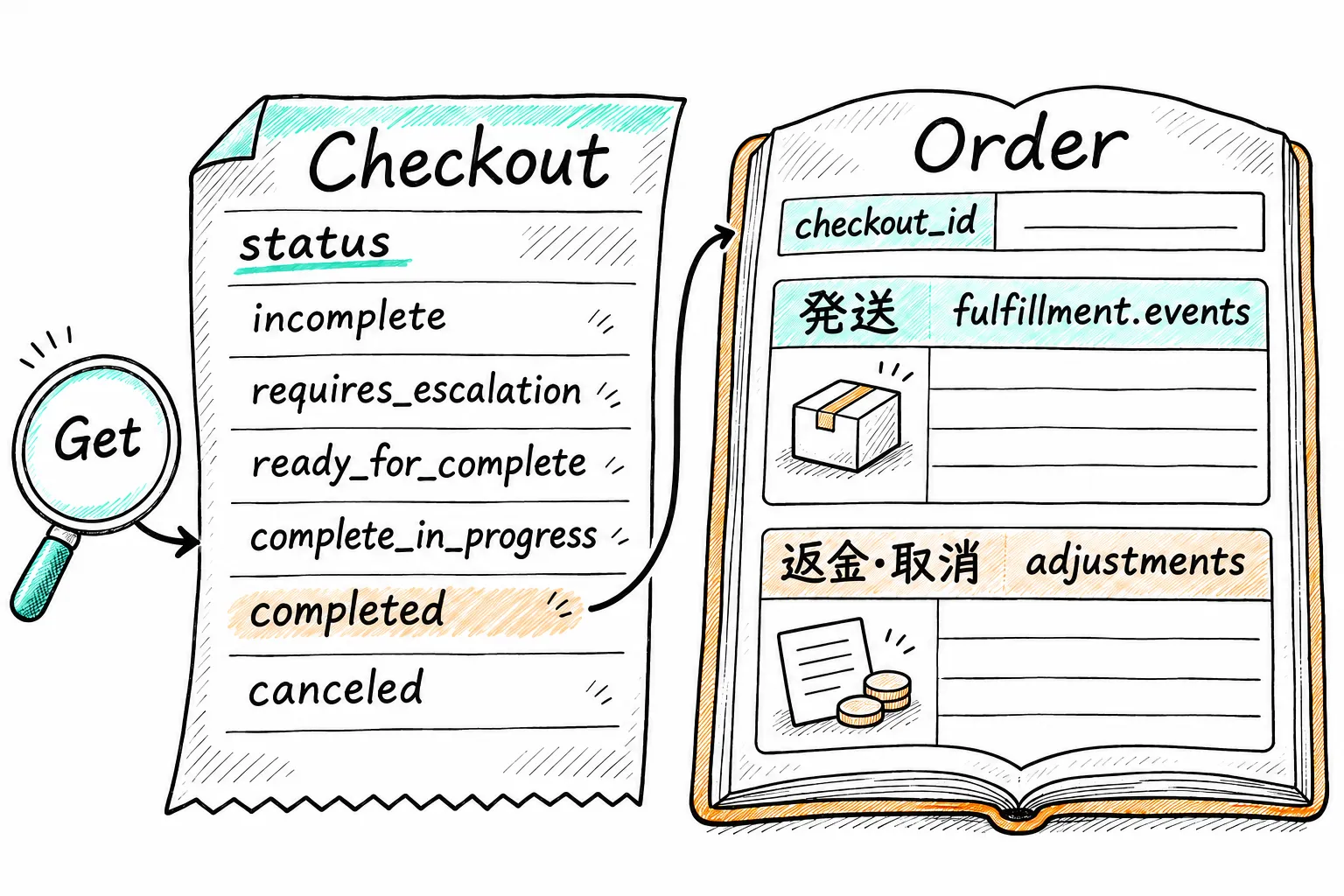
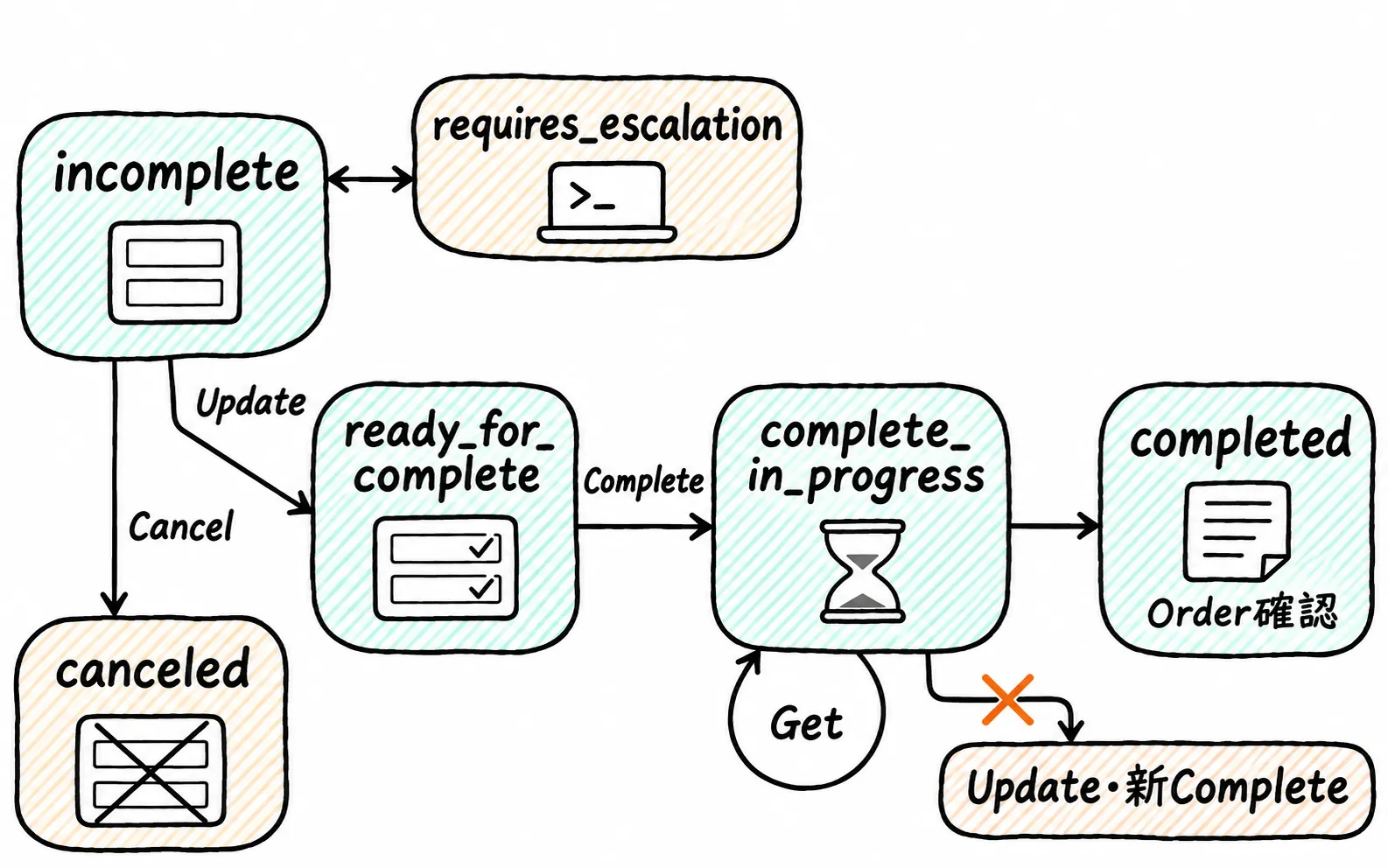
When the business returns checkout terms, it also indicates what is missing, whether buyer interaction is required, and whether completion processing has finished. The platform uses the returned checkout session state to determine which request it can send next and what to display to the buyer. Once a purchase succeeds, fulfillment and refunds are tracked in a separate order record.
Operations and States
Checkout sessions support create, get, update, complete, and cancel operations. When the platform sends products or a shipping destination, the business validates the input and returns the resulting session. To interpret the outcome of an operation, read the response's status.
| Status | What the response indicates | Platform action |
|---|---|---|
incomplete |
Information required for checkout is missing. | Read the messages and supply missing input. |
requires_escalation |
Buyer interaction or confirmation is required. | Examine the issue and hand off to the buyer. |
ready_for_complete |
The prerequisites for submitting a completion request are satisfied. | Obtain buyer confirmation and request completion. |
complete_in_progress |
The completion request has been accepted and is being processed. Outstanding Action objects may exist. |
Process an Action according to its type's contract, or wait by retrieving the session if none exists. Do not send new update or completion requests. |
completed |
Checkout is complete. | Check the order information. |
canceled |
The checkout session has been canceled. | Do not continue purchasing through this session. |
For example, when the status is ready_for_complete, the platform can review the returned terms and proceed toward purchase confirmation. If the buyer changes the quantity or shipping destination at this point, the platform first sends an update and checks the recalculated terms. Whether the purchase remains permissible must also be reassessed using the updated response.
If complete_in_progress is returned after a completion request, do not initiate another update or completion request. Distinguish operations that modify purchase terms from additional actions remaining in already accepted processing. If an outstanding Action exists, process it according to the contract of the extension defining its type. Otherwise, observe the business's progress by retrieving the session.
Even after completing an additional action, its completion notification alone cannot establish the checkout state. Retrieve the session to check whether the business removed the Action or changed the state. If the same action type key and id remain, process the action again only if its contract explicitly permits retries and all safe retry conditions are satisfied. An action replaced with a new id is separate work; an action that has disappeared is no longer outstanding.
Once the order is placed, confirm completed and the order information, then switch to order tracking.
Handing Off to the Buyer
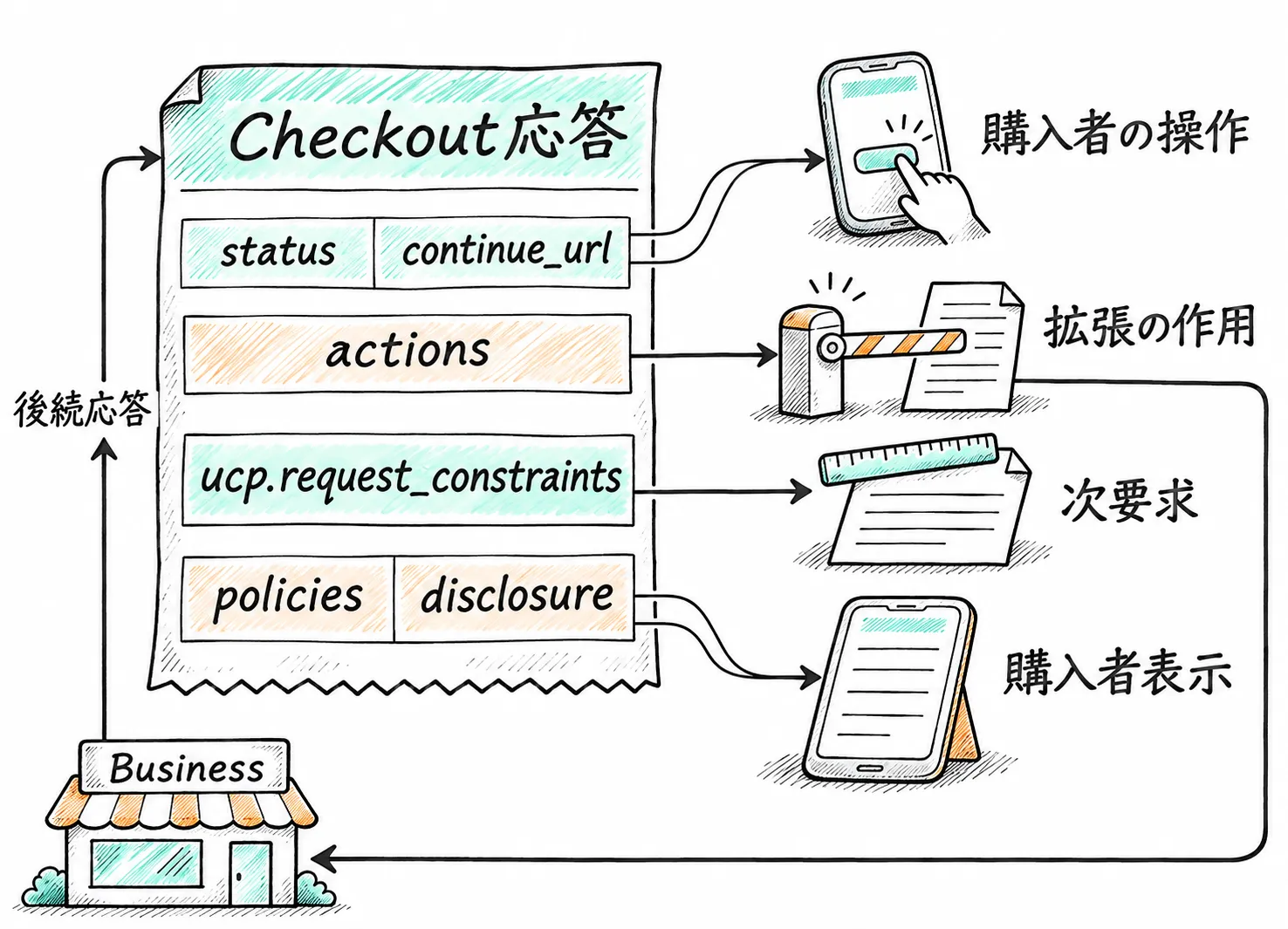
Missing address information can be supplied by the platform, but cardholder authentication or confirmation on a business's own interface may require the buyer to act. In a requires_escalation response, the business returns a continue_url. The platform reads the messages, handles recoverable issues, and hands off the remaining inputs or confirmations to the buyer at that URL.
In addition to messages and processing state, the business may return outstanding additional actions required by an extension. An Action represents such an operation. The business uses the property names of actions to identify action types and returns individual outstanding actions in the corresponding arrays. Each element has an id, with additional data in config if needed.
How an additional action is performed depends on the contract of the extension negotiated by the platform. Neither the parent status nor the severity of a message alone indicates which processing the action blocks. Even after the buyer finishes interacting with the interface, check the business's subsequent response to determine whether the action took effect. Do not assume that a request blocked by an additional action will automatically execute again.
The business can also return input constraints for subsequent requests to the same session. These constraints, called Request Constraints, appear in ucp.request_constraints. For example, the following response fragment limits the quantity of each line item to 1.
{
  "ucp": {
    "request_constraints": {
      "path": "$.line_items[*]",
      "properties": {
        "quantity": { "const": 1 }
      }
    }
  }
}
The path specifies which objects in subsequent requests are to be validated. In this case, it selects each line item and constrains any present quantity to 1. If the platform performs prevalidation, evaluate the complete expression of the selected constraint. If an unsupported construct or processing limit prevents evaluation of a value, skip that entire value rather than counting it as a pass.
Constraints returned by the business are replaced by subsequent authoritative responses and are removed if omitted. An implementation should therefore not keep adding previously received constraints to every purchase indefinitely. Passing constraint and schema validation also does not establish that inventory has been reserved or payment processing has succeeded; verify those outcomes through the business's actual response.
Sales terms such as returns and warranties are conveyed in the policies array. Each element contains a policy type and a human-readable description; applies_to identifies the applicable line items if the scope is limited. Where policies of the same type overlap, use the most specific applicable policy rather than combining their contents arbitrarily.
Terms that must be displayed to the buyer also use corresponding messages. The business returns type:"warning" and presentation:"disclosure", mapping the policy type to the message's code. The platform displays this warning without hiding it, allowing the buyer to review the presented sales terms before confirming.
Lost Responses and Order Confirmation
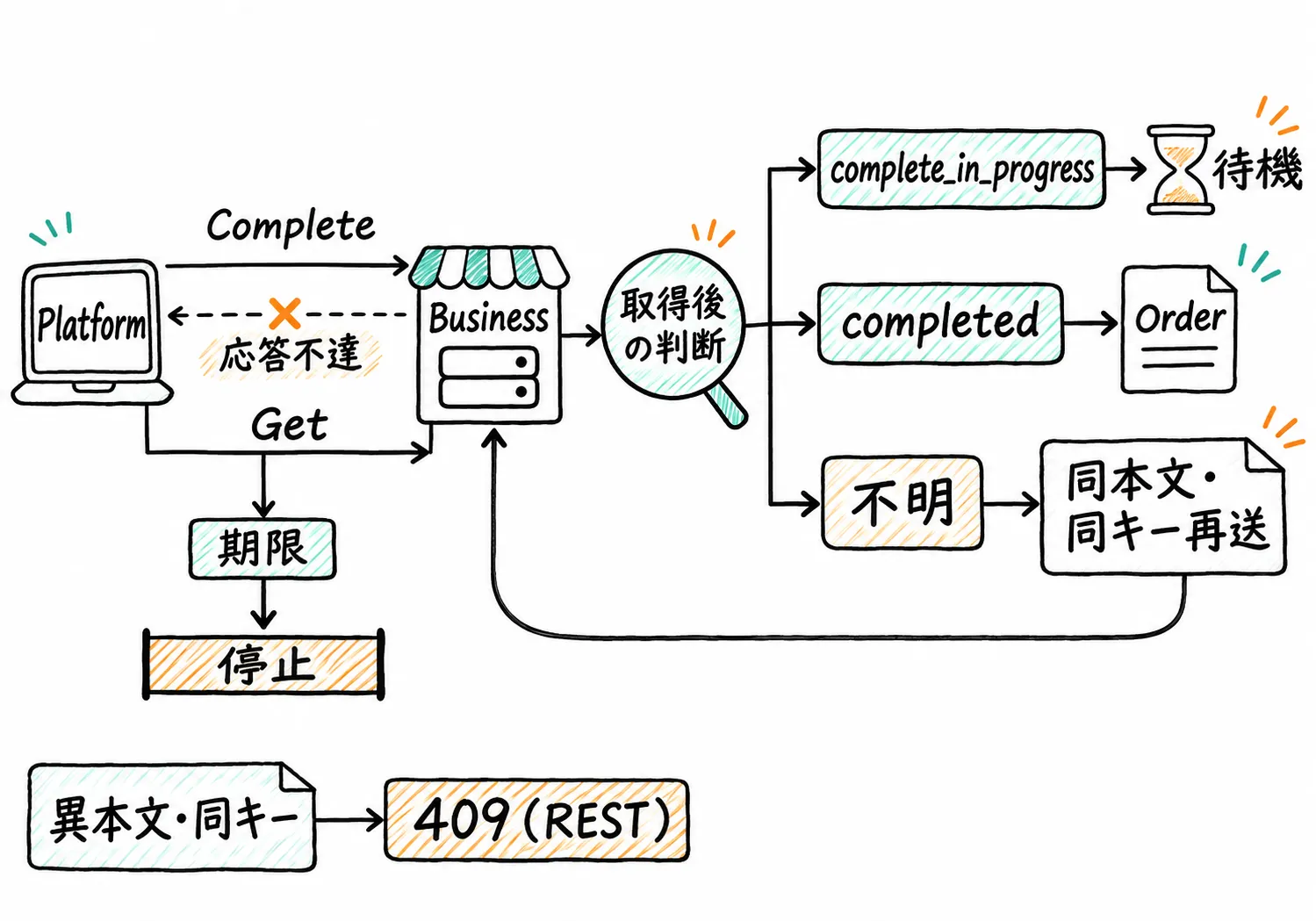
If the connection drops immediately after a completion request, the platform cannot tell whether the purchase succeeded. The connection may have failed before the business began processing, or only the response after processing may have been lost. Retrieve the existing checkout session before creating a new purchase.
If retrieval returns completed, read the order information. If the state is complete_in_progress and an Action exists, process it according to its type's contract; otherwise, wait and retrieve the session again. If an additional action was processed, retrieve the session to verify its effect.
The same action key and id may be processed again only when the contract explicitly permits retries and all safe retry conditions are satisfied. Do not interpret the prohibition on new update and completion requests as a prohibition on additional operations defined by an extension. Set limits on the number of checks and the waiting time, and also stop at the expires_at deadline. If the deadline is reached without confirmation, tell the buyer that the outcome is unknown.
Only if retrieving the session leaves the result of the completion request unknown should the platform resend the original body with the original idempotency key. An idempotency key identifies a resend of the same request so the business does not process it twice. Preserve the submitted body and key in a request record for retries, rather than replacing them with newly assembled data when resending.
The business rejects a request with the same key but a changed body without executing it. With REST, where operations are invoked over HTTP, the response is 409 Conflict; with MCP, where operations are invoked by tool name, the error is -32000. Body equality is checked using the SHA-256 hash of the original bytes, so use a new key for a request with changed shipping or payment information. Starting a separate completion operation after confirming the result is also distinct from resending the previous request.
For state-changing REST requests, UCP recommends using an idempotency key. A business accepting one retains its processing result for at least 24 hours. In MCP, a key is mandatory for completion and cancellation. The platform records retries of the original request separately from operations initiated with changed terms.
Post-Order Updates
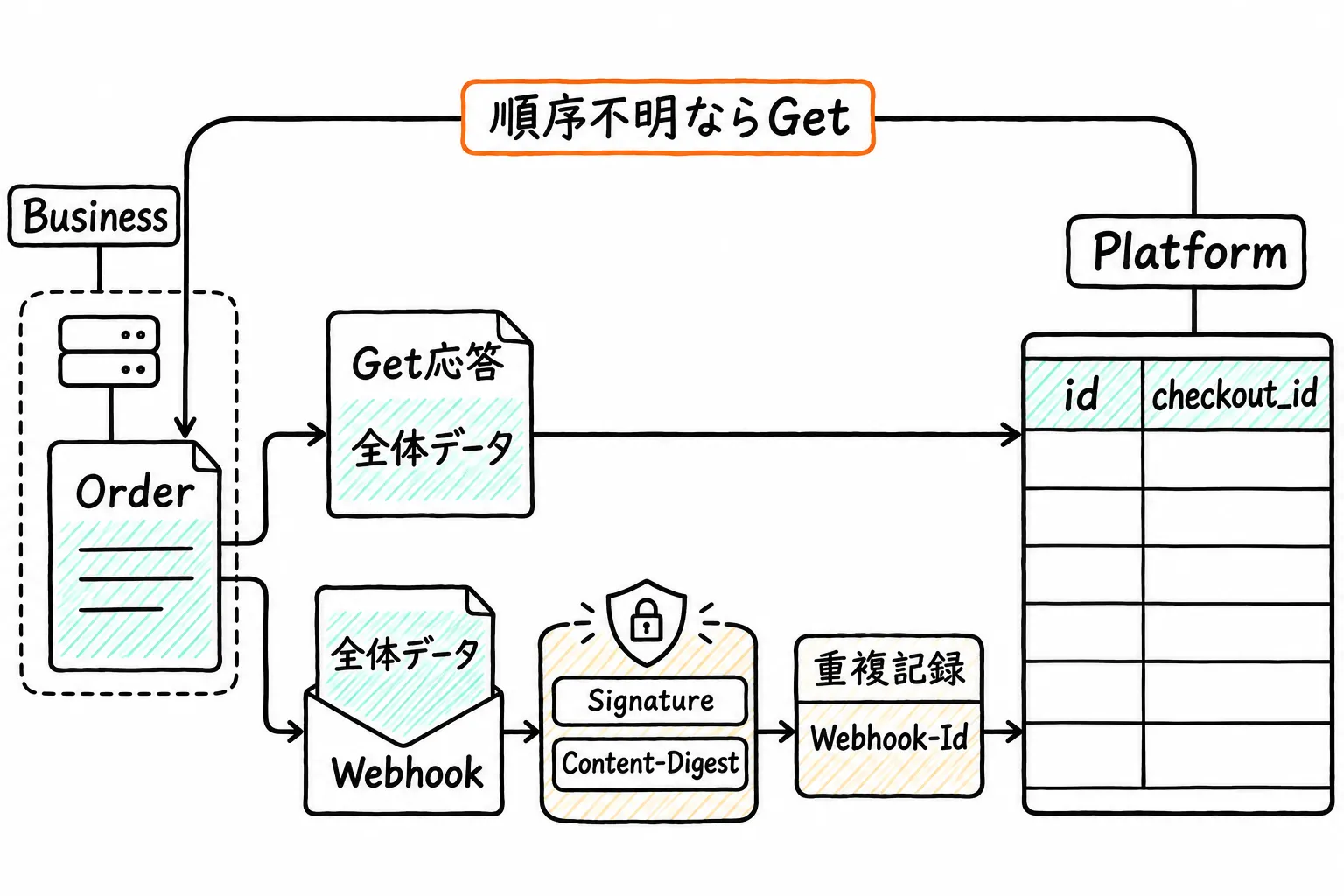
Once an order has been placed, the business updates the Order information. Shipments add fulfillment records, while refunds and cancellations appear in post-order adjustment records. Looking only at fulfillment progress can miss a refund unrelated to shipping, so check both kinds of information.
The platform can obtain current information through authenticated order retrieval and receive notifications from the business via a Webhook. A Webhook is a channel through which the business sends order updates to the platform's receiving URL. The platform supplies this URL in its order capability configuration.
Both retrieval responses and notifications return the entire order as it exists at that point. The platform identifies the order by id and matches checkout_id with the stored checkout session ID. Shipment records appear in fulfillment.events, whereas refund and cancellation adjustments appear in adjustments, allowing the platform to interpret them as distinct changes to the same order.
The notification recipient verifies the signature and whether the sender is authorized to send updates for the order. Return a 2xx response promptly for accepted notifications and update the interface asynchronously afterward. Since the business may resend notifications, use Webhook-Id to handle duplicates.
Notification delivery order is also not fixed. Overwriting the order record solely in arrival order may roll back fulfillment progress when an older notification arrives. If ordering cannot be established, use authenticated order retrieval to fetch the latest complete record again.
Payment and Purchase Approval
To pay under the terms the buyer reviewed, select an available payment method and prepare payment information corresponding to that purchase. The business and payment service provider also check the permitted use and amount of that information. Obtaining the buyer's confirmation is a separate process from obtaining payment information.
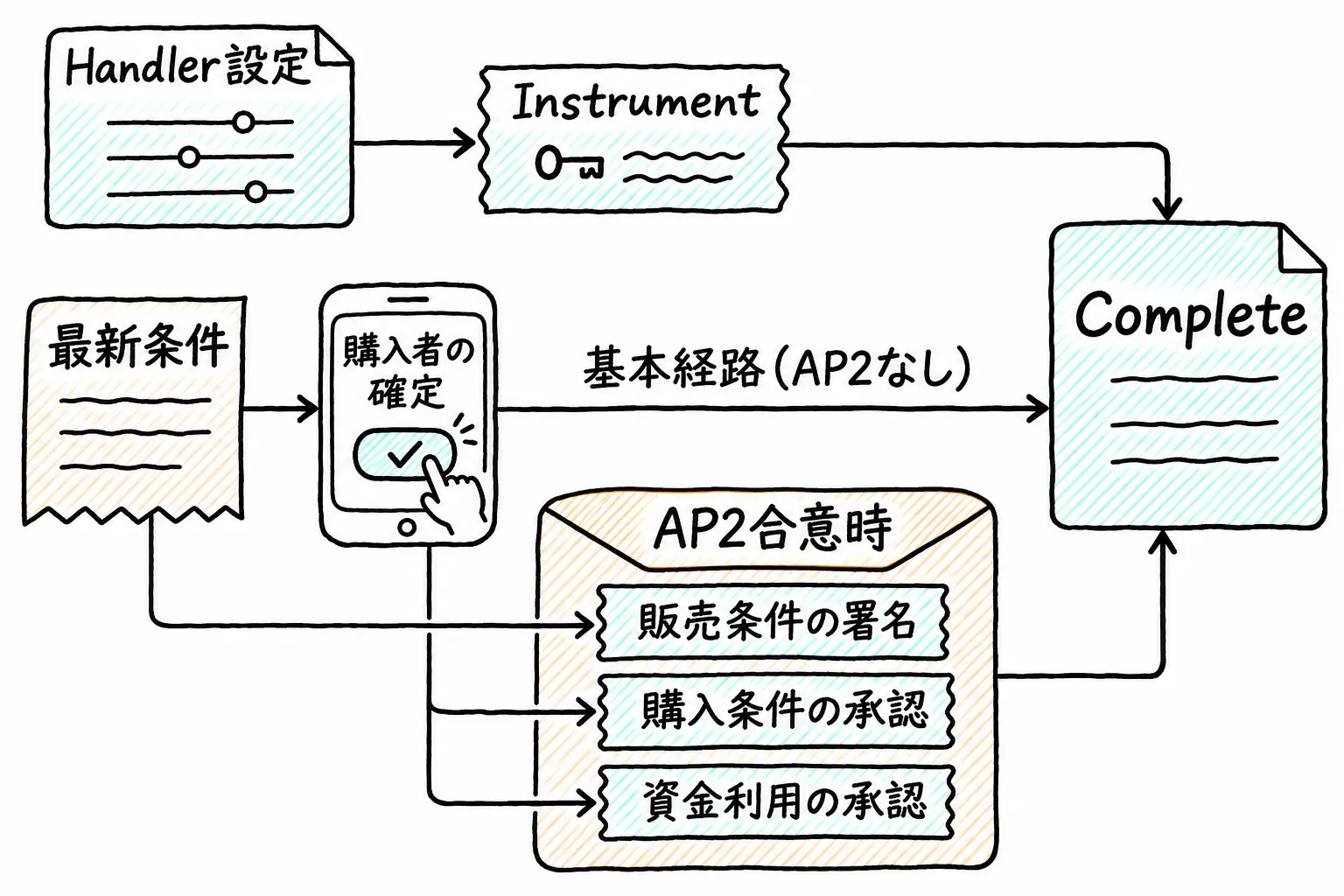
Payment Handler
If a business accepts wallet or card tokens, the platform obtains information in an accepted format. A Payment Handler defines a payment method, including how information is obtained, which data is exchanged, and how the business processes it.
In addition to the list of supported handlers, the business returns configuration for the specific purchase in the checkout session. The platform uses this runtime configuration to obtain payment information. Even for the same Handler, distinguish its general configuration in the public profile from values supplied by the business for the current purchase.
The Handler definition determines how payment information is exchanged, and the contract with the PSP determines where actual payment processing occurs. For example, the platform may obtain a token and pass it to the business, which requests a charge from its contracted PSP. The selected Handler contract specifies the format of the token to obtain and where it may be used.
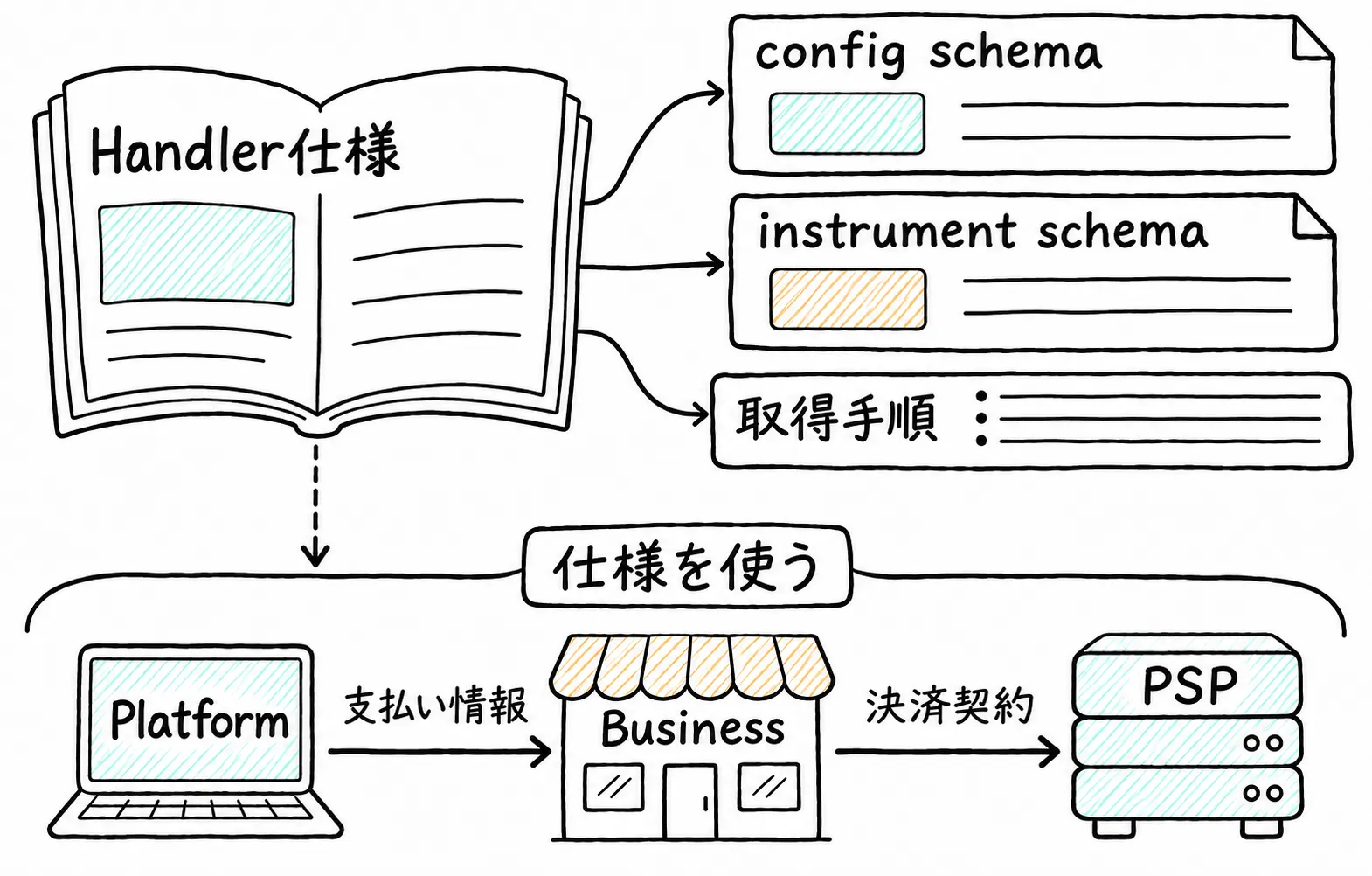
Exchanging Payment Information
The platform reads the chosen Handler instance ID and configuration from the checkout session's ucp.payment_handlers. Using those settings and the buyer's selection, it obtains data representing a payment method that can be submitted for the purchase. This data is called a Payment Instrument.
The acquisition process also supplies the purchase to which the payment information applies. A Binding combines a type, identifying a capability, with an id, identifying a resource within that capability. To bind to a checkout session, set type to dev.ucp.shopping.checkout and id to the target checkout session ID.
This Binding is a logical input used when acquiring and processing payment information through the Handler. It does not mean adding a custom binding property to the Checkout JSON. The Handler specification determines how the binding is actually applied to the token.
The basic structure for passing the acquired Instrument is as follows.
{
  "payment": {
    "instruments": [
      {
        "id": "[支払い情報ID]",
        "handler_id": "[Handler実体ID]",
        "type": "card",
        "selected": true,
        "credential": {
          "type": "[Handler定義のcredential種別]",
          "token": "[使用不能な教材トークン]"
        }
      }
    ]
  }
}| Field | Value and role in this example |
|---|---|
instruments[].id |
The ID identifying the acquired payment information. |
handler_id |
References the ID of the Handler instance that produced this information. |
type |
The broad payment method category. The example's card represents a card. |
selected |
Indicates that this payment method is selected for the purchase. |
credential |
Credential defined by the Handler. Its contract specifies the details of type and token. |
The platform checks whether the acquired information satisfies the Handler schema and the conditions for available methods. The business and payment processor verify the correspondence of the received information to the Handler and the target purchase, as well as the transaction terms including the formal total. If the token is intended for a different purchase or the information does not meet the terms, stop completion processing.
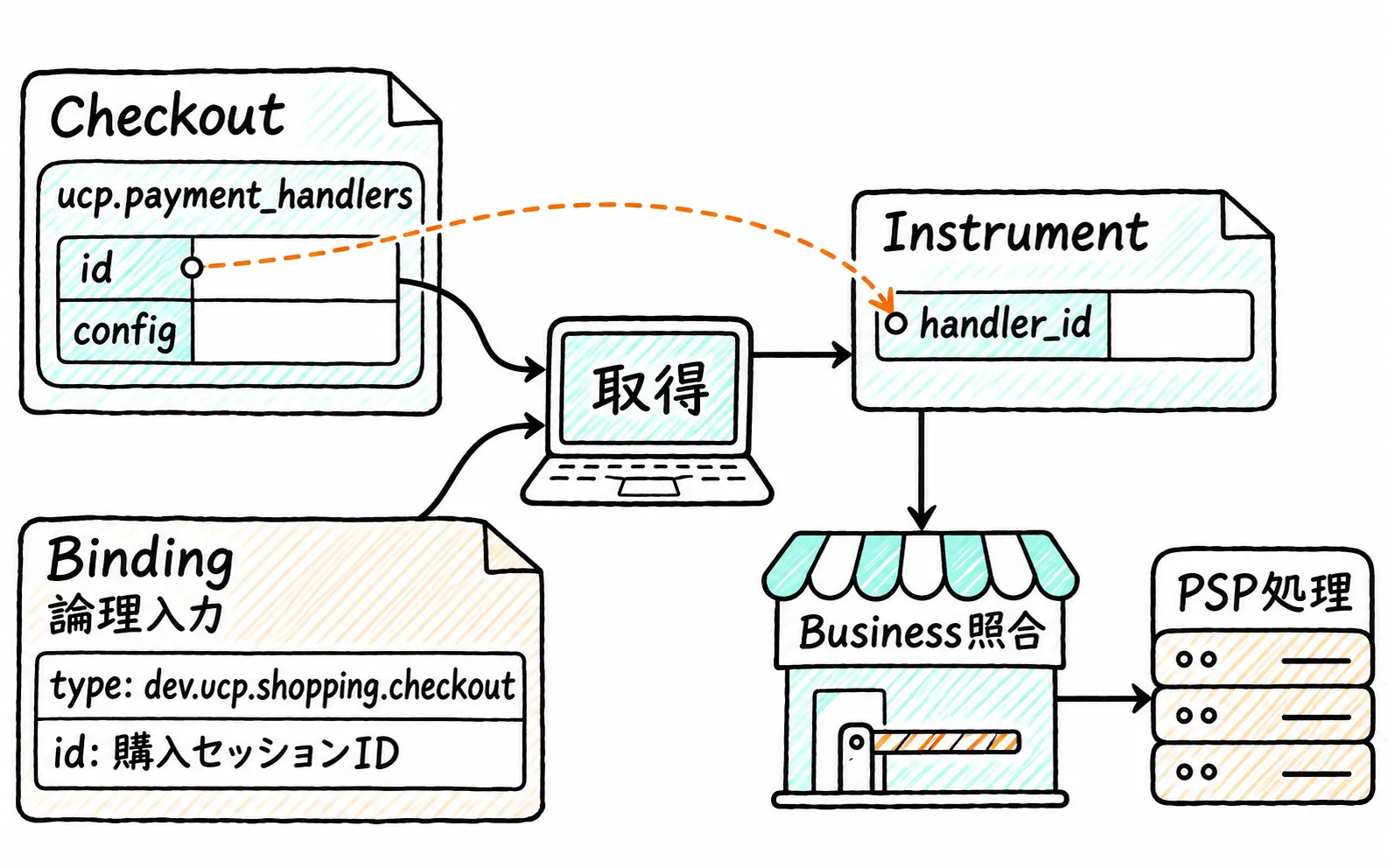
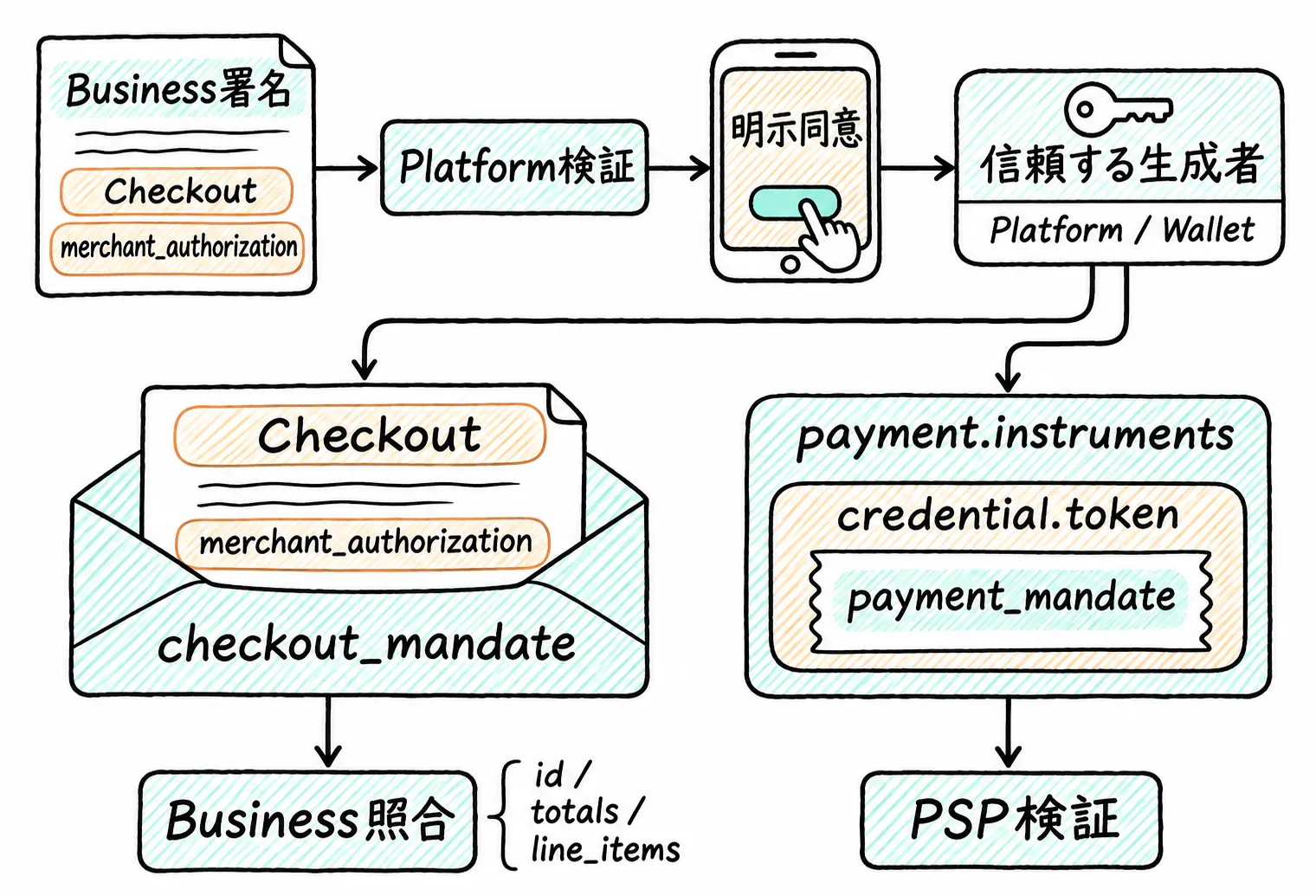
Buyer Confirmation and AP2
In base Checkout, the buyer gives final confirmation through a trusted interface. This distinguishes receiving a request to select product candidates from permission to buy them at the latest total including shipping. The platform presents the terms returned by the business, obtains confirmation of those terms, and then requests completion.
The AP2 Mandates extension defines a path that uses additional approval evidence. It connects the buyer's explicit consent and purchase terms to payment through cryptographically verifiable evidence. If both parties negotiate dev.ucp.common.payment.ap2_mandate, the session follows this path.
First, the business signs the checkout terms and attaches the signature to ap2.merchant_authorization in the Checkout response. The following partial response shows only the authorization signature; required fields of a full response such as ucp, id, products, and totals are omitted.
{
  "ap2": {
    "merchant_authorization": "[使用不能な教材用header]..[使用不能な教材用signature]"
  }
}
The merchant_authorization is a string in the JWS signature format with a detached payload. The two dots in the example merely illustrate the header..signature layout; it is not a verifiable signature. The signed payload is the checkout data from the response excluding ap2. The platform verifies the signature using the public key and key ID, then presents the verified terms to the buyer.
When the buyer explicitly consents, two pieces of approval evidence corresponding to those terms are generated. A trusted platform may generate them using a server-side key, or a wallet corresponding to a trusted payment credential may generate them. Even in an architecture that trusts the platform, obtain the buyer's explicit consent through a trusted, deterministic path before generating the evidence.
The evidence bound to checkout terms is the checkout_mandate. It contains the entire Checkout, including the business's signature, and appears in ap2.checkout_mandate in the completion request. The business verifies the evidence's signature, key binding, and expiration before checking its own embedded signature.
The business then compares the embedded checkout details with the current session.
| Value to compare | Condition to verify |
|---|---|
Session ID |
The evidence identifies the checkout session now being completed. |
| Total | The amount the buyer confirmed matches the amount to be executed. |
| Line items | The product and quantity combinations have not changed from the confirmed terms. |
If even one value differs, the business rejects the completion request. Evidence for old purchase terms cannot authorize changed terms.
The other piece of evidence, the payment mandate, authorizes the use of funds. It appears in payment.instruments[*].credential.token and is passed from the business to the Handler or PSP. The PSP verifies the evidence's signature, expiration, and correspondence to the target purchase.
The following partial completion request from the platform to the business illustrates where the two pieces of evidence are placed. Required profile information and other outer fields needed for the purchase are omitted.
{
  "payment": {
    "instruments": [
      {
        "id": "[支払い情報ID]",
        "handler_id": "[Handler実体ID]",
        "type": "card",
        "selected": true,
        "credential": {
          "type": "[Handler定義のcredential種別]",
          "token": "[使用不能な教材用payment mandate複合トークン]"
        }
      }
    ]
  },
  "ap2": {
    "checkout_mandate": "[使用不能な教材用SD-JWT+kb]"
  }
}| Evidence or reference location | Recipient's verification |
|---|---|
ap2.checkout_mandate |
The business verifies the signature, key binding, expiration, and the embedded signed purchase terms. |
payment.instruments[].handler_id |
The business verifies correspondence to the selected Handler instance. |
payment.instruments[].credential.token |
The business passes it to the Handler or PSP, and the PSP verifies the authorization evidence for use of funds. |
SD-JWT+kb is a token format that can contain checkout terms and support verification of signatures and key binding. All evidence in the example consists of unusable educational values; the token internals have not been replaced with raw JSON objects. Actual token structures and credential formats follow the negotiated AP2 and Handler contracts.
Reject the completion request if required evidence is missing or if there is a problem with signatures, expiration, or terms. Once AP2 has been negotiated, falling back to the ordinary path without evidence to complete the purchase is not permitted.
UCP Transports
Even when retrieving the same checkout session, an implementation can send a request to an HTTP URL or invoke a named tool. UCP separates commerce data from the transport used to exchange it. The logic for checking the checkout session ID and processing state remains the same, while each transport requires its own implementation of request transmission and the location from which the authoritative response is read.
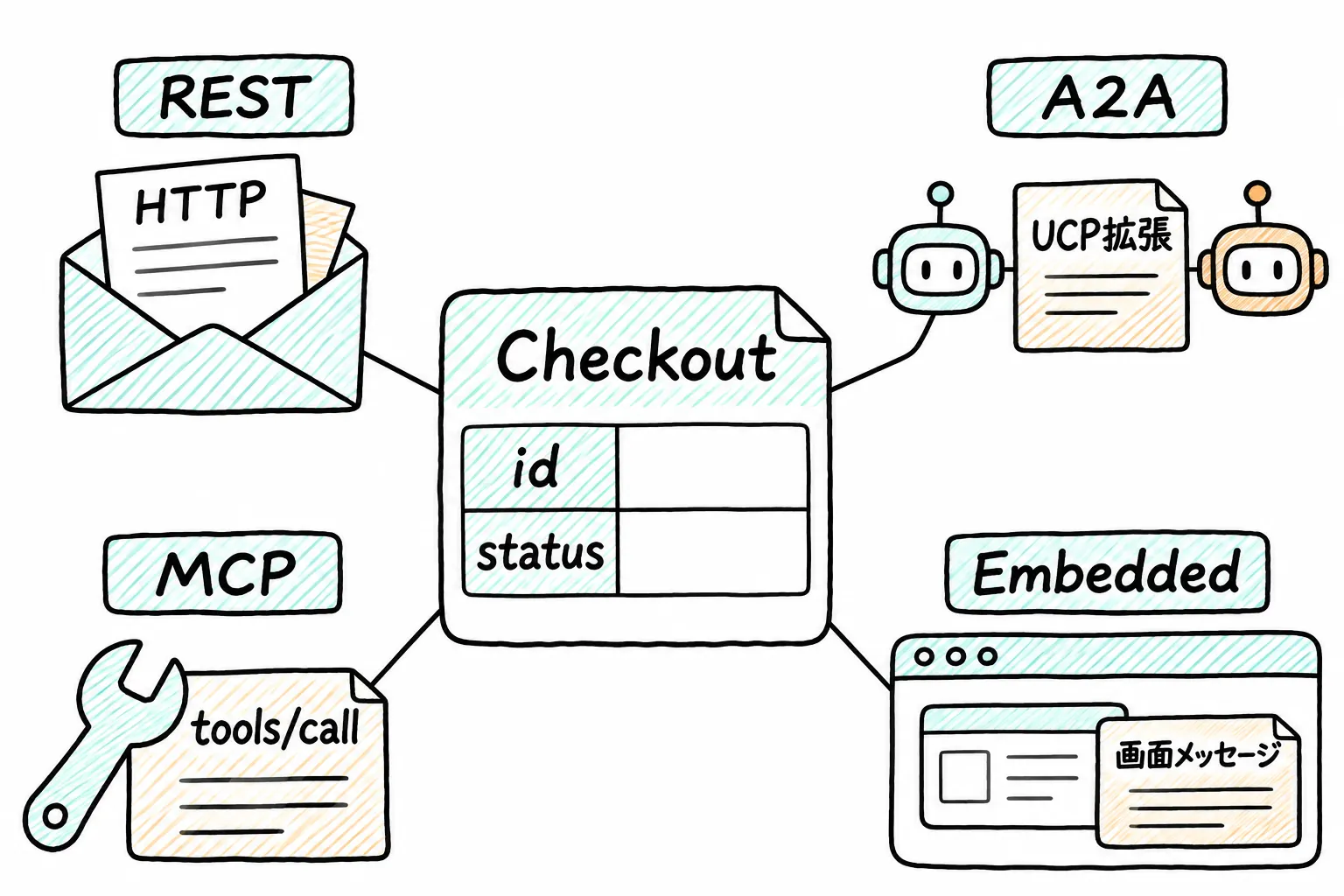
REST and MCP
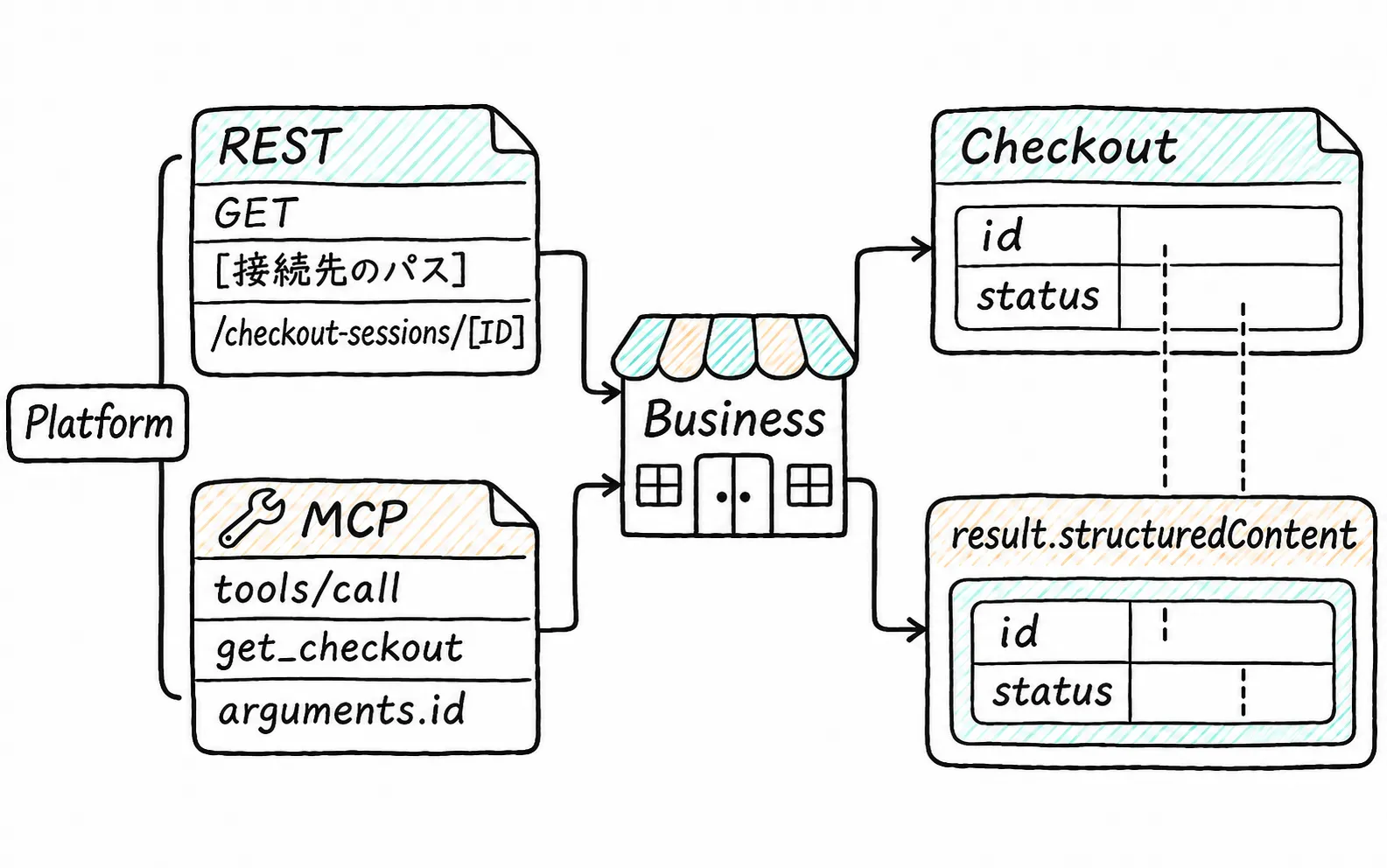
REST identifies operations using an HTTP method and URL, exchanging JSON data. The platform selects the REST endpoint from the profile. To retrieve an existing checkout session, it sends the following request.
GET [接続先のパス]/checkout-sessions/[購入セッションID] HTTP/1.1
Host: [販売事業者のホスト]
UCP-Agent: profile="[プラットフォームのプロファイルURL]"| Field | Value and role in this example |
|---|---|
[接続先のパス] (endpoint path) |
Base path included in the profile's endpoint. Leave it empty if the endpoint is at the host root; otherwise append the operation path to the base path. |
[購入セッションID] (checkout session ID) |
Identifies the checkout session to retrieve. |
Host |
Host of the business being contacted. |
UCP-Agent |
Communicates the calling platform's profile to the business. |
After receiving the response JSON, check that the session ID matches and examine the processing state.
The same checkout session can also be retrieved through MCP, which invokes operations using a remote tool name and arguments. It uses JSON-RPC to identify requests and responses, specifying the operation name in tools/call. For example, the following MCP request retrieves a checkout session.
{
  "jsonrpc": "2.0",
  "id": 1,
  "method": "tools/call",
  "params": {
    "name": "get_checkout",
    "arguments": {
      "meta": {
        "ucp-agent": {
          "profile": "[プラットフォームのプロファイルURL]"
        }
      },
      "id": "[購入セッションID]"
    }
  }
}| Field | Value and role in this example |
|---|---|
params.name |
Operation name. The example's get_checkout retrieves the checkout session. |
arguments.id |
Identifies the checkout session to retrieve. |
arguments.meta["ucp-agent"] |
Communicates the platform's profile in every request. |
arguments.meta["idempotency-key"] |
Idempotency key attached to completion and cancellation requests. Not used in this retrieval example. |
result.structuredContent |
Location from which authoritative checkout data is read in the response. |
For example, the checkout session fragment read from the REST response body or MCP's structuredContent is as follows.
{
  "id": "[購入セッションID]",
  "status": "complete_in_progress"
}
If the state is complete_in_progress, the platform does not send new update or completion requests. If the full response contains no Action, observe processing by retrieving the session; if one exists, process it according to its type's contract and then retrieve the session to verify its effect. Reprocessing the same key and id is limited to cases where the contract explicitly permits retries and all safe retry conditions are satisfied.
The full response also contains other fields required by the schema. When the state changes to completed, the order information becomes available for confirmation. Determine what result to display by reading UCP errors and checkout state, rather than relying solely on HTTP success or a successful MCP invocation.
A2A and Embedded
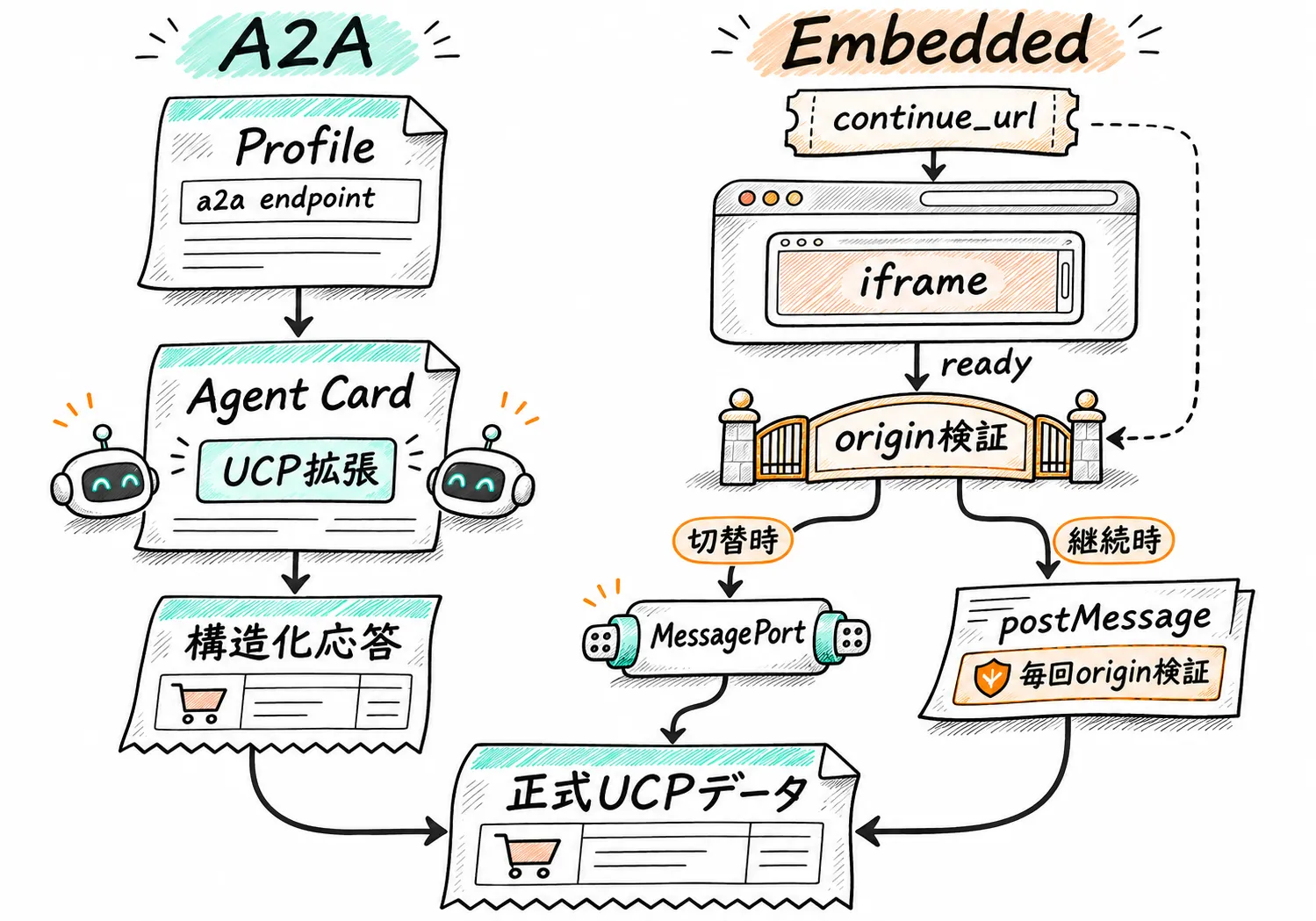
When a business publishes an agent, it can use A2A to exchange requests and results between agents. The platform retrieves the business's Agent Card from the profile's transport:"a2a" entry. It verifies the UCP extension and supported capabilities before exchanging structured checkout data.
The platform attaches UCP-Agent to each request and specifies the UCP extension using X-A2A-Extensions. Results received over A2A are also processed based on the order-identifying ID and checkout session state. Do not switch the display to order confirmed based solely on the agent's explanatory text.
When the buyer continues interacting with the business's interface, use the Embedded transport. The host application opens the business's interface using continue_url and receives a readiness message from the embedded interface. Changes to checkout terms and required actions are then communicated between the interface and the host.
In this transport, the host retains the initial continue_url and compares it with the origin of received postMessage messages. It does not process messages from other origins and accepts communication only with the specified business interface. If communication switches to a MessagePort, use that channel thereafter. If continuing with postMessage, verify the sender's origin every time.
A claim of UCP support alone does not establish that every capability supports all four transports. The platform checks whether the capability being invoked supports the selected transport. Even if the buyer closes the interface, determine whether an order was placed from authoritative checkout data.
Connection and Purchase Security
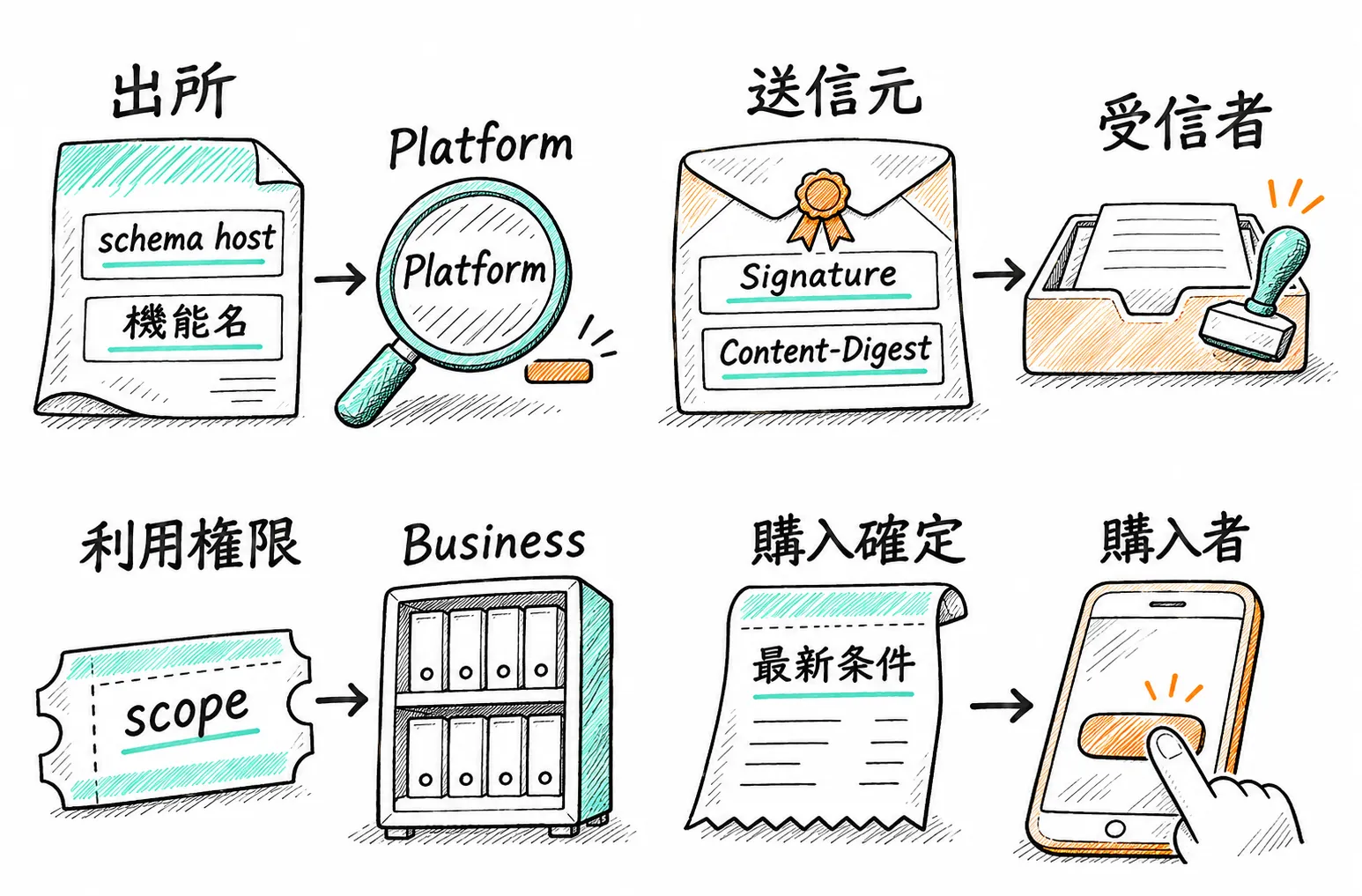
The platform performs verification both when retrieving a peer's capability information and when receiving transaction requests or notifications. Operations accessing a buyer's saved addresses or order history additionally require checking the permissions granted by that buyer. All of these checks contribute to transaction security, but the data verified and conditions for rejection differ.
Profile and Signature Verification
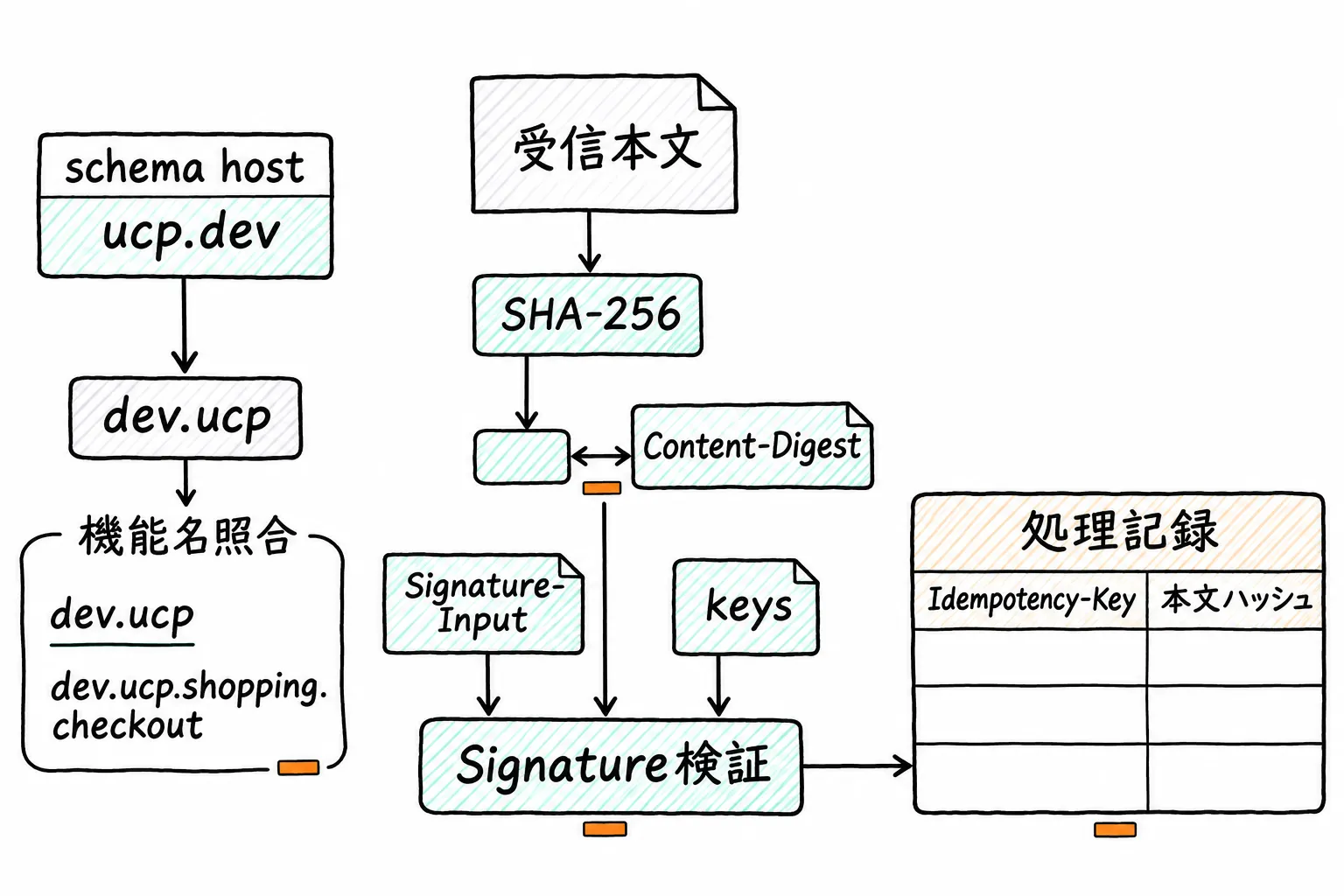
Before retrieving a schema specified in a profile, the platform compares the capability name with the origin of its URL. In this process, called Authority Binding, the reversed domain name of the URL host is checked against the capability name. For example, a schema hosted at ucp.dev corresponds to dev.ucp.shopping.checkout. A schema on an unrelated domain is not retrieved, and its definition is excluded.
When matching names, use a properly parsed HTTPS URL. Reject URLs containing credentials and hosts expressed as IP addresses, and check name matching at domain-label boundaries. Merely containing ucp.dev somewhere in the URL string does not satisfy this check.
This verification establishes who provides a definition under that name. Whether to trust and adopt its contents is a separate decision for the platform. To prevent requests to destinations resolving to internal networks, also verify the results of DNS resolution, which maps hostnames to destination IP addresses, and do not follow redirects during retrieval. Read the schema only after checking both the name and protections concerning the actual retrieval destination.
When receiving transaction requests or notifications, verify that the signature corresponds to the sender and message contents. The recipient uses the key ID in Signature-Input to select a key from the public profile's keys, then checks that it can be used for verification. Examine what the signature covers as well: a signature that permits the request destination or body to be changed is not authenticated evidence for that request.
For requests, verify the method, destination, and path, including the query if present. When a body exists, include the Content-Digest representing its hash and the content type in the signature. If a request carries an idempotency key or UCP-Agent header, protect those values with the signature as well. If the received body's SHA-256 does not match Content-Digest, body verification fails.
Even after signature verification succeeds, duplicate request handling depends on the idempotency key record. In ordinary UCP signatures, the creation timestamp created is optional, and replay protection is handled by the transaction processing key. In WBA-shape signatures used with WBA, which lets websites authenticate bots, created and expires are also used. Those timing conditions do not apply uniformly to ordinary UCP signatures.
Buyer Authorization and Data Protection
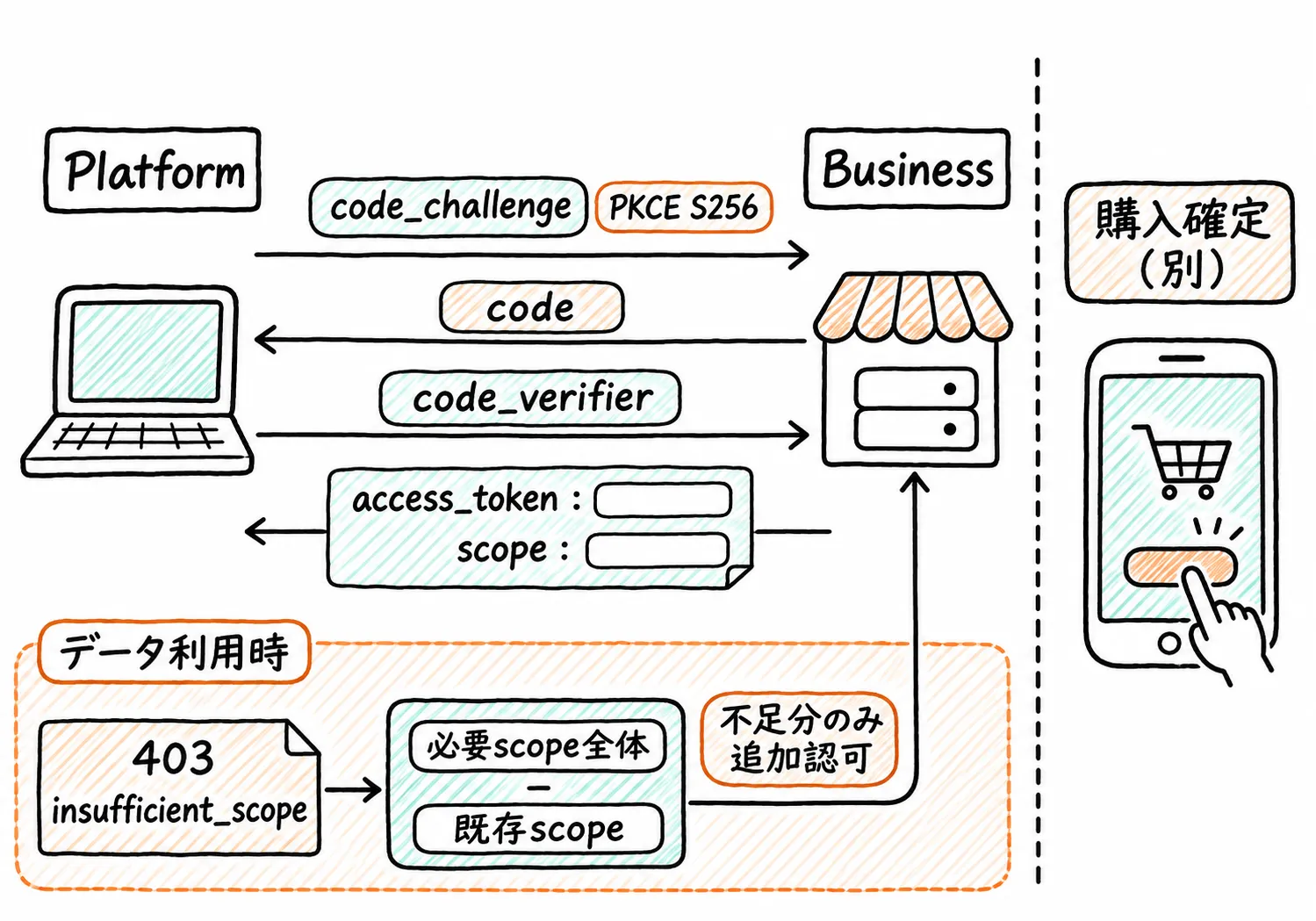
If the buyer has an account with the business, the platform can obtain permission to use saved addresses and order history. This account-linking process is called Identity Linking, with the permitted access defined by OAuth scope. Authorization to read buyer information is distinct from public product searches and operations using the platform's own authentication.
In the ordinary authorization code flow, the platform uses PKCE with S256. A verification value establishes that the party initiating authorization corresponds to the party exchanging the code. The business rejects exchanges without a valid code_verifier and does not accept the weaker plain method.
When receiving an authorization response, the platform compares its iss with the authorization server metadata's issuer for an exact match. Do not arbitrarily add or remove trailing slashes during comparison. The business also validates redirect_uri by exact matching, preventing requests that would send the authorization code to another site.
Even a valid token may lack the necessary permissions. In that case, the business returns 403 and insufficient_scope, and specifies the complete set of scope values required by the operation in WWW-Authenticate. The platform compares current permissions with the required permissions and obtains additional authorization only for the missing ones.
This recovery process does not require restarting account linking from scratch. Determine which permissions are missing from the structured error and scope, rather than using the explanatory error_description for programmatic branching. Even after permission to use account information is granted, obtain final approval of checkout terms separately.
Comparison with ACP
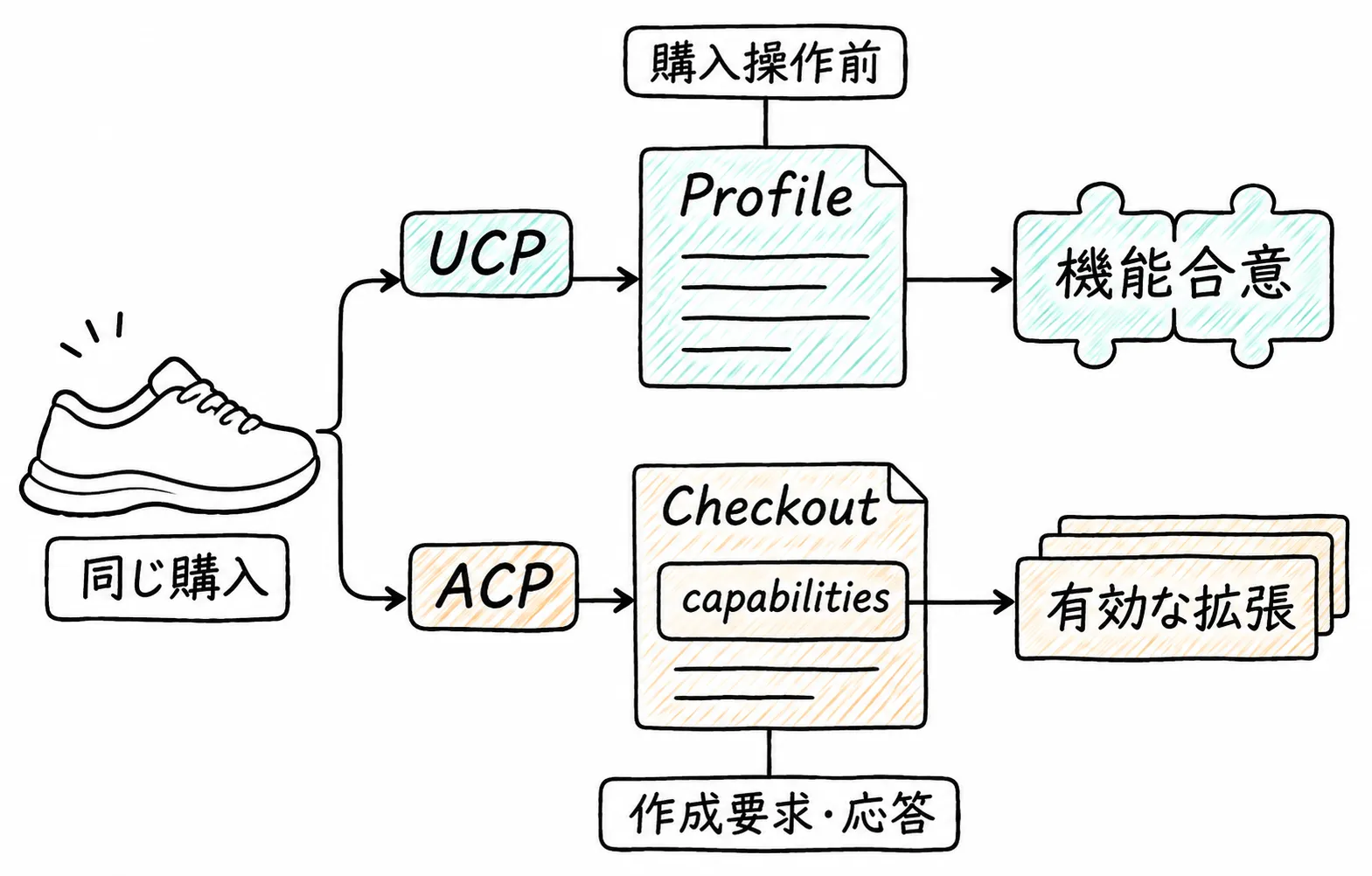
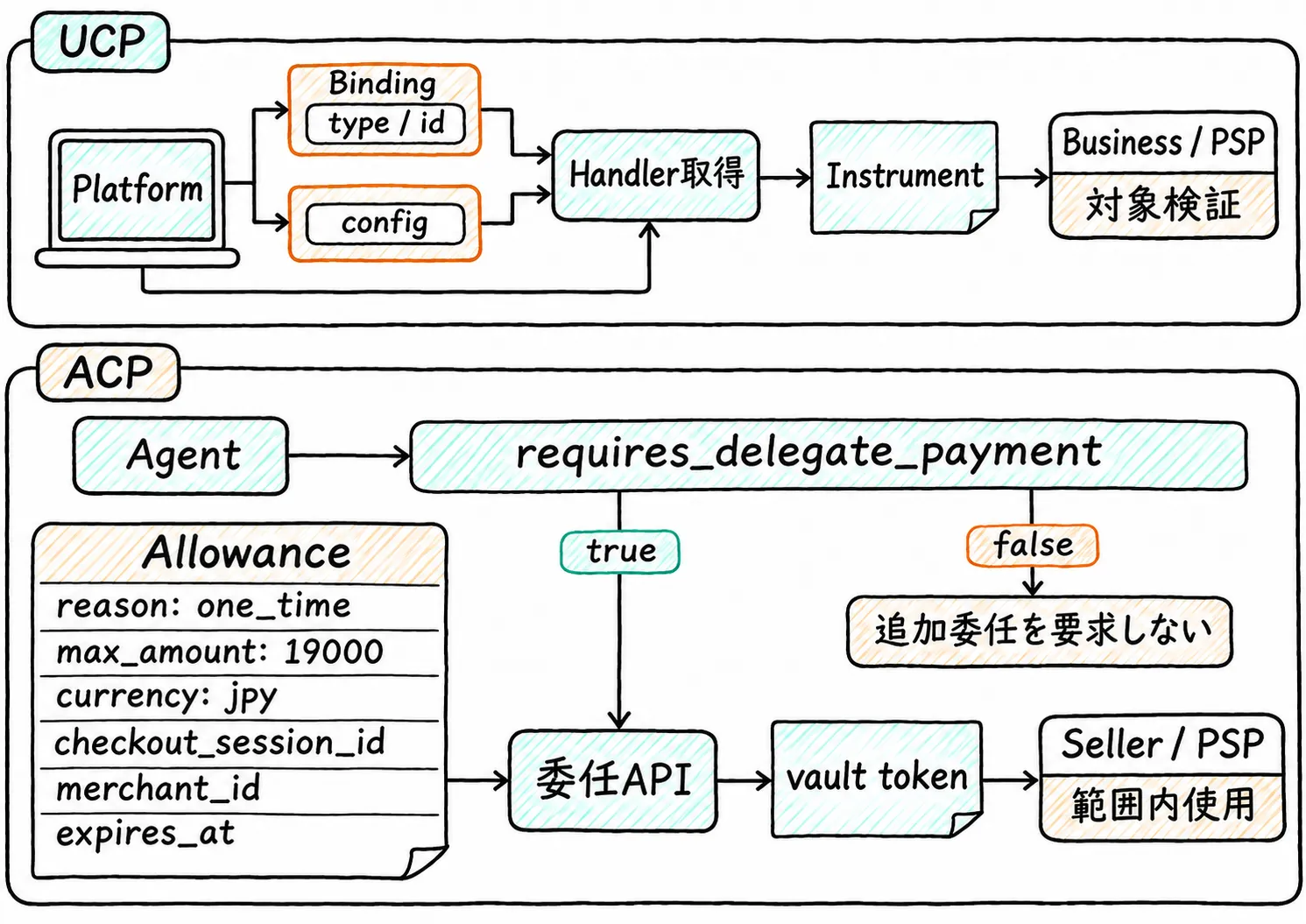
Another specification for purchasing between AI agents and businesses is the Agentic Commerce Protocol, or ACP. Both protocols offer capability negotiation, extensions, payment methods, and post-order updates, so the presence of these features alone does not determine which is preferable. The differences lie in where capability information is exchanged and how the selected payment method is integrated.
The ACP comparison uses the 2026-04-17 specification. Since UCP is based on v2026-08-25, examine each protocol's data formats in its respective version.
Connection and Capability Selection
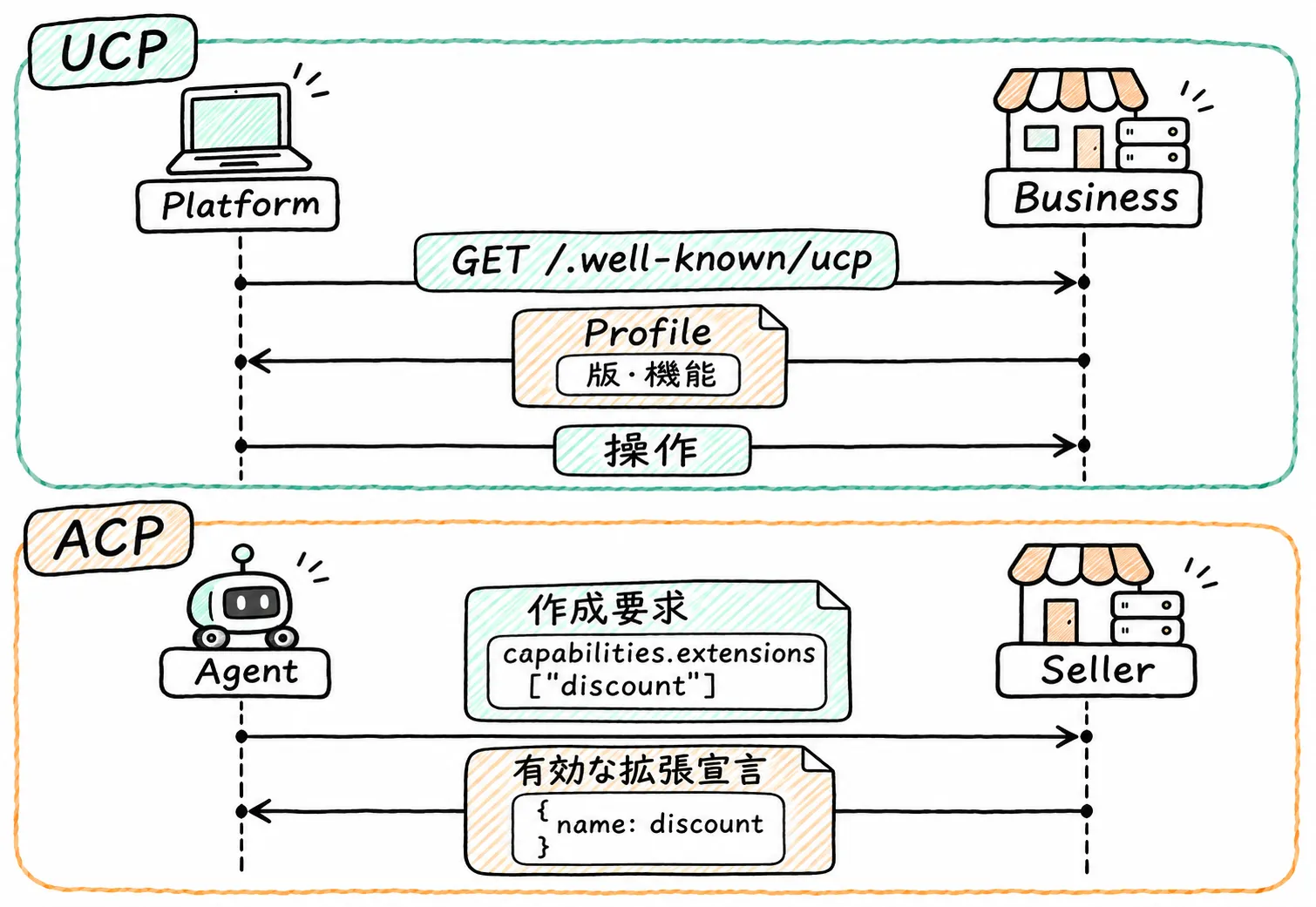
UCP matches capabilities and versions from profiles before invoking checkout operations. In ACP, the capabilities field in checkout session requests and responses communicates supported additional operations and extensions. Even for capabilities used in the same purchase, the timing and location of negotiation differ.
A platform connecting through UCP retrieves the business's profile and supplies its own profile URL in every request. After selecting a common version, capabilities, and extension parents, it implements schema composition and request and response validation. Even when connecting the same application to several businesses, determine the combinations available for the current purchase from their respective profiles.
An agent connecting through ACP supplies the identifiers of extensions it understands as capability information in its checkout session creation request. For example, if it understands discounts, part of the request is {"capabilities":{"extensions":["discount"]}}. The business returns declarations of the extensions active for that session.
An application purchasing shoes from a UCP store retrieves profiles and resolves versions and schemas before checkout operations. To connect to a store with an existing ACP checkout API, implement comparison of capabilities declared at creation with those active in the response. Whichever protocol is chosen, implement the peer's published contract; do not assume that sending one protocol's JSON unchanged makes it compatible with the other.
Payment Acquisition and Delegation
Each payment method also has its own contract for obtaining payment information. UCP uses Handler configuration and a Binding to the purchase target. In ACP, when the selected Handler requires a delegation API, the agent acquires a payment token with usage restrictions. Not every ACP payment includes a delegation request.
The UCP platform uses the Handler instance ID and runtime configuration returned by the checkout session. The business and processor receiving the acquired Instrument verify its correspondence to the target checkout session and transaction terms. Determine the acquisition API and payment information format from the selected Handler specification.
In ACP, if the business's returned Handler has requires_delegate_payment set to true, the agent calls the payment delegation API. The request carries the payment method and an Allowance describing usage conditions. The following is the Allowance fragment.
{
  "reason": "one_time",
  "max_amount": 19000,
  "currency": "jpy",
  "checkout_session_id": "[ACP購入セッションID]",
  "merchant_id": "[許可した販売事業者ID]",
  "expires_at": "[支払い委任の有効期限・RFC 3339形式]"
}| Field | Value and role in this example |
|---|---|
reason |
one_time indicates permission for a single use. |
max_amount |
Maximum permitted amount, JPY 19,000 in this example. |
currency |
Lowercase jpy specifies Japanese yen. |
checkout_session_id |
Identifies the checkout session for which the information may be used. |
merchant_id |
Identifies the business authorized to use it. |
expires_at |
Expiration of the authorization. |
All six fields are required. Even with the same maximum amount, the authorization does not permit use for a different purchase or business.
The delegation API returns the ID of a stored token corresponding to these conditions, and the agent passes it to the business in the Handler format. The business's PSP uses the information within the permitted amount, destination, and expiration. If requires_delegate_payment is false, do not add this delegation API as a mandatory path.
If a shoe retailer presents a UCP Handler, implement acquisition and verification according to its configuration and Binding. If an ACP Handler requires delegation, implement a path for acquiring the token and checking Allowance restrictions. Binding and Allowance serve different purposes; do not treat them as interchangeable by merely renaming fields.
Implementation Decisions
When connecting a shopping application to a business, map the operations needed for purchasing to the capabilities offered by the peer. Deciding whether to save product candidates, allow shipping choices, and support particular payment methods makes the requests and responses to validate more concrete. Use the peer's profile and actual responses to test not only successful purchases but also changes to terms and result recovery.
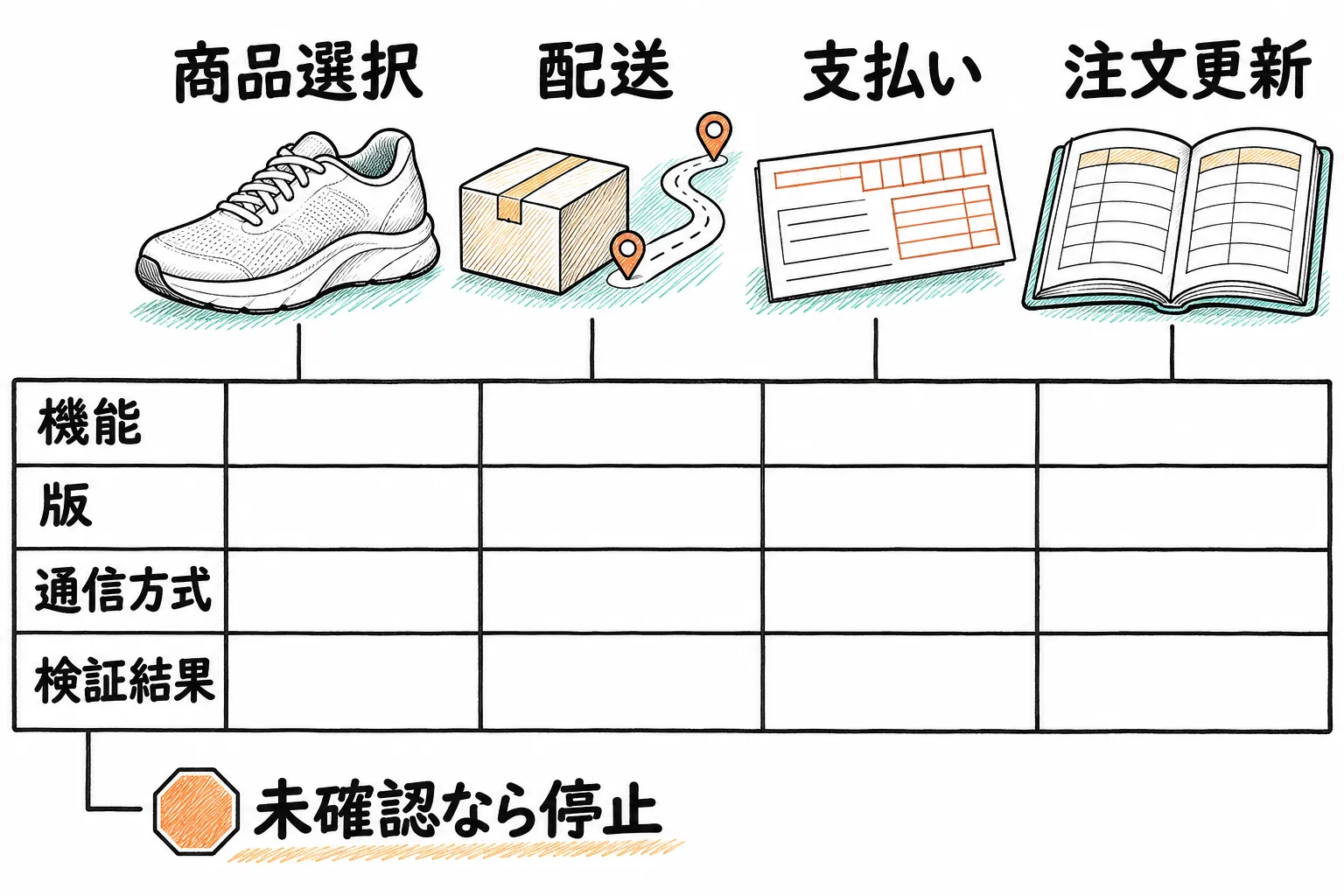
Supported Capabilities and Verification Scope
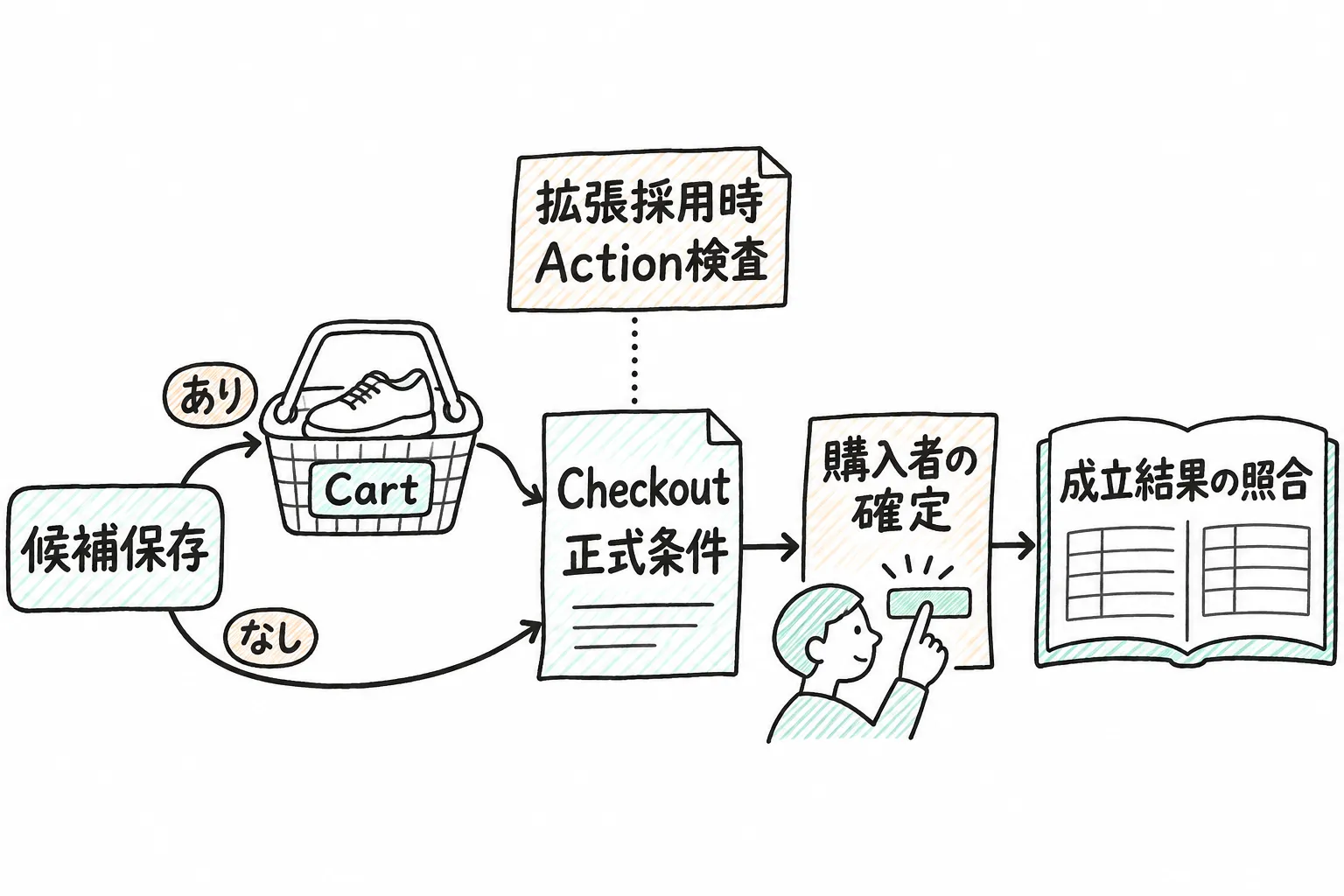
An application whose users edit selections repeatedly can use cart creation and updates. If it selects a single product and purchases immediately, it can skip the cart and create a checkout session. Both approaches still require the business's formal terms, the buyer's final confirmation, and reconciliation of the completed result.
When adopting fulfillment or payment authentication extensions, validating only the base capability inputs is insufficient. Verify the process from capability negotiation to schema composition, test whether returned additional actions can be handled, and ensure that inputs requiring rejection cause processing to stop. Also verify that purchases do not proceed using an old total after the terms change, and that new completion requests are not sent while processing is ongoing.
If post-order processing is used, test signed notification duplication, out-of-order delivery, and retrieval after missed notifications. A compatibility mark alone does not establish which capabilities and transports are available. Test actual request and response exchanges with the peer to determine the scope in which the application's purchase flow works.
Versions and Operations
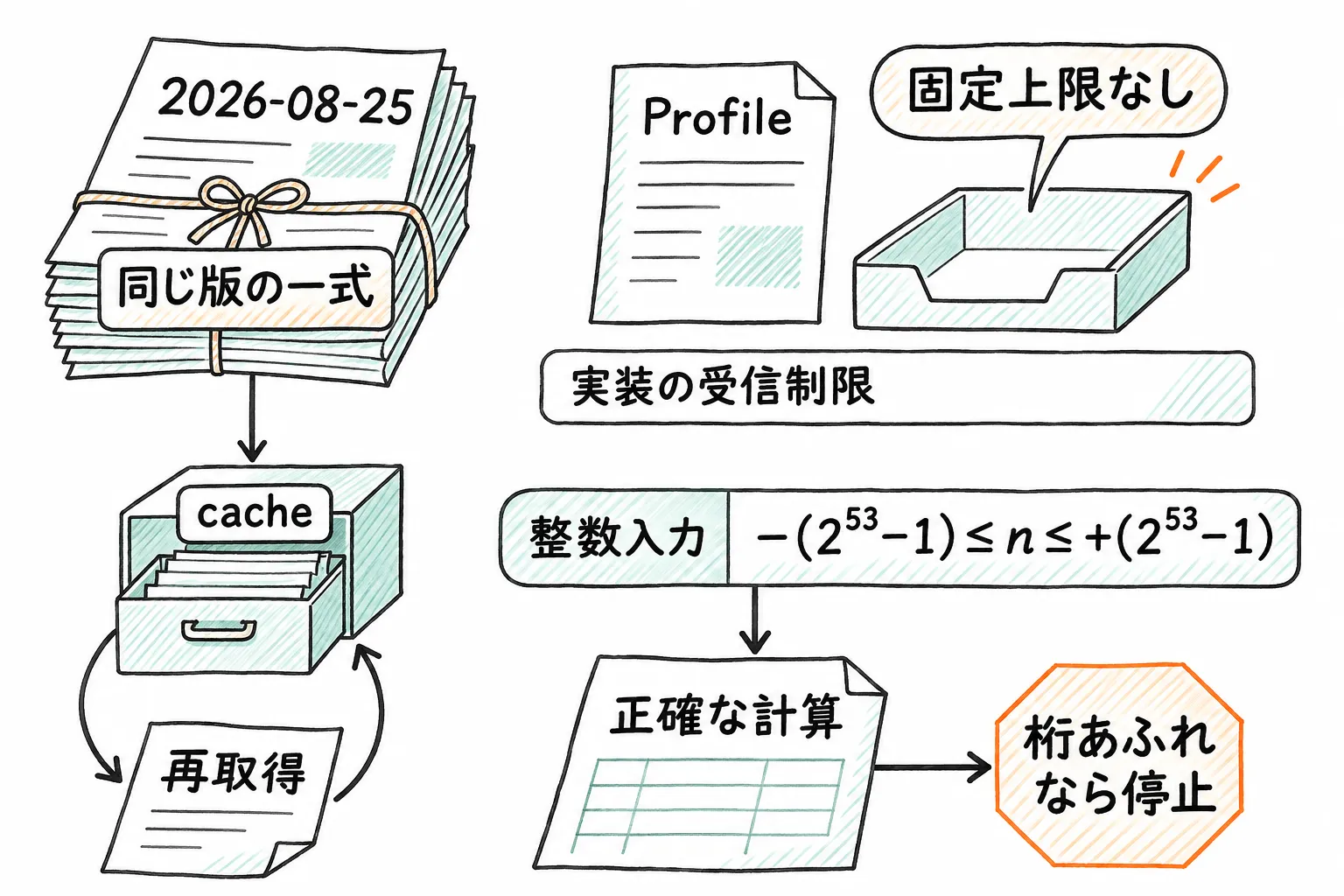
In production, align profiles and schemas with the specifications of the same release and manage caching and refresh of retrieved data. Retrieve profiles over HTTPS, configuring cache durations, timeouts, and spaced retries. Verify that key rotations propagate to verifiers and check how revoked keys are handled.
The profile's JSON schema does not impose a fixed size limit common to all implementations. The 5 KiB mentioned in the documentation is an example size, not a universal receiving limit. Compare your implementation's input limits with the size of the profiles provided by peers.
When reading amounts and quantities, validate integer ranges as well. In addition to each field's sign and range constraints, UCP integer values are limited to ±9,007,199,254,740,991, or ±(2^53−1). Reject inputs outside this range as schema-invalid.
Even when individual inputs are within range, multiplying unit price by quantity may exceed the implementation's calculation range. Use arbitrary-precision integers or overflow checks for calculations, and return an error if an exact result cannot be produced. Do not display approximate amounts or proceed with payment using them; reconcile the amount with the business's formal total.
Conclusion
UCP discovers supported capabilities and versions before selecting products and connects the checkout terms returned by the business to the buyer's confirmation. Once an order is placed, use an order ID distinct from the checkout session to track shipments and refunds through retrieval and signed notifications. An implementation checks capability negotiation, formal checkout terms, approval, and processing results using the respective data for each stage.
The UCP definitions and data structures are based on v2026-08-25 in the official repository.
The ACP comparison is based on spec/2026-04-17 at a pinned commit of the official repository.