Introduction
Hi, I'm cardene, a software engineer and technical writer focused on blockchain and AI.
I've also authored Japanese technical books on specification-driven development with LLMs and decentralized application (DApp) development.

I also build and publish a variety of tools, libraries, and open-source projects.
Asking an AI coding agent to add a price-range filter to a product search API mixes the requirements and implementation approach into the same conversation. Even if you have not decided whether a minimum price can be specified on its own, whether the range includes its endpoints, or what to return when the minimum exceeds the maximum, the agent can still write some code. To establish whether that code fulfills the request, you need to separate the requirements before implementation and record them so you can revisit them afterward.
GitHub Spec Kit separates project-wide principles from feature-specific records and gives AI coding agents a workflow for moving from requirements to implementation. Using a price-range filter for a product search API as an example, this article explains each file's role and how to use Spec Kit in an existing project.
The figures are reused from the Japanese edition; their labels may remain in Japanese.
What is GitHub Spec Kit?
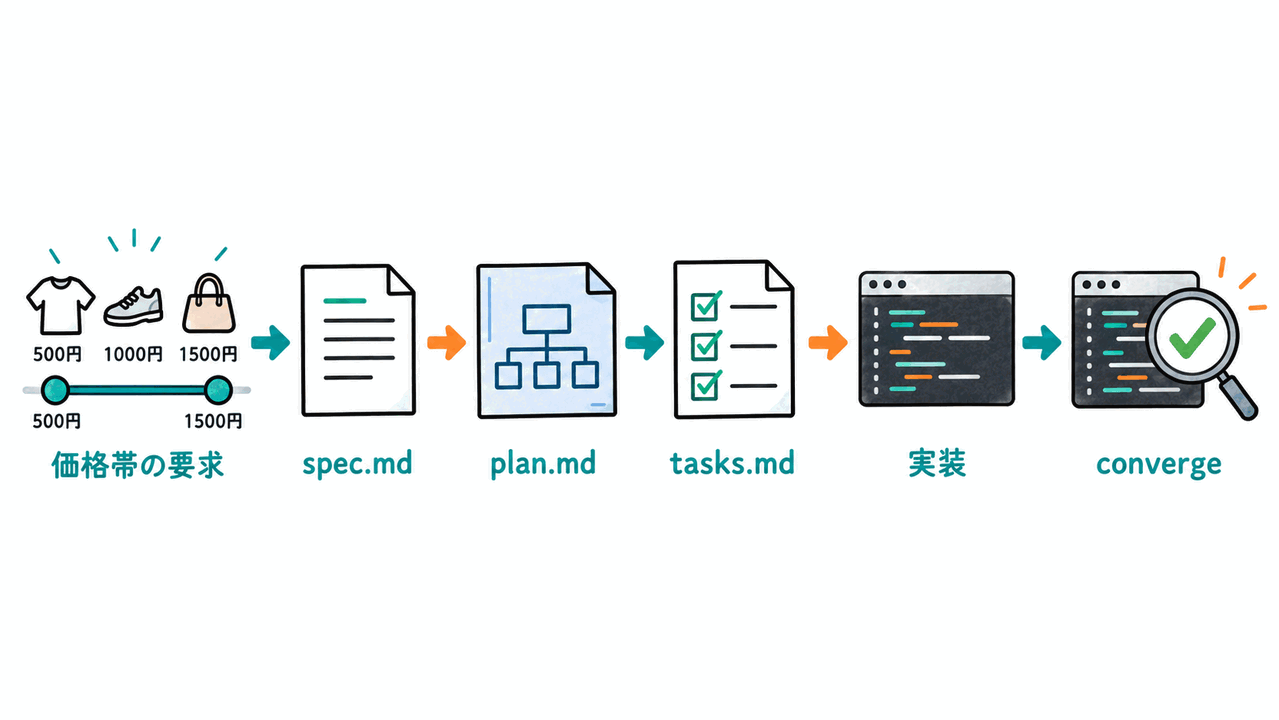
GitHub Spec Kit gives AI coding agents a workflow for storing requirements, technical designs, and task lists in separate records and checking the implementation for gaps afterward. The agent reads spec.md to create plan.md, divides the use cases in spec.md and the technical design in plan.md into tasks in tasks.md, and modifies the code according to the task list.
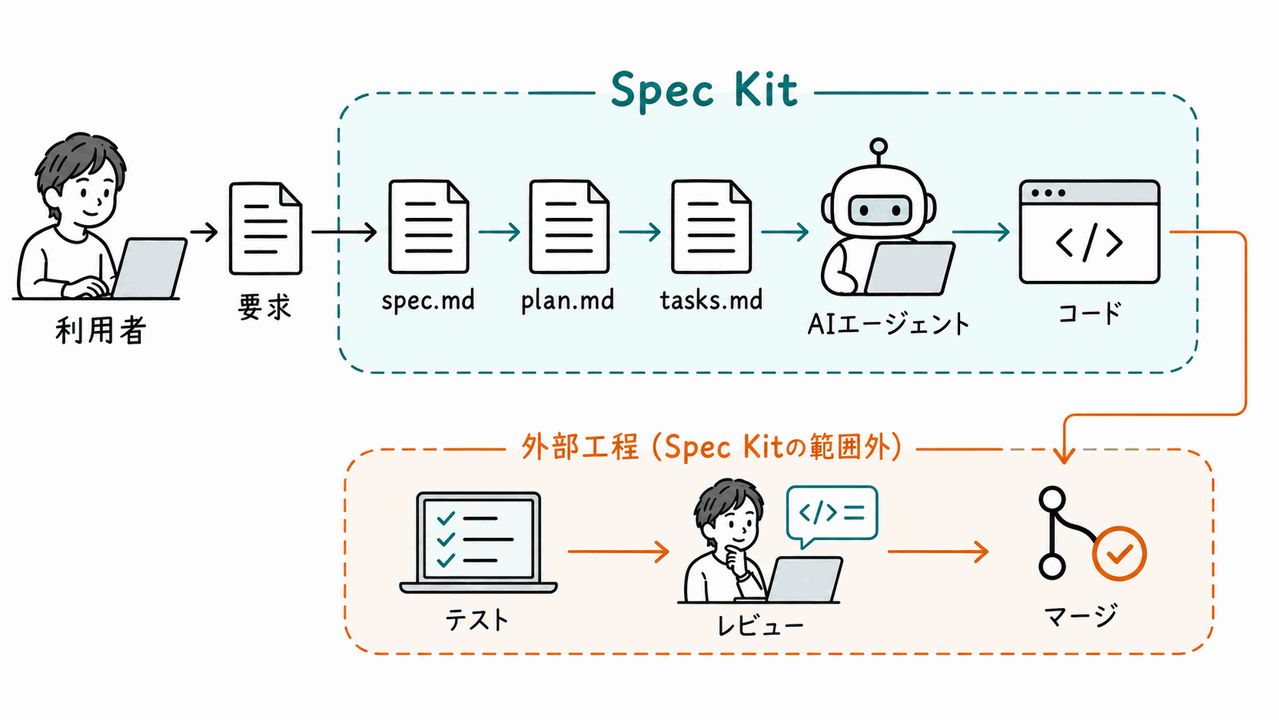
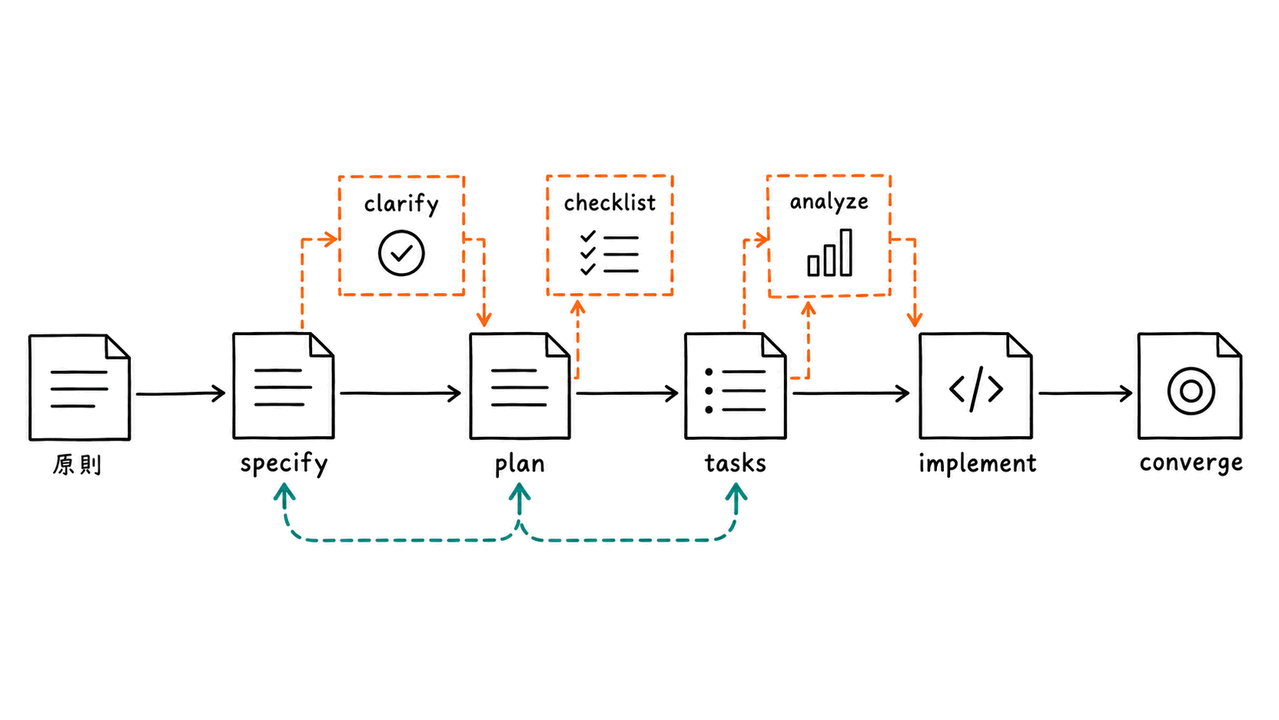
The core spec-driven development (SDD) workflow follows Specify → Plan → Tasks → Implement → Converge. Bug fixes and idea evaluation have entry points independent of the core workflow. Choose core SDD when starting feature development, and use the corresponding workflow when investigating existing defects or evaluating ideas before implementation.
Scope of spec-driven development
At the specification stage, decide what users want to achieve and what conditions count as success. Implementation choices, such as the framework, database, and file structure, are made later in the technical plan.
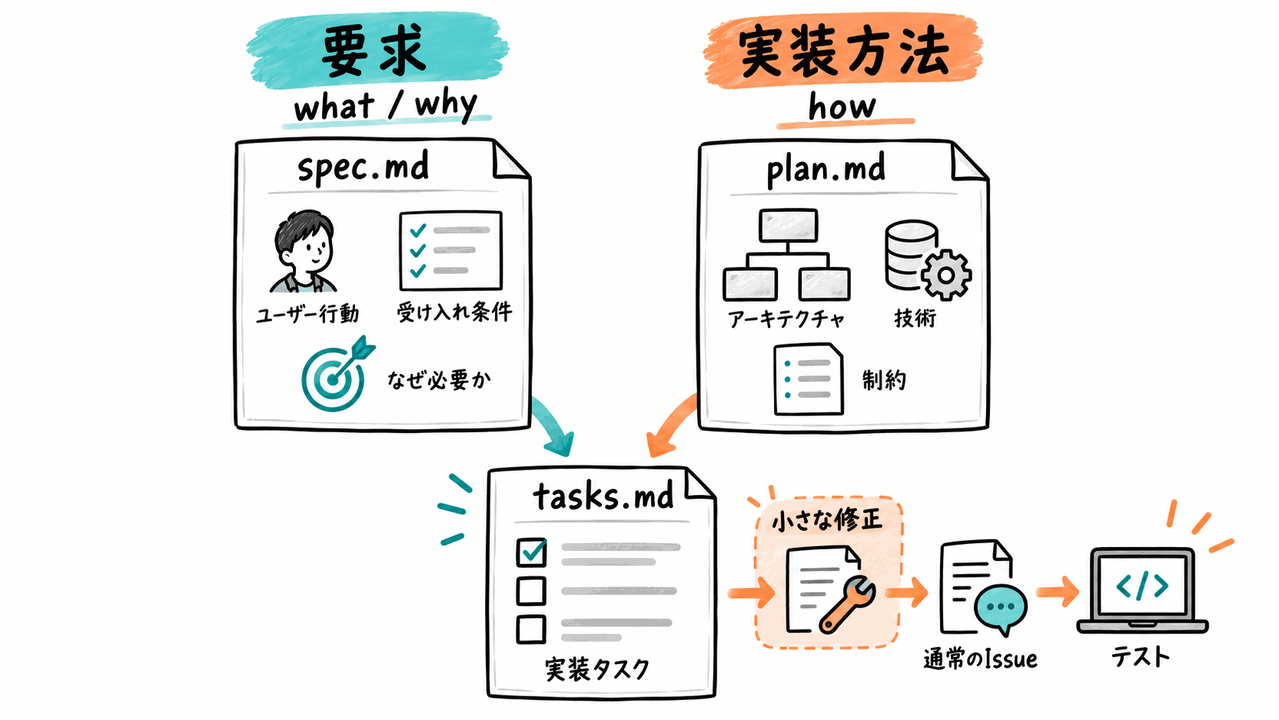
This order lets you define observable behavior before choosing the implementation. For instance, specifying the SQL for a requirement to filter products by price range from the start can lock in an implementation while boundary values and invalid input handling remain undecided. Defining observable behavior first lets you use the same acceptance criteria for a REST API or GraphQL.
Spec Kit lets you choose stages based on the ambiguity and size of a change. Add optional quality gates for features with requirements that admit multiple interpretations; use the normal issue, test, and review workflow for obvious fixes spanning a few lines.
Integration with AI agents
The specify CLI initializes the project and installs commands or skills (reusable instruction sets) that the selected AI coding agent can read. After initialization, invoke /speckit.specify, /speckit.plan, and other operations in the agent's conversation.
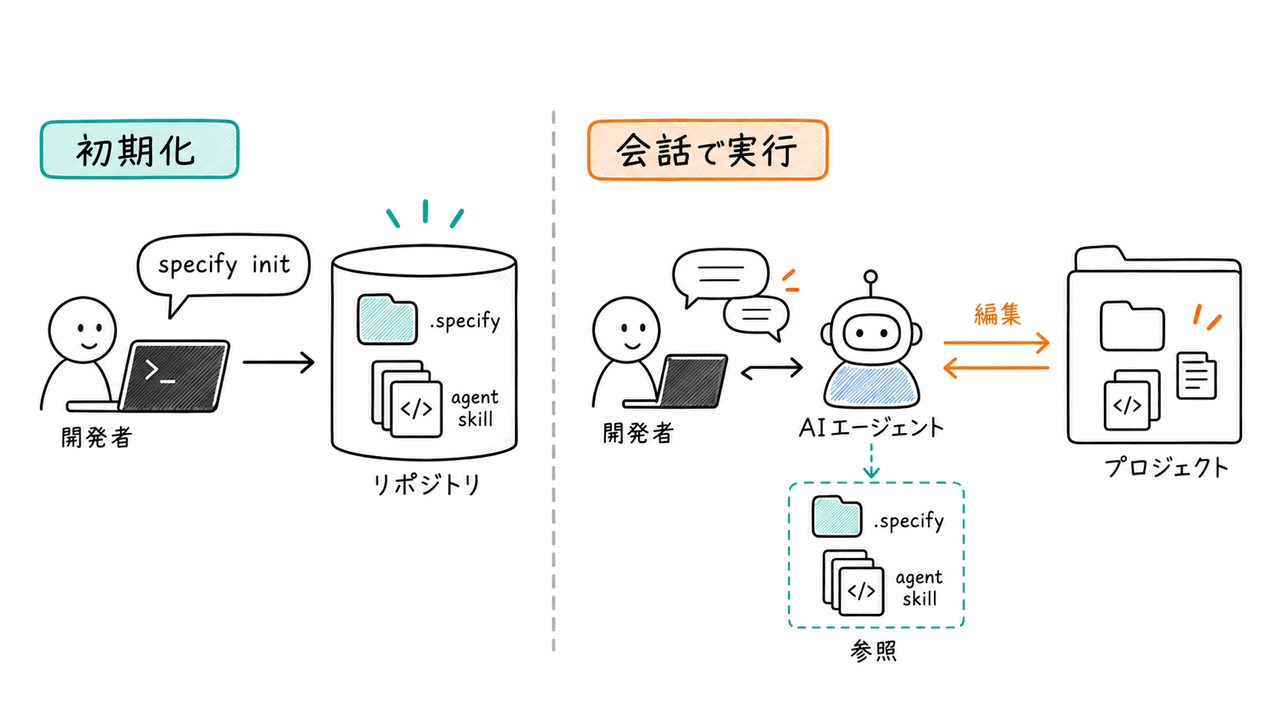
The official documentation denotes operations with /speckit.*, but their displayed form depends on the integration. GitHub Copilot's skill format uses /speckit-*, while Codex displays $speckit-*. The notation differs, but their roles in processing specifications, plans, and task lists in order are the same.
Isolation of code changes, permissions to read and edit files and run tests, and sandboxing are managed by the AI coding agent and development environment. Spec Kit supplies the workflow and record formats used in that environment.
Record structure
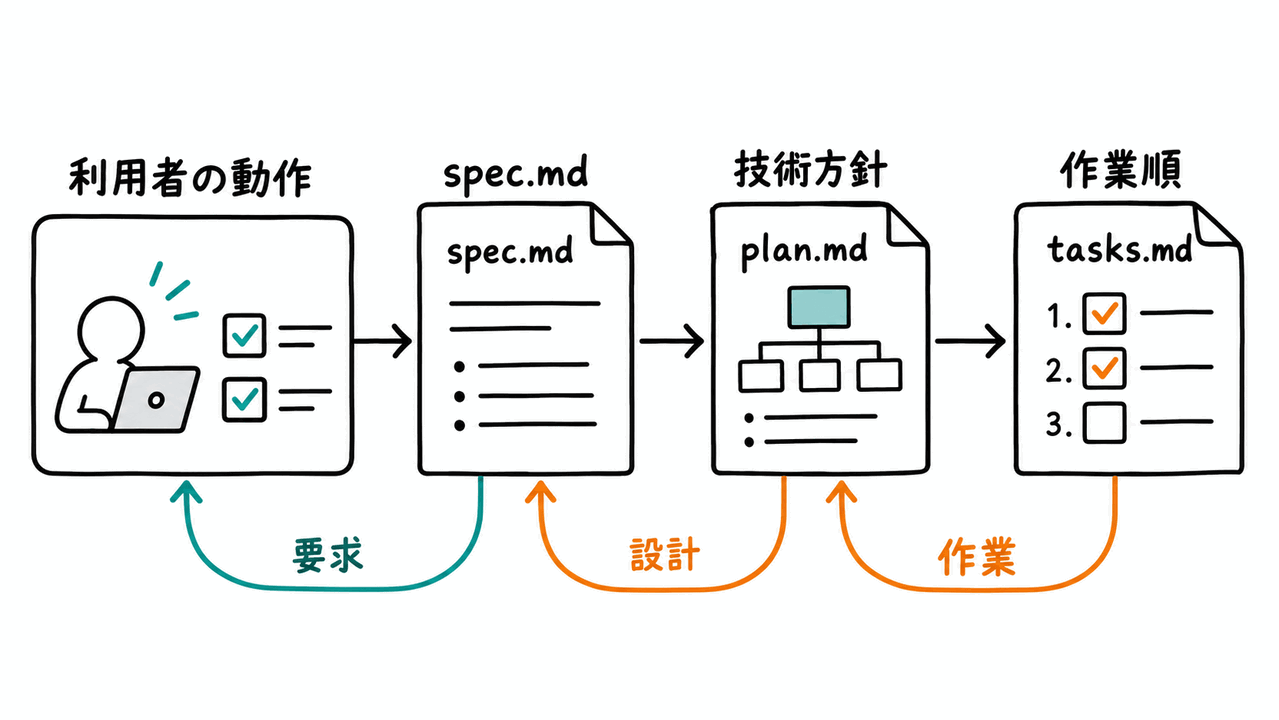
Spec Kit separates principles that apply across the project from feature-specific specifications, plans, and task lists. Because plan.md takes spec.md as input and tasks.md takes the use cases in spec.md and technical design in plan.md as input, decisions can be traced from requirements to code.
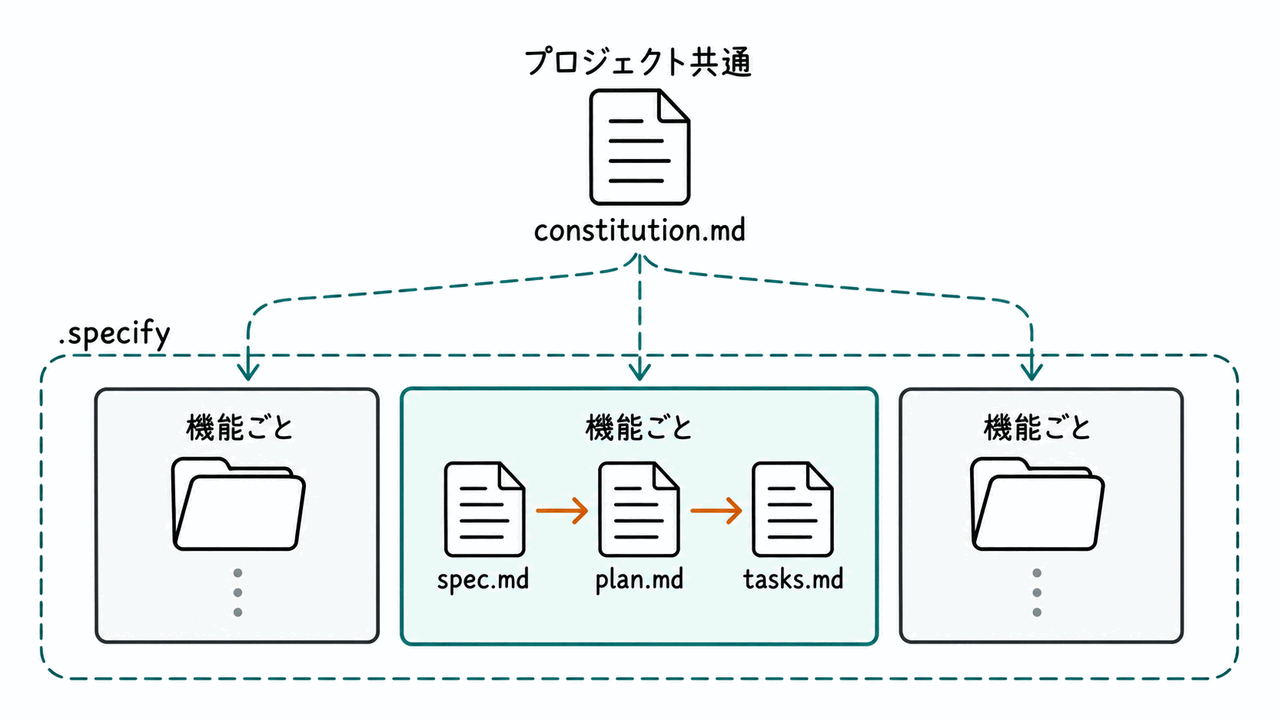
The official documentation uses the term artifact to include commands, templates, and scripts. To make the scope explicit, this article calls constitution.md, spec.md, plan.md, and tasks.md record files.
File structure after initialization
Running specify init --here --integration codex --script sh adds Spec Kit's shared infrastructure and Codex skills alongside the existing source code. The main files immediately after initialization look like this.
project/
├── .specify/
│   ├── init-options.json
│   ├── integration.json
│   ├── integrations/
│   │   ├── speckit.manifest.json
│   │   └── codex.manifest.json
│   ├── memory/
│   │   └── constitution.md
│   ├── scripts/
│   │   └── bash/
│   └── templates/
│       ├── constitution-template.md
│       ├── spec-template.md
│       ├── plan-template.md
│       ├── tasks-template.md
│       └── checklist-template.md
└── .agents/
    └── skills/
        ├── speckit-specify/
        │   └── SKILL.md
        ├── speckit-plan/
        │   └── SKILL.md
        └── ...
The .specify/ directory contains integration state, project principles, helper scripts, and templates for each record. Codex reads Spec Kit operations from .agents/skills/. The location and format of AI integration files depend on the selected integration: GitHub Copilot, for example, uses .github/skills/. Choosing --script ps or --script py also changes the directory and format of the helper scripts.
At this point, constitution.md is a template for project principles. The feature-specific spec.md, plan.md, and tasks.md files are created when feature development begins.
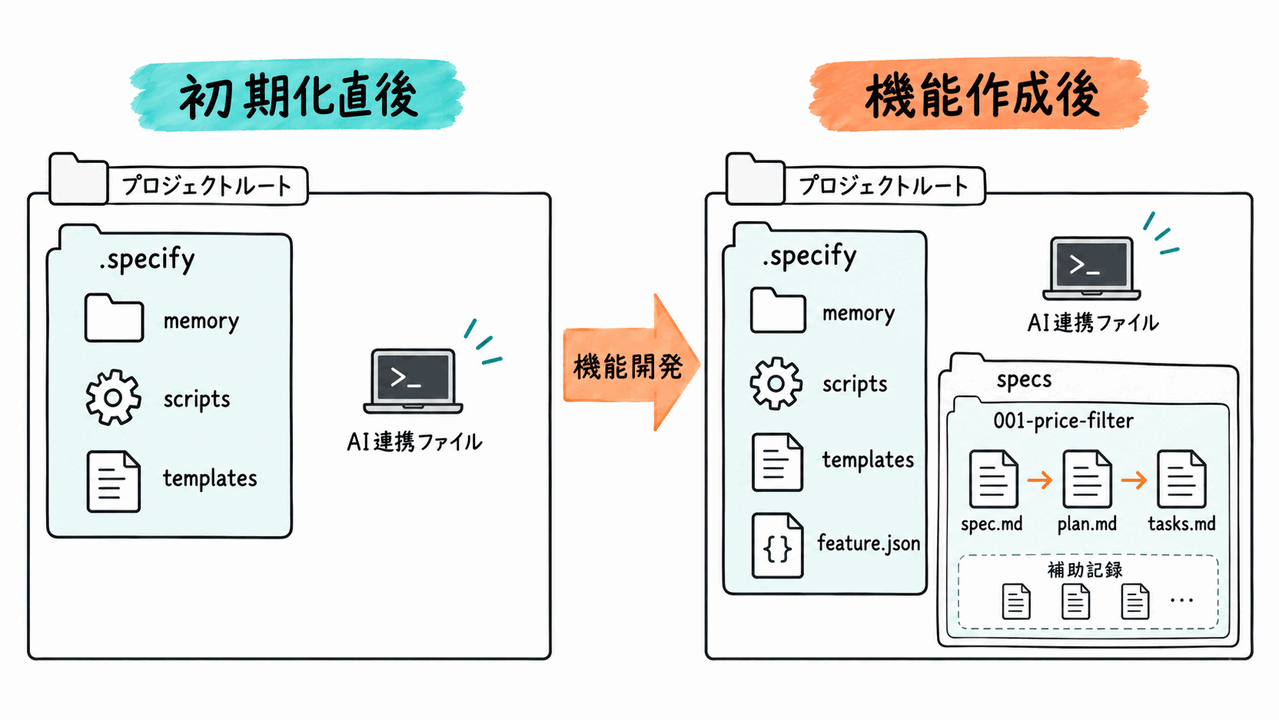
When feature development starts, a feature-specific directory is added under specs/ while the shared infrastructure remains intact. If the price filter is the first feature, the structure after progressing through the workflow looks like this.
project/
├── .specify/
│   └── feature.json
└── specs/
    └── 001-price-filter/
        ├── spec.md
        ├── checklists/
        │   ├── requirements.md
        │   └── api.md
        ├── plan.md
        ├── research.md
        ├── data-model.md
        ├── quickstart.md
        ├── contracts/
        └── tasks.md
/speckit.specify creates the feature directory, spec.md, and the built-in checklists/requirements.md. When /speckit.clarify incorporates answers into spec.md, it reevaluates that built-in checklist. The following /speckit.plan creates plan.md and adds supporting records for research findings, the data model, verification instructions, and external interface contracts as needed. Finally, /speckit.tasks creates tasks.md, breaking the technical plan into work in execution order.
By contrast, /speckit.checklist creates custom checklists for reviewers to assess requirement completeness and clarity. They are saved to specs/<feature>/checklists/<domain>.md. If the domain file does not exist, it is created; otherwise, items are appended. This differs from the creation and update process for the built-in requirements.md.
The .specify/feature.json file points to the active feature directory. Treat .specify/ as shared Spec Kit infrastructure and specs/<feature>/ as individual feature development records to make the files easier to navigate.
Project principles
The decision criteria that apply to all features are stored in .specify/memory/constitution.md. Running /speckit.constitution creates or updates project principles for input validation, compatibility, testing, and architectural boundaries.
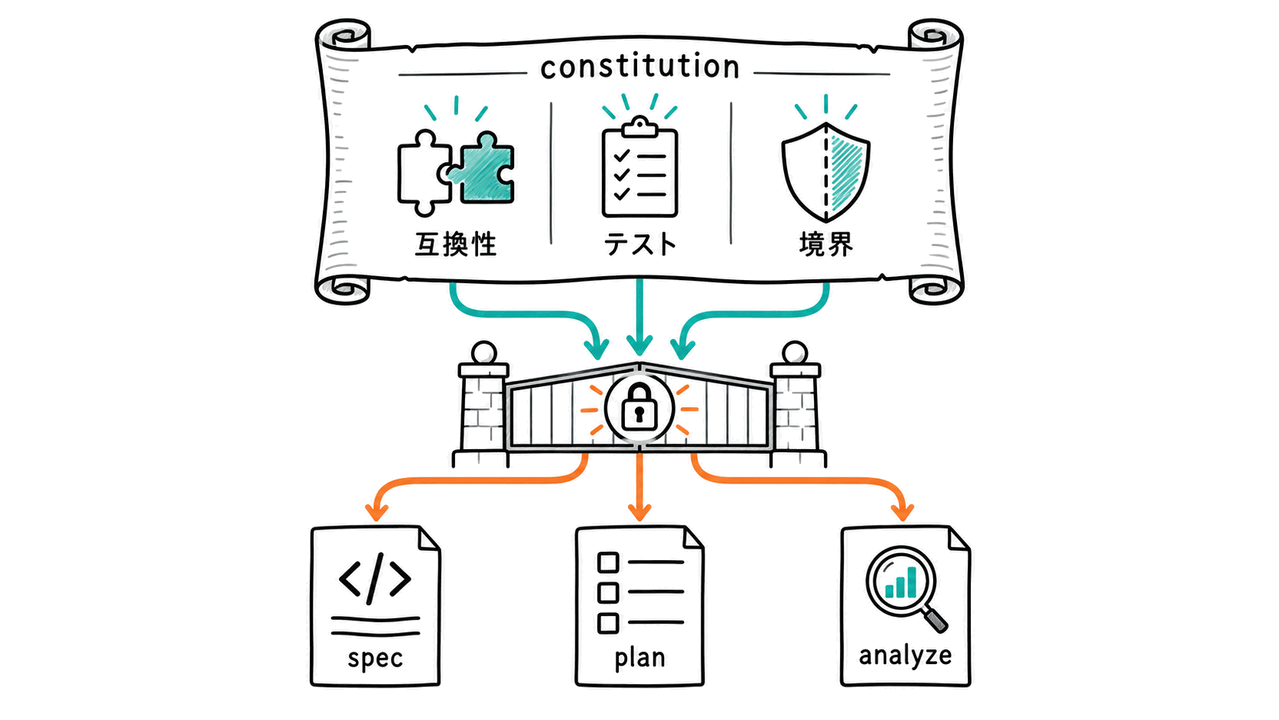
When creating a constitution for an existing project, examine the current README, design decisions, CI configuration, and contribution guide to identify rules the project actually follows. If public API compatibility is maintained, document those conditions. If database migrations require rollback procedures, record that requirement in a form that subsequent plans can check.
Principles that do not reflect actual practices cause later planning and analysis to repeatedly flag constraints the project cannot satisfy. The constitution should contain the criteria actually used in feature design.
Feature-specific records
The central feature-specific files are spec.md, plan.md, and tasks.md. Each has a different role and gives you a place to return to depending on the reason for a change.
| File | Contents | When to revise |
|---|---|---|
spec.md |
Observable behavior, use cases, and acceptance criteria | When requirements or expected behavior change |
plan.md |
Technical architecture, connection to the existing design, constraints, and implementation approach | When architecture or implementation decisions change |
tasks.md |
Testing and implementation work in dependency order | When missing tasks or sequencing issues are discovered |
For example, the minimum and maximum prices can be specified independently belongs in spec.md because it describes observable behavior. Convert query-string values to integers and pass them to the search query builder belongs in plan.md because it describes an implementation approach. Add an API test that specifies only the maximum price belongs in tasks.md because it is a concrete work item.
Separating these roles lets you reconsider the implementation without changing requirements. Conversely, if requirements change, you can trace the impact from spec.md through subsequent files instead of modifying only the code.
Selecting the active feature
Spec Kit operates on the feature directory recorded in .specify/feature.json. You can explicitly select another directory with the SPECIFY_FEATURE_DIRECTORY environment variable.
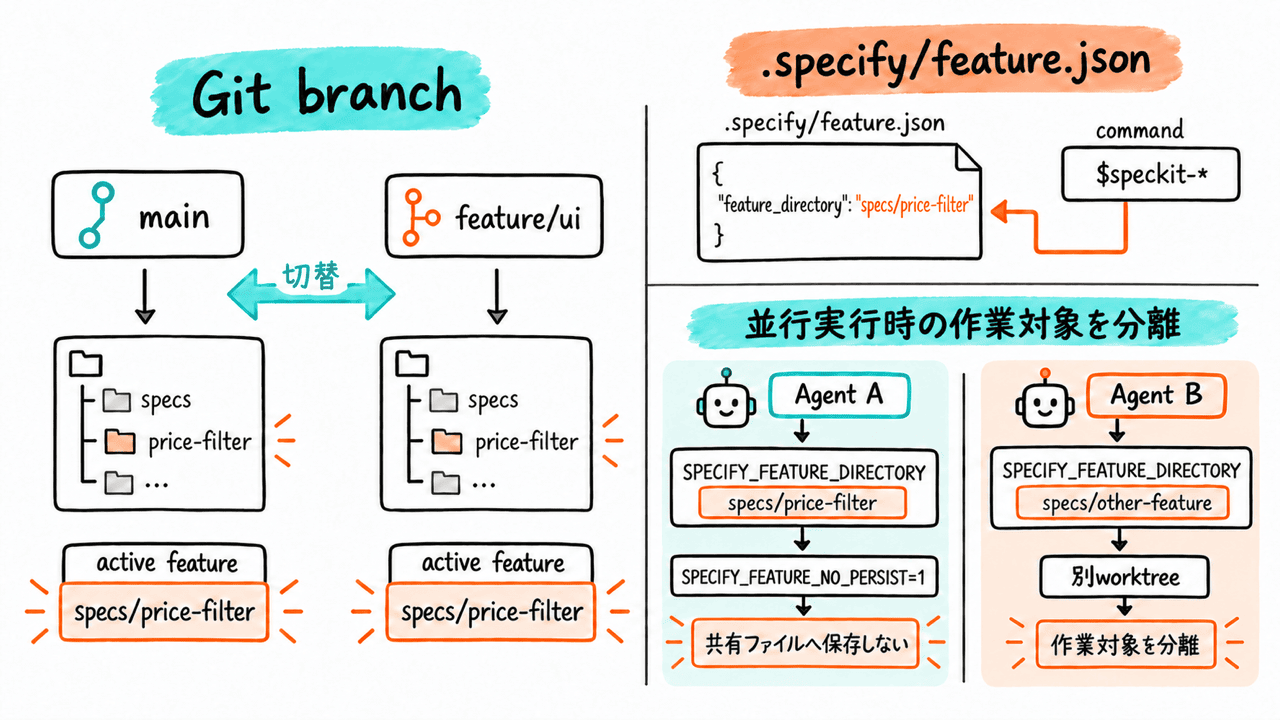
This distinction matters when working on several features in parallel. Even after switching Git branches, Spec Kit still refers to the directory pointed to by .specify/feature.json. When moving to another feature, check both the branch and that directory.
If several AI coding agents process different features in the same checkout, isolate their writes to the shared .specify/feature.json as well. Setting SPECIFY_FEATURE_DIRECTORY for each agent alone may not suffice, because commands may persist their selection to the shared file and overwrite the feature another agent refers to. Also set SPECIFY_FEATURE_NO_PERSIST=1 to prevent writes to the shared file, or use a separate worktree for each feature to isolate its state.
The core workflow can be used in environments without a Git repository. Workflows that use feature branches can be added through an optional Git extension.
Basic workflow
The core stages and optional quality gates proceed in the order below. At each stage, verify the updated files and conditions for proceeding, rather than merely checking that an operation ran.
-
Define project principles
Run
/speckit.constitutionto save compatibility, testing, and architectural principles in.specify/memory/constitution.md. Check that the principles are concrete enough to guide subsequent planning. -
Turn requirements into a specification
Give
/speckit.specifythe user's goals and expected behavior. Check that the active feature'sspec.mdcontains use cases and verifiable acceptance criteria, and that the built-inchecklists/requirements.mdevaluates requirement quality. -
Resolve ambiguous requirements
If interpretations differ, specify the areas to clarify with
/speckit.clarify. Check that the answers are incorporated intospec.md, the built-in requirements checklist is reevaluated, and competing interpretations of behavior are resolved before technical design begins. -
Create a technical plan
Give
/speckit.planthe technologies, existing architecture, and constraints, including compatibility. Check thatplan.mdand its supporting records show how the proposed architecture fulfills the acceptance criteria. -
Check requirement quality and divide the work into tasks
If people will review requirement completeness, use
/speckit.checklistto create a custom checklist owned by the reviewer. After checking that the marked items represent a review of requirement quality, run/speckit.tasksto arrange the work in dependency order intasks.md. -
Look for inconsistencies between records
Run
/speckit.analyzeto identify inconsistencies and omissions acrossspec.md,plan.md, andtasks.md. Correct requirements inspec.md, design issues inplan.md, and task breakdown issues intasks.md. -
Implement and address gaps
Execute
tasks.mdin dependency order with/speckit.implement, then run/speckit.converge. If gaps are added totasks.md, implement the additional tasks and runconvergeagain. -
Check project-specific completion criteria
Outside Spec Kit, check the project's tests, static checks, code review, and merge conditions. Since
Convergedindicates alignment between records and code, verify project-specific completion criteria separately.
From requirements to a task list
Requirements passed to /speckit.specify focus on observable behavior and its rationale. Framework names and database design are decided in /speckit.plan.
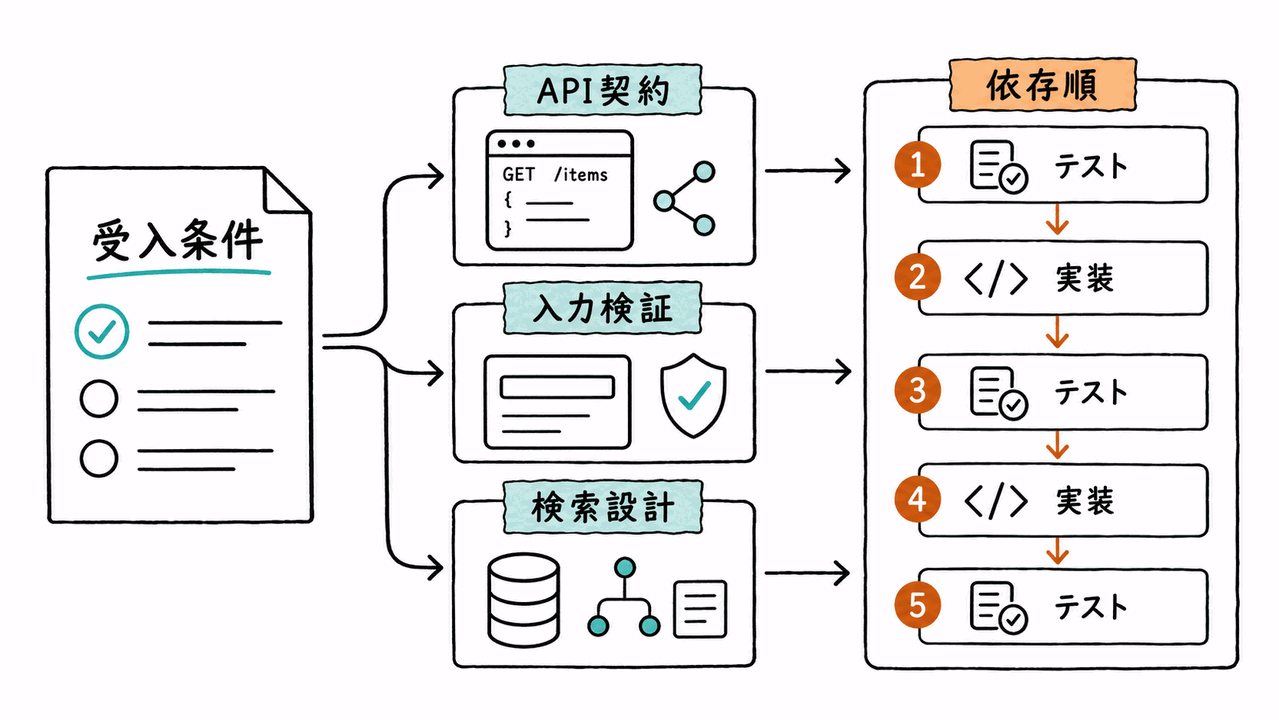
/speckit.tasks divides the design into setup, shared prerequisites, implementation for individual user goals, and cross-cutting finishing work. If tests are required, they are placed under the corresponding user goals rather than collected in a separate testing phase. Work that can run in parallel is marked, enabling independent changes to be delegated while prerequisites are executed first.
The purpose of breaking down tasks is to make the design that fulfills each acceptance criterion traceable to the tests and implementation work that verify it.
Implementation and convergence
/speckit.implement executes tasks.md in dependency order. Large features can exceed an AI agent's context capacity when processed in one pass, so the official documentation describes a staged approach to dividing the work.
First, limit an execution to particular task numbers or phases. With a supported AI agent, parallel tasks can be delegated to subagents individually. Only when a single phase still exceeds the context capacity after combining both approaches should you split the feature into smaller, independent specifications.
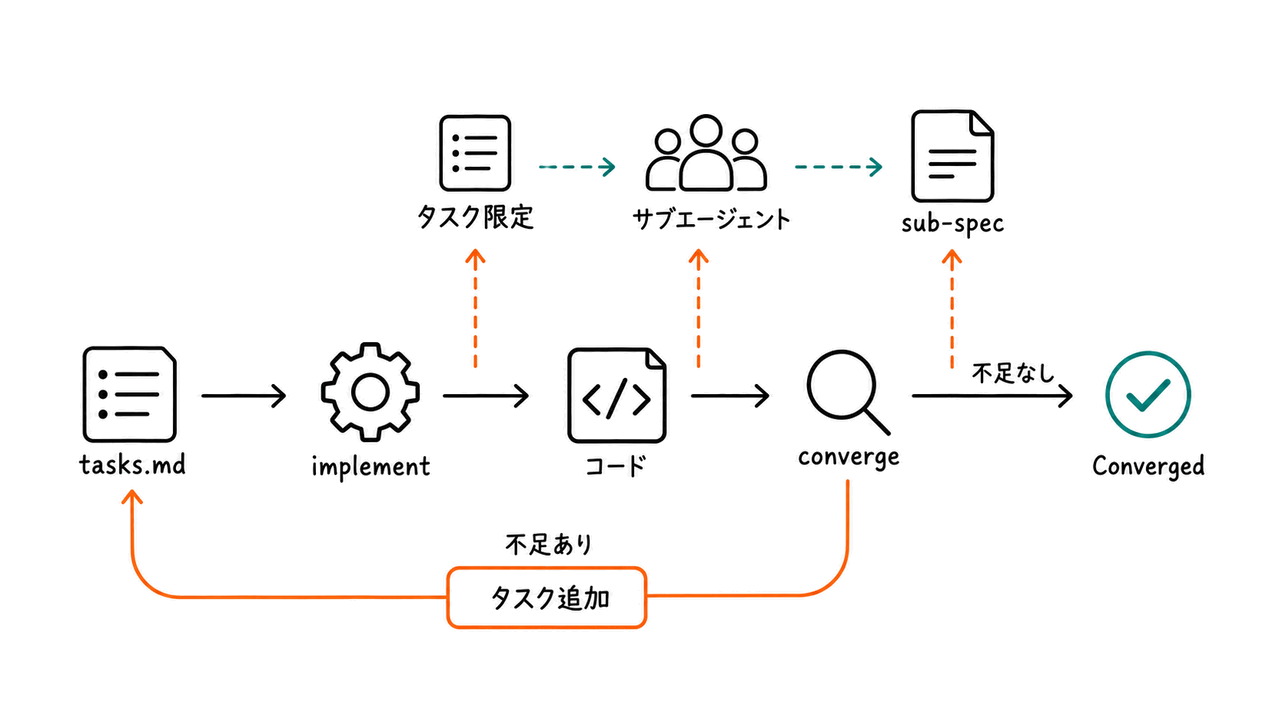
The official documentation calls this approach a spec of specs: a specification that organizes other specifications. Start with a roadmap, break it into independently testable features, and record their dependency order and scope. Each feature has its own spec.md, plan.md, and tasks.md, so splitting increases record-keeping and coordination overhead. Use it only when limiting tasks, delegating to subagents, or combining both approaches still does not fit.
After implementation, /speckit.converge compares the code against spec.md, plan.md, and tasks.md. If gaps are found, it appends tasks to the Convergence section of tasks.md. Process those tasks with implement and rerun converge. If no gaps are found, it leaves tasks.md unchanged and reports Converged.
Worked example: a price-range filter
Consider a change that adds min_price and max_price to an existing product search API. It preserves the existing category filter and authorization behavior while handling boundary values and invalid ranges.
Define acceptance criteria
First, pass only observable behavior to /speckit.specify. An example input is as follows.
/speckit.specify
Add optional min_price and max_price parameters to the existing product search API.
Allow either parameter on its own, and include both endpoints when both are specified.
Do not change the existing `category` filter or authorization behavior.
Return 400 for an invalid price range.
This input specifies observable behavior and compatibility. The database and implementation language are chosen in /speckit.plan. In spec.md, record behavior that API consumers can verify as use cases and acceptance criteria.
Here is an excerpt from an example spec.md.
 ## User Story 1 - Filter products by price

As an API client, I can narrow product results by a minimum price,
a maximum price, or both without changing existing category filtering.

 ### Acceptance Scenarios

1. Given products priced 500, 1000, and 1500,
   when min_price=1000 and max_price=1500,
   then products priced 1000 and 1500 are returned.
2. When only min_price is specified, no upper bound is applied.
3. When only max_price is specified, no lower bound is applied.
4. When min_price is greater than max_price, the API returns 400.
5. When both values are absent, the existing response is unchanged.
User Story 1 - Filter products by price
As an API client, I can narrow product results by a minimum price, a maximum price, or both without changing existing category filtering.
Acceptance Scenarios
- Given products priced 500, 1000, and 1500, when min_price=1000 and max_price=1500, then products priced 1000 and 1500 are returned.
- When only min_price is specified, no upper bound is applied.
- When only max_price is specified, no lower bound is applied.
- When min_price is greater than max_price, the API returns 400.
- When both values are absent, the existing response is unchanged.
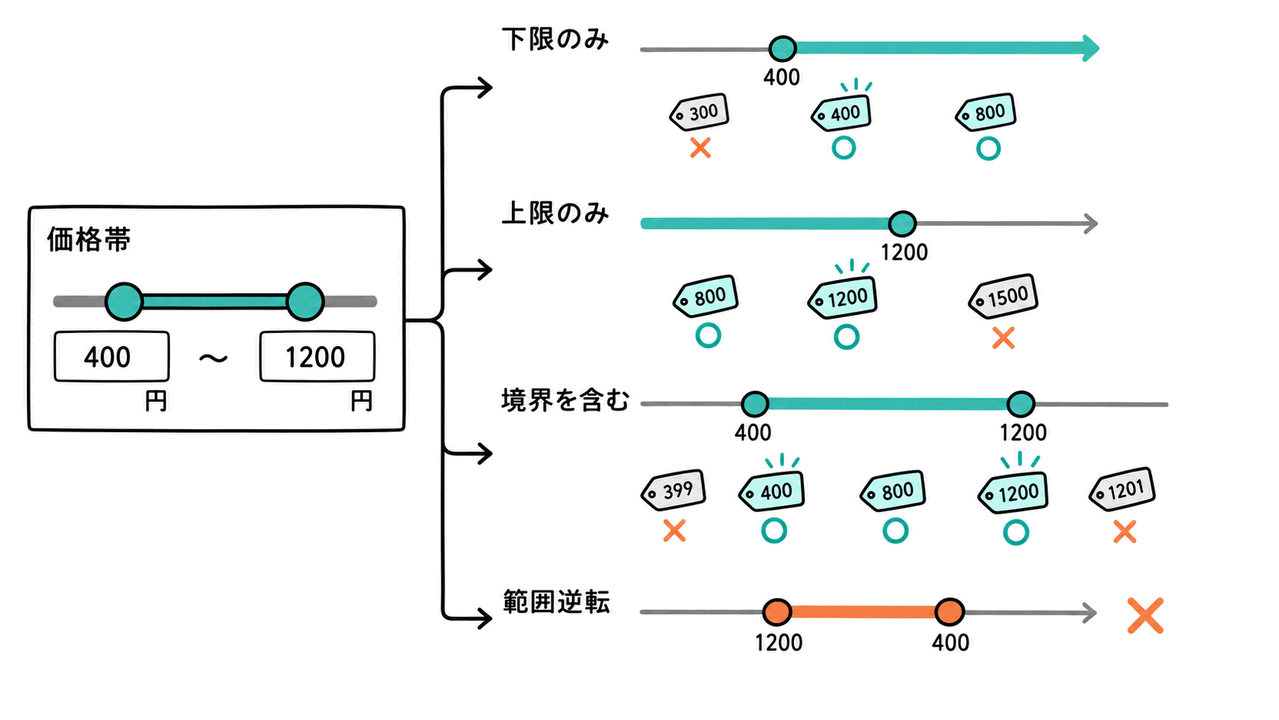
The cases covered are specifying one bound, specifying both, reversing the range, and compatibility when neither is provided. The example with min_price=1000 and max_price=1500 returns both 1000 and 1500, verifying that the boundary values are included.
The price unit, negative values, decimals, and ranges with equal endpoints are still undecided. Use /speckit.clarify to focus on price value formats and boundary conditions, and incorporate the answers into spec.md before design begins. For instance, deciding that prices are non-negative integers and that equal bounds form a valid single-point range gives implementers and testers the same criteria to work from.
Separate technical decisions
Once acceptance criteria are defined, use /speckit.plan to select an implementation approach that fits the existing project. Provide its existing technology stack and the constraints on the change.
/speckit.plan
Use the existing TypeScript REST API and PostgreSQL.
Add query parameter validation to the existing request schema.
Extend the search query builder and combine it with the existing `category` condition.
Do not change the public response schema or authorization middleware.
Follow the project's existing TDD policy and add API tests for each acceptance criterion before implementation.
This plan maps acceptance criteria to API input validation, the application service, the query builder, and integration tests. Because PostgreSQL and TypeScript are not mixed into the requirements, the implementation can be reconsidered without changing observable behavior.
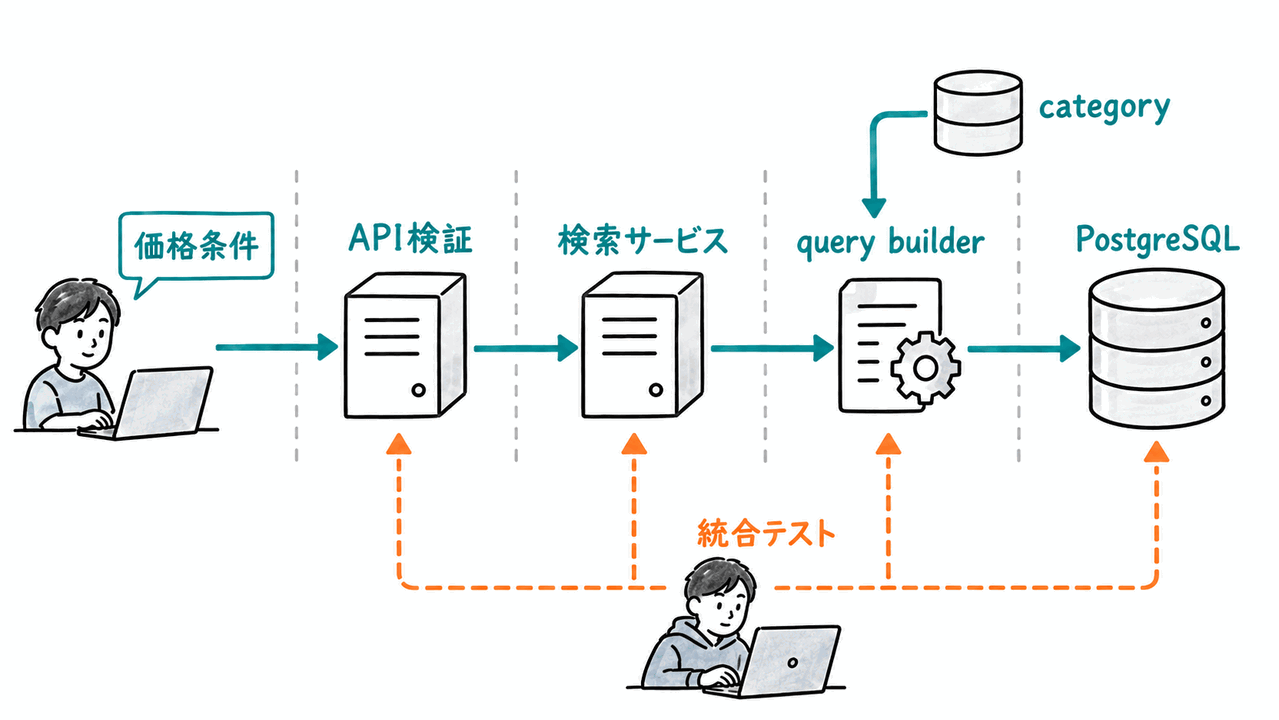
The main points of the plan can be recorded in plan.md as follows.
 ## Technical Context

- Language: TypeScript
- API: Existing REST endpoint `GET /products`
- Storage: PostgreSQL through the existing query builder
- Compatibility: Keep response schema, authorization, and category filtering

 ## Design

1. Parse optional `min_price` and `max_price` as non-negative integers.
2. Reject the request when both exist and `min_price > max_price`.
3. Add inclusive `>=` and `<=` predicates to the existing query builder.
4. Cover single-bound, two-bound, invalid-range, and compatibility cases.
Technical Context
- Language: TypeScript
- API: Existing REST endpoint
GET /products - Storage: PostgreSQL through the existing query builder
- Compatibility: Keep response schema, authorization, and category filtering
Design
- Parse optional
min_priceandmax_priceas non-negative integers. - Reject the request when both exist and
min_price > max_price. - Add inclusive
>=and<=predicates to the existing query builder. - Cover single-bound, two-bound, invalid-range, and compatibility cases.
The first and second items specify input validation at the API boundary. The third maps inclusive boundary acceptance criteria to the search logic. The fourth defines the scope of verification to cover the new feature and whether existing search filters and authorization remain intact.
Connect tasks and verification results
In this example, the user explicitly requested TDD, so /speckit.tasks places API tests before implementation. Here is an excerpt of the tasks relevant to this change.
 ## User Story 1 - Filter products by price

- [ ] T001 [US1] Add failing min-only and max-only tests in tests/api/products.test.ts
- [ ] T002 [US1] Add boundary and invalid-range tests in tests/api/products.test.ts
- [ ] T003 [US1] Extend the request schema in src/api/product-search-request.ts
- [ ] T004 [US1] Add inclusive predicates in src/search/product-query-builder.ts
- [ ] T005 [US1] Verify category filtering and authorization in tests/api/products.test.ts
User Story 1 - Filter products by price
T001 and T002 turn the acceptance criteria into failing tests, after which T003 and T004 implement input validation and search logic. Finally, T005 verifies that the price-range filter leaves existing filtering and authorization unchanged. This order prevents new implementation code from determining the expected result before the tests are written.
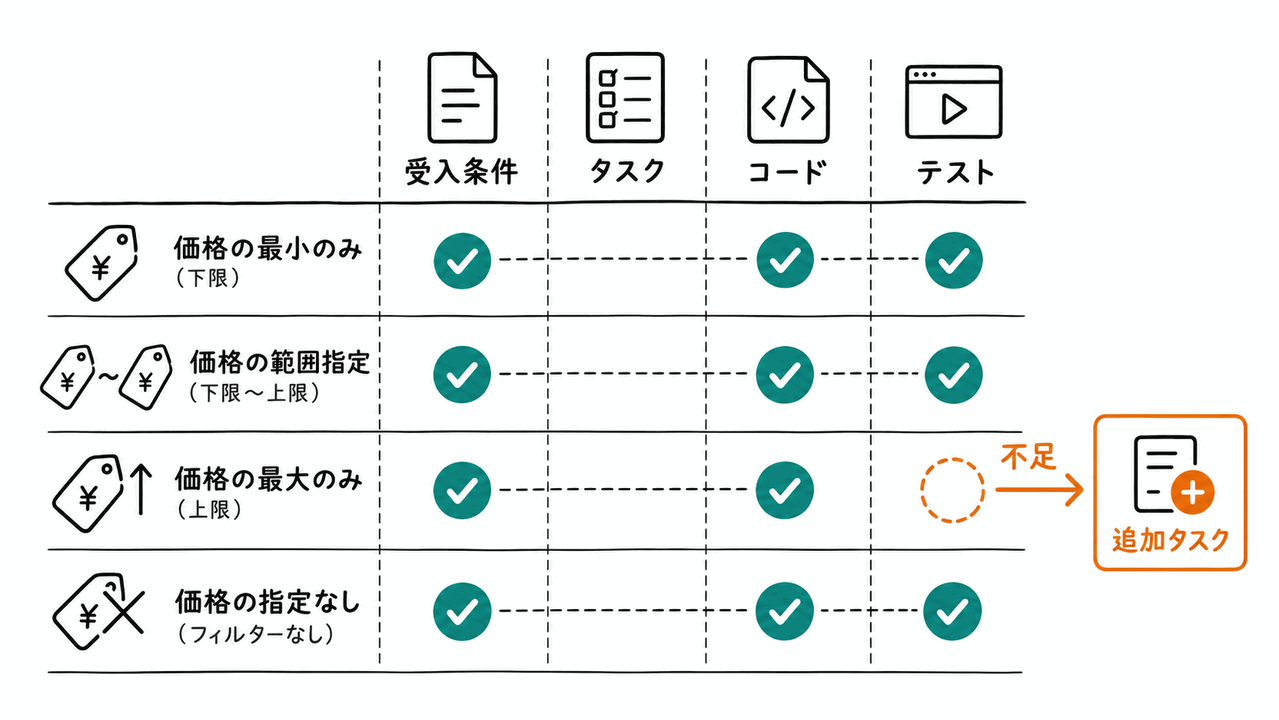
Before implementation, run /speckit.analyze to find tasks without corresponding acceptance criteria and plan items that have not been converted into tasks. For example, if an acceptance criterion specifies only max_price but T001 tests only the lower bound, correct tasks.md before implementation.
The same gap may be discovered during /speckit.converge after /speckit.implement. In that case, add a test that specifies only the upper bound as a Convergence task, complete implementation and testing, and rerun the command. Once acceptance criteria are traceable to code and test results, and Converged is reported without additional tasks, Spec Kit's convergence check is complete.
Using Spec Kit in an existing project
In an existing project, start with the next bounded change. Establish a baseline so the changes can be inspected using ordinary diffs, then reflect existing rules in the constitution.
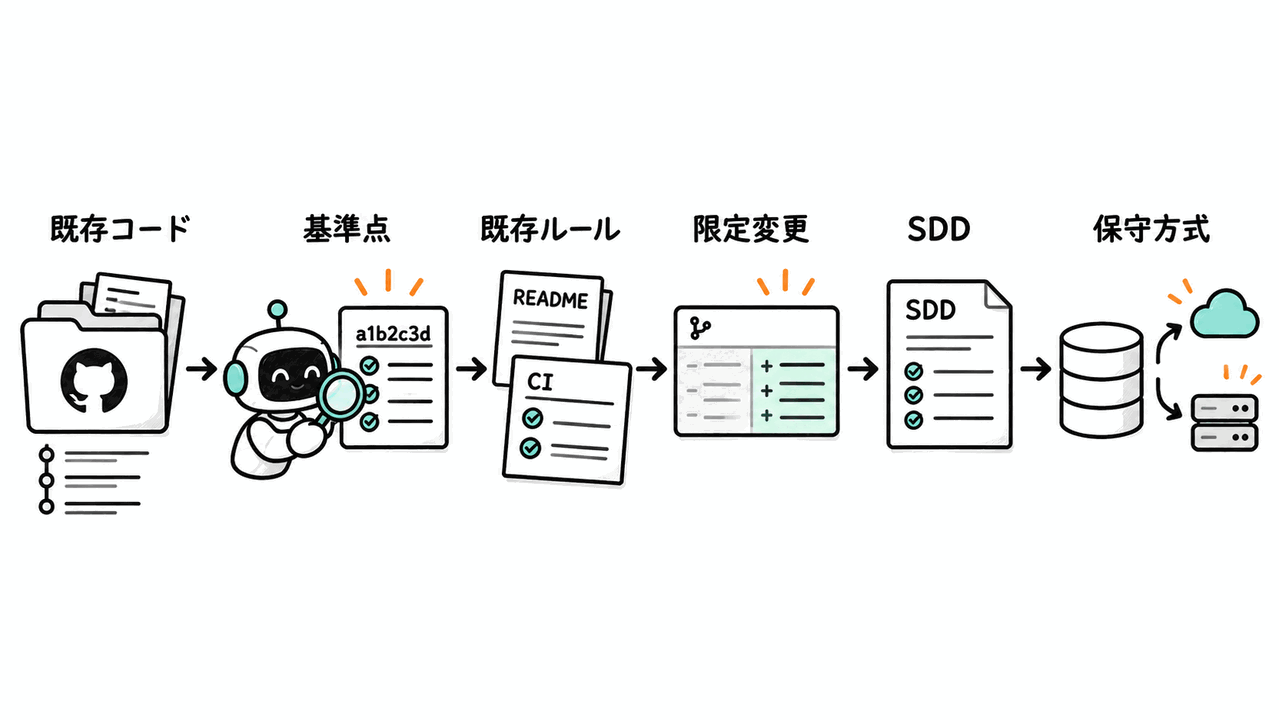
After completion, decide whether to freeze feature records as history or keep updating them as the current contract. Choose a maintenance model as a team operating rule.
Start with a small change
Before running specify init --here --force in an existing repository, organize uncommitted changes and establish a baseline for reviewing the generated files. Because --force permits initialization in a non-empty directory, run it only when you can revert the changes.
After initialization, document rules already being followed in the constitution. Candidates include public API compatibility, existing service boundaries, migration rollback procedures, and test commands. Invented standards cause later stages to refer to constraints that do not match the implementation.
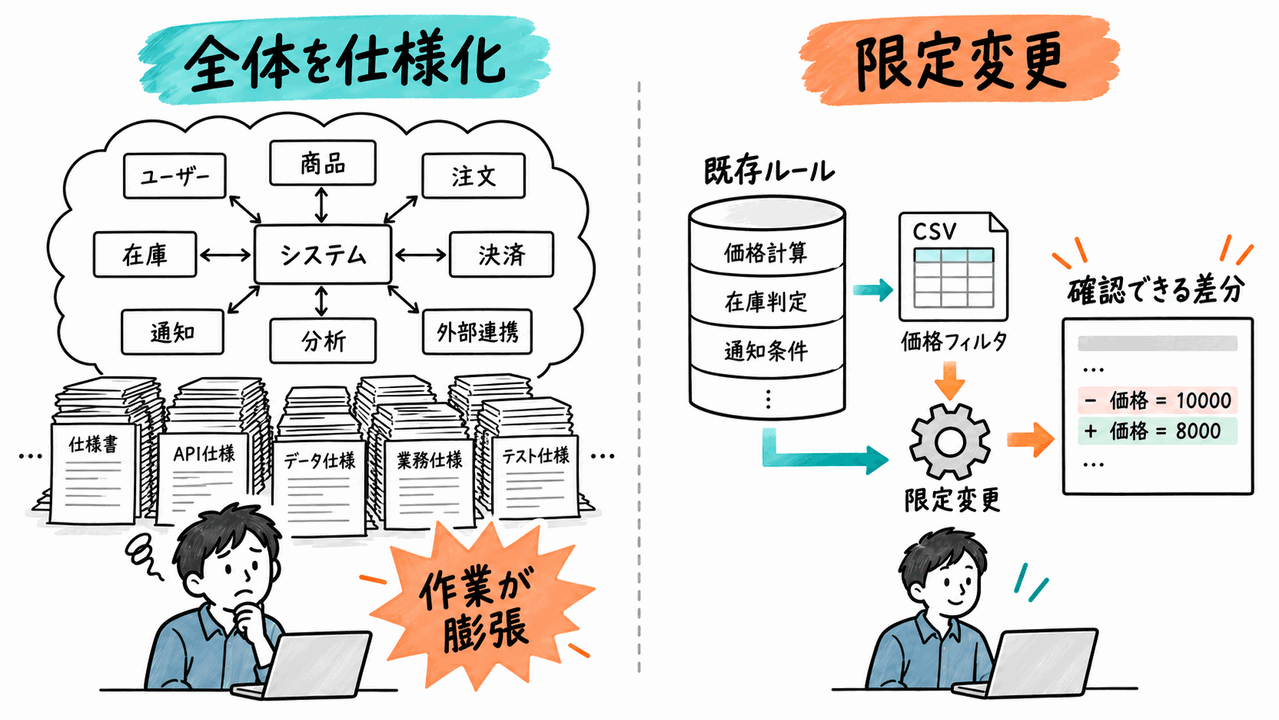
Limit the first feature to a change that can be reviewed independently. For a price-range filter in a product search API, read the existing code to understand the current design and write only the behavior being added and the compatibility to preserve in spec.md. Documenting those two things is the starting condition.
Retain specifications after completion
There are three ways to handle spec.md, plan.md, and tasks.md when requirements change. Select one as a shared team practice.
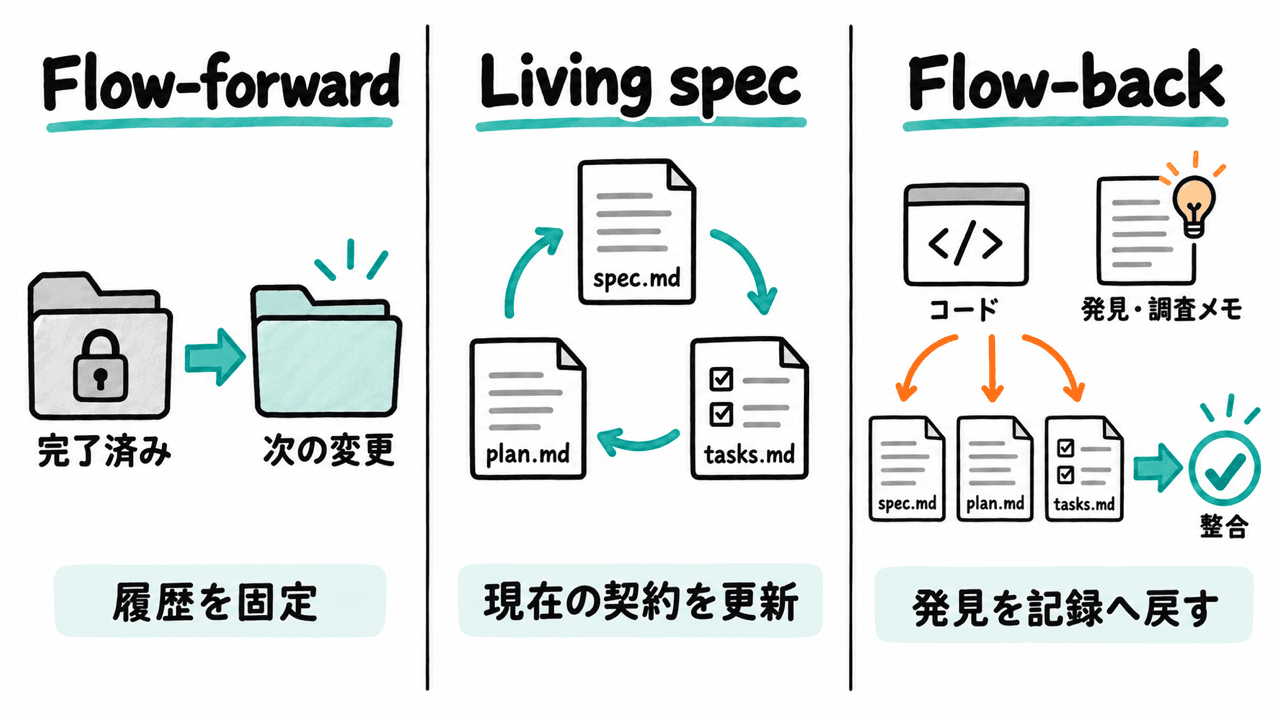
| Model | Update method | Best suited to | Caveat |
|---|---|---|---|
| Flow-forward | Freeze completed directories and create a new feature record for each change | Preserving audit history and the sequence of changes | Related decisions are distributed across directories |
| Living spec | spec.md is updated first, and plan.md and tasks.md are regenerated or revised |
Maintaining the specification as the current contract | Regeneration may lose the rationale for implementation decisions |
| Flow-back | Revise any record based on discoveries during implementation, then reconcile the full set at the end | Fast iteration in small teams | Records can drift apart if updates are missed |
Under Flow-forward, adding more price currencies after the price-range filter would involve creating a new feature directory. Earlier directories remain historical records of the decisions made at the time.
Under Living spec, first incorporate currency support into the current spec.md, then update the plan and task list.
Whichever model you choose, record in the constitution or team rules whether completed directories remain editable or are frozen as history. Without such a rule, later contributors cannot determine whether to trust an old spec.md or the current code.
Quality gates and the boundary of completion
Spec Kit's quality checks examine ambiguous requirements, the quality of the requirements themselves, consistency among records, and gaps in implementation separately. Treating them all as a single pass indicator obscures what has been verified.
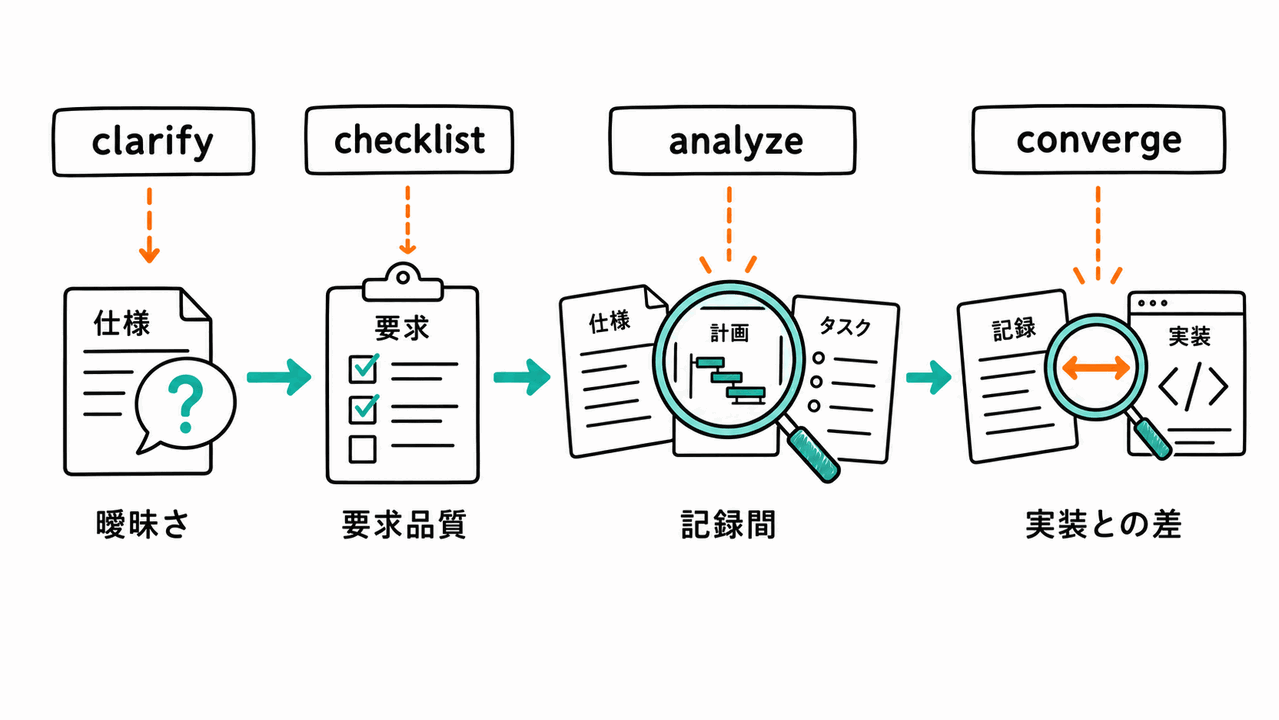
Pre-implementation checks
/speckit.clarify presents up to five questions at a time about ambiguous parts of spec.md and incorporates the answers into that same specification. It resolves behavior that requires user input before the technical plan is created.
The checklists/requirements.md generated by /speckit.specify is the built-in requirements checklist accompanying the feature specification. After incorporating answers, /speckit.clarify also reevaluates this checklist.
/speckit.checklist separately creates custom checklists for reviewers to assess the completeness and clarity of requirements. They are saved to checklists/<domain>.md; rerunning for the same domain preserves the existing items and appends new ones. A marked item on a custom checklist indicates that requirement quality has been reviewed, not that implementation or testing is complete. /speckit.implement counts total, checked, and unchecked items across all files in checklists/. If at least one item is unchecked, it stops implementation and asks whether to continue, but does not mark items in either built-in or custom checklists.
/speckit.analyze reads spec.md, plan.md, and tasks.md without modifying them and reports inconsistencies and omissions. Fix missing requirements in spec.md, conflicting technical decisions in plan.md, and missing work in tasks.md.
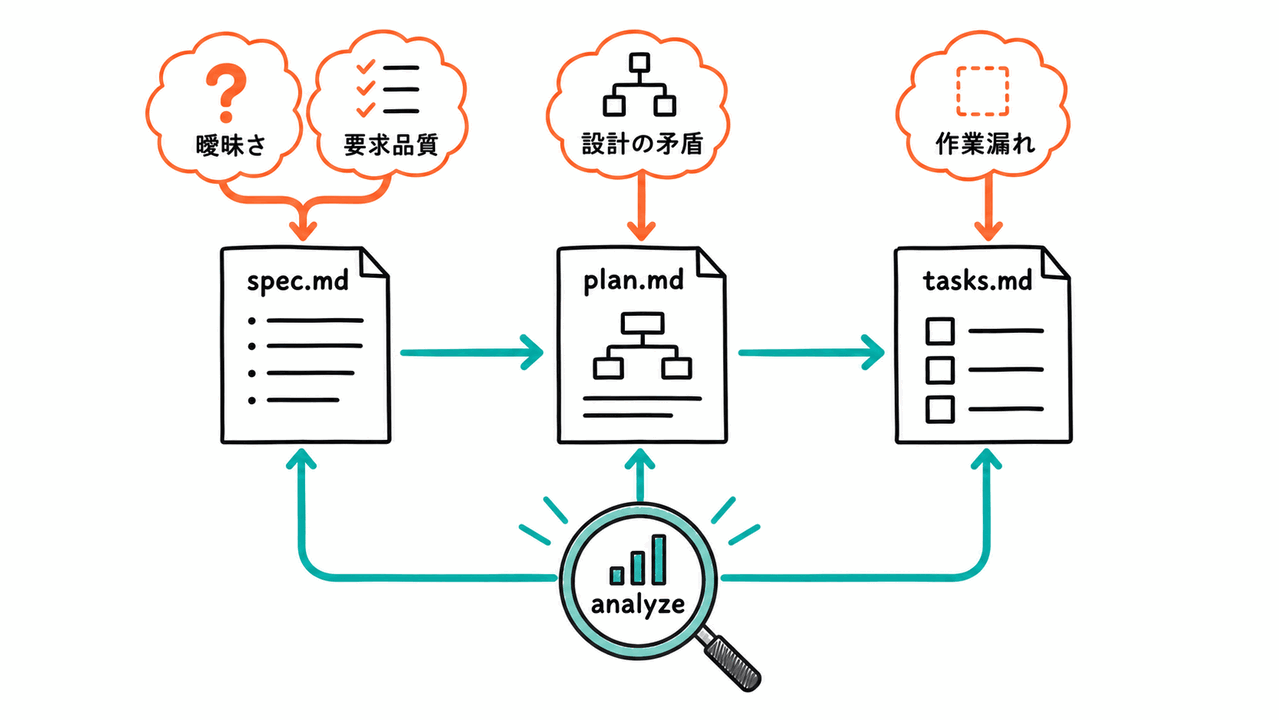
This separation prevents missing requirements from being concealed by merely adding tasks. After fixing the file where the problem originates, rerun the affected downstream stages.
What Converged means
/speckit.converge reports Converged when it finds no gaps in the code relative to the current spec.md, plan.md, and tasks.md.
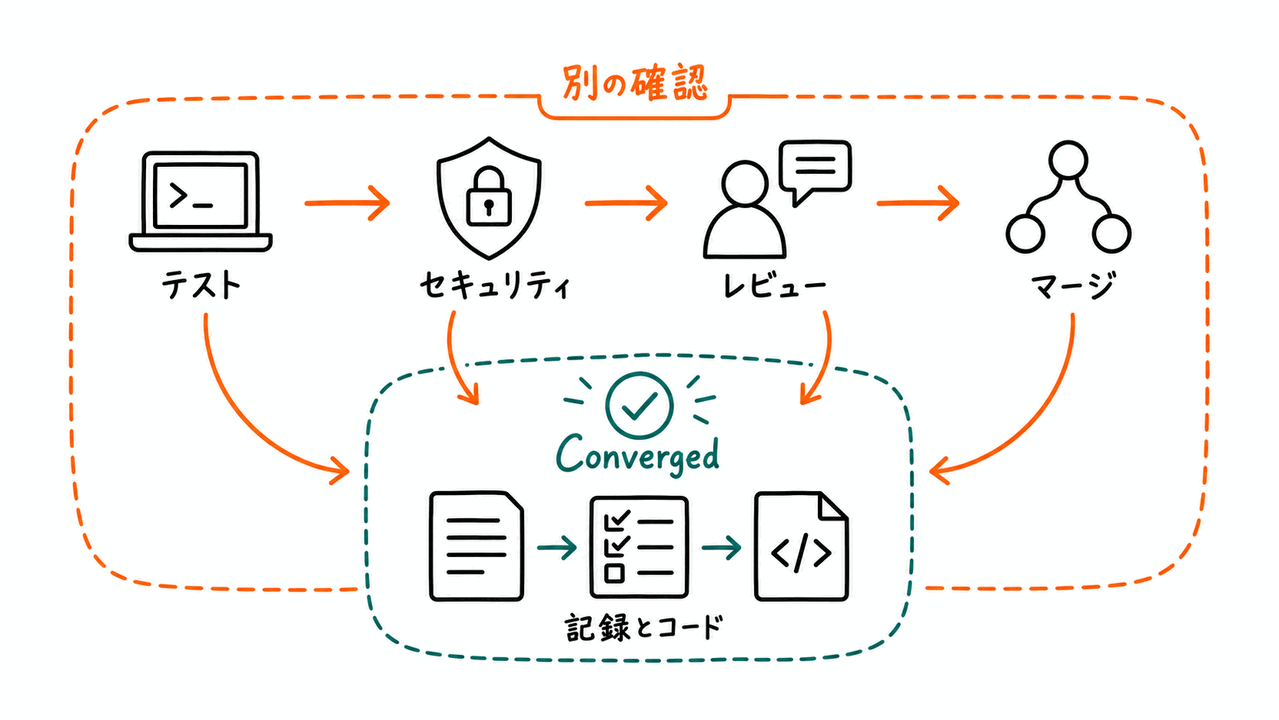
Completing the software as a whole requires separate checks: whether the specification captures the user's problem, whether tests detect the relevant defects, whether security issues exist, and whether maintainers have approved the merge. The official Spec Kit repository also separates agent-driven convergence from deterministic checks. Tests, static checks, CodeQL, maintainer review, and release decisions are part of this latter, external set of checks.
Separate completion criteria as follows.
| Check | What it determines |
|---|---|
Built-in requirements.md |
Whether the quality of the feature specification's requirements has been reevaluated |
/speckit.checklist |
Whether reviewers have assessed requirement completeness and clarity |
analyze |
Whether the specification, plan, and task list are consistent |
converge |
Whether implementation gaps remain relative to the records |
| Tests and CI | Whether the executed checks produce the expected results |
| Code review | Whether the design, maintainability, and security of the changes are acceptable |
| Merge criteria | Whether all repository-required conditions have been met |
Passing one check does not automatically pass the others. When code or specifications are revised after a change, rerun the affected checks.
When to use Spec Kit and what to watch for
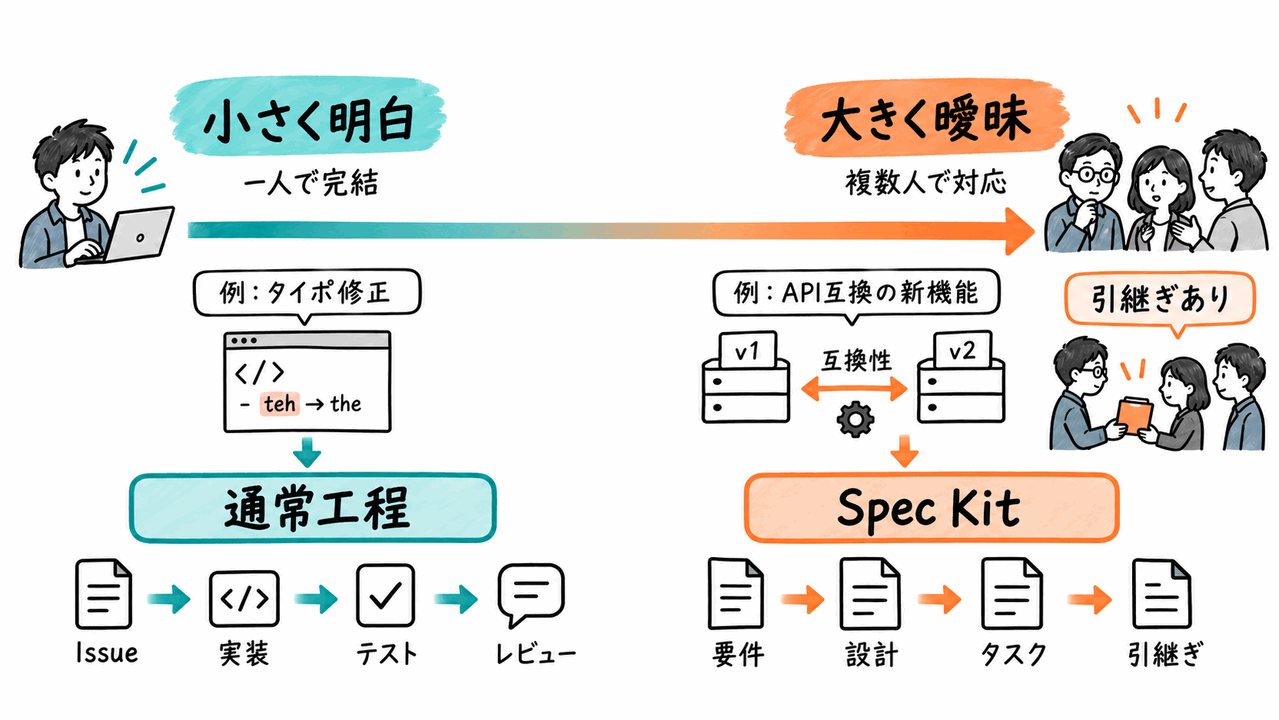
Spec Kit is suited to development where requirements, technical plans, and task breakdowns are reviewed separately and several people or AI coding agents inherit the same records. Rather than judging by feature count, choose the scope of adoption based on which decisions need to be separated before implementation and which gaps need to be revisited afterward.
Adoption decisions
If acceptance criteria admit several interpretations or public API compatibility must be preserved, stage-specific records support decision-making. The same records can be handed over when work is split into phases or AI agents are replaced. Choose optional quality gates according to the remaining uncertainties.
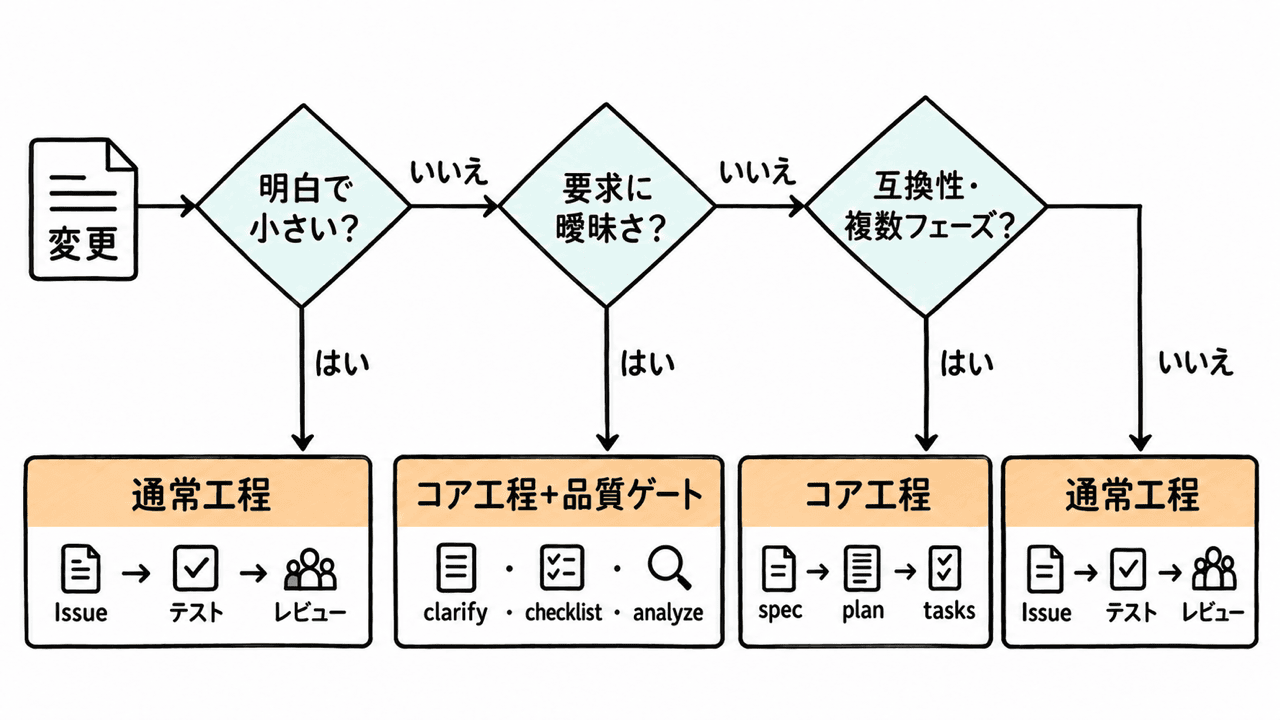
Dividing every typo or obvious bug fix spanning a few lines into spec.md, plan.md, and tasks.md can make reviewing records take longer than the change itself. Use the normal workflow for small fixes whose rationale and completion criteria can be traced through an ordinary issue, reproduction tests, and code review.
Before adoption, decide who reviews each record and how it will be maintained after completion. Generating files alone is insufficient: without someone responsible for updating stale records, subsequent AI agents inherit incorrect assumptions.
Versions and updating generated files
This article is based on GitHub Spec Kit v1.2.0, released on October 13, 2026, and the official documentation as of October 16, 2026. When updating Spec Kit, check the CLI itself and the files installed in the repository separately.
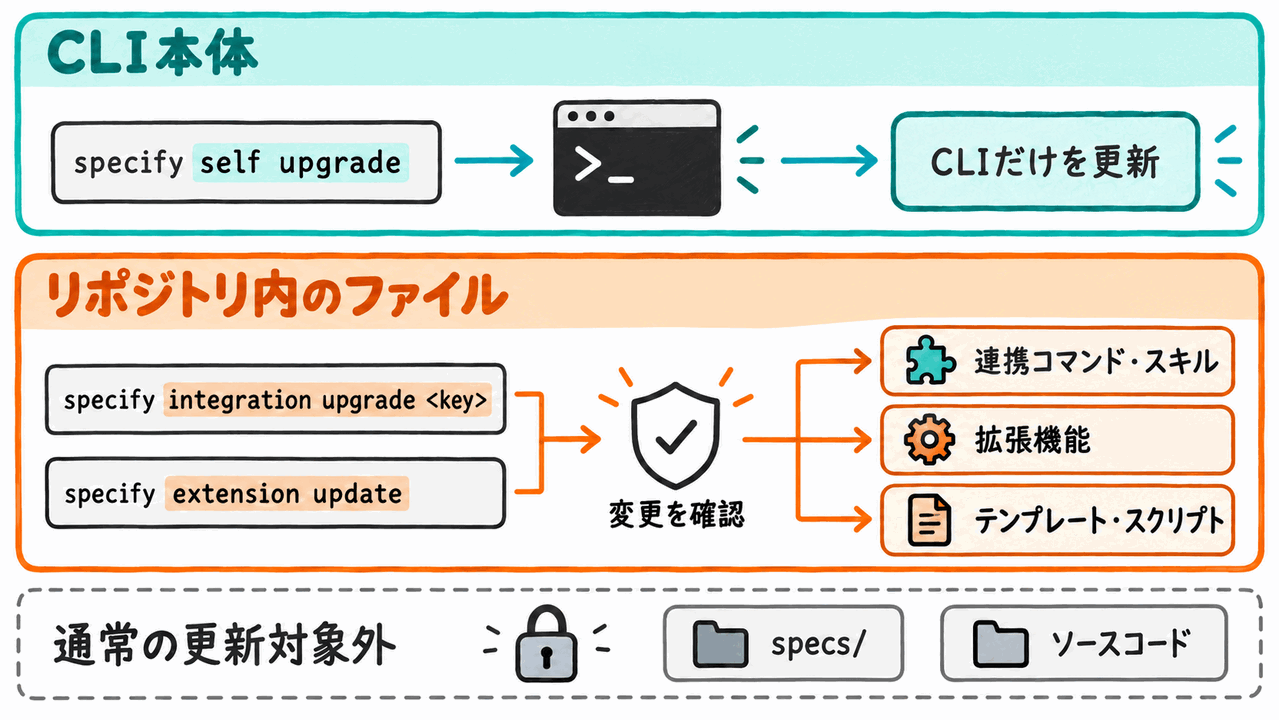
specify self upgrade updates the CLI itself. Update commands or skills for the selected integration using specify integration upgrade <key>, and extensions using specify extension update. The CLI and the commands, templates, and scripts installed in the repository are updated separately.
Integration upgrades use manifests to detect local changes to managed files. The process stops when modified files are found, so inspect the diff before overwriting with --force. Normal integration upgrades exclude specifications, plans, and task lists under specs/ as well as source code.
Conclusion
GitHub Spec Kit centers on keeping project principles, feature requirements, technical plans, and task lists in separate records, with a workflow that returns to the file where a problem originates.
In the product search API example, boundary values and invalid input were defined in spec.md, integration with the existing architecture was documented in plan.md, and testing and implementation were divided in tasks.md. After implementation, converge checks for gaps relative to those records, while testing, code review, and merge decisions remain separate.
In an existing project, start with a bounded change. The team decides whether completed records are frozen as history or maintained as the current contract.
The official GitHub Spec Kit documentation covers core SDD, adoption in existing projects, maintaining completed specifications, and how to upgrade to the latest version.
I also publish articles elsewhere if you would like to explore more.