Introduction
Hi, I'm cardene, a software engineer and technical writer focused on blockchain and AI.
I've also authored Japanese technical books on specification-driven development with LLMs and decentralized application (DApp) development.

I also build and publish a variety of tools, libraries, and open-source projects.
Overview
AI specification-driven development tools record requirements and carry them forward into the work of AI agents. However, tools that focus on storing specifications and those that also cover post-implementation verification leave different responsibilities to the people using them. Identifying the records you need and the stages at which work should stop helps narrow down the candidates for your development workflow.
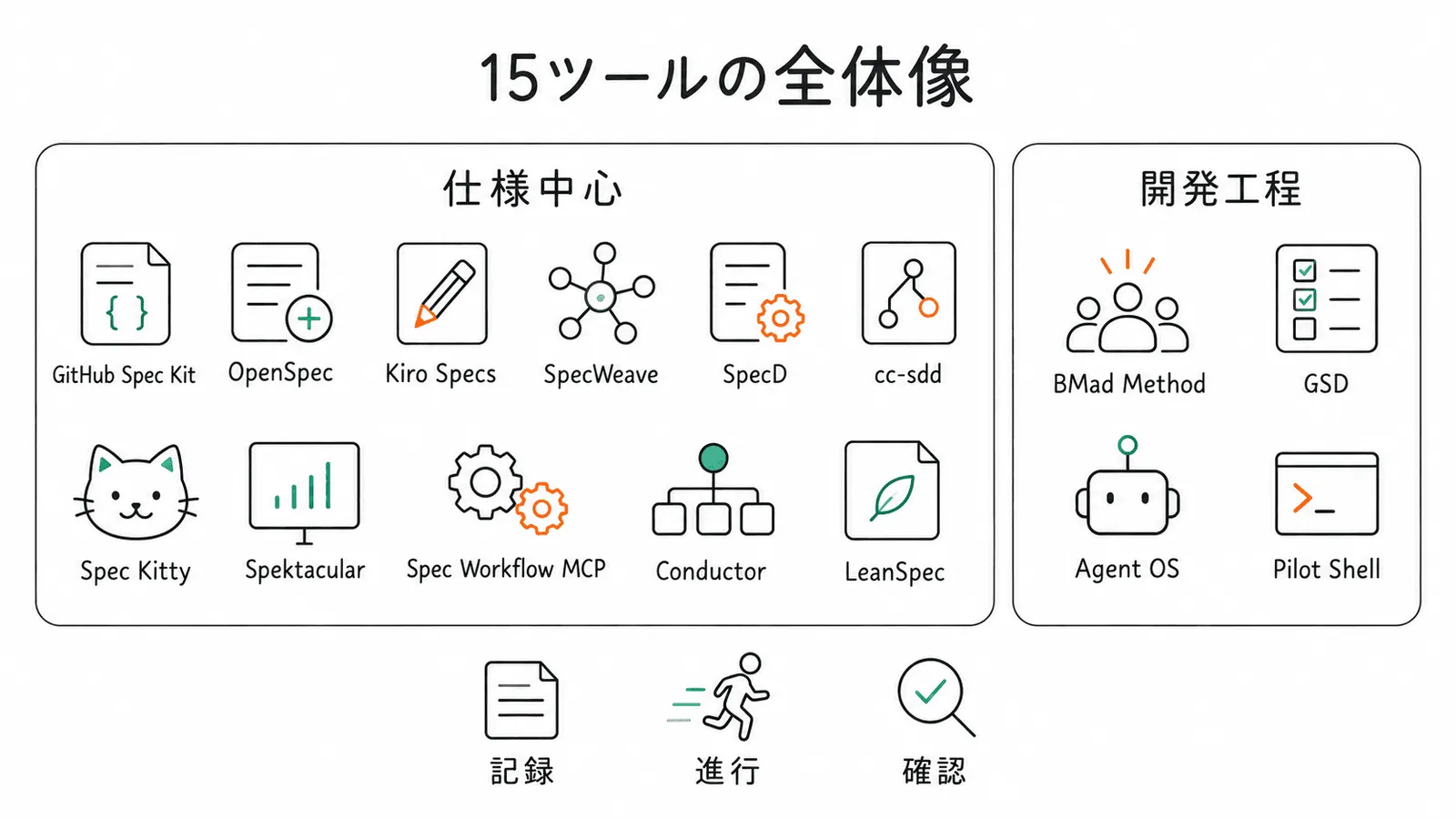
This comparison covers the 15 tools described individually in this series. Their architecture and operating procedures are covered in the individual articles; here, the focus is on operational differences and selection criteria when implementing the same change. This is not a ranking based on measurements of generated code quality or execution time in a common environment.
The existing diagrams in this article retain their original Japanese labels.
Comparing the same change
The shared scenario is adding a price range filter to an existing product search API. The acceptance criteria are to include the minimum and maximum price boundaries, accept either bound on its own, and return HTTP 400 when the minimum exceeds the maximum.
These criteria remain the same regardless of the tool. The comparison examines where the criteria are recorded, who checks them before implementation, and which records are used to resume work after a failure.
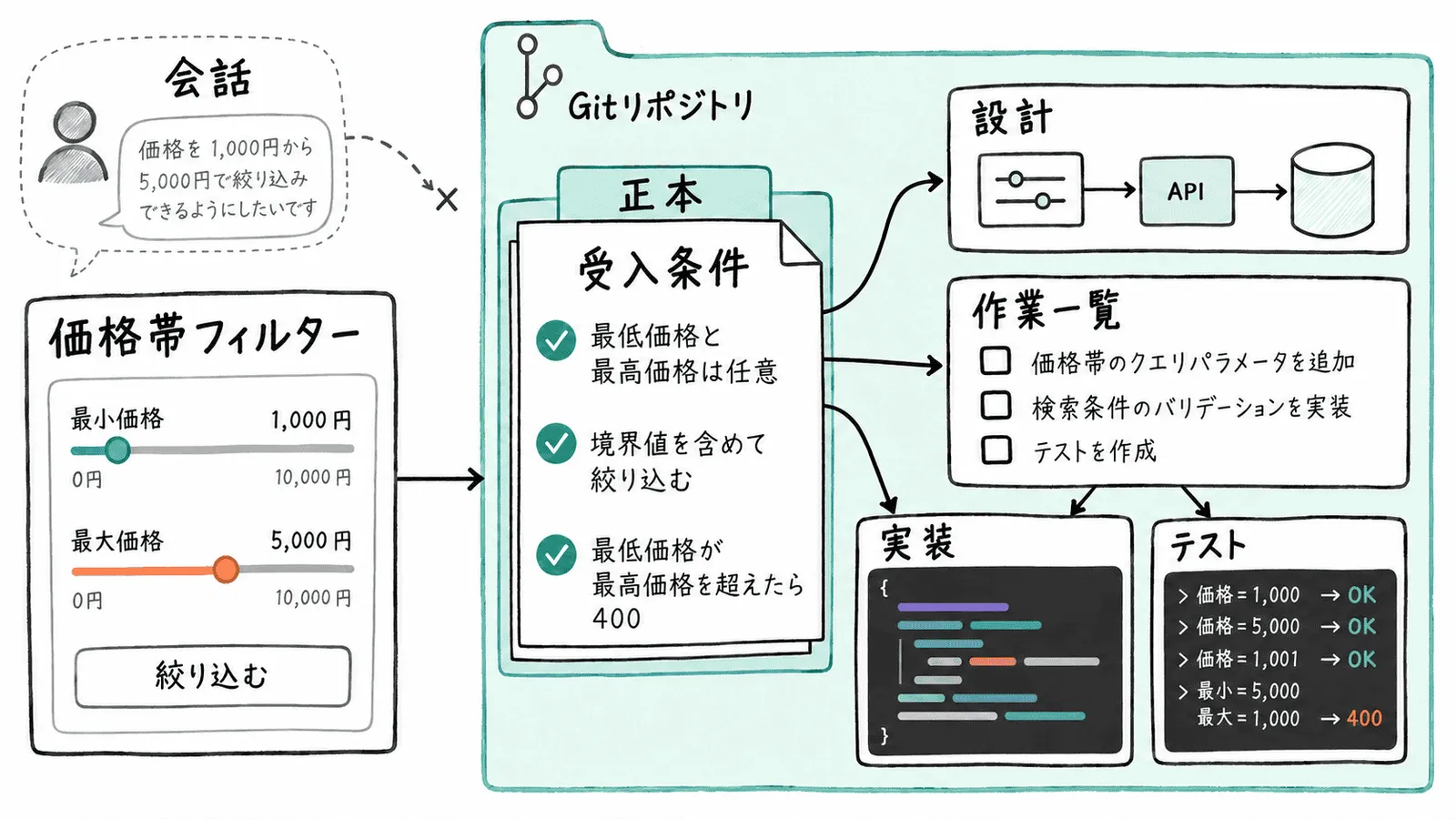
The test column in the diagram illustrates expected results for these acceptance criteria. It does not show measurements obtained by running the 15 tools.
For example, OpenSpec keeps an active change separate from the current specification, whereas GitHub Spec Kit separates requirements, technical plans, and task lists into documents for each stage. If work on the price range filter stops midway, the first record to consult when resuming also differs.
The principles of specification-driven development and the criteria for passing each stage are covered in the overview article.
Turning AI Specification-Driven Development from a Request into a Verifiable Process
Responsibilities of the 15 tools
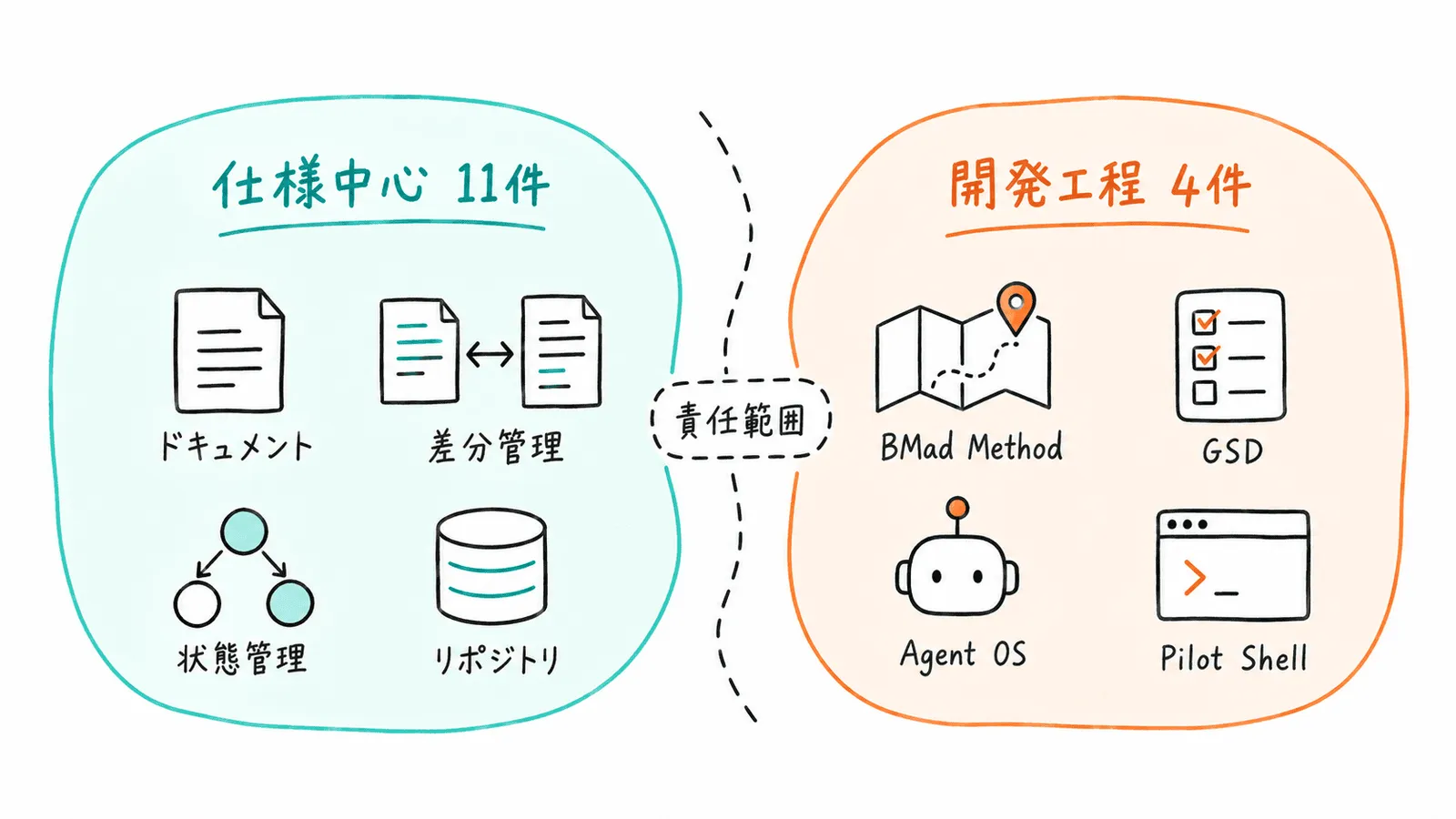
Dividing the tools into 11 that use specifications as their primary source of truth and four that organize the broader development context makes it easier to decide which capabilities to add. This classification is specific to this comparison; it is neither an official categorization nor a performance ranking.
The latter four do not all cover the same implementation responsibilities. Agent OS v3 extracts standards from existing code and passes them to specification creation; the AI environment in use handles subsequent implementation and testing. Rather than assuming which stages are automated from the category name alone, identify the specific artifacts you need in the table below.
| Individual article | Main artifacts passed between stages | Key selection criterion |
|---|---|---|
| GitHub Spec Kit | Specifications and plans for each stage | Review requirements and technical decisions separately |
| OpenSpec | Current specifications and active change deltas | Incorporate completed changes into the current specification |
| Kiro Specs | Requirements documentDesign documentTask document | Review each stage within Kiro |
| SpecWeave | Change specifications and append-only work records | Carry assignments and verification results into another session |
| SpecD | Schema-defined documents and states | Standardize document structure and workflow conditions |
| cc-sdd | Approved specifications and tasks | Connect each task to TDD and independent review |
| Spec Kitty | Work units and progress in Git | Isolate each AI agent's workspace and integrate changes |
| Spektacular | Specification statePlanning stateImplementation state | Read the interrupted stage and resume work |
| Spec Workflow MCP | Specification documentsApprovalsImplementation records | Share reviews between MCP clients and a dashboard |
| Conductor | Shared documents and change tracks | Pass project-wide policies to individual changes |
| LeanSpec | Shared specifications and states | Manage specifications through multiple interfaces |
| BMad Method | Specifications and plans appropriate to the scope of a change | Use different workflows for small changes and long-term planning |
| GSD | Plans and results for each phase | Carry long-term development across multiple sessions |
| Agent OS | Standards index and specification context | Pass existing code conventions to planning |
| Pilot Shell | Registered plans and verification results | Share completion criteria from planning through runtime verification |
For example, the existence of a Markdown document for the price range filter does not establish that inclusive boundary conditions were approved or that boundary-value tests passed. The following eight dimensions separate these concerns and show what changes when implementing the price range filter.
Eight comparison dimensions
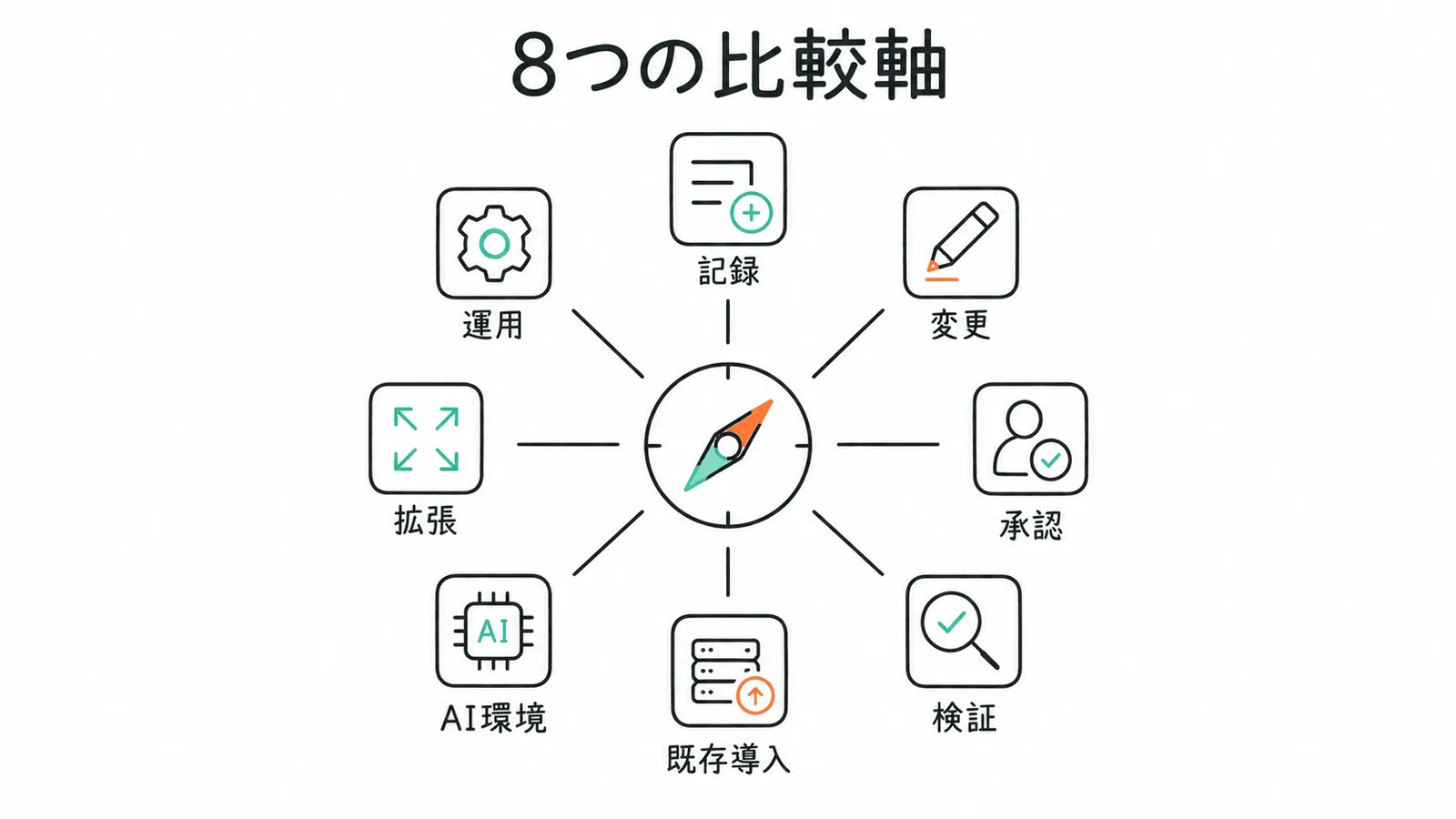
The dimensions are record storage, change closure, approval, verification, adoption in existing environments, handoff between AI environments, extension, and version management. Rather than simply counting features, the comparison looks at the records people actually consult and the conditions for advancing or stopping work.
Where specifications and records are stored
Whether you maintain a specification for each feature or separate the current specification from proposed changes affects which documents you consult after development.
In GitHub Spec Kit, the requirements for the price range filter are recorded in a feature-specific spec.md.
In OpenSpec, the current specification remains in place while the conditions being changed are recorded separately as a change under changes.
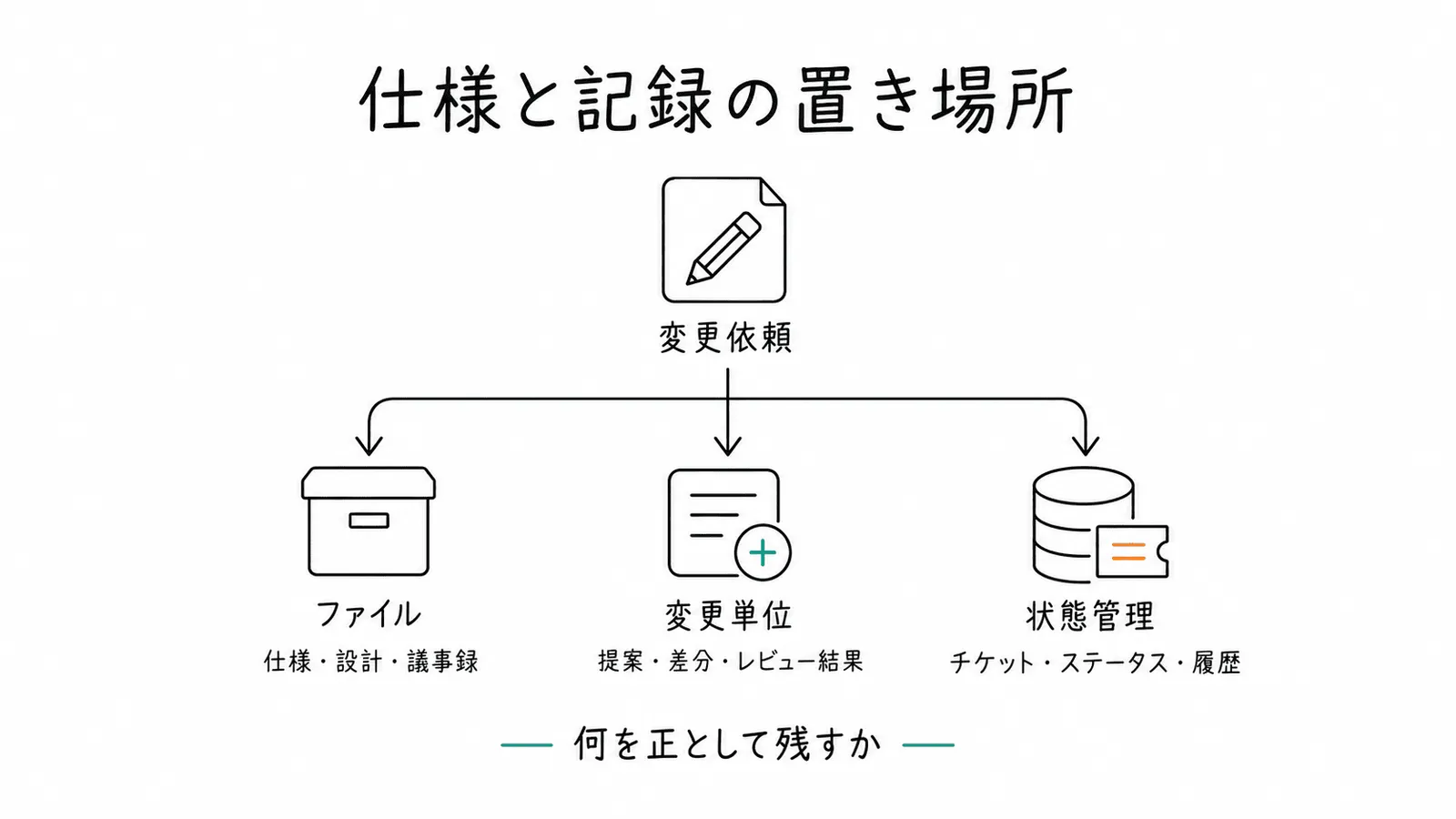
If you want to read the effective behavior from a single specification after completion, incorporating changes into the current specification is a suitable approach. If you want to trace the decisions made from requirements through implementation for each feature, you can retain the records for each stage. If progress is also recorded, check whether you should read the specification itself or the work state first to resume.
How changes are closed
Distinguish incorporating a completed change into the main specification from moving active work records into the history. With OpenSpec, specification synchronization and archiving should also be checked separately: updating the current specification and moving the change folder are distinct operations. Moving the folder into the history alone does not establish that the price range filter criteria were incorporated into the current specification.
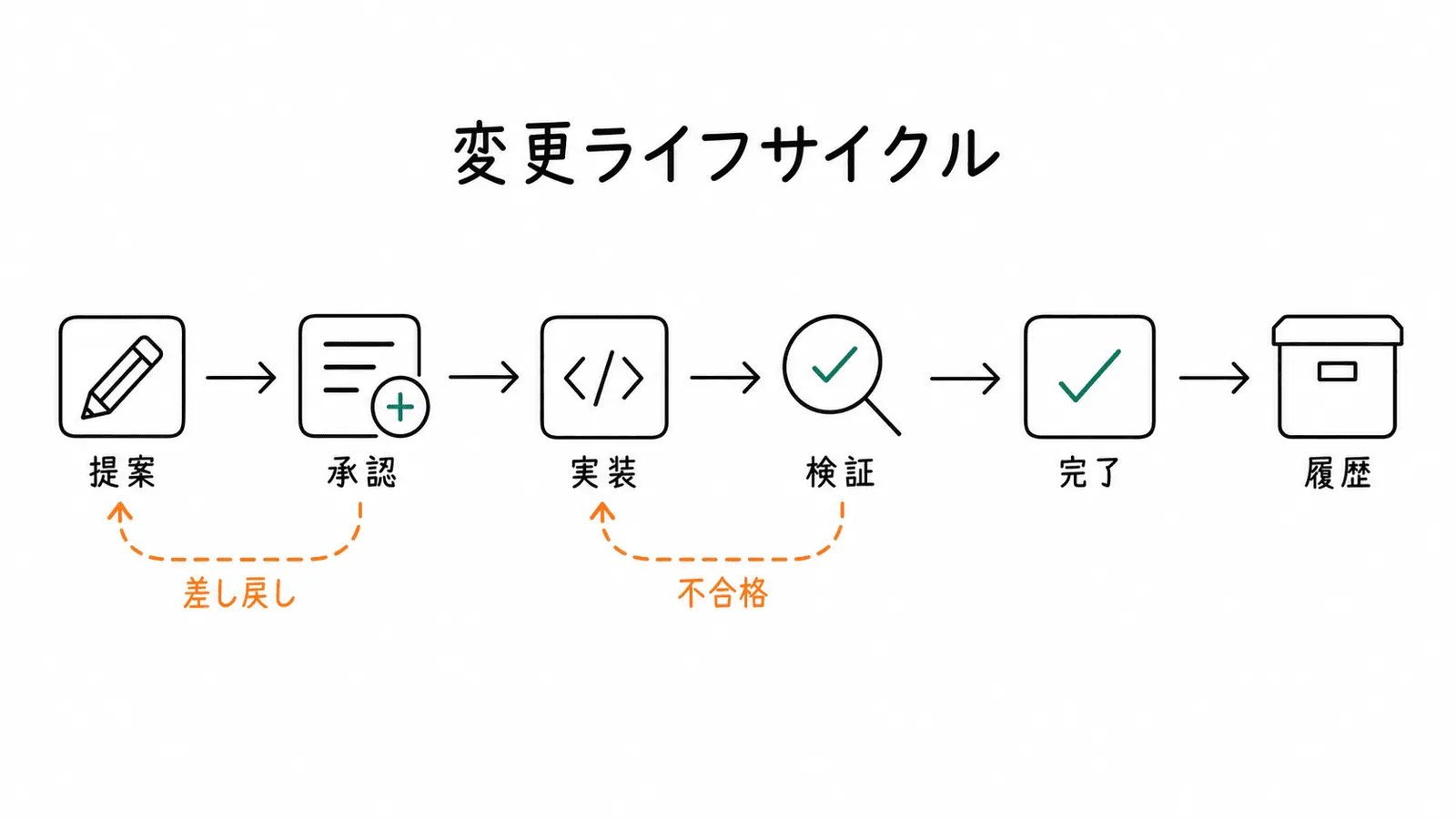
The diagram illustrates a typical workflow from making a change to recording it in the history. It does not imply that every tool has the same approval stages and states.
GSD, by contrast, divides long-term development into phases and milestones and closes work at those levels. Choose the granularity of records based on whether you want to keep updating the specification of a single feature or review multiple implementation stages together.
Where approvals occur
A procedure that asks a person for confirmation and a mechanism that rejects a state transition without approval can stop different kinds of actions. Spec Workflow MCP connects document approval to a dashboard and returns instructions telling the AI agent to wait for approval. Distinguish those instructions from technically preventing edits to the files themselves.
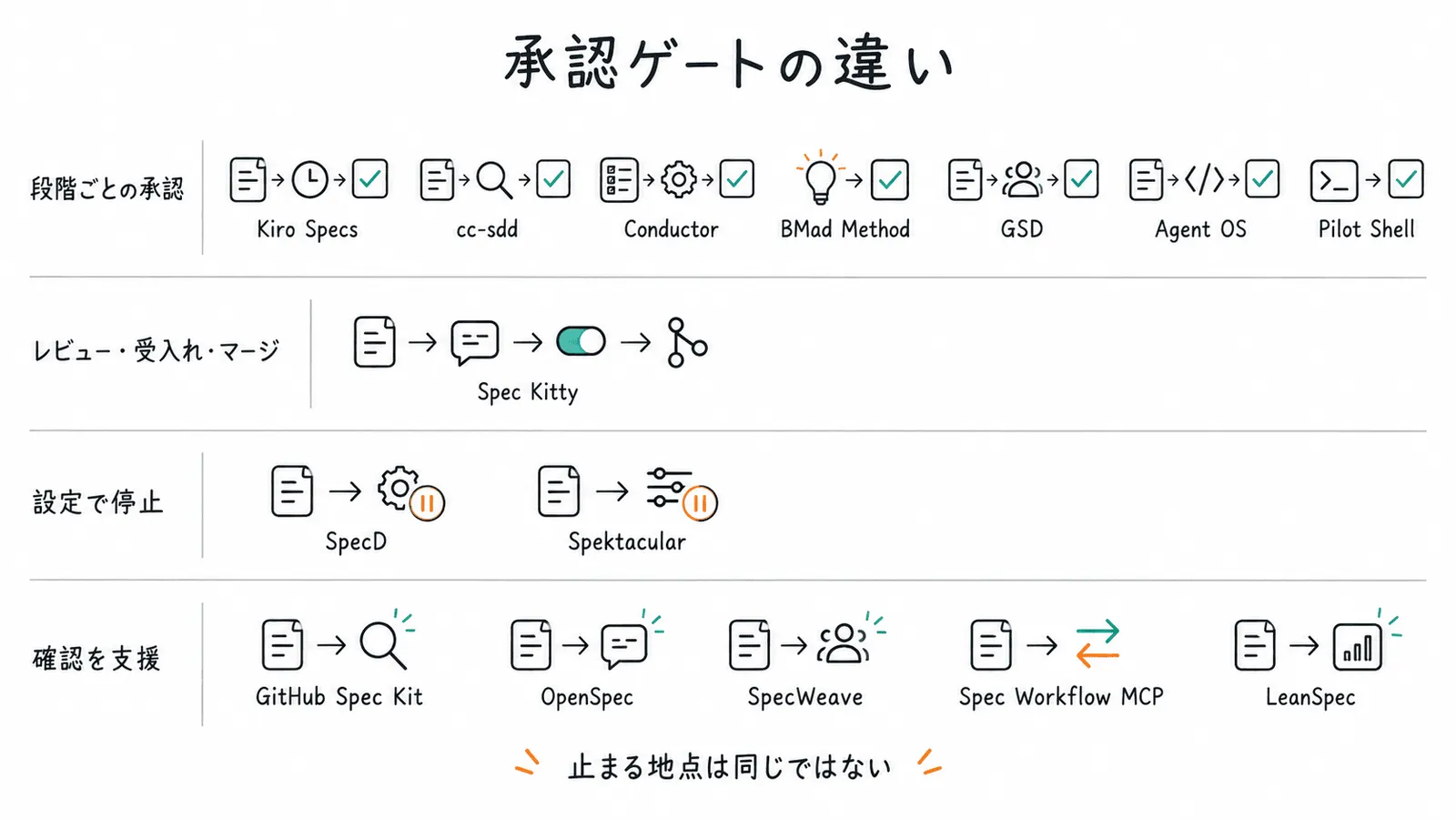
For example, depending on its configuration, Spektacular manages plan approval and the stage to return to after a specification change as states. Kiro Specs also follows different workflows for a Feature Spec, which includes reviews at each stage, and a Quick Spec, which omits review stages. Decide in advance whose judgment should be awaited and at which point: finalizing requirements, starting implementation, or integrating changes.
Verification and resuming after failure
Checking the structure of documents and verifying whether code meets acceptance criteria examine different things. SpecD's schema-based validation checks documents and workflow conditions. By contrast, the Codex Skills in cc-sdd v3.1.0 connect approved tasks to TDD and review, followed by verification of the entire feature. Review by an independent reviewer takes place when the execution environment supports subagents.
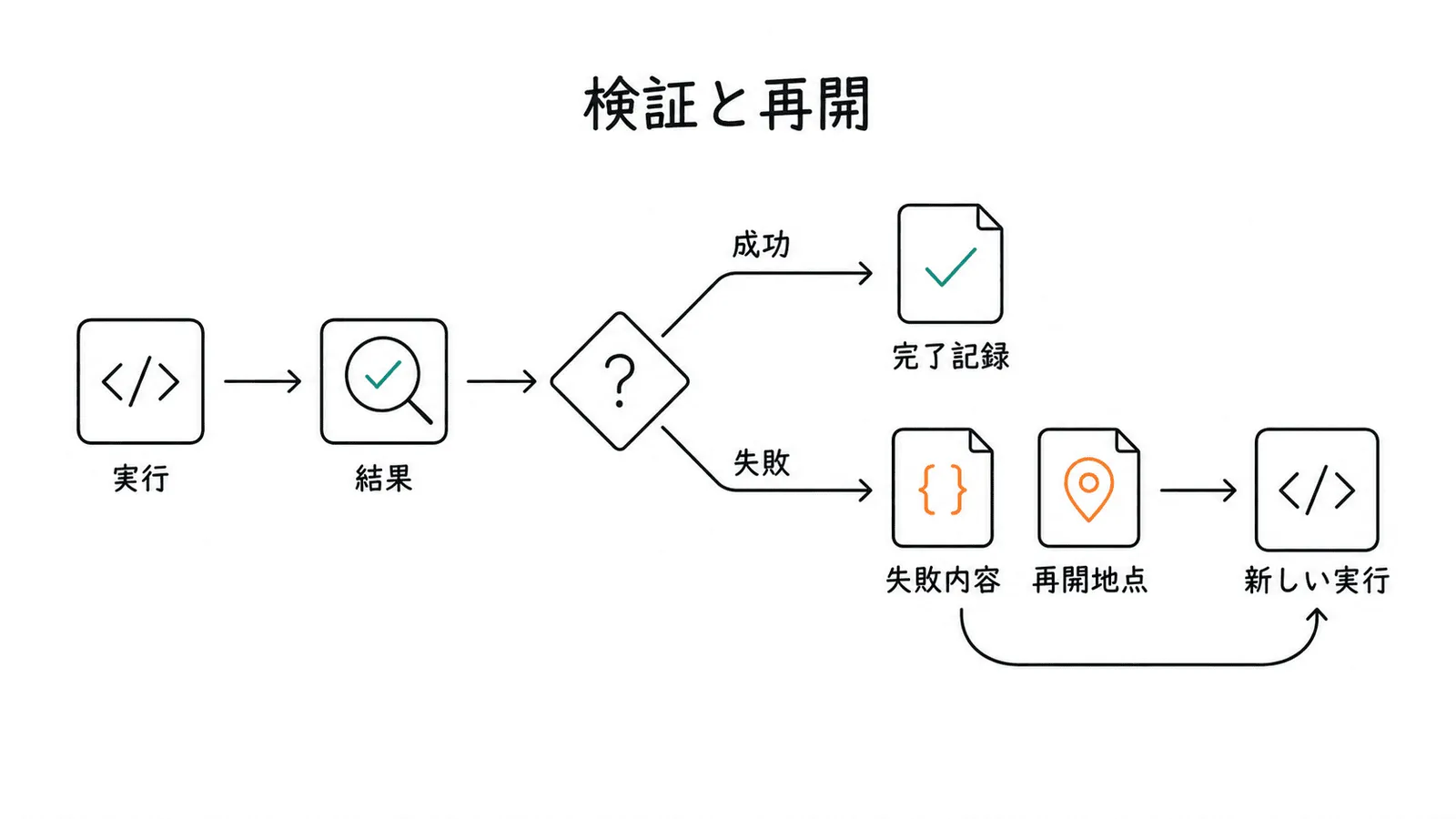
If a price boundary test fails, record which acceptance criterion and work item to return to.
Some approaches explicitly record the point of return, such as GSD's remediation plans and Conductor's Review Fixes.
Even when a verification stage exists, check separately whether project-specific tests are sufficient and execution permissions are correct.
Adoption in existing projects
The effort required for adoption differs between writing a specification for the first change alone and establishing shared project context before starting.
OpenSpec can start with a single change.
Conductor connects project-wide policies to each change track.
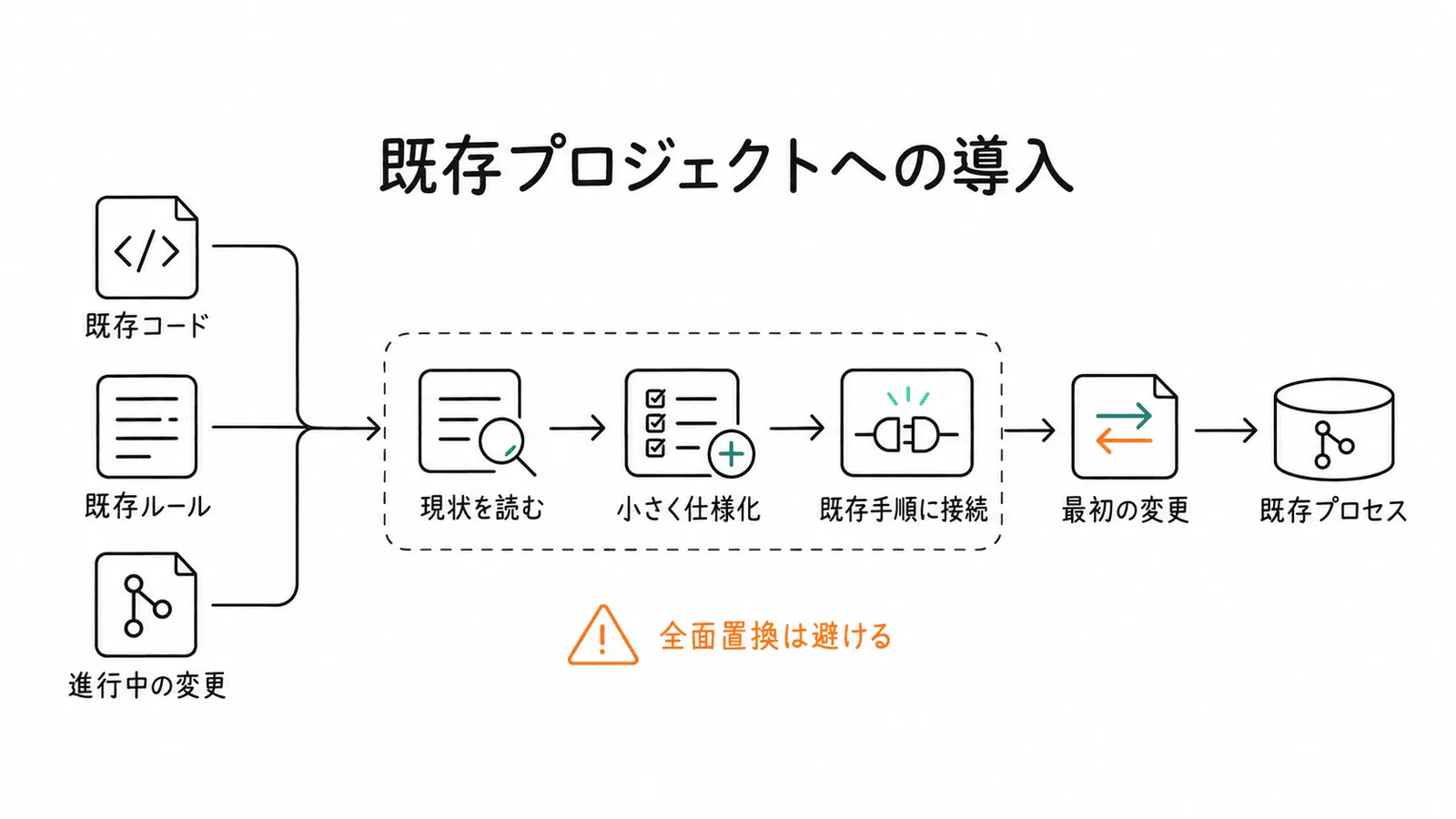
If you want to pass existing naming and testing conventions to an AI agent, Agent OS's standards extraction is another candidate. Conversely, if you are only correcting a single input validation rule, start with the scope that can be connected to existing specifications and tests. Whether to introduce an always-running server or an interface depends on the operations required for the change.
Handoff between AI environments
Distinguish another AI agent being able to read documents from being able to use the same approval actions and resume commands. Even if another AI can read a Kiro specification, that does not mean it can take over Kiro's interface or execution environment. When switching AI environments, check both the documents and the available operations.
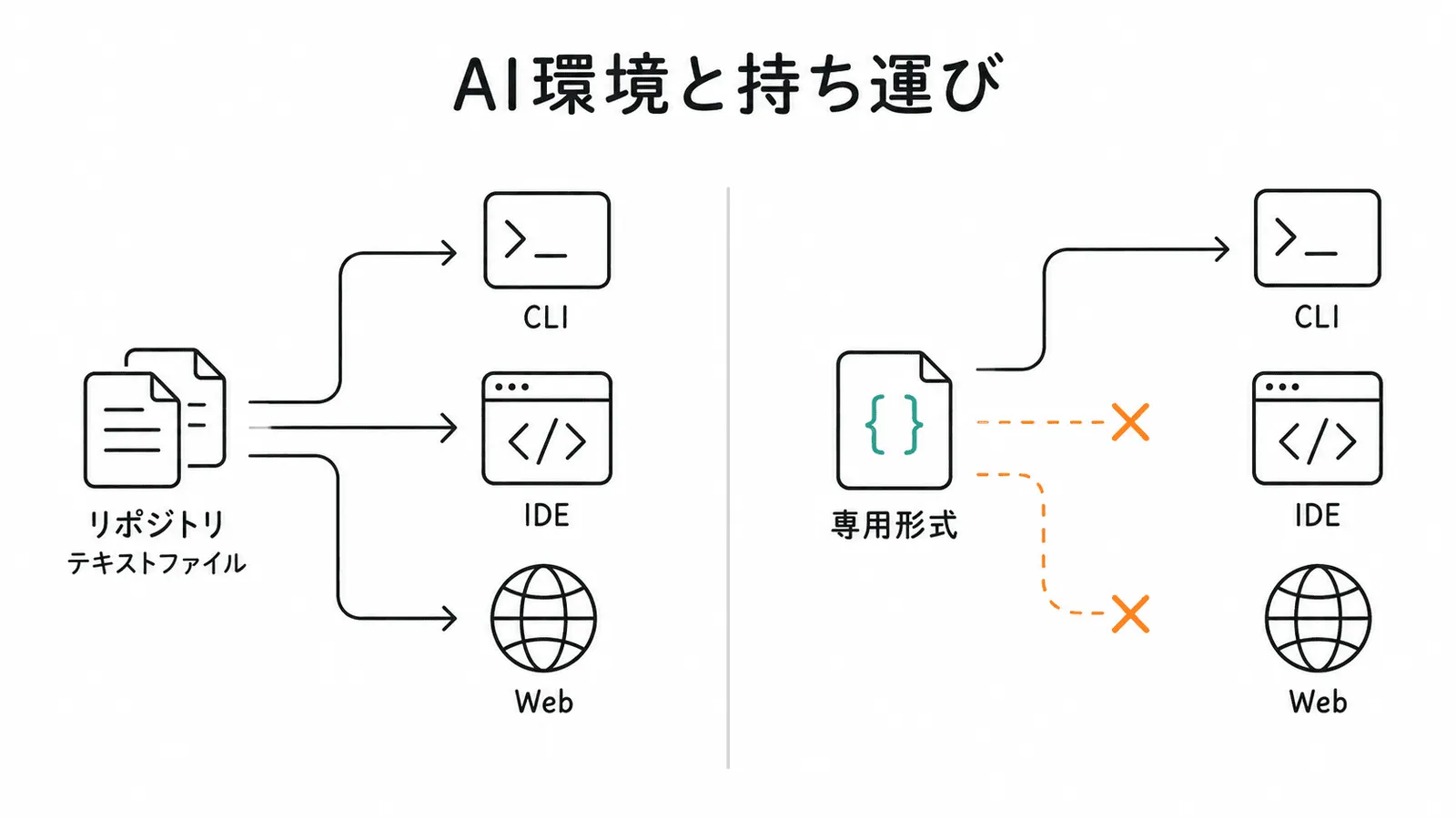
The right-hand side of the diagram illustrates a case in which only a particular environment can handle a proprietary format. It is not a list of the environments supported by each tool; it shows the boundary to check before a handoff.
LeanSpec 0.3.0 connects the CLI, TUI, Web UI, and MCP to shared specification data. However, the operations available through each interface do not entirely overlap, and some operations remain Markdown-only. If you use multiple interfaces, check individually which interfaces can make the updates you require.
Extension points
The appropriate extension mechanism depends on whether you want to change the document format or the rules passed to the AI agent. SpecD uses schemas to define artifacts and workflow stages. Agent OS passes standards derived from existing code to the specification consulted for the current change.
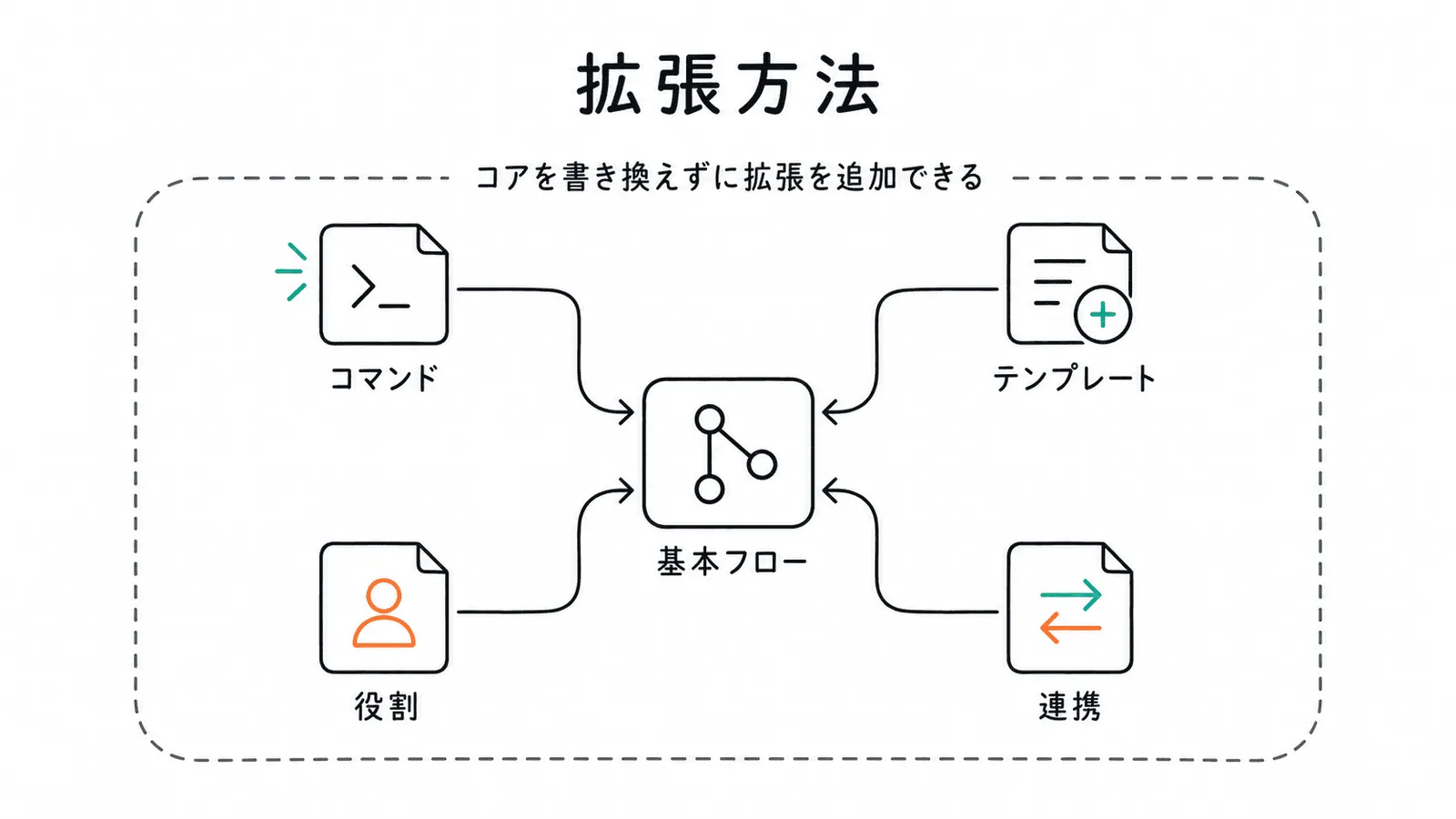
The diagram illustrates places where the basic workflow can be extended. Not every candidate supports all four types shown in the diagram in the same way.
For example, if you only need to add a price input constraint, consider updating the specification or standards. If a different artifact must be produced every time, an extension defining the document type and workflow conditions is required. Also decide who maintains the shared templates after an update and how the new conditions apply to existing changes.
Versions and operational overhead
The comparison uses the versions documented as evidence in the individual articles. It compares the records and workflows described by official materials, rather than benchmarking performance by running the same versions.
| Tool | Scope examined in this series |
|---|---|
| GitHub Spec Kit | v1.2.0 |
| OpenSpec | v1.14.2 |
| Kiro Specs | Official documentation as of October 17, 2026 |
| SpecWeave | Official documentation for SpecWeave 3.0 |
| SpecD | Public package 0.2.0 and default schema 0.1.1 |
| cc-sdd | v3.1.0 |
| Spec Kitty | v3.2.7 |
| Spektacular | 0.29.0 |
| Spec Workflow MCP | 2.2.5 |
| Conductor | v0.4.1 |
| LeanSpec | CLI 0.3.0 and MCP 0.3.0 releases |
| BMad Method | v6.12.4 |
| GSD | v1.42.3 |
| Agent OS | v3.0.0 |
| Pilot Shell | v11.0.11 |
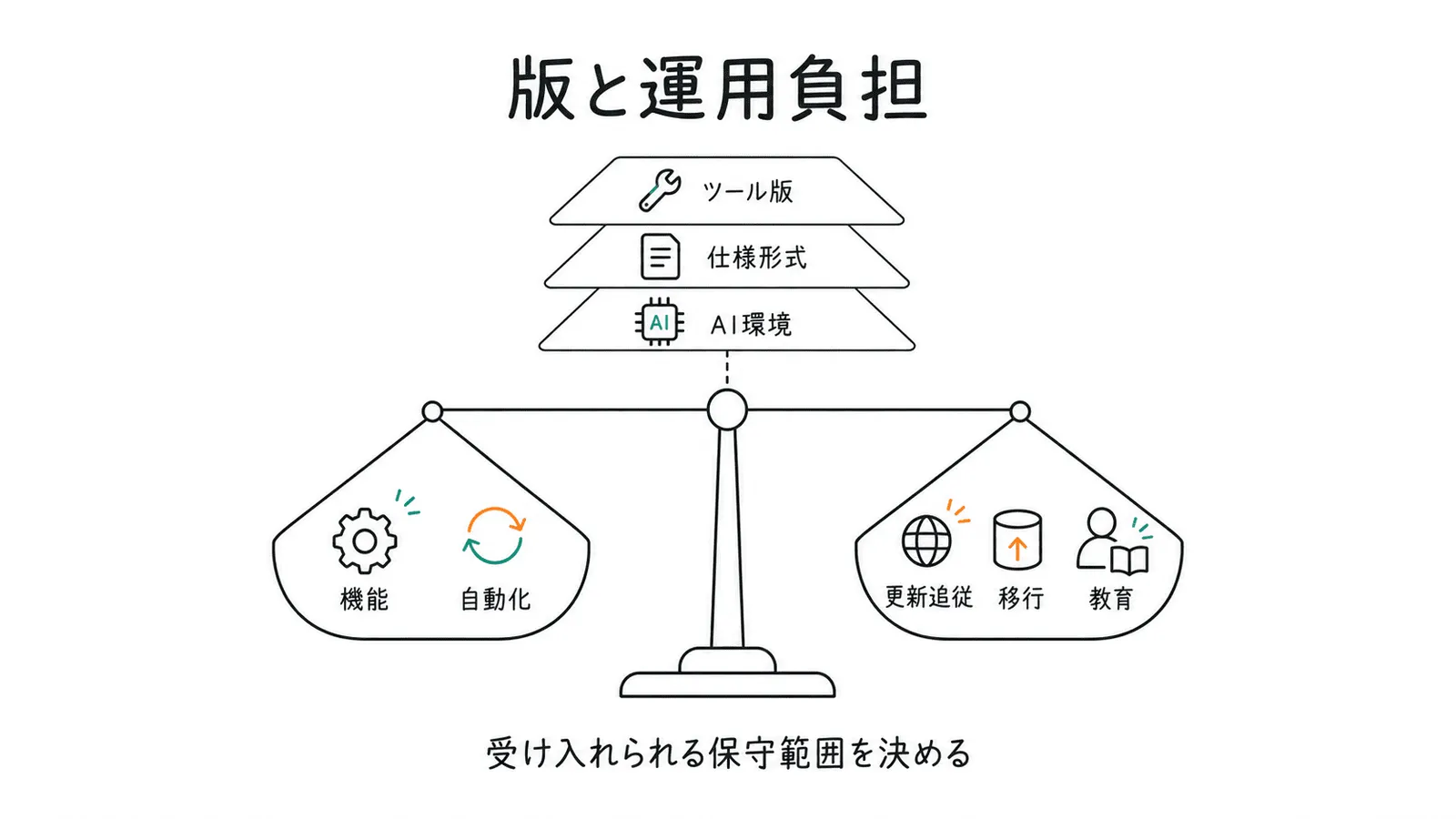
A setup that uses a server or interface in addition to specification files also requires maintenance of that execution environment. Check where previous changes can be resumed when the AI environment is updated or the document format changes. For example, do not apply descriptions of Pilot Shell v11 directly to QualityLayer v12, whose name and architecture have changed.
How to choose
First, identify one missing record or verification step in your existing development workflow. For the price range filter change, candidates include clarifying requirements, recording intermediate decisions, and connecting implementation verification to work items.
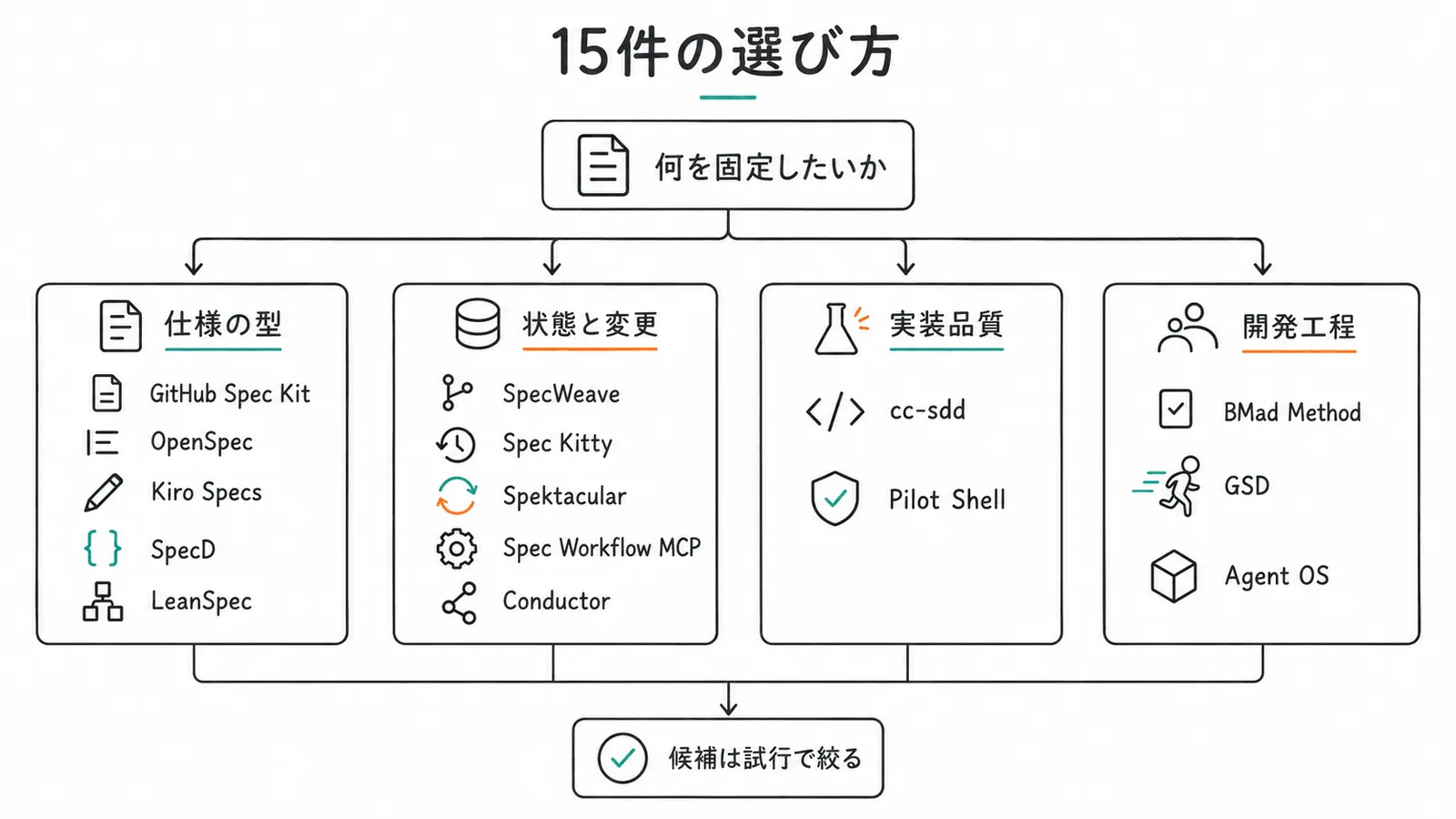
| Key criterion | Candidate and reason for considering it |
|---|---|
| Review requirements separately from technical decisions | Consider GitHub Spec Kit's documents for each stage |
| Separate active changes from the current specification | Consider OpenSpec's change deltas and specification synchronization |
| Review and implement within Kiro | Choose the appropriate review stages in Kiro Specs |
| Carry forward assignments and verification records | Examine SpecWeave's specifications and append-only records |
| Define document and workflow conditions | Examine SpecD's schemas |
| Connect each task to TDD and review | Examine cc-sdd's implementation and re-verification |
| Isolate and integrate changes from multiple AI agents | Examine Spec Kitty's work units and Git integration |
| Read the workflow state after an interruption | Examine Spektacular's states and where to return after a specification change |
| Share approvals from MCP clients | Examine Spec Workflow MCP's dashboard and procedures |
| Pass shared policies to feature changes | Examine Conductor's shared documents and tracks |
| Update the same specification from multiple interfaces | Examine LeanSpec's shared operations and differences in capabilities |
| Separate small changes from long-term planning | Examine BMad Method's planning paths |
| Carry long-term development forward phase by phase | Examine GSD's phases and verification records |
| Pass existing code conventions to specifications | Examine Agent OS's standards extraction and injection |
| Align completion criteria for plans and verification results | Examine Pilot Shell's registered plans and verification stages |
Once you have selected candidates, try them on a small change in a real project. Check not only whether you can create a specification, but also whether you can reproduce a requirements change and a test failure and resume work from the original records. Use these findings to select a scope you can maintain in everyday development.
Dividing responsibilities when combining tools
When combining tools with different roles, assign a single owner to update each record. For example, if LeanSpec manages acceptance criteria while an existing AI environment handles implementation and testing, keep the specification state separate from the storage location for verification results.
| Record | Who updates it | What is passed to the next person or agent |
|---|---|---|
| Expected behavior and acceptance criteria | The user who defines the specification | Finalized criteria and reasons for changes |
| Work progress | The chosen workflow management mechanism | Unfinished work and the point at which to resume |
| Implementation and verification results | Implementers and reviewers | Diffs and results corresponding to the change under review |
If two management mechanisms independently update the progress of the same task, their judgments diverge when only one marks it complete. When combining tools, establish in advance the sources of truth for requirements, progress, and completion decisions, along with who consults those records.
Conclusion
The differences between the 15 tools are reflected in the granularity at which they retain specifications and in who checks which results before advancing. Identify the records and verification steps you lack, then narrow down candidates by making real changes and resuming work after failures. After adoption, make explicit the versions you maintain, the authoritative records, and who determines completion.
The operations of each tool and the evidence for the pinned versions are available in the individual articles linked above.
GitHub Spec Kit's workflow for recording requirements, technical plans, and task lists by stage is documented in its official materials.